Drive mode MERCEDES-BENZ B-Class 2017 W246 Owner's Manual
[x] Cancel search | Manufacturer: MERCEDES-BENZ, Model Year: 2017, Model line: B-Class, Model: MERCEDES-BENZ B-Class 2017 W246Pages: 290, PDF Size: 19.81 MB
Page 6 of 290
1, 2, 3 ...
12 V socket see Sockets A
ABS (Anti-lock Braking System) Display message ............................ 168
Function/notes ................................ 59
Important safety notes .................... 59
Warning lamp .................................1 93
Accident
Automatic measures after an acci-
dent ................................................. 52
Activating media mode
General notes ................................ 206
Activating/deactivating cooling
with air dehumidification ................. 100
Active Brake Assist
Activating or deactivating .............. 162
Display message ............................ 174
Function/notes ................................ 60
ADAPTIVE BRAKE ................................. 64
Additional speedometer ................... 165
Address book
see also Digital Operator's Man-
ual ................................................. .201
Adjusting the volume
Audio 20 ........................................ 202
COMAND ....................................... 202
Air bags
Deployment ..................................... 50
Display message ............................ 176
Front air bag (driver, front
passenger) ....................................... 44
Important safety notes .................... 43
Introduction ..................................... 43
Knee bag .......................................... 44
Occupant Classification System
(OCS) ............................................... 45
PASSENGER AIR BAG indicator
lamps ............................................... 39
Side impact air bag .......................... 45
Window curtain air bag .................... 45
Air vents
Important safety notes .................. 106
Rear ............................................... 106 Setting the center air vents ........... 106
Setting the side air vents ..............
.106
Air-conditioning system
see Climate control
Alarm
ATA (Anti-Theft Alarm system) ......... 65
Switching off (ATA) .......................... 65
Switching the function on/off
(ATA) ................................................ 65
Alarm system
see ATA (Anti-Theft Alarm system)
Antenna ................................................ 26
Anti-lock braking system
see ABS (Anti-lock Braking System)
Anti-Theft Alarm system
see ATA (Anti-Theft Alarm system)
Ashtray ............................................... 217
Assistance display (on-board com-
puter) ................................................. .162
Assistance menu (on-board com-
puter) ................................................. .162
ASSYST PLUS
Displaying a service message ....... .233
Driving abroad ............................... 234
Hiding a service message .............. 233
Information about Service ............. 234
Resetting the service interval dis-
pla y................................................ 234
Service message ............................ 233
Special service requirements ......... 234
ATA (Anti-Theft Alarm system)
Activating/deactivating ................... 65
Function ........................................... 65
Switching off the alarm .................... 65
ATTENTION ASSIST
Activating/deactivating ................. 163
Display message ............................ 182
Function/note s............................. 148
Audio 20
Switching on/of f........................... 202
Audio menu (on-board computer) .... 160
Audio system
see separate operating instructions
Authorized Mercedes-Benz Center
see Qualified specialist workshop
Authorized workshop
see Qualified specialist workshop 4
Index
Page 18 of 290
Convenience closing feature ............ 77
Convenience opening feature .......... 76
Important safety information ..........
.75
Opening/closing .............................. 76
Problem (malfunction) ..................... 78
Resetting ......................................... 77
Reversing feature ............................. 75
SIRIUS services
see also Digital Operator's Man-
ual .................................................. 201
SmartKey
Changing the battery ....................... 69
Changing the programming .............67
Checking the battery ...................... .69
Convenience closing feature ............ 77
Convenience opening feature .......... 76
Display message ............................ 189
Door central locking/unlocking ...... .66
Important safety notes .................... 66
Loss .................................................70
Mechanical key ................................ 68
Positions (ignition lock) ................. 109
Problem (malfunction) ..................... 70
SmartKey positions (ignition lock) .. 109
SMS
see also Digital Operator's Man-
ual .................................................. 201
Snow chains ...................................... 259
Sockets
Center console .............................. 218
General notes ................................ 218
Luggage compartment ...................2 19
Rear compartment ......................... 219
Sound
Switching on/off ........................... 202
Special seat belt retractor .................. 53
Specialist workshop ............................ 27
Speed, controlling
see Cruise control
Speedometer
Activating/deactivating the addi-
tional speedometer ........................ 165
Digital ............................................ 158
In the Instrument cluster ................. 32
Selecting the display unit .............. .165
Standing lamps
Display message ............................ 179
Replacing bulbs ............................... 92 Switching on/off .............................. 88
Start/Stop button
Removing ....................................... 110
Starting the drive system .............. .110
Starting (vehicle) ............................... 110
STEER CONTROL .................................. 64
Steering
Display message ............................ 188
Steering assistant STEER CON-
TROL
see STEER CONTROL
Steering wheel
Adjusting (manually) ........................ 83
Button overview ............................... 33
Buttons (on-board computer) ......... 154
Cleaning ......................................... 239
Important safety notes .................... 83
Paddle shifters ............................... 115
Steering wheel paddle shifters ........ 115
Stowage compartments
Armrest (front) ............................... 208
Armrest (under) ............................. 209
Center console .............................. 208
Center console (rear) ..................... 209
Cup holders ................................... 216
Eyeglasses compartment ............... 208
Glove box ....................................... 208
Important safety information ......... 207
Map pockets .................................. 210
Stowage net ................................... 210
Under driver's seat/front-
passenger sea t.............................. 209
Stowage net ....................................... 210
Summer tires ..................................... 259
Sun visor ............................................ 217
Switching air-recirculation mode
on/off ................................................. 104
Switching on media mode
Via the device list .......................... 206 T
Tail lamps see Lights
Tailgate
Display message ............................ 187
Emergency unlocking ....................... 75
Important safety notes .................... 74 16
Index
Page 25 of 290
ity. Only use tires, wheels and accessories that
have been specifically approved for your vehi-
cle.
Genuine Mercedes-Benz parts are subject to
strict quality control. Every part has been spe-
cifically developed, manufactured or selected
for and adapted to Mercedes-Benz vehicles.
Therefore, only genuine Mercedes-Benz parts
should be used.
More than 300,000 different genuine
Mercedes-Benz parts are available for
Mercedes-Benz models.
All authorized Mercedes-Benz Centers maintain
a supply of genuine Mercedes-Benz parts for
necessary service and repair work. In addition,
strategically located parts delivery centers pro-
vide quick and reliable parts service.
Always specify the vehicle identification number (VIN) when ordering genuine Mercedes-Benz
parts (Y page 282). Operator's Manual
Vehicle equipment
i This Operator's Manual describes all models
and all standard and optional equipment of
your vehicle available at the time of going to
print. Country-specific differences are possi-
ble. Bear in mind that your vehicle may not
feature all functions described here. This also
applies to safety-relevant systems and func-
tions. The equipment in your vehicle may
therefore differ from that shown in the
descriptions and illustrations.
The original purchase agreement lists all sys-
tems installed in your vehicle.
Should you have any questions concerning
equipment and operation, please consult an
authorized Mercedes-Benz Center.
The Operator's Manual and Maintenance Book-
let are important documents and should be kept
in the vehicle. Service and vehicle operation
Warranty
The Limited Warranty for your vehicle applies in
accordance with the warranty terms and condi-
tions in the Service and Warranty Information
booklet. Your authorized Mercedes-Benz Center will
replace and repair all factory-installed parts in
accordance with the following warranty terms
and conditions:
R New Vehicle Limited Warranty
R State warranty enforcement laws (lemon
laws)
Replacement parts and accessories are covered
by the Mercedes-Benz Parts and Accessories
warranties. These are available at any author-
ized Mercedes-Benz Center.
i Should you lose your Service and Warranty
Information booklet, have an authorized
Mercedes-Benz Center arrange for a replace-
ment. The new Service and Warranty Infor-
mation booklet will be posted to you. Information for customers in Califor-
nia
Under California law you may be entitled to a
replacement of your vehicle or a refund of the
purchase price or lease price, if after a reason-
able number of repair attempts Mercedes-Benz USA, LLC and/or its authorized repair or servicefacilities fail to fix one or more substantial
defects or malfunctions in the vehicle that are
covered by its express warranty.
During the period of 18 months from original
delivery of the vehicle or the accumulation of
18,000 miles (approximately 29,000 km) on the
odometer of the vehicle, whichever occurs first,
a reasonable number of repair attempts is pre-
sumed for a retail buyer or lessee if one or more of the following occurs:
(1) the same substantial defect or malfunction results in a condition that is likely to cause
death or serious bodily injury if the vehicle is
driven, that defect or malfunction has been subject to repair two or more times, and youhave directly notified Mercedes-Benz USA,
LLC in writing of the need for its repair.
(2) the same substantial defect or malfunction of a less serious nature than category (1)
has been subject to repair four or more
times and you have directly notified
Mercedes-Benz in writing of the need for its
repair.
(3) the vehicle is out of service by reason of repair of the same or different substantial Service and vehicle operation
23Introduction Z
Page 26 of 290
defects or malfunctions for a cumulative
total of more than 30 calendar days.
Please send your written notice to:
Customer Assistance Center
Mercedes-Benz USA, LLC
3 Mercedes Drive
Montvale, NJ 07645-0350 Maintenance
Always bring the Maintenance Booklet with you
when taking the vehicle to an authorized
Mercedes-Benz Center. Your customer service
advisor will enter every service into your Main-
tenance Booklet on your behalf. Roadside Assistance
The Mercedes-Benz Roadside Assistance Pro-
gram offers technical help in the event of a
breakdown. Calls to the toll-free Roadside Assis- tance Hotline are answered by our agents 24
hours a day, 365 days a year.
1-800-FOR-MERCedes(1-800-367-6372)
(USA)
1-800-387-0100(Canada)
For additional information, refer to the
Mercedes-Benz Roadside Assistance Program
brochure (USA) or the "Roadside Assistance"
section in the Service and Warranty Booklet
(Canada). You will find both in the vehicle docu-
ment wallet. Change of address or change of own-
ership
In the event of a change of address, please send
us the "Notification of Address Change" in the
Service and Warranty Booklet or simply call the Mercedes-Benz Customer Assistance Center
(USA) at the hotline number
1-800-FOR-MERCedes (1-800-367-6372) or
Customer Service Center (Canada) at
1-800-387-0100. This will assist us in contact-
ing you in a timely manner should the need arise.
If you sell your Mercedes, please leave all liter-
ature in the vehicle so that it is available to the
next owner.
If you have purchased a used car, please send us the "Notification of Used Car Purchase" in the Service and Warranty Booklet or simply call the
Mercedes-Benz Customer Assistance Center
(USA) at the hotline number
1-800-FOR-MERCedes (1-800-367-6372) or
Customer Service (Canada) at 1-800-387-0100. Vehicle operation outside the USA
If you drive your vehicle abroad, please note that
service facilities or replacement parts may not
be immediately available.
Some Mercedes-Benz models are available for
delivery in Europe through our European Deliv-
ery Program. Please consult an authorized
Mercedes-Benz Center for further information,
or write to the following address:
Mercedes-Benz USA, LLC
European Delivery Department
One Mercedes Drive
Montvale, NJ 07645-0350 Operating safety
Important safety notes
Important safety notes G
WARNING
If you do not have the prescribed service/
maintenance work or any required repairs
carried out, this can result in malfunctions or system failures. There is a risk of an accident.
Always have the prescribed service/mainte-
nance work as well as any required repairs
carried out at a qualified specialist workshop. G
WARNING
Modifications to electronic components, their software as well as wiring can impair their
function and/or the function of other net-
worked components. In particular, systems
relevant to safety could also be affected. As a
result, these may no longer function as inten-
ded and/or jeopardize the operating safety of
the vehicle. There is an increased risk of an
accident and injury.
Never tamper with the wiring as well as elec-
tronic components or their software. You 24
Operating safetyIntroduction
Page 85 of 290
Steering wheel
Important safety notes
G
WARNING
You could lose control of your vehicle if you do the following while driving:
R adjust the driver's seat, head restraint,
steering wheel or mirrors
R fasten the seat belt
There is a risk of an accident.
Adjust the driver's seat, head restraint, steer-
ing wheel and mirror and fasten your seat belt before starting the vehicle's drive system. G
WARNING
Children could injure themselves if they
adjust the steering wheel. There is a risk of
injury.
When leaving the vehicle, always take the
SmartKey with you and lock the vehicle. Never leave children unsupervised in the vehicle. Adjusting the steering wheel
G
WARNING
If the steering wheel is unlocked while the
vehicle is in motion, it could change position
unexpectedly. This could cause you to lose
control of the vehicle. There is a risk of an
accident.
Before starting off, make sure the steering
wheel is locked. Never unlock the steering
wheel while the vehicle is in motion. 0043
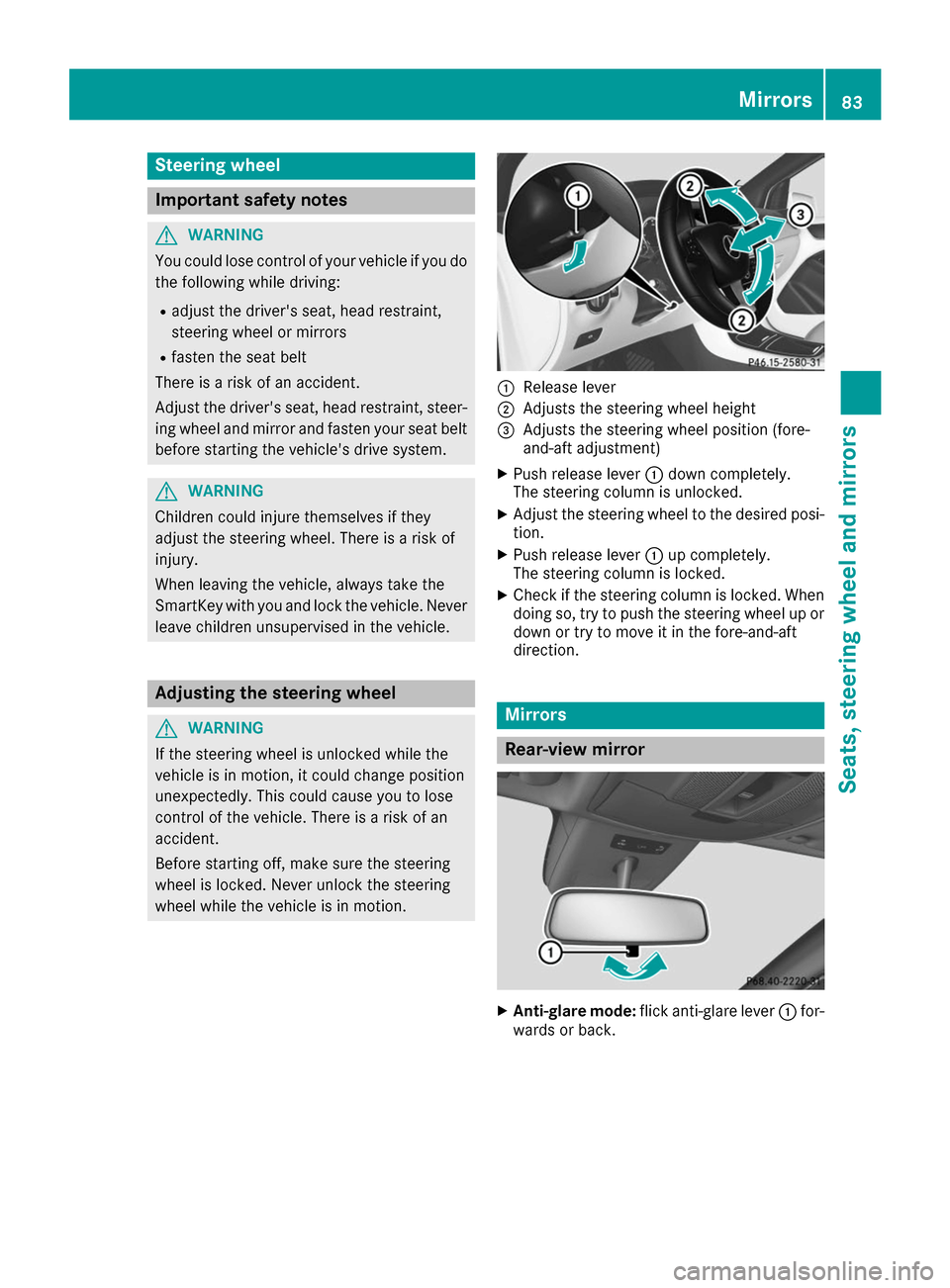
Release lever
0044 Adjusts the steering wheel height
0087 Adjusts the steering wheel position (fore-
and-aft adjustment)
X Push release lever 0043down completely.
The steering column is unlocked.
X Adjust the steering wheel to the desired posi-
tion.
X Push release lever 0043up completely.
The steering column is locked.
X Check if the steering column is locked. When
doing so, try to push the steering wheel up or down or try to move it in the fore-and-aft
direction. Mirrors
Rear-view mirror
X
Anti-glare mode: flick anti-glare lever 0043for-
wards or back. Mirrors
83Seats, steering wheel and mirrors Z
Page 87 of 290
R
Immediately change out of clothing which
has come into contact with electrolyte.
R If an allergic reaction occurs, seek medical
attention immediately.
The "Automatic anti-glare mirrors" function is
only available if the vehicle is equipped with the
"Mirrors package".
The rear-view mirror and the exterior mirror on
the driver's side automatically go into anti-glare mode if:
R the ignition is switched on and
R incident light from headlamps strikes the sen-
sor in the rear-view mirror
The mirrors do not go into anti-glare mode if
reverse gear is engaged or if the interior lighting
is switched on. Parking position for the exterior mir-
ror on the front-passenger side
Setting and storing the parking position You can set the front-passenger side exterior
mirror such that you can see the rear wheel on
that side as soon as you engage reverse gear.
You can store this position.
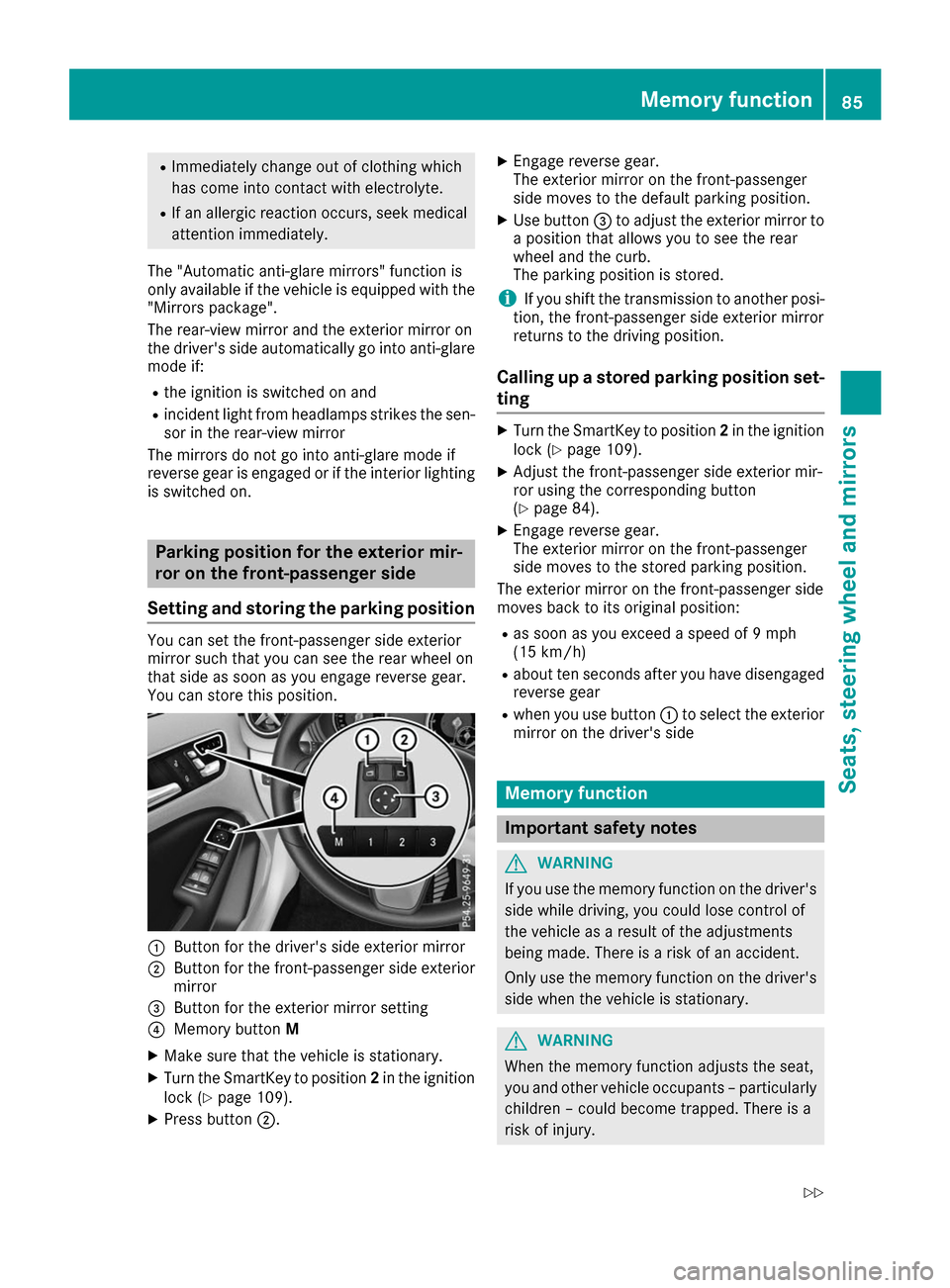
0043
Button for the driver's side exterior mirror
0044 Button for the front-passenger side exterior
mirror
0087 Button for the exterior mirror setting
0085 Memory button M
X Make sure that the vehicle is stationary.
X Turn the SmartKey to position 2in the ignition
lock (Y page 109).
X Press button 0044. X
Engage reverse gear.
The exterior mirror on the front-passenger
side moves to the default parking position.
X Use button 0087to adjust the exterior mirror to
a position that allows you to see the rear
wheel and the curb.
The parking position is stored.
i If you shift the transmission to another posi-
tion, the front-passenger side exterior mirror
returns to the driving position.
Calling up a stored parking position set- ting X
Turn the SmartKey to position 2in the ignition
lock (Y page 109).
X Adjust the front-passenger side exterior mir-
ror using the corresponding button
(Y page 84).
X Engage reverse gear.
The exterior mirror on the front-passenger
side moves to the stored parking position.
The exterior mirror on the front-passenger side
moves back to its original position:
R as soon as you exceed a speed of 9 mph
(15 km/h)
R about ten seconds after you have disengaged
reverse gear
R when you use button 0043to select the exterior
mirror on the driver's side Memory function
Important safety notes
G
WARNING
If you use the memory function on the driver's side while driving, you could lose control of
the vehicle as a result of the adjustments
being made. There is a risk of an accident.
Only use the memory function on the driver's
side when the vehicle is stationary. G
WARNING
When the memory function adjusts the seat,
you and other vehicle occupants – particularly children – could become trapped. There is a
risk of injury. Memory function
85Seats, steering wheel and mirrors
Z
Page 89 of 290
Exterior lighting
General notes
For reasons of safety, Mercedes-Benz recom-
mends that you drive with the lights switched on even during the daytime. In some countries,
operation of the headlamps varies due to legal
requirements and self-imposed obligations. Setting the exterior lighting
Setting options Exterior lighting can be set using the:
R light switch
R combination switch (Y page 88)
R on-board computer (Y page 166)
Light switch Operation
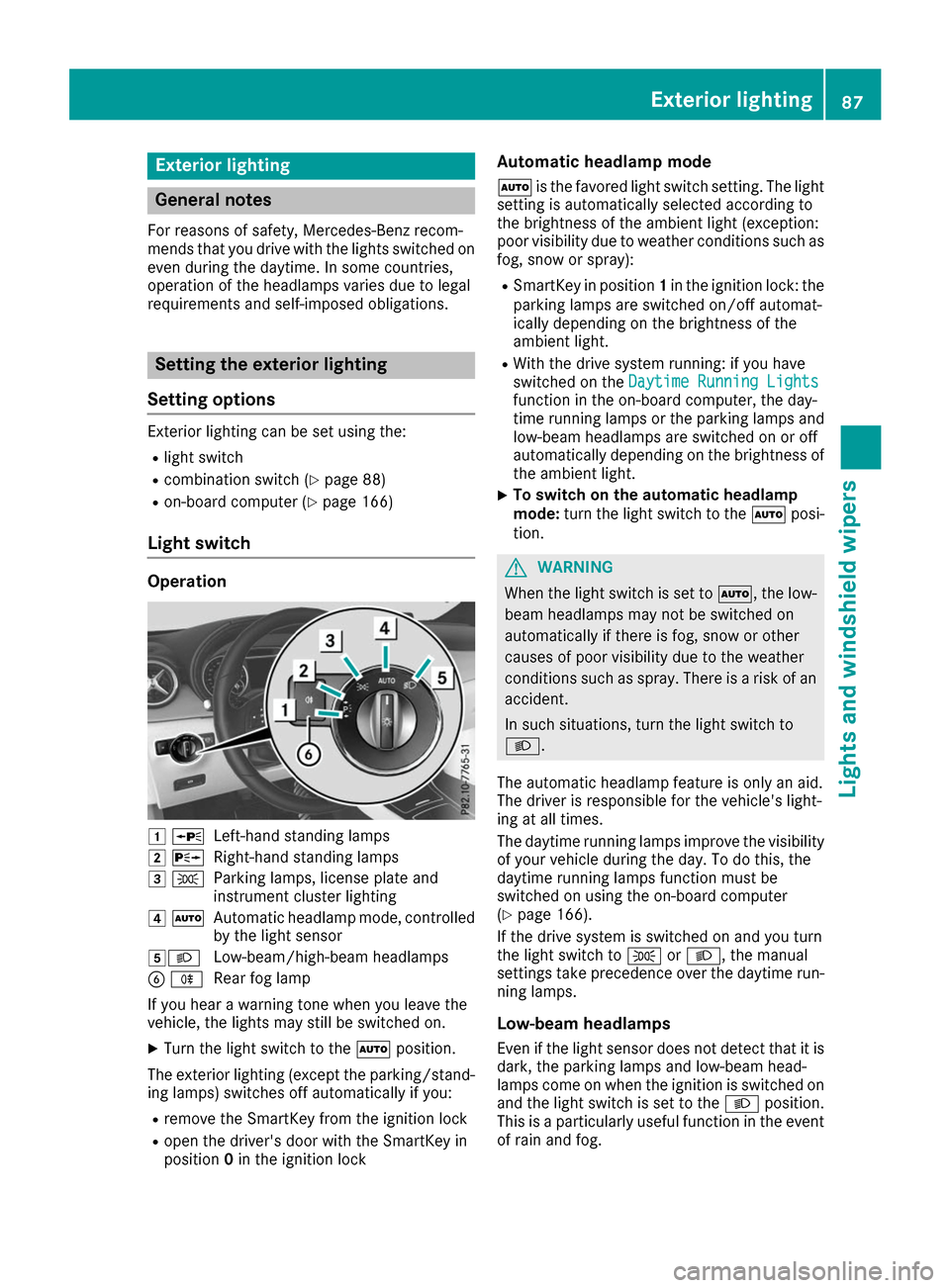
0047
0063
Left-hand standing lamps
0048 0064
Right-hand standing lamps
0049 0060
Parking lamps, license plate and
instrument cluster lighting
004A 0058
Automatic headlamp mode, controlled
by the light sensor
004B0058 Low-beam/high-beam headlamps
0084 005E
Rear fog lamp
If you hear a warning tone when you leave the
vehicle, the lights may still be switched on.
X Turn the light switch to the 0058position.
The exterior lighting (except the parking/stand- ing lamps) switches off automatically if you:
R remove the SmartKey from the ignition lock
R open the driver's door with the SmartKey in
position 0in the ignition lock Automatic headlamp mode
0058 is the favored light switch setting. The light
setting is automatically selected according to
the brightness of the ambient light (exception:
poor visibility due to weather conditions such as fog, snow or spray):
R SmartKey in position 1in the ignition lock: the
parking lamps are switched on/off automat-
ically depending on the brightness of the
ambient light.
R With the drive system running: if you have
switched on the Daytime Running Lights
Daytime Running Lights
function in the on-board computer, the day-
time running lamps or the parking lamps and
low-beam headlamps are switched on or off
automatically depending on the brightness of
the ambient light.
X To switch on the automatic headlamp
mode:
turn the light switch to the 0058posi-
tion. G
WARNING
When the light switch is set to 0058, the low-
beam headlamps may not be switched on
automatically if there is fog, snow or other
causes of poor visibility due to the weather
conditions such as spray. There is a risk of an
accident.
In such situations, turn the light switch to
0058.
The automatic headlamp feature is only an aid.
The driver is responsible for the vehicle's light-
ing at all times.
The daytime running lamps improve the visibility
of your vehicle during the day. To do this, the
daytime running lamps function must be
switched on using the on-board computer
(Y page 166).
If the drive system is switched on and you turn
the light switch to 0060or0058, the manual
settings take precedence over the daytime run- ning lamps.
Low-beam headlamps Even if the light sensor does not detect that it isdark, the parking lamps and low-beam head-
lamps come on when the ignition is switched on
and the light switch is set to the 0058position.
This is a particularly useful function in the event of rain and fog. Exterior lighting
87Lights and windshield wipers Z
Page 101 of 290
Overview of climate control systems
General notes
Observe the settings recommended on the fol-
lowing pages. The windows could otherwise fog up.
To prevent the windows from fogging up:
R switch off climate control only briefly
R switch on air-recirculation mode only briefly
R switch on the cooling with air dehumidifica-
tion function
R switch on the defrost windshield function
briefly, if required
The dual-zone automatic climate control regu-
lates the temperature and the humidity in the
vehicle interior and filters undesirable substan-
ces out of the air.
Dual-zone automatic climate control is only
operational when the vehicle is ready to drive.
Optimum operation is only achieved with the
side windows closed.
Always keep the ventilation flaps behind the
side paneling in the cargo compartment clear.
Otherwise the vehicle will not be ventilated cor- rectly. i
Ventilate the vehicle for a brief period during
warm weather, e.g. using the convenience
opening feature (Y page 76). This will speed
up the cooling process and the desired inte-
rior temperature will be reached more
quickly.
i The integrated filter filters out most parti-
cles of dust and soot and completely filters
out pollen. It also reduces gaseous pollutants and odors. A clogged filter reduces the
amount of air supplied to the vehicle interior.
For this reason, you should always observe
the interval for replacing the filter, which is
specified in the Maintenance Booklet. As it
depends on environmental conditions, e.g.
heavy air pollution, the interval may be
shorter than stated in the Maintenance Book-
let.
i It is possible that under certain circumstan-
ces the residual heat function may be activa-
ted automatically an hour after the SmartKey has been removed in order to dry the auto-
matic climate control. The vehicle is then ven-tilated for 30 minutes. Control panel for dual-zone automatic climate control
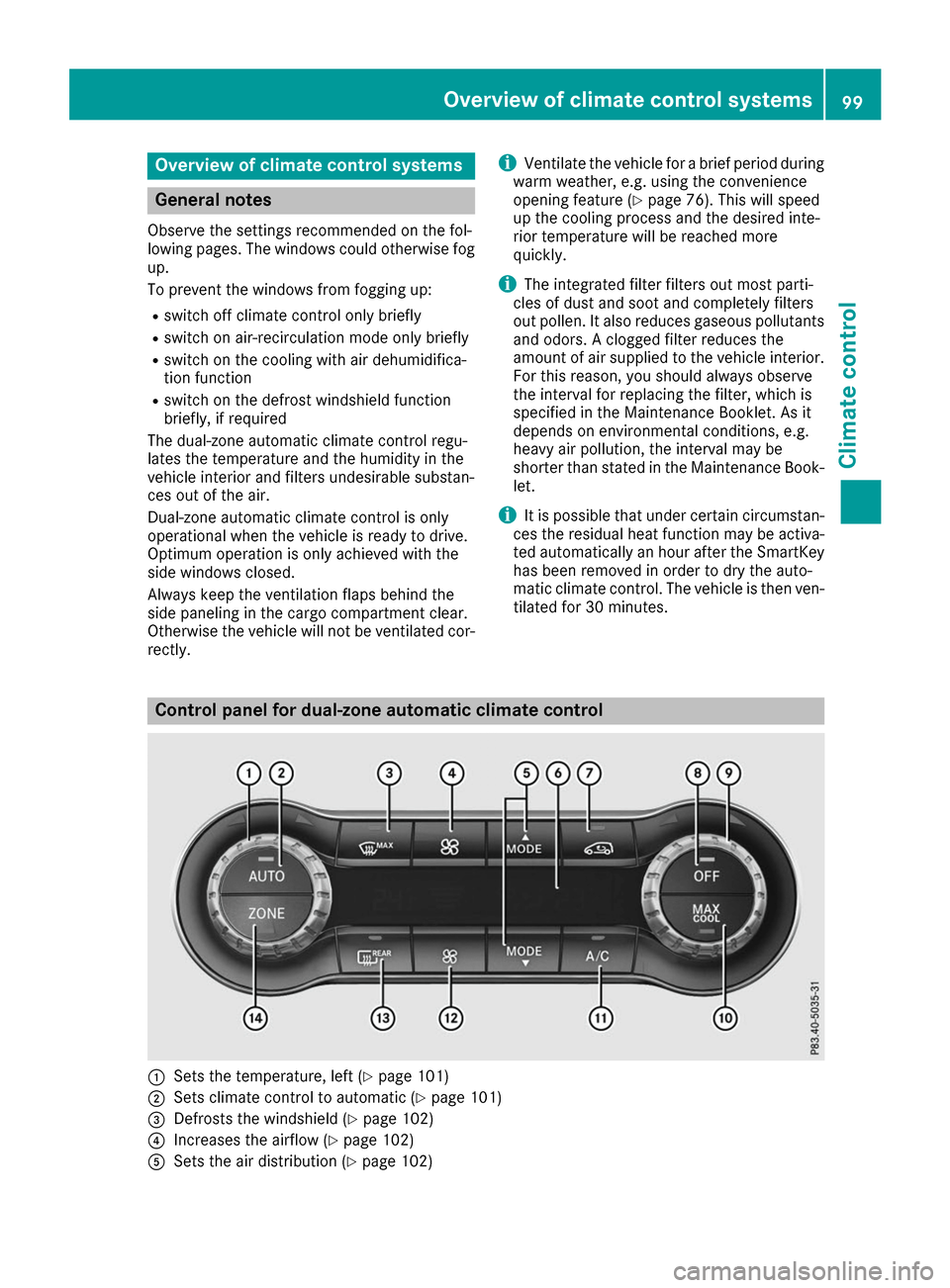
0043
Sets the temperature, left (Y page 101)
0044 Sets climate control to automatic (Y page 101)
0087 Defrosts the windshield (Y page 102)
0085 Increases the airflow (Y page 102)
0083 Sets the air distribution (Y page 102) Overview of climate control systems
99Climate control
Page 102 of 290
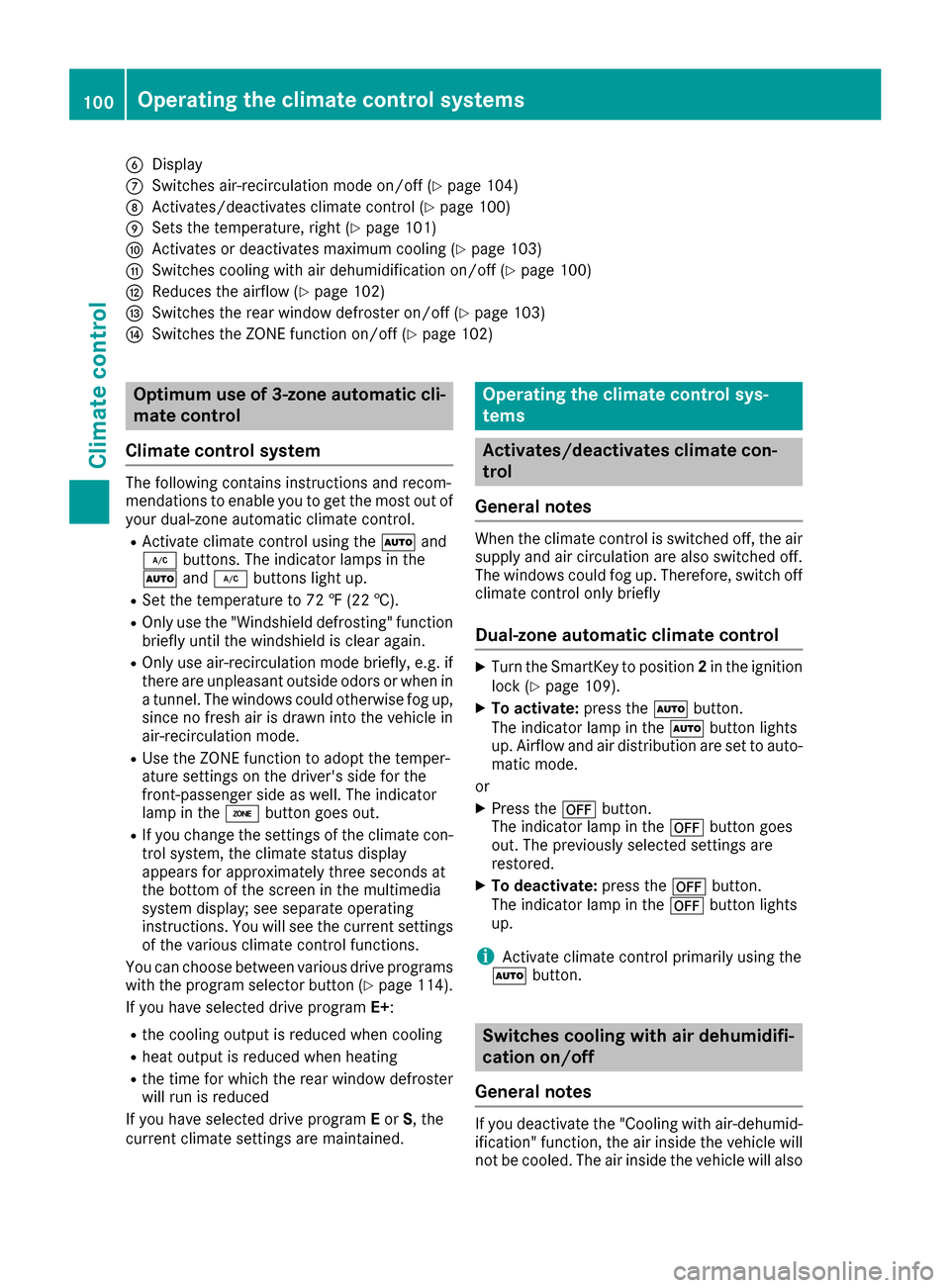
0084
Display
006B Switches air-recirculation mode on/off (Y page 104)
006C Activates/deactivates climate control (Y page 100)
006D Sets the temperature, right (Y page 101)
006E Activates or deactivates maximum cooling (Y page 103)
006F Switches cooling with air dehumidification on/off (Y page 100)
0070 Reduces the airflow (Y page 102)
0071 Switches the rear window defroster on/off (Y page 103)
0072 Switches the ZONE function on/off (Y page 102)Optimum use of 3-zone automatic cli-
mate control
Climate control system The following contains instructions and recom-
mendations to enable you to get the most out of
your dual-zone automatic climate control.
R Activate climate control using the 0058and
005A buttons. The indicator lamps in the
0058 and005A buttons light up.
R Set the temperature to 72 ‡ (22 †).
R Only use the "Windshield defrosting" function
briefly until the windshield is clear again.
R Only use air-recirculation mode briefly, e.g. if
there are unpleasant outside odors or when in a tunnel. The windows could otherwise fog up,
since no fresh air is drawn into the vehicle in
air-recirculation mode.
R Use the ZONE function to adopt the temper-
ature settings on the driver's side for the
front-passenger side as well. The indicator
lamp in the 00D6button goes out.
R If you change the settings of the climate con-
trol system, the climate status display
appears for approximately three seconds at
the bottom of the screen in the multimedia
system display; see separate operating
instructions. You will see the current settings
of the various climate control functions.
You can choose between various drive programs
with the program selector button (Y page 114).
If you have selected drive program E+:
R the cooling output is reduced when cooling
R heat output is reduced when heating
R the time for which the rear window defroster
will run is reduced
If you have selected drive program Eor S, the
current climate settings are maintained. Operating the climate control sys-
tems
Activates/deactivates climate con-
trol
General notes When the climate control is switched off, the air
supply and air circulation are also switched off.
The windows could fog up. Therefore, switch off
climate control only briefly
Dual-zone automatic climate control X
Turn the SmartKey to position 2in the ignition
lock (Y page 109).
X To activate: press the0058button.
The indicator lamp in the 0058button lights
up. Airflow and air distribution are set to auto- matic mode.
or X Press the 0078button.
The indicator lamp in the 0078button goes
out. The previously selected settings are
restored.
X To deactivate: press the0078button.
The indicator lamp in the 0078button lights
up.
i Activate climate control primarily using the
0058 button. Switches cooling with air dehumidifi-
cation on/off
General notes If you deactivate the "Cooling with air-dehumid-
ification" function, the air inside the vehicle will
not be cooled. The air inside the vehicle will also 100
Operating the climate control systemsClimate control
Page 103 of 290
not be dehumidified. The windows can fog up
more quickly. Therefore, only deactivate the
"Cooling with air-dehumidification" function
briefly.
The "Cooling with air-dehumidification" function is operational when the vehicle is ready to drive.
The air inside the vehicle is cooled and dehu-
midified according to the temperature selected.
Condensation may drip from the underside of
the vehicle when it is in cooling mode. This is
normal and not a sign that there is a malfunc-
tion. Activating/deactivating X
Press the 005Abutton.
The indicator lamp in the 005Abutton lights
up or goes out.
The indicator lamp in the button indicates that the respective function is activated. The
"Cooling with air dehumidification" function
has a delayed switch-off feature.
Problems with the "Cooling with air dehumidification" function Problem
Possible causes/consequences and
0050 0050Solutions The indicator lamp in the
005A button flashes
three times or remains
off. The "Cooling with air
dehumidification" func-
tion cannot be switched
on. Cooling with air dehumidification has been deactivated due to a mal-
function.
X Visit a qualified specialist workshop. Setting climate control to automatic
General notes In automatic mode, the set temperature is main-
tained automatically at a constant level. The
system automatically regulates the temperature of the dispensed air, the airflow and the air dis- tribution.
The "Cooling with air dehumidification" function
is activated automatically in automatic mode.
Setting climate control to automatic X
Turn the SmartKey to position 2in the ignition
lock (Y page 109).
X Set the desired temperature.
X To activate: press the0058button.
The indicator lamp in the 0058button lights
up. Automatic air distribution and airflow are
activated. X
To switch to manual mode:press the 004F
or 004A button.
or
X Press the 0097or0095 button.
The indicator lamp in the 0058button goes
out. Automatic air distribution and airflow are deactivated. Setting the temperature
Different temperatures can be set for the driv-
er's and front-passenger sides. The set temper-
ature is automatically maintained at a constant
level.
X Turn the SmartKey to position 2in the ignition
lock (Y page 109).
X To increase or decrease: turn control0043or
006D counter-clockwise or clockwise. Only
change the temperature setting in small
increments. Start at 72 ‡ (22 †). Operating the climate control systems
101Climate control