MULTI MEDIA SYSTEM DISPLAY MERCEDES-BENZ B-Class 2017 W246 Owner's Manual
[x] Cancel search | Manufacturer: MERCEDES-BENZ, Model Year: 2017, Model line: B-Class, Model: MERCEDES-BENZ B-Class 2017 W246Pages: 290, PDF Size: 19.81 MB
Page 4 of 290
Index
....................................................... 4Digital Operator's Manual
..................21
Introduction .......................................... .21
Operation ............................................... 21 Introduction
......................................... 22
Protecting the environment ...................22
Genuine Mercedes-Benz parts .............. .22
Operator's Manual ................................. 23
Service and vehicle operation ................23
Operating safety .................................... 24
QR codes for the rescue card ................28
Data stored in the vehicle ...................... 28
Information on copyright ....................... 29 At a glance
........................................... 31
Cockpit .................................................. 31
Instrument cluster ................................. 32
Multifunction steering wheel ................. 33
Center console ...................................... 34
Door control panel ................................. 36
Overhead control panel ........................ .37Safety
................................................... 38
Panic alarm ............................................ 38
Occupant safety .................................... 38
Children in the vehicle ........................... 52
Pets in the vehicle ................................. 58
Driving safety systems ........................... 58
Protection against theft .........................64 Opening and closing
...........................66
SmartKey ............................................... 66
Doors ..................................................... 72
Cargo compartment ...............................74
Side windows ......................................... 75 Seats, steering wheel and mirrors
....79
Correct driver's seat position ................ 79
Seats ..................................................... 79
Steering wheel ....................................... 83
Mirrors ................................................... 83
Memory function ................................... 85 Lights and windshield wipers
............87
Exterior lighting ..................................... 87
Interior lighting ...................................... 89
Replacing bulbs ..................................... 90
Windshield wipers .................................. 95 Climate control
.................................... 99
Overview of climate control systems ..... 99
Operating the climate control sys-
tems .................................................... 100
Air vents .............................................. 106 Driving and parking
..........................108
Notes on breaking-in a new vehicle ..... 108
Driving ................................................. 108
Transmission ....................................... 111
High-voltage battery ............................ 117
Parking ................................................ 128
Driving tips .......................................... 131
Driving systems ................................... 136 On-board computer and displays
....152
Important safety notes ........................ 152
Displays and operation ........................ 152
Menus and submenus ......................... 156
Display messages ................................ 167
Warning and indicator lamps in the
instrument cluster ............................... 190 Multimedia system
...........................201
General notes ...................................... 201
Important safety notes ........................ 201
Function restrictions ............................ 201
Operating system ................................ 202 Stowage and features
......................207
Loading guidelines ............................... 207
Stowage areas ..................................... 207
Features .............................................. 216 Maintenance and care
......................231
Engine compartment ........................... 231
ASSYST PLUS ...................................... 233
Care ..................................................... 234 2
Contents
Page 16 of 290
Protection against theft
ATA (Anti-Theft Alarm system) ......... 65
Immobilizer ...................................... 64
Protection of the environment
General notes ..................................22
Pulling away
General notes ................................ 111
Hill start assist ...............................1 11Q
QR code Mercedes-Benz Guide App ................. 1
Rescue card ..................................... 28
Qualified specialist workshop ........... 27R
Radio Selecting a station ......................... 160
see separate operating instructions
Radio mode
see also Digital Operator's Man-
ual ................................................. .201
Radio-wave reception/transmis-
sion in the vehicle
Declaration of conformity ................ 26
Range
RANGE PLUS ................................. 120
RANGE PLUS
charge .......................................... .164
Range ............................................ 120
Reading lamp ....................................... 89
READY indicator ................................ 152
Rear compartment
Setting the air vents ..................... .106
Rear fog lamp
Display message ............................ 179
Replacing bulbs ............................... 93
Switching on/off .............................. 88
Rear lamps
see Lights
Rear seats
Folding the backrest forwards/
back ............................................... 211
Rear view camera
"Reverse parking" function ............ 147
Cleaning instructions ..................... 238 Display in the multimedia system .. 146
Function/notes ............................
.145
General notes ................................ 145
Switching on/off ........................... 146
Rear window defroster
Problem (malfunction) ................... 103
Switching on/off ........................... 103
Rear window wiper
Replacing the wiper blade ................ 97
Switching on/off .............................. 95
Rear-view mirror
Anti-glare (manual) .......................... 83
Dipping (automatic) ......................... 84
Recharging statistics (COMAND)
Generated electricity ..................... 120
Recuperative Brake System
Driving safety systems ..................... 64
Refrigerant (air-conditioning sys-
tem)
Important safety notes .................. 285
Refueling
Fuel gauge ....................................... 32
Remote control
Garage door opener ....................... 226
Programming (garage door
opener) .......................................... 226
Replacing bulbs
Backup lamp ................................... .93
High-beam headlamps ..................... 92
Important safety notes .................... 90
Installing/removing the cover
(front wheel arch) ............................ 92
License plate lamp ........................... 94
Low-beam headlamps ...................... 92
Overview of bulb types .................... 91
Parking lamps ................................. .92
Rear fog lamp .................................. 93
Standing lamps ................................ 92
Turn signals (front) .......................... .93
Reporting safety defects .................... 27
Rescue card ......................................... 28
Reserve
High-voltage battery ...................... 199
Restraint system
Display message ............................ 175
Introduction ..................................... 38
Warning lamp ................................. 198
Warning lamp (function) ................... 39 14
Index
Page 23 of 290
Introduction
The printed Operator's Manual provides infor-
mation about the safe operation of your vehicle.
The Digital Operator's Manual provides compre- hensive and specifically adapted information on
your vehicle's equipment and multimedia sys-
tem. You can call up the Digital Operator's Man-
ual via the multimedia system.
i You will not incur any costs when calling up
the Digital Operator's Manual. The Digital
Operator's Manual works without connecting to the Internet.
There are three ways to access the topics of the Digital Operator's Manual:
R Visual search
The visual search allows you to explore your
vehicle "virtually". Starting from either the
vehicle exterior view or interior view, you can
access many of the different topics covered
by the Digital Operator's Manual. To access
the vehicle interior section, select the "Vehi-
cle interior" view.
R Keyword search
The keyword search allows you to search for a
keyword by entering characters.
R Contents
You can select individual sections in the con-
tents.
i The Digital Operator's Manual is deactiva-
ted for safety reasons while driving. Operation
Calling up the Digital Operator's Man-
ual
X Press the 00D4button in the center console.
The overview relating to the vehicle appears.
X Select the "Operator's Manual" menu item by
turning 3or pressing 7the controller.
X Confirm 7the message about the warning
and safety notes.
The basic menu for the Digital Operator's
Manual appears. Operating the Digital Operator's Man-
ual
General notes Please observe the information about the oper-
ation of the controller (Y page 202).
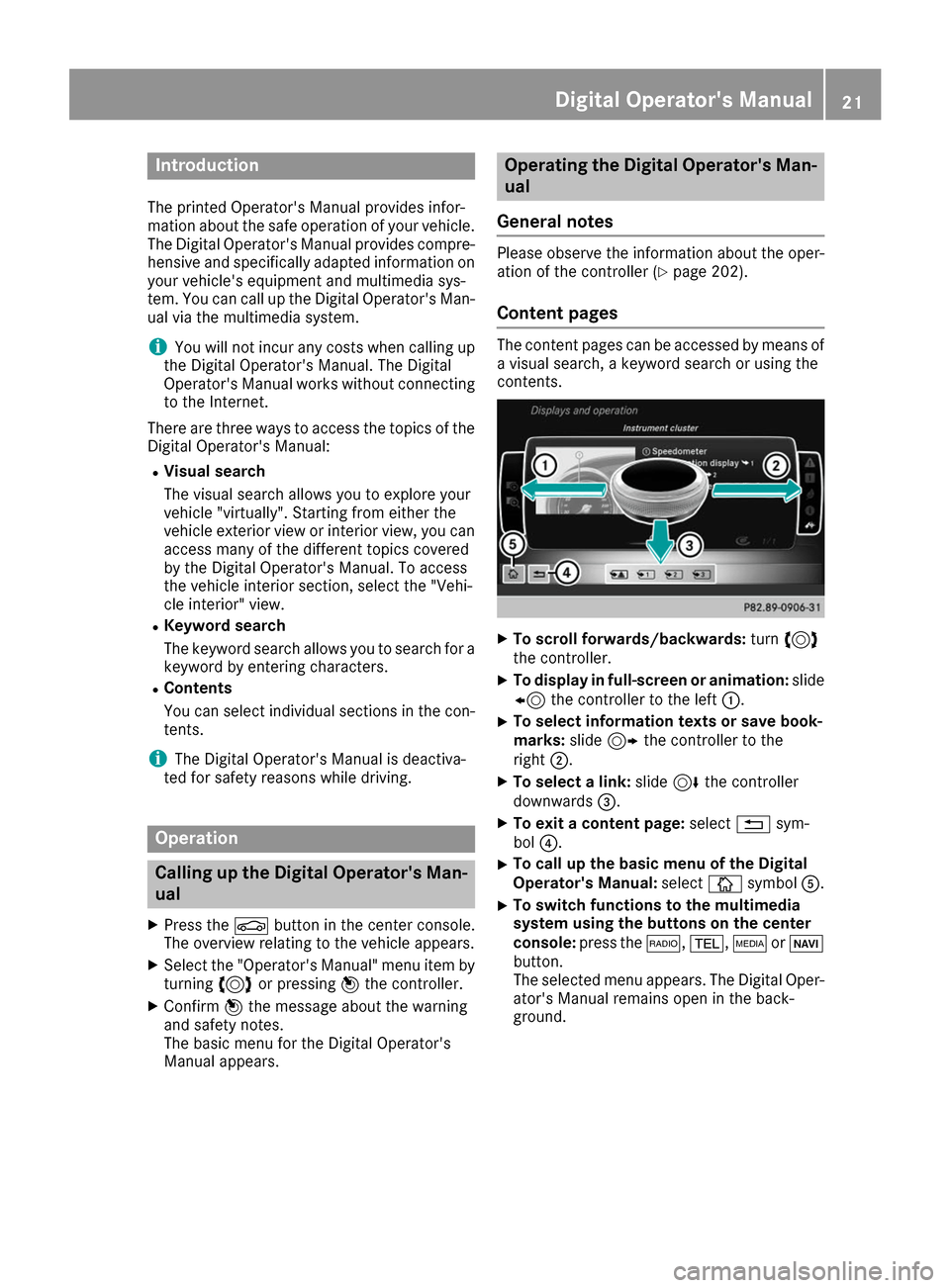
Content pages The content pages can be accessed by means of
a visual search, a keyword search or using the
contents. X
To scroll forwards/backwards: turn3
the controller.
X To display in full-screen or animation: slide
8 the controller to the left 0043.
X To select information texts or save book-
marks:
slide9 the controller to the
right 0044.
X To select a link: slide6the controller
downwards 0087.
X To exit a content page: select0038sym-
bol 0085.
X To call up the basic menu of the Digital
Operator's Manual: select00DAsymbol 0083.
X To switch functions to the multimedia
system using the buttons on the center
console:
press the 002A,002B,00FDor00BE
button.
The selected menu appears. The Digital Oper-
ator's Manual remains open in the back-
ground. Digital Operator's Manual
21
Page 35 of 290
Multifunction steering wheel
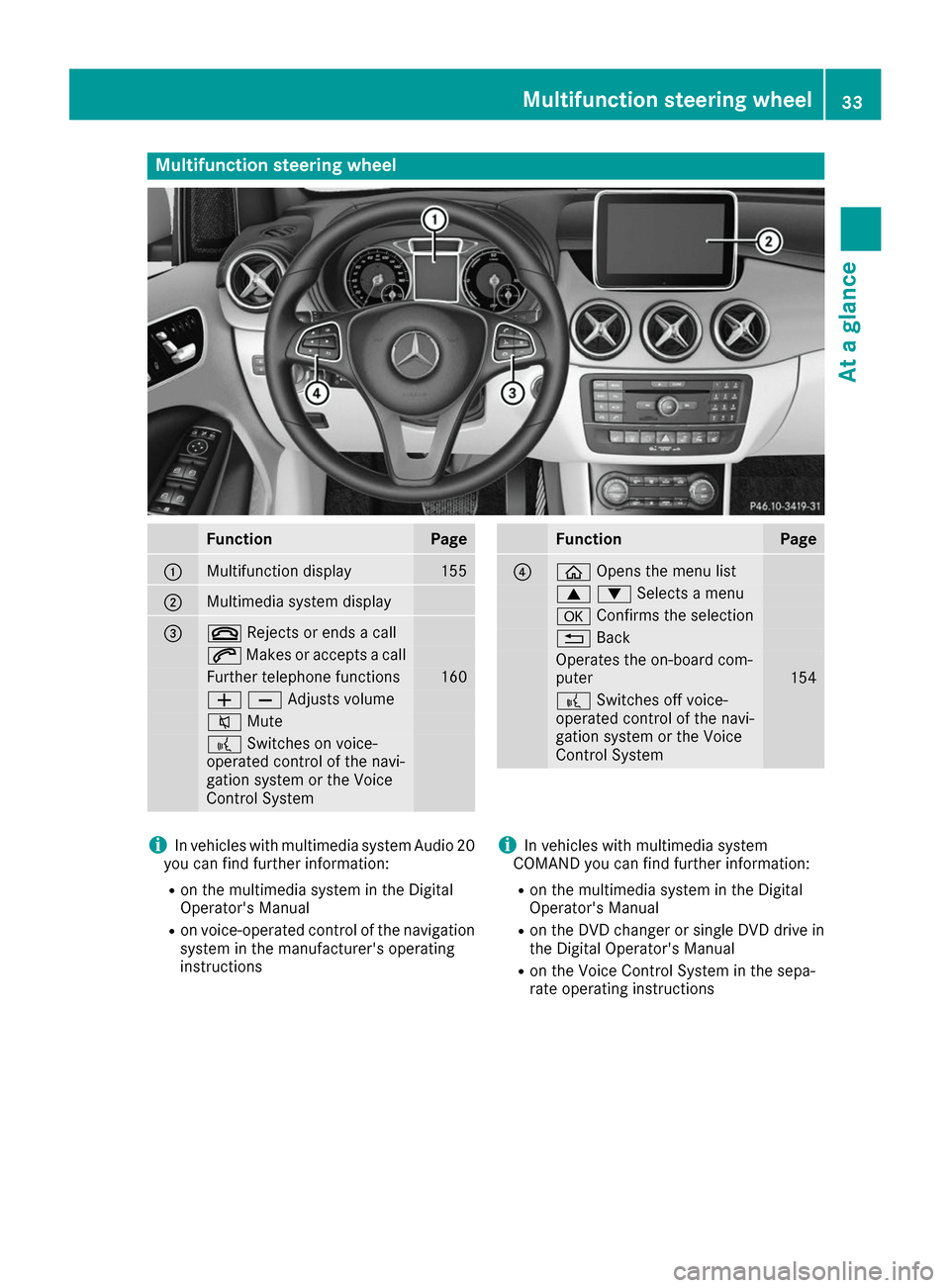
Function Page
0043
Multifunction display 155
0044
Multimedia system display
0087
0076
Rejects or ends a call 0061
Makes or accepts a call Further telephone functions 160
00810082Adjusts volume
0063
Mute 0059
Switches on voice-
operated control of the navi-
gation system or the Voice
Control System Function Page
0085
00E2
Opens the menu list 00630064Selects a menu
0076
Confirms the selection 0038
Back Operates the on-board com-
puter
154
0059
Switches off voice-
operated control of the navi-
gation system or the Voice
Control System i
In vehicles with multimedia system Audio 20
you can find further information:
R on the multimedia system in the Digital
Operator's Manual
R on voice-operated control of the navigation
system in the manufacturer's operating
instructions i
In vehicles with multimedia system
COMAND you can find further information:
R on the multimedia system in the Digital
Operator's Manual
R on the DVD changer or single DVD drive in
the Digital Operator's Manual
R on the Voice Control System in the sepa-
rate operating instructions Multifunction steering wheel
33At a glance
Page 102 of 290
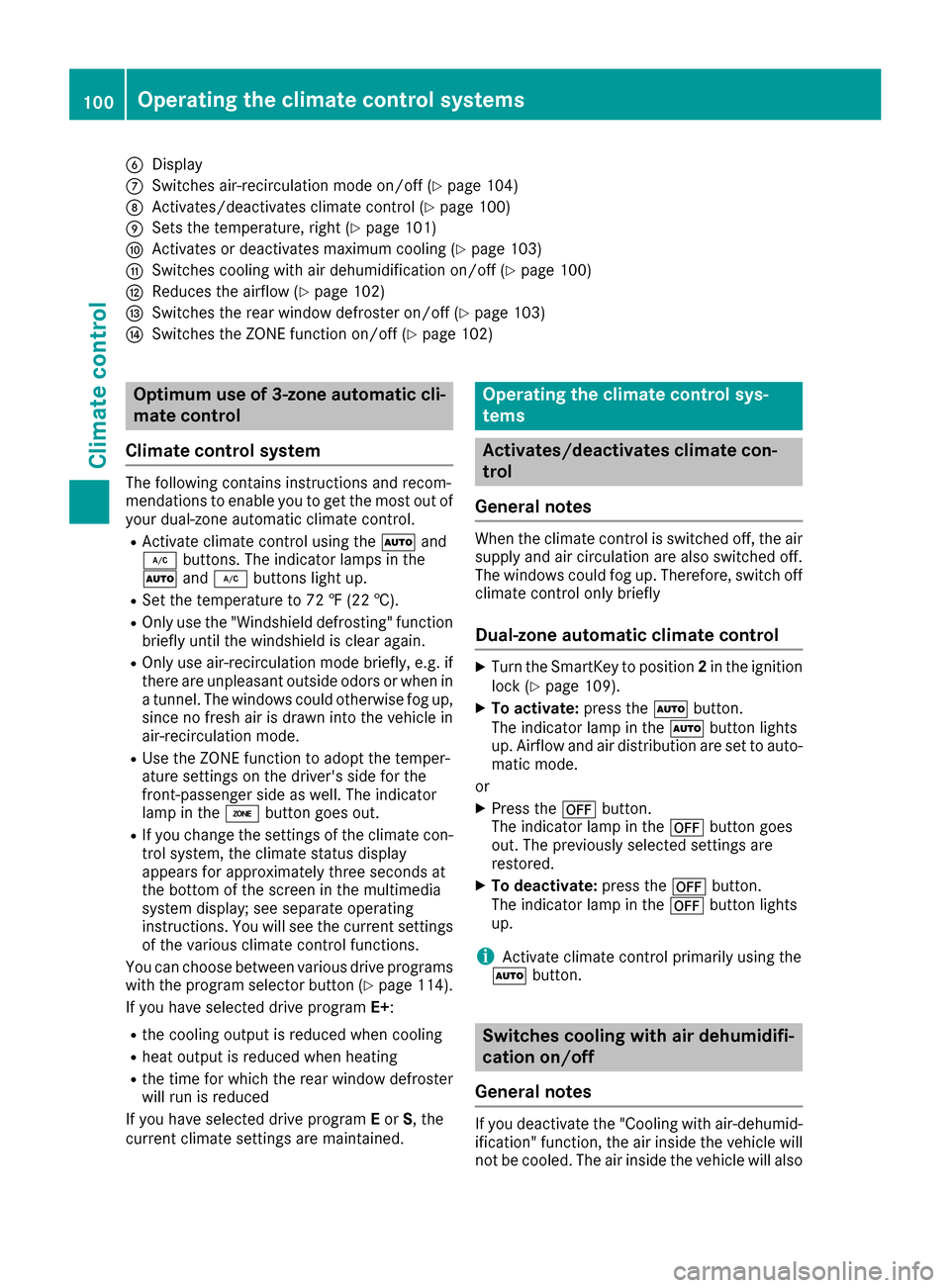
0084
Display
006B Switches air-recirculation mode on/off (Y page 104)
006C Activates/deactivates climate control (Y page 100)
006D Sets the temperature, right (Y page 101)
006E Activates or deactivates maximum cooling (Y page 103)
006F Switches cooling with air dehumidification on/off (Y page 100)
0070 Reduces the airflow (Y page 102)
0071 Switches the rear window defroster on/off (Y page 103)
0072 Switches the ZONE function on/off (Y page 102)Optimum use of 3-zone automatic cli-
mate control
Climate control system The following contains instructions and recom-
mendations to enable you to get the most out of
your dual-zone automatic climate control.
R Activate climate control using the 0058and
005A buttons. The indicator lamps in the
0058 and005A buttons light up.
R Set the temperature to 72 ‡ (22 †).
R Only use the "Windshield defrosting" function
briefly until the windshield is clear again.
R Only use air-recirculation mode briefly, e.g. if
there are unpleasant outside odors or when in a tunnel. The windows could otherwise fog up,
since no fresh air is drawn into the vehicle in
air-recirculation mode.
R Use the ZONE function to adopt the temper-
ature settings on the driver's side for the
front-passenger side as well. The indicator
lamp in the 00D6button goes out.
R If you change the settings of the climate con-
trol system, the climate status display
appears for approximately three seconds at
the bottom of the screen in the multimedia
system display; see separate operating
instructions. You will see the current settings
of the various climate control functions.
You can choose between various drive programs
with the program selector button (Y page 114).
If you have selected drive program E+:
R the cooling output is reduced when cooling
R heat output is reduced when heating
R the time for which the rear window defroster
will run is reduced
If you have selected drive program Eor S, the
current climate settings are maintained. Operating the climate control sys-
tems
Activates/deactivates climate con-
trol
General notes When the climate control is switched off, the air
supply and air circulation are also switched off.
The windows could fog up. Therefore, switch off
climate control only briefly
Dual-zone automatic climate control X
Turn the SmartKey to position 2in the ignition
lock (Y page 109).
X To activate: press the0058button.
The indicator lamp in the 0058button lights
up. Airflow and air distribution are set to auto- matic mode.
or X Press the 0078button.
The indicator lamp in the 0078button goes
out. The previously selected settings are
restored.
X To deactivate: press the0078button.
The indicator lamp in the 0078button lights
up.
i Activate climate control primarily using the
0058 button. Switches cooling with air dehumidifi-
cation on/off
General notes If you deactivate the "Cooling with air-dehumid-
ification" function, the air inside the vehicle will
not be cooled. The air inside the vehicle will also 100
Operating the climate control systemsClimate control
Page 123 of 290
Energy consumption indicator
0043may differ
from the indicator in the From Start
From Start
(Y page 156) trip computer in the Trip
Tripmenu.
Displaying energy consumption and recu-
perated electric energy:
X Switch on the multimedia system (see sepa-
rate operating instructions).
X To select Vehicle Vehiclefrom the main function bar:
turn and press the controller.
The vehicle menu is displayed.
X To select Consumption
Consumption: turn and press the
controller.
Energy consumption 0043and recuperated
electric energy 0044for the last 15 minute s of
the journey are shown.
Exiting the vehicle settings: X Press the 0038button on the controller.
or X To select 0038: slide 6and press the con-
troller.
To reset values: the values are reset along with
the From Start
From Start trip computer (Y page 158).
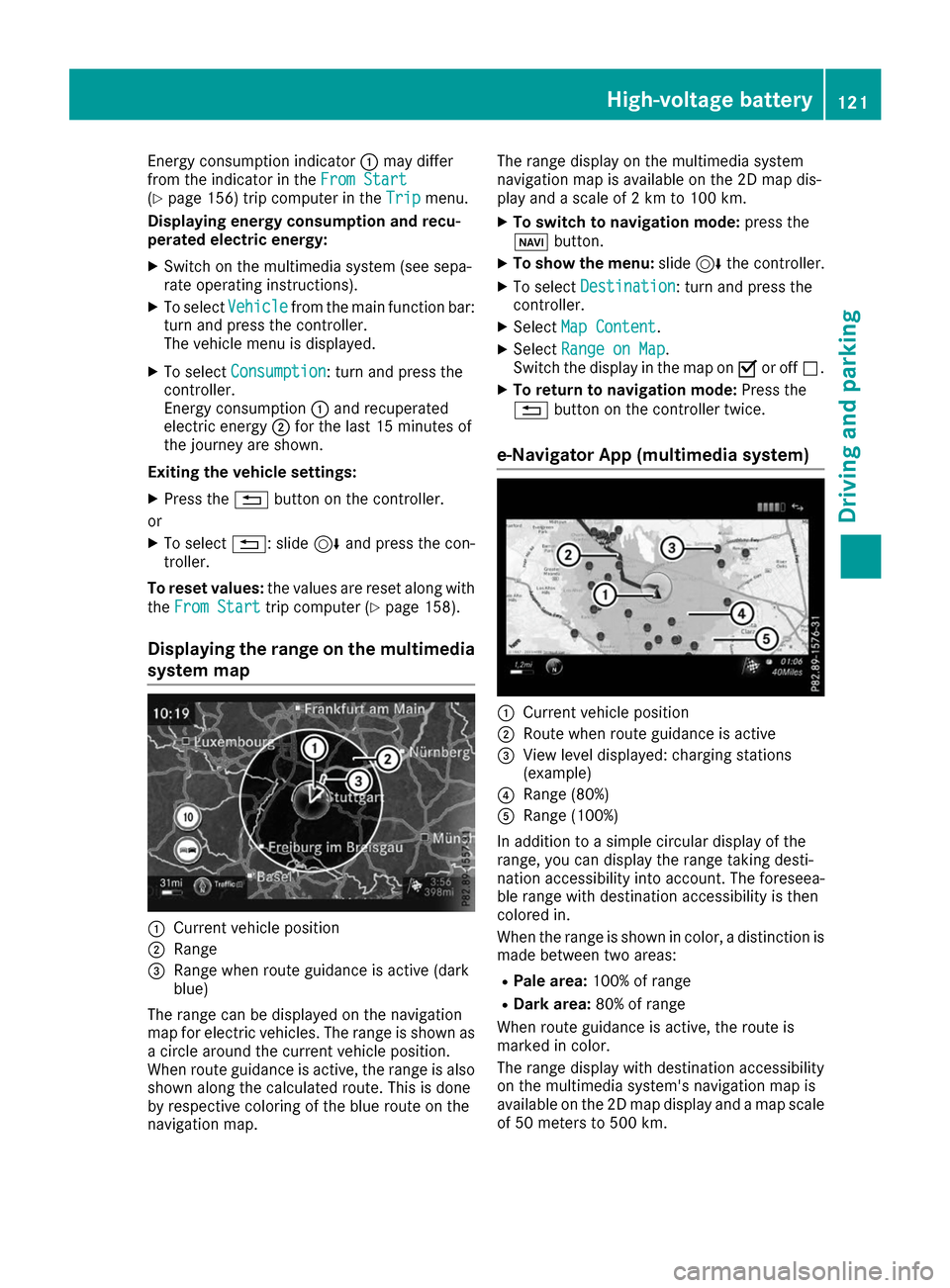
Displaying the range on the multimedia
system map 0043
Current vehicle position
0044 Range
0087 Range when route guidance is active (dark
blue)
The range can be displayed on the navigation
map for electric vehicles. The range is shown as
a circle around the current vehicle position.
When route guidance is active, the range is also
shown along the calculated route. This is done
by respective coloring of the blue route on the
navigation map. The range display on the multimedia system
navigation map is available on the 2D map dis-
play and a scale of 2 km to 100 km.
X To switch to navigation mode: press the
00CB button.
X To show the menu: slide6the controller.
X To select Destination
Destination: turn and press the
controller.
X Select Map Content
Map Content.
X Select Range on Map Range on Map .
Switch the display in the map on 0073or off 0053.
X To return to navigation mode: Press the
0038 button on the controller twice.
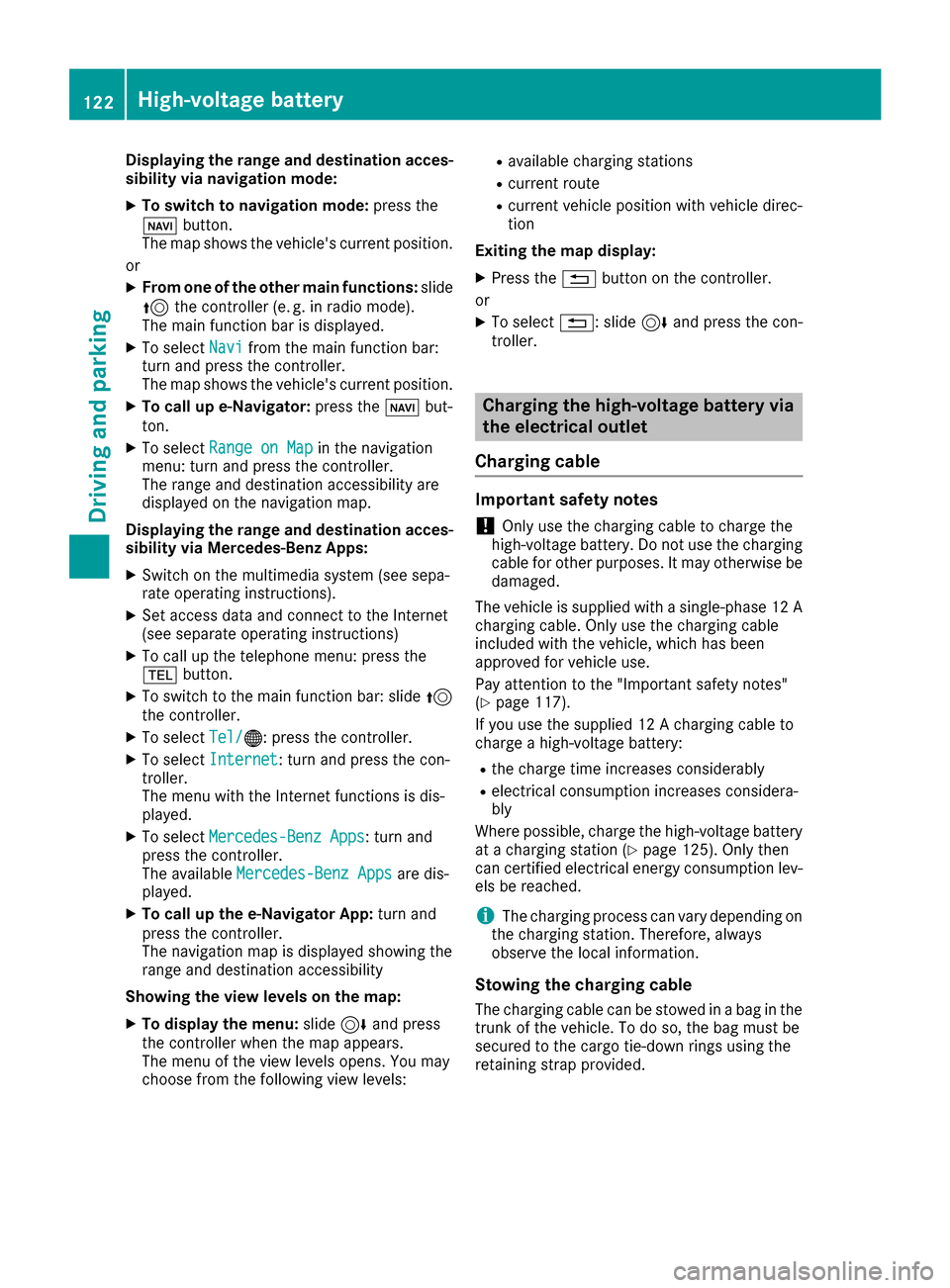
e-Navigator App (multimedia system) 0043
Current vehicle position
0044 Route when route guidance is active
0087 View level displayed: charging stations
(example)
0085 Range (80%)
0083 Range (100%)
In addition to a simple circular display of the
range, you can display the range taking desti-
nation accessibility into account. The foreseea-
ble range with destination accessibility is then
colored in.
When the range is shown in color, a distinction is made between two areas:
R Pale area: 100% of range
R Dark area: 80% of range
When route guidance is active, the route is
marked in color.
The range display with destination accessibility
on the multimedia system's navigation map is
available on the 2D map display and a map scale of 50 meters to 500 km. High-voltage battery
121Driving and parking Z
Page 124 of 290
Displaying the range and destination acces-
sibility via navigation mode:
X To switch to navigation mode: press the
00CB button.
The map shows the vehicle's current position.
or
X From one of the other main functions: slide
5 the controller (e. g. in radio mode).
The main function bar is displayed.
X To select Navi
Navi from the main function bar:
turn and press the controller.
The map shows the vehicle's current position.
X To call up e-Navigator: press the00CBbut-
ton.
X To select Range on Map
Range on Map in the navigation
menu: turn and press the controller.
The range and destination accessibility are
displayed on the navigation map.
Displaying the range and destination acces- sibility via Mercedes-Benz Apps:
X Switch on the multimedia system (see sepa-
rate operating instructions).
X Set access data and connect to the Internet
(see separate operating instructions)
X To call up the telephone menu: press the
002B button.
X To switch to the main function bar: slide 5
the controller.
X To select Tel/
Tel/00A7: press the controller.
X To select Internet
Internet: turn and press the con-
troller.
The menu with the Internet functions is dis-
played.
X To select Mercedes-Benz Apps
Mercedes-Benz Apps: turn and
press the controller.
The available Mercedes-Benz Apps
Mercedes-Benz Apps are dis-
played.
X To call up the e-Navigator App: turn and
press the controller.
The navigation map is displayed showing the
range and destination accessibility
Showing the view levels on the map:
X To display the menu: slide6and press
the controller when the map appears.
The menu of the view levels opens. You may
choose from the following view levels: R
available charging stations
R current route
R current vehicle position with vehicle direc-
tion
Exiting the map display:
X Press the 0038button on the controller.
or
X To select 0038: slide 6and press the con-
troller. Charging the high-voltage battery via
the electrical outlet
Charging cable Important safety notes
! Only use the charging cable to charge the
high-voltage battery. Do not use the charging
cable for other purposes. It may otherwise be damaged.
The vehicle is supplied with a single-phase 12 A charging cable. Only use the charging cable
included with the vehicle, which has been
approved for vehicle use.
Pay attention to the "Important safety notes"
(Y page 117).
If you use the supplied 12 A charging cable to
charge a high-voltage battery:
R the charge time increases considerably
R electrical consumption increases considera-
bly
Where possible, charge the high-voltage battery at a charging station (Y page 125). Only then
can certified electrical energy consumption lev- els be reached.
i The charging process can vary depending on
the charging station. Therefore, always
observe the local information.
Stowing the charging cable
The charging cable can be stowed in a bag in the trunk of the vehicle. To do so, the bag must be
secured to the cargo tie-down rings using the
retaining strap provided. 122
High-voltage batteryDriving and pa
rking
Page 136 of 290
Wet roads
If you have driven for a long time in heavy rain
without braking, there may be a delayed reac-
tion from the brakes when braking for the first
time. This may also occur after the vehicle has
been washed or driven through deep water.
You have to depress the brake pedal more
firmly. Maintain a greater distance from the
vehicle in front.
After driving on a wet road or having the vehicle
washed, brake firmly while paying attention to
the traffic conditions. This will warm up the
brake discs, thereby drying them more quickly
and protecting them against corrosion.
Limited braking performance on salt-
treated roads If you drive on salted roads, a layer of salt resi-
due may form on the brake discs and brake
pads. This can result in a significantly longer
braking distance.
R In order to prevent any salt build-up, apply the
brakes occasionally while paying attention to
the traffic conditions.
R Carefully depress the brake pedal and the
beginning and end of a journey.
R Maintain a greater distance to the vehicle
ahead.
Servicing the brakes !
The brake fluid level may be too low, if:
R if the red brake warning lamp lights up in
the instrument cluster and
R you hear a warning tone while the engine is
running
Observe additional warning messages in the
multifunction display.
The brake fluid level may be too low due to
brake pad wear or leaking brake lines.
Have the brake system checked immediately.
Consult a qualified specialist workshop to
arrange this.
! A function or performance test should only
be carried out on a 2-axle dynamometer. If
you wish to operate the vehicle on such a
dynamometer, please consult a qualified spe- cialist workshop in advance. You could oth-
erwise damage the drive train or the brake
system. !
As the ESP ®
system operates automatically,
the engine and the ignition must be switched
off (the SmartKey must be in position 0or 1in
the ignition lock) if:
R the electric parking brake is tested on a
brake dynamometer (for a maximum of
ten seconds)
R the vehicle is towed with the front axle
raised.
Braking triggered automatically by ESP ®
may
seriously damage the brake system.
All checks and maintenance work on the brake
system must be carried out at a qualified spe-
cialist workshop.
Have brake pads installed and brake fluid
replaced at a qualified specialist workshop.
If the brake system has only been subject to
moderate loads, you should test the functional- ity of your brakes at regular intervals.
You can find a description of Brake Assist (BAS)
on (Y page 59).
Mercedes-Benz recommends that you only have brake pads/linings installed on your vehicle
which have been approved for Mercedes-Benz
vehicles or which correspond to an equivalent
quality standard. Brake pads/linings which havenot been approved for Mercedes-Benz vehicles
or which are not of an equivalent quality could
affect your vehicle's operating safety.
Mercedes-Benz recommends that you only use
brake fluid that has been specially approved for
your vehicle by Mercedes-Benz, or which corre- sponds to an equivalent quality standard. Brakefluid which has not been approved for
Mercedes-Benz vehicles or which is not of an
equivalent quality could affect your vehicle's
operating safety.
Checking brake lining thickness You can measure the break pad/lining thick-
ness using a test gage. Color-coding (green or
red) on the test gage allows you to determine
whether the brake pad/lining thickness is still
sufficient. The test gage is in the vehicle docu-
ment wallet in the glove box. 134
Driving tipsDriving and parking
Page 141 of 290
The electric parking brake secures the vehicle
automatically if the HOLD function is activated
and:
R the driver's seat belt is not fastened and the
driver's door is open.
R the engine is switched off, unless it is auto-
matically switched off by the ECO start/stop
function.
R a system malfunction occurs.
R the power supply is insufficient.
The Brake Immediately Brake Immediately message may also
appear in the multifunction display.
X Immediately depress the brake firmly until the
warning message in the multifunction display goes out.
The HOLD function is deactivated. The horn
sounds at regular intervals if you have switched
off the engine, released the seat belt and
opened the driver's door with the HOLD function activated. The sounding of the horn alerts you to
the fact that the HOLD function is still activated.
If you attempt to lock the vehicle, the tone
becomes louder. The vehicle cannot be locked
until you have deactivated the HOLD function.
i After switching off the engine, it can only be
started again once you have deactivated the
HOLD function. Parking Assist PARKTRONIC
Important safety notes Parking Assist PARKTRONIC is an electronic
parking aid with ultrasound. It monitors the area
around your vehicle using six sensors in the
front bumper and six sensors in the rear
bumper. Parking Assist PARKTRONIC visually
and audibly indicates the distance between your
vehicle and an object.
Parking Assist PARKTRONIC is only an aid. It is
not a replacement for your attention to your
immediate surroundings. You are always
responsible for safe maneuvering, parking and
exiting a parking space. When maneuvering,
parking or pulling out of a parking space, make
sure that there are no persons, animals or
objects in the area in which you are maneuver-
ing.
! When parking, pay particular attention to
objects above or below the sensors, such as
flower pots or trailer drawbars. Parking Assist PARKTRONIC does not detect such objects
when they are in the immediate vicinity of the
vehicle. You could damage the vehicle or the
objects.
The sensors may not detect snow and other
objects that absorb ultrasonic waves.
Ultrasonic sources such as an automatic car
wash, the compressed-air brakes of a truck or
a pneumatic drill could cause Parking Assist
PARKTRONIC to malfunction.
Parking Assist PARKTRONIC may not function
correctly on uneven terrain.
Parking Assist PARKTRONIC is activated auto-
matically when you: R switch on the ignition
R shift the transmission to position D,Ror N
R shift the transmission to position D,Ror N
R release the electric parking brake
Parking Assist PARKTRONIC is deactivated at
speeds above 11 mph (18 km/h) . It is reactiva-
ted at lower speeds.
Range of the sensors General notes
Parking Assist PARKTRONIC does not take into
account obstacles located:
R below the detection range, e.g. people, ani-
mals or objects.
R above the detection range, e.g. overhanging
loads, tail sections or loading ramps of goods
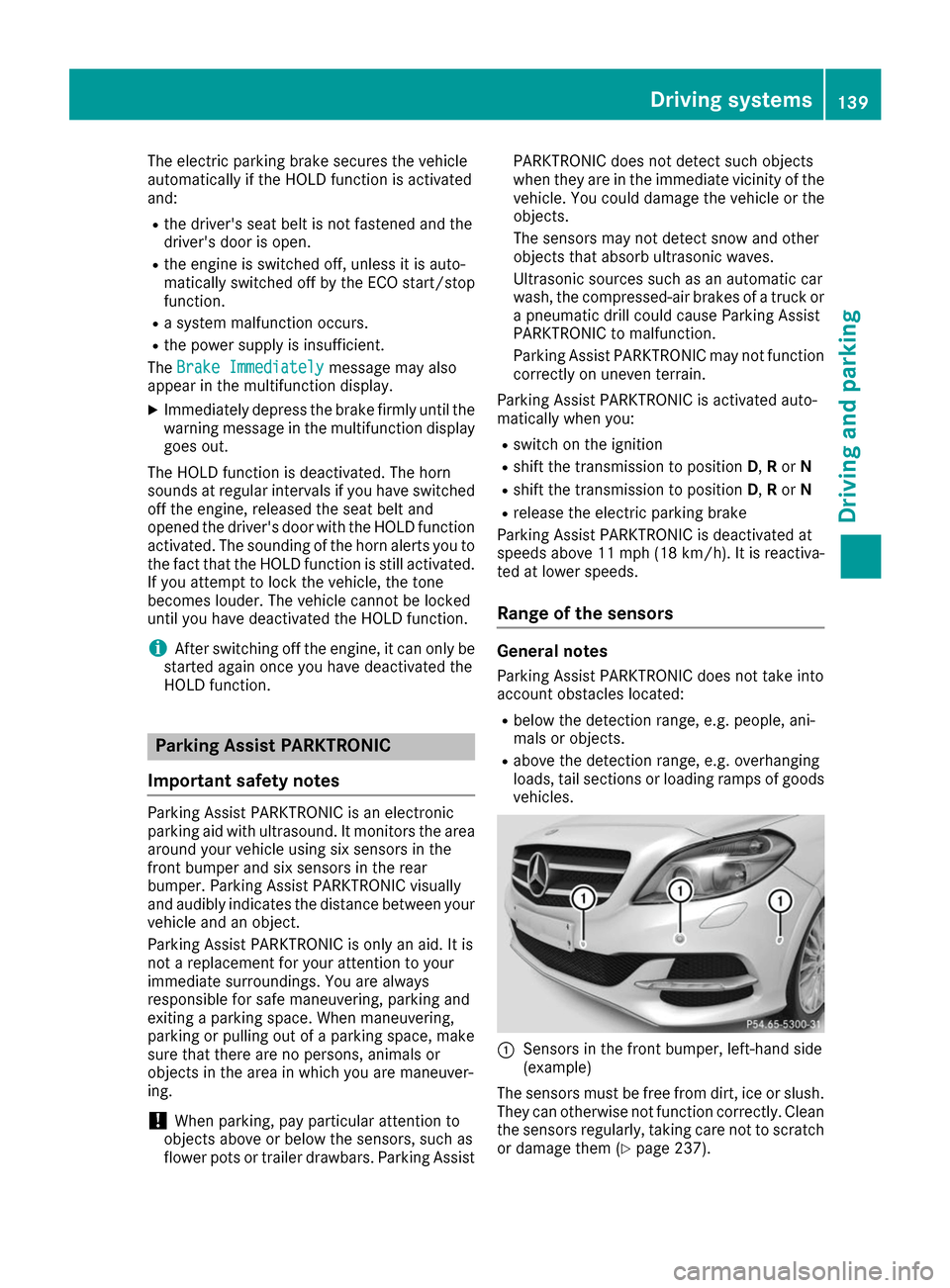
vehicles. 0043
Sensors in the front bumper, left-hand side
(example)
The sensors must be free from dirt, ice or slush. They can otherwise not function correctly. Clean
the sensors regularly, taking care not to scratch
or damage them (Y page 237). Driving systems
139Driving and parking Z
Page 145 of 290
R
the range of movement is too small
R the parking space is bordered by an obstacle
which is not clearly defined such as a tree or a
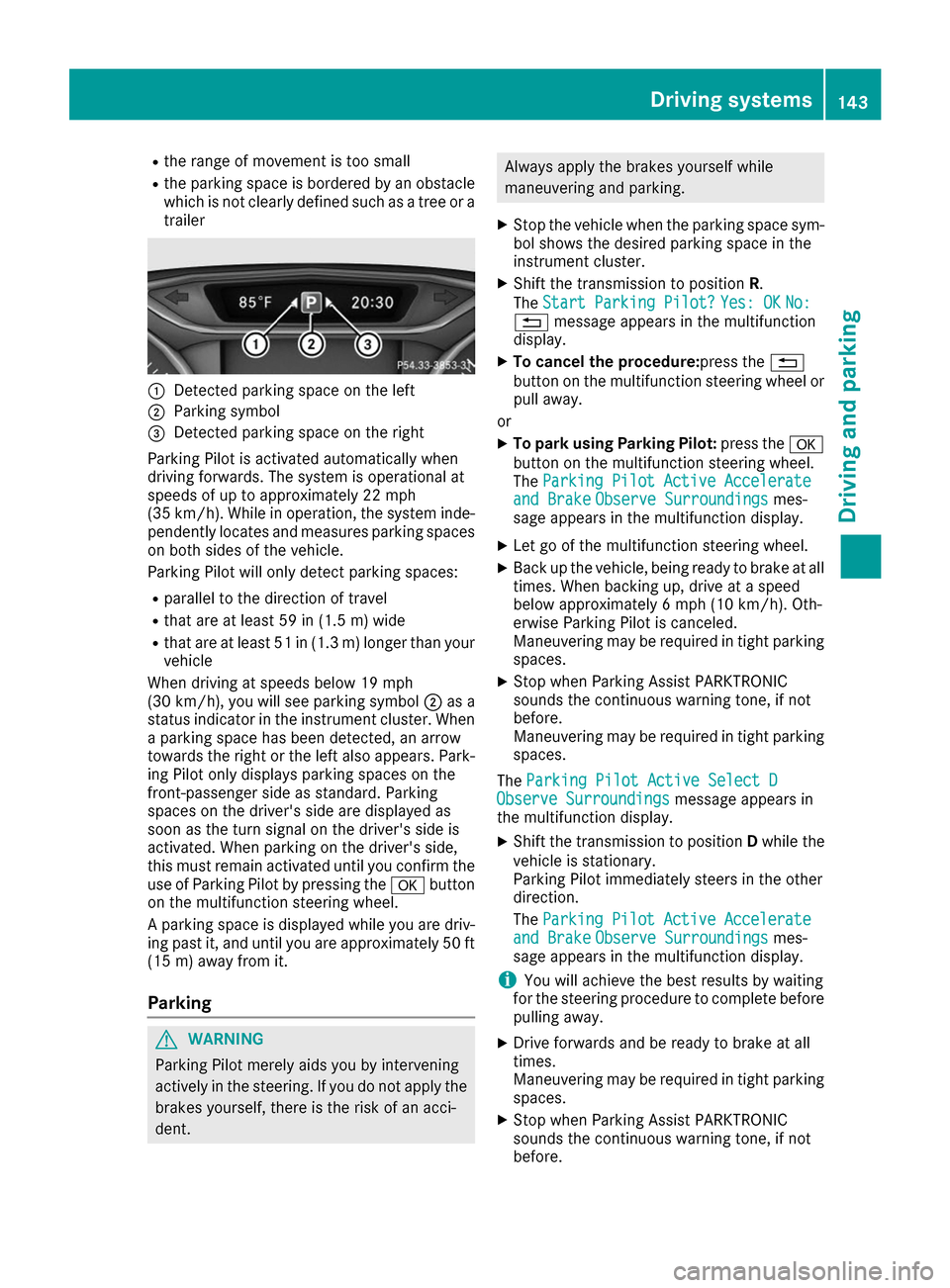
trailer 0043
Detected parking space on the left
0044 Parking symbol
0087 Detected parking space on the right
Parking Pilot is activated automatically when
driving forwards. The system is operational at
speeds of up to approximately 22 mph
(35 km/h). While in operation, the system inde- pendently locates and measures parking spaces on both sides of the vehicle.
Parking Pilot will only detect parking spaces:
R parallel to the direction of travel
R that are at least 59 in (1.5 m) wide
R that are at least 51 in (1.3 m) longer than your
vehicle
When driving at speeds below 19 mph
(30 km/h), you will see parking symbol 0044as a
status indicator in the instrument cluster. When
a parking space has been detected, an arrow
towards the right or the left also appears. Park- ing Pilot only displays parking spaces on the
front-passenger side as standard. Parking
spaces on the driver's side are displayed as
soon as the turn signal on the driver's side is
activated. When parking on the driver's side,
this must remain activated until you confirm the
use of Parking Pilot by pressing the 0076button
on the multifunction steering wheel.
A parking space is displayed while you are driv- ing past it, and until you are approximately 50 ft
(15 m) away from it.
Pa rking G
WARNING
Parking Pilot merely aids you by intervening
actively in the steering. If you do not apply the brakes yourself, there is the risk of an acci-
dent. Always apply the brakes yourself while
maneuvering and parking.
X Stop the vehicle when the parking space sym-
bol shows the desired parking space in the
instrument cluster.
X Shift the transmission to position R.
The Start Parking Pilot?
Start Parking Pilot? Yes: OK Yes: OKNo:
No:
0038 message appears in the multifunction
display.
X To cancel the procedure:press the 0038
button on the multifunction steering wheel or pull away.
or
X To park using Parking Pilot: press the0076
button on the multifunction steering wheel.
The Parking Pilot Active Accelerate Parking Pilot Active Accelerate
and Brake
and Brake Observe Surroundings
Observe Surroundings mes-
sage appears in the multifunction display.
X Let go of the multifunction steering wheel.
X Back up the vehicle, being ready to brake at all
times. When backing up, drive at a speed
below approximately 6 mph (10 km/h). Oth-
erwise Parking Pilot is canceled.
Maneuvering may be required in tight parking
spaces.
X Stop when Parking Assist PARKTRONIC
sounds the continuous warning tone, if not
before.
Maneuvering may be required in tight parking
spaces.
The Parking Pilot Active Select D
Parking Pilot Active Select D
Observe Surroundings Observe Surroundings message appears in
the multifunction display.
X Shift the transmission to position Dwhile the
vehicle is stationary.
Parking Pilot immediately steers in the other
direction.
The Parking Pilot Active Accelerate
Parking Pilot Active Accelerate
and Brake and Brake Observe Surroundings
Observe Surroundings mes-
sage appears in the multifunction display.
i You will achieve the best results by waiting
for the steering procedure to complete before
pulling away.
X Drive forwards and be ready to brake at all
times.
Maneuvering may be required in tight parking
spaces.
X Stop when Parking Assist PARKTRONIC
sounds the continuous warning tone, if not
before. Driving systems
143Driving and parking Z