display MERCEDES-BENZ B-Class ELECTRIC 2016 W246 Owner's Guide
[x] Cancel search | Manufacturer: MERCEDES-BENZ, Model Year: 2016, Model line: B-Class ELECTRIC, Model: MERCEDES-BENZ B-Class ELECTRIC 2016 W246Pages: 342, PDF Size: 7.53 MB
Page 52 of 342
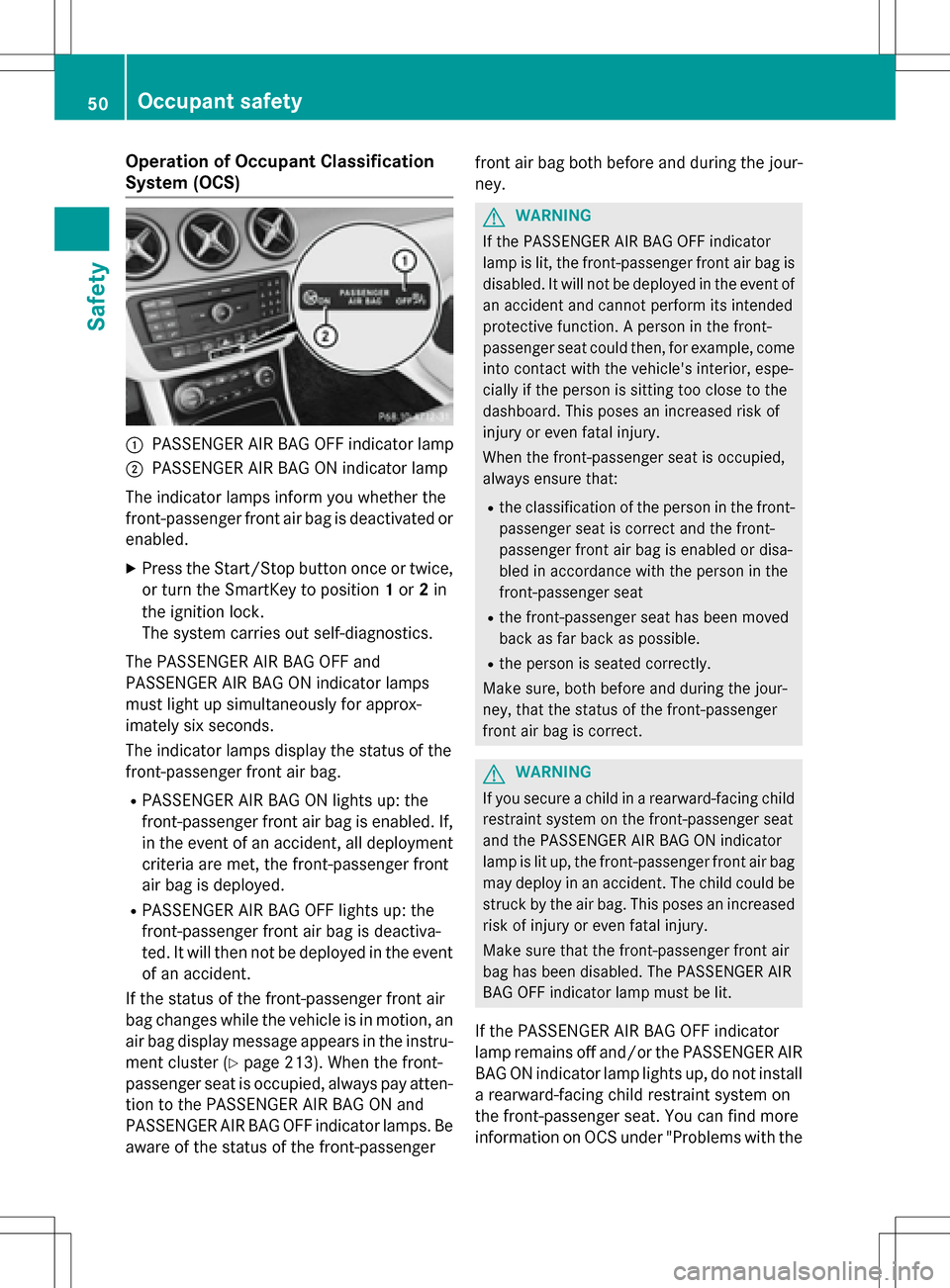
Operation of Occupant Classification
System (OCS)
:PASSENGER AIR BAG OFF indicator lamp
;PASSENGER AIR BAG ON indicator lamp
The indicator lamps inform you whether the
front-passenger front air bag is deactivated or enabled.
XPress the Start/Stop button once or twice,or turn the SmartKey to position 1or 2in
the ignition lock.
The system carries out self-diagnostics.
The PASSENGER AIR BAG OFF and
PASSENGER AIR BAG ON indicator lamps
must light up simultaneously for approx-
imately six seconds.
The indicator lamps display the status of the
front-passenger front air bag.
RPASSENGER AIR BAG ON lights up: the
front-passenger front air bag is enabled. If,
in the event of an accident, all deployment
criteria are met, the front-passenger front
air bag is deployed.
RPASSENGER AIR BAG OFF lights up: the
front-passenger front air bag is deactiva-
ted. It will then not be deployed in the event of an accident.
If the status of the front-passenger front air
bag changes while the vehicle is in motion, an
air bag display message appears in the instru-
ment cluster (
Ypage 213). When the front-
passenger seat is occupied, always pay atten-
tion to the PASSENGER AIR BAG ON and
PASSENGER AIR BAG OFF indicator lamps. Be
aware of the status of the front-passenger front air bag both before and during the jour-
ney.
GWARNING
If the PASSENGER AIR BAG OFF indicator
lamp is lit, the front-passenger front air bag is
disabled. It will not be deployed in the event of
an accident and cannot perform its intended
protective function. A person in the front-
passenger seat could then, for example, come
into contact with the vehicle's interior, espe-
cially if the person is sitting too close to the
dashboard. This poses an increased risk of
injury or even fatal injury.
When the front-passenger seat is occupied,
always ensure that:
Rthe classification of the person in the front- passenger seat is correct and the front-
passenger front air bag is enabled or disa-
bled in accordance with the person in the
front-passenger seat
Rthe front-passenger seat has been moved
back as far back as possible.
Rthe person is seated correctly.
Make sure, both before and during the jour-
ney, that the status of the front-passenger
front air bag is correct.
GWARNING
If you secure a child in a rearward-facing child
restraint system on the front-passenger seat
and the PASSENGER AIR BAG ON indicator
lamp is lit up, the front-passenger front air bag may deploy in an accident. The child could be
struck by the air bag. This poses an increased
risk of injury or even fatal injury.
Make sure that the front-passenger front air
bag has been disabled. The PASSENGER AIR
BAG OFF indicator lamp must be lit.
If the PASSENGER AIR BAG OFF indicator
lamp remains off and/or the PASSENGER AIR
BAG ON indicator lamp lights up, do not install
a rearward-facing child restraint system on
the front-passenger seat. You can find more
information on OCS under "Problems with the
50Occupant safety
Safety
Page 54 of 342
For safety reasons, Mercedes-Benz recom-
mends that you only use seat accessories
that have been approved by Mercedes-Benz.
If the driver's air bag deploys, this does not
mean that the front-passenger front air bag
will also deploy. The Occupant Classification
System (OCS) categorizes the occupant in the
front-passenger seat. Depending on that
result, the front-passenger front air bag is
either enabled or deactivated.
System self-test
GDANGER
If both the PASSENGER AIR BAG OFF and
PASSENGER AIR BAG ON indicator lamps do
not light up during the system self-test, the
system is malfunctioning. The front-
passenger front air bag might be triggered
unintentionally or might not be triggered at all
in the event of an accident with high deceler-
ation. This poses an increased risk of injury or
even fatal injury.
In this case the front-passenger seat may not
be used. Do not install a child restraint system
on the front-passenger seat. Have the Occu-
pant Classification System (OCS) checked
and repaired immediately at a qualified spe-
cialist workshop.
GDANGER
If the PASSENGER AIR BAG OFF indicator
lamp remains lit after the system self-test, the
front-passenger front air bag is disabled. It will
not be deployed in the event of an accident. In
this case, the front-passenger front air bag
cannot perform its intended protective func-
tion, e.g. when a person is seated in the front-
passenger seat.
That person could, for example, come into
contact with the vehicle's interior, especially
if the person is sitting too close to the dash-
board. This poses an increased risk of injury or
even fatal injury.
When the front-passenger seat is occupied,
always ensure that:
Rthe classification of the person in the front- passenger seat is correct and the front-
passenger front air bag is enabled or disa-
bled in accordance with the person in the
front-passenger seat
Rthe person is seated properly with a cor-
rectly fastened seatbelt
Rthe front-passenger seat has been moved
back as far back as possible
If the PASSENGER AIR BAG OFF indicator
lamp remains lit when it should not, the front-
passenger seat may not be used. Do not
install a child restraint system on the front-
passenger seat. Have the Occupant Classifi-
cation System (OCS) checked and repaired
immediately at a qualified specialist work-
shop.
GWARNING
Objects between the seat surface and the
child restraint system could affect OCS oper- ation. This could result in the front-passenger
air bag not functioning as intended during an
accident. This poses an increased risk of
injury or even fatal injury.
Do not place any objects between the seat
surface and the child restraint system. The
entire base of the child restraint system must
always rest on the seat cushion of the front-
passenger seat. The backrest of the forward-
facing child restraint system must, as far as
possible, be resting on the backrest of the
front-passenger seat. Always comply with the
child restraint system manufacturer's instal-
lation instructions.
After the system self-test, the PASSENGER
AIR BAG OFF or PASSENGER AIR BAG ON
indicator lamp displays the status of the front-
passenger front air bag (
Ypage 50).
For more information about the OCS, see
"Problems with the Occupant Classification
System" (
Ypage 53).
52Occupant safety
Safety
Page 65 of 342
ABS (Anti-lock Braking System)
Gene ral information
AB S regulates brake pressure in suchaway
that th e wheels do not lock when you brake.
This allows you to continue steering the vehi-
cle when braking.
The ! ABS warning lamp in the instrument
cluster lights up when the ignition is switched
on. It goes out when the engine is running.
AB S works from a speed of about 5 mph
(8 km/h), regardless of road-surface condi-
tions. ABS works on slippery surfaces, even
when you only brake gently.
Important safety notes
iObserve the "Important safety notes" sec-
tion (
Ypage 62).
GWARNING
If AB S is faulty, the wheels could lock when
braking. The steerability and braking charac-
teristics may be severely impaired. Addition-
ally, further driving safety systems are deac-
tivated. There is an increased danger of skid-
ding and accidents.
Drive on carefully. Have ABS checked imme-
diately at a qualified specialist workshop.
When ABS is malfunctioning, other systems,
including driving safety systems, will also
become inoperative. Observe the information
on the ABS warning lamp (
Ypage 232) and
display messages which may be shown in the
instrument cluster(
Ypage 201).
Braking
XIf ABS intervenes: continue to depress the
brake pedal vigorously until the braking sit-
uation is over.
XTo make a fu ll brake application:
depress the brake pedal with full force.
If ABS intervenes when braking, you will fee la
pulsing in the brake pedal. The pulsating brake pedal can be an indica-
tion of hazardous road conditions, and func-
tion
s as a reminder to take extra care while
driving.
BAS (Brake Assist System)
Gene ral information
BA S operates in emergency braking situa-
tion s. If you depress the brake pedal quickly,
BA S automatically boosts the braking force,
thus shortening the stopping distance.
Important safety notes
iObserve the "Important safety notes"sec-
tion (
Ypage 62).
GWARNING
If BA S is malfunctioning, the braking distance
in an emergency braking situation is
increased. There is a risk of an accident.
In an emergenc y braking situation, depress
th e brake pedal with full force. ABSprevents
th e wheels from locking.
Braking
XKeep the brake pedal firmly depressed until
th eemergenc y braking situation is over.
AB Sprevents th e wheels from locking.
The brakes will function as usual once you
release the brake pedal. BAS is deactivated.
COLLISION PREVENTION ASSIST
PLUS
Gene ral information
iObserve the "Important safety notes"sec-
tion (
Ypage 62).
COLLISION PREVENTION ASSIST PLUScon-
sists of a distance warning function with an
autonomous braking function and adaptive
Brake As sist.
Driving safety systems63
Safety
Z
Page 66 of 342
COLLISION PREVENTION ASSISTPLUS can
help you to minimize the risk of a front-end
co llision with a vehicle ahead or reduce the
effects of such a collision.
If COLLISION PREVENTION AS SISTPLUS
detects that there is a risk of a collision, you
will be warned visually and acoustically. If you
do not react to the visual and audible collision
warning, autonomous braking can be initiated
in critical situations. If you apply the brake
yourself in a critical situation, the COLLISION
PREVENTION AS SISTPLUS adaptive Brake
Assist assists you.
Important safety notes
Detection of hazardous situations can be par-
ticularly impaired by:
Rthere is dirt on the sensors or anything else
covering the sensors
Rthere is snow or heavy rain
Rthereisinterference by other radar sources
Rthere are strong radar reflections, for
example in parking garages
Ra narrow vehicle traveling in front, e.g. a
motorbike
Ra vehicle traveling in front on a different line
Rnew vehicles or after a service on the COL-
LISI ON PREVENTION AS SISTPLUS system
Observe the important safety notes in the
"Breaking-in notes" section (
Ypage 130).
Fo llowing damage to the front end of the vehi-
cle, have the configuration and operation of
the radar sensor checked at a qualified spe-
cialist workshop. This also applies to colli-
sions at low speeds where there is no visible
damage to the front of the vehicle.
Switching on/off
The COLLISION PREVENTION AS SISTPLUS is
automatically active after switching on the
ignition.
You can activate or deactivate COLLISION
PREVENTION AS SISTPLUS in the on-board
computer (
Ypage 194). When deactivated, the distance warning function and the auton-
omous braking function are also deactivated.
If COLLISION PREVENTION AS SISTPLUS is
deactivated, the æsymbol appears in the
assistance graphics display.
Distance warning function
General info rmation
The distance warning function can help you to
minimize the risk of a front-end collision with
a vehicle ahead or reduce the effects of such a co llision. Ifthe distance warning function
detects that there is ariskofacollision, you
will be warned visually and acoustically.
Important safety notes
iObserve the "Important safety notes" sec-
tion for driving safety systems (
Ypage 62).
GWARNING
The distance warning function does not react:
Rto people or animals
Rto oncoming vehicles
Rto crossing traffic
Rwhen cornering
Thus, the distance warning function cannot
provide a warning in all critical situations.
There is a risk of an accident.
Always pay careful attention to the traffic sit-
uation and be ready to brake.
GWARNING
The distance warning function cannot always
clearly identify objects and complex traffic
situations.
In such cases, the distance warning function
may:
Rgive an unnecessary warning
Rno t giveawarning
There is a risk of an accident.
Always pay careful attention to the traffic sit-
uation and do not rely solely on the distance
warning function.
64Driving safety systems
Safety
Page 67 of 342
Function
Starting at a speed of approximately 4 mph
(7 km/h), the distance warning function
warns you if you rapidly approach a vehicle in
front. An intermittent warning tone will then
sound, and the·distance warning lamp
will light up in the instrument cluster.
XBrake immediately in order to increase the distance from the vehicle in front.
or
XTake evasive action, provided it is safe to do
so.
Due to the nature of the system, particularly
complicated but non-critical driving condi-
tions may also cause the system to display a warning.
With the help of the radar sensor system, the
distance warning function can detect obsta-
cles that are in the path of your vehicle for an
extended period of time.
Up to a speed of approximately 44 mph
(70 km/h), the distance warning function can
also react to stationary obstacles, such as
stopped or parked vehicles.
Autonomous braking function
If the driver does not react to the distance
warning signal in a critical situation, COLLI-
SION PREVENTION ASSIST PLUS can assist
with the autonomous braking function.
The autonomous braking function:
Rgives the driver more time to react to criti-
cal driving situations
Rcan help the driver to avoid an accident or
Rreduces the effects of an accident
The autonomous braking function is available
in the following speed ranges:
R4 - 65 mph (7 - 105 km/h) for moving
objects
R4 - 31 mph (7 - 50 km/h) for stationary
objects
Due to the nature of the system, particularly
complicated but non-critical driving condi- tions may also cause the Autonomous Brak-
ing Function to intervene.
Adaptive Brake Assist
General information
iObserve the "Important safety notes" sec-
tion (
Ypage 62).
With the help of adaptive Brake Assist, the
distance warning signal can detect obstacles
that are in the path of your vehicle for an
extended period of time.
If adaptive Brake Assist detects a risk of col-
lision with the vehicle in front, it calculates
the braking force necessary to avoid a colli-
sion. If you apply the brakes forcefully, adap-
tive Brake Assist will automatically increase
the braking force to a level suitable for the
traffic conditions.
Adaptive Brake Assist provides braking assis-
tance in hazardous situations at speeds
above 4 mph (7 km/h). It uses radar sensor
technology to assess the traffic situation.
Up to a speed of approximately 155 mph
(25 0km/ h), adaptive Brake Assist is capable
of reacting to moving objects that have
already been detected as such at least once
over the period of observation.
Up to a speed of approximately 44 mph
(70 km/ h), adaptive Brake Assist reacts to
stationary obstacles.
XKeep the brake pedal depressed until the
emergency braking situation is over.
ABS prevents the wheels from locking.
The brakes will work normally again if:
Ryou release the brake pedal.
Rthere is no longer any danger of a collision.
Rno obstacle is detected in front of your
vehicle.
Adaptive Brake Assist is then deactivated.
Important safety notes
iObserve the "Important safety notes" sec-
tion for driving safety systems (
Ypage 62).
Driving safety systems65
Safety
Z
Page 69 of 342
Observe the information on warning lamps
(
Ypage 235) and display messages which
may be shown in the instrument cluster
(
Ypage 201).
Only use wheels with the recommended tire
sizes. Only then will ESP
®function properly.
Characteristics of ESP®
Characteristics of ESP®
If the ÷ ESP warning lamp goes out before
beginning the journey, ESP®is automatically
active.
If ESP
®intervenes, the ÷ESP®warning
lamp flashes in the instrument cluster.
If ESP
®intervenes:
XDo not deactivate ESP®under any circum-
stances.
XOnly depress the accelerator pedal as far as
necessary when pulling away.
XAdapt your driving style to suit the prevail-
ing road and weather conditions.
Deactivating/activating ESP®
Important safety notes
You can select between the following states
of ESP
®:
RESP®is activated.
RESP®is deactivated.
GWARNING
If you deactivate ESP
®, ESP®no longer sta-
bilizes the vehicle. There is an increased risk
of skidding and an accident.
Only deactivate ESP
®in the situations descri-
bed in the following.
It may be best to deactivate ESP®in the fol-
lowing situations:
Rwhen using snow chains
Rin deep snow
Ron sand or gravel
iActivate ESP®as soon as the situations
described above no longer apply. ESP®will
otherwise not be able to stabilize the vehi-
cle if the vehicle starts to skid or a wheel
starts to spin.
!Avoid spinning the driven wheels for an
extended period with ESP®deactivated.
You could otherwise damage the drivetrain.
Deactivating/activating ESP
®
You can deactivate or activate ESP®via the
on-board computer (
Ypage 193).
ESP
®deactivated:
The å ESP
®OFF warning lamp in the
instrument cluster lights up.
ESP
®activated:
The å ESP
®OFF warning lamp in the
instrument cluster goes out.
Characteristics when ESP
®is deactivated
If ESP
®is deactivated and one or more wheels
start to spin, the ÷ESP®warning lamp in
the instrument cluster flashes. In such situa-
tions, ESP
®will not stabilize the vehicle.
If you deactivate ESP
®:
RESP®no longer improves driving stability.
REngine torque is no longer limited and the
drive wheels are able to spin.
The spinning of the wheels results in a cut-
ting action for better traction on loose sur-
faces.
RTraction control is still activated.
RCOLLISION PREVENTION ASSIST is no lon-
ger available; nor is it activated if you brake firmly with assistance from ESP
®.
RESP®still provides support when you brake
firmly.
Driving safety systems67
Safety
Z
Page 71 of 342
You can find information about manually
adjustable recuperation under "Steering
wheel paddle shifters" (
Ypage 138).
If the warning light in the instrument cluster is lit up, there is a motor malfunction or a brake
malfunction.
Observe information regarding indicator and
warning lamps (
Ypage 231) as well as dis-
play messages (
Ypage 201).
Protection against theft
Immobilizer
The immobilizer prevents your vehicle from
being started without the correct SmartKey.
XTo activate with the SmartKey: remove
the SmartKey from the ignition lock.
XTo activate with KEYLESS-GO start-
function or KEYLESS-GO: switch the igni-
tion off and open the driver's door.
XTo deactivate: switch on the ignition.
When leaving the vehicle, always take the
SmartKey with you and lock the vehicle. Any-
one can start the drive system if a valid Smart-
Key has been left inside the vehicle.
iThe immobilizer is always deactivated
when you start the drive system.
In the event that the engine cannot be star-
ted (yet the vehicle's battery is charged),
the system is not operational. The READY
display in the multifunction display does
not appear. Contact an authorized
Mercedes-Benz Center or call
1-800-FOR-MERCedes (in the USA) or
1-800-387-0100 (in Canada).
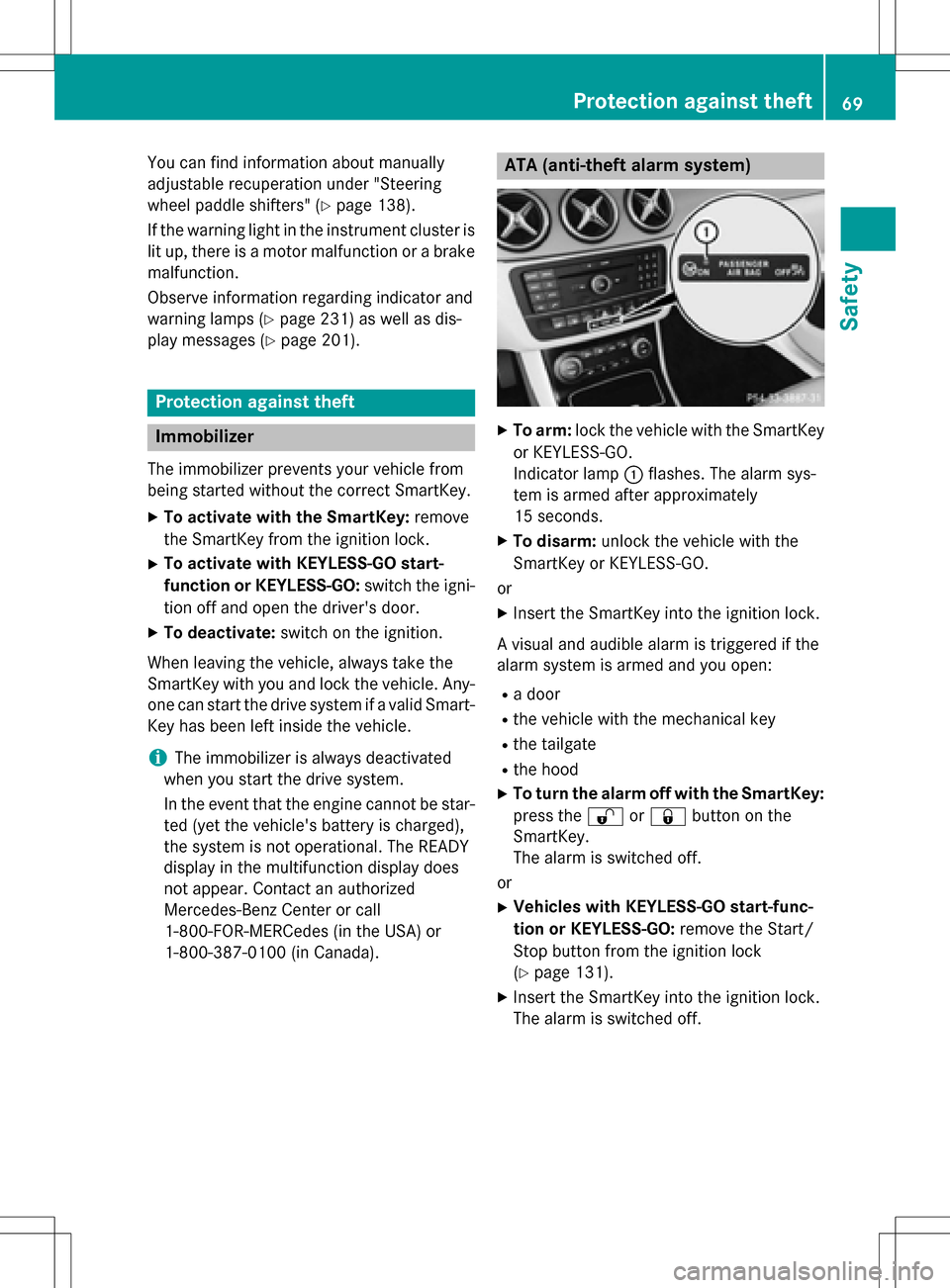
ATA (anti-theft alarm system)
XTo arm: lock the vehicle with the SmartKey
or KEYLESS-GO.
Indicator lamp :flashes. The alarm sys-
tem is armed after approximately
15 seconds.
XTo disarm: unlock the vehicle with the
SmartKey or KEYLESS-GO.
or
XInsert the SmartKey into the ignition lock.
A visual and audible alarm is triggered if the
alarm system is armed and you open:
Ra door
Rthe vehicle with the mechanical key
Rthe tailgate
Rthe hood
XTo turn the alarm off with the SmartKey:
press the %or& button on the
SmartKey.
The alarm is switched off.
or
XVehicles with KEYLESS-GO start-func-
tion or KEYLESS-GO: remove the Start/
Stop button from the ignition lock
(
Ypage 131).
XInsert the SmartKey into the ignition lock.
The alarm is switched off.
Protection against theft69
Safety
Z
Page 90 of 342
Useful information
i
This Operator's Manual describes all
models and all standard and optional equip-
ment of your vehicle available at the time of
publication of the Operator's Manual.
Country-specific differences are possible.
Please note that your vehicle may not be
equipped with all features described. This
also applies to safety-related systems and
functions.
iRead the information on qualified special-
ist workshops (
Ypage 26).
Correct driver's seat position
GWARNING
You could lose control of your vehicle if you do the following while driving:
Radjust the driver's seat, head restraint,
steering wheel or mirrors
Rfasten the seat belt
There is a risk of an accident.
Adjust the driver's seat, head restraint, steer-
ing wheel and mirror and fasten your seat belt before starting the vehicle's drive system.
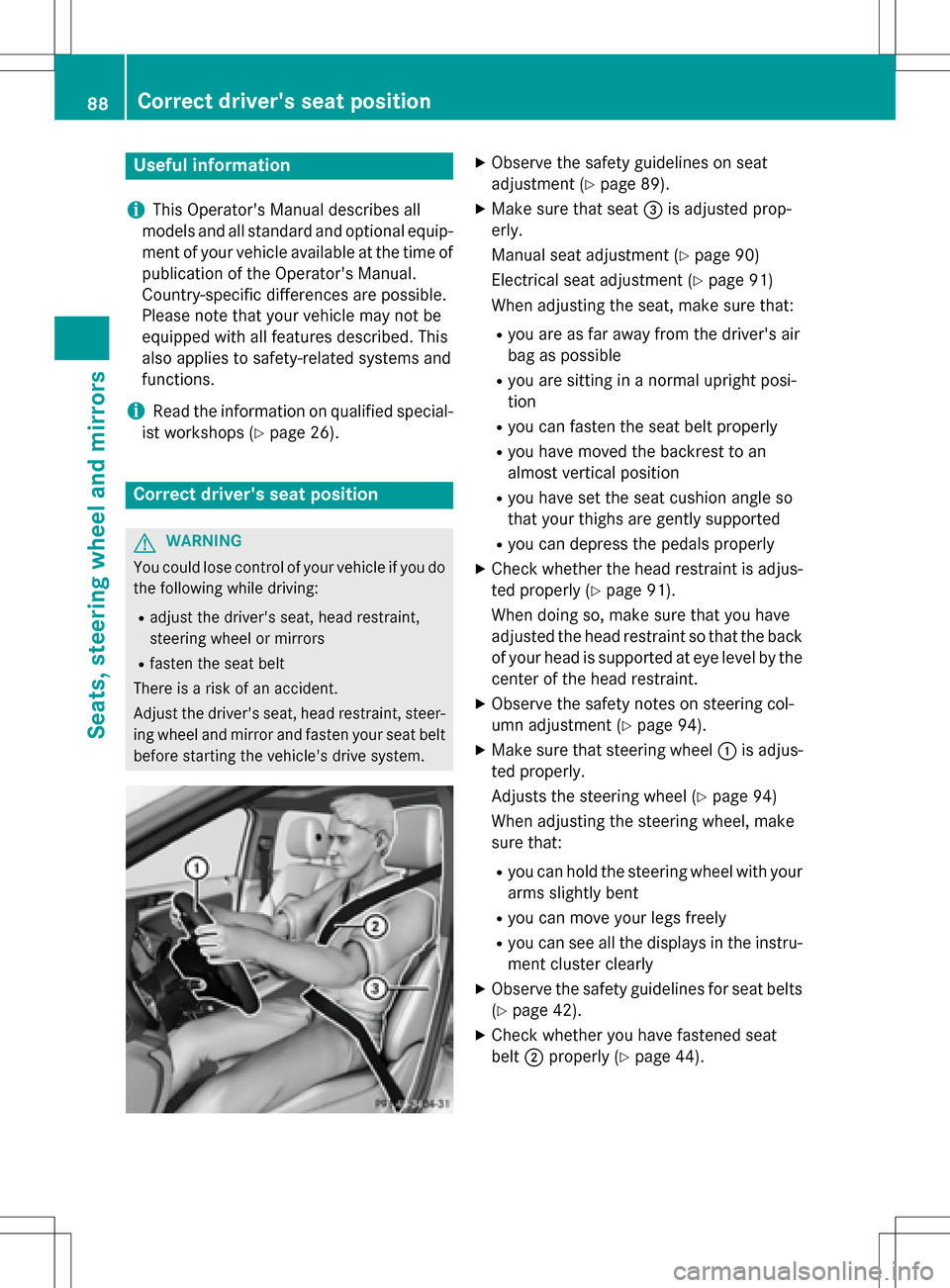
XObserve the safety guidelines on seat
adjustment (
Ypage 89).
XMake sure that seat =is adjusted prop-
erly.
Manual seat adjustment (
Ypage 90)
Electrical seat adjustment (
Ypage 91)
When adjusting the seat, make sure that:
Ryou are as far away from the driver's air
bag as possible
Ryou are sitting in a normal upright posi-
tion
Ryou can fasten the seat belt properly
Ryou have moved the backrest to an
almost vertical position
Ryou have set the seat cushion angle so
that your thighs are gently supported
Ryou can depress the pedals properly
XCheck whether the head restraint is adjus-
ted properly (
Ypage 91).
When doing so, make sure that you have
adjusted the head restraint so that the back
of your head is supported at eye level by the
center of the head restraint.
XObserve the safety notes on steering col-
umn adjustment (
Ypage 94).
XMake sure that steering wheel :is adjus-
ted properly.
Adjusts the steering wheel (
Ypage 94)
When adjusting the steering wheel, make
sure that:
Ryou can hold the steering wheel with your
arms slightly bent
Ryou can move your legs freely
Ryou can see all the displays in the instru-
ment cluster clearly
XObserve the safety guidelines for seat belts
(
Ypage 42).
XCheck whether you have fastened seat
belt ;properly (
Ypage 44).
88Correct driver's seat position
Seats, steering wheel and mirrors
Page 119 of 342
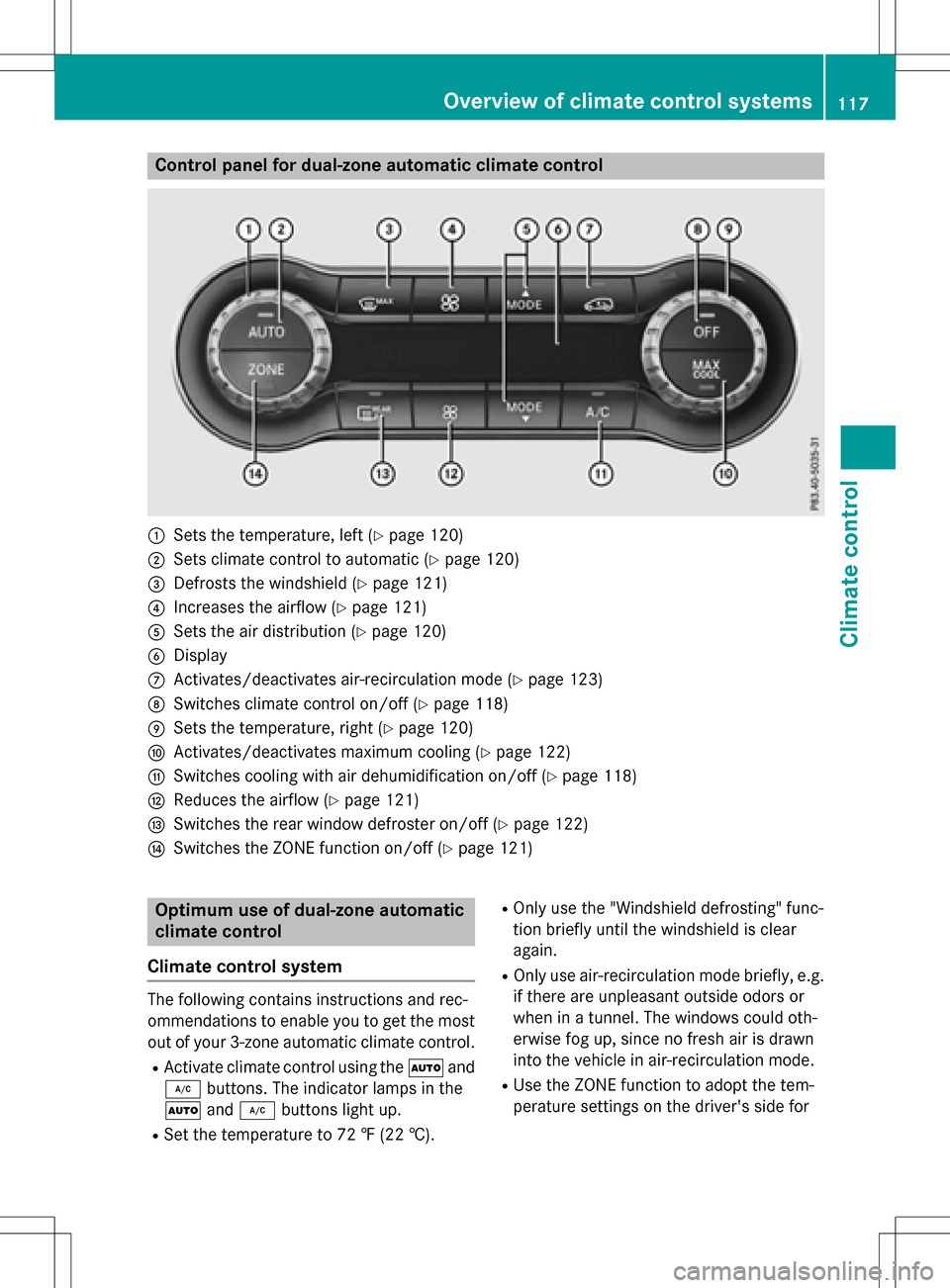
Control panel for dual-zone automatic climate control
:Sets the temperature, left (Ypage 120)
;Sets climate control to automatic (Ypage 120)
=Defrosts the windshield (Ypage 121)
?Increases the airflow (Ypage 121)
ASets the air distribution (Ypage 120)
BDisplay
CActivates/deactivates air-recirculation mode (Ypage 123)
DSwitches climate control on/off (Ypage 118)
ESets the temperature, right (Ypage 120)
FActivates/deactivates maximum cooling (Ypage 122)
GSwitches cooling with air dehumidification on/off (Ypage 118)
HReduces the airflow (Ypage 121)
ISwitches the rear window defroster on/off (Ypage 122)
JSwitches the ZONE function on/off (Ypage 121)
Optimum use of dual-zone automatic
climate control
Climate control system
The following contains instructions and rec-
ommendations to enable you to get the most
out of your 3-zone automatic climate control.
RActivate climate control using the Ãand
¿ buttons. The indicator lamps in the
à and¿ buttons light up.
RSet the temperature to 72 ‡ (22 †).
ROnly use the "Windshield defrosting" func-
tion briefly until the windshield is clear
again.
ROnly use air-recirculation mode briefly, e.g.
if there are unpleasant outside odors or
when in a tunnel. The windows could oth-
erwise fog up, since no fresh air is drawn
into the vehicle in air-recirculation mode.
RUse the ZONE function to adopt the tem-
perature settings on the driver's side for
Overview of climate control systems117
Climate control
Page 120 of 342
the front-passenger side as well. The indi-
cator lamp in theábutton goes out.
RIf you change the settings of the climate
control system, the climate status display
appears for approximately three seconds
at the bottom of the screen in the Audio/
COMAND display (see separate operating
instructions). You will see the current set-
tings of the various climate control func-
tions.
You can choose between various drive pro-
grams with the program selector button
(
Ypage 137).
If you have selected drive program E+:
Rthe cooling output is reduced when cooling
Rheat output is reduced when heating
Rthe time for which the rear window
defroster will run is reduced
If you have selected drive program Eor S, the
current climate settings are maintained.
Operating the climate control sys-
tems
Activating/deactivating climate con-
trol
General notes
When the climate control is switched off, the
air supply and air circulation are also
switched off. The windows could fog up.
Therefore, switch off climate control only
briefly
Dual-zone automatic climate control
XTurn the SmartKey to position 2in the igni-
tion lock (
Ypage 131).
XTo activate: press theÃbutton.
The indicator lamp in the Ãbutton lights
up. Airflow and air distribution are set to
automatic mode.
or
XPress the ^button.
The indicator lamp in the ^button goes
out. The previously selected settings are
restored.
XTo deactivate: press the^button.
The indicator lamp in the ^button lights
up.
iActivate climate control primarily using
the à button.
Switching cooling with air dehumidi-
fication on/off
General notes
If you deactivate the "Cooling with air-dehu-
midification" function, the air inside the vehi- cle will not be cooled. The air inside the vehi-
cle will also not be dehumidified. The win-
dows can fog up more quickly. Therefore, only
deactivate the "Cooling with air-dehumidifi-
cation" function briefly.
The "Cooling with air-dehumidification" func-
tion is operational when the vehicle is ready
to drive. The air inside the vehicle is cooled
and dehumidified according to the tempera-
ture selected.
Condensation may drip from the underside of
the vehicle when it is in cooling mode. This is
normal and not a sign that there is a malfunc- tion.
118Operating the climate control systems
Climate control