Head light MERCEDES-BENZ B-Class ELECTRIC 2016 W246 Owner's Manual
[x] Cancel search | Manufacturer: MERCEDES-BENZ, Model Year: 2016, Model line: B-Class ELECTRIC, Model: MERCEDES-BENZ B-Class ELECTRIC 2016 W246Pages: 342, PDF Size: 7.53 MB
Page 7 of 342
Automatic headlamp mode.............. 100
Automatic transmission
Display message ............................ 225
B
Backup lamp
Changing bulbs .............................. 107
Display message ............................ 216
Bag hook ............................................ 247
BAS (Brake Assist System) .................63
Battery (SmartKey)
Checking .......................................... 75
Important safety notes .................... 75
Replacing ......................................... 75
Battery (vehicle)
Charging ........................................ 289
Display message ............................ 218
Important safety notes .................. 287
Jump starting ................................. 292
Belt
see Seat belts
Blind Spot Assist
Activating/deactivating (on-
board computer) ............................ 194
Display message ............................ 220
Notes/function .............................. 177
Brake Assist
see BAS (Brake Assist System)
Brake fluid
Display message ............................ 208
Notes ............................................. 335
Brake force distribution
see EBD (electronic brake force
distribution)
Brake lamps
Display message ............................ 215
Brake system
Driving safety systems ..................... 68
Brakes
ABS .................................................. 63
Adaptive Brake Assist ...................... 65
BAS .................................................. 63
Brake fluid (notes) ......................... 335
Display message ............................ 201
EBD .................................................. 68
Hill start assist ............................... 134
HOLD function ............................... 163 Important safety notes .................. 158
Maintenance .................................. 159
Parking brake ................................ 155
Riding tips ...................................... 158
Warning lamp ................................. 231
Breakdown
Towing away .................................. 294
Where will I find...? ........................ 282
see Flat tire
Brightness control (instrument
cluster lighting) ................................... 31
Buttons on the steering wheel ......... 184
C
California
Important notice for retail cus-
tomers and lessees .......................... 22
Calling up a malfunction
see Display messages
Car
see Vehicle
Care
Car wash ........................................ 274
Carpets .......................................... 280
Display ........................................... 278
Exterior lights ................................ 277
Gear or selector lever .................... 278
Interior ........................................... 278
Matte finish ................................... 276
Notes ............................................. 273
Paint .............................................. 275
Plastic trim .................................... 278
Power washer ................................ 275
Rear view camera .......................... 278
Roof lining ...................................... 280
Seat belt ........................................ 279
Seat cover ..................................... 279
Sensors ......................................... 277
Steering wheel ............................... 278
Trim pieces .................................... 278
Washing by hand ........................... 274
Wheels ........................................... 276
Windows ........................................ 276
Wiper blades .................................. 277
Wooden trim .................................. 278
Cargo compartment cover
Important safety notes .................. 248
Index5
Page 8 of 342
Installing/removing ....................... 248
Notes/how to use .........................248
Cargo compartment enlargement ... 246
Cargo compartment floor
Height adjustment ......................... 250
Important safety notes .................. 249
Opening/closing ............................ 250
Stowage well (under) ..................... 249
Cargo net
Attaching ....................................... 249
Important safety information ......... 249
Cargo tie down rings ......................... 247
CD player (on-board computer) ........191
Center console
Lower section .................................. 36
Upper section .................................. 35
Central locking
Automatic locking (on-board com-
puter) ............................................. 198
Locking/unlocking (SmartKey) ....... .72
Changing bulbs
Cornering light function ................ .107
High-beam headlamps ................... 106
License plate lighting ..................... 109
Low-beam headlamps .................... 106
Parking lamps ................................ 107
Rear fog lamp ................................ 107
Reversing lamps ............................ 107
Standing lamps (front) ................... 107
Turn signals (front) ......................... 107
Charge level display .......................... 184
Charging
with RANGE PLUS .......................... 195
see Charging the high-voltage battery
Charging cable
Connecting ....................................1 48
Controls ......................................... 147
Important safety notes .................. 146
Removing ....................................... 149
Storing ...........................................1 47
Warming up ................................... 142
Charging the high-voltage battery
(important safety notes) ................... 140
Child
Restraint system .............................. 57
Child seat
Forward-facing restraint system ...... 60 LATCH-type (ISOFIX) child seat
anchors ............................................ 58
On the
front-passenger seat ............ 60
Rearward-facing restraint system .... 60
Top Tether ....................................... 59
Child-proof locks
Important safety notes .................... 61
Rear doors ....................................... 61
Children
Special seat belt retractor ............... 57
Cigarette lighter ................................ 254
Cleaning
Mirror turn signal ........................... 277
Climate control
Automatic climate control (dual-
zone) .............................................. 117
Auxiliary climate control (on-
board computer) ............................ 196
Controlling automatically ............... 120
Convenience opening/closing
(air-recirculation mode) ................. 123
Cooling with air dehumidification .. 118
Defrosting the windows ................. 122
Defrosting the windshield .............. 121
General notes ................................ 116
Immediate pre-entry climate con-
trol ................................................. 125
Indicator lamp ................................ 120
Information about using auto-
matic climate control ..................... 117
Maximum cooling .......................... 122
Overview of systems ...................... 116
Pre-entry climate control at
departure time ............................... 125
Pre-entry climate control at time
of departure (on-board computer) .. 196
Pre-entry climate control via key ... 124
Pre-entry climate control via key
(on-board computer) ...................... 196
Problem with the rear window
defroster ........................................ 123
Problems with cooling with air
dehumidification ............................ 120
Refrigerant ..................................... 337
Refrigerant filling capacity ............. 337
Setting the air distribution ............. 120
Setting the air vents ...................... 126
Setting the airflow ......................... 121
6Index
Page 11 of 342
Emergency releaseDriver's door .................................... 80
Vehicle ............................................ .80
Emergency Tensioning Devices
Activation ........................................ .54
Emergency unlocking
Tailgate ............................................ 82
Energy
Driving tips .................................... 157
Energy flow display ...........................187
ESP
®(Electronic Stability Pro-
gram)
Activating/deactivating (on-
board computer) ............................ 193
Characteristics ................................. 67
Deactivating/activating (notes) ....... 67
Display message ............................ 201
Function/notes ................................ 66
General notes .................................. 66
Important safety information ........... 66
Warning lamp ................................. 235
ETS/4ETS (Electronic Traction Sys-
tem) ...................................................... 66
Exhaustive discharging (high-volt-
age battery) ....................................... 290
Exterior lighting
Cleaning ......................................... 277
see Lights
Exterior mirrors
Adjusting ......................................... 95
Dipping (automatic) ......................... 96
Out of position (troubleshooting) ..... 95
Storing settings (memory func-
tion) ................................................. 98
Storing the parking position ............. 96
Eyeglasses compartment ................. 243
F
Flat tire
MOExtended tires .......................... 283
Preparing the vehicle ..................... 282
TIREFIT kit ...................................... 284
Floormats .......................................... .267
Folding table ...................................... 244
Frequencies
Mobile phone ................................. 332
Two-way radio ................................ 332 Front-passenger seat
Folding the backrest forward/
back ............................................... 245
Fuses
Allocation chart ............................ .299
Before changing ............................ .298
Fuse box in the engine compart-
ment .............................................. 298
Fuse box in the front-passenger
footwell .......................................... 299
Important safety notes .................. 298
G
Garage door opener
Clearing the memory ..................... 266
General notes ................................ 263
Important safety notes .................. 263
Opening/closing the garage door .. 266
Programming (button in the rear-
view mirror) ................................... 264
Synchronizing the rolling code ....... 264
Generated electrical energy (Audio
20) ...................................................... 144
Genuine parts ...................................... 20
Glove box .......................................... .243
H
Handbrake
see Parking brake
Hazard warning lamps
Display message ............................ 227
Switching on/off ........................... 102
Head restraints
Adjusting ......................................... 91
Adjusting (manually) ........................ 91
Adjusting (rear) ................................ 92
Headlamps
Fogging up ..................................... 103
see Automatic headlamp mode
Heating
see Climate control
High beam flasher .............................102
High voltage
see Safety notes
High-beam headlamps
Changing bulbs .............................. 106
Index9
Page 13 of 342
LightsAutomatic headlamp mode ............ 100
Cornering light function ................ .103
Fogged up headlamps .................... 103
Hazard warning lamps ................... 102
High beam flasher .......................... 102
High-beam headlamps ................... 102
Light switch ................................... 100
Low-beam headlamps .................... 101
Parking lamps ................................ 101
Rear fog lamp ................................ 101
Setting exterior lighting ................. 100
Standing lamps .............................. 101
Switching the daytime running
lamps on/off (on-board com-
puter) ............................................. 198
Turn signals ................................... 102
Loading guidelines ............................ 242
Locking
see Central locking
Locking (doors)
Automatic ........................................ 80
Emergency locking ........................... 81
From inside (central locking but-
ton) ................................................. .80
Locking centrally
see Central locking
Locking verification signal (on-
board computer) .............................. .198
Low-beam headlamps
Changing bulbs .............................. 106
Display message ............................ 214
Switching on/off ........................... 101
Lumbar support
Adjusting the 4-way lumbar sup-
port ................................................. .92
M
M+S tires ............................................ 304
Malfunction message
see Display messages
Map (navigation)
Switching the range on the map
on/off ............................................ 145
Matte finish (cleaning instruc-
tions) .................................................. 276 Maximum charge current
Setting (charging cable) ................. 147
mbrace
Call priority ................................... .259
Display message ............................ 209
Downloading destinations
(COMAND) ..................................... 259
Downloading routes ....................... 262
Emergency call .............................. 256
General notes ................................ 255
Geo fencing ................................... 263
Locating a stolen vehicle .............. .261
MB info call button ........................ 258
Remote fault diagnosis .................. 261
Remote vehicle locking .................. 261
Roadside Assistance button .......... 257
Search & Send ............................... 260
Self-test ......................................... 255
Speed alert .................................... 262
System .......................................... 255
Triggering the vehicle alarm ........... 263
Vehicle remote unlocking .............. 260
Mechanical key
Function/notes ................................ 74
Inserting .......................................... 75
Locking vehicle ................................ 81
Removing ......................................... 75
Unlocking the driver's door .............. 80
Memory card (audio) ......................... 191
Memory function ................................. 97
Message memory (on-board com-
puter) .................................................. 200
Messages
see Display messages
Mirror turn signal
Cleaning ......................................... 277
Mirrors
see Exterior mirrors
see Rear-view mirror
see Vanity mirror (in the sun visor)
Mobile phone
Frequencies ................................... 332
Installation ..................................... 332
Menu (on-board computer) ............ 192
Transmission output (maximum) .... 332
Modifying the programming
(SmartKey) ........................................... 74
Index11
Page 14 of 342
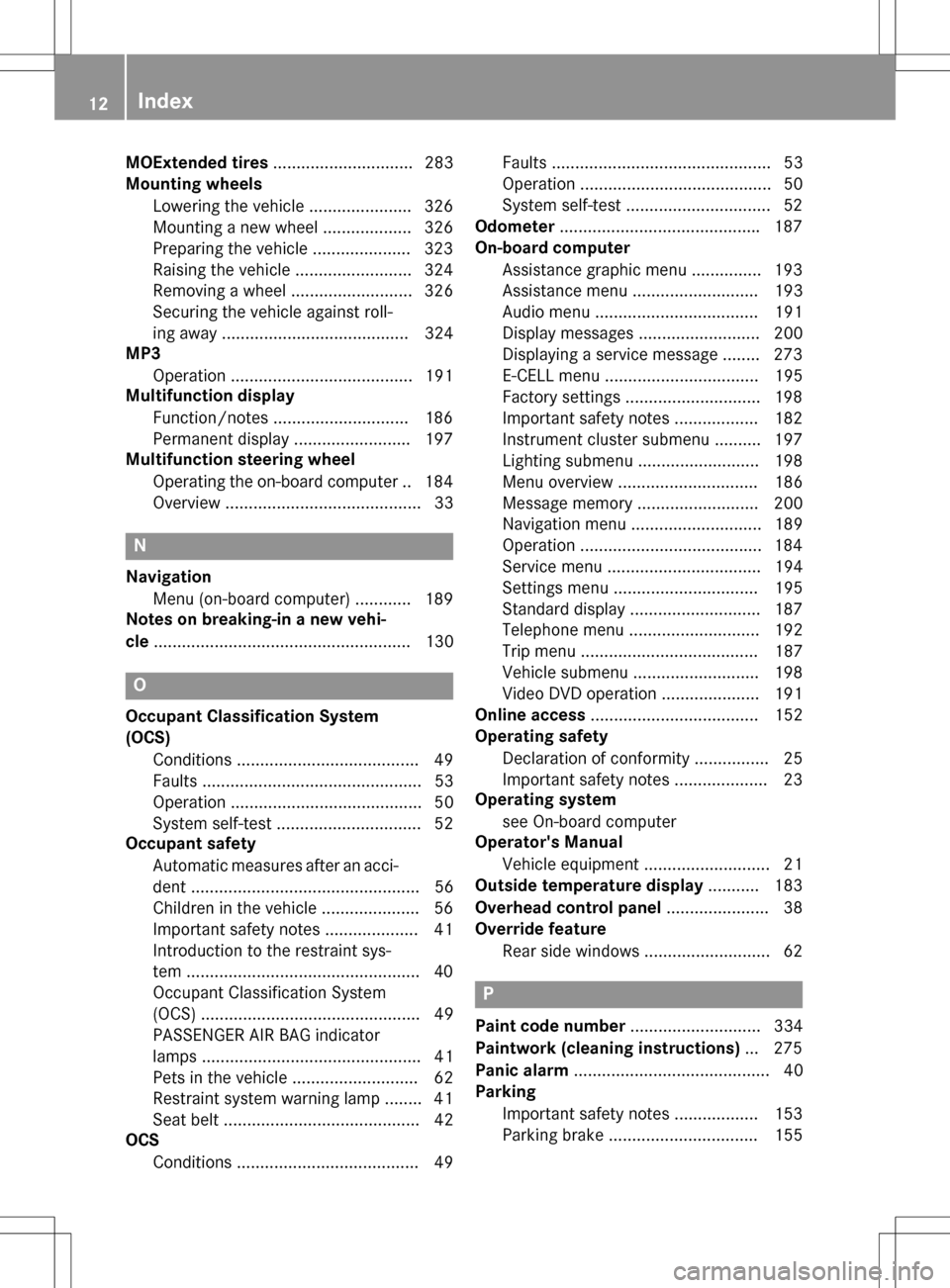
MOExtended tires.............................. 283
Mounting wheels
Lowering the vehicle ...................... 326
Mounting a new wheel ................... 326
Preparing the vehicle .................... .323
Raising the vehicle ......................... 324
Removing a wheel .......................... 326
Securing the vehicle against roll-
ing away ........................................ 324
MP3
Operation ....................................... 191
Multifunction display
Function/notes ............................ .186
Permanent display ......................... 197
Multifunction steering wheel
Operating the on-board computer .. 184
Overview .......................................... 33
N
NavigationMenu (on-board computer) ............ 189
Notes on breaking-in a new vehi-
cle ....................................................... 130
O
Occupant Classification System
(OCS)
Conditions ....................................... 49
Faults ............................................... 53
Operation ......................................... 50
System self-test ............................... 52
Occupant safety
Automatic measures after an acci-
dent ................................................. 56
Children in the vehicle ..................... 56
Important safety notes .................... 41
Introduction to the restraint sys-
tem ................................................. .40
Occupant Classification System
(OCS) ............................................... 49
PASSENGER AIR BAG indicator
lamps ............................................... 41
Pets in the vehicle ........................... 62
Restraint system warning lamp ........ 41
Seat belt .......................................... 42
OCS
Conditions ....................................... 49 Faults ............................................... 53
Operation ......................................... 50
System self-test ..............................
.52
Odometer .......................................... .187
On-board computer
Assistance graphic menu .............. .193
Assistance menu ........................... 193
Audio menu ................................... 191
Display messages .......................... 200
Displaying a service message ....... .273
E‑CELL menu ................................. 195
Factory settings ............................ .198
Important safety notes .................. 182
Instrument cluster submenu .......... 197
Lighting submenu .......................... 198
Menu overview .............................. 186
Message memory .......................... 200
Navigation menu ............................ 189
Operation ................................... .... 184
Service menu ................................. 194 Settings menu ............................... 195
Standard display ............................ 187
Telephone menu ............................ 192
Trip menu ...................................... 187
Vehicle submenu ........................... 198
Video DVD operation ..................... 191
Online access .................................... 152
Operating safety
Declaration of conformity ................ 25
Important safety notes .................... 23
Operating system
see On-board computer
Operator's Manual
Vehicle equipment ........................... 21
Outside temperature display ........... 183
Overhead control panel ...................... 38
Override feature
Rear side windows ........................... 62
P
Paint code number ............................ 334
Paintwork (cleaning instructions) ... 275
Panic alarm .......................................... 40
Parking
Important safety notes .................. 153
Parking brake ................................ 155
12Index
Page 32 of 342
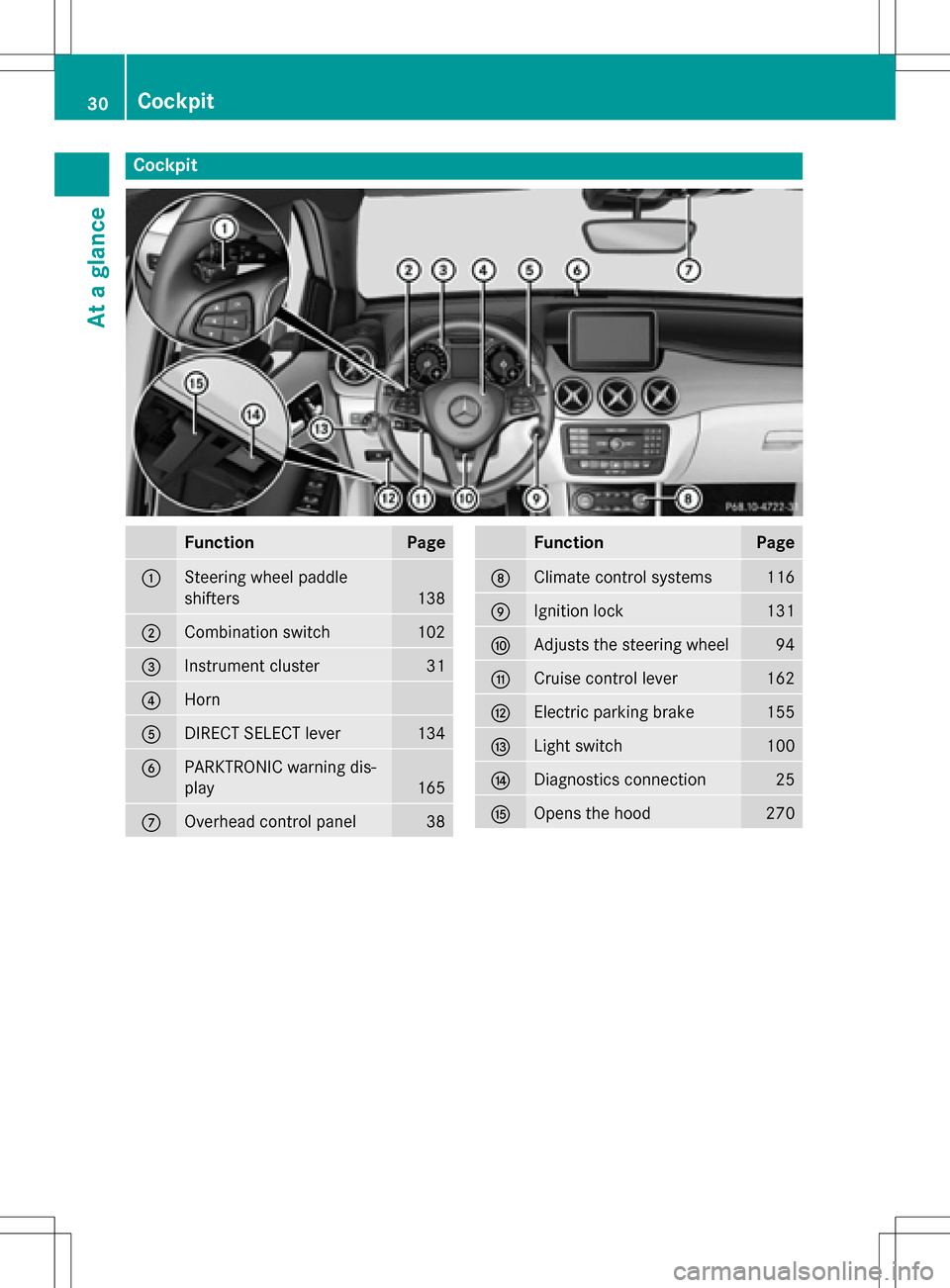
Cockpit
FunctionPage
:Steering wheel paddle
shifters
138
;Combination switch102
=Instrument cluster31
?Horn
ADIRECT SELECT lever134
BPARKTRONIC warning dis-
play
165
COverhead control panel38
FunctionPage
DClimate control systems116
EIgnition lock131
FAdjusts the steering wheel94
GCruise control lever162
HElectric parking brake155
ILight switch100
JDiagnostics connection25
KOpens the hood270
30Cockpit
At a glance
Page 40 of 342
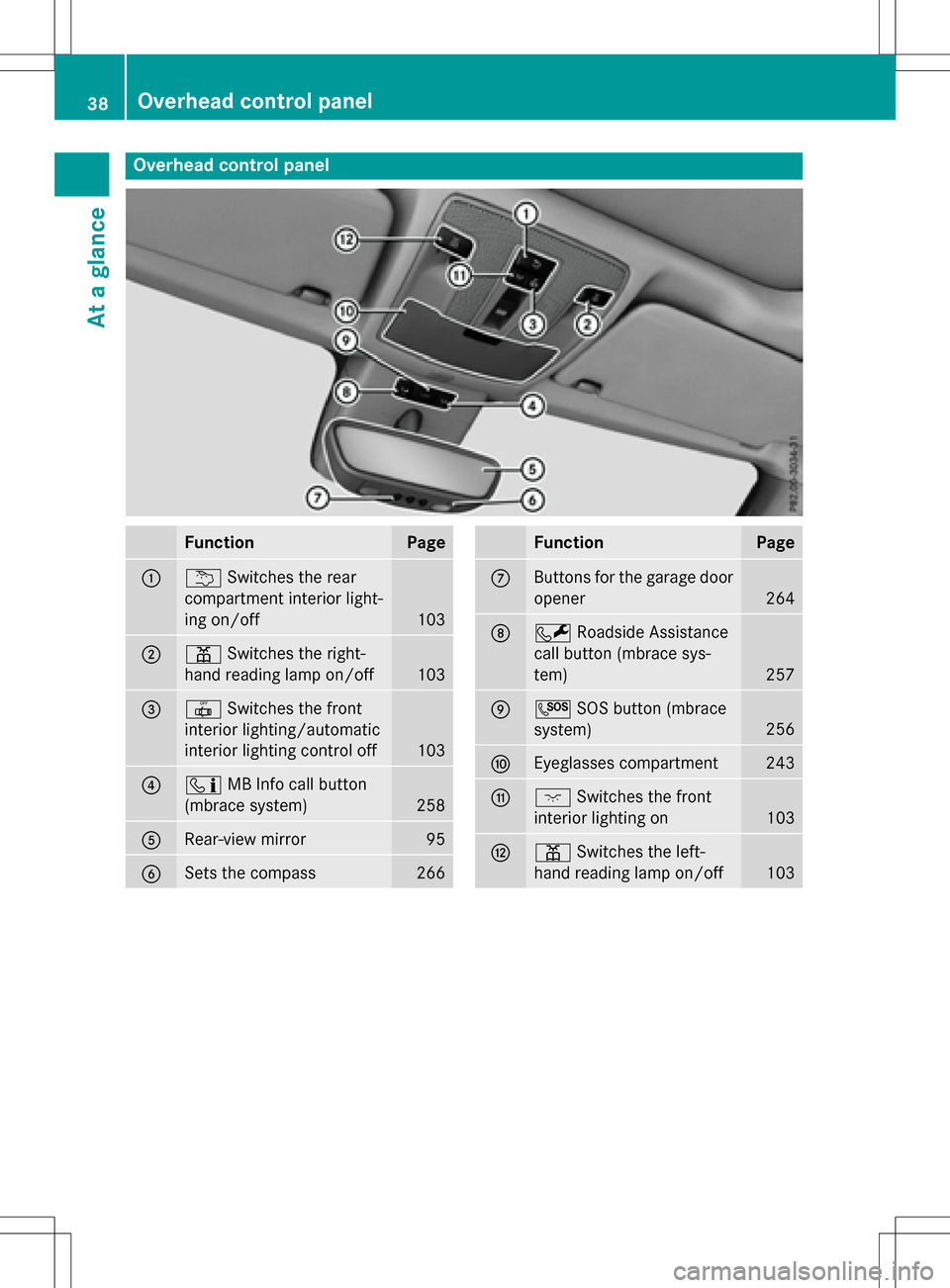
Overhead control panel
FunctionPage
:uSwitches the rear
compartment interior light-
ing on/off
103
;p Switches the right-
hand reading lamp on/off
103
=| Switches the front
interior lighting/automatic
interior lighting control off
103
?ï MB Info call button
(mbrace system)
258
ARear-view mirror95
BSets the compass266
FunctionPage
CButtons for the garage door
opener
264
DF Roadside Assistance
call button (mbrace sys-
tem)
257
EG SOS button (mbrace
system)
256
FEyeglasses compartment243
Gc Switches the front
interior lighting on
103
Hp Switches the left-
hand reading lamp on/off
103
38Overhead control panel
At a glance
Page 55 of 342
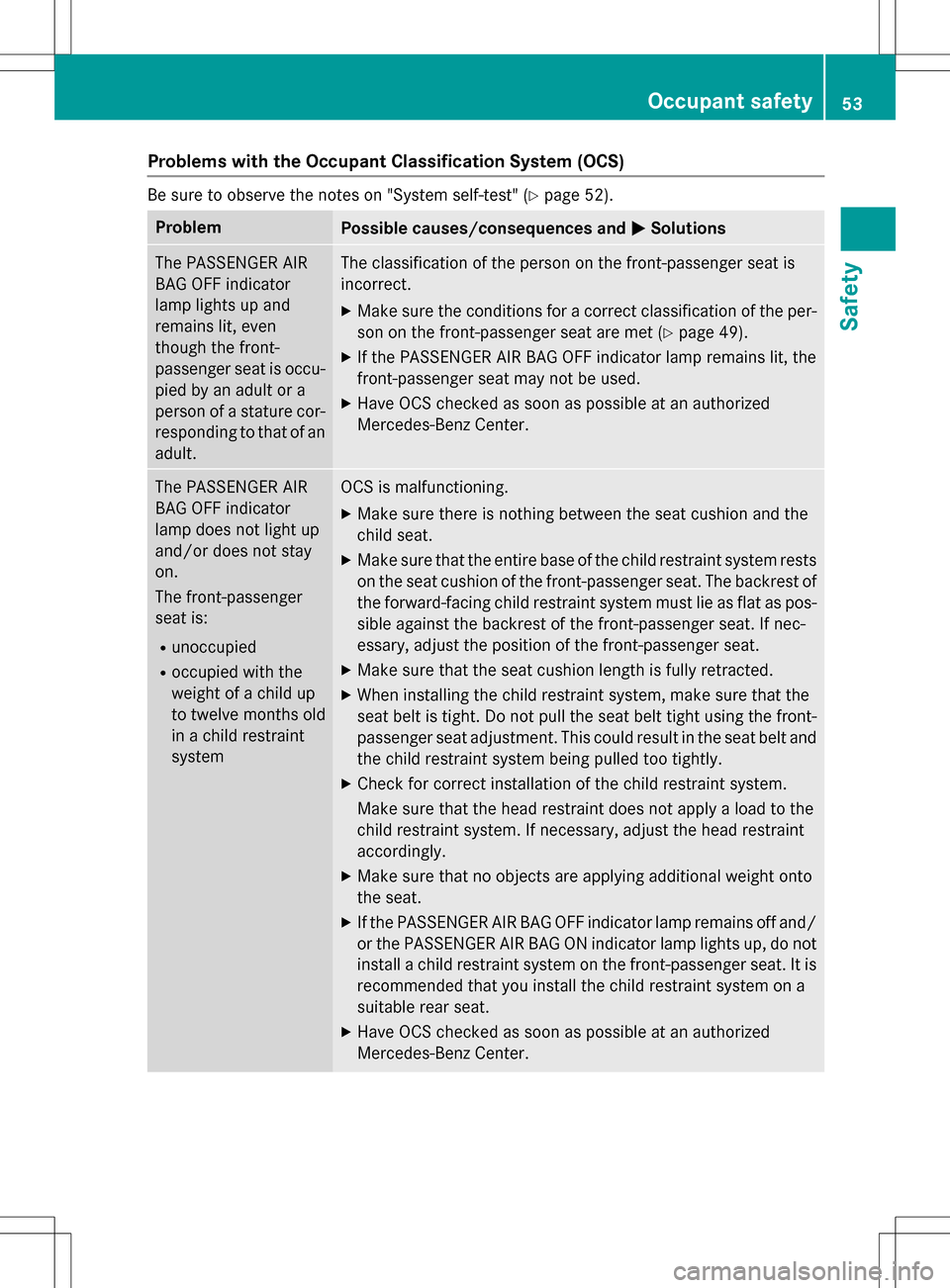
Problems with the Occupant Classification System (OCS)
Be sure to observe the notes on "System self-test" (Ypage 52).
ProblemPossible causes/consequences andMSolutions
The PASSENGER AIR
BAG OFF indicator
lamp lights up and
remains lit, even
though the front-
passenger seat is occu-
pied by an adult or a
person of a stature cor-
responding to that of an
adult.The classification of the person on the front-passenger seat is
incorrect.
XMake sure the conditions for a correct classification of the per-
son on the front-passenger seat are met (
Ypage 49).
XIf the PASSENGER AIR BAG OFF indicator lamp remains lit, the
front-passenger seat may not be used.
XHave OCS checked as soon as possible at an authorized
Mercedes-Benz Center.
The PASSENGER AIR
BAG OFF indicator
lamp does not light up
and/or does not stay
on.
The front-passenger
seat is:
Runoccupied
Roccupied with the
weight of a child up
to twelve months old
in a child restraint
system
OCS is malfunctioning.
XMake sure there is nothing between the seat cushion and the
child seat.
XMake sure that the entire base of the child restraint system rests on the seat cushion of the front-passenger seat. The backrest of
the forward-facing child restraint system must lie as flat as pos-
sible against the backrest of the front-passenger seat. If nec-
essary, adjust the position of the front-passenger seat.
XMake sure that the seat cushion length is fully retracted.
XWhen installing the child restraint system, make sure that the
seat belt is tight. Do not pull the seat belt tight using the front-
passenger seat adjustment. This could result in the seat belt and
the child restraint system being pulled too tightly.
XCheck for correct installation of the child restraint system.
Make sure that the head restraint does not apply a load to the
child restraint system. If necessary, adjust the head restraint
accordingly.
XMake sure that no objects are applying additional weight onto
the seat.
XIf the PASSENGER AIR BAG OFF indicator lamp remains off and/
or the PASSENGER AIR BAG ON indicator lamp lights up, do notinstall a child restraint system on the front-passenger seat. It is
recommended that you install the child restraint system on a
suitable rear seat.
XHave OCS checked as soon as possible at an authorized
Mercedes-Benz Center.
Occupant safety53
Safety
Z
Page 62 of 342
Make sure that:
RTop Tether hookAis hooked into Top
Tether anchorage ?as shown.
RTop Tether belt Bis not twisted.
RTop Tether belt Bis routed between rear
seat backrest =and cargo compart-
ment cover ;if cargo compartment
cover ;is installed.
RTop Tether belt Bis routed between the
rear seat backrest =and the cargo net if
the cargo net is installed.
XSwing back rear seat backrest =until it
engages.
The red lock verification indicator is no lon-
ger visible.
XInstall the LATCH-type (ISOFIX) child
restraint system with Top Tether. Always
comply with the child restraint system
manufacturer's installation instructions
when doing so.
XTension Top Tether belt B. Always comply
with the child restraint system manufactur-
er's installation instructions when doing so.
XMove head restraint :back down again
slightly if necessary (
Ypage 92). Make
sure that you do not interfere with the cor-
rect routing of Top Tether belt B.
Child restraint system on the front-
passenger seat
General notes
Accident statistics show that children
secured in the rear seats are safer than chil-
dren secured in the front-passenger seat. For
this reason, Mercedes-Benz strongly advises
that you install the child restraint system on a
rear seat.
If it is absolutely necessary to install a child
restraint system on the front-passenger seat,
always observe the instructions and safety
notes on the "Occupant Classification System (OCS)" (
Ypage 49). You can thus avoid the risks that could arise
as a result of:
Ran incorrectly categorized person in the
front-passenger seat
Rthe unintentional deactivation of the front-
passenger front air bag
Rthe unsuitable positioning of the child
restraint system, e.g. too close to the dash-
board
Rearward-facing child restraint system
If it is absolutely necessary to install a rear-
ward-facing child restraint system on the
front-passenger seat, always make sure that
the front-passenger front air bag is deactiva-
ted. Only if the PASSENGER AIR BAG OFF
indicator lamp is permanently lit (
Ypage 41)
is the front-passenger front air bag deactiva-
ted.
Always observe the child restraint system
manufacturer's installation and operating
instructions.
Forward-facing child restraint system
If it is absolutely necessary to install a
forward-facing child restraint system on the
front-passenger seat, always move the front-
passenger seat as far back as possible. Fully
retract the seat cushion length. The entire
base of the child restraint system must
always rest on the seat cushion of the front-
passenger seat. The backrest of the child
restraint system must lie as flat as possible
against the backrest of the front-passenger
seat. The child restraint system must not
touch the roof or be subjected to a load by the
head restraint. Adjust the angle of the seat
backrest and the head restraint position
accordingly. Always make sure that the shoul- der belt strap is correctly routed from the
vehicle belt outlet to the shoulder belt guide
on the child restraint system. The shoulder
belt strap must be routed forwards and down-
wards from the vehicle belt outlet. If neces-
sary, adjust the vehicle belt outlet and the
front-passenger seat accordingly.
60Children in the vehicle
Safety
Page 90 of 342
Useful information
i
This Operator's Manual describes all
models and all standard and optional equip-
ment of your vehicle available at the time of
publication of the Operator's Manual.
Country-specific differences are possible.
Please note that your vehicle may not be
equipped with all features described. This
also applies to safety-related systems and
functions.
iRead the information on qualified special-
ist workshops (
Ypage 26).
Correct driver's seat position
GWARNING
You could lose control of your vehicle if you do the following while driving:
Radjust the driver's seat, head restraint,
steering wheel or mirrors
Rfasten the seat belt
There is a risk of an accident.
Adjust the driver's seat, head restraint, steer-
ing wheel and mirror and fasten your seat belt before starting the vehicle's drive system.
XObserve the safety guidelines on seat
adjustment (
Ypage 89).
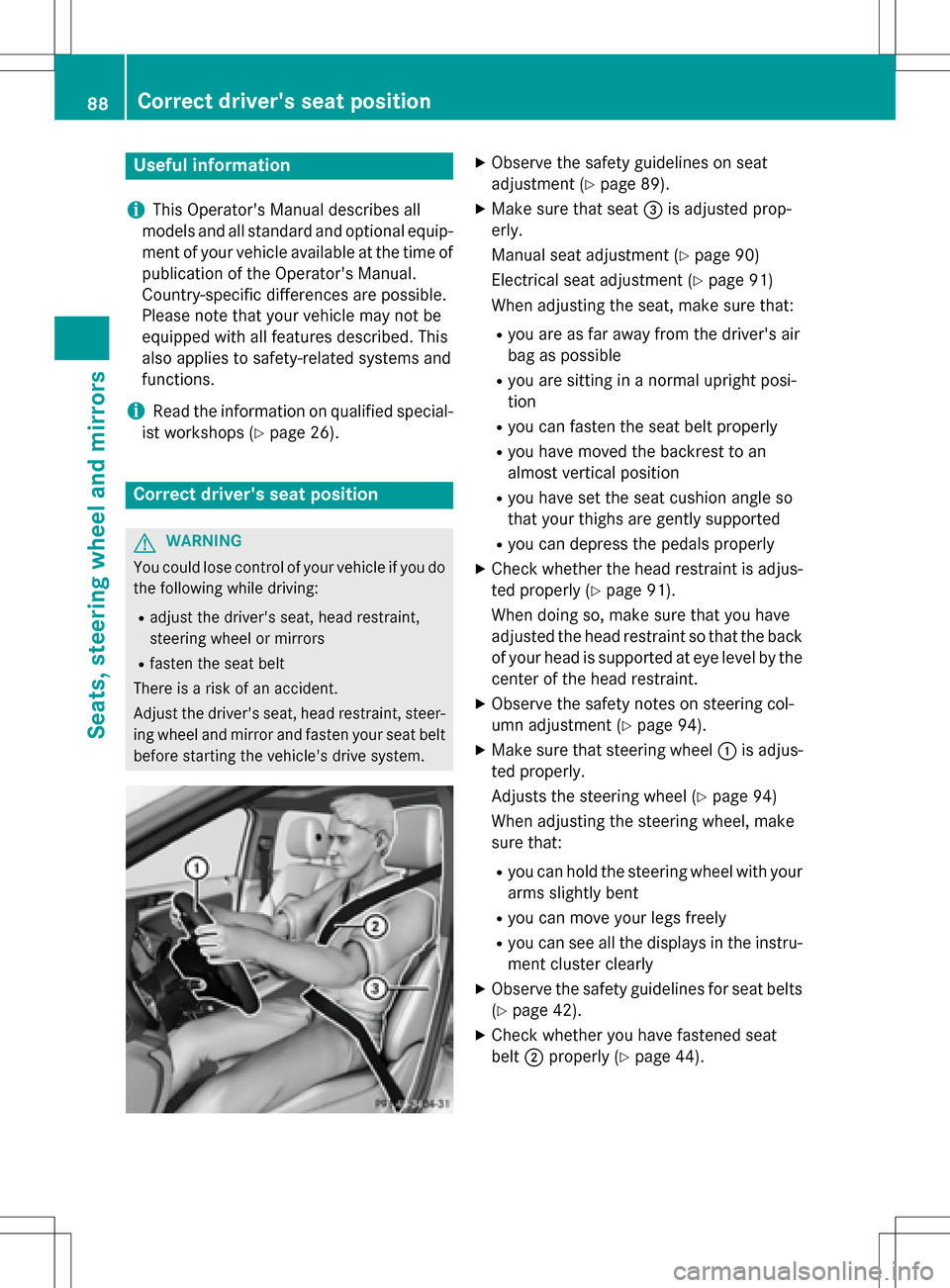
XMake sure that seat =is adjusted prop-
erly.
Manual seat adjustment (
Ypage 90)
Electrical seat adjustment (
Ypage 91)
When adjusting the seat, make sure that:
Ryou are as far away from the driver's air
bag as possible
Ryou are sitting in a normal upright posi-
tion
Ryou can fasten the seat belt properly
Ryou have moved the backrest to an
almost vertical position
Ryou have set the seat cushion angle so
that your thighs are gently supported
Ryou can depress the pedals properly
XCheck whether the head restraint is adjus-
ted properly (
Ypage 91).
When doing so, make sure that you have
adjusted the head restraint so that the back
of your head is supported at eye level by the
center of the head restraint.
XObserve the safety notes on steering col-
umn adjustment (
Ypage 94).
XMake sure that steering wheel :is adjus-
ted properly.
Adjusts the steering wheel (
Ypage 94)
When adjusting the steering wheel, make
sure that:
Ryou can hold the steering wheel with your
arms slightly bent
Ryou can move your legs freely
Ryou can see all the displays in the instru-
ment cluster clearly
XObserve the safety guidelines for seat belts
(
Ypage 42).
XCheck whether you have fastened seat
belt ;properly (
Ypage 44).
88Correct driver's seat position
Seats, steering wheel and mirrors