open hood MERCEDES-BENZ B-Class ELECTRIC 2016 W246 Owner's Manual
[x] Cancel search | Manufacturer: MERCEDES-BENZ, Model Year: 2016, Model line: B-Class ELECTRIC, Model: MERCEDES-BENZ B-Class ELECTRIC 2016 W246Pages: 342, PDF Size: 7.53 MB
Page 12 of 342
Display message ............................ 215
Switching on/off ........................... 102
High-voltage battery
Battery care ................................... 143
Charging (charging station) ............ 149
Charging (mains socket) ................ 146
Charging cable warming ................ 142
Cruise range .................................. 143
Discharged battery ........................ 143
Display message ............................ 219
Displaying energy consumption
(on-board computer) ...................... 188
Displaying the range (on-board
computer) ...................................... 188
Energy consumption ...................... 143
General notes ................................ 141
Method of operation ...................... 142
Outside temperatures .................... 143
Overvoltage protection .................. 142
Problems with the charging proc-
ess ................................................ .151
Reserve, warning lamp ................... 238
Terms of use .................................. 142
High-voltage disconnect device ......... 24
Hill start assist .................................. 134
HOLD function
Activating ....................................... 164
Deactivating ................................... 164
Display message ............................ 220
Function/notes ............................ .163
Hood
Closing .......................................... .271
Display message ............................ 226
Important safety notes .................. 270
Opening ......................................... 270
Horn ...................................................... 30
Hydroplaning ..................................... 161
I
Ignition lock
see Key positions
Immobilizer .......................................... 69
Indicator and warning lamps
COLLISION PREVENTION ASSIST
PLUS .............................................. 239
Indicator lamps
see Warning and indicator lamps Indicators
see Turn signals
Instrument cluster
Overview .......................................... 31
Power display ................................ 183
Settings ......................................... 197
Warning and indicator lamps ........... 32
Instrument cluster lighting .............. 182
Interior lighting
Control ........................................... 104
Emergency lighting ........................ 104
Overview ........................................ 103
Reading lamp ................................. 103
Internet connection
Via mobile service module ............. 153
J
JackStorage location ............................ 282
Using ............................................. 324
K
Key positionsStart/Stop button .......................... 131
KEYLESS-GO
Convenience closing feature ............ 84
Deactivation ..................................... 73
Locking ............................................ 73
Unlocking ......................................... 73
Kickdown
Driving tips .................................... 137
Knee bag .............................................. 48
L
Lamps
see Warning and indicator lamps
LATCH-type (ISOFIX) child seat
anchors ................................................ 58
License plate lamp
Changing bulbs .............................. 109
License plate lamp (display mes-
sage) ................................................... 215
Light function, active
Display message ............................ 217
Light sensor (display message) ....... 217
10Index
Page 32 of 342
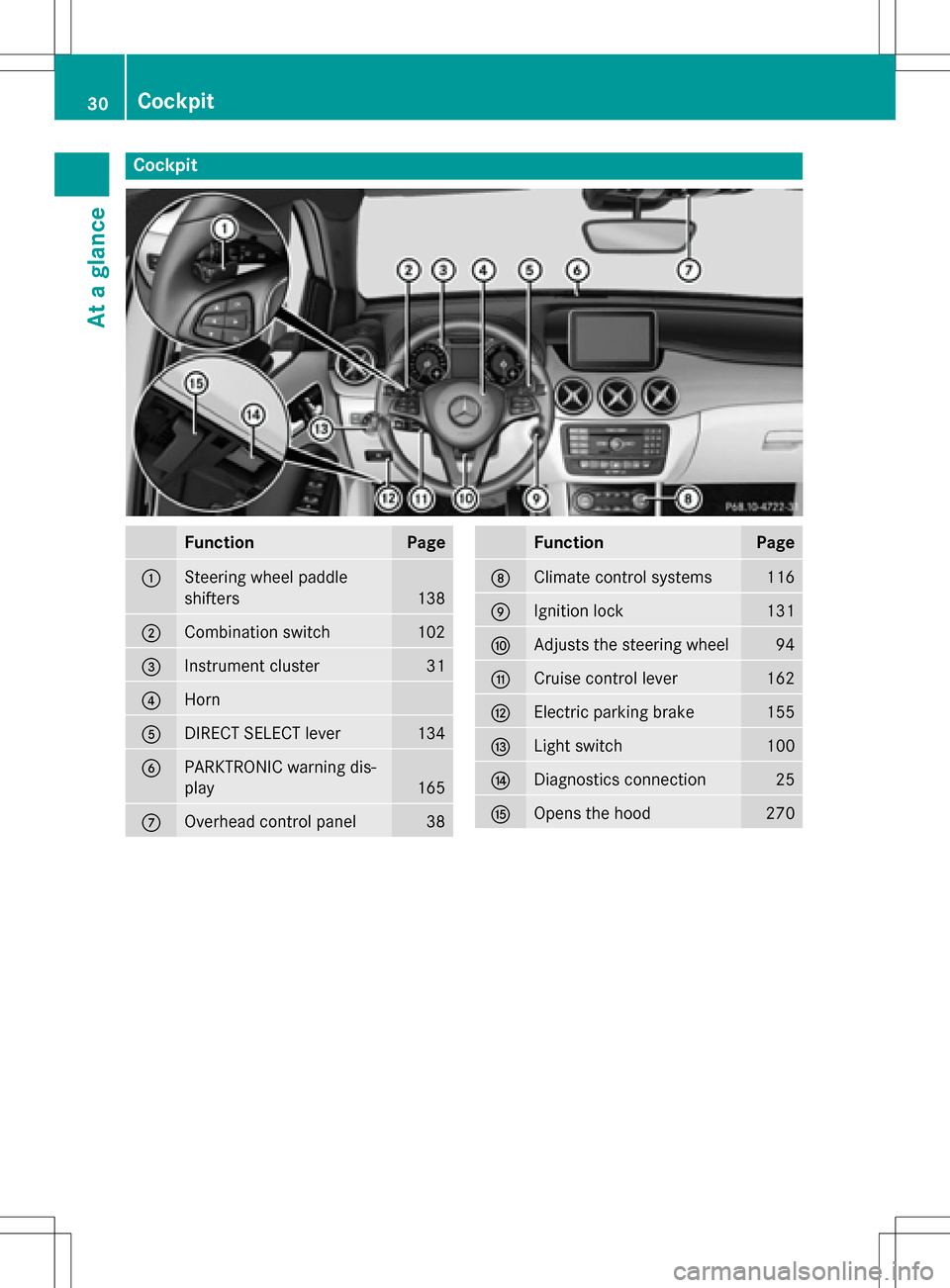
Cockpit
FunctionPage
:Steering wheel paddle
shifters
138
;Combination switch102
=Instrument cluster31
?Horn
ADIRECT SELECT lever134
BPARKTRONIC warning dis-
play
165
COverhead control panel38
FunctionPage
DClimate control systems116
EIgnition lock131
FAdjusts the steering wheel94
GCruise control lever162
HElectric parking brake155
ILight switch100
JDiagnostics connection25
KOpens the hood270
30Cockpit
At a glance
Page 71 of 342
You can find information about manually
adjustable recuperation under "Steering
wheel paddle shifters" (
Ypage 138).
If the warning light in the instrument cluster is lit up, there is a motor malfunction or a brake
malfunction.
Observe information regarding indicator and
warning lamps (
Ypage 231) as well as dis-
play messages (
Ypage 201).
Protection against theft
Immobilizer
The immobilizer prevents your vehicle from
being started without the correct SmartKey.
XTo activate with the SmartKey: remove
the SmartKey from the ignition lock.
XTo activate with KEYLESS-GO start-
function or KEYLESS-GO: switch the igni-
tion off and open the driver's door.
XTo deactivate: switch on the ignition.
When leaving the vehicle, always take the
SmartKey with you and lock the vehicle. Any-
one can start the drive system if a valid Smart-
Key has been left inside the vehicle.
iThe immobilizer is always deactivated
when you start the drive system.
In the event that the engine cannot be star-
ted (yet the vehicle's battery is charged),
the system is not operational. The READY
display in the multifunction display does
not appear. Contact an authorized
Mercedes-Benz Center or call
1-800-FOR-MERCedes (in the USA) or
1-800-387-0100 (in Canada).
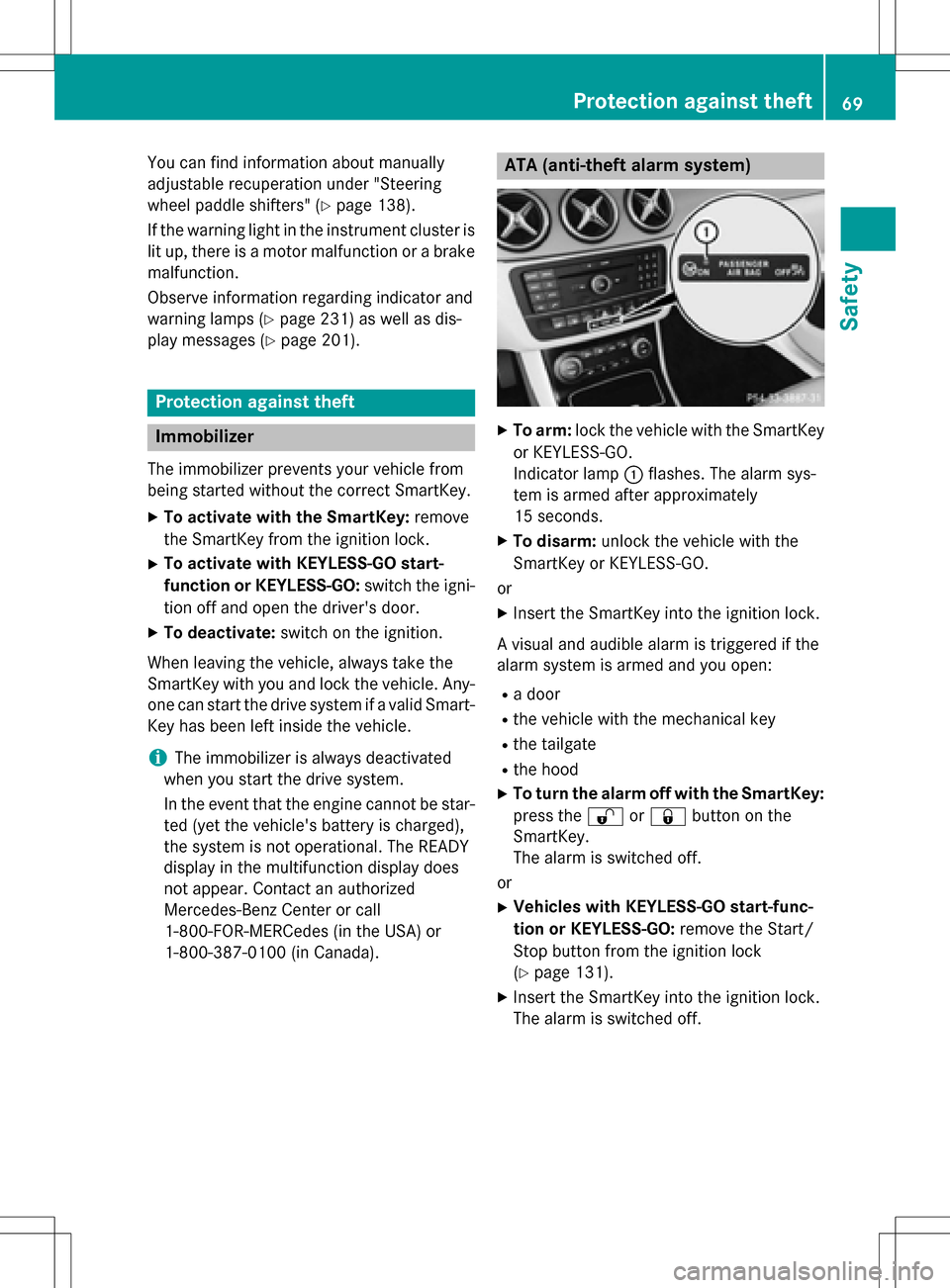
ATA (anti-theft alarm system)
XTo arm: lock the vehicle with the SmartKey
or KEYLESS-GO.
Indicator lamp :flashes. The alarm sys-
tem is armed after approximately
15 seconds.
XTo disarm: unlock the vehicle with the
SmartKey or KEYLESS-GO.
or
XInsert the SmartKey into the ignition lock.
A visual and audible alarm is triggered if the
alarm system is armed and you open:
Ra door
Rthe vehicle with the mechanical key
Rthe tailgate
Rthe hood
XTo turn the alarm off with the SmartKey:
press the %or& button on the
SmartKey.
The alarm is switched off.
or
XVehicles with KEYLESS-GO start-func-
tion or KEYLESS-GO: remove the Start/
Stop button from the ignition lock
(
Ypage 131).
XInsert the SmartKey into the ignition lock.
The alarm is switched off.
Protection against theft69
Safety
Z
Page 108 of 342
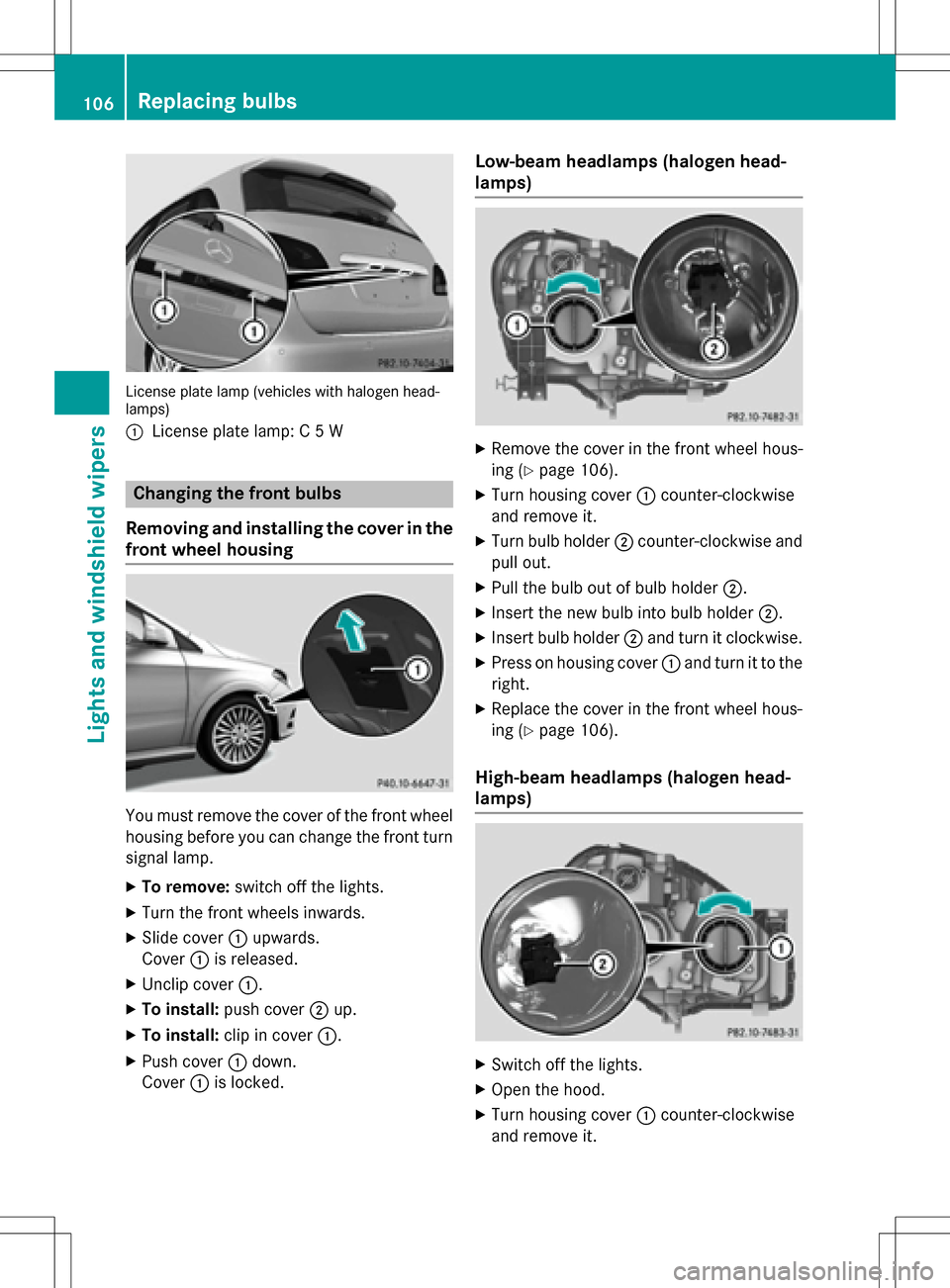
License plate lamp (vehicles with halogen head-
lamps)
:
License plate lamp: C 5 W
Changing the front bulbs
Removing and installing the cover in the
front wheel housing
You must remove the cover of the front wheel
housing before you can change the front turn signal lamp.
XTo remove: switch off the lights.
XTurn the front wheels inwards.
XSlide cover:upwards.
Cover :is released.
XUnclip cover :.
XTo install:push cover ;up.
XTo install: clip in cover :.
XPush cover:down.
Cover :is locked.
Low-beam headlamps (halogen head-
lamps)
XRemove the cover in the front wheel hous-
ing (
Ypage 106).
XTurn housing cover :counter-clockwise
and remove it.
XTurn bulb holder ;counter-clockwise and
pull out.
XPull the bulb out of bulb holder ;.
XInsert the new bulb into bulb holder ;.
XInsert bulb holder;and turn it clockwise.
XPress on housing cover :and turn it to the
right.
XReplace the cover in the front wheel hous-
ing (
Ypage 106).
High-beam headlamps (halogen head-
lamps)
XSwitch off the lights.
XOpen the hood.
XTurn housing cover :counter-clockwise
and remove it.
106Replacing bulbs
Lights and windshield wipers
Page 109 of 342
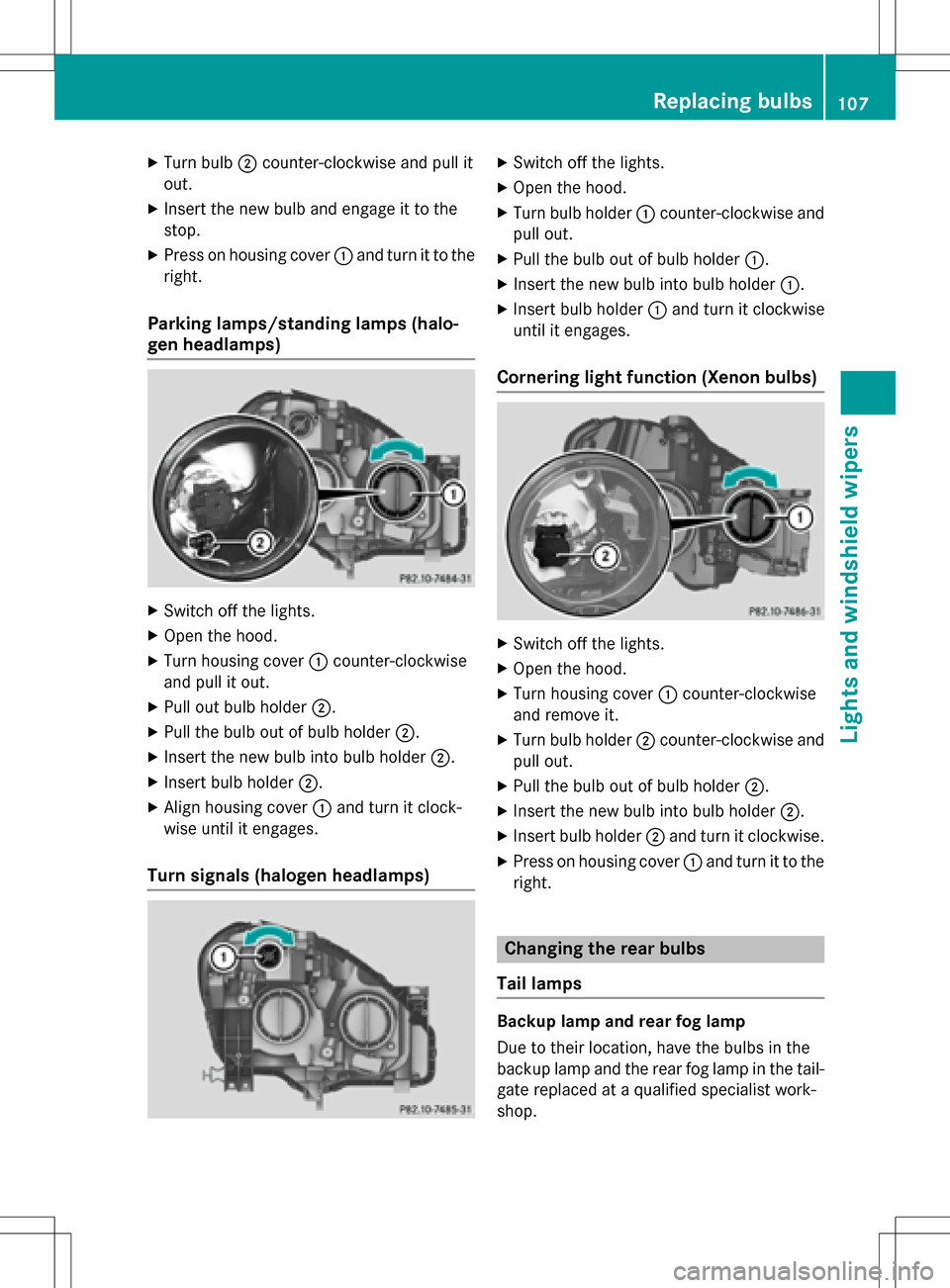
XTurn bulb;counter-clockwise and pull it
out.
XInsert the new bulb and engage it to the
stop.
XPress on housing cover :and turn it to the
right.
Parking lamps/standing lamps (halo-
gen headlamps)
XSwitch off the lights.
XOpen the hood.
XTurn housing cover :counter-clockwise
and pull it out.
XPull out bulb holder ;.
XPull the bulb out of bulb holder ;.
XInsert the new bulb into bulb holder ;.
XInsert bulb holder;.
XAlign housing cover :and turn it clock-
wise until it engages.
Turn signals (halogen headlamps)
XSwitch off the lights.
XOpen the hood.
XTurn bulb holder :counter-clockwise and
pull out.
XPull the bulb out of bulb holder :.
XInsert the new bulb into bulb holder :.
XInsert bulb holder:and turn it clockwise
until it engages.
Cornering light function (Xenon bulbs)
XSwitch off the lights.
XOpen the hood.
XTurn housing cover :counter-clockwise
and remove it.
XTurn bulb holder ;counter-clockwise and
pull out.
XPull the bulb out of bulb holder ;.
XInsert the new bulb into bulb holder ;.
XInsert bulb holder;and turn it clockwise.
XPress on housing cover :and turn it to the
right.
Changing the rear bulbs
Tail lamps
Backup lamp and rear fog lamp
Due to their location, have the bulbs in the
backup lamp and the rear fog lamp in the tail-
gate replaced at a qualified specialist work-
shop.
Replacing bulbs107
Lights and windshield wipers
Z
Page 113 of 342
!Never open the hood/tailgate if a wiper
arm has been folded away from the wind-
shield/rear window.
Never fold a windshield wiper arm without a
wiper blade back onto the windshield/rear
window.
Hold the windshield wiper arm firmly when
you change the wiper blade. If you release
the wiper arm without a wiper blade and it
falls onto the windshield/rear window, the
windshield/rear window may be damaged
by the force of the impact.
Mercedes-Benz recommends that you have
the wiper blades changed at a qualified
specialist workshop.
Replacing the windshield wiper blades
(variant 1)
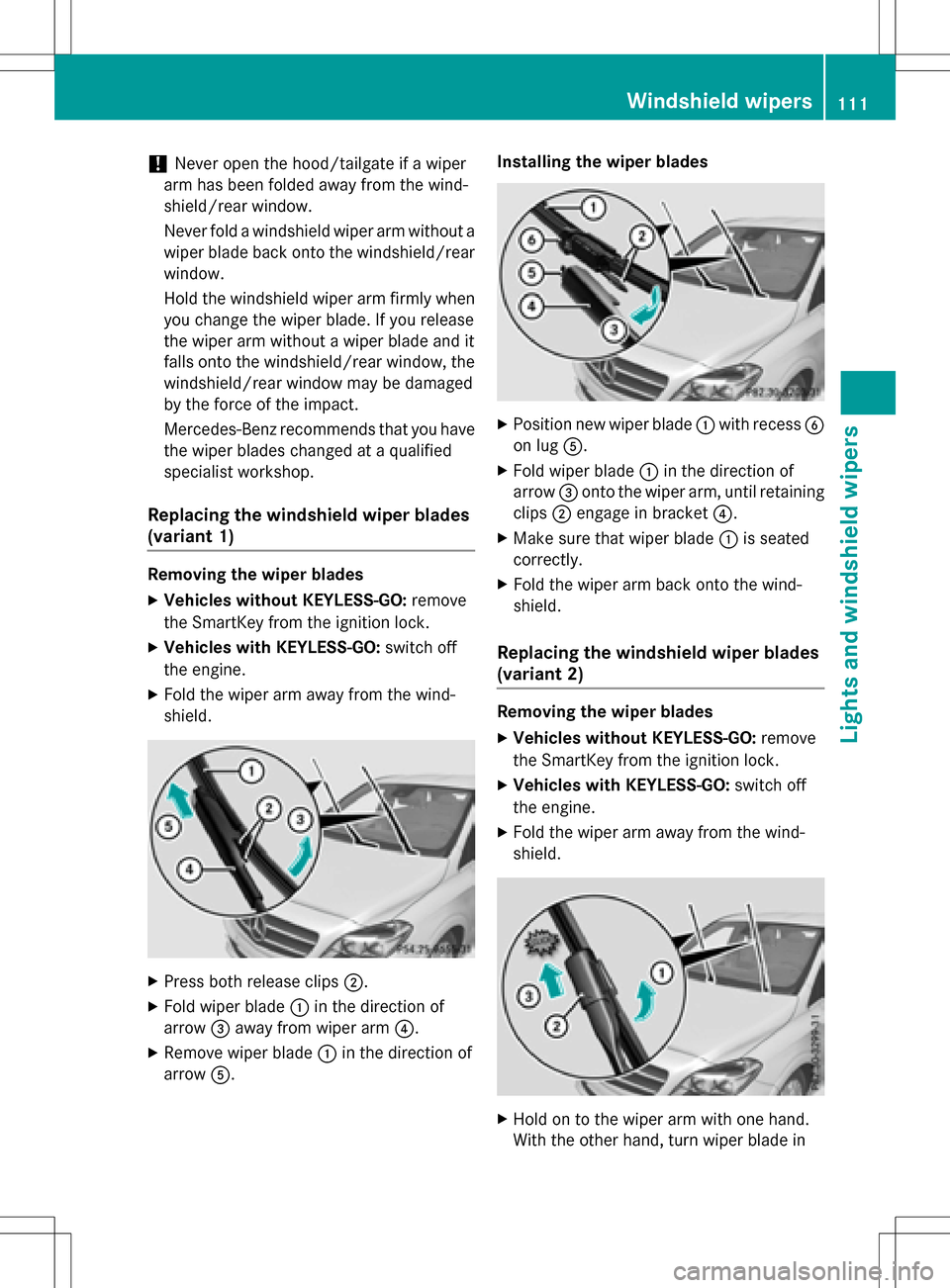
Removing the wiper blades
XVehicles without KEYLESS-GO: remove
the SmartKey from the ignition lock.
XVehicles with KEYLESS-GO: switch off
the engine.
XFold the wiper arm away from the wind-
shield.
XPress both release clips ;.
XFold wiper blade:in the direction of
arrow =away from wiper arm ?.
XRemove wiper blade:in the direction of
arrow A. Installing the wiper blades
XPosition new wiper blade
:with recess B
on lug A.
XFold wiper blade :in the direction of
arrow =onto the wiper arm, until retaining
clips ;engage in bracket ?.
XMake sure that wiper blade :is seated
correctly.
XFold the wiper arm back onto the wind-
shield.
Replacing the windshield wiper blades
(variant 2)
Removing the wiper blades
XVehicles without KEYLESS-GO: remove
the SmartKey from the ignition lock.
XVehicles with KEYLESS-GO: switch off
the engine.
XFold the wiper arm away from the wind-
shield.
XHold on to the wiper arm with one hand.
With the other hand, turn wiper blade in
Windshield wipers111
Lights and windshield wipers
Z
Page 128 of 342
To activate/deactivate "Immediate pre-
entry climate control"
XPress button:in the center console.
The blue or red indicator lamp in the button
lights up or goes out.
The colors of the indicator lamps in the button have the following meanings:
Re dH eating activated
Blue Cooling activated
Yellow Pre-entry climate control at depar- ture is preselected
Air vents
Important safety notes
GWARNING
Very hot or very cold air can flow from the air
vents. This could result in burns or frostbite in
the immediate vicinity of the air vents. There
is a risk of injury.
Make sure that all vehicle occupants always
maintain a sufficient distance to the air out-
lets. If necessary, redirect the airflow to
another area of the vehicle interior.
In order to ensure the direct flow of fresh air
through the air vents into the vehicle interior,
please observe the following notes:
Rkeep the air inlet between the windshield
and the hood free of blockages, such as ice, snow or leaves.
Rnever cover the air vents or air intake grillesin the vehicle interior.
iFor optimal climate control in the vehicle,
open the air vents completely and set the
adjusters to the central position.
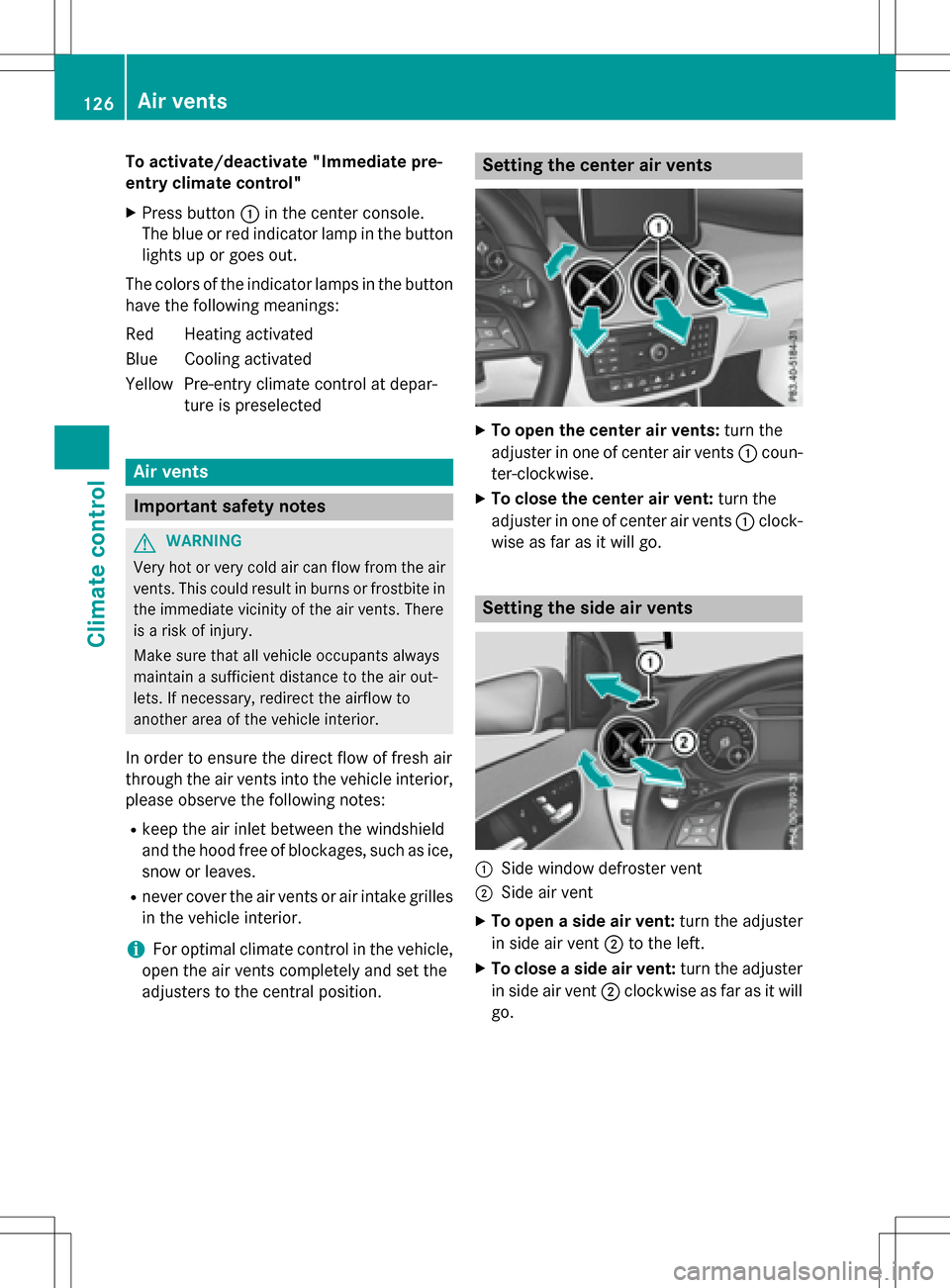
Setting the center air vents
XTo open the center air vents: turn the
adjuster in one of center air vents :coun-
ter-clockwise.
XTo close the center air vent: turn the
adjuster in one of center air vents :clock-
wise as far as it will go.
Setting the side air vents
:Side window defroster vent
;Side air vent
XTo open a side air vent: turn the adjuster
in side air vent ;to the left.
XTo close a side air vent: turn the adjuster
in side air vent ;clockwise as far as it will
go.
126Air vents
Climate control
Page 228 of 342
Display messagesPossible causes/consequences andMSolutions
Service Required
DoNotShiftGears
Visit Dealer
You cannotchangeth e transmission position due to a malfunction.
A warning tone also sounds.
If transmission position Dis selected:
XDrive to a qualified specialist workshop without shifting the
transmission from position D.
If transmission position R,N or Pis selected:
XSecur eth e vehicle against rolling away (Ypage 153).
XNotify a qualified specialist workshop or breakdown service.
XDo no tto w the vehicle.
Only Shift to 'P'
when Vehicle is
Stationary
The vehicle is moving.
XPull over and stop the vehicle safely as soon as possible, paying
attention to road and traffic conditions.
XShift th e transmission to position P.
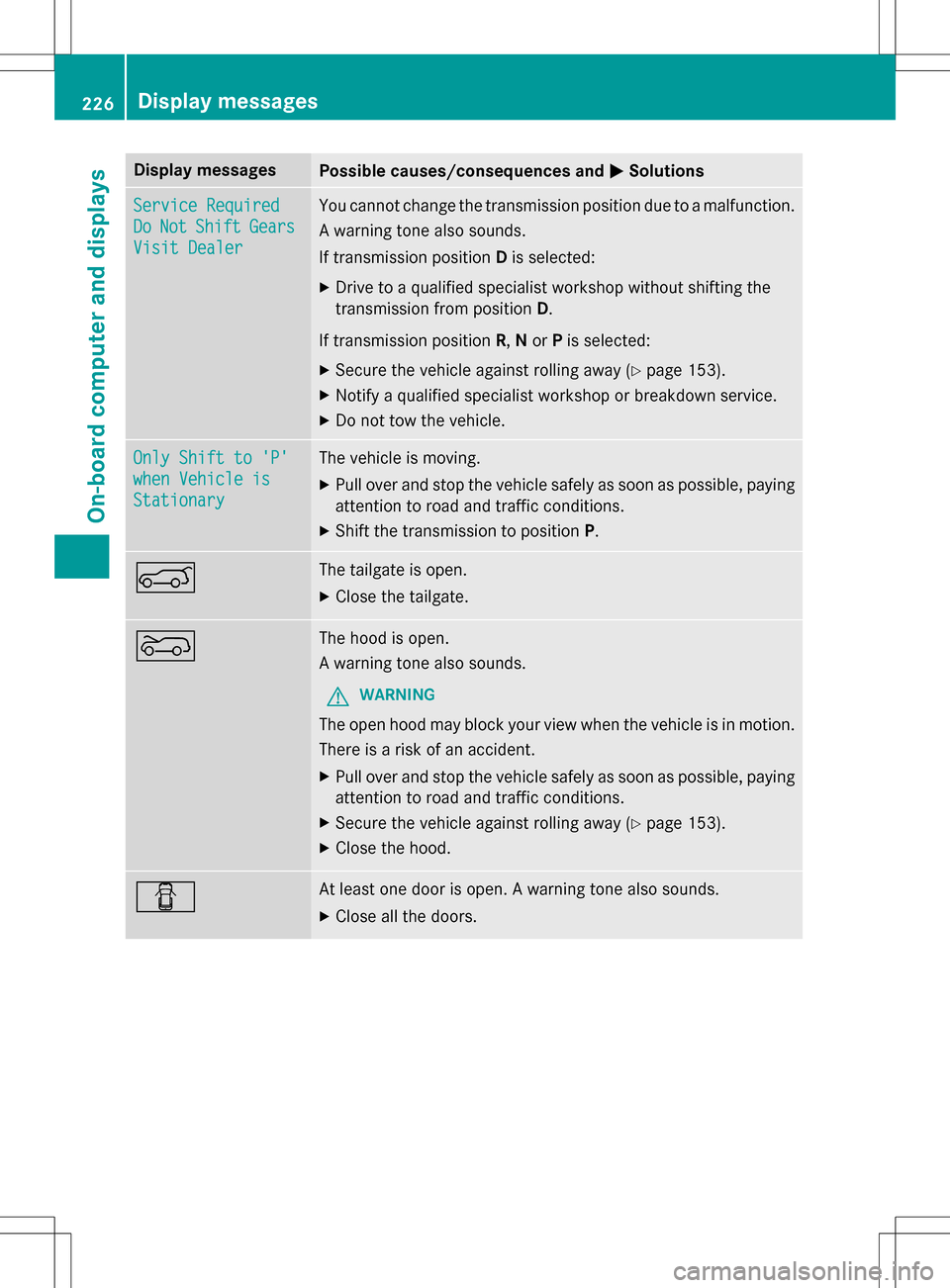
AThe tailgate is open.
XClosethe tailgate.
?The hood is open.
A warning tone also sounds.
GWARNING
The open hood may block your view when the vehicle is in motion.
There is a risk of an accident.
XPull over and stop the vehicle safely as soon as possible, paying
attention to road and traffic conditions.
XSecur eth e vehicle against rolling away (Ypage 153).
XClose the hood.
CAt least one door is open.Awarning tone also sounds.
XClose all the doors.
226Display messages
On-board computer and displays
Page 267 of 342
XTurn the SmartKey to position2in the igni-
tion lock (
Ypage 131).
XGet out of the vehicle.
XPress the programing button on the door
drive unit.
Usually, you now have 30 seconds to ini-
tiate the next step.
XGet into the vehicle.
XPress previously programed button ;,=
or ? on the integrated garage door opener
repeatedly until the door closes.
The rolling code synchronization is then
complete.
Notes on programing the remote control
Canadian radio frequency laws require a
"break" (or interruption) of the transmission
signals after broadcasting for a few seconds.
Therefore, these signals may not last long
enough for the integrated garage door
opener. The signal is not recognized during
programing. Comparable with Canadian law,
some U.S. garage door openers also feature a
"break".
Proceed as follows:
Rif you live in Canada
Rif you have difficulties programing the
garage door opener (regardless of where
you live) when using the programing steps.
XPress and hold one of buttons ;to? on
the integrated garage door opener.
After a short time, indicator lamp :lights
up yellow.
XRelease the button.
Indicator lamp :flashes yellow.
XPress button Bof garage door remote
control Afor two seconds, then release it
for two seconds.
XPress button Bagain for two seconds.
XRepeat this sequence on button Bof
remote control Auntil indicator lamp :
lights up green.
When indicator lamp :lights up green:
programing is finished. When indicator lamp
:flashes green: pro-
graming was successful. The next step is to
synchronize the rolling code.
XRelease button Bof remote control Aof
the garage door drive.
If indicator lamp :lights up red: repeat the
programing process for the corresponding
button on the rear-view mirror. When doing
so, vary the distance between remote con-
trol Aand the rear-view mirror.
The required distance between remote
control Aand the integrated garage door
opener depends on the garage door drive
system. Several attempts might be neces-
sary. You should test every position for at
least 25 seconds before trying another
position.
Problems when programing
If you experience problems programing the
integrated garage door opener on the rear-
view mirror, take note of the following instruc-
tions:
RCheck the transmitter frequency used by
garage door drive remote control Aand
whether it is supported. The transmitter
frequency can usually be found on the back
of the garage door drive remote control.
The integrated garage door opener is com- patible with devices that have units which
operate in the frequency range of 280 to
433 MHz.
RReplace the batteries in garage door
remote control A. This increases the like-
lihood that garage door remote control A
will transmit a strong and precise signal to
the integrated garage door opener.
RWhen programing, hold remote control A
at varying distances and angles from the
button which you are programing. Try vari-
ous angles at a distance between 2and
12 inches (5to 30 cm) or at the same angle
but at varying distances.
RIf another remote control is available for the
same garage door drive, repeat the same
programing steps with this remote control.
Features265
Stowage and features
Z
Page 272 of 342
Useful information
i
This Operator's Manual describes all
models and all standard and optional equip-
ment of your vehicle available at the time of
publication of the Operator's Manual.
Country-specific differences are possible.
Please note that your vehicle may not be
equipped with all features described. This
also applies to safety-related systems and
functions.
iRead the information on qualified special-
ist workshops (
Ypage 26).
Engine compartment
Hood
Important safety notes
GWARNING
If the hood is unlatched, it may open up when the vehicle is in motion and block your view.
There is a risk of an accident.
Never unlatch the hood while driving. Before
every trip, ensure that the hood is locked.
GWARNING
When opening and closing the hood, it may
suddenly fall into the closed position. There is a risk of injury to persons within range of
movement of the hood.
Open and close the hood only when no one is
within its range of movement.
GWARNING
Certain components in the engine compart-
ment may be very hot, e.g. the drive system
and radiator. Working in the engine compart-
ment poses a risk of injury.
If possible, let the drive system cool down and only touch the components described in the
following.
GWARNING
The engine compartment contains moving
components. Certain components, such as
the radiator fan, may continue to run or start
again suddenly when the ignition is off. There is a risk of injury.
If you need to do any work inside the engine
compartment:
Rswitch off the ignition
Rnever reach into the area where there is a
risk of danger from moving components,
such as the fan rotation area
Rremove jewelry and watches
Rkeep items of clothing and hair, for exam-
ple, away from moving parts
Opening the hood
GWARNING
Certain components in the engine compart-
ment may be very hot, e.g. the drive system
and radiator. Working in the engine compart-
ment poses a risk of injury.
If possible, let the drive system cool down and only touch the components described in the
following.
GWARNING
When the hood is open and the windshield
wipers are set in motion, you can be injured by
the wiper linkage. There is a risk of injury.
Always switch off the windshield wipers and
the ignition before opening the hood.
!Make sure that the windshield wipers are
not folded away from the windshield. You
could otherwise damage the windshield
wipers or the hood.
270Engine compartment
Maintenance and care