service indicator MERCEDES-BENZ B-Class ELECTRIC 2016 W246 Owner's Manual
[x] Cancel search | Manufacturer: MERCEDES-BENZ, Model Year: 2016, Model line: B-Class ELECTRIC, Model: MERCEDES-BENZ B-Class ELECTRIC 2016 W246Pages: 342, PDF Size: 7.53 MB
Page 6 of 342
1,2,3...
12 V socketsee Sockets
A
ABS (Anti-lock Braking System)Display message ............................ 201
Function/notes ................................ 63
Important safety notes .................... 63
Warning lamp ................................ .232
Accident
Automatic measures after an acci-
dent ................................................. 56
Activating/deactivating cooling
with air dehumidification ................. 118
Active Parking Assist
Detecting parking spaces .............. 169
Display message ............................ 221
Exiting a parking space .................. 171
Function/notes ............................ .168
Important safety notes .................. 168
Parking .......................................... 170
ADAPTIVE BRAKE ................................. 68
Adaptive Brake Assist
Function/notes ................................ 65
Additional speedometer ................... 197
Air bags
Deployment ..................................... 54
Display message ............................ 213
Front air bag (driver, front
passenger) ....................................... 47
Important safety notes .................... 46
Introduction ..................................... 46
Knee bag .......................................... 48
Occupant Classification System
(OCS) ............................................... 49
PASSENGER AIR BAG indicator
lamps ............................................... 41
Side impact air bag .......................... 48
Window curtain air bag .................... 49
Air vents
Important safety notes .................. 126
Rear ............................................... 127
Setting the center air vents ........... 126
Setting the side air vents .............. .126 Air-conditioning system
see Climate control
Alarm
ATA (Anti-Theft Alarm system) ......... 69
Switching off (ATA) .......................... 69
Switching the function on/off
(ATA) ................................................ 69
Alarm system
see ATA (Anti-Theft Alarm system)
Antenna ................................................ 25
Anti-lock braking system
see ABS (Anti-lock Braking System)
Anti-Theft Alarm system
see ATA (Anti-Theft Alarm system)
Ashtray ............................................... 253
Assistance display (on-board com-
puter) ................................................. .193
Assistance menu (on-board com-
puter) ................................................. .193
ASSYST PLUS
Displaying a service message ....... .273
Driving abroad ............................... 273
Hiding a service message .............. 273
Information about Service ............. 273
Resetting the service interval dis-
play ................................................ 273
Service message ............................ 272
Special service requirements ......... 273
ATA (Anti-Theft Alarm system)
Activating/deactivating ................... 69
Function ........................................... 69
Switching off the alarm .................... 69
ATTENTION ASSIST
Activating/deactivating ................. 194
Display message ............................ 220
Function/notes ............................. 176
Audio menu (on-board computer) .... 191
Audio system
see separate operating instructions
Authorized Mercedes-Benz Center
see Qualified specialist workshop
Authorized workshop
see Qualified specialist workshop
AUTO lights
Display message ............................ 217
see Lights
Automatic car wash (care) ............... 274
4Index
Page 12 of 342
Display message ............................ 215
Switching on/off ........................... 102
High-voltage battery
Battery care ................................... 143
Charging (charging station) ............ 149
Charging (mains socket) ................ 146
Charging cable warming ................ 142
Cruise range .................................. 143
Discharged battery ........................ 143
Display message ............................ 219
Displaying energy consumption
(on-board computer) ...................... 188
Displaying the range (on-board
computer) ...................................... 188
Energy consumption ...................... 143
General notes ................................ 141
Method of operation ...................... 142
Outside temperatures .................... 143
Overvoltage protection .................. 142
Problems with the charging proc-
ess ................................................ .151
Reserve, warning lamp ................... 238
Terms of use .................................. 142
High-voltage disconnect device ......... 24
Hill start assist .................................. 134
HOLD function
Activating ....................................... 164
Deactivating ................................... 164
Display message ............................ 220
Function/notes ............................ .163
Hood
Closing .......................................... .271
Display message ............................ 226
Important safety notes .................. 270
Opening ......................................... 270
Horn ...................................................... 30
Hydroplaning ..................................... 161
I
Ignition lock
see Key positions
Immobilizer .......................................... 69
Indicator and warning lamps
COLLISION PREVENTION ASSIST
PLUS .............................................. 239
Indicator lamps
see Warning and indicator lamps Indicators
see Turn signals
Instrument cluster
Overview .......................................... 31
Power display ................................ 183
Settings ......................................... 197
Warning and indicator lamps ........... 32
Instrument cluster lighting .............. 182
Interior lighting
Control ........................................... 104
Emergency lighting ........................ 104
Overview ........................................ 103
Reading lamp ................................. 103
Internet connection
Via mobile service module ............. 153
J
JackStorage location ............................ 282
Using ............................................. 324
K
Key positionsStart/Stop button .......................... 131
KEYLESS-GO
Convenience closing feature ............ 84
Deactivation ..................................... 73
Locking ............................................ 73
Unlocking ......................................... 73
Kickdown
Driving tips .................................... 137
Knee bag .............................................. 48
L
Lamps
see Warning and indicator lamps
LATCH-type (ISOFIX) child seat
anchors ................................................ 58
License plate lamp
Changing bulbs .............................. 109
License plate lamp (display mes-
sage) ................................................... 215
Light function, active
Display message ............................ 217
Light sensor (display message) ....... 217
10Index
Page 14 of 342
MOExtended tires.............................. 283
Mounting wheels
Lowering the vehicle ...................... 326
Mounting a new wheel ................... 326
Preparing the vehicle .................... .323
Raising the vehicle ......................... 324
Removing a wheel .......................... 326
Securing the vehicle against roll-
ing away ........................................ 324
MP3
Operation ....................................... 191
Multifunction display
Function/notes ............................ .186
Permanent display ......................... 197
Multifunction steering wheel
Operating the on-board computer .. 184
Overview .......................................... 33
N
NavigationMenu (on-board computer) ............ 189
Notes on breaking-in a new vehi-
cle ....................................................... 130
O
Occupant Classification System
(OCS)
Conditions ....................................... 49
Faults ............................................... 53
Operation ......................................... 50
System self-test ............................... 52
Occupant safety
Automatic measures after an acci-
dent ................................................. 56
Children in the vehicle ..................... 56
Important safety notes .................... 41
Introduction to the restraint sys-
tem ................................................. .40
Occupant Classification System
(OCS) ............................................... 49
PASSENGER AIR BAG indicator
lamps ............................................... 41
Pets in the vehicle ........................... 62
Restraint system warning lamp ........ 41
Seat belt .......................................... 42
OCS
Conditions ....................................... 49 Faults ............................................... 53
Operation ......................................... 50
System self-test ..............................
.52
Odometer .......................................... .187
On-board computer
Assistance graphic menu .............. .193
Assistance menu ........................... 193
Audio menu ................................... 191
Display messages .......................... 200
Displaying a service message ....... .273
E‑CELL menu ................................. 195
Factory settings ............................ .198
Important safety notes .................. 182
Instrument cluster submenu .......... 197
Lighting submenu .......................... 198
Menu overview .............................. 186
Message memory .......................... 200
Navigation menu ............................ 189
Operation ................................... .... 184
Service menu ................................. 194 Settings menu ............................... 195
Standard display ............................ 187
Telephone menu ............................ 192
Trip menu ...................................... 187
Vehicle submenu ........................... 198
Video DVD operation ..................... 191
Online access .................................... 152
Operating safety
Declaration of conformity ................ 25
Important safety notes .................... 23
Operating system
see On-board computer
Operator's Manual
Vehicle equipment ........................... 21
Outside temperature display ........... 183
Overhead control panel ...................... 38
Override feature
Rear side windows ........................... 62
P
Paint code number ............................ 334
Paintwork (cleaning instructions) ... 275
Panic alarm .......................................... 40
Parking
Important safety notes .................. 153
Parking brake ................................ 155
12Index
Page 114 of 342
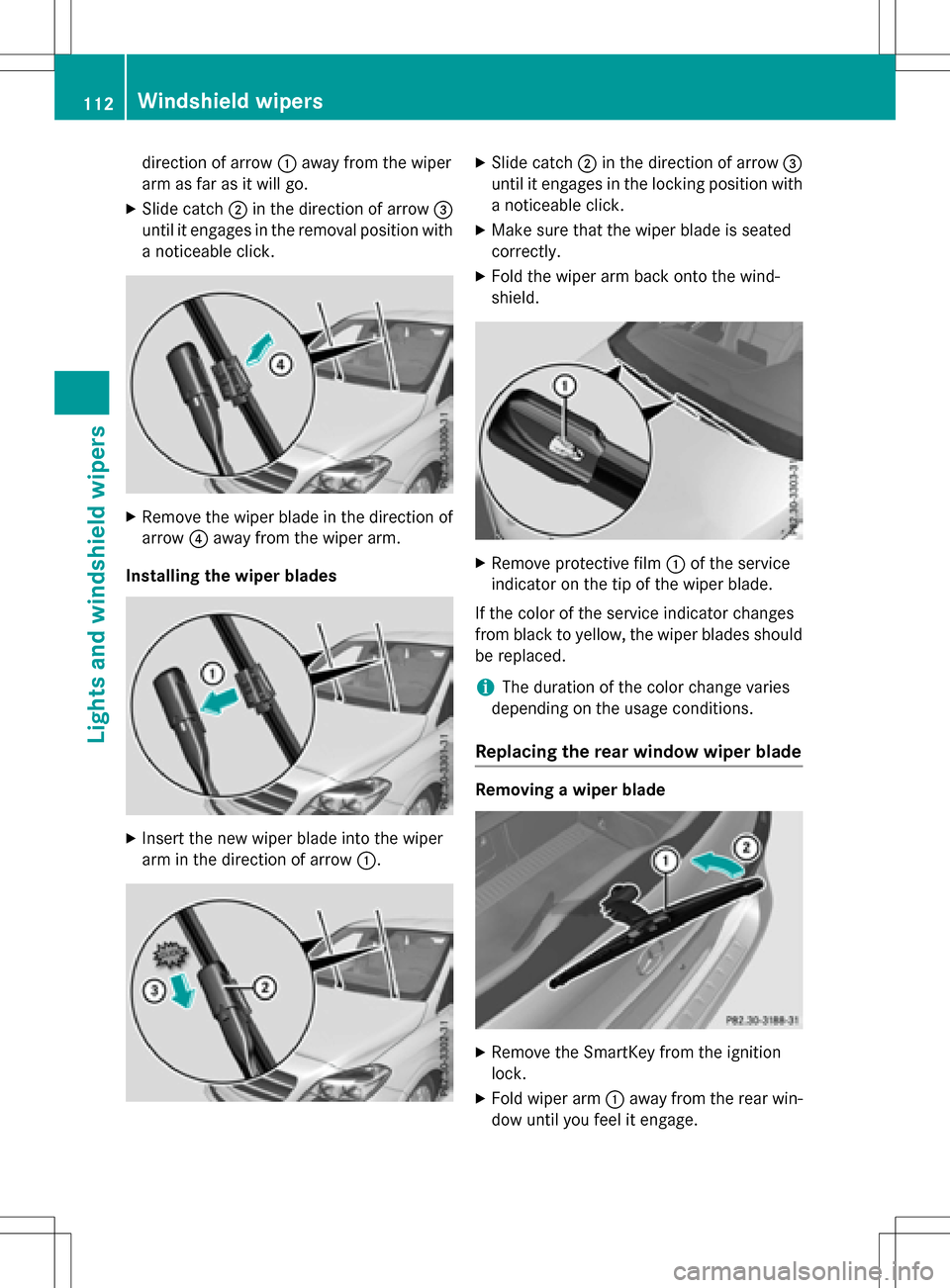
direction of arrow:away from the wiper
arm as far as it will go.
XSlide catch ;in the direction of arrow =
until it engages in the removal position with
a noticeable click.
XRemove the wiper blade in the direction of
arrow ?away from the wiper arm.
Installing the wiper blades
XInsert the new wiper blade into the wiper
arm in the direction of arrow :.
XSlide catch;in the direction of arrow =
until it engages in the locking position with a noticeable click.
XMake sure that the wiper blade is seated
correctly.
XFold the wiper arm back onto the wind-
shield.
XRemove protective film :of the service
indicator on the tip of the wiper blade.
If the color of the service indicator changes
from black to yellow, the wiper blades should
be replaced.
iThe duration of the color change varies
depending on the usage conditions.
Replacing the rear window wiper blade
Removing a wiper blade
XRemove the SmartKey from the ignition
lock.
XFold wiper arm :away from the rear win-
dow until you feel it engage.
112Windshield wipers
Lights and windshield wipers
Page 146 of 342
As a result of its basic characteristics, the
amount of energy available from the high-
voltage battery decreases over the course of
its life.
This reduces:
Rthe maximum range that can be achieved
by the vehicle
Rthe maximum output (acceleration) of the
vehicle
You can actively reduce the energy consump-
tion of your vehicle in a number of ways, for
example, by:
Ran anticipatory driving style
Rreducing the use of electrical consumers
Rhaving the vehicle regularly maintained
The charging time of the high-voltage battery may change over the course of its life.
Observe the displays on energy usage
(
Ypage 188) and range (Ypage 188).
RANGE PLUS
If you activate RANGE PLUS, the operating
window of the battery will be extended at thenext charging process. An extended driving
range will be available to you for the next
journey.
Using RANGE PLUS shortens the service life
of the battery. Therefore, only use RANGE
PLUS if, for example:
Rlong journeys are planned or
Rthe availability of charging stations at the
destination is limited
The more often RANGE PLUS is used, the
more the extended range is reduced.
Therefore always check the range display
before every journey (
Ypage 188).
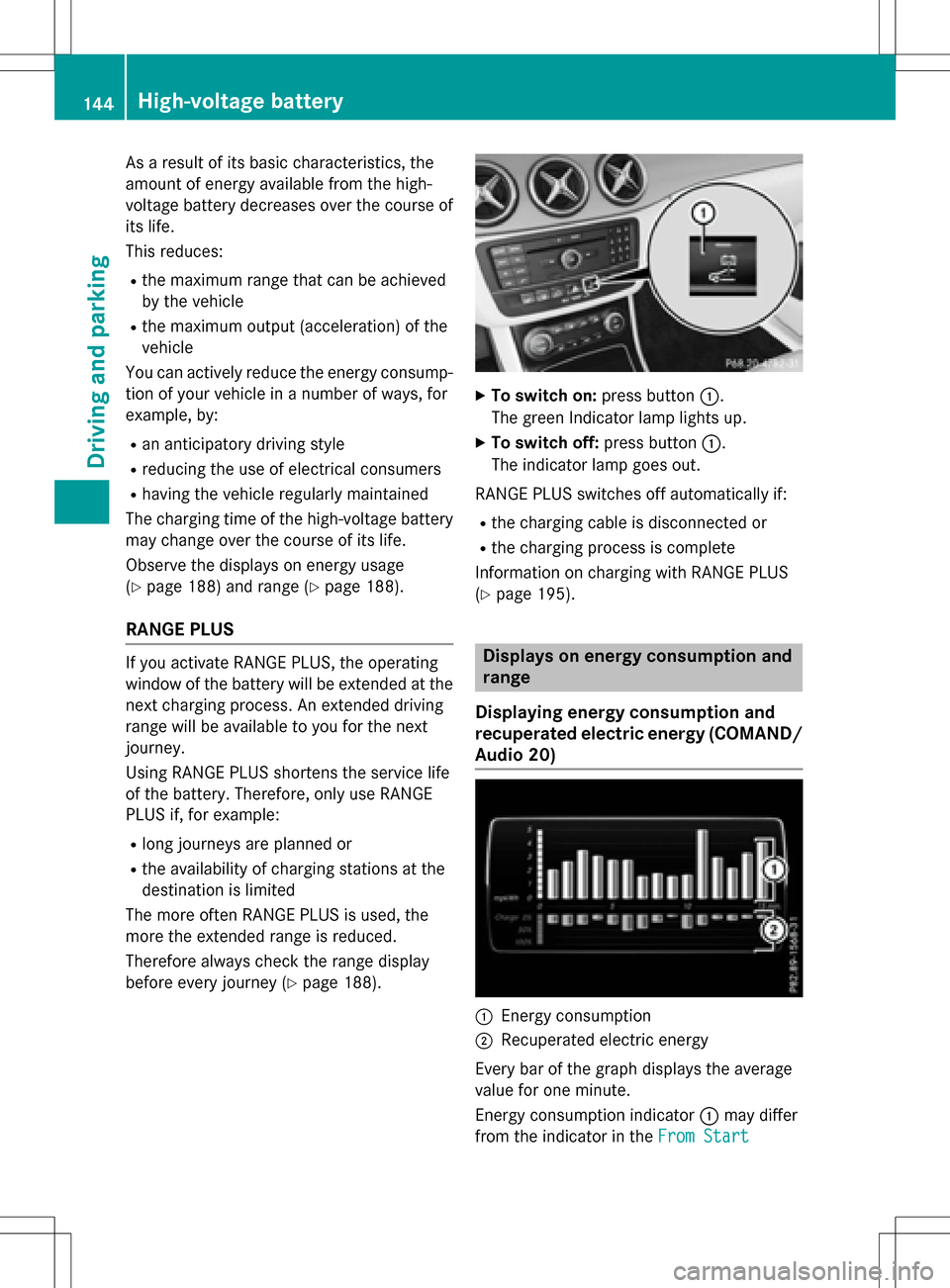
XTo switch on: press button:.
The green Indicator lamp lights up.
XTo switch off: press button:.
The indicator lamp goes out.
RANGE PLUS switches off automatically if:
Rthe charging cable is disconnected or
Rthe charging process is complete
Information on charging with RANGE PLUS
(
Ypage 195).
Displays on energy consumption and
range
Displaying energy consumption and
recuperated electric energy (COMAND/
Audio 20)
:Energy consumption
;Recuperated electric energy
Every bar of the graph displays the average
value for one minute.
Energy consumption indicator :may differ
from the indicator in the From Start
144High-voltage battery
Driving and parking
Page 179 of 342
The following information is displayed:
Rlength of the journey since the last break.
Rthe attention level determined by ATTEN-
TION ASSIST (Attention Level
), dis-
played in a bar display in five levels from
high to low
Rif ATTENTION ASSIST is unable to calculate the attention level and cannot issue a warn-
ing, the System Suspended
message
appears. The bar display then changes the
display, e.g. if you are driving at a speed
below 37 mph (60 km/ h)or above 124 mph
(200 km/ h).
Activating ATTENTION ASSIST
XActivat e ATTENTION ASSIST using the on-
board computer (
Ypage 194).
The system determines the attention level
of the driver depending on the setting
selected:
If Standard
is selected: the sensitivity with
which the system determines the attention
level is set to normal.
If Sensitive
is selected: the sensitivity is set
higher. The attention level detected by Atten-
tion Assist is adapted accordingly and the
driver is warned earlier.
When ATTENTION ASSIST is deactivated, the
é symbol appears in the multifunction
display in the assistance graphic display.
When ATTENTION ASSIST has been deactiva-
ted, it is automatically reactivated after the
engine has been stopped. The sensitivity
selected corresponds to the last selection
activated (standard/sensitive).
Warn ing in the multifunction display
If fatigue or increasing lapses in concentra-
tion are detected, a warning appears in the
multifunction display: ATTENTION ASSIST
TakeaBreak!.
In addition to the message shown in the mul-
tifunction display, you will then hear a warn-
ing tone .
XIf necessary, takeabreak.
XConfirm the message by pressing th ea
button on the steering wheel.
On long journeys, take regular breaks in good
time to allow yourself to rest properly. If you
do not tak eabreak and ATTENTION ASSIST
still detects increasing lapses in concentra-
tion , you will be warned again after
15 minute sat the earliest. This will only hap-
pen if ATTENTION ASSIST still detects typical
indicators of fatigue or increasing lapses in
concentration.
If a warning is output in the multifunction dis-
play, a service station search is performed in
COMAND. You can select a service station
and navigation to this service station will then
begin. This function can be activated and
deactivated in COMAND.
Blind Spot Assist
General notes
Blind Spot Assist monitors the areas on either side of the vehicle that are not visible to the
driver with two lateral, rear-facing radar sen-
sors. A warning display in the exterior mirrors
draws your attention to vehicles detected in
the monitored area. If you then switch on the
corresponding turn signal to change lane, you
will also receive an optical and audible warn-
ing.
Blind Spot Assist supports you from a speed
of approximately 20 mph (30 km/h).
Important safety notes
GWARNING
Blind Spot Assist does not react to:
Rvehicles overtaken too closely on the side,
placing them in the blind spot area
Rvehicles which approach with a large speed
differential and overtake your vehicle
As a result, Blind Spot Assist may not give
warnings in such situations. There is a risk of
an accident.
Driving systems177
Driving and parking
Z
Page 258 of 342
A malfunction in the system has been detec-
ted if one of the following occurs:
RThe indicator lamp in the SOS button doesnot come on during the system self-test.
RThe indicator lamp in the FRoadside
Assistance button does not light up during
self-diagnosis of the system.
RThe indicator lamp in the ïMB Info call
button does not light up during self-diag-
nosis of the system.
RThe indicator lamp in one or more of the
following buttons continues to light up red
after the system self-diagnosis:
-SOS button
-F Roadside Assistance call button
-ïMB Info call button
RTheInoperativeor the Service Not
Activatedmessage appears in the multi-
function display after the system self-diag-
nosis.
If a malfunction is indicated as outlined
above, the system may not operate as expec-
ted. In the event of an emergency, help will
have to be summoned by other means.
Have the system checked at the nearest
authorized Mercedes-Benz Center or contact the following service hotlines:
Mercedes-Benz Customer Assistance Center
at 1-800-FOR-MERCedes (1-800-367-6372)
or 1-866-990-9007
Emergency call
Important safety notes
GWARNING
It can be dangerous to remain in the vehicle,
even if you have pressed the SOS button in an emergency if:
Ryou see smoke inside or outside of the vehi-
cle, e.g. if there is a fire after an accident
Rthe vehicle is on a dangerous section of
road
Rthe vehicle is not visible or cannot easily beseen by other road users, particularly when
dark or in poor visibility conditions
There is a risk of an accident and injury.
Leave the vehicle immediately in this or simi-
lar situations as soon as it is safe to do so.
Move to a safe location along with other vehi-
cle occupants. In such situations, secure the
vehicle in accordance with national regula-
tions, e. g. with a warning triangle.
General notes
Observe the notes on system activation
(
Ypage 255).
An emergency call is dialed automatically if an
air bag or Emergency Tensioning Device is
triggered. You cannot end an automatically
triggered emergency call yourself.
An emergency call can also be initiated man-
ually.
As soon as the emergency call has been ini-
tiated, the indicator lamp in the SOS button
flashes. The Connecting Call
message
appears in the multifunction display.
The audio output is muted.
Once the connection has been made, the
Call Connected
message appears in the
multifunction display.
256Features
Stowage and features
Page 260 of 342
If a mobile phone network and GPS reception
are available, the system transfers data to the
Mercedes-Benz Customer Assistance Center,
for example:
Rcurrent location of the vehicle
Rvehicle identification number
The COMAND/Audio 20 display indicates
that a call is active. During the call, you can
change to the navigation menu by pressing
the NAVI button in COMAND/Audio 20, for
example.
Voice output is not available in this case.
A voice connection is established between
the Mercedes-Benz Customer Assistance
Center and the vehicle occupants.
From the remote malfunction diagnosis, the
Mercedes-Benz Customer Assistance Center
can ascertain the nature of the problem
(
Ypage 261).
The Mercedes-Benz Customer Assistance
Center either sends a qualified Mercedes-
Benz technician or makes arrangements for
your vehicle to be transported to the nearest authorized Mercedes-Benz Center.
You may be charged for services such as
repair work and/or towing.
You can find more information in the separate
mbrace manual.
The system has not been able to initiate a
Roadside Assistance call, if:
Rthe indicator lamp for Roadside Assistance
call button Fis flashing continuously.
Rno voice connection to the Mercedes-Benz
Customer Assistance Center was estab-
lished.
This can occur if the relevant mobile phone
network is not available, for example.
The Call Failed
message appears in the
multifunction display.
XTo end a call: press the~button on the
multifunction steering wheel.
or
XPress the corresponding COMAND/Audio
20 button for ending a phone call.
MB Info call button
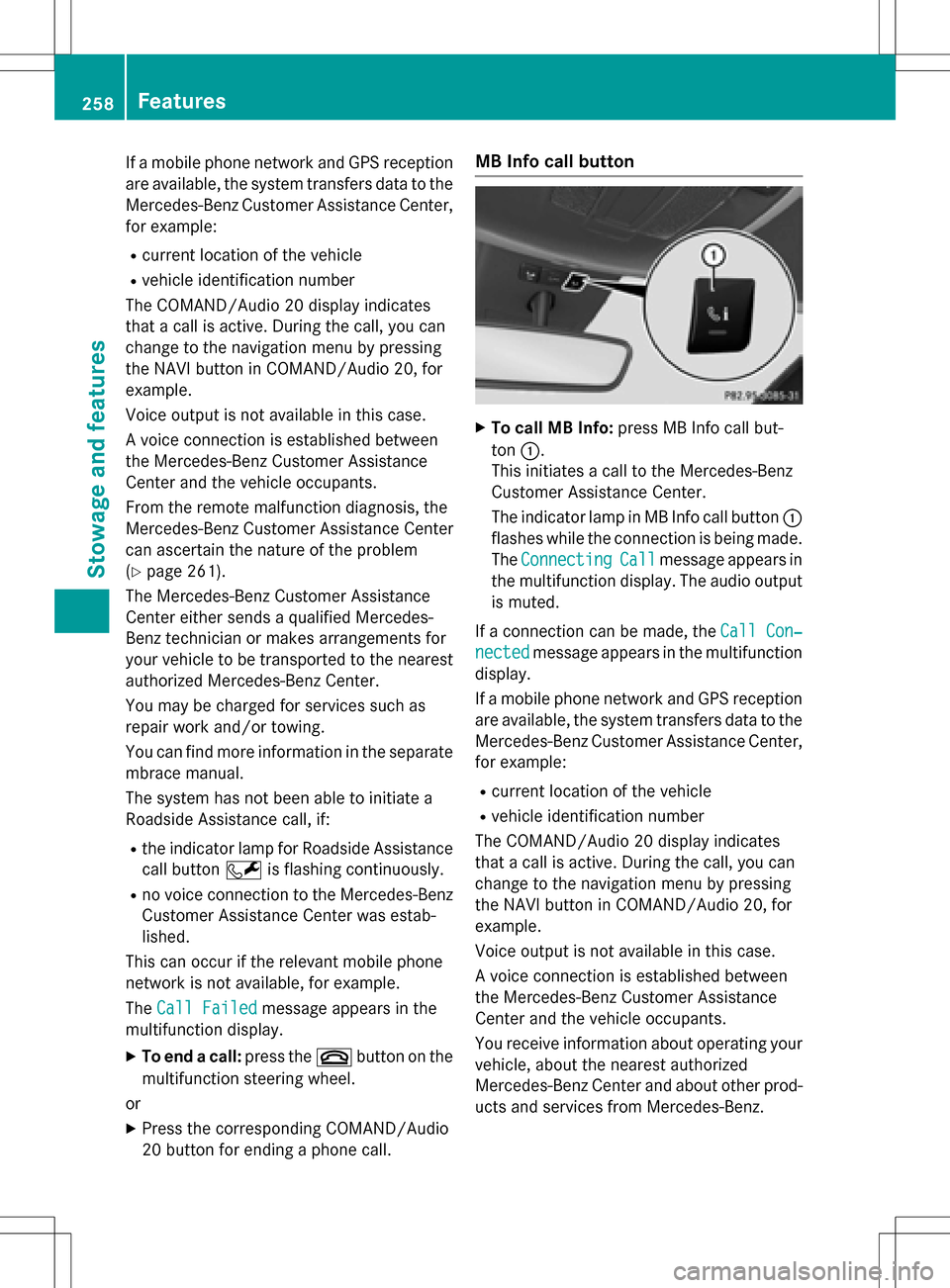
XTo call MB Info: press MB Info call but-
ton :.
This initiates a call to the Mercedes-Benz
Customer Assistance Center.
The indicator lamp in MB Info call button :
flashes while the connection is being made.
The Connecting
Callmessage appears in
the multifunction display. The audio output
is muted.
If a connection can be made, the Call Con‐
nectedmessage appears in the multifunction
display.
If a mobile phone network and GPS reception
are available, the system transfers data to the
Mercedes-Benz Customer Assistance Center,
for example:
Rcurrent location of the vehicle
Rvehicle identification number
The COMAND/Audio 20 display indicates
that a call is active. During the call, you can
change to the navigation menu by pressing
the NAVI button in COMAND/Audio 20, for
example.
Voice output is not available in this case.
A voice connection is established between
the Mercedes-Benz Customer Assistance
Center and the vehicle occupants.
You receive information about operating your
vehicle, about the nearest authorized
Mercedes-Benz Center and about other prod-
ucts and services from Mercedes-Benz.
258Features
Stowage and features
Page 261 of 342
You can find further information on the
mbrace system under "Owners Online" at
http://www.mbusa.com.
The system has not been able to initiate an
MB Info call, if:
Rthe indicator lamp in MB Info call button
ïis flashing continuously.
Rno voice connection to the Mercedes-Benz
Customer Assistance Center was estab-
lished.
This can occur if the relevant mobile phone
network is not available, for example.
The Call Failed
message appears in the
multifunction display.
XTo end a call: press the~button on the
multifunction steering wheel.
or
XPress the corresponding COMAND/Audio
20 button for ending a phone call.
Call priority
When service calls are active, e.g. Roadside
Assistance or MB Info calls, an emergency
call can still be initiated. In this case, an emer-
gency call will take priority and override all
other active calls.
The indicator lamp of the respective button
flashes until the call is ended.
An emergency call can only be terminated by the Mercedes-Benz Customer Assistance
Center.
All other calls can be ended by pressing:
Rthe ~ button on the multifunction steer-
ing wheel
Rthe corresponding button in COMAND/
Audio 20 to end the voice call
When a call is initiated, the audio system is
muted.
The mobile phone is no longer connected to
COMAND/Audio 20.
However, if you want to use your mobile
phone, do so only when the vehicle is station-
ary and in a safe location.
Downloading destinations
Downloading destinations
Downloading destinations gives you access
to a database with over 15 million points of
interest (POIs). These can be downloaded on
the navigation system in your vehicle. If you
know the destination, the address can be
downloaded. Alternatively, you can obtain the
location of Points of Interest (POIs)/impor-
tant destinations in the vicinity.
Furthermore, you can download routes with
up to four way points.
You are prompted to confirm route guidance
to the address entered.
XSelect Yesby turning 3or sliding 1
the controller and confirm with 7.
The system calculates the route and sub-
sequently starts the route guidance with
the address entered.
If you select No
the address can be stored in
the address book.
The destination download function is availa-
ble if:
Rthe vehicle is equipped with a navigation
system.
Rthe relevant mobile phone network is avail- able and data transfer is possible.
Route Assistance
This service is part of the mbrace PLUS Pack-
age and cannot be purchased separately.
You can use the route assistance function
even if the vehicle is not equipped with a nav-
igation system.
Within the framework of this service, you
receive a professional and reliable form of
navigation support without having to leave
your vehicle.
The customer service representative finds a
suitable route depending on your vehicle's
current position and the desired destination.
You will then be guided live through the cur-
rent route section.
Features259
Stowage and features
Z
Page 292 of 342
Allow the frozen battery to thaw out before
charging it or jump-starting.
!Only use battery chargers with a maxi-
mum charging voltage of 14.8 V.
!Onlycharge the battery using the jump-
starting connection point.
The jump-starting connection point is in the
engine compartment (
Ypage 292).
XOpen the hood.
XConnect the battery charger to the positive terminal and ground point in the same
order as when connecting the donor bat-
tery in the jump-starting procedure
(
Ypage 292).
If the indicator/warning lamps do not light up
at low temperatures, it is very likely that the
discharged battery has frozen. In this case
you may neither jump-start the vehicle nor
charge the battery. The service life of a
thawed-out battery may be shorter. The start-
ing characteristics can be impaired, particu-
larly at low temperatures. Have the thawed-
out battery checked at a qualified specialist
workshop.
Only charge the installed battery with a bat-
tery charger which has been tested and
approved by Mercedes-Benz. A battery
charger unit specially adapted for Mercedes-
Benz vehicles and tested and approved by
Mercedes-Benz is available as an accessory.
It permits the charging of the battery in its
installed position. Contact an authorized
Mercedes-Benz Center for further informa-
tion and availability. Read the battery charg-
er's ope rating instructions before charging
the battery.
High-voltage battery – important
safety notes
GDANGER
The vehicle's high-voltage electrical system is under high voltage. If you modify components
in the vehicle's high-voltage electrical system
or touch damaged components, you may be
electrocuted. The components in the vehi-
cle's high-voltage electrical system may be
damaged in an accident, although the damage
is not visible. There is a risk of fatal injury.
Following an accident, do not touch any high-
voltage components and never modify the
vehicle's high-voltage electrical system. Have
the vehicle towed away after an accident and
the vehicle's high-voltage electrical system
checked by a qualified specialist workshop.
GWARNING
In the event of a vehicle fire, the internal pres- sure of the high-voltage battery can exceed a
critical value. In this case flammable gas
escapes through a ventilation valve on the
underbody. The gas can ignite. There is a risk
of injury.
Leave the danger zone immediately. Secure
the danger area at a suitable distance, whilst
observing legal requirements.
The vehicle's high voltage electrical system is
under high voltage.
RDo not handle high-voltage components orthe orange cables of the vehicle's high-volt-
age electrical system.
RDo not touch high-voltage components or
the orange cables of the high-voltage elec-
trical system when a vehicle has been
involved in a crash.
RDo not touch any damaged components or
the damaged orange cables of the vehicle's
high-voltage electrical system.
RDo not remove the covers of the high-volt-
age electrical system components that are
marked with a warning sticker.
Do not leave the vehicle parked for longer
than 14 days with a high-voltage battery con- dition of charge below 20%.
You can check the condition of charge in the
charge level display (
Ypage 184).
If you park the vehicle and leave it stationary
for longer periods, connect it to a power sup-
ply.
290Batteries
Breakdown assistance