transmission MERCEDES-BENZ B-CLASS HATCHBACK 2008 Owner's Manual
[x] Cancel search | Manufacturer: MERCEDES-BENZ, Model Year: 2008, Model line: B-CLASS HATCHBACK, Model: MERCEDES-BENZ B-CLASS HATCHBACK 2008Pages: 305, PDF Size: 5.1 MB
Page 118 of 305
Driving sys
tems 115
The LIM indicator lamp on the cruise control
lever indicates which system you have selec-
ted:
R LIM indicator lamp off:
cruise control is selected
R LIM indicator lamp lit:
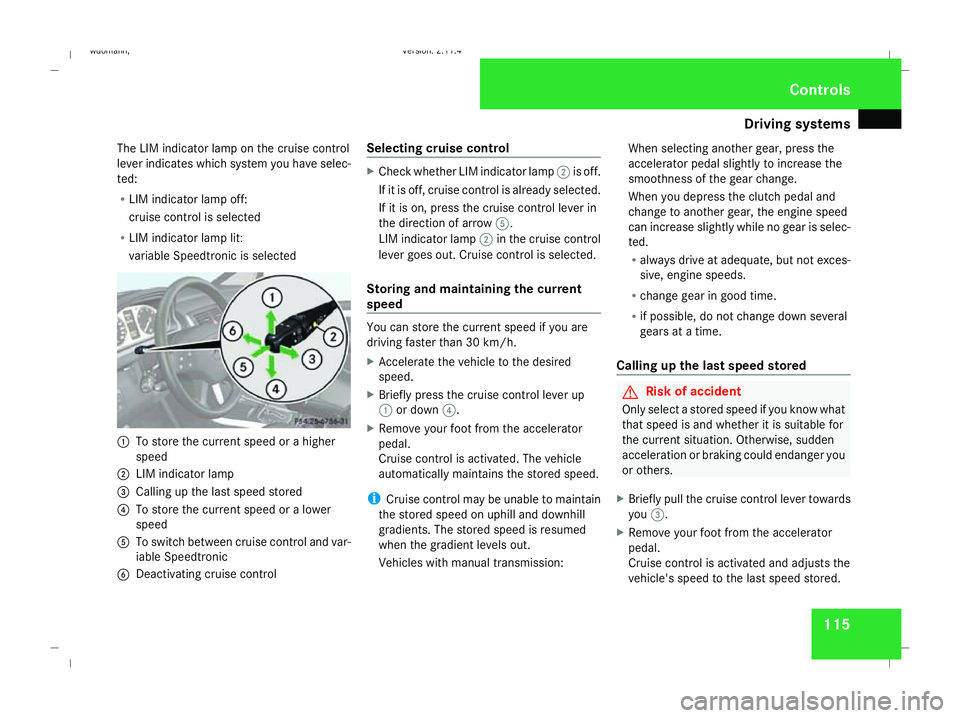
variable Speedtronic is selected 1
To store the current speed or a higher
speed
2 LIM indicator lamp
3 Calling up the last speed stored
4 To store the current speed or a lower
speed
5 To switch between cruise control and var-
iable Speedtronic
6 Deactivating cruise control Selecting cruise control X
Check whether LIM indicator lamp 2is off.
If it is off, cruise control is already selected.
If it is on, press the cruise control lever in
the direction of arrow 5.
LIM indicator lamp 2in the cruise control
lever goes out. Cruise control is selected.
Storing and maintaining the current
speed You can store the current speed if you are
driving faster than 30 km/
h.
X Accelerate the vehicle to the desired
speed.
X Briefly press the cruise control lever up
1 or down 4.
X Remove your foot from the accelerator
pedal.
Cruise control is activated. The vehicle
automatically maintains the stored speed.
i Cruise control may be unable to maintain
the stored speed on uphill and downhill
gradients. The stored speed is resumed
when the gradient levels out.
Vehicles with manual transmission: When selecting another gear, press the
accelerator pedal slightly to increase the
smoothness of the gear change.
When you depress the clutch pedal and
change to another gear, the engine speed
can increase slightly while no gear is selec-
ted.
R
always drive at adequate, but not exces-
sive, engine speeds.
R change gear in good time.
R if possible, do not change down several
gears at a time.
Calling up the last speed stored G
Risk of accident
Only select a stored speed if you know what
that speed is and whether it is suitable for
the current situation. Otherwise, sudden
acceleration or braking could endanger you
or others.
X Briefly pull the cruise control lever towards
you 3.
X Remove your foot from the accelerator
pedal.
Cruise control is activated and adjusts the
vehicle's speed to the last speed stored. Controls
245_AKB; 2; 7, en-GB
wdomann,
Version: 2.11.4 2008-10-17T11:22:31+02:00 - Seite 115 ZDateiname: 6515_1640_02_buchblock.pdf; preflight
Page 119 of 305
Driving sys
tems 116
Setting a speed X
Press the cruise control lever up 1for a
higher speed or down 4for a lower speed.
X Keep the cruise control lever pressed until
the desired speed is reached.
X Release the cruise control lever.
The new speed is stored.
i Cruise control is not deactivated if you
depress the accelerator pedal. For exam-
ple, if you accelerate briefly to overtake,
cruise control adjusts the vehicle's speed
to the last speed stored after you have fin-
ished overtaking.
i Vehicles with AUTOTRONIC*:
When you decelerate the vehicle using the
cruise control lever, AUTOTRONIC changes
down if deceleration is insufficient.
Making fine adjustments in
1 km/hincrements X
Briefly press the cruise control lever up
1 for a higher speed or down 4for a
lower speed.
The last speed stored is increased or
reduced. Deactivating cruise control There are several ways to deactivate cruise
control:
X
Briefly press the cruise control lever for-
wards 6.
or
X Brake.
or
X Briefly press the cruise control lever in the
direction of arrow 5.
Variable Speedtronic is selected. LIM indi-
cator lamp 2in the cruise control lever
lights up.
Cruise control is automatically deactivated if,
for example:
R aquaplaning is detected
R you press the clutch pedal for more than
four seconds on vehicles with a manual
transmission
R you move the selector lever to Nwhile driv-
ing in vehicles with AUTOTRONIC*
i The last speed stored is cleared when you
switch off the engine. Speedtronic*
Speedtronic is used to make sure that you do
not exceed a stored speed. You must select
a low gear in good time on long and steep
downhill gradients, especially if the vehicle is
laden or towing a trailer. By doing so you will
make use of the braking effect of the engine,
which relieves the load on the brake system
and prevents the brakes from overheating
and wearing too quickly. G
Risk of accident
Never depress the brake pedal continu-
ously while the vehicle is in motion, e.g.
never cause the brakes to rub by applying
constant slight pedal pressure. This causes
the brake system to overheat, increases
the braking distance and can lead to the
brakes failing completely. G
Risk of accident
Do not change down for additional engine
braking on a slippery road surface. This
could cause the drive wheels to lose their
grip and the vehicle could skid. Controls
* optional
245_AKB; 2; 7, en-GB
wdomann,
Version: 2.11.4 2008-10-17T11:22:31+02:00 - Seite 116Dateiname: 6515_1640_02_buchblock.pdf; preflight
Page 124 of 305
Driving sys
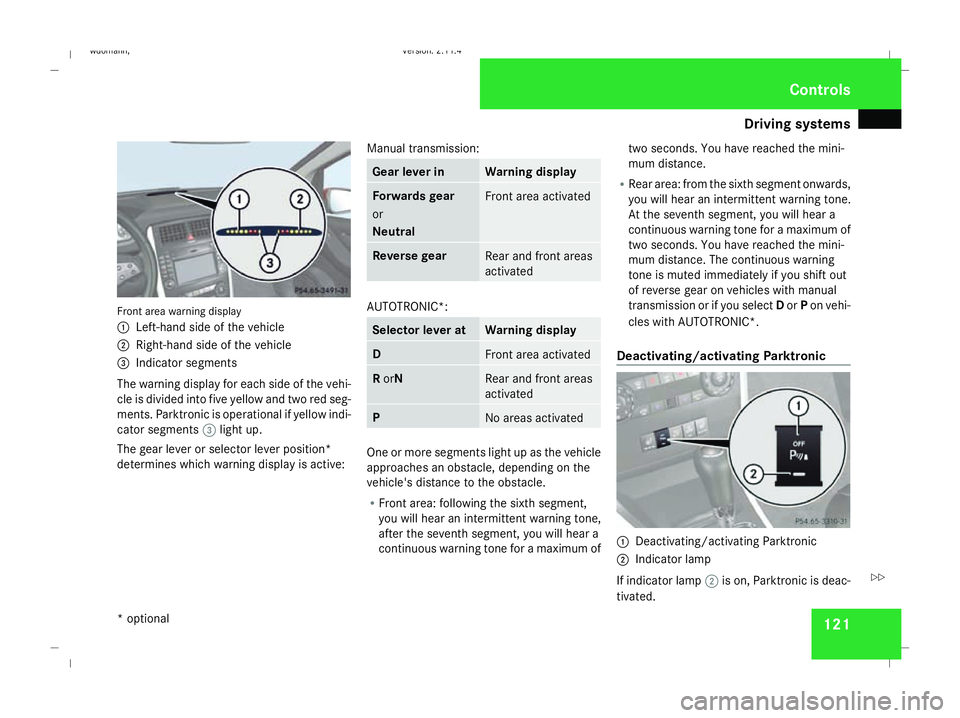
tems 121Front area warning display
1
Left-hand side of the vehicle
2 Right-hand side of the vehicle
3 Indicator segments
The warning display for each side of the vehi-
cle is divided into five yellow and two red seg-
ments. Parktronic is operational if yellow indi-
cator segments 3light up.
The gear lever or selector lever position*
determines which warning display is active: Manual transmission: Gear lever in Warning display
Forwards gear
or
Neutral
Front area activated
Reverse gear
Rear and front areas
activated
AUTOTRONIC*:
Selector lever at Warning display
D
Front area activated
R
orN Rear and front areas
activated
P
No areas activated
One or more segments light up as the vehicle
approaches an obstacle, depending on the
vehicle's distance to the obstacle.
R
Front area: following the sixth segment,
you will hear an intermittent warning tone,
after the seventh segment, you will hear a
continuous warning tone for a maximum of two seconds. You have reached the mini-
mum distance.
R Rear area: from the sixth segment onwards,
you will hear an intermittent warning tone.
At the seventh segment, you will hear a
continuous warning tone for a maximum of
two seconds. You have reached the mini-
mum distance. The continuous warning
tone is muted immediately if you shift out
of reverse gear on vehicles with manual
transmission or if you select Dor Pon vehi-
cles with AUTOTRONIC*.
Deactivating/activating Parktronic 1
Deactivating/activating Parktronic
2 Indicator lamp
If indicator lamp 2is on, Parktronic is deac-
tivated. Controls
* optional
245_AKB; 2; 7, en-GB
wdomann,
Version: 2.11.4 2008-10-17T11:22:31+02:00 - Seite 121 ZDateiname: 6515_1640_02_buchblock.pdf; preflight
Page 127 of 305
Driving sys
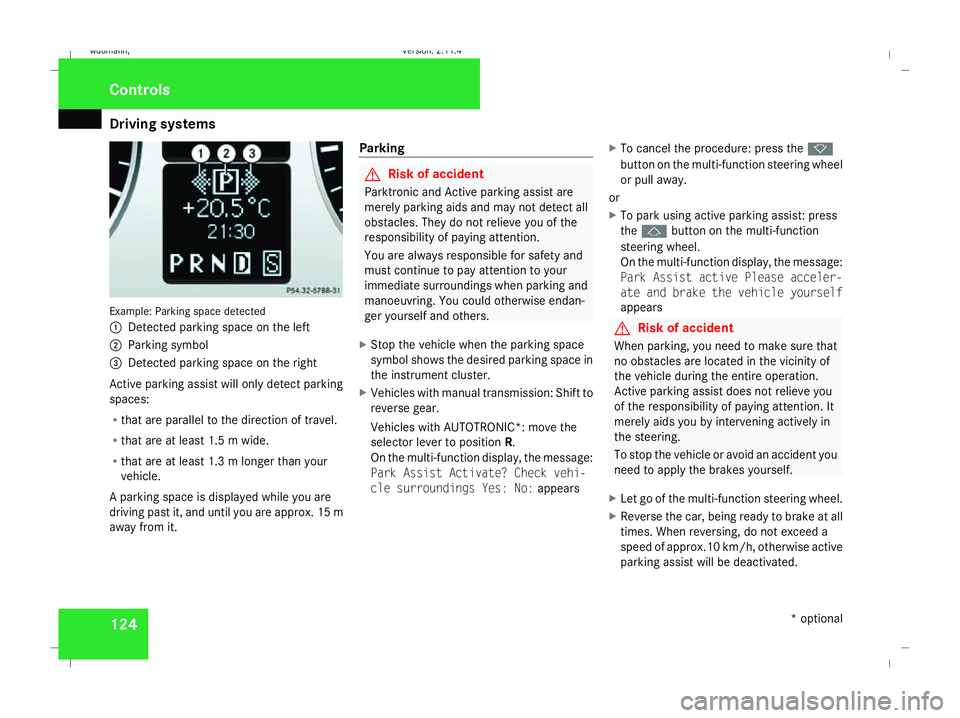
tems 124Example: Parking space detected
1
Detected parking space on the left
2 Parking symbol
3 Detected parking space on the right
Active parking assist will only detect parking
spaces:
R that are parallel to the direction of travel.
R that are at least 1.5 m wide.
R that are at least 1.3 m longer than your
vehicle.
A parking space is displayed while you are
driving past it, and until you are approx. 15 m
away from it. Parking G
Risk of accident
Parktronic and Active parking assist are
merely parking aids and may not detect all
obstacles. They do not relieve you of the
responsibility of paying attention.
You are always responsible for safety and
must continue to pay attention to your
immediate surroundings when parking and
manoeuvring. You could otherwise endan-
ger yourself and others.
X Stop the vehicle when the parking space
symbol shows the desired parking space in
the instrument cluster.
X Vehicles with manual transmission: Shift to
reverse gear.
Vehicles with AUTOTRONIC*: move the
selector lever to position R.
On the multi-function display, the message:
Park Assist Activate? Check vehi-
cle surroundings Yes: No: appearsX
To cancel the procedure: press the k
button on the multi-function steering wheel
or pull away.
or
X To park using active parking assist: press
the j button on the multi-function
steering wheel.
On the multi-function display, the message:
Park Assist active Please acceler-
ate and brake the vehicle yourself
appears G
Risk of accident
When parking, you need to make sure that
no obstacles are located in the vicinity of
the vehicle during the entire operation.
Active parking assist does not relieve you
of the responsibility of paying attention. It
merely aids you by intervening actively in
the steering.
To stop the vehicle or avoid an accident you
need to apply the brakes yourself.
X Let go of the multi-function steering wheel.
X Reverse the car, being ready to brake at all
times. When reversing, do not exceed a
speed of approx.10 km/h, otherwise active
parking assist will be deactivated. Controls
* optional
245_AKB; 2; 7, en-GB
wdomann,
Version: 2.11.4
2008-10-17T11:22:31+02:00 - Seite 124 Dateiname: 6515_1640_02_buchblock.pdf; preflight
Page 128 of 305
Driving sys
tems 125
i
In tight parking spaces, you will achieve
the best parking results by reversing as far
as possible. When doing so, also observe
the Parktronic messages.
X Stop as soon as Parktronic sounds the con-
tinuous warning tone, if not before.
Manoeuvring may be required in tight park-
ing spaces.
Vehicles with manual transmission: the mes-
sage Park Assist active Please shift
to a forward gear appears in the multi-
function display.
Vehicles with AUTOTRONIC*: the message
Park Assist active Please shift to
D appears in the multi-function display.
X Vehicles with manual transmission: When
the car is stationary, shift to first gear.
Vehicles with AUTOTRONIC*: When the car
is stationary, set the selector lever to posi-
tion R.
Active parking assist immediately steers in
the other direction.
On the multi-function display, the message:
Park Assist active Please acceler- ate and brake the vehicle yourself
appears.
i You will achieve the best parking results
by waiting for the steering procedure to
complete before moving forwards.
X Drive forwards and be ready to brake at all
times.
X Stop as soon as Parktronic sounds the con-
tinuous warning tone, if not before.
Vehicles with manual transmission: the mes-
sage Park Assist active Please shift
into reverse gear appears in the multi-
function display.
Vehicles with AUTOTRONIC*, the message
Park Assist active Please shift to
R appears in the multi-function display.
X Further gear changes* may be necessary.
As soon as the parking procedure is com-
plete, the message Parking assistance
finished Please take over appears.
Active parking assist is now deactivated.
Parktronic is still available.
X Manoeuvre if necessary.
X Always observe the warning messages dis-
played by Parktronic (Y page 120).Cancelling active parking assist You can cancel active parking assist at any
time.
X
Stop the movement of the multi-function
steering wheel or steer yourself.
Active parking assist will be cancelled at
once. The multi-function display shows the
message: Park Assist cancelled .
or
X Press the Parktronic button on the centre
console (Y page 121).
Parktronic is switched off and active park-
ing assist is immediately cancelled. The
multi-function display shows the message:
Park Assist cancelled .
Active parking assist is cancelled automati-
cally if:
R a gear is changed* too early
R parking using active parking assist is no
longer possible
R you are driving faster than 10 km/h
R a wheel spins, ESP ®
is activated or fails. In
such cases the vwarning lamp lights
up in the instrument cluster. Controls
* optional
245_AKB; 2; 7, en-GB
wdomann,
Version: 2.11.4
2008-10-17T11:22:31+02:00 - Seite 125 ZDateiname: 6515_1640_02_buchblock.pdf; preflight
Page 186 of 305
Driving
tips 183
X
Vehicles with manual transmission: engage
neutral.
X Vehicles with AUTOTRONIC*: shift the
selector lever to N.
X Try to bring the vehicle under control using
corrective steering. Driving tips
Rolling with the engine switched off
G
Risk of accident
Never switch the engine off while the vehi-
cle is in motion.
There is no power assistance for the steer-
ing and the service brake when the engine
is not running.
You will require considerably more effort to
steer and brake and you could therefore
lose control of the vehicle and cause an
accident. Braking
G
Risk of accident
Do not change down for additional engine
braking on a slippery road surface. This
could cause the drive wheels to lose their
grip and the vehicle could skid. G
Risk of accident
Make sure that other road users are not
endangered by your braking. Downhill gradients On long and steep downhill stretches, espe-
cially if the vehicle is laden or towing a trailer,
you must shift to a lower gear in good time or,
on vehicles with AUTOTRONIC*, select shift
range
1,2or 3.
i This also applies if you have activated
cruise control* or Speedtronic*.
This will use the braking effect of the engine,
so less braking will be required to maintain
the speed. This relieves the load on the brake
system and prevents the brakes from over-
heating and wearing too quickly. If you need
additional braking, depress the brake pedal
repeatedly rather than continuously.
Heavy and light loads If the brakes have been subjected to a heavy
load, do not stop the vehicle immediately, but
drive on for a short while. This allows the air-
flow to cool the brakes more quickly.
G
Risk of accident
Never depress the brake pedal continu-
ously while the vehicle is in motion, e.g.
never cause the brakes to rub by applying
constant slight pedal pressure. This causes
the brake system to overheat, increases Operation
* optional
245_AKB; 2; 7, en-GB
wdomann,
Version: 2.11.4
2008-10-17T11:22:31+02:00 - Seite 183 ZDateiname: 6515_1640_02_buchblock.pdf; preflight
Page 188 of 305
Driving ab
road 185Driving on wet roads
If water has accumulated to a certain depth
on the road surface, there is a danger of aqua-
planing occurring, even if:
R you drive at low speeds
R the tyres have adequate tread depth
For this reason, do not drive in tyre ruts, and
brake carefully. Driving on flooded roads
If you have to drive on stretches of road on
which water has collected, please bear in
mind that:
R the maximum permitted still water depth is
25 cm.
R you should drive no faster than at walking
pace.
! Bear in mind that vehicles travelling in
front or in the opposite direction create
waves. This may cause the maximum per-
missible water depth to be exceeded.
Failure to observe these notes may result
in damage to the engine, electrical systems
and transmission. Driving abroad
Points to remember
An extensive Mercedes-Benz Service network
is also available in other countries. The
Service Hotline's current telephone numbers
for use when you are abroad are to be found
in the "Service24h" chapter of the Service
Booklet.
Only low-octane fuel is available in certain
countries.
You can find further information about fuel
grades on (Y page 168). Symmetrical dipped beam
If your journey takes you to countries where
vehicles are driven on sides of the road oppo-
site to the country in which the vehicle is reg-
istered, your headlamps must be switched to
symmetrical dipped beam. Oncoming traffic
will be dazzled less.
X Have the headlamps switched over at a
qualified specialist workshop, e. g. a
Mercedes-Benz Service Centre. G
Risk of accident
Remember to set the headlamps back to
asymmetrical dipped beam when you return to driving on the same side of the
road as that of the country in which your
vehicle was registered. You may otherwise
dazzle the oncoming traffic and could cause
an accident. Operation
245_AKB; 2; 7, en-GB
wdomann,
Version: 2.11.4
2008-10-17T11:22:31+02:00 - Seite 185 ZDateiname: 6515_1640_02_buchblock.pdf; preflight
Page 212 of 305
Display
messages 209Display messages Possible cause/consequence Possible solution
ESP inoperative See
Owner's Manual G
Risk of accident
ESP ®
is unavailable due to a malfunction.
The following systems are also unavaila-
ble:
R BAS
R the steering assistant STEER CONTROL
R hill start assist
R the tyre pressure loss warning system
The brake system continues to function
normally, but without the functions listed
above. X
Drive on carefully.
X Visit a qualified specialist workshop immedi-
ately. Vehicle Consult workshop
Safe operation of AUTOTRONIC* can no
longer be fully guaranteed. X
Stop in accordance with traffic conditions.
X Move the selector lever to P.
X Turn the key to position 0in the ignition lock.
X Wait at least 10 seconds before restarting the
engine.
X Move the selector lever to position Dor R.
X Drive on carefully.
X Have the transmission checked immediately at
a qualified specialist workshop. Shift to N to start
Vehicles with AUTOTRONIC*: the selector
lever is not in position
Nor P. X
Move the selector lever to position Nor P. Practical advi
ce
* optional
245_AKB; 2; 7, en-GB
wdomann,
Version: 2.11.4 2008-10-17T11:22:31+02:00 - Seite 209 ZDateiname: 6515_1640_02_buchblock.pdf; preflight
Page 238 of 305
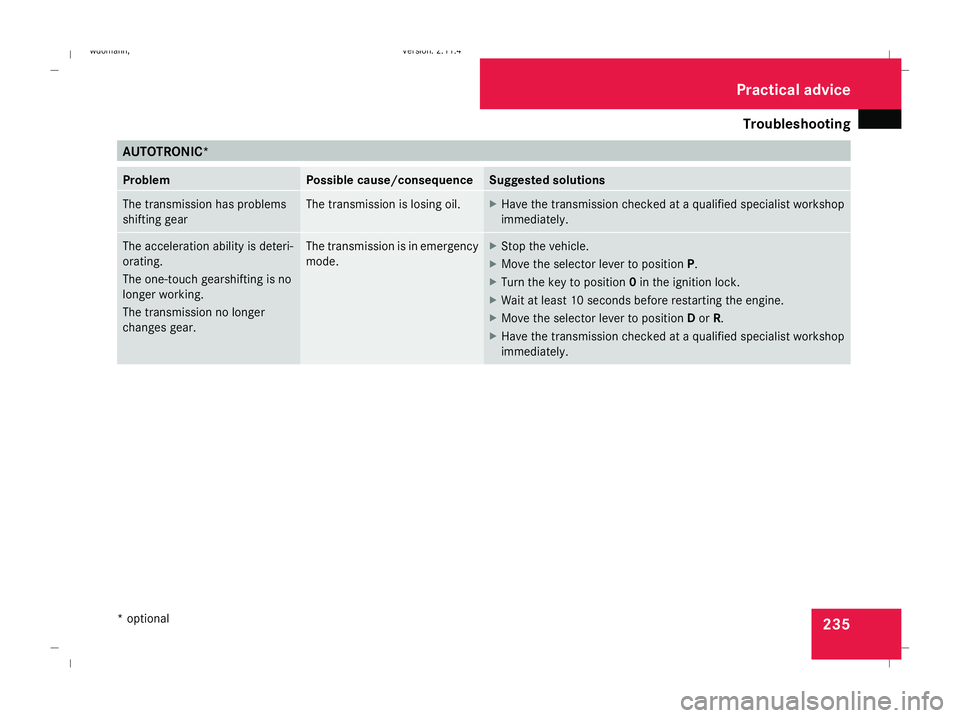
Troubleshooting
235AUTOTRONIC*
Problem Possible cause/consequence Suggested solutions
The transmission has problems
shifting gear The transmission is losing oil. X
Have the transmission checked at a qualified specialist workshop
immediately. The acceleration ability is deteri-
orating.
The one-touch gearshifting is no
longer working.
The transmission no longer
changes gear. The transmission is in emergency
mode. X
Stop the vehicle.
X Move the selector lever to position P.
X Turn the key to position 0in the ignition lock.
X Wait at least 10 seconds before restarting the engine.
X Move the selector lever to position Dor R.
X Have the transmission checked at a qualified specialist workshop
immediately. Practical advice
* optional
245_AKB; 2; 7, en-GB
wdomann,
Version: 2.11.4
2008-10-17T11:22:31+02:00 - Seite 235 ZDateiname: 6515_1640_02_buchblock.pdf; preflight
Page 255 of 305
Flat tyre
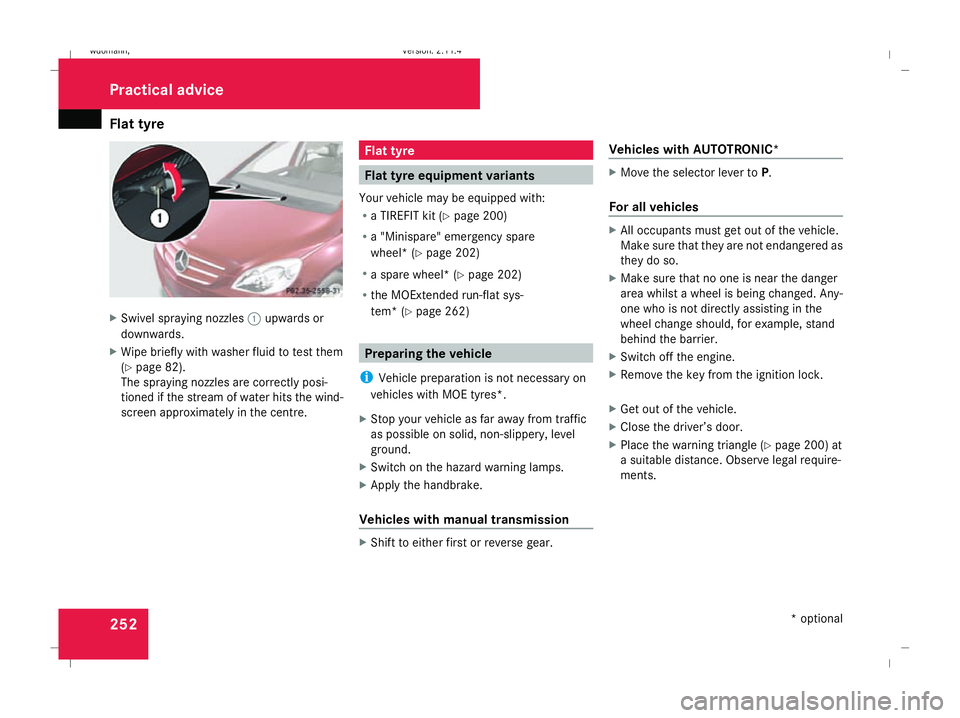
252X
Swivel spraying nozzles 1upwards or
downwards.
X Wipe briefly with washer fluid to test them
(Y page 82).
The spraying nozzles are correctly posi-
tioned if the stream of water hits the wind-
screen approximately in the centre. Flat tyre
Flat tyre equipment variants
Your vehicle may be equipped with:
R a TIREFIT kit (Y page 200)
R a "Minispare" emergency spare
wheel* (Y page 202)
R a spare wheel* (Y page 202)
R the MOExtended run-flat sys-
tem* (Y page 262) Preparing the vehicle
i Vehicle preparation is not necessary on
vehicles with MOE tyres*.
X Stop your vehicle as far away from traffic
as possible on solid, non-slippery, level
ground.
X Switch on the hazard warning lamps.
X Apply the handbrake.
Vehicles with manual transmission X
Shift to either first or reverse gear. Vehicles with AUTOTRONIC* X
Move the selector lever to P.
For all vehicles X
All occupants must get out of the vehicle.
Make sure that they are not endangered as
they do so.
X Make sure that no one is near the danger
area whilst a wheel is being changed. Any-
one who is not directly assisting in the
wheel change should, for example, stand
behind the barrier.
X Switch off the engine.
X Remove the key from the ignition lock.
X Get out of the vehicle.
X Close the driver’s door.
X Place the warning triangle ( Ypage 200) at
a suitable distance. Observe legal require-
ments. Practical advice
* optional
245_AKB; 2; 7, en-GB
wdomann
, Version: 2.11.4
2008-10-17T11:22:31+02:00 - Seite 252 Dateiname: 6515_1640_02_buchblock.pdf; preflight