lock MERCEDES-BENZ B-CLASS HATCHBACK 2008 Repair Manual
[x] Cancel search | Manufacturer: MERCEDES-BENZ, Model Year: 2008, Model line: B-CLASS HATCHBACK, Model: MERCEDES-BENZ B-CLASS HATCHBACK 2008Pages: 305, PDF Size: 5.1 MB
Page 64 of 305
Opening and closing
61Opening the doors from the inside
You can open a door from the inside at any
time, even if it has been locked. X
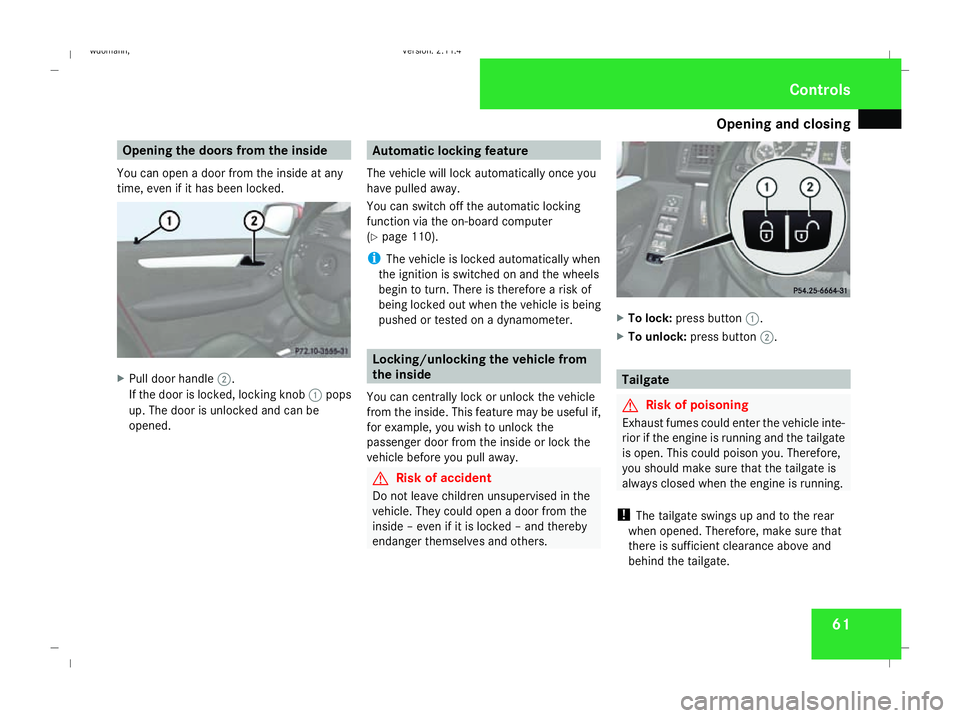
Pull door handle 2.
If the door is locked, locking knob 1pops
up. The door is unlocked and can be
opened. Automatic locking feature
The vehicle will lock automatically once you
have pulled away.
You can switch off the automatic locking
function via the on-board computer
(Y page 110).
i The vehicle is locked automatically when
the ignition is switched on and the wheels
begin to turn. There is therefore a risk of
being locked out when the vehicle is being
pushed or tested on a dynamometer. Locking/unlocking the vehicle from
the inside
You can centrally lock or unlock the vehicle
from the inside. This feature may be useful if,
for example, you wish to unlock the
passenger door from the inside or lock the
vehicle before you pull away. G
Risk of accident
Do not leave children unsupervised in the
vehicle. They could open a door from the
inside – even if it is locked – and thereby
endanger themselves and others. X
To lock: press button 1.
X To unlock: press button 2. Tailgate
G
Risk of poisoning
Exhaust fumes could enter the vehicle inte-
rior if the engine is running and the tailgate
is open. This could poison you. Therefore,
you should make sure that the tailgate is
always closed when the engine is running.
! The tailgate swings up and to the rear
when opened. Therefore, make sure that
there is sufficient clearance above and
behind the tailgate. Controls
245_AKB; 2; 7, en-GB
wdomann,
Version: 2.11.4 2008-10-17T11:22:31+02:00 - Seite 61 ZDateiname: 6515_1640_02_buchblock.pdf; preflight
Page 65 of 305
Key positions
62
Opening from the outside You can only open the tailgate after unlocking
it first.
X To unlock centrally: press thekbut-
ton on the key. X
Pull handle 1.
X Raise the tailgate.
Closing from the outside G
Risk of injury
Make sure that nobody can become trap-
ped as you close the tailgate.
i Do not leave the key in the luggage com-
partment. You could otherwise lock your-
self out. X
Pull the tailgate down using recess 1.
X Push the tailgate closed from the outside.
X Lock the vehicle if necessary with
the ‹ button on the key. Key positions
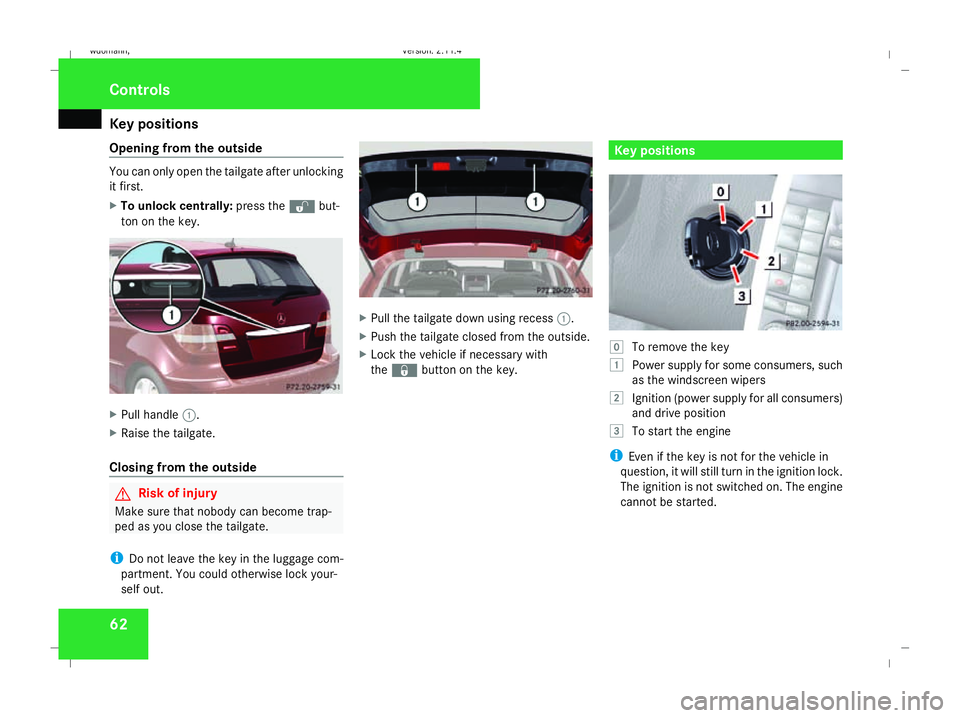
}
To remove the key
$ Power supply for some consumers, such
as the windscreen wipers
% Ignition (power supply for all consumers)
and drive position
& To start the engine
i Even if the key is not for the vehicle in
question, it will still turn in the ignition lock.
The ignition is not switched on. The engine
cannot be started. Cont
rols
245_AKB; 2; 7, en-GB
wdomann, Version: 2.11.4
2008-10-17T11:22:31+02:00 - Seite 62 Dateiname: 6515_1640_02_buchblock.pdf; preflight
Page 66 of 305
Seats
63Seats
Points to remember
You can find information about enlarging the
luggage compartment (folding forwards/
removing the rear seats) on (Y page 149).
Depending on the vehicle's equipment, the
seats can be adjusted either manually or elec-
trically. G
Risk of injury
The seats can be adjusted when the key is
removed and the door is open. For this rea-
son, children should never be left unsuper-
vised in the vehicle. They could become
trapped when adjusting a seat. G
Risk of accident
Only adjust the driver's seat when the vehi-
cle is stationary. You will otherwise be dis-
tracted from the road and traffic conditions
and you could lose control of the vehicle as
a result of the seat moving. This could
cause an accident. G
Risk of injury
Make sure that nobody can become trap-
ped when you adjust the seat. Observe the notes concerning the airbag
system.
Secure children as recommended; see
"Children in the vehicle" section.
! When you move the seats, make sure that
there are no objects in the footwell or
behind the seats. Otherwise, you could
damage the seats and the objects.
i The front seats are fitted with active head
restraints (Y page 42). For this reason, it is
not possible to remove the head restraints
from the front seats.
The rear-compartment head restraints can
be removed (Y page 66).
Please contact a Mercedes-Benz Service
Centre for more information. Adjusting the seat manually
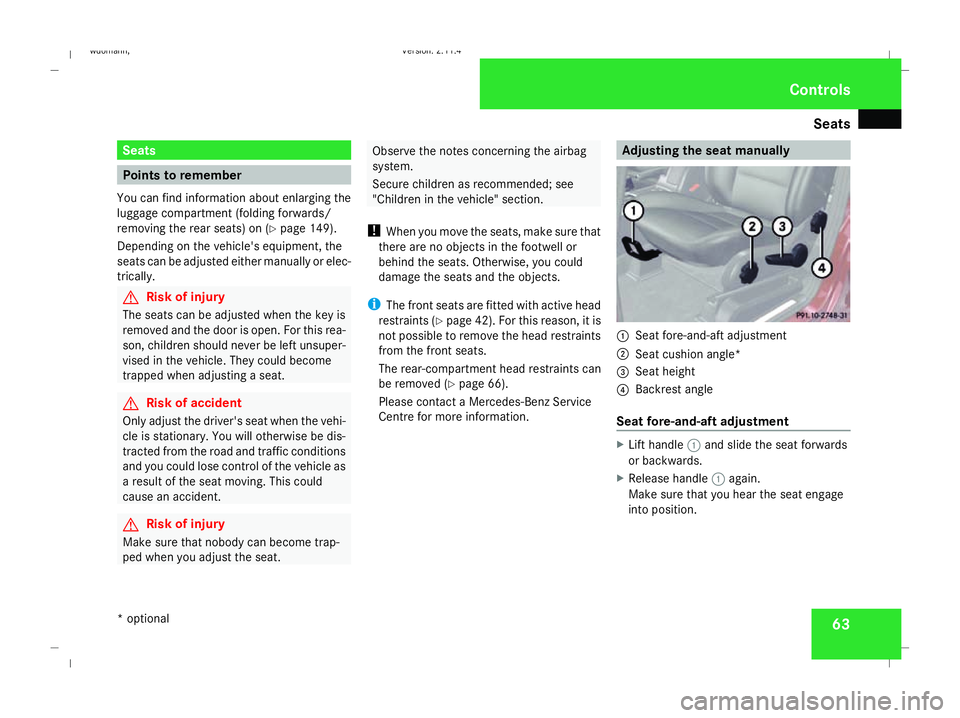
1
Seat fore-and-aft adjustment
2 Seat cushion angle*
3 Seat height
4 Backrest angle
Seat fore-and-aft adjustment X
Lift handle 1and slide the seat forwards
or backwards.
X Release handle 1again.
Make sure that you hear the seat engage
into position. Controls
* optional
245_AKB; 2; 7, en-GB
wdomann,
Version: 2.11.4 2008-10-17T11:22:31+02:00 - Seite 63 ZDateiname: 6515_1640_02_buchblock.pdf; preflight
Page 67 of 305
Seats
64
Backrest angle X
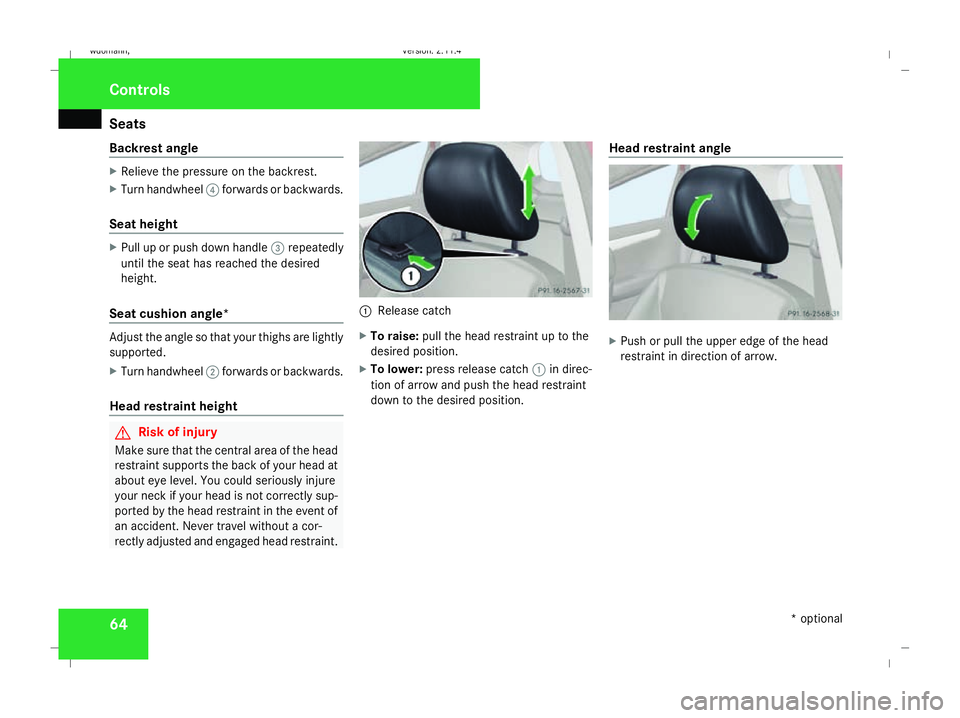
Relieve the pressure on the backrest.
X Turn handwheel 4forwards or backwards.
Seat height X
Pull up or push down handle 3repeatedly
until the seat has reached the desired
height.
Seat cushion angle* Adjust the angle so that your thighs are lightly
supported.
X Turn handwheel 2forwards or backwards.
Head restraint height G
Risk of injury
Make sure that the central area of the head
restraint supports the back of your head at
about eye level. You could seriously injure
your neck if your head is not correctly sup-
ported by the head restraint in the event of
an accident. Never travel without a cor-
rectly adjusted and engaged head restraint. 1
Release catch
X To raise: pull the head restraint up to the
desired position.
X To lower: press release catch 1in direc-
tion of arrow and push the head restraint
down to the desired position. Head restraint angle X
Push or pull the upper edge of the head
restraint in direction of arrow. Controls
* optional
245_AKB; 2; 7, en-GB
wdomann,
Version: 2.11.4 2008-10-17T11:22:31+02:00 - Seite 64Dateiname: 6515_1640_02_buchblock.pdf; preflight
Page 68 of 305
Seats
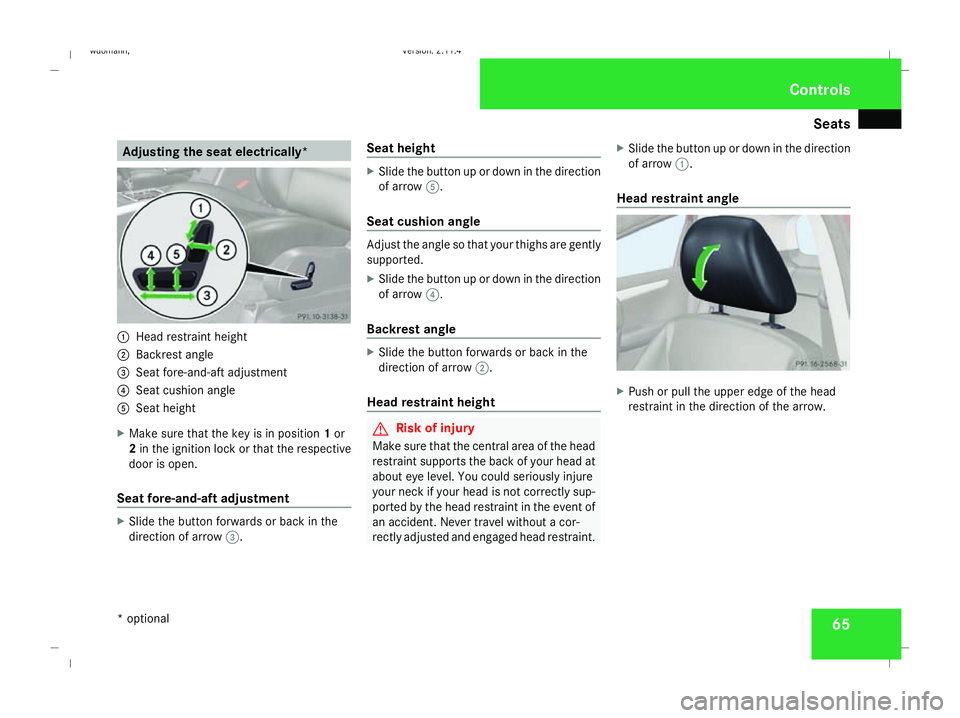
65Adjusting the seat electrically*
1
Head restraint height
2 Backrest angle
3 Seat fore-and-aft adjustment
4 Seat cushion angle
5 Seat height
X Make sure that the key is in position 1or
2 in the ignition lock or that the respective
door is open.
Seat fore-and-aft adjustment X
Slide the button forwards or back in the
direction of arrow 3. Seat height X
Slide the button up or down in the direction
of arrow 5.
Seat cushion angle Adjust the angle so that your thighs are gently
supported.
X
Slide the button up or down in the direction
of arrow 4.
Backrest angle X
Slide the button forwards or back in the
direction of arrow 2.
Head restraint height G
Risk of injury
Make sure that the central area of the head
restraint supports the back of your head at
about eye level. You could seriously injure
your neck if your head is not correctly sup-
ported by the head restraint in the event of
an accident. Never travel without a cor-
rectly adjusted and engaged head restraint. X
Slide the button up or down in the direction
of arrow 1.
Head restraint angle X
Push or pull the upper edge of the head
restraint in the direction of the arrow. Controls
* optional
245_AKB; 2; 7, en-GB
wdomann,
Version: 2.11.4 2008-10-17T11:22:31+02:00 - Seite 65 ZDateiname: 6515_1640_02_buchblock.pdf; preflight
Page 69 of 305
Seats
66 Rear seat head restraints
Adjusting the head restraint height G
Risk of injury
Make sure that the central area of the head
restraint supports the back of your head at
about eye level. You could seriously injure
your neck if your head is not correctly sup-
ported by the head restraint in the event of
an accident. Never travel without a cor-
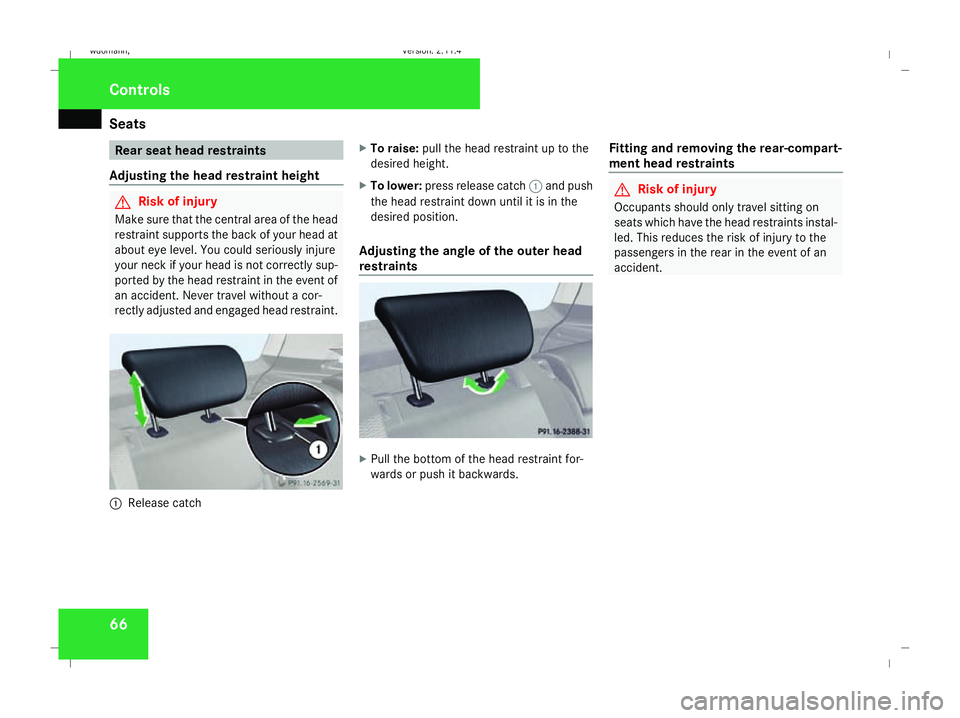
rectly adjusted and engaged head restraint. 1
Release catch X
To raise: pull the head restraint up to the
desired height.
X To lower: press release catch 1and push
the head restraint down until it is in the
desired position.
Adjusting the angle of the outer head
restraints X
Pull the bottom of the head restraint for-
wards or push it backwards. Fitting and removing the rear-compart-
ment head restraints G
Risk of injury
Occupants should only travel sitting on
seats which have the head restraints instal-
led. This reduces the risk of injury to the
passengers in the rear in the event of an
accident. Controls
245_AKB; 2; 7, en-GB
wdomann,
Version: 2.11.4 2008-10-17T11:22:31+02:00 - Seite 66Dateiname: 6515_1640_02_buchblock.pdf; preflight
Page 70 of 305
Seats
671
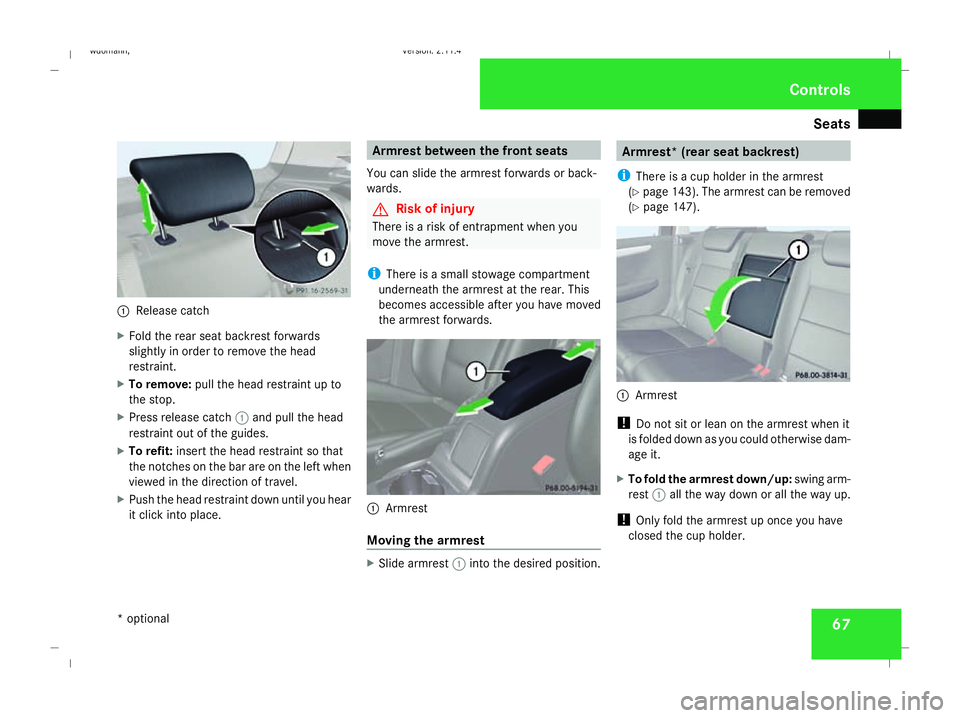
Release catch
X Fold the rear seat backrest forwards
slightly in order to remove the head
restraint.
X To remove: pull the head restraint up to
the stop.
X Press release catch 1and pull the head
restraint out of the guides.
X To refit: insert the head restraint so that
the notches on the bar are on the left when
viewed in the direction of travel.
X Push the head restraint down until you hear
it click into place. Armrest between the front seats
You can slide the armrest forwards or back-
wards. G
Risk of injury
There is a risk of entrapment when you
move the armrest.
i There is a small stowage compartment
underneath the armrest at the rear. This
becomes accessible after you have moved
the armrest forwards. 1
Armrest
Moving the armrest X
Slide armrest 1into the desired position. Armrest* (rear seat backrest)
i There is a cup holder in the armrest
(Y page 143). The armrest can be removed
(Y page 147). 1
Armrest
! Do not sit or lean on the armrest when it
is folded down as you could otherwise dam-
age it.
X To fold the armrest down/up: swing arm-
rest 1all the way down or all the way up.
! Only fold the armrest up once you have
closed the cup holder. Controls
* optional
245_AKB; 2; 7, en-GB
wdomann,
Version: 2.11.4 2008-10-17T11:22:31+02:00 - Seite 67 ZDateiname: 6515_1640_02_buchblock.pdf; preflight
Page 71 of 305
Seats
68 Lumbar support*
The lumbar support for the front seats can be
adjusted to provide optimum support for your
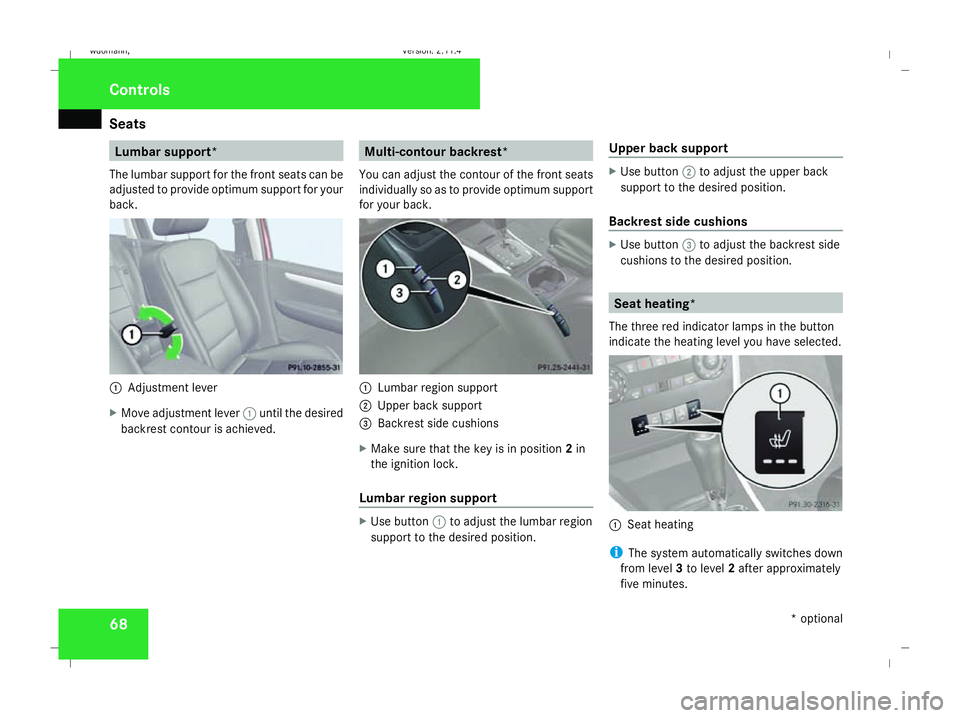
back. 1
Adjustment lever
X Move adjustment lever 1until the desired
backrest contour is achieved. Multi-contour backrest*
You can adjust the contour of the front seats
individually so as to provide optimum support
for your back. 1
Lumbar region support
2 Upper back support
3 Backrest side cushions
X Make sure that the key is in position 2in
the ignition lock.
Lumbar region support X
Use button 1to adjust the lumbar region
support to the desired position. Upper back support X
Use button 2to adjust the upper back
support to the desired position.
Backrest side cushions X
Use button 3to adjust the backrest side
cushions to the desired position. Seat heating*
The three red indicator lamps in the button
indicate the heating level you have selected. 1
Seat heating
i The system automatically switches down
from level 3to level 2after approximately
five minutes. Controls
* optional
245_AKB; 2; 7, en-GB
wdomann,
Version: 2.11.4
2008-10-17T11:22:31+02:00 - Seite 68 Dateiname: 6515_1640_02_buchblock.pdf; preflight
Page 72 of 305
Steering wheel
69
The system automatically switches down
from level 2to level 1after approximately
ten minutes.
The system automatically switches off
approximately 20 minutes after it is set to
level 1.
X Make sure that the key is in position 1or
2 in the ignition lock.
X To switch on: press button1repeatedly
until the desired heating level is set.
X To switch off: press button1repeatedly
until all indicator lamps go out.
i If the battery voltage is too low, the seat
heating may switch off. Steering wheel
G
Risk of accident
Only adjust the steering wheel when the
vehicle is stationary and do not pull away
until the steering wheel adjustment mech-
anism is locked in position. You might oth-
erwise drive without the steering wheel
adjustment mechanism being locked in
position. As a result you could be distracted
from road and traffic conditions by an unex-
pected movement of the steering wheel
and thereby cause an accident.
However, the steerability of the vehicle is
not affected.
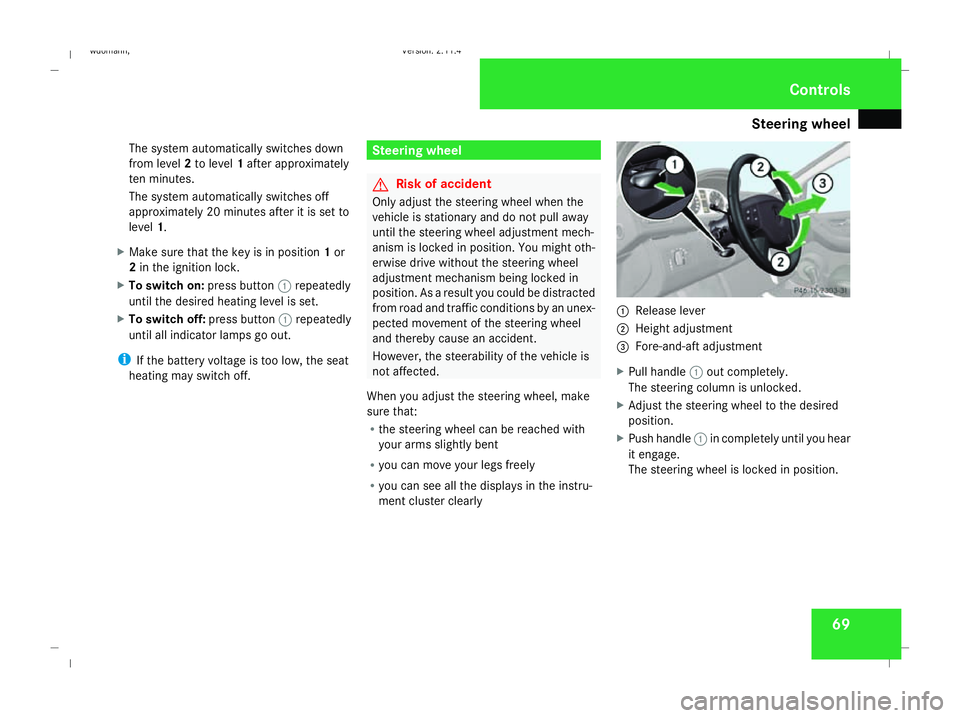
When you adjust the steering wheel, make
sure that:
R the steering wheel can be reached with
your arms slightly bent
R you can move your legs freely
R you can see all the displays in the instru-
ment cluster clearly 1
Release lever
2 Height adjustment
3 Fore-and-aft adjustment
X Pull handle 1out completely.
The steering column is unlocked.
X Adjust the steering wheel to the desired
position.
X Push handle 1in completely until you hear
it engage.
The steering wheel is locked in position. Controls
245_AKB; 2; 7, en-GB
wdomann,
Version: 2.11.4
2008-10-17T11:22:31+02:00 - Seite 69 ZDateiname: 6515_1640_02_buchblock.pdf; preflight
Page 73 of 305
Mirrors
70 Mirrors
Rear-view mirror
X Adjust the rear-view mirror by hand so you
have a good overview of the traffic condi-
tions.
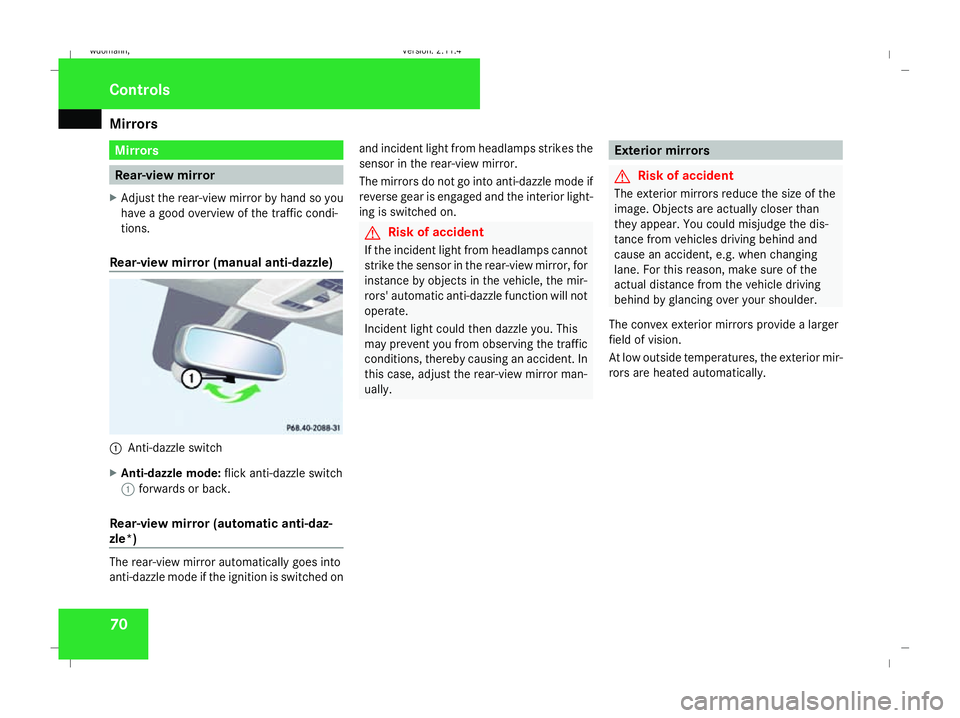
Rear-view mirror (manual anti-dazzle) 1
Anti-dazzle switch
X Anti-dazzle mode: flick anti-dazzle switch
1 forwards or back.
Rear-view mirror (automatic anti-daz-
zle*) The rear-view mirror automatically goes into
anti-dazzle mode if the ignition is switched on and incident light from headlamps strikes the
sensor in the rear-view mirror.
The mirrors do not go into anti-dazzle mode if
reverse gear is engaged and the interior light-
ing is switched on. G
Risk of accident
If the incident light from headlamps cannot
strike the sensor in the rear-view mirror, for
instance by objects in the vehicle, the mir-
rors' automatic anti-dazzle function will not
operate.
Incident light could then dazzle you. This
may prevent you from observing the traffic
conditions, thereby causing an accident. In
this case, adjust the rear-view mirror man-
ually. Exterior mirrors
G
Risk of accident
The exterior mirrors reduce the size of the
image. Objects are actually closer than
they appear. You could misjudge the dis-
tance from vehicles driving behind and
cause an accident, e.g. when changing
lane. For this reason, make sure of the
actual distance from the vehicle driving
behind by glancing over your shoulder.
The convex exterior mirrors provide a larger
field of vision.
At low outside temperatures, the exterior mir-
rors are heated automatically. Controls
245_AKB; 2; 7, en-GB
wdomann,
Version: 2.11.4 2008-10-17T11:22:31+02:00 - Seite 70Dateiname: 6515_1640_02_buchblock.pdf; preflight