cruise control MERCEDES-BENZ B-CLASS HATCHBACK 2011 Owner's Manual
[x] Cancel search | Manufacturer: MERCEDES-BENZ, Model Year: 2011, Model line: B-CLASS HATCHBACK, Model: MERCEDES-BENZ B-CLASS HATCHBACK 2011Pages: 329, PDF Size: 7.91 MB
Page 186 of 329
permissible maximum speed for vehicle/
trailer combinations is above 100 km/h.
When towing a trailer, your vehicle's handling
characteristics will be differen tincomparison
to when driving without a trailer and it will
consume more fuel.
Change into a lower gear in good time on long
and steep downhill gradients. Vehicles with
automatic transmission: in order to do so, you
will need to have switched to manual drive
program Min advance (Y page 139).
i This also applies if you have activated
cruise control, SPEEDTRONIC or DIS-
TRONIC PLUS.
This will use the braking effect of the engine,
so less braking will be required to prevent the
vehicle from gaining speed. This relieves the
load on the brake system and prevents the
brakes from overheating and wearing too
quickly. If you need additional braking,
depress the brake pedal repeatedly rather
than continuously.
i Vehicles with automatic transmis-
sion: if the accelerator pedal is depressed
briefly on downhill gradients while manual
drive program Mis temporarily activated,
the automatic transmission may switch
back to the last active automatic drive pro-
gram Eor S.T he automatic transmission
may shift to a higher gear. This can reduce
the engine's braking effect.
Driving tips If the trailer swings from side to side:
X
Do not accelerate.
X Do not counter-steer.
X Brake if necessary. R
Maintain a greater distance from the vehi-
cle in front than when driving without a
trailer.
R Avoid braking abruptly. If possible, brake
gently at first to allow the trailer to run on.
Then, increase the braking force rapidly.
R The values given for gradient-climbing
capabilities from a standstill refer to sea
level. When driving in mountainous areas,
note that the power output of the engine,
and consequently the vehicle's gradient-
climbing capability, decrease with increas-
ing altitude. Folding out the ball coupling
G
WARNING
Make sure that the ball coupling is engaged,
either in its folded-out or folded-in position,
and that the indicator lamp is off.
Do not turn the release wheel when a trailer
is coupled up. Otherwise, the trailer might
detach.
Before you can tow a trailer with your vehicle,
you must fold out the ball coupling.
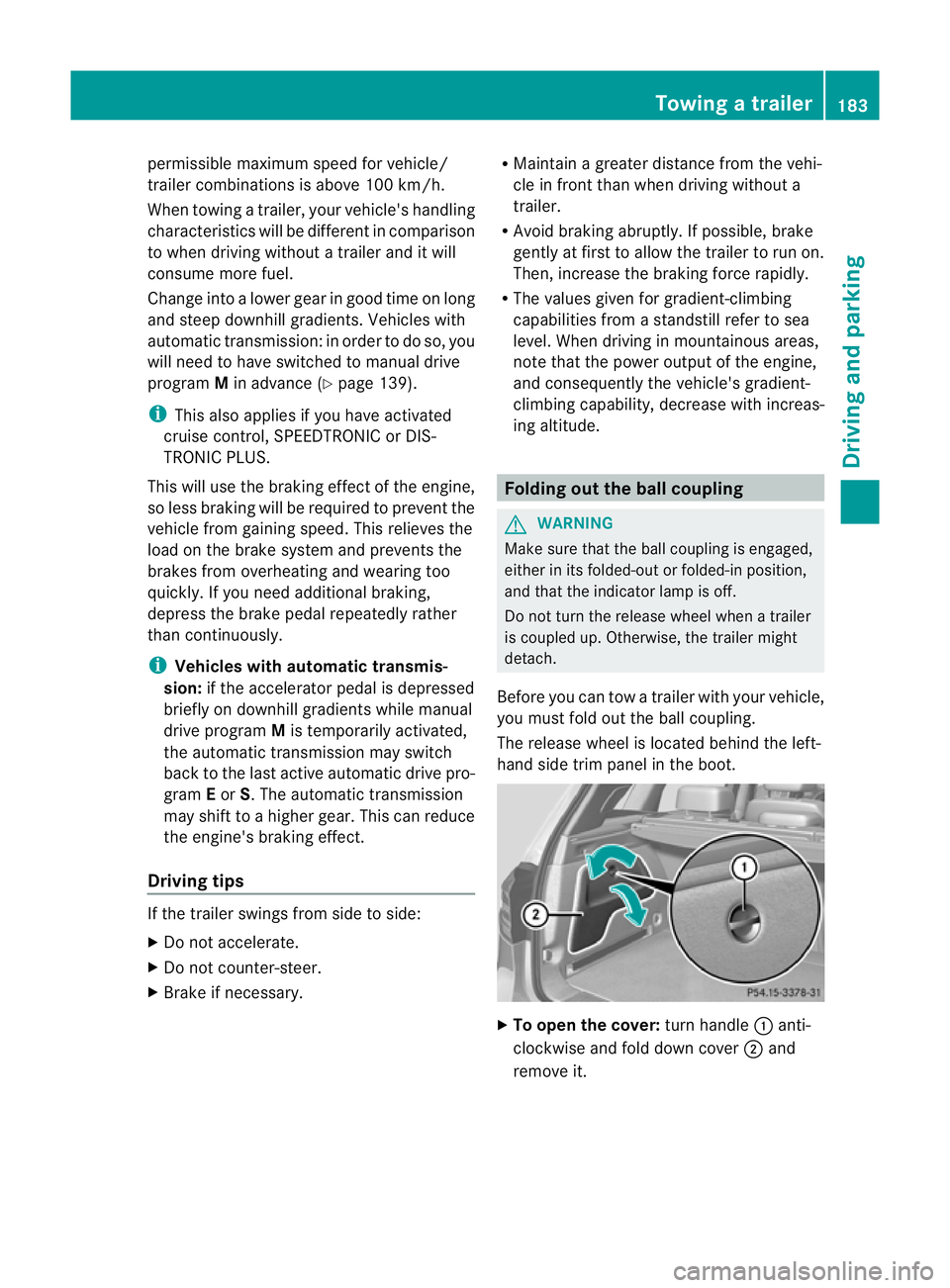
The release wheel is located behind the left-
hand side trim panel in the boot. X
To open the cover: turn handle:anti-
clockwise and fold down cover ;and
remove it. Towing
atrailer
183Driving an d parking Z
Page 192 of 329
The outside temperature display is in the mul-
tifunction display.
Changes in the outside temperature are dis-
played after a short delay. Speedometer with segments
The segments in the speedometer indicate
which speed range is available.
Cruise control (Y page 149) activated:
The segments light up from the stored speed
to the maximum speed.
Variable SPEEDTRONIC (Y page 151) activa-
ted:
The segments light up from the start of the
scale to the selected limit speed.
DISTRONIC PLUS (Y page 154) activated:
One or two segments in the set speed range
light up.
DISTRONIC PLUS detects a vehicle in front:
The segments between the speed of the vehi-
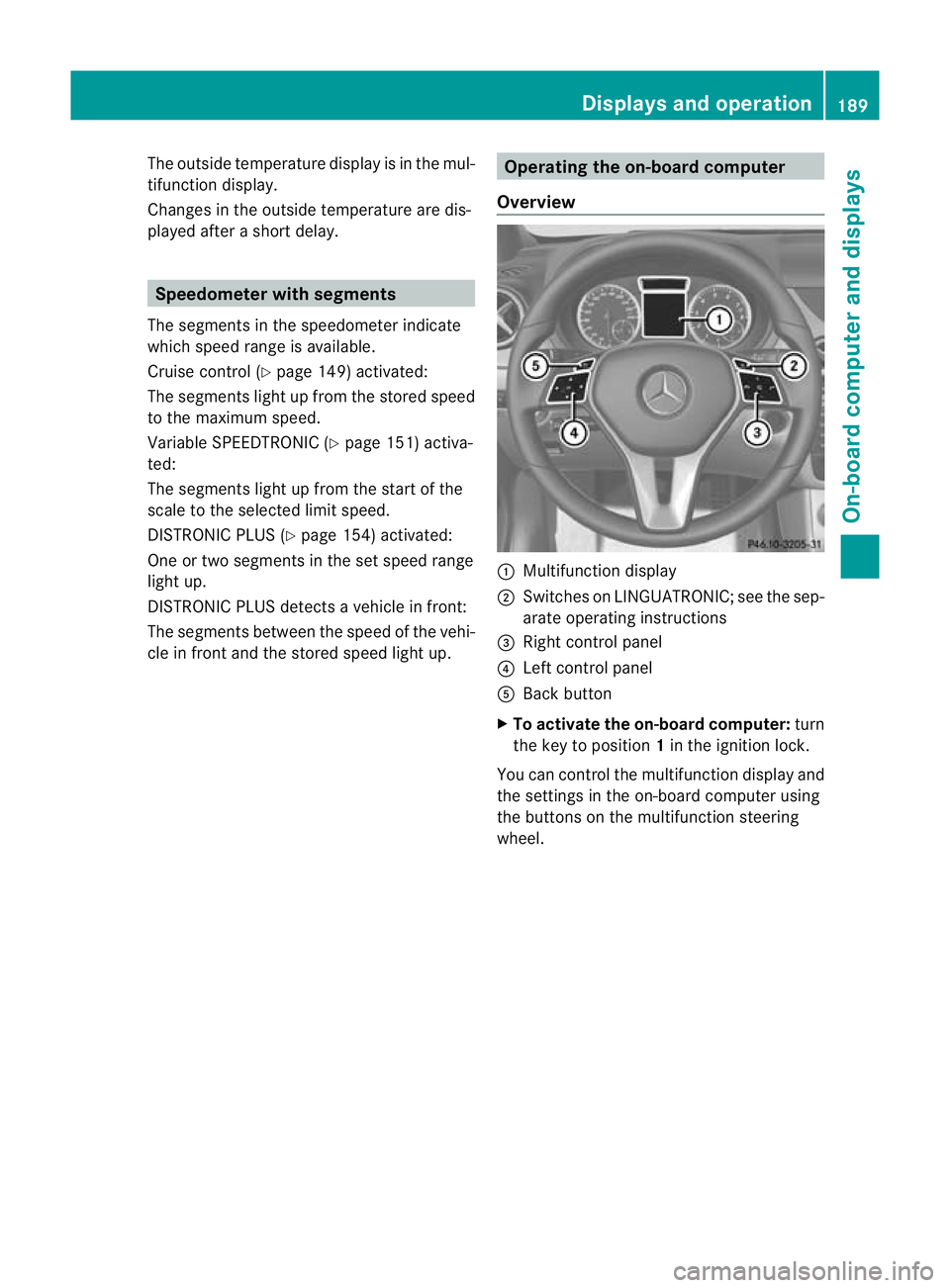
cle in fronta nd the stored speed light up. Operating the on-board computer
Overview :
Multifunctio ndisplay
; Switches on LINGUATRONIC; see the sep-
arate operating instructions
= Right control panel
? Left control panel
A Back button
X To activat ethe on-board computer: turn
the key to position 1in the ignition lock.
You can control the multifunction display and
the settings in the on-board computer using
the buttons on the multifunction steering
wheel. Displays and operation
189On-board computer and displays Z
Page 194 of 329
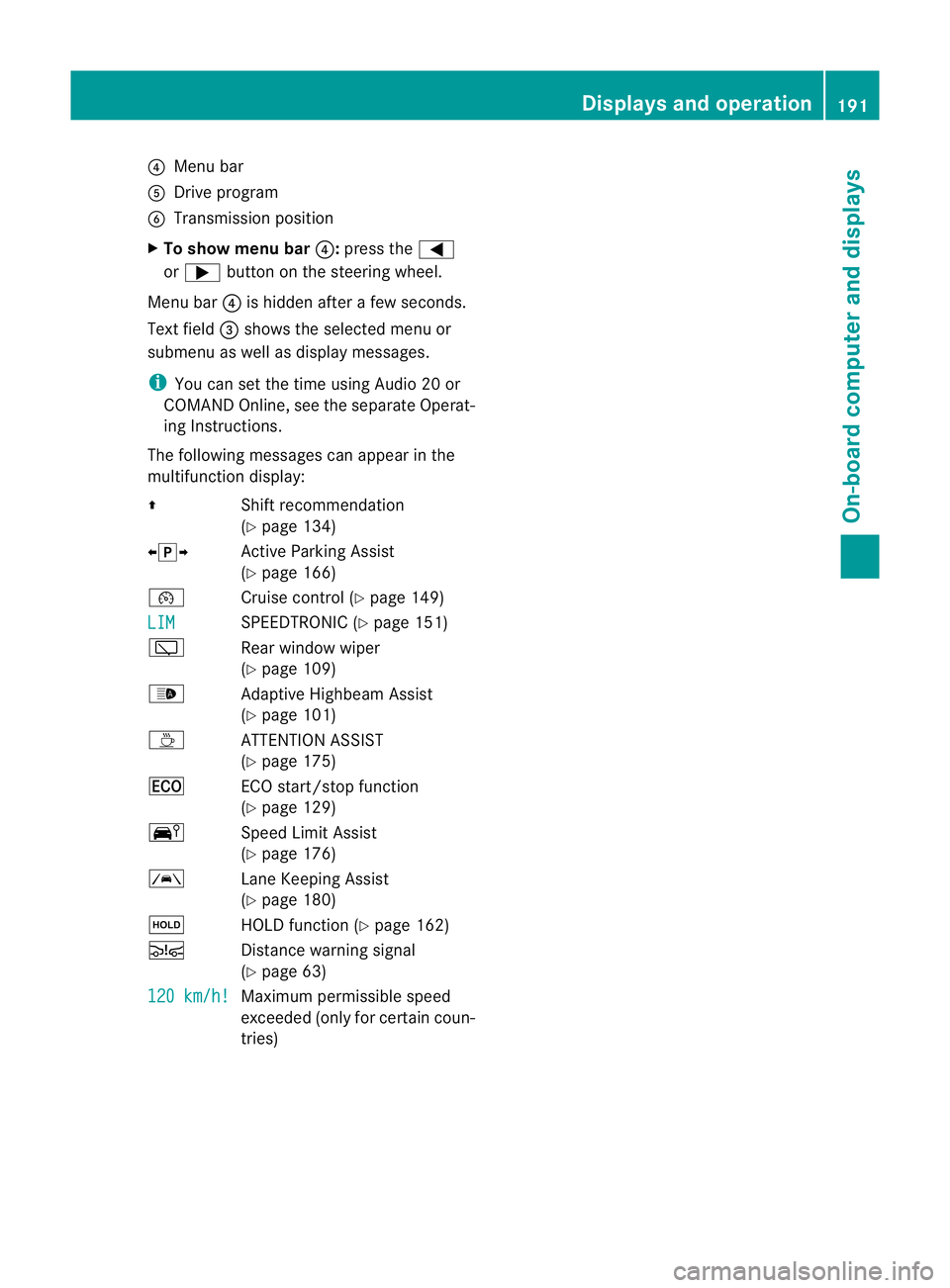
?
Menu bar
A Drive program
B Transmission position
X To show menu bar ?:press the =
or ; button on the steering wheel.
Menu bar ?is hidden after a few seconds.
Text field =shows the selected menu or
submenu as well as display messages.
i You can set the time using Audio 20 or
COMAND Online, see the separate Operat-
ing Instructions.
The following messages can appearint he
multifunction display:
Z Shift recommendation
(Ypage 134)
XjY Active Parking Assist
(Ypage 166)
¯ Cruise control (Y page 149)
LIM SPEEDTRONIC (Y
page 151)
è Rear window wiper
(Ypage 109)
_ Adaptive Highbeam Assist
(Ypage 101)
À ATTENTION ASSIST
(Ypage 175)
¤ ECO start/stop function
(Ypage 129)
Ä Speed Limit Assist
(Ypage 176)
à Lane Keeping Assist
(Ypage 180)
ë HOLD function (Y page 162)
Ä Distance warning signal
(Ypage 63)
120 km/h! Maximum permissible speed
exceeded (only for certain coun-
tries) Displays and operation
191On-board computer and displays Z
Page 203 of 329
X
Press a.
The curren tselection is displayed.
X Press the abutton to confirm.
X Press :or9 to set Off ,
Standard or
Adaptive .
X Press the abutton to save the setting.
If Lane Keeping Assist is activated
(Y page 180)a nd the ignition is switched on,
the à symbol appears in the multifunction
display. Service menu
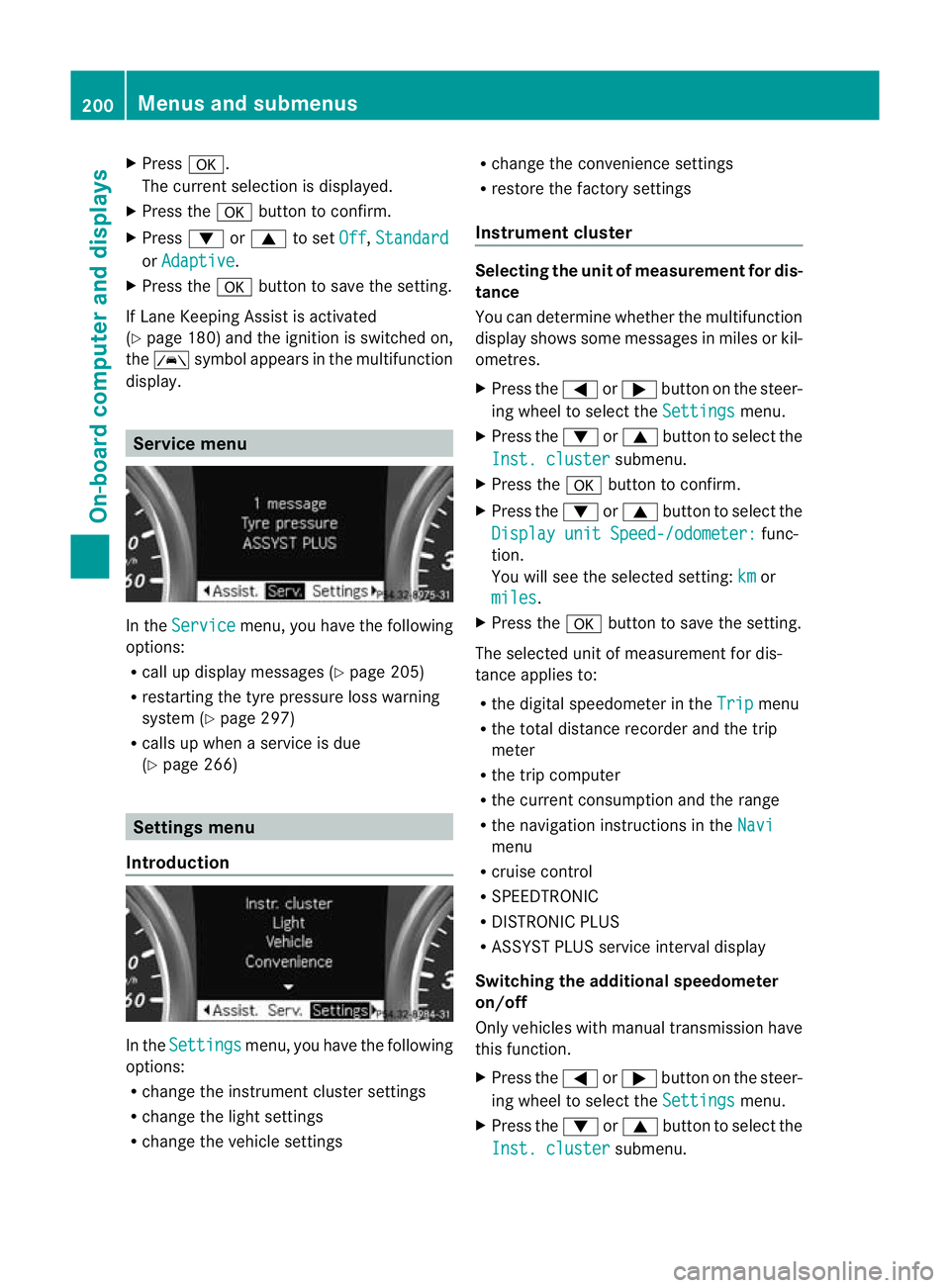
In the
Service menu, you have the following
options:
R call up display messages (Y page 205)
R restarting the tyre pressure loss warning
system (Y page 297)
R calls up when a service is due
(Y page 266) Settings menu
Introduction In the
Settings menu, you have the following
options:
R change the instrument cluster settings
R change the light settings
R change the vehicle settings R
change the convenience settings
R restore the factory settings
Instrument cluster Selecting the uni
tofmeasurement for dis-
tance
You can determine whether the multifunction
display shows some messages in miles or kil-
ometres.
X Press the =or; button on the steer-
ing wheel to selec tthe Settings menu.
X Press the :or9 button to select the
Inst. cluster submenu.
X Press the abutton to confirm.
X Press the :or9 button to select the
Display unit Speed-/odometer: func-
tion.
You will see the selected setting: km or
miles .
X Press the abutton to save the setting.
The selected unit of measurement for dis-
tance applies to:
R the digital speedometer in the Trip menu
R the total distance recorder and the trip
meter
R the trip computer
R the current consumption and the range
R the navigation instructions in the Navi menu
R cruise control
R SPEEDTRONIC
R DISTRONIC PLUS
R ASSYST PLUS service interval display
Switching the additional speedometer
on/off
Only vehicles with manual transmission have
this function.
X Press the =or; button on the steer-
ing wheel to select the Settings menu.
X Press the :or9 button to select the
Inst. cluster submenu.200
Menus and submenusOn-board computer and displays
Page 230 of 329
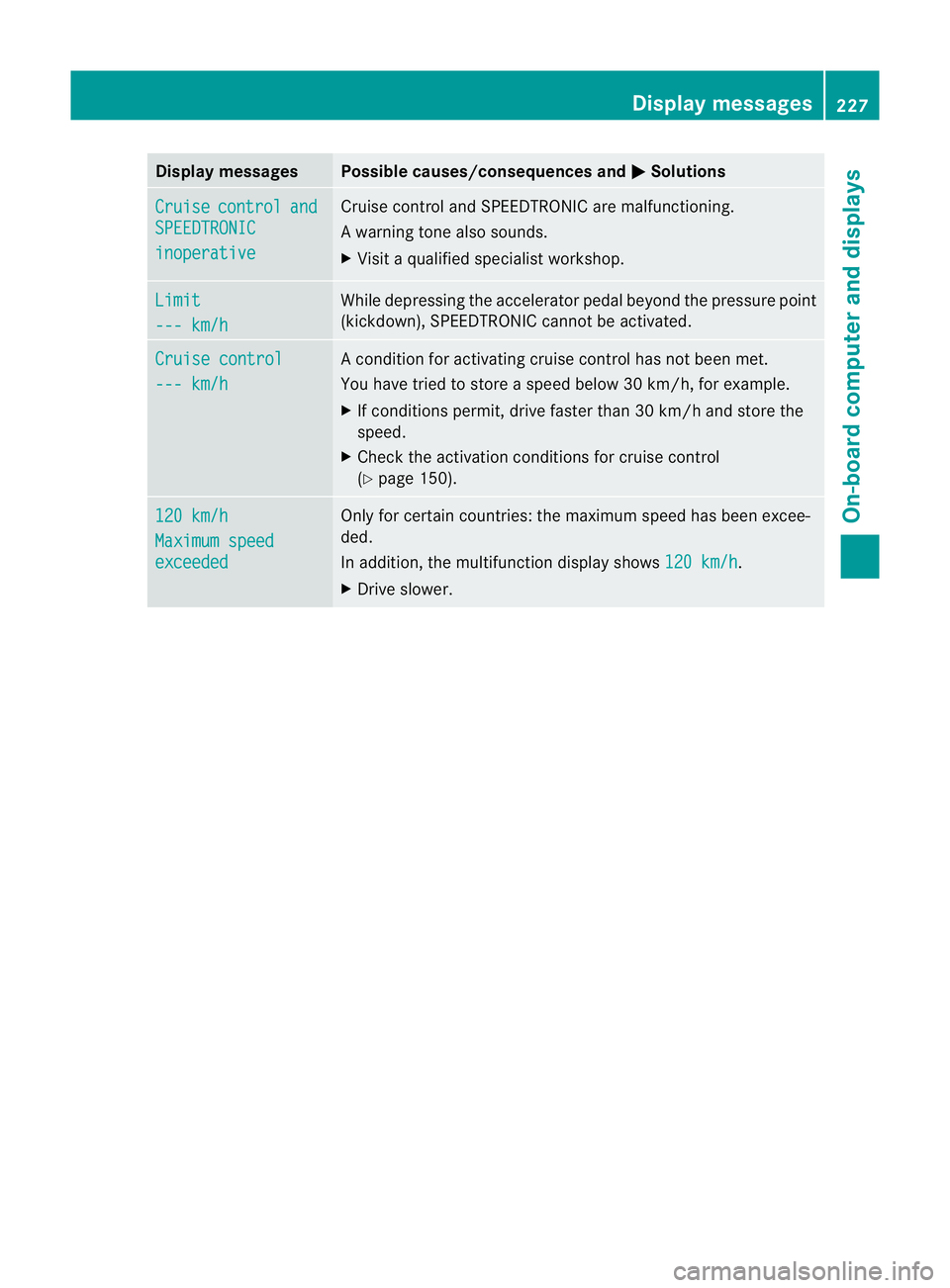
Display messages Possible causes/consequences and
M Solutions
Cruise control and
SPEEDTRONIC
inoperative Cruise control and SPEEDTRONIC are malfunctioning.
Aw
arning tone also sounds.
X Visi taqualified specialist workshop. Limit
--- km/h While depressing the accelerator pedal beyond the pressure point
(kickdown), SPEEDTRONIC cannot be activated.
Cruise control
--- km/h A condition for activating cruise control has not been met.
You have tried to store
aspeed below 30 km/h, for example.
X If conditions permit, drive faster than 30 km/h and store the
speed.
X Check the activation conditions for cruise control
(Y page 150). 120 km/h
Maximum speed
exceeded Only for certain countries: the maximum speed has been excee-
ded.
In addition, the multifunction display shows
120 km/h .
X Drive slower. Display messages
227On-board computer and displays Z
Page 239 of 329
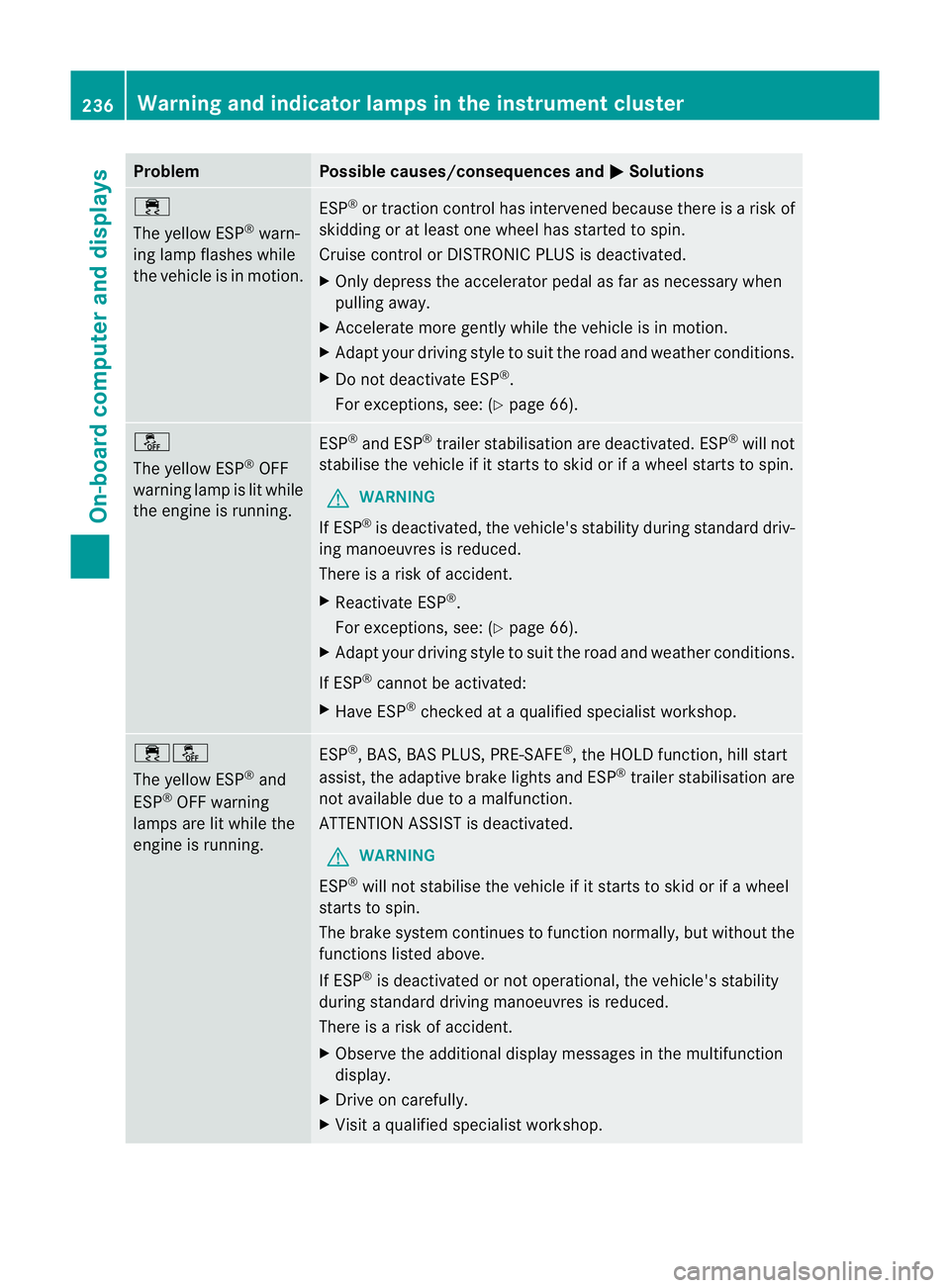
Problem Possible causes/consequences and
M Solutions
÷
The yellow ESP
®
warn-
ing lamp flashes while
the vehicle is in motion. ESP
®
or traction control has intervened because there is a risk of
skidding or at least one wheel has started to spin.
Cruise control or DISTRONIC PLUS is deactivated.
X Only depress the accelerator pedal as far as necessary when
pulling away.
X Accelerate more gently while the vehicle is in motion.
X Adapt your driving style to suit the road and weather conditions.
X Do not deactivate ESP ®
.
For exceptions, see: (Y page 66).å
The yellow ESP
®
OFF
warning lamp is lit while
the engine is running. ESP
®
and ESP ®
trailer stabilisation are deactivated. ESP ®
will not
stabilise the vehicle if it starts to skid or if awheel starts to spin.
G WARNING
If ESP ®
is deactivated, the vehicle's stability during standard driv-
ing manoeuvres is reduced.
There is a risk of accident.
X Reactivate ESP ®
.
For exceptions, see: (Y page 66).
X Adapt your driving style to suit the road and weather conditions.
If ESP ®
cannot be activated:
X Have ESP ®
checked at a qualified specialist workshop. ֌
The yellow ESP
®
and
ESP ®
OFF warning
lamps are lit while the
engine is running. ESP
®
, BAS, BAS PLUS, PRE-SAFE ®
, the HOLD function, hill start
assist, the adaptive brake lights and ESP ®
trailer stabilisation are
not available due to a malfunction.
ATTENTION ASSIST is deactivated.
G WARNING
ESP ®
will not stabilise the vehicle if it starts to skid or if a wheel
starts to spin.
The brake system continues to function normally, but without the
functions listed above.
If ESP ®
is deactivated or not operational, the vehicle's stability
during standard driving manoeuvres is reduced.
There is a risk of accident.
X Observe the additional display messages in the multifunction
display.
X Drive on carefully.
X Visit a qualified specialist workshop. 236
Warning and indicator lamps in the instrument clusterOn-board computer and displays