wheel MERCEDES-BENZ B-CLASS HATCHBACK 2014 Manual PDF
[x] Cancel search | Manufacturer: MERCEDES-BENZ, Model Year: 2014, Model line: B-CLASS HATCHBACK, Model: MERCEDES-BENZ B-CLASS HATCHBACK 2014Pages: 405, PDF Size: 12.24 MB
Page 236 of 405
Under normal operating conditions and with
the specified coolant level, the coolant tem-
perature may rise to 120 †.
At high outside temperatures and when driv-
ing uphill, the coolant temperature may rise
to the end of the scale. Rev counter
! Do not drive in the overrevving range.
Doing so will damage the engine.
The red band in the rev counter indicates the
engine's overrevving range.
The engine is limited within a range to protect the engine when the red band is reached. Outside temperature display
You should pay special attention to road con-
ditions when temperatures are around freez-
ing point.
Bear in mind that the outside temperature
display indicates the measured air tempera-
ture and not the road surface temperature.
The outside temperature display is in the mul- tifunction display (Y page 235).
Changes in the outside temperature are dis-
played after a short delay. Speedometer with segments
The speedometer is divided into segments
only on vehicles with DISTRONIC PLUS.
The segments in the speedometer indicate
which speed range is available.
R Variable SPEEDTRONIC activated
(Y page 191):
The segments light up from the start of the
scale to the selected limit speed.
R DISTRONIC PLUS activated (Y page 193):
One or two segments in the set speed
range light up.
R DISTRONIC PLUS detects a vehicle in front
moving more slowly than the stored speed: The segments between the speed of the
vehicle in front and the stored speed light
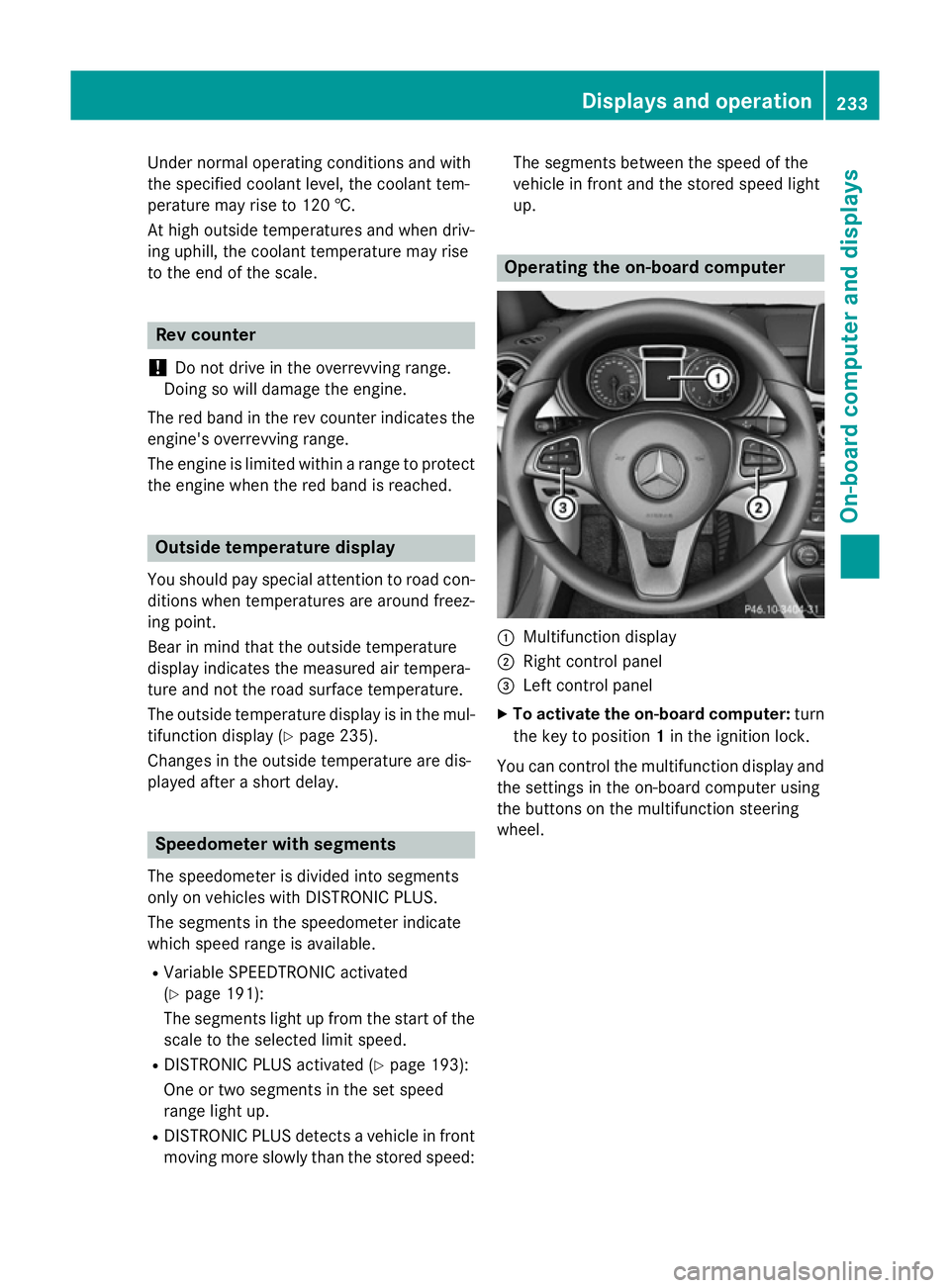
up. Operating the on-board computer
:
Multifunction display
; Right control panel
= Left control panel
X To activate the on-board computer: turn
the key to position 1in the ignition lock.
You can control the multifunction display and
the settings in the on-board computer using
the buttons on the multifunction steering
wheel. Displays and operation
233On-board computer and displays Z
Page 238 of 405
Multifunction display
Black and white multifunction display Colour multifunction display
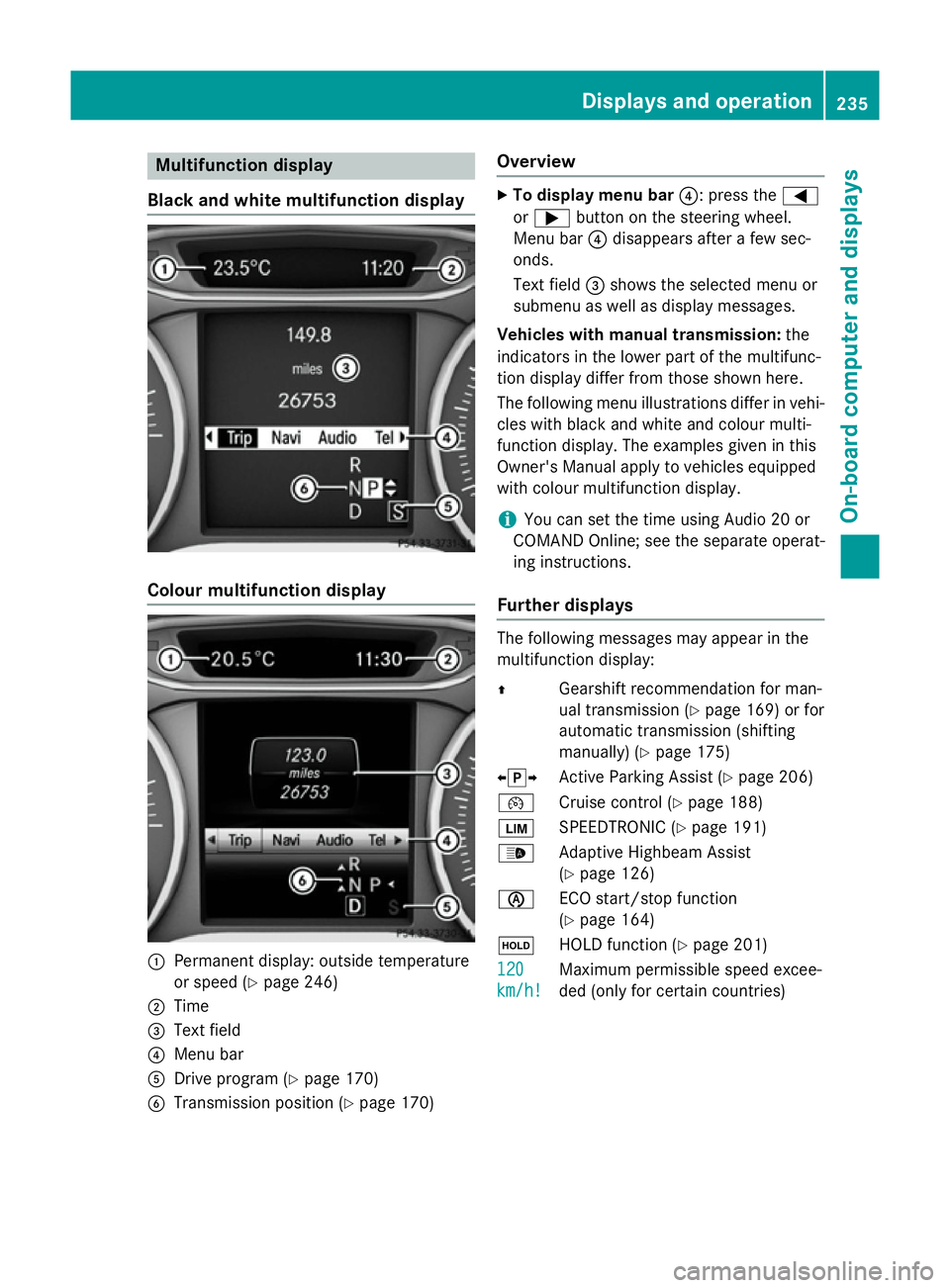
:
Permanent display: outside temperature
or speed (Y page 246)
; Time
= Text field
? Menu bar
A Drive program (Y page 170)
B Transmission position (Y page 170)Overview X
To display menu bar ?: press the=
or ; button on the steering wheel.
Menu bar ?disappears after a few sec-
onds.
Text field =shows the selected menu or
submenu as well as display messages.
Vehicles with manual transmission: the
indicators in the lower part of the multifunc-
tion display differ from those shown here.
The following menu illustrations differ in vehi- cles with black and white and colour multi-
function display. The examples given in this
Owner's Manual apply to vehicles equipped
with colour multifunction display.
i You can set the time using Audio 20 or
COMAND Online; see the separate operat-
ing instructions.
Further displays The following messages may appear in the
multifunction display:
Z
Gearshift recommendation for man-
ual transmission (Y page 169) or for
automatic transmission (shifting
manually) (Y page 175)
XjY Active Parking Assist (Y page 206)
¯ Cruise control (Y page 188)
È SPEEDTRONIC (Y page 191)
_ Adaptive Highbeam Assist
(Ypage 126)
è ECO start/stop function
(Ypage 164)
ë HOLD function (Y page 201)
120
120
km/h! km/h! Maximum permissible speed excee-
ded (only for certain countries) Displays and operation
235On-board computer and displays Z
Page 239 of 405
Menus and submenus
Menu overview
Press the =or; button on the steer-
ing wheel to call up the menu bar and select a
menu.
Operating the on-board computer
(Y page 233).
Depending on the equipment fitted in the
vehicle, you can call up the following menus:
R Trip Trip menu (Y page 236)
R Navi
Navi menu (navigation instructions)
(Y page 237)
R Audio
Audio menu (Y page 239)
R Tel
Tel menu (telephone) (Y page 240)
R Assist.
Assist. menu (assistance) (Y page 242)
R Serv.
Serv. menu (Y page 245)
R Settings
Settings menu (settings) (Y page 245)
The Audio
Audio, Navi
NaviandTel
Tel menus differ slightly
in vehicles with Audio 20 and in vehicles with COMAND Online. The examples given in this
Owner's Manual apply to vehicles equipped
with COMAND Online. Trip menu
Standard display X
Press and hold the %button on the
steering wheel until the Trip
Trip menu with
trip meter :and total distance
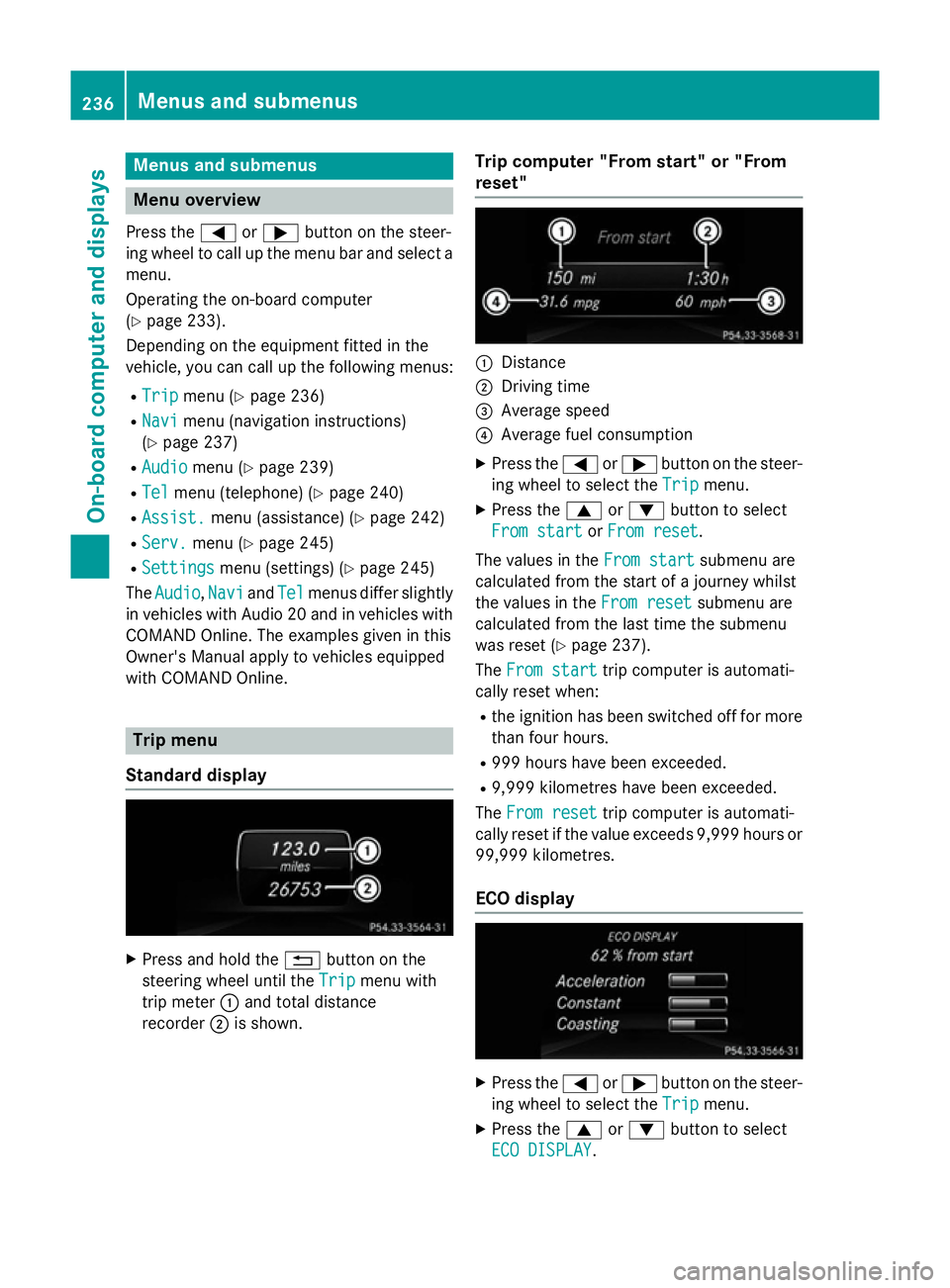
recorder ;is shown. Trip computer "From start" or "From
reset" :
Distance
; Driving time
= Average speed
? Average fuel consumption
X Press the =or; button on the steer-
ing wheel to select the Trip Tripmenu.
X Press the 9or: button to select
From start
From start orFrom reset
From reset.
The values in the From start
From start submenu are
calculated from the start of a journey whilst
the values in the From reset From resetsubmenu are
calculated from the last time the submenu
was reset (Y page 237).
The From start From start trip computer is automati-
cally reset when:
R the ignition has been switched off for more
than four hours.
R 999 hours have been exceeded.
R 9,999 kilometres have been exceeded.
The From reset
From reset trip computer is automati-
cally reset if the value exceeds 9,999 hours or 99,999 kilometres.
ECO display X
Press the =or; button on the steer-
ing wheel to select the Trip
Tripmenu.
X Press the 9or: button to select
ECO DISPLAY
ECO DISPLAY .236
Menus and submenusOn-board computer and displays
Page 240 of 405
If the ignition remains switched off for longer
than four hours, the ECO display will be auto-
matically reset.
Further information on the ECO display
(Y page 185).
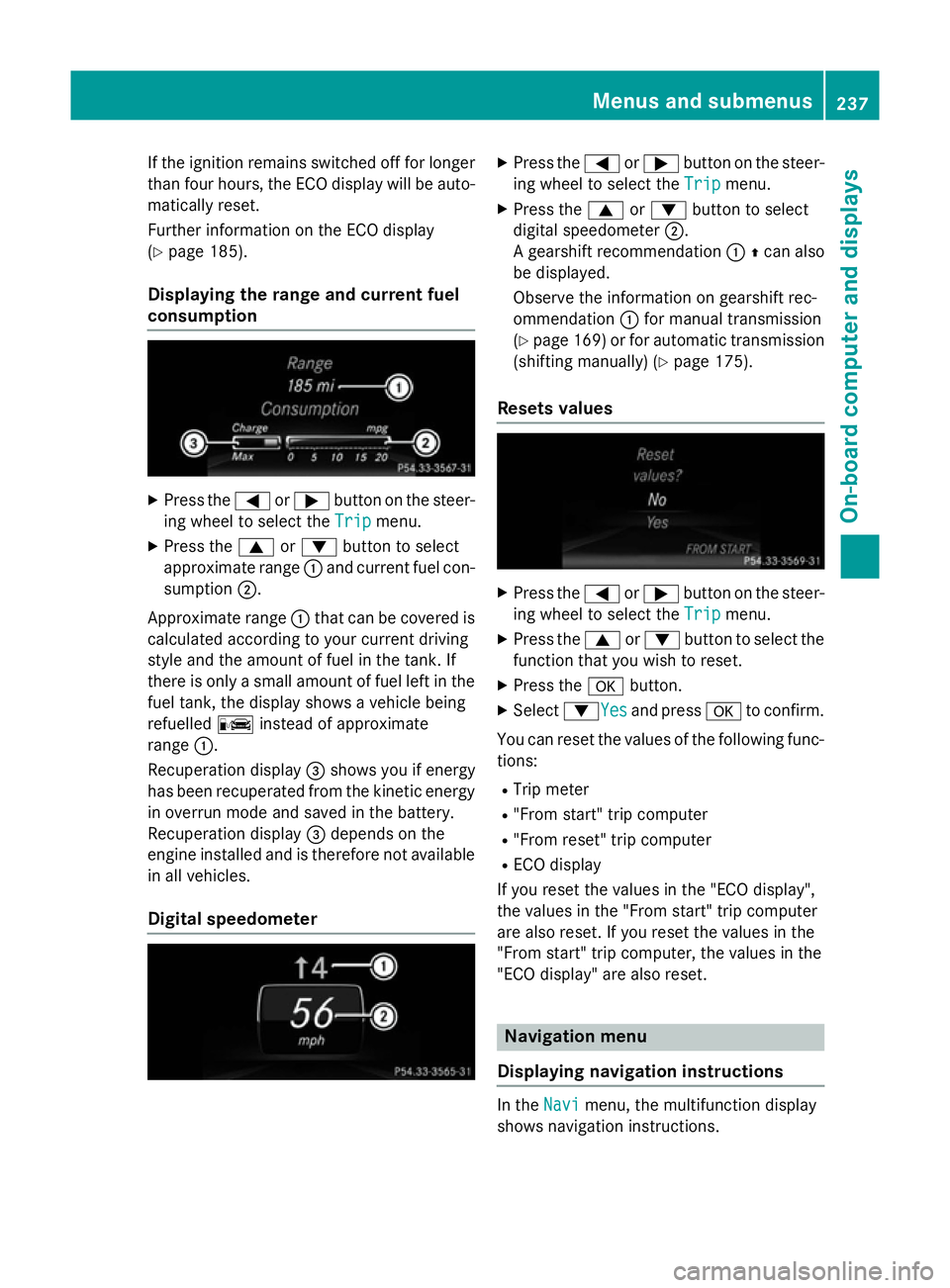
Displaying the range and current fuel
consumption X
Press the =or; button on the steer-
ing wheel to select the Trip Tripmenu.
X Press the 9or: button to select
approximate range :and current fuel con-
sumption ;.
Approximate range :that can be covered is
calculated according to your current driving
style and the amount of fuel in the tank. If
there is only a small amount of fuel left in the
fuel tank, the display shows a vehicle being
refuelled Cinstead of approximate
range :.
Recuperation display =shows you if energy
has been recuperated from the kinetic energy
in overrun mode and saved in the battery.
Recuperation display =depends on the
engine installed and is therefore not available in all vehicles.
Digital speedometer X
Press the =or; button on the steer-
ing wheel to select the Trip Tripmenu.
X Press the 9or: button to select
digital speedometer ;.
A gearshift recommendation :Zcan also
be displayed.
Observe the information on gearshift rec-
ommendation :for manual transmission
(Y page 169) or for automatic transmission
(shifting manually) (Y page 175).
Resets values X
Press the =or; button on the steer-
ing wheel to select the Trip Tripmenu.
X Press the 9or: button to select the
function that you wish to reset.
X Press the abutton.
X Select :YesYesand press ato confirm.
You can reset the values of the following func-
tions:
R Trip meter
R "From start" trip computer
R "From reset" trip computer
R ECO display
If you reset the values in the "ECO display",
the values in the "From start" trip computer
are also reset. If you reset the values in the
"From start" trip computer, the values in the
"ECO display" are also reset. Navigation menu
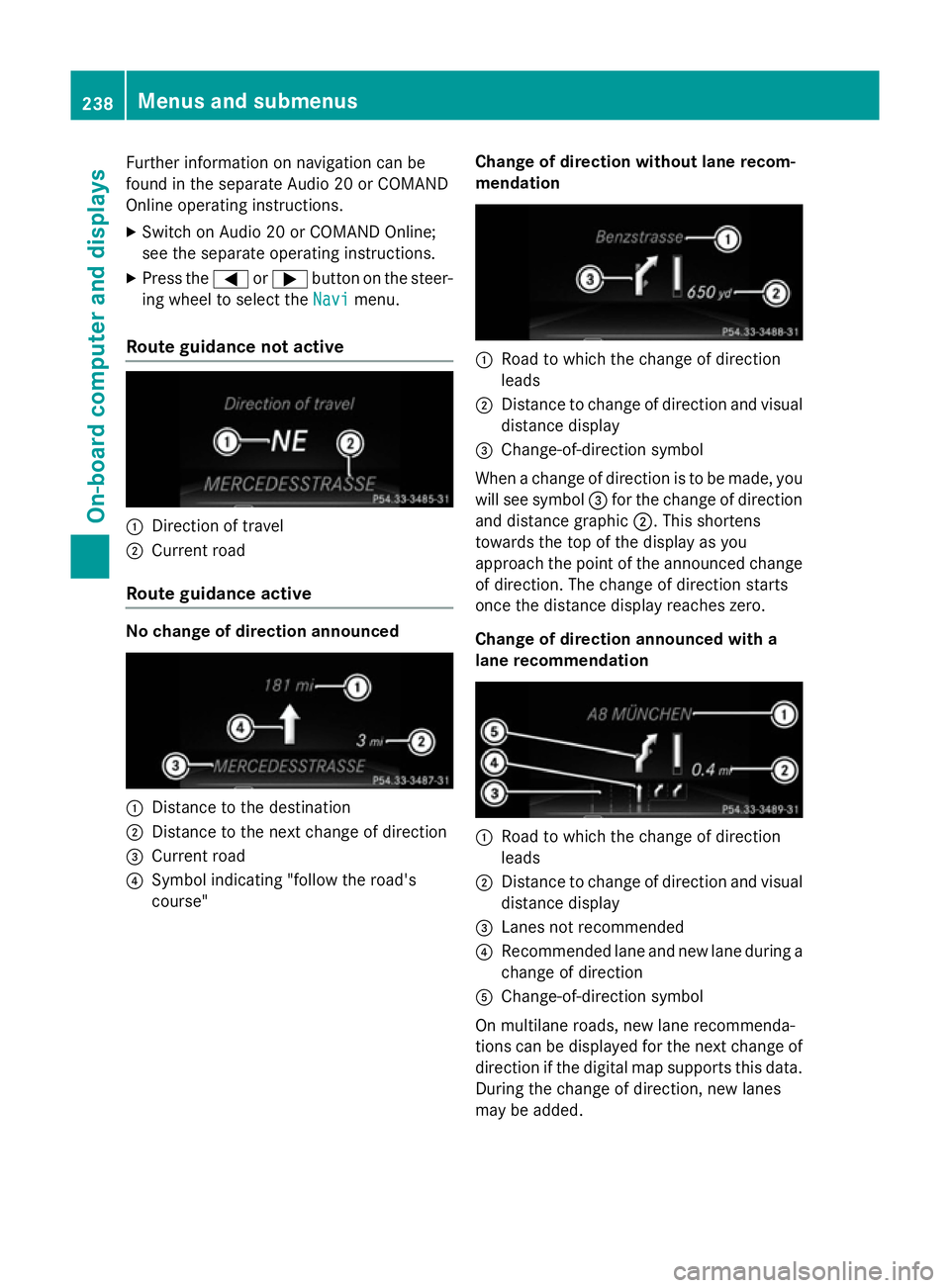
Displaying navigation instructions In the
Navi Navimenu, the multifunction display
shows navigation instructions. Menus and submenus
237On-board computer and displays Z
Page 241 of 405
Further information on navigation can be
found in the separate Audio 20 or COMAND
Online operating instructions.
X Switch on Audio 20 or COMAND Online;
see the separate operating instructions.
X Press the =or; button on the steer-
ing wheel to select the Navi
Navi menu.
Route guidance not active :
Direction of travel
; Current road
Route guidance active No change of direction announced
:
Distance to the destination
; Distance to the next change of direction
= Current road
? Symbol indicating "follow the road's
course" Change of direction without lane recom-
mendation :
Road to which the change of direction
leads
; Distance to change of direction and visual
distance display
= Change-of-direction symbol
When a change of direction is to be made, you will see symbol =for the change of direction
and distance graphic ;. This shortens
towards the top of the display as you
approach the point of the announced change
of direction. The change of direction starts
once the distance display reaches zero.
Change of direction announced with a
lane recommendation :
Road to which the change of direction
leads
; Distance to change of direction and visual
distance display
= Lanes not recommended
? Recommended lane and new lane during a
change of direction
A Change-of-direction symbol
On multilane roads, new lane recommenda-
tions can be displayed for the next change of
direction if the digital map supports this data. During the change of direction, new lanes
may be added. 238
Menus and submenusOn-board computer and displays
Page 242 of 405
Lane not recommended
=: you will not be
able to complete the next change of direction
if you stay in this lane.
Recommended lane and new lane during a
change of direction ?: in this lane you will be
able to complete the next two changes of
direction without changing lane.
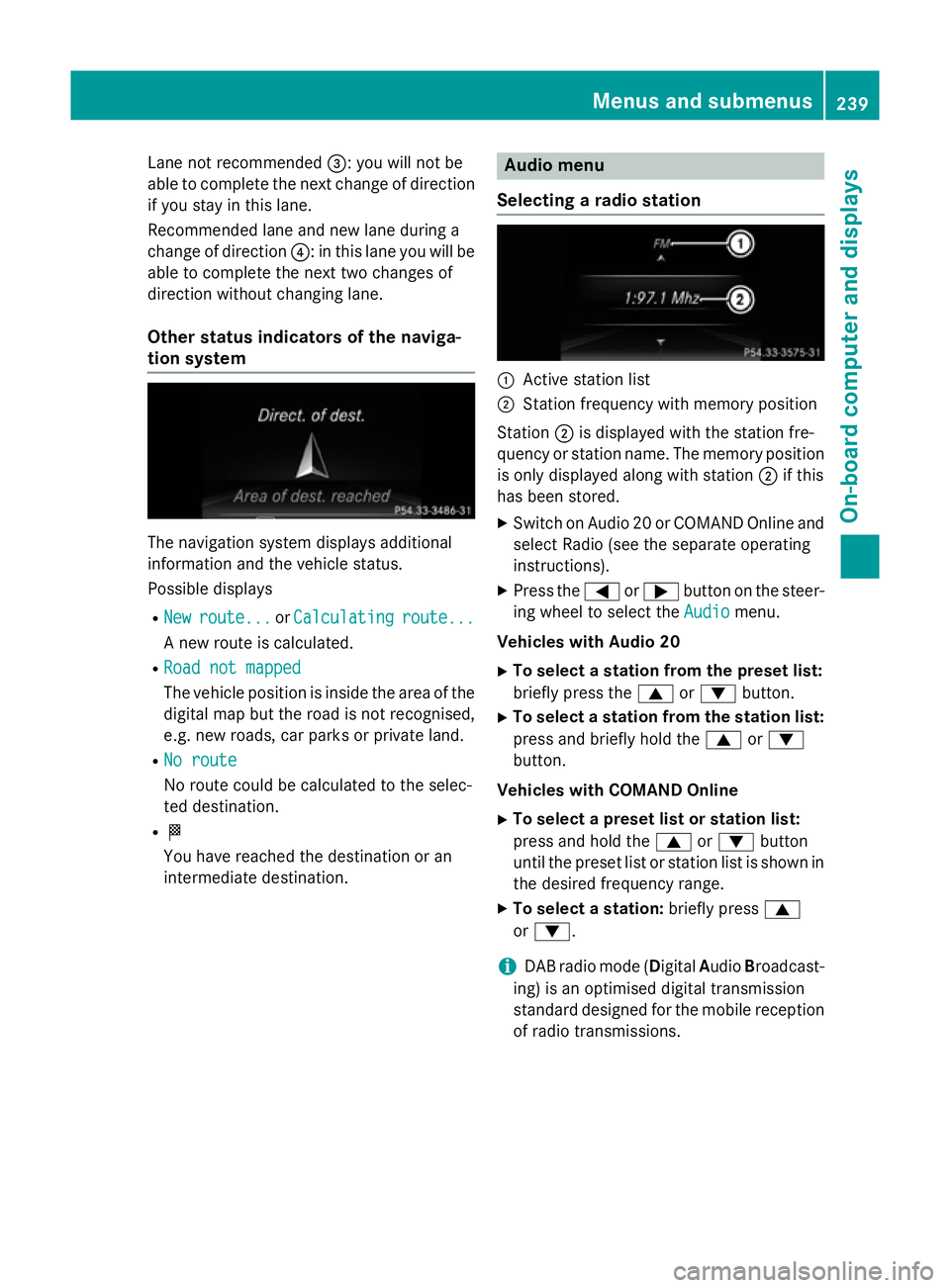
Other status indicators of the naviga-
tion system The navigation system displays additional
information and the vehicle status.
Possible displays
R New
New route...
route... orCalculating Calculating route...
route...
A new route is calculated.
R Road not mapped
Road not mapped
The vehicle position is inside the area of the
digital map but the road is not recognised,
e.g. new roads, car parks or private land.
R No route No route
No route could be calculated to the selec-
ted destination.
R O
You have reached the destination or an
intermediate destination. Audio menu
Selecting a radio station :
Active station list
; Station frequency with memory position
Station ;is displayed with the station fre-
quency or station name. The memory position is only displayed along with station ;if this
has been stored.
X Switch on Audio 20 or COMAND Online and
select Radio (see the separate operating
instructions).
X Press the =or; button on the steer-
ing wheel to select the Audio Audiomenu.
Vehicles with Audio 20
X To select a station from the preset list:
briefly press the 9or: button.
X To select a station from the station list:
press and briefly hold the 9or:
button.
Vehicles with COMAND Online
X To select a preset list or station list:
press and hold the 9or: button
until the preset list or station list is shown in
the desired frequency range.
X To select a station: briefly press9
or :.
i DAB radio mode (Digital
AudioBroadcast-
ing) is an optimised digital transmission
standard designed for the mobile reception
of radio transmissions. Menus and submenus
239On-board computer and displays Z
Page 243 of 405

Audio player or audio media operation
:
Current track
Audio files from various audio players or
media can be played, depending on the equip- ment fitted in the vehicle.
X Switch on Audio 20 or COMAND Online and
select audio CD or MP3 mode; see the sep- arate operating instructions.
X Press the =or; button on the steer-
ing wheel to select the Audio Audiomenu.
X To select the next/previous track:
briefly press the 9or: button.
X To select a track from the track list
(rapid scrolling): press and hold the 9
or : button until the desired track has
been reached.
If you press and hold the 9or:
button, the rapid scrolling speed is
increased. Not all audio players or media
support this function.
If track information is stored on the audio
player or media, the multifunction display will
show the number and title of the track.
Video DVD operation It is only possible to use the
Audio Audiomenu to
operate video DVDs on vehicles with
COMAND Online. X
Switch on COMAND Online and select
video DVD (see the separate operating
instructions).
X Press the =or; button on the steer-
ing wheel to select the Audio Audiomenu.
X To select the next or previous scene:
briefly press the 9or: button.
X To select a scene from the scene list
(rapid scrolling): press and hold the 9
or : button until desired scene :has
been reached. Telephone menu
Introduction G
WARNING
Operating the integrated information systems and communications equipment in the vehicle
while driving will distract you from traffic con-
ditions. You could then lose control of the
vehicle. There is a risk of an accident.
Only operate these devices if road traffic con-
ditions permit. If you are unsure about the
surrounding conditions, pull over to a safe
location and make entries only while the vehi-
cle is stationary.
When telephoning, you must observe the
legal requirements for the country in which
you are currently driving. X Switch on the mobile phone (see the man-
ufacturer's operating instructions).
X Switch on Audio 20 or COMAND Online;
see the separate operating instructions.
X Insert the mobile phone into the bracket
(Y page 314).
or
X Establish a Bluetooth ®
connection to Audio
20 or COMAND Online; see the separate
operating instructions.
X Press the =or; button on the steer-
ing wheel to select the Tel
Tel menu. 240
Menus and sub
menusOn-board computer and displays
Page 244 of 405
You will see one of the following display mes-
sages in the multifunction display:
R Telephone ready
Telephone ready or the name of the net-
work provider: the mobile phone has found a network and is ready to receive.
R Telephone No service
Telephone No service: there is no net-
work available or the mobile phone is
searching for a network.
i You can obtain further information about
suitable mobile phones and connecting
mobile phones via Bluetooth ®
:
R from any Mercedes-Benz Service Centre
R on the Internet at http://
www.mercedes-benz.com/connect
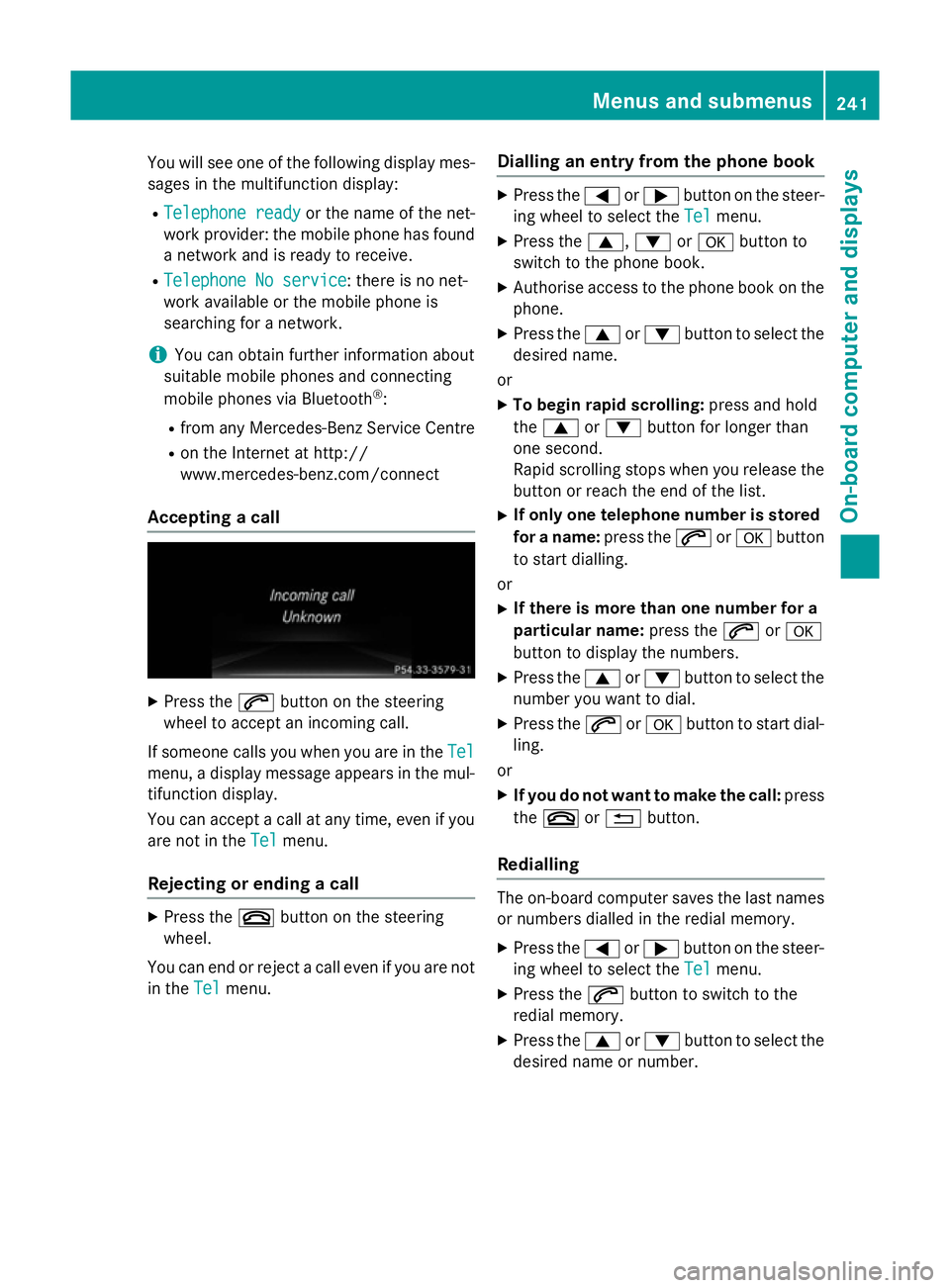
Accepting a call X
Press the 6button on the steering
wheel to accept an incoming call.
If someone calls you when you are in the Tel Tel
menu, a display message appears in the mul- tifunction display.
You can accept a call at any time, even if you
are not in the Tel Telmenu.
Rejecting or ending a call X
Press the ~button on the steering
wheel.
You can end or reject a call even if you are not
in the Tel
Telmenu. Dialling an entry from the phone book X
Press the =or; button on the steer-
ing wheel to select the Tel Telmenu.
X Press the 9,:ora button to
switch to the phone book.
X Authorise access to the phone book on the
phone.
X Press the 9or: button to select the
desired name.
or
X To begin rapid scrolling: press and hold
the 9 or: button for longer than
one second.
Rapid scrolling stops when you release the
button or reach the end of the list.
X If only one telephone number is stored
for a name: press the6ora button
to start dialling.
or
X If there is more than one number for a
particular name: press the6ora
button to display the numbers.
X Press the 9or: button to select the
number you want to dial.
X Press the 6ora button to start dial-
ling.
or
X If you do not want to make the call: press
the ~ or% button.
Redialling The on-board computer saves the last names
or numbers dialled in the redial memory.
X Press the =or; button on the steer-
ing wheel to select the Tel Telmenu.
X Press the 6button to switch to the
redial memory.
X Press the 9or: button to select the
desired name or number. Menus and submenus
241On-board computer and displays Z
Page 245 of 405
X
Press the 6ora button to start dial-
ling.
or
X If you do not want to make the call: press
the ~ or% button. Assistance menu
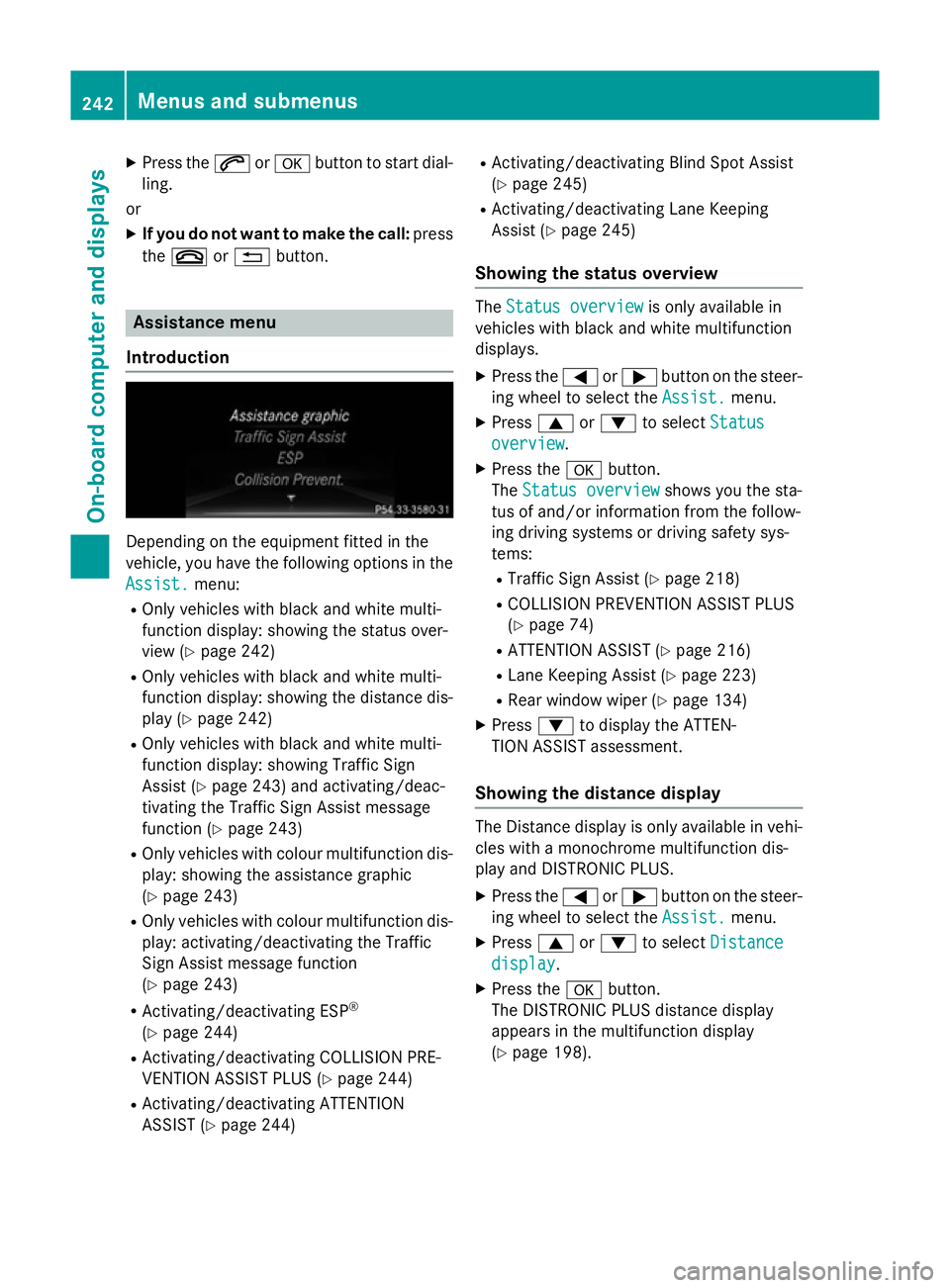
Introduction Depending on the equipment fitted in the
vehicle, you have the following options in the
Assist. Assist. menu:
R Only vehicles with black and white multi-
function display: showing the status over-
view (Y page 242)
R Only vehicles with black and white multi-
function display: showing the distance dis-
play (Y page 242)
R Only vehicles with black and white multi-
function display: showing Traffic Sign
Assist (Y page 243) and activating/deac-
tivating the Traffic Sign Assist message
function (Y page 243)
R Only vehicles with colour multifunction dis-
play: showing the assistance graphic
(Y page 243)
R Only vehicles with colour multifunction dis-
play: activating/deactivating the Traffic
Sign Assist message function
(Y page 243)
R Activating/deactivating ESP ®
(Y page 244)
R Activating/deactivating COLLISION PRE-
VENTION ASSIST PLUS (Y page 244)
R Activating/deactivating ATTENTION
ASSIST (Y page 244) R
Activating/deactivating Blind Spot Assist
(Y page 245)
R Activating/deactivating Lane Keeping
Assist (Y page 245)
Showing the status overview The
Status overview Status overview is only available in
vehicles with black and white multifunction
displays.
X Press the =or; button on the steer-
ing wheel to select the Assist.
Assist.menu.
X Press 9or: to select Status
Status
overview
overview.
X Press the abutton.
The Status overview
Status overview shows you the sta-
tus of and/or information from the follow-
ing driving systems or driving safety sys-
tems:
R Traffic Sign Assist (Y page 218)
R COLLISION PREVENTION ASSIST PLUS
(Y page 74)
R ATTENTION ASSIST (Y page 216)
R Lane Keeping Assist (Y page 223)
R Rear window wiper (Y page 134)
X Press :to display the ATTEN-
TION ASSIST assessment.
Showing the distance display The Distance display is only available in vehi-
cles with a monochrome multifunction dis-
play and DISTRONIC PLUS.
X Press the =or; button on the steer-
ing wheel to select the Assist.
Assist. menu.
X Press 9or: to select Distance Distance
display
display.
X Press the abutton.
The DISTRONIC PLUS distance display
appears in the multifunction display
(Y page 198). 242
Menus and submenusOn-board computer and displays
Page 246 of 405
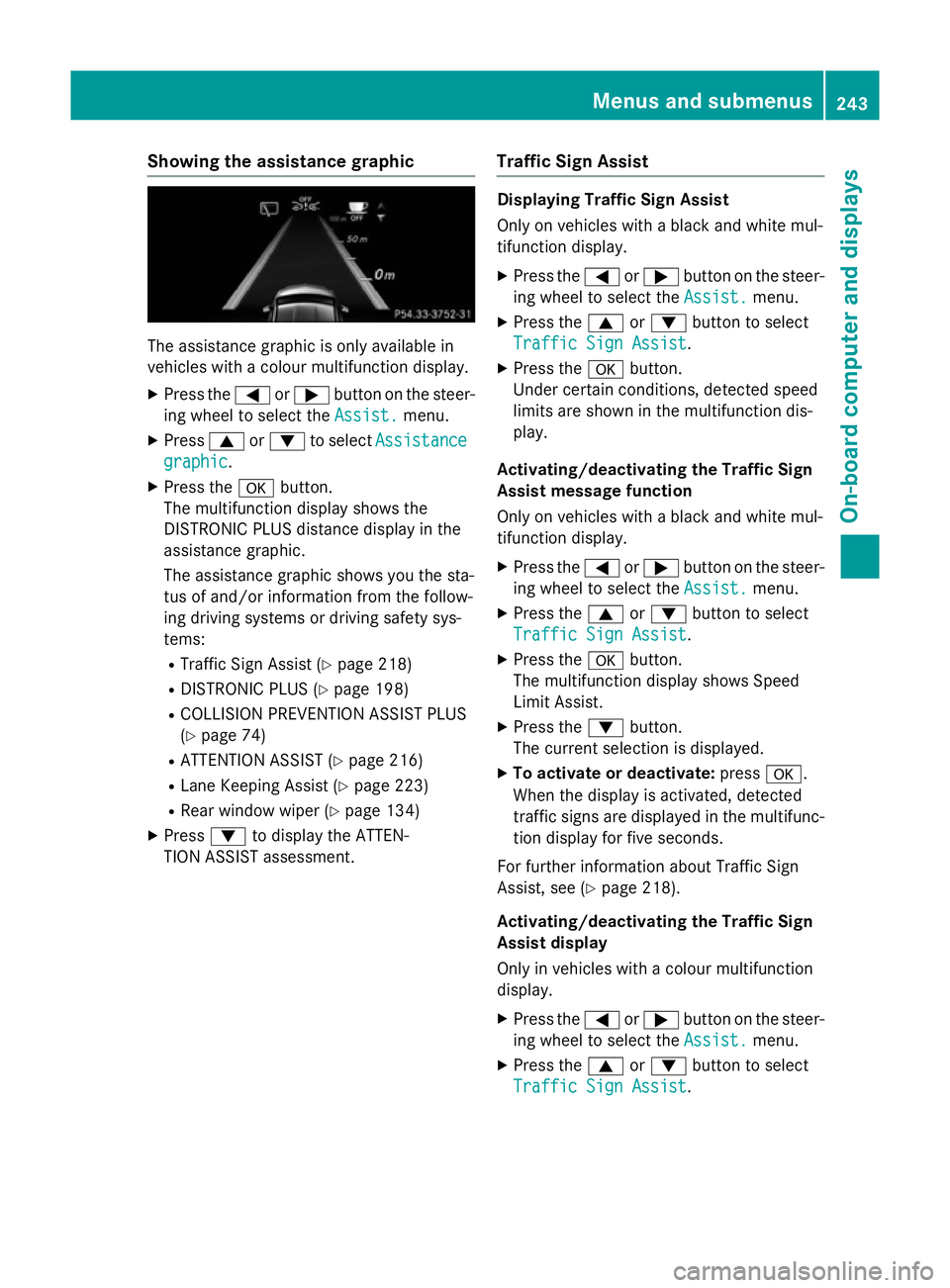
Showing the assistance graphic
The assistance graphic is only available in
vehicles with a colour multifunction display.
X Press the =or; button on the steer-
ing wheel to select the Assist.
Assist.menu.
X Press 9or: to select Assistance
Assistance
graphic
graphic.
X Press the abutton.
The multifunction display shows the
DISTRONIC PLUS distance display in the
assistance graphic.
The assistance graphic shows you the sta-
tus of and/or information from the follow-
ing driving systems or driving safety sys-
tems:
R Traffic Sign Assist (Y page 218)
R DISTRONIC PLUS (Y page 198)
R COLLISION PREVENTION ASSIST PLUS
(Y page 74)
R ATTENTION ASSIST (Y page 216)
R Lane Keeping Assist (Y page 223)
R Rear window wiper (Y page 134)
X Press :to display the ATTEN-
TION ASSIST assessment. Traffic Sign Assist Displaying Traffic Sign Assist
Only on vehicles with a black and white mul-
tifunction display.
X Press the =or; button on the steer-
ing wheel to select the Assist. Assist.menu.
X Press the 9or: button to select
Traffic Sign Assist
Traffic Sign Assist.
X Press the abutton.
Under certain conditions, detected speed
limits are shown in the multifunction dis-
play.
Activating/deactivating the Traffic Sign
Assist message function
Only on vehicles with a black and white mul-
tifunction display.
X Press the =or; button on the steer-
ing wheel to select the Assist. Assist.menu.
X Press the 9or: button to select
Traffic Sign Assist
Traffic Sign Assist.
X Press the abutton.
The multifunction display shows Speed
Limit Assist.
X Press the :button.
The current selection is displayed.
X To activate or deactivate: pressa.
When the display is activated, detected
traffic signs are displayed in the multifunc- tion display for five seconds.
For further information about Traffic Sign
Assist, see (Y page 218).
Activating/deactivating the Traffic Sign
Assist display
Only in vehicles with a colour multifunction
display.
X Press the =or; button on the steer-
ing wheel to select the Assist.
Assist. menu.
X Press the 9or: button to select
Traffic Sign Assist Traffic Sign Assist. Menus and submenus
243On-board computer and displays Z