lock MERCEDES-BENZ B-CLASS HATCHBACK 2015 Owners Manual
[x] Cancel search | Manufacturer: MERCEDES-BENZ, Model Year: 2015, Model line: B-CLASS HATCHBACK, Model: MERCEDES-BENZ B-CLASS HATCHBACK 2015Pages: 293, PDF Size: 10.83 MB
Page 198 of 293
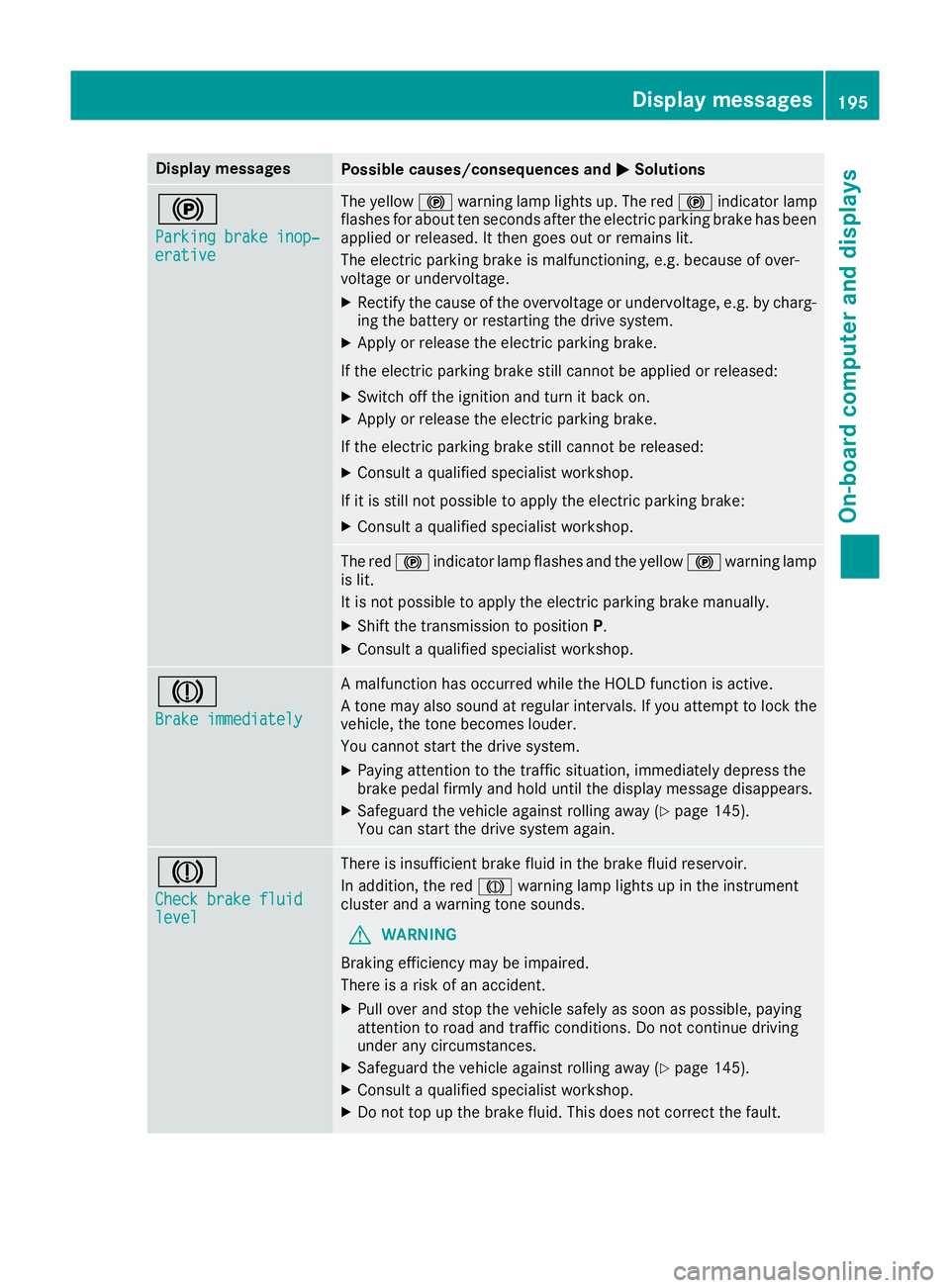
Display messages
Possible causes/consequences and
M
MSolutions !
Parking brake inop‐ Parking brake inop‐
erative erative The yellow
!warning lamp lights up. The red !indicator lamp
flashes for about ten seconds after the electric parking brake has been applied or released. It then goes out or remains lit.
The electric parking brake is malfunctioning, e.g. because of over-
voltage or undervoltage.
X Rectify the cause of the overvoltage or undervoltage, e.g. by charg-
ing the battery or restarting the drive system.
X Apply or release the electric parking brake.
If the electric parking brake still cannot be applied or released:
X Switch off the ignition and turn it back on.
X Apply or release the electric parking brake.
If the electric parking brake still cannot be released:
X Consult a qualified specialist workshop.
If it is still not possible to apply the electric parking brake: X Consult a qualified specialist workshop. The red
!indicator lamp flashes and the yellow !warning lamp
is lit.
It is not possible to apply the electric parking brake manually.
X Shift the transmission to position P.
X Consult a qualified specialist workshop. J
Brake immediately Brake immediately A malfunction has occurred while the HOLD function is active.
A tone may also sound at regular intervals. If you attempt to lock the
vehicle, the tone becomes louder.
You cannot start the drive system.
X Paying attention to the traffic situation, immediately depress the
brake pedal firmly and hold until the display message disappears.
X Safeguard the vehicle against rolling away (Y page 145).
You can start the drive system again. J
Check brake fluid Check brake fluid
level level There is insufficient brake fluid in the brake fluid reservoir.
In addition, the red Jwarning lamp lights up in the instrument
cluster and a warning tone sounds.
G WARNING
Braking efficiency may be impaired.
There is a risk of an accident.
X Pull over and stop the vehicle safely as soon as possible, paying
attention to road and traffic conditions. Do not continue driving
under any circumstances.
X Safeguard the vehicle against rolling away (Y page 145).
X Consult a qualified specialist workshop.
X Do not top up the brake fluid. This does not correct the fault. Display
messages
195On-board computer and displays Z
Page 213 of 293
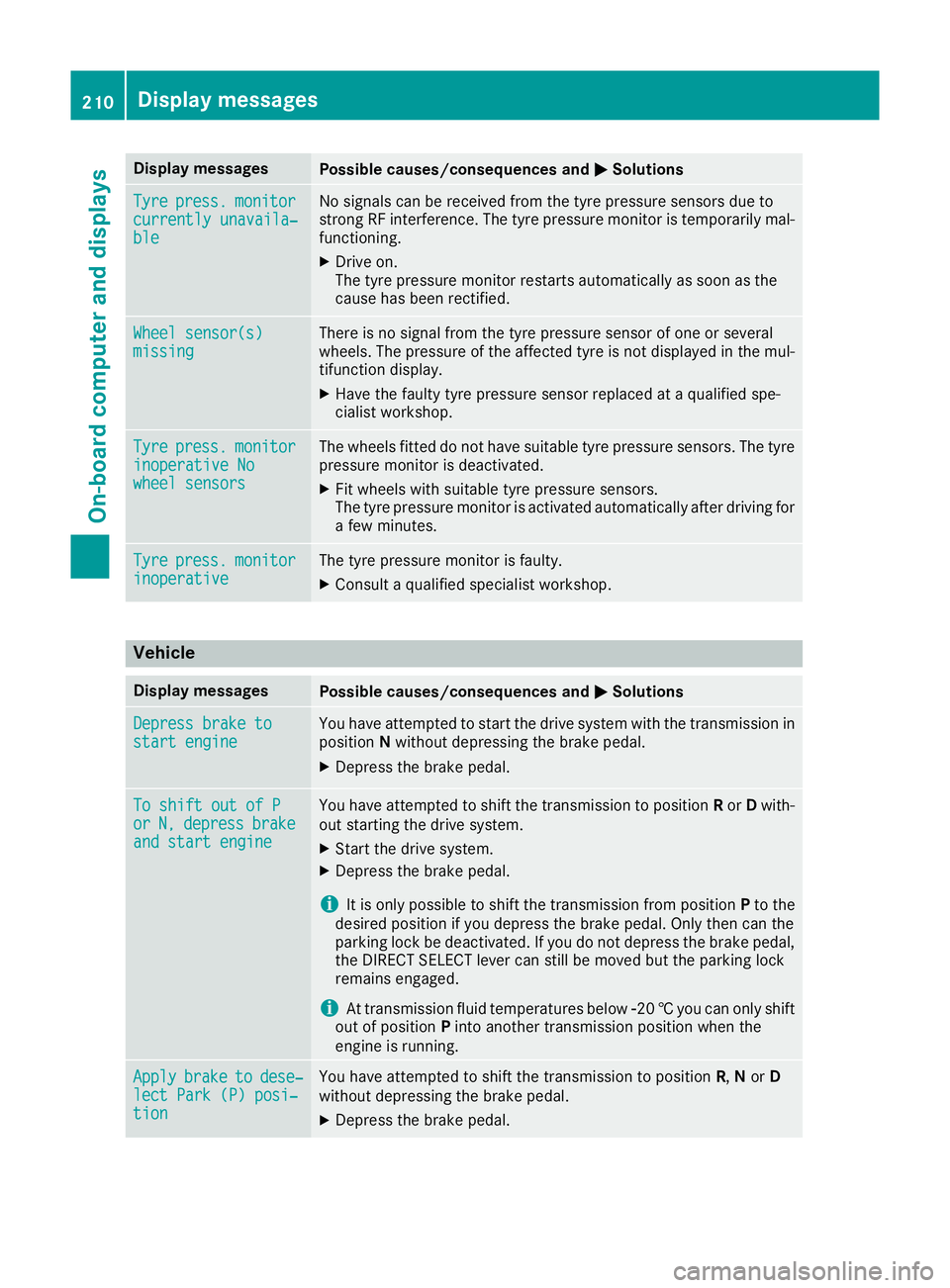
Display messages
Possible causes/consequences and
M
MSolutions Tyre
Tyre
press.
press. monitor
monitor
currently unavaila‐
currently unavaila‐
ble ble No signals can be received from the tyre pressure sensors due to
strong RF interference. The tyre pressure monitor is temporarily mal-
functioning.
X Drive on.
The tyre pressure monitor restarts automatically as soon as the
cause has been rectified. Wheel sensor(s) Wheel sensor(s)
missing missing There is no signal from the tyre pressure sensor of one or several
wheels. The pressure of the affected tyre is not displayed in the mul-
tifunction display.
X Have the faulty tyre pressure sensor replaced at a qualified spe-
cialist workshop. Tyre Tyre
press.
press. monitor
monitor
inoperative No
inoperative No
wheel sensors wheel sensors The wheels fitted do not have suitable tyre pressure sensors. The tyre
pressure monitor is deactivated.
X Fit wheels with suitable tyre pressure sensors.
The tyre pressure monitor is activated automatically after driving for
a few minutes. Tyre Tyre
press.
press. monitor
monitor
inoperative
inoperative The tyre pressure monitor is faulty.
X Consult a qualified specialist workshop. Vehicle
Display messages
Possible causes/consequences and
M
MSolutions Depress brake to
Depress brake to
start engine start engine You have attempted to start the drive system with the transmission in
position Nwithout depressing the brake pedal.
X Depress the brake pedal. To shift out of P
To shift out of P
or or
N,
N,depress
depress brake
brake
and start engine
and start engine You have attempted to shift the transmission to position
Ror Dwith-
out starting the drive system.
X Start the drive system.
X Depress the brake pedal.
i It is only possible to shift the transmission from position
Pto the
desired position if you depress the brake pedal. Only then can the
parking lock be deactivated. If you do not depress the brake pedal,
the DIRECT SELECT lever can still be moved but the parking lock
remains engaged.
i At transmission fluid temperatures below
Ò20†you can only shift
out of position Pinto another transmission position when the
engine is running. Apply
Apply
brake
braketo
todese‐
dese‐
lect Park (P) posi‐
lect Park (P) posi‐
tion tion You have attempted to shift the transmission to position
R,Nor D
without depressing the brake pedal.
X Depress the brake pedal. 210
Display messagesOn-board computer and displays
Page 214 of 293
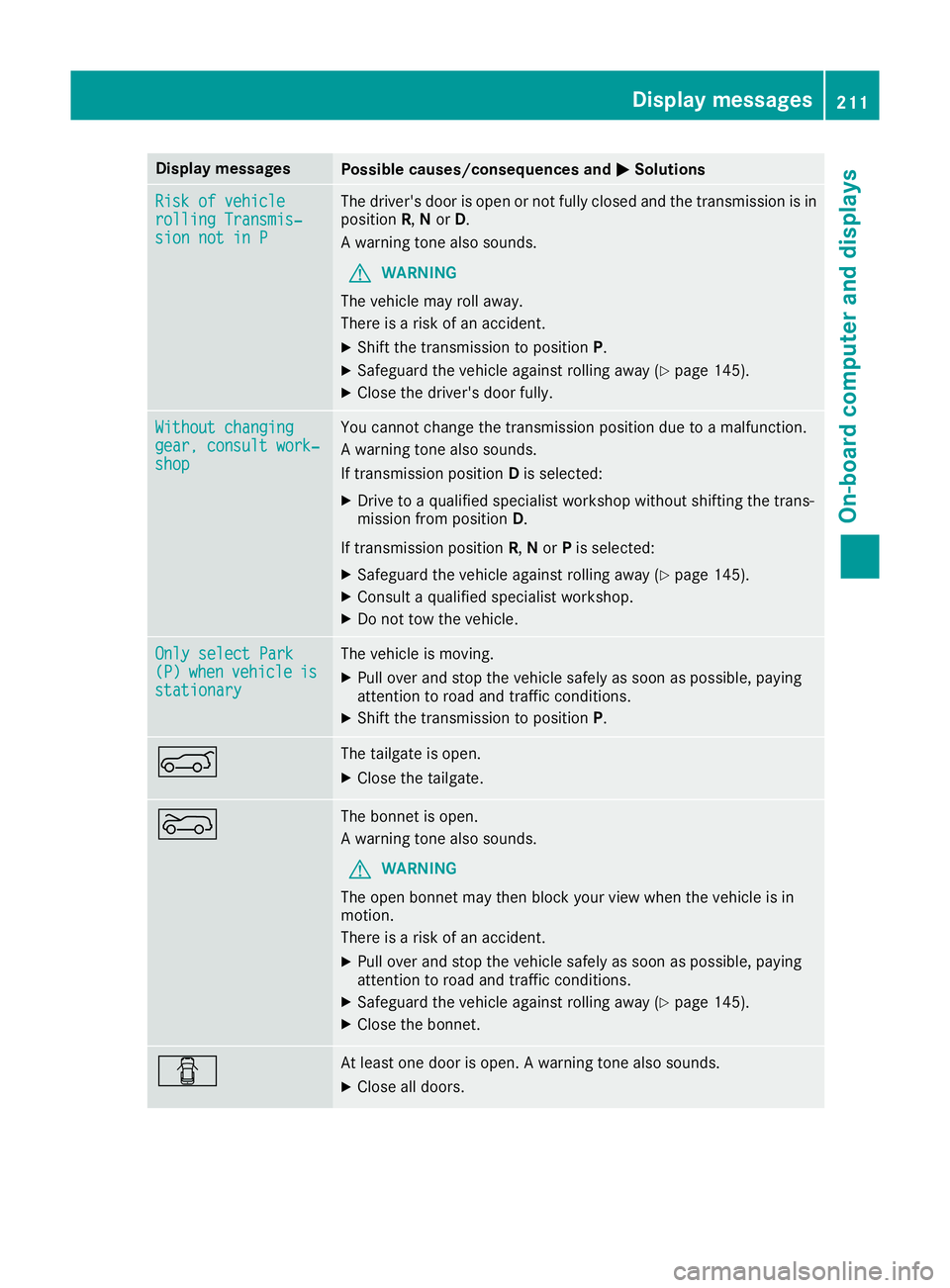
Display messages
Possible causes/consequences and
M
MSolutions Risk of vehicle
Risk of vehicle
rolling Transmis‐ rolling Transmis‐
sion not in P sion not in P The driver's door is open or not fully closed and the transmission is in
position R,Nor D.
A warning tone also sounds.
G WARNING
The vehicle may roll away.
There is a risk of an accident.
X Shift the transmission to position P.
X Safeguard the vehicle against rolling away (Y page 145).
X Close the driver's door fully. Without changing
Without changing
gear, consult work‐ gear, consult work‐
shop shop You cannot change the transmission position due to a malfunction.
A warning tone also sounds.
If transmission position
Dis selected:
X Drive to a qualified specialist workshop without shifting the trans-
mission from position D.
If transmission position R,Nor Pis selected:
X Safeguard the vehicle against rolling away (Y page 145).
X Consult a qualified specialist workshop.
X Do not tow the vehicle. Only select Park Only select Park
(P) (P)
when
when vehicle
vehicle is
is
stationary
stationary The vehicle is moving.
X
Pull over and stop the vehicle safely as soon as possible, paying
attention to road and traffic conditions.
X Shift the transmission to position P.A The tailgate is open.
X Close the tailgate. ? The bonnet is open.
A warning tone also sounds.
G WARNING
The open bonnet may then block your view when the vehicle is in
motion.
There is a risk of an accident.
X Pull over and stop the vehicle safely as soon as possible, paying
attention to road and traffic conditions.
X Safeguard the vehicle against rolling away (Y page 145).
X Close the bonnet. C At least one door is open. A warning tone also sounds.
X Close all doors. Display
messages
211On-board computer and displays Z
Page 215 of 293
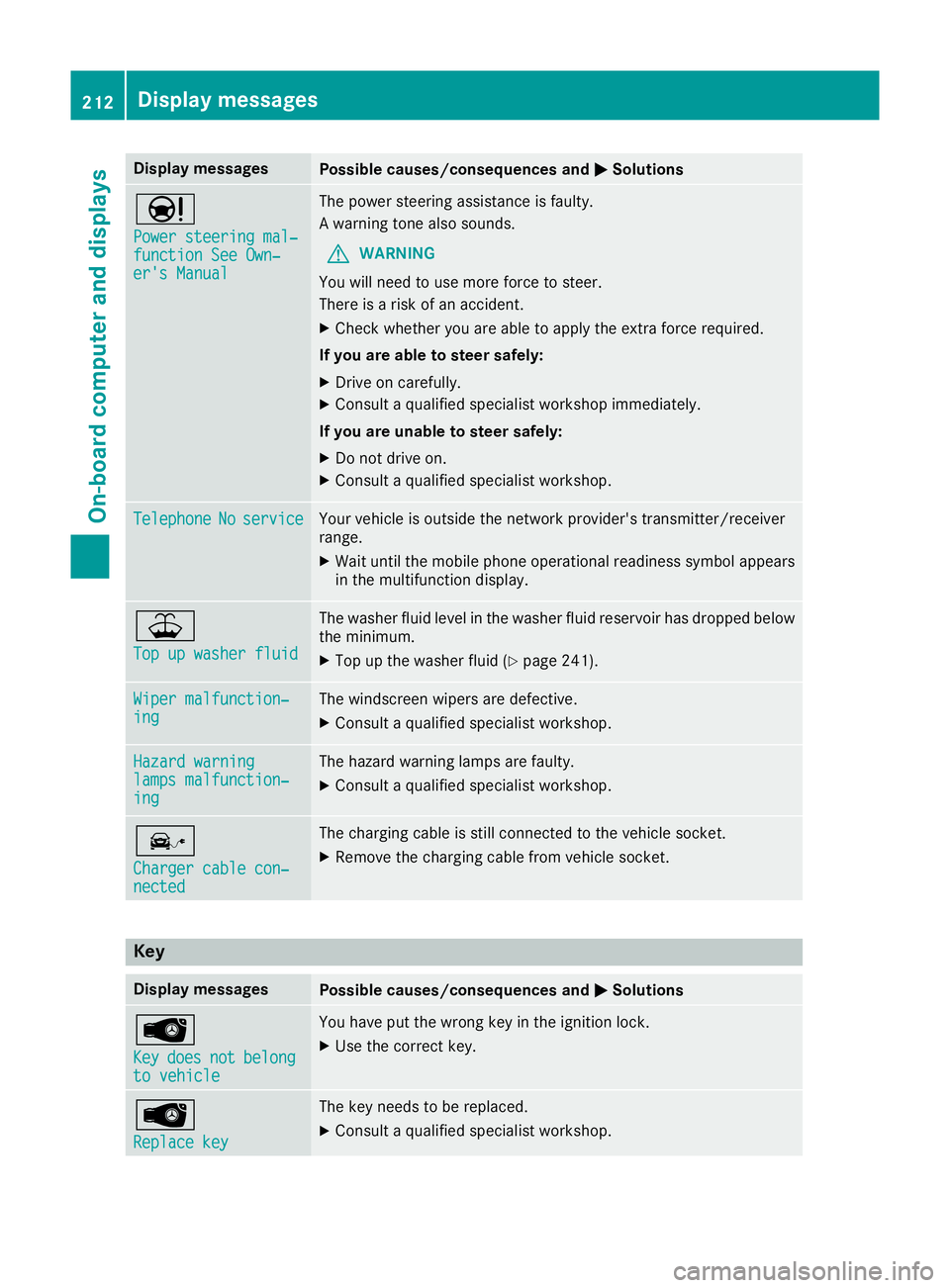
Display messages
Possible causes/consequences and
M
MSolutions Ð
Power steering mal‐ Power steering mal‐
function See Own‐ function See Own‐
er's Manual er's Manual The power steering assistance is faulty.
A warning tone also sounds.
G WARNING
You will need to use more force to steer.
There is a risk of an accident.
X Check whether you are able to apply the extra force required.
If you are able to steer safely:
X Drive on carefully.
X Consult a qualified specialist workshop immediately.
If you are unable to steer safely:
X Do not drive on.
X Consult a qualified specialist workshop. Telephone Telephone
No
Noservice
service Your vehicle is outside the network provider's transmitter/receiver
range.
X Wait until the mobile phone operational readiness symbol appears
in the multifunction display. ¥
Top up washer fluid Top up washer fluid The washer fluid level in the washer fluid reservoir has dropped below
the minimum.
X Top up the washer fluid (Y page 241).Wiper malfunction‐
Wiper malfunction‐
ing ing The windscreen wipers are defective.
X Consult a qualified specialist workshop. Hazard warning
Hazard warning
lamps malfunction‐ lamps malfunction‐
ing ing The hazard warning lamps are faulty.
X Consult a qualified specialist workshop. î
Charger cable con‐ Charger cable con‐
nected nected The charging cable is still connected to the vehicle socket.
X Remove the charging cable from vehicle socket. Key
Display messages
Possible causes/consequences and
M
MSolutions Â
Key Key
does
does not
notbelong
belong
to vehicle
to vehicle You have put the wrong key in the ignition lock.
X Use the correct key. Â
Replace key Replace key The key needs to be replaced.
X Consult a qualified specialist workshop. 212
Display
messagesOn-board computer and displays
Page 216 of 293
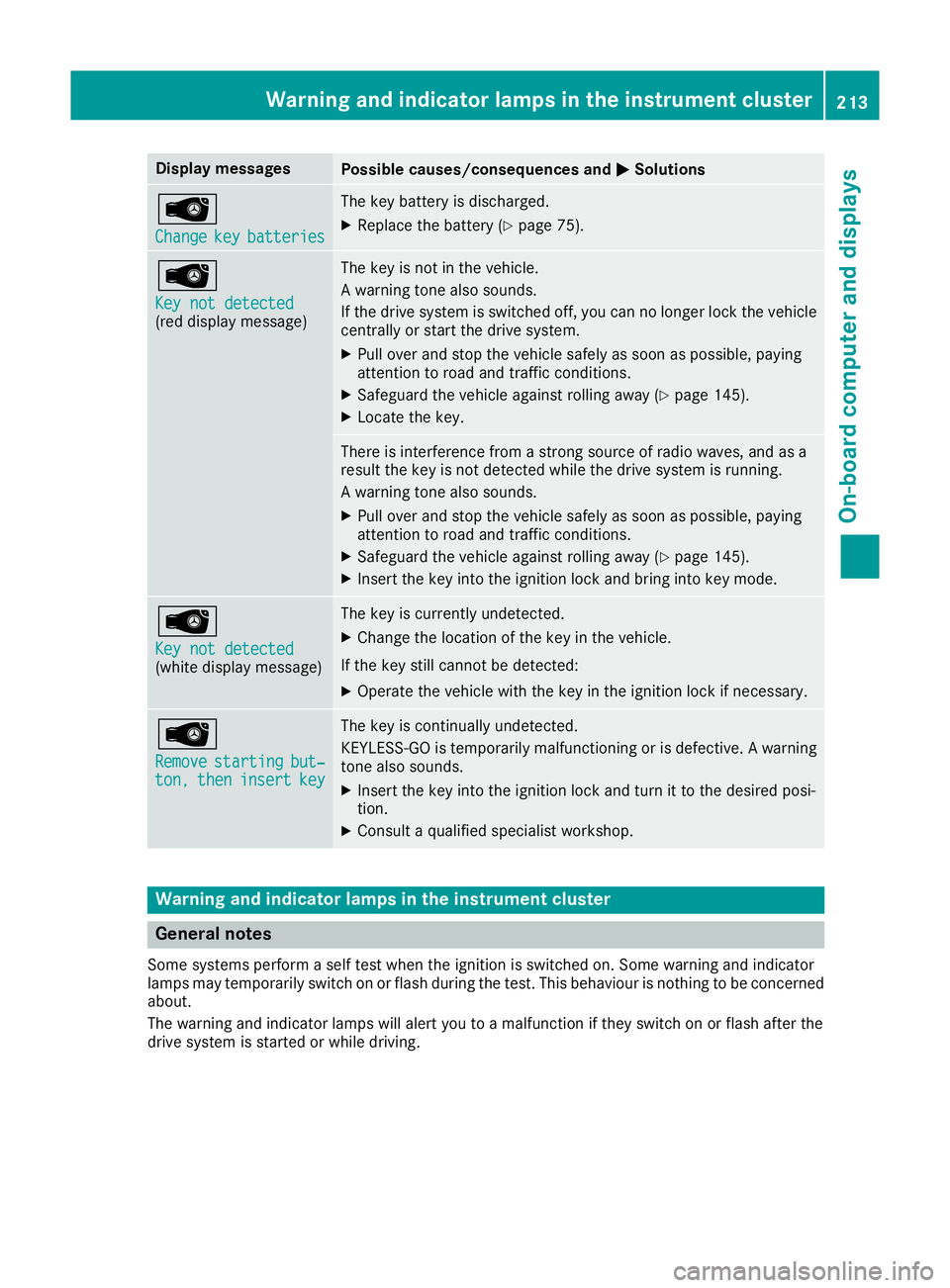
Display messages
Possible causes/consequences and
M
MSolutions Â
Change Change
key
keybatteries
batteries The key battery is discharged.
X Replace the battery (Y page 75).Â
Key not detected Key not detected
(red display message) The key is not in the vehicle.
A warning tone also sounds.
If the drive system is switched off, you can no longer lock the vehicle
centrally or start the drive system.
X Pull over and stop the vehicle safely as soon as possible, paying
attention to road and traffic conditions.
X Safeguard the vehicle against rolling away (Y page 145).
X Locate the key. There is interference from a strong source of radio waves, and as a
result the key is not detected while the drive system is running.
A warning tone also sounds.
X Pull over and stop the vehicle safely as soon as possible, paying
attention to road and traffic conditions.
X Safeguard the vehicle against rolling away (Y page 145).
X Insert the key into the ignition lock and bring into key mode. Â
Key not detected Key not detected
(white display message) The key is currently undetected.
X Change the location of the key in the vehicle.
If the key still cannot be detected:
X Operate the vehicle with the key in the ignition lock if necessary. Â
Remove Remove
starting
starting but‐
but‐
ton,
ton, then
theninsert
insert key
key The key is continually undetected.
KEYLESS-GO is temporarily malfunctioning or is defective. A warning
tone also sounds.
X Insert the key into the ignition lock and turn it to the desired posi-
tion.
X Consult a qualified specialist workshop. Warning and indicator lamps in the instrument cluster
General notes
Some systems perform a self test when the ignition is switched on. Some warning and indicator
lamps may temporarily switch on or flash during the test. This behaviour is nothing to be concerned about.
The warning and indicator lamps will alert you to a malfunction if they switch on or flash after the
drive system is started or while driving. Wa
rning and indi cator lamps in the instrument cluster
213On-board computer and displays Z
Page 219 of 293
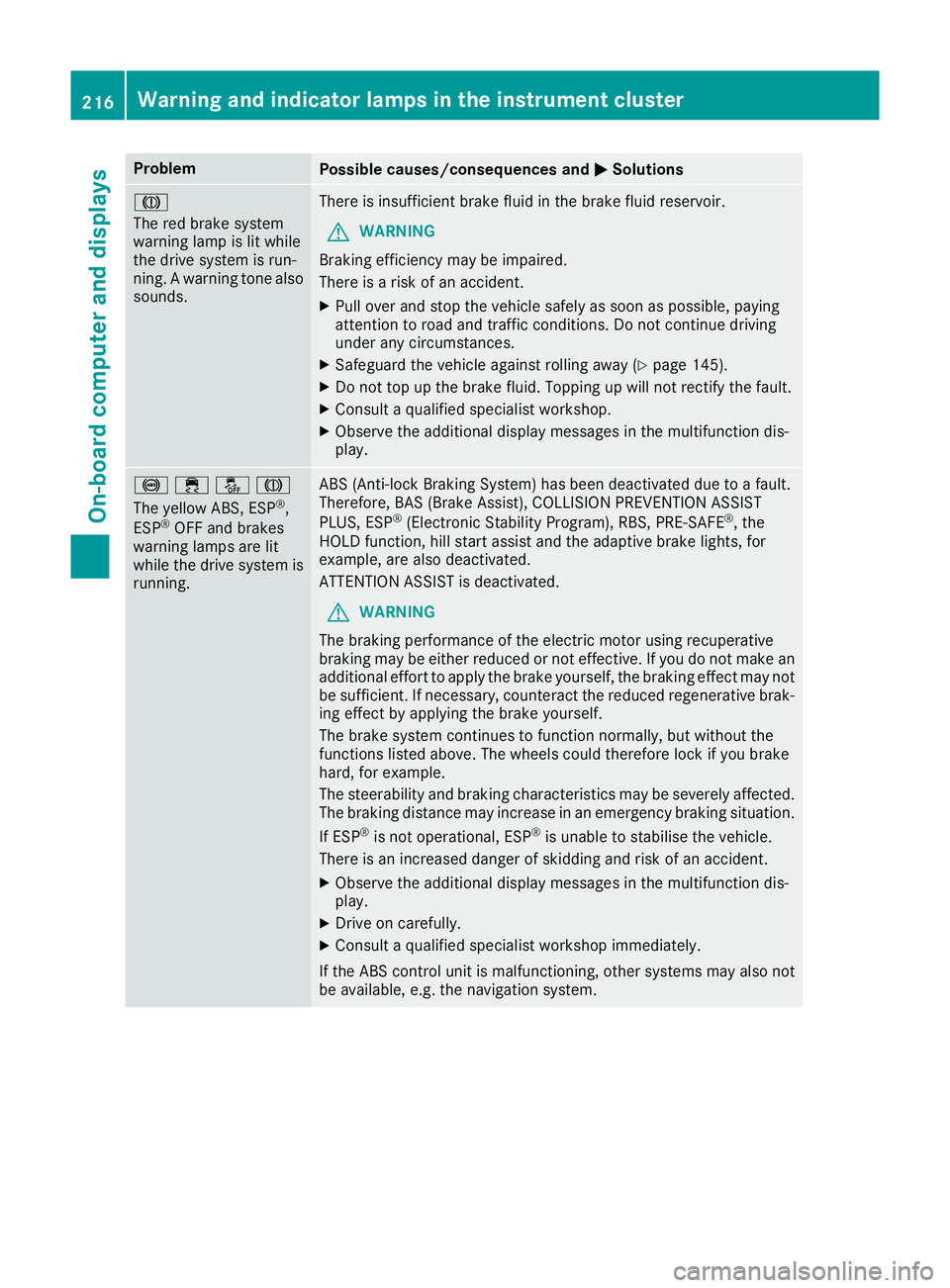
Problem
Possible causes/consequences and
M
MSolutions J
The red brake system
warning lamp is lit while
the drive system is run-
ning. A warning tone also
sounds. There is insufficient brake fluid in the brake fluid reservoir.
G WARNING
Braking efficiency may be impaired.
There is a risk of an accident.
X Pull over and stop the vehicle safely as soon as possible, paying
attention to road and traffic conditions. Do not continue driving
under any circumstances.
X Safeguard the vehicle against rolling away (Y page 145).
X Do not top up the brake fluid. Topping up will not rectify the fault.
X Consult a qualified specialist workshop.
X Observe the additional display messages in the multifunction dis-
play. !֌J
The yellow ABS, ESP
®
,
ESP ®
OFF and brakes
warning lamps are lit
while the drive system is running. ABS (Anti-lock Braking System) has been deactivated due to a fault.
Therefore, BAS (Brake Assist), COLLISION PREVENTION ASSIST
PLUS, ESP ®
(Electronic Stability Program), RBS, PRE ‑SAFE®
, the
HOLD function, hill start assist and the adaptive brake lights, for
example, are also deactivated.
ATTENTION ASSIST is deactivated.
G WARNING
The braking performance of the electric motor using recuperative
braking may be either reduced or not effective. If you do not make an
additional effort to apply the brake yourself, the braking effect may not be sufficient. If necessary, counteract the reduced regenerative brak-
ing effect by applying the brake yourself.
The brake system continues to function normally, but without the
functions listed above. The wheels could therefore lock if you brake
hard, for example.
The steerability and braking characteristics may be severely affected. The braking distance may increase in an emergency braking situation.
If ESP ®
is not operational, ESP ®
is unable to stabilise the vehicle.
There is an increased danger of skidding and risk of an accident.
X Observe the additional display messages in the multifunction dis-
play.
X Drive on carefully.
X Consult a qualified specialist workshop immediately.
If the ABS control unit is malfunctioning, other systems may also not
be available, e.g. the navigation system. 216
Warning and indicator lamps in the instrument clusterOn-board computer and displays
Page 220 of 293
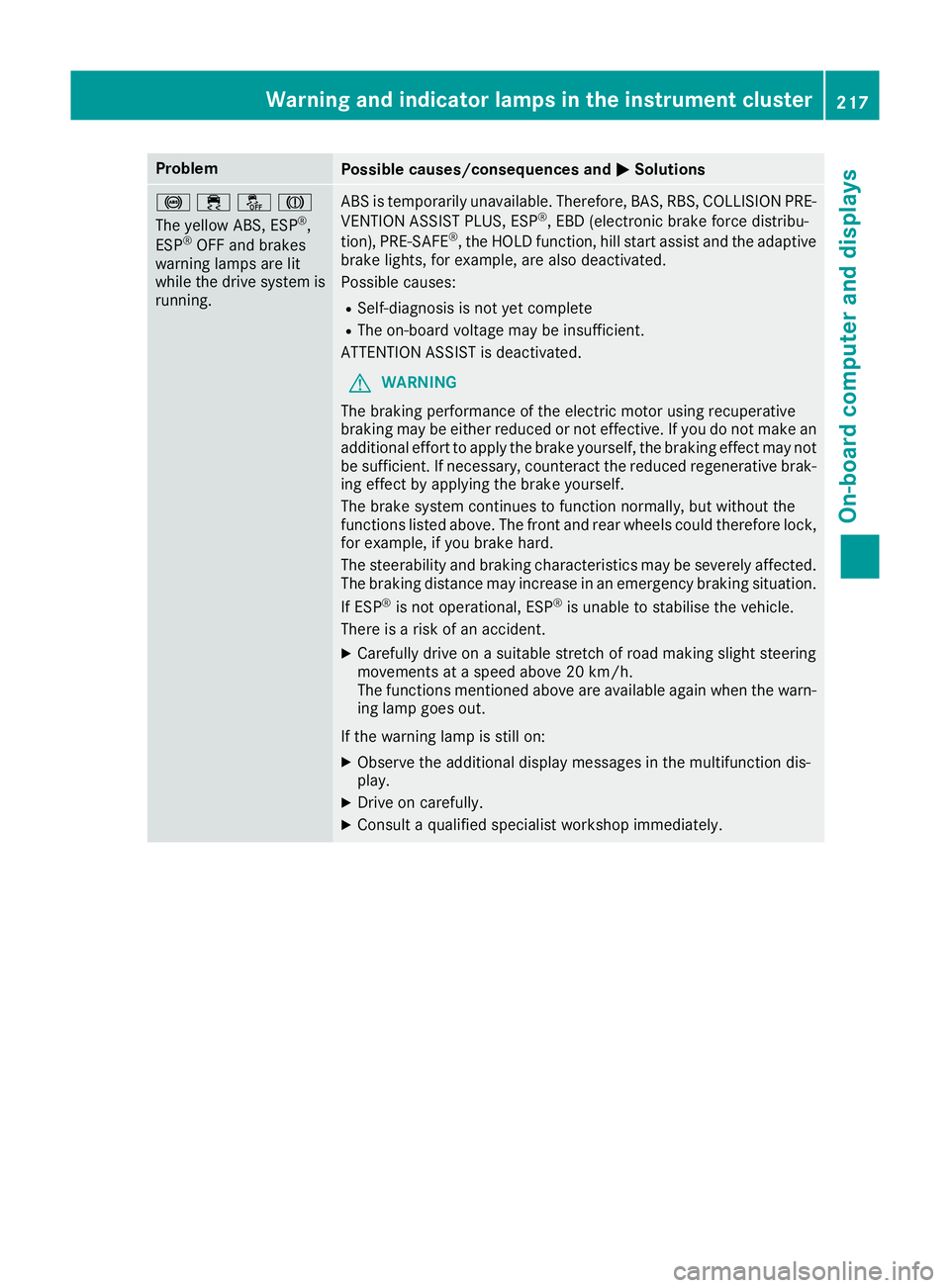
Problem
Possible causes/consequences and
M
MSolutions !֌J
The yellow ABS, ESP
®
,
ESP ®
OFF and brakes
warning lamps are lit
while the drive system is running. ABS is temporarily unavailable. Therefore, BAS, RBS, COLLISION PRE-
VENTION ASSIST PLUS, ESP ®
, EBD (electronic brake force distribu-
tion), PRE‑SAFE ®
, the HOLD function, hill start assist and the adaptive
brake lights, for example, are also deactivated.
Possible causes:
R Self-diagnosis is not yet complete
R The on-board voltage may be insufficient.
ATTENTION ASSIST is deactivated.
G WARNING
The braking performance of the electric motor using recuperative
braking may be either reduced or not effective. If you do not make an
additional effort to apply the brake yourself, the braking effect may not be sufficient. If necessary, counteract the reduced regenerative brak-
ing effect by applying the brake yourself.
The brake system continues to function normally, but without the
functions listed above. The front and rear wheels could therefore lock, for example, if you brake hard.
The steerability and braking characteristics may be severely affected.The braking distance may increase in an emergency braking situation.
If ESP ®
is not operational, ESP ®
is unable to stabilise the vehicle.
There is a risk of an accident.
X Carefully drive on a suitable stretch of road making slight steering
movements at a speed above 20 km/h.
The functions mentioned above are available again when the warn-
ing lamp goes out.
If the warning lamp is still on: X Observe the additional display messages in the multifunction dis-
play.
X Drive on carefully.
X Consult a qualified specialist workshop immediately. Warning and indicator lamps in the instrument cluster
217On-board computer and displays Z
Page 221 of 293
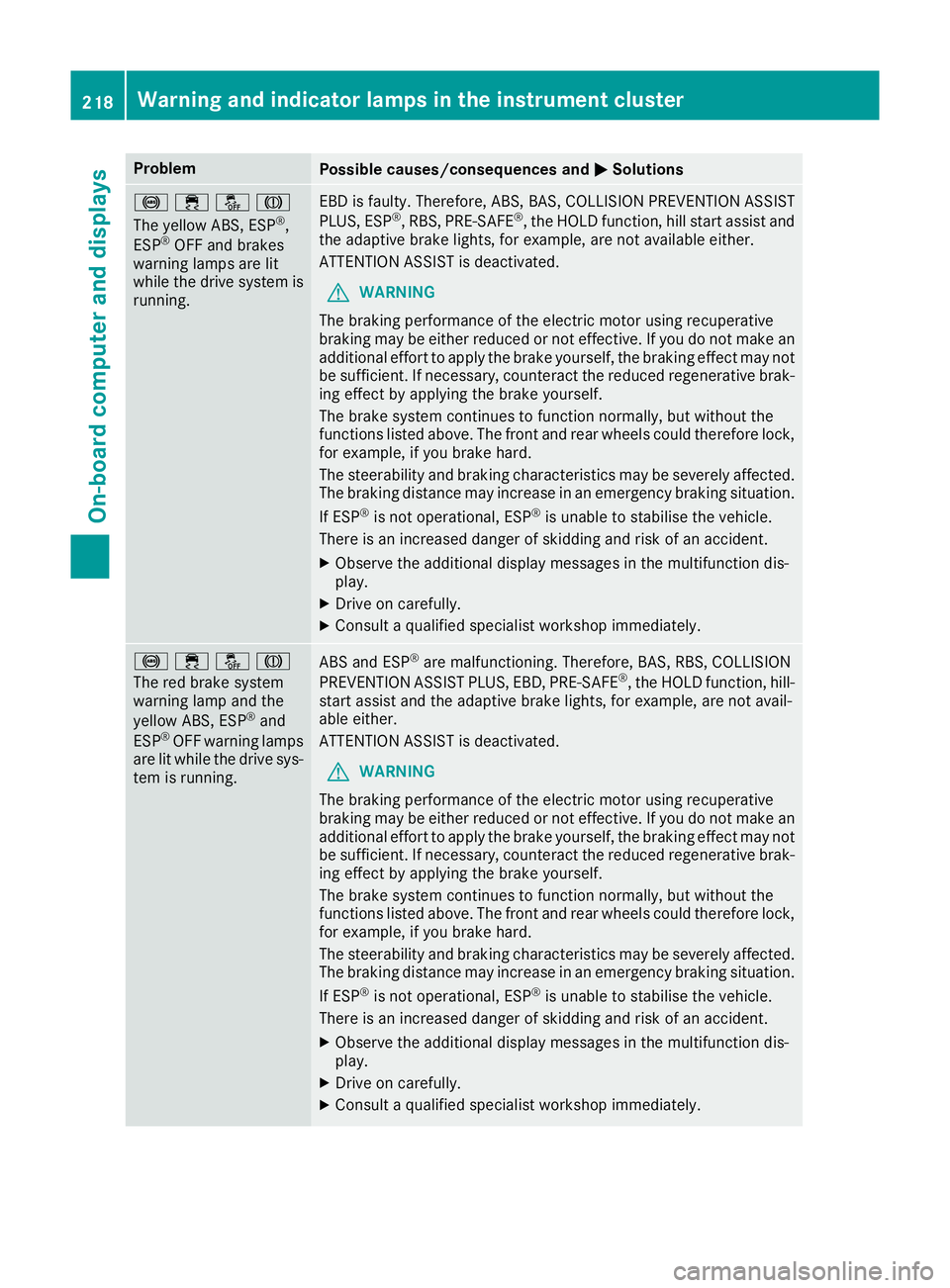
Problem
Possible causes/consequences and
M
MSolutions !֌J
The yellow ABS, ESP
®
,
ESP ®
OFF and brakes
warning lamps are lit
while the drive system is running. EBD is faulty. Therefore, ABS, BAS, COLLISION PREVENTION ASSIST
PLUS, ESP ®
, RBS, PRE ‑SAFE®
, the HOLD function, hill start assist and
the adaptive brake lights, for example, are not available either.
ATTENTION ASSIST is deactivated.
G WARNING
The braking performance of the electric motor using recuperative
braking may be either reduced or not effective. If you do not make an
additional effort to apply the brake yourself, the braking effect may not be sufficient. If necessary, counteract the reduced regenerative brak-
ing effect by applying the brake yourself.
The brake system continues to function normally, but without the
functions listed above. The front and rear wheels could therefore lock, for example, if you brake hard.
The steerability and braking characteristics may be severely affected.The braking distance may increase in an emergency braking situation.
If ESP ®
is not operational, ESP ®
is unable to stabilise the vehicle.
There is an increased danger of skidding and risk of an accident.
X Observe the additional display messages in the multifunction dis-
play.
X Drive on carefully.
X Consult a qualified specialist workshop immediately. !֌J
The red brake system
warning lamp and the
yellow ABS, ESP
®
and
ESP ®
OFF warning lamps
are lit while the drive sys-
tem is running. ABS and ESP
®
are malfunctioning. Therefore, BAS, RBS, COLLISION
PREVENTION ASSIST PLUS, EBD, PRE ‑SAFE®
, the HOLD function, hill-
start assist and the adaptive brake lights, for example, are not avail-
able either.
ATTENTION ASSIST is deactivated.
G WARNING
The braking performance of the electric motor using recuperative
braking may be either reduced or not effective. If you do not make an
additional effort to apply the brake yourself, the braking effect may not be sufficient. If necessary, counteract the reduced regenerative brak-
ing effect by applying the brake yourself.
The brake system continues to function normally, but without the
functions listed above. The front and rear wheels could therefore lock, for example, if you brake hard.
The steerability and braking characteristics may be severely affected.The braking distance may increase in an emergency braking situation.
If ESP ®
is not operational, ESP ®
is unable to stabilise the vehicle.
There is an increased danger of skidding and risk of an accident.
X Observe the additional display messages in the multifunction dis-
play.
X Drive on carefully.
X Consult a qualified specialist workshop immediately. 218
Warning and indicator lamps in the instrument clusterOn-board computer and displays
Page 227 of 293
Useful information
i This Owner's Manual describes all models,
series and optional equipment for your vehi-
cle that were available at the time of going to
press. National variations are possible. Note
that your vehicle may not be equipped with all
of the functions described. This is also the
case for systems and functions relevant to
safety.
i Read the information on qualified specialist
workshops: (Y page 23). Loading guidelines
G
WARNING
If objects, luggage or loads are not secured or not secured sufficiently, they could slip, tip
over or be flung around and thereby hit vehicle
occupants. There is a risk of injury, especially when braking or abruptly changing directions.
Always store objects so that they cannot be
flung around. Secure objects, luggage or
loads against slipping or tipping before the
journey.
The handling characteristics of a laden vehicle
are dependent on the distribution of the load
within the vehicle. For this reason, you should
observe the following notes when transporting a load:
R never exceed the maximum permissible gross
vehicle weight or the permissible axle loads
for the vehicle (including occupants).
R the luggage compartment is the preferred
place to carry objects.
R position heavy loads as far forwards as pos-
sible and as low down in the load compart-
ment as possible.
R the load must not protrude above the upper
edge of the seat backrests.
R always place the load against the rear or front
seat backrests. Make sure that the seat
backrests are securely locked into place.
R always place the load behind unoccupied
seats if possible.
R use the lashing eyelets and the luggage nets
to transport loads and luggage. R
only use lashing eyelets and fastening com-
ponents that are suitable for the weight and
size of the load.
R hook in the safety net when loading.
R the maximum load capacity of the stowage
well under the luggage compartment floor is
25 kg.
R secure the load with sufficiently strong and
wear-resistant lashing material. pad sharp
edges for protection.
! Do not position the load on one part of the
folding luggage compartment floor only. The
maximum load capacity of the folding luggage compartment floor is 100 kg. Spread the
weight evenly to avoid damaging the luggage
compartment floor. Place a solid board under the load if necessary. Please note that the
load on the luggage compartment floor will be increased when the load is lashed down. Stowage areas
Stowage compartments
Important safety notes G
WARNING
If objects in the passenger compartment are
stowed incorrectly, they can slide or be
thrown around and hit vehicle occupants.
There is a risk of injury, particularly in the
event of sudden braking or a sudden change
in direction.
R Always stow objects so that they cannot be
thrown around in such situations.
R Always make sure that objects do not pro-
trude from stowage spaces, parcel nets or
stowage nets.
R Close the lockable stowage spaces before
starting a journey.
R Stow and secure objects that are heavy,
hard, pointed, sharp-edged, fragile or too
large in the luggage compartment.
Observe the loading guidelines (Y page 224).224
Stowage areasStowing and features
Page 231 of 293
X
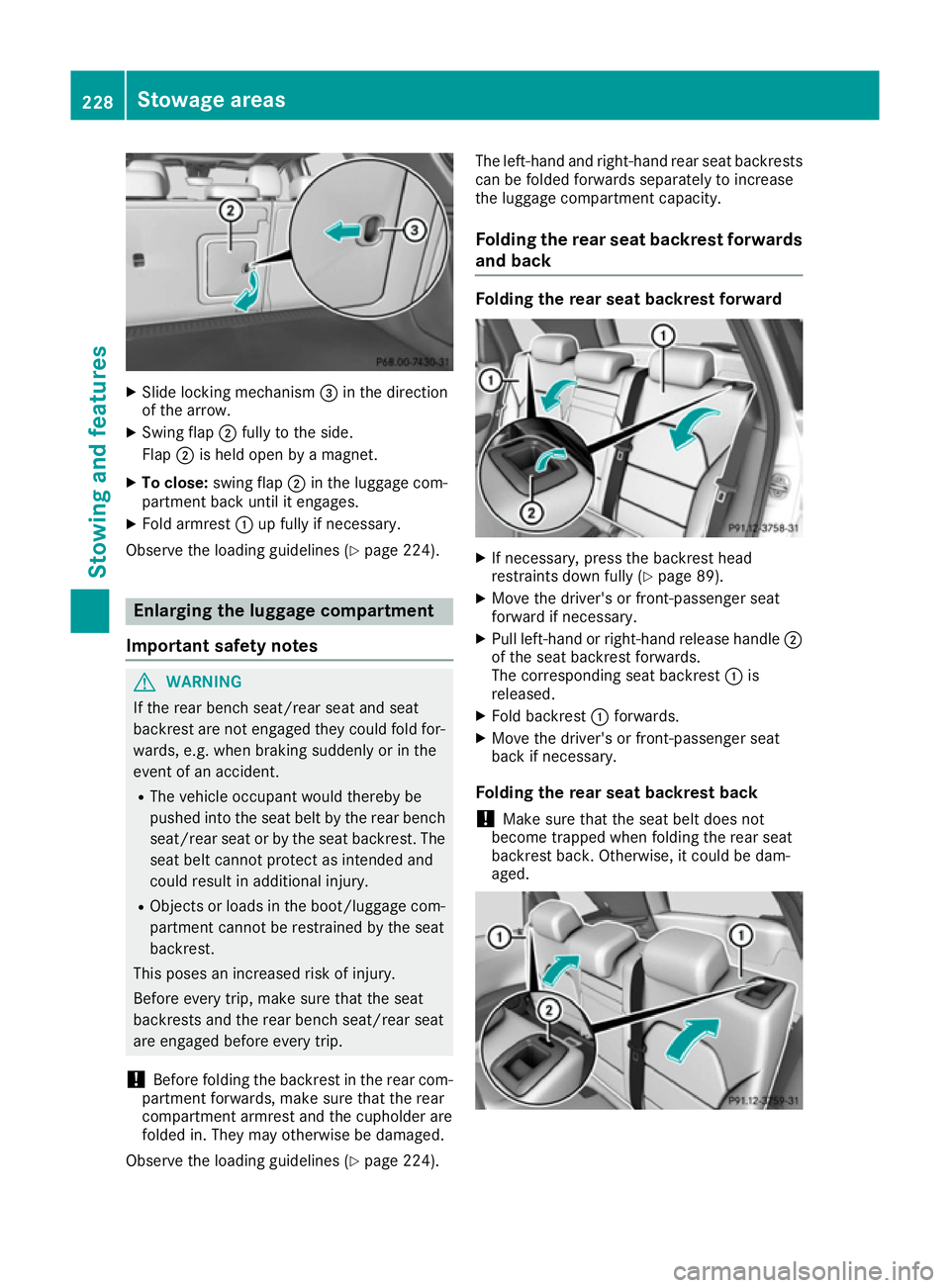
Slide locking mechanism =in the direction
of the arrow.
X Swing flap ;fully to the side.
Flap ;is held open by a magnet.
X To close: swing flap ;in the luggage com-
partment back until it engages.
X Fold armrest :up fully if necessary.
Observe the loading guidelines (Y page 224).Enlarging the luggage compartment
Important safety notes G
WARNING
If the rear bench seat/rear seat and seat
backrest are not engaged they could fold for- wards, e.g. when braking suddenly or in the
event of an accident.
R The vehicle occupant would thereby be
pushed into the seat belt by the rear bench
seat/rear seat or by the seat backrest. The
seat belt cannot protect as intended and
could result in additional injury.
R Objects or loads in the boot/luggage com-
partment cannot be restrained by the seat
backrest.
This poses an increased risk of injury.
Before every trip, make sure that the seat
backrests and the rear bench seat/rear seat
are engaged before every trip.
! Before folding the backrest in the rear com-
partment forwards, make sure that the rear
compartment armrest and the cupholder are
folded in. They may otherwise be damaged.
Observe the loading guidelines (Y page 224).The left-hand and right-hand rear seat backrests
can be folded forwards separately to increase
the luggage compartment capacity.
Folding the rear seat backrest forwards and back Folding the rear seat backrest forward
X
If necessary, press the backrest head
restraints down fully (Y page 89).
X Move the driver's or front-passenger seat
forward if necessary.
X Pull left-hand or right-hand release handle ;
of the seat backrest forwards.
The corresponding seat backrest :is
released.
X Fold backrest :forwards.
X Move the driver's or front-passenger seat
back if necessary.
Folding the rear seat backrest back
! Make sure that the seat belt does not
become trapped when folding the rear seat
backrest back. Otherwise, it could be dam-
aged. 228
Stowage areasStowing and features