air condition MERCEDES-BENZ B-CLASS HATCHBACK 2015 User Guide
[x] Cancel search | Manufacturer: MERCEDES-BENZ, Model Year: 2015, Model line: B-CLASS HATCHBACK, Model: MERCEDES-BENZ B-CLASS HATCHBACK 2015Pages: 293, PDF Size: 10.83 MB
Page 65 of 293
allows you to continue steering the vehicle when
braking.
The ! ABS warning lamp in the instrument
cluster lights up when the ignition is switched
on. It goes out when the engine is running.
ABS works from a speed of about 8 km/h,
regardless of road-surface conditions. ABS
works on slippery surfaces, even when you only
brake gently.
Important safety notes i
Observe the "Important safety notes" sec-
tion (Y page 61). G
WARNING
If ABS is faulty, the wheels could lock when
braking. The steerability and braking charac-
teristics may be severely impaired. Addition-
ally, further driving safety systems are deac-
tivated. There is an increased danger of skid- ding and accidents.
Drive on carefully. Have ABS checked imme-
diately at a qualified specialist workshop.
If ABS is malfunctioning, other systems, includ-
ing driving safety systems, will also become
inoperative. Observe the information on the ABS warning lamp (Y page 216) and display mes-
sages which may be shown in the instrument
cluster (Y page 190).
Brakes X
If ABS intervenes: continue to depress the
brake pedal with force until the braking sit-
uation is over.
X To make a full brake application: depress
the brake pedal with full force.
If ABS intervenes when braking, you will feel a
pulsing in the brake pedal.
The pulsating brake pedal can be an indication
of hazardous road conditions; this serves as a
reminder to take extra care while driving. BAS (Brake Assist)
General notes BAS operates in emergency braking situations.
If you depress the brake pedal quickly, BAS
automatically boosts the braking force, thus
shortening the stopping distance.
Important safety notes i
Observe the "Important safety notes" sec-
tion (Y page 61). G
WARNING
If BAS is malfunctioning, the braking distance
in an emergency braking situation is
increased. There is a risk of accident.
In an emergency braking situation, depress
the brake pedal with full force. ABS prevents
the wheels from locking.
Braking X
Keep the brake pedal depressed firmly until
the emergency braking situation is over.
ABS prevents the wheels from locking.
The brakes will function as usual once you
release the brake pedal. BAS is deactivated. COLLISION PREVENTION ASSIST
PLUS
General notes i
Observe the "Important safety notes" sec-
tion (Y page 61).
COLLISION PREVENTION ASSIST PLUS consists of a distance warning function with an autono-
mous braking function and Adaptive Brake
Assist.
COLLISION PREVENTION ASSIST PLUS can help you to minimise the risk of a collision with the
vehicle in front or reduce the effects of such a
collision.
If COLLISION PREVENTION ASSIST PLUS
detects that there is a risk of a collision, you will
be warned visually and acoustically. If you do not react to the visual and audible collision warning,autonomous braking can be initiated in critical
situations. If you apply the brake yourself in a 62
Driving safety systemsSafety
Page 103 of 293
Headlamp flasher
X
To switch on: turn the key in the ignition lock
to position 1or 2or start the drive system.
X Pull the combination switch in the direction of
arrow =. Headlamp cleaning system
Vehicles with bi-xenon headlamps: the head-
lamps are cleaned automatically if the "Wipe
with washer fluid" function is operated five
times (Y page 108) while the lights are on and
the drive system is running. When you switch off the ignition, the automatic headlamp cleaning
system is reset and counting is resumed from 0. Hazard warning lamps
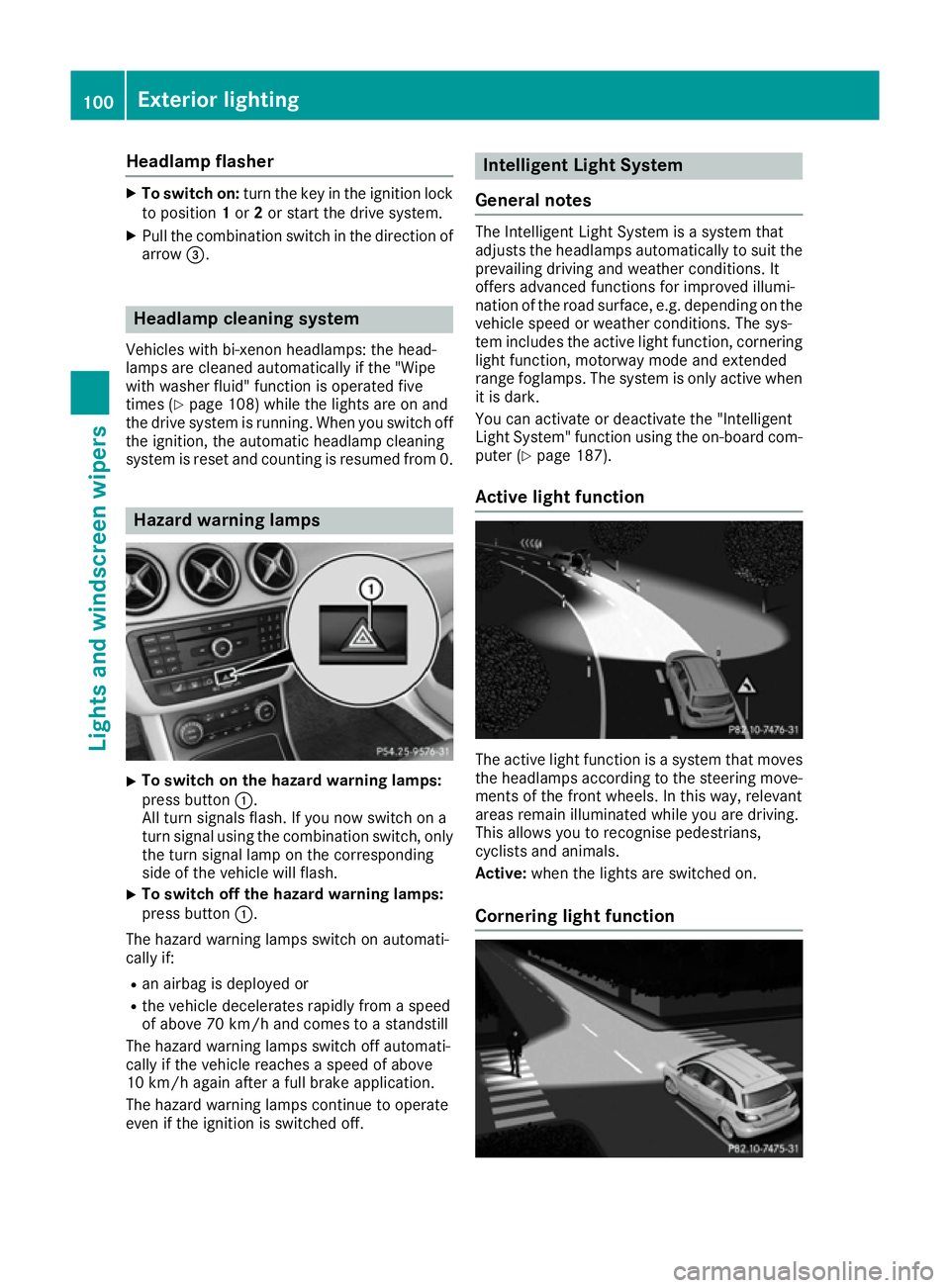
X
To switch on the hazard warning lamps:
press button :.
All turn signals flash. If you now switch on a
turn signal using the combination switch, only the turn signal lamp on the corresponding
side of the vehicle will flash.
X To switch off the hazard warning lamps:
press button
:.
The hazard warning lamps switch on automati-
cally if:
R an airbag is deployed or
R the vehicle decelerates rapidly from a speed
of above 70 km/h and comes to a standstill
The hazard warning lamps switch off automati-
cally if the vehicle reaches a speed of above
10 km/h again after a full brake application.
The hazard warning lamps continue to operate
even if the ignition is switched off. Intelligent Light System
General notes The Intelligent Light System is a system that
adjusts the headlamps automatically to suit the
prevailing driving and weather conditions. It
offers advanced functions for improved illumi-
nation of the road surface, e.g. depending on the vehicle speed or weather conditions. The sys-
tem includes the active light function, corneringlight function, motorway mode and extended
range foglamps. The system is only active when it is dark.
You can activate or deactivate the "Intelligent
Light System" function using the on-board com-
puter (Y page 187).
Active light function The active light function is a system that moves
the headlamps according to the steering move-
ments of the front wheels. In this way, relevant
areas remain illuminated while you are driving.
This allows you to recognise pedestrians,
cyclists and animals.
Active: when the lights are switched on.
Cornering light function 100
Exterior lightingLights and windscreen wipers
Page 117 of 293
Useful information
i This Owner's Manual describes all models,
series and optional equipment for your vehi-
cle that were available at the time of going to
press. National variations are possible. Note
that your vehicle may not be equipped with all
of the functions described. This is also the
case for systems and functions relevant to
safety.
i Read the information on qualified specialist
workshops: (Y page 23). Overview of climate control systems
General notes
Observe the settings recommended on the fol-
lowing pages. The windows could otherwise
mist up.
To prevent the windows from misting up:
R switch off climate control only briefly
R activate air-recirculation mode only briefly
R activate the "Cooling with air dehumidifica-
tion" function
R activate the windscreen demisting function
briefly, if required
THERMOTRONIC automatic climate control reg-
ulates the temperature and the humidity in the
vehicle interior and filters undesirable substan-
ces out of the air.
THERMOTRONIC automatic climate control is
only operational when the vehicle is ready to
drive. Optimum operation is only achieved with
the side windows closed.
The residual heat function can only be activated or deactivated with the ignition switched off
(Y page 122).
Always keep the ventilation flaps behind the
side panelling clear (Y page 106). Otherwise the
vehicle will not be ventilated correctly.
i Ventilate the vehicle for a brief period during
warm weather, e.g. using the convenience
opening feature (Y page 83). This will speed
up the cooling process and the desired inte-
rior temperature will be reached more
quickly.
i The integrated filter filters out most parti-
cles of dust and soot and completely filters
out pollen. It also reduces gaseous pollutants and odours. A clogged filter reduces the
amount of air supplied to the vehicle interior.
For this reason, you should always observe
the interval for replacing the filter, which is
specified in the Service Booklet. As this
depends on environmental conditions, e.g.
heavy air pollution, the interval may be
shorter than stated in the Service Booklet.
i Vehicles with auxiliary heating:
under
certain environmental conditions, the resid-
ual heat function may be activated automati-
cally an hour after the key has been removed
in order to dry the automatic climate control.
When the automatic climate control drying
function is active, the blue LED lamp is lit in
the rocker switch in the centre console. The
vehicle is then ventilated for 30 minutes.
Vehicles without auxiliary heating: under
certain environmental conditions, the resid-
ual heat function may be activated automati-
cally an hour after the key has been removed in order to dry the automatic climate control.
The vehicle is then ventilated for 30 minutes. 114
Overview of climate control systemsClimate control
Page 135 of 293
Drive program S (Sport)
Drive program
Sis characterised by the follow-
ing:
R the vehicle exhibits sporty driving character-
istics
R the entire power output can be utilised by
depressing the accelerator pedal.
E+ (Economy Plus) Drive program
E+is characterised by the fol-
lowing:
R reduced torque and significantly reduced
power. This supports an especially efficient
and even driving style and results in a reduc-
tion in speed to approximately 110 km/h.
R the vehicle pulling away more gently in
forward gear unless the accelerator pedal is
depressed fully.
R the wheels are less likely to spin.
R particularly efficient overrun.
R full power output by using kickdown.
R the performance of the air-conditioning and
heating systems is reduced. Steering wheel gearshift paddles
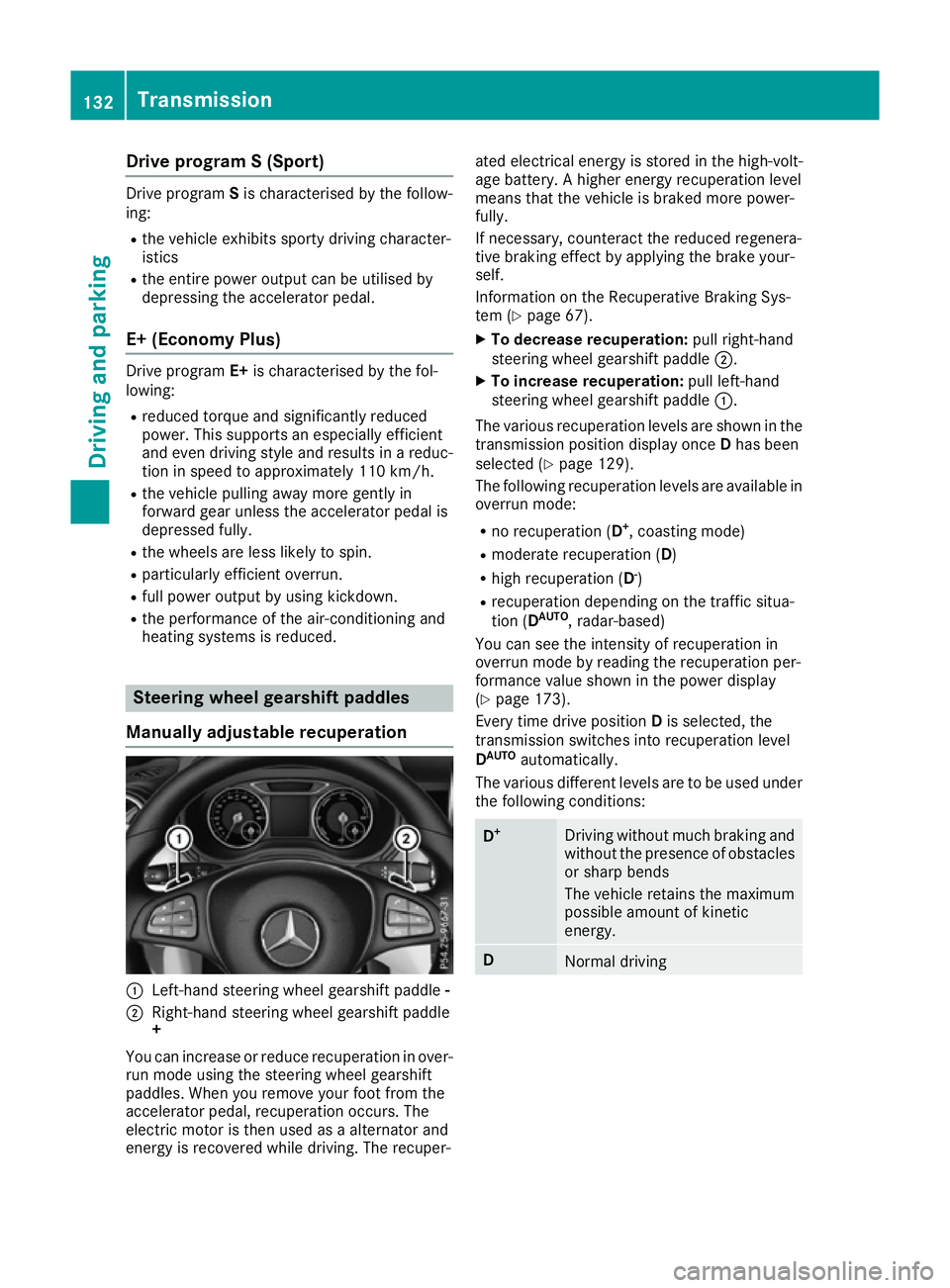
Manually adjustable recuperation :
Left-hand steering wheel gearshift paddle -
; Right-hand steering wheel gearshift paddle
+
You can increase or reduce recuperation in over-
run mode using the steering wheel gearshift
paddles. When you remove your foot from the
accelerator pedal, recuperation occurs. The
electric motor is then used as a alternator and
energy is recovered while driving. The recuper- ated electrical energy is stored in the high-volt-
age battery. A higher energy recuperation level
means that the vehicle is braked more power-
fully.
If necessary, counteract the reduced regenera-
tive braking effect by applying the brake your-
self.
Information on the Recuperative Braking Sys-
tem (Y page 67).
X To decrease recuperation: pull right-hand
steering wheel gearshift paddle ;.
X To increase recuperation: pull left-hand
steering wheel gearshift paddle :.
The various recuperation levels are shown in the
transmission position display once Dhas been
selected (Y page 129).
The following recuperation levels are available in
overrun mode:
R no recuperation (D +
, coasting mode)
R moderate recuperation ( D)
R high recuperation ( D-
)
R recuperation depending on the traffic situa-
tion (D AUTO
, radar-based)
You can see the intensity of recuperation in
overrun mode by reading the recuperation per-
formance value shown in the power display
(Y page 173).
Every time drive position Dis selected, the
transmission switches into recuperation level
D AUTO
automatically.
The various different levels are to be used under the following conditions: D
+ Driving without much braking and
without the presence of obstacles
or sharp bends
The vehicle retains the maximum
possible amount of kinetic
energy. D
Normal driving132
TransmissionDriving and pa
rking
Page 140 of 293
Energy consumption and range
This range is reduced by:
R high and low outside temperatures
R a non-anticipatory driving style
R switching on consumers, e.g. air-conditioning
system or heating.
The battery's physical characteristics are such
that leaving the vehicle parked for an extended
period at low outdoor temperatures without
charging it can lead to:
R a reduction in battery performance
R longer charge times
In extreme cases, this could mean that the vehi- cle cannot be started. For this reason, connect
the charging cable when leaving the vehicle
parked for long periods at low outdoor temper-
atures.
As a result of its basic characteristics, the
amount of energy available from the high-volt-
age battery decreases over the course of its life.
This reduces:
R the maximum range that can be achieved by
the vehicle
R the maximum output (acceleration) of the
vehicle
You can actively reduce the energy consump-
tion of your vehicle in a number of ways, for
example, by:
R an anticipatory driving style
R reducing the use of electrical consumers
R having the vehicle regularly maintained
The charging time of the high-voltage battery
may change over the course of its life.
Observe the displays on energy usage
(Y page 178) and range (Y page 178).
RANGE PLUS If you activate RANGE PLUS, the operating win-
dow of the battery will be extended at the next
charging process. An extended driving range will
be available to you for the next journey.
Using RANGE PLUS shortens the service life of
the battery. Therefore, only use RANGE PLUS if, for example:
R long journeys are planned or
R the availability of charging stations at the des-
tination is limited The more often RANGE PLUS is used, the more
the extended range is reduced.
Therefore always check the range display for
every journey (Y
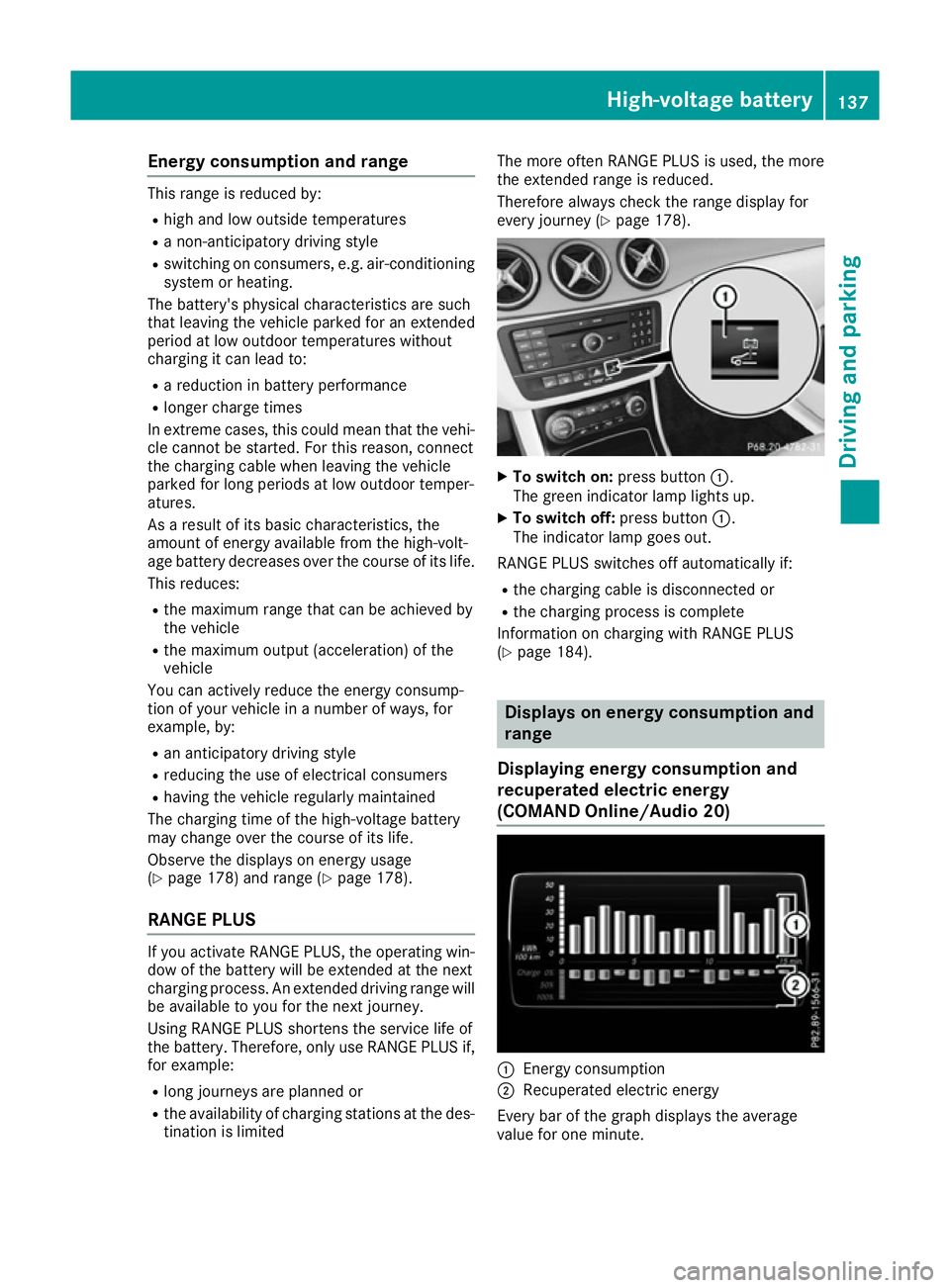
page 178). X
To switch on: press button:.
The green indicator lamp lights up.
X To switch off: press button:.
The indicator lamp goes out.
RANGE PLUS switches off automatically if:
R the charging cable is disconnected or
R the charging process is complete
Information on charging with RANGE PLUS
(Y page 184). Displays on energy consumption and
range
Displaying energy consumption and
recuperated electric energy
(COMAND Online /Audio 20) :
Energ y consumption
; Recuperated electric energy
Every bar of the graph displays the average
value for one minute. High-voltage battery
137Driving and parking Z
Page 152 of 293
The braking performance of the electric motor
using recuperative braking is, in some operating modes, either reduced or not effective:
R when the charge status of the high-voltage
battery increases
R if the high-voltage battery is not yet at a nor-
mal operating temperature
R when driving close to the maximum speed
R when the vehicle is almost stationary
R in transmission position N
R during and after ESP stability control
If you do not make an additional effort to apply
the brake yourself, the braking effect may not be sufficient. If necessary, counteract the reduced regenerative braking effect by applying the
brake yourself.
Downhill gradients On long, steep gradients, you must reduce the
load on the brakes by selecting maximum recu- peration. This prevents the brakes overheating
and causing excessive wear.
Recuperation allows the vehicle to be deceler-
ated without placing a load on the braking sys-
tem.
Do not depress the brake pedal continuously
while the vehicle is in motion, e.g. never cause
the brakes to rub by constantly applying light
pressure to the pedal. This results in excessive
and premature wear to the brake pads.
Heavy and light loads G
WARNING
The braking system can overheat if you leave your foot on the brake pedal while driving.
This increases the braking distance and could
even cause the braking system to fail. There is
a risk of an accident.
Never use the brake pedal as a footrest. Do
not simultaneously depress both the brake
pedal and the accelerator pedal while driving.
! Depressing the brake pedal constantly
results in excessive and premature wear to
the brake pads.
If heavy demands are made on the brakes, do
not park the vehicle immediately. Drive on for a
short while. This allows the airflow to cool the
brakes more quickly. If the brakes have been used only moderately,
you should occasionally test their effectiveness.
To do this, brake more firmly from a higher
speed, paying attention to traffic conditions.
This improves the grip of the brakes.
Wet road surfaces If you have driven for a long time in heavy rain
without braking, there may be a delayed reac-
tion from the brakes when braking for the first
time. This may also occur after a car wash or
after driving through deep water.
You will have to depress the brake pedal more
firmly. Maintain a greater distance to the vehicle
in front.
After driving on a wet road or having the vehicle washed, brake firmly while paying attention to
the traffic conditions. This will warm up the
brake discs, thereby drying them more quickly
and protecting them against corrosion.
Limited braking performance on salt-
treated roads If you drive on salt-treated roads, a layer of salt
may form on the brake discs and pads. This can increase the braking distance considerably.
R In order to prevent any salt build-up, apply the
brakes occasionally while paying attention to the traffic conditions.
R Carefully depress the brake pedal at the end
of the journey and when starting the next
journey.
R Maintain a much greater distance to the vehi-
cle in front.
New brake pads/linings Brake pads/linings and discs that are either new
or have been replaced only achieve optimum
braking effect after several hundred kilometres
of driving. Compensate for the reduced braking effect by applying greater force to the brake
pedal.
For safety reasons, Mercedes-Benz recom-
mends that you only have brake pads/linings
fitted to your vehicle which have been approved
for Mercedes-Benz vehicles or which corre-
spond to an equivalent quality standard. Brake
pads/linings which have not been approved for
Mercedes-Benz vehicles or which are not of an
equivalent quality could affect your vehicle's
operating safety. Driving tips
149Driving and parking Z
Page 158 of 293
Activating the HOLD function
X
Make sure that the activation conditions are
met.
X Depress the brake pedal.
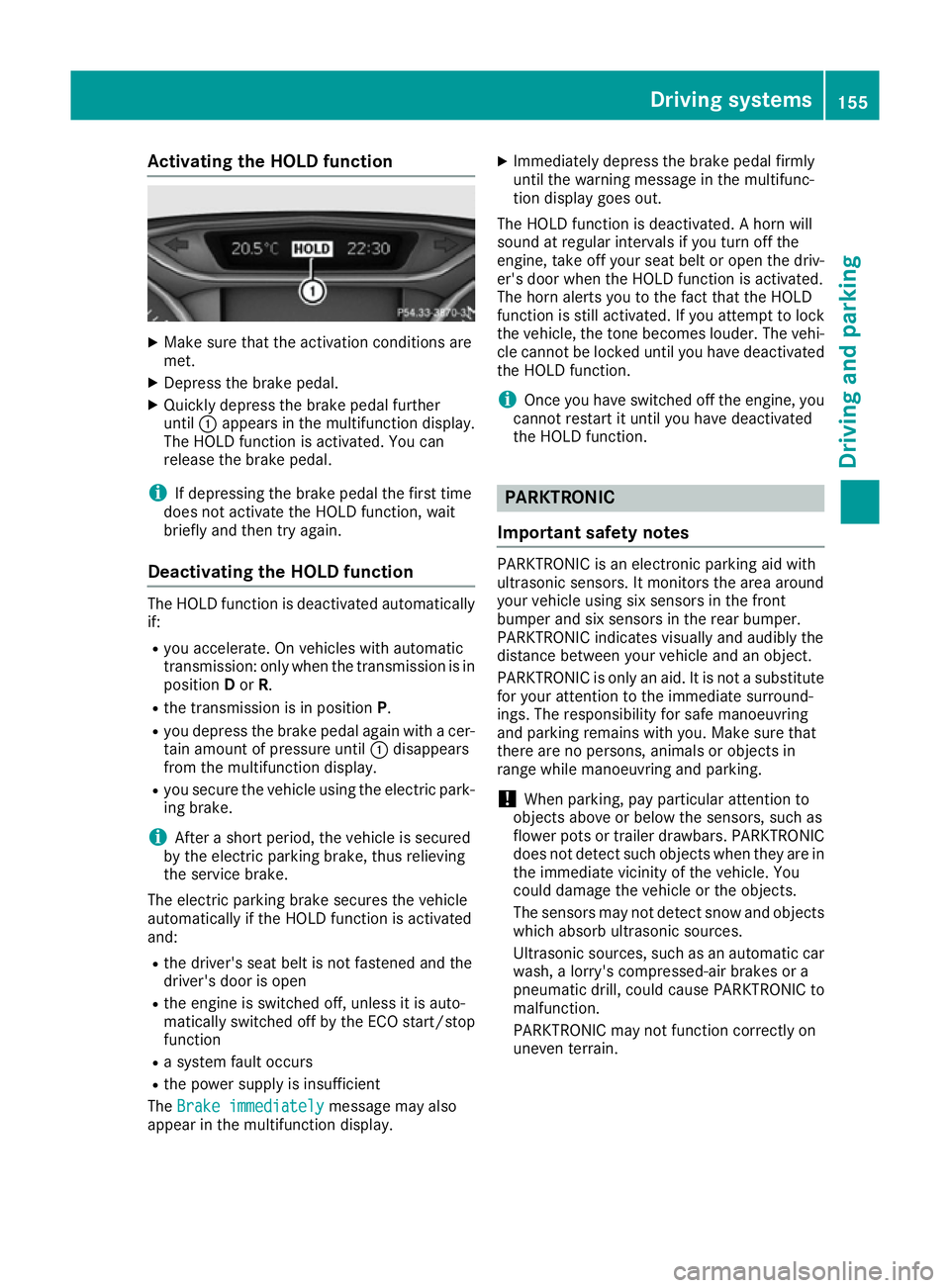
X Quickly depress the brake pedal further
until :appears in the multifunction display.
The HOLD function is activated. You can
release the brake pedal.
i If depressing the brake pedal the first time
does not activate the HOLD function, wait
briefly and then try again.
Deactivating the HOLD function The HOLD function is deactivated automatically
if:
R you accelerate. On vehicles with automatic
transmission: only when the transmission is in
position Dor R.
R the transmission is in position P.
R you depress the brake pedal again with a cer-
tain amount of pressure until :disappears
from the multifunction display.
R you secure the vehicle using the electric park-
ing brake.
i After a short period, the vehicle is secured
by the electric parking brake, thus relieving
the service brake.
The electric parking brake secures the vehicle
automatically if the HOLD function is activated
and:
R the driver's seat belt is not fastened and the
driver's door is open
R the engine is switched off, unless it is auto-
matically switched off by the ECO start/stop
function
R a system fault occurs
R the power supply is insufficient
The Brake immediately Brake immediately message may also
appear in the multifunction display. X
Immediately depress the brake pedal firmly
until the warning message in the multifunc-
tion display goes out.
The HOLD function is deactivated. A horn will
sound at regular intervals if you turn off the
engine, take off your seat belt or open the driv-
er's door when the HOLD function is activated.
The horn alerts you to the fact that the HOLD
function is still activated. If you attempt to lock
the vehicle, the tone becomes louder. The vehi- cle cannot be locked until you have deactivated
the HOLD function.
i Once you have switched off the engine, you
cannot restart it until you have deactivated
the HOLD function. PARKTRONIC
Important safety notes PARKTRONIC is an electronic parking aid with
ultrasonic sensors. It monitors the area around
your vehicle using six sensors in the front
bumper and six sensors in the rear bumper.
PARKTRONIC indicates visually and audibly the
distance between your vehicle and an object.
PARKTRONIC is only an aid. It is not a substitute for your attention to the immediate surround-
ings. The responsibility for safe manoeuvring
and parking remains with you. Make sure that
there are no persons, animals or objects in
range while manoeuvring and parking.
! When parking, pay particular attention to
objects above or below the sensors, such as
flower pots or trailer drawbars. PARKTRONIC does not detect such objects when they are in
the immediate vicinity of the vehicle. You
could damage the vehicle or the objects.
The sensors may not detect snow and objects which absorb ultrasonic sources.
Ultrasonic sources, such as an automatic car
wash, a lorry's compressed-air brakes or a
pneumatic drill, could cause PARKTRONIC to
malfunction.
PARKTRONIC may not function correctly on
uneven terrain. Driving systems
155Driving and parking Z
Page 170 of 293
applicable traffic regulation continues to be
shown in the assistance graphic display
(Y page 182).
The camera also detects traffic signs with a
restriction indicated by an additional sign (e.g. in wet conditions).
The traffic signs are only displayed with the
restrictions if:
R the regulation must be observed with the
restriction, or
R Traffic Sign Assist is unable to determine
whether the restriction applies
If Traffic Sign Assist is unable to determine a
maximum permitted speed from any of the avail- able sources, no speed limit is displayed in the
instrument cluster either. Traffic Sign Assist is not available in all coun-
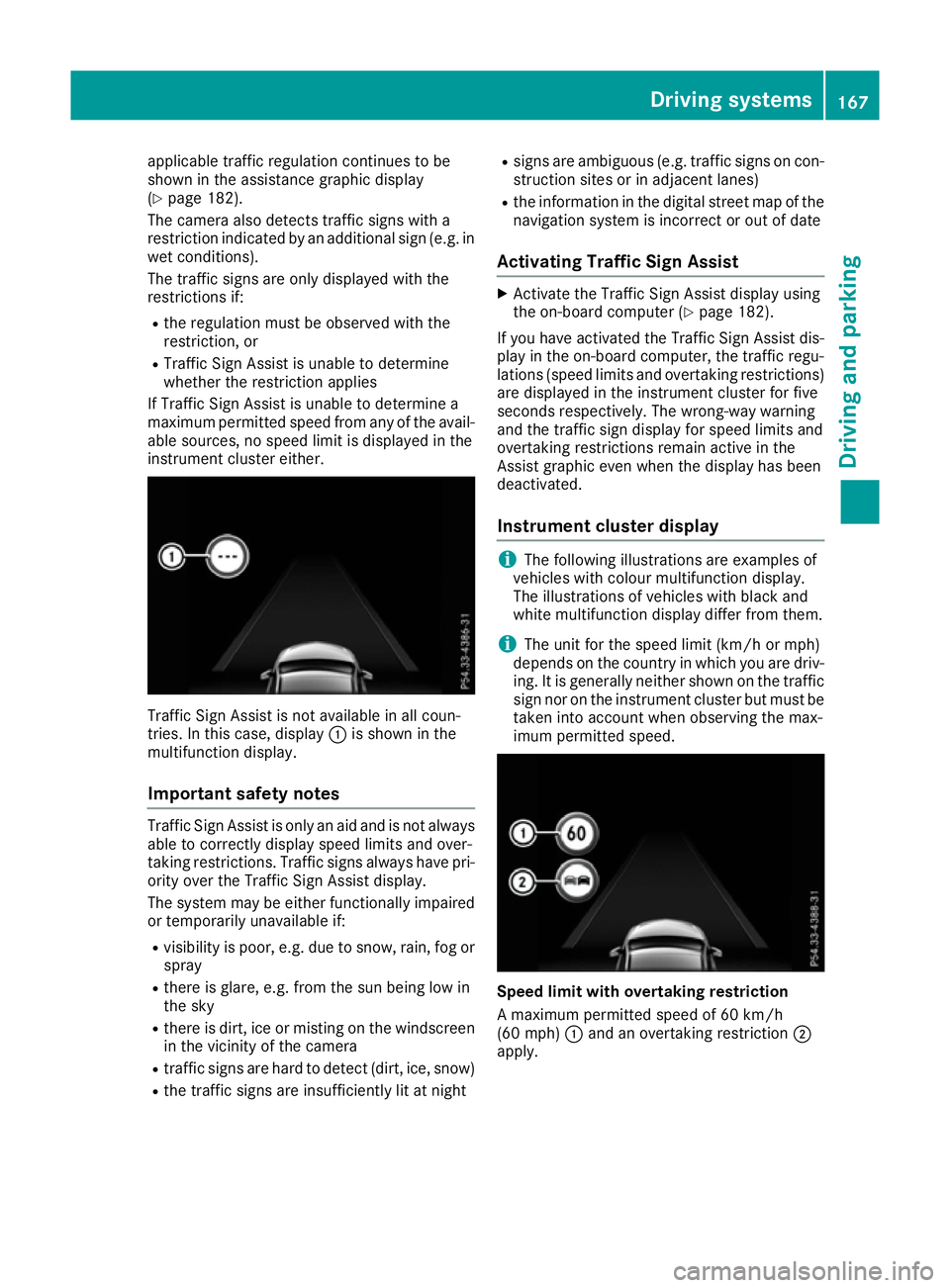
tries. In this case, display
:is shown in the
multifunction display.
Important safety notes Traffic Sign Assist is only an aid and is not always
able to correctly display speed limits and over-
taking restrictions. Traffic signs always have pri-
ority over the Traffic Sign Assist display.
The system may be either functionally impaired
or temporarily unavailable if:
R visibility is poor, e.g. due to snow, rain, fog or
spray
R there is glare, e.g. from the sun being low in
the sky
R there is dirt, ice or misting on the windscreen
in the vicinity of the camera
R traffic signs are hard to detect (dirt, ice, snow)
R the traffic signs are insufficiently lit at night R
signs are ambiguous (e.g. traffic signs on con-
struction sites or in adjacent lanes)
R the information in the digital street map of the
navigation system is incorrect or out of date
Activating Traffic Sign Assist X
Activate the Traffic Sign Assist display using
the on-board computer (Y page 182).
If you have activated the Traffic Sign Assist dis- play in the on-board computer, the traffic regu-
lations (speed limits and overtaking restrictions)
are displayed in the instrument cluster for five
seconds respectively. The wrong-way warning
and the traffic sign display for speed limits and
overtaking restrictions remain active in the
Assist graphic even when the display has been
deactivated.
Instrument cluster display i
The following illustrations are examples of
vehicles with colour multifunction display.
The illustrations of vehicles with black and
white multifunction display differ from them.
i The unit for the speed limit (km/h or mph)
depends on the country in which you are driv-
ing. It is generally neither shown on the traffic
sign nor on the instrument cluster but must be
taken into account when observing the max-
imum permitted speed. Speed limit with overtaking restriction
A maximum permitted speed of 60 km/h
(60 mph)
:and an overtaking restriction ;
apply. Driving systems
167Driving and parking Z
Page 174 of 293
G
WARNING
The Lane Keeping Assist warning does not
return the vehicle to the original lane. There is a risk of an accident.
Always steer, apply the brakes or accelerate
the vehicle yourself, especially if Lane Keep-
ing Assist alerts you.
If you fail to adapt your driving style, Lane Keep-
ing Assist can neither reduce the risk of an acci-
dent nor override the laws of physics. Lane
Keeping Assist cannot take into account road,
weather or traffic conditions. Lane Keeping
Assist is only an aid. You are responsible for the distance to the vehicle in front, for vehicle
speed, for braking in good time and for staying in
lane.
Lane Keeping Assist does not keep your vehicle
in its lane.
The system may be impaired or may not function if:
R there is poor visibility, e.g. due to insufficient
illumination of the road, or due to snow, rain,fog or spray
R there is glare, e.g. from oncoming traffic, the
sun or reflection from other vehicles (e.g. if
the road surface is wet)
R the windscreen is dirty, misted up, damaged
or covered, for instance by a sticker, in the
vicinity of the camera
R no or several, unclear lane markings are pres-
ent for one lane, e.g. in a construction area
R the lane markings are worn away, dark or cov-
ered up, e.g. by dirt or snow
R the distance to the vehicle in front is too small
and the lane markings thus cannot be detec-
ted
R the lane markings change quickly, e.g. lanes
branch off, cross one another or merge
R the road is narrow and winding
R there are highly variable shade conditions on
the road
Activating Lane Keeping Assist
X Activate Lane Keeping Assist using the on-
board computer; to do so, select Standard
Standard or
Adaptive
Adaptive (Ypage 183).
If you drive at speeds above 60 km/h and lane
markings are detected, the lane markings in
the assistance graphics display (Y page 182)
are shown in green. When
Standard
Standard is selected, no warning vibra-
tion occurs if:
R you have switched on the turn signal. In this
event, the warnings are suppressed for a cer-
tain period of time.
R a driving safety system intervenes, such as
ABS, BAS or ESP ®
.
When Adaptive Adaptive is selected, no warning vibra-
tion occurs if:
R you have switched on the turn signal. In this
event, the warnings are suppressed for a cer-
tain period of time.
R a driving safety system intervenes, such as
ABS, BAS or ESP ®
.
R you accelerate hard, e.g. kickdown.
R you brake hard.
R you steer actively, e.g. swerve to avoid an
obstacle or change lane quickly.
R you cut the corner on a sharp bend.
In order that you are warned only when neces-
sary and in good time if you cross the lane mark-
ing, the system detects certain conditions and
warns you accordingly.
The warning vibration occurs earlier if:
R you approach the outer lane marking on a
bend
R the road has very wide lanes, e.g. a motorway
R the system detects solid lane markings
The warning vibration occurs later if:
R the road has narrow lanes
R you cut the corner on a bend Driving systems
171Driving and parking Z
Page 175 of 293
Useful information
i This Owner's Manual describes all models,
series and optional equipment for your vehi-
cle that were available at the time of going to
press. National variations are possible. Note
that your vehicle may not be equipped with all
of the functions described. This is also the
case for systems and functions relevant to
safety.
i Read the information on qualified specialist
workshops: (Y page 23). Important safety notes
G
WARNING
Operating the integrated information systems and communications equipment in the vehicle
while driving will distract you from traffic con-
ditions. You could then lose control of the
vehicle. There is a risk of an accident.
Only operate these devices if road traffic con-
ditions permit. If you are unsure about the
surrounding conditions, pull over to a safe
location and make entries only while the vehi-
cle is stationary.
You must observe the legal requirements for the country in which you are currently driving whenoperating the on-board computer. G
WARNING
If the instrument cluster has failed or mal-
functioned, you may not recognise function
restrictions relevant to safety. The operating
safety of your vehicle may be impaired. There is a risk of an accident.
Drive on carefully. Have the vehicle checked
at a qualified specialist workshop immedi-
ately.
The on-board computer only shows messages or warnings from certain systems in the multifunc-tion display. You should therefore make sure
your vehicle is operating safely at all times.
If the operating safety of your vehicle is
impaired, park the vehicle safely as soon as pos- sible. Contact a qualified specialist workshop. For an overview, see the instrument panel illus-
tration (Y page 27). Displays and operation
Instrument cluster lighting
The light sensor in the instrument cluster auto-
matically controls the brightness of the multi-
function display. In daylight, the displays in the
instrument cluster are not illuminated.
The lighting in the instrument cluster, in the dis- plays and the controls in the vehicle interior can
be adjusted using the brightness control knob.
The brightness control knob is located on the
bottom left of the instrument cluster
(Y page 27).
X Turn the brightness control knob clockwise or
anti-clockwise.
If the light switch is set to the Ã,Tor
L position, the brightness is dependent
upon the brightness of the ambient light. READY indicator
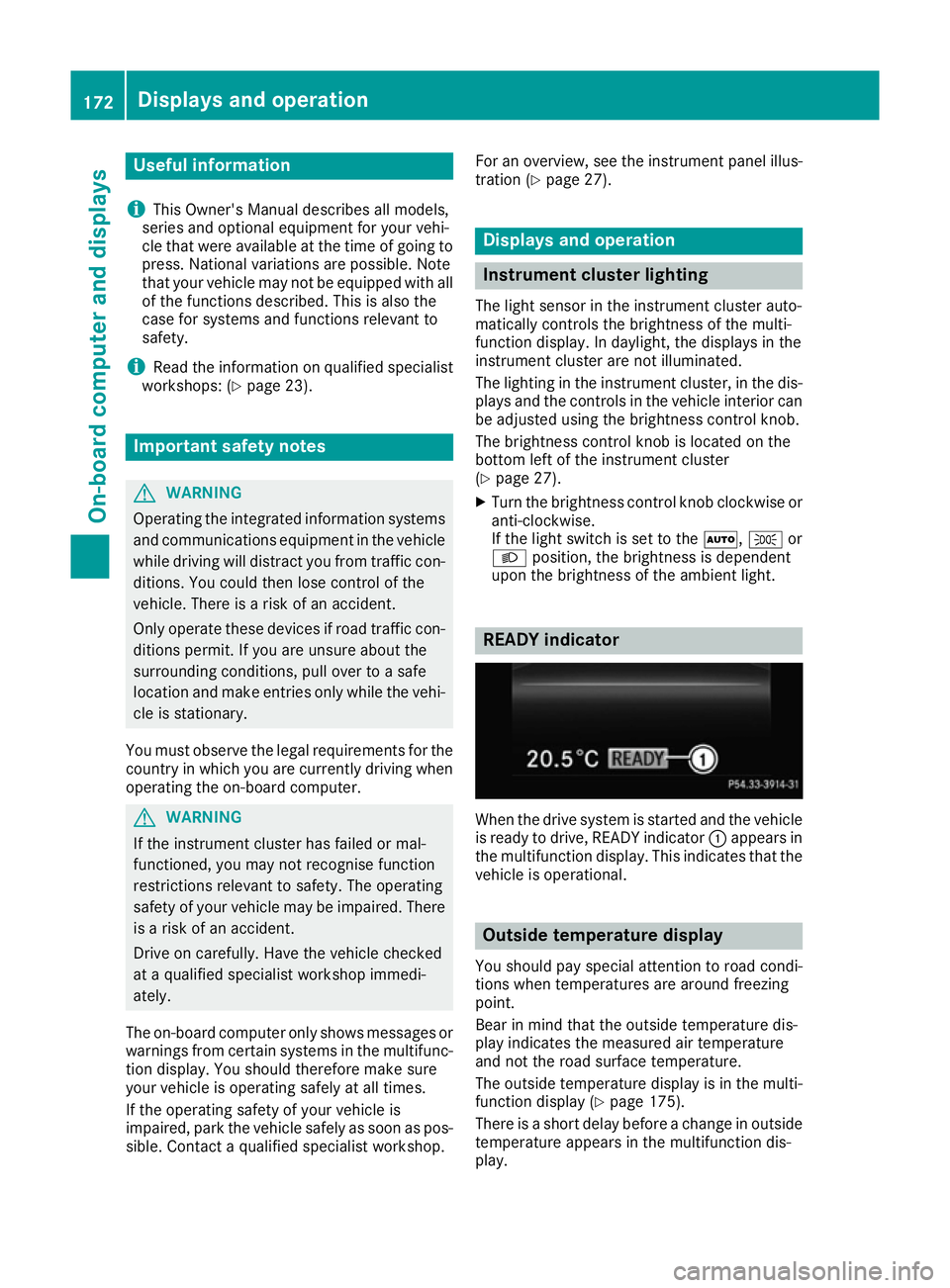
When the drive system is started and the vehicle
is ready to drive, READY indicator :appears in
the multifunction display. This indicates that the vehicle is operational. Outside temperature display
You should pay special attention to road condi-
tions when temperatures are around freezing
point.
Bear in mind that the outside temperature dis-
play indicates the measured air temperature
and not the road surface temperature.
The outside temperature display is in the multi-
function display (Y page 175).
There is a short delay before a change in outside
temperature appears in the multifunction dis-
play. 172
Displays and operationOn-board computer and displays