washer fluid MERCEDES-BENZ B-CLASS HATCHBACK 2015 Owners Manual
[x] Cancel search | Manufacturer: MERCEDES-BENZ, Model Year: 2015, Model line: B-CLASS HATCHBACK, Model: MERCEDES-BENZ B-CLASS HATCHBACK 2015Pages: 293, PDF Size: 10.83 MB
Page 17 of 293
Displays in the Audio displa
y......... 162
Displays in the COMAND display ... 162
Function/note s............................. 162
Switching on/of f........................... 162
Reversing feature
Side windows ................................... 82
Reversing lamp
Changing bulb s.............................. 107
Reversing lamps
Display message ............................ 202
Roof carrier ........................................ 232
Roof lining and carpets (cleaning
instructions) ...................................... 247
Roof load (maximum) ........................ 284S
Safety Children in the vehicle ..................... 49
Safety net
Attaching ....................................... 230
Important safety information ......... 230
Safety system
see Driving safety systems
Seat
Folding the backrest (rear com-
partment) forwards/back .............. 228
Seat belt
Centre rear-compartment sea t........ 38
Correct usage .................................. 37
Switching belt adjustment on/off
(on-board computer) ...................... 188
Seat belts
Adjusting the driver's and front-
passenger seat belt ......................... 38
Adjusting the height ......................... 37
Cleaning ......................................... 247
Display message ............................ 197
Fastening ......................................... 37
Important safety guidelines ............. 36
Introduction ..................................... 35
Rear seat belt status indicator ......... 39
Releasing ......................................... 38
Warning lamp ................................. 214
Warning lamp (function) ................... 39
Seats
Adjusting (electrically) ..................... 88
Adjusting (manually) ........................ 88 Adjusting the 4-way lumbar sup-
port .................................................. 90
Adjusting the head restraint ............ 89
Cleaning the cover ......................... 247
Correct driver's seat position ........... 86
Important safety notes .................... 87
Seat heating problem ...................... 92
Storing settings (memory func-
tion) ................................................. 96
Switching seat heating on/of
f......... 90
Securing a load .................................. 229
Securing luggage ............................... 229
Selector lever
Cleaning ......................................... 247
see DIRECT SELECT lever
Sensors (cleaning instructions) ....... 245
Service
see ASSYST PLUS
Service Centre
see Qualified specialist workshop
Service menu (on-board com-
puter) .................................................. 184
Service message
see ASSYST PLUS
Service products
Brake fluid ..................................... 283
Coolant (engine) ............................ 283
Important safety notes .................. 282
Washer fluid ................................... 284
Setting the air distribution ............... 117
Setting the airflow ............................ 118
Setting the maximum charge cur-
rent (on-board computer) ................. 185
Settings
Factory (on-board computer) ......... 188
On-board compute r....................... 184
Side lamps
Switching on/of f.............................. 98
Side windows
Convenience closing ........................ 83
Convenience opening ...................... 83
Important safety notes .................... 82
Opening/closing .............................. 83
Problem (malfunction) ..................... 85
Resetting ......................................... 84
Reversing feature ............................. 82
Sidebag ................................................ 41 14
Index
Page 20 of 293
Summer tyres ................................ 268
Tyre size (data
).............................. 277
Tyre tread ...................................... 267
Wheel and tyre combinations ........ 279
see Flat tyre U
Unlocking Emergency unlocking ....................... 80
From inside the vehicle (central
unlocking button) ............................. 79 V
Vanity mirror (in sun visor) .............. 234
Variable SPEEDTRONIC
see SPEEDTRONIC
Vehicle
Correct use ...................................... 23
Data acquisition ............................... 23
Display message ............................ 210
Electronics ..................................... 280
Equipment ....................................... 20
Implied warranty .............................. 23
Individual settings .......................... 184
Leaving parked up ......................... 147
Locking (in an emergency) ............... 80
Locking (key) ................................... 72
Lowering ........................................ 276
Raising ........................................... 274
Registration ..................................... 23
Securing from rolling away ............ 274
Transporting .................................. 263
Unlocking (in an emergency) ........... 80
Unlocking (key) ................................ 72
Vehicle data ................................... 284
Vehicle data
Boot load (maximum) ..................... 284
Roof load (maximum) ..................... 284
Vehicle dimensions ........................... 284
Vehicle emergency locking ................ 80
Vehicle identification number
see VIN
Vehicle identification plate .............. 281
Vehicle tool kit .................................. 249
Ventilation
Setting the vents ........................... 123 Video
Operating the DVD ......................... 180
VIN
Seat ............................................... 282
Type plate ...................................... 281 W
Warning and indicator lamps ABS ................................................ 216
Brakes ........................................... 215
Distance warning signal ................. 222
ESP ®
.............................................. 218
ESP ®
OFF ....................................... 219
LIM (cruise control )........................ 151
LIM (variable SPEEDTRONIC) ......... 153
Overview .......................................... 28
PASSENGER AIR BAG ...................... 35
RBS (Recuperative Brake Sys-
tem) ............................................... 215
Seat belt ........................................ 214
Tyre pressure monitor ................... 223
Warning triangle ................................ 248
Washer fluid
Display message ............................ 212
Wheel and tyre combinations
Tyres .............................................. 279
Wheel bolt tightening torque ........... 276
Wheel chock ...................................... 274
Wheels
Changing a whee l.......................... 273
Changing/replacing ....................... 273
Checking ........................................ 267
Cleaning ......................................... 244
Fitting a new wheel ........................ 276
General notes ................................ 277
Important safety notes .................. 266
Information on driving .................... 266
Removing a wheel .......................... 276
Storing ........................................... 274
Tightening torque ........................... 276
Wheel size/tyre size ...................... 277
Windowbag
Display message ............................ 198
Operation ......................................... 42
Windows
Cleaning ......................................... 244
see Side windows Index
17
Page 21 of 293
Windscreen
Demisting ...................................... 118
Windscreen washer fluid
see Windscreen washer system
Windscreen washer system
Important safety notes .................. 284
Topping up .................................... .241
Windscreen wipers
Display message ............................ 212
Problem (malfunction) ................... 113
Rear window wiper ........................ 109
Replacing the wiper blades ............ 109
Switching on/off ........................... 108
Winter driving
General notes ................................ 268
Winter operation
Slippery road surfaces ................... 150
Snow chains .................................. 269
Winter tyres
M+S tyres ...................................... 268
Wiper blades
Cleaning ......................................... 245
Important safety notes .................. 109
Replacing (on the rear window) ..... 111
Replacing (windscreen) .................. 110
Wooden trim (cleaning instruc-
tions) ................................................. .247
Workshop
see Qualified specialist workshop Z
ZONE function Switching on/off ........................... 118 18
Index
Page 103 of 293
Headlamp flasher
X
To switch on: turn the key in the ignition lock
to position 1or 2or start the drive system.
X Pull the combination switch in the direction of
arrow =. Headlamp cleaning system
Vehicles with bi-xenon headlamps: the head-
lamps are cleaned automatically if the "Wipe
with washer fluid" function is operated five
times (Y page 108) while the lights are on and
the drive system is running. When you switch off the ignition, the automatic headlamp cleaning
system is reset and counting is resumed from 0. Hazard warning lamps
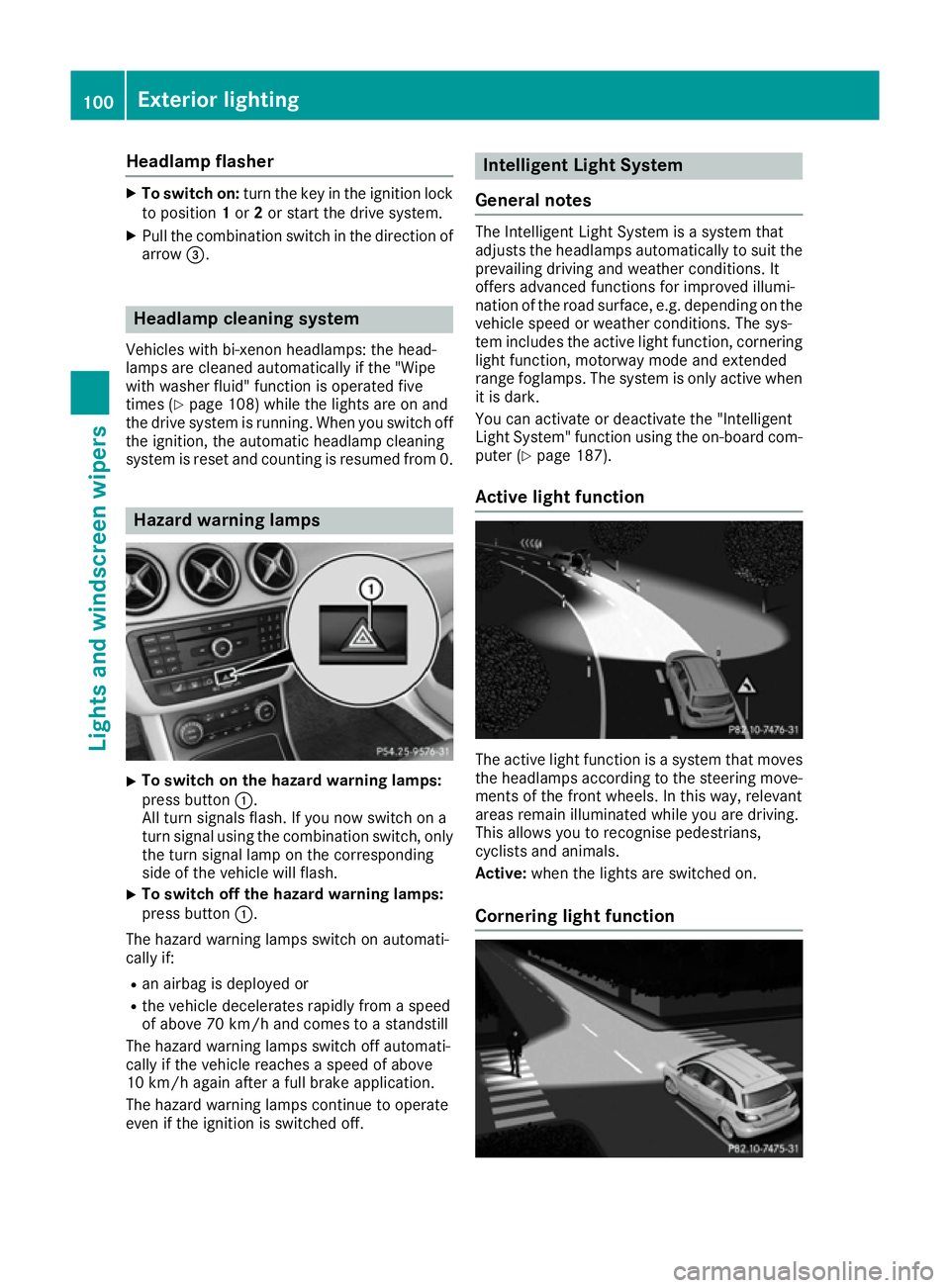
X
To switch on the hazard warning lamps:
press button :.
All turn signals flash. If you now switch on a
turn signal using the combination switch, only the turn signal lamp on the corresponding
side of the vehicle will flash.
X To switch off the hazard warning lamps:
press button
:.
The hazard warning lamps switch on automati-
cally if:
R an airbag is deployed or
R the vehicle decelerates rapidly from a speed
of above 70 km/h and comes to a standstill
The hazard warning lamps switch off automati-
cally if the vehicle reaches a speed of above
10 km/h again after a full brake application.
The hazard warning lamps continue to operate
even if the ignition is switched off. Intelligent Light System
General notes The Intelligent Light System is a system that
adjusts the headlamps automatically to suit the
prevailing driving and weather conditions. It
offers advanced functions for improved illumi-
nation of the road surface, e.g. depending on the vehicle speed or weather conditions. The sys-
tem includes the active light function, corneringlight function, motorway mode and extended
range foglamps. The system is only active when it is dark.
You can activate or deactivate the "Intelligent
Light System" function using the on-board com-
puter (Y page 187).
Active light function The active light function is a system that moves
the headlamps according to the steering move-
ments of the front wheels. In this way, relevant
areas remain illuminated while you are driving.
This allows you to recognise pedestrians,
cyclists and animals.
Active: when the lights are switched on.
Cornering light function 100
Exterior lightingLights and windscreen wipers
Page 111 of 293
X
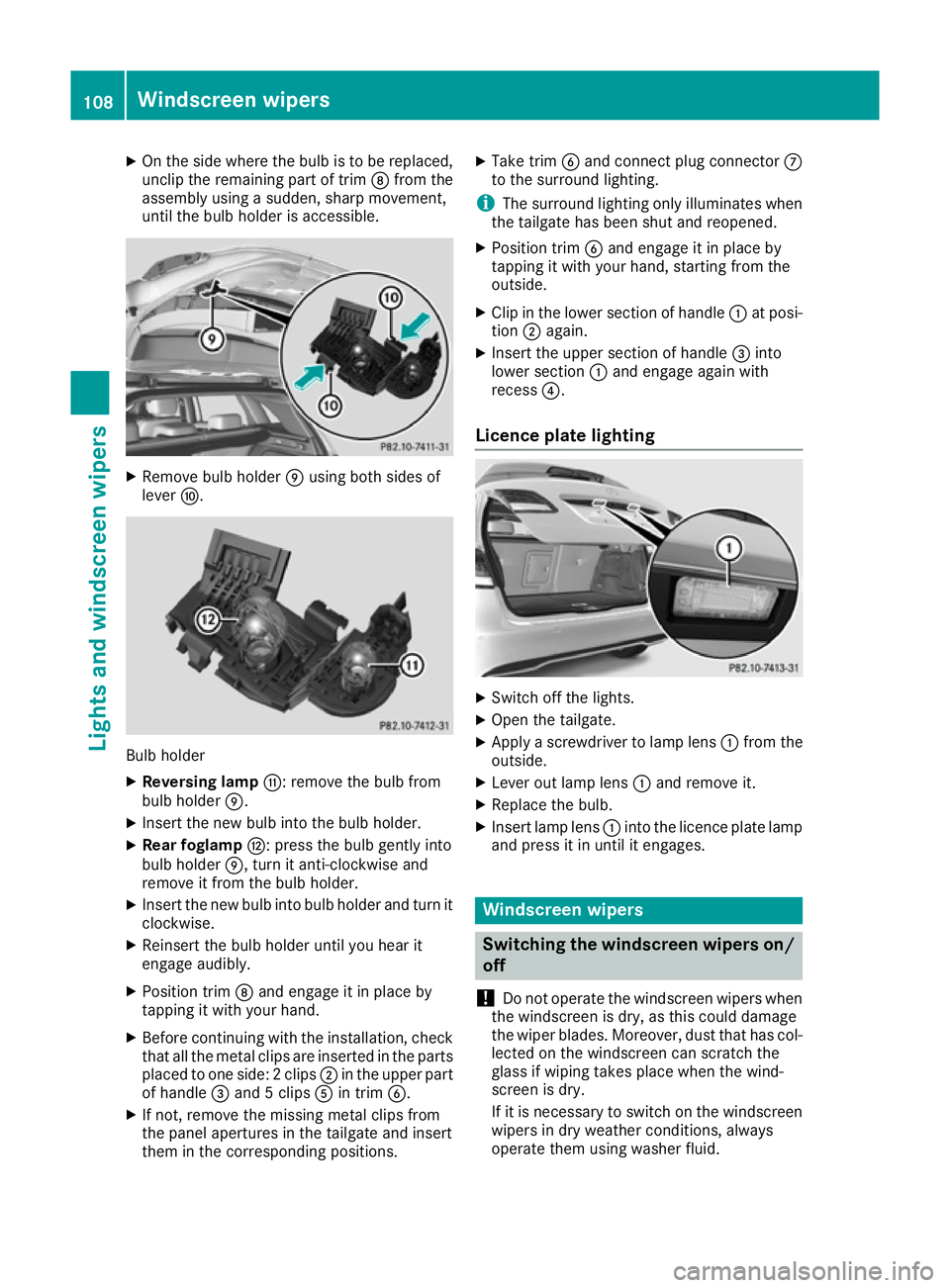
On the side where the bulb is to be replaced,
unclip the remaining part of trim Dfrom the
assembly using a sudden, sharp movement,
until the bulb holder is accessible. X
Remove bulb holder Eusing both sides of
lever F. Bulb holder
X Reversing lamp G: remove the bulb from
bulb holder E.
X Insert the new bulb into the bulb holder.
X Rear foglamp H: press the bulb gently into
bulb holder E, turn it anti-clockwise and
remove it from the bulb holder.
X Insert the new bulb into bulb holder and turn it
clockwise.
X Reinsert the bulb holder until you hear it
engage audibly.
X Position trim Dand engage it in place by
tapping it with your hand.
X Before continuing with the installation, check
that all the metal clips are inserted in the parts placed to one side: 2 clips ;in the upper part
of handle =and 5 clips Ain trim B.
X If not, remove the missing metal clips from
the panel apertures in the tailgate and insert
them in the corresponding positions. X
Take trim Band connect plug connector C
to the surround lighting.
i The surround lighting only illuminates when
the tailgate has been shut and reopened.
X Position trim Band engage it in place by
tapping it with your hand, starting from the
outside.
X Clip in the lower section of handle :at posi-
tion ;again.
X Insert the upper section of handle =into
lower section :and engage again with
recess ?.
Licence plate lighting X
Switch off the lights.
X Open the tailgate.
X Apply a screwdriver to lamp lens :from the
outside.
X Lever out lamp lens :and remove it.
X Replace the bulb.
X Insert lamp lens :into the licence plate lamp
and press it in until it engages. Windscreen wipers
Switching the windscreen wipers on/
off
! Do not operate the windscreen wipers when
the windscreen is dry, as this could damage
the wiper blades. Moreover, dust that has col-
lected on the windscreen can scratch the
glass if wiping takes place when the wind-
screen is dry.
If it is necessary to switch on the windscreen wipers in dry weather conditions, always
operate them using washer fluid. 108
Windscreen wipersLights and windscreen wipers
Page 112 of 293
!
If the windscreen wipers leave smears on
the windscreen after the vehicle has been
washed in an automatic car wash, this may be
due to wax or other residue. Clean the wind-
screen with washer fluid after an automatic
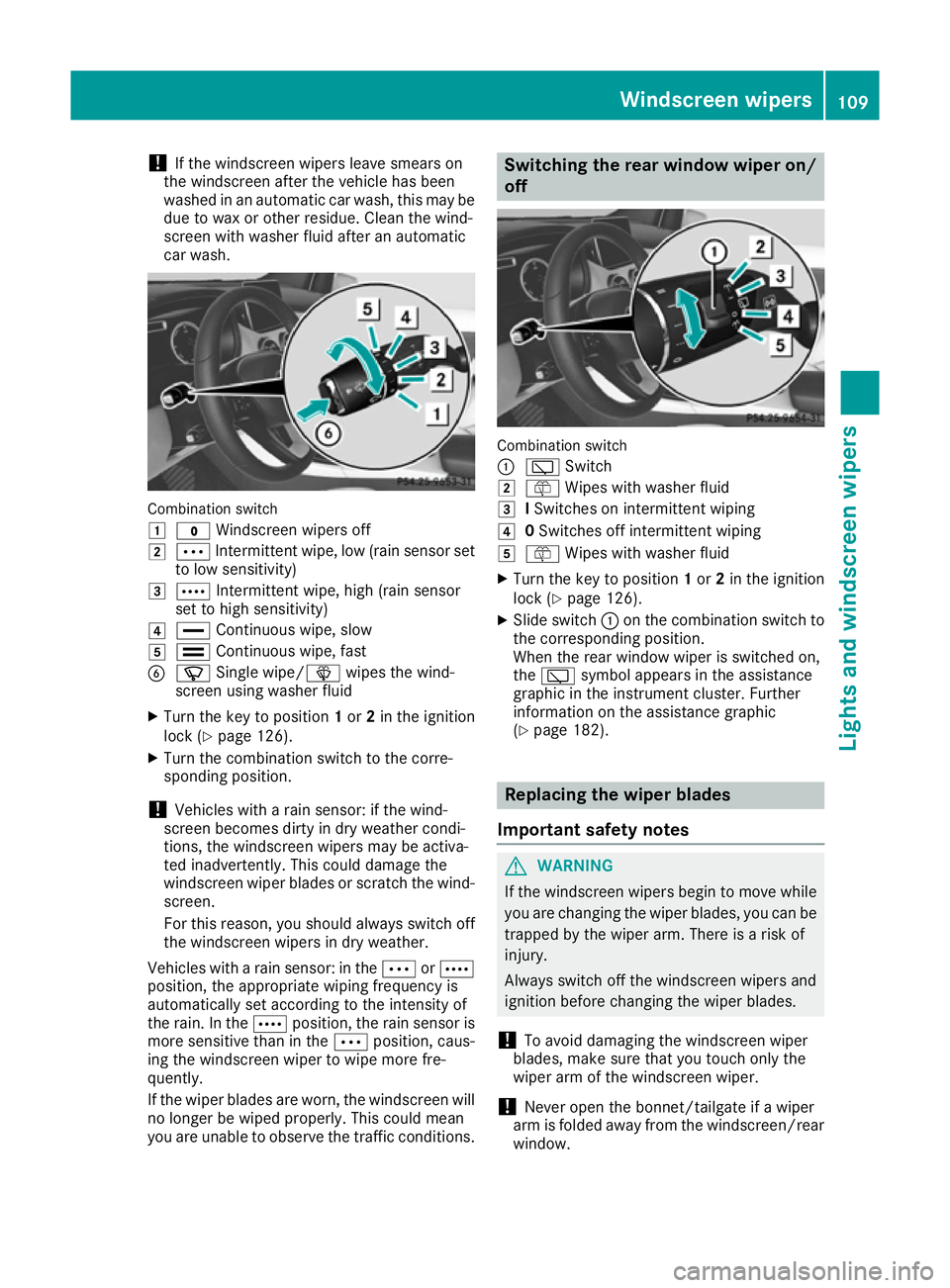
car wash. Combination switch
1
$ Windscreen wipers off
2 Ä Intermittent wipe, low (rain sensor set
to low sensitivity)
3 Å Intermittent wipe, high (rain sensor
set to high sensitivity)
4 ° Continuous wipe, slow
5 ¯ Continuous wipe, fast
B í Single wipe/î wipes the wind-
screen using washer fluid
X Turn the key to position 1or 2in the ignition
lock (Y page 126).
X Turn the combination switch to the corre-
sponding position.
! Vehicles with a rain sensor: if the wind-
screen becomes dirty in dry weather condi-
tions, the windscreen wipers may be activa-
ted inadvertently. This could damage the
windscreen wiper blades or scratch the wind- screen.
For this reason, you should always switch off
the windscreen wipers in dry weather.
Vehicles with a rain sensor: in the ÄorÅ
position, the appropriate wiping frequency is
automatically set according to the intensity of
the rain. In the Åposition, the rain sensor is
more sensitive than in the Äposition, caus-
ing the windscreen wiper to wipe more fre-
quently.
If the wiper blades are worn, the windscreen will
no longer be wiped properly. This could mean
you are unable to observe the traffic conditions. Switching the rear window wiper on/
off Combination switch
:
è Switch
2 ô Wipes with washer fluid
3 ISwitches on intermittent wiping
4 0Switches off intermittent wiping
5 ô Wipes with washer fluid
X Turn the key to position 1or 2in the ignition
lock (Y page 126).
X Slide switch :on the combination switch to
the corresponding position.
When the rear window wiper is switched on,
the è symbol appears in the assistance
graphic in the instrument cluster. Further
information on the assistance graphic
(Y page 182). Replacing the wiper blades
Important safety notes G
WARNING
If the windscreen wipers begin to move while
you are changing the wiper blades, you can be trapped by the wiper arm. There is a risk of
injury.
Always switch off the windscreen wipers and
ignition before changing the wiper blades.
! To avoid damaging the windscreen wiper
blades, make sure that you touch only the
wiper arm of the windscreen wiper.
! Never open the bonnet/tailgate if a wiper
arm is folded away from the windscreen/rear
window. Windscreen wipers
109Lights and windscreen wipers Z
Page 116 of 293
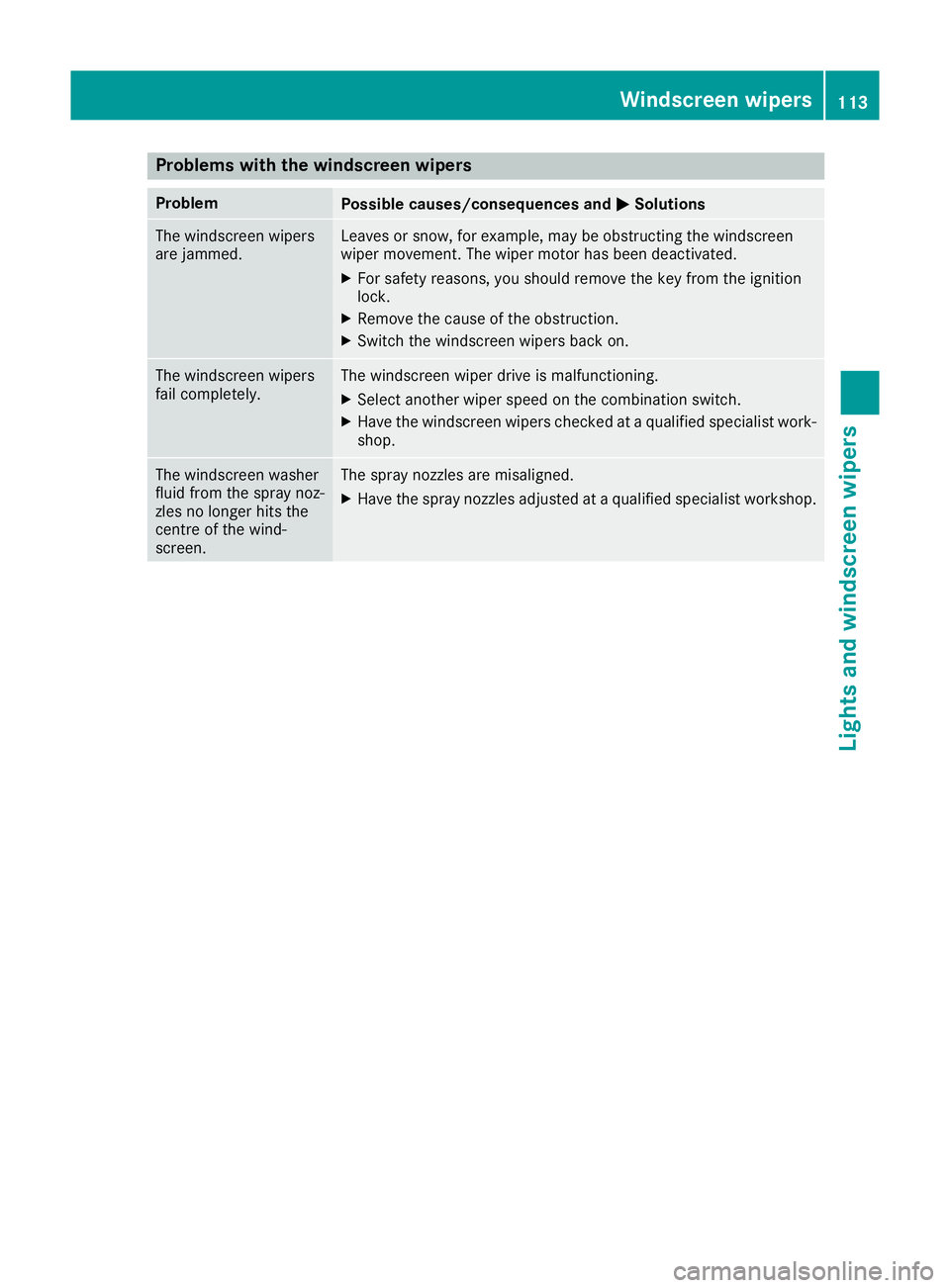
Problems with the windscreen wipers
Problem
Possible causes/consequences and
M
MSolutions The windscreen wipers
are jammed. Leaves or snow, for example, may be obstructing the windscreen
wiper movement. The wiper motor has been deactivated.
X For safety reasons, you should remove the key from the ignition
lock.
X Remove the cause of the obstruction.
X Switch the windscreen wipers back on. The windscreen wipers
fail completely. The windscreen wiper drive is malfunctioning.
X Select another wiper speed on the combination switch.
X Have the windscreen wipers checked at a qualified specialist work-
shop. The windscreen washer
fluid from the spray noz-
zles no longer hits the
centre of the wind-
screen. The spray nozzles are misaligned.
X Have the spray nozzles adjusted at a qualified specialist workshop. Windscreen wipers
113Lights and windscreen wipers Z
Page 215 of 293
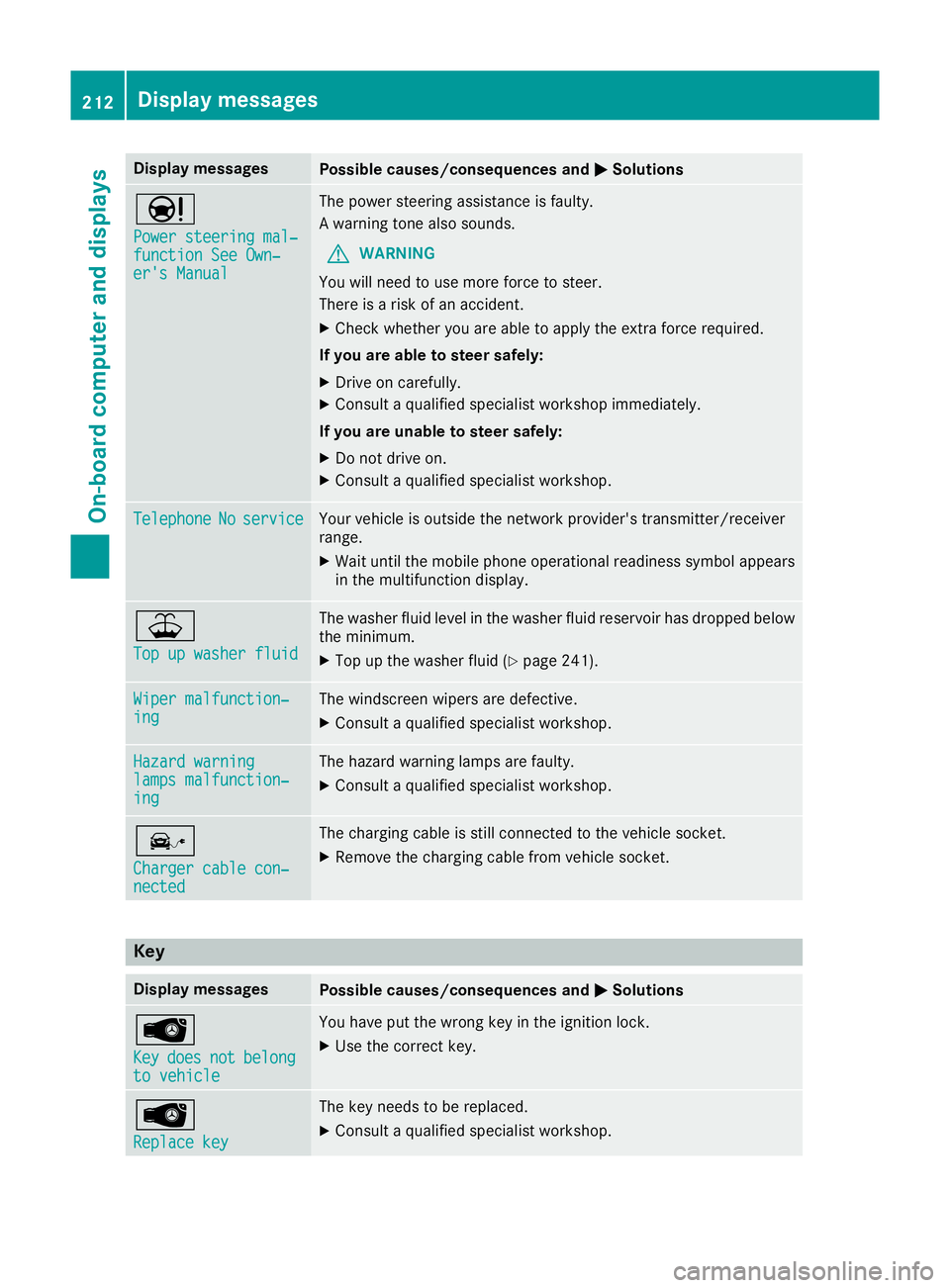
Display messages
Possible causes/consequences and
M
MSolutions Ð
Power steering mal‐ Power steering mal‐
function See Own‐ function See Own‐
er's Manual er's Manual The power steering assistance is faulty.
A warning tone also sounds.
G WARNING
You will need to use more force to steer.
There is a risk of an accident.
X Check whether you are able to apply the extra force required.
If you are able to steer safely:
X Drive on carefully.
X Consult a qualified specialist workshop immediately.
If you are unable to steer safely:
X Do not drive on.
X Consult a qualified specialist workshop. Telephone Telephone
No
Noservice
service Your vehicle is outside the network provider's transmitter/receiver
range.
X Wait until the mobile phone operational readiness symbol appears
in the multifunction display. ¥
Top up washer fluid Top up washer fluid The washer fluid level in the washer fluid reservoir has dropped below
the minimum.
X Top up the washer fluid (Y page 241).Wiper malfunction‐
Wiper malfunction‐
ing ing The windscreen wipers are defective.
X Consult a qualified specialist workshop. Hazard warning
Hazard warning
lamps malfunction‐ lamps malfunction‐
ing ing The hazard warning lamps are faulty.
X Consult a qualified specialist workshop. î
Charger cable con‐ Charger cable con‐
nected nected The charging cable is still connected to the vehicle socket.
X Remove the charging cable from vehicle socket. Key
Display messages
Possible causes/consequences and
M
MSolutions Â
Key Key
does
does not
notbelong
belong
to vehicle
to vehicle You have put the wrong key in the ignition lock.
X Use the correct key. Â
Replace key Replace key The key needs to be replaced.
X Consult a qualified specialist workshop. 212
Display
messagesOn-board computer and displays
Page 244 of 293
X
If necessary, top up with coolant that has
been tested and approved by Mercedes-Benz.
X Replace cap :and turn it clockwise as far as
it will go.
For further information on coolant, see
(Y page 283).
Topping up the windscreen washer sys-
tem/headlamp cleaning system G
WARNING
Certain components in the engine compart-
ment may be very hot, e.g. the drive system
and radiator. When carrying out work in the
engine compartment there is a risk of injury.
If possible, let the drive system cool down and only touch the components described in the
following. G
WARNING
Windscreen washer concentrate is highly
flammable. If it comes into contact with hot
components in the front compartment, it may ignite. There is a risk of fire and injury.
Make sure that windscreen washer concen-
trate is not spilled next to the filler neck. X
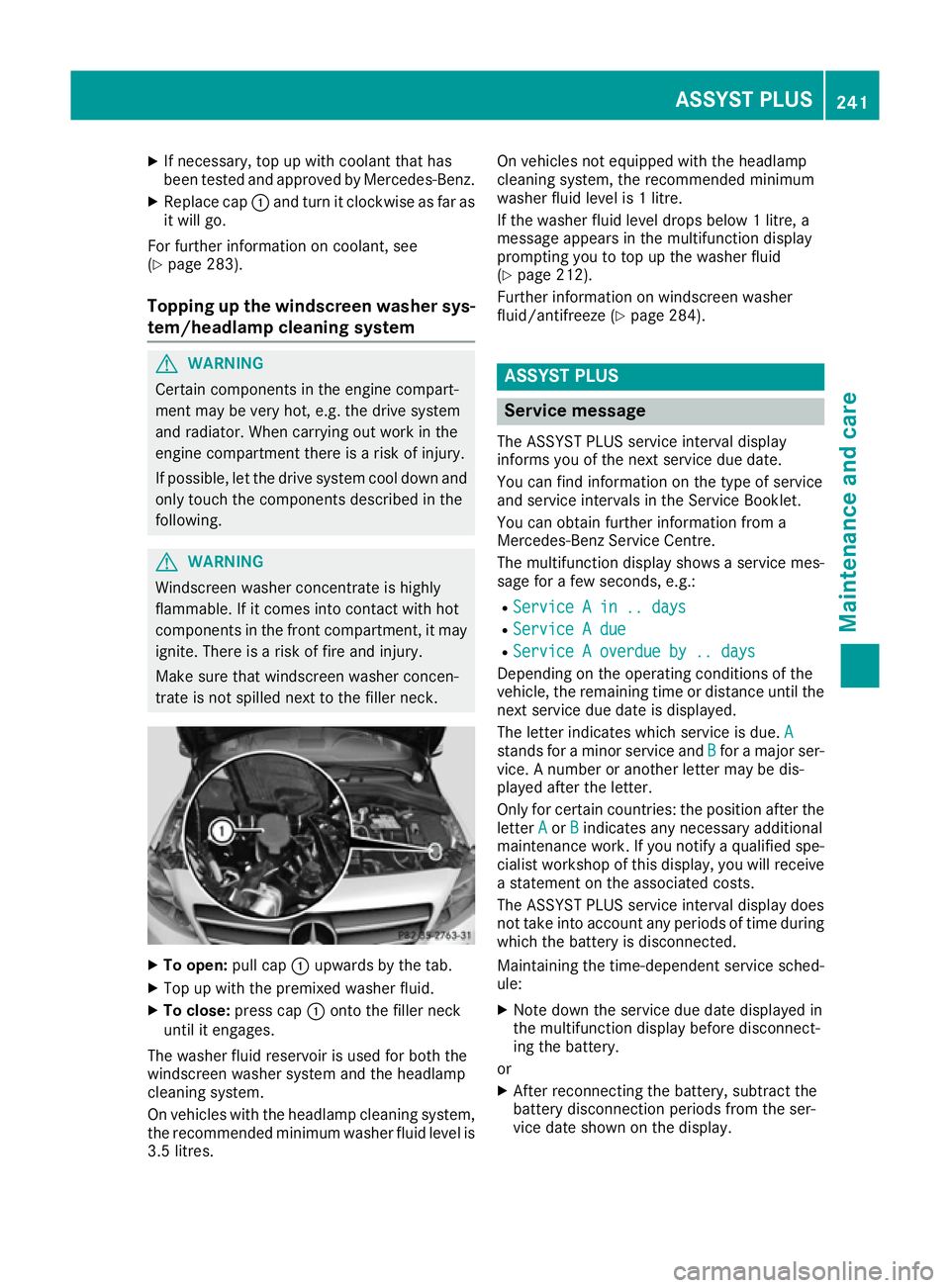
To open: pull cap:upwards by the tab.
X Top up with the premixed washer fluid.
X To close: press cap :onto the filler neck
until it engages.
The washer fluid reservoir is used for both the
windscreen washer system and the headlamp
cleaning system.
On vehicles with the headlamp cleaning system,
the recommended minimum washer fluid level is 3.5 litres. On vehicles not equipped with the headlamp
cleaning system, the recommended minimum
washer fluid level is 1 litre.
If the washer fluid level drops below 1 litre, a
message appears in the multifunction display
prompting you to top up the washer fluid
(Y page 212).
Further information on windscreen washer
fluid/antifreeze (Y page 284). ASSYST PLUS
Service message
The ASSYST PLUS service interval display
informs you of the next service due date.
You can find information on the type of service
and service intervals in the Service Booklet.
You can obtain further information from a
Mercedes-Benz Service Centre.
The multifunction display shows a service mes-
sage for a few seconds, e.g.:
R Service A in .. days
Service A in .. days
R Service A due Service A due
R Service A overdue by .. days
Service A overdue by .. days
Depending on the operating conditions of the
vehicle, the remaining time or distance until the
next service due date is displayed.
The letter indicates which service is due. A A
stands for a minor service and B
Bfor a major ser-
vice. A number or another letter may be dis-
played after the letter.
Only for certain countries: the position after the
letter A
A or B Bindicates any necessary additional
maintenance work. If you notify a qualified spe-
cialist workshop of this display, you will receive
a statement on the associated costs.
The ASSYST PLUS service interval display does
not take into account any periods of time during which the battery is disconnected.
Maintaining the time-dependent service sched-
ule:
X Note down the service due date displayed in
the multifunction display before disconnect-
ing the battery.
or
X After reconnecting the battery, subtract the
battery disconnection periods from the ser-
vice date shown on the display. ASSYST PLUS
241Maintenance and care Z
Page 285 of 293
:
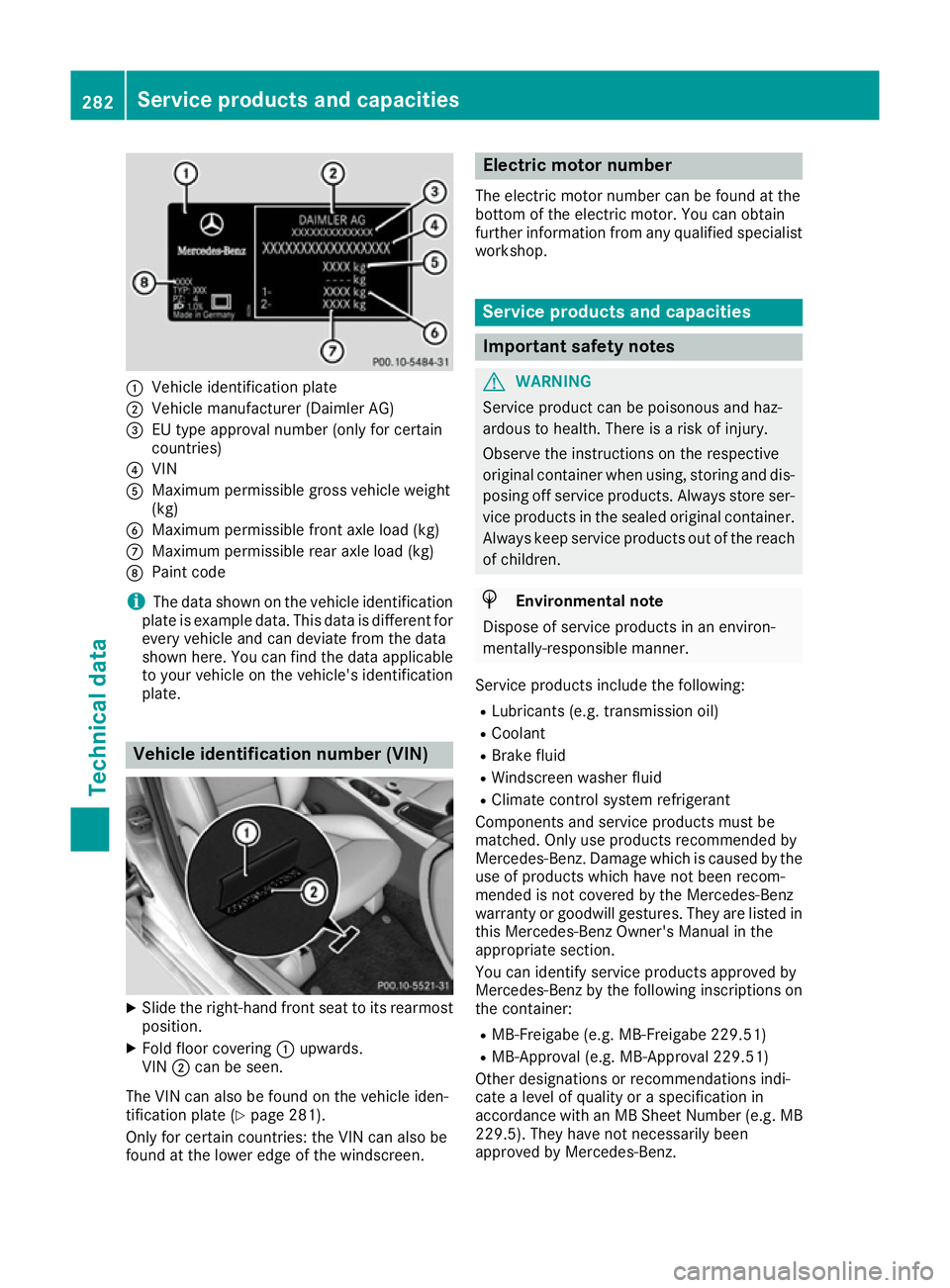
Vehicle identification plate
; Vehicle manufacturer (Daimler AG)
= EU type approval number (only for certain
countries)
? VIN
A Maximum permissible gross vehicle weight
(kg)
B Maximum permissible front axle load (kg)
C Maximum permissible rear axle load (kg)
D Paint code
i The data shown on the vehicle identification
plate is example data. This data is different for
every vehicle and can deviate from the data
shown here. You can find the data applicable to your vehicle on the vehicle's identification
plate. Vehicle identification number (VIN)
X
Slide the right-hand front seat to its rearmost
position.
X Fold floor covering :upwards.
VIN ;can be seen.
The VIN can also be found on the vehicle iden-
tification plate (Y page 281).
Only for certain countries: the VIN can also be
found at the lower edge of the windscreen. Electric motor number
The electric motor number can be found at the
bottom of the electric motor. You can obtain
further information from any qualified specialist
workshop. Service products and capacities
Important safety notes
G
WARNING
Service product can be poisonous and haz-
ardous to health. There is a risk of injury.
Observe the instructions on the respective
original container when using, storing and dis- posing off service products. Always store ser-
vice products in the sealed original container. Always keep service products out of the reach
of children. H
Environmental note
Dispose of service products in an environ-
mentally-responsible manner.
Service products include the following:
R Lubricants (e.g. transmission oil)
R Coolant
R Brake fluid
R Windscreen washer fluid
R Climate control system refrigerant
Components and service products must be
matched. Only use products recommended by
Mercedes-Benz. Damage which is caused by the
use of products which have not been recom-
mended is not covered by the Mercedes-Benz
warranty or goodwill gestures. They are listed in this Mercedes-Benz Owner's Manual in the
appropriate section.
You can identify service products approved by
Mercedes-Benz by the following inscriptions on
the container:
R MB-Freigabe (e.g. MB-Freigabe 229.51)
R MB-Approval (e.g. MB-Approval 229.51)
Other designations or recommendations indi-
cate a level of quality or a specification in
accordance with an MB Sheet Number (e.g. MB
229.5). They have not necessarily been
approved by Mercedes-Benz. 282
Service products and capacitiesTechnical data