sensor MERCEDES-BENZ B-CLASS SPORTS 2013 Owner's Manual
[x] Cancel search | Manufacturer: MERCEDES-BENZ, Model Year: 2013, Model line: B-CLASS SPORTS, Model: MERCEDES-BENZ B-CLASS SPORTS 2013Pages: 336, PDF Size: 30 MB
Page 167 of 336
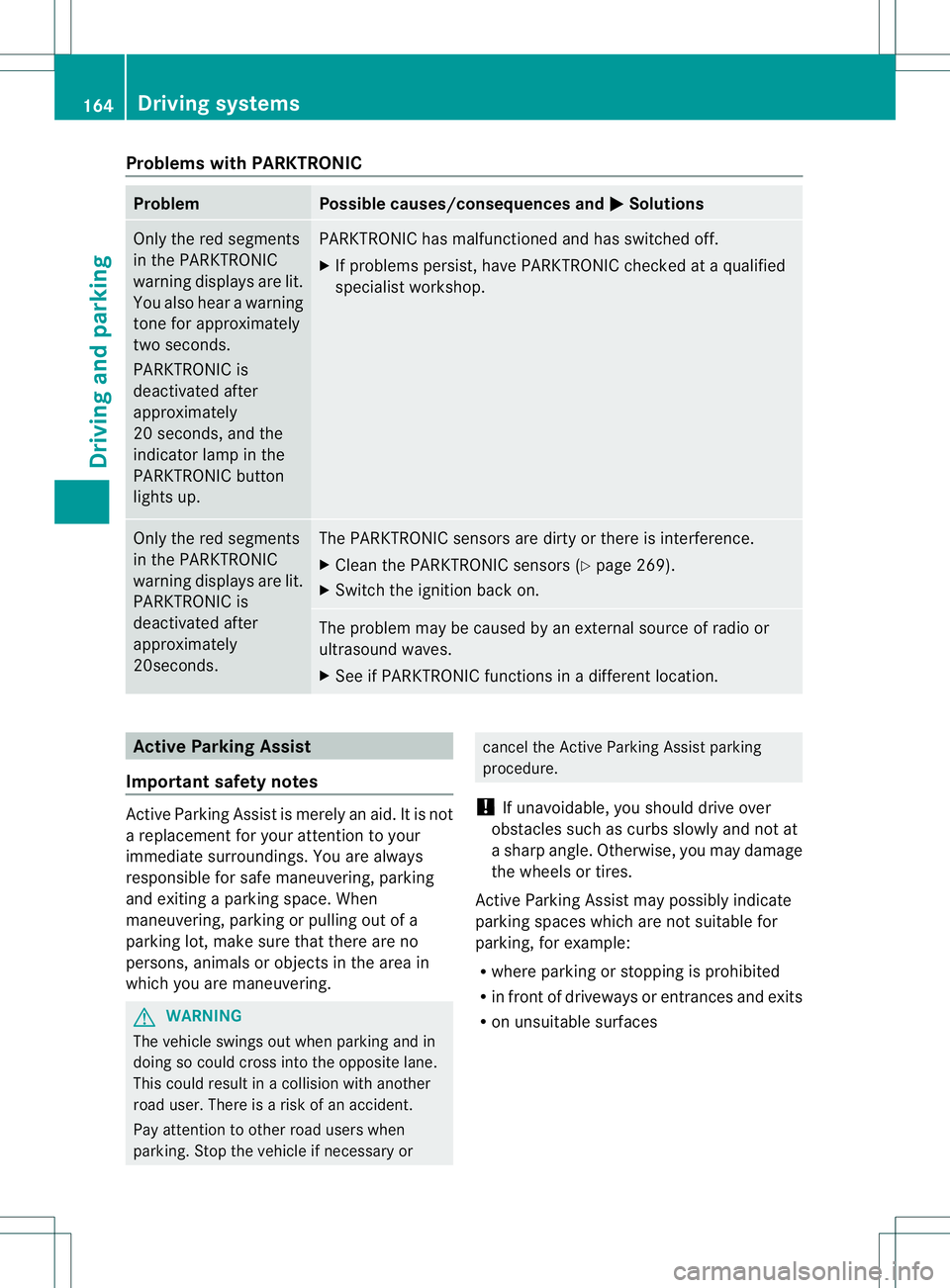
Problems with PARKTRONIC
Problem Possible causes/consequences and
M Solutions
Only the red segments
in the PARKTRONIC
warning displays are lit.
You also hear a warning
tone for approximately
two seconds.
PARKTRONIC is
deactivated after
approximately
20 seconds, and the
indicator lamp in the
PARKTRONIC button
lights up. PARKTRONIC has malfunctioned and has switched off.
X
If problems persist, have PARKTRONIC checked at a qualified
specialist workshop. Only the red segments
in the PARKTRONIC
warning displays are lit.
PARKTRONIC is
deactivated after
approximately
20seconds. The PARKTRONIC sensors are dirty or there is interference.
X
Cleant he PARKTRONIC sensors (Y page 269).
X Switch the ignition back on. The problem may be caused by an external source of radio or
ultrasound waves.
X
See if PARKTRONIC functions in a different location. Active Parking Assist
Important safety notes Active Parking Assist is merely an aid. It is not
a replacement for your attention to your
immediate surroundings. You are always
responsible for safe maneuvering, parking
and exiting a parking space. When
maneuvering, parking or pulling out of a
parking lot, make sure that there are no
persons, animals or objectsint
he area in
which you are maneuvering. G
WARNING
The vehicle swings out when parking and in
doing so could cross into the opposite lane.
This could result in a collision with another
road user. There is a risk of an accident.
Pay attention to other road users when
parking. Stop the vehicle if necessary or cancel the Active Parking Assist parking
procedure.
! If unavoidable, you should drive over
obstacles such as curbs slowly and not at
a sharp angle. Otherwise, you may damage
the wheels or tires.
Active Parking Assist may possibly indicate
parking spaces which are not suitable for
parking, for example:
R where parking or stopping is prohibited
R in front of driveways or entrances and exits
R on unsuitable surfaces 164
Driving systemsDriving and parking
Page 176 of 336
Lane Tracking package
General notes The Lane Tracking package consists of Blind
Spo
tAssist (Y page 173) and Lane Keeping
Assist (Y page 174).
Blind Spot Assist Important safety notes
G
WARNING
Blind Spot Assist does not react to:
R vehicles overtaken too closely on the side,
placing them in the blind spot area
R vehicles approaching and driving by with a
speed difference of more than 6.8 mph
(11 km/h)
As a result, Blind Spot Assist may not give
warnings in such situations. There is a risk of
an accident.
Always observe the traffic conditions
carefully, and maintain a safe lateral distance.
Blind Spot Assist is merely an aid. It may fail
to detect some vehicles and is no substitute
for attentive driving.
i USA only:
This device has been approved by the FCC
as a “VehicularR adar System”. The radar
sensor is intended for use in an automotive
radar system only. Removal, tampering, or
altering of the device will void any
warranties, and is notp ermitted by the
FCC. Do not tamper with, alter, or use in
any non-approved way.
Any unauthorized modification to this
device could void the user’s authority to
operate the equipment.
General notes
Blind Spot Assist uses a radar sensor system
to monitor the areas on both sides of your
vehicle. It supports you from a speed of
approximately 20 mph (30 km/h). A warning
display in the exterio rmirrors draws your
attention to vehicles detected in the monitored area. If you then switch on the
corresponding tur
nsignal to change lane, you
will also receive an optical and audible
collision warning. For this purpose, Blind Spot
Assist uses sensors in the rear bumper.
For Blind Spot Assist to assist you when
driving, the radar sensor system must be
activated (Y page 192) and operational.
Monitoring range of the sensors
In particular, the detection of obstacles can
be impaired if:
R there is dirt on the sensors or anything else
covering the sensors.
R there is poor visibility, e.g. due to fog, heavy
rain or snow.
R a narrow vehicle traveling in front, e.g. a
motorbike or bicycle.
R the road has very wide lanes.
R the road has narrow lanes.
R you are not driving in the middle of the lane.
R there are barriers or similar lane borders.
Vehicles in the monitoring range are the nnot
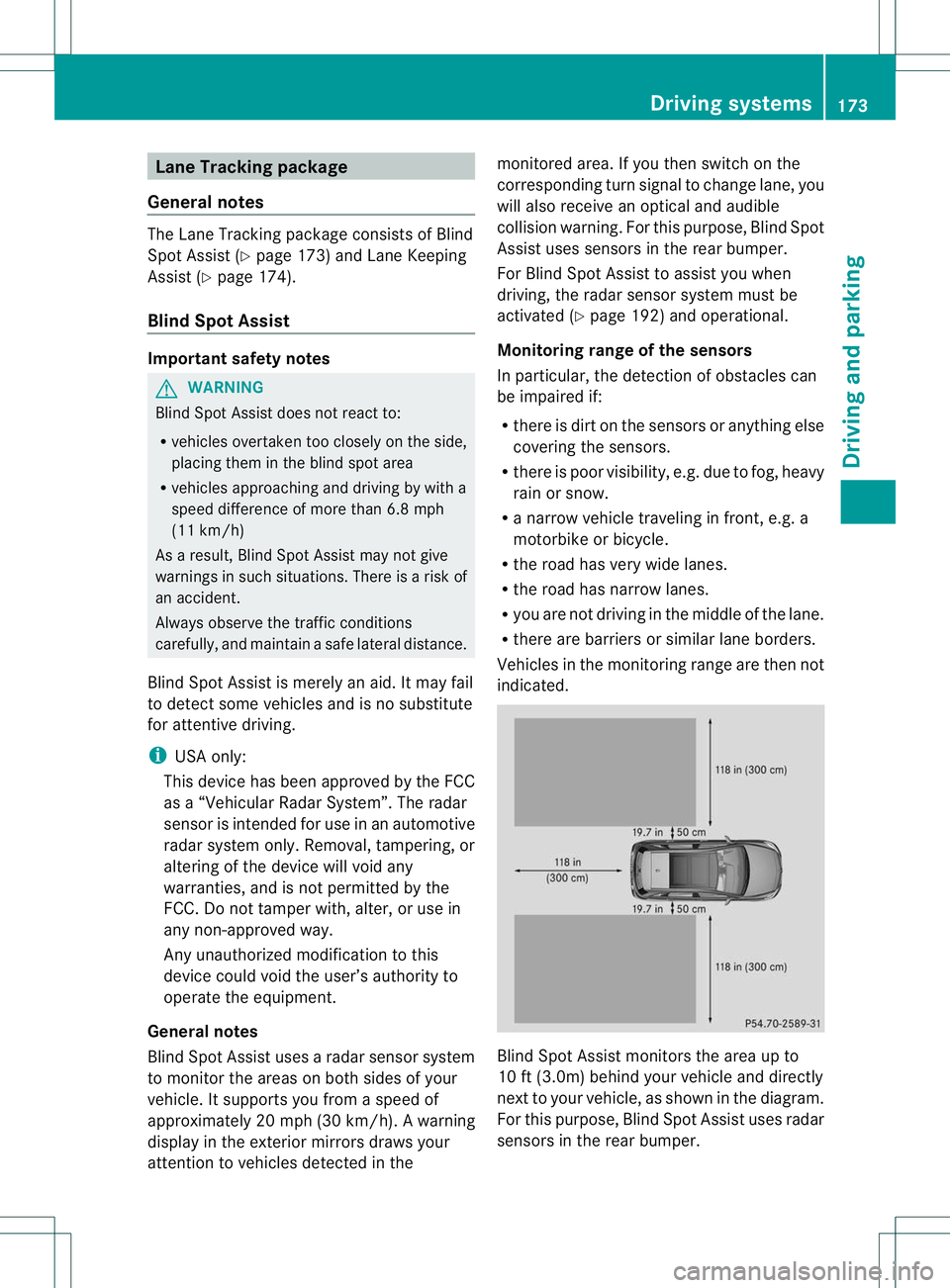
indicated. Blind Spot Assist monitors the area up to
10 ft (3.0m) behind your vehicle and directly
next to your vehicle, as shown in the diagram.
For this purpose, Blind Spot Assist uses radar
sensors in the rear bumper. Driving systems
173Driving and parking Z
Page 177 of 336
If the lanes are narrow, vehicles driving in the
lane beyond the lane next to yourv
ehicle may
be indicated, especially if the vehicles are not
driving in the middle of their lane. This may
be the case if the vehicles are driving on the
inner side of their lane.
Due to the nature of the system:
R warnings may be issued in error when
driving close to crash barriers or similar
solid lane borders.
R warnings may be interrupted when driving
alongside particularly long vehicles, for
example trucks, for a prolonged time.
The two sensors for Blind Spot Assist are
integrated into the sides of the rear bumper.
Make sure that the bumper is free from dirt,
ice or slush around the sensors. The rear
sensors must not be covered, for example by
bicycle racks or overhanging loads. Following
a severe impact or in the event of damage to
the bumpers, have the function of the radar
sensors checked at a qualified specialist
workshop. Blind Spot Assist may otherwise
not work properly.
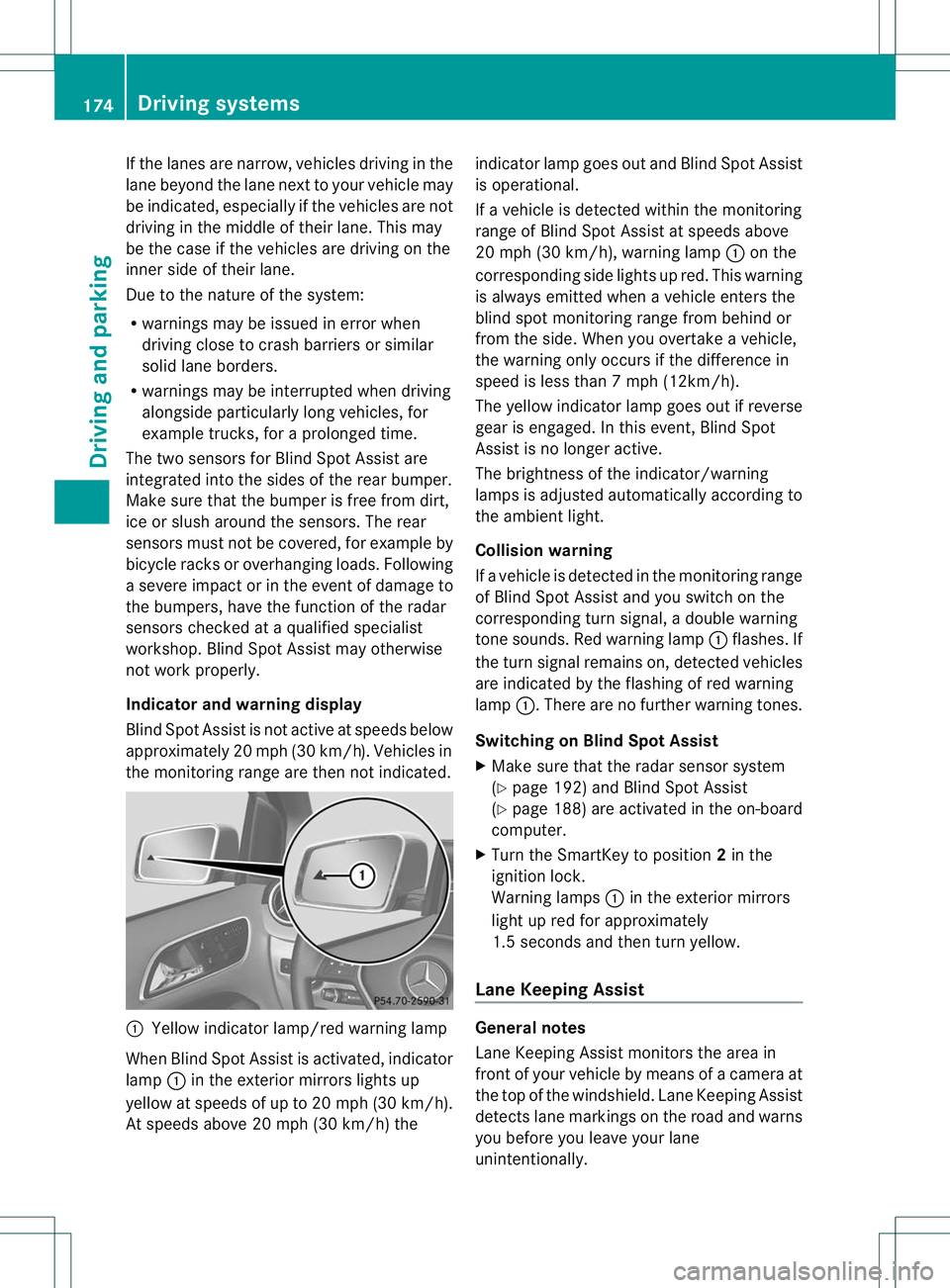
Indicator and warning display
Blind Spot Assist is not active at speeds below
approximately 20 mph (30 km/h) .Vehicles in
the monitoring range are then not indicated. :
Yellow indicator lamp/red warning lamp
When Blind Spot Assist is activated, indicator
lamp :in the exterior mirrors lights up
yellow at speeds of up to 20 mph (30k m/h).
At speeds above 20 mph (30 km/h) the indicator lamp goes out and Blind Spot Assist
is operational.
If a vehicle is detected withi
nthe monitoring
range of Blind Spot Assist at speeds above
20 mph (30 km/h), warning lamp :on the
corresponding side lights up red. This warning
is always emitted when a vehicle enters the
blind spot monitoring range from behind or
from the side. When you overtake a vehicle,
the warning only occurs if the difference in
speed is less than 7mph (12km/h).
The yellow indicator lamp goes out if reverse
gear is engaged. In this event, Blind Spot
Assist is no longer active.
The brightness of the indicator/warning
lamps is adjusted automatically according to
the ambient light.
Collision warning
If a vehicle is detected in the monitoring range
of Blind Spot Assist and you switch on the
corresponding turn signal, a double warning
tone sounds. Red warning lamp :flashes. If
the turn signal remains on, detected vehicles
are indicated by the flashing of red warning
lamp :.There are no further warning tones.
Switching on Blind Spot Assist
X Make sure that the radar sensor system
(Y page 192) and Blind Spot Assist
(Y page 188) are activated in the on-board
computer.
X Turn the SmartKey to position 2in the
ignition lock.
Warning lamps :in the exterior mirrors
light up red for approximately
1.5 seconds and then turn yellow.
Lane Keeping Assist General notes
Lane Keeping Assist monitors the area in
front of your vehicle by means of a camera at
the top of the windshield. Lane Keeping Assist
detects lane markings on the road and warns
you before you leave your lane
unintentionally.174
Driving systemsDriving and parking
Page 182 of 336
X
Turn the brightness control knob clockwise
or counter-clockwise.
If the light switch is set to Ã,Tor
L, the brightness is dependent upon
the brightness of the ambient light.
i The light sensor in the instrument cluster
automatically controls the brightness of
the multifunction display.
In daylight, the displays in the instrument
cluster are not illuminated. Coolant temperature display
G
WARNING
Driving when your engine is overheated can
cause some fluids which may have leaked into
the engine compartment to catch fire. You
could be seriously burned.
Steam from an overheated engine can cause
serious burns which can occur just by opening
the engine hood. Stay away from the engine
if you see or hear steam coming from it.
Stop the vehicle in a safe location away from
other traffic. Turn off the engine, get out of the
vehicle and do not stand near the vehicle until
the engine has cooled down.
! Adisplay message is shown if the coolant
temperature is too high.
If the coolant temperature is over
248 ‡(120 †), do not continue driving. The
engine will otherwise be damaged.
The coolan ttemperature gage is in the
instrument cluster on the right-hand side.
Under normal operating conditions and with
the specified coolant level, the coolant
temperature may rise to 248 ‡ (120 †). Tachometer
! Do not drive in the overrevving range, as
this could damage the engine.
The red band in the tachometer indicates the
engine's overrevving range. The fuel supply is interrupted to protec
tthe
engine when the red band is reached. Outside temperature display
G
WARNING
The outside temperature indicator is not
designed to serve as an ice-warning device
and is therefore unsuitable for that purpose.
Indicated temperatures just above the
freezing point do not guarantee that the road
surface is free of ice. The road may still be icy,
especially in wooded areas or on bridges.
The outside temperature display is in the
multifunction display.
Changes in the outside temperature are
displayed after a short delay. Speedometer with segments
The segments in the speedometer indicate
which speed range is available.
R Cruise control activated (Y page 150):
The segments light up from the stored
speed to the maximum speed.
R DISTRONIC PLUS activated (Y page 152):
One or two segments in the set speed
range light up.
R DISTRONIC PLUS detectsav ehicle in front:
The segments between the speed of the
vehicle in fron tand the stored speed light
up. Displays and operation
179On-board computer and displays Z
Page 191 of 336
X
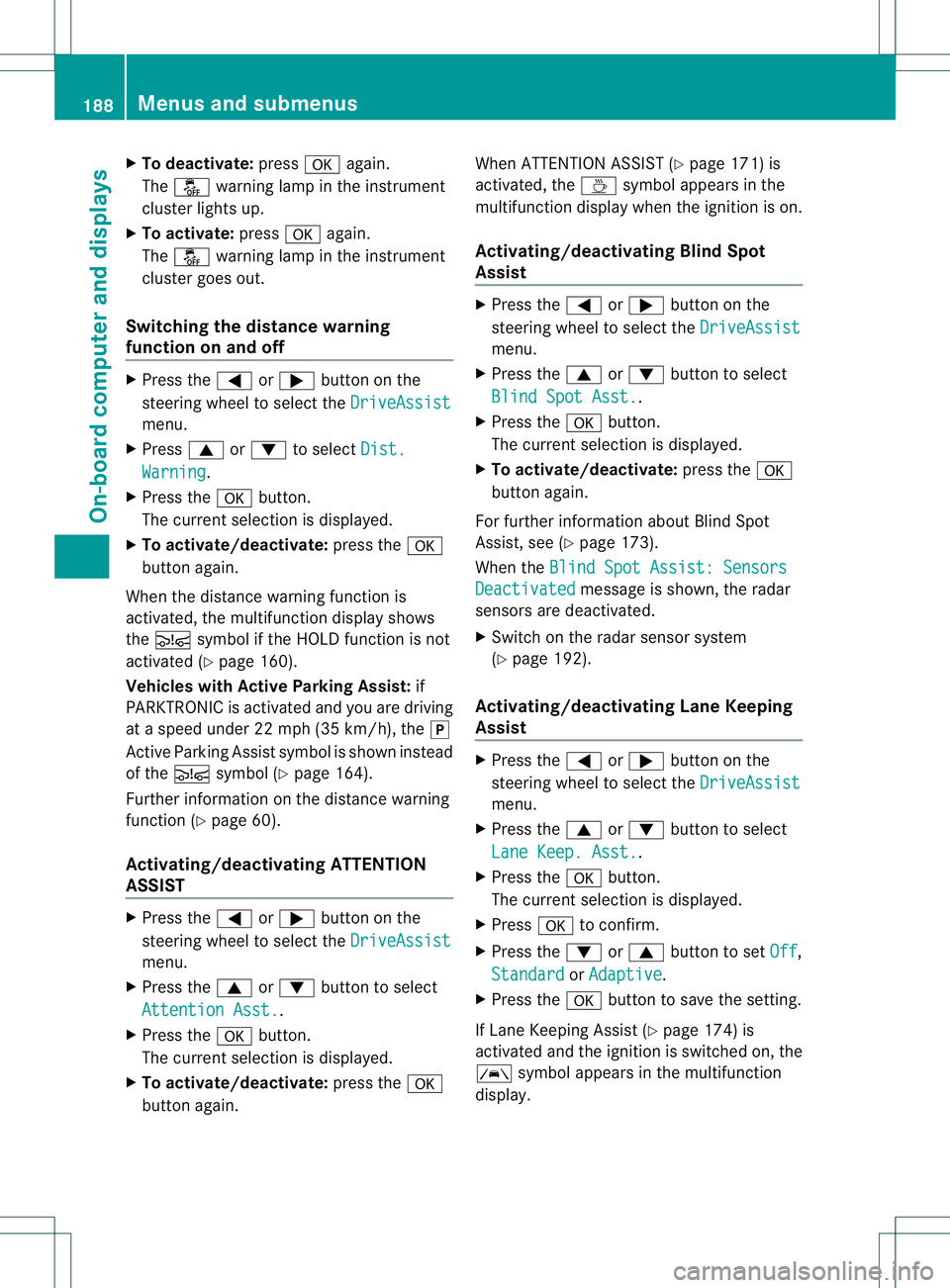
To deactivate: pressaagain.
The å warning lamp in the instrument
cluster lights up.
X To activate: pressaagain.
The å warning lamp in the instrument
cluster goes out.
Switching the distance warning
function on and off X
Press the =or; button on the
steering wheel to select the DriveAssistmenu.
X Press 9or: to select Dist. Warning .
X Press the abutton.
The current selection is displayed.
X To activate/deactivate: press thea
button again.
Whe nthe distance warning function is
activated, the multifunction display shows
the Ä symbol if the HOLD function is not
activated (Y page 160).
Vehicles with Active Parking Assist: if
PARKTRONIC is activated and you are driving
at a speed under 22 mph (35 km/h), the j
Active Parking Assist symbol is shown instead
of the Äsymbol (Y page 164).
Further information on the distance warning
function (Y page 60).
Activating/deactivating ATTENTION
ASSIST X
Press the =or; button on the
steering wheel to select the DriveAssistmenu.
X Press the 9or: button to select
Attention Asst. .
X Press the abutton.
The current selection is displayed.
X To activate/deactivate: press thea
button again. When ATTENTION ASSIST (Y
page 171) is
activated, the Àsymbol appears in the
multifunction display when the ignition is on.
Activating/deactivating Blind Spot
Assist X
Press the =or; button on the
steering wheel to select the DriveAssist menu.
X Press the 9or: button to select
Blind Spot Asst. .
X Press the abutton.
The current selection is displayed.
X To activate/deactivate: press thea
button again.
For further information about Blind Spot
Assist, see (Y page 173).
When the Blind Spot Assist: Sensors Deactivated message is shown, the radar
sensors are deactivated.
X Switch on the radar sensor system
(Y page 192).
Activating/deactivating Lane Keeping
Assist X
Press the =or; button on the
steering wheel to select the DriveAssist menu.
X Press the 9or: button to select
Lane Keep. Asst. .
X Press the abutton.
The current selection is displayed.
X Press ato confirm.
X Press the :or9 button to set Off ,
Standard or
Adaptive .
X Press the abutton to save the setting.
If Lane Keeping Assist (Y page 174) is
activated and the ignition is switched on, the
à symbol appears in the multifunction
display. 188
Menus and submenusOn-board computer and displays
Page 195 of 336
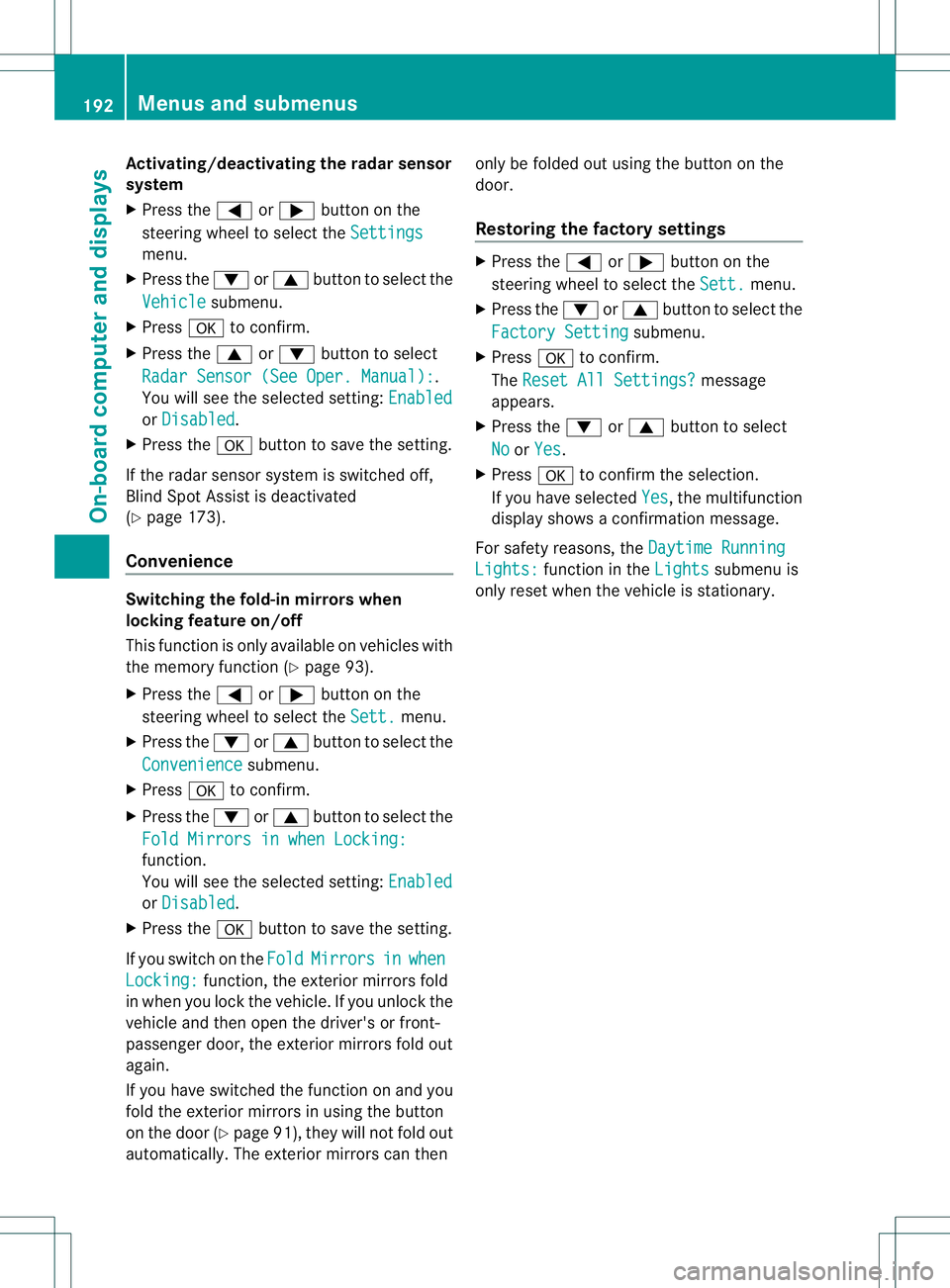
Activating/deactivating the rada
rsensor
system
X Press the =or; button on the
steering wheel to selec tthe Settings menu.
X Press the :or9 button to select the
Vehicle submenu.
X Press ato confirm.
X Press the 9or: button to select
Radar Sensor (See Oper. Manual): .
You will see the selected setting: Enabledor
Disabled .
X Press the abutton to save the setting.
If the radar sensor system is switched off,
Blind Spot Assist is deactivated
(Y page 173).
Convenience Switching the fold-in mirrors when
locking feature on/off
This function is only available on vehicles with
the memory function (Y
page 93).
X Press the =or; button on the
steering wheel to select the Sett. menu.
X Press the :or9 button to select the
Convenience submenu.
X Press ato confirm.
X Press the :or9 button to select the
Fold Mirrors in when Locking: function.
You will see the selected setting:
Enabledor
Disabled .
X Press the abutton to save the setting.
If you switch on the Fold Mirrors in when
Locking: function, the exterior mirrors fold
in when you lock the vehicle. If you unlock the
vehicle and then open the driver's or front-
passenger door, the exterior mirrors fold out
again.
If you have switched the function on and you
fold the exterior mirrors in using the button
on the door (Y page 91), they will not fold out
automatically.T he exterior mirrors can then only be folded out using the button on the
door.
Restoring the factory settings X
Press the =or; button on the
steering wheel to select the Sett. menu.
X Press the :or9 button to select the
Factory Setting submenu.
X Press ato confirm.
The Reset All Settings? message
appears.
X Press the :or9 button to select
No or
Yes .
X Press ato confirm the selection.
If you have selected Yes , the multifunction
display shows a confirmation message.
For safety reasons, the Daytime Running Lights: function in the
Lights submenu is
only reset when the vehicle is stationary. 192
Menus and submenusOn-board computer and displays
Page 204 of 336
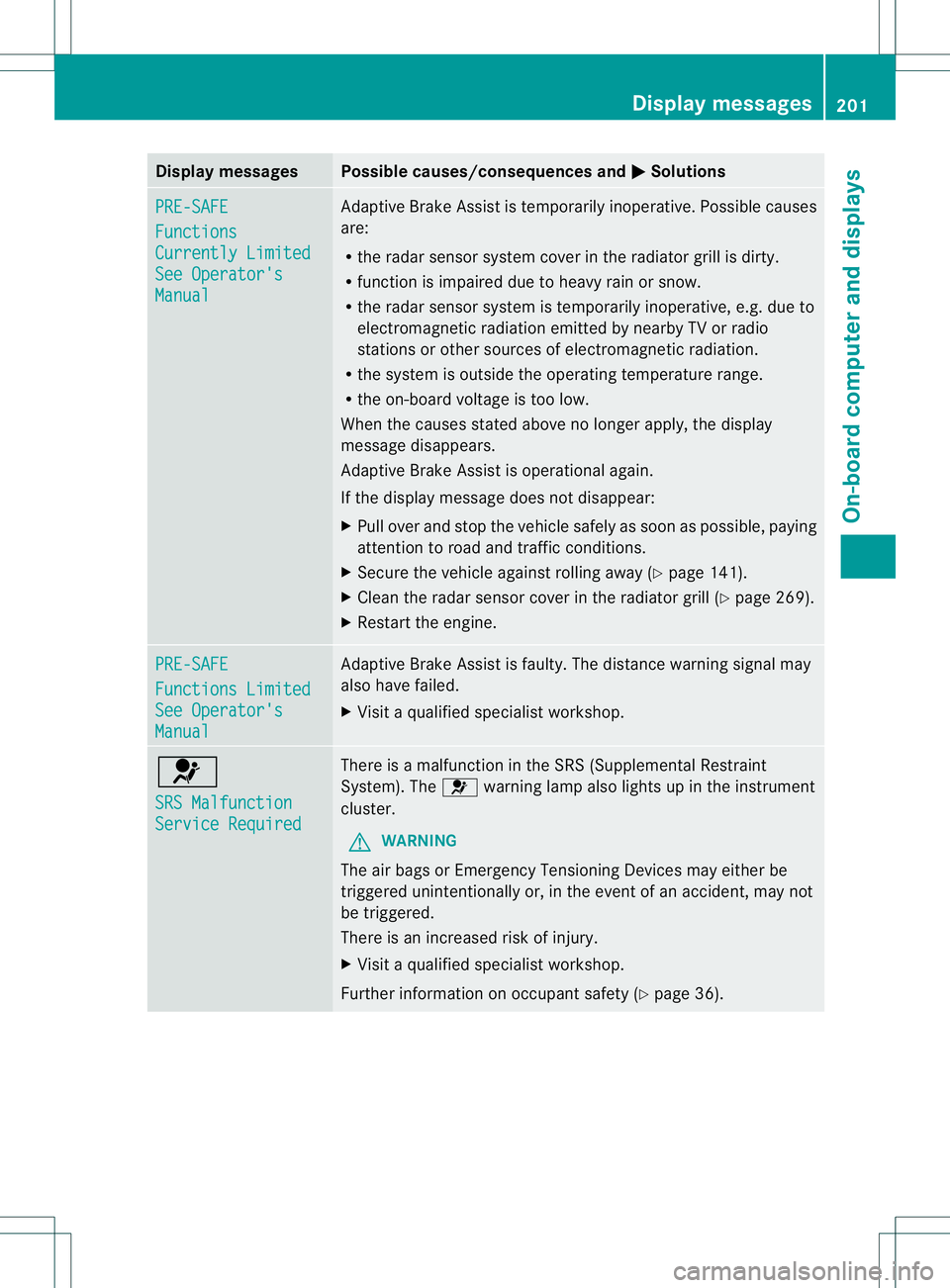
Display messages Possible causes/consequences and
M Solutions
PRE-SAFE
Functions
Currently Limited
See Operator's
Manual Adaptive Brake Assis
tis temporarily inoperative. Possible causes
are:
R the radar sensor system cover in the radiator grill is dirty.
R function is impaired due to heavy rain or snow.
R the radar sensor system is temporarily inoperative, e.g. due to
electromagnetic radiation emitted by nearby TV or radio
stations or other sources of electromagnetic radiation.
R the system is outside the operating temperature range.
R the on-board voltage is too low.
When the causes stated above no longer apply, the display
message disappears.
Adaptive Brake Assist is operational again.
If the display message does not disappear:
X Pull over and stop the vehicle safely as soon as possible, paying
attention to road and traffic conditions.
X Secure the vehicle against rolling away (Y page 141).
X Cleant he radar sensor cover in the radiator grill (Y page 269).
X Restart the engine. PRE-SAFE
Functions Limited
See Operator's
Manual Adaptive Brake Assist is faulty. The distance warning signal may
also have failed.
X
Visit a qualified specialist workshop. 6
SRS Malfunction
Service Required There is a malfunction in the SRS (Supplemental Restraint
System). The
6warning lamp also lights up in the instrument
cluster.
G WARNING
The air bags or Emergency Tensioning Devices may either be
triggered unintentionally or, in the event of an accident, may not
be triggered.
There is an increased risk of injury.
X Visit a qualified specialist workshop.
Further information on occupant safety (Y page 36). Display messages
201On-board computer and displays Z
Page 208 of 336
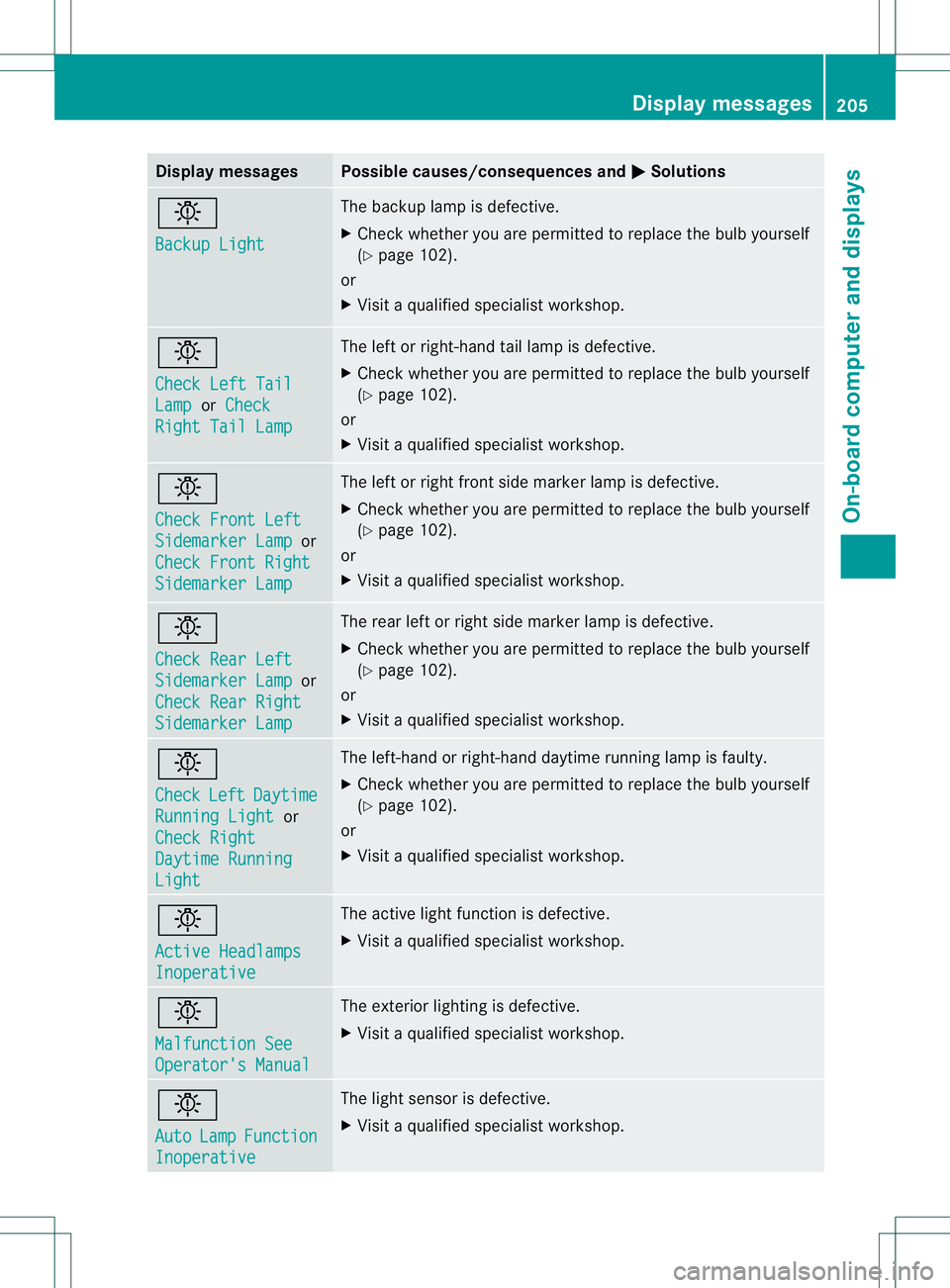
Display messages Possible causes/consequences and
M Solutions
b
Backup Light The backup lamp is defective.
X
Chec kwhether you are permitted to replace the bulb yourself
(Y page 102).
or
X Visit a qualified specialist workshop. b
Check Left Tail
Lamp or
Check Right Tail Lamp The left or right-hand tail lamp is defective.
X
Check whether you are permitted to replace the bulb yourself
(Y page 102).
or
X Visit a qualified specialist workshop. b
Check Front Left
Sidemarker Lamp or
Check Front Right Sidemarker Lamp The left or right front side marker lamp is defective.
X
Check whether you are permitted to replace the bulb yourself
(Y page 102).
or
X Visit a qualified specialist workshop. b
Check Rear Left
Sidemarker Lamp or
Check Rear Right Sidemarker Lamp The rear left or right side marker lamp is defective.
X
Check whether you are permitted to replace the bulb yourself
(Y page 102).
or
X Visit a qualified specialist workshop. b
Check
Left Daytime
Running Light or
Check Right Daytime Running
Light The left-hand or right-hand daytime running lamp is faulty.
X
Check whether you are permitted to replace the bulb yourself
(Y page 102).
or
X Visit a qualified specialist workshop. b
Active Headlamps
Inoperative The active light function is defective.
X
Visit a qualified specialist workshop. b
Malfunction See
Operator's Manual The exterior lighting is defective.
X
Visit a qualified specialist workshop. b
Auto
Lamp Function
Inoperative The light sensor is defective.
X
Visit a qualified specialist workshop. Display messages
205On-board computer and displays Z
Page 212 of 336
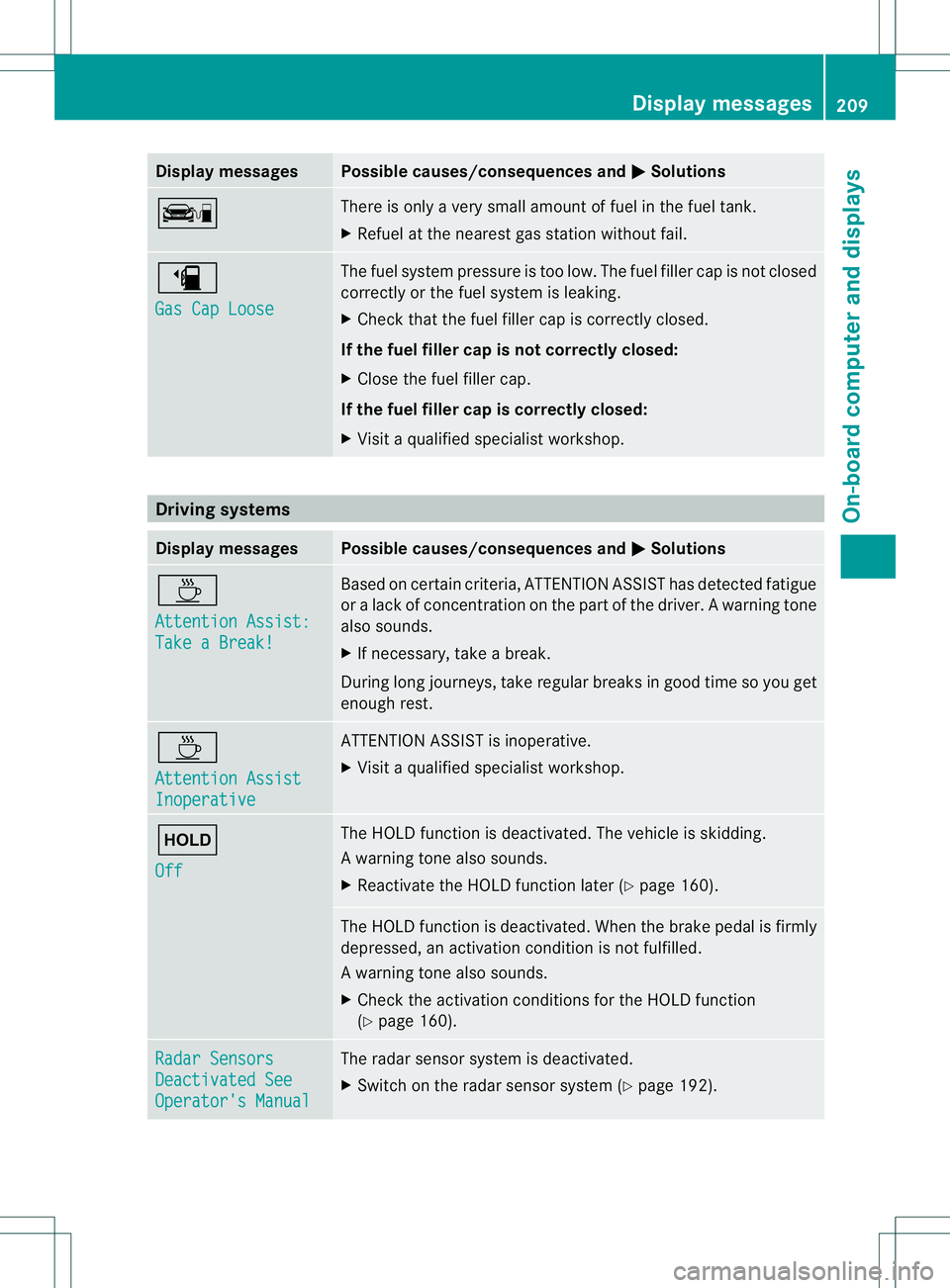
Display messages Possible causes/consequences and
M Solutions
ç There is only a very small amount of fuel in th
efuel tank.
X Refuel at the neares tgas statio nwithout fail. æ
Gas Cap Loose The fuel system pressure is too low. The fuel filler cap is not closed
correctly or the fuel system is leaking.
X
Check that the fuel filler cap is correctly closed.
If the fuel filler cap is not correctly closed:
X Close the fuel filler cap.
If the fuel filler cap is correctly closed:
X Visit a qualified specialist workshop. Driving systems
Displa
ymessages Possible causes/consequences and
M Solutions
À
Attention Assist:
Take a Break! Based on certain criteria, ATTENTION ASSIST has detected fatigue
or
alack of concentration on thep art of thedriver. A warning tone
also sounds.
X If necessary, take a break.
During long journeys, take regular breaks in good time so you get
enough rest. À
Attention Assist
Inoperative ATTENTION ASSIST is inoperative.
X
Visi taqualified specialist workshop. ë
Off The HOLD function is deactivated. The vehicle is skidding.
Aw
arning tone also sounds.
X Reactivate the HOLD function later (Y page 160). The HOLD function is deactivated. When the brak
epedal is firmly
depressed, an activation condition is not fulfilled.
Aw arning tone also sounds.
X Check the activation conditions for the HOLD function
(Y page 160). Radar Sensors
Deactivated See
Operator's Manual The radar sensor system is deactivated.
X
Switch on the radar sensor system (Y page 192). Display messages
209On-board computer and displays Z
Page 213 of 336
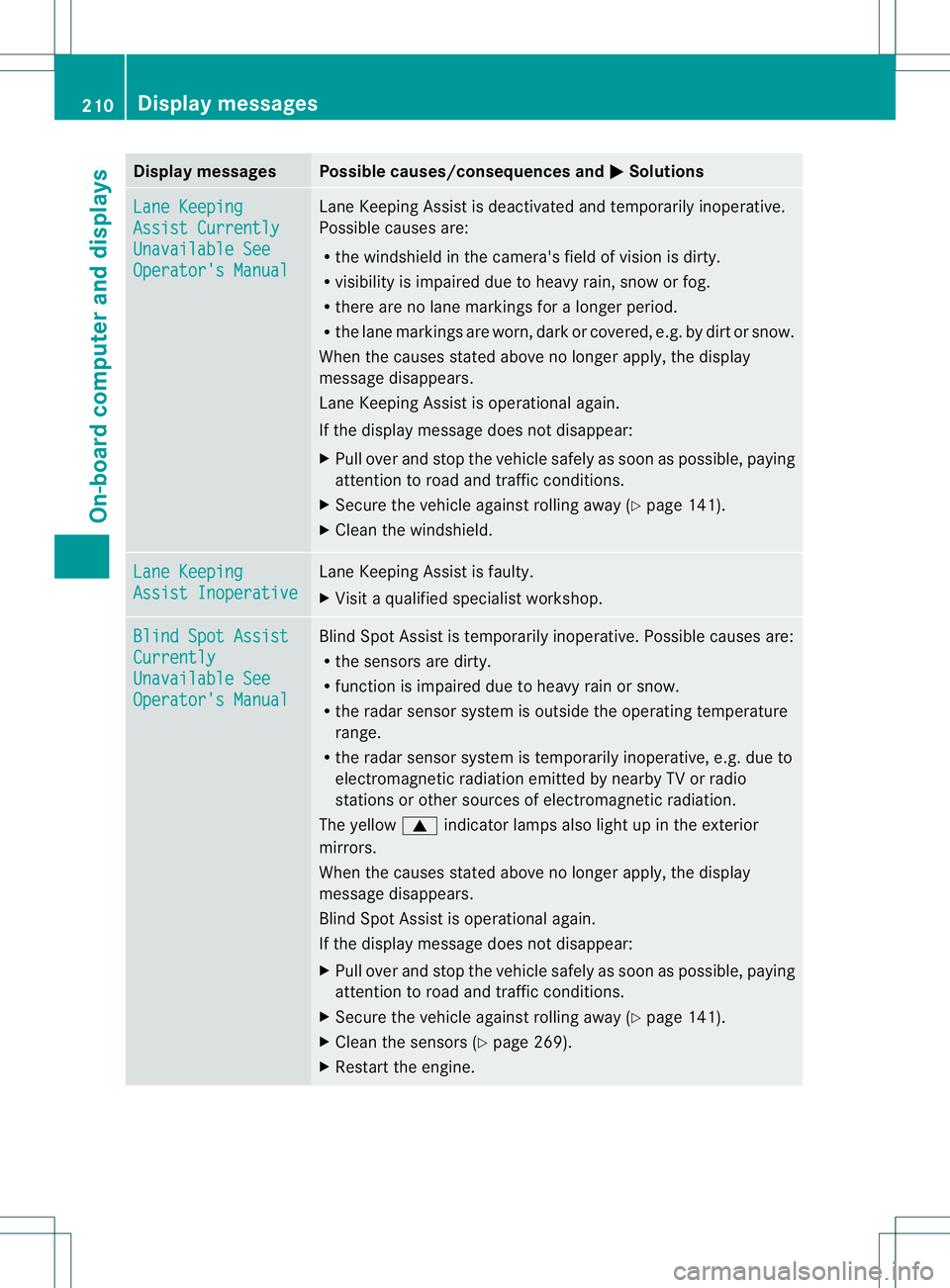
Display messages Possible causes/consequences and
M Solutions
Lane Keeping
Assist Currently
Unavailable See
Operator's Manual Lane Keeping Assis
tis deactivated and temporarily inoperative.
Possible causes are:
R the windshield in the camera's field of vision is dirty.
R visibility is impaired due to heavy rain, snow or fog.
R there are no lane markings for a longer period.
R the lane markings are worn, dark or covered, e.g. by dirt or snow.
When the causes stated above no longer apply, the display
message disappears.
Lane Keeping Assist is operational again.
If the display message does not disappear:
X Pull over and stop the vehicle safely as soon as possible, paying
attention to road and traffic conditions.
X Secure the vehicle against rolling away (Y page 141).
X Cleant he windshield. Lane Keeping
Assist Inoperative Lane Keeping Assist is faulty.
X
Visit a qualified specialist workshop. Blind Spot Assist
Currently
Unavailable See
Operator's Manual Blind Spot Assist is temporarily inoperative. Possible causes are:
R
the sensors are dirty.
R function is impaired due to heavy rain or snow.
R the radar sensor system is outside the operating temperature
range.
R the radar sensor system is temporarily inoperative, e.g. due to
electromagnetic radiation emitted by nearby TV or radio
stations or other sources of electromagnetic radiation.
The yellow 9indicator lamps also light up in the exterior
mirrors.
When the causes stated above no longer apply, the display
message disappears.
Blind Spot Assist is operational again.
If the display message does not disappear:
X Pull over and stop the vehicle safely as soon as possible, paying
attention to road and traffic conditions.
X Secure the vehicle against rolling away (Y page 141).
X Cleant he sensors (Y page 269).
X Restart the engine. 210
Display messagesOn-board computer and displays