engine MERCEDES-BENZ B-CLASS SPORTS 2013 Manual PDF
[x] Cancel search | Manufacturer: MERCEDES-BENZ, Model Year: 2013, Model line: B-CLASS SPORTS, Model: MERCEDES-BENZ B-CLASS SPORTS 2013Pages: 336, PDF Size: 30 MB
Page 190 of 336
Dialing a number from the phone book
X
Press the =or; button on the
steering wheel to selec tthe Tel menu.
X Press the 9,:ora button to
switch to the phone book.
X Press the 9or: button to select the
desired name.
To start scrolling rapidly,p ress and hold the
9 or: button for longer than one
second.
Rapid scrolling stops when you release the
button or reach the end of the list.
X If onlyo ne telephone number is stored
for a name: press the6ora button
to start dialing.
or
X If there is more than one number for a
particular name: press the6ora
button to display the numbers.
X Press the 9or: button to select the
number you want to dial.
X Press the 6ora button to start
dialing.
or
X If you do not want to make a call: press
the ~ or% button.
Redialing The on-board computer saves the last names
or numbers dialed in the redial memory.
X
Press the =or; button on the
steering wheel to select the Tel menu.
X Press the 6button to switch to the
redial memory.
X Press the 9or: button to select the
desired name or number.
X Press the 6ora button to start
dialing.
or
X If you do not want to make a call: press
the ~ or% button. Assistance menu
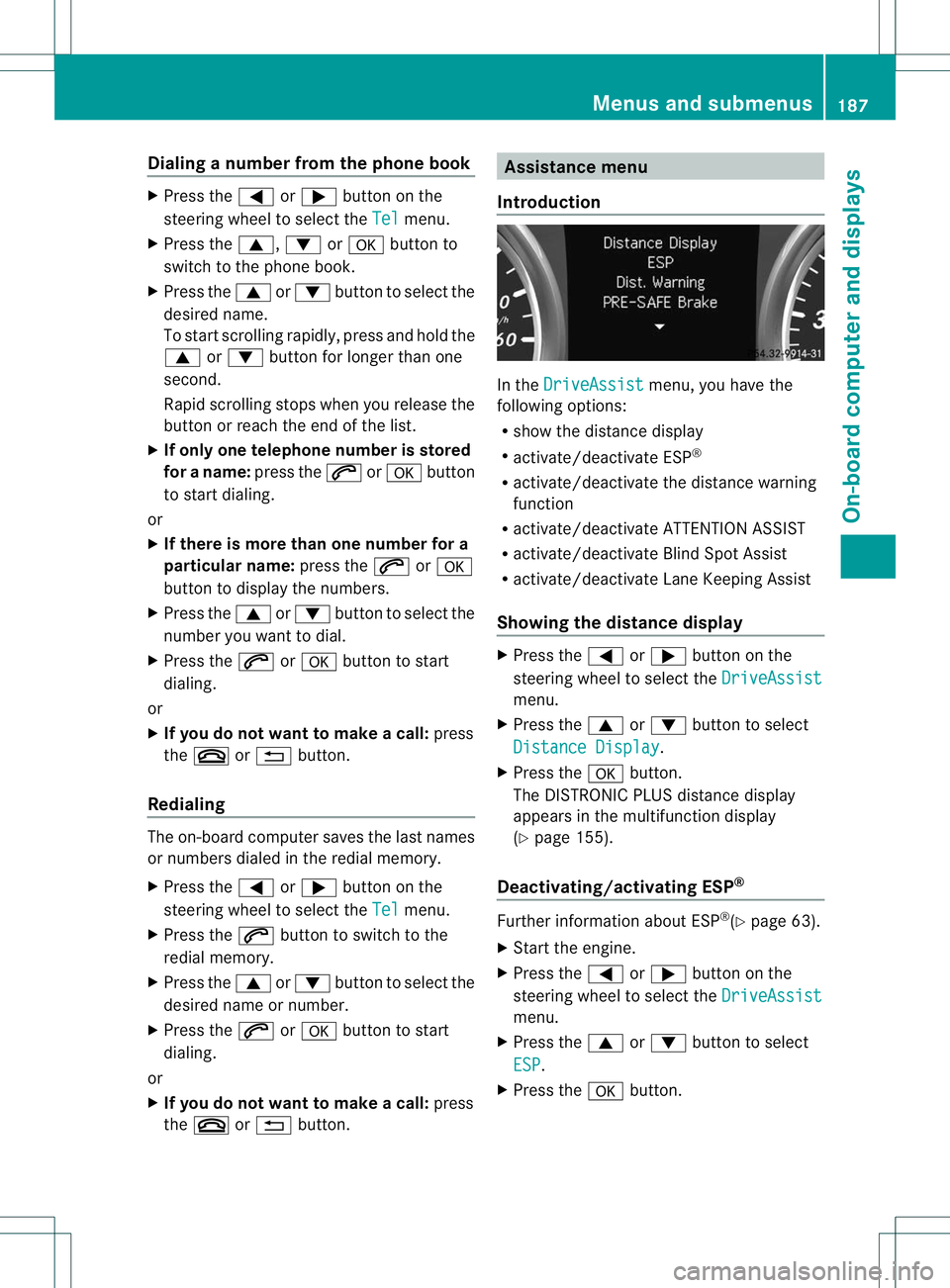
Introduction In the
DriveAssist menu, you have the
following options:
R show the distance display
R activate/deactivate ESP ®
R activate/deactivate the distance warning
function
R activate/deactivate ATTENTION ASSIST
R activate/deactivate Blind Spot Assist
R activate/deactivate Lane Keeping Assist
Showing the distance display X
Press the =or; button on the
steering wheel to select the DriveAssist menu.
X Press the 9or: button to select
Distance Display .
X Press the abutton.
The DISTRONIC PLUS distance display
appears in the multifunction display
(Y page 155).
Deactivating/activating ESP ® Further information about ESP
®
(Y page 63).
X Start the engine.
X Press the =or; button on the
steering wheel to select the DriveAssist menu.
X Press the 9or: button to select
ESP .
X Press the abutton. Menus and submenus
187On-board computer and displays Z
Page 193 of 336
![MERCEDES-BENZ B-CLASS SPORTS 2013 Manual PDF X
Press the :or9 button to select the
Speedometer [mph]: function.
You will see the selected setting: On or
Off .
X Press the abutton to save the setting.
i Speed is displayed in mph.
The Speedometer](/img/4/58079/w960_58079-192.png "MERCEDES-BENZ B-CLASS SPORTS 2013 Manual PDF X
Press the :or9 button to select the
Speedometer [mph]: function.
You will see the selected setting: On or
Off .
X Press the abutton to save the setting.
i Speed is displayed in mph.
The Speedometer")
X
Press the :or9 button to select the
Speedometer [mph]: function.
You will see the selected setting: On or
Off .
X Press the abutton to save the setting.
i Speed is displayed in mph.
The Speedometer [mph] function allows you
to choose whether the status area in the
multifunction display always shows the speed
in mph instead of the outside temperature.
Selecting the permanent display function
You can determine whether the multifunction
display permanently shows your speed or the
outside temperature.
X Press the =or; button on the
steering wheel to select the Sett. menu.
X Press the :or9 button to select the
Instr. Cluster submenu.
X Press ato confirm.
X Press the :or9 button to select the
Permanent Display: function.
You will see the selected setting OutsideTemperature or
Speedometer [km/h] (USA)/Speedometer [mph] (Canada).
X Press the abutton to save the setting.
i The speed is shown in km/h( USA)/mph
(Canada).
Lights Switching the daytime running lamps on/
off
The
Daytime Running Lights: function
can only be set when the engine is switched
off.
X Press the =or; button on the
steering wheel to select the Sett. menu.
X Press the :or9 button to select the
Lights submenu.
X Press ato confirm. X
Press the :or9 button to select the
Daytime Running Lights function.
You will see the selected setting: Enabled or
Disabled .
X Press the abutton to save the setting.
Further information on daytime running
lamps (Y page 97).
Switching Adaptive Highbeam Assisto n/
off
X Press the =or; button on the
steering wheel to select the Sett. menu.
X Press the :or9 button to select the
Lights submenu.
X Press ato confirm.
X Press the :or9 button to select the
Adaptive Highbeam Assist: function.
You will see the selected setting: Enabled or
Disabled .
X Press the abutton to save the setting.
For further information about Adaptive
Highbeam Assist, see (Y page 100).
Activating/deactivating surround
lighting and exterior lighting delayed
switch-off
If you have activated the Locator Lighting: function and the light switch is set
to Ã, the following function sare activated
when it is dark:
R surround lighting: the exterior lighting
remains lit for 40 seconds after unlocking
with the SmartKey. If you start the engine,
the surround lighting is switched off and
automatic headlamp mode is activated
(Y page 97).
R exterio rlighting delayed switch-off: the
exterior lighting remains lit for
60 seconds aftert he engine is switched off.
If you close all the doors and the tailgate,
the exterior lighting goes off after
15 seconds. 190
Menus and submenusOn-board computer and displays
Page 194 of 336
X
Press the =or; button on the
steering wheel to select the Sett. menu.
X Press the :or9 button to select the
Lights submenu.
X Press ato confirm.
X Press the :or9 button to select the
Locator Lighting function.
You will see the selected setting: Enabledor
Disabled .
X Press the abutton to save the setting.
Deactivating delayed switch-off of the
exterior lighting temporarily:
X Before leaving the vehicle, turn the
SmartKey to position 0in the ignition lock.
X Turn the SmartKey to position 2in the
ignition lock.
The exterior lighting delayed switch-off is
deactivated.
Delayed switch-off of the exterior lighting is
reactivated the next time you start the
engine.
i Depending on your vehicle's equipment,
when the surround lighting and delayed
switch-off exterior lighting are on, the
following light up:
R Parking lamps
R Front fog lamps
R Low-beam headlamps
R Daytime running lamps
R Side marker lamps
R Surround lighting in the exterior mirrors
Activating/deactivating the interior
lighting delayed switch-off
If you activate the Interior Lighting Delay: function, the interior lighting remains
on for 20 seconds after you remove the
SmartKey from the ignition lock.
X Press the =or; button on the
steering wheel to select the Sett. menu.
X Press the :or9 button to select the
Lights submenu.
X Press ato confirm. X
Press the :or9 button to select the
Interior Lighting Delay: function.
You will see the selected setting: Enabled or
Disabled .
X Press the abutton to save the setting.
Vehicle Activating/deactivating the automatic
door locking mechanism
X
Press the =or; button on the
steering wheel to select the Sett. menu.
X Press the :or9 button to select the
Vehicle submenu.
X Press ato confirm.
X Press the :or9 button to select the
Automatic Door Lock: function.
You will see the selected setting: Enabled or
Disabled .
X Press the abutton to save the setting.
If you select the Automatic Door Lock: function, the vehicle is centrally locked above
a speed of around 9 mph (15 km/h).
i
For further information on the automatic
locking feature, see (Y page 74).
Activating/deactivating the acoustic
locking verification signal
If you switch on the Acoustic Lock Feedback: function, an acoustic signal
sounds when you lock the vehicle.
X Press the =or; button on the
steering wheel to select the Sett. menu.
X Press the :or9 button to select the
Vehicle submenu.
X Press ato confirm.
X Press the :or9 button to select the
Acoustic Lock Feedback: function.
You will see the selected setting: Enabled or
Disabled .
X Press the abutton to save the setting. Menus and submenus
191On-board computer and displays Z
Page 202 of 336
Display messages Possible causes/consequences and
M Solutions
!
Parking Brake
Inoperative The yellow
!warning lamp lights up. The red !indicator
lamp flashes fo rabout ten seconds after the electric parking brake
has been applied or released. It then goes out or remains lit.
The electric parking brake is malfunctioning, e.g. because of
overvoltage or undervoltage.
X Remove the cause for the overvoltage or undervoltage, e.g. by
charging the battery or restarting the engine.
X Engage or release the electric parking brake.
If it remains impossible to apply or release the electric parking
brake:
X Switch off the ignition and turn it back on.
X Engage or release the electric parking brake.
If the electric parking brake still cannot be released:
X Consult a qualified specialist workshop. The display message is only shown while the vehicle is in motion.
The red
!indicator lamp flashes and the yellow !warning
lamp is lit.
It is not possible to apply the electric parking brake manually.
X Shift the transmission to P.
X Visit a qualified specialist workshop. !
Turn On the
Ignition to
Release the
Parking Brake The red
!indicator lamp is lit.
You attempted to release the electric parking brake while the
ignition was switched off.
X Turn the SmartKey to position 1in the ignition lock. Display messages
199On-board computer and displays Z
Page 204 of 336
Display messages Possible causes/consequences and
M Solutions
PRE-SAFE
Functions
Currently Limited
See Operator's
Manual Adaptive Brake Assis
tis temporarily inoperative. Possible causes
are:
R the radar sensor system cover in the radiator grill is dirty.
R function is impaired due to heavy rain or snow.
R the radar sensor system is temporarily inoperative, e.g. due to
electromagnetic radiation emitted by nearby TV or radio
stations or other sources of electromagnetic radiation.
R the system is outside the operating temperature range.
R the on-board voltage is too low.
When the causes stated above no longer apply, the display
message disappears.
Adaptive Brake Assist is operational again.
If the display message does not disappear:
X Pull over and stop the vehicle safely as soon as possible, paying
attention to road and traffic conditions.
X Secure the vehicle against rolling away (Y page 141).
X Cleant he radar sensor cover in the radiator grill (Y page 269).
X Restart the engine. PRE-SAFE
Functions Limited
See Operator's
Manual Adaptive Brake Assist is faulty. The distance warning signal may
also have failed.
X
Visit a qualified specialist workshop. 6
SRS Malfunction
Service Required There is a malfunction in the SRS (Supplemental Restraint
System). The
6warning lamp also lights up in the instrument
cluster.
G WARNING
The air bags or Emergency Tensioning Devices may either be
triggered unintentionally or, in the event of an accident, may not
be triggered.
There is an increased risk of injury.
X Visit a qualified specialist workshop.
Further information on occupant safety (Y page 36). Display messages
201On-board computer and displays Z
Page 209 of 336
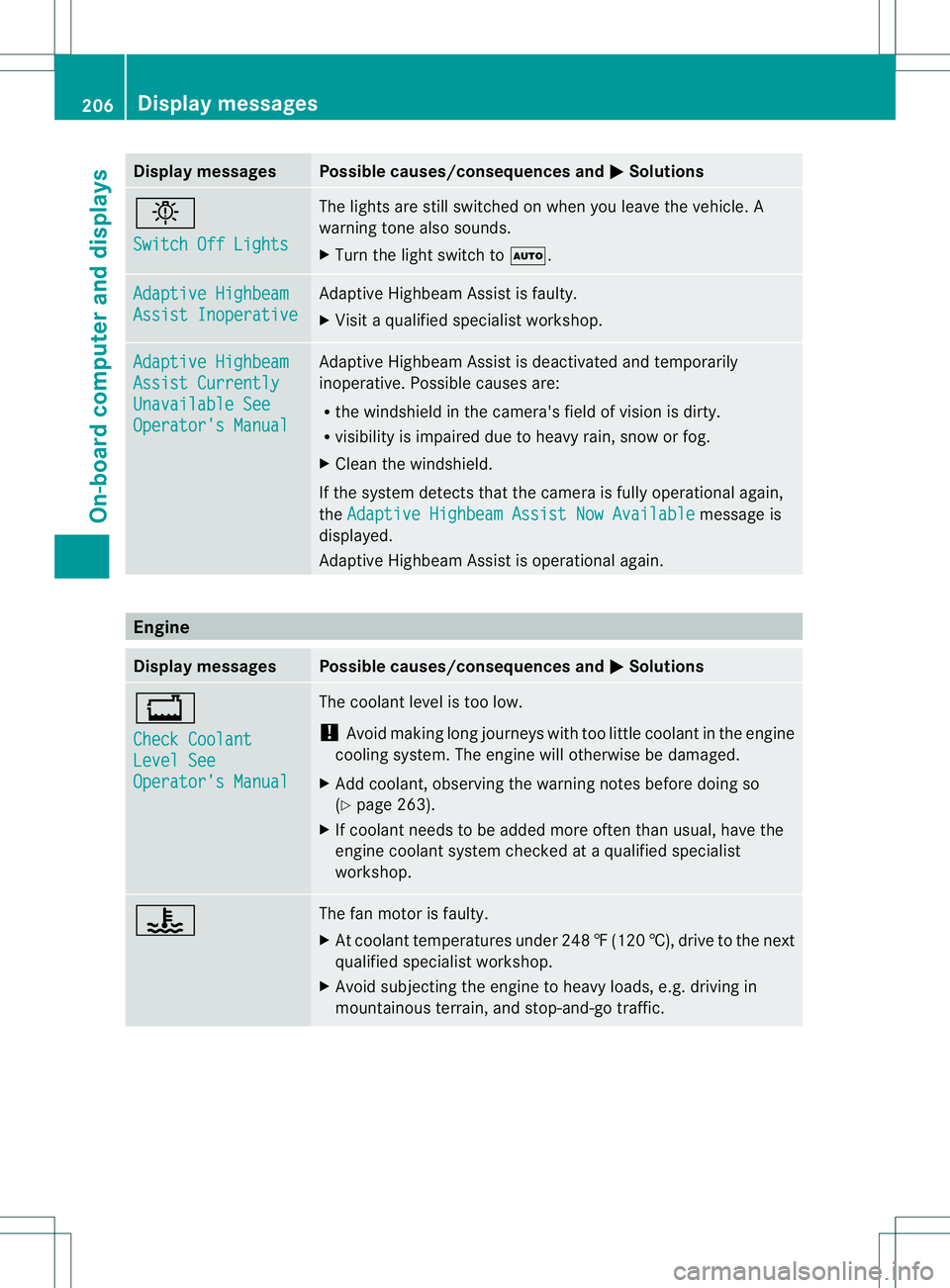
Display messages Possible causes/consequences and
M Solutions
b
Switch Off Lights The lights are still switched on when you leave the vehicle. A
warning tone also sounds.
X
Tur nthe light switch to Ã. Adaptive Highbeam
Assist Inoperative Adaptive Highbeam Assist is faulty.
X
Visit a qualified specialist workshop. Adaptive Highbeam
Assist Currently
Unavailable See
Operator's Manual Adaptive Highbeam Assist is deactivated and temporarily
inoperative. Possible causes are:
R
the windshield in the camera's field of vision is dirty.
R visibility is impaired due to heavy rain, snow or fog.
X Cleant he windshield.
If the system detects that the camera is fully operational again,
the Adaptive Highbeam Assist Now Available message is
displayed.
Adaptive Highbeam Assist is operational again. Engine
Display messages Possible causes/consequences and
M Solutions
+
Check Coolant
Level See
Operator's Manual The coolant level is too low.
!
Avoid making long journeys with too little coolant in the engine
cooling system. The engine will otherwise be damaged.
X Add coolant, observing the warning notes before doing so
(Y page 263).
X If coolant needs to be added more often than usual, have the
engine coolant system checked at a qualified specialist
workshop. ? The fan motor is faulty.
X
At coolant temperatures under 248 ‡(120 †), drive to the next
qualified specialist workshop.
X Avoid subjecting the engine to heavy loads, e.g. driving in
mountainous terrain, and stop-and-go traffic. 206
Display messagesOn-board computer and displays
Page 210 of 336
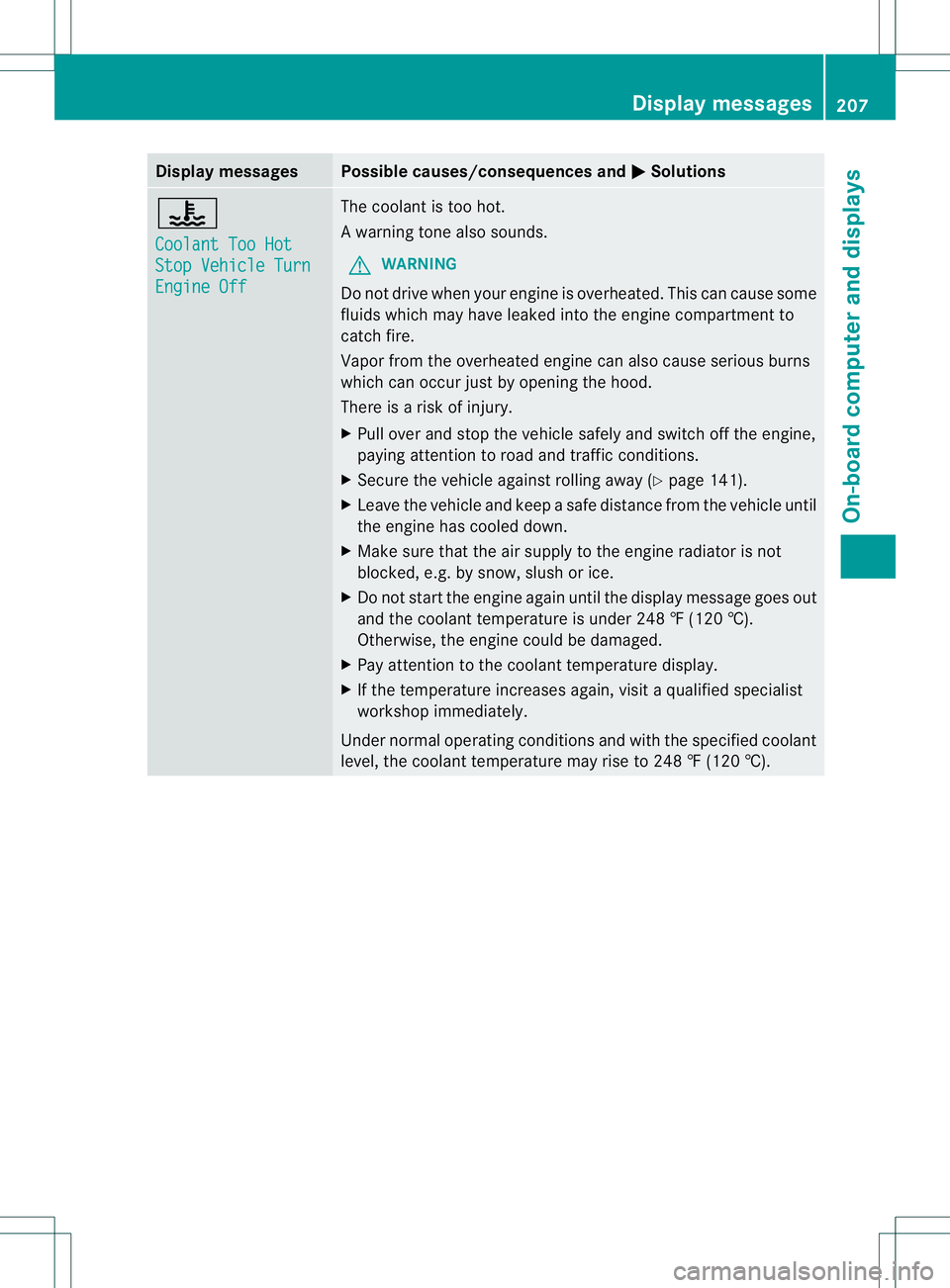
Display messages Possible causes/consequences and
M Solutions
?
Coolant Too Hot
Stop Vehicle Turn
Engine Off The coolan
tis too hot.
Aw arning tone also sounds.
G WARNING
Do no tdrive when youre ngine is overheated. Thi scan cause some
fluids which may have leaked into the engine compartmen tto
catch fire.
Vapor from the overheated engine can also cause serious burns
which can occu rjust by opening the hood.
There is a ris kofinjury.
X Pull ove rand stop the vehicle safely and switch off the engine,
paying attention to road and traffic conditions.
X Secure the vehicle against rolling away (Y page 141).
X Leave the vehicle and kee pasafe distance from the vehicle until
the engine has cooled down.
X Make sure that the air supply to the engine radiator is not
blocked, e.g. by snow, slush or ice.
X Do not start the engine againu ntil the display message goes out
and the coolant temperature is under 248 ‡ (120 †).
Otherwise, the engine could be damaged.
X Pay attentio nto the coolant temperature display.
X If the temperature increases again, visit a qualified specialist
workshop immediately.
Under normal operating conditions and with the specified coolant
level, the coolant temperature may rise to 248 ‡ (120 †). Display messages
207On-board computer and displays Z
Page 211 of 336
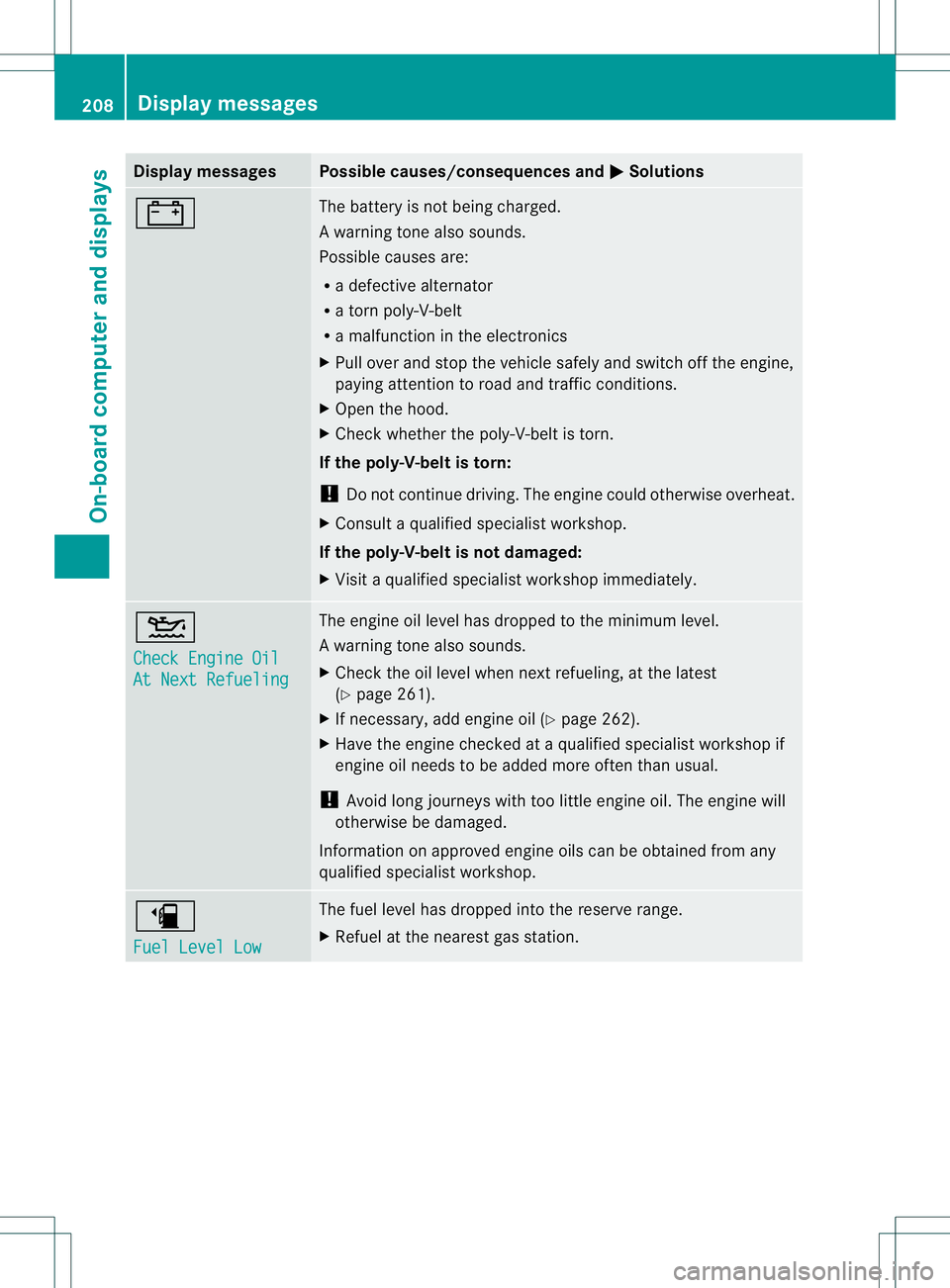
Display messages Possible causes/consequences and
M Solutions
# The battery is no
tbeing charged.
Aw arning tone also sounds.
Possible causes are:
R a defective alternator
R a torn poly-V-belt
R a malfunction in the electronics
X Pull ove rand stop the vehicle safely and switch off the engine,
paying attention to road and traffic conditions.
X Ope nthe hood.
X Check whether the poly-V-belt is torn.
If the poly-V-belt is torn:
! Do not continue driving. The engine could otherwise overheat.
X Consult a qualified specialist workshop.
If the poly-V-belt is not damaged:
X Visit a qualified specialist workshop immediately. 4
Check Engine Oil
At Next Refueling The engine oil level has dropped to the minimum level.
Aw
arning tone also sounds.
X Chec kthe oil level when next refueling, at the latest
(Y page 261).
X If necessary, add engine oil (Y page 262).
X Have the engine checked at a qualified specialist workshop if
engine oil needs to be added more often than usual.
! Avoid long journeys with too little engine oil. The engine will
otherwise be damaged.
Information on approved engine oils can be obtained from any
qualified specialist workshop. æ
Fuel Level Low The fuel level has dropped into the reserve range.
X
Refuel at the nearest gas station. 208
Display messagesOn-board computer and displays
Page 213 of 336
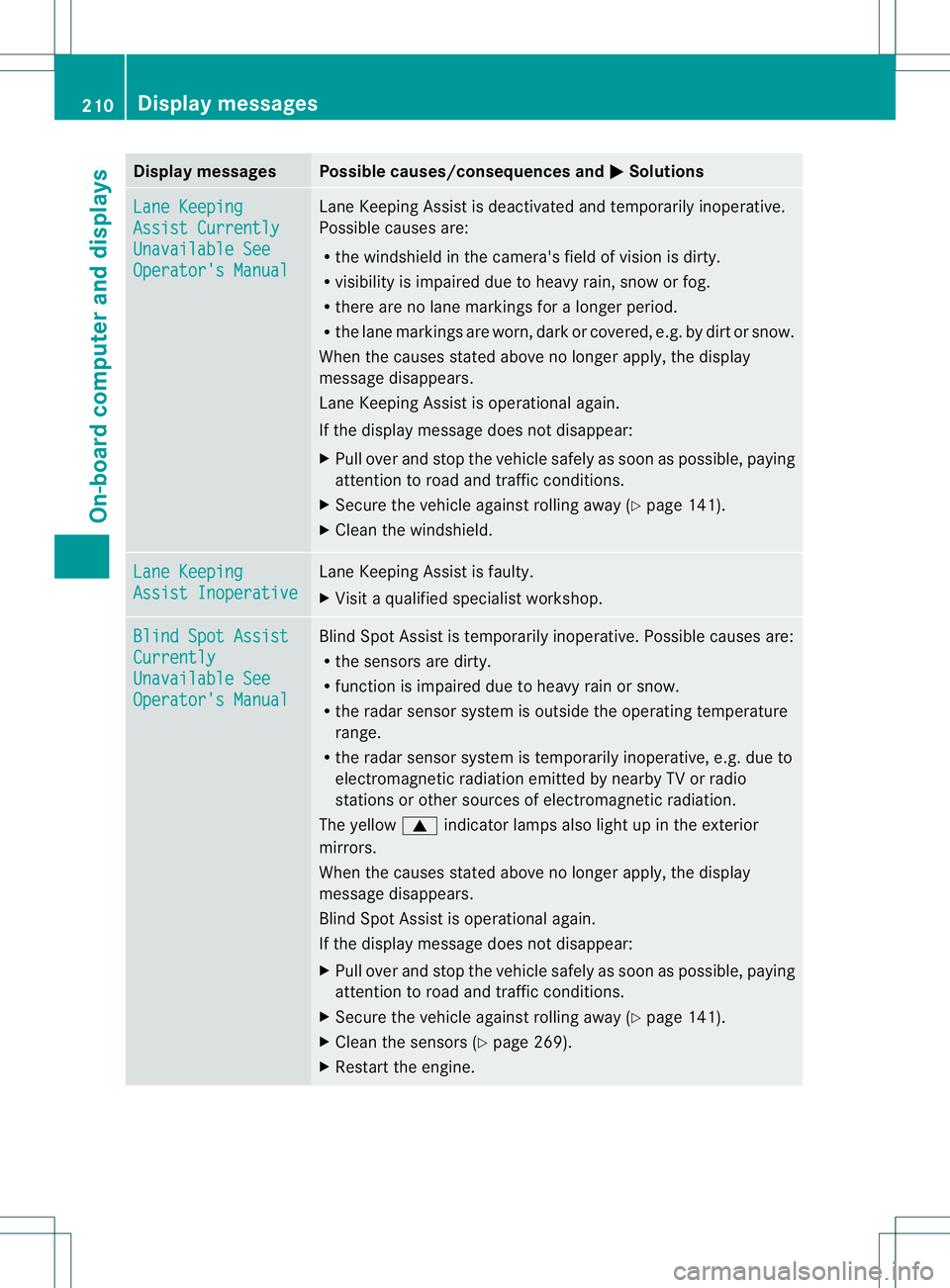
Display messages Possible causes/consequences and
M Solutions
Lane Keeping
Assist Currently
Unavailable See
Operator's Manual Lane Keeping Assis
tis deactivated and temporarily inoperative.
Possible causes are:
R the windshield in the camera's field of vision is dirty.
R visibility is impaired due to heavy rain, snow or fog.
R there are no lane markings for a longer period.
R the lane markings are worn, dark or covered, e.g. by dirt or snow.
When the causes stated above no longer apply, the display
message disappears.
Lane Keeping Assist is operational again.
If the display message does not disappear:
X Pull over and stop the vehicle safely as soon as possible, paying
attention to road and traffic conditions.
X Secure the vehicle against rolling away (Y page 141).
X Cleant he windshield. Lane Keeping
Assist Inoperative Lane Keeping Assist is faulty.
X
Visit a qualified specialist workshop. Blind Spot Assist
Currently
Unavailable See
Operator's Manual Blind Spot Assist is temporarily inoperative. Possible causes are:
R
the sensors are dirty.
R function is impaired due to heavy rain or snow.
R the radar sensor system is outside the operating temperature
range.
R the radar sensor system is temporarily inoperative, e.g. due to
electromagnetic radiation emitted by nearby TV or radio
stations or other sources of electromagnetic radiation.
The yellow 9indicator lamps also light up in the exterior
mirrors.
When the causes stated above no longer apply, the display
message disappears.
Blind Spot Assist is operational again.
If the display message does not disappear:
X Pull over and stop the vehicle safely as soon as possible, paying
attention to road and traffic conditions.
X Secure the vehicle against rolling away (Y page 141).
X Cleant he sensors (Y page 269).
X Restart the engine. 210
Display messagesOn-board computer and displays
Page 214 of 336
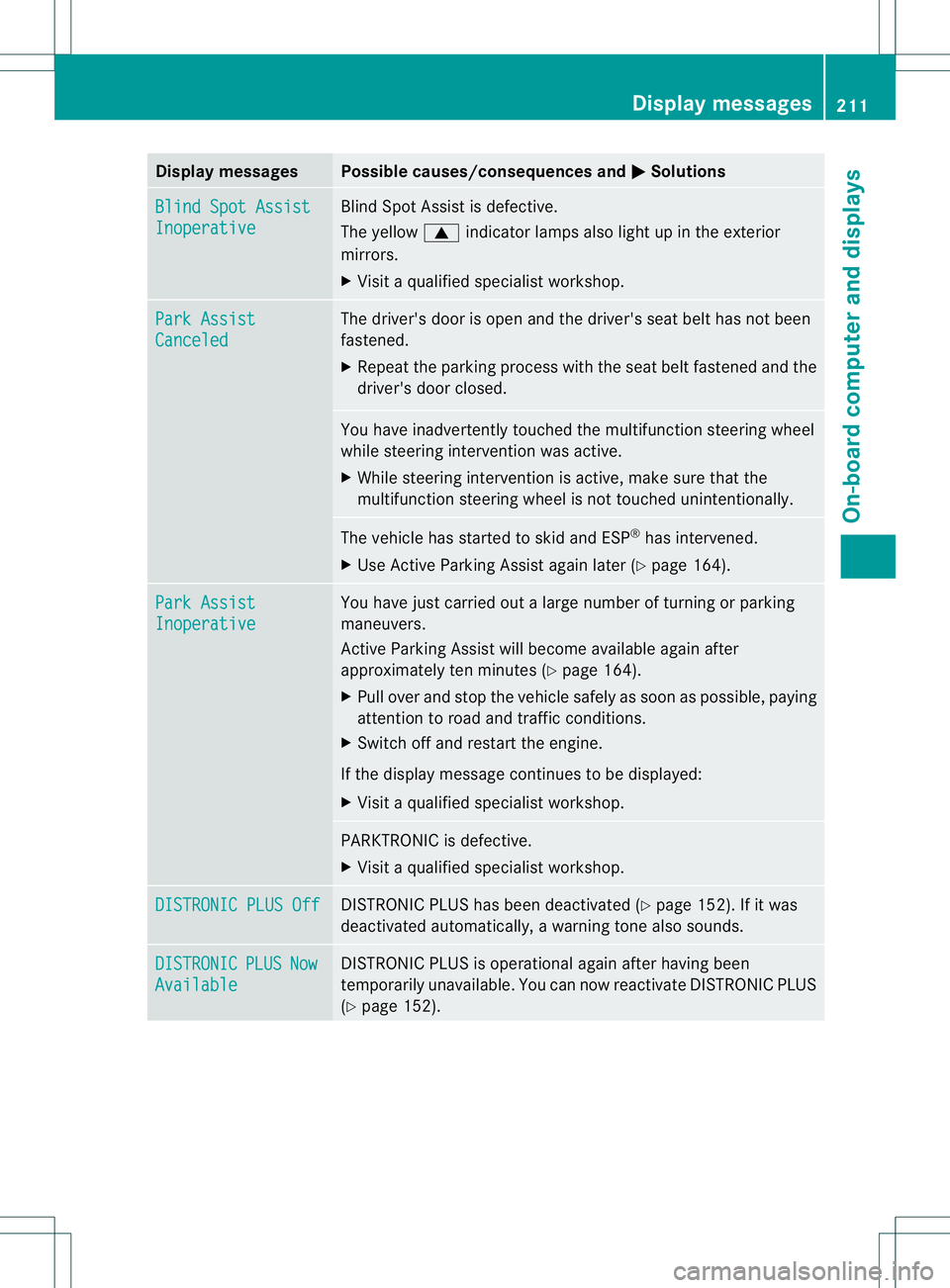
Display messages Possible causes/consequences and
M Solutions
Blind Spot Assist
Inoperative Blind Spot Assis
tis defective.
The yellow 9indicator lamps also light up in the exterior
mirrors.
X Visit a qualified specialist workshop. Park Assist
Canceled The driver's door is open and the driver's seat belt has not been
fastened.
X
Repeatt he parking process with the seat belt fastened and the
driver's door closed. You have inadvertently touched the multifunction steering wheel
while steering intervention was active.
X
While steering intervention is active, make sure that the
multifunction steering wheel is not touched unintentionally. The vehicle has started to skid and ESP
®
has intervened.
X Use Active Parking Assist again later (Y page 164).Park Assist
Inoperative You have just carried out a large number of turning or parking
maneuvers.
Active Parking Assist will become available again after
approximately ten minutes (Y
page 164).
X Pull over and stop the vehicle safely as soon as possible, paying
attention to road and traffic conditions.
X Switch off and restart the engine.
If the display message continues to be displayed:
X Visit a qualified specialist workshop. PARKTRONIC is defective.
X
Visit a qualified specialist workshop. DISTRONIC PLUS Off DISTRONIC PLUS has been deactivated (Y
page 152). If it was
deactivated automatically, a warning tone also sounds. DISTRONIC PLUS Now
Available DISTRONIC PLUS is operational again after having been
temporarily unavailable. You can now reactivate DISTRONIC PLUS
(Y
page 152). Display messages
211On-board computer and displays Z