clock MERCEDES-BENZ B-CLASS SPORTS 2013 Owners Manual
[x] Cancel search | Manufacturer: MERCEDES-BENZ, Model Year: 2013, Model line: B-CLASS SPORTS, Model: MERCEDES-BENZ B-CLASS SPORTS 2013Pages: 336, PDF Size: 30 MB
Page 78 of 336
i
If you press one of the two buttons and
do not hear a tone, the relevant setting has
already been selected.
The vehicle is locked automatically when the
ignition is switched on and the wheels are
turning.
You could therefore lock yourself out if:
R the vehicle is being pushed.
R the vehicle is being towed.
R the vehicle is on a rollerd ynamometer.
You can also switch the automati clocking
function on and off using the on-board
computer (Y page 191). Unlocking the driver's door
(mechanical key)
If the vehicle can no longer be unlocked with
the SmartKey, use the mechanical key.
If you use the mechanical key to unlock and
open the driver's door, the anti-theft alarm
system will be triggered (Y page 65).
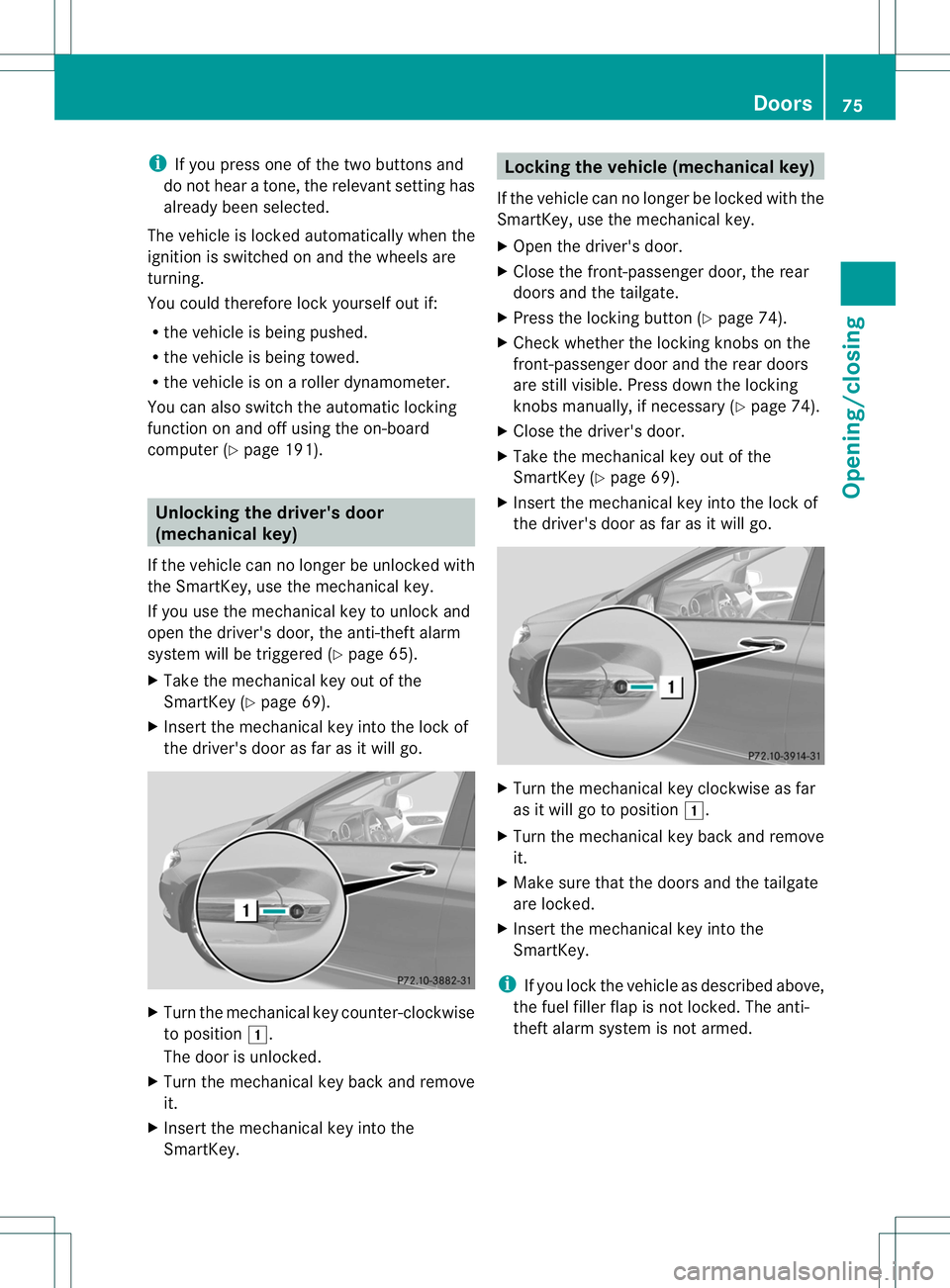
X Take the mechanical key out of the
SmartKey (Y page 69).
X Insert the mechanical key into the lock of
the driver's door as far as it will go. X
Turn the mechanical key counter-clockwise
to position 1.
The door is unlocked.
X Turn the mechanical key back and remove
it.
X Insert the mechanical key into the
SmartKey. Locking the vehicle (mechanical key)
If the vehicle can no longer be locked with the
SmartKey, use the mechanical key.
X Open the driver's door.
X Close the front-passenger door, the rear
doors and the tailgate.
X Press the locking button (Y page 74).
X Check whether the locking knobs on the
front-passenger door and the rear doors
are still visible. Press down the locking
knobs manually, if necessary (Y page 74).
X Close the driver's door.
X Take the mechanical key out of the
SmartKey (Y page 69).
X Insert the mechanical key into the lock of
the driver's door as far as it will go. X
Turn the mechanical key clockwise as far
as it will go to position 1.
X Turn the mechanical key back and remove
it.
X Make sure that the doors and the tailgate
are locked.
X Insert the mechanical key into the
SmartKey.
i If you lock the vehicle as described above,
the fuel filler flap is not locked. The anti-
theft alarm system is not armed. Doors
75Opening/closing Z
Page 80 of 336
Closing
G
WARNING
To preventp ossible personal injury, always
keep hands and fingers away from the cargo
compartment opening when closing the
tailgate. Be especially careful when small
children are around. X
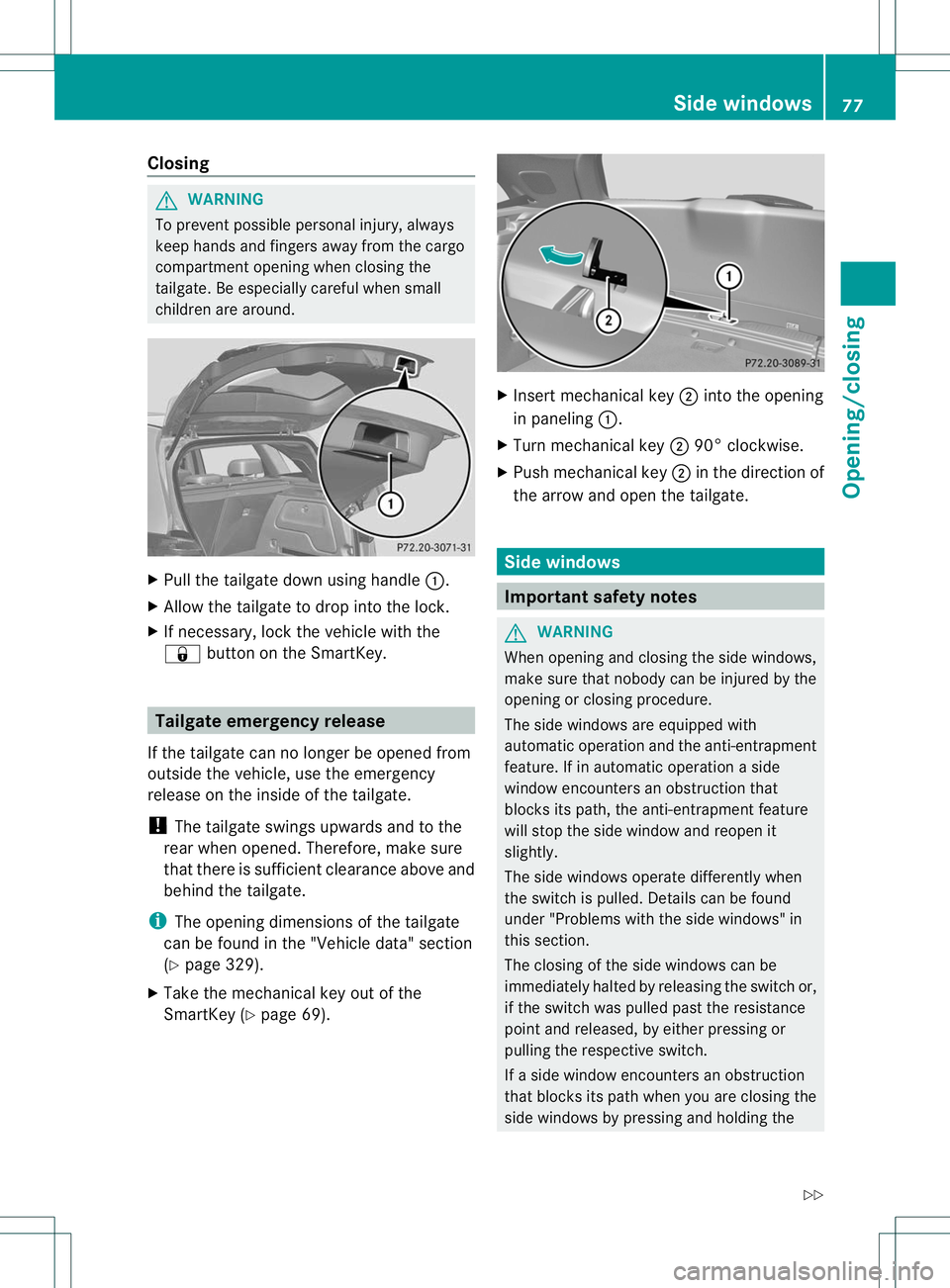
Pull the tailgate down using handle :.
X Allow the tailgate to drop into the lock.
X If necessary, lock the vehicle with the
& button on the SmartKey. Tailgate emergency release
If the tailgate can no longer be opened from
outside the vehicle, use the emergency
release on the inside of the tailgate.
! The tailgate swings upwards and to the
rear when opened. Therefore, make sure
that there is sufficient clearance above and
behind the tailgate.
i The opening dimensions of the tailgate
can be found in the "Vehicle data" section
(Y page 329).
X Take the mechanical key out of the
SmartKey (Y page 69). X
Insert mechanical key ;into the opening
in paneling :.
X Turn mechanical key ;90° clockwise.
X Push mechanical key ;in the direction of
the arrow and open the tailgate. Side windows
Important safety notes
G
WARNING
When opening and closing the side windows,
make sure that nobody can be injured by the
opening or closing procedure.
The side windows are equipped with
automatic operation and the anti-entrapment
feature. If in automatic operation a side
window encounters an obstruction that
blocks its path, the anti-entrapment feature
will stop the side window and reopen it
slightly.
The side windows operate differently when
the switch is pulled. Details can be found
under "Problems with the side windows" in
this section.
The closing of the side windows can be
immediately halted by releasing the switch or,
if the switch was pulled past the resistance
point and released, by either pressing or
pulling the respective switch.
If a side window encounters an obstruction
that blocks its path when you are closing the
side windows by pressing and holding the Side windows
77Opening/closing
Z
Page 108 of 336
Low-bea
mheadlamps (halogen
headlamps) X
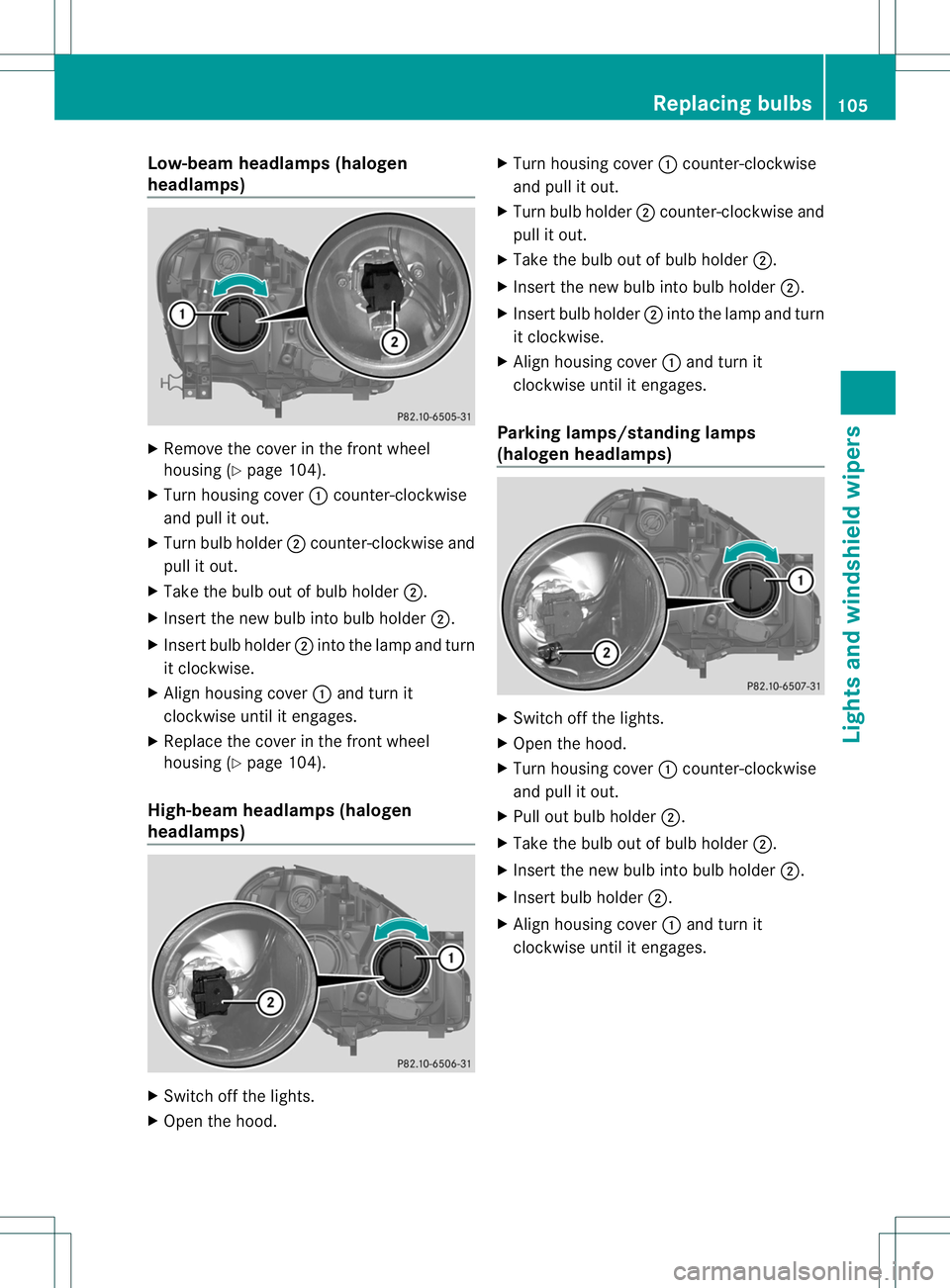
Remove the cover in the front wheel
housing (Y page 104).
X Turn housing cover :counter-clockwise
and pull it out.
X Turn bulb holder ;counter-clockwise and
pull it out.
X Take the bulb out of bulb holder ;.
X Inser tthe new bulb into bulb holder ;.
X Insert bulb holder ;into the lamp and turn
it clockwise.
X Align housing cover :and turn it
clockwise until it engages.
X Replace the cover in the front wheel
housing (Y page 104).
High-beam headlamps (halogen
headlamps) X
Switch off the lights.
X Open the hood. X
Turn housing cover :counter-clockwise
and pull it out.
X Turn bulb holder ;counter-clockwise and
pull it out.
X Take the bulb out of bulb holder ;.
X Insert the new bulb into bulb holder ;.
X Insert bulb holder ;into the lamp and turn
it clockwise.
X Align housing cover :and turn it
clockwise until it engages.
Parking lamps/standing lamps
(halogen headlamps) X
Switch off the lights.
X Open the hood.
X Turn housing cover :counter-clockwise
and pull it out.
X Pull out bulb holder ;.
X Take the bulb out of bulb holder ;.
X Insert the new bulb into bulb holder ;.
X Insert bulb holder ;.
X Align housing cover :and turn it
clockwise until it engages. Replacing bulbs
105Lights and windshield wipers Z
Page 109 of 336
Turn signal lamp (halogen headlamps)
X
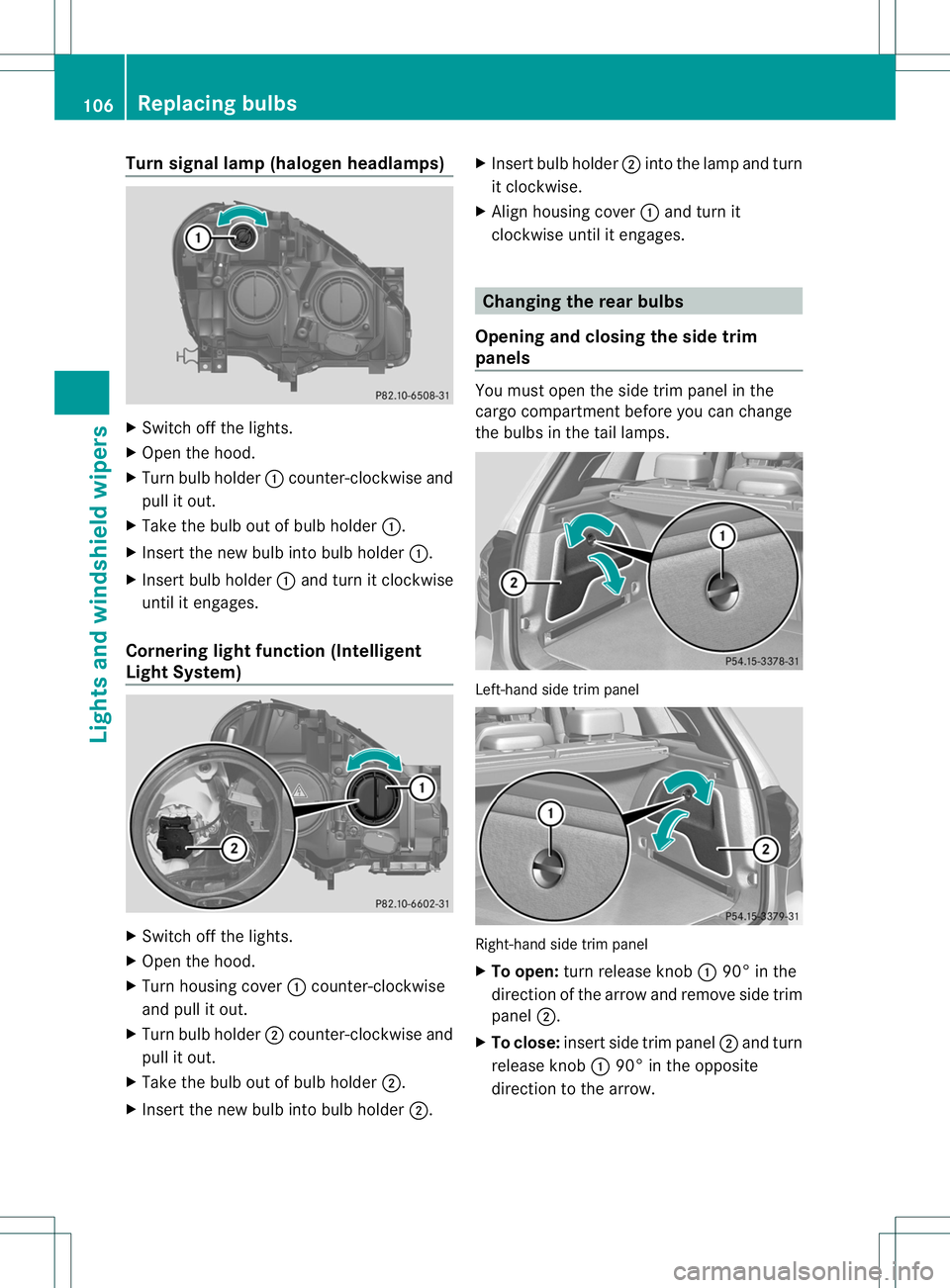
Switch off the lights.
X Open the hood.
X Turn bulb holder :counter-clockwise and
pull it out.
X Take the bulb ou tofbulb holder :.
X Inser tthe new bulb into bulb holder :.
X Insert bulb holder :and turn it clockwise
until it engages.
Cornering light function (Intelligent
Light System) X
Switch off the lights.
X Open the hood.
X Turn housing cover :counter-clockwise
and pull it out.
X Turn bulb holder ;counter-clockwise and
pull it out.
X Take the bulb out of bulb holder ;.
X Insert the new bulb into bulb holder ;.X
Insert bulb holder ;into the lamp and turn
it clockwise.
X Align housing cover :and turn it
clockwise until it engages. Changing the rear bulbs
Opening and closing the side trim
panels You must open the side trim panel in the
cargo compartment before you can change
the bulbs in the tail lamps.
Left-hand side trim panel
Right-hand side trim panel
X
To open: turn release knob :90° in the
direction of the arrow and remove side trim
panel ;.
X To close: insert side trim panel ;and turn
release knob :90° in the opposite
direction to the arrow. 106
Replacing bulbsLights and windshield wipers
Page 110 of 336
Tail lamp
Turn signal lamp/tail lamp and brake
lamp
X
Switch off the lights.
X Open the cargo compartment.
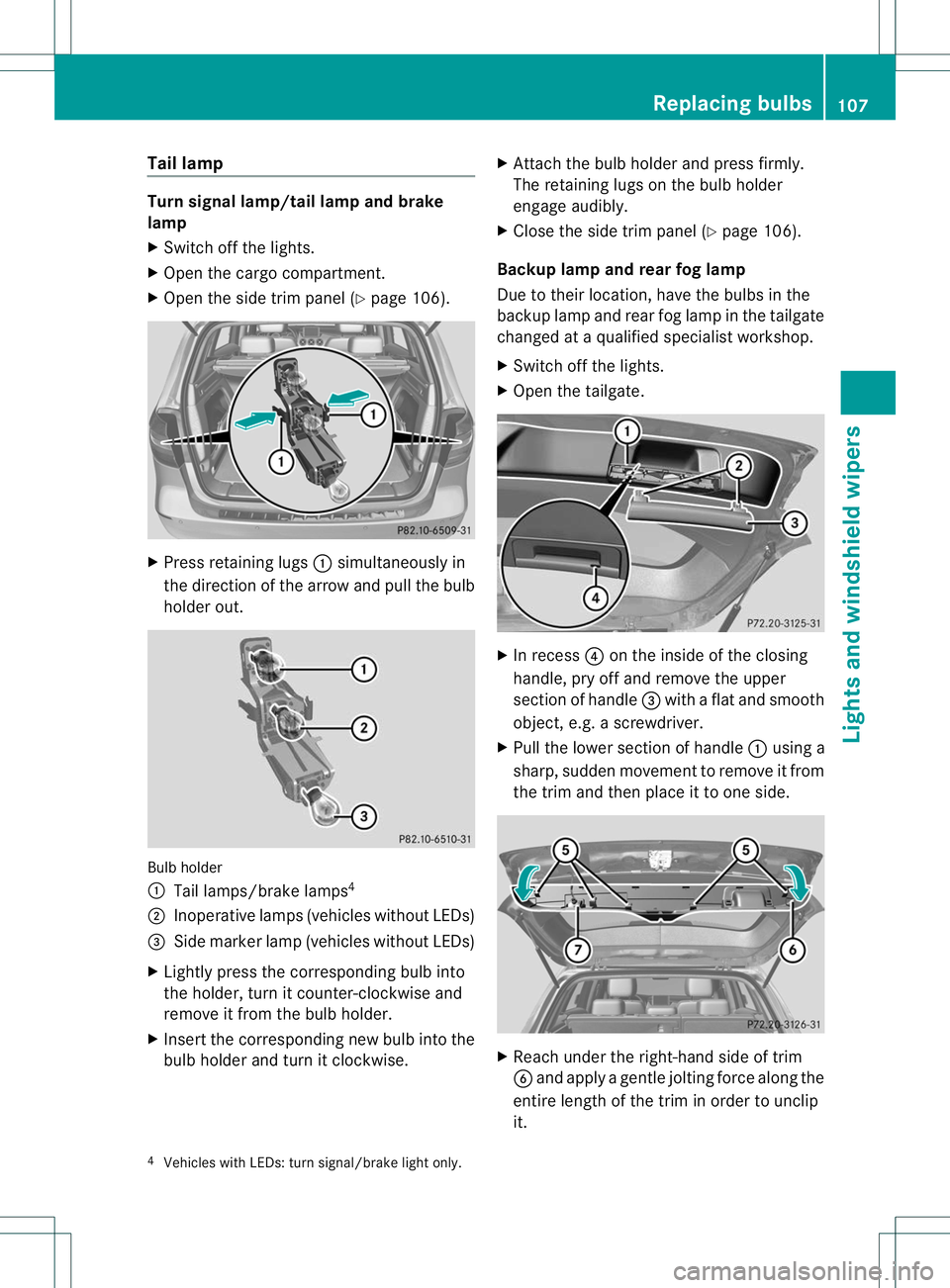
X Open the side trim panel (Y page 106).X
Press retaining lugs :simultaneously in
the direction of the arrow and pull the bulb
holde rout. Bulb holder
:
Tail lamps/brake lamps 4
; Inoperative lamps (vehicles without LEDs)
= Side marke rlamp (vehicle swithout LEDs)
X Lightly press the corresponding bulb into
the holder, tur nitcounter-clockwise and
remove it from the bulb holder.
X Insert the corresponding new bulb into the
bulb holder and turn it clockwise. X
Attach the bulb holder and press firmly.
The retaining lugs on the bulb holder
engage audibly.
X Close the side trim panel (Y page 106).
Backup lamp and rear fog lamp
Due to their location, have the bulbs in the
backup lamp and rear fog lamp in the tailgate
changed at a qualified specialist workshop.
X Switch off the lights.
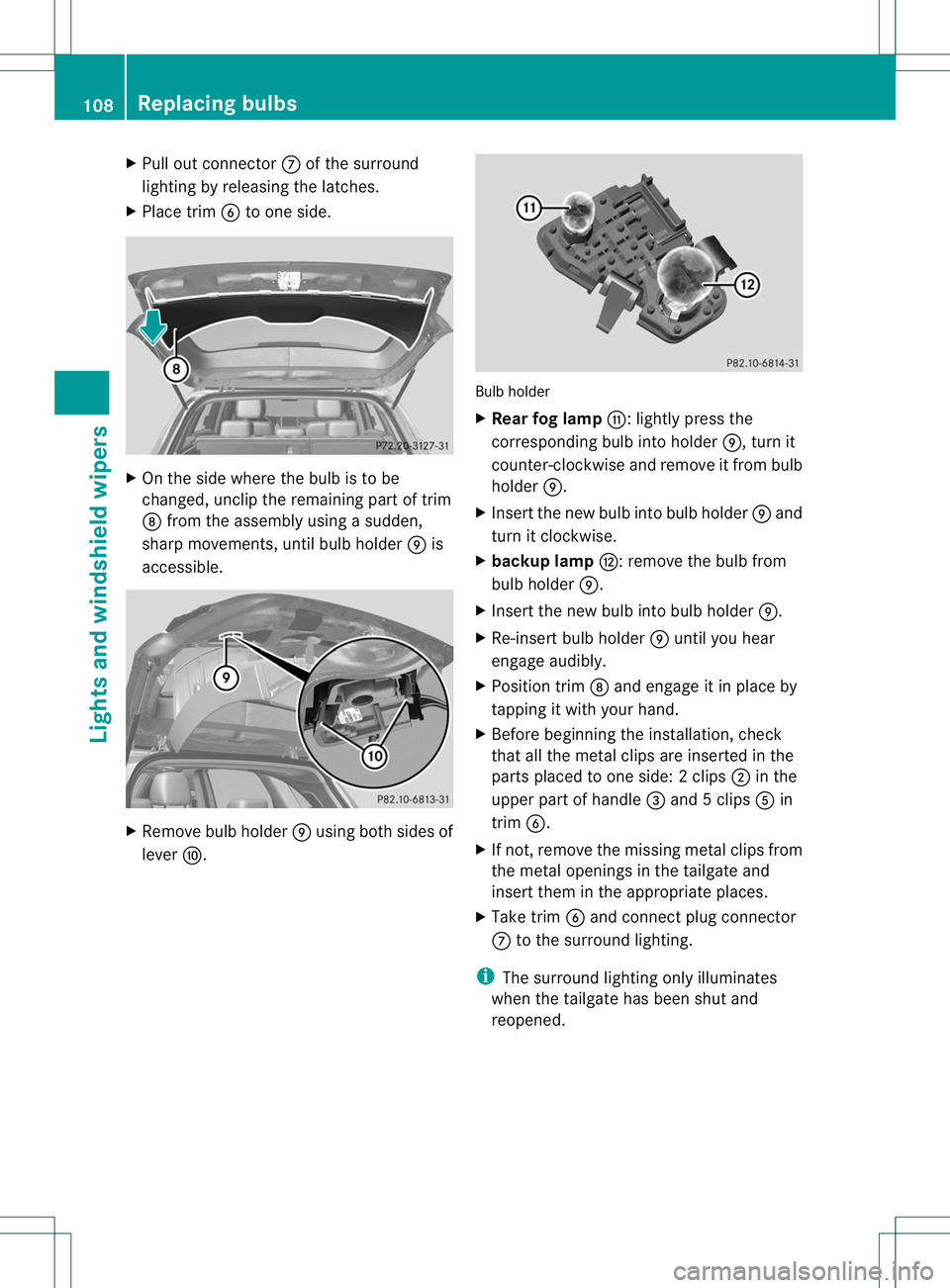
X Open the tailgate. X
In recess ?on the inside of the closing
handle, pry off and remove the upper
section of handle =with a flat and smooth
object, e.g. a screwdriver.
X Pull the lower section of handle :using a
sharp, sudden movementtor emove it from
the trim and then place it to one side. X
Reach under the right-hand side of trim
B and apply a gentle jolting force along the
entire length of the trim in order to unclip
it.
4 Vehicles with LEDs: turn signal/brake light only. Replacing bulbs
107Lights and windshield wipers Z
Page 111 of 336
X
Pull out connector Cof the surround
lighting by releasing the latches.
X Place trim Bto one side. X
On the side where the bulb is to be
changed, unclip the remaining part of trim
D from the assembly using a sudden,
sharp movements, until bulb holder Eis
accessible. X
Remove bulb holder Eusing both sides of
lever F. Bulb holder
X
Rear fog lamp G:lightly press the
corresponding bulb into holder E, turn it
counter-clockwise and remove it fromb ulb
holder E.
X Inser tthe new bulb into bulb holder Eand
turn it clockwise.
X backup lamp H: remove the bulb from
bulb holder E.
X Insert the new bulb into bulb holder E.
X Re-insert bulb holder Euntil you hear
engage audibly.
X Position trim Dand engage it in place by
tapping it with your hand.
X Before beginning the installation, check
that all the metal clips are inserted in the
parts placed to one side: 2clips ;in the
upper part of handle =and 5clips Ain
trim B.
X If not, remove the missing metal clips from
the metal openings in the tailgate and
insert the minthe appropriate places.
X Take trim Band connect plug connector
C to the surround lighting.
i The surround lighting only illuminates
when the tailgate has been shut and
reopened. 108
Replacing bulbsLights and windshield wipers
Page 118 of 336
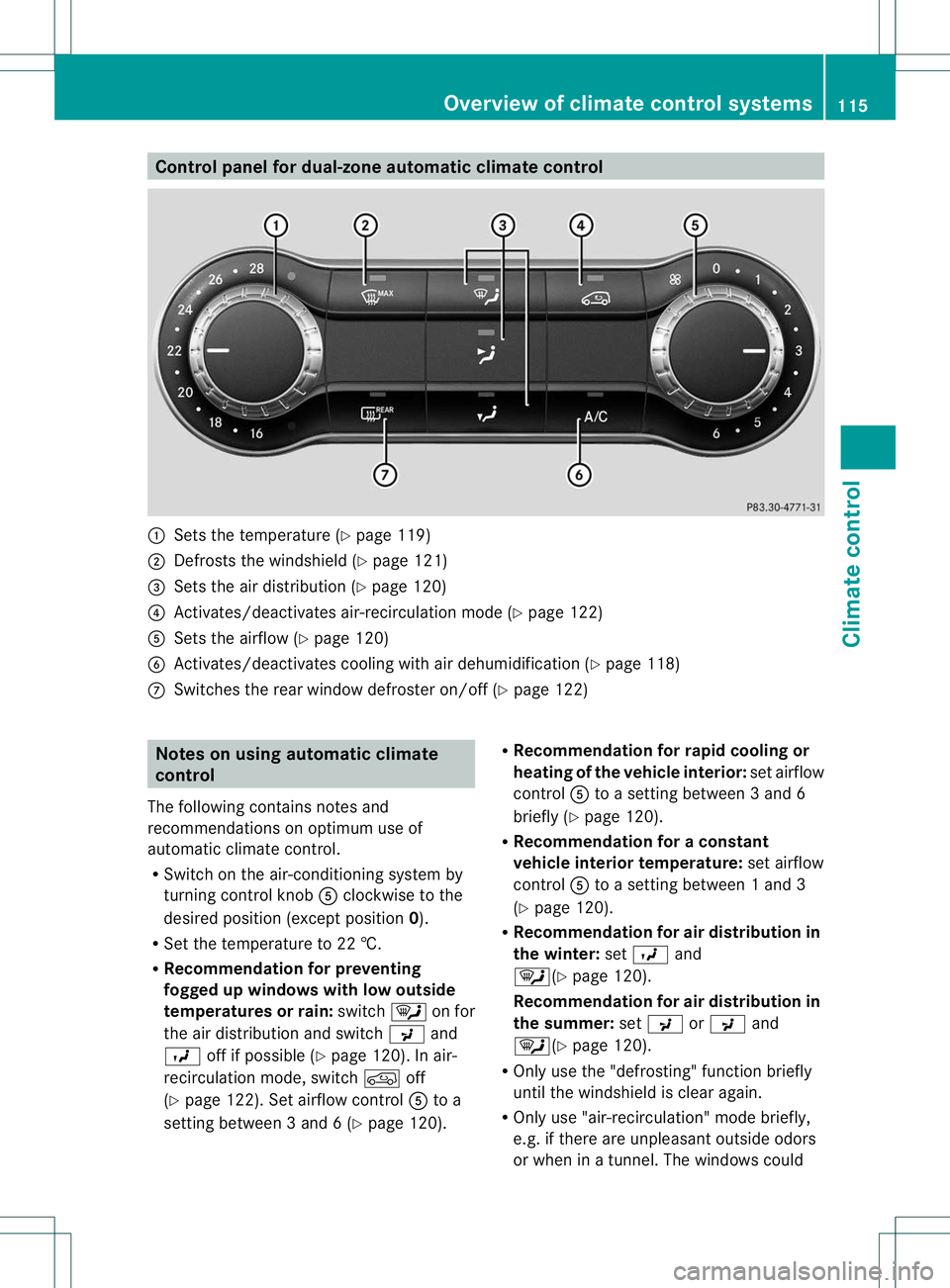
Control panel for dual-zone automatic climate control
:
Sets the temperature (Y page 119)
; Defrosts the windshield (Y page 121)
= Sets the air distribution (Y page 120)
? Activates/deactivates air-recirculation mode (Y page 122)
A Sets the airflow (Y page 120)
B Activates/deactivates coolin gwith air dehumidification ( Ypage 118)
C Switches the rear window defroster on/off (Y page 122)Notes on using automatic climate
control
The following contains notes and
recommendations on optimum use of
automatic climate control.
R Switch on the air-conditioning system by
turning control knob Aclockwise to the
desired position (except position 0).
R Set the temperature to 22 †.
R Recommendation for preventing
fogged up windows with low outside
temperatures or rain: switch¯on for
the air distribution and switch Pand
O off if possible (Y page 120). In air-
recirculation mode, switch doff
(Y page 122). Set airflow control Ato a
setting between 3 and 6 (Y page 120).R
Recommendation for rapid cooling or
heating of the vehicle interior: set airflow
control Ato a setting between 3 and 6
briefly (Y page 120).
R Recommendation for a constant
vehicle interior temperature: set airflow
control Ato a setting between 1 and 3
(Y page 120).
R Recommendation for air distribution in
the winter: setO and
¯(Y page 120).
Recommendation for air distribution in
the summer: setP orP and
¯(Y page 120).
R Only use the "defrosting" function briefly
until the windshield is clear again.
R Only use "air-recirculation" mode briefly,
e.g. if there are unpleasan toutside odors
or when in a tunnel. The windows could Overview of climate control systems
115Climate control Z
Page 121 of 336
for the front-passenger side as well. The
indicator lamp in the
ábutton goes out.
R Use the residual heatf unction if you want
to heat or ventilate th evehicle interior
when the ignition is switched off. The
"residual heat" function can only be
activated or deactivated with the ignition
switched off. Operating the climate control
systems
Activating/deactivating climate
control
Points to observe before use G
WARNING
When the climate control system is
deactivated, the outside air supply and
circulation are also deactivated. Only choose
this setting for a short time. Otherwise the
windows could fog up, impairing visibility and
endangering you and others.
Activating/deactivating Climate control
X
Turn the SmartKey to position 2in the
ignition lock.
X To switch on: turn controlAclockwise
to the desired position (except position 0)
(Y page 115).
X To switch off: turn controlAcounter-
clockwise to position 0(Y page 115). 3-zone automatic climate control
X
Turn the SmartKey to position 2in the
ignition lock.
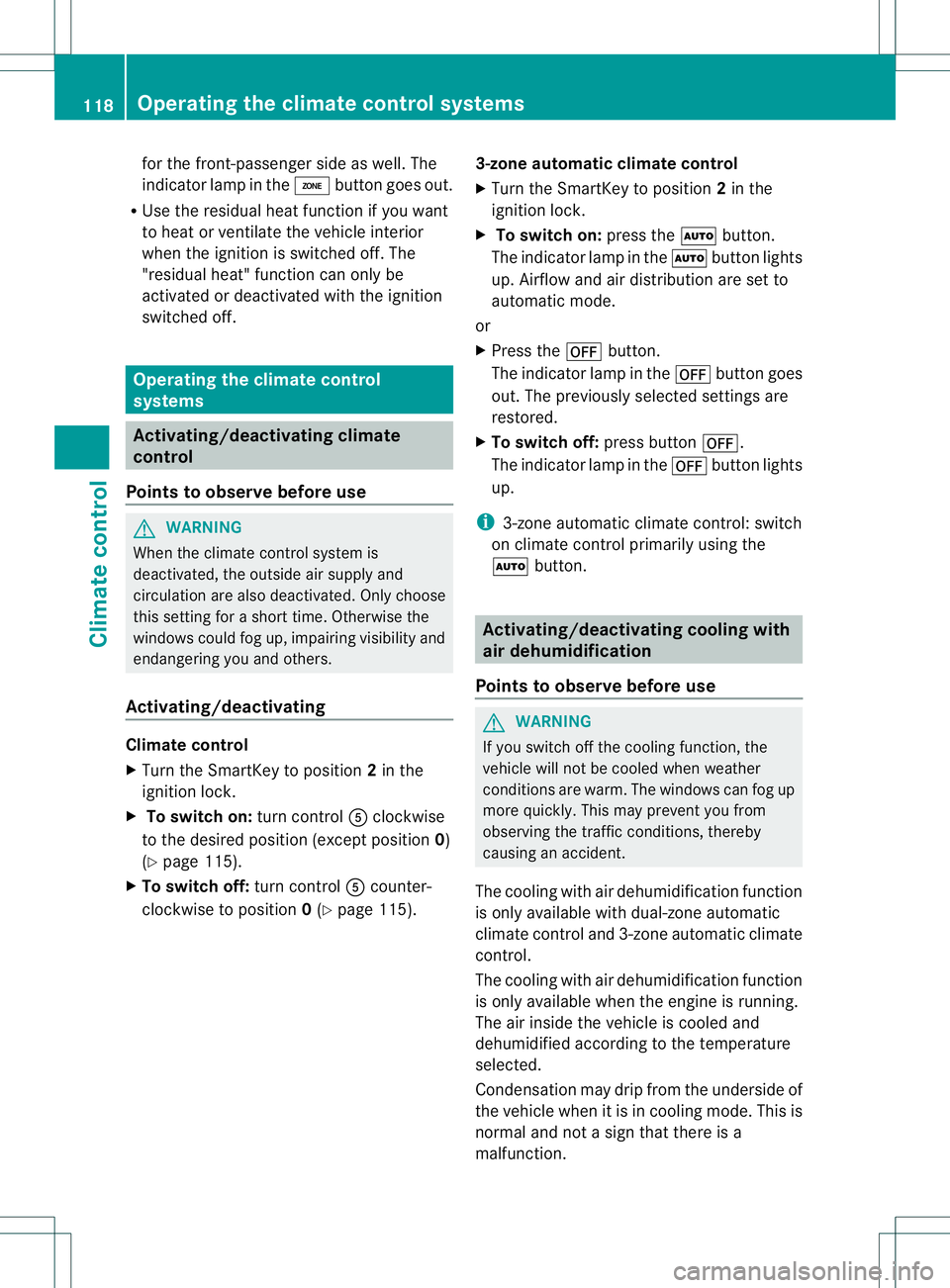
X To switch on: press theÃbutton.
The indicator lamp in the Ãbutton lights
up. Airflow and air distribution are set to
automatic mode.
or
X Press the ^button.
The indicator lamp in the ^button goes
out. The previously selected settings are
restored.
X To switch off: press button^.
The indicator lamp in the ^button lights
up.
i 3-zone automatic climate control: switch
on climate control primarily using the
à button. Activating/deactivating cooling with
air dehumidification
Points to observe before use G
WARNING
If you switch off the cooling function, the
vehicle will not be cooled when weather
conditions are warm. The windows can fog up
more quickly. This may preventy ou from
observing the traffic conditions, thereby
causing an accident.
The cooling with air dehumidification function
is only available with dual-zone automatic
climate control and 3-zone automatic climate
control.
The cooling with air dehumidification function
is only available when the engine is running.
The air inside the vehicle is cooled and
dehumidified according to the temperature
selected.
Condensation may drip from the underside of
the vehicle when it is in cooling mode. This is
normal and not a sign that there is a
malfunction. 118
Operating the climate control systemsClimate control
Page 122 of 336
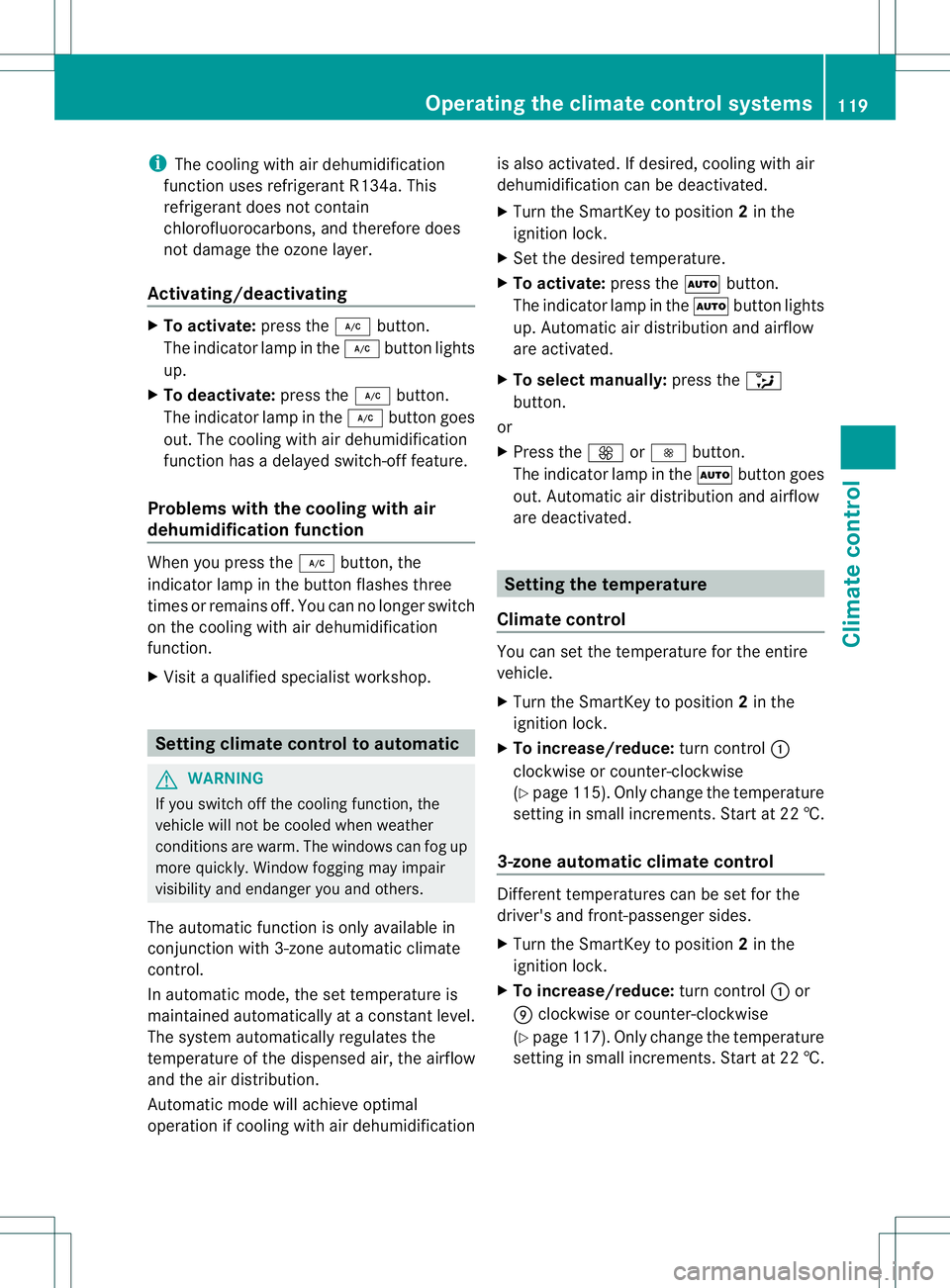
i
The cooling with air dehumidification
function uses refrigerant R134a. This
refrigerant does not contain
chlorofluorocarbons, and therefore does
not damage the ozone layer.
Activating/deactivating X
To activate: press the¿button.
The indicator lamp in the ¿button lights
up.
X To deactivate: press the¿button.
The indicator lamp in the ¿button goes
out. The cooling with air dehumidification
function has a delayed switch-off feature.
Problems with the cooling with air
dehumidification function When you press the
¿button, the
indicator lamp in the button flashes three
times or remains off. You can no longer switch
on the cooling with air dehumidification
function.
X Visit a qualified specialist workshop. Setting climate control to automatic
G
WARNING
If you switch off the cooling function, the
vehicle will not be cooled when weather
conditions are warm. The windows can fog up
more quickly. Window fogging may impair
visibility and endanger you and others.
The automatic function is only available in
conjunction with 3-zone automatic climate
control.
In automatic mode, the set temperature is
maintained automatically at a constant level.
The system automatically regulates the
temperature of the dispensed air, the airflow
and the air distribution.
Automatic mode will achieve optimal
operation if cooling with air dehumidification is also activated. If desired, cooling with air
dehumidification can be deactivated.
X
Turn the SmartKey to position 2in the
ignition lock.
X Set the desired temperature.
X To activate: press theÃbutton.
The indicator lamp in the Ãbutton lights
up. Automatic air distribution and airflow
are activated.
X To select manually: press the_
button.
or
X Press the KorI button.
The indicator lamp in the Ãbutton goes
out. Automatic air distribution and airflow
are deactivated. Setting the temperature
Climate control You can set the temperature for the entire
vehicle.
X
Turn the SmartKey to position 2in the
ignition lock.
X To increase/reduce: turn control:
clockwise or counter-clockwise
(Y page 115). Only change the temperature
setting in small increments. Start at 22 †.
3-zone automatic climate control Different temperatures can be set for the
driver's and front-passenger sides.
X
Turn the SmartKey to position 2in the
ignition lock.
X To increase/reduce: turn control:or
E clockwise or counter-clockwise
(Y page 117). Only change the temperature
setting in small increments. Start at 22 †. Operating the climate control systems
119Climate control Z
Page 123 of 336
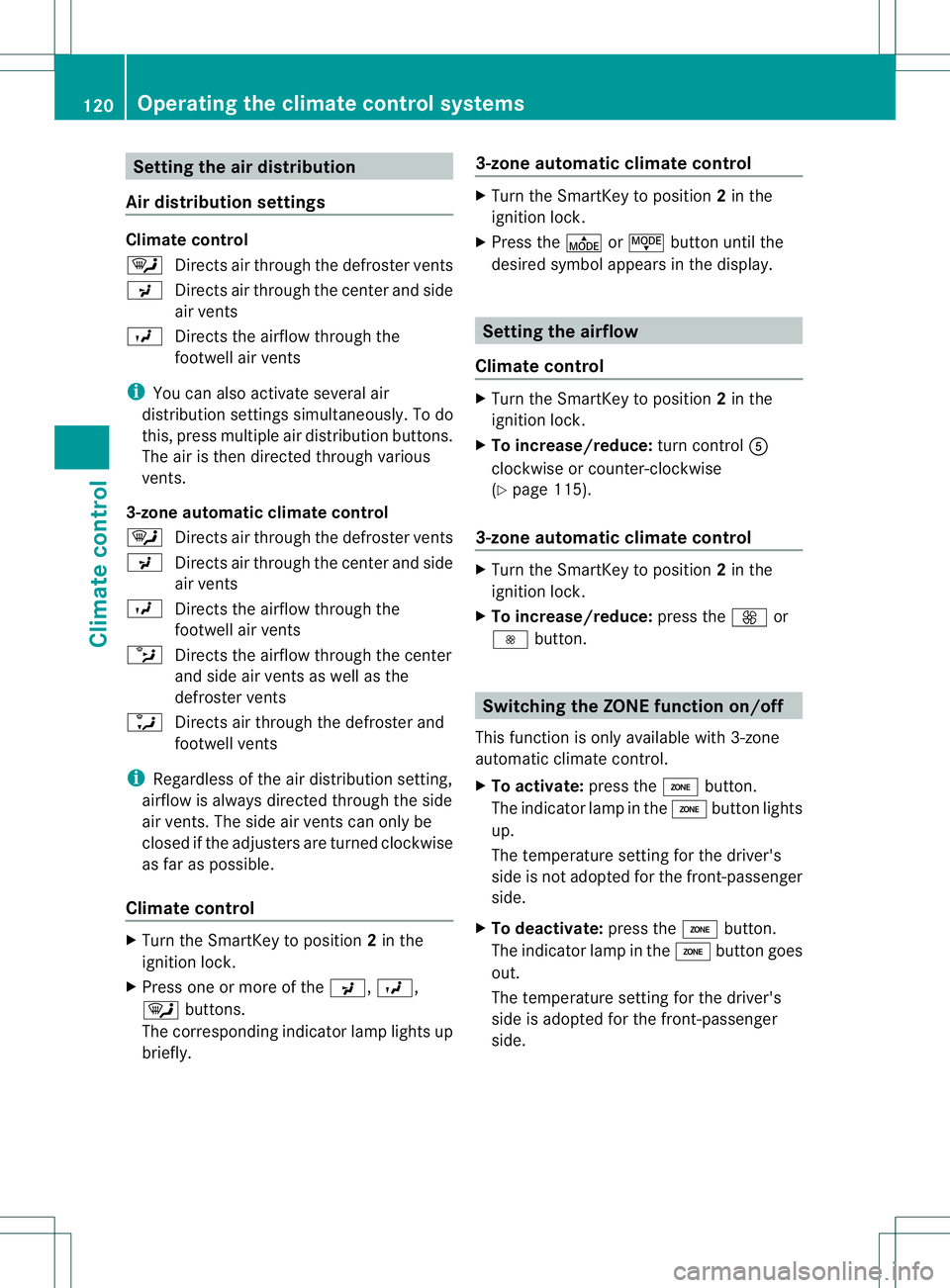
Setting the air distribution
Air distribution settings Climate control
¯
Directs air through the defroster vents
P Directs air through the center and side
air vents
O Directs the airflow through the
footwell air vents
i You can also activate several air
distribution settings simultaneously .To do
this, press multiple air distribution buttons.
The air is then directed through various
vents.
3-zone automatic climate control
¯ Directs air through the defroster vents
P Directs air through the center and side
air vents
O Directs the airflow through the
footwell air vents
b Directs the airflow through the center
and side air vents as well as the
defroster vents
a Directs air through the defroster and
footwell vents
i Regardless of the air distribution setting,
airflow is always directed through the side
air vents. The side air vents can only be
closed if the adjusters are turned clockwise
as far as possible.
Climate control X
Turn the SmartKey to position 2in the
ignition lock.
X Press one or more of the P,O,
¯ buttons.
The corresponding indicator lamp lights up
briefly. 3-zone automatic climate control X
Turn the SmartKey to position 2in the
ignition lock.
X Press the ÉorË button until the
desired symbol appears in the display. Setting the airflow
Climate control X
Turn the SmartKey to position 2in the
ignition lock.
X To increase/reduce: turn controlA
clockwise or counter-clockwise
(Y page 115).
3-zone automatic climate control X
Turn the SmartKey to position 2in the
ignition lock.
X To increase/reduce: press theKor
I button. Switching the ZONE function on/off
This function is only available with 3-zone
automatic climate control.
X To activate: press theábutton.
The indicator lamp in the ábutton lights
up.
The temperature setting for the driver's
side is not adopted for the front-passenger
side.
X To deactivate: press theábutton.
The indicator lamp in the ábutton goes
out.
The temperature setting for the driver's
side is adopted for the front-passenger
side. 120
Operating the climate control systemsClimate control