clock MERCEDES-BENZ B-CLASS SPORTS 2014 Owners Manual
[x] Cancel search | Manufacturer: MERCEDES-BENZ, Model Year: 2014, Model line: B-CLASS SPORTS, Model: MERCEDES-BENZ B-CLASS SPORTS 2014Pages: 360, PDF Size: 39.45 MB
Page 83 of 360
You could therefore lock yourself out if:
R the vehicle is being pushed.
R the vehicle is being towed.
R the vehicle is on aroller dynamometer.
You can also switc hthe automatic locking
function on and off using the on-board
computer (Y page 205). Unlocking th
edriver' sdoor
(mechanical key)
If the vehicle can no longer be unlocked with
the SmartKey, use the mechanical key.
If you use the mechanical key to unloc kand
open the driver's door, the anti-thef talarm
system will be triggere d(Ypage 70).
X Take the mechanical key out of the
SmartKey (Y page 75).
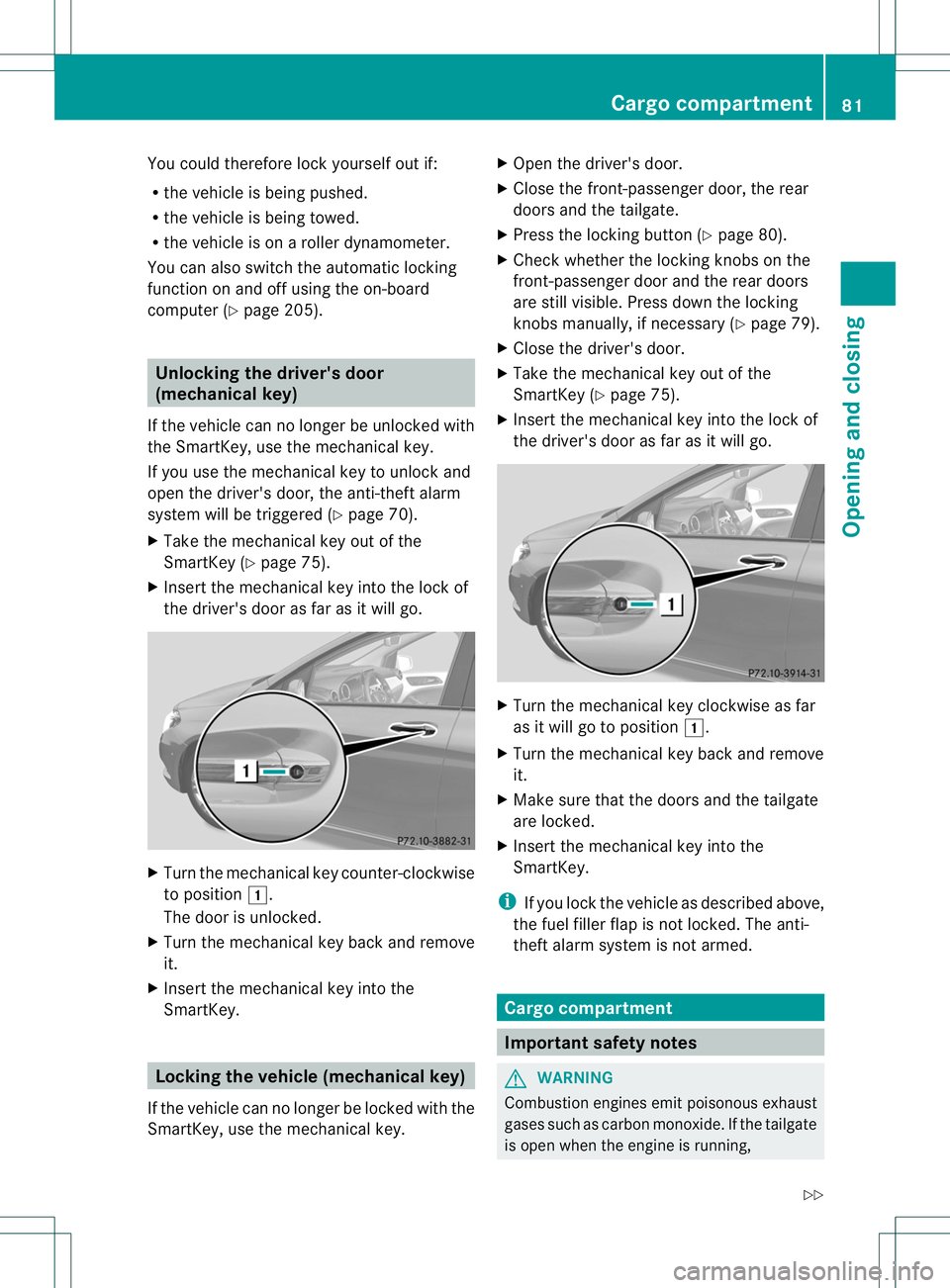
X Insert the mechanical key int othe lock of
the driver's door as far as it will go. X
Turn the mechanical key counter-clockwise
to position 000C.
The door is unlocked.
X Turn the mechanical key back and remove
it.
X Insert the mechanical key int othe
SmartKey. Locking th
evehicle (mechanical key)
If the vehicle can no longer be locked with the
SmartKey, use the mechanical key. X
Open the driver's door.
X Close the front-passenger door, the rear
doors and the tailgate.
X Press the locking button (Y page 80).
X Check whether the locking knobs on the
front-passenger door and the rear doors
are still visible. Press down the locking
knobs manually, if necessary ( Ypage 79).
X Close the driver's door.
X Take the mechanical key out of the
SmartKey (Y page 75).
X Insert the mechanical key int othe lock of
the driver's door as far as it will go. X
Turn the mechanical key clockwise as far
as it will go to position 000C.
X Turn the mechanical key back and remove
it.
X Make sure that the doors and the tailgate
are locked.
X Insert the mechanical key int othe
SmartKey.
i If you lock the vehicle as described above,
the fuel filler flap is not locked. The anti-
theft alarm system is not armed. Cargo compartment
Important safety notes
G
WARNING
Combustion engines emit poisonous exhaust
gases such as carbon monoxide .Ifthe tailgate
is open when the engine is running, Cargo compartment
81Opening and closing
Z
Page 85 of 360
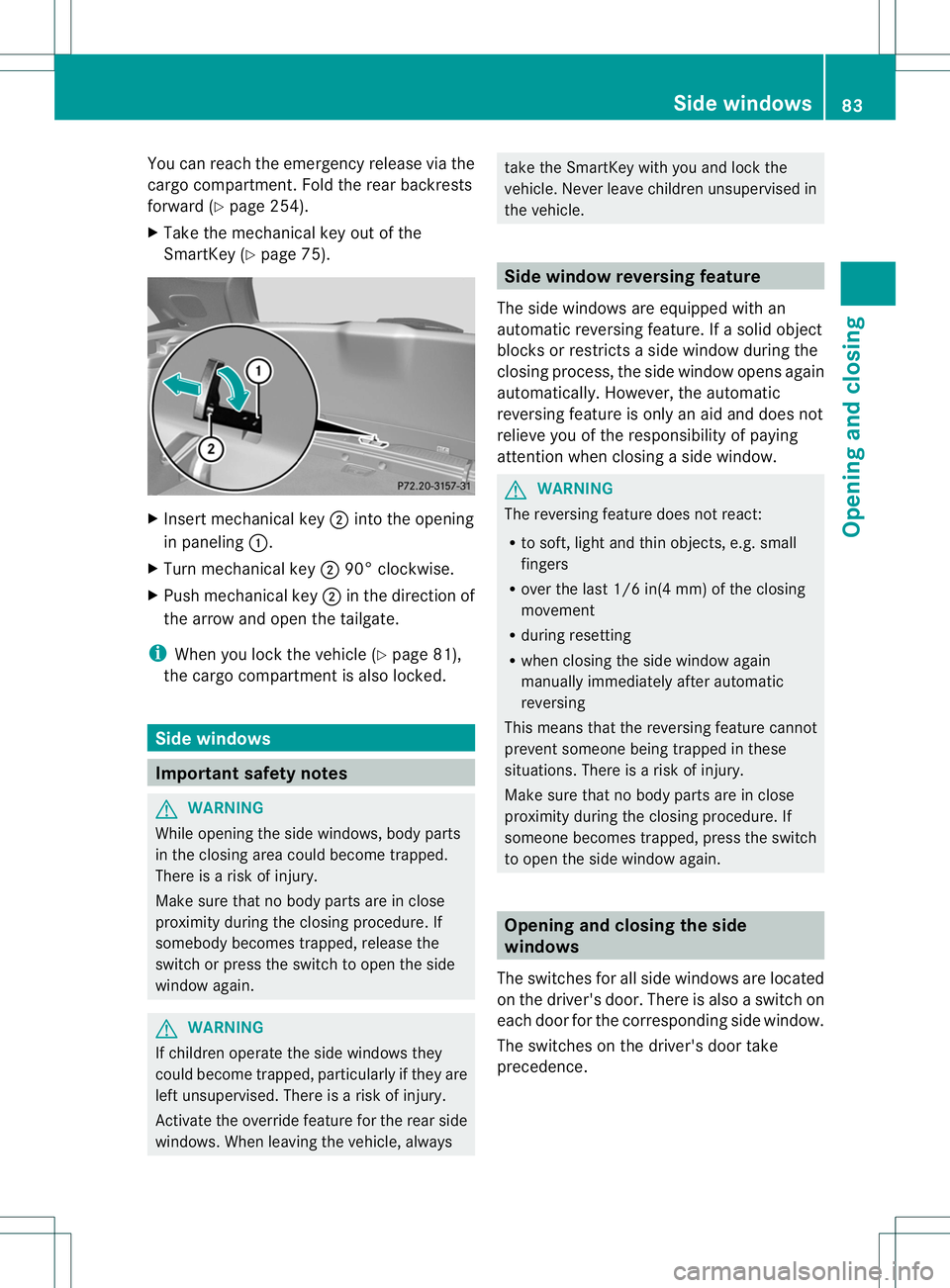
You can reach the emergenc
yrelease via the
carg ocompartment. Fold the rear backrests
forward (Y page 254).
X Take the mechanical key out of the
SmartKey (Y page 75). X
Insert mechanical key 0010intot he opening
in paneling 001A.
X Turn mechanical key 001090° clockwise.
X Push mechanical key 0010in the direction of
the arrow and open the tailgate.
i When you lock the vehicle ( Ypage 81),
the carg ocompartmen tisalso locked. Side windows
Important safety notes
G
WARNING
While opening the side windows ,body parts
in the closing area could become trapped.
There is arisk of injury.
Make sure that no body part sare in close
proximit ydurin gthe closing procedure. If
somebody becomes trapped, release the
switc horp ress the switc htoopen the side
window again. G
WARNING
If children operat ethe side windows they
could become trapped, particularly if the yare
left unsupervised. There is arisk of injury.
Activate the override feature for the rear side
windows .When leaving the vehicle, always take the SmartKey with you and lock the
vehicle. Never leave children unsupervised in
the vehicle.
Side window reversing feature
The side windows are equipped with an
automatic reversing feature. If asolid object
blocks or restrictsas ide window during the
closing process, the side window opens again
automatically .However, the automatic
reversing feature is only an aid and does not
relieve you of the responsibility of paying
attention when closing aside window. G
WARNING
The reversing feature does not react:
R to soft, light and thin objects, e.g. small
fingers
R over the last 1/6 in(4 mm) of the closing
movement
R during resetting
R when closing the side window again
manually immediately after automatic
reversing
This means that the reversing feature cannot
prevent someone being trapped in these
situations. There is arisk of injury.
Make sure that no body parts are in close
proximity during the closing procedure. If
someone becomes trapped, press the switch
to open the side window again. Opening and closin
gthe side
windows
The switches for all side windows are located
on the driver's door. There is also aswitch on
each door for the corresponding side window.
The switches on the driver's door take
precedence. Side windows
83Opening and closing Z
Page 115 of 360
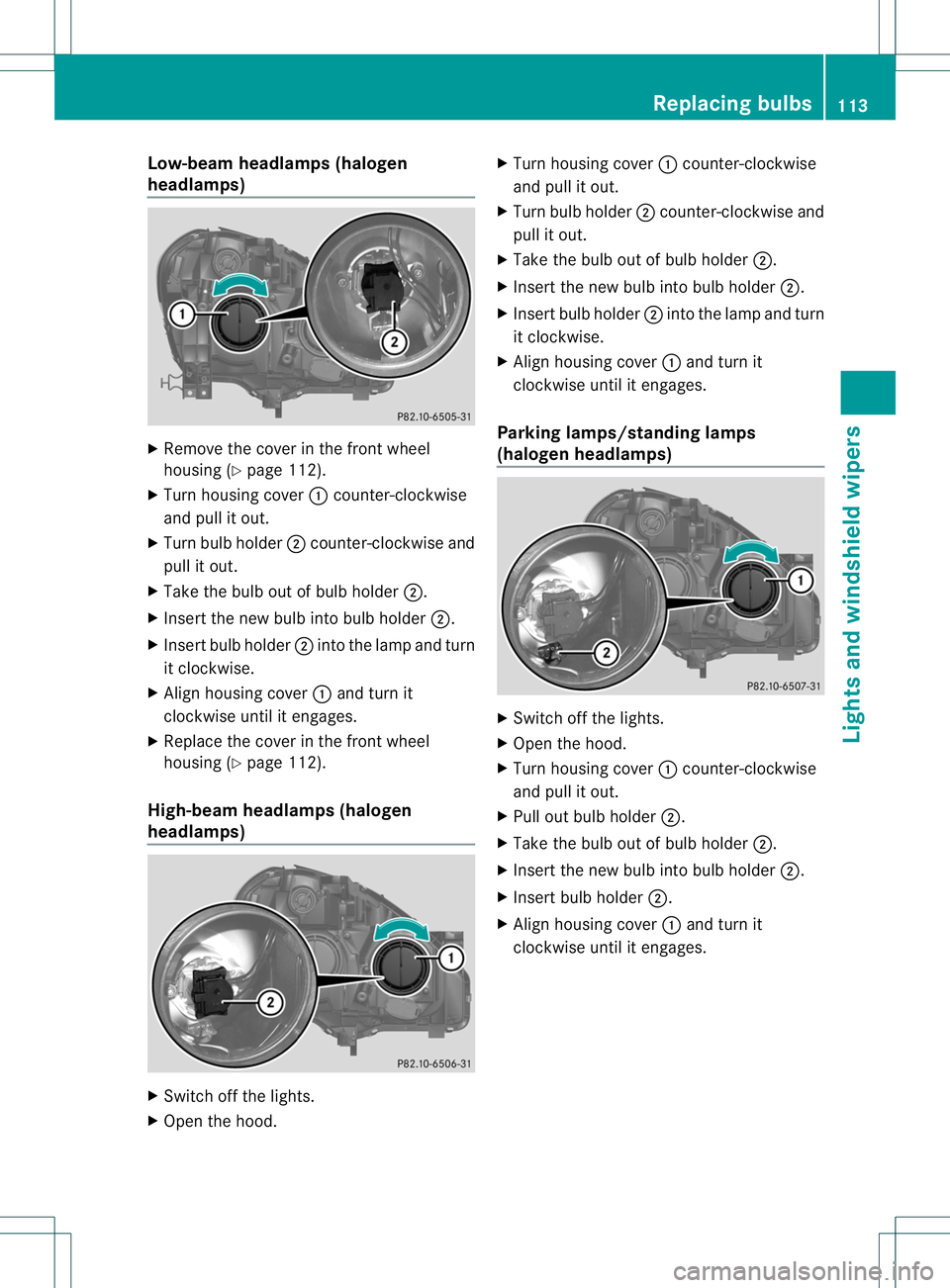
Low-bea
mheadlamps (halogen
headlamps) X
Remov ethe cover in th efront wheel
housin g(Ypage 112).
X Turn housin gcover 001Acounter-clockwise
and pull it out.
X Turn bulb holder 0010counter-clockwise and
pull it out.
X Take th ebulb out of bulb holder 0010.
X Inser tthe new bulb into bulb holder 0010.
X Insert bulb holder 0010into the lamp and turn
it clockwise.
X Align housing cover 001Aand turn it
clockwise until it engages.
X Replace the cover in the front wheel
housing (Y page 112).
High-beam headlamps (halogen
headlamps) X
Switch off the lights.
X Open the hood. X
Turn housing cover 001Acounter-clockwise
and pull it out.
X Turn bulb holder 0010counter-clockwise and
pull it out.
X Take the bulb out of bulb holder 0010.
X Insert the new bulb into bulb holder 0010.
X Insert bulb holder 0010into the lamp and turn
it clockwise.
X Align housing cover 001Aand turn it
clockwise until it engages.
Parking lamps/standing lamps
(halogen headlamps) X
Switch off the lights.
X Open the hood.
X Turn housing cover 001Acounter-clockwise
and pull it out.
X Pull out bulb holder 0010.
X Take the bulb out of bulb holder 0010.
X Insert the new bulb into bulb holder 0010.
X Insert bulb holder 0010.
X Align housing cover 001Aand turn it
clockwise until it engages. Replacing bulbs
113Lights and windshield wipers Z
Page 116 of 360
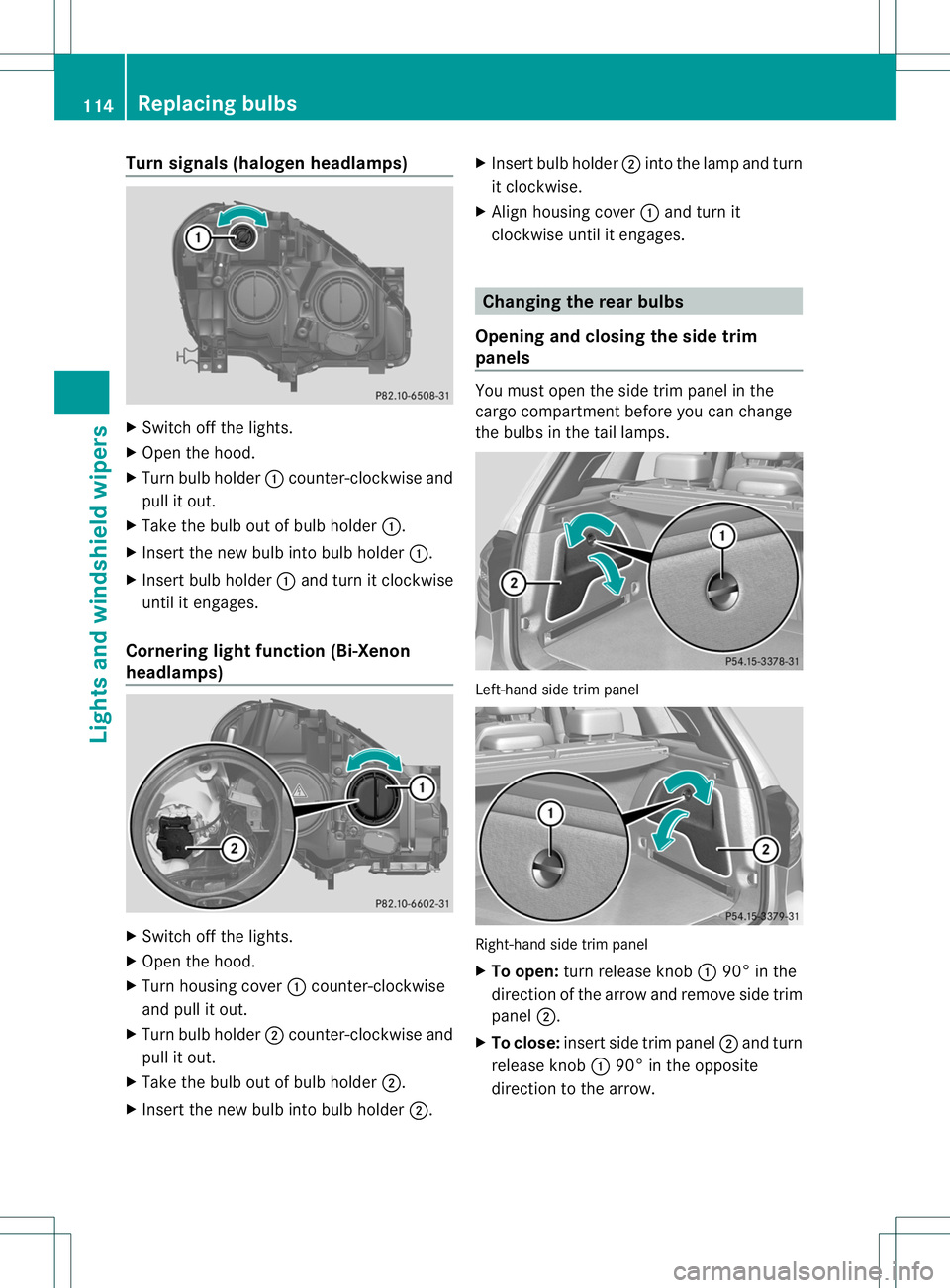
Turn signals (haloge
nheadlamps) X
Switch off the lights.
X Open the hood.
X Turn bulb holder 001Acounter-clockwis eand
pull it out.
X Take the bulb ou tofbulb holder 001A.
X Inser tthe new bulb into bulb holder 001A.
X Insert bulb holder 001Aand turn it clockwise
until it engages.
Cornering light function (Bi-Xenon
headlamps) X
Switch off the lights.
X Open the hood.
X Turn housing cover 001Acounter-clockwise
and pull it out.
X Turn bulb holder 0010counter-clockwise and
pull it out.
X Take the bulb out of bulb holder 0010.
X Insert the new bulb into bulb holder 0010.X
Insert bulb holder 0010into the lamp and turn
it clockwise.
X Align housing cover 001Aand turn it
clockwise until it engages. Changing the rear bulbs
Opening and closing the side trim
panels You must open the side trim panel in the
cargo compartmentb
efore you can change
the bulbs in the tail lamps. Left-hand side trim panel
Right-hand side trim panel
X
To open: turn release knob 001A90° in the
direction of the arrow and remove side trim
panel 0010.
X To close: insert side trim panel 0010and turn
release knob 001A90° in the opposite
direction to the arrow. 114
Replacing bulbsLights and windshield wipers
Page 117 of 360
Tail lamp
Turn signal lamp/tail lamp and brake
lamp
X
Switch off the lights.
X Open the cargo compartment.
X Open the side trim panel (Y page 114).X
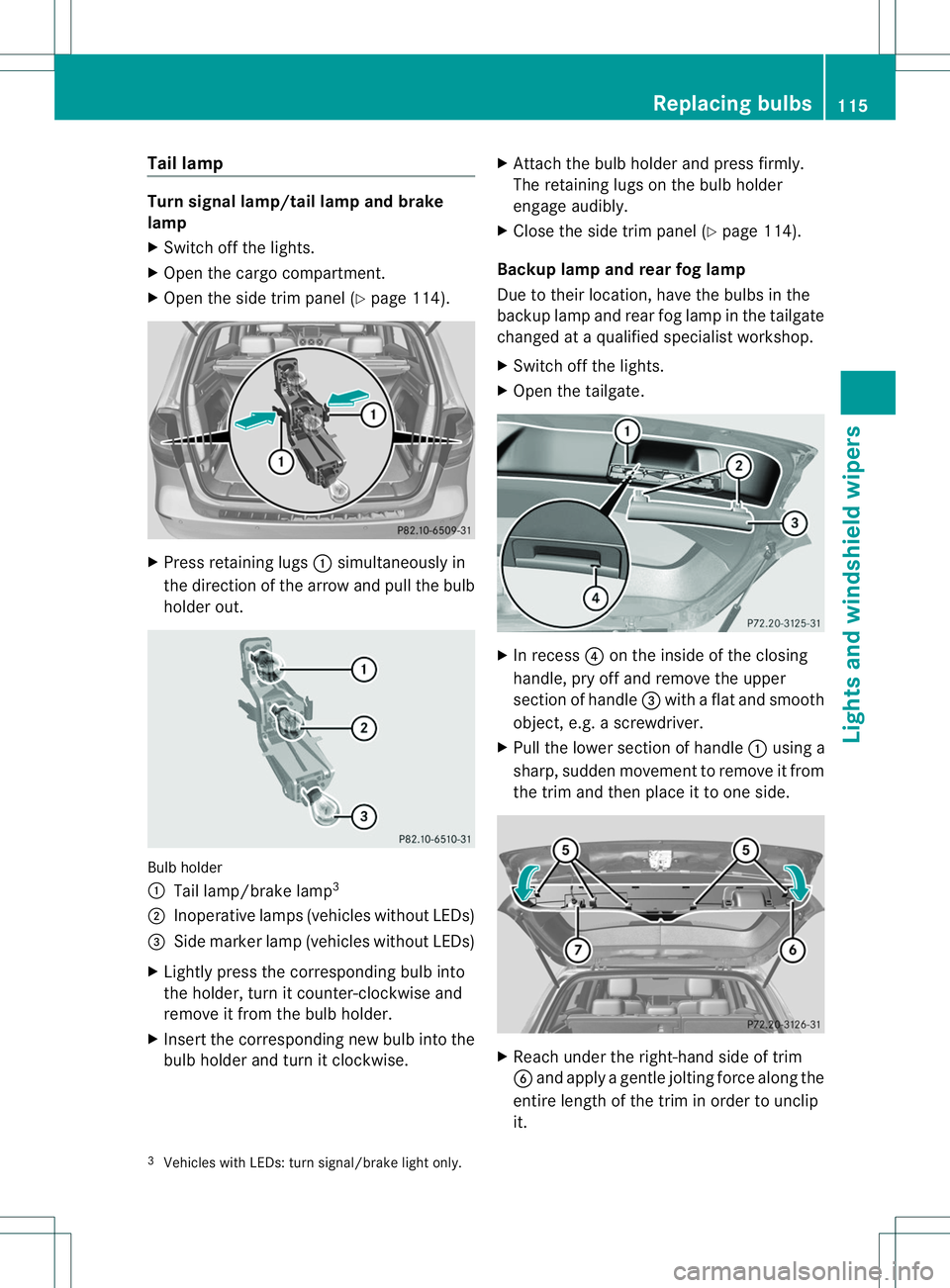
Press retaining lugs 001Asimultaneously in
the direction of the arrow and pull the bulb
holde rout. Bulb holder
001A
Tail lamp/brak elamp 3
0010 Inoperative lamps (vehicles without LEDs)
0023 Sidem arke rlamp (vehicle swithout LEDs)
X Lightly press the correspondin gbulb into
the holder ,tur nitc ounter-clockwise and
remove it from the bulb holder.
X Insert the corresponding new bulb into the
bulb holder and turn it clockwise. X
Attach the bulb holder and press firmly.
The retaining lugs on the bulb holder
engage audibly.
X Close the side trim panel (Y page 114).
Backup lamp and rear fog lamp
Due to their location, have the bulbs in the
backup lamp and rear fog lamp in the tailgate
changed at aqualified specialist workshop.
X Switch off the lights.
X Open the tailgate. X
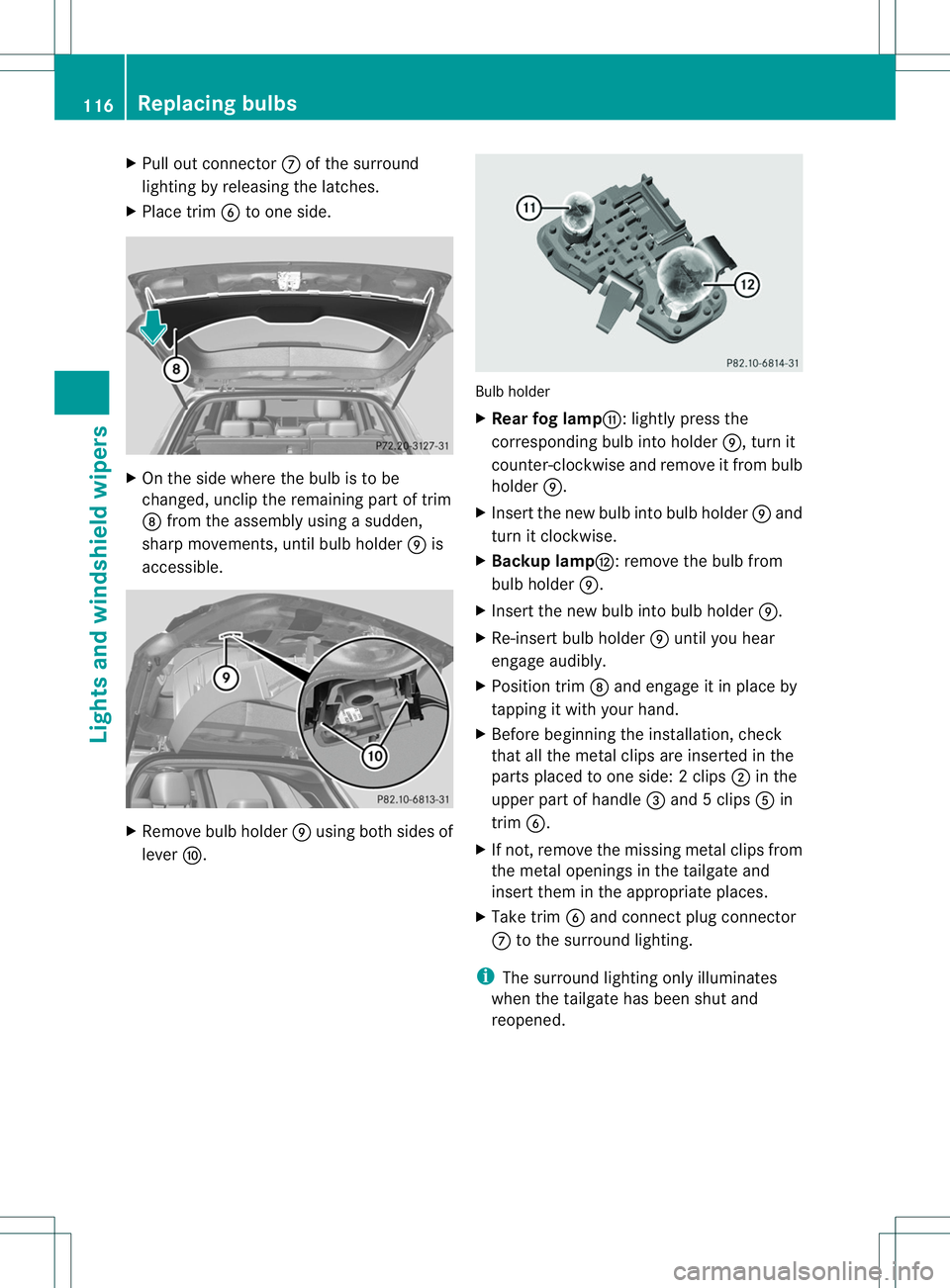
In recess 0021on the inside of the closing
handle, pry off and remove the upper
section of handle 0023with aflat and smooth
object ,e.g. ascrewdriver.
X Pull the lower section of handle 001Ausing a
sharp, sudden movemen ttoremove it from
the trim and then place it to one side. X
Reach under the right-hand side of trim
0024 and apply agentle jolting forc ealong the
entire lengt hofthe trim in order to unclip
it.
3 Vehicles with LEDs: turn signal/brake light only. Replacing bulbs
115Lights and windshield wipers Z
Page 118 of 360
X
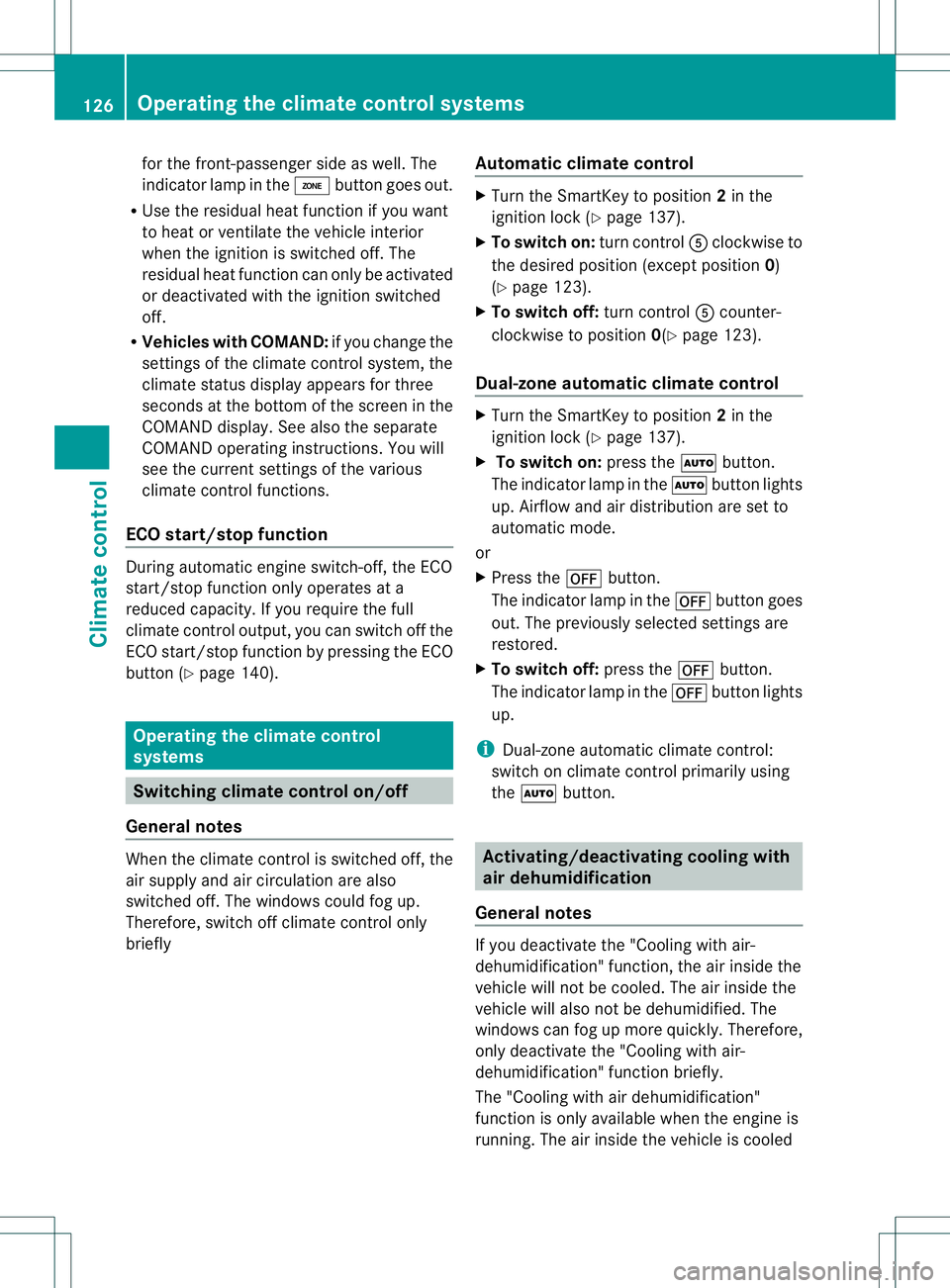
Pull out connector 0007of the surround
lighting by releasing the latches.
X Place trim 0024to one side. X
On the side where the bulb is to be
changed, unclip the remaining part of trim
0008 from the assembly using asudden,
sharp movements, until bulb holder 0009is
accessible. X
Remove bulb holder 0009using both sides of
lever 0016. Bulb holder
X
Rear fog lamp001D:l ightly press the
correspondin gbulb int oholder 0009,turnit
counter-clockwise and remove it fro mbulb
holder 0009.
X Inser tthe new bulb into bulb holder 0009and
turn it clockwise.
X Backup lamp0004:r emove the bulb from
bulb holder 0009.
X Insert the new bulb into bulb holder 0009.
X Re-insert bulb holder 0009until you hear
engage audibly.
X Position trim 0008and engage it in place by
tapping it with your hand.
X Before beginning the installation, check
that all the metal clips are inserted in the
parts placed to one side: 2clips 0010in the
upper part of handle 0023and 5clips 001Ein
trim 0024.
X If not ,remove the missin gmetal clips from
the metal openings in the tailgat eand
insert the minthe appropriate places.
X Take trim 0024and connect plug connector
0007 to the surround lighting.
i The surround lighting only illuminates
when the tailgate has been shut and
reopened. 116
Replacing bulbsLights and windshield wipers
Page 125 of 360
Control panel for climat
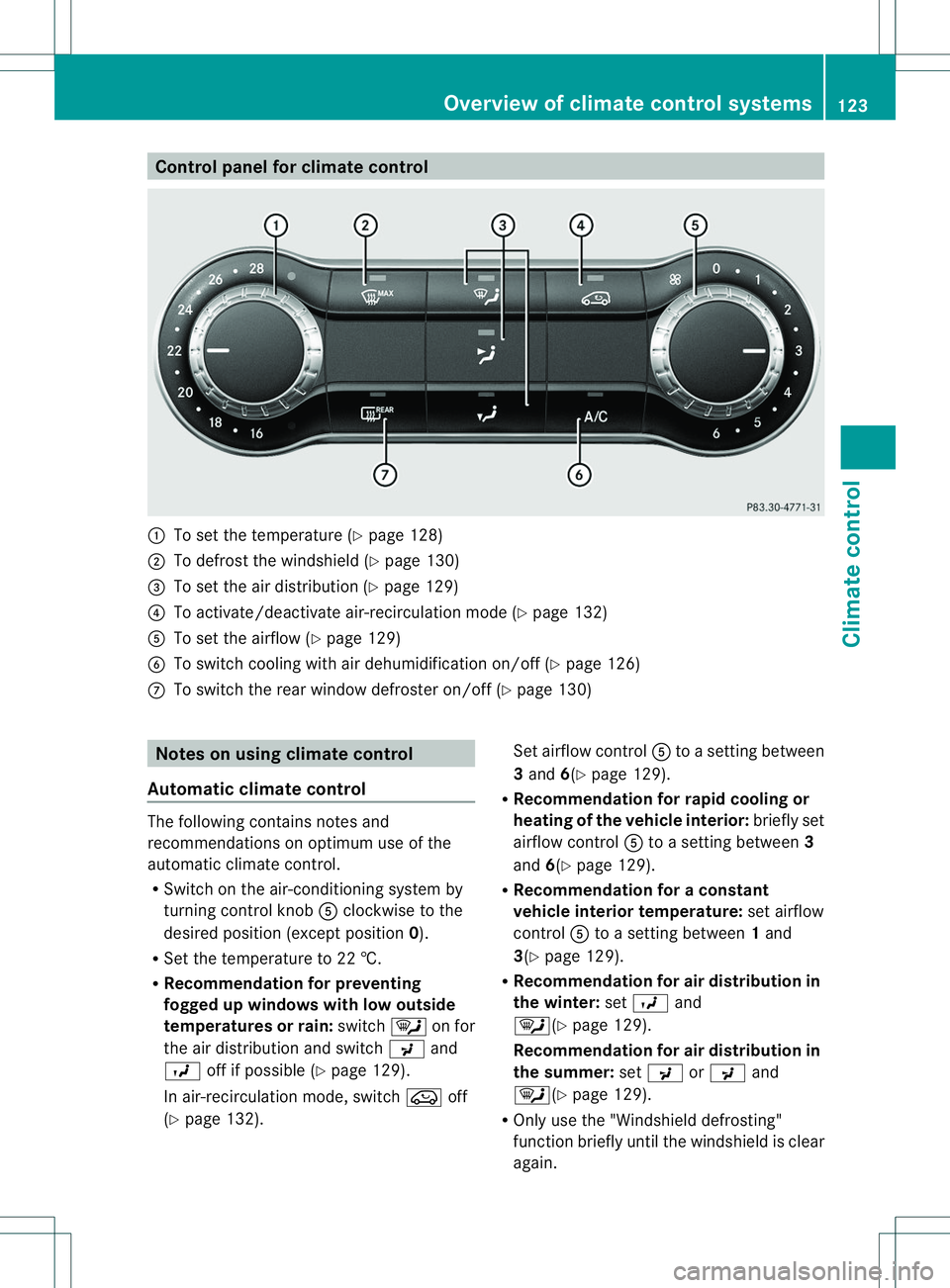
econtrol 001A
To set th etem peratur e(Ypage 128)
0010 To defros tthe windshield (Y page 130)
0023 To set the air distribution (Y page 129)
0021 To activate/deactivate air-recirculation mode (Y page 132)
001E To set the airflow (Y page 129)
0024 To switch cooling with air dehumidification on/off (Y page 126)
0007 To switch the rear window defroster on/off (Y page 130)Notes on using climate control
Automatic climate control The following contains notes and
recommendations on optimum use of the
automatic climate control.
R
Switch on the air-conditioning system by
turning control knob 001Eclockwise to the
desired position (except position 0).
R Set the temperature to 22 †.
R Recommendation for preventing
fogged up windowsw ith low outside
temperatures or rain: switch0002on for
the air distribution and switch 0018and
000B off if possible (Y page 129).
In air-recirculation mode, switch 0019off
(Y page 132). Set airflow control
001Etoas ettingb etween
3 and 6(Ypage 129).
R Recommendation for rapid cooling or
heating of the vehicle interior: briefly set
airflow control 001Etoas ettingb etween 3
and 6(Ypage 129).
R Recommendation for aconstant
vehicle interior temperature: set airflow
control 001Etoas ettingb etween 1and
3(Y page 129).
R Recommendation for air distribution in
the winter: set000B and
0002(Y page 129).
Recommendation for air distribution in
the summer: set0018 or0018 and
0002(Y page 129).
R Only use the "Windshield defrosting"
function briefly until the windshield is clear
again. Overview of climate control systems
123Climatecontrol
Page 128 of 360
for the front-passenger side as well. The
indicator lamp in the
000Dbutton goes out.
R Use the residualh eatfunction if you want
to heat or ventilat ethe vehicl einterior
when the ignition is switched off. The
residual heat function can only be activated
or deactivated with the ignition switched
off.
R Vehicles with COMAND: if you change the
settings of the climate control system, the
climate status display appears for three
seconds at the bottom of the screen in the
COMAND display. See also the separate
COMAND operatin ginstructions. You will
see the curren tsettings of the various
climate control functions.
ECO start/stop function Durin
gautomatic engin eswitch-off ,the ECO
start/stop function only operates at a
reduced capacity. If you require the full
climate control output, you can switch off the
ECO start/stop function by pressing the ECO
button (Y page 140). Operating the climat
econtrol
systems Switching climat
econtrol on/off
General notes When the climate control is switched off, the
air supply and air circulation are also
switched off. The windows could fog up.
Therefore, switch off climate control only
briefly Automatic climat
econtrol X
Turn the SmartKey to position 2in the
ignition lock (Y page 137).
X To switch on: turn control001Eclockwise to
the desired position (except position 0)
(Y page 123).
X To switch off: turn control001Ecounter-
clockwise to position 0(Ypage 123).
Dual-zone automatic climat econtrol X
Turn the SmartKey to position 2in the
ignition lock (Y page 137).
X To switch on: press the000Cbutton.
The indicator lamp in the 000Cbutton lights
up. Airflow and air distribution are set to
automatic mode.
or
X Press the 0007button.
The indicator lamp in the 0007button goes
out. The previously selected settings are
restored.
X To switch off: press the0007button.
The indicator lamp in the 0007button lights
up.
i Dual-zone automatic climate control:
switch on climate control primarily using
the 000C button. Activating/deactivating cooling with
air dehumidification
General notes If you deactivat
ethe "Cooling with air-
dehumidification "function ,the air inside the
vehicle will not be cooled. The air inside the
vehicle will also not be dehumidified. The
windows can fog up more quickly. Therefore,
only deactivat ethe "Cooling with air-
dehumidification "function briefly.
The "Cooling with air dehumidification"
function is only available when the engin eis
running. The air inside the vehicle is cooled 126
Operating thec
limatecontrol systemsClimatecontrol
Page 130 of 360
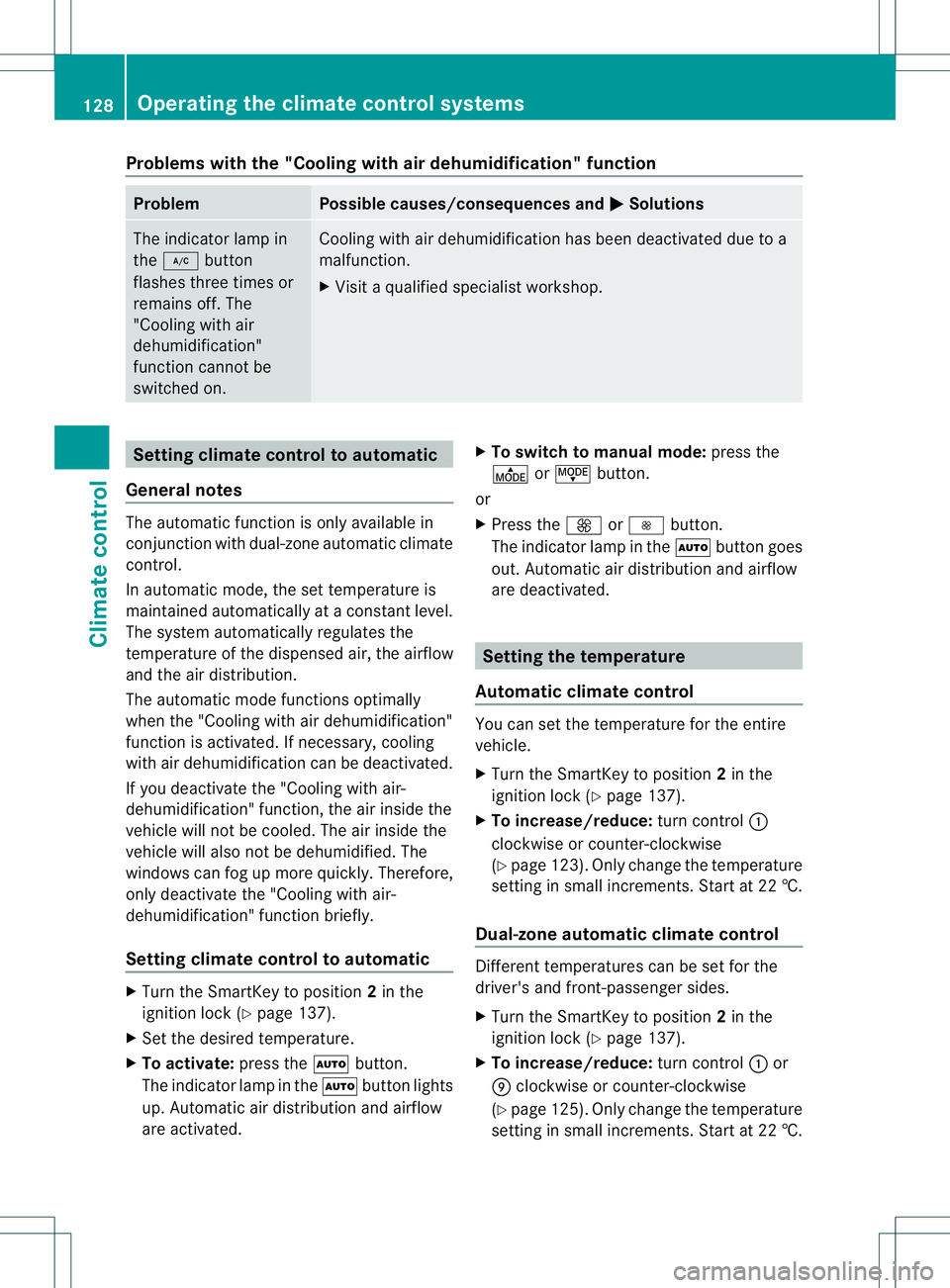
Problems with the "Cooling with air dehumidification" function
Problem Possible causes/consequences and
000B Solutions
The indicator lamp in
the
0001 button
flashes three times or
remains off. The
"Cooling with air
dehumidification"
function cannot be
switched on. Cooling with air dehumidification has been deactivated due to a
malfunction.
X
Visit aqualified specialist workshop. Setting climate control to automatic
General notes The automatic function is only available in
conjunction with dual-zonea utomatic climate
control.
In automatic mode, the set temperature is
maintained automatically at aconstant level.
The system automatically regulates the
temperature of the dispensed air, the airflow
and the air distribution.
The automatic mode functions optimally
when the "Cooling with air dehumidification"
function is activated. If necessary, cooling
with air dehumidification can be deactivated.
If you deactivate the "Cooling with air-
dehumidification" function, the air inside the
vehicle will not be cooled. The air inside the
vehicle will also not be dehumidified. The
windows can fog up more quickly. Therefore,
only deactivate the "Cooling with air-
dehumidification" function briefly.
Setting climate control to automatic X
Turn the SmartKey to position 2in the
ignition lock (Y page 137).
X Set the desired temperature.
X To activate: press the000Cbutton.
The indicator lamp in the 000Cbutton lights
up. Automatic air distribution and airflow
are activated. X
To switch to manualm ode:press the
000F or0017 button.
or
X Press the 0004or000E button.
The indicator lamp in the 000Cbutton goes
out. Automatic air distribution and airflow
are deactivated. Setting the temperature
Automatic climate control You can set the temperature for the entire
vehicle.
X
Turn the SmartKey to position 2in the
ignition lock (Y page 137).
X To increase/reduce: turn control001A
clockwise or counter-clockwise
(Y page 123). Only change the temperature
settingins mall increments. Star tat2 2†.
Dual-zon eautomatic climate control Different temperatures can be set for the
driver's and front-passenger sides.
X
Turn the SmartKe ytoposition 2in the
ignition lock (Y page 137).
X To increase/reduce: turnc ontrol 001Aor
0009 clockwise or counter-clockwise
(Y page 125) .Only change the temperature
setting in small increments. Star tat2 2†. 128
Operatin
gthe climate contro lsystemsClimate control
Page 131 of 360
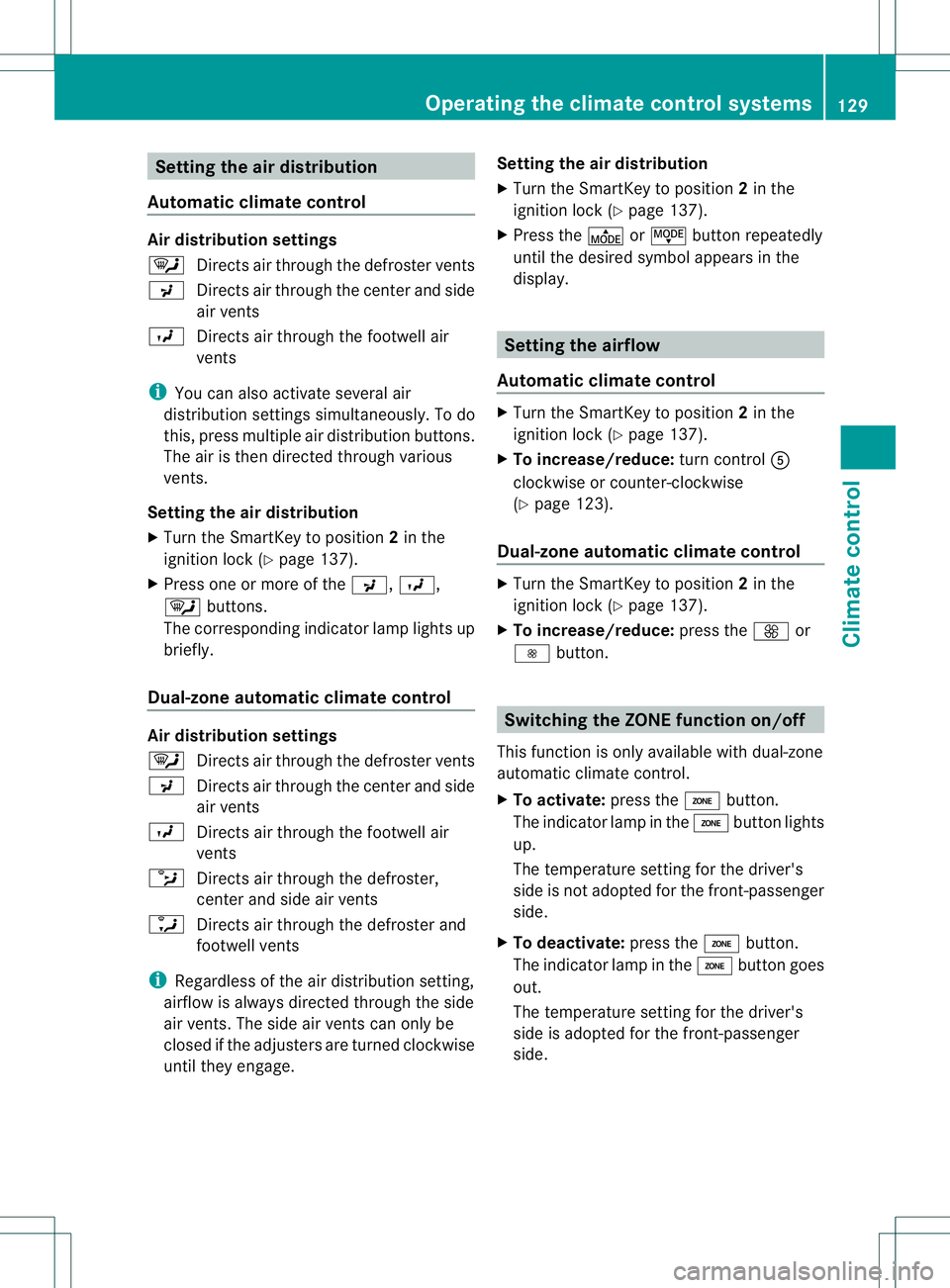
Setting the air distribution
Automatic climate control Air distribution settings
0002
Directsa ir through the defroster vents
0018 Directsa ir through the center and side
air vents
000B Directsa ir through the footwell air
vents
i You can also activate several air
distribution settings simultaneously. To do
this, press multiple air distribution buttons.
The air is then directed through various
vents.
Setting the air distribution
X Turn the SmartKey to position 2in the
ignition lock (Y page 137).
X Press one or more of the 0018,000B,
0002 buttons.
The corresponding indicator lamp lights up
briefly.
Dual-zone automatic climate control Air distribution settings
0002
Directsa ir through the defroster vents
0018 Directsair through the center and side
air vents
000B Directsair through the footwell air
vents
0013 Directsair through the defroster,
center and side air vents
0009 Directsair through the defroster and
footwell vents
i Regardless of the air distribution setting,
airflow is always directed through the side
air vents. The side air ventsc an only be
closed if the adjusters are turned clockwise
until they engage. Setting the air distribution
X
Turn the SmartKey to position 2in the
ignition lock (Y page 137).
X Press the 000For0017 button repeatedly
until the desired symbol appears in the
display. Setting the airflow
Automatic climate control X
Turn the SmartKey to position 2in the
ignition lock (Y page 137).
X To increase/reduce: turn control001E
clockwise or counter-clockwise
(Y page 123).
Dual-zone automatic climate control X
Turn the SmartKey to position 2in the
ignition lock (Y page 137).
X To increase/reduce: press the0004or
000E button. Switching the ZONE function on/off
This function is only available with dual-zone
automatic climate control.
X To activate: press the000Dbutton.
The indicator lamp in the 000Dbutton lights
up.
The temperature setting for the driver's
side is not adopted for the front-passenger
side.
X To deactivate: press the000Dbutton.
The indicator lamp in the 000Dbutton goes
out.
The temperature setting for the driver's
side is adopted for the front-passenger
side. Operating the climate control systems
129Climate control