CD changer MERCEDES-BENZ C-Class 2001 W203 Comand Manual
[x] Cancel search | Manufacturer: MERCEDES-BENZ, Model Year: 2001, Model line: C-Class, Model: MERCEDES-BENZ C-Class 2001 W203Pages: 231, PDF Size: 2.37 MB
Page 65 of 231

63
Introduction
AudioTelephone
Navigation
Index Info Services and
system settings CD operationError messages
1CD changer error messages
2CD drive error messages“No CD changer” – The system cannot detect the CD
changer; contact a Mercedes-Benz Center (1)
“No magazine” –There is no magazine inserted in the
CD changer; load CDs into the magazine and insert the
magazine into the CD changer (1)
“Magazine empty” –There are no CDs in the magazine;
load CDs into the magazine and insert the magazine
into the CD changer (1)
“No CD”:
• The magazine slot selected does not contain a CD;
select a different magazine slot (1)
• No CD is in the CD drive or the CD in the drive is
not ready to play (2)
“Being activated” – The CD changer is not yet ready for
operation (1)
“Reading error” – The system cannot read the CD
which has been inserted (2), e.g. audio CD
P82.85-2990-26
2
1
Page 66 of 231

64
AudioTelephone Navigation
Index Info Services and
system settings Introduction
CD operation
“Error” – an error other than those described here has
occurred (1, 2)
If an error occurs in the operation of the CD drive or
the CD changer, the system will automatically switch to
the other component after 3 seconds.
CD operation will resume when the error has been
corrected.
If it is not possible to play the CD which has been
selected in the CD changer (“Error” message), the
system will automatically select the next CD in the
magazine.“Temperature too high” – CD operation will switch off
automatically after 3 seconds; press the corresponding
key to select a different audio source (1, 2)
Page 71 of 231
69
Introduction
AudioTelephone
Navigation
Index Info Services and
system settings Sound settingsAdjust sound settings
The COMAND system is equipped with a standard
amplifier.
You can set the sound Bass/Treble and the sound-
center (fader and balance) individually or select sound
impressions.
See individual audio mode descriptions for instructions
on this feature.
Adjustments to the sound have a different effect on the
audio and service sources. The predefined sound
modes are available for the
audio sour
ces onl
y.
The audio sources include:
• Radio (FM/AM, WB)
• CD drive and CD changer
• Auxiliary sound source, e.g. tape deck (if con-
nected)
The main menu for the sound is activated in the audio
sources through the menu field “Sound”.Service sources include:
• Telephone
• Voice output in navigation
• Voice recognition system
The main menu for the sound is activated in the menu
“NAVI Settings” through the menu field “Sound”.
Page 72 of 231
70
IntroductionAudioTelephone
Navigation
Index Info Services and
system settings
Sound settings
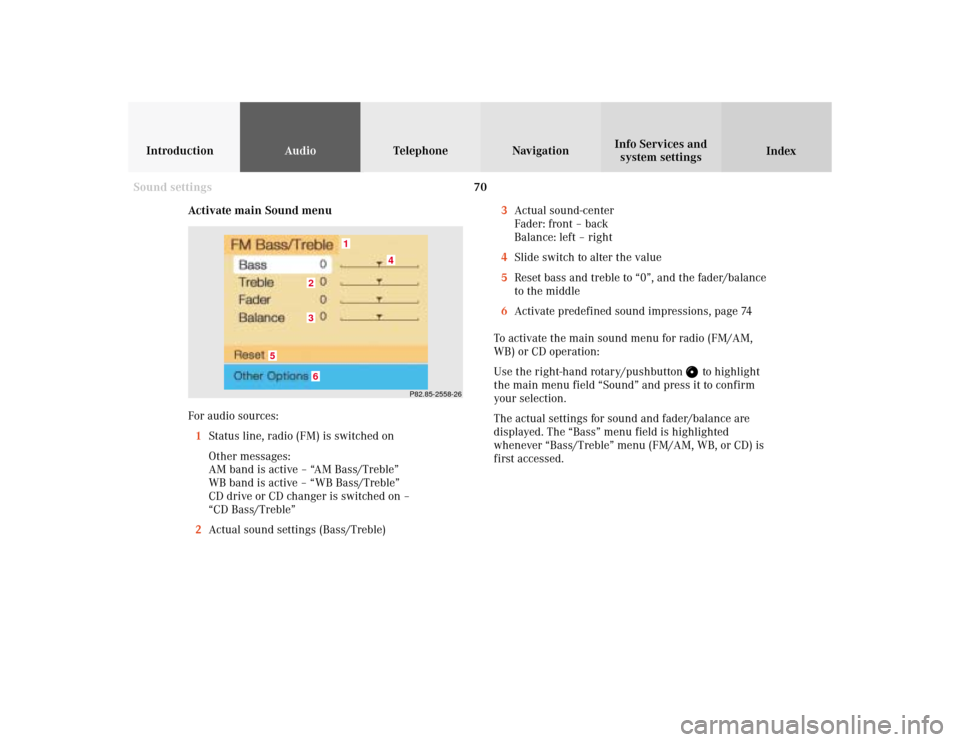
Activate main Sound menu
For audio sources:
1Status line, radio (FM) is switched on
Other messages:
AM band is active – “AM Bass/Treble”
WB band is active – “WB Bass/Treble”
CD drive or CD changer is switched on –
“CD Bass/Treble”
2Actual sound settings (Bass/Treble)
P82.85-2558-26
5
4
32
1
6
3Actual sound-center
Fader: front – back
Balance: left – right
4Slide switch to alter the value
5Reset bass and treble to “0”, and the fader/balance
to the middle
6Activate predefined sound impressions, page 74
To activate the main sound menu for radio (FM/AM,
WB) or CD operation:
Use the right-hand rotary/pushbutton
to highlight
the main menu field “Sound” and press it to confirm
your selection.
The actual settings for sound and fader/balance are
displayed. The “Bass” menu field is highlighted
whenever “Bass/Treble” menu (FM/AM, WB, or CD) is
first accessed.
Page 75 of 231
73
Introduction
AudioTelephone
Navigation
Index Info Services and
system settings Sound settingsNotes:
The balance is adjusted to the same setting for the
radio (FM/AM, WB) and CD changer.
Adjustments which are made to the navigation system
will affect the Voice recognition system and the
telephone.Use the “Reset” menu field to position the balance back
to the center of the vehicle, to set the sound linearly
and to reset at the same time the sound volume to a
defined value.
Page 193 of 231
191
Introduction
Audio Telephone
Navigation
Index Info Services and
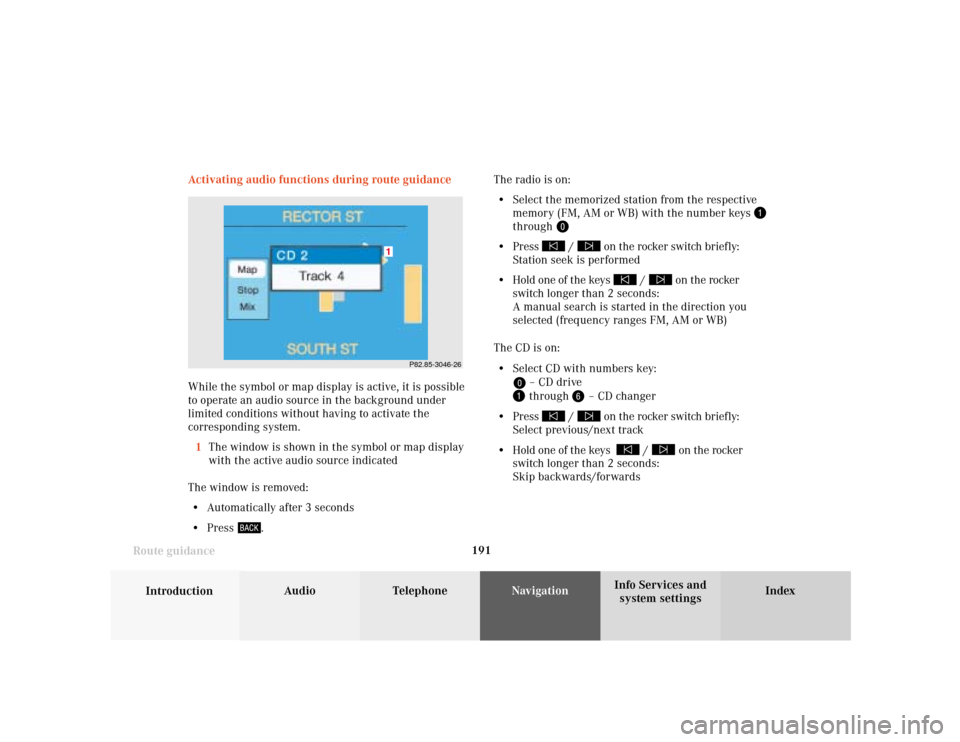
system settings Route guidanceActivating audio functions during route guidance
While the symbol or map display is active, it is possible
to operate an audio source in the background under
limited conditions without having to activate the
corresponding system.
1The window is shown in the symbol or map display
with the active audio source indicated
The window is removed:
• Automatically after 3 seconds
• Press
.The radio is on:
• Select the memorized station from the respective
memory (FM, AM or WB) with the number keys
through
• Press
/
on the rocker switch briefly:
Station seek is performed
• Hold one of the keys
/
on the rocker
switch longer than 2 seconds:
A manual search is started in the direction you
selected (frequency ranges FM, AM or WB)
The CD is on:
• Select CD with numbers key:
– CD drive through
– CD changer
• Press
/
on the rocker switch briefly:
Select previous/next track
• Hold one of the keys
/
on the rocker
switch longer than 2 seconds:
Skip backwards/forwards
P82.85-3046-26
1
Page 225 of 231

Index223
AAccepting a call (using the multifunction
steering wheel) .................................................................. 88
Accepting calls using COMAND ..................................... 89
Activating the location map ........................................... 167
Activating the route map ............................................... 166
Acknowledgement beep .................................................... 15
Adjusting the brightness ............................................... 208
Adjusting the volume ........................................................ 14
Alarm beep ......................................................................... 14
Altering the map scale ........................................... 152, 179
Altering the voice output volume ................................ 173
AM (Ante Meridiem) ....................................................... 217
Audio sources .................................................................... 69
Automatic Station Scan ................................................... 28
Auxiliary audio source, Switching on/off ................... 221BBeep tones, Switching on/off ......................................... 218
CCalibration ....................................................................... 201
Canceling route guidance .............................................. 192
CD changer ........................................................................ 45
CD, Loading into the CD drive ........................................ 44
CDs scan ............................................................................. 62
CD track scan .................................................................... 56
CD playback ....................................................................... 43
Changing to map display during route guidance ...... 177
City list ............................................................................. 143
COMAND (Cockpit Management and Data System) ...... 2
Compass needle .............................................................. 180
Cross hairs ....................................................................... 150
Current map scale .................................................. 152, 166
Current vehicle position ......................................... 167, 170DDate and Time, Setting .................................................... 211
Day/Night display ............................................................ 219
Delete CD name ................................................................. 59
Destination address, Entering ....................................... 141
Destination memory, Sorting ........................................ 208
Destination, Selecting via the map .............................. 149
Page 227 of 231

Index225
MMap display ..................................................................... 166
Map orientation, Selecting ............................................ 180
Map scale, Current ................................................. 152, 179
Map scale, Reduce .................................................. 152, 179
Map scale, Increasing ............................................ 152, 179
Menus .................................................................................. 12
Message “Activating Navigation.
Please obey all traffic rules!” ................................ 136, 137
Message “Attention, name memory is full;
new entry only possible after cleaning an old one!” .. 58
Message “Being activated” .............................................. 63
Message “CALC. ROUTE” .............................................. 163
Message “Caution. Please turn on ignition.
Otherwise system will shut down in 3 minutes” ......... 15
Message “Caution. Please turn on ignition.
Otherwise system will shut down in 10 seconds” ........ 15
Message “Caution. The system will shut down.” .......... 15
Message “CD changer: No CD” ....................................... 54
Message “CD loading” ................................................ 50, 54
Message “CD-Reading error. Please change CD” ........ 137
Message “Cellular System Busy” ................................. 205
Message “Compiling Route List” .................................. 165Message “Data Connection Cannot
be Established” ............................................................... 205
Message “Data transmission failure” .......................... 205
Message “DEST AREA” .................................................. 163
Message “Error” ................................................................ 64
Message “Error: Phone defective” .................................. 79
Message “Error: Phone not connected” ......................... 79
Message “Forward”, “Rewind” ........................................ 55
Message “Magazine empty” ............................................ 63
Message “Navigation cannot be activated,
an error has occured” ..................................................... 137
Message “NEW ROUTE” ........................................ 163, 189
Message “No CD. Insert navigation CD” ...................... 137
Message “No CD changer” .............................................. 63
Message “No Cellular Connection Available” ............ 205
Message “No information available at this time.
Press SVC button later.” ................................................ 205
Message “No magazine” .................................................. 63
Message “NO ROUTE” .................................................... 163
Message “No Service” ................................................ 79, 86
Message “No Service, redial?” ........................................ 79
Message “OFF MAP” ...................................................... 163
Message “OFF ROAD” .................................................... 163
Message “Reading error” ................................................. 63
Message “Ready” .............................................................. 95