reset MERCEDES-BENZ C-Class 2001 W203 Comand Manual
[x] Cancel search | Manufacturer: MERCEDES-BENZ, Model Year: 2001, Model line: C-Class, Model: MERCEDES-BENZ C-Class 2001 W203Pages: 231, PDF Size: 2.37 MB
Page 131 of 231

129 Destination input
Contents - Navigation
NavigationContents – Navigation ................... 129
Notes ................................................ 131
Before you use
the navigation system ................ 131
Navigation ....................................... 133
Quick reference – Navigation .... 133
Switching the navigation
system on ...................................... 136
Changing the Navigation CD ..... 138
Destination entry ........................... 139
Menu overview –
Destination entry ........................ 139
Entering destination address .... 141
Continue destination input ........ 146
Selecting a destination
via the map ................................... 149Entering points of interest ......... 153
Selecting the last destinations .. 158
Selecting the route calculation
mode and calculating the route .. 159
Route guidance ............................... 162
The principle
of route guidance.......................... 162
Requesting destination and
route information ........................ 164
Beginning route guidance .......... 172
Turning onto a street .................. 174
Following the course
of the road ..................................... 175
Driving through
an intersection.............................. 176
Changing to map display
during route guidance ................ 177Route guidance with a mixture
of map and symbol display ........ 178
Altering the map scale ............... 179
Selecting map orientation .......... 180
Marking a way point ................... 181
Selecting a detour during
route guidance ............................. 184
Resetting functions during
route guidance ............................. 288
Deviating from the
calculated route ........................... 189
Reaching your destination ......... 189
Activating audio system ............. 190
Activating audio functions
during route guidance ................ 191
Cancelling route guidance ......... 192
Page 190 of 231
188
Introduction Audio Telephone
Navigation
Index Info Services and
system settings
Route guidance
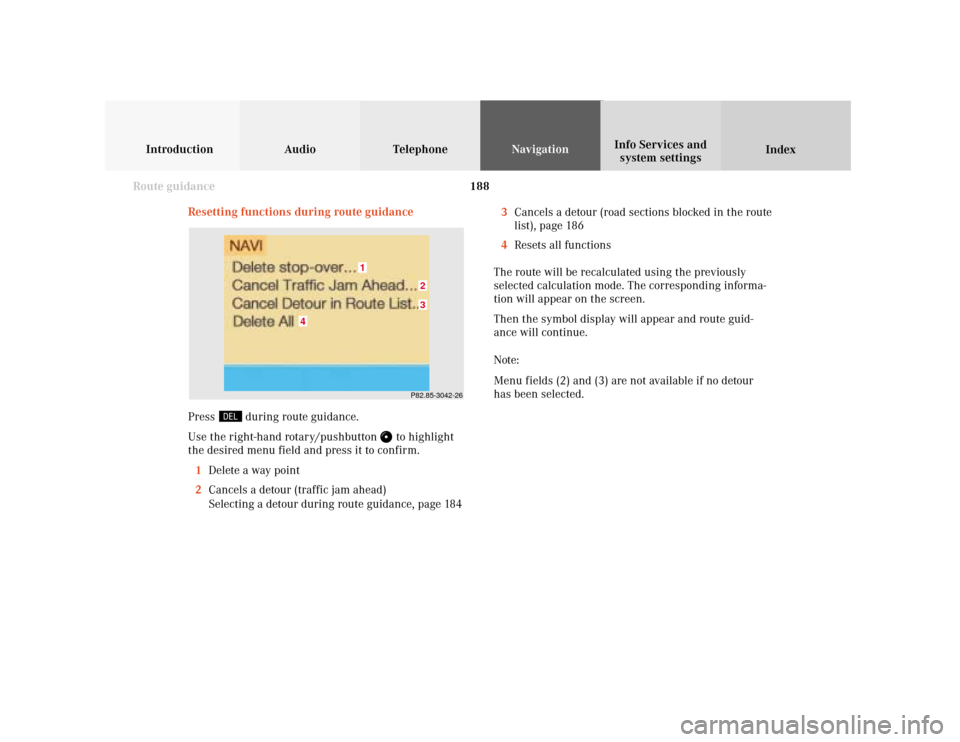
Resetting functions during route guidance
3Cancels a detour (road sections blocked in the route
list), page 186
4Resets all functions
The route will be recalculated using the previously
selected calculation mode. The corresponding informa-
tion will appear on the screen.
Then the symbol display will appear and route guid-
ance will continue.
Note:
Menu fields (2) and (3) are not available if no detour
has been selected.
P82.85-3042-2632
1
4
Press
during route guidance.
Use the right-hand rotary/pushbutton
to highlight
the desired menu field and press it to confirm.
1Delete a way point
2Cancels a detour (traffic jam ahead)
Selecting a detour during route guidance, page 184
Page 205 of 231

System settings
Info Services and
system settings 203Contents – Info Services and system settings
Info Services and system
settingsContents – Info Services and
system settings .............................. 203
Info Services ................................... 204
Requesting and displaying
Info Services ................................ 204
System settings .............................. 207
Activating the main system
settings menu .............................. 207
Adjusting the brightness ........... 208
Activating Settings menu ........... 209
Selecting the language ............... 210
Set the date and time .................. 211
Switching beep tones
on and off ...................................... 218
Setting changeover between
day and night display ................. 219
Reset all settings to the factory
settings .......................................... 220
Auxiliary audio source ............... 221
Page 213 of 231
System settings
Introduction Audio
Telephone NavigationIndex Info Services and
system settings 211Set the date and time
COMAND is equipped with an integrated clock. Press
to display the current time. The clock is used e.g.
for indicating the estimated time of arrival at the
destination, page 164.
There are several ways to set the time:
• With GPS reception, page 212
Set the time in 30 minute steps, page 213
Set the time by selecting a country and the time
zone, page 214
• Without GPS reception, page 212
Set the date and time manually, page 216
Note:
The clock must always be reset if the COMAND
system was disconnected or if the vehicle batter y
was discharged. List of languages:
• “Adopt from Instrument Cluster” – the system will
use the same language as is set in instrument
cluster
• “Deutsch”
• “English (metric)” – distance measured in km,
speed in km/h
• “English (imperial)” – distance measured in yards,
miles, speed in mph
• “Español“
• “Français“
• “Italiano“
• “Nederlands“
Page 222 of 231

220 System settings
Audio Introduction
Telephone Navigation IndexInfo Services and
system settings
Reset all settings to the factory settings
Use the right-hand rotary/pushbutton
to highlight the
“Factory settings” menu field in the settings menu and
press to confirm.
An inquiry menu will appear.To accept the factory settings:
Press the right-hand rotary/pushbutton
confirm the
“Yes” menu field). A screen with the factory settings is
shown for a few seconds. The main menu for system
settings is reactivated.
The factory settigs are:
• Acknowledgement beep - off
• Info beep – off
• Language – English (imp.)
• Time display – AM/PM
• Date display – MM.DD (MM – month, DD – day)
If you do not wish to reset settings:
Use the right-hand rotary/pushbutton to highlight
“No” and press to confirm. This activates the main menu
for system settings.
P82.85-3081-26
Page 226 of 231

Index224
Destination, Reaching your ........................................... 189
Destination, Saving in the memory ............................. 205
Deviating from the calculated route ............................ 189
Dialing a number from the phone book ........................ 95
Displaying the route list ................................................ 165
Distance bar ..................................................................... 163
EEmergency call ................................................................. 107
Entering CD names .......................................................... 57
Entering destination address ........................................ 139
Entering the house number .......................................... 148
Entering the station frequency in the presets ............. 37FFactory settings ............................................................... 220
FM, AM ............................................................................... 23
Frequency ranges ....................................................... 23, 27
Fast forward/rewinding ................................................... 55
GGeographical latitude and longitude of your
current position ............................................................... 167
GPS reception, set the time ............................................ 213
GPS-signals ...................................................................... 132HHeading-up ...................................................................... 180
House numbers, Entering ............................................. 148IInformation/status line .................................................... 12
Increase the map scale .......................................... 152, 179
Info beep .................................................................... 14, 218LLast destination, Activating .......................................... 158
List of languages .............................................................. 210
Lists ...................................................................................... 12