trunk MERCEDES-BENZ C-CLASS 2002 Owner's Manual
[x] Cancel search | Manufacturer: MERCEDES-BENZ, Model Year: 2002, Model line: C-CLASS, Model: MERCEDES-BENZ C-CLASS 2002Pages: 399, PDF Size: 16.95 MB
Page 270 of 399
267
Driving instructions
Te ch n i c a l
data
Instruments
and controls Operation
DrivingInstrument
cluster display Practical hints Car care Index
Passenger compartment Traveling abroad
Abroad, there is a widely-spread Mercedes-Benz service
network at your disposal. If you plan to travel into areas
which are not listed in the index of your Mercedes-Benz
Center directory, you should request pertinent
information from your authorized Mercedes-Benz
Center.
Wa r n i n g !
Always fasten items being carried as securely as
possible.In an accident, during hard braking or sudden
maneuvers, loose items will be thrown around
inside the vehicle, and cause injury to vehicle
occupants unless the items are securely fastened in
the vehicle.The trunk is the preferred place to carry objects.
ProCarManuals.com
Page 284 of 399

281
Contents - Instrument cluster display
Te ch n i c a l
data
Instruments
and controls Operation Driving
Instrument
cluster display Practical hints Car care Index
Instrument cluster displayMalfunction and indicator
lamps in the instrument
cluster ......................................... 282
On-board diagnostic system ......... 283 Check engine malfunction
indicator lamp............................. 283
Brake warning lamp .................. 284
Supplemental restraint
system (SRS) indicator lamp .... 285
Fuel reserve warning................. 286
ABS malfunction indicator
lamp.............................................. 287
Electronic stability program
(ESP) — warning lamp ............... 288
Seat belt nonusage warning lamp ............................................288 Malfunction and indicator
lamp in the center console...... 289
AIRBAG OFF indicator lamp .... 289
Malfunction and warning messages in the
multifunction display .............. 290
DISPLAY DEFECTIVE................ 291
BATTERY / ALTERNATOR ....... 292
ANTILOCK BRAKE SYSTEM .... 293
BRAKE ASSIST........................... 293
BRAKE PAD WEAR.................... 294
BRAKE FLUID ............................ 294
PARKING BRAKE ....................... 295
SEAT BELT SYSTEM .................. 295
ELEC. STABIL. PROG.
(Electronic stability program).. 296
COOLANT (coolant level).......... 297 COOLANT
(coolant temperature) ................ 298
ENGINE OIL LEVEL ................... 299
LIGHTING SYSTEM .................... 300
LIGHT SENSOR........................... 302
DOOR............................................ 302
TRUNK OPEN ............................. 303
HOOD ........................................... 303
TELEPHONE – FUNCTION ....... 304
TELE AID ..................................... 304
WASHER FLUID.......................... 305
RESTRAINT SYSTEM ................. 306
KEY............................................... 306
FUEL RESERVE .......................... 307
UNDERVOLTAGE ........................ 307
STEERING WHEEL ADJUST. ..... 308
ProCarManuals.com
Page 293 of 399
290
Malfunction and warning messages
Te ch n i c a l
data
Instruments
and controls Operation Driving
Instrument
cluster display Practical hints Car care Index
Malfunction and warning messages in the
multifunction display
Malfunction and warning messages for the following
systems will be displayed immediately in the
multifunction display.
They are divided into three categories.
Category C1:
Messages of most immediate priority.
These cannot be cleared from the instrument cluster
using the reset knob on the instrument cluster (see
page 99).
Categories C2 and C3:
Messages of less immediate priority.
These can be cleared from the instrument cluster using
the reset knob on the instrument cluster (see page 99)
and are then stored in the malfunction message
memory. See page 119. Note:
Certain malfunction and warning messages are
accompanied by an audible signal.
Malfunction and warning messages in red are always
accompanied by an audible signal.
Temporary messages such as “TRUNK OPEN!” will not
be stored in the malfunction message memory.
Wa r n i n g !
All categories of messages contain important
information which should be taken note of and,
where malfunction indicated, addressed as soon as
possible at an authorized Mercedes-Benz Center.Failure to repair condition noted may cause
damage not covered by the Mercedes-Benz Limited
Warranty, or result in property damage or personal
injury.
ProCarManuals.com
Page 306 of 399

303
Malfunction and warning messages
Te ch n i c a l
data
Instruments
and controls Operation Driving
Instrument
cluster display Practical hints Car care Index
TRUNK OPEN
* C = Category, see page 290
HOOD* C = Category, see page 290.See page 315 for hood.
Line 1
Line 2C*
TRUNK OPEN! 2
Line 1Line 2C*
HOOD OPEN! 2
ProCarManuals.com
Page 313 of 399
310
First aid kit
Te ch n i c a l
data
Instruments
and controls Operation Driving
Instrument
cluster display Practical hints
Car care Index
First aid kit
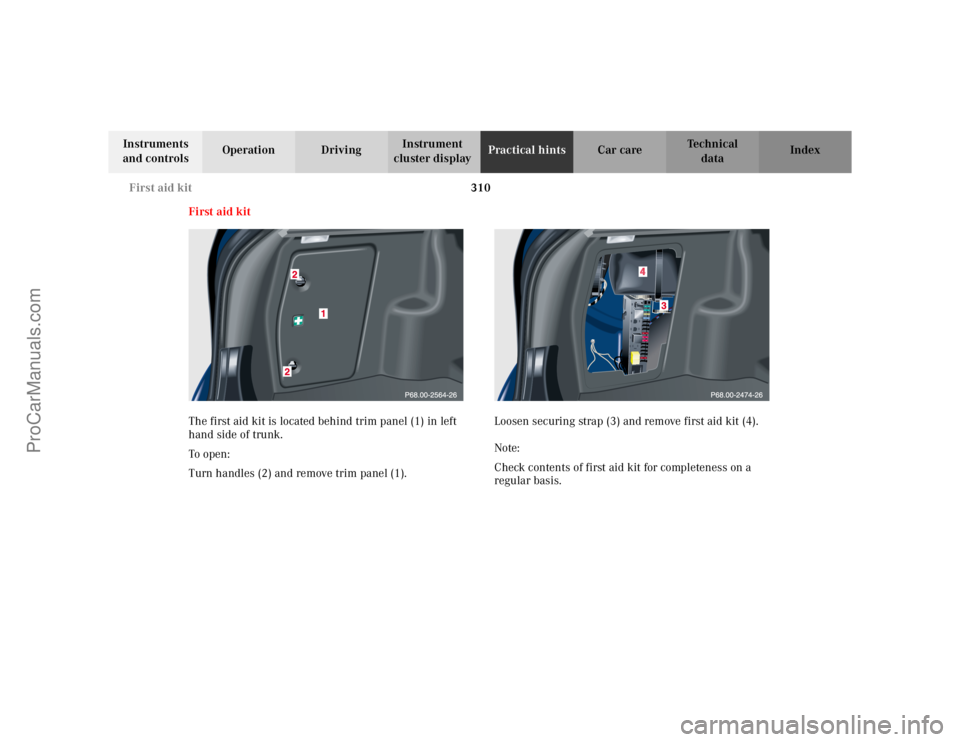
The first aid kit is located behind trim panel (1) in left
hand side of trunk.
To o pen :
Turn handles (2) and remove trim panel (1). Loosen securing strap (3) and remove first aid kit (4).
Note:
Check contents of first aid kit for completeness on a
regular basis.
ProCarManuals.com
Page 314 of 399

311
Fuses
Te ch n i c a l
data
Instruments
and controls Operation Driving
Instrument
cluster display Practical hints
Car care Index
Stowing things in the vehicle Fuses
Most of your vehicle’s electrical components are fused
with safety fuses. With the exception of the brake lights,
all individual lighting system components are
electronically fused. Before replacing a blown safety
fuse, determine the cause of the short circuit. Always
observe amperage and color of fuse.
The circuit for components is protected by a cycled
circuit breaker interrupted if too much current is being
drawn. The circuit closes automatically after a short
time; the circuit is broken again if the malfunction
reoccurs.
Always use a new fuse for replacement. Never attempt to
repair or bridge a blown fuse.
A fuse chart is located in fuse box (1).
A special fuse puller is located in the auxiliary fuse box
in the trunk, see page 314.
Wa r n i n g !
To help avoid personal injury during a collision or
sudden maneuver, exercise care when stowing
things. Put luggage or cargo in the trunk if
possible. Do not pile luggage or cargo higher than
the seat backs. Do not place anything on the shelf
below the rear window.
ProCarManuals.com
Page 317 of 399
314
Fuses
Te ch n i c a l
data
Instruments
and controls Operation Driving
Instrument
cluster display Practical hints
Car care Index
Auxiliary fuse box in the trunk
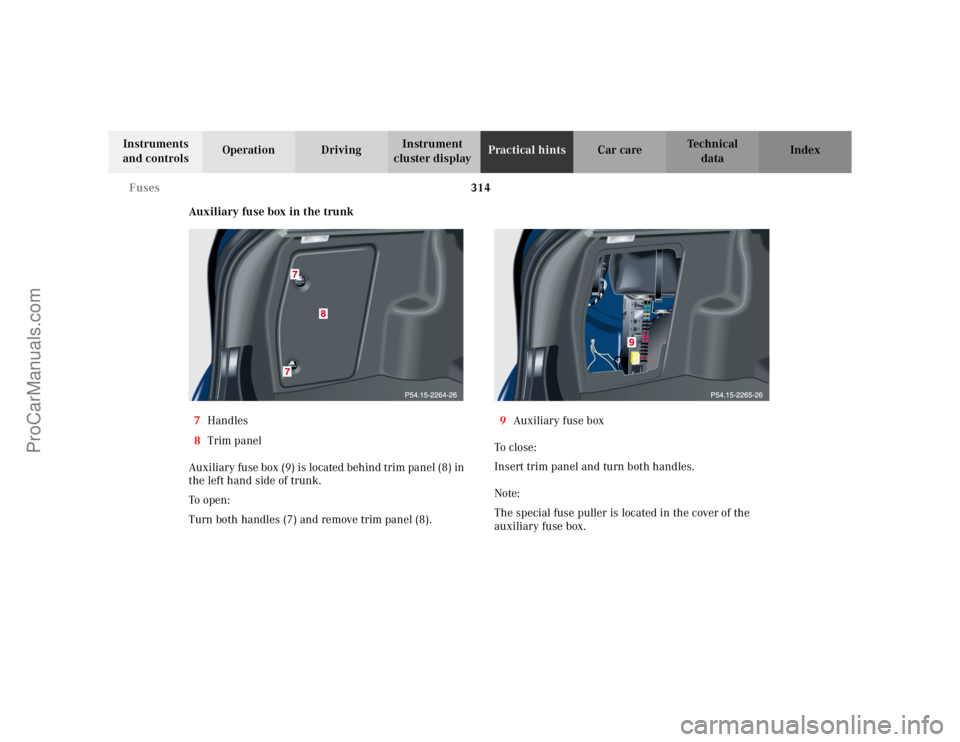
7 Handles
8 Trim panel
Auxiliary fuse box (9) is located behind trim panel (8) in
the left hand side of trunk.
To o pen :
Turn both handles (7) and remove trim panel (8). 9
Auxiliary fuse box
To c l o s e :
Insert trim panel and turn both handles.
Note:
The special fuse puller is located in the cover of the
auxiliary fuse box.
ProCarManuals.com
Page 324 of 399
321
Spare wheel
Te ch n i c a l
data
Instruments
and controls Operation Driving
Instrument
cluster display Practical hints
Car care Index
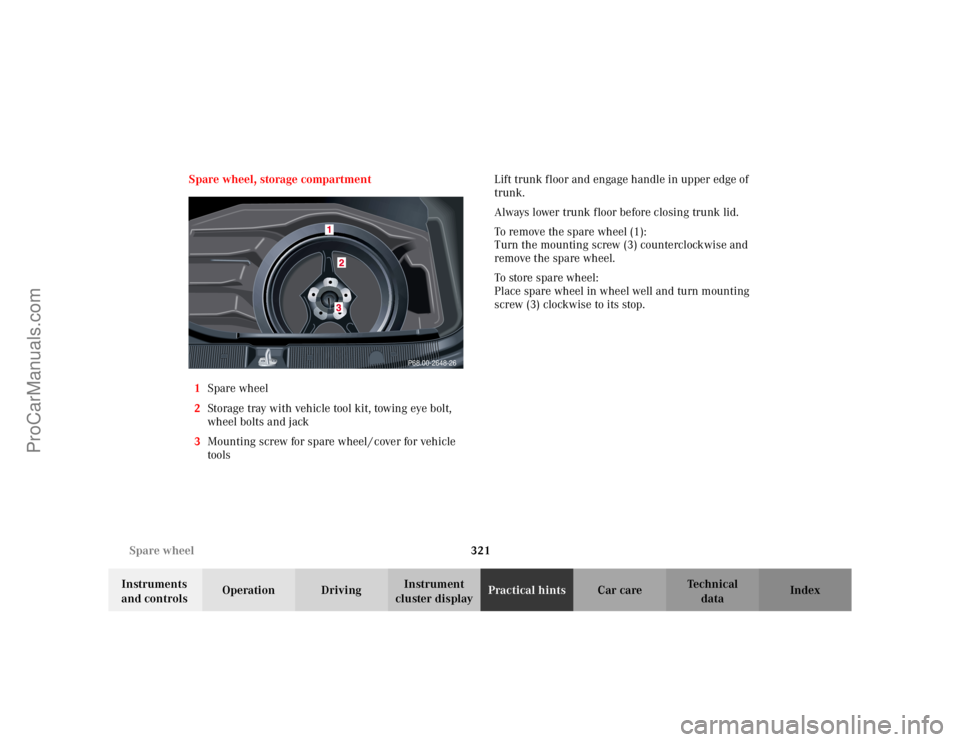
Spare wheel, storage compartment
1 Spare wheel
2 Storage tray with vehicle tool kit, towing eye bolt,
wheel bolts and jack
3 Mounting screw for spare wheel / cover for vehicle
tools Lift trunk floor and engage handle in upper edge of
trunk.
Always lower trunk floor before closing trunk lid.
To remove the spare wheel (1):
Turn the mounting screw (3) counterclockwise and
remove the spare wheel.
To store spare wheel:
Place spare wheel in wheel well and turn mounting
screw (3) clockwise to its stop.
P68.00-2648-26
ProCarManuals.com
Page 325 of 399
322
Spare wheel
Te ch n i c a l
data
Instruments
and controls Operation Driving
Instrument
cluster display Practical hints
Car care Index
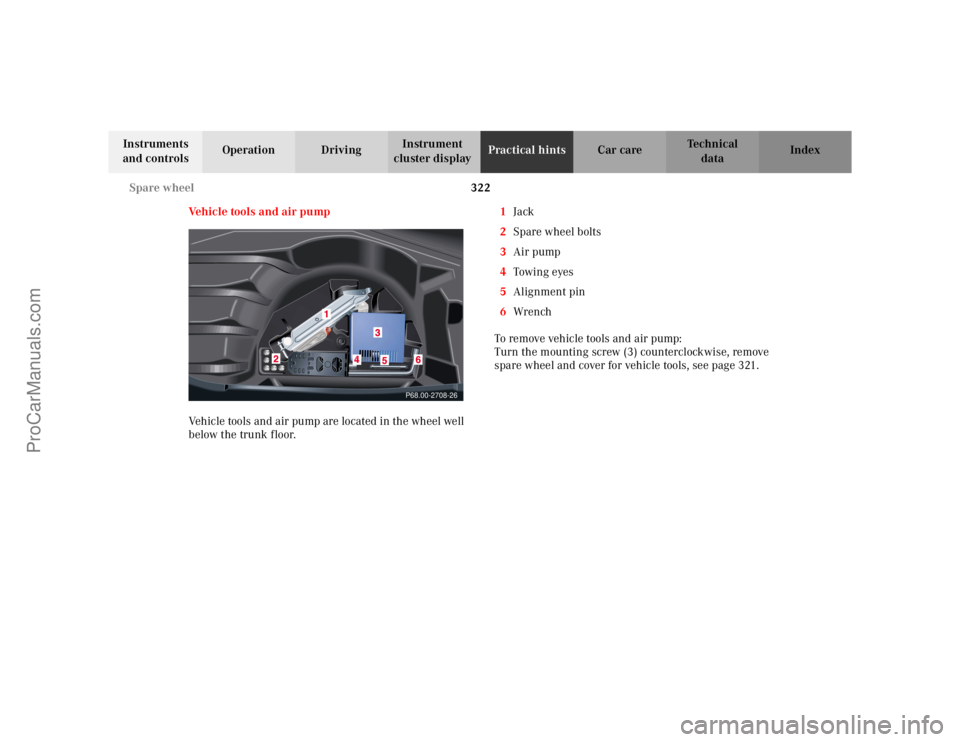
Vehicle tools and air pump
Vehicle tools and air pump are located in the wheel well
below the trunk floor. 1
Jack
2 Spare wheel bolts
3 Air pump
4 Towin g eyes
5 Alignment pin
6 Wrench
To remove vehicle tools and air pump:
Turn the mounting screw (3) counterclockwise, remove
spare wheel and cover for vehicle tools, see page 321.
P68.00-2708-26
ProCarManuals.com
Page 326 of 399

323
Jack
Te ch n i c a l
data
Instruments
and controls Operation Driving
Instrument
cluster display Practical hints
Car care Index
Ve h i c l e j a c k
To prepare the jack for use:
Remove the jack from the spare wheel well under the
trunk floor.
Push the crank handle up and turn clockwise until it
engages (operational position).
Storing the jack in the trunk:
Before storing the jack, it should be fully collapsed, with
handle folded in (storage position).
ProCarManuals.com