card MERCEDES-BENZ C-Class 2011 W204 Comand Manual
[x] Cancel search | Manufacturer: MERCEDES-BENZ, Model Year: 2011, Model line: C-Class, Model: MERCEDES-BENZ C-Class 2011 W204Pages: 190, PDF Size: 2.21 MB
Page 114 of 190
Using
theaddress book Intr
oduct ion G
War
ning!
Please devoteyour attent ion first and
forem osttothe trafficsituatio nyou arein.
Befor eyour journ ey,please familiarize
yourself withtheaddress bookfunctions.
Only usetheCOMAND whenroadandtraffic
con dition spermit youtodo so. Othe rwise you
could beinvolv edinan acciden tinw hich you
or others couldbeinjured.
The address bookorganizes andstores
entr ieswhich areimported fromdifferent
sources (mobilephone,memory card,
COMAND telephone book,navigation
system).
You canusethese entriestomake telephone
calls andfornavigation.
i Address bookentriesare not deleted
when themobile phoneisremoved. Forthis
reason, youshould deleteyourpersonal
data using thereset functionbefore selling
your vehicle, forexample (Ypage 45). Calling
upthe address book
X Press theKfunct ionbutton.
You seethetelephone basicmenu orthe
address bookifit was open previously .
X With thetelephone basicmenu shown,
select Phone bysliding VZtheCOMAND
cont roller andpress Wtoconfirm .
X Select Address Bookfromthemenu and
press Wtoconfirm . Address
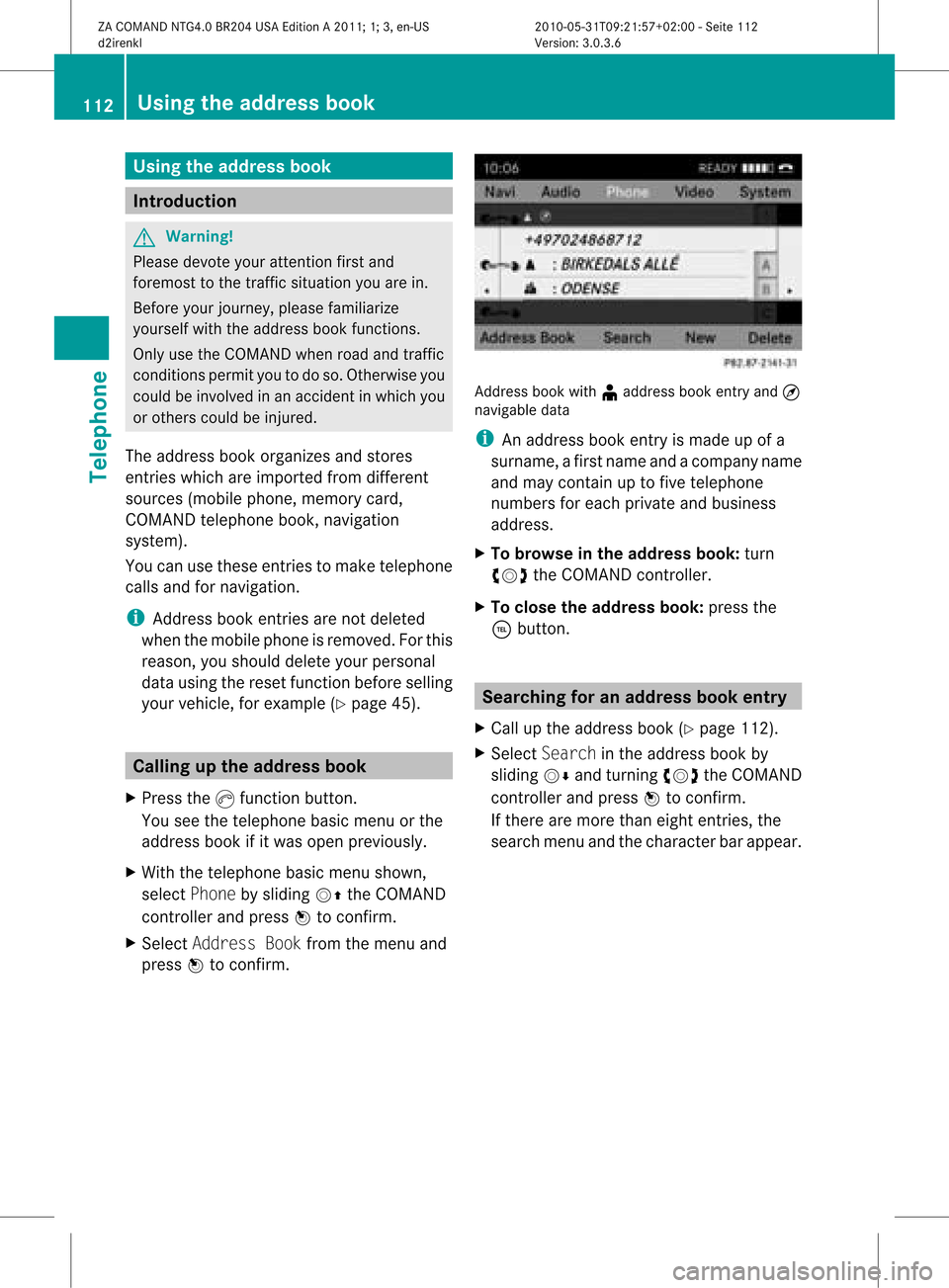
bookwith¥address bookentry and¤
navigable data
i Anaddress bookentryis made upofa
surname, afirst name andacompany name
and may containuptofive telephone
numbers foreach private andbusiness
address.
X To browse inthe addr essbook: turn
cVd theCOMAND controller.
X To close theaddr essbook: pressthe
÷ button. Searching
foranadd ress book entry
X Call upthe address book(Ypage 112).
X Select Search inthe address bookby
sliding VÆandturning cVdtheCOMAND
cont roller andpress Wtoconfirm .
If there aremore thaneight entries, the
search menuandthecharacter barappea r. 112
Using
theaddress bookTelephone
ZACOMAND NTG4.0BR204USAEdition A2011; 1;3,en-US
d2irenkl Version:3.0.3.6
2010-
05-31T09:21 :57+02:00-Seite 112
Page 118 of 190

Sub
sequent ope rationwillde pend onhow
comp lete the addre ssdata items are and
wh ethe rthey correspond withthedata in
the digital mapinthe navigation system.
They donot correspond, forexample, if
they arenot written inthe same wayasthe
destination entry. Voice
tags
Adding orchanging avoice tag You
canentervoic etag svia theVoic eCont rol
Syst em(see thesepar ateoper ating
ins truct ions).Onceyou have assign edavoic e
tag toan addre ssbook entry,you can callup
th is ent rywith avoic ecom man dand diala
phon enum ber,forexam ple.You canadd one
voic etag per addre ssbook entry.
X Sear chfor anaddre ssbook entrywith out
or with avoic etag (¦ icon)
(Y page 112).
X Sele ctOpt ionsby slidin gVY the
COMA NDcontroller andpres sW to
con firm.
X Sele ctVoi ceNam eand pres sW to
con firm.
X Sele ctAdd orCha nge andpres sW to
con firm.
Subs equen toperation isvoice- controlled.
The Voice ControlSyst emguides you
thr ough thedialogues.
Deleting avoice tag X
Sear chfor anaddre ssbook entrywith a
voic etag (Ypage 112).
X Sele ctOpt ionsby slidin gVY the
COMA NDcontroller andpres sW to
con firm.
X Sele ctVoi ceNam eand pres sW to
con firm. X
Sele ctDel ete andpres sW tocon firm.
Ad eletion prompt appears.
X Select YesorNo and press the9button
to con firm.
If you select Yes,COMAND deletesthe
voice tag.
If you select No,the process willbeaborted.
Listening toav oice tag X
Sear chfor anaddre ssbook entrywith a
voic etag (Ypage 112).
X Sele ctOpt ionsby slidin gVY the
COMA NDcontroller andpres sW to
con firm.
X Sele ctVoi ceNameand pres sW to
con firm.
X Sele ctLis ten andpres sW tocon firm.
You hear thevoic etag . Imp
orting conta cts
Not esand requiremen ts You
canimpo rtcon tactsfrom themobil e
phon eand themem orycardint oth eaddre ss
book .
Please observethat:
R Bluet ooth®
must beact ivat ed.
R theext ern aldevic ecan sendcon tactsand/
or vCard svia Bluet ooth®
.
R theext ern aldevic ein theveh icle must be
swit chedon and connectedto COMA ND
(Y page 42).
Imp orting data X
Start thedata trans feronthedevic e(see
oper atingins truct ionsof theres pec tive
devic e)or ins ert themem orycard.
X Sele ctAdd ressBoo kin theaddre ssbook
by slidin gVÆ andturnin gcVd the 116
Using
thead dress bookTelep hone
ZACOMA NDNTG4 .0BR2 04USA EditionA 201 1;1;3,en- US
d2ir enklV ersion:3.0.3.6
2010
-05-31T09 :21:57+0 2:00-Seite 116
Page 126 of 190

Reg
isteri ngsate llite radio
X Swi tch onsatell ite rad iomod e
(Y page 124).
The satell ite rad iomai nm enu appears
showing theweather channel.You cann ot
select anyother stations.
X Select SatRadio inthe lower menu bar
and press Wtocon firm.
X Select Service andpress the9button to
con firm.
The servic einfor mation screenappears. Serv
iceinfor mation screen
1 Provider's phonenumber (SIRIUSXM)
2 SIRIUS XMIDofyour satellite receiver
X Call thephone number ofyour satellite
radio provider shownonthe screen .
i You canalso have thesatellite service
activat edonline. Todo so, visit theSIRIUS
XM Radio website at
htt p://ww w.siriu s.com(USA)or
htt p://ww w.siriu scanada .com
(Canada).
Onc ethe connection hasbeen established:
X Follow theinstruct ions ofthe servic estaff .
The activat ionprocess maytake uptoten
minut es.Ifthe activat ioniscomplet ed
success fully,theNoService message
appears inthe display, followed bythe
satellite radiomainmenu.
i Ifregistr ationisnot included when
purchasing thesystem, yourcredit card details
willberequired toactivat eyour
accoun t.
If the satellite receiver isnot installed oris
not installed correctly,the Device
Unavail ablemessage willappear. Switching
tosatellit erad iomode
Notes You
canalso usethemultifunc tionsteer ing
wheel totune inchann elsorscroll through
lists, e.g.bypressing the=;
9: buttons(Y page 21).
Import antnoteson registr ation,see
"Registering satelliteradio"(Y page 124).
Opt ion 1 X
Press theófunc tion button .
The NoService message appearswhen
start inguporifno signal isbeing received.
Onc eCOMAND receivesthesignal, the
satellite radiodisplay appears. Thestation
last select edisplayed.
i Repeatedly pressingthisfunc tion button
switch esbetween theFM, AM, WB
wavebands inthat order andthen switch es
to satellite radiomode. Pressin gthe button
again takes youback toFM radio mode.
Opt ion 2 X
Select Audiointhe main function barby
sliding ZVandturningcVd theCOMAND
con troller andpress Wtocon firm.
If satellite radiomode wasthelast mode
select ed,itwill now beactiv e.
If anoth eraudio mode isswitch edon, you
can now switch tosatellite radiomode in
the audio menu. 124
Sat
Rad ioAudio
ZACOMAND NTG4.0BR204USAEdition A2011 ;1; 3,en-U S
d2irenk lV ersion:3.0.3.6
2010
-05-31T09 :21:57+0 2:00-Seite 124
Page 132 of 190

X
Sel ect amag azine tray conta ining adi sc by
turni ngcVd theCOMAND controllerand
pre ssW toconfi rm.
or
X Pre ssanumb erkey ,e.g. :.
The EjectingDisc
ap pe ars .Then, youseethefollowing
message: X
Take thedisc outofthe disc slot.
If you donot take thedisc outofthe disc
slot, COMAND willautomatically drawitin
again afterashort period andload itagain.
X To eject allCDs/ DVDs: pressthe8
load/eject button.
The magazine menuappears. X
Confirm EjectAllbypressing W.
The DVD changer ejectsthe last disc
selected. YouseetheEjecting Disc
X Take thedisc outofthe disc slotwhen you
see thePlease RemoveDisc
message.
The DVD changer switches tothe next
loaded magazine trayandeject sthe disc.
X Repea tthe last step until themagazine is
empty.
X To cancel ejecting: pressthe8 eject/
load button againorpress thek button.
or
X Select Backbysliding VÆandturning
cVd theCOMAND controller andpress
W toconfirm . Inserting
andejecting aPCMCIA
mem orycard
Gener alinfor mation COMA
NDsuppo rts 16 -bitfull- sizetyp eIa nd
II PC MC IAmem orycards.
i Not allcomm ercially availabl eP CMCIA
mem orycardsand storag emed iaare
desi gned for thete mpe ratures whichmay
be reac hedintheveh icle.
If you arenolonger usin gth ePCMCI A
mem orycard,rem ove itfrom COMA ND,as
high tempe ratures could damag ethe card. 130
Audio
CD/DVD andMP3 modeAudio
ZACOMAND NTG4.0BR204USAEdition A2011; 1;3,en-US
d2irenkl Version:3.0.3.6
2010-
05-31T09:21 :57+02:00-Seite 130
Page 133 of 190

Inser
ting aPCMCIA memorycard :
PCMCI Amemory cardslot
X Inser tthe memory cardintothe slot. The
side with thecontact smust face
downwards andpoint towards theslot.
COMAND loadsthememory cardand
shows amessage tothis effec t.Ifno MP3
trac kscan befound, youwillsee amessage
to this effec t.
Ejecting aPCMCIA memorycard :
Eject button
; PCMCIA memorycardslot
X Press ejectbutt on : twice.
The mem orycardis ejec ted.
X Remo vethemem orycardfrom slot ;. Swit
chingto CD/au dioDVD orMP3
mod e
Op tion 1 X
Inser taC D/DVD (Ypage 128) oraP CMCIA
mem orycard(Y page 131).
COMA NDloads themed iuminserted and
st art sto play it.
Op tion2 X
Pre ssthee function button.
i This switches tothelast disc mode
sele cted (CD /audi oDV D/ vide oDV D/
MP3 ).COMA NDwill access alldisc sin the
DV Dc hanger, thememory card,theMUSIC
REGISTER orthe Media Interface.
X Select anaudi omedium fromthemedia list
(Y page 133).
Option 3 X
Select Audiointhe main functionbar by
sliding ZVandturning cVdtheCOMAND
cont roller andpress Wtoconfirm .
If disc mode wasthelast mode selected, it
will now beactive.
If another audiosource isswitched on,you
can now switch todisc mode inthe audi o
menu.
X Select Audiobysliding ZVandturning
cVd theCOMAND controller andpress
W toconfirm .
The audi omenu appears.
X Select DiscorMemory Cardandpress
W toconfirm .
The desired discmode isactivated.
X Select anaudi omedium fromthemedia list
(Y page 133). Audio
CD/DVD andMP3 mode
131Audio
ZACOMAND NTG4.0BR204USAEdition A2011; 1;3,en-US
d2irenkl Version:3.0.3.6
2010-
05-31T09:21 :57+02:00-Seite 131 Z
Page 136 of 190

Media
list Maga
zinetrays ,posi tions 1to6: readable
data media areaudio CDs,MP3CDsorMP3
DVD s,audio DVDsand video DVDs. Memory
card,position 7 MUSIC
REGISTER, position8 Media
Interface, position 9 i
Ifadata medium isnot readable, anentr y
appears behindthemagazine trayoryou
receive amessage ifyou have selected the
memory card.
X Select thedata medium byturnin gcVd
the COMAND controller andpress Wto
conf irm.
i Ifyou select avideo DVD,the system
switches tovideo DVDmode
(Y page 152). Selecting
atrac k
Se lecti ng byskippin gto atrac k X
To ski pfo rwa rdsorbac kto atrac k:tur n
cVd theCOMAND controllerwh en the
di sp lay/ selectio nwindow isact ive.
or
X Press theE orF button.
Sk ipping forward skipsto the nexttr ack .
Sk ipping backwards restartsthe curr ent
tr ack (ifithas been playing formor ethan
8s econ ds)orstart sthe previous track(if
the curr enttrack hasonly been playing for
a shor tertime).
If you have switchedonthe Rand om
Trac ksplayback option, theorder ofthe
tr ack sis rand om.
Selecting bytrack list X
In audio CD/DVDm ode, select Track
List bysliding VÆandturnin gcVd the COMAND
controller andpress Wto
conf irm.
or
X Press Wthe COMAND controller inMP3
mode whenthedisplay /select ionwindow
is active.
The track listappears. The#dot indicates
the current track.
X Select thetrack byturnin gcVd andpress
W toconf irm.
i InMP3 mode, thelistshows allthe track s
in alphabetical order. Fast
forward /rewind
X While thedisplay /select ionwindow is
active, slideXVY andhold theCOMAND
cont roller untilthedesired position has
been reached.
or
X Press andhold theE orF button
until thedesired position hasbeen
reached. Selecting
afolder
This function ison lyavailable inMP3 mode .
X Swit chon MP3 mode (Ypage 131).
X Sele ctFol der byslidin gVÆ andturnin g
cVd theCOMA NDcontroller andpres s
W tocon firm.
or
X Pres sW theCOMA NDcontroller when the
display/ selectionw indow isact ive.
The contentofthe folder isdispla yed. 134
Audio
CD/DVD andMP3 modeAudio
ZACOMAND NTG4.0BR204USAEdition A2011; 1;3,en-US
d2irenkl Version:3.0.3.6
2010-
05-31T09:21 :57+02:00-Seite 134
Page 139 of 190

X
To select opti ons:sw itch onaudio CD/
DVD orMP3 mode(Y pa ge 131) .
X Sel ect CD,DVD -AorMP3 byslid ing VÆ and
tur ning cVd theCOMAND controller and
pre ssW toconfi rm.
The optio ns list appe ars. The #dot
ind icates the optio ns elected.
X Select anoption byturn ingcVd andpress
W tocon firm.
The option isswitch edon. For alloption s
exc ept "Normal tracksequence", youwill
see acorr espondin gdisplay inthe display/
select ionwindow. Seetheexample ofthe
display inaudio CDmode (Ypage 132).
i The "Normal tracksequence" optionis
automatic allyselect edwhen youchange
the medium youarecurren tlylisten ingto
or when youselect adifferen tmedium. If
an option isselect ed,itremains selected
after COMAND isswitch edon oroff. Notes
onMP3 mode
Perm issible discs R
CD-R andCD-RW
R DVD -Rand DVD -RW
R DVD +Rand DVD +RW
R PCMCIA memorycard
Perm issible filesystem s R
ISO9 660/Joliet forCDs
R UDF foraudio andvideo DVDs
R FA T16 orFA T32 forPCMCIA memorycards
with storage medium
Mult isession CDs For
multisession CDs,thecontentofthe first
session determines howCOMAND will
process theCD. COMAND playsonly one
session andgives priority tothe audi oCD
session.
If possible, useCOMAND toplay only CDs
which werewritten inone session. File
structure ofadisc When
youcreate adisc with compressed
music files,thetrack scan beorganized in
folders. Afolder canalso containsubfolders.
A disc cancont ainam axim umof25 5fold ers.
Eac hfold ercan contain amax imum of25 5
tr ack sand 255subf older s.
The disc may contain nomor eth an eigh t
dire ctory leve ls.File sbeyon dth eeigh thleve l
will notb erecogn izedbythe system.
Tr ack and filenames When
youcreat eadisc with compr essed
music files,youcan assign names tothe
trac ksand folders.
COMAND usesthese names accordingly for
the display. Folderswhichcontain data other
than MP3 orWMA tracksare not displayed by
COMAND .
If MP3 orWMA filesarestor edinthe root
direct oryitself, theroot direct orywill also be
treat edasafolder. COMAND willthen show
the name ofthe root direct oryasthe folder
name.
You must observe thefollowing when
assigning tracknames :
R track nam esmust haveatleast one
ch arac ter.
R track nam esmust havetheex tens ion
"mp3 "or "wma".
R there must beafull stop bet ween thetrack
nam eand theex tens ion .
Ex ample ofaco rrect track nam e:
"Trac k1.m p3"
i COMA NDdoes notsuppor tID3 tags.
Pe rmis sibl efo rmats CO
MAND supp orts thefollowi ng forma ts:
R MP EG1 AudioLayer3( MP3)
R Microsoft WindowsMediaAudioV2,V7,V8
and V9(WMA) Audio
CD/DVD andMP3 mode
137Audio
ZACOMAND NTG4.0BR204USAEdition A2011; 1;3,en-US
d2irenkl Version:3.0.3.6
2010-
05-31T09:21 :57+02:00-Seite 137 Z
Page 141 of 190

Switching
tothe MUSIC REGISTER
Option 1 X
Press theefunct ionbutton.
i This switches tothe last disc mode
selected (CD/audio DVD/video DVD/
MP3). COMAND willaccess alldiscs inthe
DVD changer, thememory card,theMUSIC
REGISTER orthe Media Interface.
X Select theMUSIC REGISTER positioninthe
media listand press Wthe COMAND
cont roller toconf irm(Ypage 133).
If there areany music files,youwillhear the
first track inthe first folder foundorplay back
will begin atthe point itwas lastinterr upted.
If there arenomusic files,youwillsee a
message tothis effect .
X Confirm themessage withtheCOMAND
cont roller Wand record themusic files
(Y page 139).
Option 2 X
Select Audiointhe main functionbar by
sliding ZVandturnin gcVd theCOMAND
cont roller andpress Wtoconf irm.
If MUSIC REGISTER wasthelast mode
selected, itis now switched on.
If another audiosource isswitched on,you
can now switch onthe MUSIC REGISTER in
the audi omenu.
X Select Audiobysliding ZVandturnin g
cVd theCOMAND controller andpress
W toconf irm.
The audi omenu appears.
X Select Music Register andpress Wto
conf irm. :
Type ofdata medium: MUSICREGISTER
; Track number
= CD orDVD inserted
? Track name
A Track time
B Visual timeandtrack display
C Current playback option
D Sound settings
E Media selection
F Current folder
G Folder functions
H Data medium positioninthe media list
I Tocall upthe MUSIC REGISTER menu Recording
musicfiles
Introduct ion CD
information suchasthe albu mname, disc
nam e,art ist and track nam eis pro vide dby
th eGrac enoteMedia Database
(Y page 135).
X Swit chon audio CDmod e(Y page 131).
X Wit han audio CDinserted, selec tREC inthe
CD basic displayby slidin gVÆ andturnin g
cVd theCOMA NDcontroll erand pres s
W toconfirm . MUS
ICREG ISTER
139Audio
ZACOMA NDNTG4 .0BR2 04USAEdi tionA 20 11;1; 3,en- US
d2ir enklV ersion:3.0.3.6
2010
-05-31T09 :21:57+0 2:00-Seite 139 Z