service MERCEDES-BENZ C-Class 2011 W204 Comand Manual
[x] Cancel search | Manufacturer: MERCEDES-BENZ, Model Year: 2011, Model line: C-Class, Model: MERCEDES-BENZ C-Class 2011 W204Pages: 190, PDF Size: 2.21 MB
Page 127 of 190
X
Sel ect Audiobysliding ZV theCOMAND
control lera nd pre ssW toconfi rm.
The audio menu appe ars.
X Sel ect Sat Radioand pressW toconfi rm.
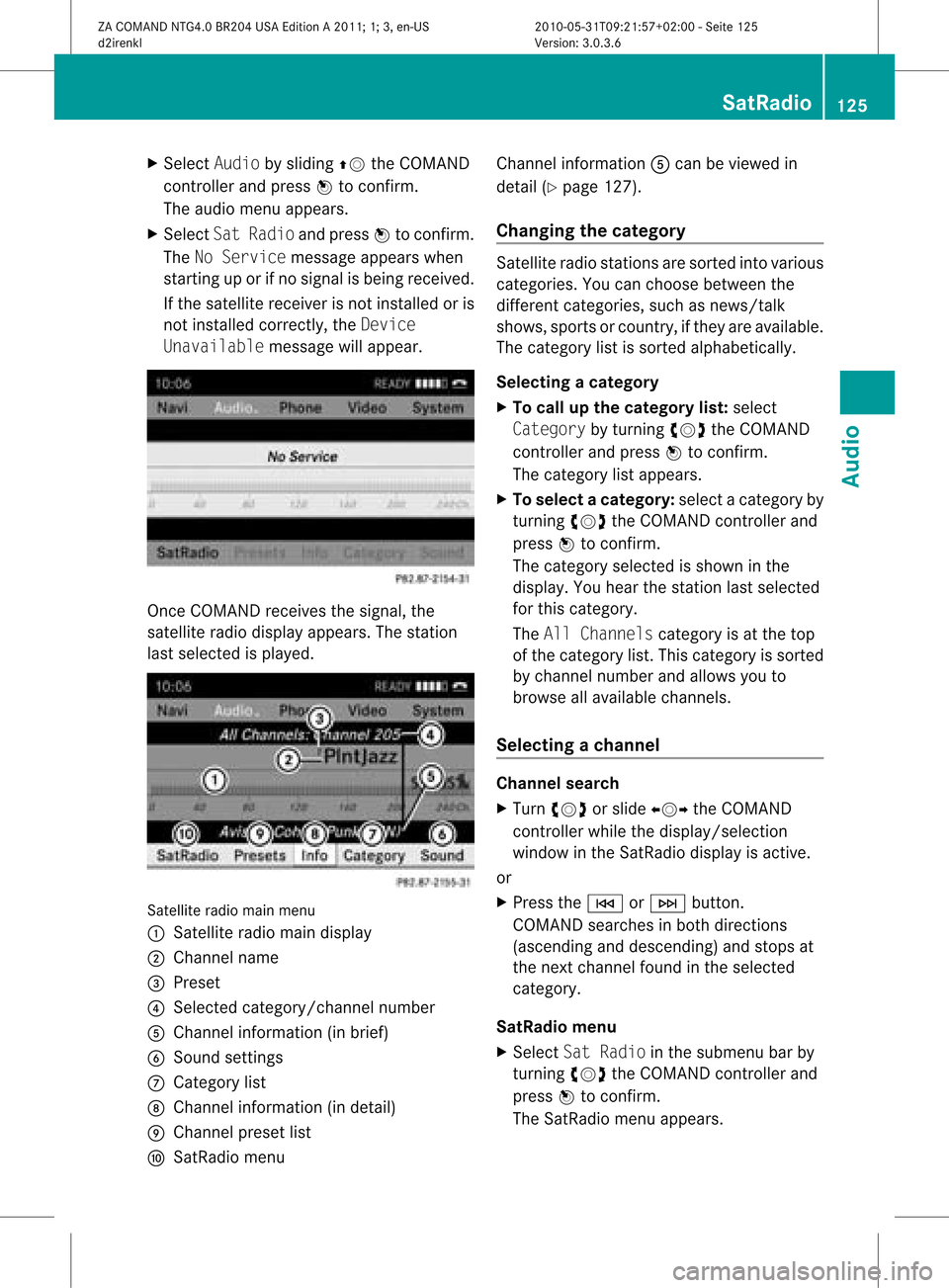
The NoServicemes sage appe arswh en
sta rting uporifno signa lis be ing rece ived.
If the satel lite rece iverisnot installed oris
not installed correctly,the Device
Unavailable messagewillappea r. Once
COMAND receivesthesignal, the
satellite radiodispla yappea rs.The station
last selected isplay ed. Satellite
radiomainmenu
1 Satellite radiomaindispla y
2 Channel name
3 Preset
4 Selected category/channel number
5 Channel information (inbrief)
6 Sound settings
7 Category list
8 Channel information (indetail)
9 Channel presetlist
a SatRadio menu Channel
information Acan beviewed in
detail (Ypage 127).
Changing thecategory Satellite
radiostations aresorted intovarious
categories. Youcanchoose between the
different categories, suchasnews/talk
shows, sportsorcountry, ifthey areavail able.
The category listissorted alphabetically .
Selec tingacatego ry
X To callup the categ orylist:sel ect
Catego rybyturning cVdtheCOM AND
controlle rand pre ssW toconfi rm.
The cate gorylist appe ars.
X To select ac atego ry:select acatego ryby
turning cVdtheCOM AND controll erand
press Wtoconfirm.
The catego rysel ected isshow nint he
displa y.You hear thestation lastselected
for this category.
The All Channels categoryisat the top
of the category list.This category issorted
by channel numberandallow syou to
browse allavaila blechannels.
Selec tingachanne l Chann
elsearc h
X Turn cVd orslide XVY theCOMAND
controlle rwhile thedispla y/selection
window inthe SatRadio displayisactive.
or
X Press theE orF button.
COMAND searchesinboth directions
(ascending anddescending) andstops at
the next channel foundinthe selected
category.
SatRa diomenu
X Select SatRadio inthe submenu barby
turning cVdtheCOMAND controller and
press Wtoconfirm.
The SatRadio menuappears. SatR
adio
125Audio
ZACOMAND NTG4.0BR204USAEdition A2011; 1;3,en-US
d2irenkl Version:3.0.3.6
2010-0
5-31T09 :21:57+02:0 0-Seite 125
Page 129 of 190

Disp
laying informa tion X
Se lec tInf oin thesubm enubar byturn ing
cVd theCOM ANDco ntro ller and press
W toconfirm .
In fo rm ation onthecur ren tly rec eived
pro gram isdis played . 1
Catego ry
2 Chan nel
3 Artist
4 Track nam e
If avai lable ,you see:
R thefull nam e
R addit ionalinfo rm ation
X To retu rn totheSa tRad ioma indisp lay :
slid eXVY theCOM ANDco ntro ller .
Disp laying service informa tion The
provider'scus tomer servicece nter is
avai lable bypho neatany time toans wer any
gen eralques tion sor ques tion son the
ver sions avai lable .
X Se lec tSat Radiointhesubm enubar by
tu rn ing cVd theCOM ANDco ntro ller and
pre ssW toconfirm .
X Se lec tSer viceand pressW toconfirm .
The provider'sdet ails appe ar. 1
Prov ider 'spho nenum ber(SIRI US XM) or
Cal lSer vicePro vider
2 SIRIU SID ofyour satellit erec eiver
X To retu rn totheSa tRad ioma indisp lay :
slid eXVY theCOM ANDco ntro ller .
Cha nnel listupdates Du
ringrec ept ion ofane wch ann ellist ,th e
Upd atingChannels...mes sage issho wn.
The stat ion last selectedis swit ched tomut e
unt ilth eupdat ehas been compl eted.
Sat ellit erad iomo deisno ta vail ableduri ng
this process.
Once theupdate has been comple ted,the
satel literadi omain menu appears. The
station lastselected isplayed.
Sound settings You
willfind details onthe sound settings in
the "Ataglance" section(Ypage 32). Audio
CD/DVDand MP3 mode Impor
tantsafet ynotes G
War
ning!
COMAND isclassified asaClass 1laser
prod uct.You must notopen thecasing. Ifyou
open thecasing, orifthe casing isfaulty or
damaged, thereisarisk ofexposure to
invisible laserradiation. Thismay damage
your eyes, orthose ofothers.
COMAND doesnotcont ainany parts thatcan
be serviced bythe user. Forsafety reasons, Audio
CD/DVD andMP3 mode
127Audio
ZACOMAND NTG4.0BR204USAEdition A2011; 1;3,en-US
d2irenkl Version:3.0.3.6
2010-
05-31T09: 21:57+02: 00-Seite 127 Z
Page 154 of 190

Vehi
cle equi pmen t
i TheseOpe rating Instru ctionsdescri beall
sta nda rdand optio nal equipme ntava ilab le
for your veh icleat the time ofpurcha se.
Pl ea se note thatyour vehicle maynotbe
equipped withallfeatures described. General
information Automa
ticpictur eshutoff
If the vehicle istraveling fasterthan
approximately 3mph,the image switchesoff
automatic allyinvideo DVDmode.
The following messageappearsinthe display:
In order nottodistra ctyou from
the traffi csituat ion,thepictur e
is faded outwhile thevehicl eis in
motion .
As soon asthe vehicle speedfallsbelow
approximat ely3m ph,the image switches
back on. Basic
settings Pictur
esett ings
Adju sting thebright ness,contra stor
color X
Press Wthe COMAND controller toshow
the menu.
X Select DVD-Vi deobysliding VÆand
turn ingcVd theCOMAND controller and
press Wtocon firm.
Am enu appears.
X Select Brightn ess,Contras tor Color by
turn ingcVd theCOMAND controller and
press Wtocon firm. Changing
thepictu reform at X
Press Wthe COMAND controller toshow
the menu.
X Select DVD-Vid eobysliding VÆand
turn ingcVd theCOMAND controller and
press Wtocon firm.
Am enu appears.
X Select 16:9Optimiz ed,4:3 or
Widescr eenandpress Wtocon firm.
The äicon indicat esthe format currently
select ed.
X Select asett ingbyturn ingcVd the
COMAND controller andpress Wto
con firm. DVD
video mode Safet
ynotes G
Wa
rning!
COMA NDisclas sified asaClass 1laser
prod uct.You must notopen thecasing. Ifyou
open thecasing, orifthe casing isfaulty or
damaged, thereisarisk ofexposure to
invisible laserradiation. Thismay damage
your eyes, orthose ofothers.
COMAND doesnotcont ainany parts thatcan
be serviced bythe user. Forsafety reasons,
all mainten ancework must becarried outby
quali fiedaftersales technicians. G
War
ning!
Only when thevehicle isstation aryshould
you:
R load adisc
R eject adisc
There isarisk ofbeing distract edfrom the
road andtraffic conditionsifthis isdone while
the vehicle isin motion . 152
DVD
video modeVideo
ZACOMAND NTG4.0BR204USAEdition A2011; 1;3,en-US
d2irenkl Version:3.0.3.6
2010-
05-31T09: 21:57+02: 00-Seite 152
Page 162 of 190

Vehi
cle equi pmen t
i TheseOpe rating Instru ctionsdescri beall
sta nda rdand optio nal equipme ntava ilab le
for your veh icleat the time ofpurcha se.
Pl ea se note thatyour vehicle maynotbe
equipped withallfeatures described. General
information Import
antsafety notes G
War
ning
The RSE CD/D VDplayer isaClass 1laser
prod uct.There isadanger ofinvisible laser
radiation whenyouopen ordamage thecover.
Do not remove thecover. TheRSE CD/DVD
play erdoes notcont ainany parts which can
be serviced bythe user. Forsafety reasons,
have anynecessary serviceworkperformed
by qual ified personnel. G
Warning
The driver should notwear aRear Seat
Ent ertainment headsetwhileoperating the
vehicle underanycircumstan ces.Theuseof
a headset whiledriving thevehicle could
drastically impairtheabili tyto react toaudi ble
traffic conditions (e.g.emergency sirensfrom
<0010000F000C0009000300050022000600090012000500220001000D00020015
000C0001000E000300050032V anothercar’shorn,
etc. ). G
Warning
When notinuse, headsets orextern alvideo
sources shouldbestored inas afe locatio n
(e. g.on eof theveh icle’sstorag e
com partmen ts)so that they are notloose
within thepassenger compartmentduring
braking, vehiclemaneuvers oratraffic
accident .Object smoving withinthe
passenger compartmentcould cause serious
personal injurytovehicle occupant s. G
War
ning
Due toapotent ialchokin ghazar d,wired
heads etusage bychildre nshould onlyoccur
with adultsuper vision . Comp
onents
Over view The
Rear SeatEntertainm entSys tem
co mpr ises:
R two scree nsbehin dth efron t-seat head
res traint s
R therem oteco ntrol
R aCD/ DVDdriv e
R AU Xjac kson bot hsc ree ns(AU Xdispl ay)
and ontheCD/ DVDdriv e(AU Xdriv e)
R two setsof wirel essheadp hones 160
Gener
alinfor mationRea rSe at Syste m
ZACOMAN DNT G4 .0BR 204 USA Editio n A 201 1;1;3,en-US
d2 iren kl Version: 3.0 .3.6
201
0-05-31T09: 21:57+ 02:00-Se ite1 60
Page 171 of 190
X
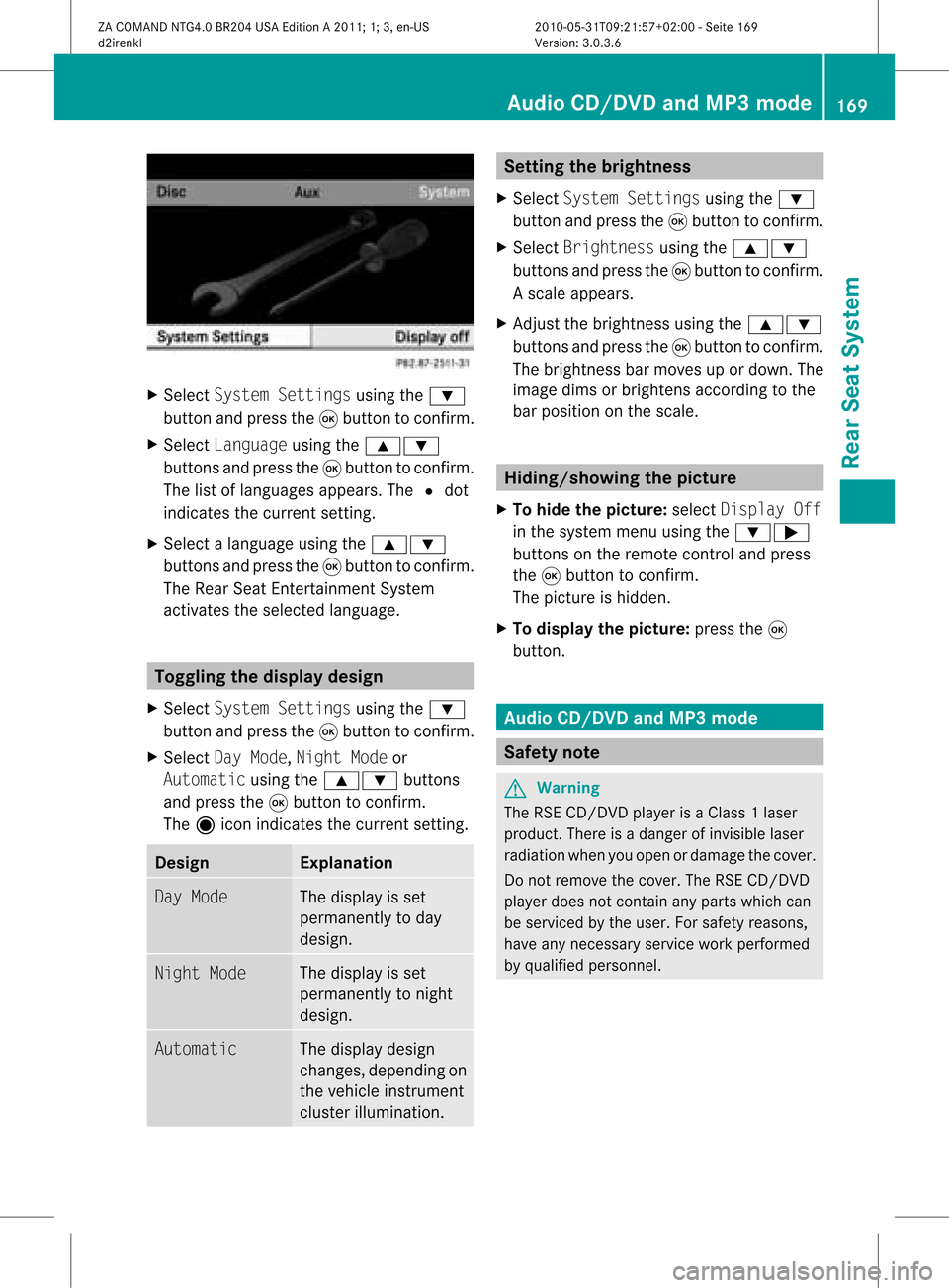
Sel ect System Settingsusing the :
bu tton andpressthe 9button toconfi rm.
X Sel ect Languageusing the 9:
bu ttons andpressthe 9button toconfi rm.
The list of langu ages appe ars .The # dot
indicates thecurrent setting.
X Select alanguage usingthe9:
buttons andpress the9button toconfirm .
The Rear SeatEntertainment System
activates theselected language. Toggling
thedisplay design
X Select System Settings usingthe:
button andpress the9button toconfirm .
X Select DayMode, Night Modeor
Automatic usingthe9: buttons
and press the9button toconfirm .
The äicon indicates thecurrent setting. Desig
n Explanation
Day
Mode The
displa yis set
permanent lyto day
design. Night
Mode The
displa yis set
permanent lyto night
design. Automatic The
displa ydesign
changes, depending on
the vehicle instrumen t
cluster illumination. Setting
thebrightness
X Select System Settings usingthe:
button andpress the9button toconfirm .
X Select Brightness usingthe9:
buttons andpress the9button toconfirm .
As caleap pea rs.
X Adju stthe brightne ssusing the 9:
bu ttons andpressthe 9button toconfi rm.
The brightne ssbarm oves upordown. The
image dimsorbrightens according tothe
bar position onthe scale. Hiding/showing
thepictur e
X To hide thepictur e:select Display Off
in the system menuusingthe:;
button son the remote controland press
the 9button toconf irm.
The picture ishidden.
X To display thepictur e:press the9
button . Audio
CD/DVDand MP3 mode Safety
note G
War
ning
The RSE CD/D VDplayer isaClass 1laser
prod uct.There isadanger ofinvisible laser
radiation whenyouopen ordamage thecover.
Do not remove thecover. TheRSE CD/DVD
play erdoes notcont ainany parts which can
be serviced bythe user. Forsafety reasons,
have anynecessary serviceworkperformed
by qual ified personnel. Audio
CD/DVD andMP3 mode
169RearSeatSystem
ZACOMAND NTG4.0BR204USAEdition A2011; 1;3,en-US
d2irenkl Version:3.0.3.6
2010-
05-31T09:21 :57+02:00-Seite 169 Z
Page 187 of 190

Comp
letedet ails and addit ionalinf orm ation
on Roadsi deAssist anc ecan befoun din the
veh icle Oper ator'sMan ual. Tel
eph one inquiries
The teleph oneinq uirie sbut tonã isloc ate din
th eove rheadcontrol pan el. X
Pre ssthete leph oneinq uirie sbut tonã for
lon ger than two seconds.
The Cust omerCent eriscalled. Thebutton
flashes whilethecall isin progress. The
phone operator canupload adestin ation
(e.g. arepair worksho p)to your COMAND ,
which youcan then usefornavigation ;see
the "Search &Send" section
(Y page 185).
Complete detailsandadditional information
on telephon einquiries canbefound inthe
vehicle Operator 'sManual. Search
&Send Not
es
i Touse Sear ch&S end, your vehicle needs
to be equipped withmbrace, anavigation
system andavalid mbrace subscript ion.
"Search &Send" isaservic eassistin gyou in
ent ering destin ations forthe navigation
system. Thismbrace servicecan send a
destin ationaddress directlyfrom theGoogle
Maps ®
or Yahoo LocalMaps®
websites tothe
navigation systemofyour vehicle. Selecting
andsending adesti nation
ad dress
i Obse rvetheno teson ent erin gand
sen ding anaddre ssprov ided onthe
res pec tivewebsit e.Eac hwebsit eoper ates
in adiff eren twayand issubj ecttochang es
and amen dmen ts.
X Ac ces sth eht tp://m aps.google. comor
ht tp://m aps.ya hoo. com websi teand
en tert he destination addressintothe
address entryfield.
X Depending onthe website used,clickthe
corresponding buttontosend the
destination addresstoyour mbrace e-mail
address.
X Ent erthe e-mail address youspecified
when settingup your mbrace account into
the corresponding fieldinthe "Send" dialog
window.
X Click "Send". Calling
upadestination address
X Press mbrace information buttonãto start
downloadi ngthe destination addressonto
the navigation systemofyour vehicle. i
Ifyou have sentmore thanone
destination addresstoyour vehicle's
navigation system,youwillneed tocall up
the information individuallyfor every
address tobe downloaded .
X Select Yeswhen theprompt forstartin gthe
navigation systemisshown. Thewindow Search
&Send
185mbrace
ZACOM ANDNT G4. 0BR2 04USAEd ition A20 11;1; 3,en-US
d2 irenklV ersion:3.0.3.6
2010
-05-31T09 :21:57+0 2:00-Seite 185