window MERCEDES-BENZ C-Class 2011 W204 Comand Manual
[x] Cancel search | Manufacturer: MERCEDES-BENZ, Model Year: 2011, Model line: C-Class, Model: MERCEDES-BENZ C-Class 2011 W204Pages: 190, PDF Size: 2.21 MB
Page 128 of 190

Ente
ringcha nnel numbersdir ectly
Opt ion 1
X Pres sth eõ butt on.
An inputmen uappear s.
Opt ion 2
X Sele ctSat Radiointhesubme nubar by
tur nin gcVd theCOMA NDcontroller and
pres sW tocon firm.
X Sele ctEnt erCha nneland pres sW to
con firm.
An inputmen uappear s.
X To ent erac hanne l:irresp ective ofthe
optio n,press thecorresp ondingnumber
keys onthe control paneloneafter the
other.
COMAND setsthesele cted channel.
i You canonly selectcurrently permitted
dig its.
Sel ecting achann elfrom theSatRadio
chann ellist
X Select SatRadio inthe submenu barby
turning cVdtheCOMAND controllerand
press Wtoconfirm.
X Select Channel Listandpress Wto
confirm.
The channel lista ppears.
X Select achann elby turn ingcVd the
COMAND controller and press Wto
con firm. Memor
yfunct ions Stor
ingchannels
i There areten preset savailable.
X Press Wthe COMAND controller when the
display/select ionwindow isactiv e.
or
X Select Preset sin the submenu barby
turn ingcVd theCOMAND controller and
press Wtocon firm.
In both cases, thechann elpreset sappear.
The Rdot infron tof apreset position
indicat esthat thecurren tlyselect ed
chann elisstor edther e. Channel
presets
X Select apreset byturn ingcVd the
COMAND controller and press andhold
W until youhear aton e.
or
X Press andhold anumber button,e.g. 4,
until youhear aton e.
The chann elisstor edunder thepreset .
Selecting achanne lfrom thepreset list
X To call upthe chann ellist:sele ct
Preset sby turning cVdtheCOMAND
controlle rand pre ssW toconfi rm.
The channel preset list appe ars.
X To setac hanne l:sele ctaprese tby
tur ning cVd theCOMAND controllerand
pre ssW toconf irm.
or
X Pre ssanum berk ey, e.g. 4. 126
Sat
Rad ioAudio
ZACOMAND NTG4.0BR204USAEdition A2011 ;1; 3,en-U S
d2irenk lV ersion:3.0.3.6
2010
-05-31T09 :21:57+0 2:00-Seite 126
Page 135 of 190
Pause
function
In audio CD/DVD andMP3 mode X
To pause playback: brieflypressB.
The , display isat the top leftofthe
status bar.
X To continue playback: brieflypressthe
B button again.
The , display goesout.
Only inaudio DVDmode X
To pause playback: switchonaudi oDVD
mode (Ypage 131).
X Select «bysliding VÆandturnin gcVd
the COMAND controller andpress Wto
conf irm.
The «display changes toM.
X To continue playback: selectMand press
W toconf irm.
Play back continues fromthepoint where it
was interr upted. TheMdisplay changes to
«. Stop
function
This funct ionisonly availa bleinaudi oDVD
mode.
X Switch onaudi oDVD mode (Ypage 131).
X To interru ptplayback: select±by
sliding VÆandturnin gcVd theCOMAND
cont roller andpress Wtoconf irm.
The «display changes toM.T he± icon
remains highlighted.
X To continue playback: selectMand press
W toconfirm .
Play back continues fromthepoint where it
was interrupted. X
To stop playback: whileplayback is
interrupted, select±again andpress W
to confirm .
or
X Select ±and confirm bypressing Wtwice
in rapid succession.
The selection markerisat M.
X To restar tplayback: selectMand press
W toconfirm .
Play back starts atthe beginning ofthe
DVD . Selec
tingCD/audio DVD/MP3 discs
Selec tingviathe media list X
In CD/ audio DVDandMP3 mode: select
Media bysliding VÆandturning cVdthe
COMAND controller andpress Wto
confirm .
or
X In CD/ audio DVDmode only:press W
the COMAND controller when thedispla y/
selection windowisactive.
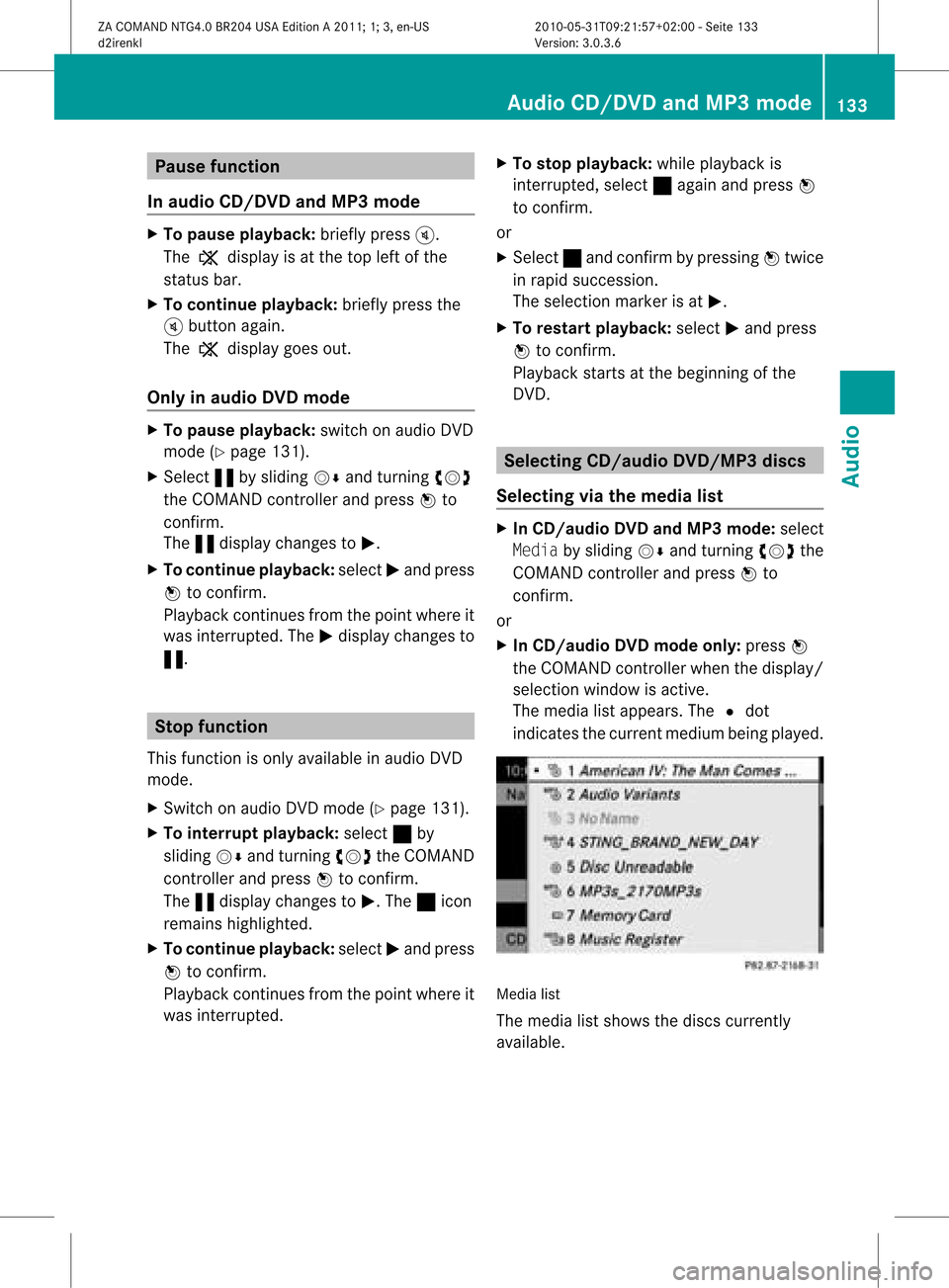
The media listappea rs.The #dot
indicates thecurrent medium beingplayed. Media
list
The media listshows thediscs current ly
availa ble. Audio
CD/DVD andMP3 mode
133Audio
ZACOMAND NTG4.0BR204USAEdition A2011; 1;3,en-US
d2irenkl Version:3.0.3.6
2010-
05-31T09:21 :57+02:00-Seite 133 Z
Page 136 of 190

Media
list Maga
zinetrays ,posi tions 1to6: readable
data media areaudio CDs,MP3CDsorMP3
DVD s,audio DVDsand video DVDs. Memory
card,position 7 MUSIC
REGISTER, position8 Media
Interface, position 9 i
Ifadata medium isnot readable, anentr y
appears behindthemagazine trayoryou
receive amessage ifyou have selected the
memory card.
X Select thedata medium byturnin gcVd
the COMAND controller andpress Wto
conf irm.
i Ifyou select avideo DVD,the system
switches tovideo DVDmode
(Y page 152). Selecting
atrac k
Se lecti ng byskippin gto atrac k X
To ski pfo rwa rdsorbac kto atrac k:tur n
cVd theCOMAND controllerwh en the
di sp lay/ selectio nwindow isact ive.
or
X Press theE orF button.
Sk ipping forward skipsto the nexttr ack .
Sk ipping backwards restartsthe curr ent
tr ack (ifithas been playing formor ethan
8s econ ds)orstart sthe previous track(if
the curr enttrack hasonly been playing for
a shor tertime).
If you have switchedonthe Rand om
Trac ksplayback option, theorder ofthe
tr ack sis rand om.
Selecting bytrack list X
In audio CD/DVDm ode, select Track
List bysliding VÆandturnin gcVd the COMAND
controller andpress Wto
conf irm.
or
X Press Wthe COMAND controller inMP3
mode whenthedisplay /select ionwindow
is active.
The track listappears. The#dot indicates
the current track.
X Select thetrack byturnin gcVd andpress
W toconf irm.
i InMP3 mode, thelistshows allthe track s
in alphabetical order. Fast
forward /rewind
X While thedisplay /select ionwindow is
active, slideXVY andhold theCOMAND
cont roller untilthedesired position has
been reached.
or
X Press andhold theE orF button
until thedesired position hasbeen
reached. Selecting
afolder
This function ison lyavailable inMP3 mode .
X Swit chon MP3 mode (Ypage 131).
X Sele ctFol der byslidin gVÆ andturnin g
cVd theCOMA NDcontroller andpres s
W tocon firm.
or
X Pres sW theCOMA NDcontroller when the
display/ selectionw indow isact ive.
The contentofthe folder isdispla yed. 134
Audio
CD/DVD andMP3 modeAudio
ZACOMAND NTG4.0BR204USAEdition A2011; 1;3,en-US
d2irenkl Version:3.0.3.6
2010-
05-31T09:21 :57+02:00-Seite 134
Page 139 of 190

X
To select opti ons:sw itch onaudio CD/
DVD orMP3 mode(Y pa ge 131) .
X Sel ect CD,DVD -AorMP3 byslid ing VÆ and
tur ning cVd theCOMAND controller and
pre ssW toconfi rm.
The optio ns list appe ars. The #dot
ind icates the optio ns elected.
X Select anoption byturn ingcVd andpress
W tocon firm.
The option isswitch edon. For alloption s
exc ept "Normal tracksequence", youwill
see acorr espondin gdisplay inthe display/
select ionwindow. Seetheexample ofthe
display inaudio CDmode (Ypage 132).
i The "Normal tracksequence" optionis
automatic allyselect edwhen youchange
the medium youarecurren tlylisten ingto
or when youselect adifferen tmedium. If
an option isselect ed,itremains selected
after COMAND isswitch edon oroff. Notes
onMP3 mode
Perm issible discs R
CD-R andCD-RW
R DVD -Rand DVD -RW
R DVD +Rand DVD +RW
R PCMCIA memorycard
Perm issible filesystem s R
ISO9 660/Joliet forCDs
R UDF foraudio andvideo DVDs
R FA T16 orFA T32 forPCMCIA memorycards
with storage medium
Mult isession CDs For
multisession CDs,thecontentofthe first
session determines howCOMAND will
process theCD. COMAND playsonly one
session andgives priority tothe audi oCD
session.
If possible, useCOMAND toplay only CDs
which werewritten inone session. File
structure ofadisc When
youcreate adisc with compressed
music files,thetrack scan beorganized in
folders. Afolder canalso containsubfolders.
A disc cancont ainam axim umof25 5fold ers.
Eac hfold ercan contain amax imum of25 5
tr ack sand 255subf older s.
The disc may contain nomor eth an eigh t
dire ctory leve ls.File sbeyon dth eeigh thleve l
will notb erecogn izedbythe system.
Tr ack and filenames When
youcreat eadisc with compr essed
music files,youcan assign names tothe
trac ksand folders.
COMAND usesthese names accordingly for
the display. Folderswhichcontain data other
than MP3 orWMA tracksare not displayed by
COMAND .
If MP3 orWMA filesarestor edinthe root
direct oryitself, theroot direct orywill also be
treat edasafolder. COMAND willthen show
the name ofthe root direct oryasthe folder
name.
You must observe thefollowing when
assigning tracknames :
R track nam esmust haveatleast one
ch arac ter.
R track nam esmust havetheex tens ion
"mp3 "or "wma".
R there must beafull stop bet ween thetrack
nam eand theex tens ion .
Ex ample ofaco rrect track nam e:
"Trac k1.m p3"
i COMA NDdoes notsuppor tID3 tags.
Pe rmis sibl efo rmats CO
MAND supp orts thefollowi ng forma ts:
R MP EG1 AudioLayer3( MP3)
R Microsoft WindowsMediaAudioV2,V7,V8
and V9(WMA) Audio
CD/DVD andMP3 mode
137Audio
ZACOMAND NTG4.0BR204USAEdition A2011; 1;3,en-US
d2irenkl Version:3.0.3.6
2010-
05-31T09:21 :57+02:00-Seite 137 Z
Page 143 of 190

If
you select No,the process willbe aborted . Call
ingupmemory spaceinfo
X Select Music Register byslid ing VÆ and
turning cVdtheCOMAND controller and
press Wtoconfirm.
X Select Memory Infoandpress Wto
confirm.
The follo wing isdisp layed:
R storage capacity
R avai lablememory
R occupie dmemory
R content (folders,tracks) Fol
der functio ns
Introductio n You
canview thecontent ofthe MUSIC
REGISTER, changefolderortrack names and
dele teindivi dualfolders ortracks.
Call ingupthe MUSIC REGISTE R X
Select Folder byslid ing VÆ andturning
cVd theCOMAND controller andpress
W toconfirm.
or
X Press Wthe COMAND controller whenthe
disp lay/selection windowisactive.
You seethecontent sof the current folder. :
Folder selection symbol
; Icon formusic file
= Current folder
X To swi tch tothe superordinate folder:
select theU iconandpress Wto
confirm.
The displaychanges tothe next folder up.
Changi ngthe folder/ trackname X
Select Folder byslid ing VÆ andturning
cVd theCOMAND controller andpress
W toconfirm.
X Select afolder/track byturning cVd.
X Select Options byslid ing VY andpress
W toconfirm.
X Select Change andpress Wtoconfirm.
X Ent eraname forthe folder/track.
X To save thechange s:select ¬and
press Wtoconfirm.
De letin gfolders/ tracks X
Select Folder byslid ing VÆ andturning
cVd theCOMAND controller andpress
W toconfirm.
X Select afolder/track byturning cVd.
X Select Options byslid ing VY andpress
W toconfirm.
X Select Delete andpress Wtoconfirm.
Aq uery appear s.No ishigh light ed.
If you selectYes ,th efol der s/track sare
delet ed.You seethePle ase Wait... MUS
ICREG ISTER
141Audio
ZACOMA NDNTG4 .0BR2 04USAEd ition A20 11;1; 3,en-US
d2i ren kl Version :3. 0.3.6
20
10-05-31 T09 :21:57 +02:00 -Sei te14 1 Z
Page 144 of 190
messa
ge.Then, youseetheDeletion
Procedur eSuccessf ulmessa ge.
If you sele ctNo, the process willbe abo rted. Playbac
koptio ns
The followi ng opti ons areavailab leto you:
R Nor mal TrackSeq uence
Yo uwi llhea rthe track sin the normal order
(e.g. track 1,2,3,etc. ).
R Random Tracks
All the track son the medium areplay edin
random order.
R Random Folder(MP3mode only)
The track sin the current lyactive category
or folder areplay edinrandom order.
X To selec toptio ns:switch onthe MUSIC
REG ISTER (Ypage 139).
X Sel ect Musi cRegi ster bysliding VÆ and
turni ngcVd theCOMAND controllerand
pre ssW toconfi rm.
The options list appea rs.The #dot
ind icates the optionselected .
X Sel ect anopti onand pressW toconfi rm.
The optionisswi tched on.Allopti ons
excep tNorm alTrac kSequ ence willbe
ind icated byacorre sponding iconint he
displa y/selection window.
i The Normal TrackSequence optionis
automatically selectedwhenyouchange
the disc youarecurrent lylistening toor
when youselect adifferent medium. Ifan
option isselected, itremains selected after
COMAND isswitched onoroff. Media
Interface mode Conne
ctionoptions
Overview You
willfind theconn ection socketsin the
glove box. To
conn ectextern aldevices tothe Media
Int erface, youwillneed device-specific
adapter cableswhichareincluded withthe
Media Interface.
i Stow theindividua lparts inasecure
location.
Use only genuine Mercedes-Ben z
conn ecting cables.
You canconn ectthe following datacarriers
to COMAND viathe Media Interface:
R iPod ®
R USB devices (USBsticks,USB hard drives)
i iPod ®
is aregistered trademark ofApple
Inc. ,Cupertino, California, USA.
Suppor tediPod ®
variant s The
following areexamples ofsupported
iPod ®
variants:
R iPod ®
mini
R iPod ®
nano
R iPod ®
classic
R iPod ®
touch
Suppor tedUSB devices The
following USBdevices aresupported:
R USB sticks(flash memory)
R USB hard drives requiring astartup/
permanent currentofamaximum of
800 mA(itmay benecessary toconn ecta
separate powersupply)
R certain MP3players
i The Media Interface supports USB
storage mediaof"USB Device Subclass 6".
Inform ationconcerning USBDevice
Subclass 6isavail able from theequip ment
manufacturer.
For further detailsandalist ofsupported
devices, visithttp://www .mbusa-
mobile.co m.O rcall theMer cedes-Ben z
Cust omerAssistance Centerat
1-80 0-FOR-ME RCedes(1-800 -367-6372) 142
Media
Interface modeAudio
ZACOMAND NTG4.0BR204USAEdition A2011; 1;3,en-US
d2irenkl Version:3.0.3.6
2010-0
5-31T09 :21:57+02:0 0-Seite 142
Page 146 of 190
X
Sel ect Audiobysliding ZV andturni ng
cVd theCOMAND controllerand press
W toconfi rm.
The audio menu appe ars .
X Sel ect MediaInt erface andpressW to
confi rm.
Opti on2 X
Pre ssthe efuncti onbutton.
If yo uha dpre viouslysel ected Media
Interfa cemod e,this willnow beacti vate d.
If not, youcan switch onMed iaInterfa ce
mod evia the audio menu .
X Sel ect Audiobysliding ZV andturni ng
cVd theCOMAND controllerand press
W toconfi rm.
The audio menu appe ars .
X Sel ect MediaInt erface andpressW to
confi rm.
Opti on3 X
Pre ssthe Enumb erbutton.
Thi sdi rectl ysel ects theconnecte dexter nal
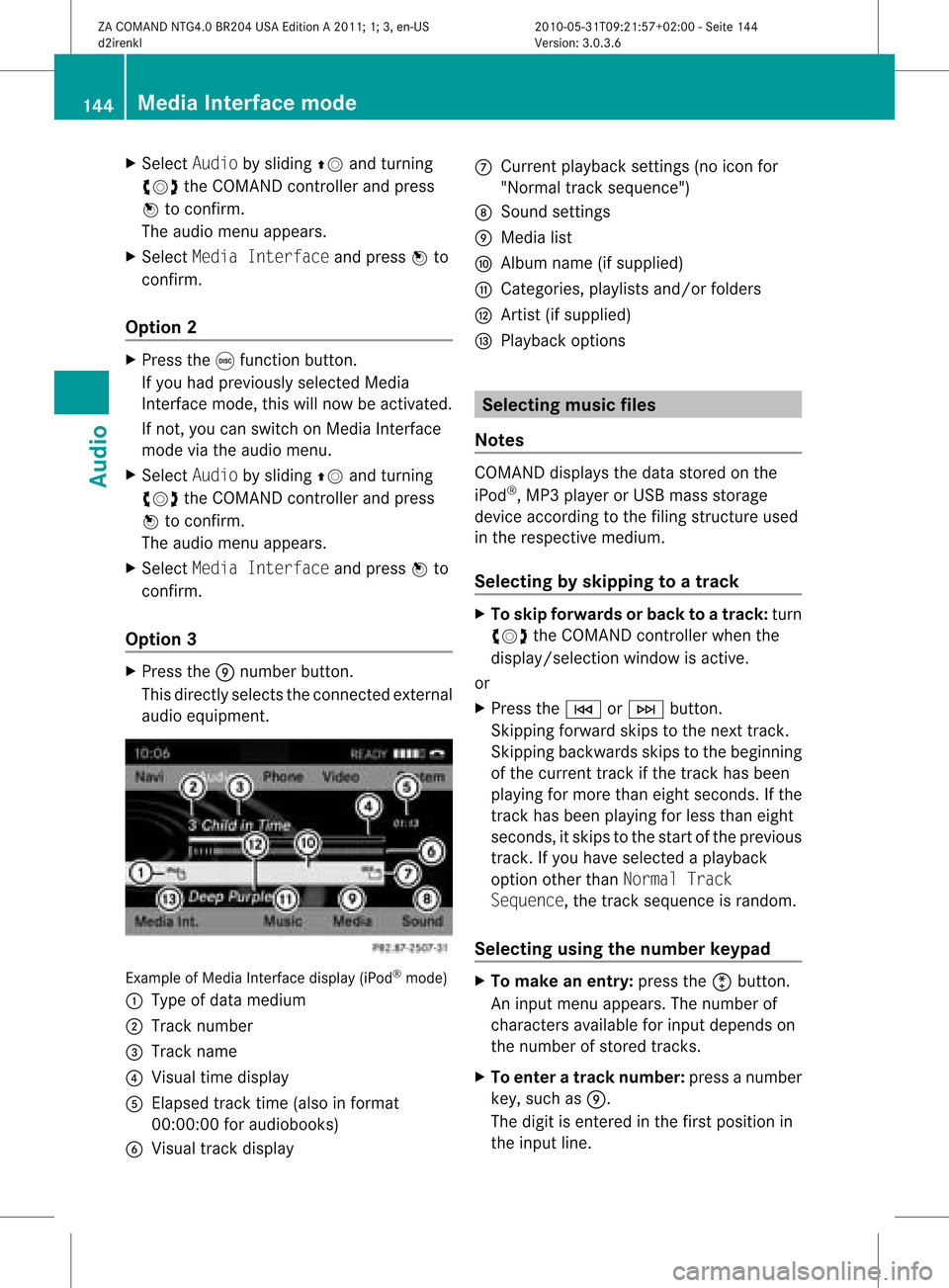
au dio eq uipme nt. Examp
leof Med iaInterf acedispl ay(iPod ®
mod e)
: Type ofdata med ium
; Tracknumb er
= Trackname
? Visualtime displ ay
A Elapse dtrack time(also inform at
00:00:00 foraudiobo oks)
B Visualtrack displ ay C
Current play ba ck setti ngs(noiconfor
"Normal tracksequence")
D Sound settings
E Media list
F Album name(ifsupplied)
G Categories, playlistsand/or folders
H Artist (ifsupplied)
I Playb ackoptions Selecting
musicfiles
Notes COMAND
displaysthe data stored onthe
iPod ®
,MP3 playe rorU SB mas sstora ge
de vice acco rding tothe filing stru cture used
in the respective medium.
Se lecti ng byskippin gto atrac k X
To ski pfo rwa rdsorbac kto atrac k:tur n
cVd theCOMAND controllerwh en the
di sp lay/ selectio nwindow isact ive.
or
X Press theE orF button.
Sk ipping forward skipsto the nexttr ack .
Sk ipping backwards skipsto the begin ning
of the curr enttrack ifthe track hasbeen
playing formor ethan eight seconds .Ift he
track hasbeen playingforless than eight
seconds, itskips tothe start ofthe previous
track .Ify ou have selected aplayb ack
option otherthanNormal Track
Sequence, thetrack sequence israndom.
Selecting usingthenumber keypad X
To mak ean entry: presstheõbutton .
An input menu appears. Thenumber of
charact ersavaila bleforinput depends on
the number ofstored tracks.
X To enter atr ack number: pressanumber
key, such asE.
The digit isenter edinthe first position in
the input line. 144
Media
Interface modeAudio
ZACOMAND NTG4.0BR204USAEdition A2011; 1;3,en-US
d2irenk lV ersion:3.0.3.6
2010
-05-31T09 :21:57+0 2:00-Seite 144
Page 147 of 190

i
COMA NDwill ignore and notd isplay an
inv alid digit .
X Ifdesire d,ent erfurt her digit s.
X To confir man entr y:press Wthe
COMA NDcontroller orpress andhold the
numb erkey correspo ndingto the last digit
of the desire dtrack numb er.
The selec tedtrack isplayed.
Fast forwar d/rewind X
While thedisplay/s electionwindow is
act ive, slide XVY andhold theCOMA ND
con troller untilthe desire dposition has
been reached.
or
X Press andhold theF orE button
until thedesired position hasbeen
reached.
i OnaniPod ®
,fast rewind onlyfunct ions
within thecurrent track. Selecting
acatego ry/play list/fol der
iPo d®
and certain MP3playe rs You
canselect tracks foraniPo d®
and MP3
pla yera ccord ingtocate goriesand folder s.
Depe nding on the deviceconnecte d,the
fol lowi ng cate goriesmay beava ilab le,for
exa mpl e:
R Curr entTracklis t
R Play lists(e .g. All)
R Arti sts
R Albu ms
R Trac ks
R Podc asts
R Genr es
R Comp osers
R Audi obooks
i Some play ba ck cate goriescontai nthe
All entry.Ifthis entryhas been selected, the
entire contentofthe category selected
will beplay ed.
USB devices For
USB mass storage devices, youcan select
folders andalso playlists (ifavaila ble).
COMAND canalso displa ythe albu mname
and artist (met adata)durin gplaybac k,ifth is
inf orm ationhasbeen entered intoth e
syst em.
Playlist sare indicat edinthedispl ayby a
spec ialsymb ol.When youopen theplaylist ,
th eco rrespo nding track sare open edand
playbac kbegins. Youcannow select Random
Categor iesinstead ofRandom Folderasa
playback option.
For USB mass storage devices, youcan
choose todisplay themetadata contained in
the tags ofthe encoded music data,orto
display thefileand direct orynames whenthe
music isplaying.
X To displa ythe album andartist name:
select Media Int.inthe basic display by
sliding VÆandturningcVd theCOMAND
con troller andpress Wtocon firm.
X Select Display Metadataand press Wto
con firm.
Selecting acatego ryand open inga
fol der X
Press Wthe COM AND controll erwhe nthe
displa y/selection windowisactive.
or
X Select Musicinthe basic displa yby sliding
VÆ andturning cVdtheCOMAND
cont roller andpress Wtoconfirm .
You willsee theavaila blecategories orthe
folder content(e.g. other folders). The
category selectedorthe folder nameisin
the status barofthe displa y.
i The Music menuitemisnot availa bleuntil
the device hasbeen activated. Media
Interface mode
145Audio
ZACOMAND NTG4.0BR204USAEdition A2011; 1;3,en-US
d2irenkl Version:3.0.3.6
2010-
05-31T09:21 :57+02:00-Seite 145 Z
Page 149 of 190

the
version and langu ageva riant ofthe
so ftw are(e .g. iTune s®
ver sion) used to
po pulate the device.
US Bm ass storage devices Thi
sfunction isava ilable foralpha betica lly
sorted directories .This funct ionisnot
availa bleforalbu msorplay lists, forexample.
X In adirectory, pressthecorresponding
number keyonce orseveral timestoselect
the first letter ofthe artist's name(e.g.for
an artist beginning withtheletter "C",press
number key;three times).
You seetheavaila bleletters atthe bottom
edge ofthe displa y.
If the directory onlycontains folders,
COMAND searchesforfolders. Aftera
message, thefirst entryfound which
matches theletters enteredappears firstin
the list.
If there isno entr ybeginn ingwith theletter
ent ered, thelast entrybeginn ingwith the
previous letterisshown atthe top ofthe
list. Selecting
anactive partition (for USB
mass storage devices only)
You canselect thisfunc tion forUSB mass
stor age devices whenthestor age device is
partit ioned. Uptofour partit ions(primary or
logical andFAT-for matt ed)are supported.
i The Windows formattingprogram
supports FATpartit ionsofup to32 GB as
stan dard.
X Select Media Int.inthe basic display by
sliding VÆandturningcVd theCOMAND
con troller andpress Wtocon firm.
X Select Select ActivePartitionand
press Wtocon firm. Playback
options
The following optionsare available toyou:
R Normal TrackSequenc e
You hear thetrac ksintheir normalorder
(numeric alor alphabetical, forexample).
R Random Tracks
All the trac kson the medium areplayed in
random order.
R Random CategoriesorRandom Folder
(in the case ofUSB devices whenFolder
has been select ed):
The tracksinthe curren tlyactive categor y
or folder, including anysub-folders ,are
played inrandom order.
i ForUSB devices, therandom playlists can
con tain amaximum of300 randomly
select edtrac ks.
X To select aplayba ckoption: select
Media Int.inthe basic display bysliding
VÆ andturningcVd theCOMAND
con troller andpress Wtocon firm.
The option slist appears. The#dot
indicat esthe option selected.
X Select anoption andpress Wtocon firm. Notes
onUSB devices
Data formats The
following dataformat sare supported:
R MP3: CBR,VBR(upto320 kbit/s)
R wma: CBR,VBR(upto320 kbit/s)
Notes onUSB devices R
Avoid storingdata other thanmusic dataon
the USB device sothat thestart -uptime is
not extended unnecessarily.
R Up toeight direct orylevels withupto100 0
trac ksare supported. Media
Interfacemod e
147Audio
ZACOMAND NTG4.0BR204USAEdition A2011 ;1; 3,en-U S
d2irenk lV ersion:3.0.3.6
2010
-05-31T09 :21:57+0 2:00-Seite 147 Z
Page 174 of 190
If
the Random TracksorRandom Folder
pla yba ckoption hasbeen selected, the
track order israndom.
Sele cting bytrack list In
aud ioCD mode, thetrack listcontains all
the tracks onthe disc currently playing.
In aud ioDVD mode, thetrack listcontains all
tracks inthe currently activegroup;see
"Setting theaudioformat" (Ypage 136).
In MP3 mode, thetrack listshows alltracks
on the currently activefolder, aswel las the
folder structure forselection ofall the tracks
on the MP3 CD.
X Select Track List(audio CD/DVD mode)
or Folder (MP3mode) using
the :=; buttonsonthe remote
control andpress the9button toconfirm.
or
X Press the9button whenthedisp lay/
selection windowisactive.
The track listapp ears. The#dot indicates
the current track.
X Select atrack using the9: buttons
and press the9button toconfirm.
Sele cting atrac kbydirect lyenter ingits
num ber X
Press honthe remo tecon trol.
The track entrydisplay appears.
Ex ample: track 2
X Press the· numbe rbutt on.
Ex ample: track 12
X Press thecorrespon dingnumbe rkeys in
rapid success ion.
i Itis not possible toent ernumbers that
exc eed thenumber oftrac kson the CDor
in the curren tlyactiv efolder.
X Wait forapproximat elythree secon dsafter
makin gthe entry.
You willhear theentered track.The
corr espondin gbasic menu thenreappears. Fast
forwar d/rewind
X While the<0004000900130010000C0001001A002200130005000C0005000300140009000F
000EV windowis
active, pressthe= or; button on
the remot econ trol repeatedly untilyou
reach thedesired position.
or
X Press andhold theE orF button
until thedesired position hasbeen
reached. Selecting
afolder
This function ison lyavailable inMP3 mode .
X Sele ctFol der inMP3 mode using
th e:=; buttonson therem ote
con trol and pres sth e9 butt ontocon firm.
or
X Pres sth e9 butt onwhen thedisplay/
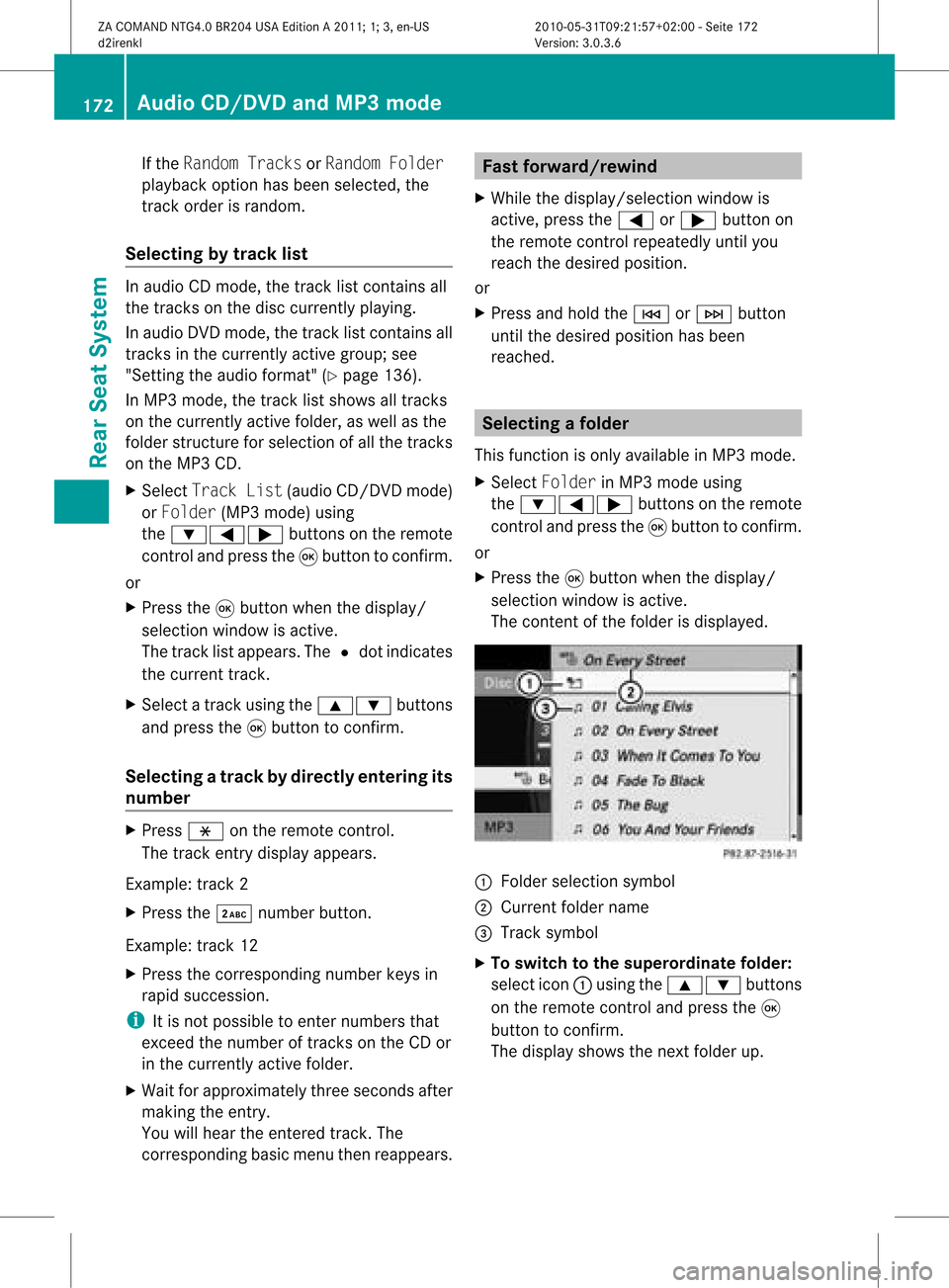
selec tionw indow isact ive.
The contentofthe folder isdispla yed. :
Folder selection symbol
; Current foldername
= Track symbol
X To switch tothe superord inatefolder:
select icon:using the9: buttons
on the remote controland press the9
button toconfirm .
The displa yshows thenext folder up. 172
Audio
CD/DVD andMP3 modeRear SeatSystem
ZACOMAND NTG4.0BR204USAEdition A2011; 1;3,en-US
d2irenkl Version:3.0.3.6
2010-
05-31T09:21 :57+02:00-Seite 172