sport mode MERCEDES-BENZ C-Class 2011 W204 User Guide
[x] Cancel search | Manufacturer: MERCEDES-BENZ, Model Year: 2011, Model line: C-Class, Model: MERCEDES-BENZ C-Class 2011 W204Pages: 320, PDF Size: 13.17 MB
Page 174 of 320
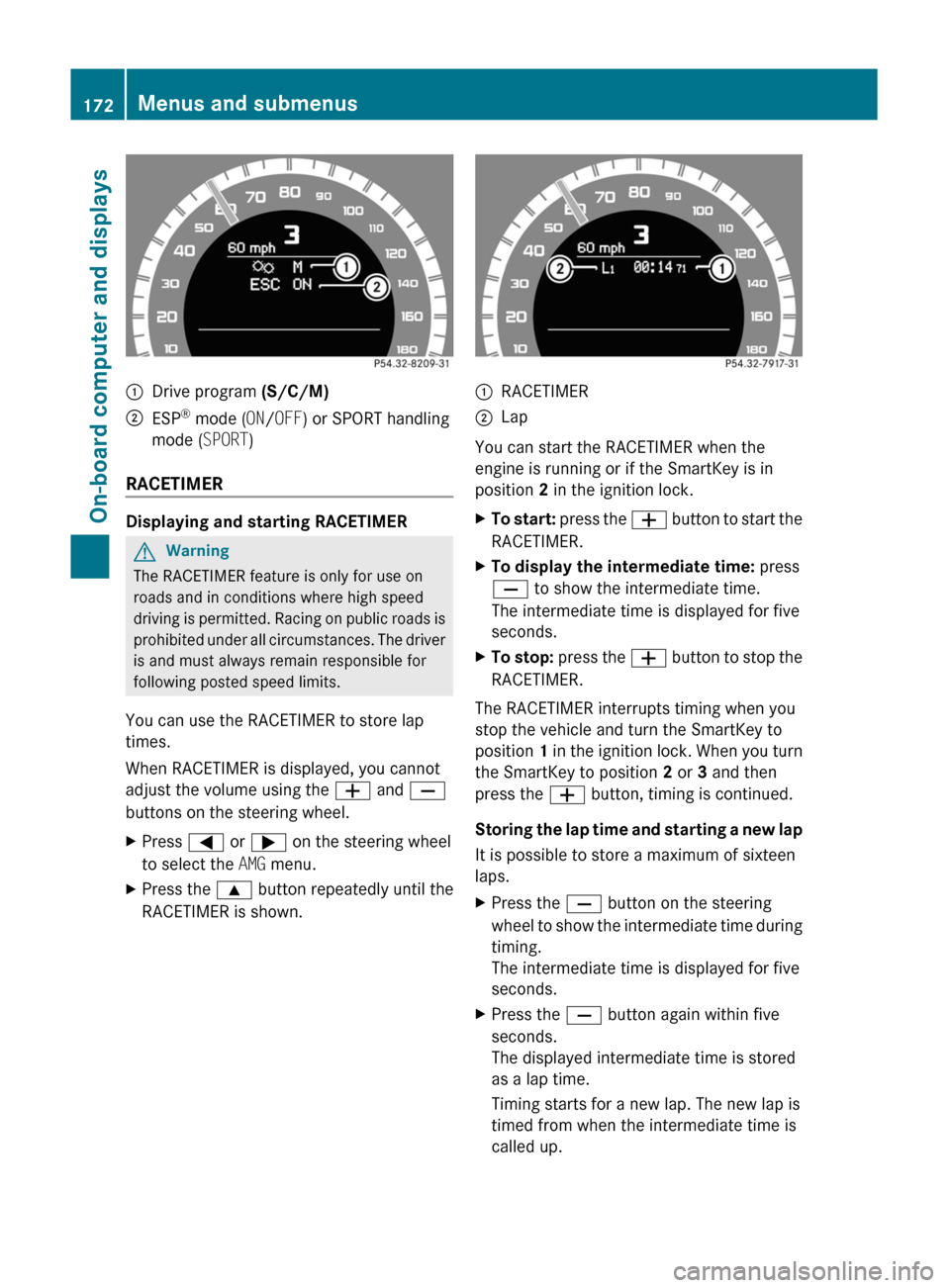
:Drive program (S/C/M);ESP®
mode ( ON/OFF ) or SPORT handling
mode ( SPORT)
RACETIMER
Displaying and starting RACETIMER
GWarning
The RACETIMER feature is only for use on
roads and in conditions where high speed
driving is permitted. Racing on public roads is
prohibited under all circumstances. The driver
is and must always remain responsible for
following posted speed limits.
You can use the RACETIMER to store lap
times.
When RACETIMER is displayed, you cannot
adjust the volume using the W and X
buttons on the steering wheel.
XPress = or ; on the steering wheel
to select the AMG menu.XPress the 9 button repeatedly until the
RACETIMER is shown.:RACETIMER;Lap
You can start the RACETIMER when the
engine is running or if the SmartKey is in
position 2 in the ignition lock.
XTo start: press the W button to start the
RACETIMER.XTo display the intermediate time: press
X to show the intermediate time.
The intermediate time is displayed for five
seconds.XTo stop: press the W button to stop the
RACETIMER.
The RACETIMER interrupts timing when you
stop the vehicle and turn the SmartKey to
position 1 in the ignition lock. When you turn
the SmartKey to position 2 or 3 and then
press the W button, timing is continued.
Storing the lap time and starting a new lap
It is possible to store a maximum of sixteen
laps.
XPress the X button on the steering
wheel to show the intermediate time during
timing.
The intermediate time is displayed for five
seconds.XPress the X button again within five
seconds.
The displayed intermediate time is stored
as a lap time.
Timing starts for a new lap. The new lap is
timed from when the intermediate time is
called up.172Menus and submenusOn-board computer and displays
BA 204 USA, CA Edition A 2011; 1; 5, en-UShereepeVersion: 3.0.3.62010-05-20T09:17:30+02:00 - Seite 172
Page 210 of 320
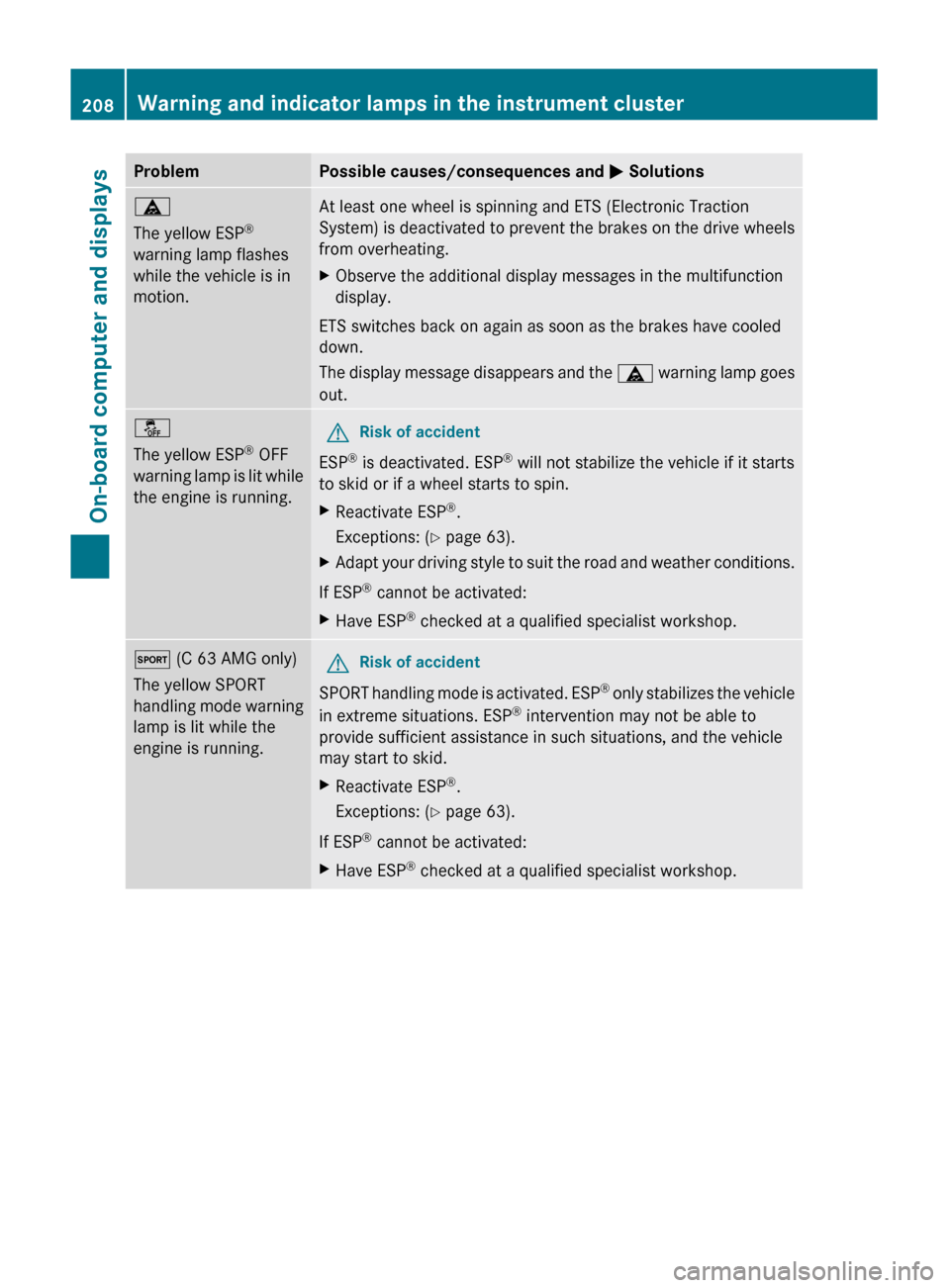
ProblemPossible causes/consequences and M Solutionsä
The yellow ESP ®
warning lamp flashes
while the vehicle is in
motion.At least one wheel is spinning and ETS (Electronic Traction
System) is deactivated to prevent the brakes on the drive wheels
from overheating.XObserve the additional display messages in the multifunction
display.
ETS switches back on again as soon as the brakes have cooled
down.
The display message disappears and the ä warning lamp goes
out.
å
The yellow ESP ®
OFF
warning lamp is lit while
the engine is running. GRisk of accident
ESP ®
is deactivated. ESP ®
will not stabilize the vehicle if it starts
to skid or if a wheel starts to spin.
XReactivate ESP ®
.
Exceptions: ( Y page 63).XAdapt your driving style to suit the road and weather conditions.
If ESP ®
cannot be activated:
XHave ESP ®
checked at a qualified specialist workshop.M (C 63 AMG only)
The yellow SPORT
handling mode warning
lamp is lit while the
engine is running. GRisk of accident
SPORT handling mode is activated. ESP ®
only stabilizes the vehicle
in extreme situations. ESP ®
intervention may not be able to
provide sufficient assistance in such situations, and the vehicle
may start to skid.
XReactivate ESP ®
.
Exceptions: ( Y page 63).
If ESP ®
cannot be activated:
XHave ESP ®
checked at a qualified specialist workshop.208Warning and indicator lamps in the instrument clusterOn-board computer and displays
BA 204 USA, CA Edition A 2011; 1; 5, en-UShereepeVersion: 3.0.3.62010-05-20T09:17:30+02:00 - Seite 208
Page 231 of 320
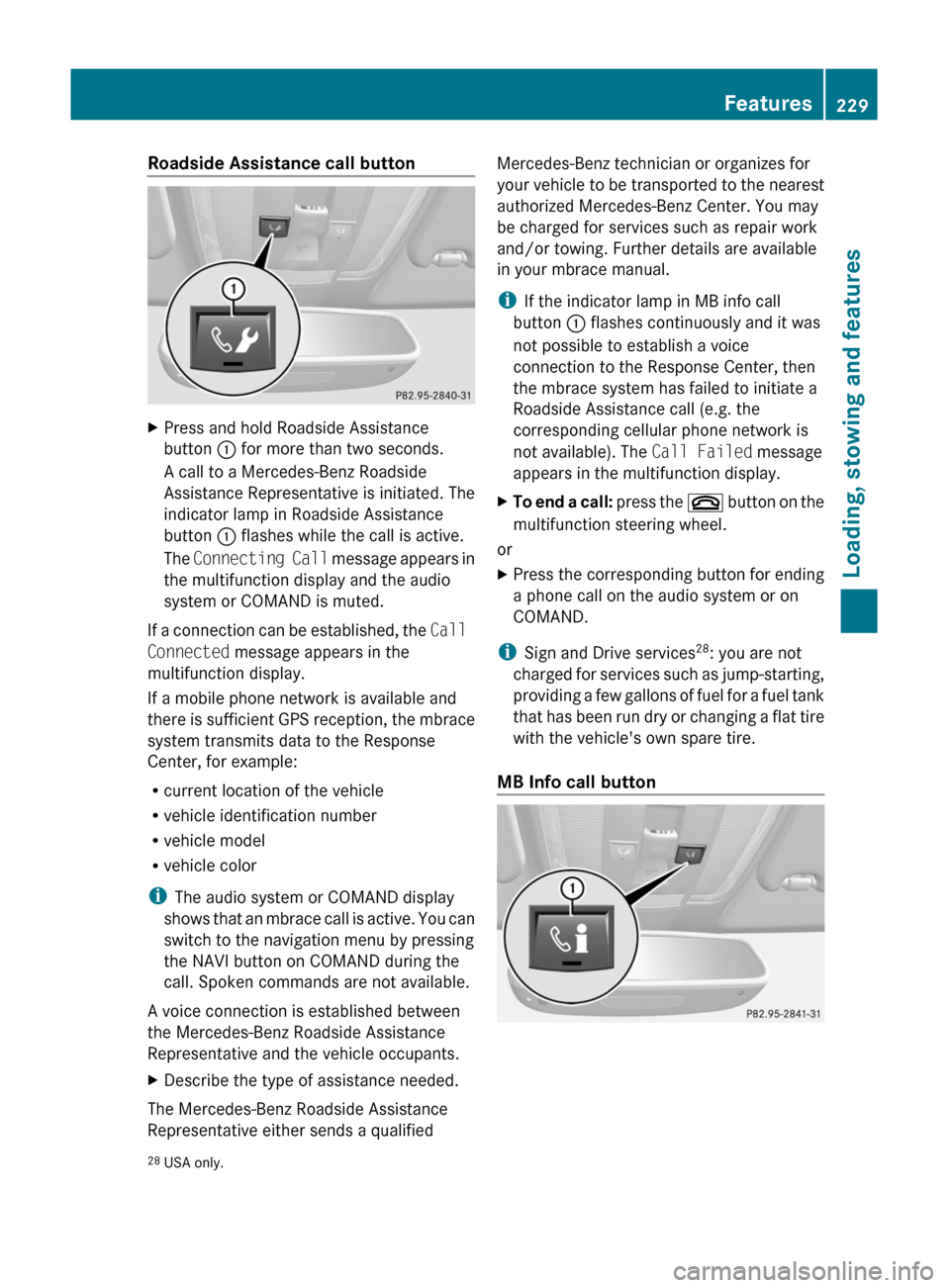
Roadside Assistance call buttonXPress and hold Roadside Assistance
button : for more than two seconds.
A call to a Mercedes-Benz Roadside
Assistance Representative is initiated. The
indicator lamp in Roadside Assistance
button : flashes while the call is active.
The Connecting Call message appears in
the multifunction display and the audio
system or COMAND is muted.
If a connection can be established, the Call
Connected message appears in the
multifunction display.
If a mobile phone network is available and
there is sufficient GPS reception, the mbrace
system transmits data to the Response
Center, for example:
R current location of the vehicle
R vehicle identification number
R vehicle model
R vehicle color
i The audio system or COMAND display
shows that an mbrace call is active. You can
switch to the navigation menu by pressing
the NAVI button on COMAND during the
call. Spoken commands are not available.
A voice connection is established between
the Mercedes-Benz Roadside Assistance
Representative and the vehicle occupants.
XDescribe the type of assistance needed.
The Mercedes-Benz Roadside Assistance
Representative either sends a qualified
Mercedes-Benz technician or organizes for
your vehicle to be transported to the nearest
authorized Mercedes-Benz Center. You may
be charged for services such as repair work
and/or towing. Further details are available
in your mbrace manual.
i If the indicator lamp in MB info call
button : flashes continuously and it was
not possible to establish a voice
connection to the Response Center, then
the mbrace system has failed to initiate a
Roadside Assistance call (e.g. the
corresponding cellular phone network is
not available). The Call Failed message
appears in the multifunction display.XTo end a call: press the ~ button on the
multifunction steering wheel.
or
XPress the corresponding button for ending
a phone call on the audio system or on
COMAND.
i Sign and Drive services 28
: you are not
charged for services such as jump-starting,
providing a few gallons of fuel for a fuel tank
that has been run dry or changing a flat tire
with the vehicle's own spare tire.
MB Info call button
28 USA only.Features229Loading, stowing and featuresBA 204 USA, CA Edition A 2011; 1; 5, en-UShereepeVersion: 3.0.3.62010-05-20T09:17:30+02:00 - Seite 229Z
Page 300 of 320
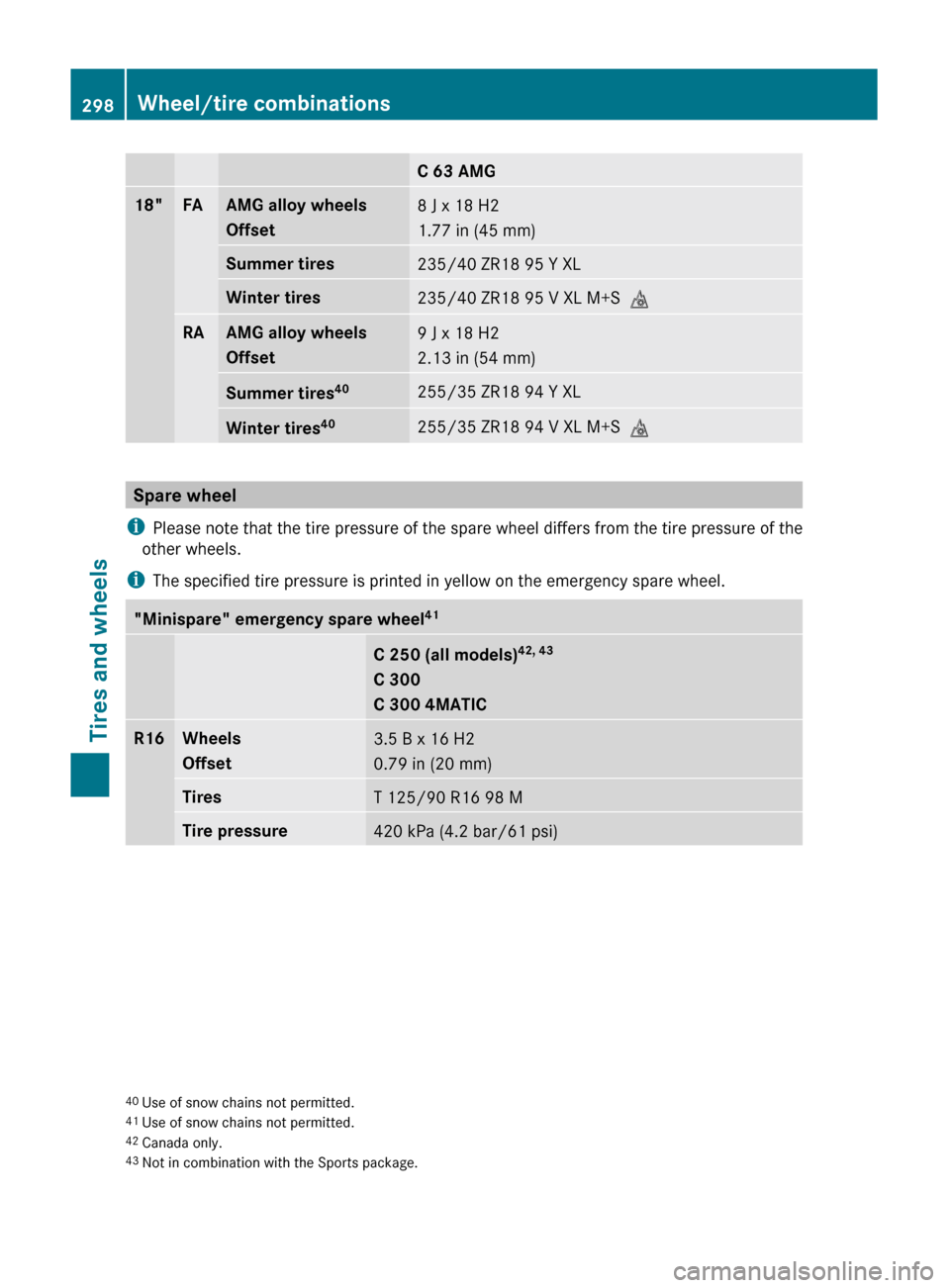
C 63 AMG18"FAAMG alloy wheels
Offset8 J x 18 H2
1.77 in (45 mm)Summer tires235/40 ZR18 95 Y XLWinter tires235/40 ZR18 95 V XL M+S iRAAMG alloy wheels
Offset9 J x 18 H2
2.13 in (54 mm)Summer tires 40255/35 ZR18 94 Y XLWinter tires40255/35 ZR18 94 V XL M+S
i
Spare wheel
i Please note that the tire pressure of the spare wheel differs from the tire pressure of the
other wheels.
i The specified tire pressure is printed in yellow on the emergency spare wheel.
"Minispare" emergency spare wheel 41C 250 (all models)42, 43
C 300
C 300 4MATICR16Wheels
Offset3.5 B x 16 H2
0.79 in (20 mm)TiresT 125/90 R16 98 MTire pressure420 kPa (4.2 bar/61 psi)40 Use of snow chains not permitted.
41 Use of snow chains not permitted.
42 Canada only.
43 Not in combination with the Sports package.298Wheel/tire combinationsTires and wheels
BA 204 USA, CA Edition A 2011; 1; 5, en-UShereepeVersion: 3.0.3.62010-05-20T09:17:30+02:00 - Seite 298
Page 301 of 320
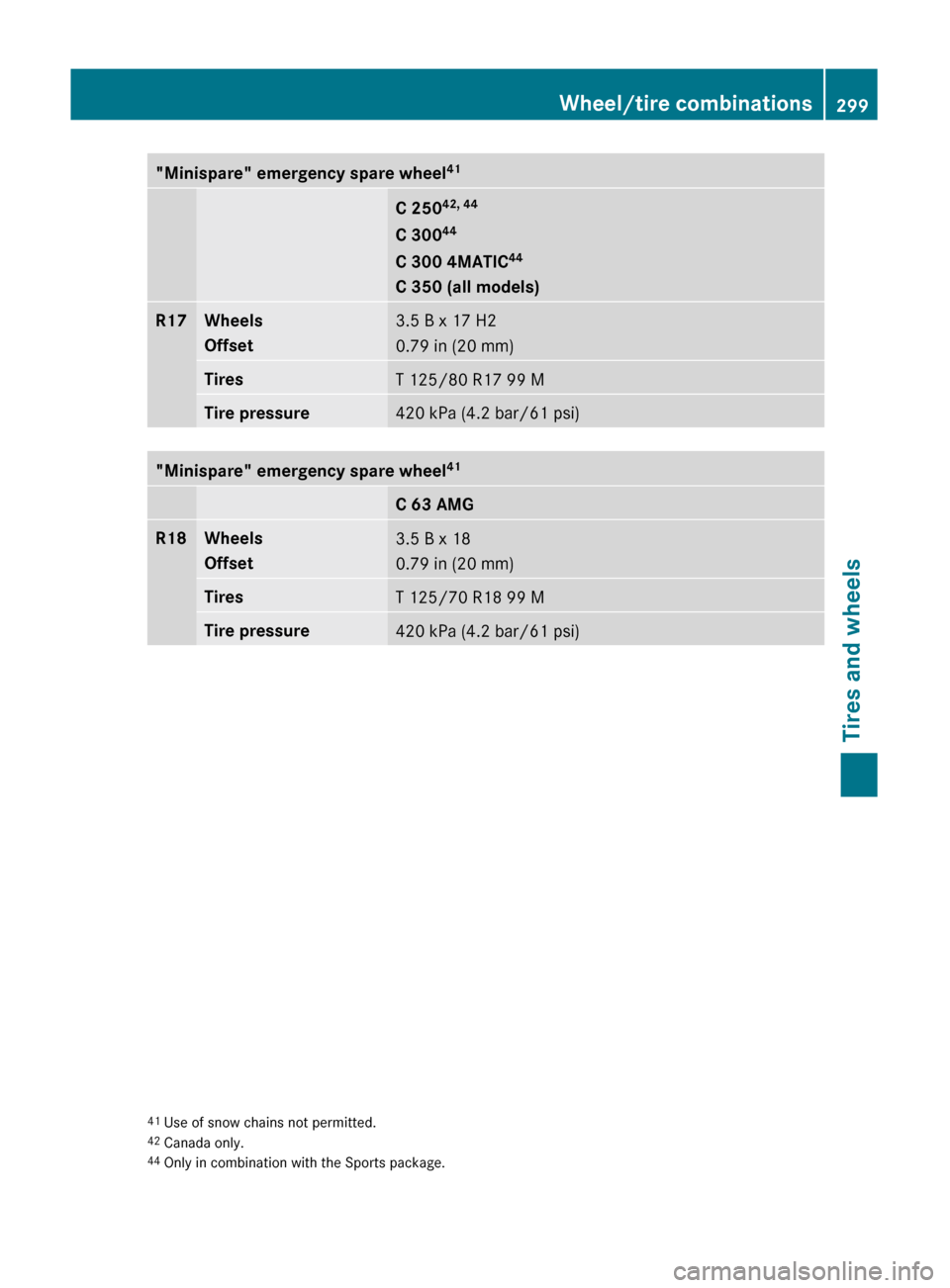
"Minispare" emergency spare wheel41C 25042, 44
C 300 44
C 300 4MATIC 44
C 350 (all models)R17Wheels
Offset3.5 B x 17 H2
0.79 in (20 mm)TiresT 125/80 R17 99 MTire pressure420 kPa (4.2 bar/61 psi)"Minispare" emergency spare wheel 41C 63 AMGR18Wheels
Offset3.5 B x 18
0.79 in (20 mm)TiresT 125/70 R18 99 MTire pressure420 kPa (4.2 bar/61 psi)41 Use of snow chains not permitted.
42 Canada only.
44 Only in combination with the Sports package.Wheel/tire combinations299Tires and wheelsBA 204 USA, CA Edition A 2011; 1; 5, en-UShereepeVersion: 3.0.3.62010-05-20T09:17:30+02:00 - Seite 299Z