brake MERCEDES-BENZ C-Class 2011 W204 Owner's Guide
[x] Cancel search | Manufacturer: MERCEDES-BENZ, Model Year: 2011, Model line: C-Class, Model: MERCEDES-BENZ C-Class 2011 W204Pages: 320, PDF Size: 13.17 MB
Page 133 of 320
GWarning
On slippery road surfaces, never downshift in
order to obtain braking action. This could
result in drive wheel slip and reduced vehicle
control. Your vehicle's ABS will not prevent
this type of loss of control.
GWarning
Manual transmission: Wait until the vehicle is
stationary before removing the SmartKey
from the starter switch. The vehicle cannot be
steered when the SmartKey is removed from
the starter switch.
GWarning
It is dangerous to shift the automatic
transmission out of parking position P or
neutral position N if the engine speed is
higher than idle speed. If your foot is not firmly
on the brake pedal, the vehicle could
accelerate quickly forward or in reverse. You
could lose control of the vehicle and hit
someone or something. Only shift into gear
when the engine is idling normally and when
your right foot is firmly on the brake pedal.
! Warm up the engine quickly. Do not use
the engine's full performance until it has
reached operating temperature.
Only shift the automatic transmission to
the desired drive position when the vehicle
is stationary.
Where possible, avoid spinning the drive
wheels when pulling away on slippery
roads. You could otherwise damage the
drive train.
! AMG vehicles: at low engine oil
temperatures (below 68 ‡ (+20 †), the
maximum engine speed is restricted in
order to protect the engine. To protect the
engine and maintain smooth engine
operation, avoid driving at full throttle when
the engine is cold.
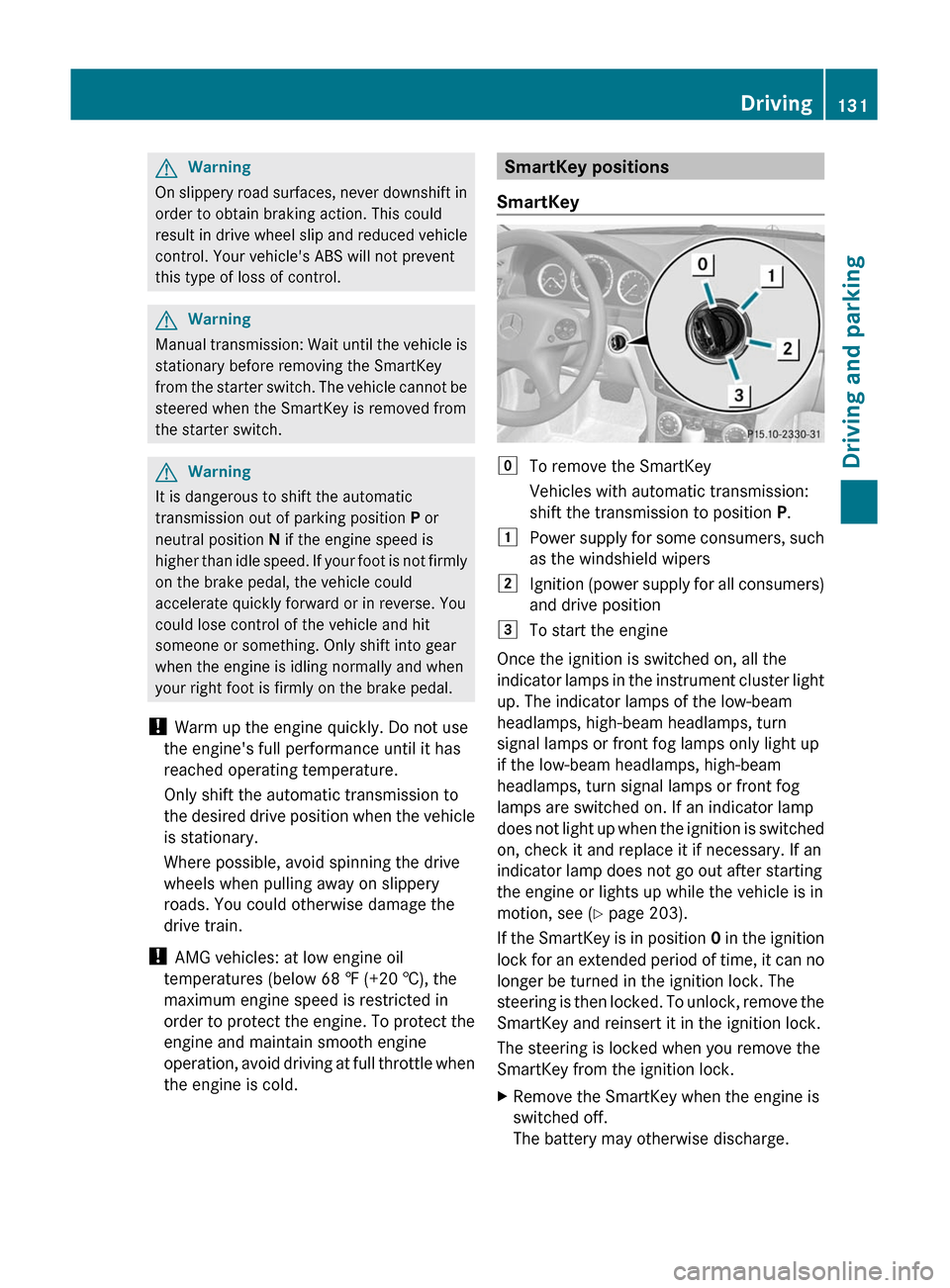
SmartKey positions
SmartKeygTo remove the SmartKey
Vehicles with automatic transmission:
shift the transmission to position P.1Power supply for some consumers, such
as the windshield wipers2Ignition (power supply for all consumers)
and drive position3To start the engine
Once the ignition is switched on, all the
indicator lamps in the instrument cluster light
up. The indicator lamps of the low-beam
headlamps, high-beam headlamps, turn
signal lamps or front fog lamps only light up
if the low-beam headlamps, high-beam
headlamps, turn signal lamps or front fog
lamps are switched on. If an indicator lamp
does not light up when the ignition is switched
on, check it and replace it if necessary. If an
indicator lamp does not go out after starting
the engine or lights up while the vehicle is in
motion, see ( Y page 203).
If the SmartKey is in position 0 in the ignition
lock for an extended period of time, it can no
longer be turned in the ignition lock. The
steering is then locked. To unlock, remove the
SmartKey and reinsert it in the ignition lock.
The steering is locked when you remove the
SmartKey from the ignition lock.
XRemove the SmartKey when the engine is
switched off.
The battery may otherwise discharge.Driving131Driving and parkingBA 204 USA, CA Edition A 2011; 1; 5, en-UShereepeVersion: 3.0.3.62010-05-20T09:17:30+02:00 - Seite 131Z
Page 134 of 320
If you cannot turn the SmartKey in the ignition
lock, the vehicle battery may not be charged
sufficiently.XCheck the vehicle battery and charge if
necessary ( Y page 261).
or
XJump-start the vehicle ( Y page 262).
i
The SmartKey can be turned in the
ignition lock even if it is not the correct
SmartKey for the vehicle. The ignition is not
switched on. The engine cannot be started.
KEYLESS-GO
Vehicles with KEYLESS-GO are equipped with
a SmartKey with an integrated KEYLESS-GO
function and a detachable Start/Stop button.
The Start/Stop button must be inserted in the
ignition lock and the SmartKey must be in the
vehicle.
Pressing the Start/Stop button several times
in succession corresponds to the different
key positions in the ignition lock. This is only
the case if you are not depressing the brake
pedal.
If you depress the brake pedal and press the
Start/Stop button, the engine starts
immediately.
The Start/Stop button can be removed from
the ignition lock. Then you can insert the
SmartKey in the ignition lock.
i You do not have to remove the Start/Stop
button from the ignition lock when you
leave the vehicle. However, you should
always take the SmartKey with you when
leaving the vehicle. The vehicle can be
started with the Start/Stop button and the
electrical equipment can be operated while
the SmartKey is in the vehicle.
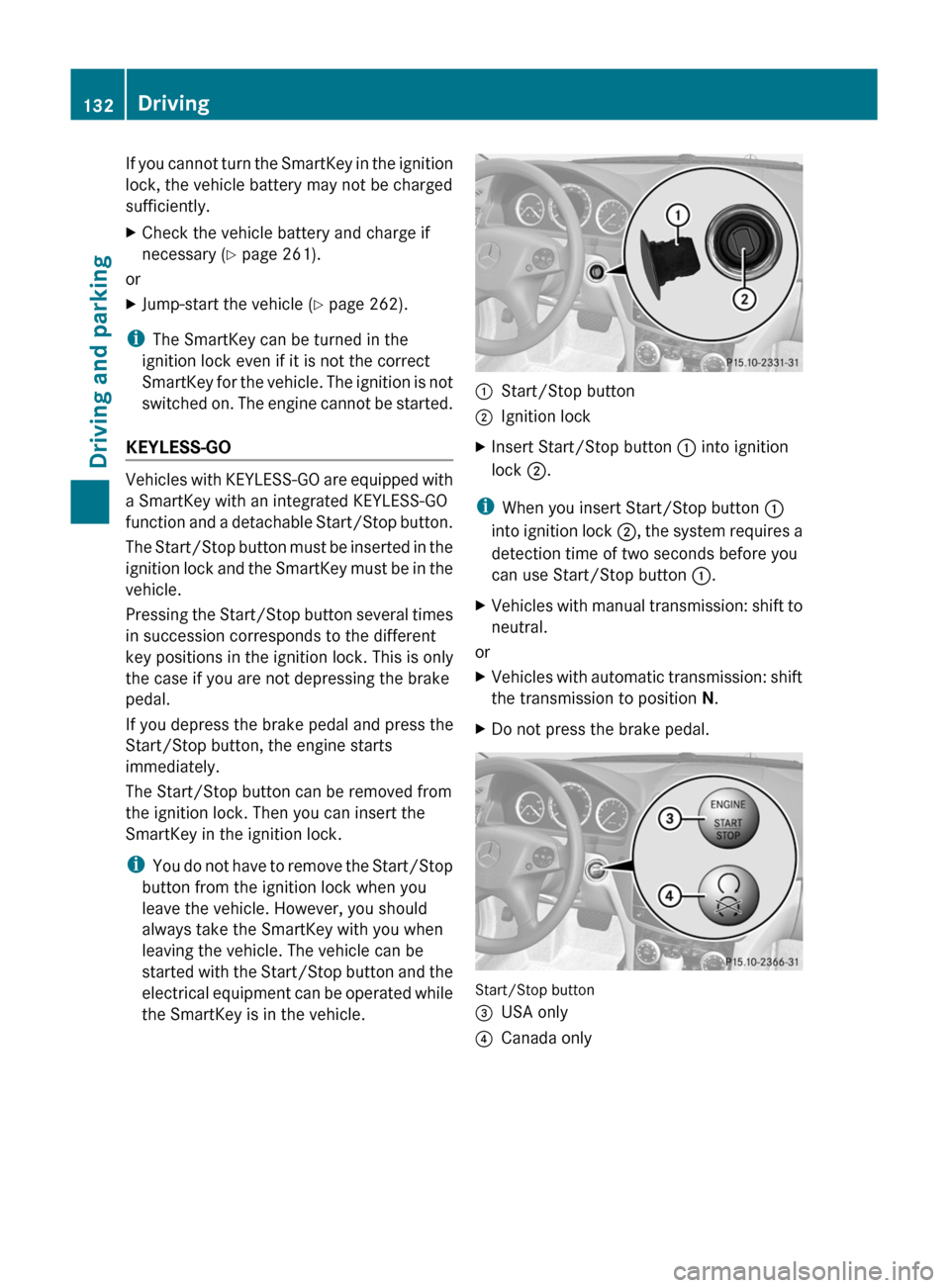
:Start/Stop button;Ignition lockXInsert Start/Stop button : into ignition
lock ;.
i
When you insert Start/Stop button :
into ignition lock ;, the system requires a
detection time of two seconds before you
can use Start/Stop button :.
XVehicles with manual transmission: shift to
neutral.
or
XVehicles with automatic transmission: shift
the transmission to position N.XDo not press the brake pedal.
Start/Stop button
=USA only?Canada only132DrivingDriving and parking
BA 204 USA, CA Edition A 2011; 1; 5, en-UShereepeVersion: 3.0.3.62010-05-20T09:17:30+02:00 - Seite 132
Page 135 of 320
XPosition 0: if Start/Stop button : has not
yet been pressed, this corresponds to the
SmartKey being removed from the ignition.XPosition 1: press Start/Stop button :.
You can now activate the windshield
wipers, for example.
i If you then open the driver's door when in
this position, the power supply is
deactivated.
XPosition 2 (ignition): press Start/Stop
button : twice.
i
If you press Start/Stop button : once
when in this position and the driver's door
is open, the power supply is deactivated
again.
As soon as the ignition is switched on, all the
indicator lamps in the instrument cluster light
up. The indicator lamps of the low-beam
headlamps, high-beam headlamps, turn
signal lamps or front fog lamps only light up
if the low-beam headlamps, high-beam
headlamps, turn signal lamps or front fog
lamps are switched on. If an indicator lamp
does not light up when the ignition is switched
on, check it and replace it if necessary. If an
indicator lamp does not go out after the
engine is started or if it lights up while the
vehicle is in motion, see ( Y page 203).
Starting the engine
Important safety notes
GWarning
Inhalation of exhaust gas is hazardous to your
health. All exhaust gas contains carbon
monoxide (CO), and inhaling it can cause
unconsciousness and possible death.
Do not run the engine in confined areas (such
as a garage) which are not properly ventilated.
If you think that exhaust gas fumes are
entering the vehicle while driving, have the
cause determined and corrected
immediately. If you must drive under these
conditions, drive only with at least one
window fully open at all times.
! Do not depress the accelerator pedal
when starting the engine.
Manual transmissionXDepress the brake pedal and keep it
depressed.XFully depress the clutch pedal.XShift to neutral N.
i
You can only start the engine when the
clutch pedal is fully depressed.
Automatic transmission
XShift the transmission to position P.
i
The transmission position display in the
multifunction display shows P.
Starting procedure with the SmartKey
XTurn the SmartKey to position 3 in the
ignition lock (Y page 131) and release it as
soon as the engine is running.
Using KEYLESS-GO to start the engine
GWarning!
As long as the SmartKey is in your vehicle, the
vehicle can be started. Therefore, never leave
children unattended in the vehicle, as they
could otherwise accidentally start the engine.
When leaving the vehicle, always take the
SmartKey with you and lock the vehicle. Do
not leave children unattended in the vehicle,
or with access to an unlocked vehicle. A
child's unsupervised access to a vehicle could
result in an accident and/or serious personal
injury.
i The Start/Stop button can be used to
start the vehicle without inserting the
SmartKey in the ignition lock. The
SmartKey must be in the vehicle.
Driving133Driving and parkingBA 204 USA, CA Edition A 2011; 1; 5, en-UShereepeVersion: 3.0.3.62010-05-20T09:17:30+02:00 - Seite 133Z
Page 136 of 320
XThe Start/Stop button must be inserted in
the ignition lock.
i To start the engine with the SmartKey
instead of with KEYLESS-GO, remove the
Start/Stop button from the ignition lock.
XDepress the brake pedal and keep it
depressed.XPress the Start/Stop button once
( Y page 132).
The engine starts.
Pulling away
Manual transmission
XDepress the brake pedal and keep it
depressed.XFully depress the clutch pedal.XShift to either 1st gear or reverse gear R.XRelease the parking brake ( Y page 149).XRelease the brake pedal.XSlowly release the clutch pedal and gently
depress the accelerator pedal.
! If a warning signal sounds and the
Release the parking brake message
appears in the instrument cluster, the
parking brake is still applied. Release the
parking brake.
! Change gear in good time and avoid
spinning the wheels. You could otherwise
damage the vehicle.
i The vehicle locks centrally once you have
pulled away. The locking knobs in the doors
drop down.
You can open the doors from the inside at
any time.
You can also deactivate the automatic
locking feature ( Y page 181).
Automatic transmissionGWarning
It is dangerous to shift the automatic
transmission out of parking position P or
neutral position N if the engine speed is
higher than idle speed. If your foot is not firmly
on the brake pedal, the vehicle could
accelerate quickly forward or in reverse. You
could lose control of the vehicle and hit
someone or something. Only shift into gear
when the engine is idling normally and when
your right foot is firmly on the brake pedal.
i It is only possible to shift the transmission
from position P to the desired position if
you depress the brake pedal. Only then is
the selector lever lock released.
XDepress the brake pedal and keep it
depressed.XShift the transmission to position D or R.XWait until the gear change is completed
before pulling away.XRelease the parking brake ( Y page 149).XRelease the brake pedal.XCarefully depress the accelerator pedal.
!
If a warning tone sounds and the
Release Park. Brake message appears
in the instrument cluster, the parking brake
is still applied. Release the parking brake.
i The vehicle locks centrally once you have
pulled away. The locking knobs in the doors
drop down.
You can open the doors from the inside at
any time.
You can also deactivate the automatic
locking feature ( Y page 181).
i Upshifts take place at higher engine
speeds after a cold start. This helps the
catalytic converter to reach its operating
temperature more quickly.
134DrivingDriving and parking
BA 204 USA, CA Edition A 2011; 1; 5, en-UShereepeVersion: 3.0.3.62010-05-20T09:17:30+02:00 - Seite 134
Page 137 of 320
Hill start assist
Hill start assist helps you when pulling away
forwards or in reverse on an uphill gradient.
It holds the vehicle for a short time after you
have removed your foot from the brake pedal.
This gives you enough time to move your foot
from the brake pedal to the accelerator pedal
and depress it before the vehicle begins to
roll.
GWarning
Never leave the vehicle when it is held by hill
start assist. After approximately one second,
hill start assist will no longer brake your
vehicle and it could roll away.
XTake your foot off the brake pedal.
i Once you have taken your foot off the
brake pedal, the vehicle is held for around
one second.
XPull away.
Hill start assist will not function if:
R you are pulling away on a level road or a
downhill gradient.
R on vehicles with automatic transmission,
the transmission is in position N.
R the parking brake is applied.
R ESP ®
is malfunctioning.
Driving135Driving and parkingBA 204 USA, CA Edition A 2011; 1; 5, en-UShereepeVersion: 3.0.3.62010-05-20T09:17:30+02:00 - Seite 135Z
Page 139 of 320
ProblemPossible causes/consequences and M SolutionsThe engine is not
running smoothly and
is misfiring.
There is a malfunction in the engine electronics or a mechanical
component of the engine management system.
XOnly depress the accelerator pedal slightly.XHave the cause rectified immediately at a qualified specialist
workshop.
Otherwise, non-combusted fuel may get into the catalytic
converter and damage it.
The coolant
temperature gauge
shows a value above
248 ‡(120 †).
The coolant level is too low. The coolant is too hot and the engine
is no longer being cooled sufficiently.
XStop as soon as possible and allow the engine and the coolant
to cool down.
XCheck the coolant level (Y page 240). Observe the warning
notes as you do so and add coolant if necessary.Manual transmission
Important safety notes
GWarning
When working on the vehicle, engage the
parking brake and shift the manual
transmission into the 1st gear or reverse R.
The vehicle could otherwise roll away, which
could result in an accident and/or serious
personal injury.
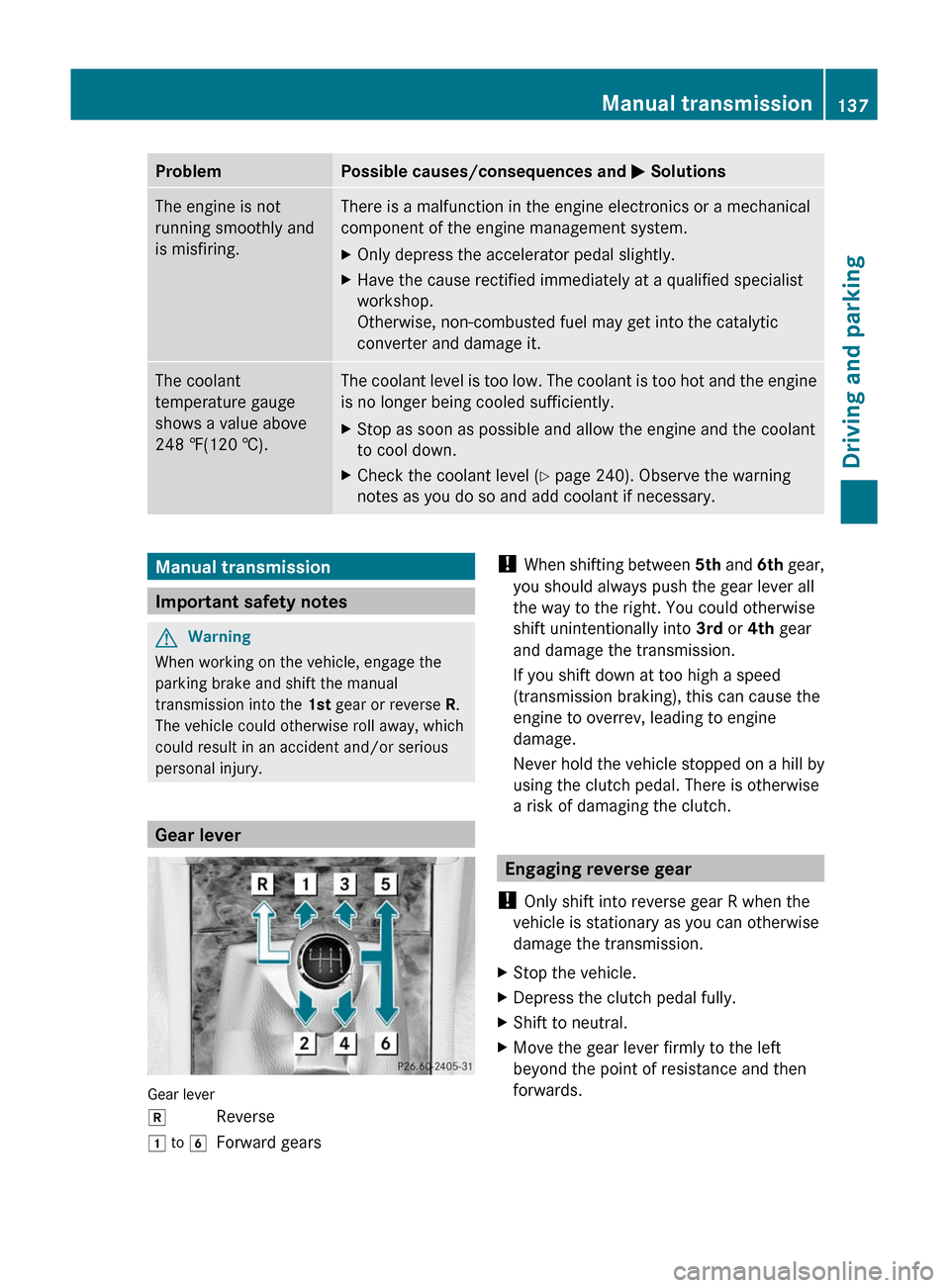
Gear lever
Gear lever
kReverse1 to 6Forward gears! When shifting between 5th and 6th gear,
you should always push the gear lever all
the way to the right. You could otherwise
shift unintentionally into 3rd or 4th gear
and damage the transmission.
If you shift down at too high a speed
(transmission braking), this can cause the
engine to overrev, leading to engine
damage.
Never hold the vehicle stopped on a hill by
using the clutch pedal. There is otherwise
a risk of damaging the clutch.
Engaging reverse gear
! Only shift into reverse gear R when the
vehicle is stationary as you can otherwise
damage the transmission.
XStop the vehicle.XDepress the clutch pedal fully.XShift to neutral.XMove the gear lever firmly to the left
beyond the point of resistance and then
forwards.
Manual transmission137Driving and parkingBA 204 USA, CA Edition A 2011; 1; 5, en-UShereepeVersion: 3.0.3.62010-05-20T09:17:30+02:00 - Seite 137Z
Page 140 of 320
Shift recommendation
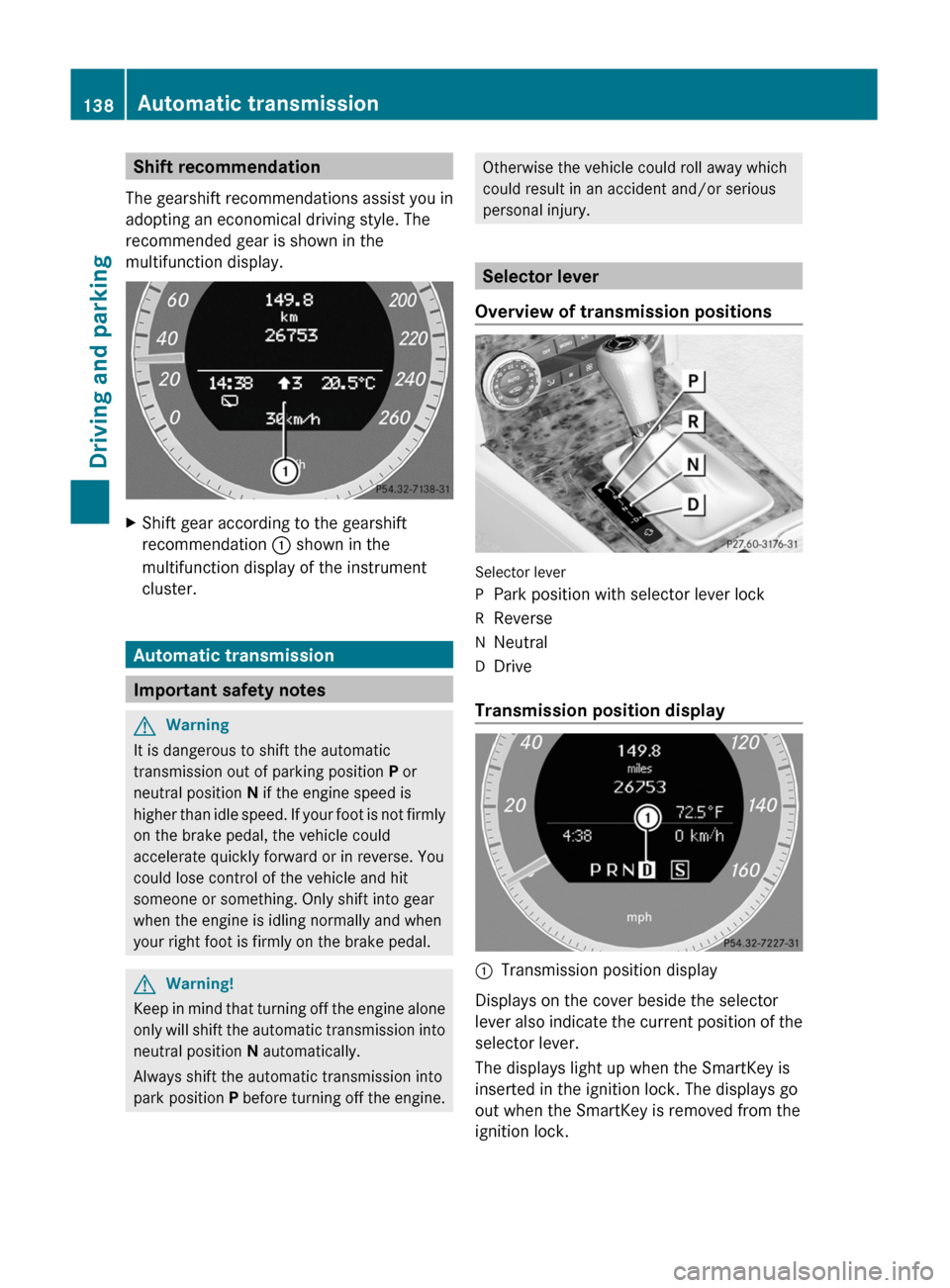
The gearshift recommendations assist you in
adopting an economical driving style. The
recommended gear is shown in the
multifunction display.
XShift gear according to the gearshift
recommendation : shown in the
multifunction display of the instrument
cluster.
Automatic transmission
Important safety notes
GWarning
It is dangerous to shift the automatic
transmission out of parking position P or
neutral position N if the engine speed is
higher than idle speed. If your foot is not firmly
on the brake pedal, the vehicle could
accelerate quickly forward or in reverse. You
could lose control of the vehicle and hit
someone or something. Only shift into gear
when the engine is idling normally and when
your right foot is firmly on the brake pedal.
GWarning!
Keep in mind that turning off the engine alone
only will shift the automatic transmission into
neutral position N automatically.
Always shift the automatic transmission into
park position P before turning off the engine.
Otherwise the vehicle could roll away which
could result in an accident and/or serious
personal injury.
Selector lever
Overview of transmission positions
Selector lever
PPark position with selector lever lockRReverseNNeutralDDrive
Transmission position display
:Transmission position display
Displays on the cover beside the selector
lever also indicate the current position of the
selector lever.
The displays light up when the SmartKey is
inserted in the ignition lock. The displays go
out when the SmartKey is removed from the
ignition lock.
138Automatic transmissionDriving and parking
BA 204 USA, CA Edition A 2011; 1; 5, en-UShereepeVersion: 3.0.3.62010-05-20T09:17:30+02:00 - Seite 138
Page 141 of 320
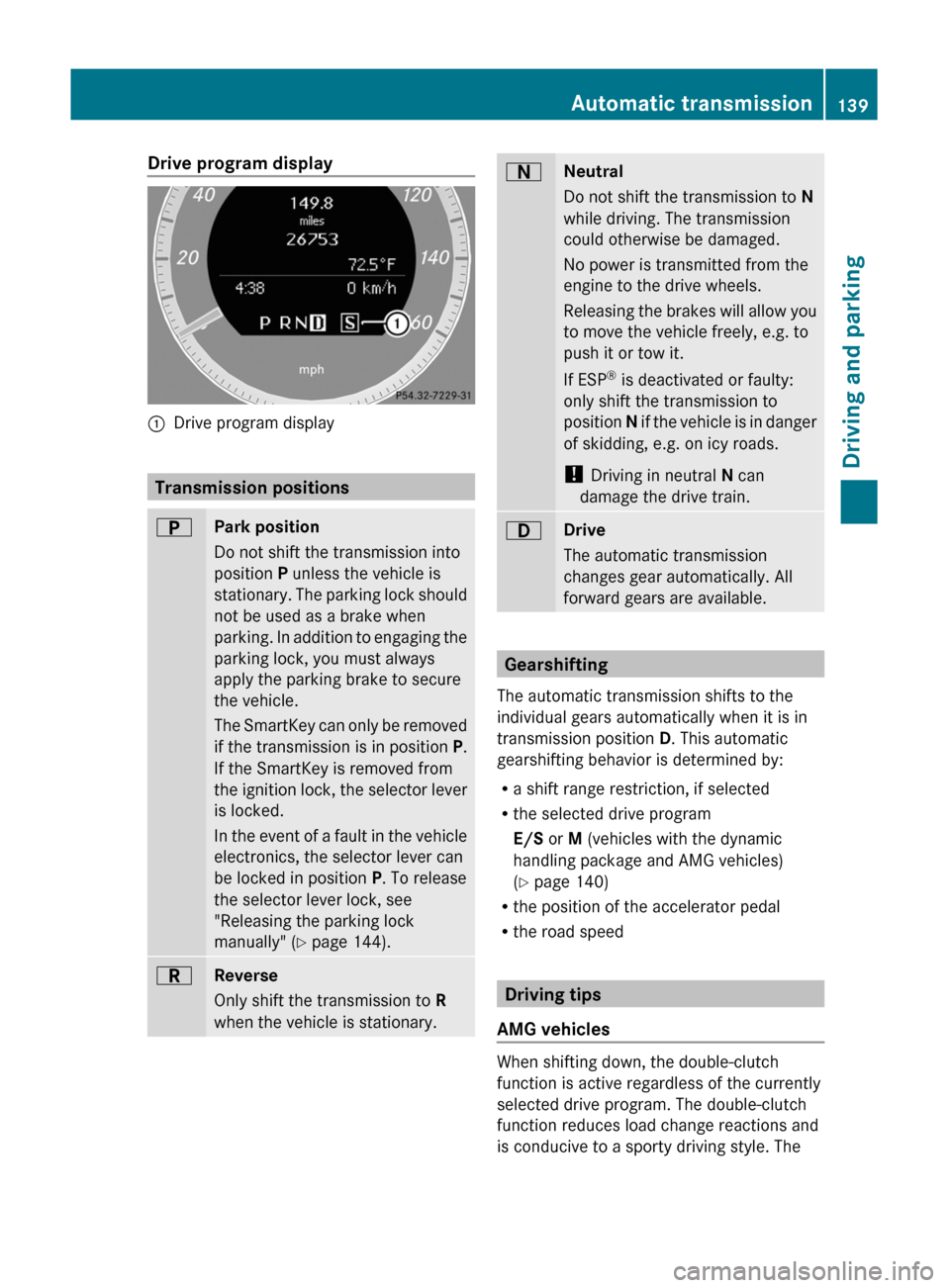
Drive program display:Drive program display
Transmission positions
BPark position
Do not shift the transmission into
position P unless the vehicle is
stationary. The parking lock should
not be used as a brake when
parking. In addition to engaging the
parking lock, you must always
apply the parking brake to secure
the vehicle.
The SmartKey can only be removed
if the transmission is in position P.
If the SmartKey is removed from
the ignition lock, the selector lever
is locked.
In the event of a fault in the vehicle
electronics, the selector lever can
be locked in position P. To release
the selector lever lock, see
"Releasing the parking lock
manually" ( Y page 144).CReverse
Only shift the transmission to R
when the vehicle is stationary.ANeutral
Do not shift the transmission to N
while driving. The transmission
could otherwise be damaged.
No power is transmitted from the
engine to the drive wheels.
Releasing the brakes will allow you
to move the vehicle freely, e.g. to
push it or tow it.
If ESP ®
is deactivated or faulty:
only shift the transmission to
position N if the vehicle is in danger
of skidding, e.g. on icy roads.
! Driving in neutral N can
damage the drive train.7Drive
The automatic transmission
changes gear automatically. All
forward gears are available.
Gearshifting
The automatic transmission shifts to the
individual gears automatically when it is in
transmission position D. This automatic
gearshifting behavior is determined by:
R a shift range restriction, if selected
R the selected drive program
E/S or M (vehicles with the dynamic
handling package and AMG vehicles)
( Y page 140)
R the position of the accelerator pedal
R the road speed
Driving tips
AMG vehicles
When shifting down, the double-clutch
function is active regardless of the currently
selected drive program. The double-clutch
function reduces load change reactions and
is conducive to a sporty driving style. The
Automatic transmission139Driving and parkingBA 204 USA, CA Edition A 2011; 1; 5, en-UShereepeVersion: 3.0.3.62010-05-20T09:17:30+02:00 - Seite 139Z
Page 142 of 320
sound generated by the double-clutch
function depends on the drive program
selected.
Kickdown
Use kickdown for maximum acceleration.
XVehicles for USA except AMG vehicles:
fully depress the accelerator pedal.
The transmission shifts to a lower gear
depending on the engine speed.
XVehicles for Canada except AMG
vehicles: depress the accelerator pedal
beyond the pressure point.
The transmission shifts to a lower gear
depending on the engine speed.
Working on the vehicle
GWarning
When working on the vehicle, engage the
parking brake and shift the automatic
transmission into park position P. Otherwise
the vehicle could roll away which could result
in an accident and/or serious personal injury.
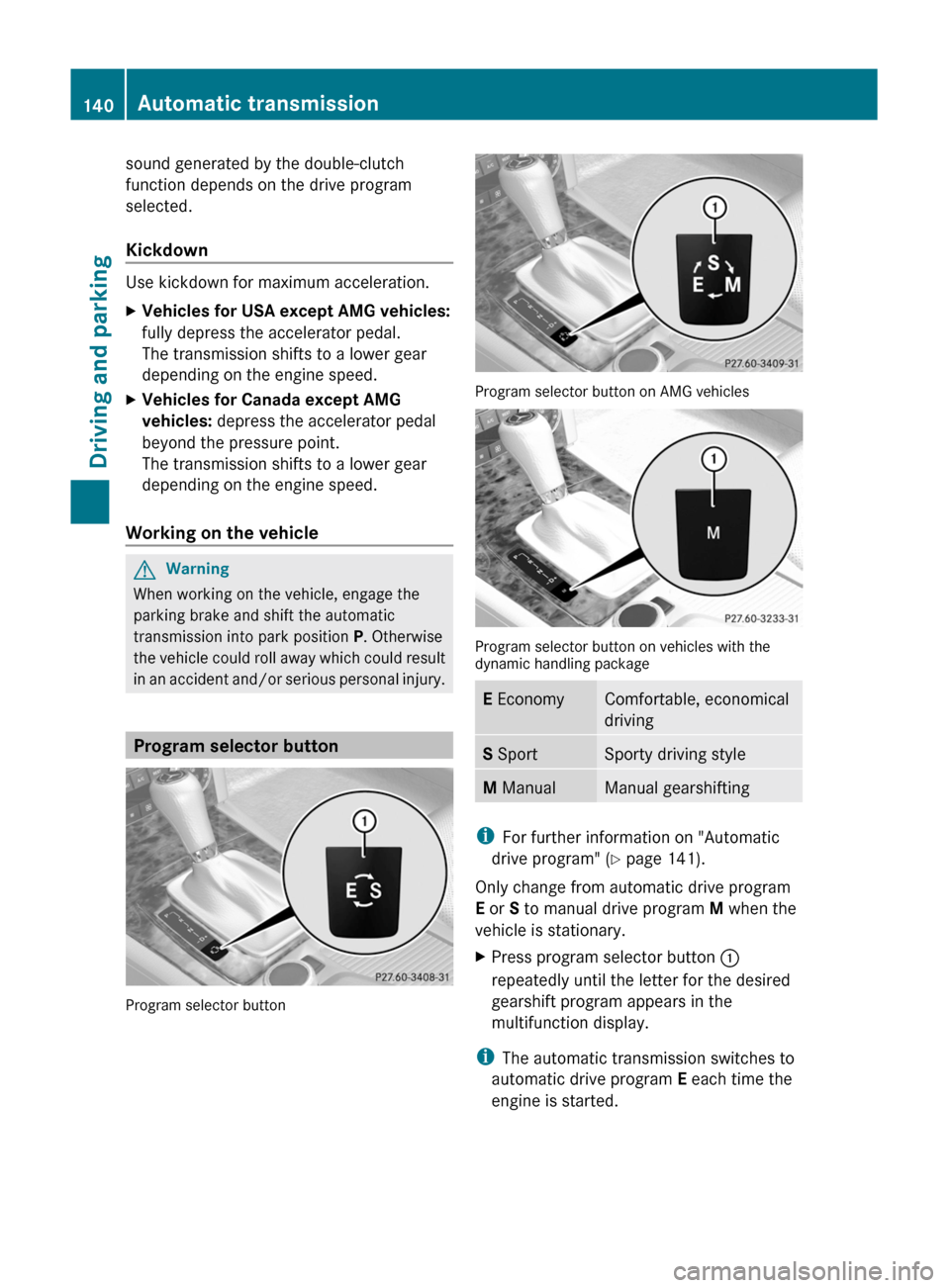
Program selector button
Program selector button
Program selector button on AMG vehicles
Program selector button on vehicles with thedynamic handling package
E EconomyComfortable, economical
driving
S SportSporty driving styleM ManualManual gearshifting
iFor further information on "Automatic
drive program" (Y page 141).
Only change from automatic drive program
E or S to manual drive program M when the
vehicle is stationary.
XPress program selector button :
repeatedly until the letter for the desired
gearshift program appears in the
multifunction display.
iThe automatic transmission switches to
automatic drive program E each time the
engine is started.
140Automatic transmissionDriving and parking
BA 204 USA, CA Edition A 2011; 1; 5, en-UShereepeVersion: 3.0.3.62010-05-20T09:17:30+02:00 - Seite 140
Page 145 of 320
DownshiftingXBriefly press the selector lever to the left
towards D–.
or
XPull the left-hand steering wheel paddle
shifter ( Y page 141).
The automatic transmission shifts down to
the next gear.
i If you brake the vehicle or stop without
shifting down, the automatic transmission
will shift down to a gear that will allow the
vehicle to accelerate or pull away again.
i Vehicles with the dynamic handling
package: to avoid overrevving the engine
when downshifting, the automatic
transmission does not shift to a lower gear
if this would result in the maximum engine
speed being exceeded.
i If you desire maximum acceleration, push
the selector lever to the left or pull and hold
the left-hand steering wheel paddle shifter
until the transmission shifts to the optimal
gear for the current speed.
Kickdown
i Vehicles with an AMG engine: it is not
possible to use kickdown in manual drive
program M.
You can also use kickdown for maximum
acceleration in manual drive program M.
XVehicles for USA: fully depress the
accelerator pedal.
The automatic transmission shifts to a
lower gear depending on the engine speed.XVehicles for Canada: depress the
accelerator pedal beyond the pressure
point.
The automatic transmission shifts to a
lower gear depending on the engine speed.
i During kickdown, you cannot change gear
using the steering wheel paddle shifters or
the selector lever.
Switching off the manual drive programXAMG vehicles: press the program selector
button ( Y page 140) repeatedly until E or
S appears in the multifunction display.XVehicles with the dynamic handling
package: press the program selector
button ( Y page 140). M is no longer shown
in the multifunction display.Automatic transmission143Driving and parkingBA 204 USA, CA Edition A 2011; 1; 5, en-UShereepeVersion: 3.0.3.62010-05-20T09:17:30+02:00 - Seite 143Z