phone MERCEDES-BENZ C-Class 2013 W204 Comand Manual
[x] Cancel search | Manufacturer: MERCEDES-BENZ, Model Year: 2013, Model line: C-Class, Model: MERCEDES-BENZ C-Class 2013 W204Pages: 274, PDF Size: 4.07 MB
Page 17 of 274
1. These devices may not cause harmful
interference, and
2. These devices must accept any
interference received, including
interference that may cause undesired
operation.
Correct use
Observe the following information when using
COMAND:
R the safety notes in this manual
R traffic rules and regulations
R laws and safety standards pertaining to
motor vehicles
i Work improperly carried out on electronic
components or systems (e.g. radio, DVD
changer) and associated software could
cause them to cease functioning. Even
systems that have not been modified could
be affected because the electronic
systems are connected. Electronic
malfunctions can seriously jeopardize the
operational safety of your vehicle.
i Roof antenna functionality (telephone,
satellite radio, GPS) can be affected by the
use of roof carrier systems.
Attaching metallized retrofit film to the
windshield may affect radio reception and
have a negative impact on all other
antennas (e.g. emergency antenna) in the
vehicle interior.
i Therefore, have all work on or
modifications to electronic components
carried out at a qualified specialist
workshop. This workshop should have the
necessary specialist knowledge and tools
to carry out the work required. Mercedes-
Benz recommends that you use an
authorized Mercedes-Benz Center for this
purpose. In particular, work relevant to
safety or on safety-related systems must
be carried out at a qualified specialist
workshop. i
Protection against theft: this device is
equipped with technical provisions to
protect it against theft. Further information
on protection against theft can be obtained
from an authorized Mercedes-Benz Center. Qualified specialist workshop
Read the information on qualified specialist
workshops in the vehicle Operator's Manual. Information on copyright
General information
You can find information on licenses for free
and open-source software used in COMAND
and its components here as soon as the
website is released: http://
www.mercedes-benz.com/opensource . Registered trademarks
Registered trademarks:
R Bluetooth ®
is a registered trademark of
Bluetooth SIG Inc.
R DTS is a registered trademark of DTS, Inc.
R Dolby and MLP are registered trademarks
of DOLBY Laboratories.
R BabySmart™, ESP ®
and PRE-SAFE ®
are
registered trademarks of Daimler AG.
R HomeLink ®
is a registered trademark of
Prince.
R iPod ®
and iTunes ®
are registered
trademarks of Apple Inc.
R Logic7 ®
is a registered trademark of
Harman International Industries.
R Microsoft ®
and Windows media ®
are
registered trademarks of Microsoft
Corporation.
R SIRIUS is a registered trademark of Sirius
XM radio Inc.
R HD Radio is a registered trademark of
iBiquity Digital Corporation. Operating safety
15 Z
Page 18 of 274

R
Gracenote ®
is a registered trademark of
Gracenote, Inc.
R ZAGATSurvey ®
and related brands are
registered trademarks of ZagatSurvey,
LLC. Macrovision
This product incorporates copyright
protection technology that is protected by
U.S. patents and other intellectual property
rights. Use of this copyright protection
technology must be authorized by Rovi
Corporation, and is intended for home and
other limited viewing uses only unless
otherwise authorized by Rovi Corporation.
Reverse engineering or disassembly is
prohibited. libjpeg
This software is based in part on the work of
the Independent JPEG Group. Free Type
Portions of this software are
copyright© 2005 The FreeType Project
(www.freetype.org). All rights reserved. ©
1996-2000 by David Turner, Robert Wilhelm,
and Werner Lemberg. NetFront™
This product contains NetFront Browser
software of ACCESS Co., Ltd. Copyright ©
1996-2010 ACCESS Co., Ltd. All rights
reserved.
The NetFront Browser software is based in
part on the work of the Independent JPEG
Group. Camellia
Copyright © 2006, 2007 NTT (Nippon
Telegraph and Telephone Corporation).
All rights reserved.
The conditions and disclaimers in connection
with use of Camellia are available at http://
info.isl.ntt.co.jp/crypt/eng/index.html. Flash
®
Lite™
This product contains Flash ®
Lite™
technology by Adobe Systems Incorporated.
This product contains Adobe ®
Flash ®
player
software under license from Adobe Systems
Incorporated, Copyright © 1995-2010 Adobe
Macromedia Software LLC. All rights
reserved. Adobe and Flash are registered
trademarks of Adobe Systems Incorporated
in the United States and/or other countries. Your COMAND equipment
These operating instructions describe all
standard and optional equipment available
for your COMAND system at the time of
purchase. Country-specific differences are
possible. Please note that your COMAND
system may not be equipped with all the
features described. This also applies to
safety-related systems and functions.
Therefore, the equipment on your COMAND
system may differ from that in the
descriptions and illustrations. Contact an
authorized Mercedes-Benz Center if you have
any questions about equipment or operation. Function restrictions
For safety reasons, some COMAND functions
are restricted or unavailable while the vehicle
is in motion. You will notice this, for example
because either you will not be able to select
certain menu items or COMAND will display
a message to this effect. 16
Operating safety
Page 20 of 274

Your COMAND equipment
These operating instructions describe all the
standard and optional equipment for your
COMAND system, as available at the time of
going to print. Country-specific differences
are possible. Please note that your COMAND
system may not be equipped with all the
features described. COMAND operating system
Overview
0043
COMAND display (Y page 18)
0044 COMAND control panel with a single DVD
drive or DVD changer
0087 COMAND controller (Y page 24)
You can use COMAND to operate the
following main functions:
R the navigation system
R the audio function
R the telephone function
R the video function
R the system settings
R the online and Internet functions
R the Digital Operator's Manual
(available depending on the vehicle model) You can call up the main functions:
R
using the corresponding function buttons
R using the main function bar in the COMAND
display COMAND display
General notes !
Do not use the space in front of the
display to stow anything. Objects placed
here could damage the display or impair its
function. Avoid touching the surface of the
display. Pressure exerted on the surface of
the display can have an irreversible,
detrimental effect on the display.
Wearing polarized sunglasses may impair
your ability to read the display.
The display has an automatic temperature-
controlled switch-off feature. The brightness
is automatically reduced if the temperature is
too high. The display may temporarily switch
off completely. 18
COMAND ope
rating systemAt a glance
Page 21 of 274

Display overview
Example display for radio
0043
Status bar
0044 Calls up the audio menu
0087 Main function bar
0085 Display/selection window
0083 Radio menu bar
Status bar 0043shows the time and the current settings for telephone operation.
The main functions – navigation, audio, telephone and video – feature additional menus. This
is indicated by triangle 0044. The following table lists the available menu items.
Main function bar 0087allows you to call up the desired main function. When the main function
is activated, it is identifiable by the white lettering.
In the example, the audio main function is set to radio mode and display/selection
window 0085is active.
Radio menu bar 0083allows you to operate the radio functions. COMAND ope
rating system
19At a glance
Page 22 of 274
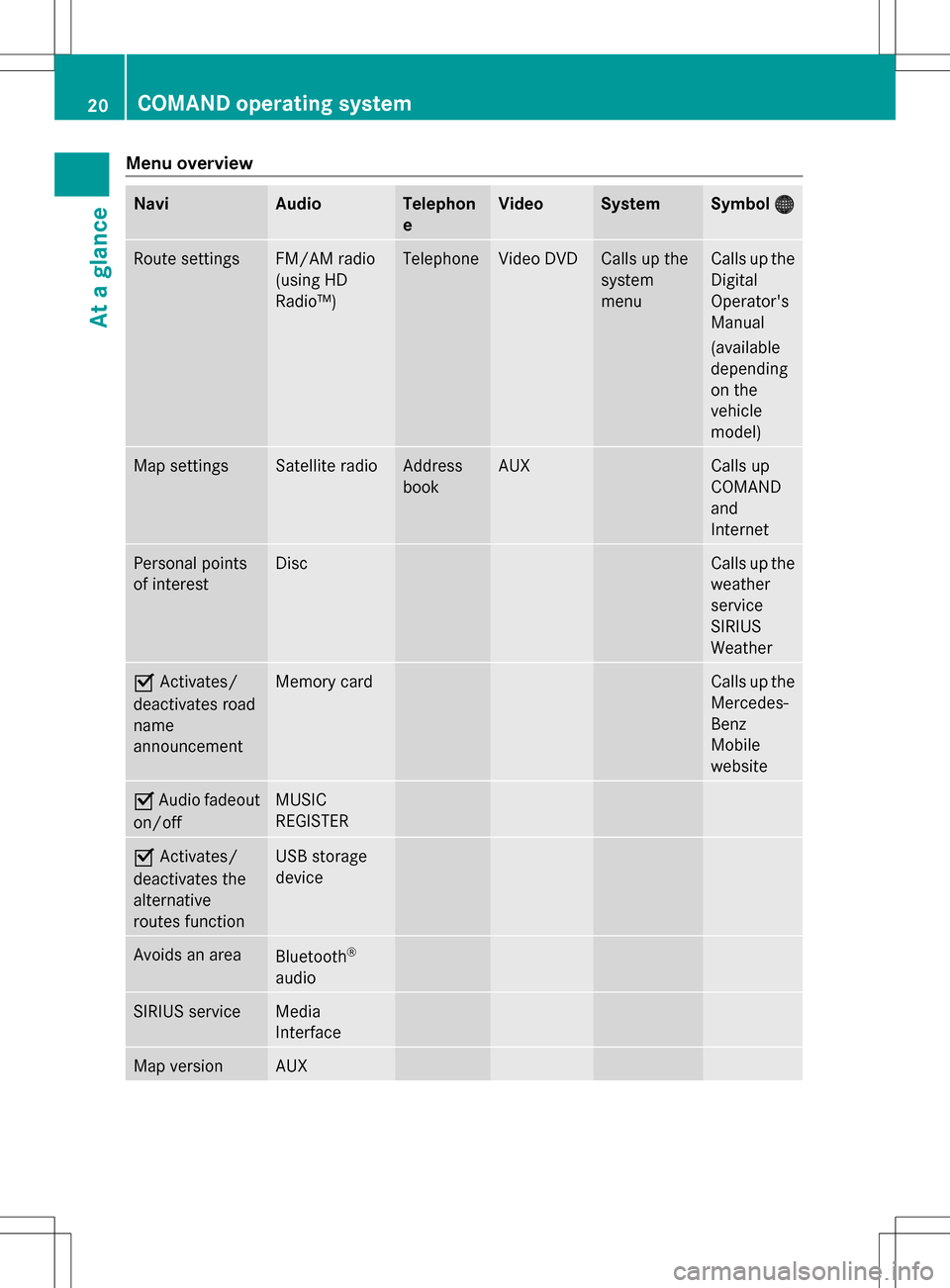
Menu overview
Navi Audio Telephon
e Video System Symbol
00A7 00A7 Route settings FM/AM radio
(using HD
Radio™) Telephone Video DVD Calls up the
system
menu Calls up the
Digital
Operator's
Manual
(available
depending
on the
vehicle
model)
Map settings Satellite radio Address
book AUX Calls up
COMAND
and
Internet
Personal points
of interest Disc Calls up the
weather
service
SIRIUS
Weather
0073
Activates/
deactivates road
name
announcement Memory card Calls up the
Mercedes-
Benz
Mobile
website
0073
Audio fadeout
on/off MUSIC
REGISTER
0073
Activates/
deactivates the
alternative
routes function USB storage
device
Avoids an area
Bluetooth
®
audio SIRIUS service Media
Interface
Map version AUX20
COMAND operating systemAt a glance
Page 25 of 274

COMAND control panel
Function Page
0043
Switches to radio mode 182
Switches wavebands 183
Switches to satellite radio 187
0044
Switches to navigation
mode 55
Shows the menu system 55
0087
Press
003Arepeatedly • Switches to audio CD,
audio DVD and MP3 mode
or DVD video mode
195
• Switches to memory card
mode
195
• Switches to MUSIC
REGISTER
207
• Switches to USB storage
device mode
195
• Switches to Media
Interface or audio AUX
mode
218
• Switches to Bluetooth
®
audio mode 215 Function Page
0085
Calls up the telephone
basic menu:
• Bluetooth
®
interface
telephony 127
0083
0065
Load/eject button 192
0084
Selects stations via the
station search function
184
Rewinds 199
Selects the previous track 198
006B
Disc slot
• Loads CDs/DVDs 192
• Ejects CDs/DVDs 193
• Updates the digital map 113
006C
Selects stations via the
station search function
184
Fast forward 199
Selects the next track 198
006D
Clear button
• Deletes characters 35
• Deletes an entry 35COMAND operating system
23At a glance
Page 26 of 274

Function Page
006E
Number pad
• Selects stations via the
station presets
184
• Stores stations manually 184
• Mobile phone
authorization 124
• Telephone number entry 128
• Sends DTMF tones 130
• Character entry 34
• Selects a location for the
weather forecast from the
memory 263
0099
Displays the current
track being played 201
0086
Selects stations by
entering the frequency
manually 184
0086
Selects a track 198
006F
Switches COMAND on/off 27
Adjusts the volume
27 Function Page
0070
SD memory card slot 195
0071
Calls up the system menu 38
0072
Accepts a call 128
Dials a number 128
Redials 129
Accepts a waiting call 130
0073
Switches the sound on or
off
27
Switches the hands-free
microphone on/off
130
Cancels the text message
read-aloud function
141
Switches off navigation
announcements
27
0074
Rejects a call 128
Ends an active call 131
Rejects a waiting call 130
COMAND controller
Overview 0043
COMAND controller
You can use the COMAND controller to select
the menu items in the COMAND display. You can:
R
call up menus or lists
R scroll within menus or lists and
R exit menus or lists
Operation Example: operating the COMAND controller24
COMAND operating systemAt a glance
Page 28 of 274

Using COMAND
Selecting a main function
Address entry menu
0043
Main function bar
Situation: switching from navigation mode
(address entry menu) to the system settings.
X To switch on navigation mode: press the
00BE function button.
X To show the menu: press00A1the COMAND
controller.
X Select Destination
Destination by sliding005B0064and
turning 0082005B0083the COMAND controller and
press 00A1to confirm.
X Select Address Entry
Address Entry and press00A1to
confirm.
The address entry menu appears.
X Slide 00A0005Bthe COMAND controller and
switch to main function bar 0043.
X Select System
System in the main function bar by
turning 0082005B0083the COMAND controller and
press 00A1to confirm.
The system menu appears. Selecting the menu of a main function
Example display for audio CD mode and audio
menu (below)
0043
To call up the audio menu
If one of the navigation, audio, telephone or
video main functions is switched on,
triangle 0043appears next to the entry in the
main function bar. You can now select an
associated menu.
The example describes how to call up the
audio menu from audio CD mode (an audio
CD is playing).
X Select Audio Audioin the main function bar by
sliding 00A0005Bthe COMAND controller and
press 00A1to confirm.
The Audio menu appears.
The 003Bdot indicates the currently selected
audio mode.
X Select another audio mode, e.g. Radio
Radio , by
turning 0082005B0083the COMAND controller and
press 00A1to confirm.
Radio mode is activated. 26
Using COMANDAt a glance
Page 29 of 274

Selecting a menu item
X
Select the station by turning 0082005B0083the
COMAND controller and press 00A1to
confirm.
The station is set. Basic COMAND functions
Switching COMAND on/off
X Press the 0043control knob.
A warning message appears. COMAND
calls up the previously selected menu.
i If you switch off COMAND, playback of
the current audio or video source will also
be switched off. Switching the sound on or off
Audio/video source sound X
Press the 006Cbutton on the COMAND
controller or on the multifunction steering
wheel.
The sound from the respective audio or
video source is switched on or off.
i When the sound is off, the system
displays the 0074icon in the status line.
When you change the audio or video
source, or adjust the volume, sound
automatically switches on again.
i Even if the sound is switched off, you will
still hear navigation system
announcements. Switching off navigation
announcements X
Navigation announcements: press the
006C button during the announcement.
Switching navigation announcements
back on X
Press the 006Cbutton again.
The navigation announcements are active
again:
R if COMAND is switched off/on with the
0043 control knob.
R or after starting route guidance Adjusting the volume
Adjusting the volume for the audio or
video source X
Turn the 0043control knob
or
X Press the 0081or0082 button on the
multifunction steering wheel.
The volume of the currently selected audio
or video source changes.
You can also adjust the volume for the
following:
R navigation announcements
R phone calls
R voice output of the Voice Control System
(see the separate operating instructions)
Adjusting the volume for navigation
announcements During a navigation announcement:
X
Turn the 0043control knob
or
X Press the 0081or0082 button on the
multifunction steering wheel. Basic COMAND functions
27At a glance
Page 30 of 274

Adjusting the volume for phone calls
You can adjust the volume for hands-free
mode during a telephone call.
X Turn the 0043control knob
or
X Press the 0081or0082 button on the
multifunction steering wheel. Adjusting the sound settings
Calling up the sound menu You can make various sound settings for the
different audio and video sources. This means
that it is possible to set more bass for radio
mode than for audio CD mode, for example.
You can call up the respective sound menu
from the menu of the desired mode.
The example describes how to call up the
sound menu in radio mode.
X Press the 002Afunction button.
The radio display appears. You will hear the
last station played on the last waveband.
X Select Sound
Sound by sliding 005B0064and turning
0082005B0083 the COMAND controller and press
00A1 to confirm.
You can now set the treble, bass and
balance for radio mode. Adjusting treble and bass
Setting the bass
X Select Treble Treble orBass
Bass in the sound menu
by turning 0082005B0083the COMAND controller
and press 00A1to confirm.
An adjustment scale appears.
X Select a setting by turning 0082005B0083the
COMAND controller and press 00A1to
confirm.
The setting is stored and you exit the menu.
Adjusting balance and fader Adjusting the balance
With the balance function, you can control
whether the sound is louder on the driver's or
front-passenger side.
The fader function is used to control whether
the sound is louder in the front or the rear of
the vehicle.
You can adjust the fader depending on the
vehicle model. 28
Basic COMAND functionsAt a glance