audio MERCEDES-BENZ C-Class 2014 W204 Audio Manual
[x] Cancel search | Manufacturer: MERCEDES-BENZ, Model Year: 2014, Model line: C-Class, Model: MERCEDES-BENZ C-Class 2014 W204Pages: 106, PDF Size: 1.46 MB
Page 15 of 106

Audio 20 control panel
Function Page
0043
002A
Switches to radio
mode 60
Switches wavebands 61
Switches to SatRadio mode 64
0044
00BE
Activates navigation
mode (only in conjunction
with Becker ®
MAP PILOT ) 40
0087
003A
Switches to audio CD
or MP3 mode 69
0085
002B
Activates telephone
mode 48
0083
00F8
Ejects CD 69
0084
Disc slot
Insert CDs 68
Remove CDs 68
006B
0037
Delete button • Deletes characters
• Deletes an entry Function Page
006C
Number pad
• Selects stations via the
station presets
62
• Stores stations manually 62
• Telephone number entry 50
• Sends DTMF tones 52
• Character entry
006D
0049
Selects a station
using the station search
function 61
Selects the next track 71
Fast forward 72
006E
Adjusts the volume 21
006F
0043
Switches Audio 20 on/
off 20
0070
0048
Selects a station
using the station search
function 61
Selects the previous track 71
Rewinds 72
0071
0066
Calls up the basic
menu 17Audio 20 operating system
13At a glance
Page 16 of 106

Function Page
0072
0061
Accepts a call 49
Dials a number 50
Redial 51
0073
0063
Mute 21
Switches the hands-free
system on/off Function Page
0074
0076
Rejects a call 49
Ends an active call 51
Audio 20 controller
Introduction You can use the controller to select functions
in the display. To do so, move the selection
bar.
0043
Controller The controller can be:
R
pressed briefly or pressed and held
R turned clockwise or counterclockwise
R slid to the left, to the right, up or down In this way you can:
R
scroll within menus
R select menu items
R exit menus
i If your vehicle is equipped with Becker ®
MAP PILOT, you can slide the controller
diagonally to move the map ( Ypage 40). 14
Audio 20 operating systemAt a glance
Page 17 of 106

Overview
Symbol Controller operation Function (examples)
0098
Press briefly R
Selects a menu item Press and hold until the selected
action is carried out R
Stores a station 00790052007A
Turn R
Scrolls through vertical or hori-
zontal menus
R Scrolls through text
R Makes settings 009700520064 Slide R
Scrolls through a vertical menu
R Exits a horizontal menu 009500520096
Slide R
Scrolls through a horizontal
menu
R Exits a vertical menu Slide and hold R
Fast forward or rewind during CD
playback
R Scrolls through lists Controller buttons
0043
Back button 003D
0044 Clear button 0084
0087 Seat function button
0085 Favorites button
i If the seats on your vehicle can be
adjusted via Audio 20, it will have the seat
function button. Otherwise, a second favor-
ites button will be located here. X
To go up a level in the menu: briefly press
the 003D back button
Audio 20 changes to the next higher menu
level in the current operating mode.
X To switch to the basic menu: press and
hold the 003Dback button.
Audio 20 changes to the basic menu of the
current operating mode.
X To delete individual characters: briefly
press the 0084delete button.
X To delete an entire entry: press and hold
the 0084 delete button.
X To call up the favorites function: press
the left or right star button.
i Information on setting the Favorites func-
tion (Y page 15). Audio 20 operating system
15At a glance
Page 18 of 106

Audio 20 display
Display overview The display shows the function currently
selected and its associated menus. The dis-
play is divided into several areas. Example: radio
0043
Status bar
0044 Main function bar
0087 Waveband/frequency
0085 Display/selection window
0083 Radio text plus (if available)
0084 Submenu bar
006B HD Radio logo (only with HD Radio recep-
tion)
i The layout of the menus may vary,
depending on the vehicle's equipment.
Depending on the current setting of Audio 20,
the following information can be displayed in
the status bar:
R Time
If a mobile phone is operational, additional
information is shown:
R Name of the mobile phone network pro-
vider
R Signal strength of mobile phone network
Ä (Ypage 48)
R Receiver icon 0071,0075(Ypage 48) 16
Audio 20 operating systemAt a glance
Page 19 of 106
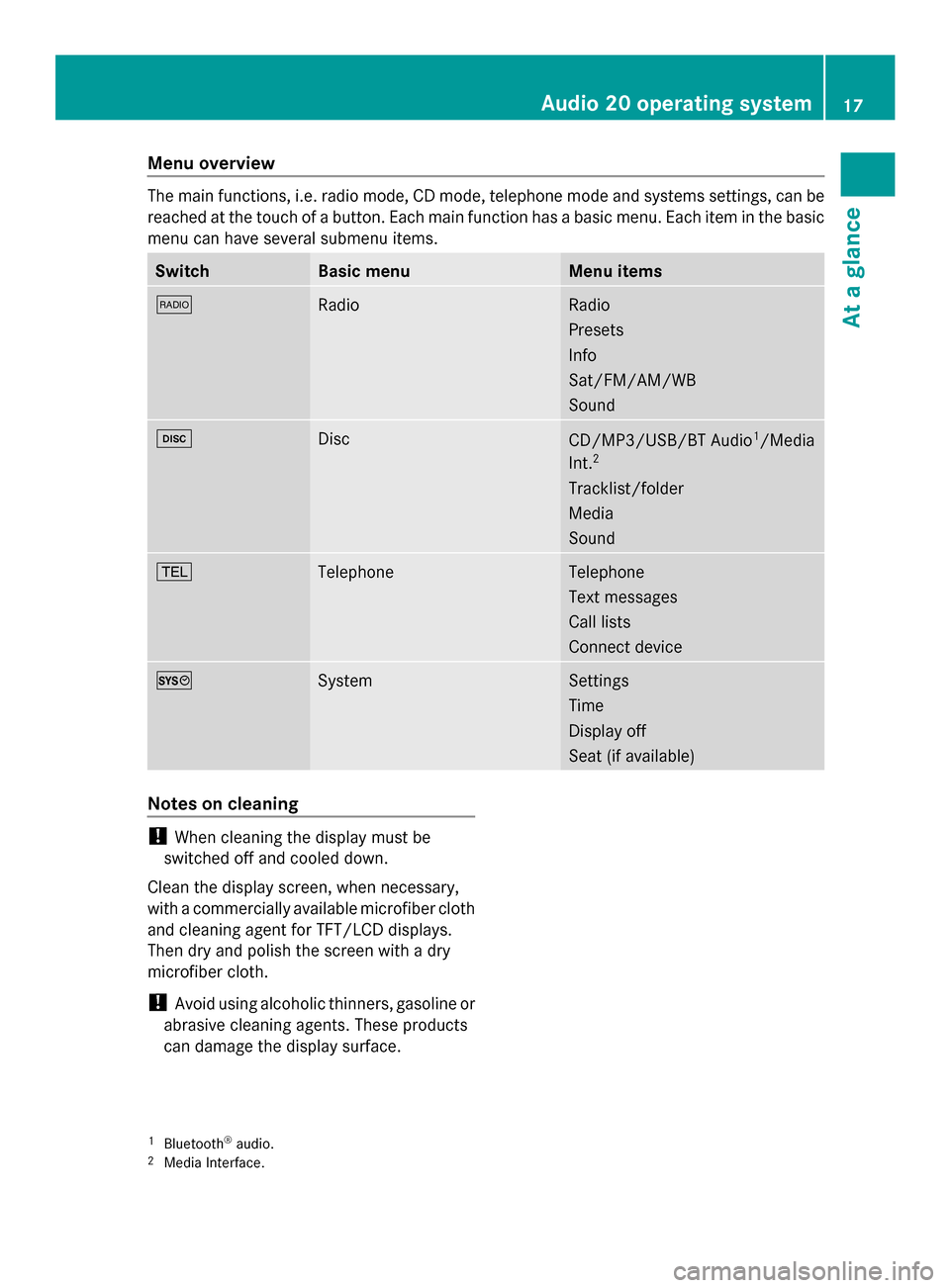
Menu overview
The main functions, i.e. radio mode, CD mode, telephone mode and systems settings, can be
reached at the touch of a button. Each main function has a basic menu. Each item in the basic
menu can have several submenu items. Switch Basic menu Menu items
002A
Radio Radio
Presets
Info
Sat/FM/AM/WB
Sound
003A
Disc
CD/MP3/USB/BT Audio
1
/Media
Int. 2
Tracklist/folder
Media
Sound 002B
Telephone Telephone
Text messages
Call lists
Connect device
0066
System Settings
Time
Display off
Seat (if available)
Notes on cleaning
!
When cleaning the display must be
switched off and cooled down.
Clean the display screen, when necessary,
with a commercially available microfiber cloth
and cleaning agent for TFT/LCD displays.
Then dry and polish the screen with a dry
microfiber cloth.
! Avoid using alcoholic thinners, gasoline or
abrasive cleaning agents. These products
can damage the display surface.
1 Bluetooth ®
audio.
2 Media Interface. Audio 20 operating system
17At a glance
Page 20 of 106

Multifunction steering wheel
Example illustration
Function Page
0043
Multifunction display
0044
0059
Voice control (only in
conjunction with Becker ®
MAP PILOT ) 0087
0081
Increases the volume 21
0082
Decreases the vol-
ume 21
0061
Accepts a call 49
0076
Ends a call 49
0063
Press briefly: mutes
the audio source 21 Function Page
0085
00590065
Calls up the
menu bar and selects
menus 00630064
Press briefly:
selects a submenu or
scrolls through lists. In the
Audio Audio menu, this selects a
stored station or an audio
track. In the Phone
Phonemenu,
this switches to the phone
book and selects a name or
phone number. 00630064
Press and
hold: in the Audio Audio menu,
this selects the next/previ-
ous station or selects an
audio track using rapid
scrolling. In the Phone Phone
menu, this starts rapid
scrolling through the phone
book. 0076
Confirms selections
and fades out messages. In
the Phone Phone menu, this
switches to the phone book
and starts dialing. 0083
0038
Press briefly:
returns to the previous
menu and hides display
messages 0038
Press and hold:
selects the standard dis-
play; see vehicle Operator's
Manual 18
Multifunction steering wheelAt a glance
Page 21 of 106

Operating Audio 20
Selecting menus
Basic menu X
Press the appropriate 002A,003A,002Bor
0066 button.
The basic menu of the respective function
is shown. The main area is active.
The active area is highlighted.
i The following pictures show the display in
daytime design (Y page 31). The menu
highlighting appearance is different
depending on the display design. Switching from the display window to the
submenu bar
X Slide 00520064the controller.
Horizontal menus Navigating within a menu
X
Slide 009500520096or turn 00790052007Athe controller.
The menu item selected is highlighted in
white. Selecting a menu item
X
Press 0098the controller.
Exiting a menu without making a selec-
tion
X Slide 00970052the controller in the opposite
direction to the direction of the list.
or
X Press the 003Dback button on the control-
ler.
Vertical menus Navigating within a menu
X
Slide 009700520064or turn 00790052007Athe controller.
The menu item selected is highlighted in
white.
Selecting a menu item
X Press 0098the controller.
Exiting a menu without making a selec-
tion
X Slide 009500520096 the controller in the opposite
direction to the direction of the list.
or
X Press the 003Dback button on the control-
ler. Operating Audio 20
19At a glance
Page 22 of 106

Operating example
Example: setting the radio station to FM
104.5 MHz.
X Press the 002Abutton once or several
times until the FM FMwaveband appears in the
status bar.
X To switch to the submenu bar: slide
00520064 the controller.
X To highlight Radio
Radioin the submenu bar:
Slide 00950052or turn 00790052007Athe controller. X
To confirm your selection: press0098the
controller.
A selection list with the functions in the
Radio Radio submenu appears. X
To highlight the Enter Frequency
Enter Frequency func-
tion:
Slide 009700520064or turn 00790052007Athe controller.
X To confirm your selection: press0098the
controller. i
Only permissible numbers for the fre-
quency range can be entered in front of the
decimal point. If non-permissible numbers
are entered after the decimal point, the
next lowest frequency is set.
X Press the 0080007F0084 number
keys on the keypad.
The station selected is played. Basic functions of Audio 20
Switching Audio 20 on/off
Overview 0043
Button 0043
0044 Thumbwheel
Switching Audio 20 on X
Press button 0043.
or
X If Audio 20 was on the last time the ignition
was switched off, turn the SmartKey to
position 2 in the ignition lock. 20
Basic functions of Audio 20At a glance
Page 23 of 106

The last main function used is reactivated
after switching on.
Switching Audio 20 off X
Press button 0043.
or
X Turn the SmartKey to position 0 in the igni-
tion lock and remove the SmartKey.
i If you switch off Audio 20, playback of the
current audio source will also be switched
off. Your mobile phone can also no longer
be operated via the Audio 20 system. Switching the sound on or off
Switching the audio source on/off X
Press the 0063button.
The sound from the audio source is
switched on or off.
i When the sound is switched off, you will
see the 006Bsymbol in the status bar.
If you change the audio source or adjust the
volume using thumbwheel 0044, the sound
switches on automatically. Adjusting the volume
Adjusting the volume for the audio
source X
Turn thumbwheel 0044.
or
X Press the 0081or0082 button on the mul-
tifunction steering wheel.
The volume of the audio source currently
selected changes.
Adjusting the volume for phone calls You can adjust the volume for hands-free
mode during a phone call. X
Turn thumbwheel 0044during a phone call.
or
X Press the 0081or0082 button on the mul-
tifunction steering wheel during a tele-
phone call. Adjusting the sound settings
Selecting the sound menu The sound settings can be selected to suit a
variety of different audio sources. You can
access the sound menu for the current audio
source (radio, CD, USB audio, Bluetooth
®
audio, Media Interface, AUX) using the
respective basic menu.
Adjusting treble and bass X
Select Sound Soundusing the controller (slide
0052 0064,009500520096or turn 00790052007A) and press 0098to
confirm.
X Select Treble
Treble orBass
Bass and press 0098to con-
firm. Example: setting the bass
The current setting is indicated by a red nee-
dle.
X
To change the setting: slide009700520064or turn
00790052007Athe controller until the desired treble
and bass levels are set.
When you exit the menu, the current setting
is stored. Basic functions of Audio 20
21At a glance
Page 24 of 106

Adjusting balance and fader
With the balance function, you can control
whether the sound is louder on the driver's or
front-passenger side.
The fader function is used to control whether
the sound is louder in the front or the rear of
the vehicle. Fader Vehicle
Function available A-Class, B-Class,
CLA, CLS, C-Class,
E-Class, GL, GLK, M-
Class
Function not availa-
ble SLK
X
Select Sound Soundusing the controller (slide
0052 0064,009500520096or turn 00790052007A) and press 0098to
confirm.
X Select Balance
Balance orBalance/Fader
Balance/Fader and
press 0098to confirm. Example: adjusting the balance
X
Select a balance setting by sliding 009500520096
the controller and press 0098to confirm.
X Select a fader setting by sliding 009700520064the
controller and press 0098to confirm.
When you exit the menu, the current setting
is stored. Surround
General notes If your vehicle is equipped with the Har-
man Kardon
®
Logic 7 ®
surround sound sys-
tem, you can choose between the settings
LOGIC7 LOGIC7 ®
®
On
On and LOGIC7
LOGIC7 ®
®
Off
Off .
The Harman Kardon ®
Logic 7 ®
surround
sound system is available for the following
operating modes:
R Audio CD
R MP3
R USB audio
R Bluetooth Audio
R Media Interface mode
R Radio (FM) and satellite radio
R AUX
i If you select LOGIC7
LOGIC7 ® ®
Off
Off , all permissible
formats are played as stored on the
medium. Due to the design of the
passenger compartment, an optimum
audio experience cannot be guaranteed for
all passengers.
Switching surround sound on/off X
Select Sound Soundusing the controller (slide
0052 0064,009500520096or turn 00790052007A) and press 0098
to confirm. Example: setting surround sound
The
0036dot indicates the current setting. 22
Basic functions of Audio 20At a glance