light MERCEDES-BENZ C CLASS 2016 User Guide
[x] Cancel search | Manufacturer: MERCEDES-BENZ, Model Year: 2016, Model line: C CLASS, Model: MERCEDES-BENZ C CLASS 2016Pages: 398, PDF Size: 11.64 MB
Page 19 of 398
Pre-entry climate control via
SmartKey
Activating/deactivating ................. 141
PRE-SAFE ®
(anticipatory occupant
protection)
Display message ........................... .2 62
Operation ......................................... 60
PRE-SAFE ®
Brake
Activating/deactivating ................. 247
Display message ............................ 262
Function/notes ................................ 77
Important safety notes .................... 77
Warning lamp ................................. 295
PRE-SAFE ®
PLUS (anticipatory
occupant protection PLUS)
Operation ......................................... 61
Protection against theft
ATA (Anti-Theft Alarm system) ......... 79
Immobilizer ...................................... 79
Protection of the environment
General notes .................................. 27
Pulling away
Automatic transmission ................. 149
General notes ................................ 149
Hill start assist ............................... 150
Q
QR code
Mercedes-Benz Guide App ................. 1
Rescue card ..................................... 32
Qualified specialist workshop ........... 31
Quick access for audio and tele-
phone
Changing the station/music
track .............................................. 301
R
RACE START (Mercedes-AMG vehi-
cles) .................................................... 195
RACETIMER (on-board computer) .... 253
Radiator cover ................................... 331
Radio
Selecting a station ......................... 243
Radio mode
see also Digital Operator's Man-
ual ................................................. .2 98 Radio-wave reception/transmis-
sion in the vehicle
Declaration of conformity ................ 31
Rain closing feature (panorama
roof with power tilt/sliding panel) .. 101
RBS (Recuperative Brake System)
Warning lamp ................................. 288
Reading lamp ..................................... 121
Rear compartment
Setting the air vents ..................... .1 44
Setting the airflow ......................... 135
Setting the temperature ................ 134
Rear fog lamp
Display message ............................ 267
Switching on/off ........................... 119
Rear lamps
see Lights
Rear seat (folding the backrest for-
wards/back) ...................................... 311
Rear seats
Display message ............................ 284
Folding the backrest forwards/
back ............................................... 311
Rear view camera
Cleaning instructions ..................... 339
Display in the multimedia system .. 207
Function/notes ............................ .2 06
Switching on/off ........................... 207
Rear window blind ............................ 318
Rear window defroster
Problem (malfunction) ................... 137
Switching on/off ........................... 136
Rear-view mirror
Anti-glare (manual) ........................ 113
Dipping (automatic) ....................... 114
Recuperative Brake System
Driving safety systems ..................... 45
Important safety notes .................... 45
Reflective safety jacket .................... 342
Refrigerant (air-conditioning sys-
tem)
Important safety notes .................. 393
Refueling
Fuel gauge ....................................... 36
Important safety notes ....... ........... 164
R ef
ueling process .......................... 165 Index 17
Page 22 of 398
Speedometer
Activating/deactivating the addi-
tional speedometer ........................ 251
Digital ............................................ 241
In the Instrument cluster ................. 36
Segments ...................................... 235
Selecting the display unit ............... 251
SPORT handling mode
Deactivating/activating
(Mercedes-AMG vehicles) ............... .7 4
Warning lamp ................................. 292
Sports exhaust system
see AMG sports exhaust system
Standing lamps
Display message ........................... .2 67
Switching on/off ........................... 119
Start/Stop button
Starting the engine ........................ 148
Start/stop function
see ECO start/stop function
Starting (engine) ................................ 148
STEER CONTROL .................................. 78
Steering
Display message ............................ 285
Warning lamps ............................... 297
Steering Assist and Stop&Go Pilot
(DISTRONIC PLUS)
Display message ............................ 279
Steering assistant STEER CON-
TROL
see STEER CONTROL
Steering wheel
Adjusting (electrically) ................... 111
Adjusting (manually) ...................... 110
Button overview ............................... 38
Buttons (on-board computer) ......... 236
Cleaning ......................................... 340
EASY ENTRY/EXIT feature ............. 112
Important safety notes .................. 110
Steering wheel heating .................. 111
Storing settings (memory func-
tion) ............................................... 116
Steering wheel heating
Problem (malfunction) ................... 112
Switching on/off ........................... 111
Steering wheel paddle shifters ........ 161
Stopwatch (RACETIMER) ................... 253 Stowage areas ................................... 308
Stowage compartments
Armrest (under) ............................. 309
Center console .............................. 309
Cup holders ................................... 316
Door ............................................... 310
Eyeglasses compartment ............... 309
Glove box ....................................... 309
Important safety i nformation ......... 308
Map pockets .................................. 310
Rear ............................................... 310
Stowage net ................................... 310
see Stowage areas
Stowage net ....................................... 310
Stowage well beneath the trunk
floor .................................................... 315
Summer tires
In winter ........................................ 362
Sun visor ............................................ 317
Suspension setting
AIRMATIC ...................................... 197
AMG adaptive sport suspension
system ........................................... 197
Switching air-recirculation mode
on/off ................................................. 137
Switching on media mode
Via the device list .......................... 307
T
Tachometer ........................................ 236
Tail lamps
Display message ............................ 267
see Lights
Tank content
Fuel gauge ....................................... 36
Technical data
Capacities ...................................... 388
Information .................................... 386
Tires/wheels ................................. 384
Vehicle data ................................... 394
Telephone
Accepting a call (multifunction
steering wheel) .............................. 245
Authorizing a mobile phone (con-
necting) ......................................... 306
Connecting a mobile phone (gen-
eral information) ............................ 30520
Index
Page 35 of 398
These data memories temporarily or perma-
nently store technical information about: R
Vehicle's operating state R
Incidents R
Malfunctions
In general, this technical information docu-
ments the state of a component, a module, a
system or the surroundings.
These include, for example: R
operating conditions of system components,
e.g. fluid levels R
the vehicle's status messages and those of its
individual components, e.g. number of wheel
revolutions/speed, deceleration in move-
ment, lateral acceleration, accelerator pedal
position R
malfunctions and defects in important system
components, e.g. lights, brakes R
vehicle reactions and operating conditions in
special driving situations, e.g. air bag deploy-
ment, intervention of stability control sys-
tems R
ambient conditions, e.g. outside temperature
This data is of an exclusively technical nature
and can be used to: R
assist in recognizing and rectifying malfunc-
tions and defects R
analyze vehicle functions, e.g. after an acci-
dent R
optimize vehicle function
The data cannot be used to trace the vehicle's
movements.
When your vehicle is serviced, technical infor-
mation can be read from the event data memory
and malfunction data memory.
Services include, for example: R
repair services R
service processes R
warranties R
quality assurance
The vehicle is read out by employees of the ser-
vice network (including the manufacturer) using
special diagnostic testers. More detailed infor-
mation is obtained from it, if required.
After a malfunction has been rectified, the infor-
mation is deleted from the malfunction memory
or is continually overwritten.
When operating the vehicle, situations are con-
ceivable in which this technical data, in connec- tion with other information (if necessary, under
consultation with an authorized expert), could
be traced to a person.
Examples include: R
accident reports R
damage to the vehicle R
witness statements
Further additional functions that have been con-
tractually agreed upon with the customer allow
certain vehicle data to be conveyed by the vehi-
cle as well. The additional functions include, for
example, vehicle location in case of an emer-
gency.
COMAND/mbrace If the vehicle is equipped with COMAND or
mbrace, additional data about the vehicle's
operation, the use of the vehicle in certain sit-
uations, and the location of the vehicle may be
compiled through COMAND or the mbrace sys-
tem.
For additional information please refer to the
COMAND User Manual or the Digital Operator's
Manual and/or the mbrace Terms and Condi-
tions.
Event data recorders This vehicle is equipped with an event data
recorder (EDR). This vehicle is equipped with an
event data recorder (EDR). The main purpose of
an EDR is to record, in certain crash or near
crash-like situations, such as an air bag deploy-
ment or hitting a road obstacle, data that will
assist in understanding how a vehicle's systems
performed. The EDR is designed to record data
related to vehicle dynamics and safety systems
for a short period of time, typically 30 seconds
or less.
The EDR in this vehicle is designed to record
such data as: R
How various systems in your vehicle were
operating R
Whether or not the driver and passenger
safety belts were buckled/fastened R
How far (if at all) the driver was depressing the
accelerator and/or brake pedal and R
How fast the vehicle was traveling.Data stored in the vehicle 33
Introduction Z
Page 42 of 398
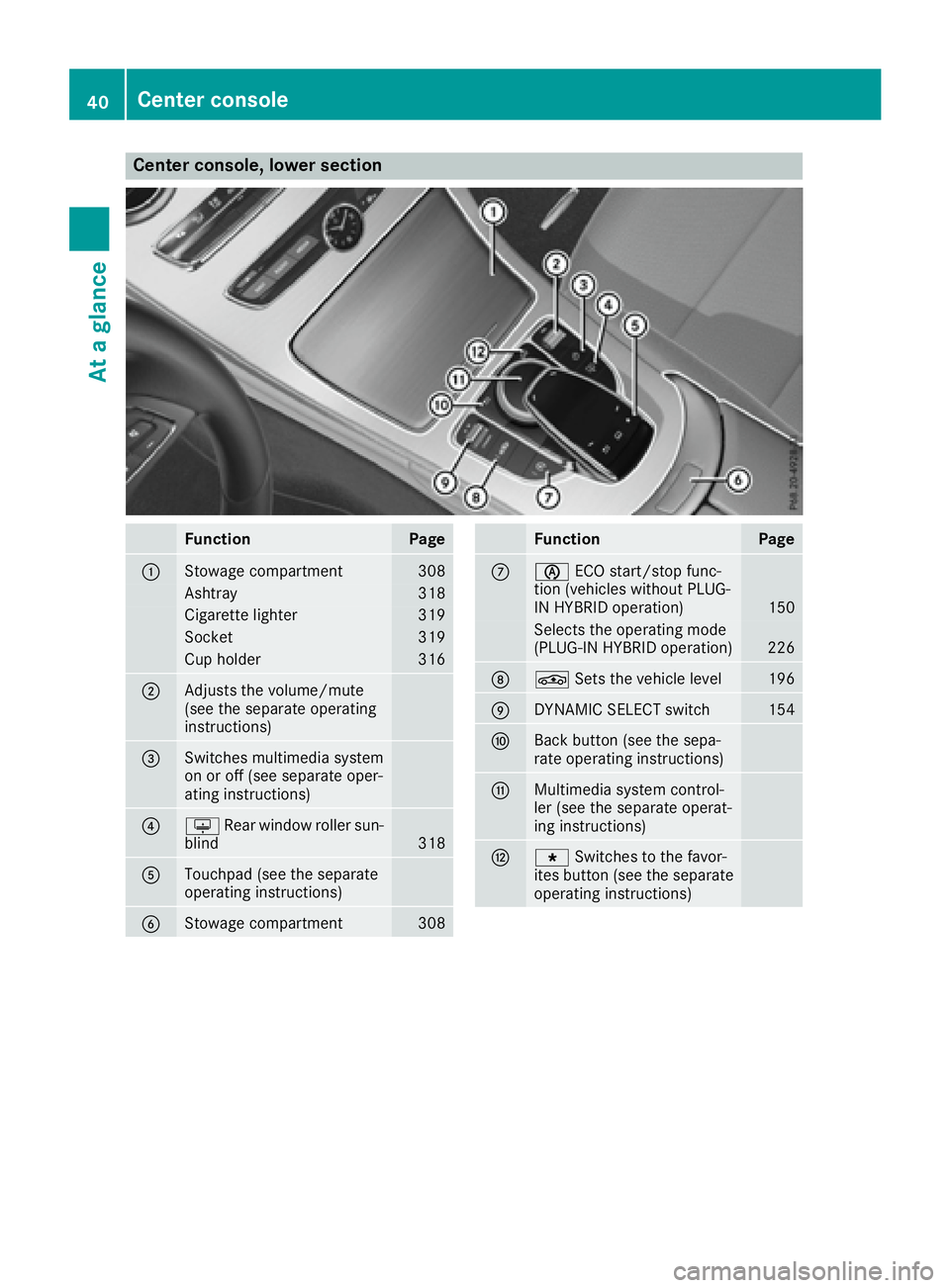
Center console, lower section
Function Page
C
Stowage compartment 308
Ashtray 318
Cigarette lighter 319
Socket 319
Cup holder 316
D
Adjusts the volume/mute
(see the separate operating
instructions)
Page 43 of 398
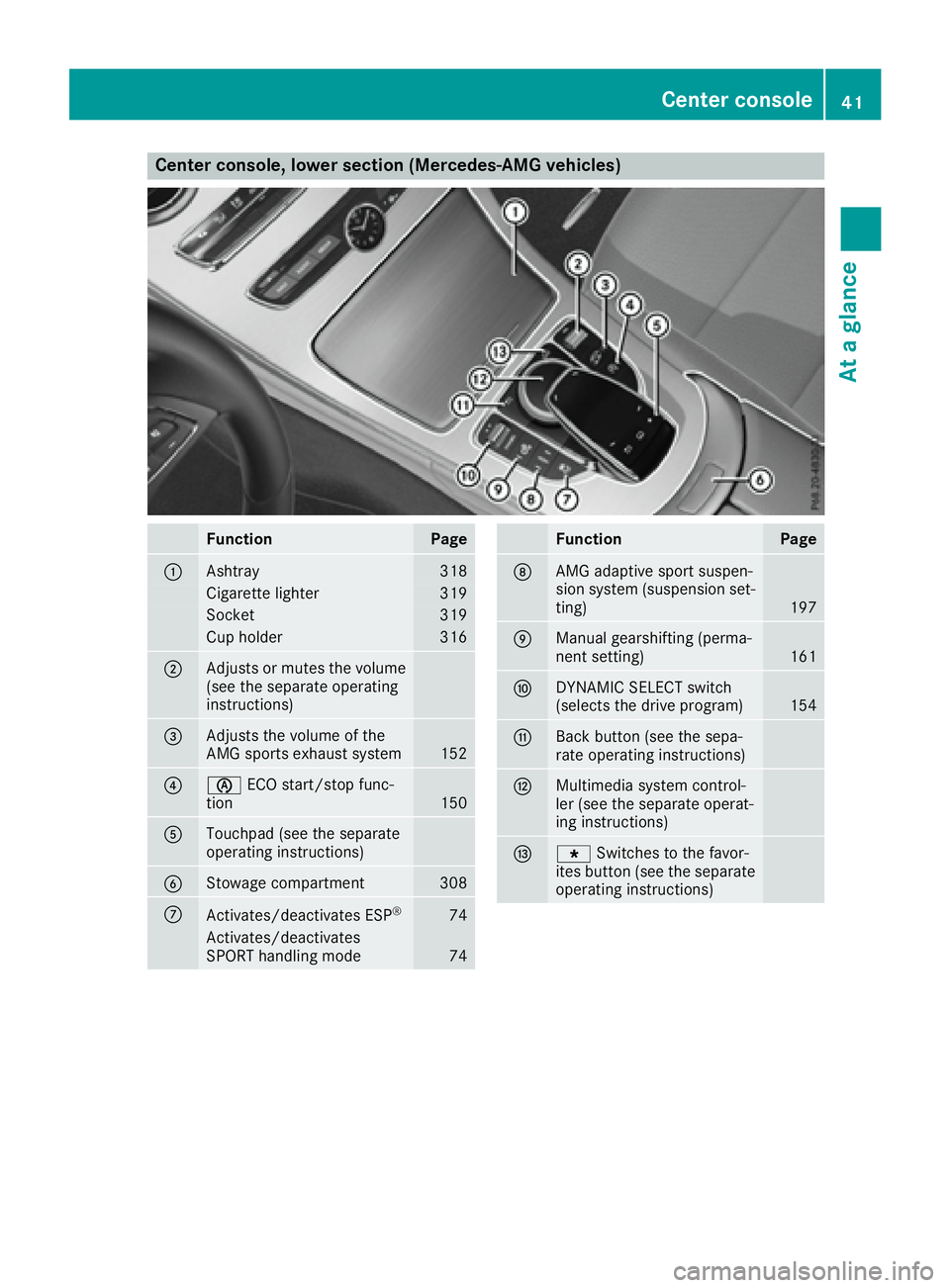
Center console, lower section (Mercedes-AMG vehicles)
Function Page
C
Ashtray 318
Cigarette lighter 319
Socket 319
Cup holder 316
D
Adjusts or mutes the volume
(see the separate operating
instructions)
Page 44 of 398
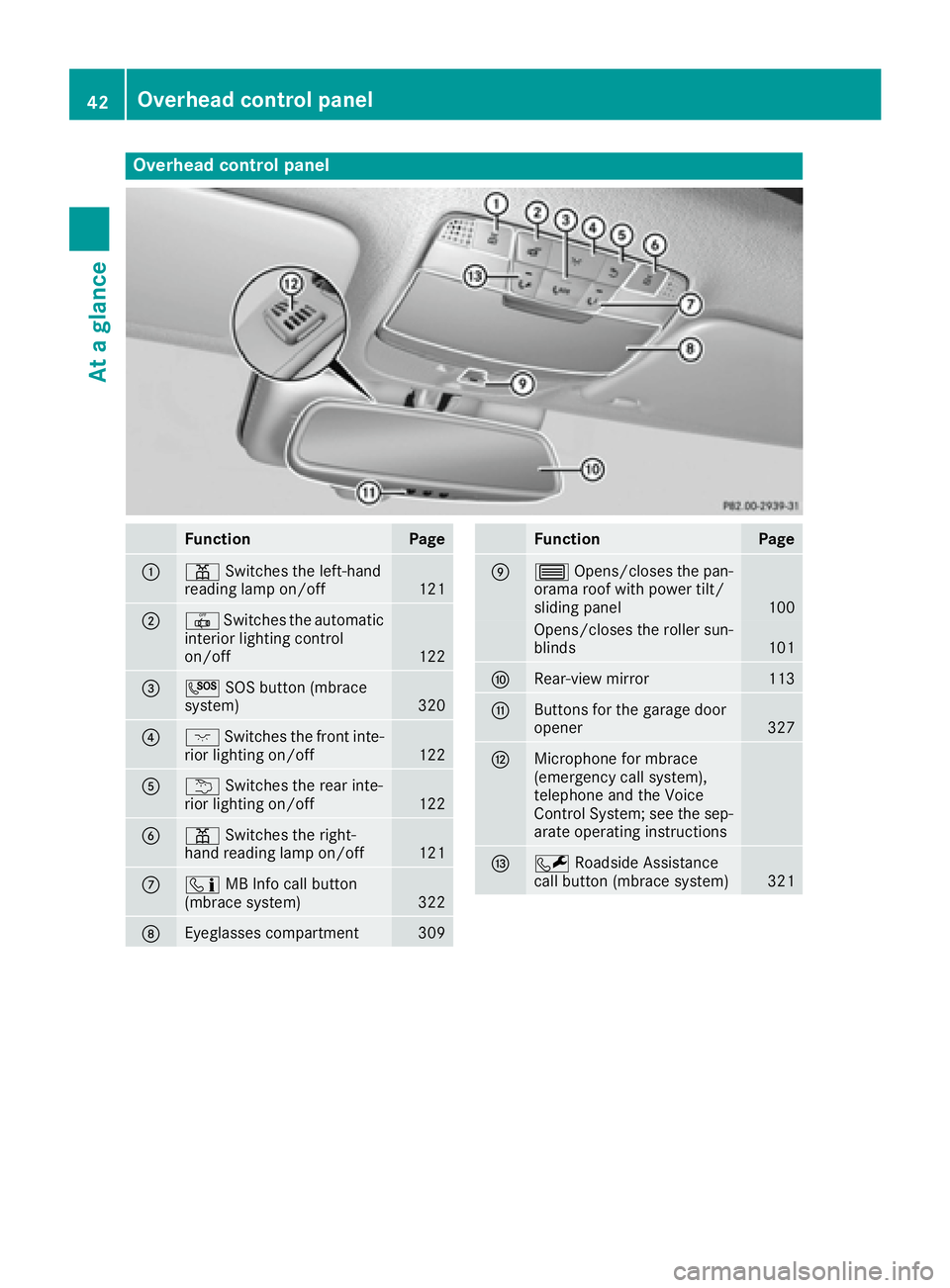
Overhead control panel
Function Page
C
= Switches the left-hand
reading lamp on/off
121
D
3 Switches the automatic
interior lighting control
on/off 122
Page 46 of 398
Hybrid vehicles
General notes Hybrid technology combines a fuel efficient
internal combustion engine with a powerful
electric motor.
Important safety notes
Danger of electric shock
G DANGER
The vehicle's high-voltage electrical system is
under high voltage. If you modify components
in the vehicle's high-voltage electrical system
or touch damaged components, you may be
electrocuted. The components in the vehi-
cle's high-voltage electrical system may be
damaged in an accident, although the damage
is not visible. There is a risk of fatal injury.
Following an accident, do not touch any high-
voltage components and never modify the
vehicle's high-voltage electrical system. Have
the vehicle towed away after an accident and
the vehicle's high-voltage electrical system
checked by a qualified specialist workshop.
When towing a vehicle after an accident, be sure
to observe the following sections: R
Transporting the vehicle ( Y
page 356)R
Towing the vehicle with the rear axle raised
( Y
page 355)R
Towing a vehicle with both axles on the
ground ( Y
page 356)
Read the safety instructions on towing and tow-
starting ( Y
page 354). All components of the hybrid drive system are
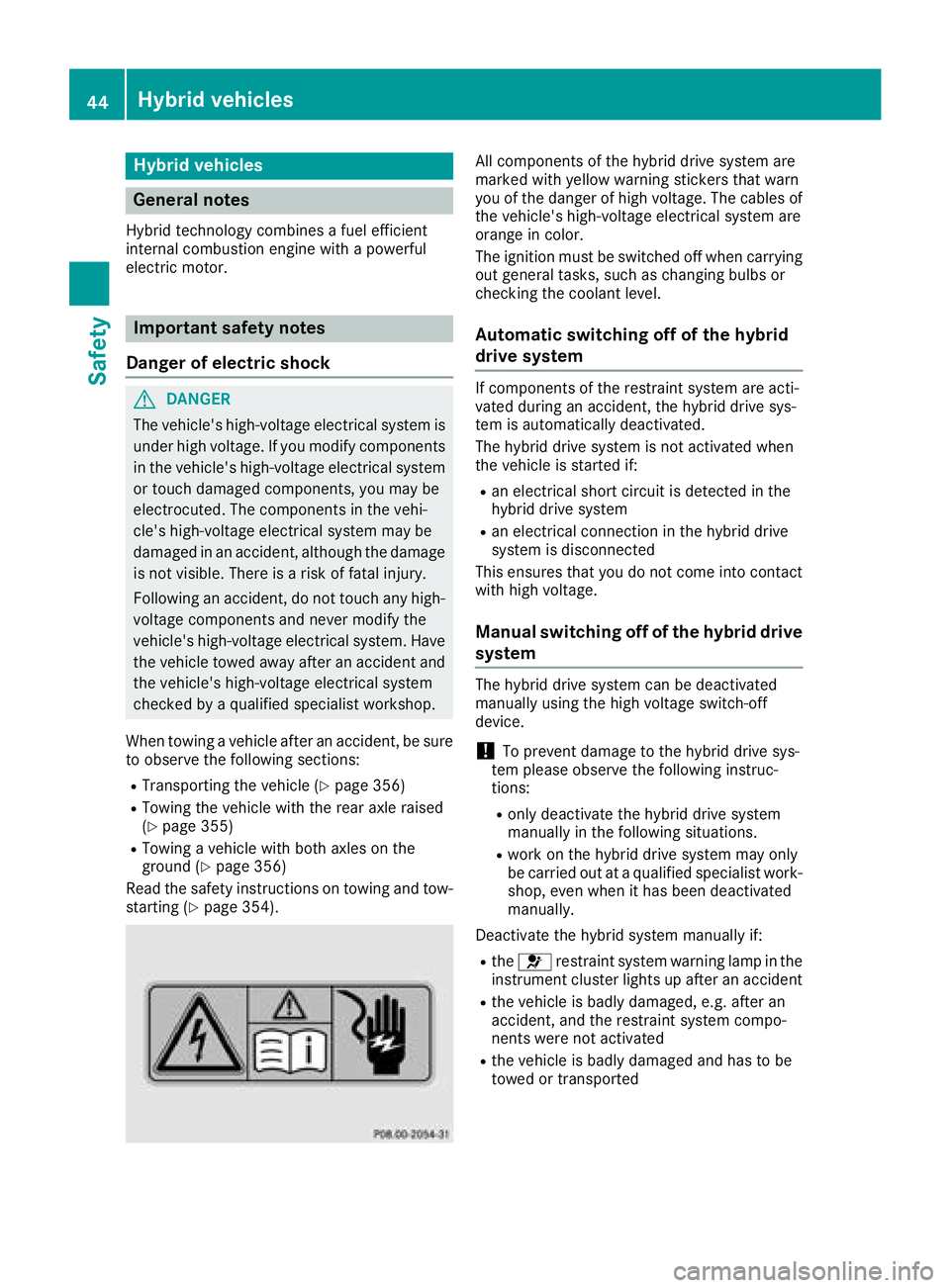
marked with yellow warning stickers that warn
you of the danger of high voltage. The cables of
the vehicle's high-voltage electrical system are
orange in color.
The ignition must be switched off when carrying
out general tasks, such as changing bulbs or
checking the coolant level.
Automatic switching off of the hybrid
drive system If components of the restraint system are acti-
vated during an accident, the hybrid drive sys-
tem is automatically deactivated.
The hybrid drive system is not activated when
the vehicle is started if: R
an electrical short circuit is detected in the
hybrid drive system R
an electrical connection in the hybrid drive
system is disconnected
This ensures that you do not come into contact
with high voltage.
Manual switching off of the hybrid drive
system The hybrid drive system can be deactivated
manually using the high voltage switch-off
device.
! To prevent damage to the hybrid drive sys-
tem please observe the following instruc-
tions: R
only deactivate the hybrid drive system
manually in the following situations. R
work on the hybrid drive system may only
be carried out at a qualified specialist work-
shop, even when it has been deactivated
manually.
Deactivate the hybrid system manually if: R
the u restraint system warning lamp in the
instrument cluster lights up after an accident R
the vehicle is badly damaged, e.g. after an
accident, and the restraint system compo-
nents were not activated R
the vehicle is badly damaged and has to be
towed or transported44
Hybrid vehicles
Safety
Page 49 of 398
regular intervals while the engine is running.
Therefore, malfunctions can be detected in
good time.
The u restraint system warning lamp in the
instrument cluster lights up when the ignition is
switched on. It goes out no later than a few sec-
onds after the vehicle is started. The compo-
nents of the restraint system are in operational
readiness.
A malfunction has occurred if the u restraint
system warning lamp: R
does not light up after the ignition is switched
on R
does not go out after a few seconds with the
engine running R
lights up again while the engine is running
All vehicles, except hybrid vehicles:
G WARNING
If restraint system is malfunctioning, restraint
system components may be triggered unin-
tentionally or might not be triggered at all in
the event of an accident with a high rate of
vehicle deceleration. This can affect the Emer-
gency Tensioning Device or air bag, for exam-
ple. This poses an increased risk of injury or
even fatal injury.
Have the restraint system checked and
repaired in a qualified specialist workshop as
soon as possible.
Hybrid vehicles:
G DANGER
If the restraint system is malfunctioning, indi-
vidual restraint system components may be
triggered unintentionally or might not be trig-
gered at all in the event of an accident with a
high rate of vehicle deceleration. This could
affect Emergency Tensioning Devices or air
bags, for example. The vehicle's high-voltage
electrical system may also not be deactivated
as intended in the event of an accident. You
could suffer an electric shock if you touch the
damaged components of the vehicle's high-
voltage electrical system. This poses an
increased risk of injury or even fatal injury.
Have the restraint system checked and
repaired immediately at a qualified specialist workshop. Immediately switch off the ignition
and remove the SmartKey from the ignition
lock after an accident.
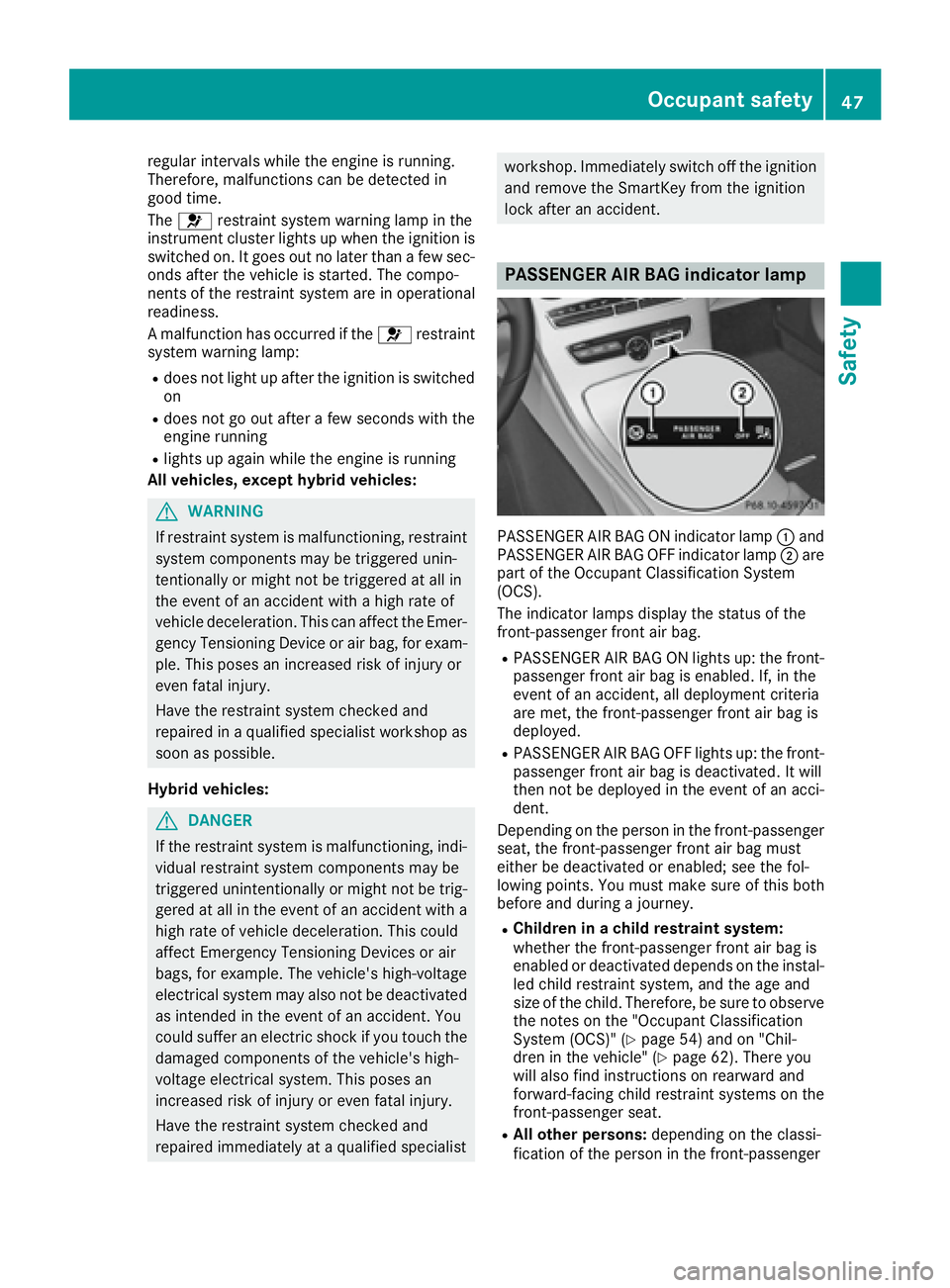
PASSENGER AIR BAG indicator lamp
PASSENGER AIR BAG ON indicator lamp C and
PASSENGER AIR BAG OFF indicator lamp D are
part of the Occupant Classification System
(OCS).
The indicator lamps display the status of the
front-passenger front air bag. R
PASSENGER AIR BAG ON lights up: the front-
passenger front air bag is enabled. If, in the
event of an accident, all deployment criteria
are met, the front-passenger front air bag is
deployed. R
PASSENGER AIR BAG OFF lights up: the front-
passenger front air bag is deactivated. It will
then not be deployed in the event of an acci-
dent.
Depending on the person in the front-passenger
seat, the front-passenger front air bag must
either be deactivated or enabled; see the fol-
lowing points. You must make sure of this both
before and during a journey. R
Children in a child restraint system:
whether the front-passenger front air bag is
enabled or deactivated depends on the instal-
led child restraint system, and the age and
size of the child. Therefore, be sure to observe
the notes on the "Occupant Classification
System (OCS)" ( Y
page 54) and on "Chil-
dren in the vehicle" ( Y
page 62). There you
will also find instructions on rearward and
forward-facing child restraint systems on the
front-passenger seat. R
All other persons: depending on the classi-
fication of the person in the front-passengerOccupant safety 47
Safety Z
Page 53 of 398
X
Press the release button in the belt buckle,
hold the belt tongue firmly and guide the belt
back.
Seat belt adjustment The seat-belt adjustment is an integral part of
the PRE-SAFE ®
convenience function. This func-
tion adjusts the driver's and front-passenger
seat belt to the upper body of the occupants.
The belt strap is tightened slightly when: R
the belt tongue is engaged in the buckle and R
the ignition is switched on
The seat-belt adjustment will apply a certain
retraction force if any slack is detected between
the vehicle occupant and the seat belt. Do not
hold on to the seat belt tightly while it is adjust-
ing.
You can switch the seat-belt adjustment on and
off using the multimedia system. Information on
activating and deactivating the seat-belt adjust-
ment function can be found in the Digital Oper-
ator's Manual or in the separate operating
instructions for the multimedia system.
Belt warning for the driver and front
passenger The v seat belt warning lamp in the instru-
ment cluster is a reminder that all vehicle occu-
pants must wear their seat belts. It may light up
continuously or flash. In addition, there may be
a warning tone.
Regardless of whether the driver's seat belt has
already been fastened, the v seat belt warn-
ing lamp lights up for six seconds each time the
engine is started. If the front doors are closed
and the driver or front-passenger seat belt has
not been fastened, the v seat belt warning
lamp lights up again after the six seconds. As
soon as the driver's and front-passenger seat
belts are fastened or a front door is opened
again, the v seat belt warning lamp goes out.
If the driver's seat belt is not fastened after the
engine is started, an additional warning tone will
sound. The warning tone switches off after six
seconds or once the driver's seat belt is fas-
tened.
If the vehicle speed exceeds 15 mph (25 km/ h)
an d the driver's or front-passenger seat belt is
not fastened, a warning tone sounds again. The
warning tone sounds with increasing intensity
for a maximum of 60 seconds or until the driver or front passenger have fastened their seat
belts.
If the driver or front passenger unfasten their
seat belt while the vehicle is in motion, the belt
warning automatically reactivates.
i For more information on the v seat belt
warning lamp, see "Warning and indicator
lamps in the instrument cluster, seat belts"
( Y
page 287).
Air bags
Introduction The air bag installation point is identified by the
label AIR BAG.
An air bag supplements a correctly fastened
seat belt. However, it is not intended as a sub-
stitute for the seat belt. Air bags provide addi-
tional protection in the event of an accident.
Not all air bags are deployed in an accident. The
various air bag systems work independently of
each other ( Y
page 58).
There is, however, no system available today
that can completely rule out injury or death.
It is also not possible to rule out a risk of injury
caused by an air bag due to the high speed at
which the air bag must be deployed.
Important safety notes
G WARNING
If you do not sit in the correct seat position,
the air bag cannot protect as intended and
could even cause additional injury when
deployed. This poses an increased risk of
injury or even fatal injury.
To avoid hazardous situations, always make
sure that all of the vehicle's occupants: R
have fastened their seat belts correctly,
including pregnant women R
are sitting correctly and maintain the great-
est possible distance to the air bags R
follow the following instructions
Always make sure that there are no objects
between the air bag and the vehicle's occu-
pants.Occupant safety 51
Safety Z
Page 57 of 398
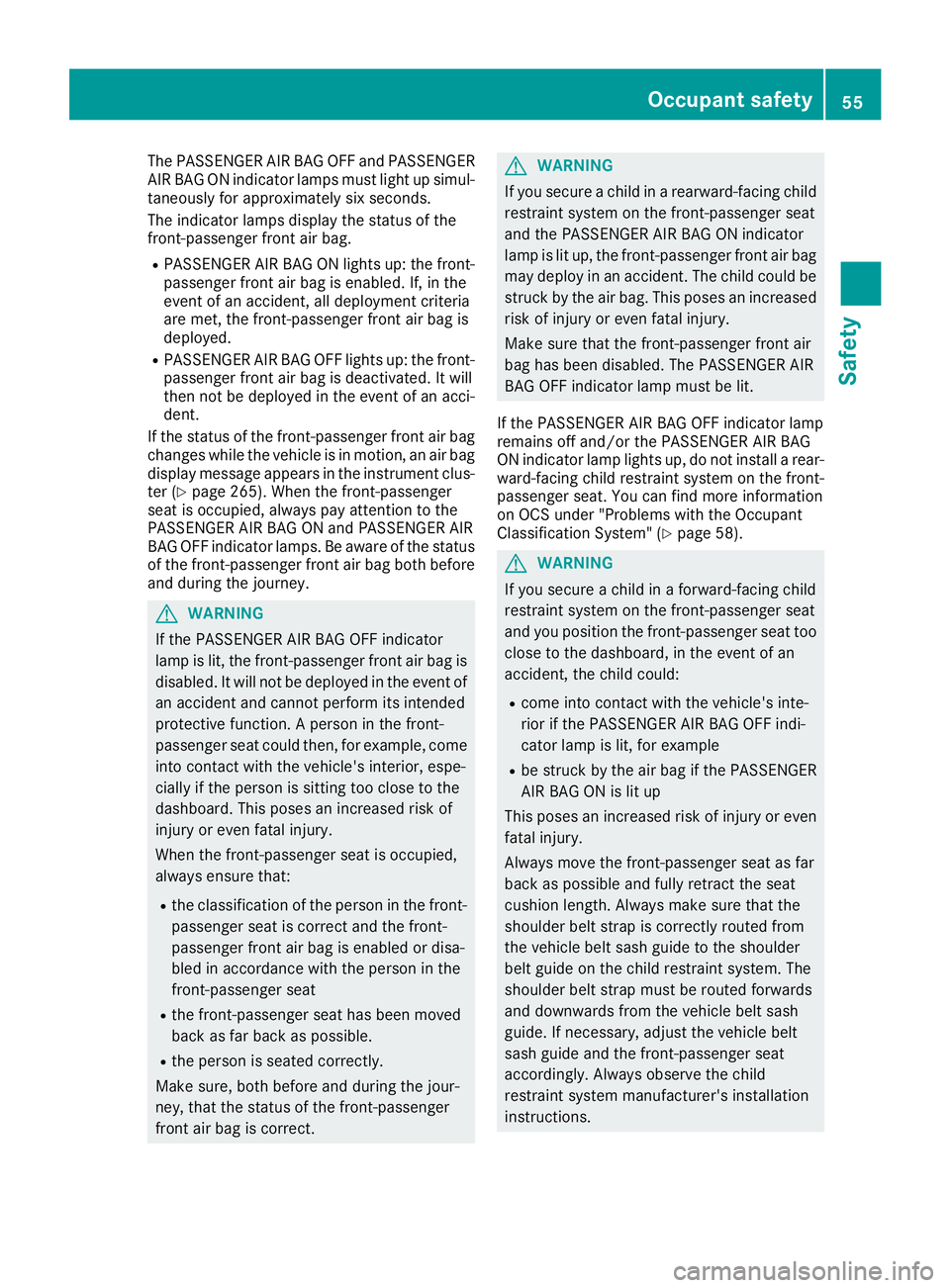
The PASSENGER AIR BAG OFF and PASSENGER
AIR BAG ON indicator lamps must light up simul-
taneously for approximately six seconds.
The indicator lamps display the status of the
front-passenger front air bag. R
PASSENGER AIR BAG ON lights up: the front-
passenger front air bag is enabled. If, in the
event of an accident, all deployment criteria
are met, the front-passenger front air bag is
deployed. R
PASSENGER AIR BAG OFF lights up: the front-
passenger front air bag is deactivated. It will
then not be deployed in the event of an acci-
dent.
If the status of the front-passenger front air bag
changes while the vehicle is in motion, an air bag
display message appears in the instrument clus-
ter ( Y
page 265). When the front-passenger
seat is occupied, always pay attention to the
PASSENGER AIR BAG ON and PASSENGER AIR
BAG OFF indicator lamps. Be aware of the status
of the front-passenger front air bag both before
and during the journey.
G WARNING
If the PASSENGER AIR BAG OFF indicator
lamp is lit, the front-passenger front air bag is
disabled. It will not be deployed in the event of
an accident and cannot perform its intended
protective function. A person in the front-
passenger seat could then, for example, come
into contact with the vehicle's interior, espe-
cially if the person is sitting too close to the
dashboard. This poses an increased risk of
injury or even fatal injury.
When the front-passenger seat is occupied,
always ensure that: R
the classification of the person in the front-
passenger seat is correct and the front-
passenger front air bag is enabled or disa-
bled in accordance with the person in the
front-passenger seat R
the front-passenger seat has been moved
back as far back as possible. R
the person is seated correctly.
Make sure, both before and during the jour-
ney, that the status of the front-passenger
front air bag is correct. G WARNING
If you secure a child in a rearward-facing child
restraint system on the front-passenger seat
and the PASSENGER AIR BAG ON indicator
lamp is lit up, the front-passenger front air bag
may deploy in an accident. The child could be
struck by the air bag. This poses an increased
risk of injury or even fatal injury.
Make sure that the front-passenger front air
bag has been disabled. The PASSENGER AIR
BAG OFF indicator lamp must be lit.
If the PASSENGER AIR BAG OFF indicator lamp
remains off and/or the PASSENGER AIR BAG
ON indicator lamp lights up, do not install a rear-
ward-facing child restraint system on the front-
passenger seat. You can find more information
on OCS under "Problems with the Occupant
Classification System" ( Y
page 58).
G WARNING
If you secure a child in a forward-facing child
restraint system on the front-passenger seat
and you position the front-passenger seat too
close to the dashboard, in the event of an
accident, the child could: R
come into contact with the vehicle's inte-
rior if the PASSENGER AIR BAG OFF indi-
cator lamp is lit, for example R
be struck by the air bag if the PASSENGER
AIR BAG ON is lit up
This poses an increased risk of injury or even
fatal injury.
Always move the front-passenger seat as far
back as possible and fully retract the seat
cushion length. Always make sure that the
shoulder belt strap is correctly routed from
the vehicle belt sash guide to the shoulder
belt guide on the child restraint system. The
shoulder belt strap must be routed forwards
and downwards from the vehicle belt sash
guide. If necessary, adjust the vehicle belt
sash guide and the front-passenger seat
accordingly. Always observe the child
restraint system manufacturer's installation
instructions.Occupant safety 55
Safety Z