lan MERCEDES-BENZ C-Class 2017 W205 Comand Manual
[x] Cancel search | Manufacturer: MERCEDES-BENZ, Model Year: 2017, Model line: C-Class, Model: MERCEDES-BENZ C-Class 2017 W205Pages: 178, PDF Size: 5.62 MB
Page 4 of 178
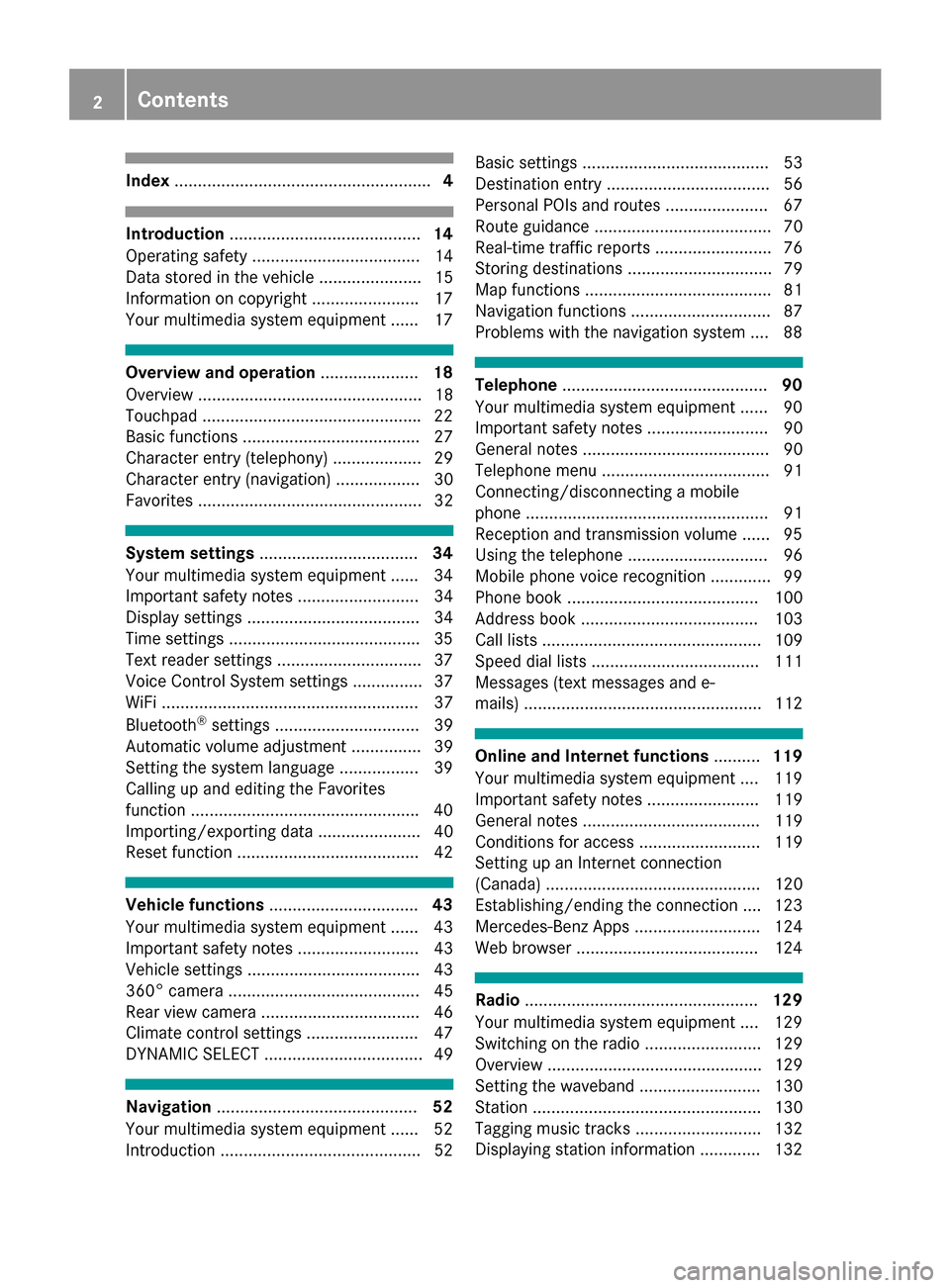
Index....................................................... 4
Introduction......................................... 14
Operating safety .................................... 14
Data stored in the vehicle ...................... 15
Information on copyright ...................... .17
Your multimedia system equipment ...... 17
Overview and operation .....................18
Overview ................................................ 18
Touchpad .............................................. .22
Basic functions ...................................... 27
Character entry (telephony) ................... 29
Character entry (navigation) .................. 30
Favorites ................................................ 32
System settings .................................. 34
Your multimedia system equipment ...... 34
Important safety notes .......................... 34
Display settings ..................................... 34
Time settings .........................................3 5
Text reader settings ...............................3 7
Voice Control System settings ............... 37
WiFi ....................................................... 37
Bluetooth
®settings ............................... 39
Automatic volume adjustment ............... 39
Setting the system language .................3 9
Callin g up and editing the Favorites
function ................................................ .40
Importing/exporting data ...................... 40
Reset function ....................................... 42
Vehicle functions ................................ 43
Your multimedia system equipment ...... 43
Important safety notes .......................... 43
Vehicle settings .....................................4 3
360° camera ......................................... 45
Rear view camera .................................. 46
Climate control settings ........................ 47
DYNAMIC SELECT .................................. 49
Navigation ........................................... 52
Your multimedia system equipment ...... 52
Introduction ...........................................5 2Basic settings ........................................ 53
Destination entry ................................... 56
Personal POIs and routes ...................... 67
Route guidance ...................................... 70
Real-time traffic reports ......................... 76
Storing destinations ............................... 79
Map functions ........................................ 81
Navigation functions .............................. 87
Problems with the navigation system .... 88
Telephone
............................................ 90
Your multimedia system equipment ...... 90
Important safety notes .......................... 90
General notes ........................................ 90
Telephone menu .................................... 91
Connecting/disconnecting a mobile
phone .................................................... 91
Reception and transmission volume ...... 95
Using the telephone .............................. 96
Mobile phone voice recognition ............. 99
Phone book ......................................... 100
Address book ...................................... 103
Call lists ............................................... 109
Speed dial lists .................................... 111
Messages (text messages and e-
mails) ................................................... 112
Online and Internet functions ..........119
Your multimedia system equipment .... 119
Important safety notes ........................ 119
General notes ...................................... 119
Conditions for access .......................... 119
Setting up an Internet connection
(Canada) .............................................. 120
Establishing/ending the connection .... 123
Mercedes-Benz Apps ........................... 124
Web browser .......................................1 24
Radio.................................................. 129
Your multimedia system equipment .... 129
Switching on the radio ......................... 129
Overview .............................................. 129
Setting the waveband .......................... 130
Station ................................................. 130
Tagging music tracks ........................... 132
Displaying station information ............. 132
2Contents
Page 7 of 178
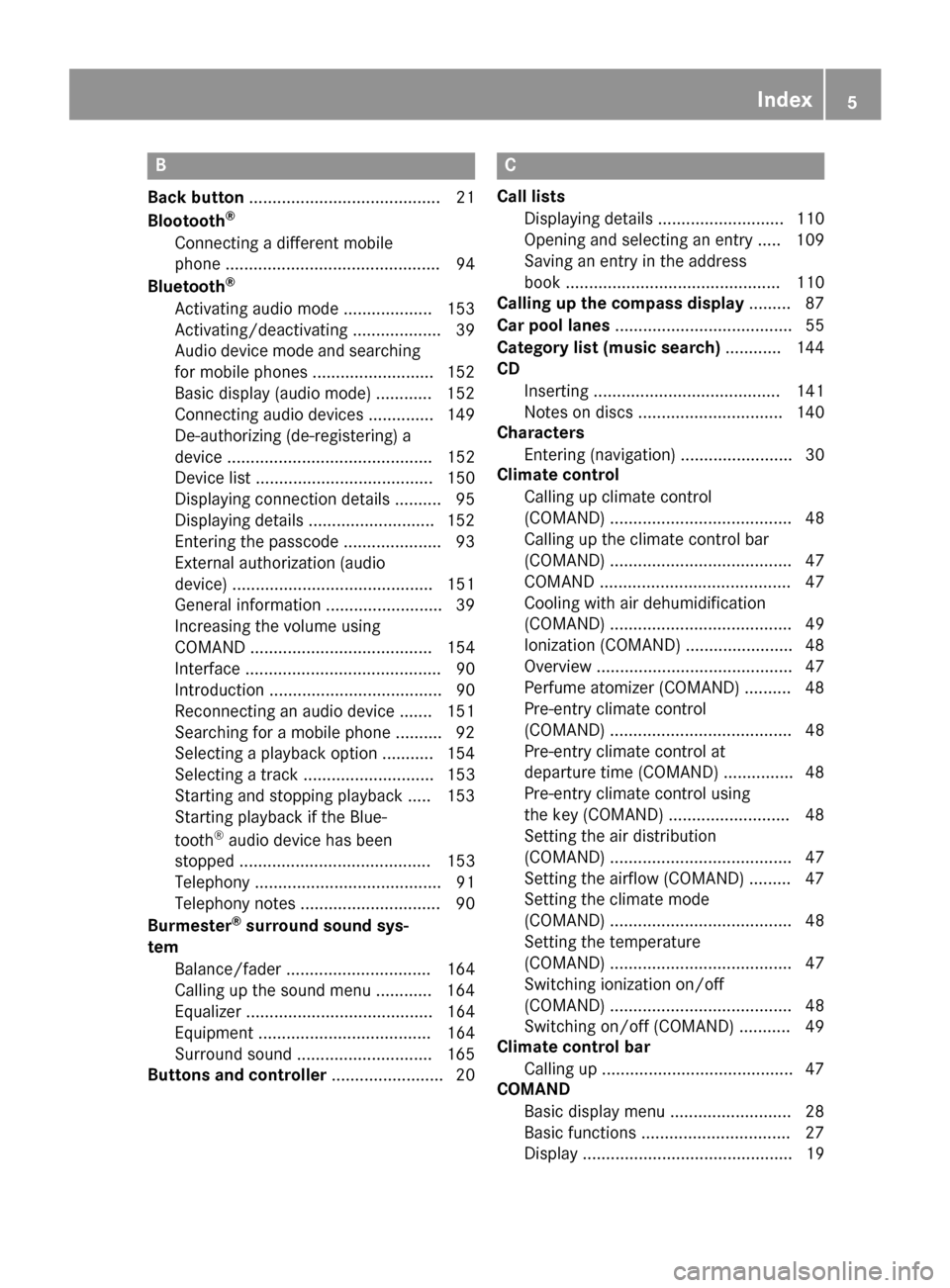
B
Back button......................................... 21
Blootooth®
Connecting a different mobile
phone .............................................. 94
Bluetooth
®
Activating audio mode ................... 153
Activating/deactivating ................... 39
Audio device mode and searching
for mobile phones .......................... 152
Basic display (audio mode) ............ 152
Connecting audio devices .............. 149
De-authorizing (de-registering) a
device ............................................ 152
Device list ...................................... 150
Displaying connection details .......... 95
Displaying details ........................... 152
Entering the passcode ..................... 93
External authorization (audio
device) ........................................... 151
General information ......................... 39
Increasing the volume using
COMAND ....................................... 154
Interface .......................................... 90
Introduction ..................................... 90
Reconnecting an audio device ....... 151
Searching for a mobile phone .......... 92
Selecting a playback option ........... 154
Selecting a track ............................ 153
Starting and stopping playback ..... 153
Starting playback if the Blue-
tooth
®audio device has been
stopped ......................................... 153
Telephony ........................................ 91
Telephony notes .............................. 90
Burmester
®surround sound sys-
tem
Balance/fader ............................... 164
Calling up the sound menu ............ 164
Equalizer ........................................ 164
Equipment ..................................... 164
Surround sound ............................. 165
Buttons and controller ........................ 20
C
Call lists
Displaying details ........................... 110
Opening and selecting an entry ..... 109
Saving an entry in the address
book .............................................. 110
Calling up the compass display ......... 87
Car pool lanes ...................................... 55
Category list (music search) ............ 144
CD
Inserting ........................................ 141
Notes on discs ............................... 140
Characters
Entering (navigation) ........................ 30
Climate control
Calling up climate control
(COMAND) ....................................... 48
Calling up the climate control bar
(COMAND) ....................................... 47
COMAND ......................................... 47
Cooling with air dehumidification
(COMAND) ....................................... 49
Ionization (COMAND) ....................... 48
Overview .......................................... 47
Perfume atomizer (COMAND) .......... 48
Pre-entry climate control
(COMAND) ....................................... 48
Pre-entry climate control at
departure time (COMAND) ............... 48
Pre-entry climate control using
the key (COMAND) .......................... 48
Setting the air distribution
(COMAND) ....................................... 47
Setting the airflow (COMAND) ......... 47
Setting the climate mode
(COMAND) ....................................... 48
Setting the temperature
(COMAND) ....................................... 47
Switching ionization on/off
(COMAND) ....................................... 48
Switching on/off (COMAND) ........... 49
Climate control bar
Calling up ......................................... 47
COMAND
Basic display menu .......................... 28
Basic functions ................................ 27
Display ............................................. 19
Index5
Page 8 of 178
Selecting operating mode ................ 29
Settings ......................................... 126
Switching on/off .............................. 27
COMAND display
Cleaning instructions ....................... 19
Setting ............................................. 34
Contacts
Deleting ......................................... 107
Importing ....................................... 108
Controller ............................................. 21
Copying music files
see Media Register
Copying/renaming/deleting files
see Media Register
D
Date format, setting ............................ 36
Day design, setting ............................. 34
Delayed switch-off time
Setting (COMAND) ........................... 45
Deleting
Call lists ......................................... 111
Destination
Saving to an SD card ....................... 80
Storing in the address book ............. 80
Destination (navigation)
Editing a previous destination .......... 81
Entering a destination by address .... 56
Entering a destination using the
map ................................................. 63
Entering a point of interest .............. 61
Entering using geo-coordinates ....... 66
Entering using Mercedes-Benz
Apps ................................................ 66
Free destination search ................... 58
General notes .................................. 56
Online search ................................... 60
Personal POIs and routes ................. 67
Saving .............................................. 79
Selecting an address book con-
tact as a destination ........................ 60
Selecting from the list of last des-
tinations ........................................... 60
Dialing a number (telephone) ............. 96
Display
Selecting the design ........................ 34
Switching on/off .............................. 35 Display COMAND
see COMAND display
Displaying current position (navi-
gation) .................................................. 75
Displaying the artist and track
Radio ............................................. 132
Distance
see Route (navigation)
DVD
Notes on discs ............................... 140
see Audio CD/DVD and MP3 mode
DVD video
Operating DVD functions ............... 160
DYNAMIC SELECT
Configuration via the DYNAMIC
SELECT switch ................................. 50
Configuring individual drive pro-
gram ................................................ 49
Displaying engine data ..................... 50
Displaying vehicle data .................... 50
Setting options ................................ 50
E
E-mailAnswering ...................................... 116
Calling up the settings menu ......... 112
Changing the name of the e-mail
account .......................................... 113
Configuring an e-mail account ....... 113
Configuring the e-mails displayed .. 113
Deactivating the e-mail function .... 113
Deleting ......................................... 118
Displaying details ........................... 115
Downloading e-mails manually ...... 113
Editing text templates .................... 117
Forwarding ..................................... 116
Inbox .............................................. 114
Reading .......................................... 114
Saving the sender in the address
book .............................................. 118
Settings ......................................... 112
Storing the sender as a new entryin the address book ....................... 118
Using a phone number in the text .. 117
Using text templates ...................... 117
Writing ........................................... 116
6Index
Page 9 of 178
EASY-ENTRY/EXIT featureActivating/deactivating
(COMAND) ...................................... .44
Entering the city .................................. 56
Exterior mirror
Activating/deactivating the auto-
matic folding mirror function
(COMAND) ...................................... .44
F
Factory setting (reset function) .........42
Favorites
Adding ............................................ .32
Deleting ........................................... 33
Displaying and calling up ................. 32
Moving ............................................. 33
Overview .......................................... 32
Renaming ......................................... 33
Favorites (Internet) ........................... 128
Favorites button .................................. 40
Free destination search
Online search ................................... 60
Selecting search options ................. 59
Selecting search results ................... 59
G
GPS reception ...................................... 52
Gracenote®Media Database ............ 143
H
Handwriting recognition
Switching text reader function
on/off .............................................. 25
Touchpad ......................................... 25
Heading up (navigation) ..................... 82
Home
see Home address
Home address
Entering and saving .........................5 7
I
Importing/exporting data.................. 40
Incident (traffic report) .......................76 Interior lighting
Setting the delayed switch-off
time (COMAND) .............................. .45
Intermediate destinations
Entering ........................................... 64
Internet
Conditions for access .................... 119
Creating favorites .......................... 128
Entering the URL ............................ 125
Favorites manager ......................... 128
Favorites menu .............................. 128
Menu functions .............................. 125
Options menu ................................ 126
Selecting/setting access data ....... 120
Setting automatic disconnection
of the Internet connection ............. 123
Setting up an Internet connection .. 120
L
Lane recommendationsExplanation ...................................... 72
Presentation .................................... 72
Lighting
Setting the delayed switch-off
time (COMAND) ............................... 45
Switching the locator lighting on/
off .................................................... 44
Lights
Setting the ambient lighting
(COMAND) ....................................... 43
List of access data
New provider ................................. 121
List of mobile phone network pro-
viders
With the selected provider ............. 121
Locator lighting
Setting (COMAND) ........................... 44
Locking confirmation
see Acoustic locking confirmation
M
Making a callUsing speed dial .............................. 97
Using the call lists ............................ 96
Using the phone book ...................... 97
Map (navigation)
3D map ............................................ 82
Index7
Page 11 of 178
Drive Information ............................. 87
Entering a destination ...................... 56
Entering a destination using geo-
coordinates ...................................... 66
Entering a destination using
Mercedes-Benz Apps ....................... 66
Entering a destination using the
map ................................................. 63
Entering a point of interest .............. 61
Entering characters (character
bar) .................................................. 30
Entering intermediate destina-
tions ................................................. 64
Entry restriction ............................... 52
First use ........................................... 52
General notes .................................. 52
GPS reception .................................. 52
Important safety notes .................... 52
Info on navigation ............................ 88
Lane recommendation ..................... 72
Map functions .................................. 81
Moving the map ............................... 53
Off-road/Off-map (off-road desti-
nation) ............................................. 76
Online map display .......................... 87
Personal POIs and routes ................. 67
Problems ......................................... 88
Reading out traffic reports ............... 79
Repeating announcements .............. 73
Route flight ...................................... 88
Route information ............................ 74
Saving destinations .......................... 79
Saving home address ....................... 57
Selecting a destination from the
list of last destinations ..................... 60
Setting route options (avoiding:
highways, toll roads, tunnels, fer-
ries) ................................................. 54
Setting the announcements vol-
ume ................................................. 73
Setting the route type (short
route, fast route, dynamic route or
economic route) ............................... 53
Showing/hiding the menu ............... 53
Starting route calculation ................ 58
Switching announcements
on/off .............................................. 74
Switching to ..................................... 53Traffic jam function .......................... 75
Updating the digital map .................. 86
Navigation announcements
Switching off .................................... 28
North orientation (navigation) ........... 82
O
Off-road
................................................ 76
Online and Internet functions
Calling up ....................................... 123
Calling up the device list ................ 122
Enabling a mobile phone for Inter-
net access ..................................... 120
Ending the connection ................... 124
Establishing a connection .............. 123
Managing all Internet devices ........ 123
Manually setting the access data
of the mobile phone network pro-
vider .............................................. 121
Mercedes-Benz Apps ..................... 124
Selecting the access data of the
mobile phone network provider ..... 121
Setting automatic disconnection
of the Internet connection ............. 123
Setting up an Internet connection .. 120
Web browser .................................. 124
Own address (navigation)
see Home address
P
Pause functionVideo DVD ..................................... 160
Perfume atomizer
Setting the perfume intensity
(COMAND) ....................................... 48
Personal POIs and routes
Alert when approaching (personal
POI) .................................................. 67
General notes .................................. 67
Importing via Mercedes-Benz
Apps ................................................ 68
Recording the route ......................... 70
Saving .............................................. 68
Selecting and editing ....................... 69
Settings for personal POIs ............... 67
Phone book
Adding a new contact .................... 101
Index9
Page 12 of 178
Adding information to a contact .... 102
Calling up ....................................... 100
Deleting a contact ......................... 102
Displaying the details of an entry ... 101
Entering characters ......................... 29
Saving a contact ............................ 102
Searching for a contact ................. 100
Symbol overview ............................ 100
Phone call
Dialing .............................................. 96
Picture viewer
Changing view ............................... 161
Displaying pictures ........................ 161
Exiting the picture viewer .............. 162
General notes ................................ 161
Starting a slide show ..................... 161
PIN protection
Activating/deactivating ...................4 1
POI (navigation)
Calling up the menu .........................6 1
Category .......................................... 61
Defining the position for the POI
search .............................................. 62
Entering .......................................... .61
Rotating 3D POI .............................. .63
Selecting .......................................... 62
Previous destinations (navigation) .... 81
Q
Quick access for telephone
Sending DTMF tones ........................ 27
R
RadioActivating/deactivating the sta-
tion presets display ....................... 132
Deleting a station .......................... 131
Displaying information ................... 133
Displaying station information ....... 132
Displaying the artist and track ....... 132
Mute function ................................ 133
Overview ........................................ 129
Setting the waveband .................... 130
Sound settings (balance, bass,
treble) ............................................ 132
Station list ..................................... 131
Storing stations ............................. 131 Switching on .................................. 129
Tagging music tracks (download-
ing/purchasing tracks from the
iTunes Store
®) ............................... 132
Radio station
Storing ........................................... 131
Read-aloud function
Automatic ........................................ 79
Read-aloud function for e-mails ....... 114
Reading out
Traffic reports on the route .............. 79
Real-time traffic reports ..................... 76
Rear view camera
Displaying the image ........................ 46
Object detection .............................. 46
Opening the camera cover for
cleaning (COMAND) ......................... 47
Switching object detection
on/off .............................................. 46
Switching on/off (COMAND) ........... 46
Receiving vCards ............................... 108
Redialing (telephone) .......................... 96
Reducing the volume
Switching announcements on/off
(COMAND) ....................................... 55
Reserve fuel level
Switching announcements on/off
(COMAND) ....................................... 55
Resetting (factory settings) ............... 42
Road map
see Map (navigation)
Route (navigation)
Selecting an alternative route .......... 75
Setting route options (avoiding:
highways, toll roads, tunnels, fer-
ries) ................................................. 54
Setting the route type (short
route, fast route, dynamic route or
economic route) ............................... 53
Starting calculation .......................... 58
Route guidance
Canceling/continuing ...................... 74
Freeway information ........................ 72
G
eneral notes .................................. 70
Lane recommendations ................... 72
Off-road ........................................... 76
Traffic reports .................................. 76
10Index
Page 13 of 178
S
Safety notesAudio CD/DVD and MP3 mode ..... 139
Using the telephone .........................9 0
Satellite radio
Displaying information ...................1 37
Overview ........................................ 134
Presets menu view ......................... 136
Registering ....................................1 34
Switching to ................................... 134
SatRadio
Channel list updates ......................1 37
Memory functions .......................... 135
Music and sports alerts ................. 136
Notes ............................................. 133
Selecting a category ......................1 34
Selecting a channel ....................... 135
Tagging music tracks ..................... 137
SD card
Inserting ........................................ 141
Inserting/removing ........................ 141
Removing ....................................... 142
Searching for a gas station
When the fuel level is low ................ 66
Seat-belt adjustment function
Activating/deactivating
(COMAND) ....................................... 44
Selecting stations
Radio ............................................. 130
Sending DTMF tones ........................... 98
Setting access data
Online and Internet ........................ 121
Setting the language
COMAND ......................................... 39
Setting the night design ..................... 34
Setting the text reader speed ............ 37
Setting the volume
Telephone calls ................................ 28
Setting the waveband
Radio ............................................. 130
Settings
Sound settings ............................... 163
Short message
see Text messages (SMS)
SIRIUS weather display
5-day forecast ................................ 166
Daily forecast ................................. 166 Detail information .......................... 167
Information chart ........................... 166
Selecting a location for the
weather forecast ............................ 167
Switching on/off ........................... 166
Weather map ................................. 169
Sound
Switchi ng on/off .............................. 28
So
und settings
Balance/fader ............................... 163
Calling up the sound menu ............ 163
Equalizer ........................................ 163
Sound system
see Burmester
®surround sound system
Speed dial
Deleting ......................................... 111
Setting up ...................................... 111
State/province
Selecting .......................................... 57
Stop function
Video DVD ..................................... 160
Storing stations
Radio ............................................. 131
Street name announcements
Switching on/off (COMAND) ........... 55
Switching between summer time
and standard time ............................... 35
Switching on media mode
Using the Media button ................. 138
Via the device list .......................... 139
Via the main function bar ............... 138
System settings
Automatic volume adjustment ......... 39
Bluetooth
®....................................... 39
Date ................................................. 35
Importing/exporting data ................ 40
Language ......................................... 39
Text reader speed ............................ 37
Time ................................................. 35
Time zone ........................................ 35
Voice Control System ...................... 37
T
Telephone
Accepting a call (COMAND) ............. 96
Adding a call .................................... 97
Adjusting the volume for calls .......... 28
Index11
Page 14 of 178
Authorizing a mobile phone (con-
necting) ............................................ 93
Call lists ......................................... 109
Call waiting ...................................... 99
Calling up the telephone menu ........ 91
Calls with several participants ......... 98
Conference calls .............................. 98
Connecting a mobile phone (gen-
eral information) .............................. 91
De-authorizing (disconnecting) a
mobile phone ................................... 95
Deleting a speed dial preset .......... 111
Deleting messages ........................ 118
Displaying Bluetooth
®connection
details .............................................. 95
Downloading messages manually .. 113
E-mail ............................................. 112
E-mail requirements ....................... 112
E-mail settings ............................... 112
Ending an active call ........................ 99
Entering a number ........................... 96
Entering phone numbers .................. 96
Establishing the connection from
the mobile phone ............................. 94
Function restrictions ........................ 91
Functions available during a call ...... 97
General notes .................................. 90
Incoming call during an existing
call ................................................... 99
Making a call .................................... 96
Message conditions ....................... 112
Message settings ........................... 112
Operating options ............................ 90
Phone book .................................... 100
Reading messages ......................... 114
Reception and transmission vol-
ume ................................................. 95
Reconnecting a mobile phone
automatically ................................... 94
Rejecting a call (COMAND) .............. 96
Safety notes ..................................... 90
Sending DTMF tones ........................ 98
Setting up a speed dial .................. 111
Switching between calls (call wait- ing) .................................................. 98
Switching between mobile
phones ............................................. 94
Switching the microphone on/off .... 98 Telephone menu overvi
ew ............... 91
T
ext message conditions ............... 112
Text message settings ................... 112
Text messages (SMS) .................... 112
Toggling ........................................... 98
Using the telephone ......................... 96
Writing e-mails ............................... 116
Writing text messages ................... 115
Telephone number
Entering ........................................... 96
Text messages (SMS)
Calling the sender .......................... 117
Calling up the settings menu ......... 112
Configuring the text messages
displayed ....................................... 112
Deleting ......................................... 118
Displaying details ........................... 115
Downloading manually ................... 113
Editing text templates .................... 117
Inbox .............................................. 114
Reading .......................................... 114
Reading aloud ................................ 114
Settings ......................................... 112
Storing sender in address book ..... 118
Storing the sender as a new
address book entry ........................ 117
Using a phone number in the text .. 117
Using text templates ...................... 117
Writing ........................................... 115
Time
Setting ............................................. 36
Setting summer/standard time ....... 35
Setting the format ............................ 36
Setting the time ............................... 36
Setting the time zone ....................... 35
Setting the time/date format .......... 36
Switching automatic time on/off ..... 35
Touchpad
Calling up quick access for audio
and telephone .................................. 23
Changing the input language for
handwriting recognition ................... 26
Changing the station/music
track ................................................ 27
Character suggestions ..................... 26
Deleting characters ......................... 26
Entering a space .............................. 26
Entering characters ......................... 25
12Index
Page 16 of 178
Operating safety
Important safety notes
GWARNING
If you operate information systems and com-
munication equipment integrated in the vehi-
cle while driving, you will be distracted from
traffic conditions. You could also lose control
of the vehicle. There is a risk of an accident.
Only operate the equipment when the traffic
situation permits. If you are not sure that this
is possible, park the vehicle paying attention
to traffic conditions and operate the equip-
ment when the vehicle is stationary.
You must observe the legal requirements for the
country in which you are currently driving when
operating the multimedia system.
The multimedia system calculates the route to
the destination without taking account of the
following, for example:
Rtraffic lights
Rstop and yield signs
Rmerging lanes
Rparking or stopping in a no parking/no stop-
ping zone
Rother road and traffic rules and regulations
Rnarrow bridges
The multimedia system can give incorrect navi-
gation commands if the actual street/traffic sit-
uation does not correspond with the digital
map's data. Digital maps do not cover all areas
nor all routes in an area. For example, a route
may have been diverted or the direction of a one-
way street may have changed.
For this reason, you must always observe road
and traffic rules and regulations during your
journey. Road and traffic rules and regulations
always have priority over the system's driving
recommendations.
Navigation announcements are intended to
direct you while driving without diverting your
attention from the road and driving.
Please always use this feature instead of con-
sulting the map display for directions. Looking
at the icons or map display can distract you from
traffic conditions and driving, and increase the
risk of an accident. Bear in mind that at a speed of only 30 mph
(approximately 50 km/
h), your vehicle covers a
distance of 44 feet (approximately 14 m) every
second.
This equipment complies with FCC radiation
exposure limits set forth for uncontrolled equip-
ment and meet s t
he FCC radio frequency (RF)
Exposure Guidelines in Supplement C to OET65.
This equipment has very low levels of RF energy
that is deemed to comply without maximum
permissive exposure evaluation (MPE). How-
ever, it is recommended to install it at a distance
of at least 8 inches (approx. 20 cm) between the
radiation source and a person's body (not
including limbs such as hands, wrists, feet and
legs).
GWARNING
Modifications to electronic components, their software as well as wiring can impair their
function and/or the function of other net-
worked components. In particular, systems
relevant to safety could also be affected. As a
result, these may no longer function as inten-
ded and/or jeopardize the operating safety of
the vehicle. There is an increased risk of an
accident and injury.
Never tamper with the wiring as well as elec-
tronic components or their software. You
should have all work to electrical and elec-
tronic equipment carried out at a qualified
specialist workshop.
Declarations of conformity
Vehicle components which receive
and/or transmit radio waves
USA only: The wireless devices of this vehicle
comply with Part 15 of the FCC Rules. Operation
is subject to the following two conditions:
1) These devices may not cause interference,
and
2) These devices must accept any interference,
including interference that may cause undesired
operation of the device.
Changes or modifications not expressly
approved by the party responsible for compli-
ance could void the user's authority to operate
the equipment.
14Introduction
Page 27 of 178
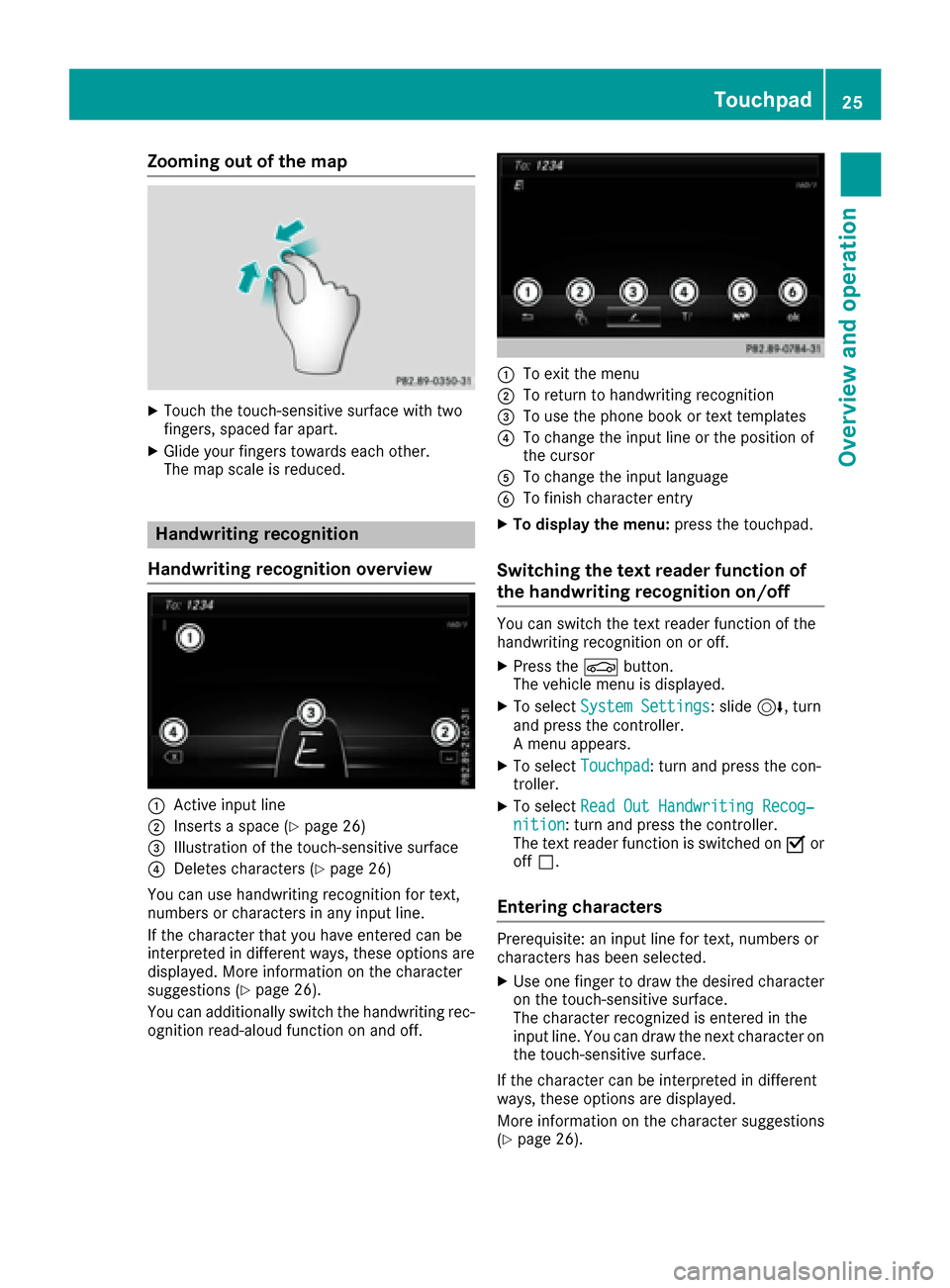
Zooming out of the map
XTouch the touch-sensitive surface with two
fingers, spaced far apart.
XGlide your fingers towards each other.
The map scale is reduced.
Handwriting recognition
Handwriting recognition overview
:Active input line
;Inserts a space (Ypage 26)
=Illustration of the touch-sensitive surface
?Deletes characters (Ypage 26)
You can use handwriting recognition for text,
numbers or characters in any input line.
If the character that you have entered can be
interpreted in different ways, these options are
displayed. More information on the character
suggestions (
Ypage 26).
You can additionally switch the handwriting rec-
ognition read-aloud function on and off.
:To exit the menu
;To return to handwriting recognition
=To use the phone book or text templates
?To change the input line or the position of
the cursor
ATo change the input language
BTo finish character entry
XTo display the menu: press the touchpad.
Switching the text reader function of
the handwriting recognition on/off
You can switch the text reader function of the
handwriting recognition on or off.
XPress theØbutton.
The vehicle menu is displayed.
XTo select System Settings: slide6, turn
and press the controller.
A menu appears.
XTo select Touchpad: turn and press the con-
troller.
XTo select Read Out Handwriting Recog‐nition: turn and press the controller.
The text reader function is switched on Oor
off ª.
Entering characters
Prerequisite: an input line for text, numbers or
characters has been selected.
XUse one finger to draw the desired character
on the touch-sensitive surface.
The character recognized is entered in the
input line. You can draw the next character on
the touch-sensitive surface.
If the character can be interpreted in different
ways, these options are displayed.
More information on the character suggestions
(
Ypage 26).
Touchpad25
Overview and operation