ECO mode MERCEDES-BENZ C CLASS 2018 User Guide
[x] Cancel search | Manufacturer: MERCEDES-BENZ, Model Year: 2018, Model line: C CLASS, Model: MERCEDES-BENZ C CLASS 2018Pages: 370, PDF Size: 6.25 MB
Page 128 of 370
IDisplay
JSets the airflow (Ypage 128)
Optimum use of automatic climate
control
Optimum use of the automatic climate
control
The following contains notes and recommenda-
tions on how best to use dual-zone automatic
climate control or 3-zone automatic climate
control (vehicles in Canada only).
XActivate climate control using the Ã
rocker switch. The indicator lamp above the
à rocker switch lights up. The "Cooling
with dehumidification" function is activated in
automatic mode.
XSet the temperature to 72 ‡ (22 †).
iOnly use the "Windshield defrosting" func-
tion briefly until the windshield is clear again.
iOnly use air-recirculation mode briefly, e.g.
if there are unpleasant outside odors or when
in a tunnel. The windows could otherwise fog
up, since no fresh air is drawn into the vehicle in air-recirculation mode.
Vehicles with 3-zone automatic climate control:
use the "Residual heat" function if you want to
heat or ventilate the vehicle interior when the
ignition is switched off. The residual heat func-
tion can only be activated or deactivated with
the ignition switched off. The residual heat func-
tion is switched off when the ignition is switched on.
DYNAMIC SELECT switch (except
Mercedes-AMG C 63 /C63S)
You can choose between various drive programs
with the DYNAMIC SELECT switch
(
Ypage 144).
If you have selected drive program E:
Rwhen heating, the electrical heater booster is
deactivated and heat output is reduced as a
result
Rthe rear window defroster running time is
reduced If you have selected drive program
C,Sor S+,
the current climate settings are maintained.
ECO start/stop function
During automatic engine switch-off, the climate
control system only operates at a reduced capa-
city. If you require the full climate control output,
you can switch off the ECO start/stop function
by pressing the ECO button (
Ypage 141).
Operating the climate control sys-
tems
Activating/deactivating climate con-
trol
General notes
When the climate control is switched off, the air
supply and air circulation are also switched off.
The windows could fog up. Therefore, switch off
climate control only briefly
Switch on climate control primarily using the
à rocker switch (
Ypage 127).
Activating/deactivating
XTurn the SmartKey to position 2in the igni-
tion lock (Ypage 136).
XTo switch on: set the airflow to level 1or
higher using the Hrocker switch.
XTo switch off: set the airflow to level 0using
the H rocker switch.
i3-zone automatic climate control: when cli-
mate control is switched off, "OFF" appears in
the rear-compartment display.
126Operating the climate control systems
Climate control
Page 139 of 370
the vehicle. This occurs, for example, when
starting the engine.
To start the vehicle without actively using the
SmartKey:
Rthe Start/Stop button must be inserted in the
ignition lock.
Rthe SmartKey must be in the vehicle.
Rthe vehicle must not be locked with the
SmartKey or KEYLESS-GO. (Ypage 79)
Do not keep the SmartKey:
Rwith electronic devices, e.g. a mobile phone
or another SmartKey.
Rwith metallic objects, e.g. coins or metal foil.
Rinside metallic objects, e.g. a metal case.
This can affect the functionality of the Smart-
Key.
If you lock the vehicle with the SmartKey remote control or with KEYLESS-GO, after a short time:
Ryou will not be able to switch on the ignition
with the Start/Stop button.
Ryou will no longer be able to start the engine
with the Start/Stop button until the vehicle is
unlocked again.
If you lock the vehicle centrally using the button
on the front door (
Ypage 84), you can continue
to start the engine with the Start/Stop button.
The engine can be switched off while the vehicle
is in motion by pressing and holding the Start/
Stop button for three seconds. This function
operates independently of the ECO start/stop
automatic engine switch-off function.
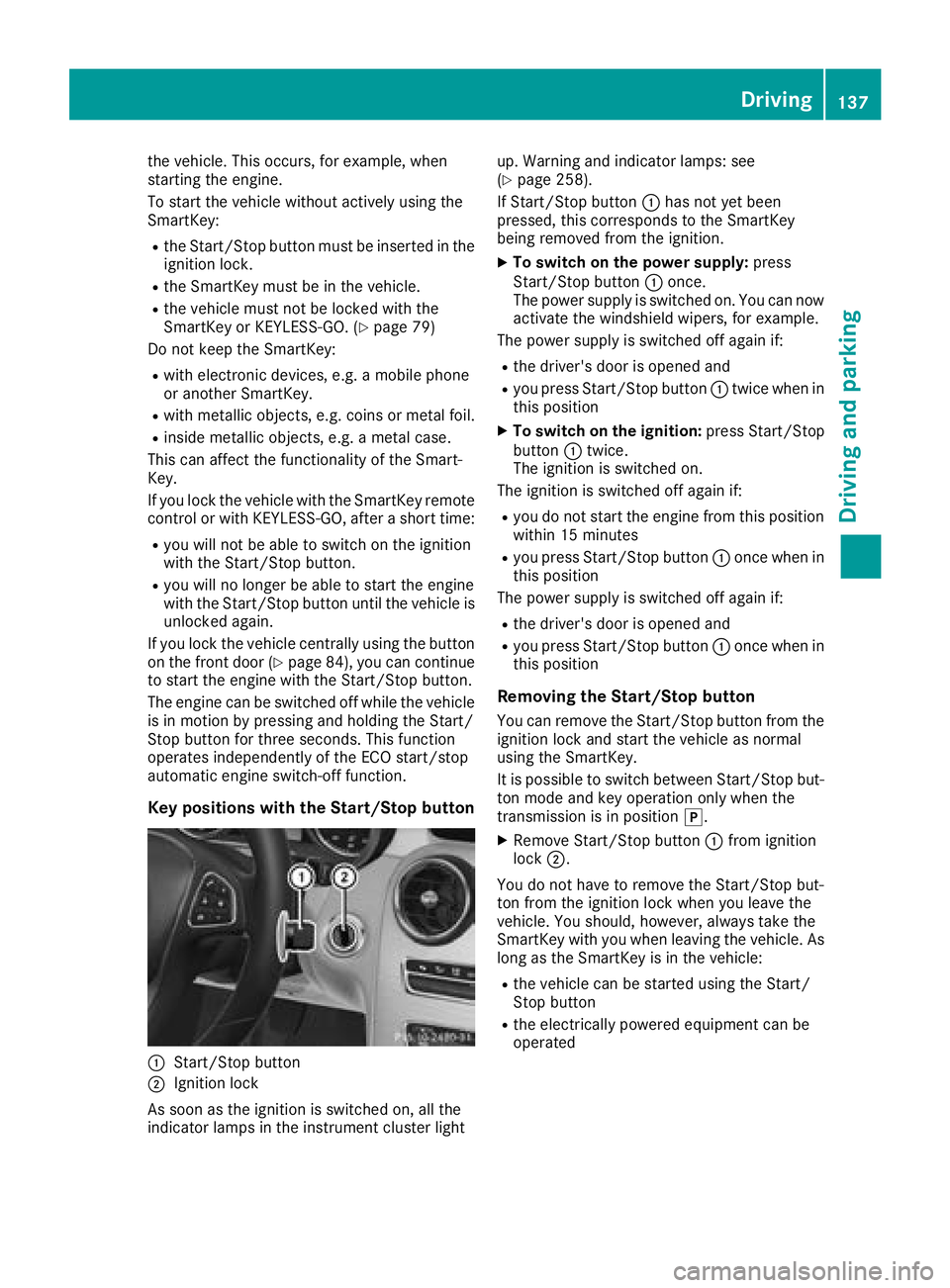
Key positions with the Start/Stop button
:Start/Stop button
;Ignition lock
As soon as the ignition is switched on, all the
indicator lamps in the instrument cluster light up. Warning and indicator lamps: see
(
Ypage 258).
If Start/Stop button :has not yet been
pressed, this corresponds to the SmartKey
being removed from the ignition.
XTo switch on the power supply: press
Start/Stop button :once.
The power supply is switched on. You can now activate the windshield wipers, for example.
The power supply is switched off again if:
Rthe driver's door is opened and
Ryou press Start/Stop button :twice when in
this position
XTo switch on the ignition: press Start/Stop
button :twice.
The ignition is switched on.
The ignition is switched off again if:
Ryou do not start the engine from this position within 15 minutes
Ryou press Start/Stop button :once when in
this position
The power supply is switched off again if:
Rthe driver's door is opened and
Ryou press Start/Stop button :once when in
this position
Removing the Start/Stop button
You can remove the Start/Stop button from the ignition lock and start the vehicle as normal
using the SmartKey.
It is possible to switch between Start/Stop bu t-
to
n mode and key operation only when the
transmission is in position j.
XRemove Start/Stop button :from ignition
lock ;.
You do not have to remove the Start/Stop but-
ton from the ignition lock when you leave the
vehicle. You should, however, always take the
SmartKey with you when leaving the vehicle. As
long as the SmartKey is in the vehicle:
Rthe vehicle can be started using the Start/
Stop button
Rthe electrically powered equipment can be
operated
Driving137
Dr iving an d parking
Z
Page 141 of 370
The Start/Stop button can be used to start the
vehicle manually without inserting the SmartKey
into the ignition lock. The Start/Stop button
must be inserted in the ignition lock and the
SmartKey must be in the vehicle. This mode for
starting the engine operates independently of
the ECO start/stop automatic engine start func-
tion.
You can start the engine if a valid SmartKey is inthe vehicle. Switch off the engine and always
take the SmartKey with you when leaving the
vehicle, even if you only leave it for a short time.
Pay attention to the important safety notes.
XDepress the brake pedal and keep it
depressed.
XPress the Start/Stop button once
(Ypage 137).
Vehicles with a gasoline engine: the engine
starts.
Vehicles with a diesel engine: preglow is
activated and the engine starts.
Starting procedure via smartphone
Observe the important safety notes on starting
the engine (Ypage 138).
You can also start your engine via your smart-
phone from outside the vehicle. In this case, the
previously selected climate control setting is
activated. In this way you can cool or heat the
interior of the vehicle before starting the jour-
ney.
Only start the engine via your smartphone if it is
safe to start and run the engine where your vehi-
cle is parked.
Observe the legal stipulations in the area where your vehicle is parked. Engine start via smart-
phone may be limited to certain countries or
regions.
You can execute a maximum of two consecutive
starting attempts via your smartphone. If you
press the start/stop button or insert the Smart-
Key into the ignition lock, you can carry out two
more starting attempts with your smartphone.
The engine runs for ten minutes when starting
with the smartphone.
Once you have started the engine, you can
switch the engine off via your smartphone at any
time. You can only start the engine via your smart-
phone if:
Rthe SmartKey is in the ignition lock
Rpark position
jis selected
Rthe accelerator pedal is not depressed
Rthe anti-theft alarm system is not activated
Rthe panic alarm is not activated
Rthe hazard warning lamps are switched off
Rthe hood is closed
Rthe doors are closed and locked
Rthe windows and sliding sunroof are closed
Also make sure that:
Rthe fuel tank is sufficiently filled
Rthe starter battery has been sufficiently
charged
GWARNING
Limbs could be crushed or trapped if the
engine is started unintentionally during ser-
vice or maintenance work. There is a risk of
injury.
Always secure the engine against uninten-
tional starting before carrying out mainte-
nance or repair work.
Make sure that the engine cannot be started via
your smartphone before carrying out mainte-
nance or repairs. You can prevent an engine
start via your smartphone, for example, if you:
Rswitch on the hazard warning lamps
Rdo not lock the doors
Ropen a side window
Ropen the sliding sunroof
Pulling away
General notes
GWARNING
If the engine speed is above the idling speed
and you engage transmission position Dor R,
the vehicle could pull away suddenly. There is
a risk of an accident.
When engaging transmission position Dor R,
always firmly depress the brake pedal and do not simultaneously accelerate.
Driving139
Driving and parking
Z
Page 143 of 370
Automa tic engine switch-off
If thevehicl eis braked to astandstill wit hth e
transmission in hori, theECO start/sto p
function switches off th eengin eautomatically.
The ECO start/sto pfunction is operational
when :
Rtheindicator lamp in th eECO butto nis lit
green
Rth eoutside temperature and th eatmospheric
air pressur eis within th erange that is suitable
for th esystem
Rth eengin eis at normal operating temperature
Rth eset temperature for th evehicl einterior
has been reached
Rth ebattery is sufficientl ycharge d
Rthesystem detects that th ewindshield is no t
fogged up when th eair-conditioning system is
switched on
Rth ehoo dis closed
Rth edriver's door is closed and th edriver's
seat belt is fastene d
All of th evehicle's systems remain active when
th eengin eis stoppe dautomatically.
The HOLD function can also be activated if th e
engin ehas been switched off automatically. It is
then no tnecessar yto continu eapplyin gth e
brakes during th eautomatic stop phase. When
you depress th eaccelerato rpedal ,th eengin e
start sautomatically and th ebraking effec tof
th eHOLD function is deactivated.
Mercedes-AMG C63 and Mercedes-
AMG C63 S: thenumber of consec utive a
uto
-
matic engin eswitch-off sis unlimited.
All other models: automatic engineswitch-off
can tak eplac e amaximum of four times in arow
(initial switch-off ,then three subsequen tswitch -
offs).
Aut oma tic engine start
The engin estart sautomatically if:
Ryou switch off th eECO start/sto pfunction by
pressing th eECO butto n
RMercedes-AMG C63 and Mercedes-AMG
C 63 S: you switch to drive program RACE
(S‑ MODEL), S+orS
Rall other models: you switch to drive pro -
gram S+
RMercedes-AMG vehicles: you permanently
activat emanual gearshifting (Ypage 152)
Rin transmission position hori, thebrak e
pedal is release dand th eHOLD function is no t
active
Ryou depress th eaccelerato rpedal
Ryou engage revers egear k
Ryou mov eth etransmission out of position j
Ryou unfasten your seat belt or open th edriv-
er' sdoor
Rth evehicl estart sto rol l
Rthebrak esystem require sthis
Rth etemperature in th evehicl einterior devi-
ate sfrom th eset range
Rth esystem detects moisture on th ewind-
shield when th eair-conditioning system is
switched on
Rth econdition of charge of th ebattery is to o
low
Shifting th etransmission to position jdoes
no tstart th eengine.
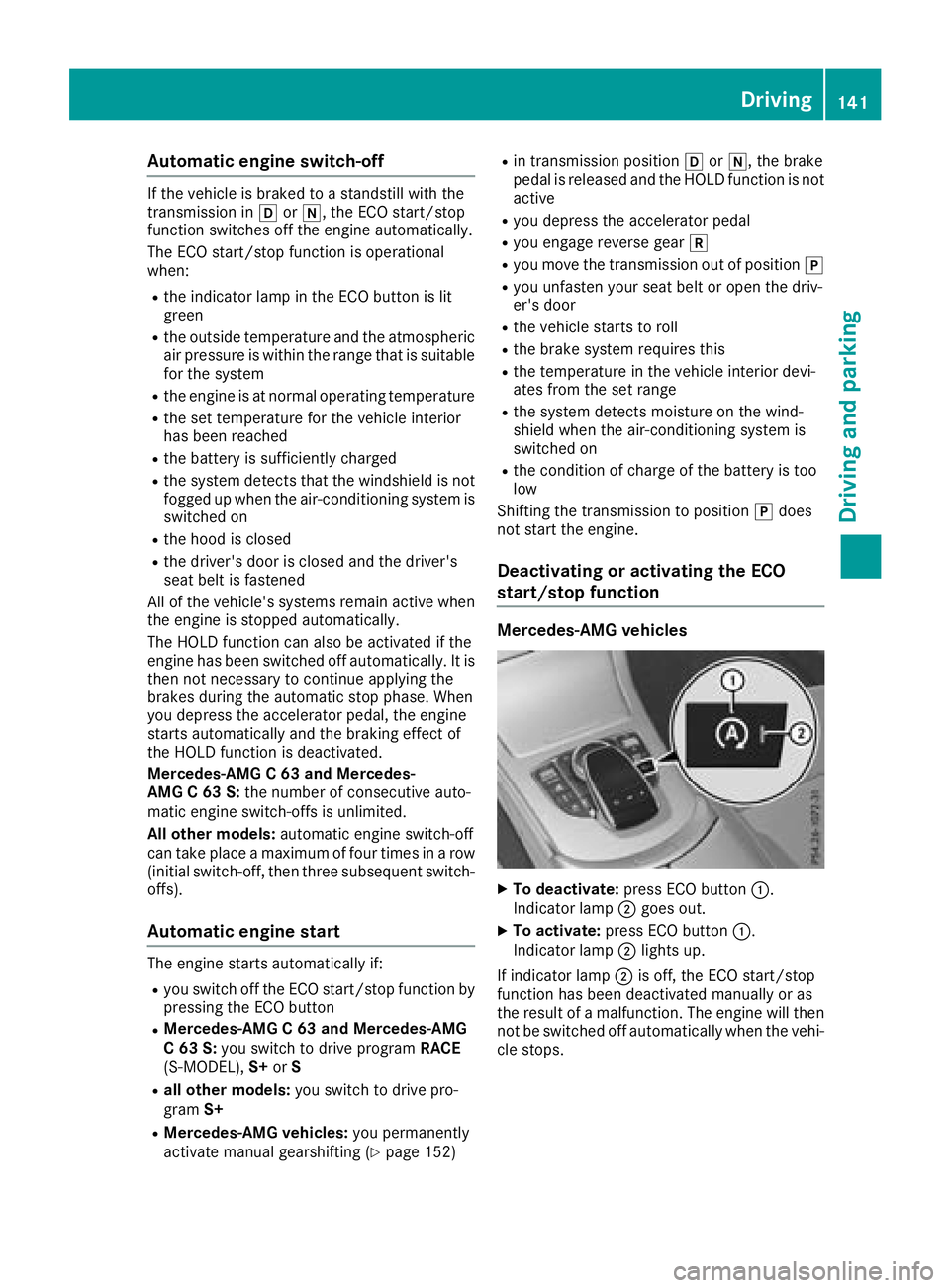
Deactivating oractivating the ECO
start/stop function
Mercedes-AM G vehicles
XTo deactivate: press ECO butto n:.
Indicato rlamp ;goe sout .
XTo activate: press ECO butto n:.
Indicato rlamp ;lights up.
If indicator lamp ;is off ,th eECO start/sto p
function has been deactivated manually or as
th eresult of amalfunction .The engin ewill then
no tbe switched off automatically when th evehi-
cle stops .
Driving141
Driving and parking
Z
Page 144 of 370
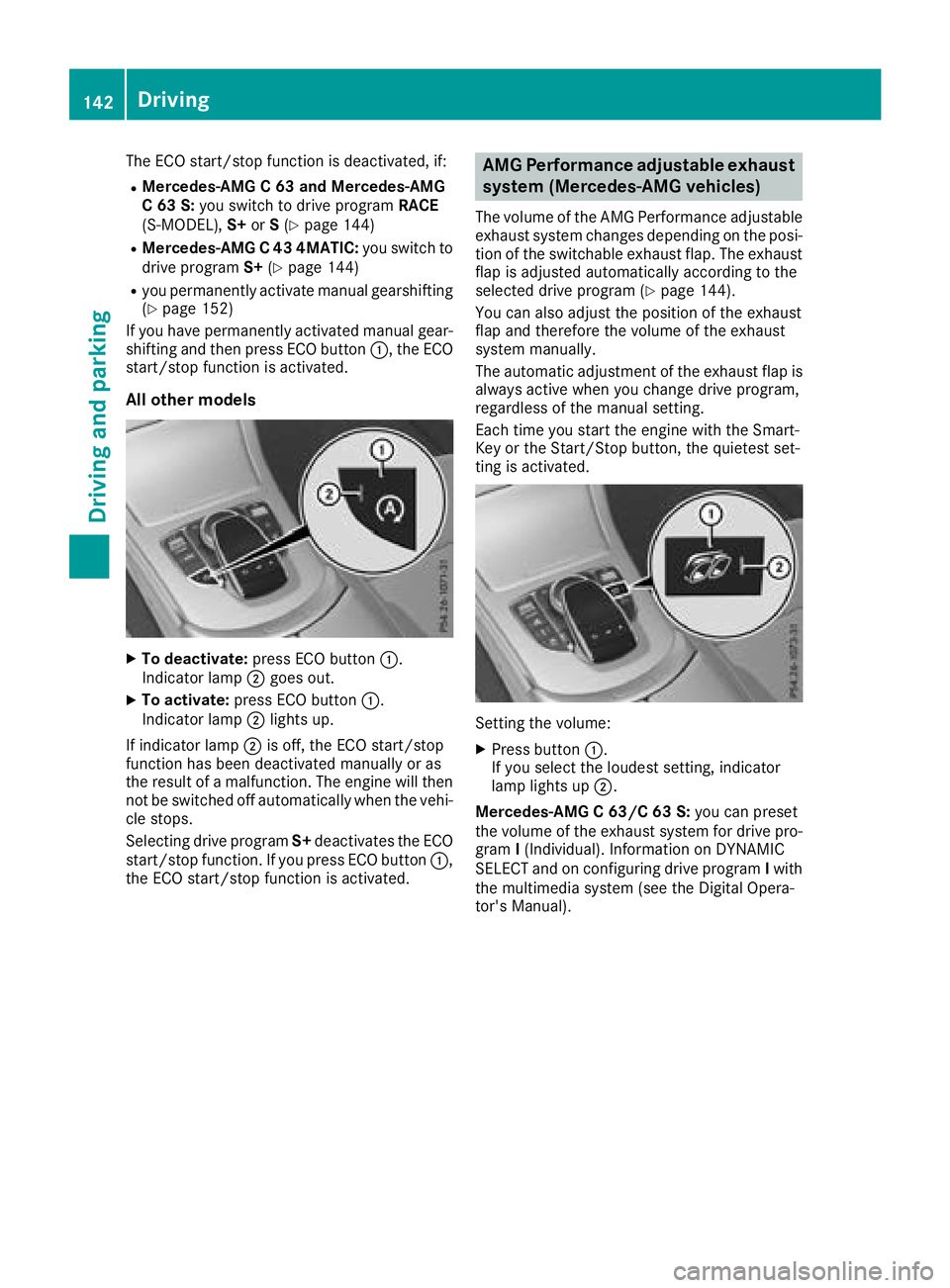
The ECO start/stop function is deactivated, if:
RMercedes-AMG C 63 and Mercedes-AMG
C 63 S:you switch to drive program RACE
(S‑MODEL), S+orS(
Ypage 144)
RMercedes-AMG C 43 4MATIC: you switch to
drive program S+(Ypage 144)
Ryou permanently activate manual gearshifting
(Ypage 152)
If you have permanently activated manual gear-
shifting and then press ECO button :, the ECO
start/stop function is activated.
All other models
XTo deactivate: press ECO button :.
Indicator lamp ;goes out.
XTo activate: press ECO button :.
Indicator lamp ;lights up.
If indicator lamp ;is off, the ECO start/stop
function has been deactivated manually or as
the result of a malfunction. The engine will then
not be switched off automatically when the vehi- cle stops.
Selecting drive program S+deactivates the ECO
start/stop function. If you press ECO button :,
the ECO start/stop function is activated.
AMG Performance adjustable exhaust
system (Mercedes-AMG vehicles)
The volume of the AMG Performance adjustable
exhaust system changes depending on the posi-
tion of the switchable exhaust flap. The exhaust
flap is adjusted automatically according to the
selected drive program (
Ypage 144).
You can also adjust the position of the exhaust
flap and therefore the volume of the exhaust
system manually.
The automatic adjustment of the exhaust flap is
always active when you change drive program,
regardless of the manual setting.
Each time you start the engine with the Smart-
Key or the Start/Stop button, the quietest set-
ting is activated.
Setting the volume:
XPress button :.
If you select the loudest setting, indicator
lamp lights up ;.
Mercedes-AMG C 63/C 63 S: you can preset
the volume of the exhaust system for drive pro-
gram I(Individual). Information on DYNAMIC
SELECT and on configuring drive program Iwith
the multimedia system (see the Digital Opera-
tor's Manual).
142Driving
Driving and parking
Page 146 of 370
ProblemPossible causes/consequences andMSolutions
Vehicles with a gasoline
engine:
The engine is not running
smoothly and is misfir-
ing.There is a malfunction in the engine electronics or in a mechanical
component of the engine management system.
XOnly depress the accelerator pedal slightly.
Otherwise, non-combusted fuel may get into the catalytic converter
and damage it.
XHave the cause rectified immediately at a qualified specialist work-
shop.
The coolant temperature
display is pointing to the
red mark.The coolant level is too low. The coolant is too hot and the engine is no
longer being cooled sufficiently.
XStop as soon as possible and allow the engine and the coolant to
cool down.
XCheck the coolant level (Ypage 306). Observe the warning notes
as you do so and add coolant if necessary.
DYNAMIC SELECT switch
Mercedes-AMG vehicles
General information
Use the DYNAMIC SELECT switch to select the
drive program.
Available drive programs for Mercedes-
AMG C 43 4MATIC:
S+ Sport PlusParticularly sporty driving
characteristics
SSportSporty driving characteris-
tics
C ComfortComfortable and economi-
cal driving characteristics
EEconomyParticularly economical
driving characteristics
IIndividualIndividual settings
Available drive programs for Mercedes-
AMG C 63/C 63 S:
RACE
(S‑MODEL)Driving characteristics suit-
able for a race circuit
S+ Sport PlusParticularly sporty driving
characteristics
SSportSporty driving characteris-
tics
C ComfortComfortable and economi-
cal driving characteristics
IIndividualIndividual settings
Depending on the drive program selected the
following vehicle characteristics will change:
Rthe drive (engine and transmission manage-
ment)
Rthe suspension
Rthe steering
Rthe driver assistance systems
RESP®(Mercedes-AMG C 63/C 63 S)
Rthe position of the exhaust flap (Mercedes-
AMG C 63/C 63 S)
Rthe setting of the ECO start/stop function
Rthe availability of gliding mode
Rthe climate control:
Further information for automatic drive program
characteristics (
Ypage 150).
Additionally, in drive program Iyou can config-
ure the respective vehicle characteristics using
the multimedia system. You can find informa-
tion about this under "DYNAMIC SELECT" in the
vehicle's Digital Operator's Manual.
Each time you start the engine with the Smart-
Key or the Start/Stop button, drive program Cis
activated. For further information about starting
the engine, see (
Ypage 138).
144DYNAMIC SELECT switch
Driving and parking
Page 147 of 370
Selecting the drive program
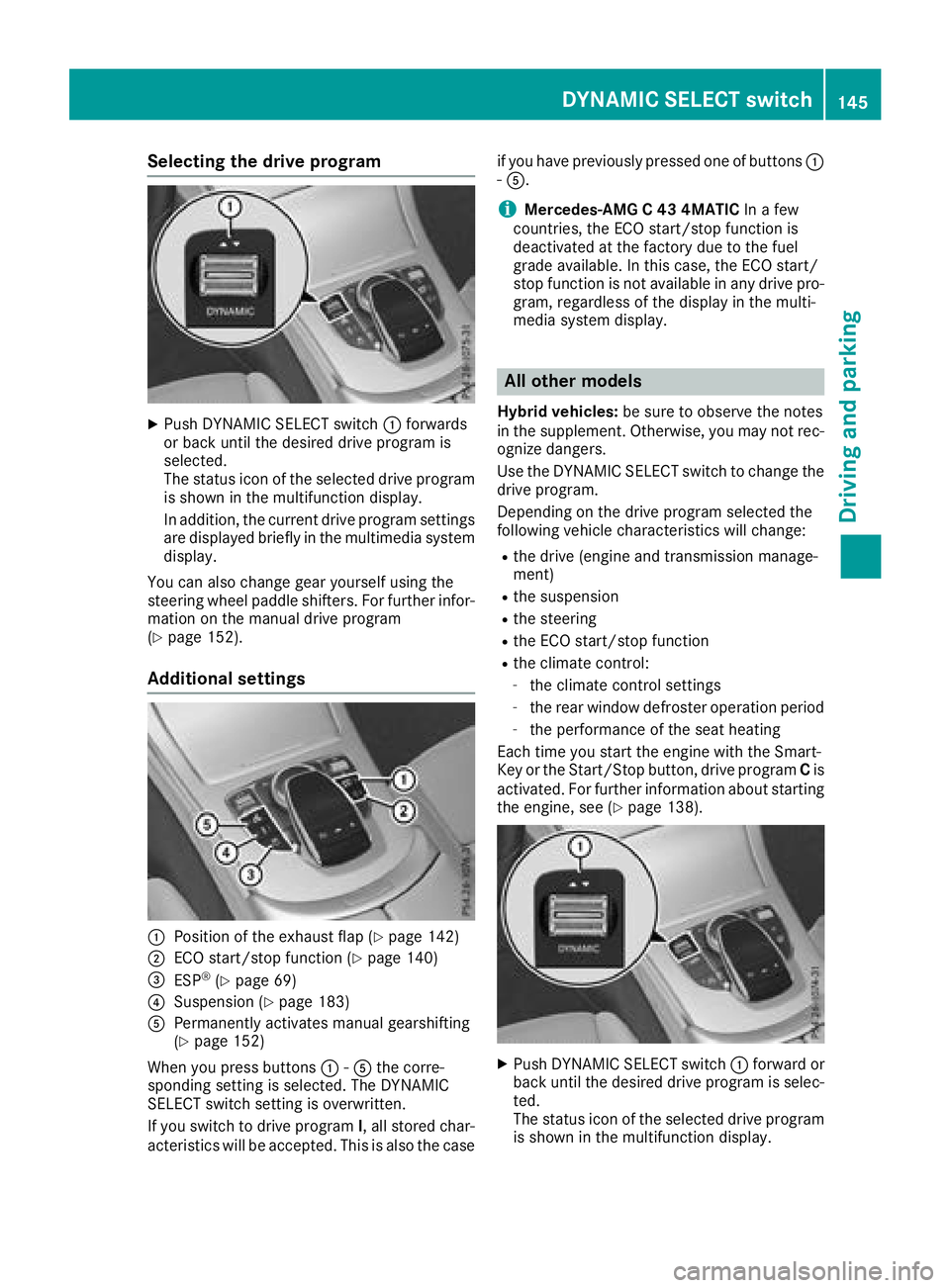
XPush DYNAMIC SELECT switch:forwards
or back until the desired drive program is
selected.
The status icon of the selected drive program
is shown in the multifunction display.
In addition, the current drive program settings
are displayed briefly in the multimedia system display.
You can also change gear yourself using the
steering wheel paddle shifters. For further infor-
mation on the manual drive program
(
Ypage 152).
Additional settings
:Position of the exhaust flap (Ypage 142)
;ECO start/stop function (Ypage 140)
=ESP®(Ypage 69)
?Suspension (Ypage 183)
APermanently activates manual gearshifting
(Ypage 152)
When you press buttons :-A the corre-
sponding setting is selected. The DYNAMIC
SELECT switch setting is overwritten.
If you switch to drive program I, all stored char-
acteristics will be accepted. This is also the case if you have previously pressed one of buttons
:
- A.
iMercedes-AMG C 43 4MATIC In a few
countries, the ECO start/stop function is
deactivated at the factory due to the fuel
grade available. In this case, the ECO start/
stop function is not available in any drive pro-
gram, regardless of the display in the multi-
media system display.
All other models
Hybrid vehicles: be sure to observe the notes
in the supplement. Otherwise, you may not rec-
ognize dangers.
Use the DYNAMIC SELECT switch to change the drive program.
Depending on the drive program selected the
following vehicle characteristics will change:
Rthe drive (engine and transmission manage-
ment)
Rthe suspension
Rthe steering
Rthe ECO start/stop function
Rthe climate control:
-the climate control settings
-the rear window defroster operation period
-the performance of the seat heating
Each time you start the engine with the Smart-
Key or the Start/Stop button, drive program Cis
activated. For further information about starting
the engine, see (
Ypage 138).
XPush DYNAMIC SELECT switch :forward or
back until the desired drive program is selec-
ted.
The status icon of the selected drive program
is shown in the multifunction display.
DYNAMIC SELECT switch145
Driving and parking
Z
Page 151 of 370
ANeutral
Do not shift the transmission toi
while driving. Otherwise, the auto-
matic transmission could be dam-
aged.
No power is transmitted from the
engine to the drive wheels.
Releasing the brake pedal will allow
you to move the vehicle freely, e.g. to
push it or tow it.
If ESP
®is deactivated or faulty: shift
the transmission to position iif the
vehicle is in danger of skidding, e.g.
on icy roads.
If you switch the engine off with the
transmission in position korh,
the automatic transmission shifts to
i automatically.
!Coasting in neutral imay
cause damage to the drive train.
7Drive
The automatic transmission changes
gear automatically. All forward gears
are available.
Driving tips
Changing gear
The automatic transmission shifts through the
individual gears automatically when it is in trans-
mission position h. This automatic gear shift-
ing behavior is determined by:
Rthe selected drive program
Rthe position of the accelerator pedal
Rthe road speed
Accelerator pedal position
Your style of driving influences how the auto-
matic transmission shifts gear:
Rlittle throttle: early upshifts
Rmore throttle: late upshifts
Double-clutch function
When shifting down, the double-clutch function
is active regardless of the currently selected
drive program. The double-clutch function reduces load change reactions and is conducive
to a sporty driving style. The sound generated by
the double-clutch function depends on the drive
program selected.
Kickdown
Use kickdown for maximum acceleration.
XDepress the accelerator pedal beyond the
pressure point.
The automatic transmission shifts to a lower
gear depending on the engine speed.
XEase off the accelerator pedal once the
desired speed is reached.
The automatic transmission shifts back up.
Gliding mode
Gliding mode is available depending on equip-
ment.
Gliding mode is characterized by the following:
RThe combustion engine is disconnected from
the drive train.
RThe engine speed corresponds to the idling
speed.
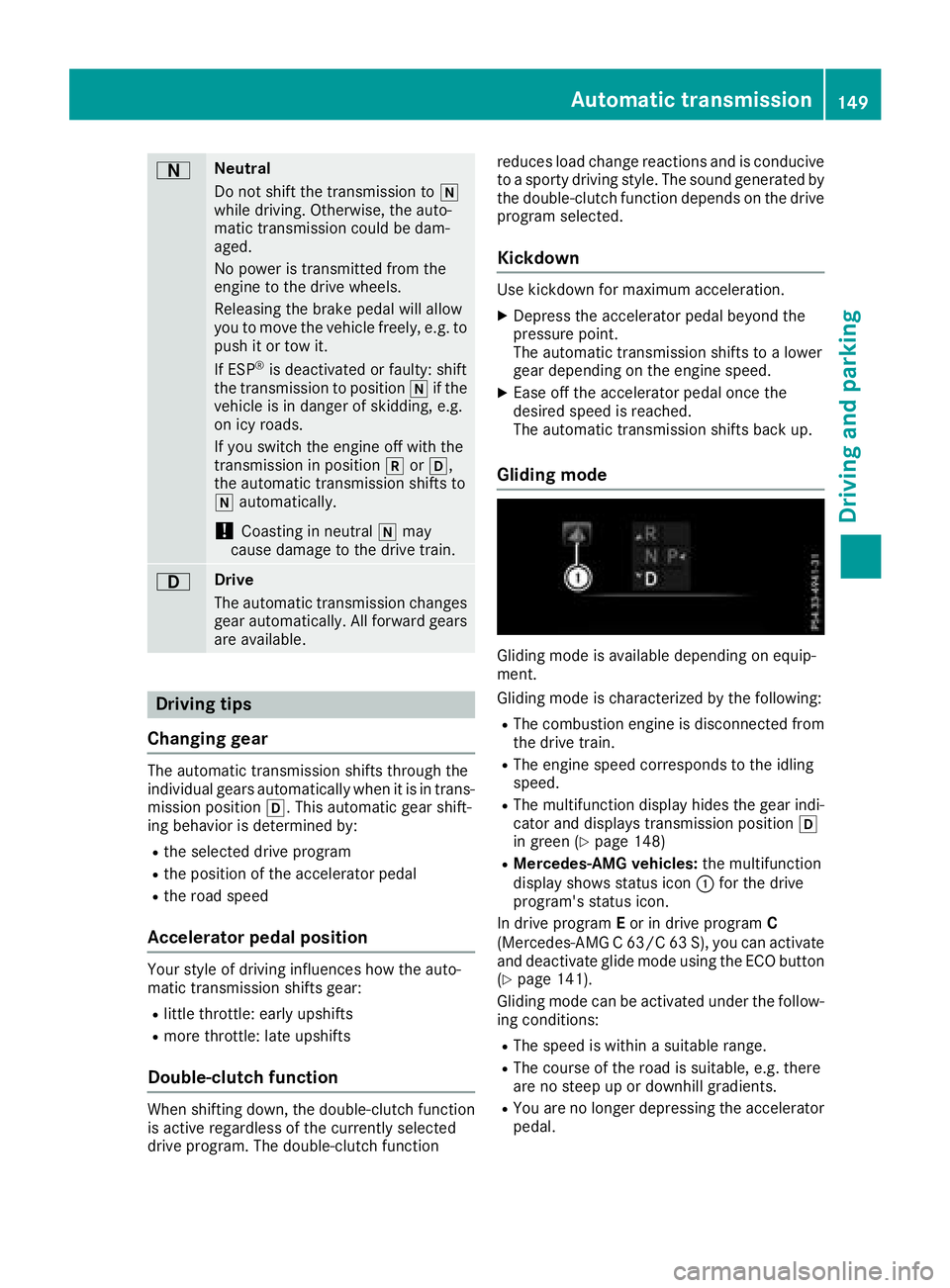
RThe multifunction display hides the gear indi-
cator and displays transmission position h
in green (
Ypage 148)
RMercedes-AMG vehicles: the multifunction
display shows status icon :for the drive
program's status icon.
In drive program Eor in drive program C
(Mercedes-AMG C 63/C 63 S), you can activate
and deactivate glide mode using the ECO button
(
Ypage 141).
Gliding mode can be activated under the follow-
ing conditions:
RThe speed is within a suitable range.
RThe course of the road is suitable, e.g. there
are no steep up or downhill gradients.
RYou are no longer depressing the accelerator
pedal.
Automatic transmission149
Driving an d parking
Z
Page 152 of 370
Gliding mode is deactivated under the following
conditions:
RYou depress the accelerator pedal.
RYou depress the brake pedal.
RYou change the transmission position
(Ypage 146).
Ryou switch to drive programRACE
(Mercedes-AMG C 63 S), S+orS
(
Ypage 144).
Ryou activate manual gearshifting
(Ypage 152).
Ryou leave the suitable speed range.
iIf you have selected the "Eco" or "Comfort"
setting (Mercedes-AMG C 63/C 63 S) for the
drive (engine and transmission management) in drive program I, you can also activate glide
mode. Information on DYNAMIC SELECT and
on configuring drive program Ivia the multi-
media system (see the Digital Operator's
Manual).
Drive programs
All vehicles except Mercedes-AMG
C 63/C 63 S
Drive program I (Individual)
In drive program Ithe following properties of the
drive program can be selected:
Rthe drive (engine and transmission manage-
ment)
and therefore indirectly the availability of glid- ing mode and the properties of the driver
assistance systems
Rthe suspension
Rthe steering
Rthe setting of the ECO start/stop function
(Ypage 140)
Rthe climate control:
To permanently shift the gears manually in drive
program Iusing the steering wheel paddle shift-
ers, select the M(Manual) setting for the drive
(except Mercedes-AMG C 43 4MATIC).
Information about configuring drive program I
with the multimedia system can be found under
"DYNAMIC SELECT" in the vehicle's Digital
Operator's Manual.
Drive program S+ (Sport Plus)
Drive program S+is characterized by the fol-
lowing:
Rthe vehicle exhibits particularly sporty driving
characteristics.
Rthe vehicle pulls away in first gear.
Rthe automatic transmission shifts up later.
the fuel consumption possibly being higher as
a result of the later automatic transmission
shift points.
Rthe suspension exhibits particularly stiff
springing and damping settings (vehicles with
AIRMATIC).
Rgliding mode is not available.
Rthe ECO start/stop function is switched off
(Ypage 140).
Drive program S (Sport)
Drive program Sis characterized by the follow-
ing:
Rthe vehicle exhibits sporty driving character-
istics.
Rthe vehicle pulls away in first gear.
Rthe automatic transmission shifts up later.
the fuel consumption possibly being higher as
a result of the later automatic transmission
shift points.
Rthe suspension exhibits hard springing and
damping settings (vehicles with AIRMATIC).
Rgliding mode is not available.
Rthe ECO start/stop function is switched on
(Ypage 140).
Drive program C (Comfort)
Drive program Cis characterized by the follow-
ing:
Rthe vehicle delivers comfortable, economical
handling characteristics.
Rthe vehicle pulls away more gently in forward
and reverse gears, unless the accelerator
pedal is depressed fully.
Rthe vehicle has improved driving stability, for
example on slippery road surfaces.
Roptimal fuel consumption resulting from the
automatic transmission shifting up sooner.
The vehicle is driven in the low engine speed
range and the wheels are less likely to spin.
Rgliding mode is not available.
Rthe ECO start/stop function is switched on
(Ypage 140).
150Automatic transmission
Driving and parking
Page 154 of 370
The vehicle is driven in the low engine speed
range and the wheels are less likely to spin.
Rgliding mode is available.
Rthe ECO start/stop function is switched on
(Ypage 140).
Drive program I (Individual)
In drive programIthe following properties of the
drive program can be selected:
Rthe drive (engine management)
and therefore indirectly the availability of glid-
ing mode and the ECO start/stop function as
well as the properties of the driver assistance
systems
Rthe transmission management
RESP®(Ypage 69)
Rthe suspension
and therefore indirectly the steering
Ractivation of the exhaust flap
To permanently shift the gears manually in drive
program Iusing the steering wheel paddle shift-
ers, select the M(Manual) setting for the trans-
mission management.
Information about configuring drive program I
with the multimedia system can be found under
"DYNAMIC SELECT" in the vehicle's Digital
Operator's Manual.
Manual gear shifting
General notes
You can change gear yourself using the steering wheel paddle shifters. The transmission must be
in position hfor this.
Depending on which steering wheel paddle
shifter is pulled, the automatic transmission
immediately shifts into the next gear down or
up, if permitted.
To use manual shifting, you have two options:
Rtemporary setting
Rpermanent setting
If you activate manual gearshifting, the multi-
function display will show the current gear and
p instead of transmission position h.
If you deactivate manual gearshifting, the gears
will be shifted automatically again.
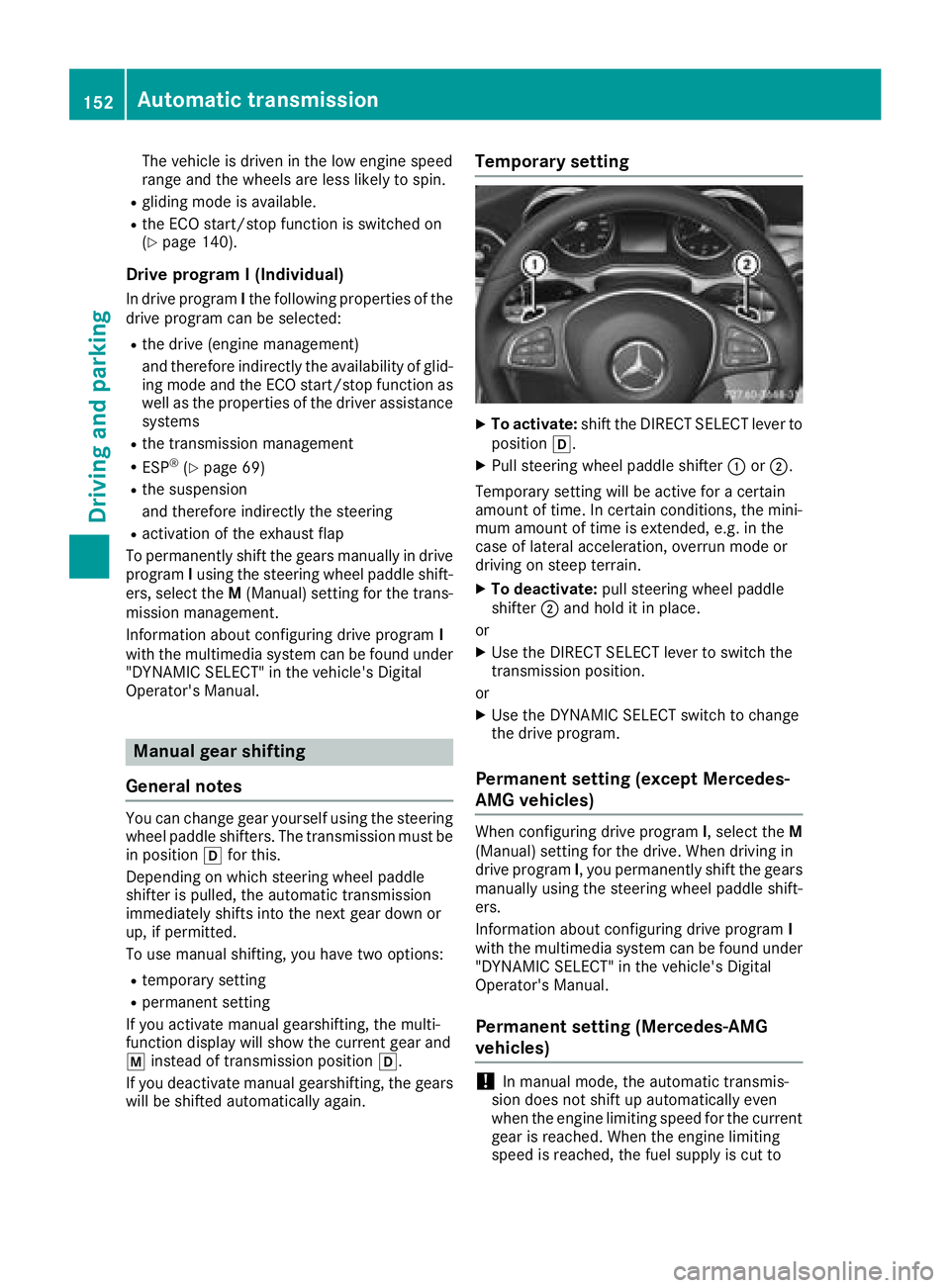
Temporary setting
XTo activate: shift the DIRECT SELECT lever to
position h.
XPull steering wheel paddle shifter :or;.
Temporary setting will be active for a certain
amount of time. In certain conditions, the mini-
mum amount of time is extended, e.g. in the
case of lateral acceleration, overrun mode or
driving on steep terrain.
XTo deactivate: pull steering wheel paddle
shifter ;and hold it in place.
or
XUse the DIRECT SELECT lever to switch the
transmission position.
or
XUse the DYNAMIC SELECT switch to change
the drive program.
Permanent setting (except Mercedes-
AMG vehicles)
When configuring drive program I, select theM
(Manual) setting for the drive. When driving in
drive program I, you permanently shift the gears
manually using the steering wheel paddle shift-
ers.
Information about configuring drive program I
with the multimedia system can be found under
"DYNAMIC SELECT" in the vehicle's Digital
Operator's Manual.
Permanent setting (Mercedes-AMG
vehicles)
!In manual mode, the automatic transmis-
sion does not shift up automatically even
when the engine limiting speed for the current
gear is reached. When the engine limiting
speed is reached, the fuel supply is cut to
152Automatic transmission
Driving and parking