cruise control MERCEDES-BENZ C CLASS 2018 User Guide
[x] Cancel search | Manufacturer: MERCEDES-BENZ, Model Year: 2018, Model line: C CLASS, Model: MERCEDES-BENZ C CLASS 2018Pages: 370, PDF Size: 6.25 MB
Page 177 of 370
When Distance Pilot DISTRONIC is activated,
the transmission shifts automatically to position
jif:
Rthe driver's seat belt is not fastened and the
driver's door is open.
Rthe engine is switched off, unless it is auto-
matically switched off by the ECO start/stop
function.
The electric parking brake secures the vehicle
automatically if Distance Pilot DISTRONIC is
activated when the vehicle is stationary and:
Ra system malfunction occurs.
Rthe power supply is insufficient.
If a malfunction occurs, the transmission may
also be shifted to position jautomatically.
Setting a speed
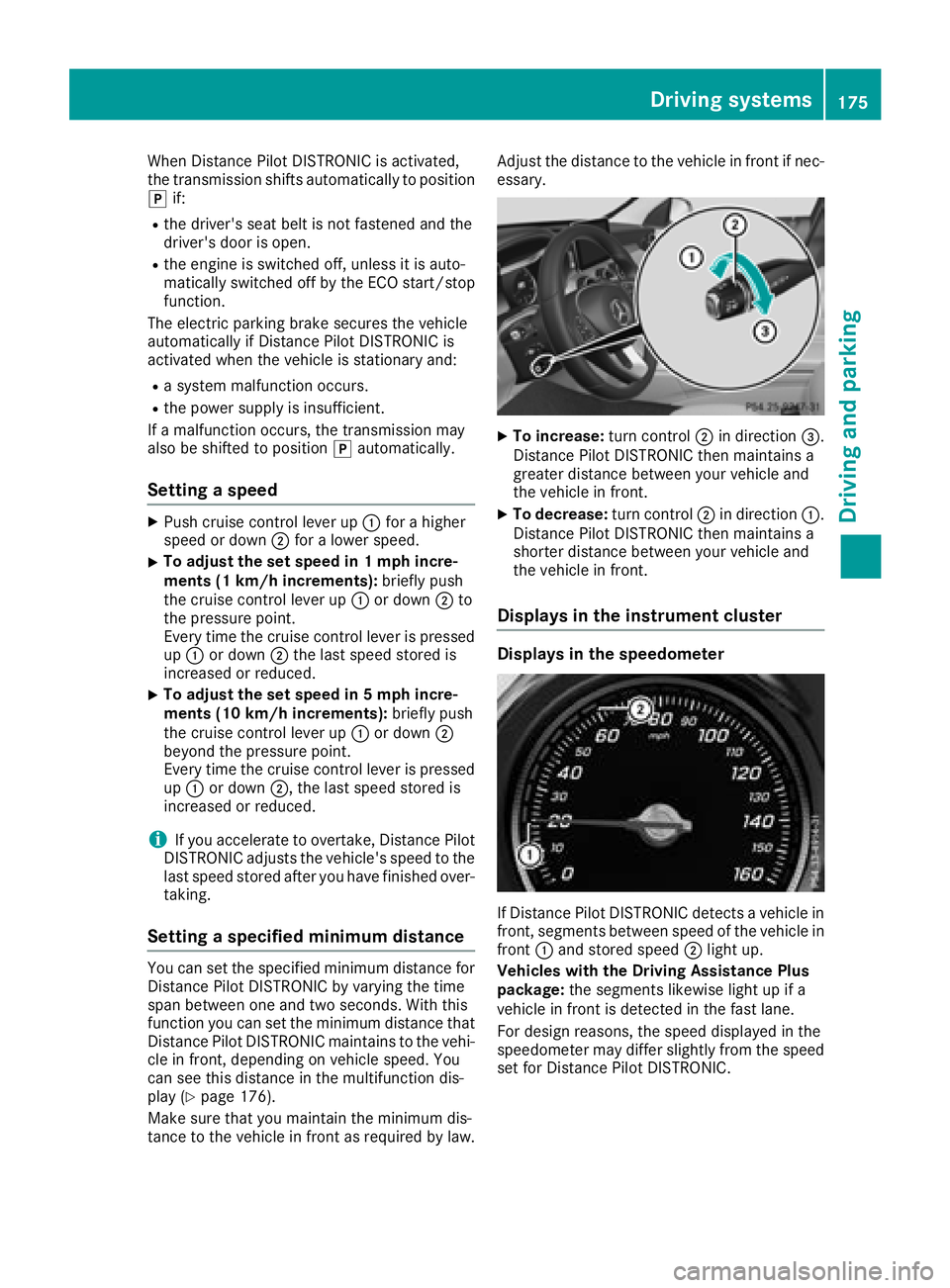
XPush cruise control lever up :for a higher
speed or down ;for a lower speed.
XTo adjust the set speed in 1 mph incre-
ments (1 km/h increments): briefly push
the cruise control lever up :or down ;to
the pressure point.
Every time the cruise control lever is pressed up : or down ;the last speed stored is
increased or reduced.
XTo adjust the set speed in 5 mph incre-
ments (10 km/h increments): briefly push
the cruise control lever up :or down ;
beyond the pressure point.
Every time the cruise control lever is pressed
up : or down ;, the last speed stored is
increased or reduced.
iIf you accelerate to overtake, Distance Pilot
DISTRONIC adjusts the vehicle's speed to the
last speed stored after you have finished over-
taking.
Setting a specified minimum distance
You can set the specified minimum distance for
Distance Pilot DISTRONIC by varying the time
span between one and two seconds. With this
function you can set the minimum distance that
Distance Pilot DISTRONIC maintains to the vehi-
cle in front, depending on vehicle speed. You
can see this distance in the multifunction dis-
play (
Ypage 176).
Make sure that you maintain the minimum dis-
tance to the vehicle in front as required by law. Adjust the distance to the vehicle in front if nec-
essary.
XTo increase:
turn control;in direction =.
Distance Pilot DISTRONIC then maintains a
greater distance between your vehicle and
the vehicle in front.
XTo decrease: turn control;in direction :.
Distance Pilot DISTRONIC then maintains a
shorter distance between your vehicle and
the vehicle in front.
Displays in the instrument cluster
Displays in the speedometer
If Distance Pilot DISTRONIC detects a vehicle in
front, segments between speed of the vehicle in
front :and stored speed ;light up.
Vehicles with the Driving Assistance Plus
package: the segments likewise light up if a
vehicle in front is detected in the fast lane.
For design reasons, the speed displayed in the
speedometer may differ slightly from the speed
set for Distance Pilot DISTRONIC.
Driving systems175
Driving and parking
Z
Page 178 of 370
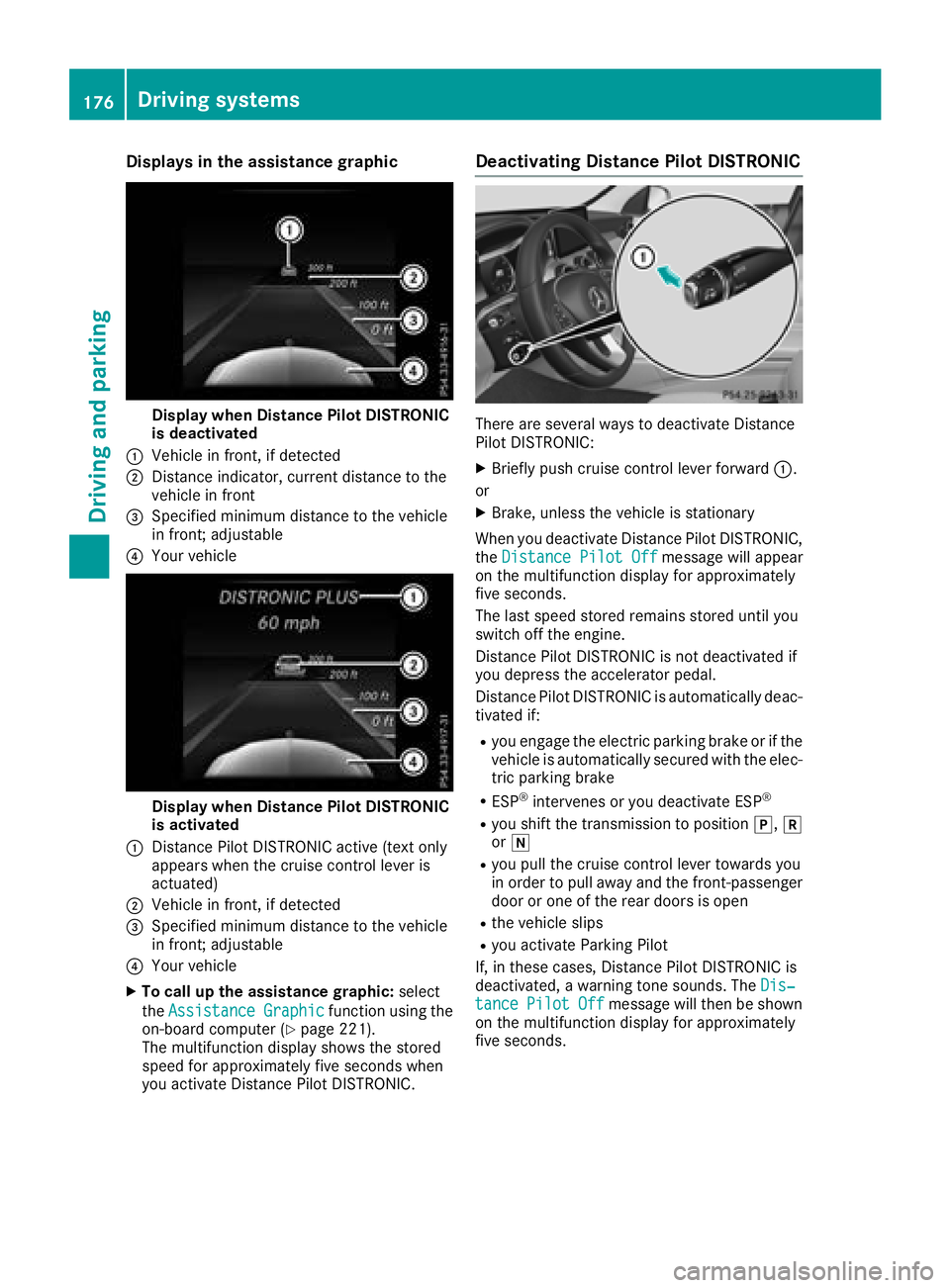
Displaysin th eassistanc egraphic
Display when Distanc ePilo tDISTRONIC
is deactivated
:Vehicl ein front, if detecte d
;Distanceindicator, curren tdistanc eto th e
vehicl ein fron t
=Specified minimum distanc eto th evehicl e
in front; adjustable
?Your vehicl e
Display when Distanc ePilo tDISTRONIC
is activated
:Distanc ePilo tDISTRONIC active (tex tonly
appears when th ecruise control lever is
actuated)
;Vehicl ein front, if detecte d
=Specified minimum distanc eto th evehicl e
in front; adjustable
?Your vehicl e
XTo call up th eassistanc egraphic: select
th eAssistanc eGraphi c
function usin gth e
on-boar dcomputer (Ypage 221).
The multifunction display shows th estore d
speed fo rapproximately fiv eseconds when
you activat eDistanc ePilo tDISTRONIC.
Deactivating Distanc ePilot DISTRONIC
There are severa lways to deactivat eDistanc e
Pilo tDISTRONIC:
XBriefly push cruise control lever forwar d:.
or
XBrake ,unless th evehicl eis stationary
Whe nyou deactivat eDistanc ePilo tDISTRONIC,
th eDistance Pilot Off
message will appear
on th emultifunction display fo rapproximately
fiv eseconds.
The last speed store dremain sstore duntil you
switch of fth eengine.
Distanc ePilo tDISTRONIC is no tdeactivated if
you depress th eaccelerato rpedal.
Distanc ePilo tDISTRONIC is automatically deac -
tivated if:
Ryou engage th eelectric parkin gbrak eor if th e
vehicl eis automatically secured wit hth eelec -
tric parkin gbrak e
RESP®intervenes or you deactivat eES P®
Ryou shift th etransmissio nto position j,k
or i
Ryou pull th ecruise control lever toward syou
in order to pull away and th efront-passenger
doo ror on eof th erea rdoors is ope n
Rthevehicl eslip s
Ryou activat eParking Pilo t
If ,in these cases, Distanc ePilo tDISTRONIC is
deactivated, awarnin gtone sounds. The Dis‐
tancePilotOffmessage will then be shown
on th emultifunction display fo rapproximately
fiv eseconds.
176Driving systems
Driving an d parking
Page 214 of 370
aRIn all menus: confirms the selected
entry in the list
RIn theRadioorMediamenu:
opens the list of available radio
sources or media
RIn the Telephonemenu: switches
to the phone book and starts dial-
ing the selected number
ñRVehicles with multimedia system
Audio 20:
Switches off voice control for nav-
igation (see the manufacturer's
operating instructions)
RVehicles with multimedia system
COMAND:
Switches off the Voice Control
System (see the separate operat-
ing instructions)
%Press briefly:
RBack
RIn the RadioorMediamenu: exits
the track or station list or list of
available radio sources or media
RHides display messages
RExits the phone book/redial mem-
ory
%Press and hold:
RCalls up the standard display in the
Tripmenu
Right control panel
~RRejects or ends a call
RExits the phone book/redial mem-
ory
6RMakes or accepts a call
RSwitches to the redial memory
W
XRAdjusts the volume
8RMute
óRVehicles with multimedia system
Audio 20:
Switches on voice control for nav-
igation (see the manufacturer's
operating instructions)
RVehicles with multimedia system
COMAND:
Switches on the Voice Control Sys-
tem (see the separate operating
instructions)
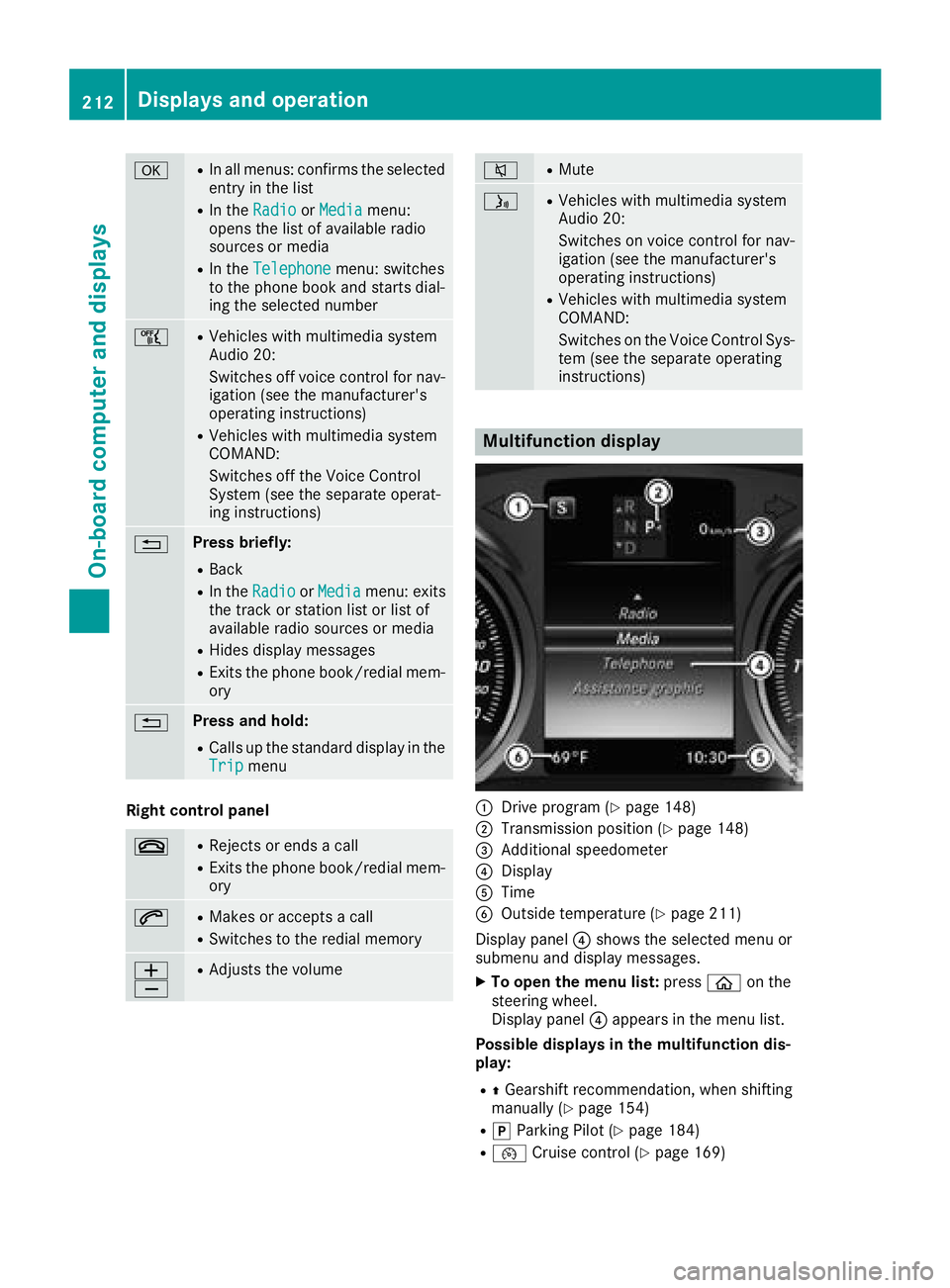
Multifunction display
:Drive program (Ypage 148)
;Transmission position (Ypage 148)
=Additional speedometer
?Display
ATime
BOutside temperature (Ypage 211)
Display panel ?shows the selected menu or
submenu and display messages.
XTo open the menu list: pressòon the
steering wheel.
Display panel ?appears in the menu list.
Possible displays in the multifunction dis-
play:
RZ Gearshift recommendation, when shifting
manually (Ypage 154)
Rj Parking Pilot (Ypage 184)
R¯ Cruise control (Ypage 169)
212Displays and operation
On-board computer and displays
Page 215 of 370
RaDistance Pilot DISTRONIC Steering Pilot
(Ypage 177)
R_ Adaptive Highbeam Assist
(Ypage 115)
Rè ECO start/stop function (Ypage 140)
RëHOLD function (Ypage 179)
Head-up display
General notes
The head-up display projects information from
the navigation system and the driver assistance
system above the dashboard into the driver's
field of vision. The head-up display allows the
driver to see all of the information without hav-
ing to take their eyes off the road.
A requirement for the display of the contents is
that the following functions are available in the
vehicle and are switched on:
RCruise control
RDistance Pilot DISTRONIC
RTraffic Sign Assist
RNavigation
Important safety notes
The head-up display is only an aid and is not a
substitute for attentive driving.
Speed limits and overtaking restrictions are not
always correctly displayed. Traffic signs always
have priority over the Traffic Sign Assist display.
The visibility of the head-up display is influenced by the following conditions:
Rthe driver's seat position
Rthe positioning of the display image
Rthe general ambient light
Rsunglasses with polarization filters
Rwet roads
Rblocking of sunlight by objects on the display
cover
In the event of extreme sunlight, sections of the
display may fade. This can be reversed by
switching the head-up display off and on again.
iVehicles with the head-up display are equip-
ped with a special windshield. Should repairs
be necessary, have the windshield replaced at
a qualified specialist workshop.
Displays and operation
Switching the head-up display on/off
XPress button :.
When the head-up display is switched on, the display appears in the driver's field of vision.
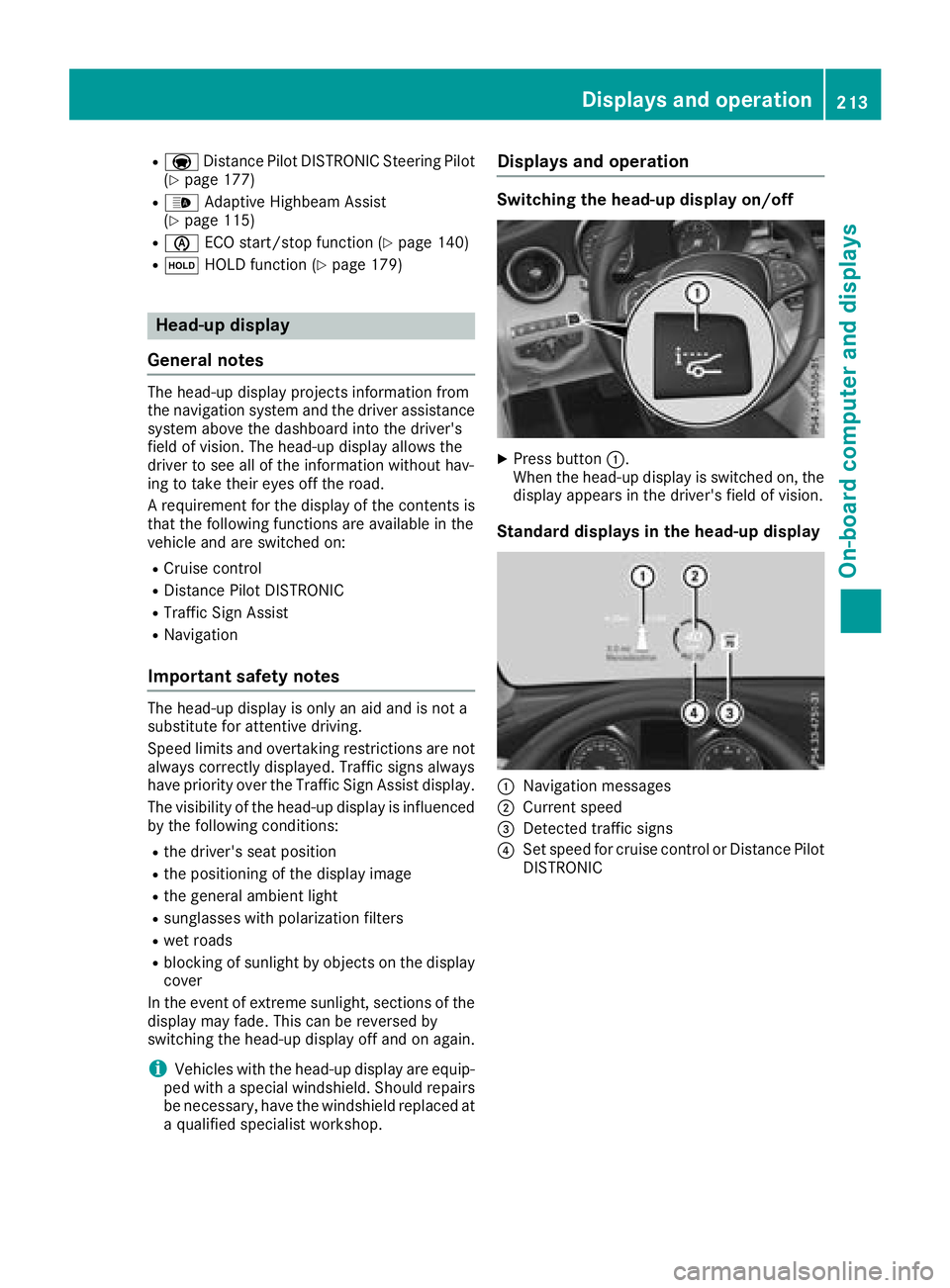
Standard displays in the head-up display
:Navigation messages
;Current speed
=Detected traffic signs
?Set speed for cruise control or Distance Pilot
DISTRONIC
Displays an doperation213
On-boa rd computer and displays
Z
Page 227 of 370
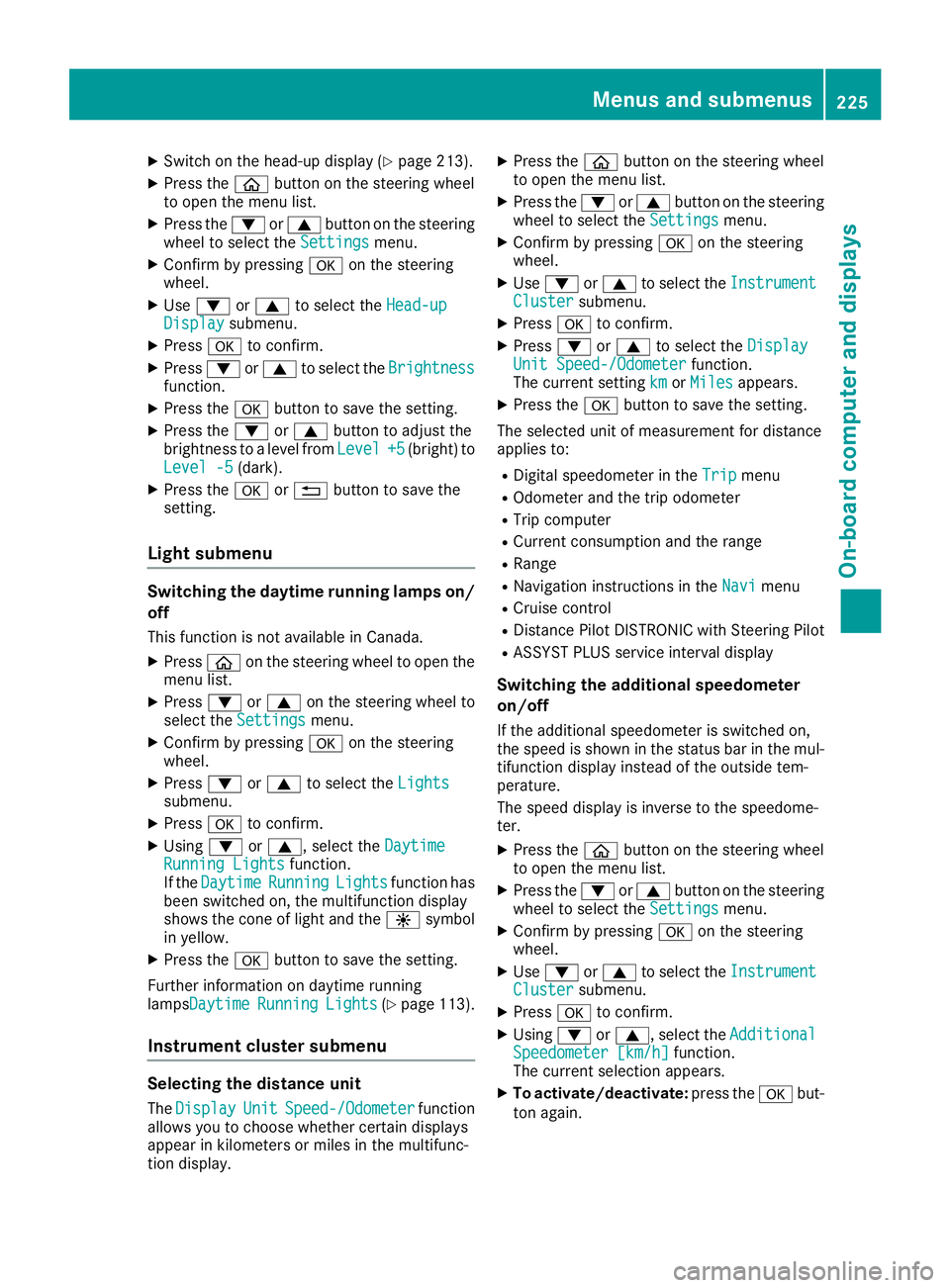
XSwitch on the head-up display (Ypage 213).
XPress theòbutton on the steering wheel
to open the menu list.
XPress the :or9 button on the steering
wheel to select the Settingsmenu.
XConfirm by pressing aon the steering
wheel.
XUse : or9 to select the Head-upDisplaysubmenu.
XPressato confirm.
XPress :or9 to select the Brightnessfunction.
XPress theabutton to save the setting.
XPress the :or9 button to adjust the
brightness to a level from Level+5(bright) to
Level -5(dark).
XPress the aor% button to save the
setting.
Light submenu
Switching the daytime running lamps on/
off
This function is not available in Canada.
XPress òon the steering wheel to open the
menu list.
XPress :or9 on the steering wheel to
select the Settingsmenu.
XConfirm by pressing aon the steering
wheel.
XPress :or9 to select the Lightssubmenu.
XPressato confirm.
XUsing :or9, select the DaytimeRunning Lightsfunction.
If the DaytimeRunningLightsfunction has
been switched on, the multifunction display
shows the cone of light and the Wsymbol
in yellow.
XPress the abutton to save the setting.
Further information on daytime running
lampsDaytime
RunningLights(Ypage 113).
Instrument cluster submenu
Selecting the distance unit
The DisplayUnitSpeed-/Odometerfunction
allows you to choose whether certain displays
appear in kilometers or miles in the multifunc-
tion display.
XPress the òbutton on the steering wheel
to open the menu list.
XPress the :or9 button on the steering
wheel to select the Settingsmenu.
XConfirm by pressing aon the steering
wheel.
XUse : or9 to select the InstrumentClustersubmenu.
XPressato confirm.
XPress :or9 to select the DisplayUnit Speed-/Odometerfunction.
The current setting kmorMilesappears.
XPress the abutton to save the setting.
The selected unit of measurement for distance
applies to:
RDigital speedometer in the Tripmenu
ROdometer and the trip odometer
RTrip computer
RCurrent consumption and the range
RRange
RNavigation instructions in the Navimenu
RCruise control
RDistance Pilot DISTRONIC with Steering Pilot
RASSYST PLUS service interval display
Switching the additional speedometer
on/off
If the additional speedometer is switched on,
the speed is shown in the status bar in the mul-
tifunction display instead of the outside tem-
perature.
The speed display is inverse to the speedome-
ter.
XPress theòbutton on the steering wheel
to open the menu list.
XPress the :or9 button on the steering
wheel to select the Settingsmenu.
XConfirm by pressing aon the steering
wheel.
XUse : or9 to select the InstrumentClustersubmenu.
XPressato confirm.
XUsing :or9, select the AdditionalSpeedometer [km/h]function.
The current selection appears.
XTo activate/deactivate: press theabut-
ton again.
Menus and submenus225
On-board computer and displays
Z
Page 253 of 370
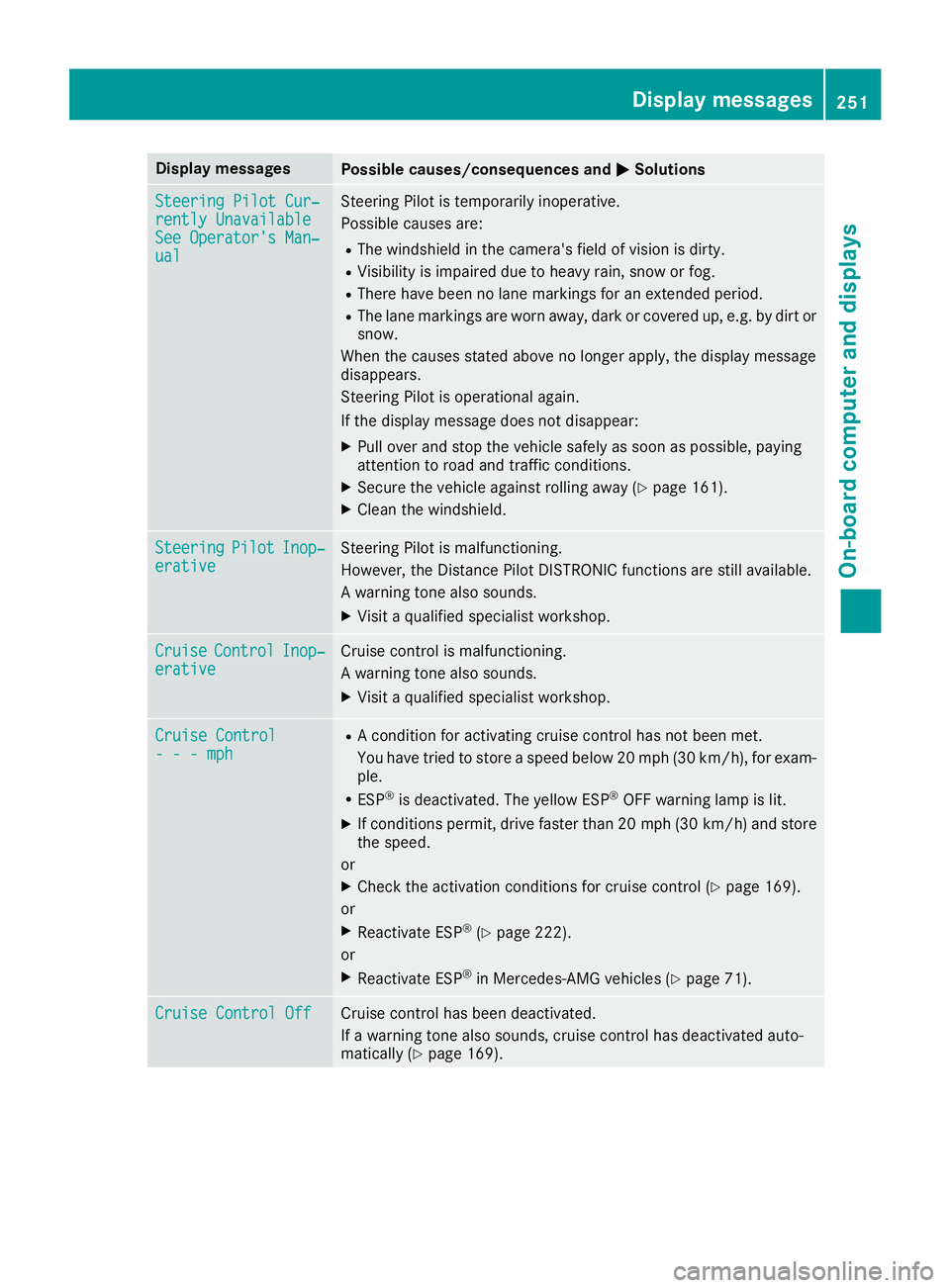
Display messagesPossible causes/consequences andMSolutions
Steering Pilot Cur‐rently UnavailableSee Operator'sMan ‐ual
Steering Pilo tis temporarily inoperative.
Possibl ecauses are:
RThe windshield in th ecamera' sfield of vision is dirty.
RVisibilit yis impaire ddue to heav yrain ,snow or fog .
RThere havebeen no lan emarking sfor an extended period.
RThe lan emarking sare wor naway, dark or covered up, e.g. by dir tor
snow.
Whe nth ecauses state dabov eno longer apply, th edisplay message
disappears.
Steering Pilo tis operational again .
If th edisplay message does no tdisappear :
XPull overand stop th evehicl esafely as soo nas possible, payin g
attention to roa dand traffic conditions.
XSecur eth evehicl eagainst rollin gaway (Ypage 161).
XClean th ewindshield.
SteeringPilotInop‐erativ eSteering Pilo tis malfunctioning .
However, th eDistanc ePilo tDISTRONI Cfunction sare still available.
A warning tone also sounds.
XVisit aqualified specialist workshop .
CruiseControlInop‐erativeCruisecontrol is malfunctioning .
A warning tone also sounds.
XVisit aqualified specialist workshop .
Cruise Control- - -mph
RAcondition for activating cruise control has no tbeen met .
You hav etried to store aspeed belo w20 mph (30 km/h), for exam-
ple.
RES P®is deactivated. The yello wES P®OF Fwarning lamp is lit .
XIf conditionspermit ,drive faste rthan 20 mph (30 km/h )and store
th espeed.
or
XChec kth eactivation condition sfor cruise control (Ypage 169).
or
XReactivat eES P®(Ypage 222).
or
XReactivat eES P®in Mercedes-AMG vehicles (Ypage 71).
Cruise Contro lOffCruis econtrol has been deactivated.
If awarning tone also sounds, cruise control has deactivated auto -
matically (
Ypage 169).
Display messages251
On-board computer and displays
Z
Page 264 of 370
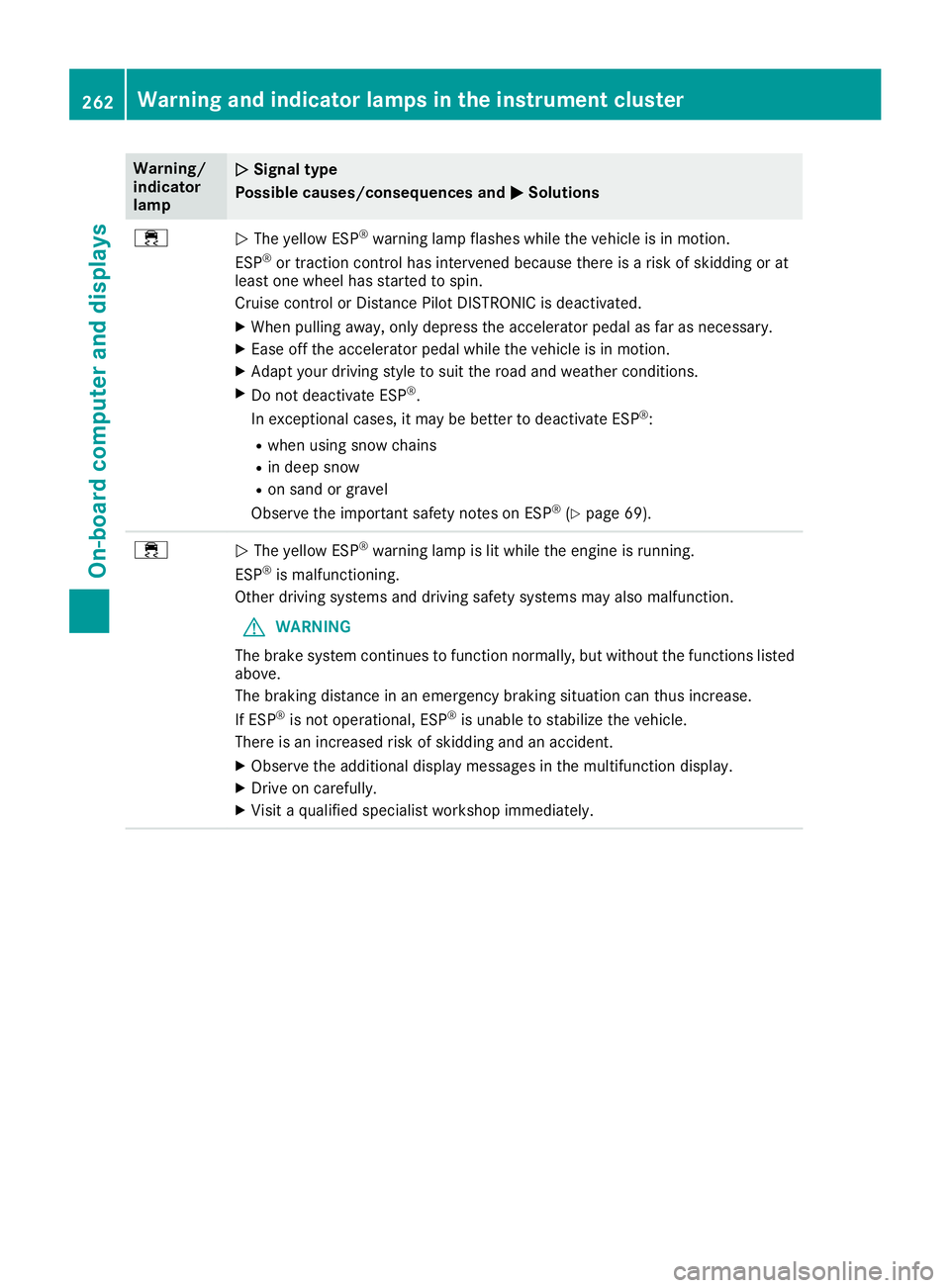
Warning/
indicator
lampNSignal type
Possible causes/consequences and M
Solutions
÷NThe yellow ESP®warning lamp flashes while the vehicle is in motion.
ESP®or traction control has intervened because there is a risk of skidding or at
least one wheel has started to spin.
Cruise control or Distance Pilot DISTRONIC is deactivated.
XWhen pulling away, only depress the accelerator pedal as far as necessary.
XEase off the accelerator pedal while the vehicle is in motion.
XAdapt your driving style to suit the road and weather conditions.
XDo not deactivate ESP®.
In exceptional cases, it may be better to deactivate ESP®:
Rwhen using snow chains
Rin deep snow
Ron sand or gravel
Observe the important safety notes on ESP®(Ypage 69).
÷N The yellow ESP®warning lamp is lit while the engine is running.
ESP®is malfunctioning.
Other driving systems and driving safety systems may also malfunction.
GWARNING
The brake system continues to function normally, but without the functions listed
above.
The braking distance in an emergency braking situation can thus increase.
If ESP
®is not operational, ESP®is unable to stabilize the vehicle.
There is an increased risk of skidding and an accident.
XObserve the additional display messages in the multifunction display.
XDrive on carefully.
XVisit a qualified specialist workshop immediately.
262Warning and indicator lamps in the instrument cluster
On-board computer and displays