ESP MERCEDES-BENZ C CLASS 2018 Owner's Manual
[x] Cancel search | Manufacturer: MERCEDES-BENZ, Model Year: 2018, Model line: C CLASS, Model: MERCEDES-BENZ C CLASS 2018Pages: 370, PDF Size: 6.25 MB
Page 72 of 370
Characteristics of ESP®
General information
If the÷ ESP®warning lamp goes out before
beginning the journey, ESP®is automatically
active.
If ESP
®intervenes, the ÷ESP®warning lamp
flashes in the instrument cluster.
If ESP
®intervenes:
XDo not deactivate ESP®under any circum-
stances.
XOnly depress the accelerator pedal as far as
necessary when pulling away.
XAdapt your driving style to suit the prevailing
road and weather conditions.
ECO start/stop function
The ECO start/stop function switches the
engine off automatically when the vehicle stops
moving. The engine starts automatically when
the driver wants to pull away again. ESP
®
remains in its previously selected status, e.g. if
ESP®was deactivated before the engine was
automatically switched off.
Deactivating/activating ESP®(except
Mercedes ‑AMG vehicles)
Important safety notes
iObserve the "Important safety notes" sec-
tion (Ypage 65).
You can select between the following states of
ESP
®:
RESP®is activated.
RESP®is deactivated.
GWARNING
If you deactivate ESP
®, ESP®no longer sta-
bilizes the vehicle. There is an increased risk
of skidding and an accident.
Only deactivate ESP
®in the situations descri-
bed in the following.
It may be best to deactivate ESP
®in the follow-
ing situations:
Rwhen using snow chains
Rin deep snow
Ron sand or gravel Spinning the wheels results in a cutting action
which provides better grip.
iActivate ESP®as soon as the situations
described above no longer apply. ESP®will
otherwise not be able to stabilize the vehicle if
the vehicle starts to skid or a wheel starts to
spin.
!Avoid spinning the driven wheels for an
extended period with ESP®deactivated. You
could otherwise damage the drivetrain.
Deactivating/activating ESP®
You can deactivate or activate ESP®via the on-
board computer (Ypage 222).
ESP®deactivated:
The å ESP®OFF warning lamp in the instru-
ment cluster lights up.
ESP
®activated:
The å ESP®OFF warning lamp in the instru-
ment cluster goes out.
Characteristics when ESP®is deactivated
If ESP®is deactivated and one or more wheels
start to spin, the ÷ESP®warning lamp in the
instrument cluster flashes. In such situations ,
E
SP®will not stabilize the vehicle.
If you deactivate ESP®:
RESP®no longer improves driving stability.
REngine torque is no longer limited and the
drive wheels are able to spin.
RTraction control is still activated.
RActive Brake Assist is no longer available; nor
is it activated if you brake firmly with assis-
tance from ESP
®.
RPRE-SAFE®is no longer available, nor is it
activated if you brake firmly and ESP®inter-
venes.
RPRE-SAFE®Brake is no longer available, it is
also not activated if you brake firmly and ESP®
intervenes.
RESP®still provides support when you brake
firmly.
70Driving safety systems
Safety
Page 73 of 370
Deactivating/activating ESP®
(Mercedes‑AM Gvehicles )
Important safet ynotes
iObserv eth e"Important safet ynotes" sec -
tion (Ypage 65).
You can selec tbetween th efollowin gstates of
ES P
®:
RESP®is activated.
RSPORT handlin gmode is activated.
RES P®is deactivated.
GWARNING
Whe nSPORT handlin gmode is activated,
there is agreater ris kof skidding and acci-
dents .
Only activat eSPORT handlin gmode in th esit -
uation sdescribed in th efollowing.
GWARNING
If you deactivat eES P
®,ES P®no longer sta-
bilizes th evehicle. There is an increase dris k
of skidding and an accident.
Only deactivat eES P
®in th esituation sdescri-
bed in th efollowing.
!Avoid spinnin gth edriven wheels fo ran
extended period wit hES P®deactivated. You
could otherwise damage th edrivetrain .
In th efollowin gsituations, it may be bette rto
activat eSPORT handlin gmode or deactivat e
ES P
®:
Rwhen usin gsnow chain s
Rin deepsnow
Ron san dor grave l
Ron specially designated roads when th evehi-
cle's own oversteering and understeering
characteristics are desire d
Spinning th ewheels result sin acutting action
whic hprovides bette rgrip.
Driving in SPORT handlin gmode or without
ES P
®require san extremely qualified and expe-
rienced driver .
iActivateES P®as soo nas th esituation s
described abov eno longer apply .ES P®will
otherwise no tbe able to stabilize th evehicle if th
evehicle start sto skid or awhee lstart sto
spin.
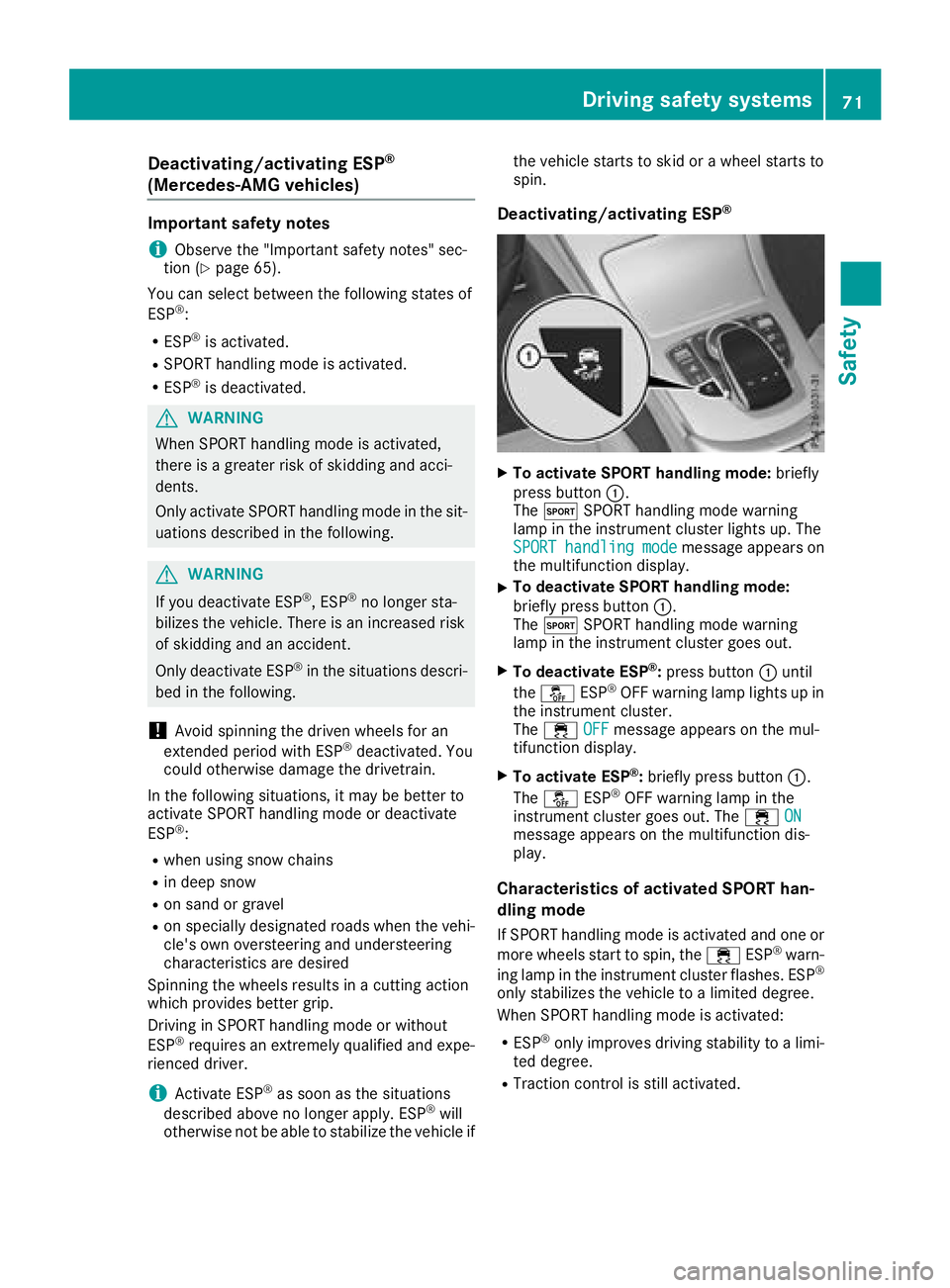
Deactivating/activating ESP®
XTo activate SPORT handling mode: briefly
press butto n:.
The M SPORT handlin gmode warnin g
lamp in th einstrumen tcluster lights up. The
SPORT
handlingmod emessag eappears on
th emultifunction display.
XTo deactivate SPORT handling mode:
briefly press butto n:.
The M SPORT handlin gmode warnin g
lamp in th einstrumen tcluster goe sout .
XTo deactivate ESP®:press butto n: until
th eå ESP®OF Fwarnin glamp lights up in
th einstrumen tcluster.
The ÷ OFF
messag eappears on th emul-
tifunction display.
XTo activate ESP®: briefly press butto n:.
The å ESP®OF Fwarnin glamp in th e
instrumen tcluster goe sout .The ÷ ON
messag eappears on th emultifunction dis -
play.
Characteristics of activate dSPORT han-
dling mode
If SPORT handlin gmode is activated and on eor
more wheels start to spin, th e÷ ESP®warn -
in glamp in th einstrumen tcluster flashes .ES P®
only stabilize sth evehicle to alimited degree .
Whe nSPORT handlin gmode is activated:
RES P®only improves drivin gstability to alimi-
te ddegree .
RTraction contro lis still activated.
Driving safety systems71
Safety
Z
Page 74 of 370
REngine torque is no longer limited and the
drive wheels are able to spin.
RESP®still provides support when you brake
firmly.
Characteristics when ESP®is deactivated
If ESP®is deactivated and one or more wheels
start to spin, the ÷ESP®warning lamp in the
instrument cluster does not flash. In such situa-
tions, ESP
®will not stabilize the vehicle.
If you deactivate ESP®:
RESP®no longer improves driving stability.
REngine torque is no longer limited and the
drive wheels are able to spin.
RTraction control is still activated.
RActive Brake Assist is no longer available; nor
is it activated if you brake firmly with assis-
tance from ESP
®.
RPRE-SAFE®is no longer available, nor is it
activated if you brake firmly and ESP®inter-
venes.
RPRE-SAFE®Brake is no longer available, it is
also not activated if you brake firmly and ESP®
intervenes.
RESP®still provides support when you brake
firmly.
ESP®trailer stabilization
General information
ESP®trailer stabilization is not available in
Mercedes-AMG vehicles.
If your vehicle/trailer combination begins to
swerve, ESP
®assists you in this situation. ESP®
slows the vehicle down by braking and limiting
the engine output until the vehicle/trailer com-
bination has stabilized.
Important safety notes
GWARNING
If road and weather conditions are poor,
trailer stabilization will not be able to prevent
the vehicle/trailer combination from swerv-
ing. Trailers with a high center of gravity can
tip over before ESP
®can detect this. There is
a risk of an accident.
Always adapt your driving style to the prevail-
ing road and weather conditions. If your vehicle with trailer (vehicle/trailer com-
bination) begins to lurch, you can only stabilize
the vehicle/trailer combination by depressing
the brake firmly.
ESP
®trailer stabilization is active above speeds
of approximately 40 mph (65 km/h).
ESP
®trailer stabilization does not work if ESP®
is deactivated or malfunctioning.
Crosswind Assist
General information
Strong crosswind gusts can impair the ability of
your vehicle to drive straight ahead. The cross-
wind driving assistance function integrated in
ESP
®noticeably reduces these impairments.
ESP®intervenes automatically according to the
direction and intensity of the crosswinds affect-
ing your vehicle.
ESP
®intervenes with stabilizing braking to
assist you in keeping the vehicle in the lane.
Crosswind Assist is active at vehicle speeds
above 50 mph (80 km/h) when driving straight
ahead or cornering gently.
Important safety notes
Crosswind Assist does not work if ESP®is
switched off or deactivated because of a mal-
function.
EBD (electronic brake force distribu-
tion)
General information
EBD monitors and controls the brake pressure
on the rear wheels to improve driving stability
while braking.
Important safety notes
iObserve the "Important safety notes" sec-
tion (Ypage 65).
GWARNING
If EBD is malfunctioning, the rear wheels can
lock, e.g. under full braking. This increases the
risk of skidding and an accident.
You should therefore adapt your driving style
to the different handling characteristics. Have
72Driving safet ysystem s
Safety
Page 75 of 370
the brake system checked at a qualified spe-
cialist workshop.
Observe information regarding indicator and
warning lamps (
Ypage 261) as well as display
messages (Ypage 233).
ADAPTIVE BRAKE
ADAPTIVE BRAKE enhances braking safety and
offers increased braking comfort. In addition to
the braking function, ADAPTIVE BRAKE also has
the HOLD function (
Ypage 179) and hill start
assist (Ypage 140).
Active Brake Assist with cross-traffic
function
General information
iObserve the important safety notes in the
"Driving safety systems" section (Ypage 65).
Active Brake Assist with cross-traffic function
can help you to minimize the risk of a collision
with a vehicle in front or a pedestrian and reduce
the effects of such a collision. If the Active Brake
Assist with cross-traffic function detects a risk
of collision, you will be warned visually and
acoustically and, if necessary, your brake appli-
cation will be assisted according to the situa-
tion. If you do not react, the system can also
react by braking automatically. In the event of a
detected risk of collision due to crossing traffic,
you will also be visually and acoustically warned as well as assisted by the brake boosting effect
according to the situation.
Active Brake Assist with cross-traffic function is
only available in vehicles with the Driving Assis-
tance Plus package.
For Active Brake Assist with cross-traffic func-
tion to assist you when driving, the radar sensor
system and the camera system must be opera-
tional.
If the radar sensor system or the camera systemis malfunctioning, Active Brake Assist with
cross-traffic function is restri
cted or no longer
available. The brake system is still available with
complete brake boosting effect and BAS.
The radar sensor system and camera system
help Active Brake Assist with cross-traffic func- tion to detect obstacles that are in the path of
your vehicle for an extended period of time.
In addition, pedestrians in the path of your vehi-
cle can be detected.
Active Brake Assist with cross-traffic function
detects pedestrians using typical characteris-
tics such as body contours and the posture of a
person standing upright.
iObserve the restrictions described in the
"Important safety notes" section
(
Ypage 73).
Important safety notes
GWARNING
Active Brake Assist with cross-traffic function will initially brake your vehicle by a partial
application of the brakes if a danger of colli-
sion is detected. There may be a collision
unless you brake yourself. Even after subse-
quent full application of the brakes a collision
cannot always be avoided, particularly when
approaching at too high a speed. There is a
risk of an accident.
Always apply the brakes yourself and try to
take evasive action, provided it is safe to do
so.
In the event of a partial application of the brakes,
the vehicle is braked with up to 50% of the full
braking pressure.
GWARNING
Active Brake Assist with cross-traffic function cannot always clearly identify objects and
complex traffic situations.
In such cases, Active Brake Assist with cross-
traffic function might:
Rissue an unnecessary warning or engage
Rneither give a warning nor intervene
There is a risk of an accident.
Always pay particular attention to the traffic
situation and be prepared to brake, especially
if Active Brake Assist with cross-traffic func-
tion alerts you. Terminate the intervention in a
non-critical driving situation.
Driving safet ysystem s73
Safety
Z
Page 76 of 370
GWARNING
Active Brake Assist with cross-traffic function cannot always clearly identify people, partic-
ularly if they are moving. Active Brake Assist
with cross-traffic function cannot intervene in
these cases. There is a risk of an accident.
Always pay particular attention to the traffic
situation and be prepared to brake, especially
if Active Brake Assist with cross-traffic func-
tion alerts you.
In order to maintain the appropriate distance to
the vehicle in front and thus prevent a collision,
you must apply the brakes yourself.
GWARNING
Active Brake Assist with cross-traffic function does not react:
Rto small people, e.g. children
Rto animals
Rto oncoming vehicles
Rwhen cornering
As a result, Active Brake Assist with cross-
traffic function may not warn you or engage in
all critical situations. There is a risk of an acci-
dent.
Always pay careful attention to the traffic sit- uation and be ready to brake.
In the event of snowfall or heavy rain, the rec-
ognition can be impaired.
Recognition by the radar sensor system is also
impaired if:
Rthere is dirt on the sensors or anything else
covering the sensors
Rthere is interference by other radar sources
Rthere are strong radar reflections, for exam-
ple in parking garages
Ra narrow vehicle is traveling in front, e.g. a
motorbike
Ra vehicle is traveling in front on a different line
Rvehicles moving quickly into the radar sensor
system detection range Recognition by the camera system is also
impaired in the event of:
Rdirt on the camera or if the camera is covered
Rglare on the camera system, e.g. from the sun
being low in the sky
Rdarkness
Ror if:
-pedestrians move quickly, e.g. into the path
of the vehicle
-the camera system no longer recognizes a
pedestrian as a person due to special cloth- ing or other objects
-a pedestrian is concealed by other objects
-the typical outline of a pedestrian is not
distinguishable from the background
Following damage to the front end of the vehicle,
have the configuration and operation of the
radar sensors checked at a qualified specialist
workshop. This also applies to collisions at slow
speeds where there is no visible damage to the
front of the vehicle.
Following damage to the windshield, have the
configuration and operation of the camera sys-
tem checked at a qualifi ed specia
list workshop.
Function
XTo activate or deactivate:
activate or deac-
tivate Active Brake Assist with cross-traffic
function using the on-board computer
(
Ypage 223).
If Active Brake Assist with cross-traffic func-
tion is deactivated, the æsymbol appears
on the multifunction display.
Starting at a speed of around 4 mph (7 km/h),
this function warns you if you are rapidly
approaching a vehicle in front. An intermittent
warning tone will then sound and the ·dis-
tance warning lamp will light up in the instru-
ment cluster.
XBrake immediately to defuse the situation.
or
XTake evasive action provided it is safe to do
so.
Active Brake Assist with cross-traffic function
can also brake the vehicle automatically under
the following conditions:
Rthe driver and front passenger have their seat
belts fastened
Rthe vehicle speed is between approximately
4 mph (7 km/h) and 124 mph (200 km/h)
74Driving safety systems
Safety
Page 78 of 370
No steering support is provided from STEER
CONTROL, if:
RESP®is deactivated
RESP®is malfunctioning
Rthe steering is malfunctioning
If ESP®is malfunctioning, you will be assisted
further by the electrical power steering.
Protection against theft
Immobilizer
The immobilizer prevents your vehicle from
being started without the correct SmartKey.
XTo activate with the SmartKey: remove the
SmartKey from the ignition lock.
XTo activate with KEYLESS-GO start-func-
tion or KEYLESS-GO: switch the ignition off
and open the driver's door.
XTo deactivate: switch on the ignition.
When leaving the vehicle, always take the
SmartKey with you and lock the vehicle. Anyone
can start the engine if a valid SmartKey has been
left inside the vehicle.
iThe immobilizer is always deactivated when
you start the engine.
In the event that the engine cannot be started
(yet the vehicle's battery is charged), the sys-
tem is not operational. Contact an authorized
Mercedes-Benz Center or call
1-800-FOR-MERCedes (in the USA) or
1-800-387-0100 (in Canada).
ATA (anti-theft alarm system)
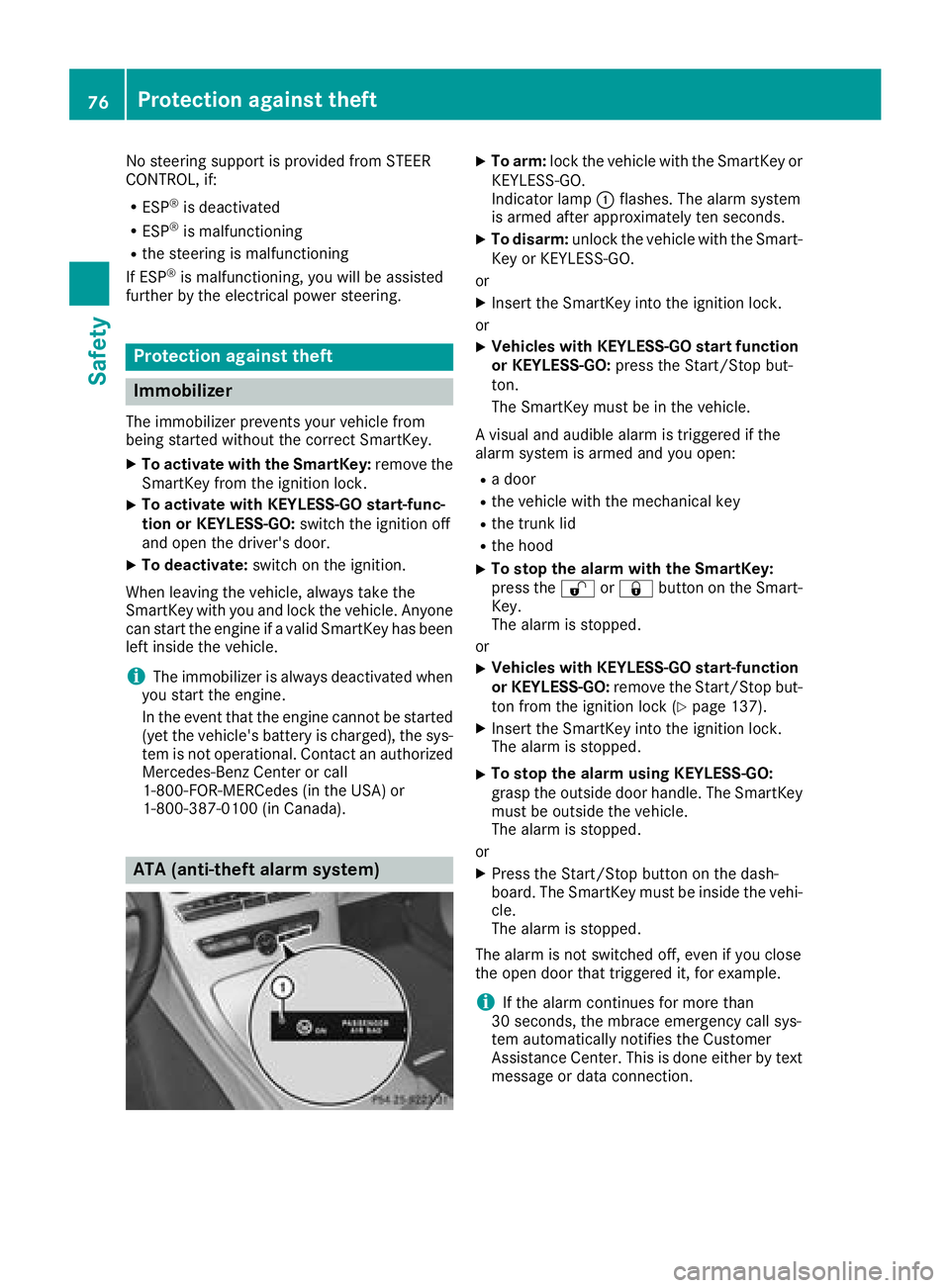
XTo arm: lock the vehicle with the SmartKey or
KEYLESS-GO.
Indicator lamp :flashes. The alarm system
is armed after approximately ten seconds.
XTo disarm: unlock the vehicle with the Smart-
Key or KEYLESS-GO.
or
XInsert the SmartKey into the ignition lock.
or
XVehicles with KEYLESS-GO start function
or KEYLESS-GO: press the Start/Stop but-
ton.
The SmartKey must be in the vehicle.
A visual and audible alarm is triggered if the
alarm system is armed and you open:
Ra door
Rthe vehicle with the mechanical key
Rthe trunk lid
Rthe hood
XTo stop the alarm with the SmartKey:
press the %or& button on the Smart-
Key.
The alarm is stopped.
or
XVehicles with KEYLESS-GO start-function
or KEYLESS-GO: remove the Start/Stop but-
ton from the ignition lock (
Ypage 137).
XInsert the SmartKey into the ignition lock.
The alarm is stopped.
XTo stop the alarm using KEYLESS-GO:
grasp the outside door handle. The SmartKey
must be outside the vehicle.
The alarm is stopped.
or
XPress the Start/Stop button on the dash-
board. The SmartKey must be inside the vehi-
cle.
The alarm is stopped.
The alarm is not switched off, even if you close
the open door that triggered it, for example.
iIf the alarm continues for more than
30 seconds, the mbrace emergency call sys-
tem automatically notifies the Customer
Assistance Center. This is done either by text
message or data connection.
76Protection against theft
Safety
Page 81 of 370
multimedia system; see the Digital Operator's
Manual.
You will receive visual and acoustic locking con-
firmation if all components were able to be
locked.
When the locator lighting is activated via the
multimedia system, it lights up when it is dark
after the vehicle is unlocked with the SmartKey;
see the Digital Operator's Manual.
XTo open the trunk lid automatically from
outside the vehicle:press and hold theF
button until the trunk lid opens.
XTo open the trunk lid automatically from
outside the vehicle: if the SmartKey is loca-
ted in the immediate vicinity of the vehicle,
press the Fbutton on the SmartKey.
When the trunk lid closes you can then
release the button.
KEYLESS-GO
General notes
Bear in mind that the engine can be started by
any of the vehicle occupants if there is a Smart-
Key in the vehicle (
Ypage 138).
Locking/unlocking centrally
You can start, lock or unlock the vehicle using
KEYLESS-GO. To do this, you only need carry the
SmartKey with you. You can combine the func-
tions of KEYLESS-GO with those of a conven-
tional SmartKey. Unlock the vehicle by using
KEYLESS-GO, for instance, and lock it using the
& button on the SmartKey.
The driver's door and the door at which the han-
dle is used, must both be closed. The SmartKey
must be outside the vehicle. When locking or
unlocking with KEYLESS-GO, the distance
between the SmartKey and the corresponding
door handle must not be greater than 3 ft (1 m).
A brief radio connection between the vehicle
and the SmartKey determines whether a valid
SmartKey is in, or in the direct vicinity of, the
vehicle. This occurs, for example:
Rwhen starting the engine
Rwhile driving
Rwhen using HANDS-FREE ACCESS
Rwhen the external door handles are touched
Rduring convenience closing
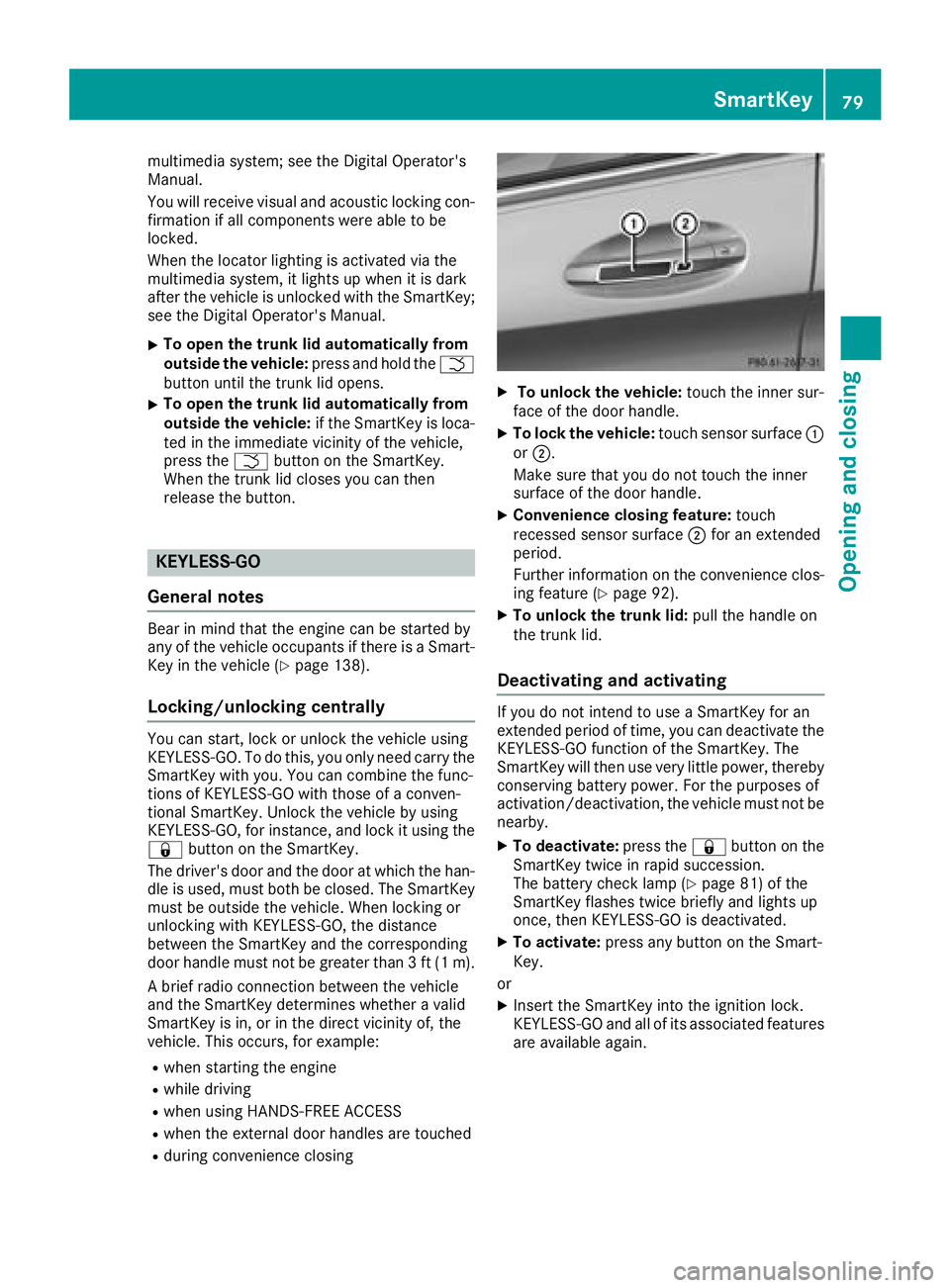
XTo unlock the vehicle: touch the inner sur-
face of the door handle.
XTo lock the vehicle: touch sensor surface :
or ;.
Make sure that you do not touch the inner
surface of the door handle.
XConvenience closing feature: touch
recessed sensor surface ;for an extended
period.
Further information on the convenience clos-
ing feature (
Ypage 92).
XTo unlock the trunk lid: pull the handle on
the trunk lid.
Deactivating and activating
If you do not intend to use a SmartKey for an
extended period of time, you can deactivate the
KEYLESS-GO function of the SmartKey. The
SmartKey will then use very little power, thereby
conserving battery power. For the purposes of
activation/deactivation, the vehicle must not be
nearby.
XTo deactivate: press the&button on the
SmartKey twice in rapid succession.
The battery check lamp (
Ypage 81) of the
SmartKey flashes twice briefly and lights up
once, then KEYLESS-GO is deactivated.
XTo activate: press any button on the Smart-
Key.
or
XInsert the SmartKey into the ignition lock.
KEYLESS-GO and all of its associated features
are available again.
SmartKey79
Opening and closing
Z
Page 88 of 370
Trunk
Important safety notes
GWARNING
Combustion engines emit poisonous exhaust
gases such as carbon monoxide. Exhaust
gases can enter the vehicle interior if the
trunk lid is open when the engine is running,
especially if the vehicle is in motion. There is a
risk of poisoning.
Always switch off the engine before opening
the trunk lid. Never drive with the trunk lid
open.
GWARNING
If objects, luggage or loads are not secured or
not secured sufficiently, they could slip, tip
over or be flung around and thereby hit vehicle
occupants. There is a risk of injury, particu-
larly in the event of sudden braking or a sud-
den change in direction.
Always store objects so that they cannot be
flung around. Secure objects, luggage or
loads against slipping or tipping before the
journey.
!The trunk lid swings upwards when opened.
Therefore, make sure that there is sufficient
clearance above the trunk lid.
The opening dimensions of the trunk lid can be
found in the "Vehicle data" section
(
Ypage 367).
You can limit the opening angle of the trunk lid in
the multimedia system; see the Digital Opera-
tor's Manual.
Do not leave the SmartKey in the trunk. You
could otherwise lock yourself out.
You should preferably place luggage or loads in
the trunk. Observe the loading guidelines
(
Ypage 280).
Object detection with trunk lid revers-
ing feature
Vehicles with trunk lid remote closing fea-
ture:
The trunk lid is equipped with automatic object
detection with a reversing feature. If a solid object blocks or restricts the trunk lid when
automatically opening, this procedure is stop-
ped. If a solid object blocks or restricts the trunk
lid when automatically closing, the trunk lid
opens again automatically. Automatic object
detection with reversing function is only an aid.
It is not a substitute for your attentiveness when opening and closing the trunk lid.
GWARNING
The reversing feature does not respond:
Rto soft, light and thin objects, e.g. fingers
Rover the last 1/3 in (8 mm) of the closing
movement
The reversing feature cannot prevent some-
one being trapped in these situations in par-
ticular. There is a risk of injury.
Make sure that no body parts are in close
proximity during the closing procedure.
If somebody becomes trapped:
Rpress the Fbutton on the SmartKey, or
Rpull or press the remote operating switch
on the driver's door or
Rpress the closing or locking button on the
trunk lid, or
Rpull on the trunk lid handle
Vehicles with HANDS-FREE ACCESS:
It is also possible to stop the closing process by
performing a kicking movement under the rear
bumper.
Opening and closing manually
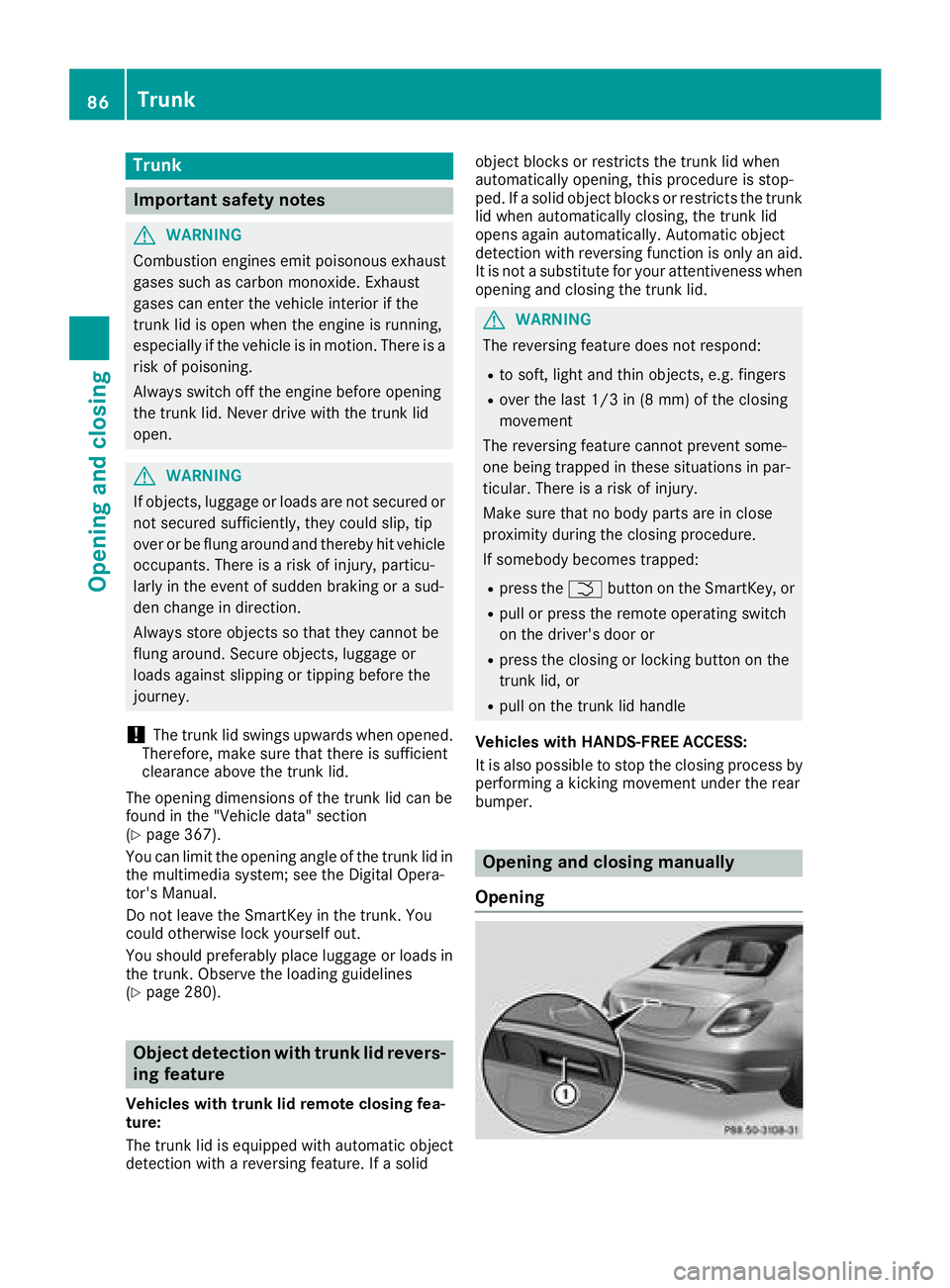
Opening
86Trunk
Opening and closing
Page 89 of 370
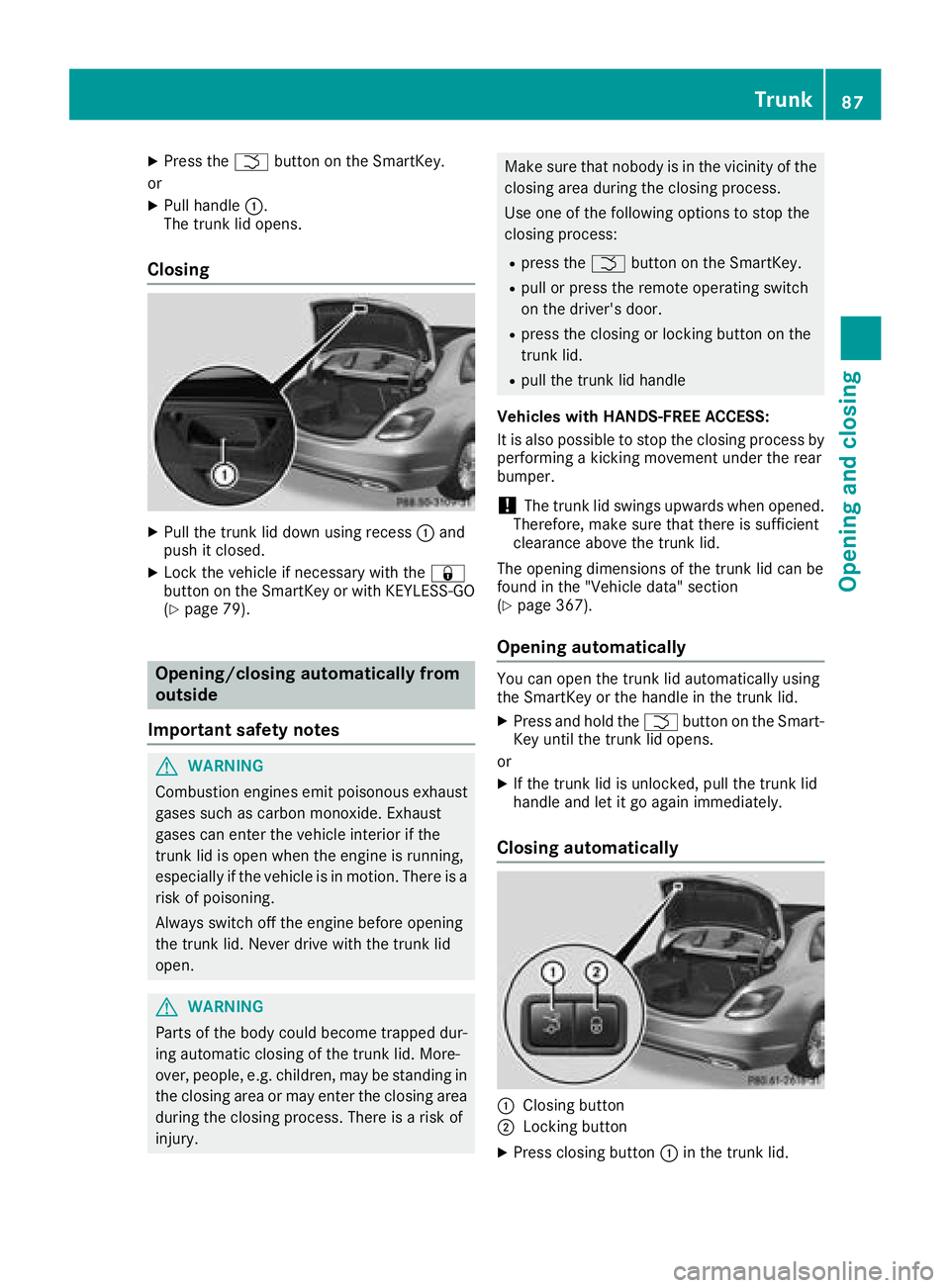
XPress theFbutton on the SmartKey.
or
XPull handle :.
The trunk lid opens.
Closing
XPull the trunk lid down using recess :and
push it closed.
XLock the vehicle if necessary with the &
button on the SmartKey or with KEYLESS-GO
(
Ypage 79).
Opening/closing automatically from
outside
Important safety notes
GWARNING
Combustion engines emit poisonous exhaust
gases such as carbon monoxide. Exhaust
gases can enter the vehicle interior if the
trunk lid is open when the engine is running,
especially if the vehicle is in motion. There is a
risk of poisoning.
Always switch off the engine before opening
the trunk lid. Never drive with the trunk lid
open.
GWARNING
Parts of the body could become trapped dur-
ing automatic closing of the trunk lid. More-
over, people, e.g. children, may be standing in the closing area or may enter the closing area
during the closing process. There is a risk of
injury.
Make sure that nobody is in the vicinity of the
closing area during the closing process.
Use one of the following options to stop the
closing process:
Rpress the Fbutton on the SmartKey.
Rpull or press the remote operating switch
on the driver's door.
Rpress the closing or locking button on the
trunk lid.
Rpull the trunk lid handle
Vehicles with HANDS-FREE ACCESS:
It is also possible to stop the closing process by
performing a kicking movement under the rear
bumper.
!The trunk lid swings upwards when opened.
Therefore, make sure that there is sufficient
clearance above the trunk lid.
The opening dimensions of the trunk lid can be
found in the "Vehicle data" section
(
Ypage 367).
Opening automatically
You can open the trunk lid automatically using
the SmartKey or the handle in the trunk lid.
XPress and hold the Fbutton on the Smart-
Key until the trunk lid opens.
or
XIf the trunk lid is unlocked, pull the trunk lid
handle and let it go again immediately.
Closing automatically
:Closing button
;Locking button
XPress closing button :in the trunk lid.
Trunk87
Opening and closing
Z
Page 91 of 370
Operation
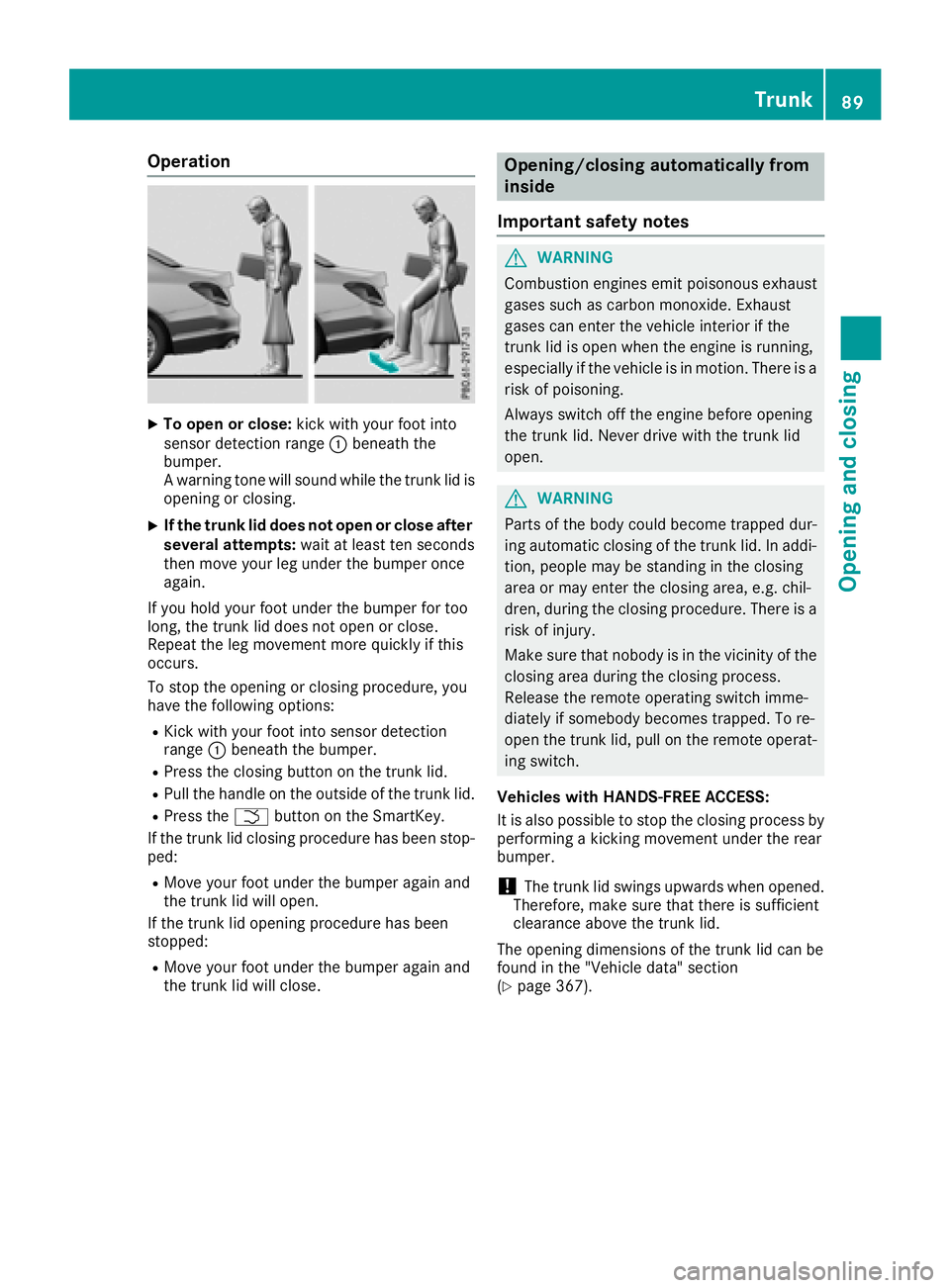
XTo open or close:kick with your foot into
sensor detection range :beneath the
bumper.
A warning tone will sound while the trunk lid is
opening or closing.
XIf the trunk lid does not open or close after
several attempts: wait at least ten seconds
then move your leg under the bumper once
again.
If you hold your foot under the bumper for too
long, the trunk lid does not open or close.
Repeat the leg movement more quickly if this
occurs.
To stop the opening or closing procedure, you
have the following options:
RKick with your foot into sensor detection
range :beneath the bumper.
RPress the closing button on the trunk lid.
RPull the handle on the outside of the trunk lid.
RPress the Fbutton on the SmartKey.
If the trunk lid closing procedure has been stop-
ped:
RMove your foot under the bumper again and
the trunk lid will open.
If the trunk lid opening procedure has been
stopped:
RMove your foot under the bumper again and
the trunk lid will close.
Opening/closing automatically from
inside
Important safety notes
GWARNING
Combustion engines emit poisonous exhaust
gases such as carbon monoxide. Exhaust
gases can enter the vehicle interior if the
trunk lid is open when the engine is running,
especially if the vehicle is in motion. There is a
risk of poisoning.
Always switch off the engine before opening
the trunk lid. Never drive with the trunk lid
open.
GWARNING
Parts of the body could become trapped dur-
ing automatic closing of the trunk lid. In addi-
tion, people may be standing in the closing
area or may enter the closing area, e.g. chil-
dren, during the closing procedure. There is a
risk of injury.
Make sure that nobody is in the vicinity of the
closing area during the closing process.
Release the remote operating switch imme-
diately if somebody becomes trapped. To re-
open the trunk lid, pull on the remote operat-
ing switch.
Vehicles with HANDS-FREE ACCESS:
It is also possible to stop the closing process by
performing a kicking movement under the rear
bumper.
!The trunk lid swings upwards when opened.
Therefore, make sure that there is sufficient
clearance above the trunk lid.
The opening dimensions of the trunk lid can be
found in the "Vehicle data" section
(
Ypage 367).
Trunk89
Opening and closing
Z