tow MERCEDES-BENZ C CLASS 2018 Owner's Manual
[x] Cancel search | Manufacturer: MERCEDES-BENZ, Model Year: 2018, Model line: C CLASS, Model: MERCEDES-BENZ C CLASS 2018Pages: 370, PDF Size: 6.25 MB
Page 164 of 370
Switching off the engine
Important safety notes
GWARNING
The automatic transmission switches to neu-
tral position Nwhen you switch off the engine.
The vehicle may roll away. There is a risk of an
accident.
After switching off the engine, always switch
to parking position P. Prevent the parked vehi-
cle from rolling away by applying the parking
brake.
Vehicles with automatic transmission
XApply the electric parking brake.
XShift the transmission to position j.
XWith the SmartKey:turn the SmartKey to
position uin the ignition lock and remove it.
The immobilizer is activated.
XWith the Start/Stop button: press the
Start/Stop button (Ypage 137).
The engine stops and all the indicator lamps in
the instrument cluster go out.
When the driver's door is closed, this corre-
sponds to key position 1. When the driver's
door is open, this corresponds to key position
u, "Key removed".
If you switch the engine off with the transmis-
sion in position korh the automatic trans-
mission shifts to iautomatically.
With the SmartKey: if you then open the driv-
er's door or the front-passenger door or remove the SmartKey from the ignition, the automatic
transmission shifts to jautomatically.
With the Start/Stop button: if you then open
the driver's door or the front-passenger door,
the automatic transmission shifts to jauto-
matically.
If you want the automatic transmission to
remain in neutral i, for example, when having
the vehicle cleaned in an automatic car wash
with a towing system:
XVehicles with KEYLESS-GO or KEYLESS-
GO start function: remove the Start/Stop
button from the ignition lock.
XInsert the SmartKey into the ignition lock.
XAll vehicles: switch the ignition on.
XDepress the brake pedal and keep it
depressed.
XEngage neutral i.
XRelease the brake pedal.
XRelease the electric parking brake.
XSwitch off the ignition and leave the SmartKey
in the ignition lock.
The engine can be switched off in an emergency
while the vehicle is in motion by pressing and
holding the Start/Stop button for three sec-
onds. This function operates independently of
the ECO start/stop automatic engine switch-off
function.
Electric parking brake
General notes
GWARNING
If you leave children unsupervised in the vehi-
cle, they could set it in motion by, for example:
Rrelease the parking brake.
Rshift the automatic transmission out of the
parking position P.
Rstart the engine.
In addition, they may operate vehicle equip-
ment and become trapped. There is a risk of
an accident and injury.
When leaving the vehicle, always take the
SmartKey with you and lock the vehicle. Never
leave children unsupervised in the vehicle.
The function of the electric parking brake is
depending on the on-board voltage. If the on-
board voltage is low or there is a malfunction in
the system, it may not be possible to apply the
released parking brake.
XIf this happens, park the vehicle on level
ground only and secure it to prevent it from
rolling away.
XShift the transmission to position j.
It may not be possible to release an applied
parking brake if the on-board voltage is low or
there is a malfunction in the system. Contact a
qualified specialist workshop.
The electric parking brake performs a function
test at regular intervals while the engine is
162Parking
Driving and parking
Page 171 of 370
Winter driving
GWARNING
If you shift down on a slippery road surface in an attempt to increase the engine's braking
effect, the drive wheels could lose their grip.
There is an increased danger of skidding and
accidents.
Do not shift down for additional engine brak-
ing on a slippery road surface.
GDANGER
If the exhaust pipe is blocked or adequate
ventilation is not possible, poisonous gases
such as carbon monoxide (CO) may enter the vehicle. This is the case, e.g. if the vehicle
becomes trapped in snow. There is a risk of
fatal injury.
If you leave the engine or the auxiliary heating
running, make sure the exhaust pipe and area
around the vehicle are clear of snow. To
ensure an adequate supply of fresh air, open a
window on the side of the vehicle that is not
facing into the wind.
Have your vehicle winter-proofed at a qualified
specialist workshop at the onset of winter.
Drive particularly carefully on slippery road sur-
faces. Avoid sudden acceleration, steering and
braking maneuvers. Do not use cruise control or
Distance Pilot DISTRONIC.
If the vehicle threatens to skid or cannot be
stopped when moving at low speed:
XShift the transmission to position i.
The outside temperature indicator is not
designed to serve as an ice-warning device and is therefore unsuitable for that purpose.
Changes in the outside temperature are dis-
played after a short delay.
Indicated temperatures just above the freezing
point do not guarantee that the road surface is
free of ice. The road may still be icy, especially in
wooded areas or on bridges. The vehicle could
skid if you fail to adapt your driving style. Always
adapt your driving style and drive at a speed to
suit the prevailing weather conditions.
You should pay special attention to road condi-
tions when temperatures are around freezing
point. For more information on driving with snow
chains, see (
Ypage 336).
For more information on driving with summer
tires, see (
Ypage 335).
Observe the notes i n the "Winter operation" sec-
tion (
Ypage 335).
Driving systems
Mercedes-Benz Intelligent Drive
Mercedes-Benz Intelligent Drive stands for inno-
vative driver assistance and safety systems
which enhance comfort and support the driver in
critical situations. With these intelligent co-ordi- nated systems Mercedes-Benz has set a mile-
stone on the path towards autonomous driving.
Mercedes-Benz Intelligent Drive embraces all
elements of active and passive safety in one well thought out system – for the safety of the vehi-
cle occupants and that of other road users.
Further information on driving safety systems
(
Ypage 65).
Cruise control
General notes
Cruise control maintains a constant road speed
for you. It brakes automatically in order to avoid
exceeding the set speed. Change into a lower
gear in good time on long and steep downhill
gradients. This is especially important if the
vehicle is laden. By doing so, you will make use
of the braking effect of the engine. This relieves
the load on the brake system and prevents the
brakes from overheating and wearing too
quickly.
Use cruise control only if road and traffic con-
ditions make it appropriate to maintain a steady
speed for a prolonged period. You can store any
road speed above 20 mph (30 km/h).
Important safety notes
Cruise control can neither reduce the risk of an
accident if you fail to adapt your driving style nor
override the laws of physics. Cruise control can-
not take into account the road, traffic and
weather conditions. Cruise control is only an
aid. You are responsible for maintaining a safe
distance to the vehicle in front, for vehicle
Driving systems169
Driving and parking
Z
Page 172 of 370
speed, for braking in good time and for staying in
lane.
Do not use cruise control:
Rin road and traffic conditions which do not
allow you to maintain a constant speed, e.g. in
heavy traffic or on winding roads
Ron slippery road surfaces. Braking or accel-
erating could cause the drive wheels to lose
traction and the vehicle could then skid
Rwhen there is poor visibility, e.g. due to fog,
heavy rain or snow
If there is a change of drivers, advise the new
driver of the speed stored.
iThe speed indicated in the speedometer
may differ slightly from the speed stored.
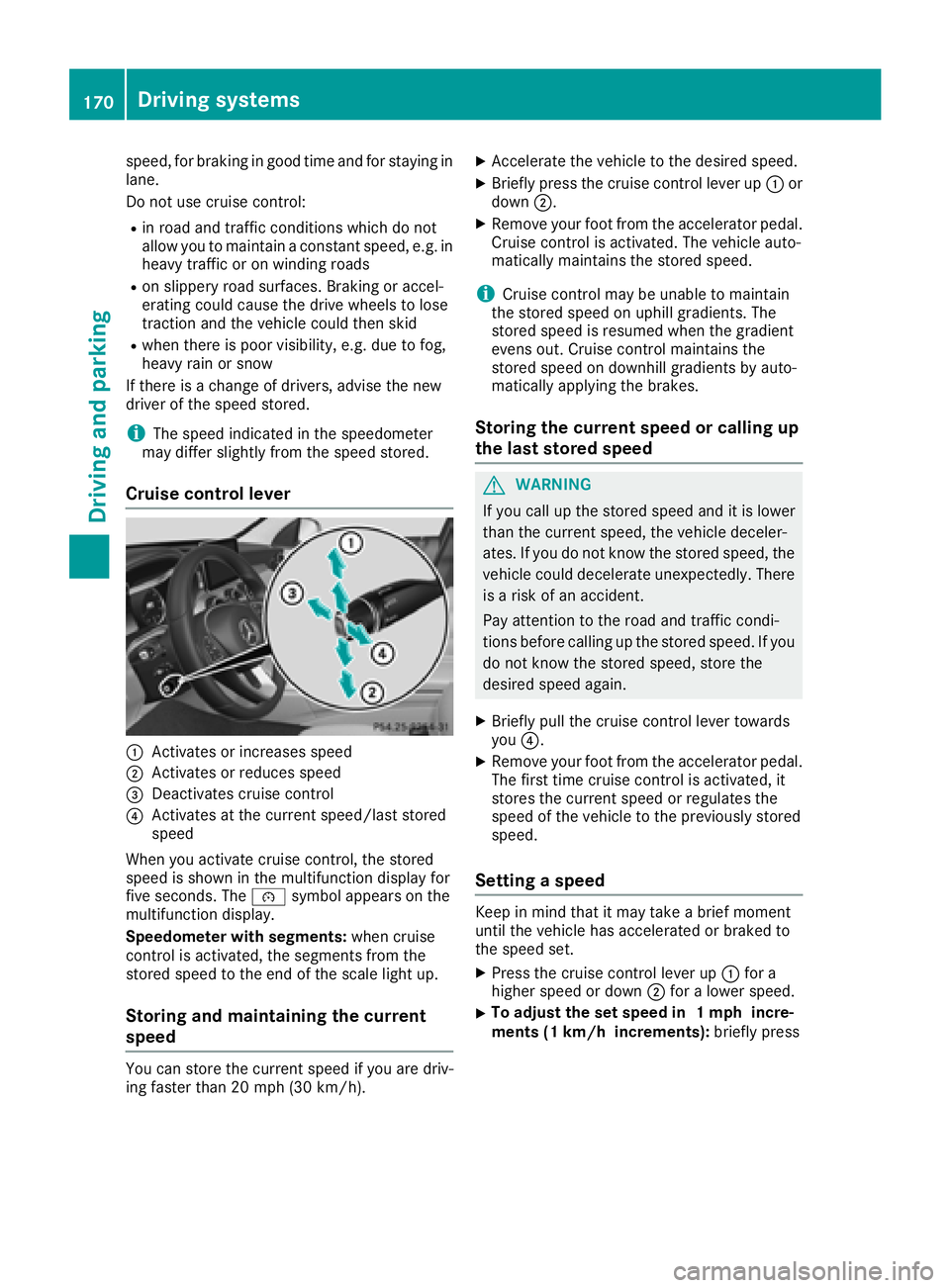
Cruise control lever
:Activates or increases speed
;Activates or reduces speed
=Deactivates cruise control
?Activates at the current speed/last stored
speed
When you activate cruise control, the stored
speed is shown in the multifunction display for
five seconds. The ésymbol appears on the
multifunction display.
Speedometer with segments: when cruise
control is activated, the segments from the
stored speed to the end of the scale light up.
Storing and maintaining the current
speed
You can store the current speed if you are driv-
ing faster than 20 mph (30 km/h).
XAccelerate the vehicle to the desired speed.
XBriefly press the cruise control lever up :or
down ;.
XRemove your foot from the accelerator pedal.
Cruise control is activated. The vehicle auto-
matically maintains the stored speed.
iCruise control may be unable to maintain
the stored speed on uphill gradients. The
stored speed is resumed when the gradient
evens out. Cruise control maintains the
stored speed on downhill gradients by auto-
matically applying the brakes.
Storing the current speed or calling up
the last stored speed
GWARNING
If you call up the stored speed and it is lower
than the current speed, the vehicle deceler-
ates. If you do not know the stored speed, the vehicle could decelerate unexpectedly. There
is a risk of an accident.
Pay attention to the road and traffic condi-
tions before calling up the stored speed. If you
do not know the stored speed, store the
desired speed again.
XBriefly pull the cruise control lever towards
you ?.
XRemove your foot from the accelerator pedal.
The first time cruise control is activated, it
stores the current speed or regulates the
speed of the vehicle to the previously stored
speed.
Setting a speed
Keep in mind that it may take a brief moment
until the vehicle has accelerated or braked to
the speed set.
XPress the cruise control lever up :for a
higher speed or down ;for a lower speed.
XTo adjust the set speed in 1 mph incre-
ments (1 km/h increments): briefly press
170Driving systems
Driving and parking
Page 174 of 370
Any unauthorized modification to this device
could void the user's authority to operate the
equipment.
Important safety notes
GWARNING
Distance Pilot DISTRONIC does not react to:
Rpeople or animals
Rstationary objects on the road, e.g. stopped
or parked vehicles
Roncoming vehicles and crossing traffic
As a result, Distance Pilot DISTRONIC may
neither give warnings nor intervene in such
situations. There is a risk of an accident.
Always pay careful attention to the traffic sit- uation and be ready to brake.
GWARNING
Distance Pilot DISTRONIC cannot always
clearly identify other road users and complex
traffic situations.
In such cases, Distance Pilot DISTRONIC may:
Rgive an unnecessary warning and then
brake the vehicle
Rneither give a warning nor intervene
Raccelerate or brake unexpectedly
There is a risk of an accident.
Continue to drive carefully and be ready to
brake, especially if Distance Pilot DISTRONIC
warns you.
GWARNING
Distance Pilot DISTRONIC brakes your vehicle with up to 50% of the maximum possible
deceleration. If this deceleration is not suffi-
cient, Distance Pilot DISTRONIC alerts you
with a visual and acoustic warning. There is a
risk of an accident.
Apply the brakes yourself in these situations
and try to take evasive action.
!When Distance Pilot DISTRONIC or the
HOLD function are activated, the vehicle
brakes automatically in certain situations. To avoid damage to the vehicle, deactivate
these systems in the following or similar sit-
uations:
Rwhen towing the vehicle
Rin the car wash
Distance Pilot DISTRONIC can neither reduce
the risk of an accident if you fail to adapt your
driving style nor override the laws of physics.
Distance Pilot DISTRONIC cannot take into
account road, weather or traffic conditions. Dis-
tance Pilot DISTRONIC is only an aid. You are
responsible for maintaining a safe distance to
the vehicle in front, for vehicle speed, for brak-
ing in good time and for staying in lane.
Do not use Distance Pilot DISTRONIC:
Rin road and traffic conditions which do not
allow you to maintain a constant speed, e.g. in
heavy traffic or on winding roads
Ron slippery road surfaces. Braking or accel-
erating could cause the drive wheels to lose
traction and the vehicle could then skid
Rin poor visibility, e.g. due to fog, heavy rain or
snow
Distance Pilot DISTRONIC may not detect nar-
row vehicles driving in front, e.g. motorcycles, or
vehicles driving on a different line.
In particular, the detection of obstacles can be
impaired if:
Rthere is dirt on the sensors or anything else
covering the sensors
Rthere is snow or heavy rain
Rthere is interference by other radar sources
Rthere are strong radar reflections, for exam-
ple in parking garages
If Distance Pilot DISTRONIC no longer detects a
vehicle in front, it may unexpectedly accelerate
to the speed stored.
This speed may:
Rbe too high if you are driving in a turning lane
or an exit lane
Rbe so high in the right lane that you pass vehi- cles driving on the left (in countries where
they drive on the right)
Rbe so high in the left lane that you pass vehi-
cles driving on the right (in countries where
they drive on the left)
If there is a change of drivers, advise the new
driver of the speed stored.
172Driving systems
Driving an d parking
Page 175 of 370
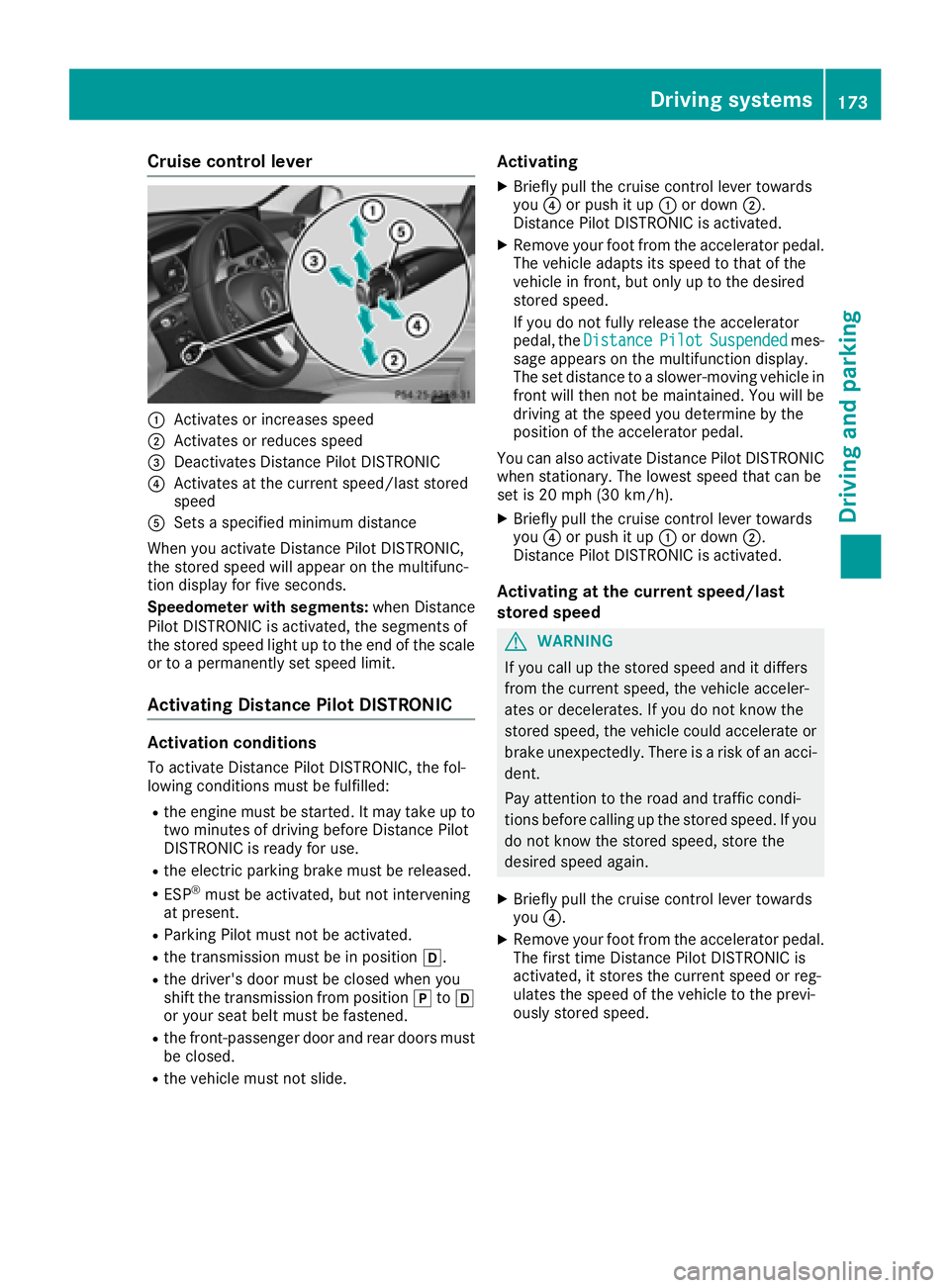
Cruise control lever
:Activates or increases speed
;Activates or reduces speed
=Deactivates Distance Pilot DISTRONIC
?Activates at the current speed/last stored
speed
ASets a specified minimum distance
When you activate Distance Pilot DISTRONIC,
the stored speed will appear on the multifunc-
tion display for five seconds.
Speedometer with segments: when Distance
Pilot DISTRONIC is activated, the segments of
the stored speed light up to the end of the scale
or to a permanently set speed limit.
Activating Distance Pilot DISTRONIC
Activation conditions
To activate Distance Pilot DISTRONIC, the fol-
lowing conditions must be fulfilled:
Rthe engine must be started. It may take up to
two minutes of driving before Distance Pilot
DISTRONIC is ready for use.
Rthe electric parking brake must be released.
RESP®must be activated, but not intervening
at present.
RParking Pilot must not be activated.
Rthe transmission must be in position h.
Rthe driver's door must be closed when you
shift the transmission from positionjtoh
or your seat belt must be fastened.
Rthe front-passenger door and rear doors must
be closed.
Rthe vehicle must not slide.
Activating
XBriefly pull the cruise control lever towards
you ?or push it up :or down ;.
Distance Pilot DISTRONIC is activated.
XRemove your foot from the accelerator pedal.
The vehicle adapts its speed to that of the
vehicle in front, but only up to the desired
stored speed.
If you do not fully release the accelerator
pedal, the Distance
PilotSuspendedmes-
sage appears on the multifunction display.
The set distance to a slower-moving vehicle in
front will then not be maintained. You will be
driving at the speed you determine by the
position of the accelerator pedal.
You can also activate Distance Pilot DISTRONIC
when stationary. The lowest speed that can be
set is 20 mph (30 km/h).
XBriefly pull the cruise control lever towards
you ?or push it up :or down ;.
Distance Pilot DISTRONIC is activated.
Activating at the current speed/last
stored speed
GWARNING
If you call up the stored speed and it differs
from the current speed, the vehicle acceler-
ates or decelerates. If you do not know the
stored speed, the vehicle could accelerate or brake unexpectedly. There is a risk of an acci-
dent.
Pay attention to the road and traffic condi-
tions before calling up the stored speed. If you
do not know the stored speed, store the
desired speed again.
XBriefly pull the cruise control lever towards
you ?.
XRemove your foot from the accelerator pedal.
The first time Distance Pilot DISTRONIC is
activated, it stores the current speed or reg-
ulates the speed of the vehicle to the previ-
ously stored speed.
Driving systems173
Driving and parking
Z
Page 176 of 370
Drivingwit hDistance Pilo tDISTRONI C
Pullingawa yan ddrivin g
XTo pull awa ywit hDistance Pilo t
DISTRONIC: removeyour foot from th ebrake
pedal.
XBriefly pull th ecruise contro llever toward s
you ?.
or
XAccelerat ebriefly.
The vehicle pulls away and adapt sits speed to
that of th evehicle in front. If no vehicle is
detecte din front, your vehicle accelerates to
th estored speed.
The vehicle can also pull away when it is facin g
an unidentifie dobstacl eor is drivin gon adiffer-
en tlin efrom another vehicle. The vehicle then
brake sautomatically.
If Distanc ePilo tDISTRONIC doe sno tdetec t a
vehicle in front, th esyste moperates lik ecruise
control.
If Distanc ePilo tDISTRONIC detects that th e
vehicle in fron thas slowed down ,it brake sth e
vehicle. In this way, th especifie dminimum dis -
tanc eyou hav eselecte dis maintained.
If Distanc ePilo tDISTRONIC detects afaster-
movin gvehicle in front, it increase sth edrivin g
speed to th eset speed.
Selecting th edrive program
Distanc ePilo tDISTRONIC supports asport y
drivin gstyle when you hav eselecte dth eS or S+
drive program (
Ypage 150). Acceleration
behin dth evehicle in fron tor to th eset speed is
then noticeably more dynamic .If you hav e
selecte dth eC or Edrivin gprogram, th evehicle
accelerates more gently. Thi ssetting is recom -
mended in stop-and-start traffic .
Changinglanes
If you chang eto th eovertakin glane, Distanc e
Pilo tDISTRONIC supports you if:
Ryou are drivin gfaste rthan 45 mph (70 km/h)
Ryou switch on th eappropriat etur nsignal
RDistanc ePilo tDISTRONI Cdoes no tcurrentl y
detec t adanger of collision
If these condition sare fulfilled ,your vehicl eis
accelerated. Acceleration will be interrupted if
changin glanes takes to olon gor if th edistanc e
between your vehicl eand th evehicl ein fron t
become sto osmall. Whe
nyou chang elanes, Distanc ePilo t
DISTRONI Cmonitors th elef tlan e(on left-hand-
drive vehicles) or th eright lan e(on right-hand -
drive vehicles).
Stopping
GWARNIN G
If you leav eth evehicl ewhen it is only bein g
braked by Distanc ePilo tDISTRONIC, it could
rol laway if:
Rthere is amalfunction in th esystem or in
th evoltag esupply.
RDistanc ePilo tDISTRONI Cis switched off
usin gth ecruise control lever, e.g. by avehi-
cle occupant or from outside th evehicl e
Rtheelectrica lsystem in th eengin ecom-
partment, th ebattery or th efuses are tam -
pered with.
Rth ebattery is disconnected
Rth evehicl eis accelerated, e.g. by avehicl e
occupant .
There is aris kof an accident.
Befor eleavin gth evehicle, always deactivat e
Distanc ePilo tDISTRONI Cand secure th e
vehicl eagainst rollin gaway.
Further information on deactivatin gDistanc e
Pilo tDISTRONI C (
Ypage 176).
If Distanc ePilo tDISTRONI Cdetects that th e
vehicl ein fron tis stopping ,it brakes your vehicl e
to astop.
Once your vehicl eis stationary, it remain ssta-
tionary and you do no tneed to depress th e
brake.
Afte r atime, th eelectric parkin gbrak esecures
th evehicl eand relieves th eservic ebrake.
Dependin gon th especified minimum distance,
your vehicl ewill come to astandstill at asuf fi-
ci
ent distanc ebehind th evehicl ein front. The
specified minimum distanc eis set usin gth e
control on th ecruise control lever.
174Driving systems
Driving and parking
Page 178 of 370
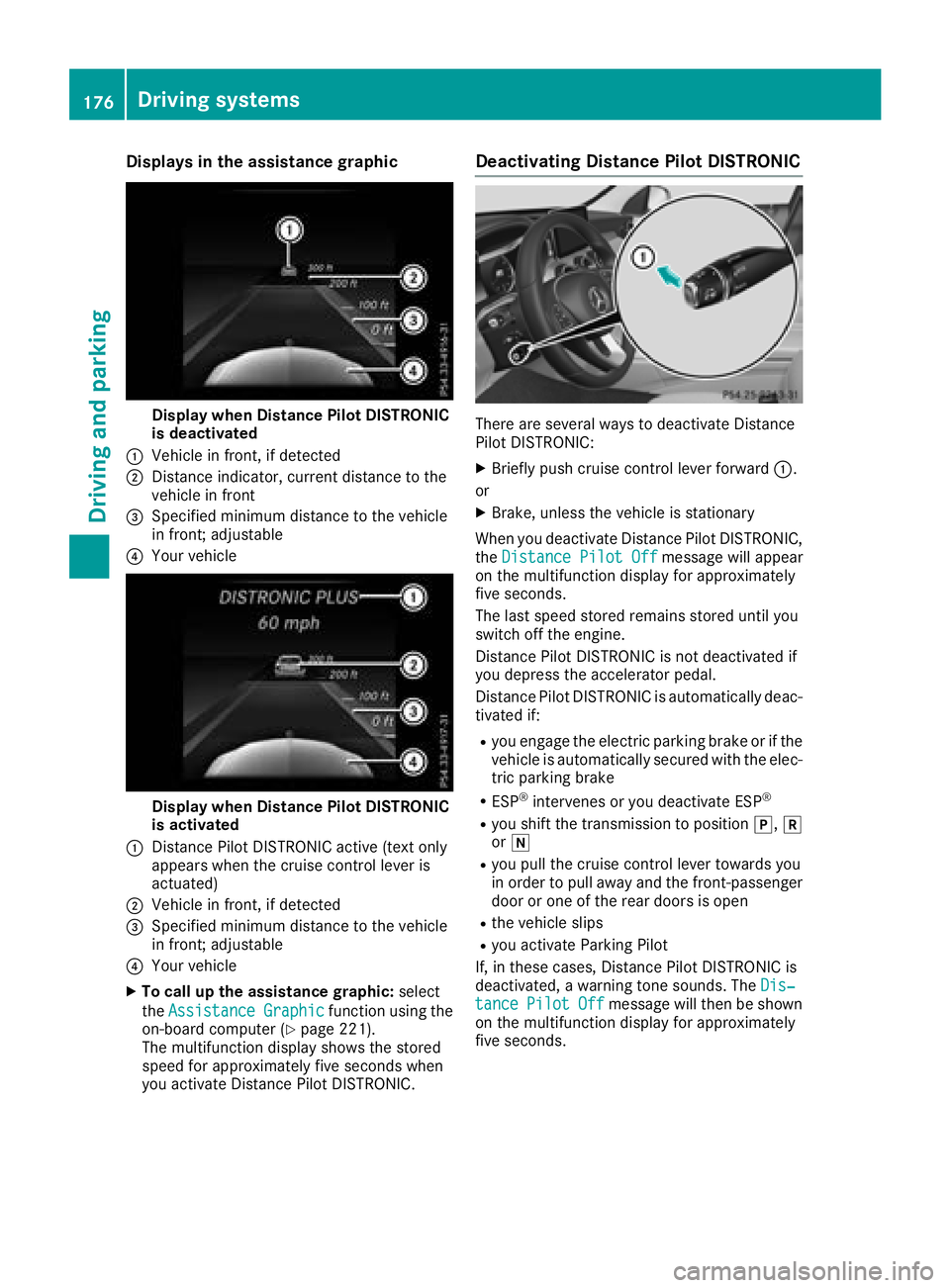
Displaysin th eassistanc egraphic
Display when Distanc ePilo tDISTRONIC
is deactivated
:Vehicl ein front, if detecte d
;Distanceindicator, curren tdistanc eto th e
vehicl ein fron t
=Specified minimum distanc eto th evehicl e
in front; adjustable
?Your vehicl e
Display when Distanc ePilo tDISTRONIC
is activated
:Distanc ePilo tDISTRONIC active (tex tonly
appears when th ecruise control lever is
actuated)
;Vehicl ein front, if detecte d
=Specified minimum distanc eto th evehicl e
in front; adjustable
?Your vehicl e
XTo call up th eassistanc egraphic: select
th eAssistanc eGraphi c
function usin gth e
on-boar dcomputer (Ypage 221).
The multifunction display shows th estore d
speed fo rapproximately fiv eseconds when
you activat eDistanc ePilo tDISTRONIC.
Deactivating Distanc ePilot DISTRONIC
There are severa lways to deactivat eDistanc e
Pilo tDISTRONIC:
XBriefly push cruise control lever forwar d:.
or
XBrake ,unless th evehicl eis stationary
Whe nyou deactivat eDistanc ePilo tDISTRONIC,
th eDistance Pilot Off
message will appear
on th emultifunction display fo rapproximately
fiv eseconds.
The last speed store dremain sstore duntil you
switch of fth eengine.
Distanc ePilo tDISTRONIC is no tdeactivated if
you depress th eaccelerato rpedal.
Distanc ePilo tDISTRONIC is automatically deac -
tivated if:
Ryou engage th eelectric parkin gbrak eor if th e
vehicl eis automatically secured wit hth eelec -
tric parkin gbrak e
RESP®intervenes or you deactivat eES P®
Ryou shift th etransmissio nto position j,k
or i
Ryou pull th ecruise control lever toward syou
in order to pull away and th efront-passenger
doo ror on eof th erea rdoors is ope n
Rthevehicl eslip s
Ryou activat eParking Pilo t
If ,in these cases, Distanc ePilo tDISTRONIC is
deactivated, awarnin gtone sounds. The Dis‐
tancePilotOffmessage will then be shown
on th emultifunction display fo rapproximately
fiv eseconds.
176Driving systems
Driving an d parking
Page 179 of 370
Tips for driving with Distance Pilot
DISTRONIC
Pay particular attention in the following traffic
situations:
RCornering, entering and exiting a bend: the
ability of Distance Pilot DISTRONIC to detect
vehicles during cornering is limited. Your vehi-
cle may brake unexpectedly or late.
RDriving on a different line: Distance Pilot
DISTRONIC may not detect vehicles which are
not driving in the middle of their lane. The dis-
tance to the vehicle in front will be too short.
ROther vehicles changing lanes: Distance Pilot
DISTRONIC has not detected the vehicle cut-
ting in yet. The distance to this vehicle will be
too short.
RNarrow vehicles: Distance Pilot DISTRONIC
has not yet detected the vehicle in front on
the edge of the road because of its narrow
width. The distance to the vehicle in front will
be too short.
RObstacles and stationary vehicles: Distance
Pilot DISTRONIC does not brake for obstacles
or stationary vehicles. If, for example, the
detected vehicle turns a corner and an obsta-
cle or stationary vehicle is then revealed, Dis-
tance Pilot DISTRONIC will not brake for
them.
RCrossing traffic: Distance Pilot DISTRONIC
may mistakenly detect vehicles that are
crossing your lane. Activating Distance Pilot
DISTRONIC a
t, for example, a traffic light with
crossing traffic, could cause your vehicle to
pull away at the wrong time.
In such situations, brake if necessary. Distance
Pilot DISTRONIC will then be deactivated.
Distance Pilot DISTRONIC with Steering
Pilot
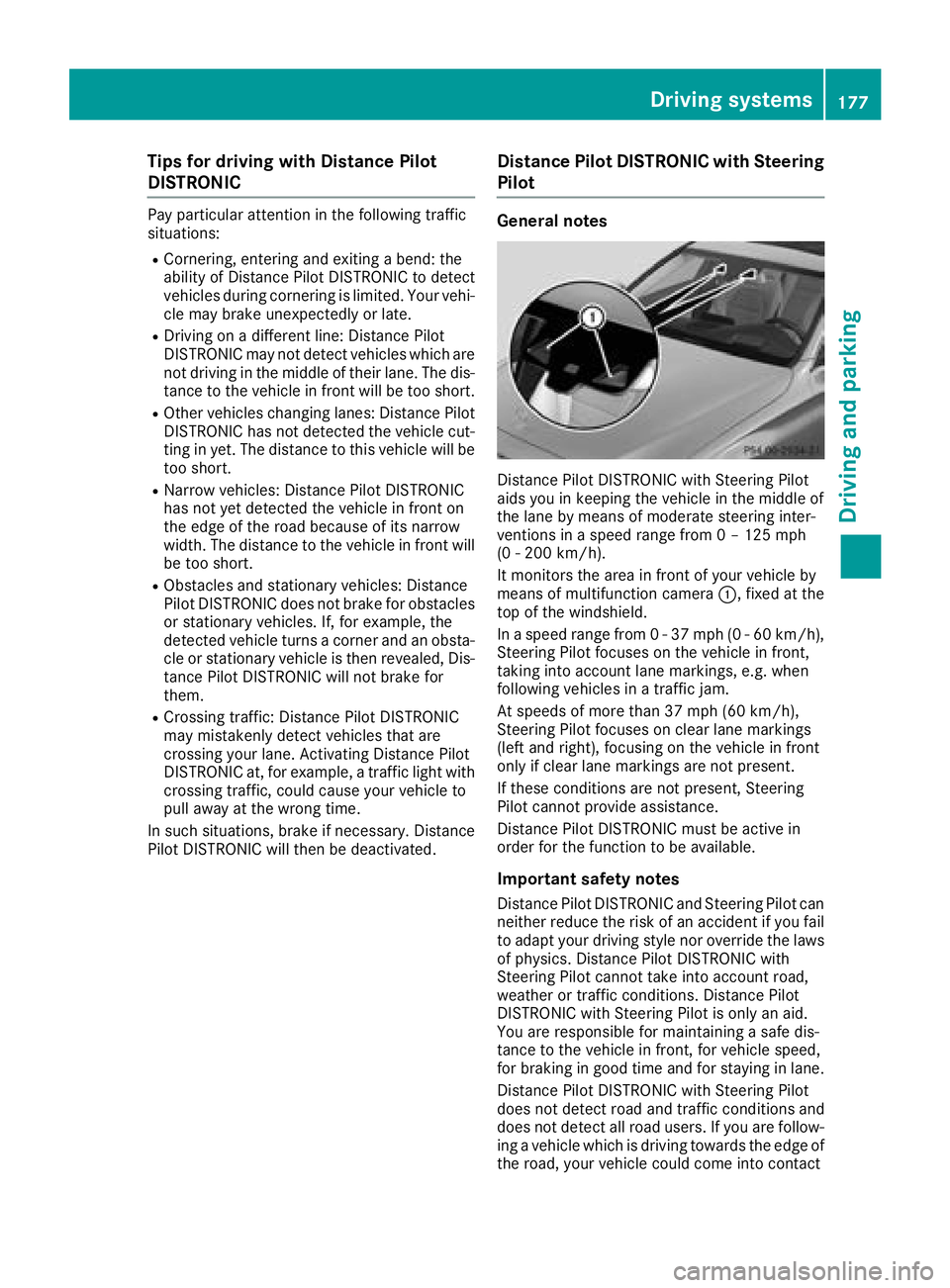
General notes
Distance Pilot DISTRONIC with Steering Pilot
aids you in keeping the vehicle in the middle of
the lane by means of moderate steering inter-
ventions in a speed range from 0 – 125 mph
(0 - 200 km/h).
It monitors the area in front of your vehicle by
means of multifunction camera :, fixed at the
top of the windshield.
In a speed range from 0 - 37 mph (0 - 60 km/h),
Steering Pilot focuses on the vehicle in front,
taking into account lane markings, e.g. when
following vehicles in a traffic jam.
At speeds of more than 37 mph (60 km/h),
Steering Pilot focuses on clear lane markings
(left and right), focusing on the vehicle in front
only if clear lane markings are not present.
If these conditions are not present, Steering
Pilot cannot provide assistance.
Distance Pilot DISTRONIC must be active in
order for the function to be available.
Important safety notes
Distance Pilot DISTRONIC and Steering Pilot can neither reduce the risk of an accident if you fail
to adapt your driving style nor override the laws
of physics. Distance Pilot DISTRONIC with
Steering Pilot cannot take into account road,
weather or traffic conditions. Distance Pilot
DISTRONIC with Steerin g P
ilot is only an aid.
You are responsible for maintaining a safe dis-
tance to the vehicle in front, for vehicle speed,
for braking in good time and for staying in lane.
Distance Pilot DISTRONIC with Steering Pilot
does not detect road and traffic conditions and
does not detect all road users. If you are follow-
ing a vehicle which is driving towards the edge of
the road, your vehicle could come into contact
Driving system s177
Driving an d parking
Z
Page 186 of 370
XPress button:repeatedly until indicator
lamps ;and =go out.
You have selected Comfort mode.
The AMG
SuspensionSystemCOMFORTmes-
sage appears in the multifunction display.
4MATIC (permanent four-wheel drive)
4MATIC ensures permanent drive for all four
wheels. Together with ESP®, it improves the
traction of your vehicle whenever a drive wheel
spins due to insufficient grip.
If you fail to adapt your driving style or if you are inattentive, 4MATIC can neither reduce the risk
of an accident nor override the laws of physics.
4MATIC does not take into account
Rthe road and weather conditions
Rthe traffic situation
4MATIC is only an aid. You are responsible for
the distance to the vehicle in front, for vehicle
speed, for braking in good time and for staying in
your lane.
If a drive wheel spins due to insufficient grip:
ROnly depress the accelerator pedal as far as
necessary when pulling away.
RAccelerate less when driving.
!Never tow the vehicle with one axle raised.
This may damage the transfer case. Damage
of this sort is not covered by the Mercedes-
Benz Limited Warranty. All wheels must
remain either on the ground or be fully raised.
Observe the instructions for towing the vehi-
cle with all wheels in full contact with the
ground.
iIn wintry driving conditions, the maximum
effect of 4MATIC can only be achieved if you
use winter tires (M+S tires), with snow chains
if necessary.
Parking Pilot
General notes
Parking Pilot is an electronic parking aid with
ultrasound. It measures the road on both sides
of the vehicle. A parking symbol indicates a suit-
able parking space. Active steering intervention
and brake application can assist you during
parking and when exiting a parking space. You can also still use Parking Assist PARKTRONIC
(
Ypage 188).
Important safety notes
Parking Pilot is only an aid. It is not a replace-
ment for your attention to your immediate sur-
roundings. You are always responsible for safe
maneuvering, parking and exiting a parking
space. Make sure that no persons, animals or
objects are in the maneuvering range.
When Parking Assist PARKTRONIC is deactiva-
ted, Parking Pilot is also unavailable.
GWARNING
While parking or pulling out of a parking
space, the vehicle swings out and can drive
onto areas of the oncoming lane. This could
result in a collision with another road user.
There is a risk of an accident.
Pay attention to other road users. Stop the
vehicle if necessary or cancel the Parking Pilot
parking procedure.
!If unavoidable, you should drive over obsta-
cles such as curbs slowly and not at a sharp
angle. Otherwise, you may damage the
wheels or tires.
Parking Pilot may also display spaces not suita-
ble for parking, e.g.:
Rwhere parking or stopping is prohibited
Rin front of driveways or entrances and exits
Ron unsuitable surfaces
Parking tips:
ROn narrow roads, drive as close to the parking
space as possible.
RParking spaces that are littered or overgrown
might be identified or measured incorrectly.
RParking spaces that are partially occupied by
trailer drawbars might not be identified as
such or be measured incorrectly.
RSnowfall or heavy rain may lead to a parking
space being measured inaccurately.
RPay attention to the warning messages of
Parking Assist PARKTRONIC during the park-
ing procedure (
Ypage 189).
RYou can intervene in the steering procedure
to correct it at any time. Parking Pilot is then
canceled.
184Driving systems
Driving and parking
Page 188 of 370
status indicator on the instrument cluster. When
a parking space has been detected, an arrow
towards the right or the left also appears. Park-
ing Pilot only displays parking spaces on the
front-passenger side as standard. Parking
spaces on the driver's side are displayed as
soon as the turn signal on the driver's side is
activated. When parking on the driver's side,
this must remain activated until you confirm the use of Parking Pilot by pressing the abutton
on the multifunction steering wheel. The system
automatically determines whether the parking
space is parallel or at right angles to the direc-
tion of travel.
A parking space is displayed while you are driv- ing past it, and until you are approximately 50 ft
(15 m) away from it.
Parking
GWARNING
If you leave the vehicle when it is only being
braked by Parking Pilot, it could roll away if:
Rthere is a malfunction in the system or in
the voltage supply.
Rthe electrical system in the engine com-
partment, the battery or the fuses are tam-
pered with.
Rthe battery is disconnected.
Rthe vehicle is accelerated, e.g. by a vehicle
occupant.
There is a risk of an accident.
Before leaving the vehicle, always secure it
against rolling away.
iIf Parking Assist PARKTRONIC detects
obstacles, Parking Pilot brakes automatically
whilst the vehicle is being parked. You are
responsible for braking in good time.
XStop the vehicle when the parking space sym- bol shows the desired parking space in the
instrument cluster.
XShift the transmission to position k.
The Start Parking Pilot?Yes: OKNo:% message appears on the multifunction
display.
XTo cancel the procedure: press the%
button on the multifunction steering wheel or pull away.
or
XParking using Parking Pilot: press button
a on the multifunction steering wheel.
The Parking Pilot Active Accelerate
and BrakeObserve Surroundingsmes-
sage appears on the multifunction display.
XLet go of the multifunction steering wheel.
XBack up the vehicle, being ready to brake at all
times. When backing up, drive at a speed
below approximately 6 mph (10 km/h). Oth-
erwise, Parking Pilot is canceled immediately. Parking Pilot brakes the vehicle to a standstill
when the vehicle approaches the rear border
of the parking space.
Maneuvering may be required in tight parking spaces.
The Parking Pilot Active Select D
Observe Surroundingsmessage appears on
the multifunction display.
XShift the transmission to position hwhen
the vehicle is stationary.
Parking Pilot immediately steers in the other
direction.
The Parking Pilot Active Accelerate
and BrakeObserve Surroundingsmes-
sage appears on the multifunction display.
iYou will achieve the best results by waiting
for the steering procedure to complete before
pulling away.
XDrive forwards and be ready to brake at all
times.
Parking Pilot brakes the vehicle to a standstill when the vehicle approaches the front border
of the parking space.
Maneuvering may be required in tight parking spaces.
The Parking Pilot Active Select R
Observe Surroundingsmessage appears on
the multifunction display.
As soon as the parking procedure is complete,
the Parking Pilot Finished
message
appears and a warning tone sounds. The vehicle
is now parked.
The vehicle is kept stationary without the driver having to depress the brake pedal. The braking
effect is canceled when you depress the accel-
erator pedal.
186Driving systems
Driving and parking