trunk MERCEDES-BENZ C CLASS 2019 Service Manual
[x] Cancel search | Manufacturer: MERCEDES-BENZ, Model Year: 2019, Model line: C CLASS, Model: MERCEDES-BENZ C CLASS 2019Pages: 534, PDF Size: 19.88 MB
Page 424 of 534
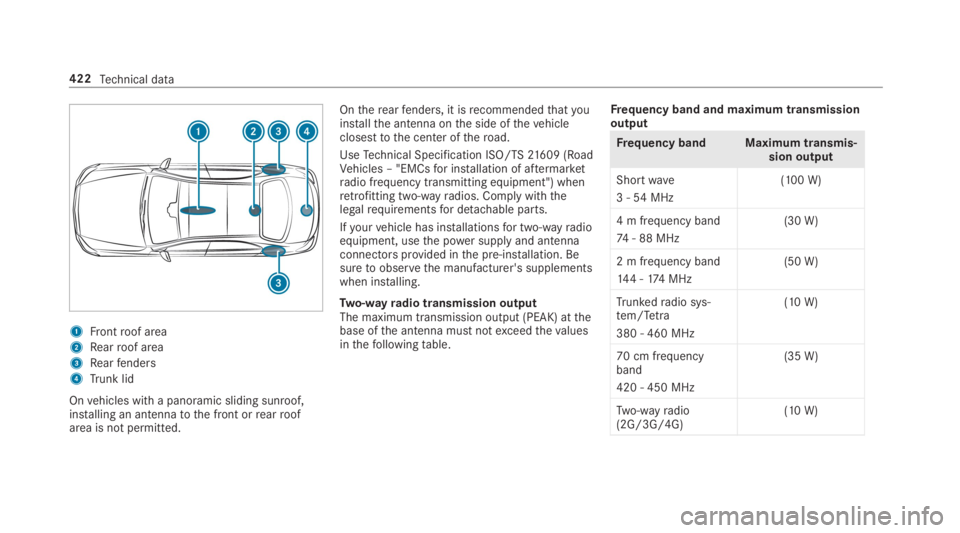
1Frontroof area
2Rearroof area
3Rearfenders
4Trunk lid
Onvehicles with a panoramic sliding sunroof,installing an antennatothe front orrearroofarea is not permitted.
Ontherearfenders, it isrecommendedthatyouinstallthe antenna onthe side ofthevehicleclosesttothe center oftheroad.
UseTechnical Specification ISO/TS21609 (RoadVehicles – "EMCsfor installation of aftermarketradio frequency transmitting equipment") whenretrofitting two-wayradios. Comply withthelegalrequirementsfor detachable parts.
Ifyourvehicle has installationsfor two-wayradioequipment, usethe power supplyand antennaconnectorsprovided inthe pre-installation. Besuretoobservethe manufacturer's supplementswhen installing.
Two-wayradio transmission outputThe maximum transmission output (PEAK) atthebase ofthe antenna must notexceedthevaluesinthefollowingtable.
Frequency band and maximum transmissionoutput
Frequency band Maximum transmis‐sion output
Shortwave
3 -54MHz
(100 W)
4 m frequency band
74- 88 MHz
(30 W)
2 m frequency band
144 -174 MHz
(50 W)
Trunkedradio sys‐tem/Tetra
380 - 460 MHz
(10 W)
70 cm frequencyband
420 - 450 MHz
(35 W)
Two-wayradio(2G/3G/4G)(10 W)
422Technical data
Page 425 of 534
Thefollowing devices can be used inthevehiclewithoutrestrictions:
RTwo-wayradios with a maximum transmis‐sion output of upto100 mW
RTwo-wayradios with transmitter frequenciesinthe 380 -410 MHz frequency band and amaximum transmission output of upto2 W(trunkedradio system/Tetra)
RMobile phones (2G/3G/4G)
There are norestrictions when positioningtheantenna onthe outside ofthevehicleforthefol‐lowing frequency bands:
RTrunkedradio system/Tetra
R70 cm frequency band
R2G/3G/4G
Vehicle identification plate, VIN and enginenumberoverview
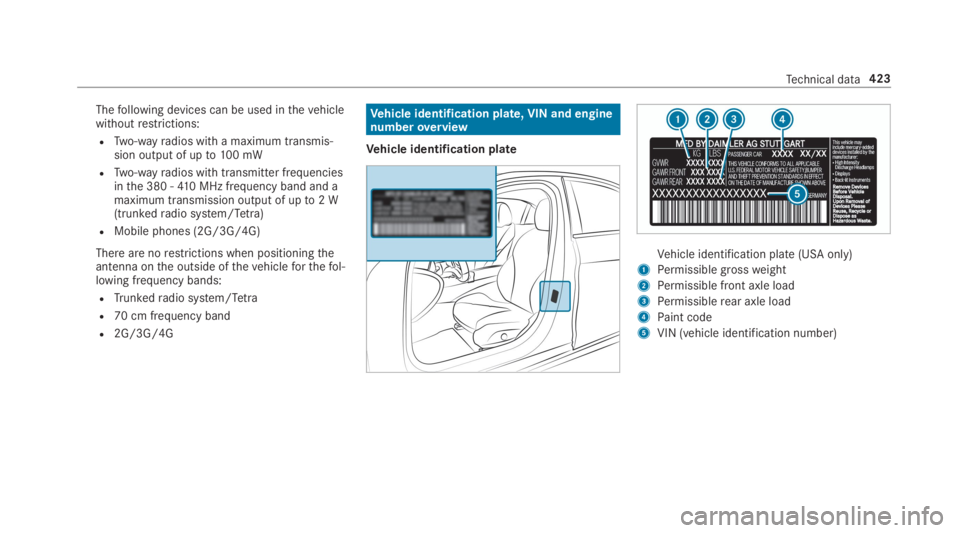
Vehicle identification plate
Vehicle identification plate (USA only)
1Permissiblegrossweight
2Permissible front axle load
3Permissiblerear axle load
4Paint code
5VIN (vehicle identification number)
Technical data423
Page 500 of 534
Calls.......................................................... 308Accepting ............................................ 308Activating functions during a call ........ 308Calls withseveral participants .............308Declining ............................................. 308Ending a call ........................................ 308Incoming call during anexisting call .... 309Making ................................................ 308Viatheoverhead control panel(Mercedes me connect) .......................319
Camerasee 360° CameraseeRear view camera
Carkeysee SmartKey
Carwashsee Care
Carwash (care)....................................... 359
Care..........................................................365Air-water duct ...................................... 358Automatic carwash ............................. 359Carpet .................................................365Decorativefoil .....................................362Display................................................ 365
EASY-PACK trunk box .......................... 365Exterior lighting ................................... 364Headliner ............................................. 365Mattefinish ......................................... 361Paintwork............................................ 361Plastic trim .......................................... 365Powerwasher ...................................... 359Realwood/trim elements ...................365Rear view camera ................................ 364Seat belts ............................................ 365Seat cover ........................................... 365Sensors ............................................... 364Tailpipes .............................................. 364Washingbyhand ................................. 360Wheels/rims ....................................... 364Windows.............................................. 364Wiper blades .......................................364
Cargo tie-downrings...............................109
Carpet (Care)...........................................365
Change of address....................................23
Change ofownership................................ 23
Changing a wheelPreparation ..........................................41 5Raisingthevehicle ...............................416
Changing bulbs........................................12 8Notes ...................................................12 8Overview .............................................12 9Reversing lights ...................................131Turnsignal lights (rear) ........................131
Changinggears........................................15 6Manually ..............................................156
Changing hub caps..................................416
Character entryOnthetouchpad .................................263Usingthe controller ............................. 262
ChargingBattery (vehicle) ..................................379
Child safety lockActivating/deactivating (multimediasystem) ............................................... 269Rear door ...............................................61Rear side windows................................. 62
Child seatAttaching (notes) ................................... 53Basic instructions ..................................48front-passenger seat (notes) ................. 59LATCH-type (ISOFIX) (installing) ............54Notes onrisks and dangers ...................49
498Index
Page 508 of 534
DYNAMICBODYCONTROLSuspension ..........................................19 6
Dynamic handling control system
see ESP®(ElectronicStability Program)
DYNAMIC SELECT....................................15 3Configuring drive program I .................15 3Displaying engine data ........................154Displayingvehicle data ........................154Drive program display ..........................15 3Drive programs ....................................15 3Function ..............................................15 3Operating (DYNAMIC SELECT switch).............................................................153Selectingthe drive program ................153Showing operationfeedback ...............15 3
E
E10............................................................ 426
Easy entryfeatureFunction/notes ....................................101Setting .................................................102
EasyexitfeatureFunction/notes ....................................101Setting .................................................102
EASY-PACKtrunk box...............................11 2Adjustingthe heighttoany position .....110Care .................................................... 365Installing/removing ..............................11 2
EBD (electronic brakeforce distribu‐tion)Function/notes ....................................175
ECO displayFunction ..............................................15 2Resetting ............................................. 233
ECOstart/stop function.........................15 0Automatic enginestart ........................15 0Automatic enginestop .........................150Method of operation ............................150Switching off/on .................................15 2
Electric parking brake.............................168Applying automatically ........................16 8Applying orreleasing manually ............16 9Emergency braking ..............................16 9Releasing automatically .......................168
ElectronicStability Program
see ESP®(ElectronicStability Program)
EmergencyFirst-aid kit (softsided) ....................... 369
Overview ofthe help functions ..............18Reflective safetyvest.......................... 368Removingthewarning triangle ............ 369Setting upthewarning triangle ...........369
Emergency braking.................................16 9
Emergency brakingseeBAS (Brake AssistSystem)
Emergency call systemsee Mercedes-Benz emergency call system
Emergency enginestart......................... 386
EmergencykeyLocking a door .......................................72Unlocking a door ...................................72
Emergency operation modeStartingthevehicle .............................14 5
EmergencyreleaseTrunk lid (from inside) ............................78
EmergencyTensioning DevicesActivation .............................................. 34
ENERGIZING comfortOverview of programs .........................275Startingthe program ...........................276
506Index
Page 510 of 534
Foil coveringRadar sensors ......................................171
FragranceseePerfume atomizer
Free software.............................................31
FrequenciesTwo-wayradio ...................................... 422
Frequency bandDialing (on-board computer) ................ 235
Front airbag (driver, front passenger).....40
Front passenger seatsee Seat
Front wheel arch.....................................12 9Installing/removingthe cover .............129
Front wheel archcoverInstalling/removing .............................12 9
Fuel...........................................................427Additives .............................................427E10 ...................................................... 426Fuelreserve......................................... 427Gasoline .............................................. 426Quality (gasoline) ................................ 426Refueling .............................................15 9
sulfur content ...................................... 426Tank content ....................................... 427
Fuel consumptionOn-board computer .............................232
Function seatsee Door control panel
Fuses........................................................ 386Beforereplacing a fuse ........................ 386Dashboard fuse box ............................ 388Fuse assignment diagram ...................386Fuse box inthe engine compartment .. 387Fuse box inthe front-passengerfoot‐well ...................................................... 388Fuse box inthe trunk ........................... 388Notes .................................................. 386
FusesseeFuses
G
Garage door openerClearingthe memory ...........................16 6Opening or closingthe door ................166Programming buttons ..........................16 3Radio equipment approval numbers ....16 6
Resolving problems .............................16 5Synchronizingtherolling code .............164
Gasstation searchStarting automatic search................... 281Switching automatic search on/off ..... 287Using automatic search....................... 287
Gasoline................................................... 426
Gearshiftrecommendation....................157
Genuine parts............................................21
Glide mode...............................................157
GloveboxLocking/unlocking ..............................105
H
Handbrakesee Electric parking brake
Handlingcharacteristics (unusual)....... 390
HANDS-FREEACCESS................................76
Hazardwarning lights.............................125
HeadrestraintFront (adjusting mechanically) .............. 96Rear (installing/removing) .....................97
508Index
Page 513 of 534
Language.................................................269Notes .................................................. 269Setting .................................................269
LATCH-type (ISOFIX)child seat secur‐ing systemInstalling ................................................54
Level control systemsee AIRMATIC
Light switchOverview .............................................122
Lightingsee Interior lightingsee Lights
Lights........................................................12 2Adaptive Highbeam Assist ...................125Adjustingthe instrument lighting ......... 231Automatic driving lights .......................12 3Changing bulbs ....................................12 8Combination switch.............................124Cornering light function .......................12 5Hazardwarning lights ..........................12 5Headlamprange ..................................12 3High beam ...........................................124High-beamflasher ...............................124
Light switch .........................................122Low-beam headlamps ..........................12 2Parking lights .......................................122Rearfog lamp ......................................12 2Responsibilityfor lighting systems .......122Settingtheexterior lighting switch-off delay time .......................................127Settingthe surround lighting ...............127Standing lights .....................................122Turnsignals .........................................124
LimitedWarrantyVehicle ...................................................27
LiveTraffic InformationDisplaying subscription information .... 294Displayingthe traffic map ...................294Displaying traffic incidents .................. 295Extending a subscription ..................... 294Issuing hazard alerts ........................... 295
Load index (tires).................................... 406
Load-bearing capacity (tires)................. 406
Loading.....................................................109Bag hook .............................................109Cargo tie-downrings ...........................109Definitions ...........................................409
Notes ...................................................104Roof carrier ..........................................11 3Stowage space underthe trunkfloor ...11 3
Loading guidelines..................................104
Loading information table...................... 399
LoadsSecuring ..............................................104
Locator lightingsee Surround lighting
Locking/unlockingActivating/deactivatingthe auto‐matic lockingfeature .............................71Emergencykey ......................................72KEYLESS-GO .......................................... 70Unlocking and opening doors fromthe inside ..............................................69
Low-beam headlampsReplacing bulbs ...................................130Switching on/off .................................12 2
Lubricant additivesseeAdditives
LuggageLuggage net .........................................109
Index511
Page 517 of 534
O
Occupant safetyPets inthevehicle ................................. 62
Occupant safetysee AirbagseeAutomatic front passenger frontairbag shutoff
see PRE-SAFE®(anticipatory occu‐pant protection)
see PRE-SAFE®PLUS (anticipatoryoccupant protection plus)seeRestraint systemsee Seat belt
OdometerseeTotal distance
Oilsee Engine oil
On-board computer................................. 228Assistance graphic menu ..................... 231Displayingthe service due date ........... 351Head-up Display menu ........................ 237Media menu ........................................235Menu designs ...................................... 229Menuoverview .................................... 228
Multifunction display ...........................230Navigation system menu ..................... 233Operating ............................................ 228Radio menu .........................................235Service menu ...................................... 231Telephone menu .................................. 236Trip menu ............................................ 232
On-boarddiagnostics interfacesee Diagnostics connection
Open-source software...............................31
Openingthe trunk lid usingyourfootHANDS-FREEACCESS ...........................76
OperatingfluidsAdditives (fuel) .................................... 427Brakefluid ...........................................428Coolant (engine) .................................. 429Engine oil ............................................. 427Fuel (gasoline) .....................................426Notes .................................................. 425Refrigerant (air conditioning system) ... 430Windshieldwasherfluid ...................... 429
Operating safetyDeclaration of conformity (wirelessvehicle components) ............................. 25
Information ............................................24
Operating systemsee On-board computer
Operator's ManualVehicle equipment ................................. 22
Operator's Manual (digital)......................20
Overhead control panelMaking calls (Mercedes me connect) ..319Overview ................................................14
P
Paint code................................................ 423
Paintwork (cleaning instructions).......... 361
Panic alarm................................................ 65Activating/deactivating ......................... 65
Panoramic sliding sunroofsee Sliding sunroof
ParkpositionInserting ..............................................15 5Selecting automatically.......................15 5
Parkingsee Electric parking brake
Index515
Page 524 of 534
Buttons ................................................ 227Operatingthe memory function ..........102Steering wheel heater ..........................101
Steering wheel heaterSwitching on/off .................................101
Steering wheel paddle shifters..............15 6
Stowage areassee LoadingseeStowage compartment
Stowage compartment...........................105Armrest ...............................................105Center console ....................................105Door ....................................................105Eyeglasses compartment ....................106Glovebox .............................................105Rear armrest .......................................106
Stowage compartmentssee LoadingseeStowage compartment
Stowage space underthe trunk floor....11 3
Sulfur content......................................... 426
Sun visorOperating .............................................137
Surround lighting....................................127Setting .................................................127
SurroundViewsee 360° Camera
SuspensionDampingcharacteristics ......................19 6DYNAMICBODYCONTROL ..................19 6Settingthe suspension level (AIR‐MATIC) .................................................198
Suspensionsee AIRMATIC
Suspension level (AIRMATIC)Setting .................................................198
Switch-off delay timeExterior ................................................127Interior .................................................12 8
Switchingthe surround sound on/off
Burmester®surround sound system ... 350
Synchronization functionActivating/deactivating (multimediasystem) ................................................141Switching on/off (control panel) .........14 0
System settingsActivating/deactivating PIN protec‐tion ......................................................270Reset function (multimedia system) .....274Settingthe distance unit ..................... 269Settingthe time and date automati‐cally ..................................................... 264Settingthe time zone .......................... 264Settingthe time/dateformat .............. 265Switching transmission ofthevehicleposition on/off .................................... 265
System settings
see Bluetooth®
see Data import/exportsee Languagesee Software updateseeWi-Fi
T
Tailpipes (Care)........................................ 364
Tank contentFuel ..................................................... 427Reserve(fuel) ...................................... 427
522Index
Page 528 of 534
Traffic mapsee Map
Traffic Sign Assist....................................217Function/notes ....................................217Setting .................................................218System limitations ...............................217
Transferredvehicle dataAndroidAuto........................................318Apple CarPlay™ ...................................318
Transmission (problem)..........................15 8
Transmission position display................154
TransportingVehicle ................................................ 384
Treadweargrade..................................... 403
Trim element (Care)................................ 365
TripMenu (on-board computer) .................. 232
Trip computerDisplaying ............................................ 232Resetting ............................................. 233
Trip distance............................................ 232Displaying ............................................ 232
Resetting ............................................. 233
Trip odometerseeTrip distance
Trunk boxsee EASY-PACK trunk box
Trunk lidActivating/deactivatingthetailgateopening heightrestriction ......................78Closing ...................................................74Emergencyrelease (from inside) ...........78HANDS-FREEACCESS ...........................76Locking separately................................77Opening .................................................73Opening dimensions ............................431
Turnsignal indicatorseeTurnsignals
Turnsignal lightsChanging bulbs (front) .........................130
Turnsignals..............................................124Changing bulbs (rear) ...........................131Switching on/off .................................124
Two phone modesee Secondtelephone
Two-wayradiosFrequencies ......................................... 422Notes on installation ............................ 421Transmission output (maximum) .........422
U
Units of measurementSetting .................................................269
Unlocking setting...................................... 65
USB devicesConnecting .......................................... 333
User profile..............................................271Creating ...............................................271Importing/exporting ............................271Options ................................................272Setting .................................................271
Usingthetelephonesee Calls
V
Vehicle......................................................14 5Activating/deactivatingstandbymode ...................................................170Correct use ........................................... 26
526Index