ECO mode MERCEDES-BENZ C-CLASS CABRIOLET 2016 User Guide
[x] Cancel search | Manufacturer: MERCEDES-BENZ, Model Year: 2016, Model line: C-CLASS CABRIOLET, Model: MERCEDES-BENZ C-CLASS CABRIOLET 2016Pages: 377, PDF Size: 6.9 MB
Page 67 of 377

Weight category Front-passenger seat Rear seat
Front-
passenger
front airbag enabled Front-
passenger
front airbag
disabled 1 Left, right
0
up to 10 kg X U, L U, L
0+
up to 13 kg X U, L U, L
I
9 kg to 18 kg UF, L U, L U, L
II
15 kg to 25 kg U, L U, L U, L
III
22 kg to 36 kg U, L U, L U, L
Suitability of the seats for attaching an ISOFIX child restraint system
If you use a baby car seat of category 0 or 0+ or a rearward-facing child restraint system of category
I on a rear seat, you must adjust the driver's or front-passenger seat so that the seat does not touch the child restraint system.
In addition, always observe the notes under "Child restraint system" (Y page 60) and the child
restraint system manufacturer's installation instructions.
Make sure that the child's feet do not touch the front seat. If necessary, move the front seat forwards slightly.
For certain child restraint systems in weight categories II or III, this can mean that the area of use
is restricted. The maximum size setting of the child restraint system may not be possible due to
possible contact with the roof.
When the soft top is opened and closed, child restraint systems of weight categories II or III must be removed or the head restraint of the child restraint system must be set to the lowest position.
Legend for the table:
XI SOFIX position that is not suitable for ISOFIX child restraint systems in this weight category
and/or size category.
IUF Suitable for forward-facing ISOFIX child seat securing systems that belong to the "Universal" category and are approved for use in this weight category.
IL Suitable for ISOFIX child restraint systems as recommended; see the "Recommended child restraint systems" table (Y page 65).
The manufacturer will also recommend a suitable ISOFIX child restraint system. For this, your
vehicle and the seat must be listed in the child restraint system manufacturer's model list. For more information, contact the child restraint system manufacturer or visit the manufacturer'swebsite. Weight category Size cate-
gory Equipment Rear seat,
right Rear seat, left
Carry cot
F ISO/L1 X X
G ISO/L2 X X
0
up to 10 kg up to approx.
6 months E ISO/R1 IL IL
1
The vehicle is equipped with an automatic front-passenger front airbag deactivation system. The PASSENGER
AIR BAG OFF indicator lamp must be lit. 64
Children in the vehicleSafety
Page 114 of 377

Automatic anti-dazzle mirrors
G
WARNING
Electrolyte may escape if the glass of an auto- matic anti-dazzle mirror breaks. Electrolyte is
harmful and causes irritation. It must not
come into contact with your skin, eyes, res-
piratory organs or clothing or be swallowed.
There is a risk of injury.
If you come into contact with electrolyte,
observe the following:
R immediately rinse off electrolyte from your
skin with water.
R immediately and thoroughly rinse electro-
lyte out of eyes using clean water.
R if electrolyte is swallowed, immediately
rinse out your mouth thoroughly. Do not
induce vomiting.
R if electrolyte comes into contact with skin
or eyes or is swallowed, seek medical atten-
tion immediately.
R immediately change out of clothing that has
been in contact with electrolyte.
R if an allergic reaction occurs, seek medical
attention immediately.
The exterior mirror on the driver's side and the
rear-view mirror automatically go into anti-daz-
zle mode if:
R the ignition is switched on
R incident light from headlamps strikes the sen-
sor in the rear-view mirror
The mirrors do not dip if reverse gear is engaged or if the interior lighting is switched on. Parking position for the exterior mir-
ror on the front-passenger side
Storing the parking position You can set the front-passenger-side exterior
mirror such that you can see the rear wheel on
that side as soon as you engage reverse gear.
You can store this position. Storing using reverse gear
:
Memory button M
; Button for the exterior mirror setting
= Button for the exterior mirror on the front-
passenger side
? Button for the exterior mirror on the driver's
side
X Start the engine.
X Press button =.
X Engage reverse gear.
The exterior mirror on the front-passenger
side moves to the preset parking position.
X Use button ;to adjust the exterior mirror to
a position that allows you to see the rear
wheel and the kerb.
The parking position is stored.
i If you shift the gears to another position, the
exterior mirror on the front-passenger side
returns to the driving position.
Storing using the memory button You can store the parking position of the front-
passenger-side exterior mirror using memory
button M:. Reverse gear must not be
engaged.
X Turn the key to position 2in the ignition lock
(Y page 133).
X Press button =.
X Use button ;to adjust the exterior mirror to
a position that allows you to see the rear
wheel and the kerb.
X Press memory button M: and one of the
arrows on button ;within three seconds.
The parking position is stored if the exterior
mirror does not move. Mirrors
111Seats, steering wheel and mirrors Z
Page 117 of 377

Exterior lighting
General notes
For reasons of safety, Mercedes-Benz recom-
mends that you drive with lights switched on
even during the daytime. In some countries,
operation of the headlamps varies due to legal
requirements and voluntary recommendations. Driving abroad
Vehicles with halogen or static LED
headlamps It is not necessary to switch your headlamps to
symmetrical dipped beam when driving in coun- tries where vehicles are driven on the opposite
side of the road to the country in which the vehi-
cle is registered. Legal requirements are fulfilled
without switching the headlamps to symmetri-
cal dipped beam.
Vehicles with Intelligent Light System It is necessary to switch your headlamps to sym-
metrical dipped beam before crossing the bor-
der into countries where vehicles are driven on
the opposite side of the road. This prevents
oncoming traffic from being dazzled.
You can switch the headlamps to symmetrical or
asymmetrical dipped beam using the "dipped-
beam headlamps for driving on the right/left"
function via the on-board computer
(Y page 236). This must be switched back to
asymmetrical dipped beam upon your return.
Symmetrical lights do not illuminate as large an
area of the edge of the carriageway. In this case,
"highway mode" and "extended-range fog
lamps" are not available. Setting the exterior lighting
Setting options Exterior lighting can be set using the:
R light switch (Y page 114)
R combination switch (Y page 116)
R headlamp range control for vehicles with hal-
ogen headlamps (Y page 116)
R on-board computer (Y page 235) Light switch Operation
1
W
Left-hand parking lamps
2 X
Right-hand parking lamps
3 T
Side lamps, licence plate and instru-
ment cluster lighting
4 Ã
Automatic headlamp mode, controlled
by the light sensor
5 L
Dipped-beam/main-beam headlamps
B R
Rear fog lamp
If you hear a warning tone when you leave the
vehicle, the lights may still be switched on.
X Turn the light switch to the Ãposition.
The exterior lighting, except the side/parking
lamps, switches off automatically if you: R remove the key from the ignition lock
R open the driver's door with the key in posi-
tion 0in the ignition lock
Automatic headlamp mode G
WARNING
When the light switch is set to Ã, the
dipped-beam headlamps may not be switched on automatically if there is fog, snow or othercauses of poor visibility due to the weather
conditions such as spray. There is a risk of an
accident.
In such situations, turn the light switch to
L.
The automatic headlamp feature is only an aid.
The driver is responsible for the vehicle lighting at all times.
à is the preferred light switch position. 114
Exterior lightingLights and windscreen wipers
Page 120 of 377
combination switch, only the indicator lamp
on the corresponding side of the vehicle will
flash.
The hazard warning lamps switch on automati-
cally if:
R an airbag has been triggered or
R the vehicle decelerates rapidly from a speed
of above 70 km/h and comes to a standstill
The hazard warning lamps switch off automati-
cally if the vehicle reaches a speed of above
10 km/h again after a full brake application.
The hazard warning lamps continue to operate
even if the ignition is switched off. Intelligent Light System
General notes The Intelligent Light System is a system that
adjusts the headlamps to suit the prevailing
driving and weather conditions. It offers
advanced functions for improved illumination of
the road surface, e.g. depending on the vehicle
speed or weather conditions. The system
includes the active light function, cornering light
function, motorway mode and extended-range
fog lamps. The system is active only when it is
dark.
You can activate/deactivate the Intelligent Intelligent
Light System
Light System function using the on-board
computer (Y page 235).
Active light function The active light function is a system that moves
the headlamps according to the steering move- ments of the front wheels. In this way, relevant
areas remain illuminated while you are driving.
This allows you to recognise pedestrians,
cyclists and animals sooner.
Active: when the lights are switched on.
Cornering light function The cornering light function improves the illu-
mination of the road over a wide angle in the
direction you are turning, enabling better visi-
bility in tight bends, for example. It can be acti-
vated only when the dipped-beam headlamps
are switched on. Active:
R if you are driving at speeds below 40 km/h
and switch on the turn signal or turn the steer-
ing wheel
R if you are driving at speeds between 40 km/h
and 70 km/h and turn the steering wheel
The cornering light function may remain lit for a short time, but is automatically switched off
after no more than three minutes.
Motorway mode Motorway mode increases the range of the
beam.
Active:if you are driving at a speed above
110 km/h and do not make any large steering
movements for at least 1000 m or if you are
driving at a speed above 130 km/h.
Not active: if you are driving at speeds below
80 km/h following activation.
Extended range fog lamps The extended-range fog lamps reduce the glare
experienced by the driver and improve the illu-
mination of the edge of the carriageway.
Active: if you are driving at speeds below
70 km/h and you switch on the rear fog lamp.
Not active: if, following activation, you are driv-
ing at speeds above 100 km/h or if you switch
off the rear fog lamp. Adaptive Highbeam Assist Plus
General notes With Adaptive Highbeam Assist Plus, you can
automatically switch between dipped-beam,
partial main-beam and main-beam headlamps.
Partial main-beam illumination is a form of illu-
mination whereby the main beam is directed
past other road users. Other road users are kept
out of the main beam. This prevents glare. If
there is a vehicle in front, for example, the main-
beam headlamps illuminate the areas to its right
and left, and the vehicle in front is illuminated by the dipped-beam headlamps.
The system automatically adapts the dipped-
beam headlamp range depending on the dis-
tance to the other vehicle. Once the system no
longer detects any other vehicles, it switches on the main-beam headlamps again. Exterior lighting
117Lights andwindscreen wipers Z
Page 128 of 377
Overview of climate control systems
General notes
The THERMATIC automatic climate control is
available with one or two climate control zones. As dual-zone automatic climate control, the
temperature can be regulated separately on the
driver's side and front-passenger side.
Observe the settings recommended on the fol-
lowing pages. Otherwise, the windows could
mist up.
To prevent the windows from misting up:
R switch off climate control only briefly
R activate air-recirculation mode only briefly
R switch on "Cooling with dehumidification"
R activate the "Windscreen demisting" function
briefly, if required
Climate control regulates the temperature and
air humidity in the vehicle interior. The interior
filter cleans the air, thus improving the interior
climate.
The "Cooling with dehumidification" function is
available only when the engine is running. Opti- mum climate control is achieved only with the
side windows and roof closed.
The integrated filter filters out most particles of
dust and soot and completely filters out pollen.
It also reduces gaseous pollutants and odours. A
clogged filter reduces the amount of air supplied to the vehicle interior. For this reason, you
should always observe the interval for replacing
the filter, which is specified in the Service Book-
let. As this depends on environmental condi-
tions, e.g. heavy air pollution, the interval may
be shorter than stated in the Service Booklet.
i Ventilate the vehicle for a brief period during
warm weather, e.g. using the convenience
opening feature (Y page 95). This will speed
up the cooling process and the desired inte-
rior temperature will be reached more
quickly.
i It is possible that the blower may be activa-
ted automatically 60 minutes after the key
has been removed depending on various fac-
tors, e.g. the outside temperature. The vehi-
cle is then ventilated for 30 minutes to dry the
automatic climate control. Control panel for THERMATIC automatic climate control
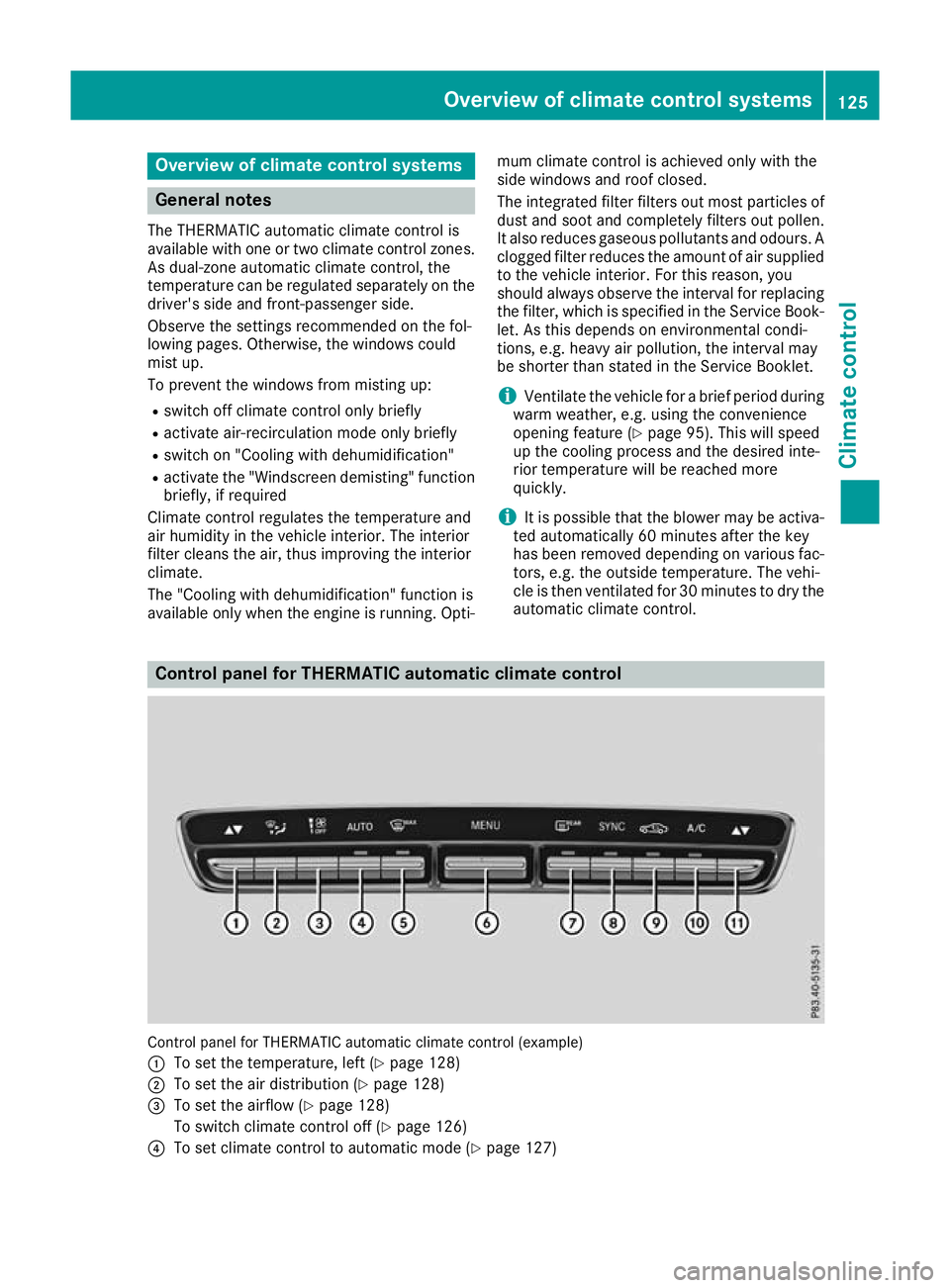
Control panel for THERMATIC automatic climate control (example)
: To set the temperature, left (Y page 128)
; To set the air distribution (Y page 128)
= To set the airflow (Y page 128)
To switch climate control off (Y page 126)
? To set climate control to automatic mode (Y page 127) Overview of climate control systems
125Climate control
Page 129 of 377
A
To demist the windscreen (Y page 128)
B To call up the climate control menu of the multimedia system (Y page 288)
C To switch the rear window heating on/off (Y page 129)
D To activate/deactivate synchronisation (Y page 128)
E To activate/deactivate air-recirculation mode manually (Y page 129)
F To activate/deactivate cooling with dehumidification (Y page 127)
G To set the temperature, right (Y page 128)Notes on using automatic climate
control
Optimum use of automatic climate con-
trol The following contains notes and recommenda-
tions on how best to use THERMATIC automatic
climate control.
R Activate climate control using the Ã
rocker switch. The indicator lamp above the
à rocker switch lights up. The "Cooling
with dehumidification" function is activated in
automatic mode.
R Set the temperature to 22 †.
R Use the "Windscreen demisting" function only
briefly until the windscreen is clear again.
R Use the "Air-recirculation mode" function only
briefly, e.g. if there are unpleasant outside
odours or when in a tunnel. The windows
could otherwise mist up as no fresh air is
drawn into the vehicle in air-recirculation
mode.
DYNAMIC SELECT switch (except
Mercedes-AMG vehicles) You can choose between various drive programs
with the DYNAMIC SELECT switch:
R manual transmission (Y page 141)
R automatic transmission (Y page 141)
If you have selected drive program E:
R during heating, the electrical heater booster
is deactivated and heat output is reduced as a
result
R the rear window heating running time is
reduced If you have selected drive program
C,Sor S+,
the current climate settings are maintained.
ECO start/stop function During automatic engine switch-off, the climate
control operates only at a reduced capacity. If
you require the full climate control output, you
can switch off the ECO start/stop function by
pressing the ECO button (Y page 139). Operating the climate control system
Switching the climate control on/off
General notes When climate control is switched off, the air
supply and air circulation are also switched off.
The windows could mist up. Therefore, switch
off climate control only briefly.
Switch on climate control primarily using the
à rocker switch (Y page 127).
Activating/deactivating X
Turn the key to position 2in the ignition lock
(Y page 133).
X To switch on: set the airflow to level 1or
higher using the Hrocker switch.
X To switch off: set the airflow to level 0using
the H rocker switch. 126
Operating the climate control systemClimate control
Page 133 of 377

Activating/deactivating
X
Turn the key to position 2in the ignition lock
(Y page 133).
X To activate: press thegrocker switch up
or down.
The indicator lamp above the grocker
switch lights up.
Air-recirculation mode is activated automati-
cally: R at high outside temperatures
R in tunnels (vehicles with a navigation system
only)
The indicator lamp above the grocker
switch is not lit when automatic air-recirculation
mode is activated. Outside air is added after
approximately 30 minutes.
X To deactivate: press thegrocker switch
up or down.
The indicator lamp above the grocker
switch goes out.
Air-recirculation mode is deactivated automati-
cally:
R after approximately five minutes at outside
temperatures below approximately 5 †
R after approximately five minutes if "Cooling
with air dehumidification" is deactivated
R after approximately 30 minutes at outside
temperatures above approximately 5 †if the
"Cooling with air dehumidification" function is
activated Opening or closing using the air-recir-
culation button G
WARNING
During opening, body parts could be drawn in
or become trapped between the side window and the door frame. There is a risk of injury.
Monitor the entire opening procedure. When
opening, make sure that nobody is touching
the side window. If somebody becomes trap-
ped, release the switch immediately to inter-
rupt the opening procedure. G
WARNING
During closing, body parts could be drawn in
or become trapped between the side window and the door frame. There is a risk of injury.
Monitor the entire closing procedure. When
closing, make sure that no body parts are in
the closing area. If somebody becomes trap-
ped, release the switch immediately to inter-
rupt the closing procedure.
X To close: Press and hold the grocker
switch up or down until the side windows
close.
The indicator lamp above the grocker
switch lights up. Air-recirculation mode is
activated.
X To open: Press and hold the grocker
switch up or down until the side windows
open.
The indicator lamp above the grocker
switch goes out. Air-recirculation mode is
deactivated. Ionisation
Ionisation is used to purify and freshen the air in the vehicle interior, which is conducive to a
pleasant climate.
The ionisation of the interior air is odourless and
cannot, directly, be perceived in the vehicle inte- rior.
You can switch ionisation on or off using the
multimedia system (Y page 288).
Ionisation can only be operated when the auto-
matic climate control is switched on. The side air vent on the driver's side must be open. Air vents
Important safety notes
G
WARNING
Very hot or very cold air can flow from the air vents. This could result in burns or frostbite in the immediate vicinity of the air vents. There
is a risk of injury.
Make sure that all vehicle occupants always
maintain a sufficient distance to the air out- 130
Air ventsClimate control
Page 137 of 377

tion operates independently of the ECO start/
stop automatic engine switch-off function.
Key positions with the Start/Stop button :
Start/Stop button
; Ignition lock
When you switch on the ignition, all the indicator lamps on the instrument cluster light up. For
warning and indicator lamps, see (Y page 273).
If Start/Stop button :has not yet been
pressed, this is the same as the key having been removed.
X To switch on the power supply: press
Start/Stop button :once.
The power supply is switched on. You can now
activate the windscreen wipers, for example.
The power supply is switched off again if:
R the driver's door is opened and
R you press Start/Stop button :twice when in
this position
X To switch on the ignition: press Start/Stop
button :twice.
The ignition is switched on.
The ignition is switched off again if:
R you do not start the engine from this position
within 15 minutes
R you press Start/Stop button :once when in
this position
The power supply is switched off again if:
R the driver's door is opened and
R you press Start/Stop button :once when in
this position
Removing the Start/Stop button
You can remove the Start/Stop button from the
ignition lock and start the vehicle as normal
using the key. It is possible to switch between Start/Stop but-
ton mode and key operation only when the
transmission is in position j.
X Remove Start/Stop button :from ignition
lock ;.
You do not have to remove the Start/Stop but-
ton from the ignition lock when you leave the
vehicle. You should, however, always take the
key with you when leaving the vehicle. As long as
the key is in the vehicle:
R the vehicle can be started using the Start/
Stop button
R the electrically powered equipment can be
operated Starting the vehicle
Important safety notes G
WARNING
If children are left unsupervised in the vehicle, they could:
R open doors, thereby endangering other per-
sons or road users
R get out and be struck by oncoming traffic
R operate vehicle equipment and become
trapped, for example
In addition, the children could also set the
vehicle in motion, for example, if they:
R release the parking brake
R shift the automatic transmission out of park
position P or shift manual transmission into
neutral
R start the engine
There is a risk of an accident and injury.
When leaving the vehicle, always take the key with you and lock the vehicle. Never leave
children and animals unattended in the vehi-
cle. Keep the keys out of the reach of children. G
WARNING
Combustion engines emit poisonous exhaust
gases such as carbon monoxide. Inhaling
these exhaust gases leads to poisoning. There is a risk of fatal injury. Therefore never leave 134
DrivingDriving an
d parking
Page 138 of 377

the engine running in enclosed spaces with-
out sufficient ventilation. G
WARNING
Flammable materials introduced through
environmental influence or by animals can
ignite if in contact with the exhaust system or parts of the engine that heat up. There is a risk
of fire.
Carry out regular checks to make sure that
there are no flammable foreign materials in
the engine compartment or in the exhaust
system.
General notes Vehicles with a petrol engine:
the catalytic
converter is preheated for up to 30 seconds
after a cold start. The sound of the engine may
change during this time.
Manual transmission X
Depress the brake pedal and keep it
depressed.
X Fully depress the clutch pedal.
X Engage neutral i.
Automatic transmission X
Shift the transmission to position j
(Y page 145).
The transmission position indicator on the
multifunction display shows j
(Y page 146).
i You can start the engine in transmission
position jand i.
Starting procedure using the key To start the engine using the key instead of the
Start/Stop button, pull the Start/Stop button
out of the ignition lock.
X To start a diesel engine: turn the key to
position 2in the ignition lock (Y page 133).
The % preglow indicator lamp on the
instrument cluster lights up.
X Turn the key to position 3in the ignition lock
(Y page 133) and release it as soon as the
engine is running. i
Vehicles with a diesel engine:
you can
start the engine without preglow if the engine
is warm.
If the engine will not start:
X Remove the key from the ignition lock.
X Reinsert the key in the ignition lock after wait-
ing for a short period.
X Turn the key to position 2in the ignition lock
(Y page 133).
The indicator lamps on the instrument cluster
light up (Y page 273).
X Turn the key to position 3in the ignition lock
(Y page 133) and release it as soon as the
engine is running.
Starting procedure using the Start/
Stop button The Start/Stop button is available only on vehi-
cles with KEYLESS-GO or the KEYLESS-GO start
function.
The Start/Stop button can be used to start the
vehicle manually without inserting the key in the ignition lock. The key must be in the vehicle and
the Start/Stop button must be inserted in the
ignition lock. This mode for starting the engine
manually operates independently of the ECO
start/stop automatic engine start function.
You can start the engine if a valid key is in the
vehicle. Switch off the engine and always take
the key with you when leaving the vehicle, even
if you leave it for only a short time. Observe the important safety notes.
X Depress the brake pedal and keep it
depressed.
X Press the Start/Stop button once
(Y page 133).
Vehicles with a petrol engine: the engine
starts.
Vehicles with a diesel engine: preglow is
activated and the engine starts. Pulling away
General notes G
WARNING
Vehicles with automatic transmission: Driving
135Driving an d parking
Z
Page 140 of 377
ECO start/stop function
Introduction The ECO start/stop function switches the
engine off automatically if the vehicle is stopped
under certain conditions.
When the vehicle pulls away again, the engine
starts automatically. The ECO start/stop func-
tion thereby helps you to reduce the fuel con-
sumption and emissions of your vehicle.
Important safety notes G
WARNING
If the engine is switched off automatically and you exit the vehicle, the engine is restarted
automatically. The vehicle may begin moving. There is a risk of accident and injury.
If you wish to exit the vehicle, always turn off
the ignition and secure the vehicle against
rolling away.
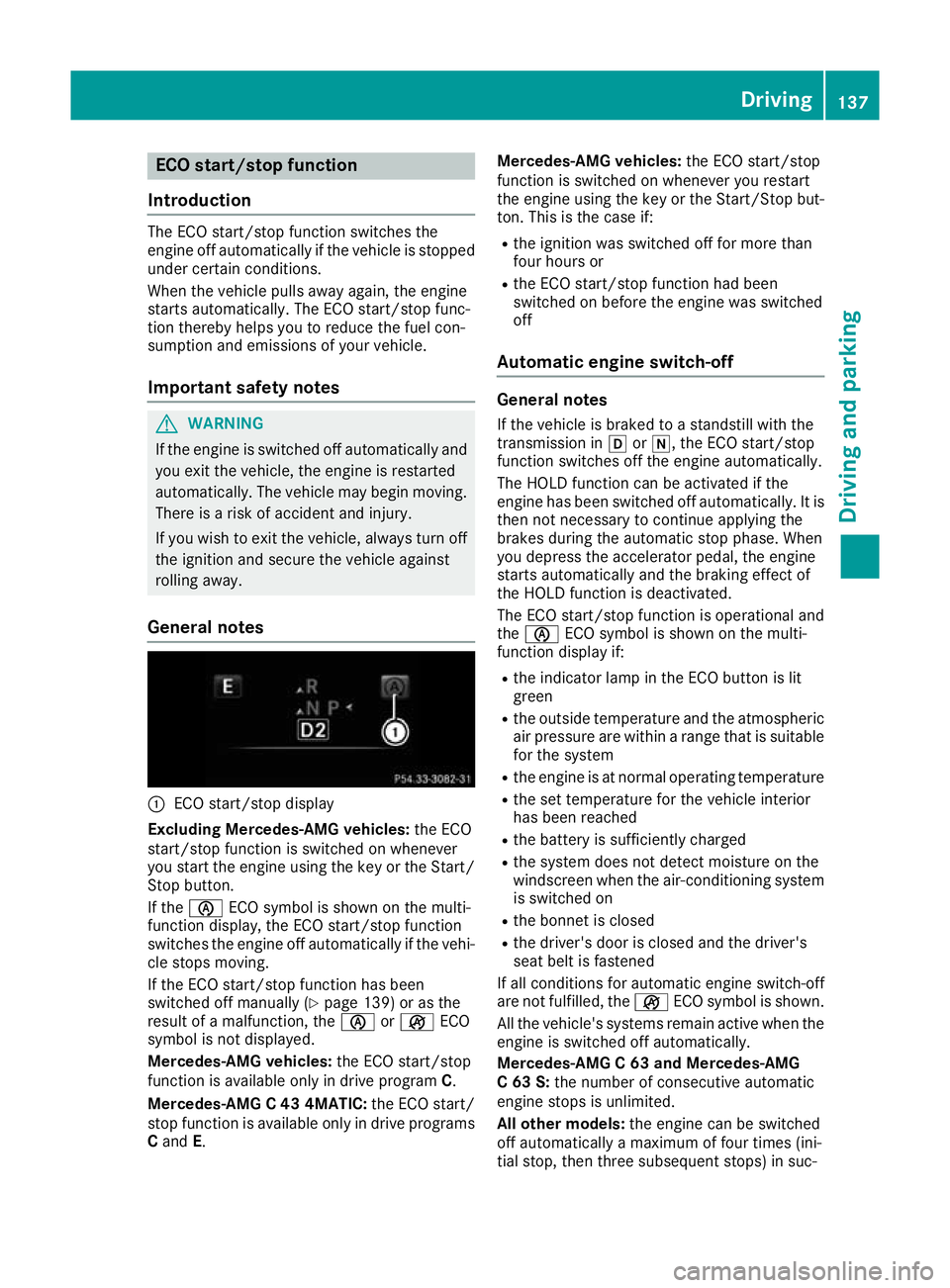
General notes :
ECO start/stop display
Excluding Mercedes-AMG vehicles: the ECO
start/stop function is switched on whenever
you start the engine using the key or the Start/ Stop button.
If the è ECO symbol is shown on the multi-
function display, the ECO start/stop function
switches the engine off automatically if the vehi-
cle stops moving.
If the ECO start/stop function has been
switched off manually (Y page 139) or as the
result of a malfunction, the èorç ECO
symbol is not displayed.
Mercedes-AMG vehicles: the ECO start/stop
function is available only in drive program C.
Mercedes-AMG C 43 4MATIC: the ECO start/
stop function is available only in drive programs
C and E. Mercedes-AMG vehicles:
the ECO start/stop
function is switched on whenever you restart
the engine using the key or the Start/Stop but- ton. This is the case if:
R the ignition was switched off for more than
four hours or
R the ECO start/stop function had been
switched on before the engine was switched
off
Automatic engine switch-off General notes
If the vehicle is braked to a standstill with the
transmission in hori, the ECO start/stop
function switches off the engine automatically.
The HOLD function can be activated if the
engine has been switched off automatically. It is then not necessary to continue applying the
brakes during the automatic stop phase. When
you depress the accelerator pedal, the engine
starts automatically and the braking effect of
the HOLD function is deactivated.
The ECO start/stop function is operational and
the è ECO symbol is shown on the multi-
function display if:
R the indicator lamp in the ECO button is lit
green
R the outside temperature and the atmospheric
air pressure are within a range that is suitable for the system
R the engine is at normal operating temperature
R the set temperature for the vehicle interior
has been reached
R the battery is sufficiently charged
R the system does not detect moisture on the
windscreen when the air-conditioning system
is switched on
R the bonnet is closed
R the driver's door is closed and the driver's
seat belt is fastened
If all conditions for automatic engine switch-off
are not fulfilled, the çECO symbol is shown.
All the vehicle's systems remain active when the engine is switched off automatically.
Mercedes-AMG C 63 and Mercedes-AMG
C 63 S: the number of consecutive automatic
engine stops is unlimited.
All other models: the engine can be switched
off automatically a maximum of four times (ini-
tial stop, then three subsequent stops) in suc- Driving
137Driving and parking Z