climate settings MERCEDES-BENZ C-CLASS CABRIOLET 2016 User Guide
[x] Cancel search | Manufacturer: MERCEDES-BENZ, Model Year: 2016, Model line: C-CLASS CABRIOLET, Model: MERCEDES-BENZ C-CLASS CABRIOLET 2016Pages: 377, PDF Size: 6.9 MB
Page 144 of 377
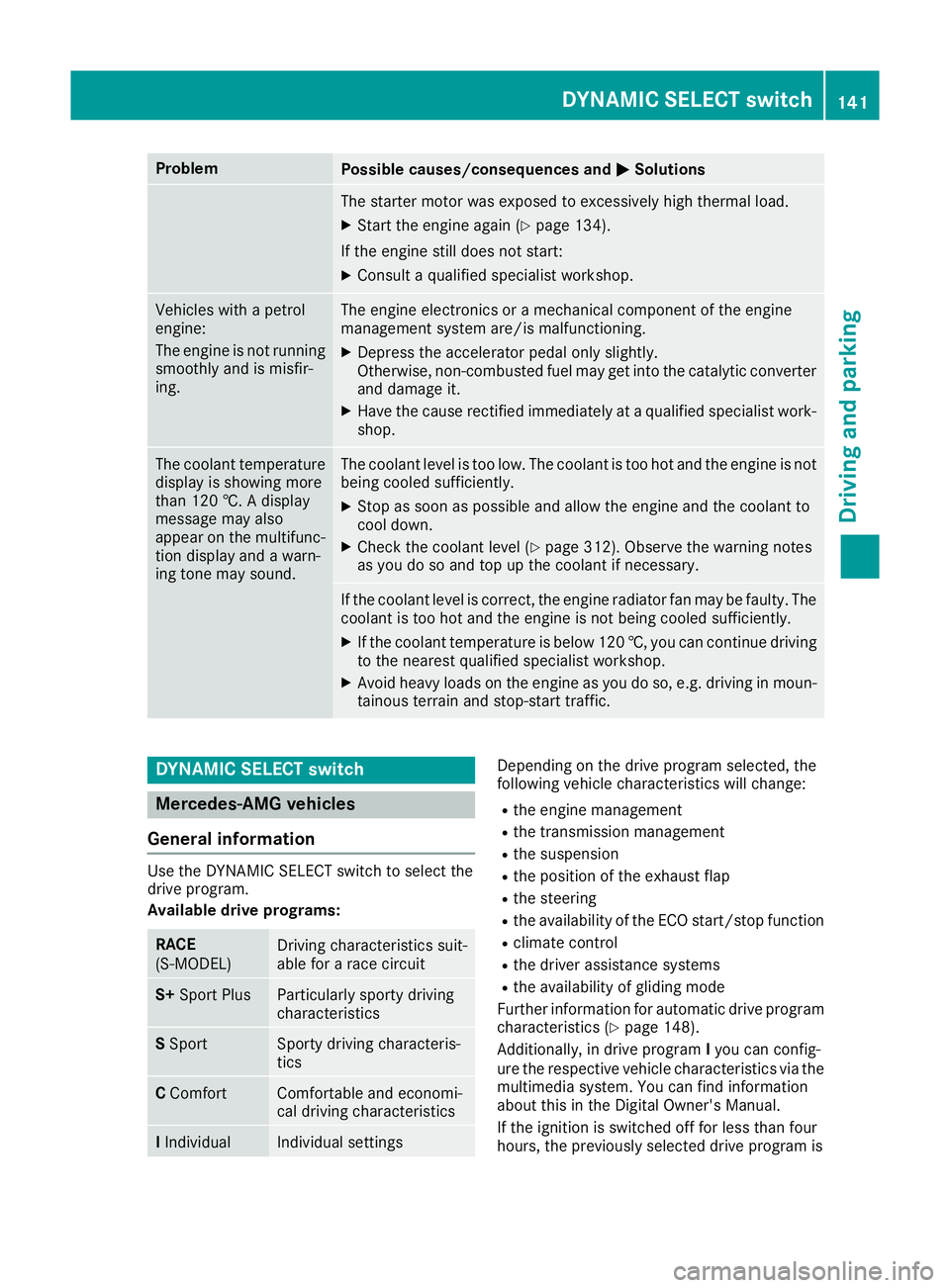
Problem
Possible causes/consequences and
M
MSolutions The starter motor was exposed to excessively high thermal load.
X Start the engine again (Y page 134).
If the engine still does not start: X Consult a qualified specialist workshop. Vehicles with a petrol
engine:
The engine is not running
smoothly and is misfir-
ing. The engine electronics or a mechanical component of the engine
management system are/is malfunctioning.
X Depress the accelerator pedal only slightly.
Otherwise, non-combusted fuel may get into the catalytic converter
and damage it.
X Have the cause rectified immediately at a qualified specialist work-
shop. The coolant temperature
display is showing more
than 120 †. A display
message may also
appear on the multifunc-
tion display and a warn-
ing tone may sound. The coolant level is too low. The coolant is too hot and the engine is not
being cooled sufficiently.
X Stop as soon as possible and allow the engine and the coolant to
cool down.
X Check the coolant level (Y page 312). Observe the warning notes
as you do so and top up the coolant if necessary. If the coolant level is correct, the engine radiator fan may be faulty. The
coolant is too hot and the engine is not being cooled sufficiently.
X If the coolant temperature is below 120 †, you can continue driving
to the nearest qualified specialist workshop.
X Avoid heavy loads on the engine as you do so, e.g. driving in moun-
tainous terrain and stop-start traffic. DYNAMIC SELECT switch
Mercedes-AMG vehicles
General information Use the DYNAMIC SELECT switch to select the
drive program.
Available drive programs:
RACE
(S‑MODEL)
Driving characteristics suit-
able for a race circuit
S+
Sport Plus Particularly sporty driving
characteristics
S
Sport Sporty driving characteris-
tics
C
Comfort Comfortable and economi-
cal driving characteristics
I
Individual Individual settings Depending on the drive program selected, the
following vehicle characteristics will change:
R the engine management
R the transmission management
R the suspension
R the position of the exhaust flap
R the steering
R the availability of the ECO start/stop function
R climate control
R the driver assistance systems
R the availability of gliding mode
Further information for automatic drive program
characteristics (Y page 148).
Additionally, in drive program Iyou can config-
ure the respective vehicle characteristics via the
multimedia system. You can find information
about this in the Digital Owner's Manual.
If the ignition is switched off for less than four
hours, the previously selected drive program is DYNAMIC SELECT switch
141Driving and parking Z
Page 145 of 377
activated when the engine is next started. If the
ignition is switched off for more than four hours,
drive program Cis activated when the engine is
next started.
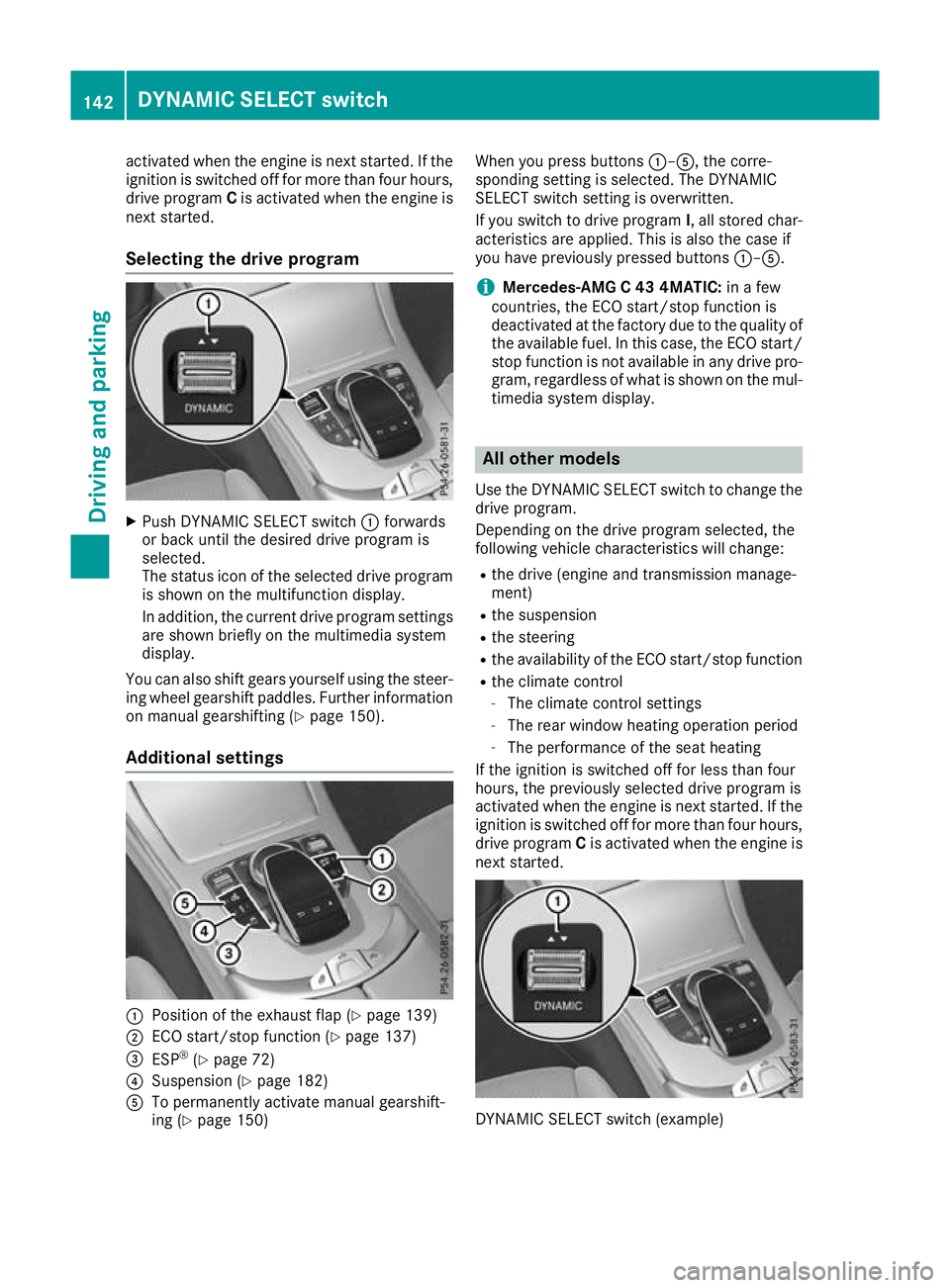
Selecting the drive program X
Push DYNAMIC SELECT switch :forwards
or back until the desired drive program is
selected.
The status icon of the selected drive program
is shown on the multifunction display.
In addition, the current drive program settings are shown briefly on the multimedia system
display.
You can also shift gears yourself using the steer-
ing wheel gearshift paddles. Further information
on manual gearshifting (Y page 150).
Additional settings :
Position of the exhaust flap (Y page 139)
; ECO start/stop function (Y page 137)
= ESP ®
(Y page 72)
? Suspension (Y page 182)
A To permanently activate manual gearshift-
ing (Y page 150) When you press buttons
:–A, the corre-
sponding setting is selected. The DYNAMIC
SELECT switch setting is overwritten.
If you switch to drive program I, all stored char-
acteristics are applied. This is also the case if
you have previously pressed buttons :–A.
i Mercedes-AMG C 43 4MATIC:
in a few
countries, the ECO start/stop function is
deactivated at the factory due to the quality of the available fuel. In this case, the ECO start/
stop function is not available in any drive pro-
gram, regardless of what is shown on the mul- timedia system display. All other models
Use the DYNAMIC SELECT switch to change the
drive program.
Depending on the drive program selected, the
following vehicle characteristics will change:
R the drive (engine and transmission manage-
ment)
R the suspension
R the steering
R the availability of the ECO start/stop function
R the climate control
- The climate control settings
- The rear window heating operation period
- The performance of the seat heating
If the ignition is switched off for less than four
hours, the previously selected drive program is
activated when the engine is next started. If the
ignition is switched off for more than four hours,
drive program Cis activated when the engine is
next started. DYNAMIC SELECT switch (example)142
DYNAMIC SELECT switchDriving and parking
Page 147 of 377
X
Move the gear lever firmly to the left, beyond
the point of resistance, then forwards.
The ECO start/stop function is not available
when reverse gear is engaged. Further informa-
tion on the ECO start/stop function
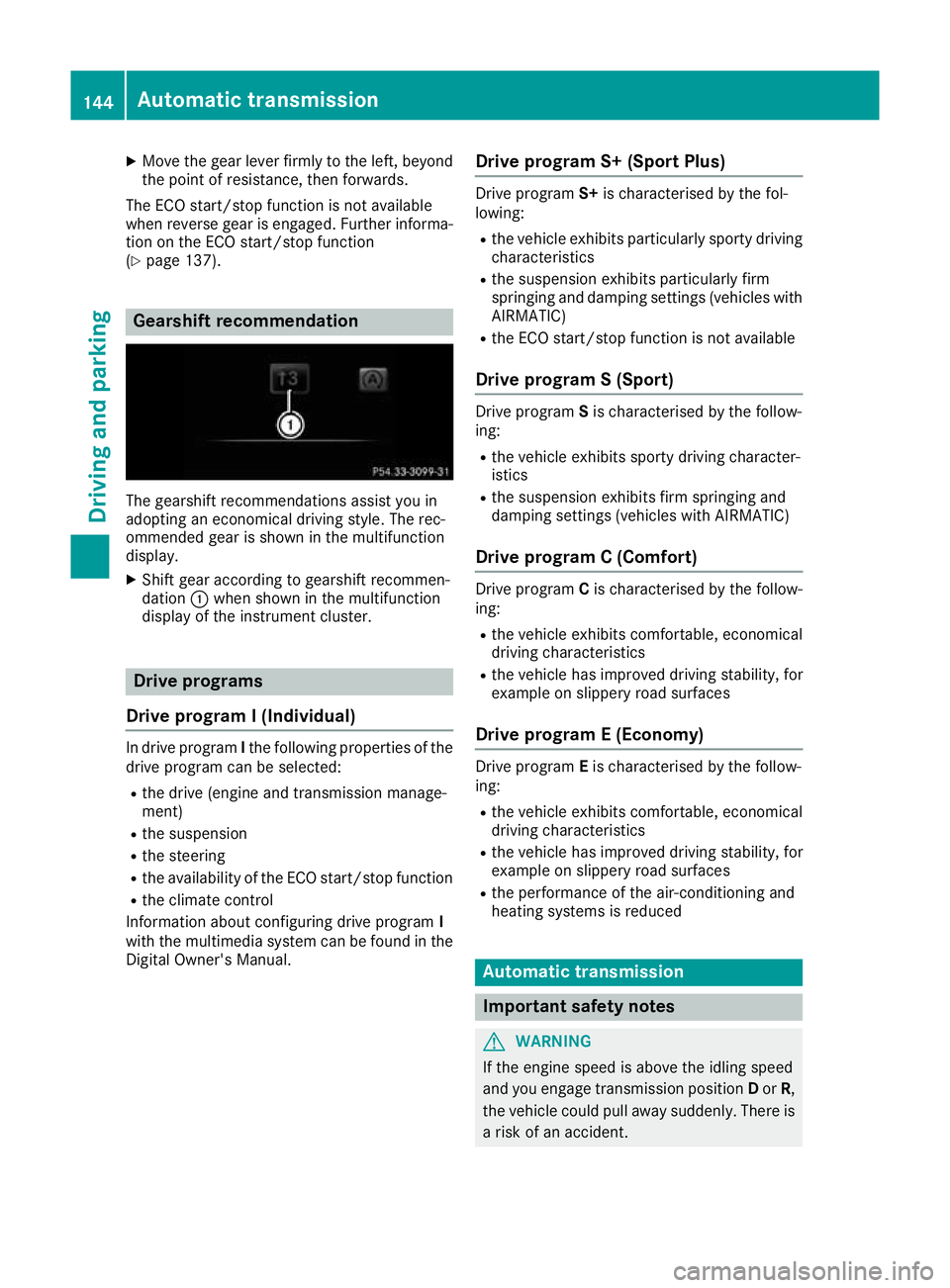
(Y page 137). Gearshift recommendation
The gearshift recommendations assist you in
adopting an economical driving style. The rec-
ommended gear is shown in the multifunction
display.
X Shift gear according to gearshift recommen-
dation :when shown in the multifunction
display of the instrument cluster. Drive programs
Drive program I (Individual) In drive program
Ithe following properties of the
drive program can be selected:
R the drive (engine and transmission manage-
ment)
R the suspension
R the steering
R the availability of the ECO start/stop function
R the climate control
Information about configuring drive program I
with the multimedia system can be found in the
Digital Owner's Manual. Drive program S+ (Sport Plus) Drive program
S+is characterised by the fol-
lowing:
R the vehicle exhibits particularly sporty driving
characteristics
R the suspension exhibits particularly firm
springing and damping settings (vehicles with
AIRMATIC)
R the ECO start/stop function is not available
Drive program S (Sport) Drive program
Sis characterised by the follow-
ing:
R the vehicle exhibits sporty driving character-
istics
R the suspension exhibits firm springing and
damping settings (vehicles with AIRMATIC)
Drive program C (Comfort) Drive program
Cis characterised by the follow-
ing:
R the vehicle exhibits comfortable, economical
driving characteristics
R the vehicle has improved driving stability, for
example on slippery road surfaces
Drive program E (Economy) Drive program
Eis characterised by the follow-
ing:
R the vehicle exhibits comfortable, economical
driving characteristics
R the vehicle has improved driving stability, for
example on slippery road surfaces
R the performance of the air-conditioning and
heating systems is reduced Automatic transmission
Important safety notes
G
WARNING
If the engine speed is above the idling speed
and you engage transmission position Dor R,
the vehicle could pull away suddenly. There is a risk of an accident. 144
Automatic transmissionDriving and parking
Page 152 of 377
Drive program S+ (Sport Plus)
Drive program S+is characterised by the fol-
lowing:
R the vehicle exhibits particularly sporty driving
characteristics.
R the vehicle pulls away in first gear.
R the automatic transmission shifts up later.
fuel consumption may be higher as a result of
the later automatic transmission shift points.
R the suspension exhibits particularly firm
springing and damping settings (vehicles with
AIRMATIC).
R gliding mode is not available.
R the ECO start/stop function is not available.
Drive program S (Sport)
Drive program Sis characterised by the follow-
ing:
R the vehicle exhibits sporty driving character-
istics.
R the vehicle pulls away in first gear.
R the automatic transmission shifts up later.
fuel consumption may be higher as a result of
the later automatic transmission shift points.
R the suspension exhibits firm springing and
damping settings (vehicles with AIRMATIC).
R gliding mode is not available.
R the ECO start/stop function is not available.
Drive program C (Comfort) Drive program Cis characterised by the follow-
ing:
R the vehicle exhibits comfortable, economical
driving characteristics.
R the vehicle pulls away more gently in forward
and reverse gears unless the accelerator
pedal is depressed fully.
R the vehicle has improved driving stability, e.g.
on slippery road surfaces.
R optimal fuel consumption resulting from the
automatic transmission shifting up sooner.
The vehicle is driven in the low engine speed
range and the wheels are less likely to spin.
R gliding mode is not available (except
Mercedes-AMG C 43 4MATIC). Drive program E (Economy)
Drive program Eis characterised by the follow-
ing:
R the vehicle exhibits particularly economical
driving characteristics.
R the vehicle pulls away more gently in forward
and reverse gears unless the accelerator
pedal is depressed fully.
R the vehicle has improved driving stability, e.g.
on slippery road surfaces.
R optimal fuel consumption resulting from the
automatic transmission shifting up sooner.
The vehicle is driven in the low engine speed
range and the wheels are less likely to spin.
R during deceleration, the engine is disconnec-
ted from the drive train. The vehicle uses
kinetic energy and consumes less fuel (over-
run mode).
R the cooling and heating output of the climate
control system has been reduced.
Mercedes-AMG C 63 /C63 S Drive program RACE (S‑MODEL)
Drive program RACEis characterised by the fol-
lowing:
R the vehicle exhibits driving characteristics
suitable for the racetrack.
R all vehicle systems are set for maximum
sportiness.
R the gearshift recommendation gives you
information for slowly warming up the drive
assemblies and for adopting a fuel-efficient
driving style (Y page 150). You can follow the
gearshift recommendations at all times and
shift gear accordingly using the steering
wheel gearshift paddles. On the basis of the
gearshift recommendation, using the steering wheel gearshift paddles, you can optimise the
drive train and engine operating mode at any time.
R if you have selected a gear manually, this will
be maintained until the vehicle speed signifi-
cantly increases or decreases.
R the vehicle pulls away in first gear.
R the automatic transmission shifts up later.
fuel consumption may be higher as a result of
the later automatic transmission shift points.
R the suspension exhibits particularly firm
springing and damping settings (vehicles with
AIRMATIC). Automatic transmission
149Driving and parking Z
Page 291 of 377
Climate control settings
General notes You can adjust the climate control settings
using the climate control bar or the climate con-
trol menu.
Important climate control functions can be set
in the climate control bar:
R Temperature
R Airflow
R Air distribution
The climate control bar is visible in most dis-
plays.
You can find all available climate control func-
tions in the climate control menu. You can use
the climate control bar to switch to the climate
control menu.
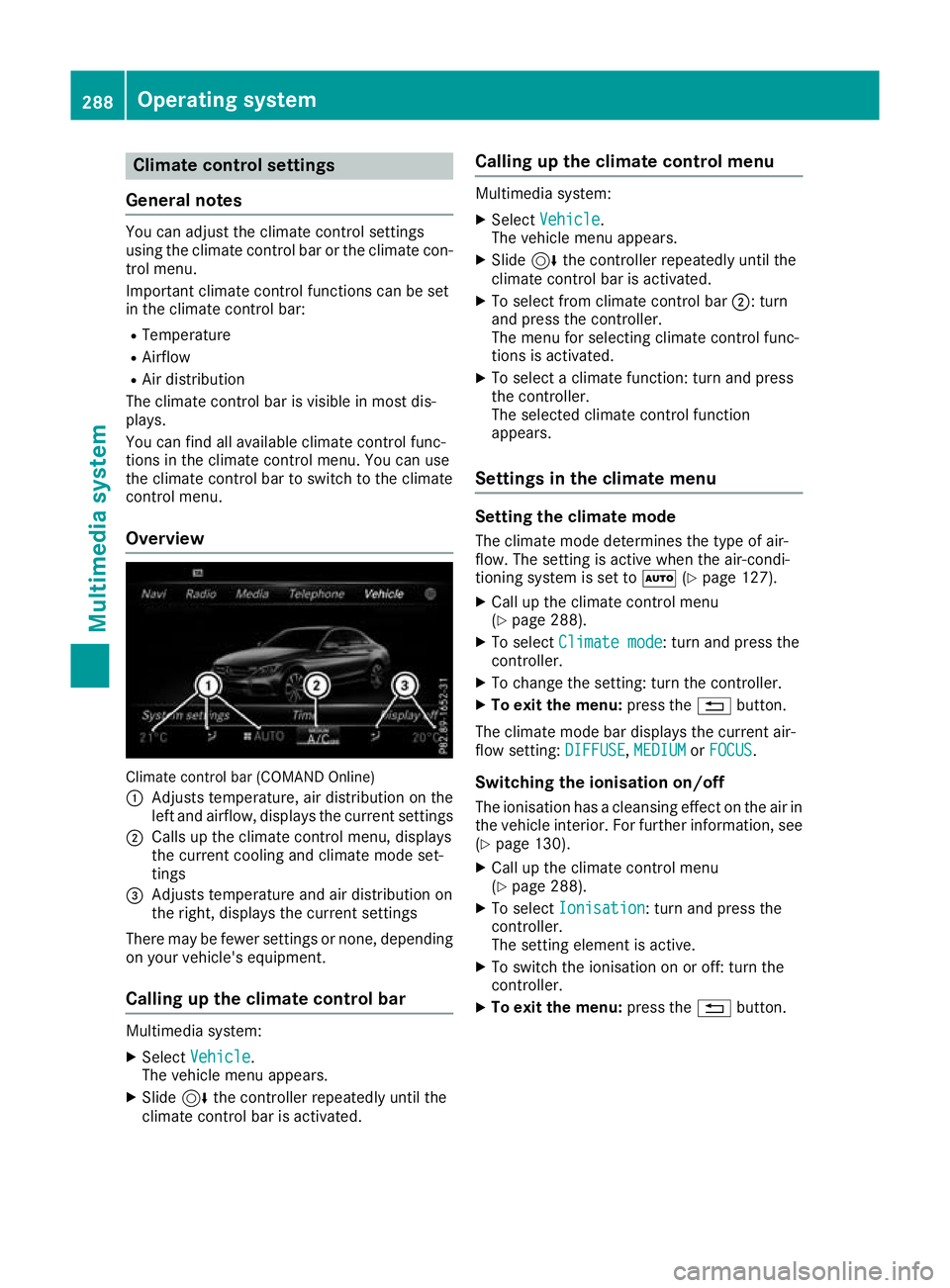
Overview Climate control bar (COMAND Online)
: Adjusts temperature, air distribution on the
left and airflow, displays the current settings
; Calls up the climate control menu, displays
the current cooling and climate mode set-
tings
= Adjusts temperature and air distribution on
the right, displays the current settings
There may be fewer settings or none, depending on your vehicle's equipment.
Calling up the climate control bar Multimedia system:
X Select Vehicle
Vehicle.
The vehicle menu appears.
X Slide 6the controller repeatedly until the
climate control bar is activated. Calling up the climate control menu Multimedia system:
X Select Vehicle Vehicle.
The vehicle menu appears.
X Slide 6the controller repeatedly until the
climate control bar is activated.
X To select from climate control bar ;: turn
and press the controller.
The menu for selecting climate control func-
tions is activated.
X To select a climate function: turn and press
the controller.
The selected climate control function
appears.
Settings in the climate menu Setting the climate mode
The climate mode determines the type of air-
flow. The setting is active when the air-condi-
tioning system is set to Ã(Ypage 127).
X Call up the climate control menu
(Y page 288).
X To select Climate mode
Climate mode: turn and press the
controller.
X To change the setting: turn the controller.
X To exit the menu: press the%button.
The climate mode bar displays the current air-
flow setting: DIFFUSE DIFFUSE,MEDIUM
MEDIUMorFOCUS
FOCUS.
Switching the ionisation on/off
The ionisation has a cleansing effect on the air in the vehicle interior. For further information, see (Y page 130).
X Call up the climate control menu
(Y page 288).
X To select Ionisation
Ionisation: turn and press the
controller.
The setting element is active.
X To switch the ionisation on or off: turn the
controller.
X To exit the menu: press the%button. 288
Operating systemMulti
media system
Page 292 of 377
Settings in the bottom bar of the cli-
mate control menu Activating/deactivating cooling with air
dehumidification
X Call up the climate control menu
(Y page 288).
X Slide 6the controller repeatedly until the
bottom bar is activated.
X To select O OA/C
A/C: turn and press the control-
ler.
X Switch cooling with air dehumidification on
O or off ª.
i The current status of the cooling function is
displayed in the climate control bar: A/C ON
– activated, A/C OFF – deactivated.
i Deactivating the cooling with air dehumidi-
fication function reduces fuel consumption.
Synchronising the climate control set-
tings
Use O
O Sync. Sync. (synchronisation) to select the
climate control setting for all zones together O
or separately ª.
X Call up the climate control menu
(Y page 288).
X Slide 6the controller repeatedly until the
bottom bar is activated.
X To select O
O Sync. Sync.: turn and press the con-
troller.
X Switch the synchronisation function on Oor
off ª.
For further information on synchronising cli-
mate control settings, see (Y page 128).Navigation mode
Important safety notes G
WARNING
Operating the integrated information systems and communications equipment in the vehicle
while driving will distract you from traffic con-
ditions. You could then lose control of the
vehicle. There is a risk of an accident.
Only operate these devices if road traffic con-
ditions permit. If you are unsure about the surrounding conditions, pull over to a safe
location and make entries only while the vehi-
cle is stationary.
You must observe the legal requirements for the country in which you are currently driving whenoperating the navigation system.
General notes Correct functioning of the navigation system
depends, amongst other things, on GPS recep-
tion. In certain situations, GPS reception may be
impaired, there may be interference or there
may be no reception at all, e.g. in tunnels or
multi-storey car parks.
Audio 20 is equipped with Garmin ®
MAP PILOT
(see the manufacturer's operating instructions).
The Garmin ®
MAP PILOT operating instructions
are stored on the SD card as a PDF file. The SD card box contains a quick guide.
The following descriptions apply to navigation
with COMAND Online. Further information can
be found in the Digital Owner's Manual.
Selecting a route type and route options Multimedia system:
X Select Navi
NaviQNavigation Navigation.
X Select Options OptionsQRoute settings Route settings.
i If route guidance is active, first slide
6the
controller and show the menu.
X Select a route type.
Notes for route types:
R Eco route
Eco route
Calculates an economical route.
R Dynamic route Dynamic route
Traffic reports on the route for the route guid-
ance are taken into account.
R Calculate alternative routes Calculate alternative routes
Different routes are being calculated. Instead
of Start Start, select the Continue
Continuemenu item.
X To avoid/use route options: selectAvoid
Avoid
options
options.
X Select a route option.
Notes for route options:
R Use toll roads
Use toll roads Operating system
289Multimedia system Z