fuel MERCEDES-BENZ C-CLASS CABRIOLET 2016 User Guide
[x] Cancel search | Manufacturer: MERCEDES-BENZ, Model Year: 2016, Model line: C-CLASS CABRIOLET, Model: MERCEDES-BENZ C-CLASS CABRIOLET 2016Pages: 377, PDF Size: 6.9 MB
Page 34 of 377
R
modifications, installations and conversions
R work on electronic components
Mercedes-Benz recommends that you use a
Mercedes-Benz Service Centre. Vehicle registration
Mercedes-Benz may ask its Service Centres to
carry out technical inspections on certain vehi-
cles. The quality or safety of the vehicle is
improved as a result of the inspection.
Mercedes-Benz can inform you about vehicle
inspections only if it has your registration data.
It is possible that your vehicle has not yet been
registered in your name in the following cases:
R if your vehicle was not purchased at an
authorised specialist dealer.
R if your vehicle has not yet been inspected at a
Mercedes-Benz Service Centre.
It is advisable to register your vehicle with a
Mercedes-Benz Service Centre.
Inform Mercedes-Benz as soon as possible
about any change in address or vehicle owner-
ship. You can do this at a Mercedes-Benz Ser-
vice Centre, for example. Correct use
If you remove any warning stickers, you or oth-
ers could fail to recognise certain dangers.
Leave warning stickers in position.
Observe the following information when driving
your vehicle:
R the safety notes in this manual
R technical data for the vehicle
R traffic rules and regulations
R laws and safety standards pertaining to motor
vehicles Implied warranty
! Follow the instructions in this manual about
the proper operation of your vehicle as well as
about possible vehicle damage. Damage to
your vehicle that arises from culpable contra- ventions against these instructions are not
covered either by Mercedes-Benz implied
warranty or by the New or Used-Vehicle War-
ranty. QR code for rescue card
The QR code is secured in the fuel filler flap and
on the opposite side on the B-pillar. In the event of an accident, rescue services can use the QR
code to quickly find the appropriate rescue card for your vehicle. The current rescue card con-
tains, in a compact form, the most important
information about your vehicle, e.g. the routing
of the electric cables.
You can find more information under
www.mercedes-benz.de/qr-code. Data stored in the vehicle
Many of the electronic components in your vehi-
cle can store data.
These data memories temporarily or perma-
nently store technical information about:
R the vehicle's operating state
R events
R faults
In general, this technical information docu-
ments the state of a component, a module, a
system or the surroundings.
These include, for example:
R operating conditions of system components –
for example, fluid levels
R status messages concerning the vehicle and
its individual components – for example,
wheel rotational speed, vehicle speed, decel-
eration in movement, lateral acceleration,
accelerator pedal position
R malfunctions and defects in important system
components, for example, lights, brakes
R vehicle reactions and operating conditions in
special driving situations – for example, air-
bag deployment, intervention of stability con-
trol systems
R ambient conditions – for example, outside
temperature
These data are of an exclusively technical nature
and can be used to:
R assist in detecting and rectifying faults and
defects
R analyse vehicle functions, e.g. after an acci-
dent
R optimise vehicle functions Data stored in the vehicle
31Introduction Z
Page 38 of 377
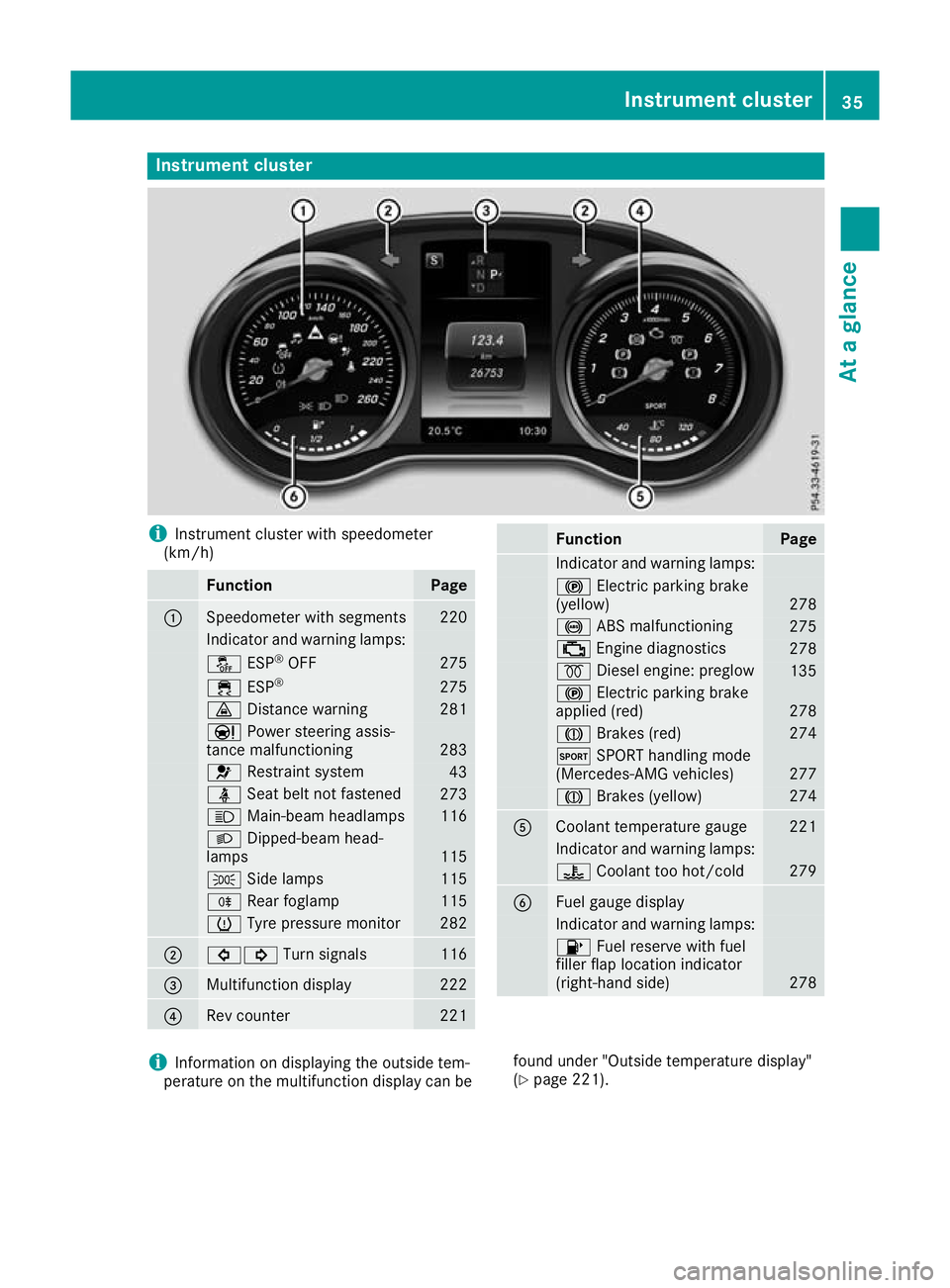
Instrument cluster
i
Instrument cluster with speedometer
(km/h) Function Page
:
Speedometer with segments 220
Indicator and warning lamps:
å
ESP®
OFF 275
÷
ESP® 275
·
Distance warning 281
Ð
Power steering assis-
tance malfunctioning 283
6
Restraint system 43
ü
Seat belt not fastened 273
K
Main-beam headlamps 116
L
Dipped-beam head-
lamps 115
T
Side lamps 115
R
Rear foglamp 115
h
Tyre pressure monitor 282
;
#!
Turn signals 116
=
Multifunction display 222
?
Rev counter 221 Function Page
Indicator and warning lamps:
!
Electric parking brake
(yellow) 278
!
ABS malfunctioning 275
;
Engine diagnostics 278
%
Diesel engine: preglow 135
!
Electric parking brake
applied (red) 278
J
Brakes (red) 274
M
SPORT handling mode
(Mercedes-AMG vehicles) 277
J
Brakes (yellow) 274
A
Coolant temperature gauge 221
Indicator and warning lamps:
?
Coolant too hot/cold 279
B
Fuel gauge display
Indicator and warning lamps:
8
Fuel reserve with fuel
filler flap location indicator
(right-hand side) 278
i
Information on displaying the outside tem-
perature on the multifunction display can be found under "Outside temperature display"
(Y
page 221). Instrument cluster
35At a glance
Page 62 of 377
Automatic measures after an acci-
dent
Immediately after an accident, the following
measures are implemented, depending on the
type and severity of the impact:
R the hazard lamps are switched on
R the emergency lighting is switched on
R the vehicle doors are unlocked
R the front side windows are lowered
R vehicles with the memory function: the elec-
trically adjustable steering wheel is raised
R the engine is switched off and the fuel supply
is cut off
R vehicles with the Mercedes-Benz emergency
call system: automatic emergency call Children in the vehicle
Important safety notes
Accident statistics show that children secured
in the rear seats are safer than children secured in the front-passenger seat. For this reason,
Mercedes-Benz strongly advises that you install
a child restraint system on a rear seat. Children are generally better protected there.
If a child younger than twelve years old and
under 1.50 min height is travelling in the vehi-
cle:
R always secure the child in a child restraint
system suitable for Mercedes-Benz vehicles.
The child restraint system must be appropri-
ate to the age, weight and size of the child.
R be sure to observe the instructions and safety
notes in this section in addition to the child
restraint system manufacturer's installation
instructions.
R be sure to observe the instructions and safety
notes on the automatic front-passenger front airbag deactivation system (Y page 50). G
WARNING
If you leave children unattended in the vehi-
cle, they may be able to set the vehicle in
motion if, for example, they:
R release the parking brake
R shift the automatic transmission out of park
position Por shift manual transmission into
neutral
R start the engine
In addition, they may operate vehicle equip-
ment and become trapped. There is a risk of
an accident and injury.
When leaving the vehicle, always take the key with you and lock the vehicle. Never leave
children unattended in the vehicle. G
WARNING
If persons (particularly children) are exposed
to heat or cold for a prolonged period, there is a risk of serious or even fatal injuries. Never
leave persons (particularly children) unatten-
ded in the vehicle. G
WARNING
If the child restraint system is placed in direct sunlight, the parts could become very hot.
Children could be suffer burns by touching
these parts, in particular on the metallic parts
of the child restraint system. There is a risk of injury.
If you and your child leave the vehicle, always
make sure that the child restraint system is
not in direct sunlight. Cover it with a blanket, for example. If the child restraint system has
been exposed to direct sunlight, leave it to
cool down before securing the child in it.
Never leave children unattended in the vehi-
cle.
Always ensure that all vehicle occupants have
their seat belts fastened correctly and are sitting
properly. Particular attention must be paid to
children.
Observe the safety notes on the seat belt
(Y page 44) and the information on the correct
use of the seat belt (Y page 45). Children in the vehicle
59Safety Z
Page 85 of 377

Key functions
:
& Locks the vehicle
; F Opens the boot lid
= % Unlocks the vehicle
X To unlock centrally: press the%button.
If you do not open the vehicle within approx-
imately 40 seconds of unlocking:
R the vehicle locks again
R protection against theft is reactivated
X To lock centrally: press the&button.
The key centrally locks and unlocks the follow-
ing components:
R the doors
R the boot lid
R the glove compartment
R the fuel filler flap
During unlocking, the turn signals flash once.
During locking, they flash three times.
You can also set an audible signal to confirm
that the vehicle has been locked. The audible
signal can be activated and deactivated via the
multimedia system (see Digital Owner's Man-
ual).
Only when all the components have been locked is the visual or audible locking confirmation
issued.
When the locator lighting is activated via the
multimedia system, it lights up when it is dark
after the vehicle is unlocked with the key (see
Digital Owner's Manual).
X To open the boot lid automatically from
outside the vehicle: press and hold theF
button until the boot lid opens. KEYLESS-GO
General notes Note that the engine can be started by any of the
vehicle occupants if there is a key in the vehicle
(Y page 135).
Locking and unlocking centrally You can start, lock or unlock the vehicle using
KEYLESS-GO. To do this, you need to carry the
key with you. You can combine the KEYLESS-GO functions with the functions of a conventional
key. Unlock the vehicle using KEYLESS-GO, for
instance, and lock it using the &button on
the key.
The driver's door and the door at which the han- dle is used must both be closed. The key must beoutside the vehicle. When you lock or unlock the
vehicle with KEYLESS-GO, the distance between the key and the door handle must not be greater
than 1 m.
A check that periodically establishes a radio
connection between the vehicle and the key
determines whether a valid key is in or in the
direct vicinity of the vehicle. This occurs, for
example:
R during engine start
R during driving
R when the external door handles are touched
R during convenience closing X
To unlock the vehicle: touch the inner sur-
face of the door handle.
X To lock the vehicle: touch sensor surface :
or ;. 82
KeyOpening and closing
Page 86 of 377

Make sure that you do not touch the inner
surface of the door handle.
X Convenience closing feature: touch
recessed sensor surface ;for an extended
period.
Deactivating and activating If you do not intend to use a key for an extended
period of time, you can deactivate the KEYLESS-
GO function of the key. The key will then use very
little power, thereby conserving battery power.
For the purposes of activation or deactivation,
the vehicle does not have to be nearby.
X To deactivate: press the&button on the
key twice in rapid succession.
The battery indicator lamp (Y page 84) of
the key flashes twice briefly and lights up
once, then KEYLESS-GO is deactivated.
X To activate: press any button on the key.
or X Insert the key into the ignition lock.
KEYLESS-GO and all its associated features
are available again. KEYLESS-GO start function
General notes Bear in mind that the engine can be started by
any of the vehicle occupants if there is a key in
the vehicle (Y
page 135). Changing the settings of the locking
system
You can change the settings of the locking sys-
tem. This means that only the driver's door and
the fuel filler flap are unlocked when the vehicle is unlocked. This is useful if you frequently travel
alone.
X To change the setting: simultaneously press
the % and& buttons for approximately
six seconds until the battery check lamp
(Y page 84) flashes twice.
If the setting of the locking system is changed
within the signal range of the vehicle, pressing
the & or% button:
R locks or
R unlocks the vehicle The key now functions as follows:
X To unlock: press the%button once.
X To unlock centrally: press the%button
twice.
X To lock: press the &button.
The KEYLESS-GO functions can be changed as
follows: X To unlock the driver's door: touch the inner
surface of the door handle on the driver's
door.
X To unlock centrally: touch the inner surface
of the front-passenger door handle.
X To lock centrally: touch the outer sensor
surface on one of the door handles.
X To restore the factory settings: press and
hold the %and& buttons simultane-
ously for approximately six seconds until the
battery check lamp (Y page 84) flashes
twice. Emergency key element
General notes If the vehicle can no longer be unlocked with the
key or KEYLESS-GO, use the emergency key ele-
ment.
If you use the emergency key element to unlock
and open the driver's door, the anti-theft alarm
system will be triggered. Switch off the alarm
(Y page 78).
If you unlock the vehicle using the emergency
key element, the fuel filler flap will not be
unlocked automatically.
X To unlock the fuel filler flap: insert the key
into the ignition lock. Key
83Opening and closing Z
Page 91 of 377

You can open a door from inside the vehicle
even if it has been locked. If the vehicle has pre-
viously been locked with the key or with KEY-
LESS-GO, opening a door from the inside will
trigger the anti-theft alarm system. Switch off
the alarm (Y page 78). X
Pull door handle ;.
If the door is locked, locking knob :pops up.
The door is unlocked and opens. Centrally locking and unlocking the
vehicle from the inside
You can centrally lock and unlock the vehicle
from the inside. The switches are on the driver's door. X
To unlock: press button :.
X To lock: press button ;.
When the front-passenger door is closed, the
vehicle is locked.
This does not lock or unlock the fuel filler flap or the glove compartment.
You cannot unlock the vehicle centrally from the
inside if the vehicle has been locked with the key or KEYLESS-GO.
For all countries except the United Kingdom: The doors can be opened from the inside.
If the vehicle has previously been locked with
the key or with KEYLESS-GO, opening a door
from the inside will trigger the anti-theft alarm
system. Switch off the alarm (Y page 78).
United Kingdom only: if the vehicle has been
locked with the key or with KEYLESS-GO, the
double lock function is activated as standard. It is then not possible to open the doors from
inside the vehicle. You can deactivate the dou-
ble lock function by deactivating the interior
motion sensor (see Digital Owner's Manual).
Opening/closing doors is then possible as fol-
lows: the doors can be opened from inside.
When a locked door is opened from inside the
vehicle, the previous unlocking process will be
observed if the vehicle has been:
R locked with the locking button for the central
locking or
R locked automatically
The vehicle will be fully unlocked if it had previ-
ously been fully unlocked. Only the door that has been opened from the inside is unlocked if only
the driver's door had previously been unlocked. Automatic locking feature
X
To deactivate: press and hold button :for
approximately five seconds until a tone
sounds.
X To activate: press and hold button ;for
approximately five seconds until a tone
sounds.
If you press one of the two buttons and do not
hear a tone, the relevant setting has already
been selected.
The vehicle is locked automatically when the
ignition is switched on and the wheels are turn-
ing. 88
DoorsOpening and closing
Page 140 of 377
ECO start/stop function
Introduction The ECO start/stop function switches the
engine off automatically if the vehicle is stopped
under certain conditions.
When the vehicle pulls away again, the engine
starts automatically. The ECO start/stop func-
tion thereby helps you to reduce the fuel con-
sumption and emissions of your vehicle.
Important safety notes G
WARNING
If the engine is switched off automatically and you exit the vehicle, the engine is restarted
automatically. The vehicle may begin moving. There is a risk of accident and injury.
If you wish to exit the vehicle, always turn off
the ignition and secure the vehicle against
rolling away.
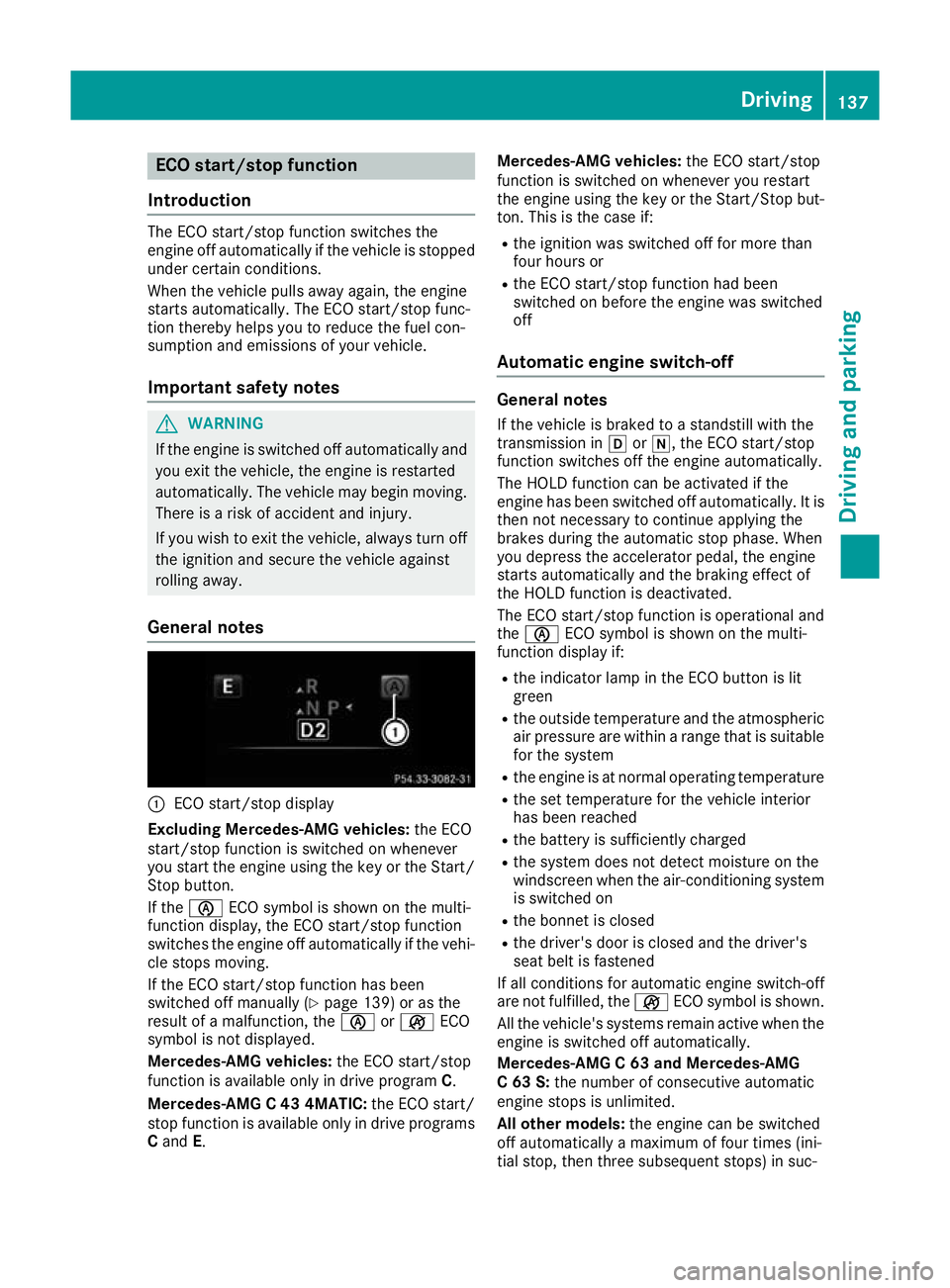
General notes :
ECO start/stop display
Excluding Mercedes-AMG vehicles: the ECO
start/stop function is switched on whenever
you start the engine using the key or the Start/ Stop button.
If the è ECO symbol is shown on the multi-
function display, the ECO start/stop function
switches the engine off automatically if the vehi-
cle stops moving.
If the ECO start/stop function has been
switched off manually (Y page 139) or as the
result of a malfunction, the èorç ECO
symbol is not displayed.
Mercedes-AMG vehicles: the ECO start/stop
function is available only in drive program C.
Mercedes-AMG C 43 4MATIC: the ECO start/
stop function is available only in drive programs
C and E. Mercedes-AMG vehicles:
the ECO start/stop
function is switched on whenever you restart
the engine using the key or the Start/Stop but- ton. This is the case if:
R the ignition was switched off for more than
four hours or
R the ECO start/stop function had been
switched on before the engine was switched
off
Automatic engine switch-off General notes
If the vehicle is braked to a standstill with the
transmission in hori, the ECO start/stop
function switches off the engine automatically.
The HOLD function can be activated if the
engine has been switched off automatically. It is then not necessary to continue applying the
brakes during the automatic stop phase. When
you depress the accelerator pedal, the engine
starts automatically and the braking effect of
the HOLD function is deactivated.
The ECO start/stop function is operational and
the è ECO symbol is shown on the multi-
function display if:
R the indicator lamp in the ECO button is lit
green
R the outside temperature and the atmospheric
air pressure are within a range that is suitable for the system
R the engine is at normal operating temperature
R the set temperature for the vehicle interior
has been reached
R the battery is sufficiently charged
R the system does not detect moisture on the
windscreen when the air-conditioning system
is switched on
R the bonnet is closed
R the driver's door is closed and the driver's
seat belt is fastened
If all conditions for automatic engine switch-off
are not fulfilled, the çECO symbol is shown.
All the vehicle's systems remain active when the engine is switched off automatically.
Mercedes-AMG C 63 and Mercedes-AMG
C 63 S: the number of consecutive automatic
engine stops is unlimited.
All other models: the engine can be switched
off automatically a maximum of four times (ini-
tial stop, then three subsequent stops) in suc- Driving
137Driving and parking Z
Page 143 of 377
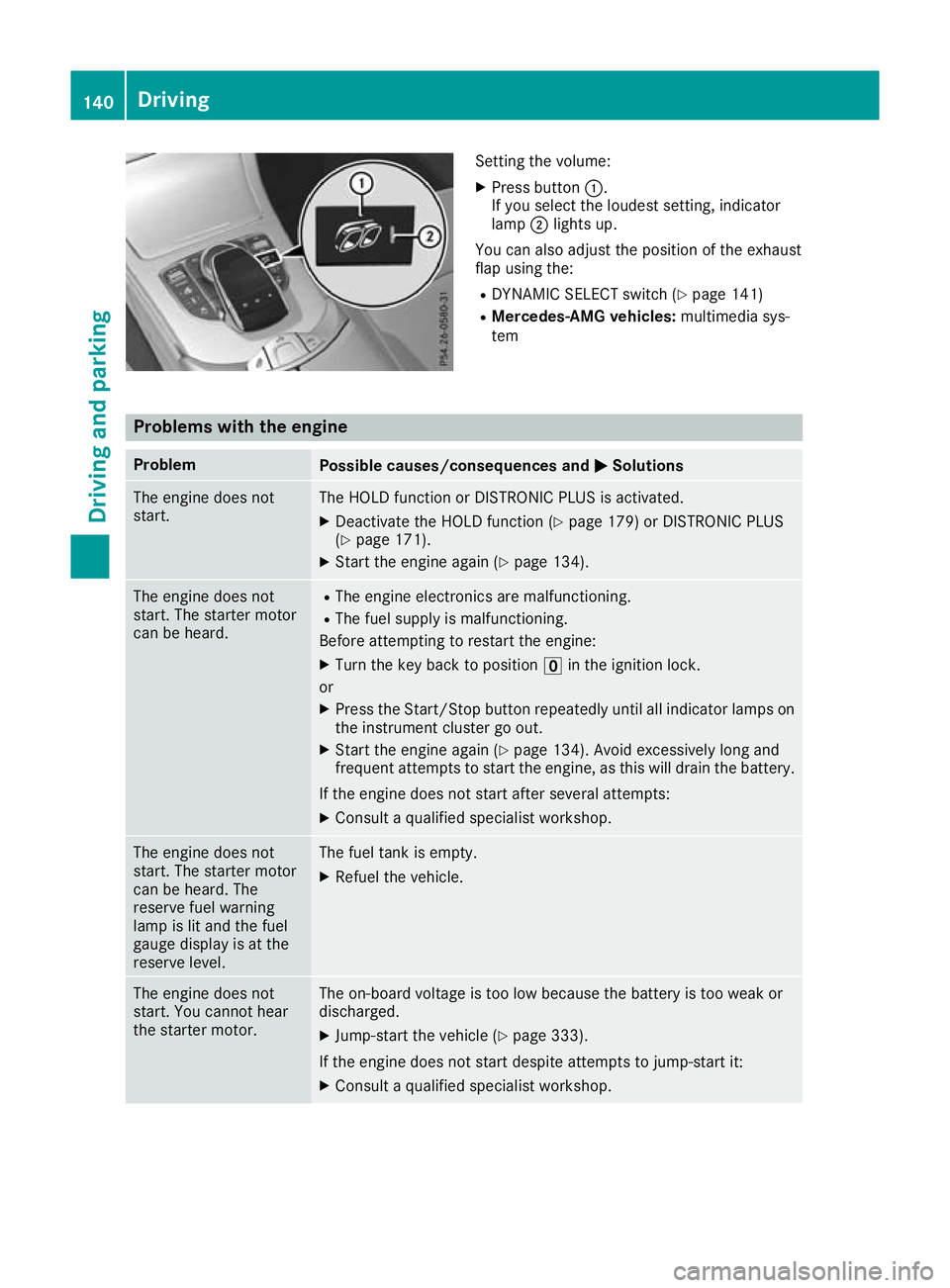
Setting the volume:
X Press button :.
If you select the loudest setting, indicator
lamp ;lights up.
You can also adjust the position of the exhaust
flap using the: R DYNAMIC SELECT switch (Y page 141)
R Mercedes-AMG vehicles: multimedia sys-
tem Problems with the engine
Problem
Possible causes/consequences and
M MSolutions The engine does not
start. The HOLD function or DISTRONIC PLUS is activated.
X Deactivate the HOLD function (Y page 179) or DISTRONIC PLUS
(Y page 171).
X Start the engine again (Y page 134).The engine does not
start. The starter motor
can be heard. R
The engine electronics are malfunctioning.
R The fuel supply is malfunctioning.
Before attempting to restart the engine:
X Turn the key back to position uin the ignition lock.
or X Press the Start/Stop button repeatedly until all indicator lamps on
the instrument cluster go out.
X Start the engine again (Y page 134). Avoid excessively long and
frequent attempts to start the engine, as this will drain the battery.
If the engine does not start after several attempts: X Consult a qualified specialist workshop. The engine does not
start. The starter motor
can be heard. The
reserve fuel warning
lamp is lit and the fuel
gauge display is at the
reserve level. The fuel tank is empty.
X Refuel the vehicle. The engine does not
start. You cannot hear
the starter motor. The on-board voltage is too low because the battery is too weak or
discharged.
X Jump-start the vehicle (Y page 333).
If the engine does not start despite attempts to jump-start it:
X Consult a qualified specialist workshop. 140
DrivingDriving and parking
Page 144 of 377
Problem
Possible causes/consequences and
M
MSolutions The starter motor was exposed to excessively high thermal load.
X Start the engine again (Y page 134).
If the engine still does not start: X Consult a qualified specialist workshop. Vehicles with a petrol
engine:
The engine is not running
smoothly and is misfir-
ing. The engine electronics or a mechanical component of the engine
management system are/is malfunctioning.
X Depress the accelerator pedal only slightly.
Otherwise, non-combusted fuel may get into the catalytic converter
and damage it.
X Have the cause rectified immediately at a qualified specialist work-
shop. The coolant temperature
display is showing more
than 120 †. A display
message may also
appear on the multifunc-
tion display and a warn-
ing tone may sound. The coolant level is too low. The coolant is too hot and the engine is not
being cooled sufficiently.
X Stop as soon as possible and allow the engine and the coolant to
cool down.
X Check the coolant level (Y page 312). Observe the warning notes
as you do so and top up the coolant if necessary. If the coolant level is correct, the engine radiator fan may be faulty. The
coolant is too hot and the engine is not being cooled sufficiently.
X If the coolant temperature is below 120 †, you can continue driving
to the nearest qualified specialist workshop.
X Avoid heavy loads on the engine as you do so, e.g. driving in moun-
tainous terrain and stop-start traffic. DYNAMIC SELECT switch
Mercedes-AMG vehicles
General information Use the DYNAMIC SELECT switch to select the
drive program.
Available drive programs:
RACE
(S‑MODEL)
Driving characteristics suit-
able for a race circuit
S+
Sport Plus Particularly sporty driving
characteristics
S
Sport Sporty driving characteris-
tics
C
Comfort Comfortable and economi-
cal driving characteristics
I
Individual Individual settings Depending on the drive program selected, the
following vehicle characteristics will change:
R the engine management
R the transmission management
R the suspension
R the position of the exhaust flap
R the steering
R the availability of the ECO start/stop function
R climate control
R the driver assistance systems
R the availability of gliding mode
Further information for automatic drive program
characteristics (Y page 148).
Additionally, in drive program Iyou can config-
ure the respective vehicle characteristics via the
multimedia system. You can find information
about this in the Digital Owner's Manual.
If the ignition is switched off for less than four
hours, the previously selected drive program is DYNAMIC SELECT switch
141Driving and parking Z
Page 145 of 377
activated when the engine is next started. If the
ignition is switched off for more than four hours,
drive program Cis activated when the engine is
next started.
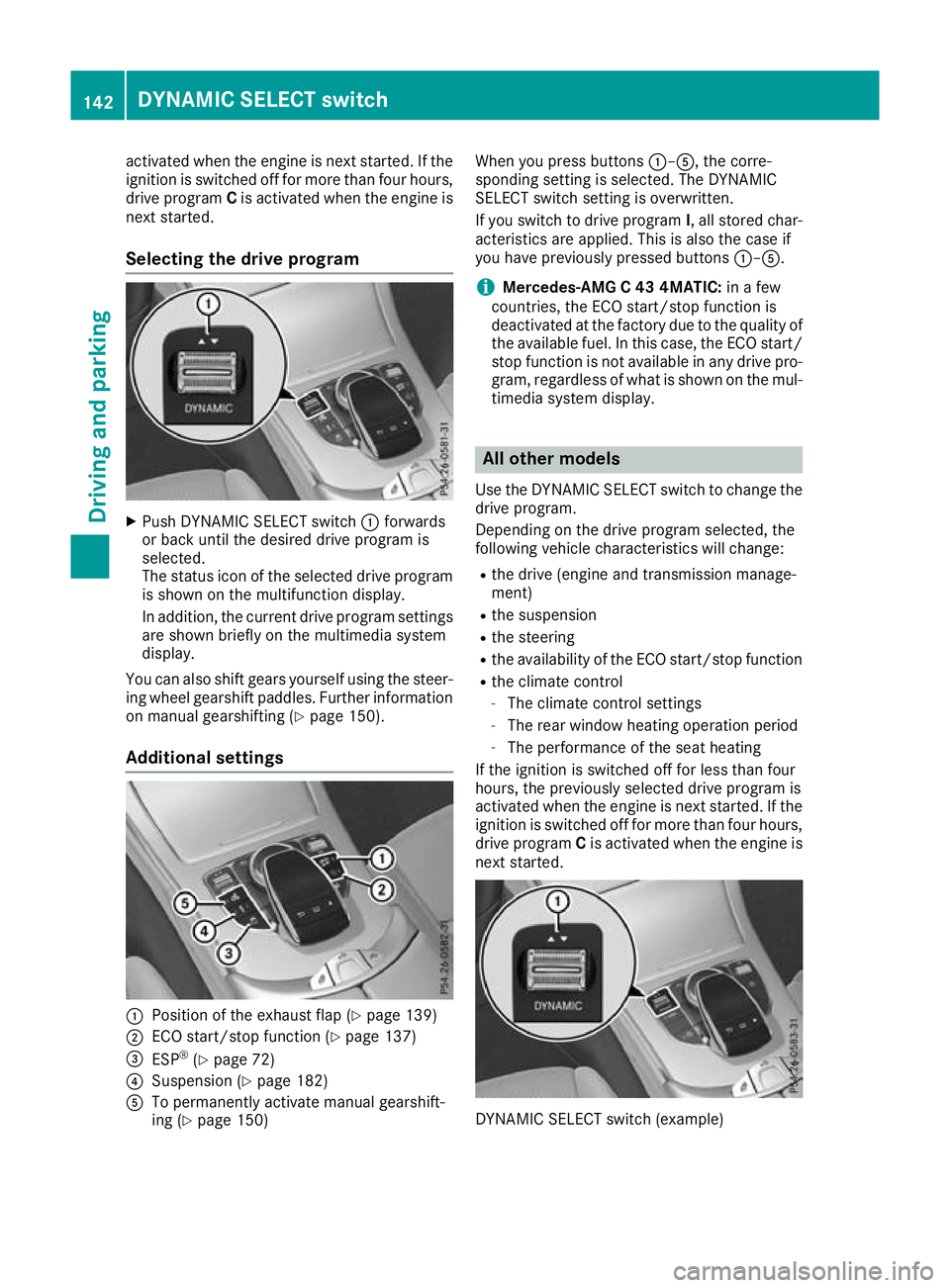
Selecting the drive program X
Push DYNAMIC SELECT switch :forwards
or back until the desired drive program is
selected.
The status icon of the selected drive program
is shown on the multifunction display.
In addition, the current drive program settings are shown briefly on the multimedia system
display.
You can also shift gears yourself using the steer-
ing wheel gearshift paddles. Further information
on manual gearshifting (Y page 150).
Additional settings :
Position of the exhaust flap (Y page 139)
; ECO start/stop function (Y page 137)
= ESP ®
(Y page 72)
? Suspension (Y page 182)
A To permanently activate manual gearshift-
ing (Y page 150) When you press buttons
:–A, the corre-
sponding setting is selected. The DYNAMIC
SELECT switch setting is overwritten.
If you switch to drive program I, all stored char-
acteristics are applied. This is also the case if
you have previously pressed buttons :–A.
i Mercedes-AMG C 43 4MATIC:
in a few
countries, the ECO start/stop function is
deactivated at the factory due to the quality of the available fuel. In this case, the ECO start/
stop function is not available in any drive pro-
gram, regardless of what is shown on the mul- timedia system display. All other models
Use the DYNAMIC SELECT switch to change the
drive program.
Depending on the drive program selected, the
following vehicle characteristics will change:
R the drive (engine and transmission manage-
ment)
R the suspension
R the steering
R the availability of the ECO start/stop function
R the climate control
- The climate control settings
- The rear window heating operation period
- The performance of the seat heating
If the ignition is switched off for less than four
hours, the previously selected drive program is
activated when the engine is next started. If the
ignition is switched off for more than four hours,
drive program Cis activated when the engine is
next started. DYNAMIC SELECT switch (example)142
DYNAMIC SELECT switchDriving and parking