phone MERCEDES-BENZ C-CLASS CABRIOLET 2016 User Guide
[x] Cancel search | Manufacturer: MERCEDES-BENZ, Model Year: 2016, Model line: C-CLASS CABRIOLET, Model: MERCEDES-BENZ C-CLASS CABRIOLET 2016Pages: 377, PDF Size: 6.9 MB
Page 40 of 377
Centre console
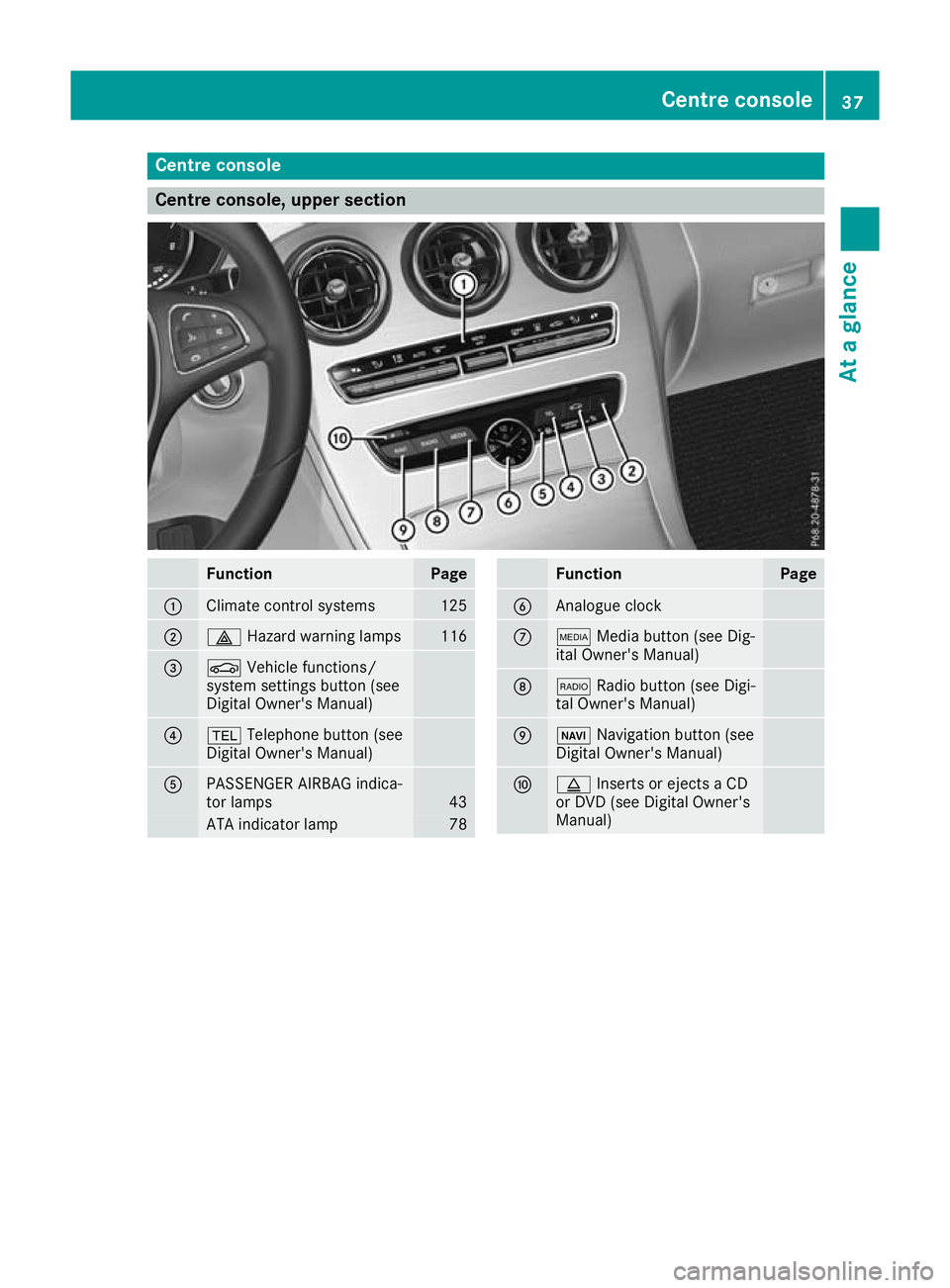
Centre console, upper section
Function Page
:
Climate control systems 125
;
£
Hazard warning lamps 116
=
Ø
Vehicle functions/
system settings button (see
Digital Owner's Manual) ?
%
Telephone button (see
Digital Owner's Manual) A
PASSENGER AIRBAG indica-
tor lamps 43
ATA indicator lamp 78 Function Page
B
Analogue clock
C
Õ
Media button (see Dig-
ital Owner's Manual) D
$
Radio button (see Digi-
tal Owner's Manual) E
Ø
Navigation button (see
Digital Owner's Manual) F
þ
Inserts or ejects a CD
or DVD (see Digital Owner's
Manual) Centre console
37At a glance
Page 81 of 377

You can prevent the engagement of PRE-SAFE
®
Brake at any time by:
R depressing the accelerator pedal further
R activating kickdown
R releasing the brake pedal
The braking action of PRE-SAFE ®
Brake is ended
automatically if:
R you manoeuvre to avoid the obstacle
R the danger of collision has passed
R an obstacle is no longer detected in front of
your vehicle STEER CONTROL
General information STEER CONTROL helps you by transmitting a
noticeable steering force to the steering wheel
in the direction required for vehicle stabilisation.
This steering support is provided in particular if:
R both right wheels or both left wheels are on a
wet or slippery road surface when you brake
R the vehicle begins to skid
Important safety notes i
Observe the "Important safety notes" sec-
tion (Y page 67).
No steering support is provided from STEER
CONTROL, if:
R ESP ®
is deactivated
R ESP ®
is malfunctioning
R the steering is faulty
If ESP ®
is malfunctioning, you will be assisted
further by the electrical power steering. Protection against theft
Immobiliser
The immobiliser prevents your vehicle from
being started without the correct key.
X To activate with the key: remove the key
from the ignition lock.
X To activate with KEYLESS-GO start func-
tion or KEYLESS-GO: switch the ignition off
and open the driver's door.
X To deactivate: switch on the ignition. When leaving the vehicle, always take the key
with you and lock the vehicle. Anyone can start
the engine if a valid key has been left inside the vehicle.
i The immobiliser is always deactivated when
you start the engine. ATA (Anti-Theft Alarm system)
X
To activate: lock the vehicle with the key or
KEYLESS-GO.
Indicator lamp :flashes. The alarm system
is activated after approximately ten seconds.
X To deactivate: unlock the vehicle with the
key or KEYLESS-GO.
or X Insert the key into the ignition lock.
or X Vehicles with KEYLESS-GO start function
or KEYLESS-GO: press the Start/Stop but-
ton.
The key must be in the vehicle.
A visual and audible alarm is triggered if the
alarm system is activated and you open: R a door
R the vehicle with the emergency key element
R the boot lid
R the bonnet
R the stowage compartment / telephone com-
partment under the armrest in vehicles with
automatic transmission
X To stop the alarm with the key: press the
% or& button on the key.
The alarm stops.
or 78
Protection against theftSafety
Page 82 of 377

X
Vehicles with KEYLESS-GO start function
or KEYLESS-GO: remove the Start/Stop but-
ton from the ignition lock (Y page 133).
X Insert the key into the ignition lock.
The alarm stops.
X To stop the alarm using KEYLESS-GO:
grasp the outside door handle. The key must
be outside the vehicle.
The alarm stops.
or X Press the Start/Stop button on the dash-
board. The key must be inside the vehicle.
The alarm stops.
The alarm does not stop, even if you close the
open door that has triggered it, for example.
i If the alarm stays on for more than
30 seconds, the Mercedes‑Benz emergency
call system automatically sends a message to
the Customer Centre. This is sent via text
message or a data connection.
The emergency call system sends a message
or establishes a data connection provided
that:
R you have subscribed to the Mercedes‑Benz
emergency call system
R the Mercedes‑ Benz emergency call system
has been activated properly
R the necessary mobile phone network is
available Tow-away protection
Function An audible and visual alarm is triggered if your
vehicle's angle of inclination is altered while
tow-away protection is primed. This can occur if
the vehicle is jacked up on one side, for exam-
ple.
Activating/deactivating Tow-away protection is automatically switched
on and off with the ATA (anti-theft alarm system) when:
R the doors are closed
R the boot lid is closed
Tow-away protection is active around
60 seconds after the ATA has been switched on (Y page 78). Deactivating To prevent a false alarm, deactivate tow-away
protection if you lock your vehicle and it:
R is being transported
R is being loaded, e.g. onto a ferry or car trans-
porter
R is parked on a movable surface, e.g. in a split-
level garage
The tow-away alarm remains deactivated until
you switch the ATA on again after opening a
door.
You can deactivate tow-away protection via the
multimedia system (see the Digital Owner's
Manual). Interior motion sensor
Function When the interior motion sensor is switched on,
a visual and audible alarm is triggered if move-
ment is detected in the vehicle interior. This can occur if someone reaches into the vehicle inte-
rior, for example.
Switching on/off The interior motion sensor is automatically
switched on and off with the ATA (Anti-Theft
Alarm system) when:
R the doors are closed
R the boot lid is closed
The interior motion sensor is active around ten
seconds after the ATA has been switched on
(Y page 78).
You can prevent false alarms by doing the fol-
lowing before switching on the ATA:
R close the side windows
R close the soft top
R make sure that no objects, such as mascots,
are attached to the rear-view mirror
Deactivating If you want to lock your vehicle and people or
animals are inside it, you can deactivate the
interior motion sensor.
The interior motion sensor remains deactivated
until you switch the ATA on again after opening
a door. Protection against theft
79Safety Z
Page 84 of 377
Key
Important safety notes
United Kingdom only: G
WARNING
When the double locks are activated, the
doors can no longer be opened from the
inside. People in the vehicle can no longer get out, e.g. in hazardous situations. There is a
risk of injury.
Therefore, do not leave any people unsuper-
vised in the vehicle, particularly children, eld-
erly people or people in need of special assis-
tance. Do not activate the double lock when
people are in the vehicle.
If the vehicle has been locked from the outside, the double lock function is activated as stand-
ard. It is then not possible to open the doors
from inside the vehicle. You can deactivate the
double lock function by deactivating the interior
motion sensor (see Digital Owner's Manual).
The doors can then be opened from the inside
after the vehicle has been locked from the out-
side. The anti-theft alarm system is triggered if
the door is opened from the inside. Switch off
the alarm (Y page 78).
All countries: G
WARNING
If children are left unsupervised in the vehicle, they could:
R open doors, thereby endangering other per-
sons or road users
R get out and be struck by oncoming traffic
R operate vehicle equipment and become
trapped, for example
In addition, the children could also set the
vehicle in motion, for example, if they:
R release the parking brake
R shift the automatic transmission out of park
position P or shift manual transmission into
neutral
R start the engine
There is a risk of an accident and injury. When leaving the vehicle, always take the key
with you and lock the vehicle. Never leave
children and animals unattended in the vehi-
cle. Keep the keys out of the reach of children. G
WARNING
If you attach heavy or large objects to the key, the key could be unintentionally turned in the
ignition lock. This could cause the engine to
be switched off. There is a risk of an accident.
Do not attach any heavy or large objects to the
key. Remove any bulky keyrings before insert-
ing the key into the ignition lock.
! Keep the key away from strong magnetic
fields. Otherwise, the remote control function could be affected.
Strong magnetic fields can occur in the vicin-
ity of powerful electrical installations.
Do not keep the key: R with electronic devices, e.g. a mobile phone
or another key
R with metallic objects, e.g. coins or metal foil
R inside metallic objects, e.g. a metal case
This can impair the key's function.
Vehicles with KEYLESS-GO start function: do
not keep the key in the boot. Otherwise, the key
may not be detected, e.g. when starting the
engine using the Start/Stop button.
A check that periodically establishes a radio
connection between the vehicle and the key
determines whether a valid key is in or in the
direct vicinity of the vehicle. This occurs, for
example:
R during engine start
R during driving
R when the external door handles are touched
R during convenience closing Key
81Opening and closing Z
Page 136 of 377
for example, the power steering and the brake
boosting effect. You will require considerably
more effort to steer and brake. There is a risk of an accident.
Do not switch off the ignition while driving. G
WARNING
If the parking brake has not been fully
released when driving, the parking brake can:
R overheat and cause a fire
R lose its hold function.
There is a risk of fire and an accident. Release
the parking brake fully before driving off.
! Do not warm up the engine when the vehicle
is stationary. Drive off immediately. Avoid
high engine speeds and driving at full throttle
until the engine has reached its operating
temperature.
Only shift the automatic transmission to the
desired drive position when the vehicle is sta-
tionary.
Where possible, avoid spinning the drive
wheels when pulling away on slippery roads.
You could otherwise damage the drive train. Key positions
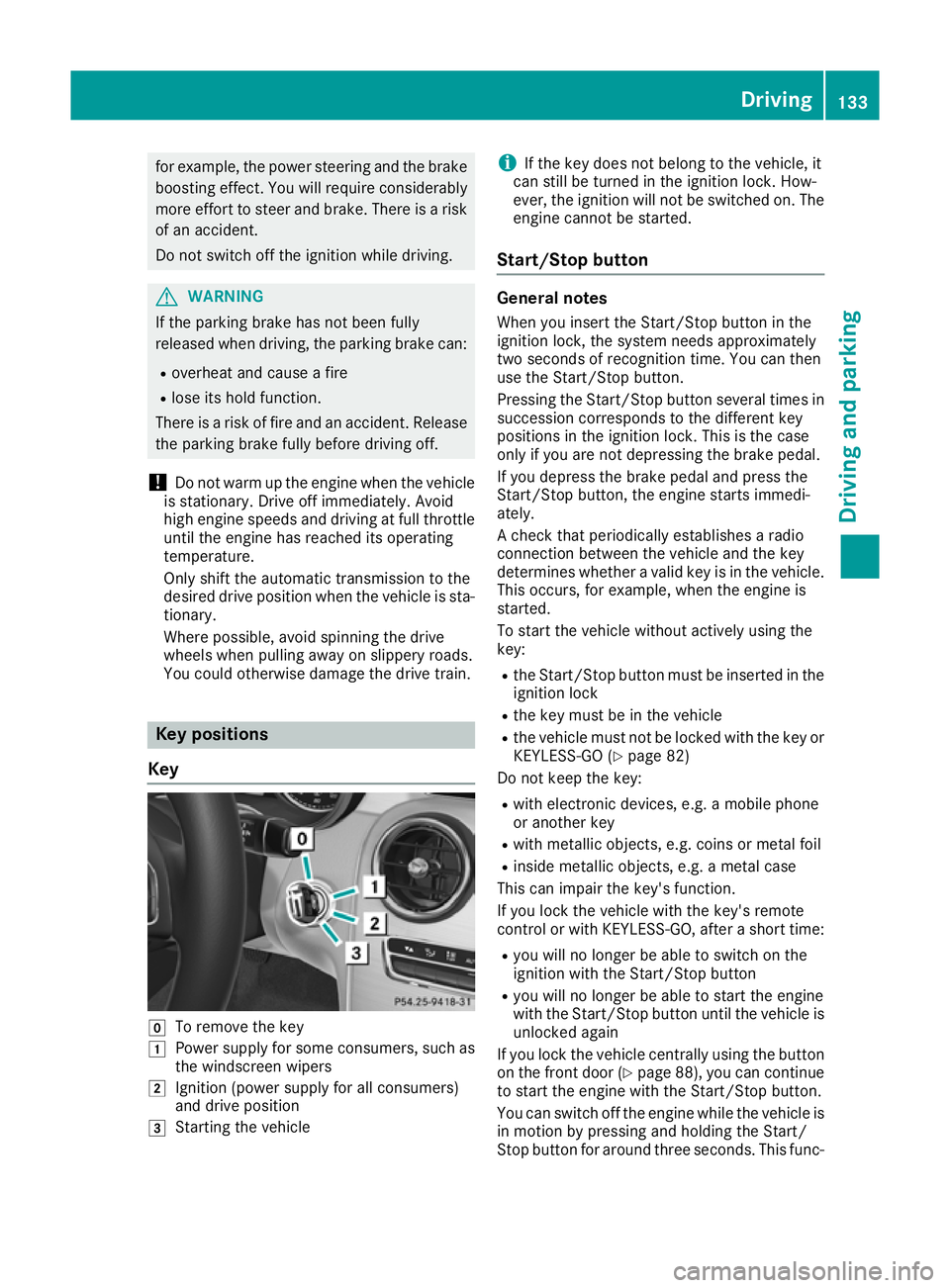
Key g
To remove the key
1 Power supply for some consumers, such as
the windscreen wipers
2 Ignition (power supply for all consumers)
and drive position
3 Starting the vehicle i
If the key does not belong to the vehicle, it
can still be turned in the ignition lock. How-
ever, the ignition will not be switched on. The
engine cannot be started.
Start/Stop button General notes
When you insert the Start/Stop button in the
ignition lock, the system needs approximately
two seconds of recognition time. You can then
use the Start/Stop button.
Pressing the Start/Stop button several times in succession corresponds to the different key
positions in the ignition lock. This is the case
only if you are not depressing the brake pedal.
If you depress the brake pedal and press the
Start/Stop button, the engine starts immedi-
ately.
A check that periodically establishes a radio
connection between the vehicle and the key
determines whether a valid key is in the vehicle.
This occurs, for example, when the engine is
started.
To start the vehicle without actively using the
key:
R the Start/Stop button must be inserted in the
ignition lock
R the key must be in the vehicle
R the vehicle must not be locked with the key or
KEYLESS-GO (Y page 82)
Do not keep the key:
R with electronic devices, e.g. a mobile phone
or another key
R with metallic objects, e.g. coins or metal foil
R inside metallic objects, e.g. a metal case
This can impair the key's function.
If you lock the vehicle with the key's remote
control or with KEYLESS-GO, after a short time:
R you will no longer be able to switch on the
ignition with the Start/Stop button
R you will no longer be able to start the engine
with the Start/Stop button until the vehicle is
unlocked again
If you lock the vehicle centrally using the button
on the front door (Y page 88), you can continue
to start the engine with the Start/Stop button.
You can switch off the engine while the vehicle is
in motion by pressing and holding the Start/
Stop button for around three seconds. This func- Driving
133Driving and parking Z
Page 224 of 377
The segments between the speed of the vehi-
cle in front and the stored speed light up. Rev counter
! Do not drive in the overrevving range. Doing
so will damage the engine.
The red band in the rev counter indicates the
engine's overrevving range.
The fuel supply is interrupted to protect the
engine when the red band is reached. Outside temperature display
You should pay special attention to road condi-
tions when temperatures are around freezing
point.
Bear in mind that the outside temperature dis-
play indicates the measured air temperature
and not the road surface temperature.
The outside temperature display is in the multi-
function display (Y page 222).
Changes in the outside temperature are dis-
played after a short delay. Coolant temperature gauge
G
WARNING
If you open the bonnet while the engine is
overheating or while there is a fire in the
engine compartment, you could come into
contact with hot gases or other leaking ser-
vice products. There is a danger of injury.
Allow an overheating engine to cool down
before opening the bonnet. If there is a fire in the engine compartment, leave the bonnet
closed and notify the fire brigade.
The coolant temperature display is shown in the lower section of the rev counter (Y page 35).
At high outside temperatures and when driving
in mountainous terrain, the coolant temperature
may rise to the end of the scale.
Under normal operating conditions and with the specified coolant level, the display may rise to
120 †. Operating the on-board computer
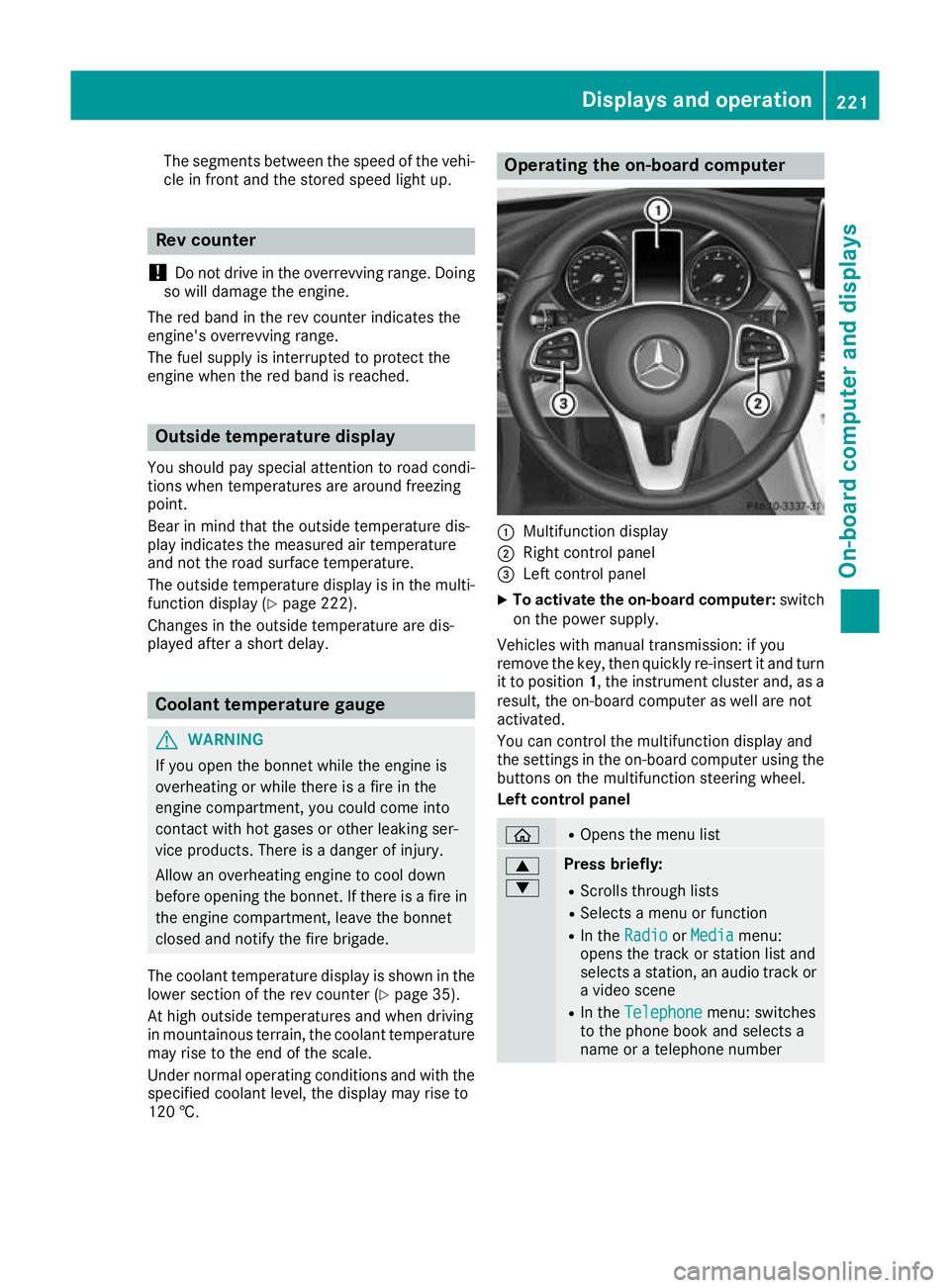
:
Multifunction display
; Right control panel
= Left control panel
X To activate the on-board computer: switch
on the power supply.
Vehicles with manual transmission: if you
remove the key, then quickly re-insert it and turn
it to position 1, the instrument cluster and, as a
result, the on-board computer as well are not
activated.
You can control the multifunction display and
the settings in the on-board computer using the buttons on the multifunction steering wheel.
Left control panel ò R
Opens the menu list 9
: Press briefly:
R Scrolls through lists
R Selects a menu or function
R In the Radio Radio orMedia
Media menu:
opens the track or station list and
selects a station, an audio track or a video scene
R In the Telephone Telephone menu: switches
to the phone book and selects a
name or a telephone number Displays and operation
221On-board computer and displays Z
Page 225 of 377
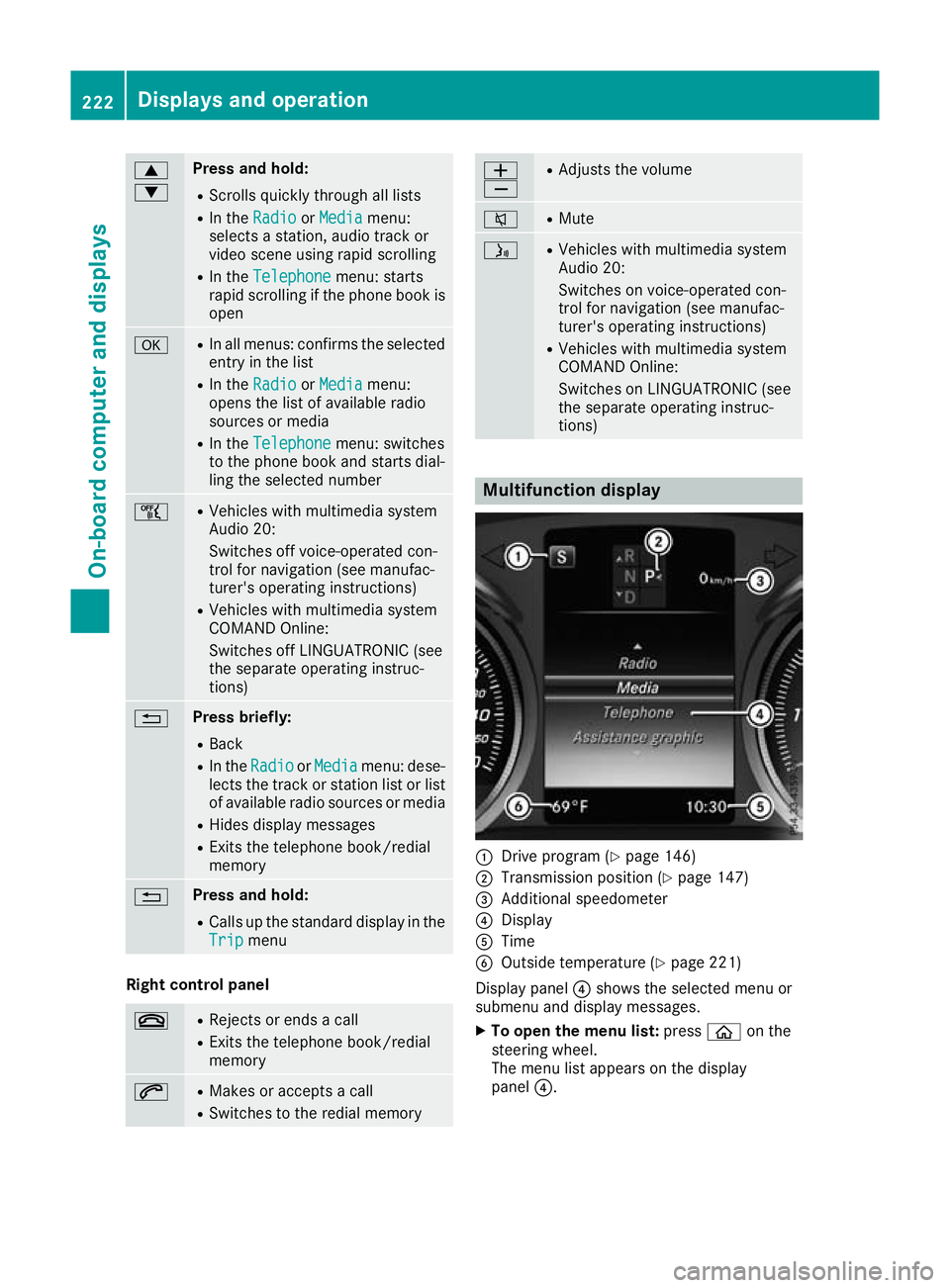
9
: Press and hold:
R
Scrolls quickly through all lists
R In the Radio Radio orMedia Media menu:
selects a station, audio track or
video scene using rapid scrolling
R In the Telephone Telephone menu: starts
rapid scrolling if the phone book is open a R
In all menus: confirms the selected
entry in the list
R In the Radio
Radio orMedia
Media menu:
opens the list of available radio
sources or media
R In the Telephone Telephone menu: switches
to the phone book and starts dial-
ling the selected number ñ R
Vehicles with multimedia system
Audio 20:
Switches off voice-operated con-
trol for navigation (see manufac-
turer's operating instructions)
R Vehicles with multimedia system
COMAND Online:
Switches off LINGUATRONIC (see
the separate operating instruc-
tions) % Press briefly:
R Back
R In the Radio Radio orMedia
Media menu: dese-
lects the track or station list or list
of available radio sources or media
R Hides display messages
R Exits the telephone book/redial
memory % Press and hold:
R
Calls up the standard display in the
Trip Trip menu Right control panel
~ R
Rejects or ends a call
R Exits the telephone book/redial
memory 6 R
Makes or accepts a call
R Switches to the redial memory W
X R
Adjusts the volume 8 R
Mute ó R
Vehicles with multimedia system
Audio 20:
Switches on voice-operated con-
trol for navigation (see manufac-
turer's operating instructions)
R Vehicles with multimedia system
COMAND Online:
Switches on LINGUATRONIC (see
the separate operating instruc-
tions) Multifunction display
:
Drive program (Y page 146)
; Transmission position (Y page 147)
= Additional speedometer
? Display
A Time
B Outside temperature (Y page 221)
Display panel ?shows the selected menu or
submenu and display messages.
X To open the menu list: pressòon the
steering wheel.
The menu list appears on the display
panel ?. 222
Displays and operationOn-board computer and displays
Page 227 of 377

AMG displays on the head-up display
:
Upshift indicator
; RACETIMER lap
= RACETIMER lap time
? Current speed
A Currently selected gear, gearshift options
with manual gearshifting
B Current engine speed
Setting options You can make the following settings on the
head-up display submenu:
R Adjust the position of the head-up display on
the windscreen (Y page 235)
R Adjust the brightness of the displays on the
head-up display (Y page 235)
R Select which information you want to appear
on the head-up display (Y page 234)
Using the Display content
Display content function, you
can, depending on your vehicle's equipment,
choose between four standard displays. The
selected content then appears on the head-
up display.
In Mercedes-AMG vehicles, you can choose
between further AMG displays in addition to
the standard displays, depending on your
vehicle's equipment.
If you select a display with traffic signs, traffic
signs detected by Traffic Sign Assist appear
on the head-up display. Menus and submenus
Menu overview
Press òon the steering wheel to open the
menu list.
Operating the on-board computer (Y page 221).Depending on the vehicle equipment, you can
select the following menus:
R Trip
Trip menu (Y page 224)
R Navi Navi menu (navigation instructions)
(Y page 226)
R Radio
Radio menu (Y page 228)
R Media
Media menu (Y page 228)
R Telephone
Telephone menu (Ypage 230)
R Assistance graphic
Assistance graphic menu (Ypage 231)
R Service
Service menu (Ypage 232)
R Settings
Settings menu (Ypage 232)
R AMG
AMG menu in Mercedes-AMG vehicles
(Y page 237) Trip menu
Standard display X
Press and hold the %button on the steer-
ing wheel until the Trip
Tripmenu with trip
meter :and total distance recorder ;
appears. 224
Menus and submenusOn-board computer and displays
Page 233 of 377
X
Press :or9 to select the correspond-
ing DVD single drive or disc.
X Press ato confirm.
X To open the scene list: press the:or
9 button briefly.
X To select the next or previous scene in the
scene list: press the:or9 button
briefly.
X To select a scene from the scene list using
rapid scrolling: press and hold:or9
until desired scene :is reached.
X Press ato confirm your selection.
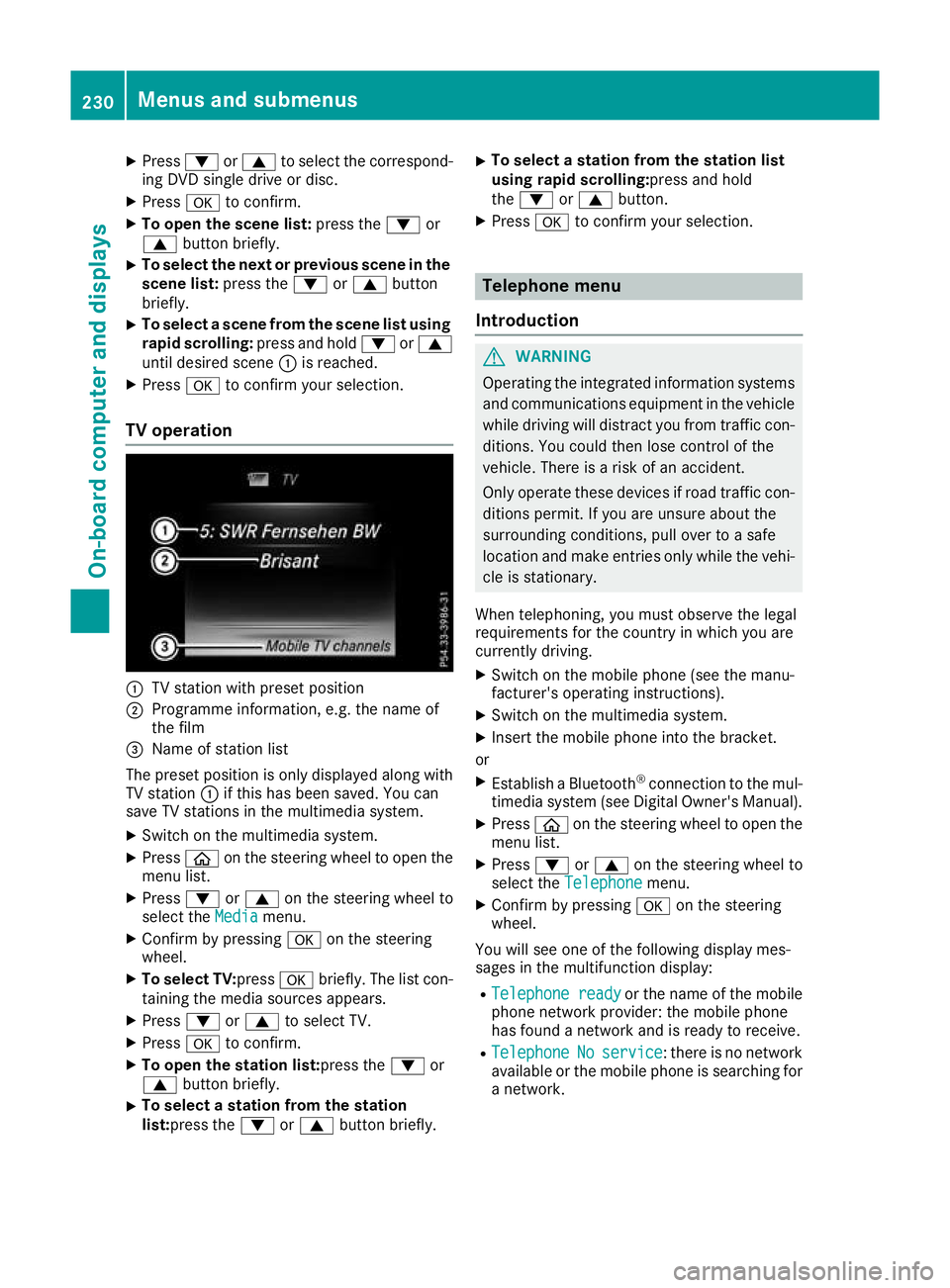
TV operation :
TV station with preset position
; Programme information, e.g. the name of
the film
= Name of station list
The preset position is only displayed along with TV station :if this has been saved. You can
save TV stations in the multimedia system.
X Switch on the multimedia system.
X Press òon the steering wheel to open the
menu list.
X Press :or9 on the steering wheel to
select the Media
Mediamenu.
X Confirm by pressing aon the steering
wheel.
X To select TV: pressabriefly. The list con-
taining the media sources appears.
X Press :or9 to select TV.
X Press ato confirm.
X To open the station list:press the :or
9 button briefly.
X To select a station from the station
list:press the
:or9 button briefly. X
To select a station from the station list
using rapid scrolling:press and hold
the
: or9 button.
X Press ato confirm your selection. Telephone menu
Introduction G
WARNING
Operating the integrated information systems and communications equipment in the vehicle
while driving will distract you from traffic con-
ditions. You could then lose control of the
vehicle. There is a risk of an accident.
Only operate these devices if road traffic con-
ditions permit. If you are unsure about the
surrounding conditions, pull over to a safe
location and make entries only while the vehi-
cle is stationary.
When telephoning, you must observe the legal
requirements for the country in which you are
currently driving. X Switch on the mobile phone (see the manu-
facturer's operating instructions).
X Switch on the multimedia system.
X Insert the mobile phone into the bracket.
or X Establish a Bluetooth ®
connection to the mul-
timedia system (see Digital Owner's Manual).
X Press òon the steering wheel to open the
menu list.
X Press :or9 on the steering wheel to
select the Telephone Telephone menu.
X Confirm by pressing aon the steering
wheel.
You will see one of the following display mes-
sages in the multifunction display:
R Telephone ready Telephone ready or the name of the mobile
phone network provider: the mobile phone
has found a network and is ready to receive.
R Telephone
Telephone No
Noservice
service: there is no network
available or the mobile phone is searching for
a network. 230
Menus and submenusOn-board computer and displays
Page 234 of 377
i
You can obtain further information about
suitable mobile phones and connecting
mobile phones via Bluetooth ®
:
R on the Internet at http://www.mercedes-
benz.com/connect
R at any Mercedes-Benz Service Centre
Accepting a call If someone calls you when you are in the
Tele‐ Tele‐
phone
phone menu, a display message appears in the
multifunction display.
You can accept a call at any time irrespective of
the selected menu.
X Press the 6button on the steering wheel
to accept the call.
Rejects or ends a call X
Press the ~button on the steering wheel
to reject or end the call.
Selecting an entry in the phone book X
Press òon the steering wheel to open the
menu list.
X Press :or9 on the steering wheel to
select the Telephone
Telephone menu.
X Confirm by pressing aon the steering
wheel.
X Press :, 9ora to switch to the
phone book.
X Press :or9 to select the names one
after the other.
or X To start rapid scrolling: press and hold:
or 9 for longer than one second.
The names are displayed quickly one after the
other in the phone book.
If you press and hold the :or9 button
for longer than five seconds, the name with
the next or previous initial letter in the alpha-
bet appears.
Rapid scrolling stops when you release the
button or reach the end of the list.
X If only one telephone number is stored for
a name: press the 6ora button to
start dialling.
or X
If there is more than one number for a
name: press the 6ora button to dis-
play the numbers.
X Press :or9 to select the number you
want to dial.
X Press the 6ora button to start dial-
ling.
or
X To exit the telephone book: press the~
or % button briefly.
Redialling The on-board computer saves the last names or
numbers dialled in the redial memory.
X Press òon the steering wheel to open the
menu list.
X Press :or9 on the steering wheel to
select the Telephone Telephone menu.
X Confirm by pressing aon the steering
wheel.
X Press the 6button to switch to the redial
memory.
X Press :or9 to select the desired
name or number.
X Press the 6ora button to start dial-
ling.
or X To exit the redial memory: press the~
or % button briefly. Assistance graphic menu
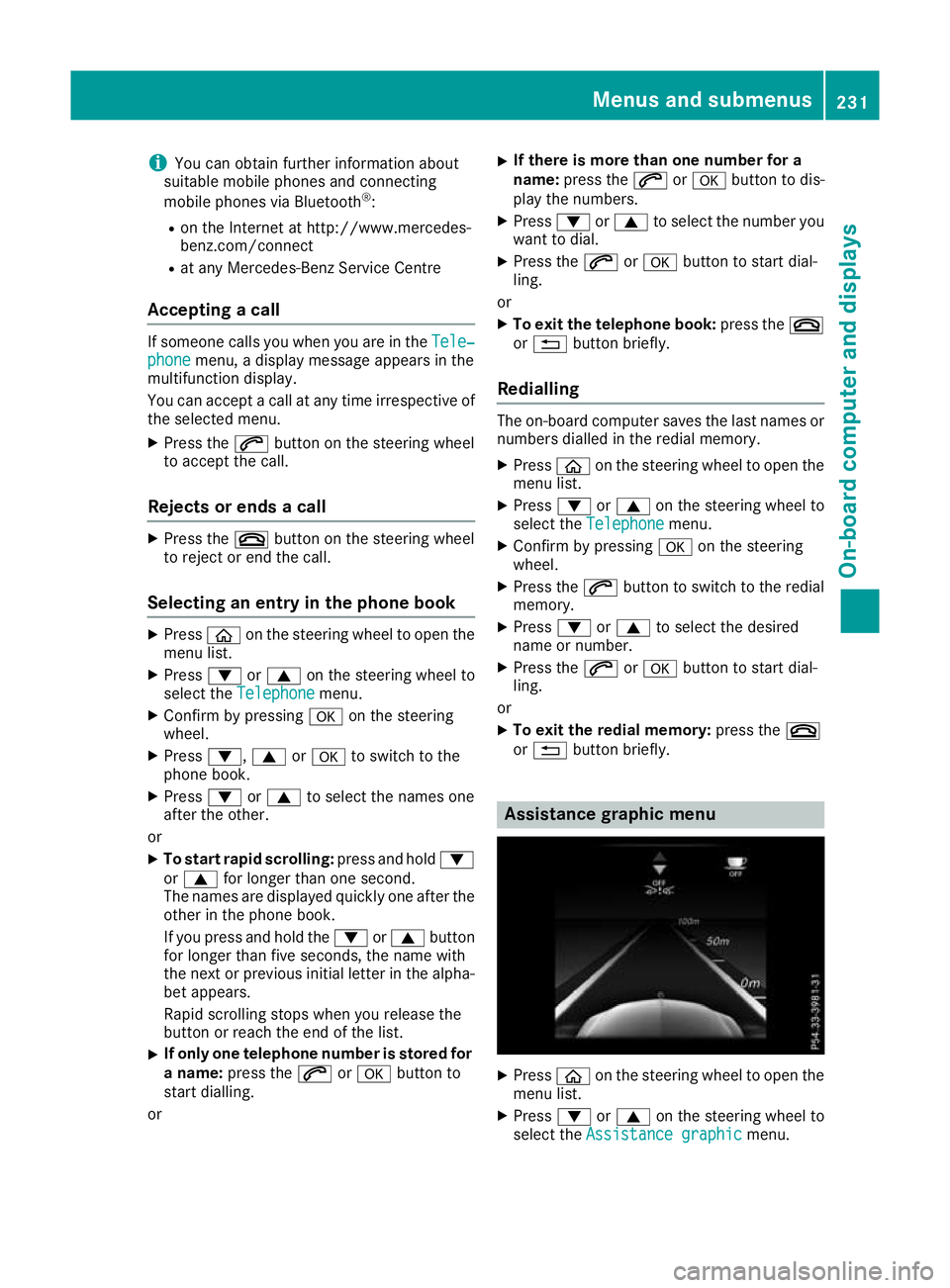
X
Press òon the steering wheel to open the
menu list.
X Press :or9 on the steering wheel to
select the Assistance graphic Assistance graphic menu. Menus and submenus
231On-board computer and displays Z