warning light MERCEDES-BENZ C-CLASS CABRIOLET 2016 Service Manual
[x] Cancel search | Manufacturer: MERCEDES-BENZ, Model Year: 2016, Model line: C-CLASS CABRIOLET, Model: MERCEDES-BENZ C-CLASS CABRIOLET 2016Pages: 377, PDF Size: 6.9 MB
Page 118 of 377
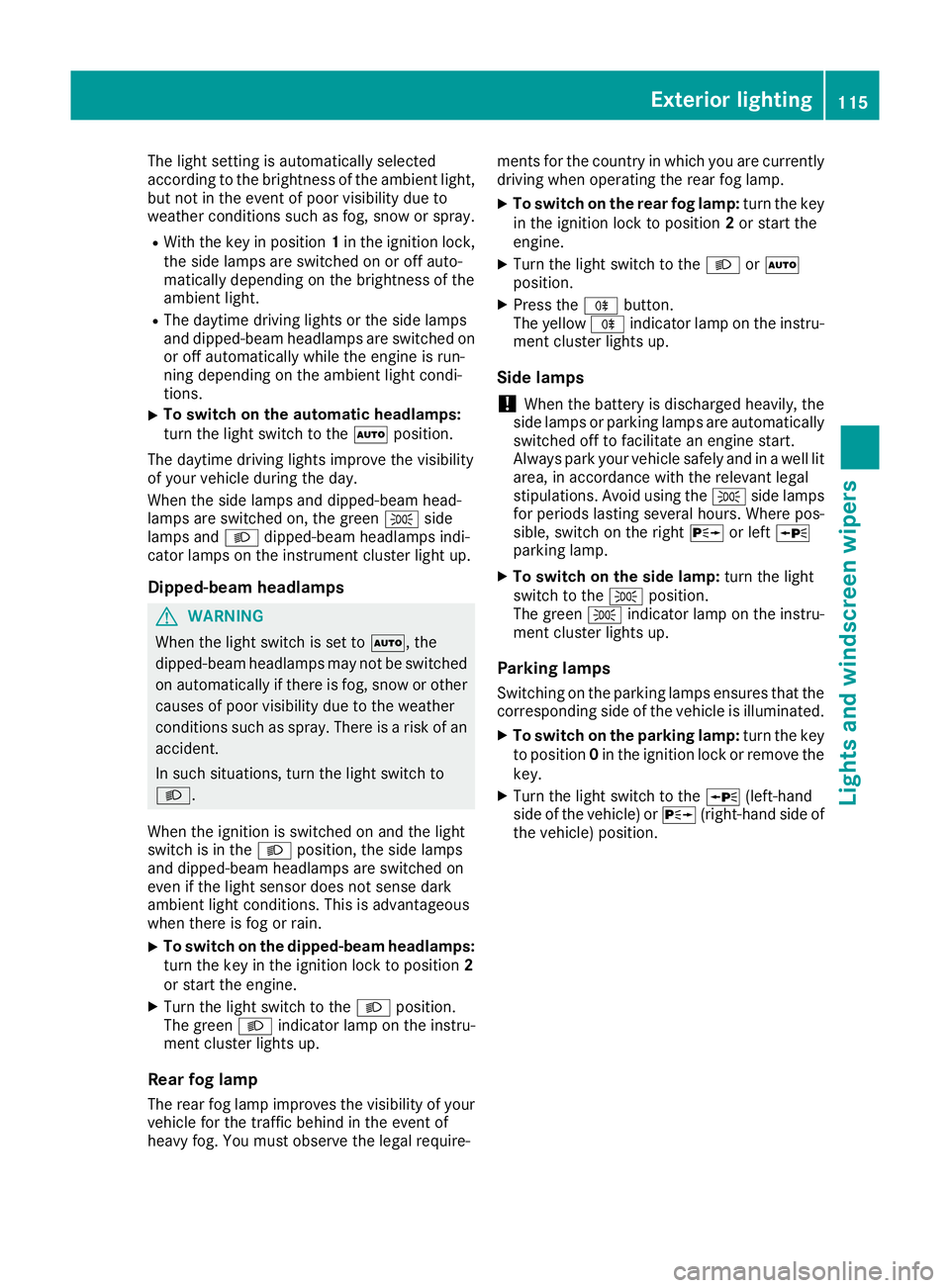
The light setting is automatically selected
according to the brightness of the ambient light,
but not in the event of poor visibility due to
weather conditions such as fog, snow or spray.
R With the key in position 1in the ignition lock,
the side lamps are switched on or off auto-
matically depending on the brightness of the
ambient light.
R The daytime driving lights or the side lamps
and dipped-beam headlamps are switched on or off automatically while the engine is run-
ning depending on the ambient light condi-
tions.
X To switch on the automatic headlamps:
turn the light switch to the
Ãposition.
The daytime driving lights improve the visibility
of your vehicle during the day.
When the side lamps and dipped-beam head-
lamps are switched on, the green Tside
lamps and Ldipped-beam headlamps indi-
cator lamps on the instrument cluster light up.
Dipped-beam headlamps G
WARNING
When the light switch is set to Ã, the
dipped-beam headlamps may not be switched on automatically if there is fog, snow or othercauses of poor visibility due to the weather
conditions such as spray. There is a risk of an
accident.
In such situations, turn the light switch to
L.
When the ignition is switched on and the light
switch is in the Lposition, the side lamps
and dipped-beam headlamps are switched on
even if the light sensor does not sense dark
ambient light conditions. This is advantageous
when there is fog or rain.
X To switch on the dipped-beam headlamps:
turn the key in the ignition lock to position 2
or start the engine.
X Turn the light switch to the Lposition.
The green Lindicator lamp on the instru-
ment cluster lights up.
Rear fog lamp The rear fog lamp improves the visibility of your
vehicle for the traffic behind in the event of
heavy fog. You must observe the legal require- ments for the country in which you are currently
driving when operating the rear fog lamp.
X To switch on the rear fog lamp: turn the key
in the ignition lock to position 2or start the
engine.
X Turn the light switch to the LorÃ
position.
X Press the Rbutton.
The yellow Rindicator lamp on the instru-
ment cluster lights up.
Side lamps
! When the battery is discharged heavily, the
side lamps or parking lamps are automatically
switched off to facilitate an engine start.
Always park your vehicle safely and in a well lit area, in accordance with the relevant legal
stipulations. Avoid using the Tside lamps
for periods lasting several hours. Where pos-
sible, switch on the right Xor left W
parking lamp.
X To switch on the side lamp: turn the light
switch to the Tposition.
The green Tindicator lamp on the instru-
ment cluster lights up.
Parking lamps Switching on the parking lamps ensures that the
corresponding side of the vehicle is illuminated.
X To switch on the parking lamp: turn the key
to position 0in the ignition lock or remove the
key.
X Turn the light switch to the W(left-hand
side of the vehicle) or X(right-hand side of
the vehicle) position. Exterior lighting
115Lights and windscreen wipers Z
Page 119 of 377
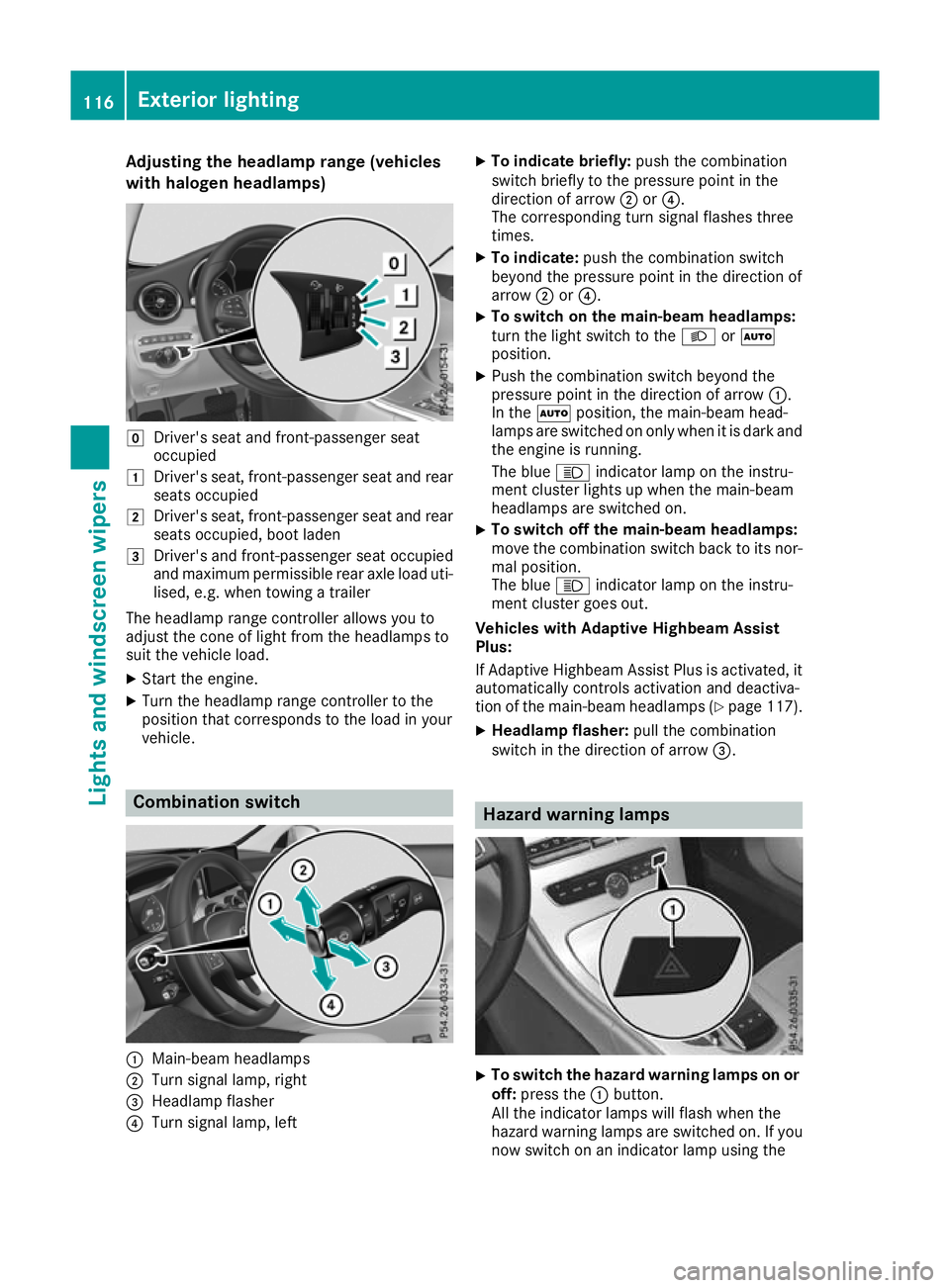
Adjusting the headlamp range (vehicles
with halogen headlamps) g
Driver's seat and front-passenger seat
occupied
1 Driver's seat, front-passenger seat and rear
seats occupied
2 Driver's seat, front-passenger seat and rear
seats occupied, boot laden
3 Driver's and front-passenger seat occupied
and maximum permissible rear axle load uti- lised, e.g. when towing a trailer
The headlamp range controller allows you to
adjust the cone of light from the headlamps to
suit the vehicle load.
X Start the engine.
X Turn the headlamp range controller to the
position that corresponds to the load in your
vehicle. Combination switch
:
Main-beam headlamps
; Turn signal lamp, right
= Headlamp flasher
? Turn signal lamp, left X
To indicate briefly: push the combination
switch briefly to the pressure point in the
direction of arrow ;or?.
The corresponding turn signal flashes three
times.
X To indicate: push the combination switch
beyond the pressure point in the direction of
arrow ;or?.
X To switch on the main-beam headlamps:
turn the light switch to the
LorÃ
position.
X Push the combination switch beyond the
pressure point in the direction of arrow :.
In the Ãposition, the main-beam head-
lamps are switched on only when it is dark and
the engine is running.
The blue Kindicator lamp on the instru-
ment cluster lights up when the main-beam
headlamps are switched on.
X To switch off the main-beam headlamps:
move the combination switch back to its nor-
mal position.
The blue Kindicator lamp on the instru-
ment cluster goes out.
Vehicles with Adaptive Highbeam Assist
Plus:
If Adaptive Highbeam Assist Plus is activated, it
automatically controls activation and deactiva-
tion of the main-beam headlamps (Y page 117).
X Headlamp flasher: pull the combination
switch in the direction of arrow =. Hazard warning lamps
X
To switch the hazard warning lamps on or
off: press the :button.
All the indicator lamps will flash when the
hazard warning lamps are switched on. If you
now switch on an indicator lamp using the 116
Exterior lightingLights and windscreen wipers
Page 120 of 377
combination switch, only the indicator lamp
on the corresponding side of the vehicle will
flash.
The hazard warning lamps switch on automati-
cally if:
R an airbag has been triggered or
R the vehicle decelerates rapidly from a speed
of above 70 km/h and comes to a standstill
The hazard warning lamps switch off automati-
cally if the vehicle reaches a speed of above
10 km/h again after a full brake application.
The hazard warning lamps continue to operate
even if the ignition is switched off. Intelligent Light System
General notes The Intelligent Light System is a system that
adjusts the headlamps to suit the prevailing
driving and weather conditions. It offers
advanced functions for improved illumination of
the road surface, e.g. depending on the vehicle
speed or weather conditions. The system
includes the active light function, cornering light
function, motorway mode and extended-range
fog lamps. The system is active only when it is
dark.
You can activate/deactivate the Intelligent Intelligent
Light System
Light System function using the on-board
computer (Y page 235).
Active light function The active light function is a system that moves
the headlamps according to the steering move- ments of the front wheels. In this way, relevant
areas remain illuminated while you are driving.
This allows you to recognise pedestrians,
cyclists and animals sooner.
Active: when the lights are switched on.
Cornering light function The cornering light function improves the illu-
mination of the road over a wide angle in the
direction you are turning, enabling better visi-
bility in tight bends, for example. It can be acti-
vated only when the dipped-beam headlamps
are switched on. Active:
R if you are driving at speeds below 40 km/h
and switch on the turn signal or turn the steer-
ing wheel
R if you are driving at speeds between 40 km/h
and 70 km/h and turn the steering wheel
The cornering light function may remain lit for a short time, but is automatically switched off
after no more than three minutes.
Motorway mode Motorway mode increases the range of the
beam.
Active:if you are driving at a speed above
110 km/h and do not make any large steering
movements for at least 1000 m or if you are
driving at a speed above 130 km/h.
Not active: if you are driving at speeds below
80 km/h following activation.
Extended range fog lamps The extended-range fog lamps reduce the glare
experienced by the driver and improve the illu-
mination of the edge of the carriageway.
Active: if you are driving at speeds below
70 km/h and you switch on the rear fog lamp.
Not active: if, following activation, you are driv-
ing at speeds above 100 km/h or if you switch
off the rear fog lamp. Adaptive Highbeam Assist Plus
General notes With Adaptive Highbeam Assist Plus, you can
automatically switch between dipped-beam,
partial main-beam and main-beam headlamps.
Partial main-beam illumination is a form of illu-
mination whereby the main beam is directed
past other road users. Other road users are kept
out of the main beam. This prevents glare. If
there is a vehicle in front, for example, the main-
beam headlamps illuminate the areas to its right
and left, and the vehicle in front is illuminated by the dipped-beam headlamps.
The system automatically adapts the dipped-
beam headlamp range depending on the dis-
tance to the other vehicle. Once the system no
longer detects any other vehicles, it switches on the main-beam headlamps again. Exterior lighting
117Lights andwindscreen wipers Z
Page 121 of 377
If the main-beam or partial main-beam head-
lamps are causing too much reflection from traf- fic signs, the lights are automatically dimmed
and glare for the driver caused by the reflectionsis thus avoided.
The system's optical sensor is located behind
the windscreen near the overhead control
panel.
Important safety notes G
WARNING
Adaptive Highbeam Assist Plus does not rec-
ognise road users:
R who have no lights, e.g. pedestrians
R who have poor lighting, e.g. cyclists
R whose lighting is blocked, e.g. by a barrier
In very rare cases, Adaptive Highbeam Assist
Plus may not recognise road users who do
have lights, or may recognise them too late. In this, or in similar situations, the automatic
main-beam headlamps will not be deactivated
or will be activated despite the presence of
other road users. There is a risk of an acci-
dent.
Always carefully observe the traffic conditions and switch off the main-beam headlamps in
good time.
Adaptive Highbeam Assist Plus cannot take into
account road, weather or traffic conditions.
Adaptive Highbeam Assist Plus is only an aid.
You are responsible for adjusting the vehicle's
lighting to the prevailing light, visibility and traf-
fic conditions.
In particular, the detection of obstacles can be
impaired in the case of:
R poor visibility, e.g. due to fog, heavy rain or
snow
R dirt on the sensors or obscured sensors Switching Adaptive Highbeam Assist
Plus on/off X
To switch on: turn the light switch to the
à position.
X Press the combination switch forwards
beyond the pressure point (Y page 116).
The indicator lamp _on the multifunction
display lights up when it is dark and the light
sensor switches on the dipped-beam head-
lamps.
At speeds above approx. 25 km/h: the head- lamp range is automatically controlled
according to the distance to other road users.
At speeds above approximately 30 km/h:
R if no other road users are detected, the
main-beam headlamps are automatically
switched on
R if other road users are detected, the partial
main-beam headlamps are automatically
switched on
The K indicator lamp on the instrument
cluster also lights up.
At speeds below approx. 25 km/h or when
there is sufficient street lighting:
R the partial main-beam headlamps are
switched off automatically
R the main-beam headlamps are switched off
automatically
The K indicator lamp on the instrument
cluster goes out. The _indicator lamp on
the multifunction display remains lit.
X To switch off:move the combination switch
back to its normal position or move the light
switch to another position.
The _ indicator lamp on the multifunction
display goes out. Headlamps misted up on the inside
Certain climatic and physical conditions may
cause moisture to form in the headlamp. This
moisture does not affect the functionality of the headlamp. 118
Exterior lightingLights and windscreen wipers
Page 122 of 377

Interior lighting
Overview of interior lighting
Front overhead control panel :
p Left-hand front reading lamp
; c Front interior lighting
= | Automatic interior lighting control
? p Right-hand front reading lamp Interior lighting control
General notes In order to prevent the vehicle's battery from
discharging, the interior lighting functions are
automatically deactivated after some time
except for when the key is in position 2in the
ignition lock.
The colour and brightness of the ambient light-
ing are set using the multimedia system (see
Digital Owner's Manual).
Automatic interior lighting control X
To switch on or off: press the|button.
When the automatic interior lighting control is
switched on, the button is flush with the over- head control panel.
The interior lighting automatically switches on if
you:
R unlock the vehicle
R open a door
R remove the key from the ignition lock
The interior lighting is activated for a short time
when the key is removed from the ignition lock. This delayed switch-off can be adjusted via the
multimedia system (see Digital Owner's Man-
ual). Replacing bulbs
Important safety notes
G
WARNING
Bulbs, lamps and plug connectors can
become very hot during use. When replacing a bulb, you could burn yourself on these com-
ponents. There is a risk of injury.
Allow these components to cool down before replacing the bulb.
Do not use a bulb if it has been dropped or if its
glass tube has been scratched.
The bulb may explode if:
R you touch it
R it is hot
R you drop it
R you scratch it
Use bulbs only in closed lamps that have been
designed for this purpose. Fit only spare bulbs of the same type and the specified voltage.
Marks on the glass tube reduce the service life
of the bulbs. Do not touch the glass tube with
your bare hands. If necessary, clean the glass
tube when cold with alcohol or spirit and rub it
off with a lint-free cloth.
Protect bulbs from moisture during operation.
Do not allow bulbs to come into contact with
liquids.
Replace only the bulbs listed (Y page 120).
Have the bulbs that you cannot change yourself
replaced at a qualified specialist workshop.
If you require assistance replacing bulbs, con-
sult a qualified specialist workshop.
If the new bulb still does not light up, consult a
qualified specialist workshop.
Headlamps and lights are an important aspect of
vehicle safety. You must therefore make sure
that these function correctly at all times. Have
the headlamp setting checked regularly.
Vehicles with LED headlamps: the front and
rear lamp clusters of your vehicle are equipped
with LED bulbs. Do not replace the bulbs your-
self. Contact a qualified specialist workshop
with the necessary specialist knowledge and
tools to carry out the work required. Replacing bulbs
119Lights and windscreen wipers Z
Page 125 of 377

Replacing the wiper blades
Important safety notes G
WARNING
If the windscreen wipers begin to move while
you are changing the wiper blades, you can be trapped by the wiper arm. There is a risk of
injury.
Always switch off the windscreen wipers and
ignition before changing the wiper blades.
! Never open the bonnet if a windscreen
wiper arm has been folded away from the
windscreen.
Never fold a windscreen wiper arm without a
wiper blade back onto the windscreen.
Hold the windscreen wiper arm firmly when
you change the wiper blade. If you release the
windscreen wiper arm without a wiper blade
and it falls onto the windscreen, the wind-
screen may be damaged by the force of the
impact.
Mercedes-Benz recommends that you have
the wiper blades changed at a qualified spe-
cialist workshop.
! To avoid damaging the windscreen wiper
blades, make sure that you touch only the
wiper arm of the windscreen wiper.
Replacing the windscreen wiper blades Moving the wiper blades to the vertical
position
On vehicles without KEYLESS-GO or KEY-
LESS‑GO start function:
X Turn the key to position 1or 2in the ignition
lock (Y page 133).
X Set the windscreen wipers to the °posi-
tion on the combination switch.
X When the wiper arms have reached the verti-
cal position, turn the key to position 0in the
ignition lock and remove it.
X Fold the wiper arm away from the windscreen.
On vehicles with KEYLESS-GO or KEY-
LESS‑GO start function:
X Switch off the engine.
X Remove your foot from the brake pedal. X
Set the windscreen wipers to the °posi-
tion on the combination switch.
X Press the Start/Stop button repeatedly until
the windscreen wipers start.
X When the wiper arms have reached the verti-
cal position, press the Start/Stop button.
X Fold the wiper arm away from the windscreen.
Removing the wiper blades X
Hold on to the wiper arm with one hand. With
the other hand, turn the wiper blade in the
direction of arrow :away from the wiper arm
as far as it will go.
X Slide the catch ;in the direction of arrow =
until it engages in the removal position with a noticeable click. X
Remove the wiper blade in the direction of
arrow ?away from the wiper arm. 122
Windscreen wipersLights and windscreen wipers
Page 133 of 377

Activating/deactivating
X
Turn the key to position 2in the ignition lock
(Y page 133).
X To activate: press thegrocker switch up
or down.
The indicator lamp above the grocker
switch lights up.
Air-recirculation mode is activated automati-
cally: R at high outside temperatures
R in tunnels (vehicles with a navigation system
only)
The indicator lamp above the grocker
switch is not lit when automatic air-recirculation
mode is activated. Outside air is added after
approximately 30 minutes.
X To deactivate: press thegrocker switch
up or down.
The indicator lamp above the grocker
switch goes out.
Air-recirculation mode is deactivated automati-
cally:
R after approximately five minutes at outside
temperatures below approximately 5 †
R after approximately five minutes if "Cooling
with air dehumidification" is deactivated
R after approximately 30 minutes at outside
temperatures above approximately 5 †if the
"Cooling with air dehumidification" function is
activated Opening or closing using the air-recir-
culation button G
WARNING
During opening, body parts could be drawn in
or become trapped between the side window and the door frame. There is a risk of injury.
Monitor the entire opening procedure. When
opening, make sure that nobody is touching
the side window. If somebody becomes trap-
ped, release the switch immediately to inter-
rupt the opening procedure. G
WARNING
During closing, body parts could be drawn in
or become trapped between the side window and the door frame. There is a risk of injury.
Monitor the entire closing procedure. When
closing, make sure that no body parts are in
the closing area. If somebody becomes trap-
ped, release the switch immediately to inter-
rupt the closing procedure.
X To close: Press and hold the grocker
switch up or down until the side windows
close.
The indicator lamp above the grocker
switch lights up. Air-recirculation mode is
activated.
X To open: Press and hold the grocker
switch up or down until the side windows
open.
The indicator lamp above the grocker
switch goes out. Air-recirculation mode is
deactivated. Ionisation
Ionisation is used to purify and freshen the air in the vehicle interior, which is conducive to a
pleasant climate.
The ionisation of the interior air is odourless and
cannot, directly, be perceived in the vehicle inte- rior.
You can switch ionisation on or off using the
multimedia system (Y page 288).
Ionisation can only be operated when the auto-
matic climate control is switched on. The side air vent on the driver's side must be open. Air vents
Important safety notes
G
WARNING
Very hot or very cold air can flow from the air vents. This could result in burns or frostbite in the immediate vicinity of the air vents. There
is a risk of injury.
Make sure that all vehicle occupants always
maintain a sufficient distance to the air out- 130
Air ventsClimate control
Page 137 of 377

tion operates independently of the ECO start/
stop automatic engine switch-off function.
Key positions with the Start/Stop button :
Start/Stop button
; Ignition lock
When you switch on the ignition, all the indicator lamps on the instrument cluster light up. For
warning and indicator lamps, see (Y page 273).
If Start/Stop button :has not yet been
pressed, this is the same as the key having been removed.
X To switch on the power supply: press
Start/Stop button :once.
The power supply is switched on. You can now
activate the windscreen wipers, for example.
The power supply is switched off again if:
R the driver's door is opened and
R you press Start/Stop button :twice when in
this position
X To switch on the ignition: press Start/Stop
button :twice.
The ignition is switched on.
The ignition is switched off again if:
R you do not start the engine from this position
within 15 minutes
R you press Start/Stop button :once when in
this position
The power supply is switched off again if:
R the driver's door is opened and
R you press Start/Stop button :once when in
this position
Removing the Start/Stop button
You can remove the Start/Stop button from the
ignition lock and start the vehicle as normal
using the key. It is possible to switch between Start/Stop but-
ton mode and key operation only when the
transmission is in position j.
X Remove Start/Stop button :from ignition
lock ;.
You do not have to remove the Start/Stop but-
ton from the ignition lock when you leave the
vehicle. You should, however, always take the
key with you when leaving the vehicle. As long as
the key is in the vehicle:
R the vehicle can be started using the Start/
Stop button
R the electrically powered equipment can be
operated Starting the vehicle
Important safety notes G
WARNING
If children are left unsupervised in the vehicle, they could:
R open doors, thereby endangering other per-
sons or road users
R get out and be struck by oncoming traffic
R operate vehicle equipment and become
trapped, for example
In addition, the children could also set the
vehicle in motion, for example, if they:
R release the parking brake
R shift the automatic transmission out of park
position P or shift manual transmission into
neutral
R start the engine
There is a risk of an accident and injury.
When leaving the vehicle, always take the key with you and lock the vehicle. Never leave
children and animals unattended in the vehi-
cle. Keep the keys out of the reach of children. G
WARNING
Combustion engines emit poisonous exhaust
gases such as carbon monoxide. Inhaling
these exhaust gases leads to poisoning. There is a risk of fatal injury. Therefore never leave 134
DrivingDriving an
d parking
Page 138 of 377

the engine running in enclosed spaces with-
out sufficient ventilation. G
WARNING
Flammable materials introduced through
environmental influence or by animals can
ignite if in contact with the exhaust system or parts of the engine that heat up. There is a risk
of fire.
Carry out regular checks to make sure that
there are no flammable foreign materials in
the engine compartment or in the exhaust
system.
General notes Vehicles with a petrol engine:
the catalytic
converter is preheated for up to 30 seconds
after a cold start. The sound of the engine may
change during this time.
Manual transmission X
Depress the brake pedal and keep it
depressed.
X Fully depress the clutch pedal.
X Engage neutral i.
Automatic transmission X
Shift the transmission to position j
(Y page 145).
The transmission position indicator on the
multifunction display shows j
(Y page 146).
i You can start the engine in transmission
position jand i.
Starting procedure using the key To start the engine using the key instead of the
Start/Stop button, pull the Start/Stop button
out of the ignition lock.
X To start a diesel engine: turn the key to
position 2in the ignition lock (Y page 133).
The % preglow indicator lamp on the
instrument cluster lights up.
X Turn the key to position 3in the ignition lock
(Y page 133) and release it as soon as the
engine is running. i
Vehicles with a diesel engine:
you can
start the engine without preglow if the engine
is warm.
If the engine will not start:
X Remove the key from the ignition lock.
X Reinsert the key in the ignition lock after wait-
ing for a short period.
X Turn the key to position 2in the ignition lock
(Y page 133).
The indicator lamps on the instrument cluster
light up (Y page 273).
X Turn the key to position 3in the ignition lock
(Y page 133) and release it as soon as the
engine is running.
Starting procedure using the Start/
Stop button The Start/Stop button is available only on vehi-
cles with KEYLESS-GO or the KEYLESS-GO start
function.
The Start/Stop button can be used to start the
vehicle manually without inserting the key in the ignition lock. The key must be in the vehicle and
the Start/Stop button must be inserted in the
ignition lock. This mode for starting the engine
manually operates independently of the ECO
start/stop automatic engine start function.
You can start the engine if a valid key is in the
vehicle. Switch off the engine and always take
the key with you when leaving the vehicle, even
if you leave it for only a short time. Observe the important safety notes.
X Depress the brake pedal and keep it
depressed.
X Press the Start/Stop button once
(Y page 133).
Vehicles with a petrol engine: the engine
starts.
Vehicles with a diesel engine: preglow is
activated and the engine starts. Pulling away
General notes G
WARNING
Vehicles with automatic transmission: Driving
135Driving an d parking
Z
Page 143 of 377
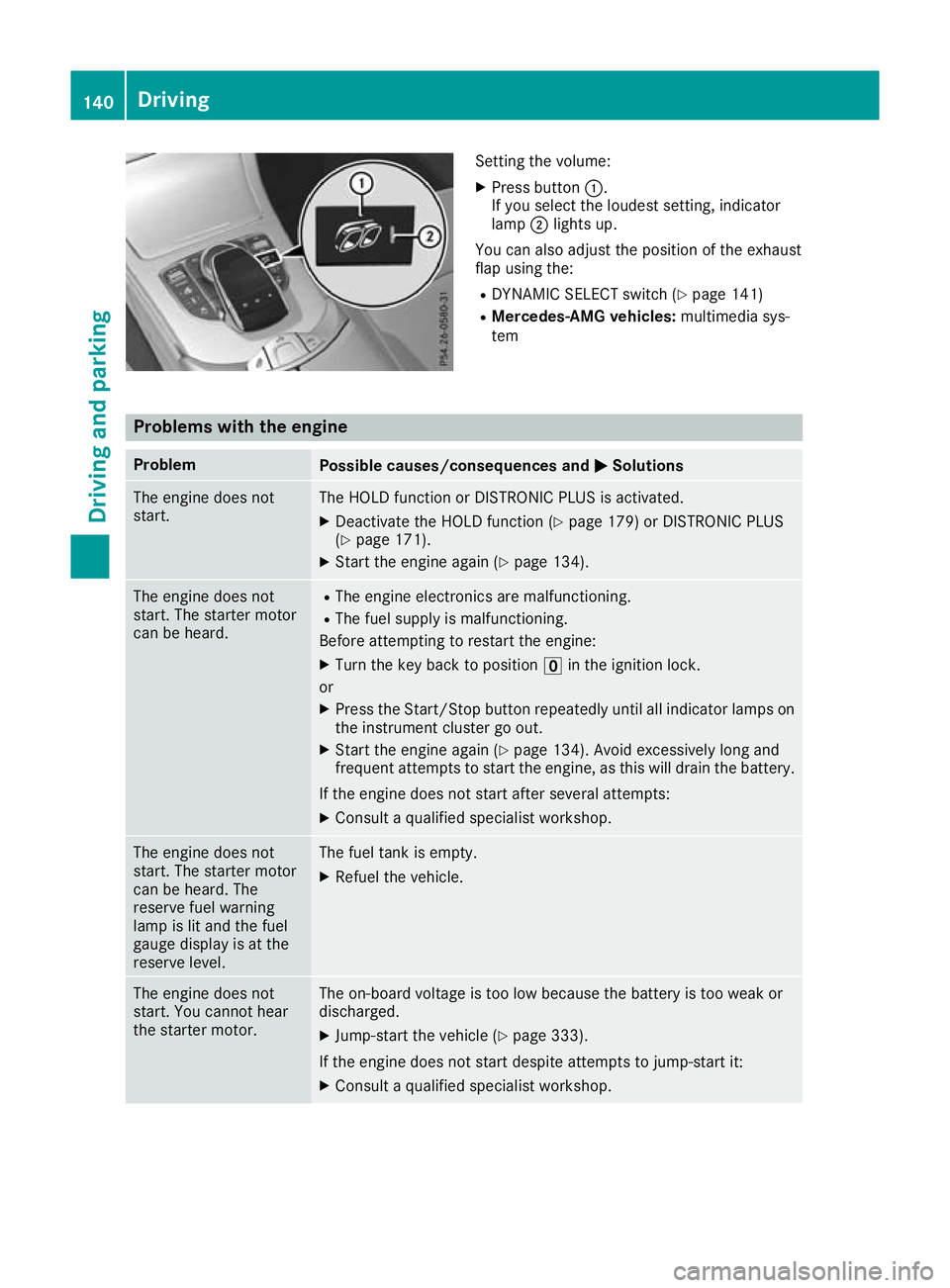
Setting the volume:
X Press button :.
If you select the loudest setting, indicator
lamp ;lights up.
You can also adjust the position of the exhaust
flap using the: R DYNAMIC SELECT switch (Y page 141)
R Mercedes-AMG vehicles: multimedia sys-
tem Problems with the engine
Problem
Possible causes/consequences and
M MSolutions The engine does not
start. The HOLD function or DISTRONIC PLUS is activated.
X Deactivate the HOLD function (Y page 179) or DISTRONIC PLUS
(Y page 171).
X Start the engine again (Y page 134).The engine does not
start. The starter motor
can be heard. R
The engine electronics are malfunctioning.
R The fuel supply is malfunctioning.
Before attempting to restart the engine:
X Turn the key back to position uin the ignition lock.
or X Press the Start/Stop button repeatedly until all indicator lamps on
the instrument cluster go out.
X Start the engine again (Y page 134). Avoid excessively long and
frequent attempts to start the engine, as this will drain the battery.
If the engine does not start after several attempts: X Consult a qualified specialist workshop. The engine does not
start. The starter motor
can be heard. The
reserve fuel warning
lamp is lit and the fuel
gauge display is at the
reserve level. The fuel tank is empty.
X Refuel the vehicle. The engine does not
start. You cannot hear
the starter motor. The on-board voltage is too low because the battery is too weak or
discharged.
X Jump-start the vehicle (Y page 333).
If the engine does not start despite attempts to jump-start it:
X Consult a qualified specialist workshop. 140
DrivingDriving and parking