lights MERCEDES-BENZ C-CLASS CABRIOLET 2016 Workshop Manual
[x] Cancel search | Manufacturer: MERCEDES-BENZ, Model Year: 2016, Model line: C-CLASS CABRIOLET, Model: MERCEDES-BENZ C-CLASS CABRIOLET 2016Pages: 377, PDF Size: 6.9 MB
Page 180 of 377
Deactivating DISTRONIC PLUS
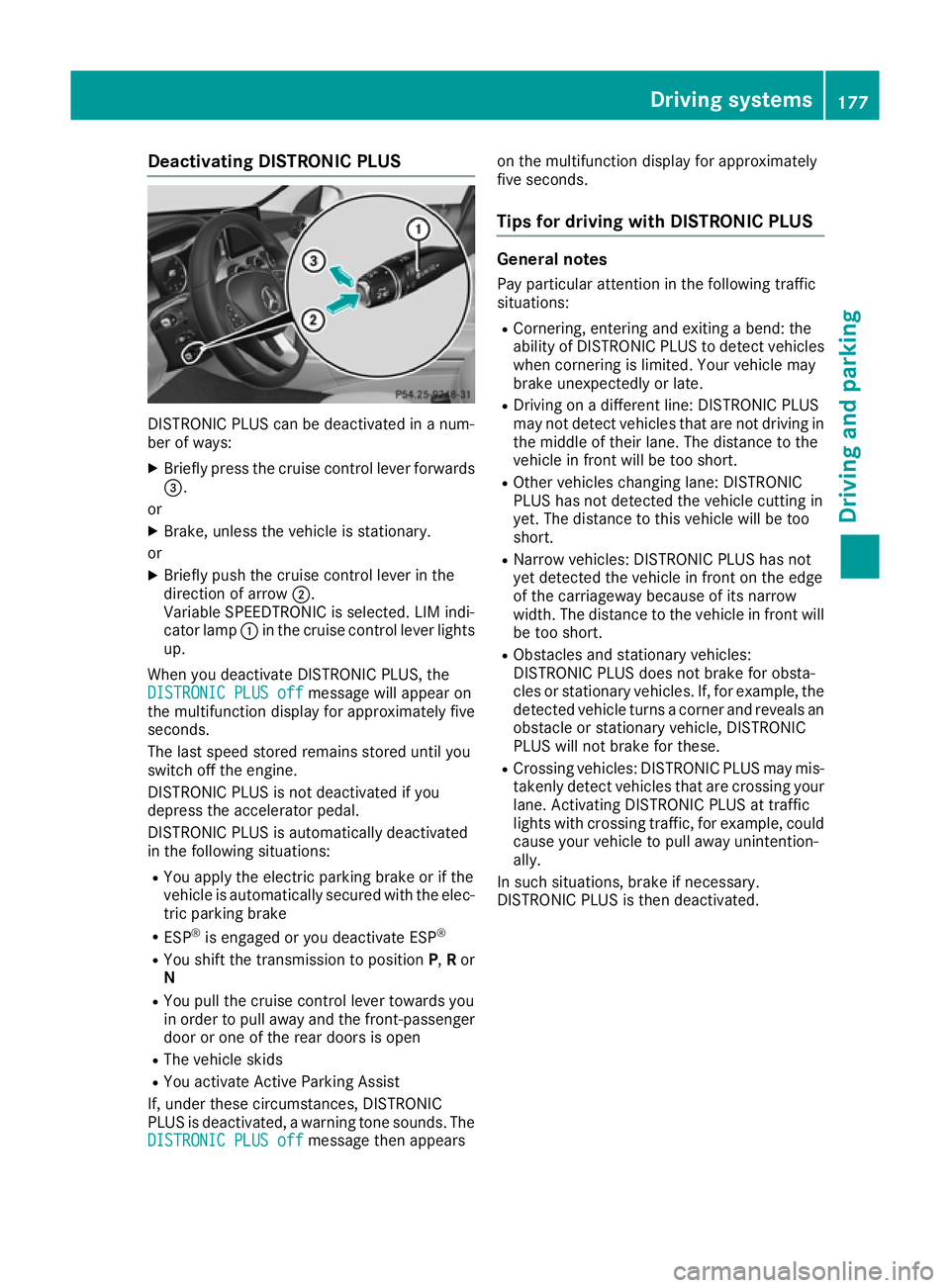
DISTRONIC PLUS can be deactivated in a num-
ber of ways:
X Briefly press the cruise control lever forwards
=.
or
X Brake, unless the vehicle is stationary.
or X Briefly push the cruise control lever in the
direction of arrow ;.
Variable SPEEDTRONIC is selected. LIM indi-
cator lamp :in the cruise control lever lights
up.
When you deactivate DISTRONIC PLUS, the
DISTRONIC PLUS off DISTRONIC PLUS off message will appear on
the multifunction display for approximately five
seconds.
The last speed stored remains stored until you
switch off the engine.
DISTRONIC PLUS is not deactivated if you
depress the accelerator pedal.
DISTRONIC PLUS is automatically deactivated
in the following situations:
R You apply the electric parking brake or if the
vehicle is automatically secured with the elec-
tric parking brake
R ESP ®
is engaged or you deactivate ESP ®
R You shift the transmission to position P,Ror
N
R You pull the cruise control lever towards you
in order to pull away and the front-passenger
door or one of the rear doors is open
R The vehicle skids
R You activate Active Parking Assist
If, under these circumstances, DISTRONIC
PLUS is deactivated, a warning tone sounds. The
DISTRONIC PLUS off
DISTRONIC PLUS off message then appears on the multifunction display for approximately
five seconds.
Tips for driving with DISTRONIC PLUS General notes
Pay particular attention in the following traffic
situations:
R Cornering, entering and exiting a bend: the
ability of DISTRONIC PLUS to detect vehicles
when cornering is limited. Your vehicle may
brake unexpectedly or late.
R Driving on a different line: DISTRONIC PLUS
may not detect vehicles that are not driving in
the middle of their lane. The distance to the
vehicle in front will be too short.
R Other vehicles changing lane: DISTRONIC
PLUS has not detected the vehicle cutting in
yet. The distance to this vehicle will be too
short.
R Narrow vehicles: DISTRONIC PLUS has not
yet detected the vehicle in front on the edge
of the carriageway because of its narrow
width. The distance to the vehicle in front will
be too short.
R Obstacles and stationary vehicles:
DISTRONIC PLUS does not brake for obsta-
cles or stationary vehicles. If, for example, the
detected vehicle turns a corner and reveals an
obstacle or stationary vehicle, DISTRONIC
PLUS will not brake for these.
R Crossing vehicles: DISTRONIC PLUS may mis-
takenly detect vehicles that are crossing your
lane. Activating DISTRONIC PLUS at traffic
lights with crossing traffic, for example, could
cause your vehicle to pull away unintention-
ally.
In such situations, brake if necessary.
DISTRONIC PLUS is then deactivated. Driving syste
ms
177Driving an d parking Z
Page 182 of 377
Steering Assist and Stop&Go Pilot cannot pro-
vide assistance in the following situations:
R on very sharp corners
R when a loss of tyre pressure or a defective
tyre has been detected and displayed
Also observe the important safety notes for
DISTRONIC PLUS (Y page 171).
The steering interventions are carried out with a limited steering moment. The system requires
the driver to keep his hands on the steering
wheel and to steer himself.
If you do not steer yourself or if you take your
hands off the steering wheel for a prolonged
period of time, the system will first alert you with
a visual warning. A steering wheel symbol
appears on the multifunction display. If you have still not started to steer and have not taken hold
of the steering wheel after five seconds at the
latest, a warning tone also sounds to remind you
to take control of the vehicle. Steering Assist
and Stop&Go Pilot switch to passive mode.
DISTRONIC PLUS remains activated.
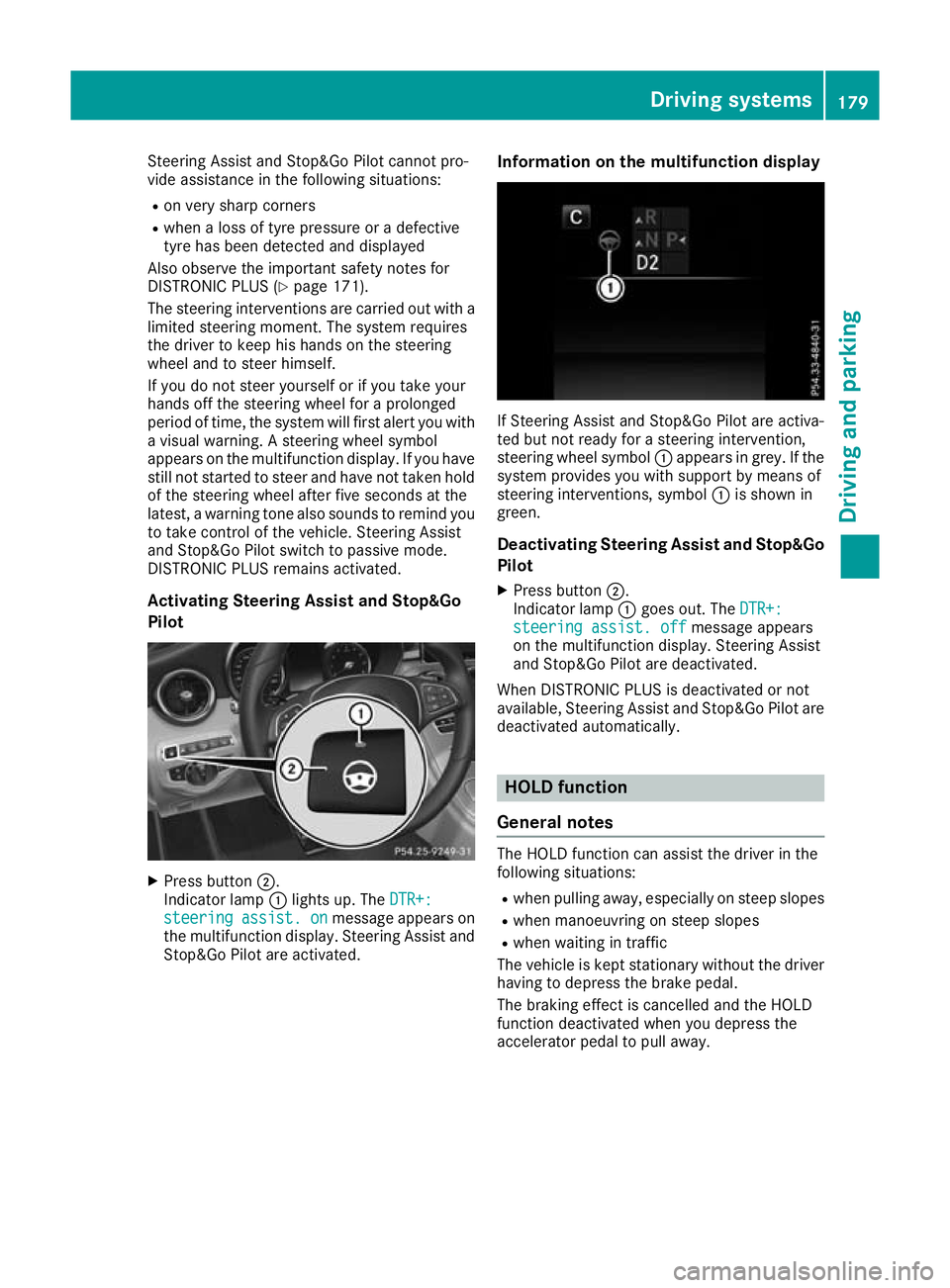
Activating Steering Assist and Stop&Go
Pilot X
Press button ;.
Indicator lamp :lights up. The DTR+:
DTR+:
steering steering assist.
assist.on
onmessage appears on
the multifunction display. Steering Assist and Stop&Go Pilot are activated. Information on the multifunction display If Steering Assist and Stop&Go Pilot are activa-
ted but not ready for a steering intervention,
steering wheel symbol :appears in grey. If the
system provides you with support by means of
steering interventions, symbol :is shown in
green.
Deactivating Steering Assist and Stop&Go
Pilot
X Press button ;.
Indicator lamp :goes out. The DTR+: DTR+:
steering assist. off
steering assist. off message appears
on the multifunction display. Steering Assist
and Stop&Go Pilot are deactivated.
When DISTRONIC PLUS is deactivated or not
available, Steering Assist and Stop&Go Pilot are deactivated automatically. HOLD function
General notes The HOLD function can assist the driver in the
following situations:
R when pulling away, especially on steep slopes
R when manoeuvring on steep slopes
R when waiting in traffic
The vehicle is kept stationary without the driver having to depress the brake pedal.
The braking effect is cancelled and the HOLD
function deactivated when you depress the
accelerator pedal to pull away. Driving systems
179Driving and parking Z
Page 186 of 377
80 km/h. Select the "Normal" setting for normal
road surfaces and "Raised" for driving with snow chains or on particularly poor road surfaces.
Your selection remains stored even if you
remove the key from the ignition lock.
X Start the engine.
If indicator lamp ;is not lit:
X Press button :.
Indicator lamp ;lights up. The vehicle is
raised by 25 mm compared with the normal
level.
The Vehicle rising Vehicle rising message appears on
the multifunction display.
i The message disappears after ten seconds,
irrespective of the level reached. If necessary,
the vehicle is raised further.
The "Raised level" setting is cancelled if you:
R drive at speeds above 120 km/h
R drive for approximately three minutes at a
speed above 80 km/h
The "Raised level" remains saved when you are
not driving within these speed ranges.
Setting the normal vehicle levelX Start the engine.
If indicator lamp ;is lit:
X Press button :.
Vehicles with automatic transmission:
indicator lamp ;goes out. The vehicle is
adjusted to the height of the currently selec-
ted drive program (Y page 141).
Vehicles with manual transmission: indi-
cator lamp ;goes out. The vehicle is adjus-
ted to the height of the currently selected
drive program (Y page 141).
Suspension settings General notes
The Adaptive Damping System automatically
controls the calibration of the dampers.
The damping is adjusted individually to each
wheel and depends on:
R your driving style, e.g. sporty
R the road surface condition, e.g. bumps
R your individual selection, i.e. sport or comfort
Your selection remains stored even if you
remove the key from the ignition lock. Sport mode
In the Sand S+drive programs, the firmer sus-
pension settings ensure even better contact
with the road. Select this mode when employing
a sporty driving style, e.g. on winding country
roads.
X Vehicles with automatic transmission:
select the
Sor S+ drive program with the
DYNAMIC SELECT switch (Y page 141).
Vehicles with manual transmission: select
the Sor S+ drive program with the DYNAMIC
SELECT switch (Y page 141).
The vehicle is lowered by 15 mm compared
with the normal level.
Comfort mode In the Eand Cdrive programs, the driving char-
acteristics of your vehicle are more comforta-
ble. Therefore, select this mode if you prefer a
more comfortable driving style. Select Comfort
mode also when driving at speed on straight
roads, e.g. on straight stretches of motorway.
X Vehicles with automatic transmission:
select the
Eor Cdrive program with the
DYNAMIC SELECT switch (Y page 141).
Vehicles with manual transmission: select
the Eor Cdrive program with the DYNAMIC
SELECT switch (Y page 141).
The vehicle is raised to the normal level.
At speeds of above 125 km/h, the vehicle is
automatically lowered by 15 mm in the Eand C
drive programs. At speeds of below 80 km/h,
the vehicle is raised again. AMG RIDE CONTROL
General notes The electronically controlled damping system
works continuously. This improves driving
safety and ride comfort.
The damping is adjusted individually to each
wheel and depends on:
R your driving style, e.g. sporty
R the road surface condition, e.g. bumps
R your individual selection of Sport, Sport + or
Comfort
The suspension mode is adjusted using the cor-
responding button in the centre console. Driving systems
183Driving and parking Z
Page 187 of 377
i
The mode can also be set using the
DYNAMIC SELECT switch (Y page 141).
This is only possible if:
R with the AMG RIDE CONTROL sports sus-
pension button on the centre console, and
R with the DYNAMIC SELECT switch, the
same mode is selected for the suspension.
This is the case, for example, when both are
set to Comfort mode.
If the ignition is switched off for less than four
hours, the previously selected drive program is
activated when the engine is next started. If the ignition is switched off for more than four hours,
Comfort mode is activated when the engine is
next started.
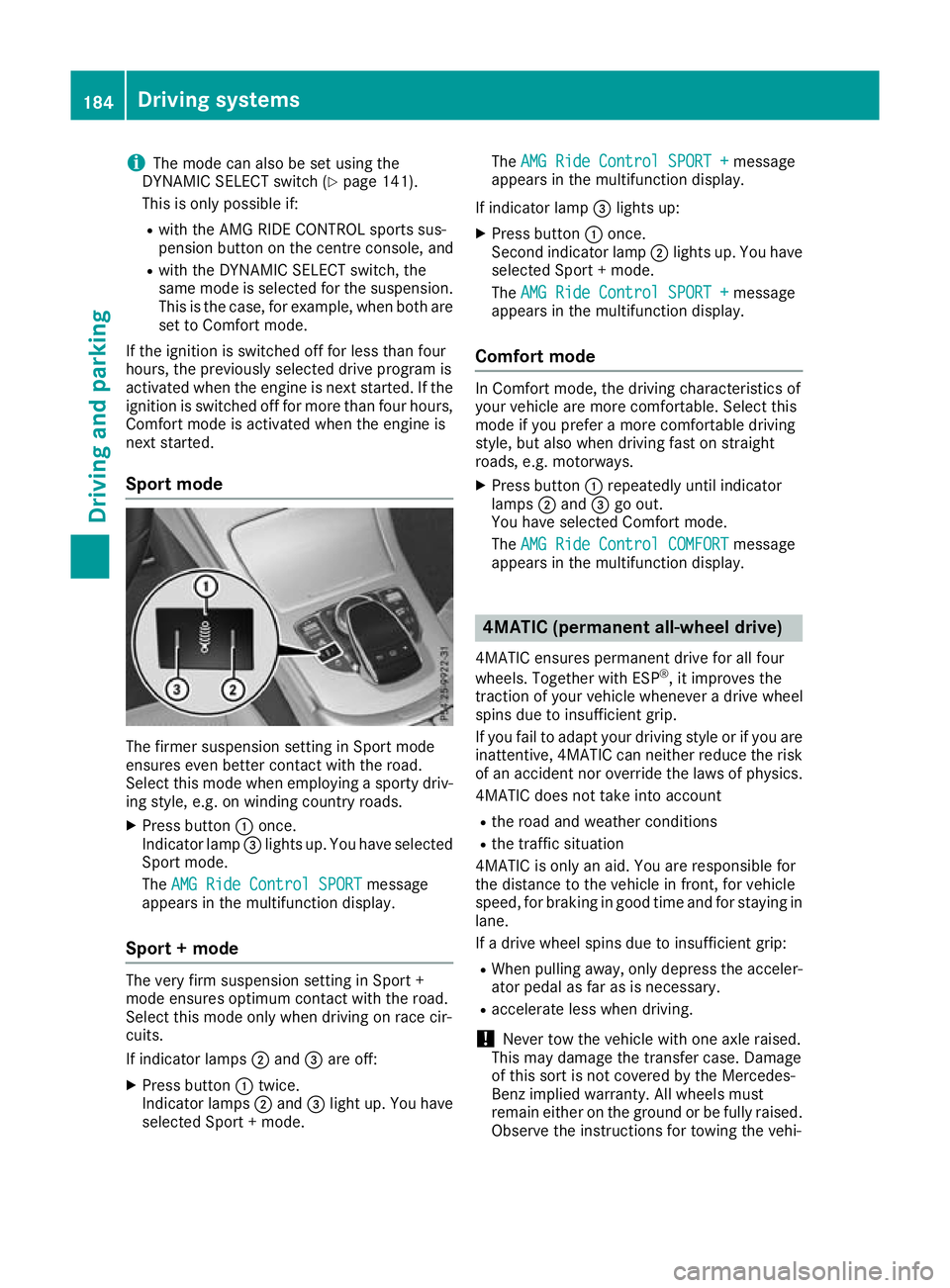
Sport mode The firmer suspension setting in Sport mode
ensures even better contact with the road.
Select this mode when employing a sporty driv-
ing style, e.g. on winding country roads.
X Press button :once.
Indicator lamp =lights up. You have selected
Sport mode.
The AMG Ride Control SPORT
AMG Ride Control SPORT message
appears in the multifunction display.
Sport + mode The very firm suspension setting in Sport +
mode ensures optimum contact with the road.
Select this mode only when driving on race cir-
cuits.
If indicator lamps ;and =are off:
X Press button :twice.
Indicator lamps ;and =light up. You have
selected Sport + mode. The
AMG Ride Control SPORT + AMG Ride Control SPORT + message
appears in the multifunction display.
If indicator lamp =lights up:
X Press button :once.
Second indicator lamp ;lights up. You have
selected Sport + mode.
The AMG Ride Control SPORT + AMG Ride Control SPORT + message
appears in the multifunction display.
Comfort mode In Comfort mode, the driving characteristics of
your vehicle are more comfortable. Select this
mode if you prefer a more comfortable driving
style, but also when driving fast on straight
roads, e.g. motorways.
X Press button :repeatedly until indicator
lamps ;and =go out.
You have selected Comfort mode.
The AMG Ride Control COMFORT AMG Ride Control COMFORT message
appears in the multifunction display. 4MATIC (permanent all-wheel drive)
4MATIC ensures permanent drive for all four
wheels. Together with ESP ®
, it improves the
traction of your vehicle whenever a drive wheel
spins due to insufficient grip.
If you fail to adapt your driving style or if you are inattentive, 4MATIC can neither reduce the risk
of an accident nor override the laws of physics.
4MATIC does not take into account
R the road and weather conditions
R the traffic situation
4MATIC is only an aid. You are responsible for
the distance to the vehicle in front, for vehicle
speed, for braking in good time and for staying in
lane.
If a drive wheel spins due to insufficient grip:
R When pulling away, only depress the acceler-
ator pedal as far as is necessary.
R accelerate less when driving.
! Never tow the vehicle with one axle raised.
This may damage the transfer case. Damage
of this sort is not covered by the Mercedes-
Benz implied warranty. All wheels must
remain either on the ground or be fully raised.
Observe the instructions for towing the vehi- 184
Driving systemsDriving and parking
Page 189 of 377
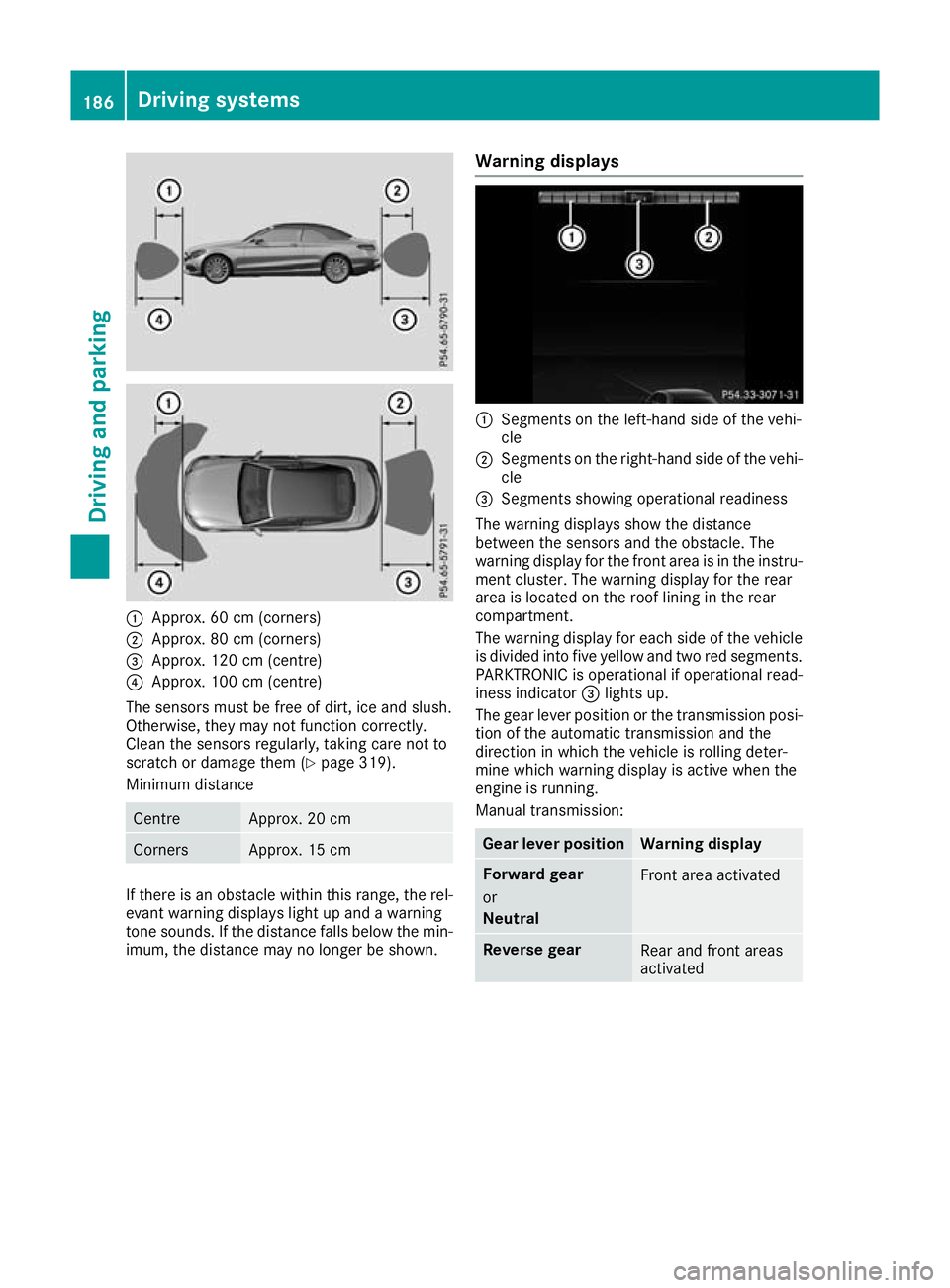
:
Approx. 60 cm (corners)
; Approx. 80 cm (corners)
= Approx. 120 cm (centre)
? Approx. 100 cm (centre)
The sensors must be free of dirt, ice and slush.
Otherwise, they may not function correctly.
Clean the sensors regularly, taking care not to
scratch or damage them (Y page 319).
Minimum distance Centre Approx. 20 cm
Corners Approx. 15 cm
If there is an obstacle within this range, the rel-
evant warning displays light up and a warning
tone sounds. If the distance falls below the min- imum, the distance may no longer be shown. Warning displays :
Segments on the left-hand side of the vehi-
cle
; Segments on the right-hand side of the vehi-
cle
= Segments showing operational readiness
The warning displays show the distance
between the sensors and the obstacle. The
warning display for the front area is in the instru- ment cluster. The warning display for the rear
area is located on the roof lining in the rear
compartment.
The warning display for each side of the vehicle
is divided into five yellow and two red segments.
PARKTRONIC is operational if operational read-
iness indicator =lights up.
The gear lever position or the transmission posi- tion of the automatic transmission and the
direction in which the vehicle is rolling deter-
mine which warning display is active when the
engine is running.
Manual transmission: Gear lever position Warning display
Forward gear
or
Neutral
Front area activated
Reverse gear
Rear and front areas
activated186
Driving systemsDriving an
d parking
Page 190 of 377
Automatic transmission:
Transmission posi-
tion Warning display
D
Front area activated
R,
Nor the vehicle is
rolling backwards Rear and front areas
activated
P
No areas activated
One or more segments light up as the vehicle
approaches an obstacle, depending on the vehi-
cle's distance from the obstacle.
From the:
R sixth segment onwards, you will hear an inter-
mittent warning tone for approximately two
seconds.
R seventh segment onwards, you will hear a
warning tone for approximately two seconds.
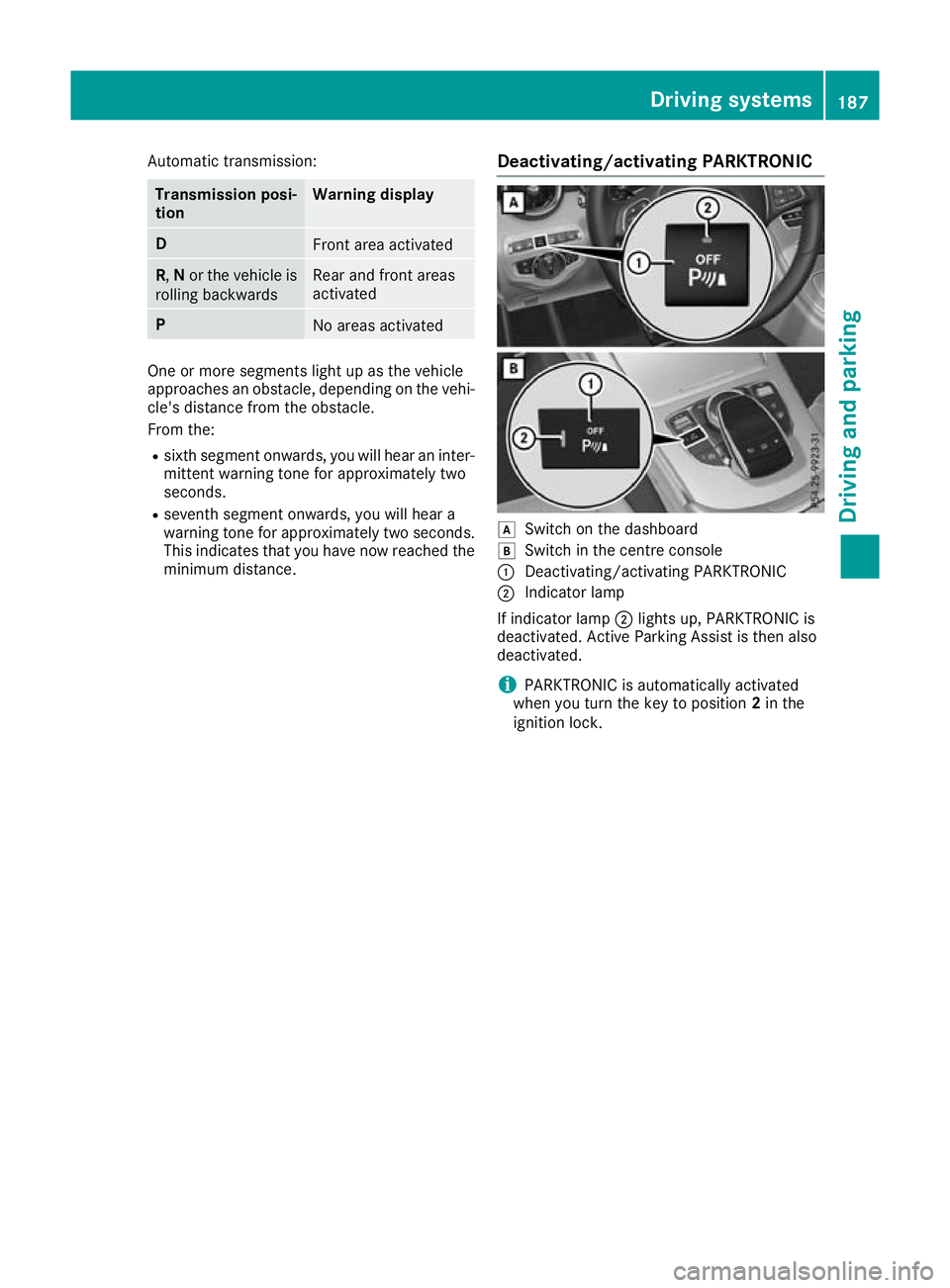
This indicates that you have now reached the minimum distance. Deactivating/activating PARKTRONIC d
Switch on the dashboard
e Switch in the centre console
: Deactivating/activating PARKTRONIC
; Indicator lamp
If indicator lamp ;lights up, PARKTRONIC is
deactivated. Active Parking Assist is then also
deactivated.
i PARKTRONIC is automatically activated
when you turn the key to position 2in the
ignition lock. Driving systems
187Driving and parking Z
Page 191 of 377

Problems with PARKTRONIC
Problem
Possible causes/consequences and
M
MSolutions Only the red segments in
the PARKTRONIC warn-
ing displays are lit. You
also hear a warning tone
for approximately two
seconds.
PARKTRONIC is then
deactivated and the indi-
cator lamp on the
PARKTRONIC button
lights up. PARKTRONIC has malfunctioned and has been deactivated.
X If problems persist, have PARKTRONIC checked at a qualified spe-
cialist workshop. Only the red segments in
the PARKTRONIC warn-
ing displays are lit.
PARKTRONIC is then
deactivated. The PARKTRONIC sensors are dirty or there is interference.
X
Clean the PARKTRONIC sensors (Y page 319).
X Switch the ignition back on. The problem may be caused by an external source of radio or ultra-
sound waves.
X See whether PARKTRONIC functions in a different location. Active Parking Assist
General notes Active Parking Assist is an electronic parking aid
with ultrasound. It measures the road on both
sides of the vehicle. A parking symbol indicates a suitable parking space. Active steering inter-
vention and brake application can assist you
during parking and when exiting a parking
space. You may also use PARKTRONIC
(Y page 185).
Important safety notes Active Parking Assist is only an aid. It is not a
substitute for your attention to the immediate
surroundings. The responsibility for safe
manoeuvring and parking remains with you.
Make sure that no persons, animals or objects
are in the manoeuvring range.
When PARKTRONIC is deactivated, Active Park-
ing Assist is also unavailable.
For vehicles with the trailer tow hitch folded out,
the minimum length for parking spaces is
slightly longer.
If you have attached a trailer to your vehicle, you
should not use Active Parking Assist. Once the
electrical connection is established between your vehicle and the trailer, Active Parking
Assist is no longer available. PARKTRONIC is
deactivated for the rear area. G
WARNING
While parking or pulling out of a parking
space, the vehicle swings out and can drive
onto areas of the oncoming lane. This could
cause you to collide with other road users.
There is a risk of an accident.
Pay attention to other road users. Stop the
vehicle if necessary or cancel the Active Park- ing Assist parking procedure.
! If unavoidable, you should drive over obsta-
cles such as kerbs slowly and not at a sharp
angle. Otherwise, you may damage the
wheels or tyres.
Active Parking Assist may also display spaces
not suitable for parking, e.g.: R In a zone where parking or stopping is pro-
hibited
R In front of driveways or entrances and exits
R On unsuitable surfaces 188
Driving systemsDriving and parking
Page 195 of 377

X
Start the engine.
X Release the electric parking brake.
X Switch on the turn signal in the direction in
which you intend to pull away.
X Vehicles with automatic transmission:
shift the transmission to position Dor R.
Vehicles with manual transmission:
engage forward or reverse gear.
The Start
Start Park ParkAssist?
Assist? Yes:
Yes:OK
OKNo:
No:%
message appears on the multifunction dis-
play.
X To cancel the procedure:press the %
button on the multifunction steering wheel or pull away.
or
X To exit a parking space with assistance
from Active Parking Assist:
press thea
button on the multifunction steering wheel.
The Park Assist active Accelerate
Park Assist active Accelerate
and brake and brake Observe surroundings
Observe surroundings mes-
sage appears on the multifunction display.
X Release the multifunction steering wheel.
X Pull away, being ready to brake at all times. Do
not exceed a speed of approximately
10 km/h when exiting a parking space. Oth-
erwise, Active Parking Assist will be cancel-
led.
X Vehicles with automatic transmission:
depending on the message or as required,
shift the transmission to position
Dor R.
Vehicles with manual transmission:
depending on the message or as required,
engage forward or reverse gear.
Active Parking Assist immediately steers in
the other direction. The Park Assist
Park Assist
active Accelerate and brake active Accelerate and brake Observe
Observe
surroundings
surroundings message appears on the mul-
tifunction display.
i You will achieve the best results in exiting a
parking space if you wait for the steering pro- cedure to complete before pulling away.
If you reverse after activation, the steering
wheel is moved to the straight-ahead posi-
tion.
X Drive forwards and reverse as prompted by
the PARKTRONIC warning displays, several
times if necessary.
Once you have exited the parking space com-
pletely, the steering wheel is moved to the
straight-ahead position. You hear a tone and the
Park
Park Assist Assist switched
switched off
offmessage appears on the multifunction display. You will then have
to steer and merge into traffic on your own.
PARKTRONIC is still available. You can take over
the steering again before the vehicle has exited the parking space completely. This is useful if
you recognise that it is already possible to pull
out of the parking space.
Cancelling Active Parking Assist X
Stop the movement of the multifunction
steering wheel or steer yourself.
Active Parking Assist will be cancelled at
once. The Park Assist cancelled Park Assist cancelled mes-
sage appears in the multifunction display.
or
X Press the PARKTRONIC button (Y page 187).
PARKTRONIC is switched off and Active Park- ing Assist is immediately cancelled. The
Park Assist cancelled
Park Assist cancelled message appears
in the multifunction display.
Active Parking Assist is cancelled automatically
if:
R the electric parking brake is applied
R transmission position Pis selected in vehicles
with automatic transmission
R parking using Active Parking Assist is no lon-
ger possible
R you are driving faster than 10 km/h
R a wheel spins and ESP ®
intervenes or fails.
The ÷ warning lamp lights up in the instru-
ment cluster.
A warning tone sounds. The parking symbol dis-
appears and the multifunction display shows the
Park Assist cancelled
Park Assist cancelled message.
When Active Parking Assist is cancelled, you
must steer and brake again yourself.
If a system malfunction occurs, the vehicle is
braked to a standstill. To drive on, depress the
accelerator pedal again. 192
Driving systemsDriving and parking
Page 207 of 377
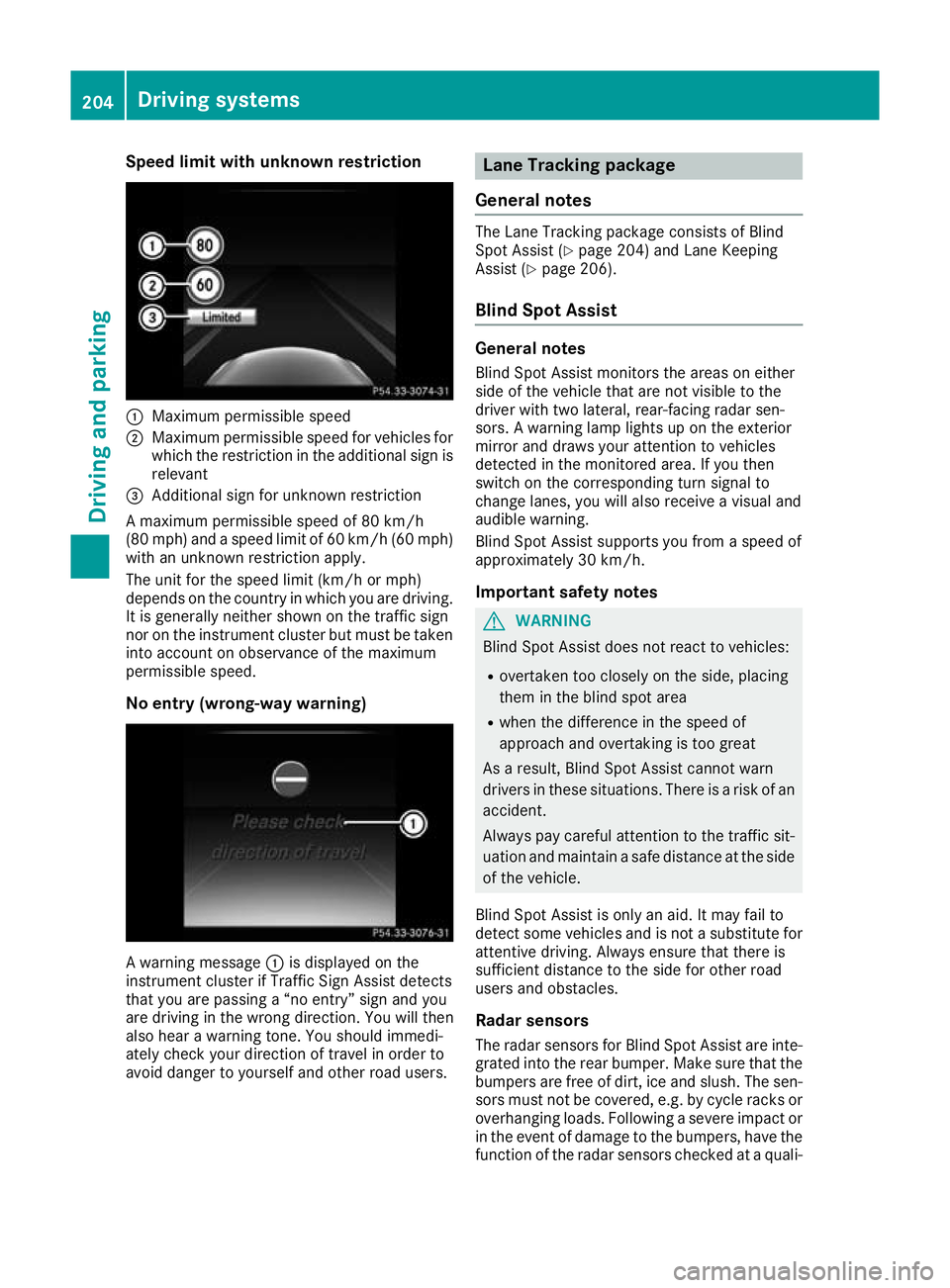
Speed limit with unknown restriction
:
Maximum permissible speed
; Maximum permissible speed for vehicles for
which the restriction in the additional sign is
relevant
= Additional sign for unknown restriction
A maximum permissible speed of 80 km/h
(80 mph) and a speed limit of 60 km/h (60 mph) with an unknown restriction apply.
The unit for the speed limit (km/h or mph)
depends on the country in which you are driving.
It is generally neither shown on the traffic sign
nor on the instrument cluster but must be taken
into account on observance of the maximum
permissible speed.
No entry (wrong-way warning) A warning message
:is displayed on the
instrument cluster if Traffic Sign Assist detects
that you are passing a “no entry” sign and you
are driving in the wrong direction. You will then
also hear a warning tone. You should immedi-
ately check your direction of travel in order to
avoid danger to yourself and other road users. Lane Tracking package
General notes The Lane Tracking package consists of Blind
Spot Assist (Y page 204) and Lane Keeping
Assist (Y page 206).
Blind Spot Assist General notes
Blind Spot Assist monitors the areas on either
side of the vehicle that are not visible to the
driver with two lateral, rear-facing radar sen-
sors. A warning lamp lights up on the exterior
mirror and draws your attention to vehicles
detected in the monitored area. If you then
switch on the corresponding turn signal to
change lanes, you will also receive a visual and
audible warning.
Blind Spot Assist supports you from a speed of
approximately 30 km/h.
Important safety notes G
WARNING
Blind Spot Assist does not react to vehicles:
R overtaken too closely on the side, placing
them in the blind spot area
R when the difference in the speed of
approach and overtaking is too great
As a result, Blind Spot Assist cannot warn
drivers in these situations. There is a risk of an accident.
Always pay careful attention to the traffic sit- uation and maintain a safe distance at the side
of the vehicle.
Blind Spot Assist is only an aid. It may fail to
detect some vehicles and is not a substitute for
attentive driving. Always ensure that there is
sufficient distance to the side for other road
users and obstacles.
Radar sensors The radar sensors for Blind Spot Assist are inte-
grated into the rear bumper. Make sure that the
bumpers are free of dirt, ice and slush. The sen- sors must not be covered, e.g. by cycle racks oroverhanging loads. Following a severe impact or in the event of damage to the bumpers, have the
function of the radar sensors checked at a quali- 204
Driving systemsDriving and parking
Page 208 of 377

fied specialist workshop. Blind Spot Assist may
no longer work properly in such cases.
Monitoring range In particular, the detection of obstacles can be
impaired in the case of:
R dirt on the sensors or obscured sensors
R poor visibility, e.g. due to fog, heavy rain,
snow or spray
R narrow vehicles, e.g. motorcycles or bicycles
R very wide lanes
R narrow lanes
R vehicles not driving in the middle of their lane
R crash barriers or other road boundaries
Vehicles in the monitoring range are then not
indicated. At a distance of around 0.5 m
;from the vehi-
cle, Blind Spot Assist monitors the area up to
3.0 mnext to =and behind :your vehicle, as
shown in the picture.
If the lanes are narrow, vehicles driving in the
lane beyond the lane next to your vehicle may be
indicated, especially if the vehicles are not driv-
ing in the middle of their lane. This may be the
case if the vehicles are driving on the inner side of their lane.
Due to the nature of the system:
R warnings may be issued in error when driving
close to crash barriers or similar solid boun-
daries
R warnings may be interrupted when driving
alongside long vehicles, e.g. lorries, for a pro-
longed time Warning lamp
:
Warning lamp
Blind Spot Assist is not active at speeds below
approximately 30 km/h. Vehicles in the moni-
toring range are then not indicated.
If a vehicle is detected within the blind spot
monitoring range at speeds above approx-
imately 30 km/h, warning lamp :on the cor-
responding side lights up red. This warning lamp always lights up when a vehicle enters the blindspot monitoring range from behind or from the
side. When you overtake a vehicle, the warning
occurs only if the difference in speed is less than
12 km/h.
If you select reverse gear, Blind Spot Assist is
not operational.
The brightness of the warning lamps is auto-
matically adapted to the brightness of the sur-
roundings.
Collision warning
If a vehicle is detected in the blind spot moni-
toring range and you switch on the correspond-
ing turn signal, a double warning tone sounds.
The red warning lamp flashes on the relevant
exterior mirror. If the turn signal remains on,
detected vehicles are indicated by the flashing
of the red warning lamp on the exterior mirror.
There are no further warning tones.
Activating Blind Spot Assist
X Make sure that Blind Spot Assist is activated
in the on-board computer (Y page 233).
X Turn the key to position 2in the ignition lock.
The red warning lamps on the exterior mirrors
light up until the engine is started. Driving systems
205Driving and parking Z