clutch MERCEDES-BENZ C-CLASS CABRIOLET 2016 Owners Manual
[x] Cancel search | Manufacturer: MERCEDES-BENZ, Model Year: 2016, Model line: C-CLASS CABRIOLET, Model: MERCEDES-BENZ C-CLASS CABRIOLET 2016Pages: 377, PDF Size: 6.9 MB
Page 8 of 377
Airbag
Automatic front-passenger front
airbag deactivation .......................... 50
Headbag .......................................... 50
Introduction .................................... .47
PASSENGER AIR BAG indicator
lamps ............................................... 43
Airbags
Display message ............................2 51
Front airbag (driver, front
passenger) ....................................... 49
Important safety guidelines ............. 48
Kneebag .......................................... .49
Sidebag ............................................ 49
Triggering ......................................... 56
AIRCAP
Cleaning instructions ..................... 317
Extending/retracting ....................... 96
Important safety notes .................... 96
AIRMATIC
Display message ............................ 258
Function/note s............................. 182
AIRSCARF
Switching on/of f........................... 107
AIRSCARF vents
Setting the blower output .............. 131
Alarm
ATA (Anti-Theft Alarm system) ......... 78
Switching off (ATA) .......................... 78
Switching the function on/off
(ATA) ................................................ 78
Alarm system
see ATA (Anti-Theft Alarm system)
AMG
Performance Seat .......................... 105
RIDE CONTROL sports suspen-
sion ................................................ 183
AMG menu (on-board computer) ..... 237
AMG Performance exhaust system
can be selected ................................. 139
Anti-glare film .................................... 307
Anti-lock braking system
see ABS (Anti-lock Braking System)
Anti-Theft Alarm system
see ATA (Anti-Theft Alarm system)
Aquaplaning ....................................... 166
Armrest
Stowage compartment .................. 298 Ashtray
............................................... 302
Assistance display (on-board com-
puter) .................................................. 231
Assistance menu (on-board com-
puter) .................................................. 232
ASSYST PLUS
Displaying a service message ........ 313
Driving abroad ............................... 314
Hiding a service message .............. 313
Resetting the service interval dis-
play ................................................ 313
Service message ............................ 313
Special service requirements ......... 314
ATA (Anti-Theft Alarm system)
Activating/deactivating ................... 78
Function ........................................... 78
Switching off the alarm .................... 78
ATTENTION ASSIST
Activating/deactivating ................. 234
Display message ............................ 258
Function/note s............................. 201
Authorised workshop
see Qualified specialist workshop
AUTO lights
Display message ............................ 253
see Lights
Automatic engine start (ECO start/
stop function) .................................... 138
Automatic engine switch-off (ECO
start/stop function) .......................... 137
Automatic front-passenger front
airbag deactivation
Display message ............................ 251
Automatic front-passenger front
airbag deactivation system
Operation ......................................... 51
Problems ......................................... 54
System self-test ............................... 53
Automatic headlamp mode .............. 114
Automatic transmission
Accelerator pedal position ............. 147
Changing gear ............................... 147
DIRECT SELECT lever ..................... 145
Display message ............................ 267
Double-clutch function .................. 147
Drive program display .................... 146
Drive programs .............................. 148 Index
5
Page 138 of 377

the engine running in enclosed spaces with-
out sufficient ventilation. G
WARNING
Flammable materials introduced through
environmental influence or by animals can
ignite if in contact with the exhaust system or parts of the engine that heat up. There is a risk
of fire.
Carry out regular checks to make sure that
there are no flammable foreign materials in
the engine compartment or in the exhaust
system.
General notes Vehicles with a petrol engine:
the catalytic
converter is preheated for up to 30 seconds
after a cold start. The sound of the engine may
change during this time.
Manual transmission X
Depress the brake pedal and keep it
depressed.
X Fully depress the clutch pedal.
X Engage neutral i.
Automatic transmission X
Shift the transmission to position j
(Y page 145).
The transmission position indicator on the
multifunction display shows j
(Y page 146).
i You can start the engine in transmission
position jand i.
Starting procedure using the key To start the engine using the key instead of the
Start/Stop button, pull the Start/Stop button
out of the ignition lock.
X To start a diesel engine: turn the key to
position 2in the ignition lock (Y page 133).
The % preglow indicator lamp on the
instrument cluster lights up.
X Turn the key to position 3in the ignition lock
(Y page 133) and release it as soon as the
engine is running. i
Vehicles with a diesel engine:
you can
start the engine without preglow if the engine
is warm.
If the engine will not start:
X Remove the key from the ignition lock.
X Reinsert the key in the ignition lock after wait-
ing for a short period.
X Turn the key to position 2in the ignition lock
(Y page 133).
The indicator lamps on the instrument cluster
light up (Y page 273).
X Turn the key to position 3in the ignition lock
(Y page 133) and release it as soon as the
engine is running.
Starting procedure using the Start/
Stop button The Start/Stop button is available only on vehi-
cles with KEYLESS-GO or the KEYLESS-GO start
function.
The Start/Stop button can be used to start the
vehicle manually without inserting the key in the ignition lock. The key must be in the vehicle and
the Start/Stop button must be inserted in the
ignition lock. This mode for starting the engine
manually operates independently of the ECO
start/stop automatic engine start function.
You can start the engine if a valid key is in the
vehicle. Switch off the engine and always take
the key with you when leaving the vehicle, even
if you leave it for only a short time. Observe the important safety notes.
X Depress the brake pedal and keep it
depressed.
X Press the Start/Stop button once
(Y page 133).
Vehicles with a petrol engine: the engine
starts.
Vehicles with a diesel engine: preglow is
activated and the engine starts. Pulling away
General notes G
WARNING
Vehicles with automatic transmission: Driving
135Driving an d parking
Z
Page 141 of 377
cession. The
çECO symbol is shown on the
multifunction display after the engine has been
started automatically for the fourth time. When
the è ECO symbol is shown on the multi-
function display, automatic engine switch-off is
possible again.
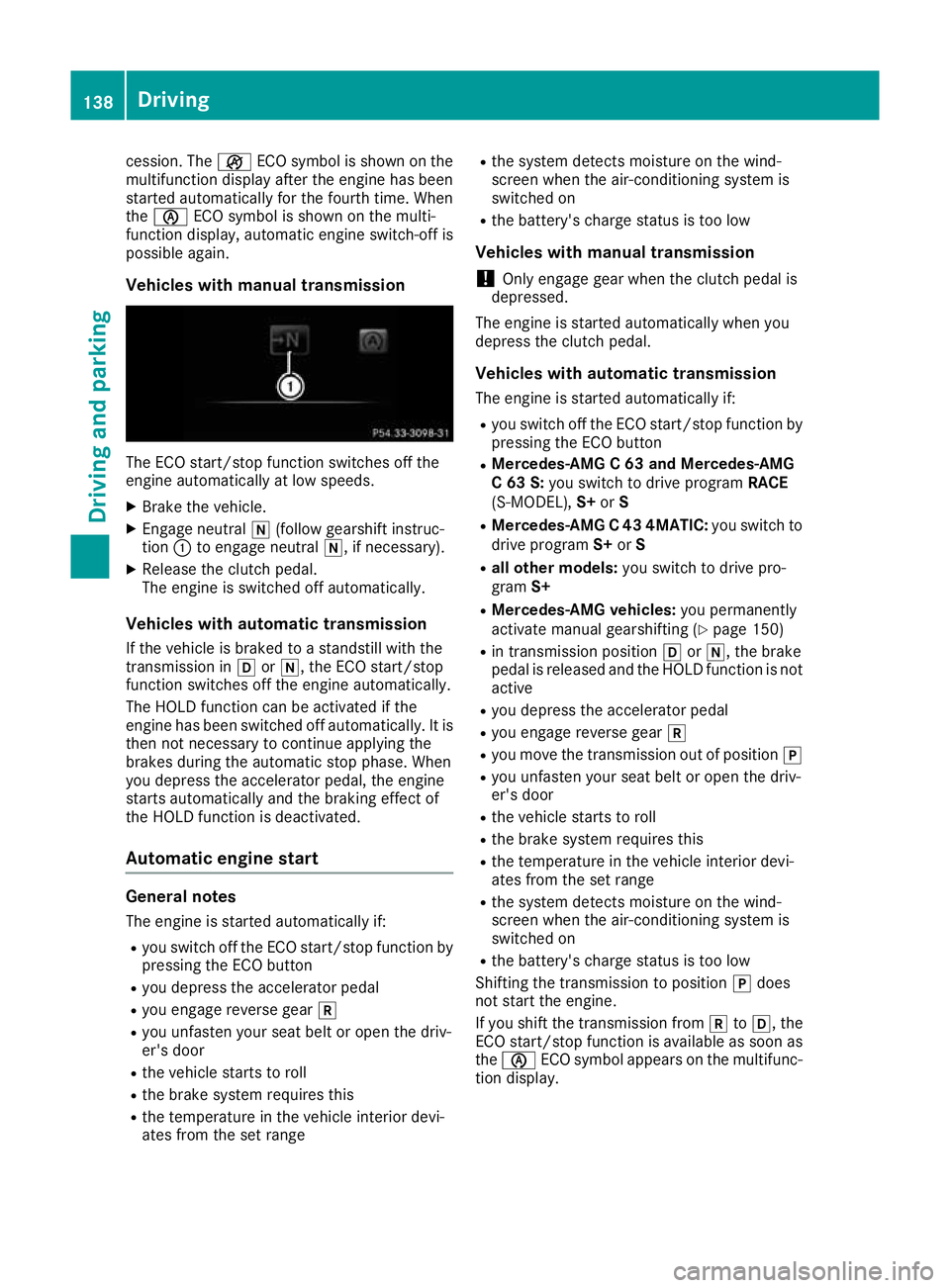
Vehicles with manual transmission The ECO start/stop function switches off the
engine automatically at low speeds.
X Brake the vehicle.
X Engage neutral i(follow gearshift instruc-
tion :to engage neutral i, if necessary).
X Release the clutch pedal.
The engine is switched off automatically.
Vehicles with automatic transmission If the vehicle is braked to a standstill with the
transmission in hori, the ECO start/stop
function switches off the engine automatically.
The HOLD function can be activated if the
engine has been switched off automatically. It is
then not necessary to continue applying the
brakes during the automatic stop phase. When
you depress the accelerator pedal, the engine
starts automatically and the braking effect of
the HOLD function is deactivated.
Automatic engine start General notes
The engine is started automatically if:
R you switch off the ECO start/stop function by
pressing the ECO button
R you depress the accelerator pedal
R you engage reverse gear k
R you unfasten your seat belt or open the driv-
er's door
R the vehicle starts to roll
R the brake system requires this
R the temperature in the vehicle interior devi-
ates from the set range R
the system detects moisture on the wind-
screen when the air-conditioning system is
switched on
R the battery's charge status is too low
Vehicles with manual transmission
! Only engage gear when the clutch pedal is
depressed.
The engine is started automatically when you
depress the clutch pedal.
Vehicles with automatic transmission The engine is started automatically if:
R you switch off the ECO start/stop function by
pressing the ECO button
R Mercedes-AMG C 63 and Mercedes-AMG
C 63 S: you switch to drive program RACE
(S‑MODEL), S+orS
R Mercedes-AMG C 43 4MATIC: you switch to
drive program S+orS
R all other models: you switch to drive pro-
gram S+
R Mercedes-AMG vehicles: you permanently
activate manual gearshifting (Y page 150)
R in transmission position hori, the brake
pedal is released and the HOLD function is not active
R you depress the accelerator pedal
R you engage reverse gear k
R you move the transmission out of position j
R you unfasten your seat belt or open the driv-
er's door
R the vehicle starts to roll
R the brake system requires this
R the temperature in the vehicle interior devi-
ates from the set range
R the system detects moisture on the wind-
screen when the air-conditioning system is
switched on
R the battery's charge status is too low
Shifting the transmission to position jdoes
not start the engine.
If you shift the transmission from ktoh, the
ECO start/stop function is available as soon as the è ECO symbol appears on the multifunc-
tion display. 138
DrivingDriving and parking
Page 146 of 377
X
Push DYNAMIC SELECT switch :forwards
or backwards until the desired drive program is selected.
The status icon of the selected drive program
is shown on the multifunction display.
In addition, the current drive program settings are shown briefly on the multimedia system
display.
i In a few countries, the ECO start/stop func-
tion is deactivated at the factory due to the
quality of the available fuel. In this case, the
ECO start/stop function is not available in any
drive program, regardless of what is shown on
the multimedia system display.
Available drive programs: I
Individual Individual settings
S+
Sport Plus Particularly sporty driving
characteristics
S
Sport Sporty driving characteris-
tics
C
Comfort Comfortable and economi-
cal driving characteristics
E
Economy Particularly economical
driving characteristics
Additional information on drive programs for:
R vehicles with manual transmission
(Y page 144)
R vehicles with automatic transmission
(Y page 148)
Vehicles with automatic transmission: you
can also shift gears yourself using the steering
wheel gearshift paddles. Further information on
manual gearshifting (Y page 150).Manual transmission
Gear lever
! Only engage gear when the clutch pedal is
depressed.
! When shifting between
5thand 6thgear,
you should always push the gear lever all the
way to the right. Otherwise, you could shift
unintentionally into 3rdor4th gear and dam-
age the transmission. If you shift down at too high a speed (trans-
mission braking), this can cause the engine to
overrev, leading to engine damage.
Do not use the clutch bite point to keep the
vehicle stationary on uphill gradients. There is otherwise a risk of damaging the clutch.
! On long and steep downhill gradients, espe-
cially if the vehicle is laden or towing a trailer,
you must shift into gear 1, 2or3in good time.
This uses the engine's braking effect. This
relieves the load on the brake system and
prevents the brakes from overheating and
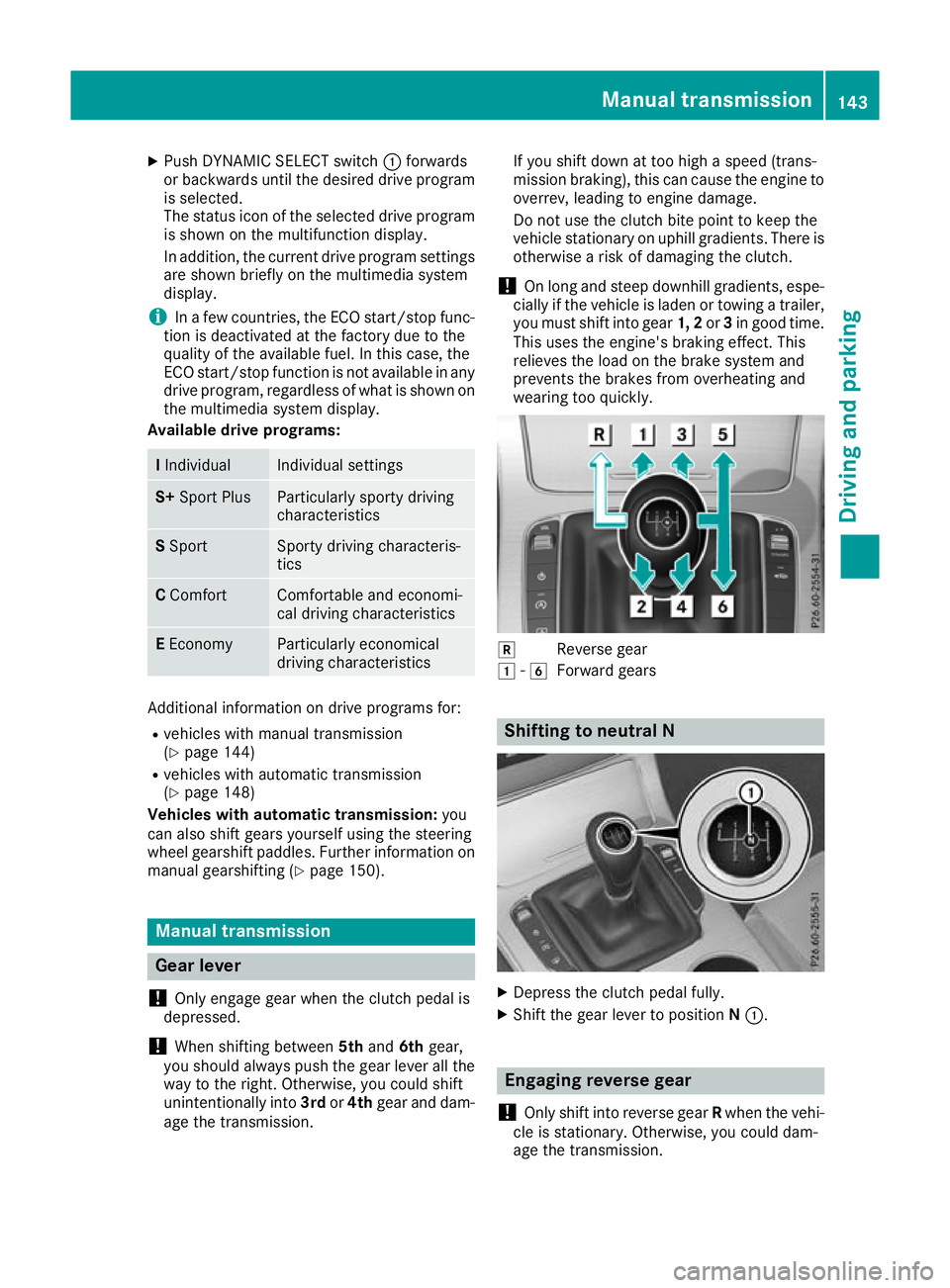
wearing too quickly. k
Reverse gear
1 -6
Forward gears Shifting to neutral N
X
Depress the clutch pedal fully.
X Shift the gear lever to position N:. Engaging reverse gear
! Only shift into reverse gear
Rwhen the vehi-
cle is stationary. Otherwise, you could dam-
age the transmission. Manual transmission
143Driving and parking Z
Page 150 of 377
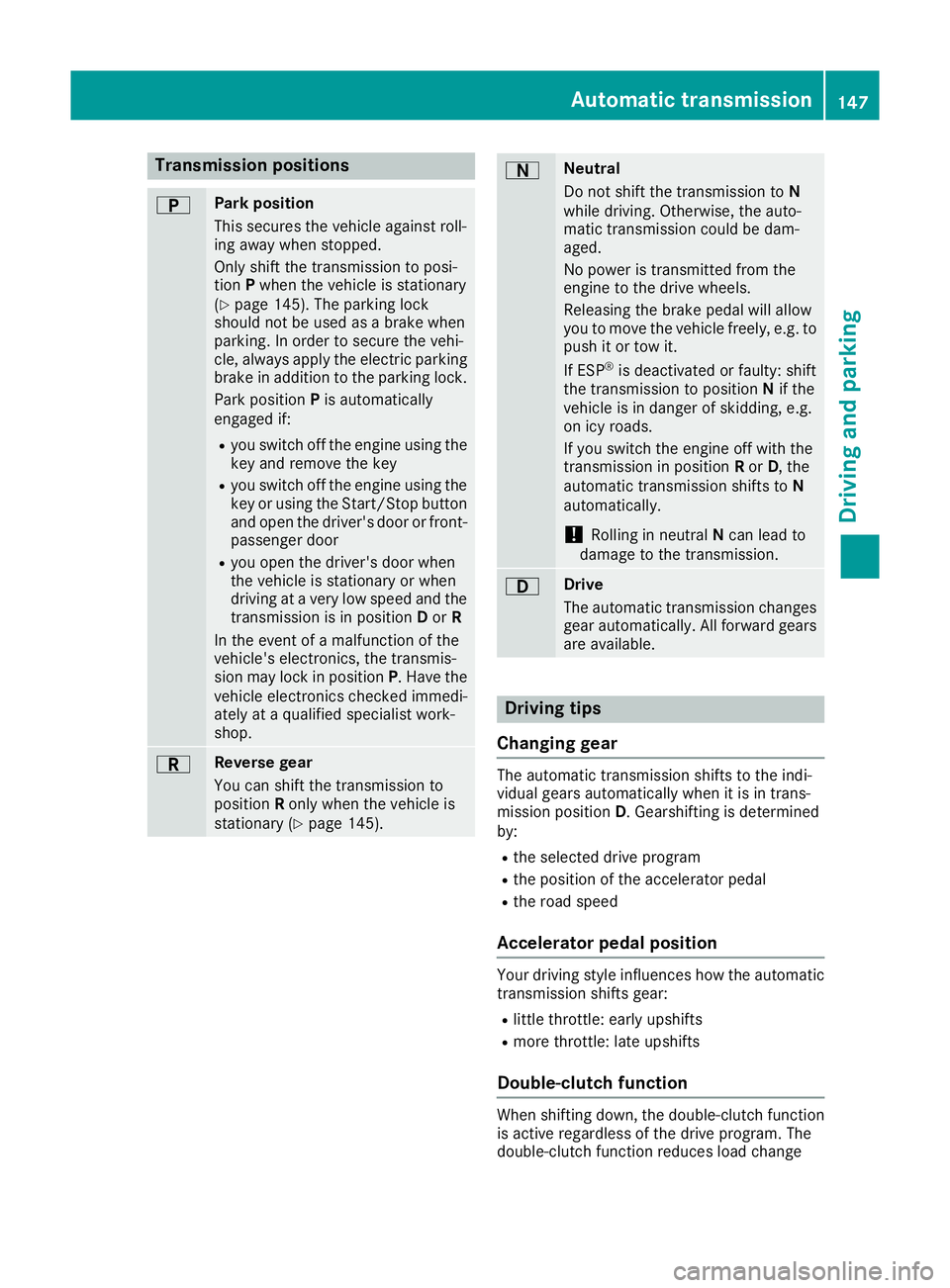
Transmission positions
B Park position
This secures the vehicle against roll-
ing away when stopped.
Only shift the transmission to posi-
tion
Pwhen the vehicle is stationary
(Y page 145). The parking lock
should not be used as a brake when
parking. In order to secure the vehi-
cle, always apply the electric parking brake in addition to the parking lock.
Park position Pis automatically
engaged if:
R you switch off the engine using the
key and remove the key
R you switch off the engine using the
key or using the Start/Stop button
and open the driver's door or front- passenger door
R you open the driver's door when
the vehicle is stationary or when
driving at a very low speed and the
transmission is in position Dor R
In the event of a malfunction of the
vehicle's electronics, the transmis-
sion may lock in position P. Have the
vehicle electronics checked immedi-
ately at a qualified specialist work-
shop. C Reverse gear
You can shift the transmission to
position
Ronly when the vehicle is
stationary (Y page 145). A Neutral
Do not shift the transmission to
N
while driving. Otherwise, the auto-
matic transmission could be dam-
aged.
No power is transmitted from the
engine to the drive wheels.
Releasing the brake pedal will allow
you to move the vehicle freely, e.g. to push it or tow it.
If ESP ®
is deactivated or faulty: shift
the transmission to position Nif the
vehicle is in danger of skidding, e.g.
on icy roads.
If you switch the engine off with the
transmission in position Ror D, the
automatic transmission shifts to N
automatically.
! Rolling in neutral
Ncan lead to
damage to the transmission. 7 Drive
The automatic transmission changes
gear automatically. All forward gears
are available. Driving tips
Changing gear The automatic transmission shifts to the indi-
vidual gears automatically when it is in trans-
mission position
D. Gearshifting is determined
by:
R the selected drive program
R the position of the accelerator pedal
R the road speed
Accelerator pedal position Your driving style influences how the automatic
transmission shifts gear:
R little throttle: early upshifts
R more throttle: late upshifts
Double-clutch function When shifting down, the double-clutch function
is active regardless of the drive program. The
double-clutch function reduces load change Automatic transmission
147Driving and parking Z
Page 151 of 377

reactions and is conducive to a sporty driving
style. The sound generated by the double-clutch
function depends on the drive program.
Kickdown Use kickdown for maximum acceleration:
X Depress the accelerator pedal beyond the
pressure point.
The automatic transmission shifts to a lower
gear depending on the engine speed.
X Ease off the accelerator pedal once the
desired speed is reached.
The automatic transmission shifts back up.
Gliding mode Gliding mode is characterised by the following:
R the combustion engine is disconnected from
the drive train
R the engine speed is equal to the engine idling
speed
R the multifunction display hides the gear indi-
cator and shows transmission position Din
green (Y page 146)
R Mercedes-AMG vehicles: the multifunction
display shows :as the status icon for the
drive program
In drive program Eand drive program C
(Mercedes-AMG vehicles) you can activate and
deactivate gliding mode using the ECO button
(Y page 139).
Gliding mode can be activated under the follow-
ing conditions:
R the speed is within a suitable range
R the type of road is suitable, e.g. no steep uphill
or downhill gradients
R you are no longer depressing the accelerator
pedal
Gliding mode is deactivated under the following
conditions:
R you depress the accelerator pedal
R you depress the brake pedal R
you change the transmission position
(Y page 145)
R you switch to drive program RACE
(Mercedes-AMG C 63 S), S+orS
(Y page 141)
R you activate manual gearshifting
(Y page 150)
R you leave the suitable speed range
i If you have selected the "Comfort" setting
for the drive (engine management) in drive
program I, you can also activate gliding mode.
You can find information about this in the Dig- ital Owner's Manual.
Towing a trailer Towing a trailer is not possible with all models.
Further information (Y
page 214).
X Drive in the middle of the engine speed range
on uphill gradients.
X Manual gearshifting: depending on the
uphill or downhill gradient, shift to a gear
(Y page 150) in which the engine will run in
the middle of the engine speed range.
This also applies if cruise control, DISTRONIC PLUS or SPEEDTRONIC are activated. Drive programs
All vehicles (except Mercedes-AMG
C 63 /C63S) Drive program I (Individual)
In drive program I, the following properties of
the drive program can be selected:
R the drive (engine and transmission manage-
ment)
R the suspension
R the steering
R the availability of the ECO start/stop function
R the climate control
Information on configuring drive program Iwith
the multimedia system can be found under
"DYNAMIC SELECT" in the vehicle's Digital Own- er's Manual.
i To permanently shift the gears manually in
drive program Iusing the steering wheel gear-
shift paddles, select the M(Manual) setting
for the drive. 148
Automatic transmissionDriving and pa
rking
Page 172 of 377
Setting a speed
Bear in mind that it may take a brief moment
until the vehicle has accelerated or braked to
the set speed.
X Press the cruise control lever up :for a
higher speed or down ?for a lower speed.
X Keep the cruise control lever pressed until the
desired speed is reached.
X Release the cruise control lever.
The new speed is stored.
X To adjust the set speed in1 km/hincre-
ments:
briefly press the cruise control lever
up : or down ?to the pressure point.
The last stored speed increases or decreases
in 1 km/h increments.
X To adjust the set speed in10 km/hincre-
ments: briefly press the cruise control lever
up : or down ?beyond the pressure point.
The last stored speed increases or decreases
in 10 km/h increments.
i Cruise control is not deactivated if you
depress the accelerator pedal. If you acceler-
ate to overtake, cruise control adjusts the
vehicle's speed to the last speed stored after
you have finished overtaking.
Deactivating cruise control There are several ways to deactivate cruise con-
trol:
X Briefly press the cruise control lever forwards
B.
or
X Brake.
or
X Briefly move the cruise control lever in the
direction of arrow A.
Variable SPEEDTRONIC is selected. LIM indi-
cator lamp ;in the cruise control lever is on.
Cruise control is automatically deactivated if: R you apply the electric parking brake
R you are driving at less than 30 km/h
R ESP ®
engages or you deactivate ESP ®
R while driving a vehicle with manual transmis-
sion, you engage neutral or depress the clutch
pedal for longer than six seconds R
on vehicles with manual transmission, you
shift to a gear that is too high, and as a result
the engine speed is too low
R in vehicles with automatic transmission, you
shift to position Nwhile driving
If cruise control is deactivated, a warning tone
sounds. You will see the Cruise control off
Cruise control off
message on the multifunction display for
approximately five seconds. The message on
the multifunction display disappears and the
segments on the speedometer go out.
i The last speed stored is cleared when you
switch off the engine. SPEEDTRONIC
General notes SPEEDTRONIC is used to set a speed limit for
your vehicle. If the vehicle speed exceeds the
set speed limit, SPEEDTRONIC brakes automat-
ically. Shift to a lower gear in good time on long and steep downhill gradients. Take particular
note of this when driving a laden vehicle and
when towing a trailer. By doing so, you will make
use of the braking effect of the engine. This
relieves the load on the brake system and pre-
vents the brakes from overheating and wearing too quickly.
Important safety notes SPEEDTRONIC can neither reduce the risk of an
accident if you fail to adapt your driving style nor
override the laws of physics. SPEEDTRONIC
cannot take into account road, weather or traffic
conditions. SPEEDTRONIC is only an aid. You
are responsible for maintaining a safe distance
from the vehicle in front, for vehicle speed, for
braking in good time and for staying in lane.
If there is a change of drivers, advise the new
driver of the speed stored.
You can set a variable or permanent limit speed:
R variable for speed limits, e.g. in built-up areas
R permanent for long-term speed restrictions,
e.g. when driving with winter tyres fitted
(Y page 171)
i The speed indicated in the speedometer
may differ slightly from the limit speed stored. Driving systems
169Driving and parking Z
Page 218 of 377
Always engage the ball coupling as described.
G
WARNING
If you release the ball coupling or it does not
engage correctly when folding in, it will swing out. Within pivoting range of the ball coupling,
there is an increased risk of an accident and
injury.
Only release the ball coupling if the pivoting
range is unobstructed. Always make sure that the ball coupling engages when folding in.
Before you can tow a trailer with your vehicle,
you must fold out the ball coupling.
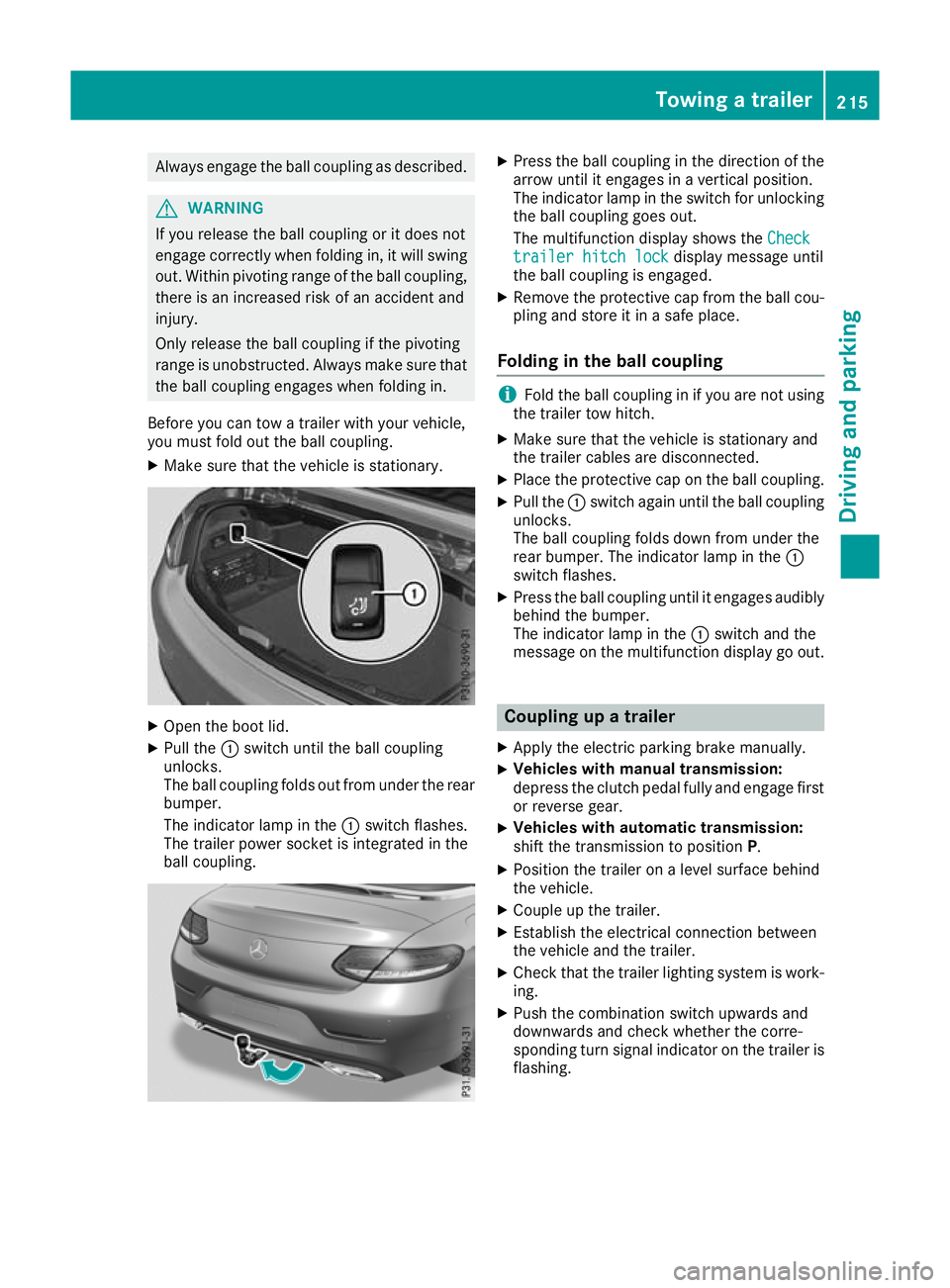
X Make sure that the vehicle is stationary. X
Open the boot lid.
X Pull the :switch until the ball coupling
unlocks.
The ball coupling folds out from under the rear
bumper.
The indicator lamp in the :switch flashes.
The trailer power socket is integrated in the
ball coupling. X
Press the ball coupling in the direction of the
arrow until it engages in a vertical position.
The indicator lamp in the switch for unlocking
the ball coupling goes out.
The multifunction display shows the Check Check
trailer hitch lock
trailer hitch lock display message until
the ball coupling is engaged.
X Remove the protective cap from the ball cou-
pling and store it in a safe place.
Folding in the ball coupling i
Fold the ball coupling in if you are not using
the trailer tow hitch.
X Make sure that the vehicle is stationary and
the trailer cables are disconnected.
X Place the protective cap on the ball coupling.
X Pull the :switch again until the ball coupling
unlocks.
The ball coupling folds down from under the
rear bumper. The indicator lamp in the :
switch flashes.
X Press the ball coupling until it engages audibly
behind the bumper.
The indicator lamp in the :switch and the
message on the multifunction display go out. Coupling up a trailer
X Apply the electric parking brake manually.
X Vehicles with manual transmission:
depress the clutch pedal fully and engage first
or reverse gear.
X Vehicles with automatic transmission:
shift the transmission to position
P.
X Position the trailer on a level surface behind
the vehicle.
X Couple up the trailer.
X Establish the electrical connection between
the vehicle and the trailer.
X Check that the trailer lighting system is work-
ing.
X Push the combination switch upwards and
downwards and check whether the corre-
sponding turn signal indicator on the trailer is
flashing. Towing a trailer
215Driving and parking Z
Page 219 of 377
A connected trailer is only detected when the
electrical connection is established correctly
and the lighting system is working properly. The
function of other systems also depends on this, for example:
R ESP ®
R PARKTRONIC
R Active Parking Assist
R Active Blind Spot Assist
R Active Lane Keeping Assist Uncoupling a trailer
G
WARNING
If you uncouple a trailer with an engaged over- run brake, you could trap your hand between
the vehicle and the trailer drawbar. This poses a risk of injury.
Do not uncouple a trailer with an engaged
overrun brake. G
WARNING
Vehicles with level control:
If you disconnect the trailer cable, the vehicle is lowered. This can cause you or others to
become trapped between the vehicle body
and tyres, or underneath the vehicle. This
poses a risk of injury.
Make sure that no-one is in the immediate
vicinity of the wheel arch or underneath the
vehicle when disconnecting the trailer cable.
! Do not disconnect a trailer with an engaged
overrun brake. Otherwise, your vehicle could
be damaged by the rebounding of the overrun
brake.
! Remove the installed adapter cable before
folding in the ball coupling. Otherwise, dam-
age may occur to the rear bumper and the
adapter cable.
X Apply the electric parking brake manually.
X Vehicles with manual transmission:
depress the clutch pedal fully and engage first
or reverse gear.
X Vehicles with automatic transmission:
shift the transmission to position P.
X Switch off the engine. X
Secure the vehicle and trailer against rolling
away.
X Remove the trailer cable and uncouple the
trailer. Trailer power supply
! You can connect accessories to the perma-
nent power supply up to a maximum of 240 W.
You cannot charge a trailer battery using the
power supply.
When it leaves the factory, your vehicle's trailer
socket is equipped with a permanent power
supply and a power supply that is switched on
via the ignition lock.
The permanent power supply is supplied via
trailer socket pin 9.
The power supply that is switched on via the
ignition lock is supplied via trailer socket pin 10.
The trailer's permanent power supply is
switched off in the event of low on-board voltage and after six hours at the latest.
You can find more information about installing
the trailer electrics at a qualified specialist work- shop.
To activate the switched power supply:
X Turn the key to position 2in the ignition lock
(Y page 133).
or X Press the Start/Stop button twice on vehicles
with KEYLESS-GO or the KEYLESS-GO start
function (Y page 133).
To deactivate the switched power supply: X Turn the key to position 0in the ignition lock
(Y page 133).
or X Press the Start/Stop button once on vehicles
with KEYLESS-GO or the KEYLESS-GO start
function (Y page 133). Failure check for LEDs
If LED lamps are fitted in the trailer, a malfunc-
tion message may appear in the multifunction
display even if there is no fault. The reason for
the error message may be that the current has
fallen below the minimum of 50 mA. 216
Towing a trailerDriving an
d parking
Page 271 of 377
Display messages
Possible causes/consequences and
M
MSolutions Without changing
Without changing
gear, consult work‐ gear, consult work‐
shop shop You cannot change the transmission position due to a malfunction.
A warning tone also sounds.
If transmission position
Dis selected:
X Drive to a qualified specialist workshop without shifting the trans-
mission from position D.
If transmission position R,Nor Pis selected:
X Secure the vehicle against rolling away (Y page 159).
X Consult a qualified specialist workshop. Reversing Reversing
not
not poss.
poss.
Consult workshop
Consult workshop You can no longer shift to transmission position
Rdue to a malfunc-
tion.
The transmission positions P,Nor Dcontinue to be available.
A warning tone also sounds.
X Consult a qualified specialist workshop. Transmission Mal‐ Transmission Mal‐
function Stop function Stop A malfunction has occurred in the mechanical transmission compo-
nents.
A warning tone also sounds. The transmission shifts automatically to position N.
X Stop the vehicle, paying attention to road and traffic conditions.
X Shift the transmission to position P.
X Secure the vehicle against rolling away (Y page 159).
X Consult a qualified specialist workshop. Stop vehicle Leave Stop vehicle Leave
engine engine
running
running Wait
Wait
Transmission cool‐
Transmission cool‐
ing ing The transmission has overheated. Pulling away can be temporarily
impaired or not possible.
X Stop the vehicle safely as soon as possible, paying attention to road
and traffic conditions. Do not continue driving.
X Leave the engine running.
X Wait until the display message disappears before pulling away. Depress clutch
Depress clutch
fully to start fully to start
engine engine You have attempted to start the engine without depressing the clutch
pedal.
X Depress the clutch pedal.
X Restart the engine. The engine has stalled while pulling away, e.g. because the clutch
pedal was released too quickly.
X Depress the clutch pedal again.
The engine starts automatically.
X Slowly release the clutch pedal to pull away. 268
Display
messagesOn-board computer and displays