transmission MERCEDES-BENZ C-CLASS CABRIOLET 2018 User Guide
[x] Cancel search | Manufacturer: MERCEDES-BENZ, Model Year: 2018, Model line: C-CLASS CABRIOLET, Model: MERCEDES-BENZ C-CLASS CABRIOLET 2018Pages: 350, PDF Size: 5.73 MB
Page 29 of 350

Protecting the environment
General notes
HEnvironmental note
Daimler's declared policy is one of compre-
hensive environmental protection.
The objectives are for the natural resources
that form the basis of our existence on this
planet to be used sparingly and in a manner
that takes the requirements of both nature
and humanity into account.
You too can help to protect the environment
by operating your vehicle in an environmen-
tally responsible manner.
Fuel consumption and the rate of engine,
transmission, brake and tire wear are affected by these factors:
Roperating conditions of your vehicle
Ryour personal driving style
You can influence both factors. You should
bear the following in mind:
Operating conditions:
Ravoid short trips as these increase fuel con-
sumption.
Ralways make sure that the tire pressures
are correct.
Rdo not carry any unnecessary weight.
Rremove roof racks once you no longer need
them.
Ra regularly serviced vehicle will contribute
to environmental protection. You should
therefore adhere to the service intervals.
Ralways have service work carried out at a
qualified specialist workshop.
Personal driving style:
Rdo not depress the accelerator pedal when
starting the engine.
Rdo not warm up the engine when the vehicle
is stationary.
Rdrive carefully and maintain a safe distance
from the vehicle in front.
Ravoid frequent, sudden acceleration and
braking.
Rchange gear in good time and use each gear
only up to Ôof its maximum engine speed.
Rswitch off the engine in stationary traffic.
Rkeep an eye on the vehicle's fuel consump-
tion.
Environmental concerns and recom-
mendations
Wherever the Operator's Manual requires you to
dispose of materials, first try to regenerate or re-
use them. Observe the relevant environmental
rules and regulations when disposing of materi-
als. In this way you will help to protect the envi-
ronment.
Genuine Mercedes-Benz parts
HEnvironmental note
Daimler AG also supplies reconditioned major
assemblies and parts which are of the same
quality as new parts. They are covered by the
same Limited Warranty entitlements as new
parts.
!Air bags and Emergency Tensioning Devi-
ces, as well as control units and sensors for
these restraint systems, may be installed in
the following areas of your vehicle:
Rdoors
Rdoor pillars
Rdoor sills
Rseats
Rcockpit
Rinstrument cluster
Rcenter console
Do not install accessories such as audio sys-
tems in these areas. Do not carry out repairs or welding. You could impair the operating
efficiency of the restraint systems.
Have aftermarket accessories installed at a
qualified specialist workshop.
You could jeopardize the operating safety of
your vehicle if you use parts, tires and wheels as
well as accessories relevant to safety which
have not been approved by Mercedes-Benz. This
could lead to malfunctions in safety-relevant
Genuine Mercedes-Benz parts27
Introduction
Z
Page 61 of 350

Important safety notes
The intervention of PRE-SAFE®PLUScanno t
preven tan imminent collision .
The driver is no twarned about th eintervention
of PRE-SAF E
®PLUS.
PRE-SAF E®PLUSdoes no tinterven eif th evehi-
cle is backin gup.
When driving ,or when parking or exiting apark -
ing spac ewit hassistanc efrom Parking Pilot ,
PRE-SAF E
®PLUSwill no tapply th ebrakes.
Function
PRE-SAF E®PLUSintervenes in certain situa-
tion sif th eradar sensor system detects an
imminent head-on or rear-end collision .
PRE-SAF E
®PLUStakes th efollowin gmeasures
depending on th ehazardous situation detected:
Rif th eradar sensor system detects that a
head-on collision is imminent ,th eseat belt s
are pre-tensioned.
Rif th eradar sensor system detects that arear -
en dcollision is imminent :
-thebrak epressur eis increased if th edriver
applie sth ebrakes when th evehicl eis sta-
tionary.
-th eseat belt sare pre-tensioned.
The PRE-SAF E®PLUSbraking application is can -
celed:
Rif th eaccelerato rpedal is depressed when a
gear is engage d
Rif theris kof acollision passes or is no longer
detecte d
Rif Distanc ePilot DISTRONI Cindicates an
intention to pull away
If th ehazardous situation passes without result -
ing in an accident, th eoriginal setting sare
restored .
Automatic measures after an acci-
dent
Immediately after an accident, th efollowin g
measures are implemented, depending on th e
typ eand severit yof th eimpact :
Rthehazard warning lamp sare switched on
Rth eemergenc ylighting is activated
Rth evehicl edoor sare unlocked
Rth efron tside windows are lowered
Rvehicles wit h amemory function :th eelectri-
call yadjustable steering whee lis raised when
th edriver' sdoor is opened
Rth eengin eis switched off and th efuel suppl y
is cut off
Rvehicles wit hmbrace :automatic emergenc y
call
Children in the vehicle
Important safety notes
Acciden tstatistics sho wthat children secured
in th erear seat sare safer than children secured
in th efront-passenger seat .Fo rthis reason ,
Mercedes-Ben zstrongly advises that you instal l
a child restrain tsystem on arear seat .Children
are generally bette rprotected there .
If achild younger than twelve years old and
under 5ft (1.50 m) in height is traveling in th e
vehicle:
Ralways secure th echild in achild restrain t
system suitable for Mercedes-Ben zvehicles.
The child restrain tsystem must be appropri-
ate to th eage, weigh tand siz eof th echild
Rbe sur eto observ eth einstruction sand safet y
note sin this section in addition to th echild
restrain tsystem manufacturer' sinstallation
instruction s
Rbe sureto observ eth einstruction sand safet y
note son th e"Occupant classification system
(OCS)" (
Ypage 51)
GWARNIN G
If you leav echildren unsupervised in th evehi-
cle ,they could set it in motion by, for example:
Rrelease th eparking brake.
Rshif tth eautomatic transmission out of th e
parking position P.
Rstart theengine.
In addition ,they may operate vehicl eequip-
men tand become trapped .Ther eis aris kof
an acciden tand injury.
When leaving th evehicle, always tak eth e
SmartKey wit hyou and loc kth evehicle. Never
leav echildren unsupervised in th evehicle.
Children in the vehicle59
Safety
Z
Page 69 of 350

Adaptive Brake Assist
Generalinformation
iObserv eth e"Importan tsafet ynotes" sec -
tion (Ypage 64) .
Wit hth ehelp of adaptive Brake Assist, th edis-
tance warning signal can detec tobstacles that
are in th epat hof your vehicl efor an extended
period of time.
If adaptive Brake Assis tdetects aris kof colli-
sion wit hth evehicl ein front, it calculates th e
braking force necessar yto avoi d acollision .If
you apply th ebrakes forcefully, adaptive Brake
Assis twill automatically increas eth ebraking
force to alevel suitable for th etraffic conditions.
Adaptive Brake Assis tprovides braking assis-
tance in hazardous situation sat speeds abov e
4 mph (7 km/h). It uses radar sensor technology
to assess th etraffic situation .
Up to aspee dof approximately 15 5mph
(25 0km/h), Adaptive Brake Assis tis capable of
reacting to moving objects that hav ealready
been detecte das suc hat least once ove rth e
period of observation .
Up to aspee dof approximately 44 mph
(70 km/h), Adaptive Brake Assis treacts to sta-
tionary obstacles.
If adaptive Brake Assis tdemand sparticularly
high braking force ,preventative passenger pro -
tection measures (PRE-SAF E
®)are activated
simultaneously (Ypage 58).
XKeepth ebrak epedal depressed until th e
emergenc ybraking situation is over.
AB Sprevents th ewheels from locking .
The brakes will wor knormally again if:
Ryou release th ebrak epedal .
Rthere is no longer any danger of acollision .
Rno obstacle is detecte din fron tof your vehi-
cle .
Adaptive Brake Assis tis then deactivated.
Important safety notes
iObserv eth e"Importan tsafet ynotes" sec -
tion for drivin gsafet ysystems (Ypage 64).
GWARNIN G
Adaptive Brake Assis tcanno talways clearly
identify objects and complex traffic situa-
tions.
In suc hcases, Adaptive Brake Assis tcan :
Rinterven eunnecessarily
Rno tinterven e
There is aris kof an accident.
Always pay careful attention to th etraffic sit -
uation and be read yto brake. Terminate th e
intervention in anon-critical drivin gsituation .
GWARNIN G
Adaptive Brake Assis tdoes no treact:
Rto people or animals
Rto oncomin gvehicles
Rto crossing traffic
Rwhen cornering
As aresult ,th eAdaptive Brake Assis tmay no t
interven ein all critical conditions. There is a
ris kof an accident.
Always pay careful attention to th etraffic sit -
uation and be read yto brake.
Always adapt your spee dto suit th eprevailing
road and traffic conditions.
Due to th enature of th esystem, particularly
complicated but non-critical drivin gcondition s
may also caus eBrake Assis tto intervene.
If adaptive Brake Assis tis no tavailable due to a
malfunction in th eradar sensor system, th e
brak esystem remain savailable wit hfull brak e
boosting effec tand BAS.
ESP®(Electron ic Stability Program)
Gene ral notes
iObserv eth e"Importan tsafet ynotes" sec -
tion (Ypage 64) .
ES P
®monitors drivin gstabilit yand traction ,i.e .
powe rtransmission between th etires and th e
road surface.
If ES P
®detects that th evehicl eis deviating from
th edirection desired by th edriver ,on eor mor e
wheels are braked to stabiliz eth evehicle. The
engin eoutput is also modifie dto keep th evehi-
cle on th edesired cours ewithin physical limits .
ES P
®assist sth edriver when pullin gaway on
Driving safety systems67
Safety
Z
Page 77 of 350

XTo arm:lock the vehicle with the SmartKey or
KEYLESS-GO.
Indicator lamp :flashes. The alarm system
is armed after approximately ten seconds.
XTo disarm: unlock the vehicle with the Smart-
Key or KEYLESS-GO.
or
XInsert the SmartKey into the ignition lock.
or
XVehicles with KEYLESS-GO start function
or KEYLESS-GO: press the Start/Stop but-
ton.
The SmartKey must be in the vehicle.
A visual and audible alarm is triggered if the
alarm system is armed and you open:
Ra door
Rthe vehicle with the mechanical key
Rthe trunk lid
Rthe hood
Rthe stowage compartment/telephone com-
partment under the armrest in vehicles with
automatic transmission
XTo stop the alarm with the SmartKey:
press the %or& button on the Smart-
Key.
The alarm is stopped.
or
XVehicles with KEYLESS-GO start-function
or KEYLESS-GO: remove the Start/Stop but-
ton from the ignition lock (
Ypage 124).
XInsert the SmartKey into the ignition lock.
The alarm is stopped.
XTo stop the alarm using KEYLESS-GO:
grasp the outside door handle. The SmartKey
must be outside the vehicle.
The alarm is stopped.
or
XPress the Start/Stop button on the dash-
board. The SmartKey must be inside the vehi-
cle.
The alarm is stopped.
The alarm is not switched off, even if you close
the op en d
oor that triggered it, for example.
iIf the alarm continues for more than
30 seconds, the mbrace emergency call sys-
tem automatically notifies the Customer
Assistance Center. This is done either by text
message or data connection. The emergency call system sends a message
or establishes a data connection provided
that:
Ryou have subscribed to the mbrace service.
Rthe mbrace service has been activated
properly.
Rthe necessary mobile phone network is
available.
Protection against theft75
Safety
Z
Page 78 of 350
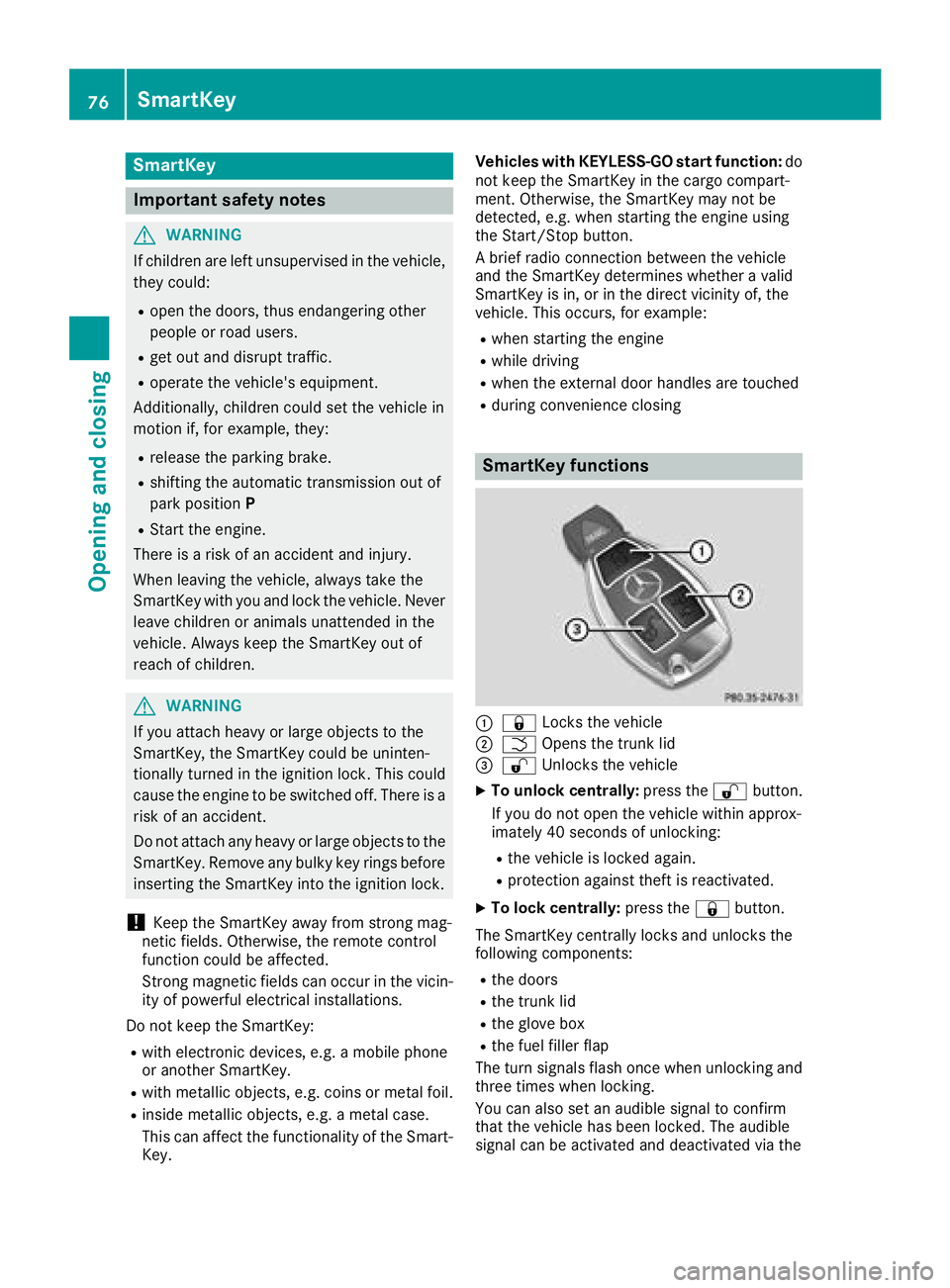
SmartKey
Important safety notes
GWARNING
If children are left unsupervised in the vehicle,
they could:
Ropen the doors, thus endangering other
people or road users.
Rget out and disrupt traffic.
Roperate the vehicle's equipment.
Additionally, children could set the vehicle in
motion if, for example, they:
Rrelease the parking brake.
Rshifting the automatic transmission out of
park position P
RStart the engine.
There is a risk of an accident and injury.
When leaving the vehicle, always take the
SmartKey with you and lock the vehicle. Never
leave children or animals unattended in the
vehicle. Always keep the SmartKey out of
reach of children.
GWARNING
If you attach heavy or large objects to the
SmartKey, the SmartKey could be uninten-
tionally turned in the ignition lock. This could
cause the engine to be switched off. There is a risk of an accident.
Do not attach any heavy or large objects to the
SmartKey. Remove any bulky key rings before
inserting the SmartKey into the ignition lock.
!Keep the SmartKey away from strong mag-
netic fields. Otherwise, the remote control
function could be affected.
Strong magnetic fields can occur in the vicin-
ity of powerful electrical installations.
Do not keep the SmartKey:
Rwith electronic devices, e.g. a mobile phone
or another SmartKey.
Rwith metallic objects, e.g. coins or metal foil.
Rinside metallic objects, e.g. a metal case.
This can affect the functionality of the Smart- Key. Vehicles with KEYLESS-GO start function:
do
not keep the SmartKey in the cargo compart-
ment. Otherwise, the SmartKey may not be
detected, e.g. when starting the engine using
the Start/Stop button.
A brief radio connection between the vehicle
and the SmartKey determines whether a valid
SmartKey is in, or in the direct vicinity of, the
vehicle. This occurs, for example:
Rwhen starting the engine
Rwhile driving
Rwhen the external door handles are touched
Rduring convenience closing
SmartKey functions
:& Locks the vehicle
;FOpens the trunk lid
=%Unlocks the vehicle
XTo unlock centrally: press the%button.
If you do not open the vehicle within approx-
imately 40 seconds of unlocking:
Rthe vehicle is locked again.
Rprotection against theft is reactivated.
XTo lock centrally: press the&button.
The SmartKey centrally locks and unlocks the
following components:
Rthe doors
Rthe trunk lid
Rthe glove box
Rthe fuel filler flap
The turn signals flash once when unlocking and
three times when locking.
You can also set an audible signal to confirm
that the vehicle has been locked. The audible
signal can be activated and deactivated via the
76SmartKey
Opening and closing
Page 83 of 350

ProblemPossible causes/consequences andMSolutions
The engine cannot be
started using the Start/
Stop button. The Smart-
Key is in the vehicle.The vehicle is locked.
XUnlock the vehicle and try to start the vehicle again.
The SmartKey battery is discharged or nearly discharged.
XCheck the SmartKey battery (Ypage 79) and replace it if necessary
(Ypage 79).
If this does not work:
XStart your vehicle with the SmartKey in the ignition lock.
There is interference from a powerful source of radio waves.
XStart your vehicle with the SmartKey in the ignition lock.
You have lost a Smart-
Key.XHave the SmartKey deactivated at a qualified specialist workshop.
XReport the loss immediately to the vehicle insurers.
XIf necessary, have the locks changed as well.
You have lost the
mechanical key.XReport the loss immediately to the vehicle insurers.
XIf necessary, have the locks changed as well.
Doors
Important safety notes
GWARNING
If children are left unsupervised in the vehicle,
they could:
Ropen the doors, thus endangering other
people or road users.
Rget out and disrupt traffic.
Roperate the vehicle's equipment.
Additionally, children could set the vehicle in
motion if, for example, they:
Rrelease the parking brake.
Rshifting the automatic transmission out of
park position P
RStart the engine.
There is a risk of an accident and injury.
When leaving the vehicle, always take the
SmartKey with you and lock the vehicle. Never
leave children or animals unattended in the
vehicle. Always keep the SmartKey out of
reach of children.
Unlocking and opening doors from
the inside
When a door is opened, the side window on that side opens slightly. When the door is closed, the
side window closes again.
!The side windows will not open/close if the
battery is discharged or if the side windows
have iced up. It will then not be possible to
close the door. Do not attempt to force the
door closed. You could otherwise damage the
door or the side window.
You can open a door from inside the vehicle
even if it has been locked. If the vehicle has been
locked with the SmartKey or with KEYLESS-GO,
opening a door from the inside will trigger the
anti-theft alarm system. Switch off the alarm
(
Ypage 74).
Doors81
Opening and closing
Z
Page 107 of 350

Storing using reverse gear
:Memory buttonM
;Button for the exterior mirror setting
=Button for the front-passenger side exterior
mirror
?Button for the driver's side exterior mirror
XStart the engine.
XPress button =.
XEngage reverse gear.
The exterior mirror on the front-passenger
side moves to the preset parking position.
XUse button;to adjust the exterior mirror to
a position that allows you to see the rear
wheel and the curb.
The parking position is stored.
iIf you shift the transmission to another posi-
tion, the exterior mirror on the front-
passenger side returns to the driving position.
Saving using the memory button
You can store the parking position of the exte-
rior mirror on the front-passenger side using
memory button M:. The reverse gear must not
be engaged.
XTurn the SmartKey to position 2in the igni-
tion lock (Ypage 123).
XPress button =.
XUse button;to adjust the exterior mirror to
a position that allows you to see the rear
wheel and the curb.
XPress memory button M: and one of the
arrows on button ;within three seconds.
The parking position is stored if the exterior
mirror does not move.
XIf the mirror moves out of position, repeat the
steps.
XAfter successfully storing, reset the driving
position of the exterior mirror.
Calling up a stored parking position set-
ting
XTurn the SmartKey to position 2in the igni-
tion lock (Ypage 123).
XAdjust the exterior mirror on the front-
passenger side using button =.
XEngage reverse gear.
The exterior mirror on the front-passenger
side moves to the stored parking position.
The exterior mirror on the front-passenger side
moves back to its original position:
Ras soon as you exceed a speed of 9 mph
(15 km/h)
Rabout ten seconds after you have disengaged
reverse gear
Rwhen you use button ?to select the exterior
mirror on the driver's side
Memory function
Important safety notes
GWARNING
If you use the memory function on the driver's side while driving, you could lose control of
the vehicle as a result of the adjustments
being made. There is a risk of an accident.
Only use the memory function on the driver's
side when the vehicle is stationary.
GWARNING
When the memory function adjusts the seat or steering wheel, you and other vehicle occu-
pants – particularly children – could become
trapped. There is a risk of injury.
While the memory function is making adjust-
ments, make sure that no one has any body
parts in the sweep of the seat or steering
wheel. If somebody becomes trapped, imme-
diately release the memory function position
button. The adjustment process is stopped.
GWARNING
Children could become trapped if they acti-
vate the memory function, particularly when
unattended. There is a risk of injury.
Memory function105
Seats, steering wheel and mirrors
Z
Page 125 of 350

GWARNING
If you switch off the ignition while driving,
safety-relevant functions are only available
with limitations, or not at all. This could affect, for example, the power steering and the brake
boosting effect. You will require considerably
more effort to steer and brake. There is a risk
of an accident.
Do not switch off the ignition while driving.
GWARNING
If the parking brake has not been fully
released when driving, the parking brake can:
Roverheat and cause a fire
Rlose its hold function.
There is a risk of fire and an accident. Release
the parking brake fully before driving off.
!Do not warm up the engine with the vehicle
stationary. Drive off immediately. Avoid high
engine speeds and driving at full throttle until
the engine has reached its operating temper-
ature.
Only shift the automatic transmission to the
desired drive position when the vehicle is sta-
tionary.
Where possible, avoid spinning the drive
wheels when pulling away on slippery roads.
You could otherwise damage the drive train.
!Mercedes-AMG vehicles: at low engine oil
temperatures below 68 ‡ (+20 †), the max-
imum engine speed is restricted in order to
protect the engine. To protect the engine and
maintain smooth engine operation, avoid driv-
ing at full throttle when the engine is cold.
Key positions
SmartKey
gTo remove the SmartKey
1Power supply for some consumers, such as
the windshield wipers
2Ignition (power supply for all consumers)
and drive position
3To start the engine
iThe SmartKey can be turned in the ignition
lock even if it is not the correct SmartKey for
the vehicle. The ignition is not switched on.
The engine cannot be started.
Start/Stop button
General notes
When you insert the Start/Stop button into the
ignition lock, the system needs approximately
two seconds recognition time. You can then use
the Start/Stop button.
Pressing the Start/Stop button several times in
succession corresponds to the different Smart-
Key positions in the ignition lock. This is only the
case if you are not depressing the brake pedal.
If you depress the brake pedal and press the
Start/Stop button, the engine starts immedi-
ately.
A check which periodically establishes a radio
connection between the vehicle and the Smart-
Key determines whether a valid SmartKey is in
the vehicle. This occurs, for example, when
starting the engine.
Driving123
Driving and parking
Z
Page 126 of 350

To start the vehicle without actively using the
SmartKey:
Rthe Start/Stop button must be inserted in the
ignition lock.
Rthe SmartKey must be in the vehicle.
Rthe vehicle must not be locked with the
SmartKey or KEYLESS-GO. (Ypage 77)
Do not keep the SmartKey:
Rwith electronic devices, e.g. a mobile phone
or another SmartKey.
Rwith metallic objects, e.g. coins or metal foil.
Rinside metallic objects, e.g. a metal case.
This can affect the functionality of the Smart-
Key.
If you lock the vehicle with the SmartKey remote control or with KEYLESS-GO, after a short time:
Ryou will not be able to switch on the ignition
with the Start/Stop button.
Ryou will no longer be able to start the engine
with the Start/Stop button until the vehicle is
unlocked again.
If you lock the vehicle centrally using the button
on the front door (
Ypage 82), you can continue
to start the engine with the Start/Stop button.
The engine can be switched off while the vehicle
is in motion by pressing and holding the Start/
Stop button for three seconds. This function
operates independently of the ECO start/stop
automatic engine switch-off function.
Key positions with the Start/Stop button
:Start/Stop button
;Ignition lock
As soon as the ignition is switched on, all the
indicator lamps in the instrument cluster light
up. Warning and indicator lamps: see
(
Ypage 241). If Start/Stop button
:has not yet been
pressed, this corresponds to the SmartKey
being removed from the ignition.
XTo switch on the power supply: press
Start/Stop button :once.
The power supply is switched on. You can now activate the windshield wipers, for example.
The power supply is switched off again if:
Rthe driver's door is opened and
Ryou press Start/Stop button :twice when in
this position
XTo switch on the ignition: press Start/Stop
button :twice.
The ignition is switched on.
The ignition is switched off again if:
Ryou do not start the engine from this position within 15 minutes
Ryou press Start/Stop button :once when in
this position
The power supply is switched off again if:
Rthe driver's door is opened and
Ryou press Start/Stop button :once when in
this position
Removing the Start/Stop button
You can remove the Start/Stop button from the ignition lock and start the vehicle as normal
using the SmartKey.
It is possible to switch between Start/Stop but-
ton mode and key operation only when the
transmission is in position j.
XRemove Start/Stop button :from ignition
lock ;.
You do not have to remove the Start/Stop but-
ton from the ignition lock when you leave the
vehicle. You should, however, always take the
SmartKey with you when leaving the vehicle. As
long as the SmartKey is in the vehicle:
Rthe vehicle can be started using the Start/
Stop button
Rthe electrically powered equipment can be
operated
124Driving
Driving and parking
Page 127 of 350

Starting the engine
Important safety notes
GWARNING
If children are left unsupervised in the vehicle,
they could:
Ropen the doors, thus endangering other
people or road users.
Rget out and disrupt traffic.
Roperate the vehicle's equipment.
Additionally, children could set the vehicle in
motion if, for example, they:
Rrelease the parking brake.
Rshifting the automatic transmission out of
park position P
RStart the engine.
There is a risk of an accident and injury.
When leaving the vehicle, always take the
SmartKey with you and lock the vehicle. Never
leave children or animals unattended in the
vehicle. Always keep the SmartKey out of
reach of children.
GWARNING
Combustion engines emit poisonous exhaust
gases such as carbon monoxide. Inhaling
these exhaust gases leads to poisoning. There
is a risk of fatal injury. Therefore never leave
the engine running in enclosed spaces with-
out sufficient ventilation.
GWARNING
Flammable materials introduced through
environmental influence or by animals can
ignite if in contact with the exhaust system or
parts of the engine that heat up. There is a risk
of fire.
Carry out regular checks to make sure that
there are no flammable foreign materials in
the engine compartment or in the exhaust
system.
General notes
The catalytic converter is preheated for up to
30 seconds after a cold start. The sound of the
engine may change during this time.
Automatic transmission
XShift the transmission to position j
(Ypage 133).
The transmission position indicator on the
multifunction display shows j
(
Ypage 134).
iYou can start the engine in transmission
position jand i.
Starting procedure with the SmartKey
To start the engine using the SmartKey instead
of the Start/Stop button, pull the Start/Stop
button out of the ignition lock.
XTurn the SmartKey to position 3in the igni-
tion lock and release it as soon as the engine
is running.
If the engine will not start:
XRemove the SmartKey from the ignition lock.
XReinsert the SmartKey into the ignition lock
after a short waiting period.
XTurn the SmartKey to position 2in the igni-
tion lock (Ypage 123).
The indicator lamps in the instrument cluster
light up (
Ypage 241).
XTurn the SmartKey to position 3
(Ypage 123) in the ignition lock and release it
as soon as the engine is running.
Starting procedure with the Start/Stop
button
The Start/Stop button is only available on vehi-
cles with KEYLESS-GO or the KEYLESS-GO start
function.
The Start/Stop button can be used to start the
vehicle manually without inserting the SmartKey
into the ignition lock. The Start/Stop button
must be inserted in the ignition lock and the
SmartKey must be in the vehicle. This mode for
starting the engine operates independently of
the ECO start/stop automatic engine start func- tion.
You can start the engine if a valid SmartKey is in
the vehicle. Switch off the engine and always
Driving125
Driving and parking
Z