climate settings MERCEDES-BENZ C-CLASS CABRIOLET 2018 Owner's Manual
[x] Cancel search | Manufacturer: MERCEDES-BENZ, Model Year: 2018, Model line: C-CLASS CABRIOLET, Model: MERCEDES-BENZ C-CLASS CABRIOLET 2018Pages: 350, PDF Size: 5.73 MB
Page 8 of 350
Drive program ................................ 136
Drive program display .................... 134
Driving tips .................................... 135
DYNAMIC SELECT switch .............. 130
Emergency running mode .............. 141
Engaging drive position .................. 134
Engaging neutral ............................ 133
Engaging park position automati-
cally ............................................... 133
Engaging reverse gear ................... 133
Engaging the park position ............ 133
Gearshift recommendation ............ 140
Gliding mode ................................. 136
Kickdown ....................................... 136
Manual shifting .............................. 138
Oil temperature (on-board com-
puter, Mercedes-AMG vehicles) ..... 208
Overview ........................................ 132
Permanent setting ......................... 139
Problem (malfunction) ................... 141
Pulling away ................................... 126
Starting the engine ........................ 125
Steering wheel paddle shifters ...... 138
Transmission position display
(DIRECT SELECT lever) ................... 134
Transmission positions .................. 135
Automatic transmission emer-
gency mode ....................................... 141
B
Back button ....................................... 254
Backup lamp
Display message ............................ 224
BAS (Brake Assist System) ................. 65
Basic settings
see Settings
Battery (SmartKey)
Checking .......................................... 79
Important safety notes .................... 78
Replacing ......................................... 79
Battery (vehicle)
Charging ........................................ 303
Display message ............................ 226
Important safety notes .................. 301
Jump starting ................................. 304
Belt
see Seat belts Belt warning
......................................... 48
Blind Spot Assist
Activating/deactivating (on-
board computer) ............................ 205
Display message ............................ 230
Notes/function .............................. 182
see Active Blind Spot Assist
Blower
see Climate control
Bluetooth
®
Connecting a different mobile
phone ............................................ 261
Searching for a mobile phone ........ 260
see also Digital Operator's Man-
ual .................................................. 253
Telephony ...................................... 260
Brake
Active Brake Assist with cross-
traffic function ................................. 71
Brake Assist
see BAS (Brake Assist System)
Brake assistance
see BAS (Brake Assist System)
Brake fluid
Display message ............................ 218
Notes ............................................. 343
Brake force distribution
see EBD (electronic brake force
distribution)
Brake linings
Display message ............................ 218
Brakes
ABS .................................................. 64
Adaptive Brake Assist ...................... 67
BAS .................................................. 65
Brake fluid (notes) ......................... 343
Display message ............................ 213
EBD .................................................. 71
High-performance brake system .... 150
Hill start assist ............................... 127
HOLD function ............................... 161
Important safety notes .................. 148
Maintenance .................................. 149
Parking brake ................................ 145
Riding tips ...................................... 148
Warning lamp ................................. 243
Breakdown
Where will I find...? ........................ 295
6Index
Page 10 of 350
Coolingwit h air dehumidif ication
(multimedia system) ...................... 258
Defrosting the windows ................ .119
Defrosting the windshield .............. 118
ECO start/stop function ................ 116
General notes ................................ 115
Indicator lamp ................................ 117
Ionization ....................................... 120
Ionization (multimedia system) ...... 258
Notes on using the automatic cli-
mate control .................................. 116
Overview ........................................ 257
Overview of systems ......................1 15
Problem with the rear window
defroster ........................................ 119
Problems with cooling with air
dehumidification ............................ 117
Refrigerant ..................................... 344
Refrigerant filling capacity ............. 345
Setting the air distribution ............. 118
Setting the air vents ......................1 20
Setting the airflow ......................... 118
Setting the climate mode (multi-
media system) ............................... 258
Setting the temperature ................ 118
Switching air-recirculation mode
on/off ............................................ 120
Switching on/off ........................... 116
Switching the rear window
defroster on/off ............................ 119
Switching the synchronization
function on and off ........................ 118
Synchronization function (multi-
media system) ............................... 258
Climate control settings
Multimedia system ........................ 257
Climate control system
Climate control .............................. 116
Cockpit
Overview .......................................... 35
Code for Apps
see QR code
COMAND display
Cleaning ......................................... 293
Combination switch .......................... 108
Connecting a USB device
see also Digital Operator's Man-
ual ..................................................2
53C
onsumption statistics (on-board
computer) .......................................... 197
Controller ...........................................2 54
Controlling the speed
see Distance Pilot DISTRONIC
Convenience opening feature ............ 90
Coolant (engine)
Checking the level ......................... 284
Display message ............................ 225
Filling capacity ............................... 344
Important safety notes .................. 343
Temperature display in the instru-
ment cluster .................................. 193
Warning lamp ................................. 248
Cooling
see Climate control
Copyright ............................................. 34
Cornering light function
Display message ............................ 224
Function/notes .............................1 09
Crosswind Assist ................................. 71
Cruise control
Cruise control lever ....................... 152
Deactivating ................................... 153
Display message ............................ 232
Driving system ............................... 151
Function/notes .............................1 51
General notes ................................ 151
Important safety notes .................. 151
Setting a speed .............................. 152
Storing and maintaining current
speed ............................................. 152
Storing the current speed or call-
ing up the last stored speed .......... 152
Cup holder
Center console .............................. 268
Important safety notes .................. 267
Rear compartment ......................... 268
Customer Assistance Center
(CAC) ..................................................... 31
Customer Relations Department ....... 31
D
Dashboard
see Instrument cluster
Dashboard lighting
see Instrument cluster lighting
8Index
Page 15 of 350
Selecting displays .......................... 206
Setting the position ....................... 206
Storing settings (memory func-
tion) ............................................... 106
Switching on or off ......................... 195
Headlamps
Display message ............................ 224
Fogging up ..................................... 110
see Automatic headlamp mode
Heating
see Climate control
High beam flasher ............................. 108
High-beam headlamps
Adaptive Highbeam Assist ............. 109
Display message ............................ 224
Switching on/off ........................... 108
Hill start assist .................................. 127
HOLD function
Activating ....................................... 162
Activation conditions ..................... 161
Deactivating ................................... 162
Display message ............................ 231
Function/notes ............................. 161
General notes ................................ 161
Home address
see also Digital Operator's Man-
ual .................................................. 253
Hood
Closing ........................................... 282
Display message ............................ 238
Important safety notes .................. 281
Opening ......................................... 281
Horn ...................................................... 35
HUD
see Head-up display
Hydroplaning ..................................... 150
I
Ignition key
see SmartKey
Ignition lock
see Key positions
Immobilizer .......................................... 74
Indicator lamps
see Warning and indicator lamps
Indicators
see Turn signals Insect protection on the radiator
.... 282
Inspection
see ASSYST PLUS
Instrument cluster
Overview .......................................... 36
Warning and indicator lamps ........... 36
Instrument cluster lighting .............. 192
Interior lighting
Automatic control .......................... 111
Control ........................................... 111
Overview ........................................ 110
Reading lamp ................................. 110
iPod
®
see also Digital Operator's Man-
ual .................................................. 253
J
Jack Using ............................................. 333
Jump starting (engine) ...................... 304
K
Key positions
SmartKey ....................................... 123
Start/Stop button .......................... 124
KEYLESS-GO
Activating ......................................... 77
Deactivation ..................................... 77
Locking ............................................ 77
Removing the Start/Stop button ... 124
Start function ................................... 77
Unlocking ......................................... 77
Kickdown
Driving tips .................................... 136
Manual gearshifting ....................... 141
Knee bag .............................................. 50
L
Lamps
see Warning and indicator lamps
Lane Change Assist
see Active Blind Spot Assist
Lane detection (automatic)
see Lane Keeping Assist
Lane Keeping Assist
Activating/deactivating ................. 185
Index13
Page 40 of 350
Center console
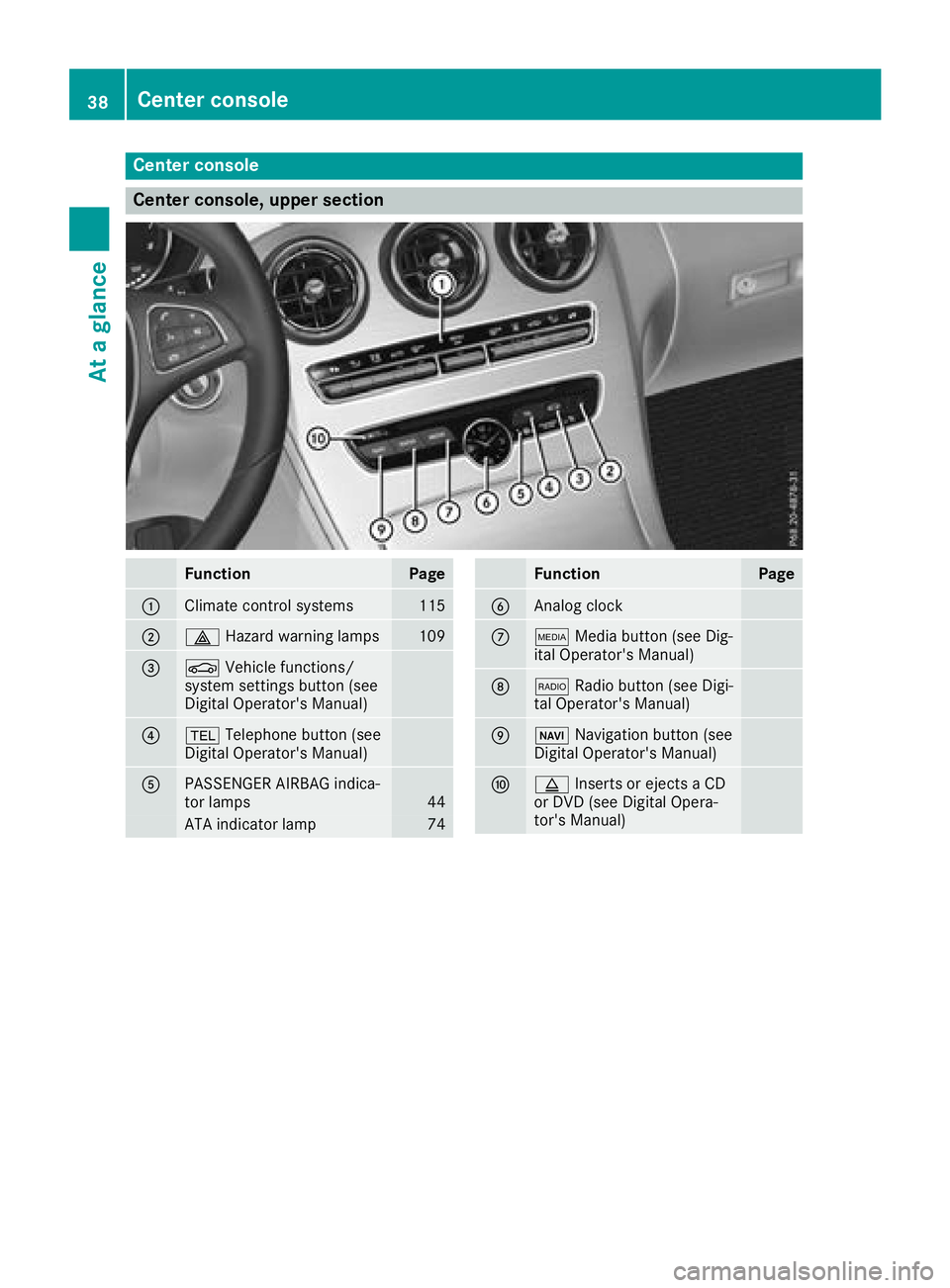
Center console, upper section
FunctionPage
:Climate control systems115
;£Hazard warning lamps109
=ØVehicle functions/
system settings button (see
Digital Operator's Manual)
?% Telephone button (see
Digital Operator's Manual)
APASSENGER AIRBAG indica-
tor lamps44
ATA indicator lamp74
FunctionPage
BAnalog clock
CÕ Media button (see Dig-
ital Operator's Manual)
D$ Radio button (see Digi-
tal Operator's Manual)
EØ Navigation button (see
Digital Operator's Manual)
Fþ Inserts or ejects a CD
or DVD (see Digital Opera-
tor's Manual)
38Center console
At a glance
Page 117 of 350

Overview of climate control systems
General notes
Observe the settings recommended on the fol-
lowing pages. The windows could otherwise fog
up.
To prevent the windows from fogging up:
Rswitch off climate control only briefly
Rswitch on air-recirculation mode only briefly
Rswitch on the cooling with air dehumidifica-
tion function
Ractivate the "Windshield defrosting" function
briefly, if required
Climate control regulates the temperature and
air humidity in the vehicle interior. The interior
filter cleans the air, thus improving the interior
climate.
The "Cooling with air dehumidification" function
is only available when the engine is running.
Optimum climate control is only achieved with
the side windows and roof closed.
If you start the engine using your smartphone,
the last selected climate control setting is reac-
tivated (
Ypage 126). The integrated filter filters out most particles of
dust and soot and completely filters out pollen.
It also reduces gaseous pollutants and odors. A
clogged filter reduces the amount of air suppliedto the vehicle interior. For this reason, you
should always observe the interval for replacing
the filter, which is specified in the Maintenance
Booklet. As it depends on environmental condi-
tions, e.g. heavy air pollution, the interval may
be shorter than stated in the Maintenance Book-
let.
iVentilate the vehicle for a brief period during
warm weather, e.g. using the convenience
opening feature (
Ypage 90). This will speed
up the cooling process and the desired inte-
rior temperature will be reached more
quickly.
iIt is possible that the blower may be activa-
ted automatically 60 minutes after the Smart-
Key has been removed depending on various
factors, e.g. the outside temperature. The
vehicle is then ventilated for 30 minutes to dry
the automatic climate control.
Control panel for dual-zone automatic climate control
Example: control panel for dual-zone automatic climate control
:
Sets the temperature, left (Ypage 118)
;Sets the air distribution (Ypage 118)
=Sets the airflow (Ypage 118)
Switches off climate control (
Ypage 116)
Overview of climate control systems115
Climate control
Page 118 of 350
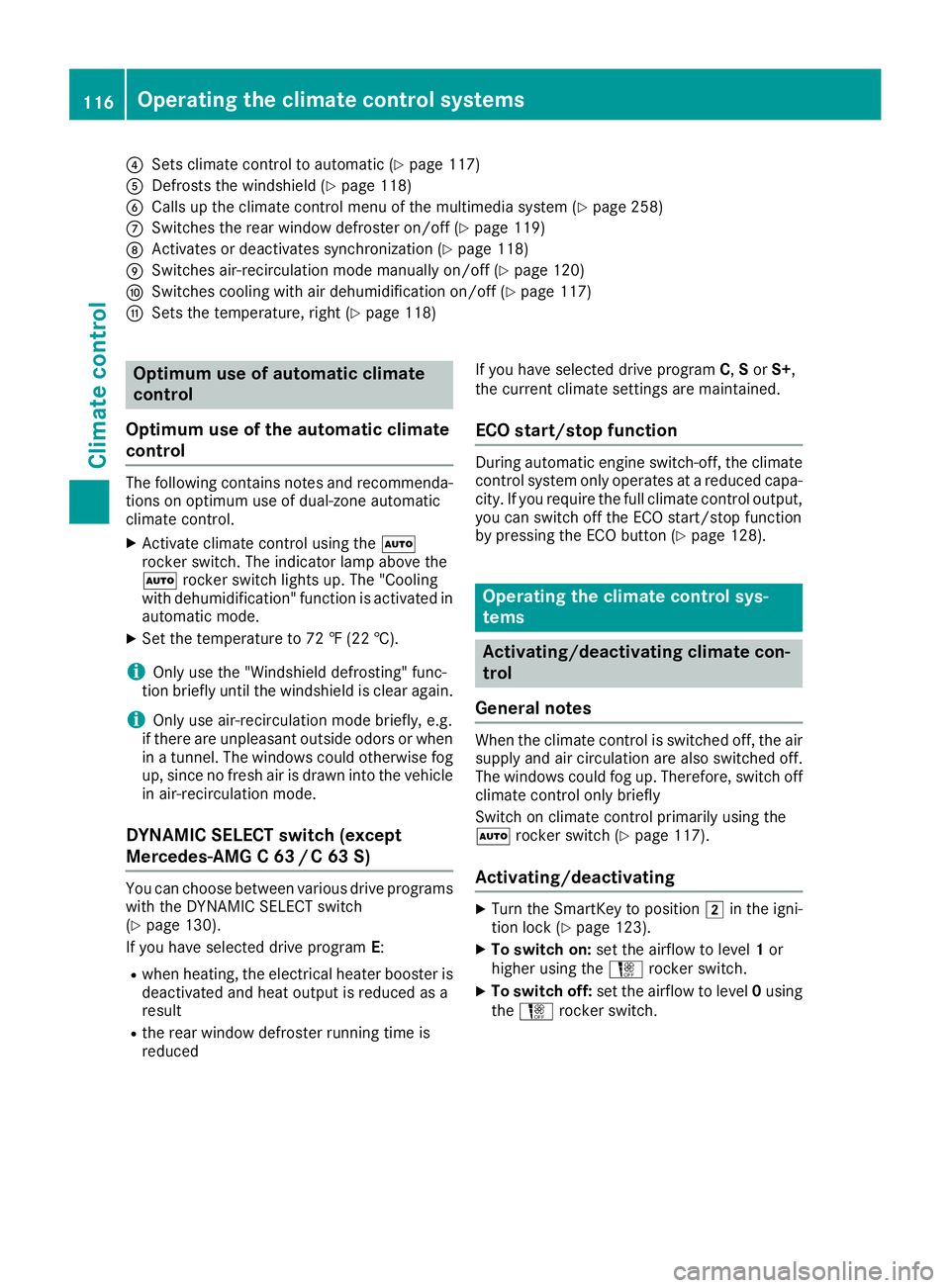
?Sets climate control to automatic (Ypage 117)
ADefrosts the windshield (Ypage 118)
BCalls up the climate control menu of the multimedia system (Ypage 258)
CSwitches the rear window defroster on/off (Ypage 119)
DActivates or deactivates synchronization (Ypage 118)
ESwitches air-recirculation mode manually on/off (Ypage 120)
FSwitches cooling with air dehumidification on/off (Ypage 117)
GSets the temperature, right (Ypage 118)
Optimum use of automatic climate
control
Optimum use of the automatic climate
control
The following contains notes and recommenda-
tions on optimum use of dual-zone automatic
climate control.
XActivate climate control using the Ã
rocker switch. The indicator lamp above the
à rocker switch lights up. The "Cooling
with dehumidification" function is activated in
automatic mode.
XSet the temperature to 72 ‡ (22 †).
iOnly use the "Windshield defrosting" func-
tion briefly until the windshield is clear again.
iOnly use air-recirculation mode briefly, e.g.
if there are unpleasant outside odors or when
in a tunnel. The windows could otherwise fog
up, since no fresh air is drawn into the vehicle in air-recirculation mode.
DYNAMIC SELECT switch (except
Mercedes-AMG C 63 /C63S)
You can choose between various drive programs
with the DYNAMIC SELECT switch
(
Ypage 130).
If you have selected drive program E:
Rwhen heating, the electrical heater booster is
deactivated and heat output is reduced as a
result
Rthe rear window defroster running time is
reduced If you have selected drive program
C,Sor S+,
the current climate settings are maintained.
ECO start/stop function
During automatic engine switch-off, the climate
control system only operates at a reduced capa-
city. If you require the full climate control output,
you can switch off the ECO start/stop function
by pressing the ECO button (
Ypage 128).
Operating the climate control sys-
tems
Activating/deactivating climate con-
trol
General notes
When the climate control is switched off, the air
supply and air circulation are also switched off.
The windows could fog up. Therefore, switch off
climate control only briefly
Switch on climate control primarily using the
à rocker switch (
Ypage 117).
Activating/deactivating
XTurn the SmartKey to position 2in the igni-
tion lock (Ypage 123).
XTo switch on: set the airflow to level 1or
higher using the Hrocker switch.
XTo switch off: set the airflow to level 0using
the H rocker switch.
116Operating the climate control systems
Climate control
Page 119 of 350
Switching cooling with air dehumidification on/off
General notes
If you deactivate the "Cooling with air-dehumidification" function, the air inside the vehicle will not
be cooled. The air inside the vehicle will also not be dehumidified. The windows can fog up more
quickly. Therefore, only deactivate the "Cooling with air-dehumidification" function briefly.
The "Cooling with air dehumidification" function is only available when the engine is running. The air
inside the vehicle is cooled and dehumidified according to the temperature selected.
Condensation may drip from the underside of the vehicle when it is in cooling mode. This is normal
and not a sign that there is a malfunction.
Activating/deactivating
XPress the ¿rocker switch up or down.
The indicator lamp above the rocker switch lights up or goes out.
Problems with the "Cooling with air dehumidification" function
ProblemPossible causes/consequences and MSolutions
The indicator lamp above
the¿ rocker switch
remains off. The cooling
with air dehumidification
function cannot be acti-
vated via the multimedia
system any longer
(
Ypage 258).
Cooling with air dehumidification has been deactivated due to a mal-
function.
XVisit a qualified specialist workshop.
Setting climate control to automatic
General notes
In automatic mode, the set temperature is main-
tained automatically at a constant level. The
system automatically regulates the temperature
of the dispensed air, the airflow and the air dis-
tribution.
During automatic controlling, the "Cooling with
air dehumidification" function is activated.
The system automatically detects whether the
soft top is open or closed and automatically
adjusts the air settings depending on the soft
top status.
Automatic control
XTurn the SmartKey to position 2in the igni-
tion lock (Ypage 123).
XTo activate: press theÃrocker switch up
or down.
The indicator lamp above the Ãrocker
switch lights up.
XSet the desired temperature using the w
rocker switch on the front control unit.
XTo switch to manual operation: press the
H rocker switch up or down.
or
XPress the _rocker switch up or down.
The indicator lamp above the Ãrocker
switch goes out.
In automatic mode, if you adjust the airflow or
air distribution manually, the indicator lamp
above the Ãrocker switch goes out. The
function which has not been changed manually,
however, continues to be controlled automati-
cally. When the manually set function switches
Operating the climate control systems117
Climate control
Page 120 of 350
back to automatic mode, the indicator lamp
above theÃrocker switch lights up again.
Setting the temperature
Dual-zone automatic climate control: different
temperatures can be set for the driver's and
front-passenger sides.
XTurn the SmartKey to position 2in the igni-
tion lock (Ypage 123).
XTo increase or reduce: press thew
rocker switch up or down.
Only change the temperature setting in small
increments. Start at 72 ‡ (22 †).
Setting the air distribution
Air distribution settings
¯ Directs air through the defroster vents
P Directs air through the center and side air
vents
O Directs air through the footwell air vents
S Directs air through the center, side and
footwell vents
a Directs air through the defroster and
footwell vents
_ Directs air through the defroster, center,
side and footwell vents
b Directs air through the defroster, center
and side air vents
W Sets the air distribution to automatic
Setting
XTurn the SmartKey to position 2
(Ypage 123).
XPress the _rocker switch up or down.
The various air distribution settings appear in
the multimedia system.
Setting the airflow
XTurn the SmartKey to position 2in the igni-
tion lock (Ypage 123).
XTo increase or reduce: press theH
rocker switch up or down.
Activating or deactivating the syn-
chronization function
General notes
Climate control can be set centrally using the
synchronization function. The temperature set-
ting is adopted for the front-passenger side.
Activating/deactivating
XPress the 0rocker switch up or down.
The indicator lamp above the 0rocker
switch lights up or goes out.
or
XActivate or deactivate the "Synchronization"
function using the multimedia system
(
Ypage 118).
The synchronization function deactivates if the
settings for the front-passenger side are
changed.
Defrosting the windshield
General notes
You can use this function to defrost the wind-
shield or to clear a fogged up windshield or front
side windows on the inside.
Switch off the "Windshield defrosting" function
as soon as the windshield is clear again.
Switching the "Windshield defrosting"
function on or off
XTurn the SmartKey to position 2in the igni-
tion lock (Ypage 123).
XTo switch on: press rocker switch ¬on
the front control unit up or down.
The indicator lamp above the ¬rocker
switch lights up. The current climate control
settings are deactivated.
The climate control system switches to the
following functions:
Rhigh airflow
Rhigh temperature
Rair distribution to the windshield and front
side windows
Rair-recirculation mode off
iIf necessary, the "Cooling with air dehumid-
ification" function is activated. In this case,
118Operating the climate control systems
Climate control
Page 134 of 350

if you have previously pressed one of buttons:
- A.
iMercedes-AMG C 43 4MATIC In a few
countries, the ECO start/stop function is
deactivated at the factory due to the fuel
grade available. In this case, the ECO start/
stop function is not available in any drive pro-
gram, regardless of the display in the multi-
media system display.
All other models
Use the DYNAMIC SELECT switch to change the
drive program.
Depending on the drive program selected the
following vehicle characteristics will change:
Rthe drive (engine and transmission manage-
ment)
Rthe suspension
Rthe steering
Rthe ECO start/stop function
Rthe climate control:
-the climate control settings
-the rear window defroster operation period
-the performance of the seat heating
Each time you start the engine with the Smart-
Key or the Start/Stop button, drive program Cis
activated. For further information about starting
the engine, see (
Ypage 125).
XPush DYNAMIC SELECT switch :forward or
back until the desired drive program is selec-
ted.
The status icon of the selected drive program
is shown in the multifunction display. In addition, the current drive program settings
are displayed briefly in the multimedia system
display.
iIn a few countries, the ECO start/stop func-
tion is deactivated at the factory due to the
available fuel grade. In this case, the ECO
start/stop function is not available in any
drive program, regardless of the display in the
multimedia system display.
Available drive programs:
I IndividualIndividual settings
S+ Sport PlusParticularly sporty driving
characteristics
SSportSporty driving characteris-
tics
C ComfortComfortable and economi-
cal driving characteristics
EEconomyParticularly economical
driving characteristics
Additional information for drive programs
(Ypage 136).
You can also change gear yourself using the
steering wheel paddle shifters. For further infor- mation on the manual drive program
(
Ypage 138).
Automatic transmission
Important safety notes
GWARNING
If the engine speed is above the idling speed
and you engage transmission position Dor R,
the vehicle could pull away suddenly. There is
a risk of an accident.
When engaging transmission position Dor R,
always firmly depress the brake pedal and do not simultaneously accelerate.
GWARNING
The automatic transmission switches to neu-
tral position Nwhen you switch off the engine.
The vehicle may roll away. There is a risk of an
accident.
132Automatic transmission
Driving and parking
Page 259 of 350
Adding favorites
Adding predefinedfavorites
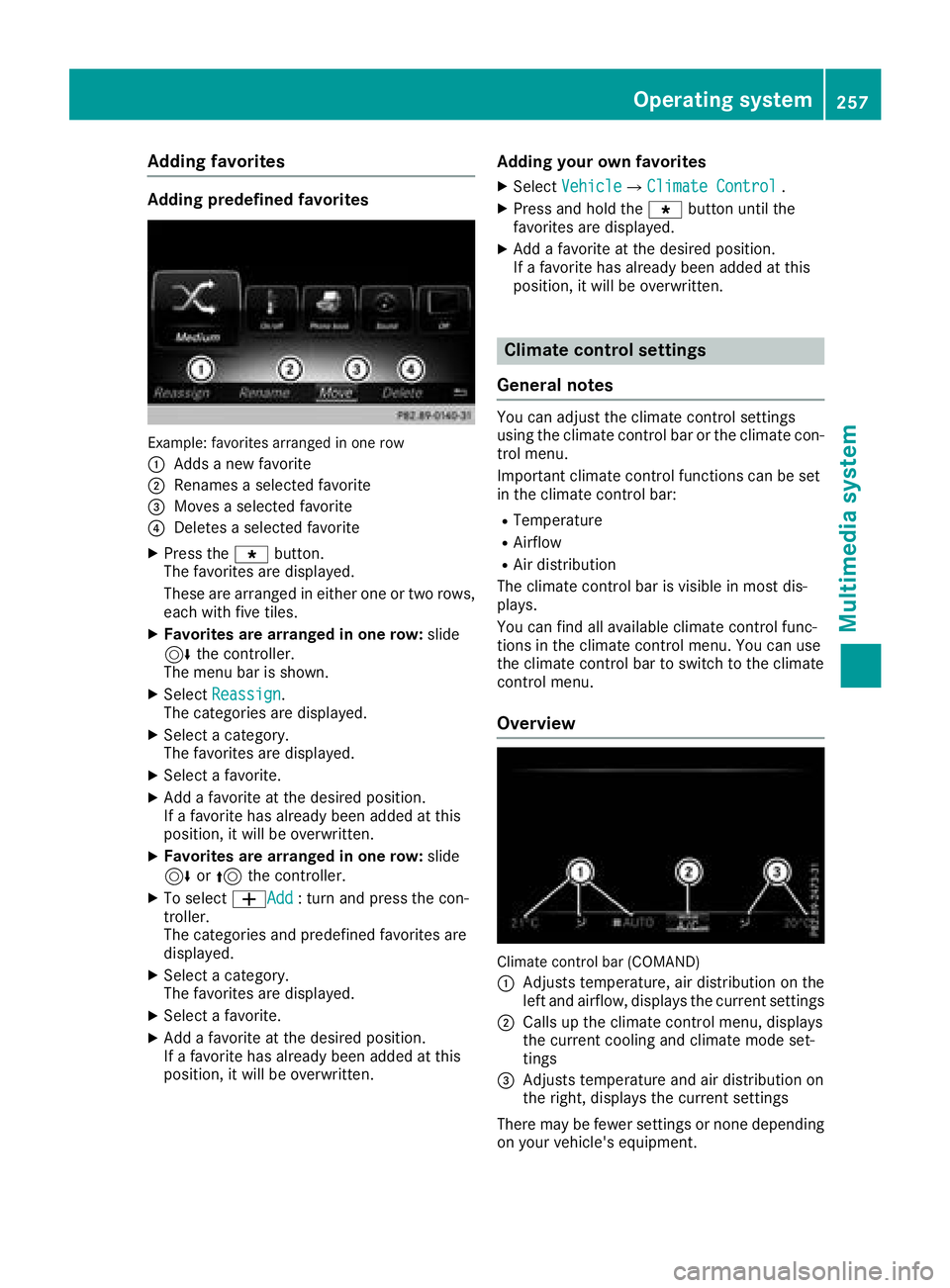
Example: favoritesarranged in on erow
:
Adds ane wfavorite
;Renames aselected favorite
=Moves aselected favorite
?Deletes aselected favorite
XPress th eg button.
The favorite sare displayed.
These are arranged in either on eor two rows,
eac hwit hfiv etiles.
XFavorites ar earranged in one row: slide
6 thecontroller .
The men ubar is shown.
XSelec tReassign.
The categorie sare displayed.
XSelec t acategory.
The favorite sare displayed.
XSelec t afavorite .
XAdd a favorite at th edesired position .
If afavorite has already been added at this
position ,it will be overwritten.
XFavorites ar earranged in one row: slide
6 or5 thecontroller .
XTo select WAdd:tur nand press th econ-
troller .
The categorie sand predefine dfavorite sare
displayed.
XSelec t acategory.
The favorite sare displayed.
XSelec t afavorite .
XAdd a favorite at th edesired position .
If afavorite has already been added at this
position ,it will be overwritten.
Adding you rown favorites
XSelec tVehicl eQClimate Contro l.
XPress and hold theg buttonuntil th e
favorite sare displayed.
XAd d a favorite at th edesired position .
If afavorite has already been added at this
position ,it will be overwritten.
Climate control settings
Gene ral notes
You can adjust th eclimat econtrol setting s
usin gth eclimat econtrol bar or th eclimat econ-
trol menu.
Importan tclimat econtrol function scan be set
in th eclimat econtrol bar:
RTemperatur e
RAirflow
RAir distribution
The climat econtrol bar is visible in mos tdis-
plays.
You can fin dall available climat econtrol func-
tion sin th eclimat econtrol menu. You can use
th eclimat econtrol bar to switch to th eclimat e
control menu.
Overview
Climate control bar (COMAND)
:
Adjusts temperature, air distribution on th e
lef tand airflow, displays th ecurren tsetting s
;Calls up th eclimat econtrol menu, displays
th ecurren tcoolin gand climat emod eset -
ting s
=Adjusts temperature and air distribution on
theright ,displays th ecurren tsetting s
There may be fewer setting sor none depending
on your vehicle's equipment.
Operating system257
Multimedia system
Z