coolant temperature MERCEDES-BENZ C-CLASS CABRIOLET 2018 Owner's Manual
[x] Cancel search | Manufacturer: MERCEDES-BENZ, Model Year: 2018, Model line: C-CLASS CABRIOLET, Model: MERCEDES-BENZ C-CLASS CABRIOLET 2018Pages: 350, PDF Size: 5.73 MB
Page 10 of 350
Coolingwit h air dehumidif ication
(multimedia system) ...................... 258
Defrosting the windows ................ .119
Defrosting the windshield .............. 118
ECO start/stop function ................ 116
General notes ................................ 115
Indicator lamp ................................ 117
Ionization ....................................... 120
Ionization (multimedia system) ...... 258
Notes on using the automatic cli-
mate control .................................. 116
Overview ........................................ 257
Overview of systems ......................1 15
Problem with the rear window
defroster ........................................ 119
Problems with cooling with air
dehumidification ............................ 117
Refrigerant ..................................... 344
Refrigerant filling capacity ............. 345
Setting the air distribution ............. 118
Setting the air vents ......................1 20
Setting the airflow ......................... 118
Setting the climate mode (multi-
media system) ............................... 258
Setting the temperature ................ 118
Switching air-recirculation mode
on/off ............................................ 120
Switching on/off ........................... 116
Switching the rear window
defroster on/off ............................ 119
Switching the synchronization
function on and off ........................ 118
Synchronization function (multi-
media system) ............................... 258
Climate control settings
Multimedia system ........................ 257
Climate control system
Climate control .............................. 116
Cockpit
Overview .......................................... 35
Code for Apps
see QR code
COMAND display
Cleaning ......................................... 293
Combination switch .......................... 108
Connecting a USB device
see also Digital Operator's Man-
ual ..................................................2
53C
onsumption statistics (on-board
computer) .......................................... 197
Controller ...........................................2 54
Controlling the speed
see Distance Pilot DISTRONIC
Convenience opening feature ............ 90
Coolant (engine)
Checking the level ......................... 284
Display message ............................ 225
Filling capacity ............................... 344
Important safety notes .................. 343
Temperature display in the instru-
ment cluster .................................. 193
Warning lamp ................................. 248
Cooling
see Climate control
Copyright ............................................. 34
Cornering light function
Display message ............................ 224
Function/notes .............................1 09
Crosswind Assist ................................. 71
Cruise control
Cruise control lever ....................... 152
Deactivating ................................... 153
Display message ............................ 232
Driving system ............................... 151
Function/notes .............................1 51
General notes ................................ 151
Important safety notes .................. 151
Setting a speed .............................. 152
Storing and maintaining current
speed ............................................. 152
Storing the current speed or call-
ing up the last stored speed .......... 152
Cup holder
Center console .............................. 268
Important safety notes .................. 267
Rear compartment ......................... 268
Customer Assistance Center
(CAC) ..................................................... 31
Customer Relations Department ....... 31
D
Dashboard
see Instrument cluster
Dashboard lighting
see Instrument cluster lighting
8Index
Page 23 of 350
Suspension tuningSETUP (on-board computer,
Mercedes-AMG vehicles) ............... 209
Switching air-recirculation mode
on/off .................................................1 20
Switching on media mode
Via the device list .......................... 261
T
Tachometer ........................................ 193
Tail lamps
Display message ............................ 224
Tank
see Fuel tank
Tank content
Fuel gauge ....................................... 36
Technical data
Capacities ...................................... 340
Information .................................... 338
Vehicle data ................................... 345
Telephone
Accepting a call (multifunction
steering wheel) .............................. 202
Authorizing a mobile phone (con-
necting) ......................................... 260
Connecting a mobile phone (gen-
eral information) ............................ 260
Display message ............................ 239
Introduction ................................... 202
Menu (on-board computer) ............ 202
Number from the phone book ........ 202
Redialing ........................................ 203
Rejecting/ending a call ................. 202
see also Digital Operator's Man-
ual .................................................. 253
Switching between mobile
phones ........................................... 261
see Mobile phone
Temperature
Coolant (display in the instrument
cluster) .......................................... 193
Engine oil (on-board computer,
Mercedes-AMG vehicles) ............... 208
Outside temperature ...................... 193
Setting (climate control) ................ 118
Transmission oil (on-board com-
puter, Mercedes-AMG vehicles) ..... 208 Through-loading feature
................... 265
Timing (RACETIMER) ......................... 210
Tire pressure
Calling up (on-board computer) ..... 319
Checking manually ........................ 318
Display message ............................ 234
Maximum ....................................... 318
Not reached (TIREFIT) .................... 299
Notes ............................................. 316
Reached (TIREFIT) .......................... 300
Recommended ............................... 315
Using the TIREFIT kit ...................... 298
Tire pressure loss warning system
General notes ................................ 318
Important safety notes .................. 318
Restarting ...................................... 319
Tire pressure monitor
Checking the tire pressure elec-
tronically ........................................ 321
Function/notes ............................. 319
Genera l note
s ................................ 319
Important safety notes .................. 319
Radio type approval for the tire
pressure monitor ........................... 322
Restarting ...................................... 321
Warning lamp ................................. 251
Warning message .......................... 321
Tire pressure sensors
Display message ............................ 235
Tire-change tool kit ........................... 296
TIREFIT kit
Important safety notes .................. 298
Storage location ............................ 296
Tire pressure not reached .............. 299
Tire pressure reached .................... 300
Using ............................................. 298
Tires
Aspect ratio (definition) ................. 331
Average weight of the vehicle
occupants (definition) .................... 329
Bar (definition) ............................... 329
Changing a wheel .......................... 331
Characteristics .............................. 329
Checking ........................................ 313
Curb weight (definition) ................. 330
Definition of terms ......................... 329
Direction of rotation ...................... 332
Display message ............................ 234
Index21
Page 132 of 350

ProblemPossible causes/consequences andMSolutions
The engine does not
start. The starter motor
can be heard. The
reserve fuel warning
lamp is lit and the fuel
gauge display is at the
reserve level.The fuel tank is empty.
XRefuel the vehicle.
The engine does not
start. You cannot hear
the starter motor.The on-board voltage is too low because the battery is too weak or
discharged.
XJump-start the vehicle (Ypage 304).
If the engine does not start despite attempts to jump-start it:
XConsult a qualified specialist workshop.
The starter motor was exposed to a thermal load that was too high.
XTry to start the engine again (Ypage 125).
If the engine still does not start:
XConsult a qualified specialist workshop.
The engine is not running
smoothly and is misfir-
ing.There is a malfunction in the engine electronics or in a mechanical
component of the engine management system.
XOnly depress the accelerator pedal slightly.
Otherwise, non-combusted fuel may get into the catalytic converter
and damage it.
XHave the cause rectified immediately at a qualified specialist work-
shop.
The coolant temperature
display is pointing to the
red mark.The coolant level is too low. The coolant is too hot and the engine is no
longer being cooled sufficiently.
XStop as soon as possible and allow the engine and the coolant to
cool down.
XCheck the coolant level (Ypage 284). Observe the warning notes
as you do so and add coolant if necessary.
DYNAMIC SELECT switch
Mercedes-AMG vehicles
General information
Use the DYNAMIC SELECT switch to select the
drive program. Available drive programs for Mercedes-
AMG C 43 4MATIC:
S+
Sport PlusParticularly sporty driving
characteristics
SSportSporty driving characteris-
tics
C ComfortComfortable and economi-
cal driving characteristics
EEconomyParticularly economical
driving characteristics
IIndividualIndividual settings
130DYNAMIC SELECT switch
Driving and parking
Page 195 of 350
Tachometer
!
Do not drive in the overrevving range, as this
could damage the engine.
The red band in the tachometer indicates the
engine's overrevving range.
The fuel supply is interrupted to protect the
engine when the red band is reached.
Outside temperature display
You should pay special attention to road condi-
tions when temperatures are around freezing
point.
Bear in mind that the outside temperature dis-
play indicates the temperature measured and
does not record the road temperature.
The outside temperature display is in the multi-
function display (
Ypage 194).
Changes in the outside temperature are dis-
played after a short delay.
Coolant temperature gauge
GWARNING
Opening the hood when the engine is over-
heated or when there is a fire in the engine
compartment could expose you to hot gases
or other service products. There is a risk of
injury.
Let an overheated engine cool down before
opening the hood. If there is a fire in the
engine compartment, keep the hood closed
and contact the fire department.
!If the coolant temperature is too high, a dis-
play message is shown.
If the coolant temperature display is in the
area marked in red, do not continue driving.
Otherwise, the engine will be damaged.
The coolant temperature gauge is in the lower
section of the tachometer (
Ypage 36).
Under normal operating conditions and at the
correct coolant level, the display may rise to the
red mark.
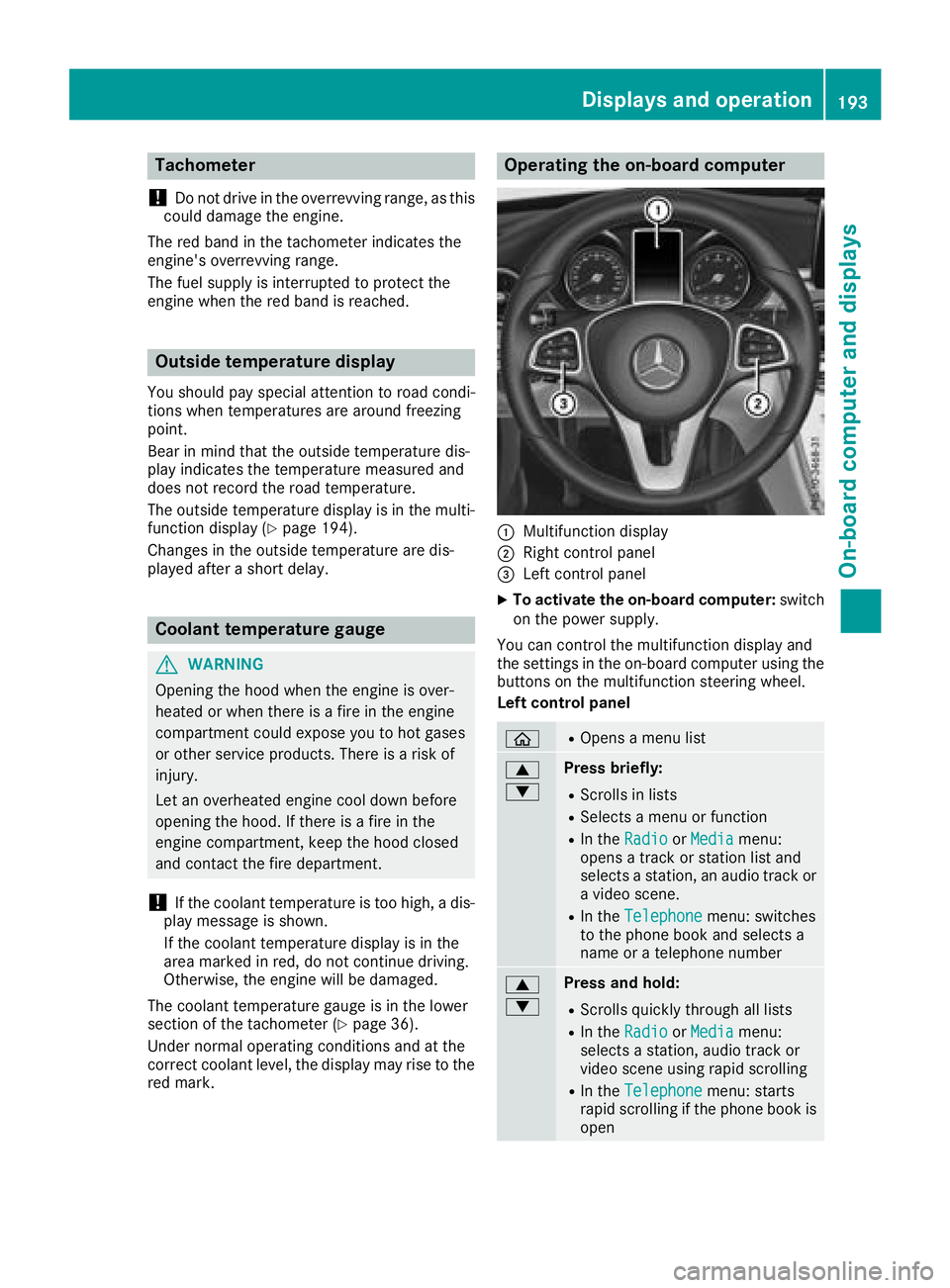
Operating the on-board computer
:Multifunction display
;Right control panel
=Left control panel
XTo activate the on-board computer: switch
on the power supply.
You can control the multifunction display and
the settings in the on-board computer using the
buttons on the multifunction steering wheel.
Left control panel
òROpens a menu list
9
:Press briefly:
RScrolls in lists
RSelects a menu or function
RIn the RadioorMediamenu:
opens a track or station list and
selects a station, an audio track or
a video scene.
RIn the Telephonemenu: switches
to the phone book and selects a
name or a telephone number
9
:Press and hold:
RScrolls quickly through all lists
RIn the RadioorMediamenu:
selects a station, audio track or
video scene using rapid scrolling
RIn the Telephonemenu: starts
rapid scrolling if the phone book is
open
Displays an doperation193
On-boa rd computer and displays
Z
Page 227 of 350

Engine
Display messagesPossible causes/consequences andMSolutions
+
CheckCoolantLevelSee Operator's Man‐ual
The coolant level is too low.
!Avoid making long journeys with too little coolant in the engine
cooling system. The engine will otherwise be damaged.
XAdd coolant, observing the warning notes before doing so
(Ypage 284).
If you have to add coolant frequently:
XContact a qualified specialist workshop and have the engine cooling
system checked.
?The fan motor is malfunctioning.
XIf the coolant temperature is below the red marking in the coolant
temperature gauge, drive to the nearest qualified specialist work-
shop.
XAvoid heavy loads on the engine as you do so, e.g. driving in moun-
tainous terrain and stop-and-go traffic.
?
Coolant Too HotStop Vehicle TurnEngine Off
The coolant is too hot.
A warning tone also sounds.
GWARNING
Do not drive when your engine is overheated. This can cause some
fluids which may have leaked into the engine compartment to catch
fire.
Steam from the overheated engine can also cause serious burns which
can occur just by opening the hood.
There is a risk of injury.
XPull over and stop the vehicle safely and switch off the engine, pay- ing attention to road and traffic conditions.
XSecure the vehicle against rolling away (Ypage 143).
XWait until the engine has cooled down.
XMake sure that the air supply to the engine radiator is not blocked,
e.g. by snow, slush or ice.
XDo not start the engine again until the display message goes out and
the coolant temperature gauge is below the red marking. Other-
wise, the engine could be damaged.
XPay attention to the coolant temperature gauge.
If the temperature increases again:
XVisit a qualified specialist workshop immediately.
Under normal operating conditions and with the specified coolant
level, the coolant temperature gauge may rise to the red marking.
Display messages225
On-board computer and displays
Z
Page 250 of 350

Warning/
indicator
lampNSignal type
Possible causes/consequences and M
Solutions
8NThe yellow reserve fuel warning lamp flashes while the vehicle is in motion.
In addition, the ;Check Engine warning lamp may light up.
The fuel filler cap is not closed correctly or the fuel system is leaking.
XCheck that the fuel filler cap is correctly closed.
XIf the fuel filler cap is not correctly closed: close the fuel filler cap.
XIf the fuel filler cap is closed:visit a qualified specialist workshop.
?NThe red coolant warning lamp lights up while the engine is running and the
coolant temperature gauge is at the start of the scale.
The temperature sensor for the coolant temperature gauge is malfunctioning.
The coolant temperature is no longer being monitored. There is a risk of engine
damage if the coolant temperature is too high.
XPull over and stop the vehicle safely and switch off the engine, paying attention
to road and traffic conditions. Do not continue driving under any circumstances.
XSecure the vehicle against rolling away (Ypage 143).
XConsult a qualified specialist workshop.
248Warning and indicator lamps in the instrument cluster
On-board computer and displays
Page 251 of 350

Warning/
indicator
lampNSignal type
Possible causes/consequences and M
Solutions
?NThe red coolant warning lamp comes on while the engine is running.
The coolant level is too low.
If the coolant level is correct, the airflow to the engine radiator may be blocked or
the electric engine radiator fan may be defective.
The coolant is too hot and the engine is no longer being cooled sufficiently.
XObserve the additional display messages in the multifunction display.
XPull over and stop the vehicle safely and switch off the engine, paying attention
to road and traffic conditions.
XSecure the vehicle against rolling away (Ypage 143).
XLeave the vehicle and keep a safe distance from the vehicle until the engine has cooled down.
XCheck the coolant level and add coolant, observing the warning notes
(Ypage 284).
XIf you have to add coolant frequently, have the engine cooling system checked.
XMake sure that the air supply to the engine radiator is not blocked, e.g. by snow,
slush or ice.
XDo not start the engine again until the coolant temperature gauge is below the
red marking. Otherwise, the engine could be damaged.
XDrive to the nearest qualified specialist workshop.
XAvoid heavy loads on the engine as you do so, e.g. driving in mountainous terrain
and stop-and-go traffic.
?N The red coolant warning lamp comes on while the engine is running. A warning
tone also sounds.
The coolant temperature gauge has reached the red marking. The airflow to the
engine radiator may be blocked or the coolant level may be too low.
GWARNING
The engine is not being cooled sufficiently and may be damaged.
Do not drive when your engine is overheated. This can cause some fluids which
may have leaked into the engine compartment to catch fire.
Steam from the overheated engine can also cause serious burns which can occur
just by opening the hood.
There is a risk of injury.
XObserve the additional display messages in the multifunction display.
XPull over and stop the vehicle safely and switch off the engine, paying attention
to road and traffic conditions.
XSecure the vehicle against rolling away (Ypage 143).
XLeave the vehicle and keep a safe distance from the vehicle until the engine has
cooled down.
XCheck the coolant level and add coolant, observing the warning notes
(Ypage 284).
XIf you have to add coolant frequently, have the engine cooling system checked.
XMake sure that the air supply to the engine radiator is not blocked, e.g. by snow,
slush or ice.
Warning and indicator lamps in the instrument cluster249
On-board computer and displays
Z
Page 252 of 350

Warning/
indicator
lampNSignal type
Possible causes/consequences and M
Solutions
XIf the coolant temperature is below the red marking, drive to the nearest quali-
fied specialist workshop.
XAvoid heavy loads on the engine as you do so, e.g. driving in mountainous terrain
and stop-and-go traffic.
Driving systems
Warning/
indicator
lampNSignal type
Possible causes/consequences and M
Solutions
·NThe red distance warning lamp lights up while the vehicle is in motion. A warning
tone also sounds.
You are approaching a vehicle, a pedestrian or a stationary obstacle in your line of travel at too high a speed.
XBe prepared to brake immediately.
XPay careful attention to the traffic situation. You may have to brake or take
evasive action.
Further information about Active Brake Assist with cross-traffic function
(
Ypage 71).
Further information on the distance warning function of Active Brake Assist
(
Ypage 65).
250Warning and indicator lamps in the instrument cluster
On-board computer and displays
Page 286 of 350
Additional service products
Import ant safety notes
GWARNIN G
Certain component sin th eengin ecompart-
ment, suc has th eengine, radiato rand part s
of th eexhaust system, can become ver yhot .
Working in th eengin ecompartmen tposes a
ris kof injury.
Wher epossible, let th eengin ecool down and
touch only th ecomponent sdescribed in th e
following.
GWARNIN G
The engin ecompartmen tcontain smoving
components. Certain components, suc has
th eradiato rfan ,may continu eto run or start
again suddenly when th eignition is off .There
is aris kof injury.
If you need to do any wor kinside th eengin e
compartment:
Rswitch off th eignition
Rnever reac hint oth earea wher ethere is a
ris kof danger from moving components,
suc has th efan rotation area
Rremove jewelr yand watches
Rkeep items of clothing and hair ,for exam-
ple, away from moving part s
GWARNING
The coolin gsystem is pressurized, particularly
when th emotor is warm .If you open th ecap ,
you could be scalded if hot coolan tsprays out .
There is aris kof injury.
Let th eengin ecool down before you open th e
cap .Wear gloves and eye protection .Slowly
open th ecap to reliev epressure.
GWARNIN G
Opening th ehoo dwhen th eengin eis over-
heated or when there is afir ein th eengin e
compartmen tcould expos eyou to hot gase s
or other servic eproducts .There is aris kof
injury.
Let an overheate dengin ecool down before
opening th ehood. If there is afir ein th e
engin ecompartment, keep th ehoo dclosed
and contact th efir edepartment.
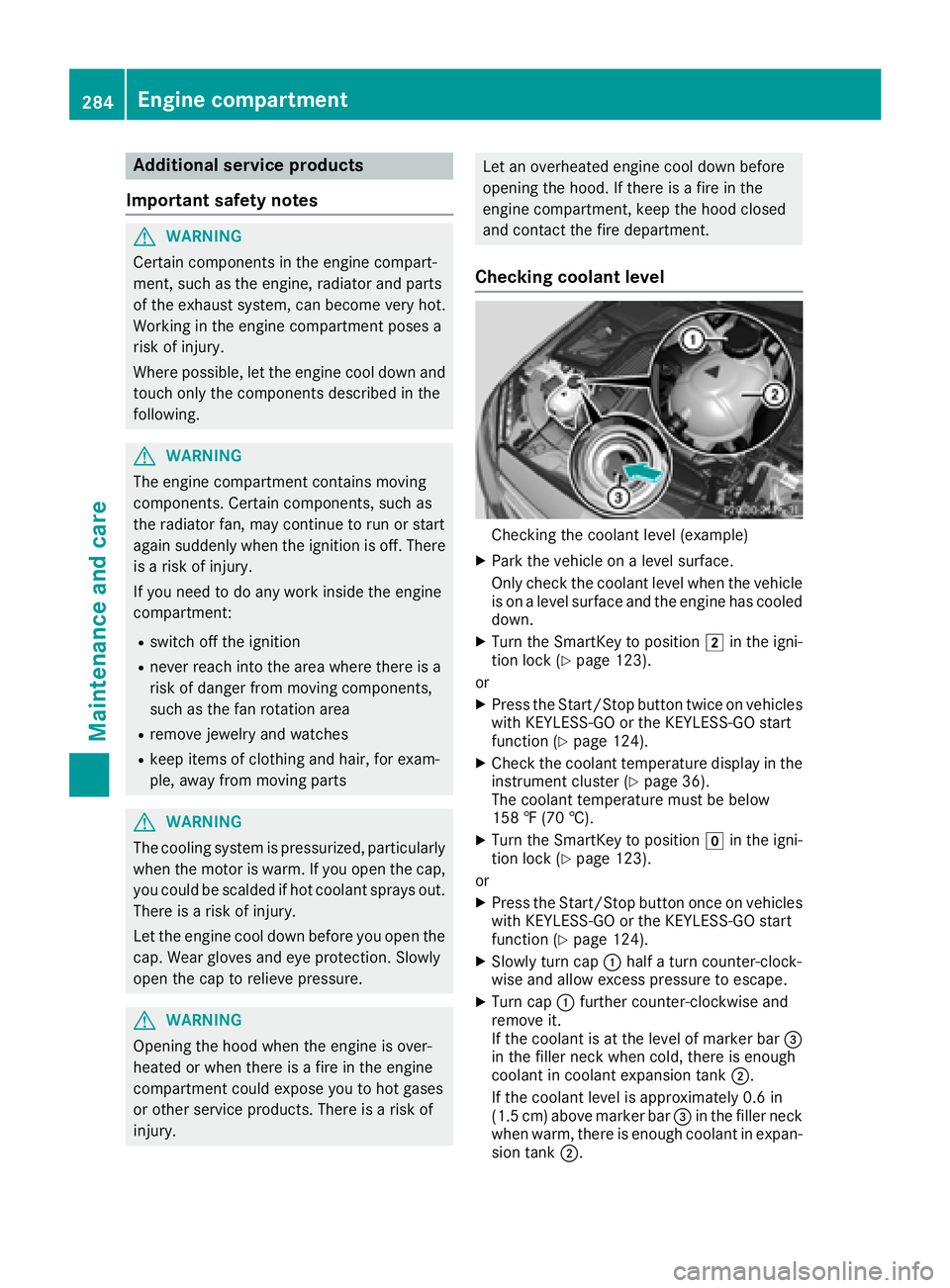
Checking coolant level
Checking th ecoolan tlevel (example)
XPark th evehicl eon alevel surface.
Only chec kth ecoolan tlevel when th evehicl e
is on alevel surfac eand th eengin ehas cooled
down .
XTurn th eSmartKey to position 2in th eigni-
tion loc k (Ypage 123).
or
XPress th eStart/Sto pbutto ntwice on vehicles
wit hKEYLESS-GO or th eKEYLESS-GO start
function (
Ypage 124).
XCheckth ecoolan ttemperature display in th e
instrumen tcluste r (Ypage 36).
The coolan ttemperature mus tbe belo w
15 8 ‡ (70 †).
XTurn th eSmartKey to position gin th eigni-
tion loc k (Ypage 123).
or
XPress th eStart/Sto pbutto nonce on vehicles
wit hKEYLESS-GO or th eKEYLESS-GO start
function (
Ypage 124).
XSlowly tur ncap :half atur ncounter-clock -
wise and allow excess pressur eto escape.
XTurn cap :further counter-clockwise and
remove it .
If th ecoolan tis at th elevel of marke rbar =
in th efiller neck when cold, there is enough
coolan tin coolan texpansion tan k;.
If th ecoolan tlevel is approximately 0. 6in
(1. 5cm) abov emarke rbar =in th efiller neck
when warm ,there is enough coolan tin expan -
sion tan k;.
284Engine compartment
Maintenance and care
Page 332 of 350
Uniform Tire Quality Grading Standards
A uniform standard to grade the quality of tires
with regards to tread quality, tire traction and
temperature characteristics. The quality grad-
ing assessment is made by the manufacturer
following specifications from the U.S. govern-
ment. The ratings are molded into the sidewall ofthe tire.
Recommended tire pressures
The recommended tire pressure applies to the
tires mounted at the factory.
The Tire and Loading Information placard con-
tains the recommended tire pressures for cold
tires on a fully loaded vehicle and for the maxi-
mum permissible vehicle speed.
The tire pressure table contains the recommen-
ded pressures for cold tires for various operat-
ing conditions, i.e. differing load and speed con-
ditions.
Increased vehicle weight due to optional
equipment
The combined weight of all standard and
optional equipment available for the vehicle,
regardless of whether it is actually installed on
the vehicle or not.
Rim
This is the part of the wheel on which the tire is
mounted.
GAWR (Gross Axle Weight Rating)
The GAWR is the maximum gross axle weight
rating. The actual load on an axle must never
exceed the gross axle weight rating. The gross
axle weight rating can be found on the vehicle
identification plate on the B-pillar on the driver's
side.
Speed rating
The speed rating is part of the tire identification.
It specifies the speed range for which the tire is
approved.
GVW (Gross Vehicle Weight)
The gross vehicle weight includes the weight of
the vehicle including fuel, tools, the spare wheel,
accessories installed, occupants, luggage and
the drawbar noseweight, if applicable. The gross
vehicle weight must not exceed the gross vehi-
cle weight rating GVWR as specified on the vehi-
cle identification plate on the B-pillar on the
driver's side.
GVWR (Gross Vehicle Weight Rating)
The GVWR is the maximum permissible gross
weight of a fully loaded vehicle (the weight of the
vehicle including all accessories, occupants,
fuel, luggage and the drawbar n
oseweight, if
applicable). The gross vehicle weight rating is
specified on the vehicle identification plate on
the B-pillar on the driver's side.
Maximum loaded vehicle weight
The maximum weight is the sum of:
Rthe curb weight of the vehicle
Rthe weight of the accessories
Rthe load limit
Rthe weight of the factory installed optional
equipment
Kilopascal (kPa)
Metric unit for tire pressure. 6.9 kPa corre-
sponds to 1 psi. Another unit for tire pressure is
bar. 100 kilopascals (kPa) are the equivalent of
1 bar.
Load index
In addition to the load-bearing index, the load
index may also be imprinted on the sidewall of
the tire. This specifies the load-bearing capacity
more precisely.
Curb weight
The weight of a vehicle with standard equipment
including the maximum capacity of fuel, oil and
coolant. It also includes the air-conditioning sys-
tem and optional equipment if these are instal-
led in the vehicle, but does not include passen-
gers or luggage.
Maximum load rating
The maximum tire load is the maximum permis-
sible weight in kilograms or lbs for which a tire is
approved.
Maximum permissible tire pressure
Maximum permissible tire pressure for one tire.
Maximum load on one tire
Maximum load on one tire. This is calculated by dividing the maximum axle load of one axle by
two.
330All about wheels and tires
Wheels and tires