isofix MERCEDES-BENZ C-CLASS CABRIOLET 2018 User Guide
[x] Cancel search | Manufacturer: MERCEDES-BENZ, Model Year: 2018, Model line: C-CLASS CABRIOLET, Model: MERCEDES-BENZ C-CLASS CABRIOLET 2018Pages: 589, PDF Size: 10.55 MB
Page 65 of 589
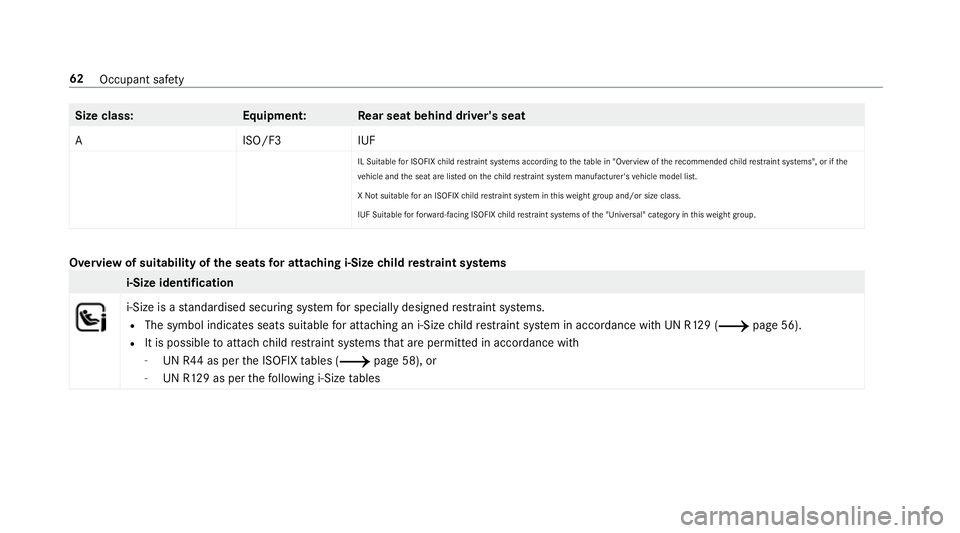
Size class:
Equipment:R ear seat behind driver's seat
AI SO/F3IUF
IL Suitable for ISOFIX child restra int sy stems according totheta ble in "Overview of there commended child restrai nt sy stems", or if the
ve hicle and the seat are lis ted on thech ild restrai nt sy stem manufacturer's vehicle model list.
X Not suitable for an ISOFIX child restra int sy stem in this we ight group and/or size class.
IUF Suitable forfo rw ard-facing ISOFIX child restra int sy stems of the "Universal" category in this we ight group. Overview of suitability of
the seats for attaching i‑Size child restra int sy stems i-Size identification
i‑Size is a
standardised securing sy stem for specially designed restra int sy stems.
R The symbol indicates seats suitable for attaching an i‑Size child restra int sy stem in accordance with UN R129 (0013 page 56).
R It is possible toattach child restra int sy stems that are permit ted in accordance with
- UN R44 as per the ISOFIX tables (0013 page 58), or
- UN R129 as per thefo llowing i‑Size tables 62
Occupant saf ety
Page 66 of 589

Fr
ont passenger seat Left/rightrear seat
i-Size child restra int sy stem
(ISO/R2, ISO/F2X, ISO/B2,
ISO/B3) Xi
‑U
X Not suitable for an i-Size child restra int sy stem in the "Universal" categor y.i-U Suitable forfo rw ard-facing and rear wa rd-facing i-Size child restrai nt sy stems
in the "Universal" categor y. Fi
tting the ISOFIX or i‑Size child restra int
sy stem on there ar seat 000A
WARNING Risk of inju ryifth ere ar
ben chseat/rear seat and seat backrest
are not engaged
If th ere ar ben chseat/rear seat and seat
backrest are not engaged they could fold for‐
wa rds, e.g. when braking suddenly or in the
ev ent of an accident.
R Ifth is is the case, theve hicle occupant
wo uld be forc ed into the seat belt bythe
re ar ben chseat/rear seat or bythe seat
backrest. The seat belt cann otprotect as intended and could
result in additional
injur y.
R Objects or loads in the boot/load com‐
partment cann otbe restra ined bythe
seat backrest. 0007
Make sure that the seat backrest and
th ere ar ben chseat/rear seat are
engaged before everytrip. If
th ere ar seat backrest is not engaged and
loc ked, there d lock verification indicator will be
visible. 000A
WARNING Risk of inju ryor death if the
permissible gross mass of thech ild and
ch ild restra int sy stem toget her is excee‐
ded
Fo r ISOFIX or i‑Size child restra int sy stems in
which thech ild is secured using the seat belt
integrated in thech ild restra int sy stem, the
permissible gross mass of thech ild and child
re stra int sy stem is 33 kg.
If th ech ild and thech ild restra int sy stem
to ge ther we igh more than 33 kg,th e ISOFIX
or i‑Size child restra int sy stem with integra‐
te d seat belt does not of fer suf ficient pr otec‐
tion. Too much load may be placed on the Occupant saf
ety63
Page 67 of 589

ISOFIX or i‑Size
child restra int sy stems and
th ech ild may not be restra ined cor rectly in
th eev ent of an accident, forex ample. 0007
Ifth ech ild and thech ild restra int sys‐
te m toget her weigh more than 33 kg,
only use an ISOFIX or i‑Size child
re stra int sy stem with which thech ild is
secured with theve hicle seat belt. 0007
Also secure thech ild restra int sy stem
with theTo pTe ther belt, if available. Alw
ays comply with the information about the
mass of thech ild restra int sy stem:
R inthe manufacturer's ins tallation and operat‐
ing instructions forth ech ild restra int sy stem
used
R on a label on thech ild restra int sy stem, if
present
Re gular lych eck that the permissible gross mass
of thech ild and child restra int sy stem is still
complied with. When
fitting a child restra int sy stem, obser ve
th efo llowing:
0073 Alw
ays obser vethe cor rect use and the suit‐
ability of the seats for attaching a child
re stra int sy stem.
ISOFIX child seat securing sy stem
(0013 page 58)
i‑Size child seat securing sy stem
(0013 page 62)
0073 Alw
ays comply with the manufacturer's
ins tallation and operating instructions for
th ech ild restra int sy stem used.
0073 Make sure
that thech ild's feet do not touch
th e front seat. If necessar y,mo vethe front
seat forw ard slightl y. When
fitting an ISOFIX child restra int sys‐
te m, obser vethefo llowing:
0073 When using a Group 0/0+ baby car seat
or a Group I rear wa rd-facing child
re stra int sy stem on a rear seat: adjust th
e front seat so that the seat does not
to uch thech ild restra int sy stem.
0073 When using a Group I
forw ard-facing
ch ild restra int sy stem: remo vethe head
re stra int from there spective seat, if possi‐
ble. In addition, the seat backrest of the
ch ild restra int sy stem must, as far as possi‐
ble, lie flat against the backrest of theve hi‐
cle seat.
When youre mo vethech ild restra int sys‐
te m, ins tallth e head restra int again immedi‐
ately and adjust all the head restra ints cor‐
re ctly.
0073 Fo
r cer tain child restra int sy stems in weight
group 2 or 3, there may be restrictions in
th e maximum size setting, e.g. due topossi‐
ble con tact wi th thero of.
0073 The
child restra int sy stem must not be put
under stra in between thero of and the seat
cushion and/or be fitted facing the wrong
direction. Where possible, adjust the seat
cushion inclination accordingly. 64
Occupant saf ety
Page 68 of 589

0073
The
child restra int sy stem must not be put
under stra in by the head restra ints. Adjust
th e head restra ints according ly. When
fitting an i‑Size child restra int sys‐
te m, obser vethefo llowing:
0073 When using a
rear wa rd-facing child
re stra int sy stem: adjust the front seat so
th at it does not touch thech ild restra int sys‐
te m.
0073 When using a
forw ard-facing child
re stra int sy stem: remo vethe head
re stra int from there spective seat, if possi‐
ble. In addition, the seat backrest of the
ch ild restra int sy stem must, as far as possi‐
ble, lie flat against the backrest of theve hi‐
cle seat.
When youre mo vethech ild restra int sys‐
te m, ins tallth e head restra int again immedi‐
ately and adjust all the head restra ints cor‐
re ctly. 1
ISOFIX mounting brac ket
2 i‑Size mounting brac ket
Before every trip, make sure that the ISOFIX
ch ild restra int sy stem or the i‑Size child restra int
sy stem is engaged cor rectly in bo thmounting
brac kets in theve hicle. 0007
Attach the ISOFIX or i‑Size child restra int sys‐
te m to both mounting brac kets in theve hicle. Securing
TopTe ther 000A
WARNING Risk of inju ryor death if the
re ar seat backrests are not loc ked af ter
fi tting TopTe ther belts
If th ere ar seat backrests are not loc ked, they
could fold forw ards in theeve nt of an acci‐
dent, heavy braking or sudden changes of
direction.
As a result, child restra int sy stems cann ot
per form their intended pr otective function.
Re ar seat backrests that are not loc ked can
also cause additional injuries, e.g. in the
ev ent of an accident. 0007
Alw ays lock rear seat backrests af ter
fi tting TopTe ther belts. 0007
Obser vethe lock verification indicator. If
th ere ar seat backrest is not engaged and
loc ked in place, there d lock verification indica‐
to r will be visible. If
th ech ild restra int sy stem is equipped
with a TopTe ther belt: Occupant saf
ety65
Page 69 of 589

The
risk of injury can be reduced byTo p
Te ther. The TopTe ther belt facilitates an
additional connection between thech ild
re stra int sy stem attached with ISOFIX or
i‑Size and theve hicle. 0007
Fitthe ISOFIX or i‑Size child restra int sy stem
with TopTe ther on there ar seat. Alw ays com‐
ply with thech ild restra int sy stem manufac‐
turer's ins tallation instructions when doing
so. 0007
Foldthere ar seat backrest forw ards. 0007
Attach TopTe ther hook 2toTopTe ther
anchorage 1. 0007
Foldthere ar seat backrest bac k. 0007
Make sure that TopTe ther belt 3is not
twis ted and there ar seat backrest is loc ked. 0007
Secure thech ild restra int sy stem with ISOFIX
or i‑Size. 0007
Tension TopTe ther belt 3from the boot. 0007
Make sure that there is suf ficient seat belt
st ra pto pull tight. 0007
Alw ays comply with thech ild restra int sys‐
te m manufacturer's ins tallation instructions
when doing so. Securing
thech ild restra int sy stem with the seat belt 66
Occupant saf ety
Page 550 of 589
Calls with se
veral participants ............ .334
Declining ............................................. 334
Ending a call ........................................ 334
Incoming call during an existing call .... 335
Making ................................................ 334
Vi ath eove rhead control panel
(Mercedes me connect) ......................3 46
Camera see 360° Camera
see Reversing camera
Car key
see Key
Car wash
see Care
Car wash (care) ....................................... 396
Care ..........................................................4 05
Air-water duct ...................................... 395
Car wash ............................................. 396
Carpet .................................................4 05
Decorative foil .................................... .399
Displ ay................................................ 405
Draught stop ....................................... 402
Exterior lighting ................................... 403
Fo lding draught stop ........................... 403 High-pressure cleaner .........................3
97
Matt finish ........................................... 398
Pa int wo rk ............................................ 398
Plastic trim .......................................... 405
Re alwo od/trim elements ...................4 05
Re versing camera ................................ 403
Ro of lining ...........................................4 05
Seat belt .............................................. 405
Seat co ver ........................................... 405
Sensors ............................................... 403
Soft top ...............................................4 01
Ta ilpipes .............................................. 403
Tr ailer hit ch......................................... 403
Wa shing byhand ................................. 397
Wheels/rims ....................................... 403
Wi nd de flector .....................................4 01
Wi ndo ws .............................................. 403
Wi per blades .......................................4 03
Carpet (Care) .......................................... .405
Changing gears ........................................ 16 4
Manually ..............................................1 64
Changing hub caps .................................446 Changing
the lights
Driving abroad (symm etrical dipped
beam) .................................................. 127
Cha rging
Bat tery (vehicle) .................................. 420
Chassis Damping characteristics ...................... 213
DY NA MIC BODY CONTROL .................. 213
Child saf ety lock
Ac tivating/deactivating (multimedia
sy stem) ............................................... 293
Child seat Appr oval categories .............................. .56
At tach ing (no tes) ................................... 55
Basic instructions ..................................48
Fr ont passenger seat (no tes) ................. 71
Fr ont passenger seat (without auto‐
matic airbag shutoff) ............................. 71
ISOFIX/i-Size (fitting) ............................ 63
No tes on risks and dangers ...................49
Re commended child restra int sys‐
te ms ...................................................... 52
Seats suita blefor belt-secu redch ild
re stra int sy stems ................................... 67 Index
547
Page 551 of 589
Seats suitable
for i‑Size child
re stra int sy stems ................................... 62
Seats suitable for ISOFIX child
re stra int sy stems ................................... 58
Securing on the front passenger seat ....72
Secu ring on there ar seat ...................... 69
To pTe ther ..............................................65
Child ren
Av oiding dangers in theve hicle .............49
Basic instructions .................................. 48
Cho ck....................................................... 444
St orage location ..................................4 44
Chock see Chock
CI+ module .............................................. 384
Calling up a menu ................................ 384
CI+ module (TV) Inserting a Smart Card ........................ 384
Cigar ette lighter
Fr ont centre console ........................... 12 3
City lighting ............................................ .132
Cleaning see Care Climate control
........................................ 14 3
Ac tivating/deactivating the A/C
function (cont rol panel) ...................... .143
Ac tivating/deactivating the synchro‐
nisation function (cont rol panel) .......... 14 4
Air di stribution settings .......................1 44
Air-reci rculation mode ........................ .144
Au tomatic control ................................ 14 4
Defrosting the windscreen ...................1 43
Demisting wind ows............................. 14 4
Fr ont air vents ..................................... 14 5
Ionisation ............................................. 14 5
No te .................................................... 14 3
Re ar air vents ...................................... 14 5
Sets the air flow ................................... 14 3
Setting the air distribution ...................1 43
Setting thete mp erature ......................1 43
Switching on/off ................................. 14 3
Switching there ar wind owheater
on/off .................................................1 43
THERMATIC control panel .................... 14 3
Ve ntilating theve hicle (con venience
opening) ................................................ 87
Cockpit ........................................................ .6
Overview .................................................6 Cof
fee cup symbol
see ATTENTION ASSIST
Collapsible spare wheel .......................... 452
No tes .................................................. 452
COMAND Online see Multimedia sy stem
COMAND Touch
Managing devices ................................ 292
Combination switch ................................12 9
Compass .................................................. 326
Compu ter
see On-board computer
Connection status
Displ aying ............................................ 355
Overview ............................................ .355
Connectivity Switching transmission of theve hicle
position on/off .................................... 289
Contacts ................................................... 335
Calling up ............................................ 336
Deleting ............................................... 337
Downloading (from mobile phone) ...... 336
Importing ............................................. 337 548
Index
Page 564 of 589
Switching Blu
etoo th®
profile (DUN/
PA N) .................................................... 354
Internet radio
Calling up ............................................ 358
Deleting stations ................................ .359
Logging out ......................................... 360
Overview ............................................. 359
Re gis tering .......................................... 360
Saving stations .................................... 359
Selecting and connecting toast ation
............................................................ .359
Selecting stre am ................................ .360
Setting options ................................... .360
Te rm s of use ........................................3 60
Ionisation Activating/deactivating (multimedia
sy stem) ................................................ 14 5
iPhone ®
see Apple CarPlay™
see Mercedes-Benz Link
ISOFIX child seat securing sy stem
Fitting .................................................... 63
Seats suitable for attaching ................... 58 J
Jack Declaration of conformity ...................... 25
Storage location ..................................4 44
Jump-start connection ............................420
Gene ral no tes ...................................... 41 8 K
Ke y.............................................................. 74
Ac oustic locking verification signal ........ 75
Battery ................................................... 76
Emergency key ...................................... .76
Energy consumption .............................. 75
Fe atures ................................................ 74
Ke yring attachment .............................. 76
Overview ................................................ 74
Pa nic alarm ............................................ 75
Problem .................................................77
Un locking setting .................................. .75
Ke y functions
Deactivating .......................................... 75
KEYLESS-GO Locking theve hicle ................................ 80
Problem .................................................81 Un
locking setting .................................. .75
Un locking theve hicle ............................80
Kickd own.................................................1 65
Using ................................................... 16 5
Knee airbag ................................................ 39 L
Lamp see In terior lighting
Lamps (instrument display) see Warning/indicator lamps
Lane de tection (au tomatic)
see Active Lane Keeping Assist
Lane Keeping Assist
see Active Lane Keeping Assist
Language .................................................2 93
No tes .................................................. 293
Setting .................................................2 93
LED light see Intelligent Light Sy stem
Le vel control sy stem
see AIRMATIC Index
561