service MERCEDES-BENZ C-CLASS CABRIOLET 2018 User Guide
[x] Cancel search | Manufacturer: MERCEDES-BENZ, Model Year: 2018, Model line: C-CLASS CABRIOLET, Model: MERCEDES-BENZ C-CLASS CABRIOLET 2018Pages: 589, PDF Size: 10.55 MB
Page 33 of 589

Depending on
the selected equipment, you can
import data into theve hicle's comfort and info‐
ta inment functions yourself.
This includes, forex ample:
R multimedia data such as music, films or pho‐
to sfo r playback in an integrated multimedia
sy stem
R address book data for use in connection with
an integrated hands-free sy stem or an inte‐
grated navigation sy stem
R entered navigation destinations
R data about the use of Internet services
This data can be sa ved locally in theve hicle or it
is located on a device which you ha veconnected
to theve hicle (e.g. smartphone, USB flash drive
or MP3 pla yer). If this data is stored in theve hi‐
cle, you can dele teit at any time. This data is
sent tothird parties only at your requ est, partic‐
ular lywhen you use online services in accord‐
ance with the settings that you ha veselected.
Yo u can store or change con venience settings/
individualisations in theve hicle at any time. Depending on
the equipment, this includes, for
ex ample:
R settings forth e seat and steering wheel posi‐
tions
R suspension and climate control settings
R customisations such as interior lighting
If yo ur vehicle is accordingly equipped, you can
connect your smartphone or ano ther mobile end
device totheve hicle. You can cont rolth is by
means of the control elements integrated in the
ve hicle. Images and audio from the smartphone
can be output via the multimedia sy stem. Cer‐
ta in information is simultaneously transfer redto
yo ur smartphone.
Depending on the type of integration, this can
include:
R general vehicle data
R position data
This allo wsyouto use selected apps on your
smartphone, such as navigation or music play‐
bac k.There is no fur ther interaction between the
smartphone and theve hicle; in particular, vehi‐
cle data is not directly accessible. Which type of fur
ther data processing occurs is de term ined by
th e pr ovider of the specific app used. Which set‐
tings you can make, if an y,depends on the spe‐
cific app and the operating sy stem of your
smartphone. Online services
Wire
less network connection
If yo ur vehicle has a wireless network connec‐
tion, it enables data tobe exc hanged between
yo ur vehicle and additional sy stems. The wire‐
less network connection is enabled via theve hi‐
cle's transmission and reception unit or via con‐
nected mobile end devices (e.g. sma rtphones).
Online functions can be used via the wireless
network connection. This includes online serv‐
ices and applications/apps pr ovided bythe man‐
ufacturer or other pr oviders.
Manu factu rer's se rvices
Re garding online services of the manufacturer,
th e individual functions are described bythe
manufacturer in a suita ble place (e.g. Owner's
Manual, website of the manufacturer) along with
th ere leva nt da taprotection information. Per‐ 30
General no tes
Page 34 of 589

sonal data may be used
forth e pr ovision of
online services. Data is exch anged via a secure
connection, e.g. the manufacturer's designated
IT sy stems. Personal data is collected, pro‐
cessed and used via the pr ovision of services
exc lusively on the basis of legal permissions or
with prior consent.
The services and functions (sometimes subject
to afe e) can usually be activated or deactivated.
In some cases, this also applies tothe entire
ve hicle's data connection. This excludes, in par‐
ticular, legally prescribed functions and services.
Third pa rty services
If it is possible touse online services from other
pr ov iders, these services are subject tothe data
pr otection and term s of use of there sponsible
pr ov ider. The manufacturer has no influence on
th e conte ntexc hanged.
Please enquire, therefore, about the type, scope
and purpose of the collection and use of per‐
sonal data as part of third party services from
th eir respective pr ovider. Copyright
Information on free and open-source software
licences foryo ur vehicle's software can be found
on the data storage medium in your vehicle
document wallet and on the Internet toge ther
with updates at:
http://www.mercedes-benz.com/opensource General no
tes31
Page 52 of 589

To
impr oveprotection forch ildren younger than
12 years old or under 1.50 m in height,
Mercedes-Benz recommends you obse rvethe
fo llowing information:
R Alw ays secure thech ild in a child restra int
sy stem suitable forth is Mercedes-Benz vehi‐
cle.
R The child restra int sy stem must be appropri‐
ate tothe age, weight and size of thech ild.
R The vehicle seat must be suitable forfitting a
ch ild restra int sy stem (0013 page 55).
Ac cident statistics show that children secured
on there ar seats are generally sa ferth an chil‐
dren secured on the front seats. Forth is reason,
Mercedes-Benz stro ng lyadvises that youfit a
ch ild restra int sy stem toare ar seat.
Generic term"child restra int sy stem"
The generic term child restra int sy stem is used
in this Owner's Manual. A child restra int sy stem
is, forex ample:
R a baby car seat
R are ar wa rd-facing child seat R
afo rw ard-facing child seat
R ach ild boos ter seat with a backrest and seat
belt guide
Mercedes-Benz recommends using a child
boos ter seat with a backrest.
The child restra int sy stem must be appropriate
to the age, weight and size of thech ild.
Observing la wsand legal requ irements
Alw ays obser vethe legal requirements when
using a child restra int sy stem in theve hicle.
Make sure that thech ild restra int sy stem is
appr oved in accordance with theva lid test speci‐
fi cations and guidelines. Further information can
be obtained at a qualified specialist workshop.
Mercedes-Benz recommends that you use a
Mercedes-Benz Service Centre forth is purpose.
Only use appr oved child restra int sy stems
Only child restra int sy stems that meet thefo l‐
lowing UNECE standards are permit tedfo r use in
th eve hicle:
R UN-R44
R UN-R129 (i-Size child restra int sy stems) Information on
child restra int sy stem appr oval
categories and de tails on the appr oval label on
th ech ild restra int sy stem (0013 page 56). De
tecting risks, avoiding danger Securing sy
stems forch ild restra int sy stems
in theve hicle
Only use thefo llowing securing sy stems forch ild
re stra int sy stems:
R the ISOFIX or i-Size mounting brac kets
R theve hicle's seat belt sy stem
R theTo pTe ther anchorages
Fitting an ISOFIX or an i-Size child restra int sys‐
te m is prefer red.
Simply attaching tothe securing rings on the
ve hicle can reduce therisk of fitting thech ild
re stra int sy stem incor rectly.
When secu ring a child with the integrated seat
belt of the ISOFIX or i-Size child restra int sys‐
te m, alw ays comply with the permissible gross
we ight forth ech ild and child restra int sy stem
(0013 page 63). Occupant saf
ety49
Page 55 of 589

Obser
vewhen stopping or parking 000A
WARNING Risk of accident and inju ry
due tochildren left unat tended in the
ve hicle
If yo u lea vechildren unat tended in theve hi‐
cle, they may be able toset theve hicle in
motion, forex ample by:
R releasing the parking brake.
R shifting the automatic transmission out of
park position 005Dor shifting manual trans‐
mission into idle position. R
starting the engine.
In addition, they may operate vehicle equip‐
ment and become trapped. 0007
Never lea vechildren and animals unat‐
te nded in theve hicle. 0007
When leaving theve hicle, alw aysta ke
th eke y with you and lock theve hicle.
This also applies tothe digital vehicle
ke y if the "Digital Vehicle Key" function
is activated via Mercedes me connect. 000A
WARNING Risk offata l injury due to
ex posure toextreme heat or cold in the
ve hicle
If people –particularly children – are exposed
to extreme temp eratures over an extended
pe riod of time, there is a risk of serious or
ev en fata l injury! 0007
Never lea veanyone – pa rticularly chil‐
dren – unat tended in theve hicle. 0007
Never lea veanimals in theve hicle unat‐
te nded. Overvi
ewofrecommended child restra int sy stems Fu
rther information on the cor rect child restra int sy stem can be obtained at a qualified specialist workshop. Mercedes-Benz recommends that you use
a Mercedes-Benz Service Centre forth is purpose. 52
Occupant saf ety
Page 83 of 589
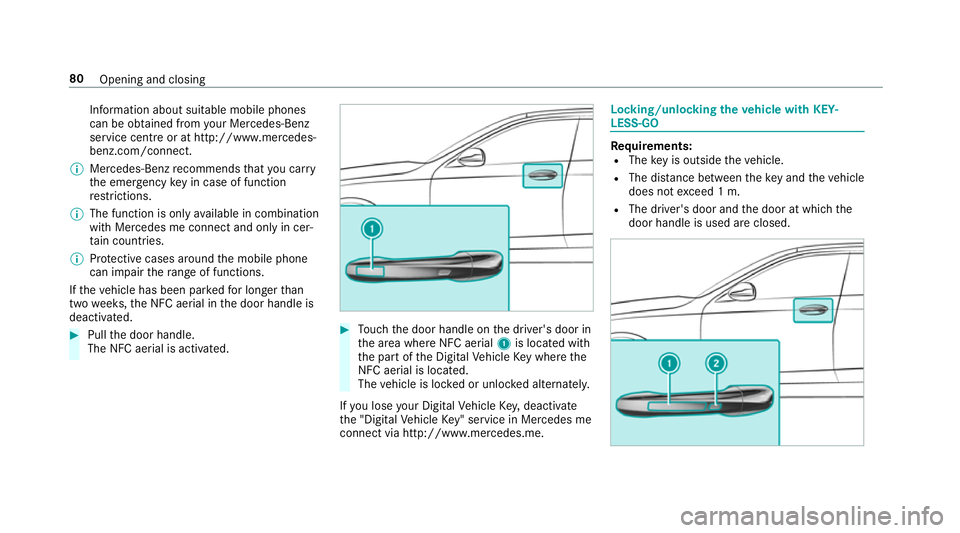
Information about suitable mobile phones
can be obtained from your Mercedes-Benz
service centre or at http://www.mercedes-
benz.com/connect.
0009 Mercedes-Benz recommends that you car ry
th e emer gency key in case of function
re strictions.
0009 The function is only available in combination
with Mercedes me connect and on lyin cer‐
ta in countries.
0009 Protective cases around the mobile phone
can impair thera nge of functions.
If th eve hicle has been par kedfo r longer than
two weeks, the NFC aerial in the door handle is
deactivated. 0007
Pull the door handle.
The NFC aerial is activated. 0007
Touch the door handle on the driver's door in
th e area where NFC aerial 1is located with
th e part of the Digital Vehicle Key where the
NFC aerial is located.
The vehicle is loc ked or unloc ked alternately.
If yo u lose your Digital Vehicle Key,deactivate
th e "Digital Vehicle Key" service in Mercedes me
connect via http://www.mercedes.m e. Locking/unlocking
theve hicle with KEY‐
LESS-GO Re
quirements:
R The key is outside theve hicle.
R The dis tance between theke y and theve hicle
does not exceed 1 m.
R The driver's door and the door at which the
door handle is used are closed. 80
Opening and closing
Page 146 of 589

Overview of climate control sy
stems Note
s on climate control An interior air
filter must alw ays be used so that
th e air conditioning sy stem, pollution le vel moni‐
to ring and the air filtering function workcor‐
re ctly. Ma kesure that thefilter is ins talled cor‐
re ctly and thefilter housing in the engine com‐
partment is closed cor rectly using the cap and
alw ays tightly sealed when in operation. Use fil‐
te rs recommended and appr ovedby Mercedes-
Benz. Alw ays ha veservice workcar ried out at a
qu alified specialist workshop. THERMATIC control panel
overview The indicator lamps on
the buttons indicate that
th e cor responding function is activated. 1
0082 Setsthe driver's side temp erature
2 008F Setsthe air distribution
3 002D Setsthe air flow or switch off climate
control
4 0058 Sets climate control toautomatic
mode (0013 page144)
5 0064 Defrosts the windscreen
6 008A Calls up the air conditioning menu
7 006C Switches there ar wind owheater
on/off
8 0015 Activates or deacti vates synchronisa‐
tion (0013 page144)
9 0072 Switches ai r-re circulation mode on/
off(0013 page 144) A
005A Switches the A/C function on/
off(0013 page143)
B 0082 Setsthe front passenger side temp era‐
ture Operating
the clima tecont rol sy stem Switching clima
tecont rol on/off 0007
Toswitch on: setthe air flow toleve l 1 or
higher using the002D button. 0007
Toswitch off: setthe air flow toleve l 0 using
th e002D button.
0009 If climate control is switched off, the win‐
do ws may mist up more quickl y.Switch off
climate control only brie fly. Switching
the A/C function on or off via the
cont rol panel The A/C function heats, cools and dehumidifies
th
eve hicle's interior air. 0007
Press button 005A. Climate control
14 3
Page 152 of 589

Yo
u can swit choff the engine while driving by
pressing button 1for about thre e seconds or
by pressing button 1thre e times within a sec‐
ond. Be sure toobser vethe saf ety no tes under
"Driving tips".
St arting theve hicle with a Digital Vehicle
Key
Re quirements:
R one of thefo llowing versions of the Digital
Ve hicle Key is available:
- suitable mobile phone
- Digital Vehicle Keyst icker
R theve hicle is equipped with the "Digital Vehi‐
cle Key" function.
R the "Digital Vehicle Key" function is activated
via Mercedes me connec t:http://
www.mercedes.me.
R the mobile phone is suf ficiently charge d.
0009 You can check the suitability of your mobile
phone byentering the phone number at
http://www.mercedes.me. Information about suitable mobile phones
can be obtained from
your Mercedes-Benz
service centre or at http://www.mercedes-
benz.com/connect.
0009 Mercedes-Benz recommends that you car ry
th e emer gency key in case of function
re strictions.
0009 The function is only available in combination
with Mercedes me connect and on lyin cer‐
ta in countries.
0009 Protective cases around the mobile phone
can impair thera nge of functions. Using the Digital
Vehicle Keyfo r the first
time 0007
Deactivate theke y2 (0013 page75). 0007
Place key2 in mar ked space 3onthe
symbol 4. 0007
Place the mobile phone or Digital Vehicle Key
st icke r in the mar ked space 1. Driving and parking
14 9
Page 153 of 589

0007
Dep ress the brake pedal and start theve hicle
using thest art/ stop button.
Any fur ther starts with th e DigitalVehicle
Key
The key is not needed for any fur ther starts. 0007
Place the mobile phone or Digital Vehicle Key
st icke r in the mar ked space 1. 0007
Depress the brake pedal and start theve hicle
using thest art/ stop button.
The "Digital Vehicle Key" service can be deacti‐
va ted in Mercedes me connect at http://
www.mercedes.me. The function is then deacti‐
va ted in the mobile phone via an online connec‐
tion. If connection tothe Internet is not possible,
e.g. af terth e mobile phone or the Digital Vehicle
Ke yst icke r has been stolen, theke y function can
be deacti vated at a Mercedes-Benz service
centre.
St arting theve hicle in emer gency operation
mode
If th eve hicle does not start and thePlace the
key in the marked space See Owner's Manual
message appears in the multifunction displa y,yo
u can start theve hicle in emer gency operation
mode. 0007
Makesure that mar ked space 2is em pty. 0007
Remo vekey1 from theke yring. 0007
Place key1 in mar ked space 2onthe
symbol 3.
The vehicle will start af ter a short time. If
yo ure mo vekey1 from mar ked space 2
th e engine continues running. For fur ther
engine starts ho wever,ke y1 must be loca‐
te d in mar ked space 2on symbol 3during
th e entire journe y. 0007
Have theke y1 checked at a qualified spe‐
cialist workshop.
If th eve hicle does not star t: 0007
place key1 in mar ked space 2and lea ve
it th ere. 0007
Vehicles with manual transmission:
depress the clutch pedal. 0007
Depress the brake pedal and start theve hicle
using thest art/ stop button.
0009 You can also swit chon the po wer supp lyor
th e ignition with thest art/ stop button. St
arting theve hicle via Remo teOnline serv‐
ices Cooling or heating
theve hicle interior before
commencing your journey
0009 This function is not available in all countries. 15 0
Driving and pa rking
Page 154 of 589

If
yo ustart theve hicle via your smartphone, the
pr ev iously selec ted air conditioning adjustment
is active.
Ensure thefo llowing before starting the engine:
R the legal stipulations in the area where your
ve hicle is par ked allow engine starting via
smartphone.
R it is safe tostart and runth e engine where
yo ur vehicle is par ked.
R the fuel tank is su fficiently filled.
R thest ar ter battery is suf ficiently charge d.
0009 You can also set thete mp erature with your
smartphone. In form ation on Mercedes me
connect and other services: http://
www.mercedes.me
This function is not available for all models.
Charging the bat tery before commencing
yo ur journey
R Ifth eve hicle battery is discharged, you
re cei vea message on your smartphone.
R You can then start theve hicle with the
smartphone tocharge the batter y. R
The vehicle is automatically switched off
af te rte n minu tes.
Ensure thefo llowing before starting the engine:
R the legal stipulations in the area where your
ve hicle is par ked allow engine starting via
smartphone.
R it is safe tostart and runth e engine where
yo ur vehicle is par ked.
R the fuel tank is su fficiently filled.
St arting theve hicle 000A
WARNING Risk of crushing or entrap‐
ment due tounin tentional starting of the
engine
Limbs could be crushed or trapped if the
engine is star ted unintentionally during
service or maintenance work. 0007
Alw ays secure the engine against unin‐
te ntional starting before car rying out
maintenance or repair work. Re
quirements:
R park position 005Dis selected. R
the anti- theft alarm sy stem is not activated.
R the panic alarm is not activated.
R the hazard warning lights are switched off.
R the bonn etis closed.
R the doors are closed and loc ked.
R the windo wsand soft top are closed. 0007
Start theve hicle using the smartphone:
R afte reve ryvehicle start, the engine runs for
te n minu tes.
R you can car ryout a maximum of two consec‐
utive starting attem pts. The vehicle must be
st ar ted once with theke y before trying to
st art theve hicle again with the smartphone.
R you can stop theve hicle again at any time.
R further information can be found in the
smartphone app.
Securing the engine against starting before
car rying out maintenance or repair work: 0007
switch on the hazard warning lights.
or 0007
unlock the doors. Driving and parking
151
Page 174 of 589

0007
Turn the fuel filler cap anti-clockwise and
re mo veit. 0007
Insert the fuel filler cap into brac ket2. 0007
Comp lete ly inse rtthe pump nozzle into the
ta nk filler nec k,hook in place and refuel. 0007
Only fill th e fuel tank until the pump nozzle
switches off.
0009 Vehicles with a diesel engine: theta nk
fi ller neck is designed forre fuelling at diesel
fi lling pumps.
0009 Vehicles with a diesel engine: whenthe
fuel tank is compl etely em pty, top up with at
least 5 litres of diesel.
0009 Vehicles with a diesel engine: use afiller
neck with a lar gediame terfo rve hicles with
a diesel engine when topping up fuel from a
fuel can. Otherwise, thefiller neck cannot
slide into theta nk. 0007
Replace the cap on thefiller neck and turn
clockwise until it engages audibl y.0007
Close the fuel filler flap. Ad
Blue ®
(vehicles with a diesel engine on ly) Note
s onrefilling AdBlue ®
000E NOTEWhen you open theAd Blue ®
tank,
small amounts of ammonia vapour may
escape. 0007
Only fill th eAd Blue ®
tank in well-venti‐
lated areas. 0007
Do not let AdBlue ®
come into contact
wi th skin, eyes or clo thes. 0007
Keep AdBlue ®
aw ay from children. 000E
NOTEDo not ingest AdBlue ®
. If
Ad Blue ®
is swallo wed: 0007
Immediately rinse out your mouth thor‐
oughl y. 0007
Drink plenty of water. 0007
Seek medical attention immediately. Obser
vethe no tes on operating fluids
(0013 page 458). Ad
Blue ®
is a wate r-soluble fluid forth e NOx
ex haust gas af tertre atment of diesel engines. In
order forth eex haust gas af tertre atment tofunc‐
tion proper ly, only use AdBlue ®
in acco rdance
with ISO 22 241.
Ad Blue ®
is ch aracterised bythefo llowing:
R non-t oxic
R colourless and odourless
R non-flammable
Ad Blue ®
is available here:
R AdBlue ®
may be topped up byfast service at
a qu alified specialist workshop, e.g. a
Mercedes-Benz Service Centre.
R AdBlue ®
is available at many filling stations
from AdBlue ®
filling pumps.
R Alternativel y,Ad Blue ®
is available at qualified
specialist workshops, e.g. Mercedes-Benz
Service Centres, and at many filling stations
in Ad Blue ®
re fill canis ters or AdBlue ®
re fill
bottles. Driving and parking
171