stop start MERCEDES-BENZ C-CLASS CABRIOLET 2018 User Guide
[x] Cancel search | Manufacturer: MERCEDES-BENZ, Model Year: 2018, Model line: C-CLASS CABRIOLET, Model: MERCEDES-BENZ C-CLASS CABRIOLET 2018Pages: 589, PDF Size: 10.55 MB
Page 176 of 589

Preparing
theAd Blue ®
re fill canis ter 0007
Screw onthefast ener of AdBlue ®
re fill canis‐
te r2. 0007
Screw disposable hose 1onto the opening
of Ad Blue ®
re fill canis ter2 until hand-tight. To
pping up AdBlue ® 0007
Screw disposable hose 1onto thefiller
neck of theve hicle until hand-tight. 0007
Lift up and tip AdBlue ®
re fill canis ter2.
The filling process stops when theAd Blue ®
ta nk is compl etely full.
Ad Blue ®
re fill canis ter2 can be remo ved
when it has been only partially em ptied. 0007
Unscr ew and close disposable hose 1and
Ad Blue ®
re fill canis ter2 inreve rse order. 0007
Replace theAd Blue ®
fuel filler cap and turn it
clockwise. 0007
Close the fuel filler flap. 0007
Swit chon the ignition for at least 60 sec‐
onds.
0009 Ifth eve hicle could not be star ted as the
Ad Blue ®
tan kwa s em pty, it can take up to
60 seconds forth ere fill to be de tected. 0007
Start theve hicle.
0009 Avoid storing AdBlue ®
re fill con tainers per‐
manently in theve hicle. Pa
rking Pa
rking theve hicle 000A
WARNING Risk of accident and inju ry
caused byan insuf ficiently secu redve hi‐
cle rolling away.
If th eve hicle is not securely par ked suf fi‐
ciently, it can rollaw ay in an uncont rolled
wa yev en at a slight downhill gradient. 0007
Ensure that the par kedve hicle is alw ays
properly secured against rolling away as
fo llo ws: Driving and pa
rking 17 3
Page 215 of 589
Ac
tivating/deactivating the HOLD function 000A
WARNING Risk of an accident due tothe
HOLD function being activated when you
lea vetheve hicle
If yo u lea vetheve hicle while only the HOLD
function is braking theve hicle, theve hicle
can rollaw ay inthefo llowing situations:
R Ifth ere is a malfunction in the sy stem or
in the po wer supp ly.
R Ifth e HOLD function is deactivated by
depressing the accelera tor pedal or brake
pedal, e.g. byave hicle occupant. 0007
Alw ays deactivate the HOLD function
and secure theve hicle against rolling
aw ay before leaving theve hicle. 000E
NO
TEDama gefrom auto matic braking If one of
thefo llowing functions is switched
on, theve hicle brakes automatically in cer‐
ta in situations:
R Active Brake Assi st
R Active Dis tance Assi stDISTRONIC
R HOLD function
R Active Parking Assist
To avo id damage totheve hicle, deactivate
th ese sy stems in thefo llowing or similar sit‐
uations: 0007
During towing 0007
In a car wash Re
quirements:
R The vehicle is stationar y.
R The driver's door is closed or the seat belt on
th e driver's side is fastened.
R The engine is running or has been au tomati‐
cally switched off bythe ECO start/ stop
function. R
The electric parking brake is released.
R Active Dis tance Assi stDISTRONIC is deacti‐
va ted.
R The transmission is in position 005B,005Eor005C.
Ac tivating the HOLD function 0007
Dep ress the brake pedal and af ter a short
time quickly depress fur ther until the00D9
display appears in the multifunction displa y. 0007
Release the brake pedal.
Deactivating the HOLD function 0007
Depress the accelerator pedal topull away.
or 0007
Depress the brake pedal until the00D9 dis‐
play disappears from the multifunction dis‐
pla y.
The HOLD function is deactivated in thefo llow‐
ing situations:
R Active Dis tance Assi stDISTRONIC is acti va‐
te d.
R The transmission is switched toposition 005D. 212
Driving and pa rking
Page 233 of 589
0009
You can stop theve hicle and change the
transmission position du ring the parking pro‐
cedure. The sy stem then calculates a new
ve hicle path. The parking procedure can
th en be continued. If no new vehicle path is
av ailable, the transmission position will be
ch anged again. If theve hicle has not yet
re ached the parking space, the parking pro‐
cedure will be cancelled, should a gear be
ch anged.
Exiting a pa rking space with Active Parking
Assist
Re quirements:
R The vehicle has been par ked with Active
Pa rking Assist.
Please no tethat you are responsible forth eve hi‐
cle and sur roundings during the entire parking
procedure. 0007
Start theve hicle. 0007
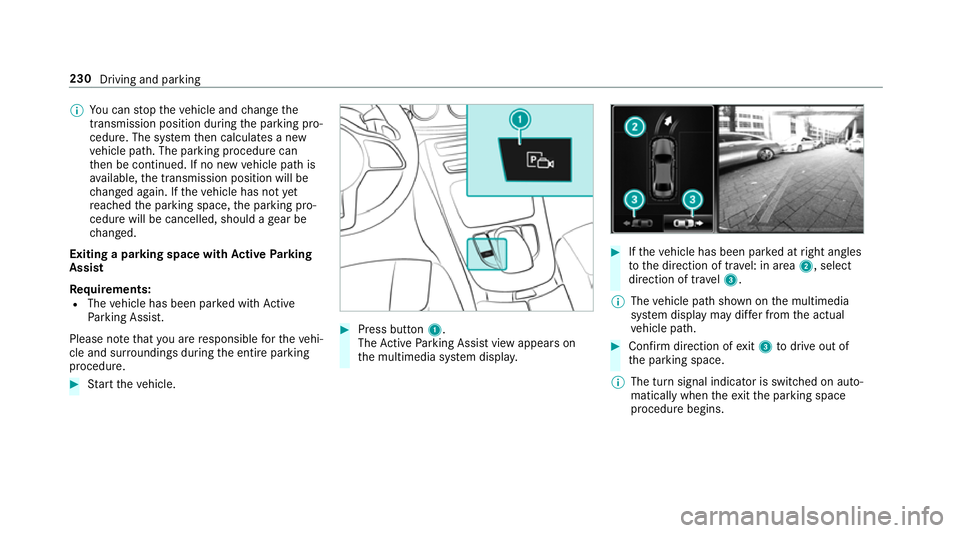
Press button 1.
The Active Parking Assist view appears on
th e multimedia sy stem displa y. 0007
Ifth eve hicle has been par ked at right angles
to the direction of tra vel: in area 2, select
direction of tra vel3.
0009 The vehicle path shown on the multimedia
sy stem display may dif fer from the actual
ve hicle path. 0007
Confirm direction of exit3 todrive out of
th e parking space.
0009 The turn signal indicator is switched on auto‐
matically when theex itth e parking space
procedure begins. 230
Driving and parking
Page 257 of 589
The
following display con tent can be selected in
th eClassic andSport designs:
R Rev counter
R Navigation
R ECO display
R Consu mption
R G-m eter
The following con tent can be selected in thePro-
gressive design:
R Date
R Navigation
R ECO display
R Consu mption
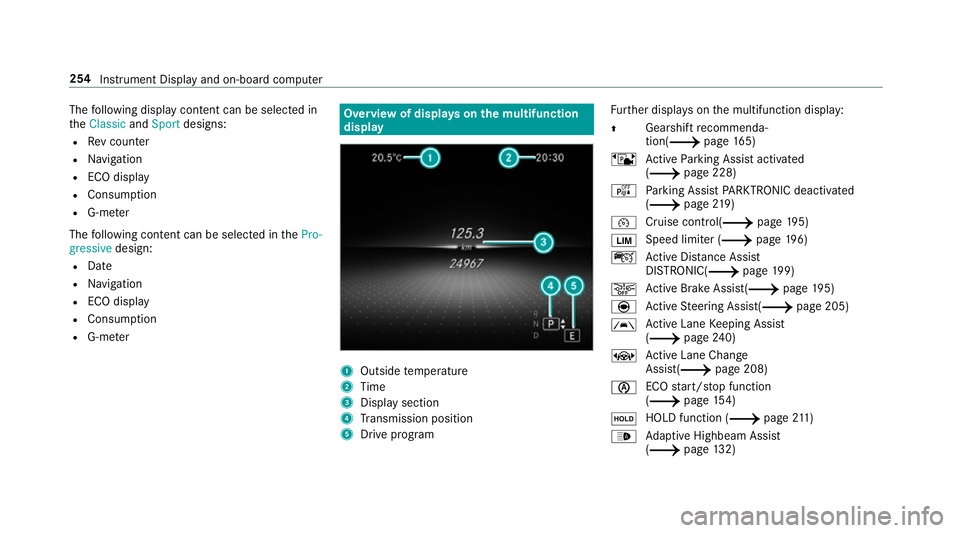
R G-m eter Overview of displa
yson the multifunction
display 1
Outside temp erature
2 Time
3 Display section
4 Transmission position
5 Drive prog ram Fu
rther displa yson the multifunction display:
0097 Gearshift
recommenda‐
tion(0013 page 165)
ë Active Parking Assist activated
(0013 page 228)
é Parking Assist PARKTRONIC deacti vated
( 0013 page219)
00B2 Cruise control(0013
page195)
00CB Speed limi
ter (0013 page196)
ç Active Dis tance Assi st
DISTRONIC( 0013page 199)
00D4 Ac
tive Brake Assi st(0013 page195)
è Active Steering Assis t(0013 page 205)
00B0 Ac
tive Lane Keeping Assist
(0013 page240)
± Active Lane Change
Assi st(0013 page 208)
00D6 ECO
start/ stop function
(0013 page154)
00D9 HOLD function (0013
page211)
00CE Ad
aptive Highbeam Assist
(0013 page132) 254
Instrument Displ ayand on-board computer
Page 263 of 589
Changing a media source
0007
Press the left-hand Touch Control. 0007
Toselect a media source: swipe upwards
or down wards on the left-hand Touch Con‐
trol. 0007
Press the left-hand Touch Control. Dialling
telephone numbers using the on-
board compu ter 000A
WARNING Risk of di stra ction from infor‐
mation sy stems and communications
equipment
If yo u operate information and communica‐
tion equipment integ rated in theve hicle
when driving, you will be distracted from the
traf fic situation. This could also cause youto
lose control of theve hicle. 0007
Only operate this equipment when the
traf fic situation permits. 0007
Ifyo u cannot be sure of this, stop the
ve hicle whilst paying attention toroad and traf
fic conditions and ope rate the
equipment with theve hicle stationar y. When
telephoning, you must obse rveth e legal
re qu irements forth e count ryin which you are
cur rently driving.
Re quirements:
R The mobile phone is connec tedto the multi‐
media sy stem.
On-board computer: 0018 Telephone
Ve hicles with the COMAND Online multime‐
dia sy stem: the most recent telephone calls
(dialled, recei ved and missed calls) are displa yed
on theTelephone menu. 0007
Toselect an entr y:swipe upwards or down‐
wa rds on the left-hand Touch Control. 0007
Press the left-hand Touch Control.
If th ere is only one telephone number
sa ve dto an entr y:thete lephone number
will be selec ted. 0007
Ifth ere are multiple telephone numbers
sa ve dto an entr y:swipe upwards or down‐ wa
rds on the left-hand touch cont rolto
select the desired telephone number. 0007
Press the left-hand Touch Control.
The telephone number will be dialled.
The following displa ysmay appear ins tead of the
te lephone numbers dialled:
R Please wait... :th e application is starting. If a
Blue tooth ®
connection tothe mobile phone
is not es tablished, the menu for auth orising
and connecting a mobile phone will be dis‐
pla yed on the multimedia sy stem
(0013 page 330).
R Updating data...: the call list is being upda‐
te d.
R Importing contacts... : contacts are being
impor ted from the mobile phone or a storage
medium.
Ac cepting/rejecting a call
Ve hicles with head-up displa y:When you
re cei vea call, theIncoming call message will
appear on the head-up displa y.260
Instrument Display and on-board computer
Page 266 of 589
Note
s on operating saf ety 000A
WARNING Risk of di stra ction from infor‐
mation sy stems and communications
equipment
If yo u operate information and communica‐
tion equipment integ rated in theve hicle
when driving, you will be distracted from the
traf fic situation. This could also cause youto
lose control of theve hicle. 0007
Only operate this equipment when the
traf fic situation permits. 0007
Ifyo u cannot be sure of this, stop the
ve hicle whilst paying attention toroad
and traf fic conditions and ope rate the
equipment with theve hicle stationar y. 000A
WARNING Risk of di stra ction from oper‐
ating mobile communication equipment
while theve hicle is in motion
If yo u operate mobile communication equip‐
ment when driving, you will be distracted from
the tra ffic situation. This could also
cause youto lose control of theve hicle. 0007
Only operate this equipment when the
ve hicle is stationar y. Fo
ryo ur ow n sa fety, al ways obser vethefo llow‐
ing points when operating mobile communica‐
tions equipment and especially your voice con‐
trol sy stem:
R Obser vethe legal requ irements forth e coun‐
try in which you are driving.
R While driving, on ly operate mobile communi‐
cations equipment and your voice control
sy stem when the tra ffic conditions permit it.
Yo u may otherwise be distracted from the
traf fic conditions and cause an accident,
inju ring yourself and others.
R Ifyo u use thevo ice control sy stem in an
emer gency your voice can change and your
te lephone call, e.g. an emer gency call, can
th ereby be unnecessarily dela yed.
R Familiarise yourself with thevo ice control
sy stem functions before starting the journe y. Operation
Overview of operation of LINGU
ATRO NIC on
the multifunction steering wheel LINGU
ATRO NIC is operational appr oximately
th irty seconds af terth e ignition is switched on. LINGU
ATRO NIC 263
Page 310 of 589
Multimedia sy
stem:
0018 Navigation
0019 ¬ Previous and other destinations
0019 Contacts 0007
Select the conta ct.
The contact de tails are displa yed. 0007
Select the address.
Fi ltering displa ysfor contacts 0007
Enter a name or telephone number, forex am‐
ple, into the sear chfield. 0007
Select ¡.
The firs t contact in the list is highlighted. 0007
Select the conta ct. 0007
Select the address. Entering
geo-coordina tes
Multimedia sy stem:
0018 Navigation
0019 ¬ Previous and other destinations
0019 Geo-coordinates 0007
Ente rge o-coordinates as latitude and longi‐
tude coordinates in degrees, minutes and
seconds.
The map sho ws the position. 0007
Confirm the entry. 0007
Tocalculate a route: select Start route
guidance. 0007
If a route has already been created, select
Start new route guidance orSet as inter-
mediate destination .
Entering the destination as a 3 wordaddress
Re quirements:
R Sear ching for a destination using 3 word
addresses is possible in the online sear ch
( 0013 page 301).
R There is an Internet connection. 0009
Sear ching for a destination using 3 word
addresses is not possible in all countries.
Multimedia sy stem:
0018 Navigation 0019
ª Enter destination 0007
Select Online search. 0007
Ente rth e destination address as a 3 word
address. Separate each of thewo rds with a
full stop.
The sear chresults are displa yed. 0007
Select the destination in the list.
The destination address is shown. The route
can be calculated.
0009 3wo rdaddresses from what3words are an
alternative addressing sy stem for multilin‐
gual georeferencing of global locations with
a re solution of thre e metres. Using this grid,
locations on the Ear th's sur face are included
whi chdo not ha vea building address such
as stre et and house number, forex ample.
The Brandenburg Gate in Berlin has thefo l‐
lowing language dependent 3 wordaddress,
fo rex ample:
R German: tapfer.ge bäude.verliehen Multimedia sy
stem 307
Page 315 of 589
0007
Select Yes.
The au tomatic filling station sear chbegins.
The available filling stations along thero ute
or in the vicinity are displa yed. 0007
Select thefilling station. 0007
When there is no route, thefilling station is
set as the destination.
or 0007
When there is a route, thefilling station is set
as the next intermediate destination.
St arting the automatic service station
sear ch
Re quirements:
R ATTENTION ASSIST and theSuggest rest
area function are activated
(0013 page 234).
Driving situation
The ATTENTION ASSIST Do you want to start
the rest area search? message is shown.0007
Select Yes.
The service station sear ch starts. The availa‐
ble service stations along thero ute or in the vicinity of
theve hicle's cur rent position are
displ ayed. 0007
Select the service station.
The service station address is displa yed. 0007
Ifro ute guidance is not active, select Start
route guidance .
The selected service station is set as a desti‐
nation. Route guidance begins.
or 0007
Ifro ute guidance is active, select Start new
route guidance orSet as next intermediate
destination .
Start new route guidance: the selected
service station is set as a new destination.
The pr evious destination and all intermediate
destinations are dele ted. Ro ute guidance to
th e service station begins.
Set as next intermediate destination: the
selected service station is set as the next
intermediate destination. Route guidance
begins. Ro
ute guidance Note
s onroute guidance 000A
WARNING Risk of di stra ction from oper‐
ating integrated communication equip‐
ment while theve hicle is in motion
If yo u operate communication equipment
integrated in theve hicle when driving, you
will be distracted from the tra ffic situation.
This could also cause youto lose control of
th eve hicle. 0007
Only operate this equipment when the
traf fic situation permits. 0007
Ifyo u cannot be sure of this, stop the
ve hicle whilst paying attention toroad
and traf fic conditions and ope rate the
equipment with theve hicle stationar y. Yo
u must obse rveth e legal requirements forthe
country in whi chyou are cur rently driving when
operating the multimedia sy stem.
Ro ute guidance begins once a route has been
calculated. 312
Multimedia sy stem
Page 346 of 589
Multimedia sy
stem:
0018 Connect 0019
Apple CarPlay
Setting automatic or manual start
A messa geappears when connec tedfo rth efirst
time. 0007
Automatic star t:select Automatically.
Start automatically is activated0073.
Apple CarPlay™ will now start immediately
af te rth e iPhone ®
is connected tothe multi‐
media sy stem using a USB cable. 0007
Manual star t:select Manually . 0007
Select the iPhone ®
in the device list.
Ac cepting/rejecting the data pr otection reg‐
ulations
A message with the data pr otection regulations
appears. 0007
Select Accept & Start .
or 0007
Select Decline & End. Exiting Apple CarPlay™ 0007
Press the00E2 button on the multifunction
st eering wheel, forex ample.
0009 If Apple CarPlay™ was not displa yed in the
fo re ground before disconnecting, the appli‐
cation starts in the bac kground when recon‐
nected. You can call up Apple CarPlay™ in
th e main menu.
Calling up Apple CarPlay™ sound settings
Multimedia sy stem:
0018 Connect 0019
Apple CarPlay 0019
Sound 0007
Select theto ne menu (0013 page 385).
Ending Apple CarPlay™
Multimedia sy stem:
0018 Connect 0019
Apple CarPlay 0007
Select Disconnect.
The connection is ended.
The mobile phone continues tobe supplied
with elect ricity.
or 0007
Disconnect the connecting cable between
th e mobile phone and multimedia sy stem.
Mercedes-Benz recommends disconnecting
th e connecting cable only when theve hicle is
st ationar y. Android
Auto Android
Autoove rview 000A
WARNING Risk of di stra ction from infor‐
mation sy stems and communications
equipment
If yo u operate information and communica‐
tion equipment integ rated in theve hicle
when driving, you will be distracted from the
traf fic situation. This could also cause youto
lose control of theve hicle. 0007
Only operate this equipment when the
traf fic situation permits. 0007
Ifyo u cannot be sure of this, stop the
ve hicle whilst paying attention toroad
and traf fic conditions and ope rate the
equipment with theve hicle stationar y. Multimedia sy
stem 343
Page 355 of 589
cessfully. If necessar
y,switch ON the media dis‐
pla y,if it was switched OFF before.
St arting/ending ERA-GLONASS test mode
(Russia)
Re quirements:
R The star ter battery is suf ficiently charge d.
R The ignition is switched on.
R The vehicle has been stationary for at least
one minute. 0007
Tostart thete st mode: press and hold the
0076 button on the multifunction steering
wheel for at least five seconds.
The test mode is star ted and automatically
ends af terth e language test has been per‐
fo rm ed. 0007
Toend thete st mode manuall y:switch off
th e ignition.
The test mode is ended. Online and Internet functions
Internet connection
Information on connecting
tothe Internet 000A
WARNING Risk of di stra ction from infor‐
mation sy stems and communications
equipment
If yo u operate information and communica‐
tion equipment integ rated in theve hicle
when driving, you will be distracted from the
traf fic situation. This could also cause youto
lose control of theve hicle. 0007
Only operate this equipment when the
traf fic situation permits. 0007
Ifyo u cannot be sure of this, stop the
ve hicle whilst paying attention toroad
and traf fic conditions and ope rate the
equipment with theve hicle stationar y. Yo
u must obse rveth e legal requirements forthe
country in whi chyou are cur rently driving when
operating the multimedia sy stem. 000A
WARNING Risk of di stra ction from oper‐
ating mobile communication equipment
while theve hicle is in motion
If yo u operate mobile communication equip‐
ment when driving, you will be distracted
from the tra ffic situation. This could also
cause youto lose control of theve hicle. 0007
Only operate this equipment when the
ve hicle is stationar y. Yo
u must obse rveth e legal requirements forthe
country in whi chyou are cur rently driving when
operating mobile communication equipment in
th eve hicle.
Depending on theve hicle's equipment, you can
es tablish an Internet connection in thefo llowing
wa ys:
R Vehicles with a communication module:
Internet use including Mercedes me connect
services and data roaming (0013 page 353).
R Vehicles without a communication mod‐
ule: 352
Multimedia sy stem