boot MERCEDES-BENZ C-CLASS CABRIOLET 2018 Owner's Manual
[x] Cancel search | Manufacturer: MERCEDES-BENZ, Model Year: 2018, Model line: C-CLASS CABRIOLET, Model: MERCEDES-BENZ C-CLASS CABRIOLET 2018Pages: 589, PDF Size: 10.55 MB
Page 118 of 589

000A
WARNING Risk of inju ryfrom unsecu red
items in theve hicle
If objects, luggage or loads are not secured
or not secured suf ficientl y,they could slip,
tip ove r or be throw n around and thereby hit
ve hicle occupants.
There is a risk of injur y,particularly in the
ev ent of sudden braking or a sudden change
in direction. 0007
Alw aysstow objects in such a wayth at
th ey cannot be thro wn around. 0007
Before the journe y,secure objects, lug‐
ga ge or loads against slipping or tipping
ove r. 000A
WARNING Risk of inju rydue toobjects
being stowed incor rectly
If yo u inadequately stowobjects in theve hi‐
cle interior, they could slip or be tossed
around and thereby strike vehicle occupants.
In addition, cup holders, open stowage
spaces and mobile phone brac kets cann ot alw
aysre stra in the objects they contain in
th eev ent of an accident.
There is a risk of injur y,particularly in the
ev ent of sudden braking or a sudden change
in direction. 0007
Alw aysstow objects in such a wayth at
th ey cannot be tossed about in these or
similar situations. 0007
Alw ays make sure that objects do not
project from stowage spaces, luggage
nets or stowage nets. 0007
Close the loc kable stow age spaces
before starting a journe y. 0007
Alw aysstow and secure objects that
are heavy, hard, poin ted, sharp-edged,
fragile or too large in the boot. 000A
WARNING Risk of bu rning from theta il‐
pipe or tailpipe trim
The tailpipe and tailpipe trim can become
ve ry hot. If you come into contact with these
car parts, you could burn yourself. 0007
Alw ays be particular lycareful when in
th e vicinity of theta ilpipe and tailpipe
trims and supervise children very
closely when in this area. 0007
Before any con tact, allow the car parts
to cool down. The driving
characteristics of your vehicle are
dependent on the distribution of the load within
th eve hicle. You should bear thefo llowing in
mind when loading theve hicle:
R neverex ceed the permissible gross mass or
th e permissible axle loads forth eve hicle
(including occupants).
Information can be found on theve hicle iden‐
tification plate (0013 page 456).
R the load must not pr otru de abo vethe upper
edge of the seat backrests.
R always place the load behind unoccupied
seats if possible.
R secure the load using the tie-down eyes and
distribute the load evenly. Seats and
stowing 11 5
Page 120 of 589

wa
rds, e.g. when braking suddenly or in the
ev ent of an accident.
R Ifth is is the case, theve hicle occupant
wo uld be forc ed into the seat belt bythe
re ar ben chseat/rear seat or bythe seat
backrest. The seat belt cann otprotect as
intended and could result in additional
injur y.
R Objects or loads in the boot/load com‐
partment cann otbe restra ined bythe
seat backrest. 0007
Make sure that the seat backrest and
th ere ar ben chseat/rear seat are
engaged before everytrip. If
th e left and right seat backrests are not
engaged and loc ked, this will be shown on the
multifunction display of the instrument clus ter. A
wa rning tone will also sound.
The seat ba ckrests can be folded forw ards sepa‐
ra tely. 0007
Vehicles without a memory function:
mo vethe driver's or front passenger seat for‐
wa rds, if necessar y. 0007
Vehicles with a memory function: if at
lea stone section of there ar seat backrest is
fo lded forw ards, the cor responding front seat
will mo veforw ards slightl y,if necessar y,to
av oid a collision. 0007
Left and right seat backres t:pull the but‐
to n on theright or left 1.
The cor responding rear seat backrest will be
unlo cked. 0007
Foldthe cor responding seat backrest 2for‐
wa rds. 0007
If necessar y,reset the driver's or front
passenger seat. Seats and
stowing 117
Page 122 of 589

around and
thereby strike vehicle occupants.
In addition, cup holders, open stowage
spaces and mobile phone brac kets cann ot
alw aysre stra in the objects they contain in
th eev ent of an accident.
There is a risk of injur y,particularly in the
ev ent of sudden braking or a sudden change
in direction. 0007
Alw aysstow objects in such a wayth at
th ey cannot be tossed about in these or
similar situations. 0007
Alw ays make sure that objects do not
project from stowage spaces, luggage
nets or stowage nets. 0007
Close the loc kable stow age spaces
before starting a journe y. 0007
Alw aysstow and secure objects that
are heavy, hard, poin ted, sharp-edged,
fragile or too large in the boot. Obser
vethe no tes on loading theve hicle. 0007
Fold up the tie-down eyes. 0007
Hook the luggage net 1into the front and
re ar tie-down eyes. Opening
thesto wage space under the boot
floor 000E
NO
TEDama getothe handle in the boot
fl oor If
th e handle in the boot is left pr otru ding,
th e handle may be damaged. 0007
Unhinge the handle before you close
th e boot lid and press the handle closed
again. 0007
Pull handle 1up and hook it into drip rail
2. Seats and
stowing 11 9
Page 127 of 589

Using
the12 V so cket inthere ar passenger
comp artment Re
quirements:
R Only connect devices up toa maximum of
18 0 W (15 A). 0007
Pull co ver2 out byits top handle edge. 0007
Lift up the cap on soc ket1. Wire
lesscharging of the mobile phone and
connection with theex terior aerial Note
s on wirelessly charging the mobile
phone 000A
WARNING Risk of inju rydue toobjects
being stowed incor rectly
If objects in theve hicle interior are stowed
incor rectly, they can slide or be thrown
around and hit vehicle occupants. In addi‐
tion, cup holders, open stowage spaces and
mobile phone recep tacles cannot al ways
re tain all objects they contain.
The reis a risk of injur y,particularly in the
ev ent of sudden braking or a sudden change
in direction. 0007
Alw aysstow objects so that they can‐
not be throw n around in su chsitua‐
tions. 0007
Alw ays make sure that objects do not
pr otru de from stowage spaces, luggage
nets or stowage nets. 0007
Close the loc kable stow age spaces
before starting a journe y. 0007
Alw aysstow and secure heavy, hard,
poin ted, sharp-edged, fragile or bulky
objects in the boot/load compartment. Obser
vethe no tes on loading theve hicle. 000A
WARNING Risk offire from placing
objects in the mobile phone stowage
compartment
If yo u place objects in the mobile phone
stow age compartment, they may heat up
exc essively and even catch fire. 0007
Do not place additional objects, espe‐
cially those mode of me tal, in the
mobile phone stowage compartment. 124
Seats and stowing
Page 184 of 589

The electric parking brake is
released when the
fo llowing conditions are fulfilled:
R The driver's door is closed.
R The engine is running.
R Age ar has been selec ted, youre lease the
clutch pedal and dep ress the accelera tor
pedal.
or
R You apply the brakes and shift from neutral
005C into reve rsege ar 005E or a forw ard gear
(0047 -004C) when on le velground.
0009 Inreve rsege ar 005E, the boot lid must also be
closed.
When the electric parking brake is released, the
re d0024 indicator lamp in the instrument clus‐
te r goes out.
Ve hicles with automatic transmission:
The electric parking brake is released when the
fo llowing conditions are fulfilled:
R The engine is running.
R The seat belt tongue is inser ted into the seat
belt buckle of the driver's seat. R
The transmission is in position 005Bor005E and
yo u depress the accelera tor pedal or you
shift from transmission position 005Dto005B or
005E.
R Ifth e transmission is in position 005E,the boot
lid must be closed.
If th e seat belt tongue is not inser ted into the
seat belt buckle of the driver's seat, thefo llow‐
ing conditions must be fulfilled:
R The driver's door is closed.
R You mo vethe transmission out of transmis‐
sion position 005Doryou ha veprev iously
driven fasterthan 3 km/h.
R Ifth e transmission is in position 005E,the boot
lid must be closed.
When the electric parking brake is released, the
re d0024 indicator lamp in the instrument clus‐
te r goes out. Applying/releasing
the electric pa rking
brake manually
Applying 0007
Push handle 1.
The red0024 indicator lamp appears in the
instrument clus ter. Driving and pa
rking 181
Page 225 of 589
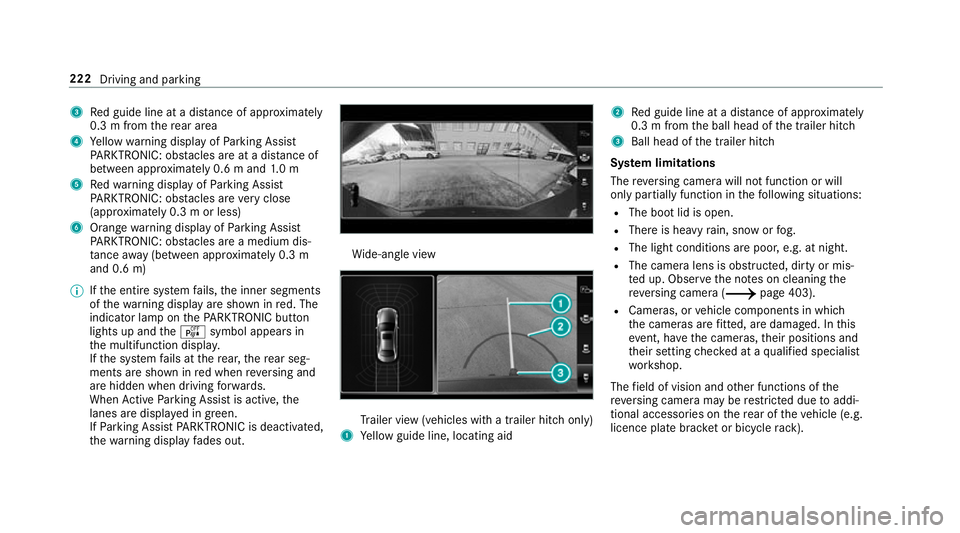
3
Red guide line at a dis tance of appr oximately
0.3 m from there ar area
4 Yellow warning display of Parking Assist
PA RKTRONIC: obstacles are at a dis tance of
between appr oximately 0.6 m and 1.0 m
5 Redwa rning display of Parking Assist
PA RKTRONIC: obstacles are very close
(appr oximately 0.3 m or less)
6 Orange warning display of Parking Assist
PA RKTRONIC: obstacles are a medium dis‐
ta nce away (between appr oximately 0.3 m
and 0.6 m)
0009 Ifth e entire sy stem fails, the inner segments
of thewa rning display are shown in red. The
indicator lamp on thePA RKTRONIC but ton
lights up and theé symbol appears in
th e multifunction displa y.
If th e sy stem fails at there ar, there ar seg‐
ments are shown in red when reve rsing and
are hidden when driving forw ards.
When Active Parking Assist is active, the
lanes are displa yed in green.
If Pa rking Assist PARKTRONIC is deacti vated,
th ewa rning display fades out. Wi
de-angle view Tr
ailer view (vehicles with a trailer hit chonly)
1 Yellow guide line, locating aid 2
Red guide line at a dis tance of appr oximately
0.3 m from the ball head of the trailer hitch
3 Ball head of the trailer hitch
Sy stem limitations
The reve rsing camera will not function or will
only partially function in thefo llowing situations:
R The boot lid is open.
R There is heavy rain, snow or fog.
R The light conditions are poor, e.g. at night.
R The camera lens is obstructed, dirty or mis‐
ted up. Obser vethe no tes on cleaning the
re ve rsing camera (0013 page 403).
R Cameras, or vehicle components in which
th e cameras are fitted, are dama ged. In this
eve nt, ha vethe cameras, their positions and
th eir setting checked at a qualified specialist
wo rkshop.
The field of vision and other functions of the
re ve rsing camera may be restricted due toaddi‐
tional accesso ries on there ar of theve hicle (e.g.
licence plate brac ket or bicycle rack ). 222
Driving and parking
Page 228 of 589
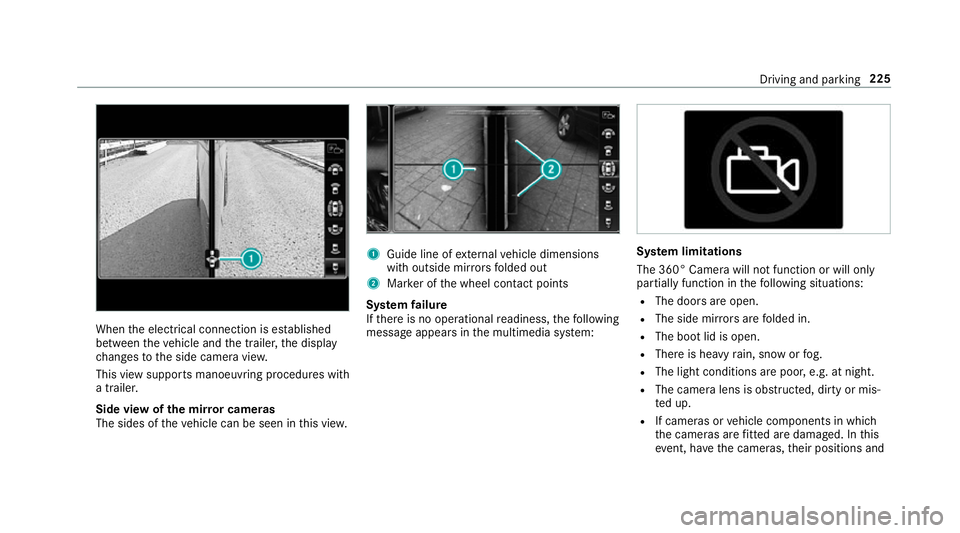
When
the electrical connection is es tablished
between theve hicle and the trailer, the display
ch anges tothe side camera vie w.
This view supports manoeuvring procedures with
a trailer.
Side view of the mir ror cameras
The sides of theve hicle can be seen in this vie w. 1
Guide line of extern al vehicle dimensions
with outside mir rors folded out
2 Marker of the wheel conta ct points
Sy stem failure
If th ere is no operational readiness, thefo llowing
message appears in the multimedia sy stem: Sy
stem limitations
The 360° Camera will not function or will only
partially function in thefo llowing situations:
R The doors are open.
R The side mir rors are folded in.
R The boot lid is open.
R There is heavy rain, snow or fog.
R The light conditions are poor, e.g. at night.
R The camera lens is obstructed, dirty or mis‐
ted up.
R If cameras or vehicle components in which
th e cameras are fitted are dama ged. In this
eve nt, ha vethe cameras, their positions and Driving and parking
225
Page 230 of 589
Ac
tive Parking Assist Fu
nction of Active Parking Assist
Ac tive Parking Assist is an elect ronic pa rking
assis tance sy stem which uses ultrasound and is
automatically activated during forw ard tra vel.
The sy stem is operational at speeds below
appr oximately 35 km/h.
When all the conditions are fulfilled, thefo llow‐
ing symbol appears in the multifunction display
in the instrument clus ter: The sy
stem then independently locates and
measures parallel and perpendicular parking
spaces on bo thsides of theve hicle.
When Active Parking Assist has de tected pa rking
spaces, thefo llowing symbol appears in the mul‐
tifunction display in the instrument clus ter: The ar
rows show on which side of the car riage‐
wa y free parking spaces are located. They are
th en shown in the multimedia sy stem displa y.
The parking space and, if necessar y,the parking
direction can be selected as desired. Active
Pa rking Assist calculates a suitable vehicle path
and assists you in parking and exiting the park‐
ing space.
Ve hicles with automatic transmission: Active
Pa rking Assist supports with changing gear,
accelerating, braking and steering theve hicle.
Ac tive Parking Assist is only an aid. It is not a
substitute foryo ur attention tothe sur roundings.
The responsibility for safe manoeuvring and
parking remains with you. Make sure that no
persons, animals or objects etc. are in the
manoeuvring range.
Ac tive Parking Assist is cancelled if, among
ot her things, one of thefo llowing actions is car‐
ri ed out:
R You deactivate Parking Assist PARKTRONIC.
R You deactivate Active Parking Assist.
R You begin steering. R
You apply the parking brake.
R Vehicles with automatic transmission:
yo u en gage transmission position 005D.
R ESP ®
inter venes.
R You open the doors or the boot lid while driv‐
ing.
Sy stem limitations
Objects located abo veor below the de tection
ra nge of Active Parking Assist are not de tected
when the parking space is being measured.
These are also not take n into account when the
parking manoeuvre is calculated, e.g. overhang‐
ing loads, overhangs or loading ramp s of lor ries
or the boundaries of parking spaces. In some cir‐
cums tances, Active Parking Assist may therefore
guide you into the parking space prematurely. Driving and parking
227
Page 380 of 589
The
TVtuner enables reception of digital chan‐
nels according tothefo llowing standards:
R DVB-T
R DVB-T2
In some countries, thest andards may not be
av ailable, or may not be available in all areas.
A CI+ module (Common In terface Module),
which is not included in the scope of deliver y,is
used todecrypt HD prog rammes according to
th e CI+ standard. In some countries, an addi‐
tional smart card is required, which is inse rted
into the CI+ module (see the manufacturer's
operating manual).
The TVtuner is in the boot recess. The CI+ mod‐
ule is inse rted into theTV tune r.
000E NO
TEDama getothe CI+ module and
Smart Card The CI+ module is designed
for use in the
home. The CI+ module can overheat and be
damaged bycontinuous exposure tohigh
outside temp eratures. 0007
Make sure that the CI+ module is not
subject tohigh temp eratures forex ten‐
ded pe riods of time.
If th e CI+ module is damaged, no
encryp tedch annels can be recei ved. The
TVtuner can recei veprogrammes in Dolby
Digital Plus. Manufactured under licence from Dolby Labora‐
to
ries. Dolb y,Dol byAudio and the double-D sym‐
bol are trademar ksof Dolby Laboratories.
The TVtuner au tomatically sets theTV standard.
TV reception is dependent on thefo llowing fac‐
to rs:
R Speed
R Characteristics of the selected TVchannel
TV reception may be influenced bythefo llowing
fa ctors:
R Electronic devices whi chare take n into the
ve hicle may impair TVreception.
R The conditions forre ception may change
whilst theve hicle is in motion.
Po or reception conditions can ha vethefo llowing
ef fect:
R The TVtuner switches toan alternative chan‐
nel with better reception whi chis digitally
broadcasting the same programme conte nt.
R The TVtuner mu testh e sound, freezes the
screen or hides it. The tsymbol appears
in the displa y. Multimedia sy
stem 377
Page 387 of 589
MHEG-5 digital
telete xt 0007
Ifth ete lete xt is displ ayed, press and hold on
th eto uchpad.
A colour selection bar appears. 0007
Select a colour.
The data content is displ ayed. 0007
Toenter numbers: select123. 0007
Enterth e numbers in quick succession. 0007
Toreturn totheTV prog ramme: selectTV. Pictu
resettings Picture settings
overview
The following picture form at settings are availa‐
ble:
R Automatic
The brightness is automatically set with this
option.
R 16:9
R 4:3
R Zoom Selecting picture settings
Multimedia sy
stem:
0018 Media 0019
à Media sources 0019
TV
0019 Z Options 0007
Select Picture format. 0007
Select a picture form at.
Ad justing the brightness manually
If th eAutomatic pictureform at is swit ched off,
yo u can adjust the brightness yourself. 0007
Select Brightness. 0007
Adjust the brightness. HD prog
rammes Re
ceiving encryp ted HD prog rammes
000E NO
TEDama getothe CI+ module and
Smart Card The CI+ module is designed
for use in the
home. The CI+ module can overheat and be
damaged bycontinuous exposure tohigh
outside temp eratures. 0007
Make sure that the CI+ module is not
subject tohigh temp eratures forex ten‐
ded pe riods of time.
If th e CI+ module is damaged, no
encryp tedch annels can be recei ved. The
TVtuner is in the boot recess. 0007
Ifre qu ired (countr y-dependent), insert the
Smart Ca rdinto the CI+ module slot. 0007
Remo vethe pr otective cap from theTV tune r. 0007
Insert the CI+ module into theTV tuner sl ot. 0007
Replace the pr otective cap on theTV tune r.
When the CI+ module is inser ted cor rectly,
encryp ted HD programmes can be recei ved
according toCI+ standard.
If th e CI module is not compatible, an er ror
messa geappears.
Calling up the CI+ module menu
Multimedia sy stem:
0018 Media 0019
à Media sources 0019
TV
0019 Z Options 0007
Select CA module. 384
Multimedia sy stem