display MERCEDES-BENZ C-CLASS CABRIOLET 2018 Manual PDF
[x] Cancel search | Manufacturer: MERCEDES-BENZ, Model Year: 2018, Model line: C-CLASS CABRIOLET, Model: MERCEDES-BENZ C-CLASS CABRIOLET 2018Pages: 589, PDF Size: 10.55 MB
Page 258 of 589
Ad
aptive Highbeam Assist Plus
(0013 page133)
00CB Maximum permissible speed
exceeded
(for cer tain countries only)
Ve hicles with Traf fic Sign Assis t:de tected
instructions and traf fic signs (0013 page 235). Ad
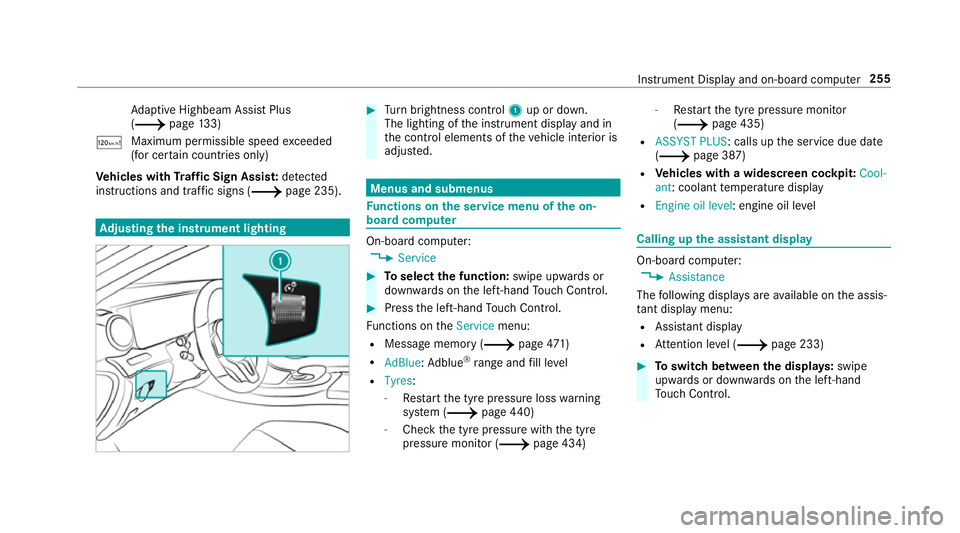
justing the in stru ment lighting 0007
Turn brightness control 1up or down.
The lighting of the instrument display and in
th e control elements of theve hicle interior is
adjus ted. Menus and submenus
Fu
nctions on the service menu of the on-
board compu ter On-board computer:
0018 Service 0007
Toselect the function: swipe upwards or
down wards on the left-hand Touch Control. 0007
Press the left-hand Touch Control.
Fu nctions on theService menu:
R Message memory (0013 page471)
R AdBlue :Ad blue ®
ra nge and fill le vel
R Tyres:
- Restart the tyre pressure loss warning
sy stem (0013 page440)
- Che ckthe tyre pressure with the tyre
pressure monitor (0013 page 434)-
Restart the tyre pressure monitor
(0013 page 435)
R ASSYST PLUS: calls up the service due date
(0013 page 387)
R Vehicles with a widescreen cock pit:Cool-
ant : coolant temp erature display
R Engine oil level: engine oil le vel Calling up
the assistant display On-board computer:
0018 Assistance
The following displa ysare available on the assis‐
ta nt displ aymenu:
R Assis tant displ ay
R Attention le vel (0013 page 233) 0007
Toswitch between the displa ys:swipe
upwards or down wards on the left-hand
To uch Control. In
stru ment Display and on-board computer 255
Page 259 of 589
St
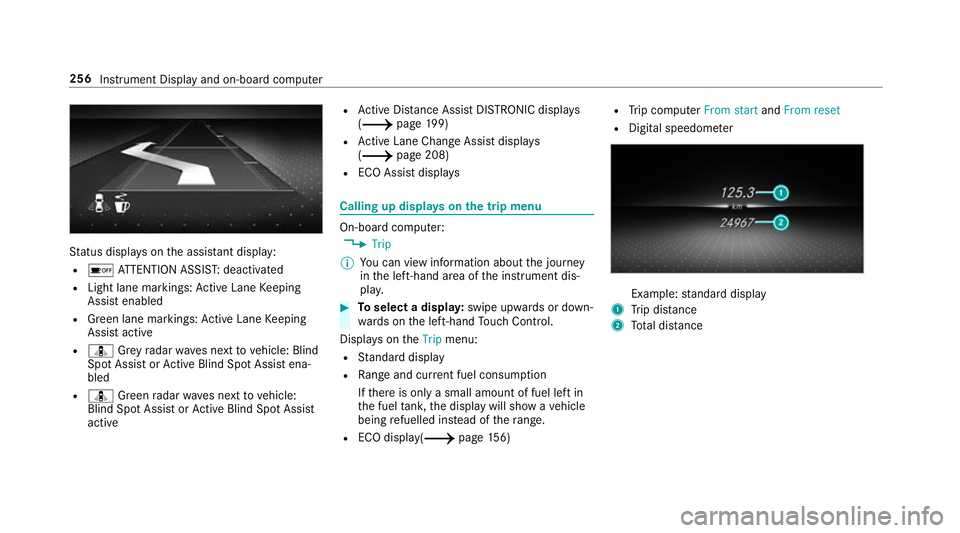
atus displa yson the assis tant displ ay:
R 00D7 ATTENTION ASSIS T:deactivated
R Light lane markings: Active Lane Keeping
Assist enabled
R Green lane markings: Active Lane Keeping
Assist active
R ¸ Grey radar waves next tovehicle: Blind
Spot Assist or Active Blind Spot Assi stena‐
bled
R ¸ Green radar waves next tovehicle:
Blind Spot Assist or Active Blind Spot Assi st
active R
Active Dis tance Assi stDISTRONIC displa ys
( 0013 page199)
R Active Lane Change Assi stdispla ys
( 0013 page 208)
R ECO Assist displa ys Calling up displa
yson the trip menu On-board computer:
0018 Trip
0009 You can view information about the journey
in the left-hand area of the instrument dis‐
pla y. 0007
Toselect a displa y:swipe upwards or down‐
wa rds on the left-hand Touch Control.
Displa yson theTrip menu:
R Standard display
R Range and cur rent fuel consu mption
If th ere is only a small amount of fuel left in
th e fuel tank, the display will show a vehicle
being refuelled ins tead of thera nge.
R ECO displ ay(0013 page156) R
Trip computer From startandFrom reset
R Digital speedom eter Example:
standard display
1 Trip dis tance
2 Total dis tance 256
Instrument Display and on-boa rdcompu ter
Page 260 of 589
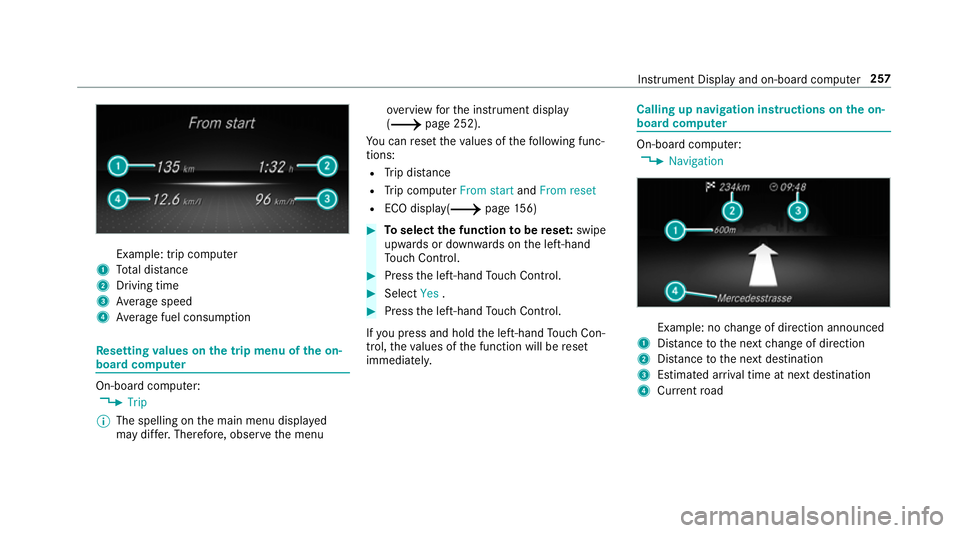
Example: trip computer
1 Total dis tance
2 Driving time
3 Average speed
4 Average fuel consum ption Re
setting values on the trip menu of the on-
board compu ter On-board computer:
0018 Trip
0009 The spelling on the main menu displa yed
may dif fer. Therefore, obser vethe menu ove
rview forth e instrument display
(0013 page 252).
Yo u can reset theva lues of thefo llowing func‐
tions:
R Trip dis tance
R Trip computer From startandFrom reset
R ECO displa y(0013 page156) 0007
Toselect the function tobe rese t:swipe
upwards or down wards on the left-hand
To uch Control. 0007
Press the left-hand Touch Control. 0007
Select Yes. 0007
Press the left-hand Touch Control.
If yo u press and hold the left-hand Touch Con‐
trol, theva lues of the function will be reset
immediatel y. Calling up navigation instructions on
the on-
board compu ter On-board computer:
0018 Navigation Example: no
change of direction announced
1 Distance tothe next change of direction
2 Distance tothe next destination
3 Estimated ar riva l time at next destination
4 Current road In
stru ment Display and on-board computer 257
Page 261 of 589
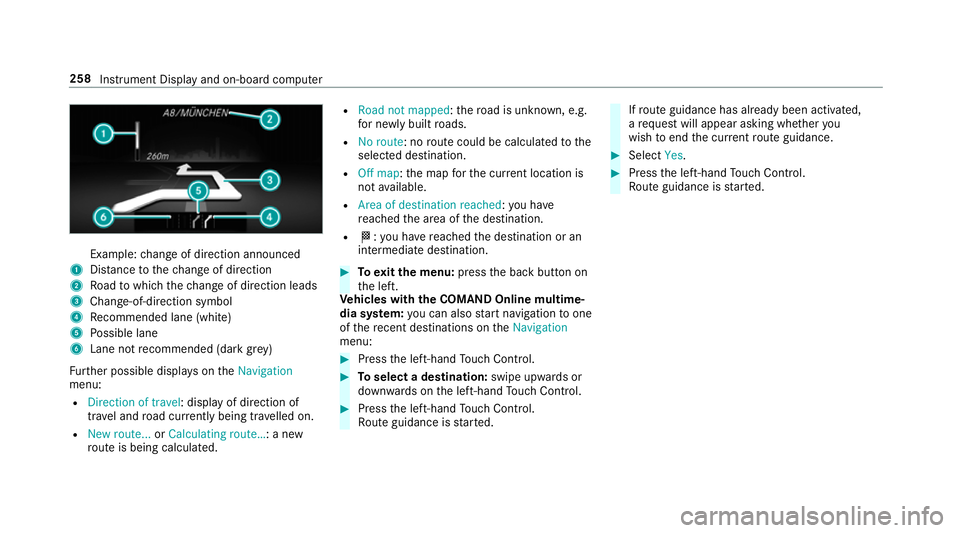
Example:
change of direction announced
1 Distance tothech ange of direction
2 Road towhich thech ange of direction leads
3 Chan ge-of-direction symbol
4 Recommended lane (white)
5 Possible lane
6 Lane not recommended (da rkgrey)
Fu rther possible displa yson theNavigation
menu:
R Direction of travel: display of direction of
tra vel and road cur rently being tr avelled on.
R New route... orCalculating route… : a new
ro ute is being calculated. R
Road not mapped :th ero ad is unknown, e.g.
fo r newly built roads.
R No route: no route could be calculated tothe
selected destination.
R Off map: the map forth e cur rent location is
not available.
R Area of destination reached: you ha ve
re ached the area of the destination.
R 004B: you ha vereached the destination or an
intermediate destination. 0007
Toexitth e menu: pressthe back button on
th e left.
Ve hicles with the COMAND Online multime‐
dia sy stem: you can also start navigation toone
of there cent destinations on theNavigation
menu: 0007
Press the left-hand Touch Control. 0007
Toselect a destination: swipe upwards or
down wards on the left-hand Touch Control. 0007
Press the left-hand Touch Control.
Ro ute guidance is star ted. If
ro ute guidance has already been activated,
a re qu est will appear asking whe ther you
wish toend the cur rent route guidance. 0007
Select Yes. 0007
Press the left-hand Touch Control.
Ro ute guidance is star ted. 258
Instrument Display and on-board computer
Page 262 of 589
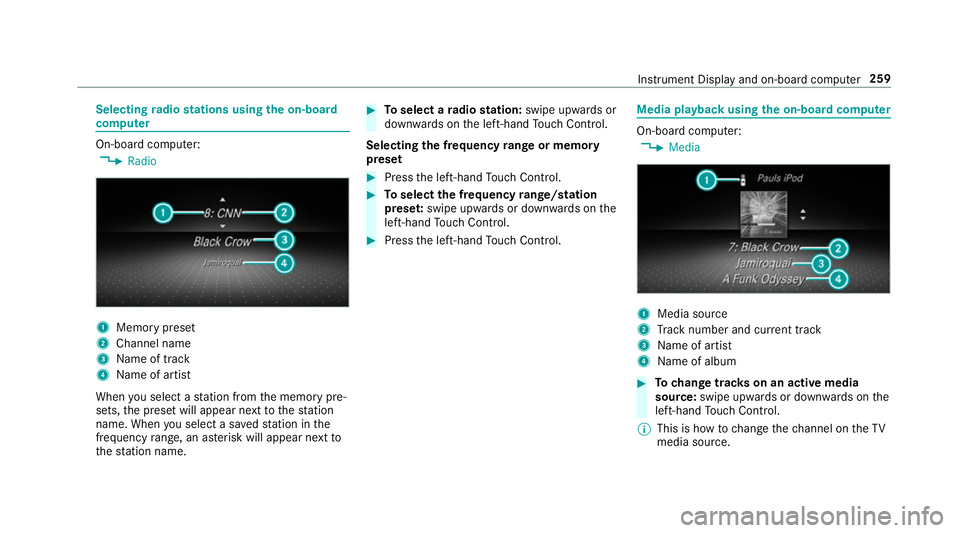
Selecting
radio stations using the on-boa rd
compu ter On-board computer:
0018 Radio 1
Memory preset
2 Channel name
3 Name of track
4 Name of artist
When you select a station from the memory pre‐
sets, the preset will appear next tothest ation
name. When you select a sa vedstation in the
frequency range, an as terisk will appear next to
th est ation name. 0007
Toselect a radio station: swipe upwards or
down wards on the left-hand Touch Control.
Selecting the frequency range or memory
preset 0007
Press the left-hand Touch Control. 0007
Toselect the frequency range/station
prese t:swipe upwards or down wards on the
left-hand Touch Control. 0007
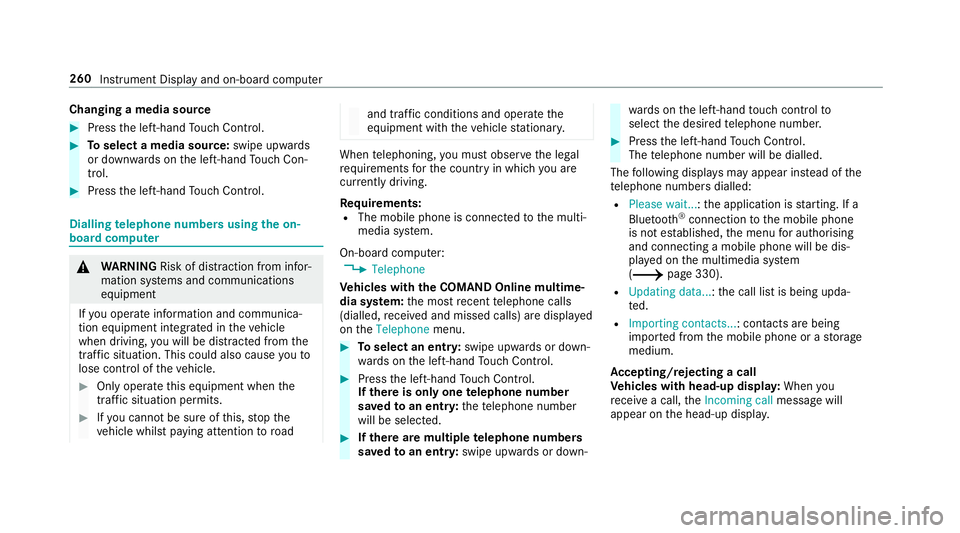
Press the left-hand Touch Control. Media playba
ckusing the on-boa rdcompu ter On-board computer:
0018 Media 1
Media source
2 Track number and cur rent track
3 Name of artist
4 Name of album 0007
Tochange trac kson an active media
source: swipe upwards or down wards on the
left-hand Touch Control.
0009 This is how tochange thech annel on theTV
media source. Instrument Display and on-board computer
259
Page 263 of 589
Changing a media source
0007
Press the left-hand Touch Control. 0007
Toselect a media source: swipe upwards
or down wards on the left-hand Touch Con‐
trol. 0007
Press the left-hand Touch Control. Dialling
telephone numbers using the on-
board compu ter 000A
WARNING Risk of di stra ction from infor‐
mation sy stems and communications
equipment
If yo u operate information and communica‐
tion equipment integ rated in theve hicle
when driving, you will be distracted from the
traf fic situation. This could also cause youto
lose control of theve hicle. 0007
Only operate this equipment when the
traf fic situation permits. 0007
Ifyo u cannot be sure of this, stop the
ve hicle whilst paying attention toroad and traf
fic conditions and ope rate the
equipment with theve hicle stationar y. When
telephoning, you must obse rveth e legal
re qu irements forth e count ryin which you are
cur rently driving.
Re quirements:
R The mobile phone is connec tedto the multi‐
media sy stem.
On-board computer: 0018 Telephone
Ve hicles with the COMAND Online multime‐
dia sy stem: the most recent telephone calls
(dialled, recei ved and missed calls) are displa yed
on theTelephone menu. 0007
Toselect an entr y:swipe upwards or down‐
wa rds on the left-hand Touch Control. 0007
Press the left-hand Touch Control.
If th ere is only one telephone number
sa ve dto an entr y:thete lephone number
will be selec ted. 0007
Ifth ere are multiple telephone numbers
sa ve dto an entr y:swipe upwards or down‐ wa
rds on the left-hand touch cont rolto
select the desired telephone number. 0007
Press the left-hand Touch Control.
The telephone number will be dialled.
The following displa ysmay appear ins tead of the
te lephone numbers dialled:
R Please wait... :th e application is starting. If a
Blue tooth ®
connection tothe mobile phone
is not es tablished, the menu for auth orising
and connecting a mobile phone will be dis‐
pla yed on the multimedia sy stem
(0013 page 330).
R Updating data...: the call list is being upda‐
te d.
R Importing contacts... : contacts are being
impor ted from the mobile phone or a storage
medium.
Ac cepting/rejecting a call
Ve hicles with head-up displa y:When you
re cei vea call, theIncoming call message will
appear on the head-up displa y.260
Instrument Display and on-board computer
Page 264 of 589
0007
Swipe up wards or down wards on the left-
hand Touch Control and select 0061(Accept)
or 0076 (Reject). 0007
Press the left-hand Touch Control.
Yo u may accept/ reject the call using button
0061 or0076 onthesteering wheel. Ad
justing the head-up display settings on
the on-board co mputer On-board computer:
0018 HUD
The following head-up display settings can be
adjus ted:
R Position
R Brightness
R Display content 0007
Toselect a setting: swipe upwards or down‐
wa rds on the left-hand Touch Control. 0007
Press the left-hand Touch Control. 0007
Toadjust a value: swipe upwards or down‐
wa rds on the left-hand Touch Control. 0007
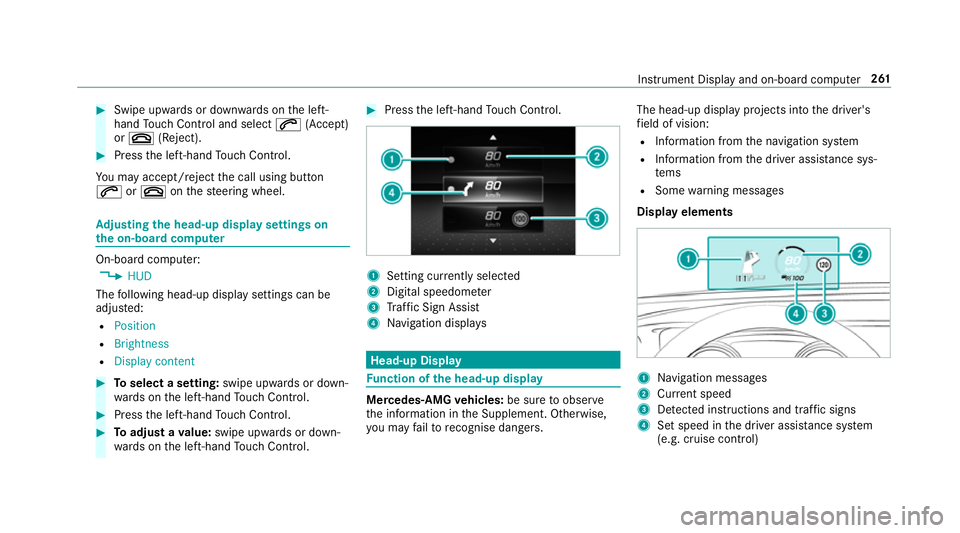
Press the left-hand Touch Control. 1
Setting cur rently selected
2 Digital speedome ter
3 Traf fic Sign Assi st
4 Navigation displa ys Head-up Display
Fu
nction of the head-up display Mercedes-AMG
vehicles: be sure toobser ve
th e information in the Supplement. Otherwise,
yo u may failto recognise dangers. The head-up displ
ayprojects into the driver's
fi eld of vision:
R Information from the navigation sy stem
R Information from the driver assis tance sys‐
te ms
R Some warning messages
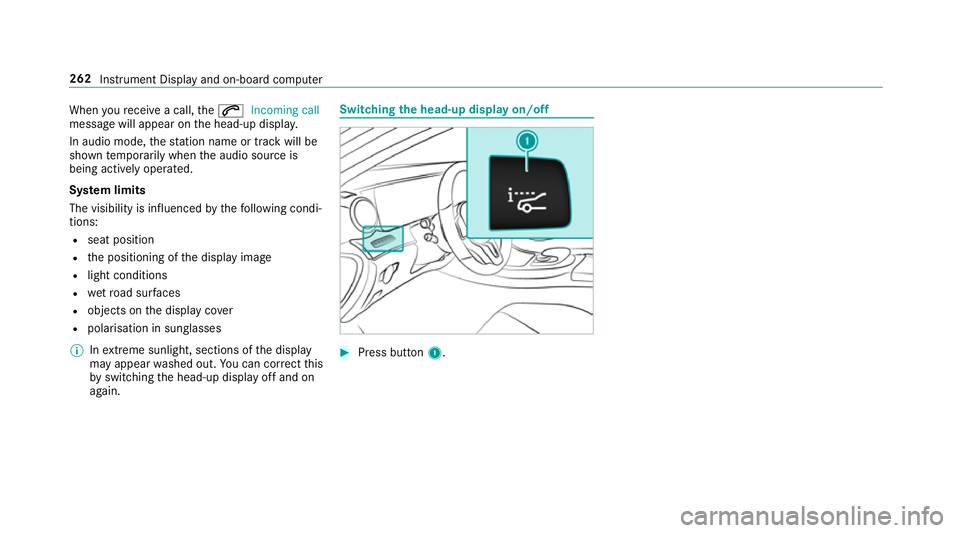
Display elements 1
Navigation messa ges
2 Current speed
3 Detected instructions and traf fic signs
4 Set speed in the driver assis tance sy stem
(e.g. cruise control) Instrument Display and on-board computer
261
Page 265 of 589
When
youre cei vea call, the0061 Incoming call
message will appear on the head-up displa y.
In audio mode, thest ation name or track will be
shown temp orarily when the audio source is
being actively operated.
Sy stem limits
The visibility is influenced bythefo llowing condi‐
tions:
R seat position
R the positioning of the display image
R light conditions
R wetro ad sur faces
R objects on the display co ver
R polarisation in sunglasses
0009 Inextreme sunlight, sections of the display
may appear washed out. You can co rrect this
by switching the head-up display off and on
again. Switching
the head-up display on/off 0007
Press button 1. 262
Instru ment Display and on-board computer
Page 269 of 589
Essential
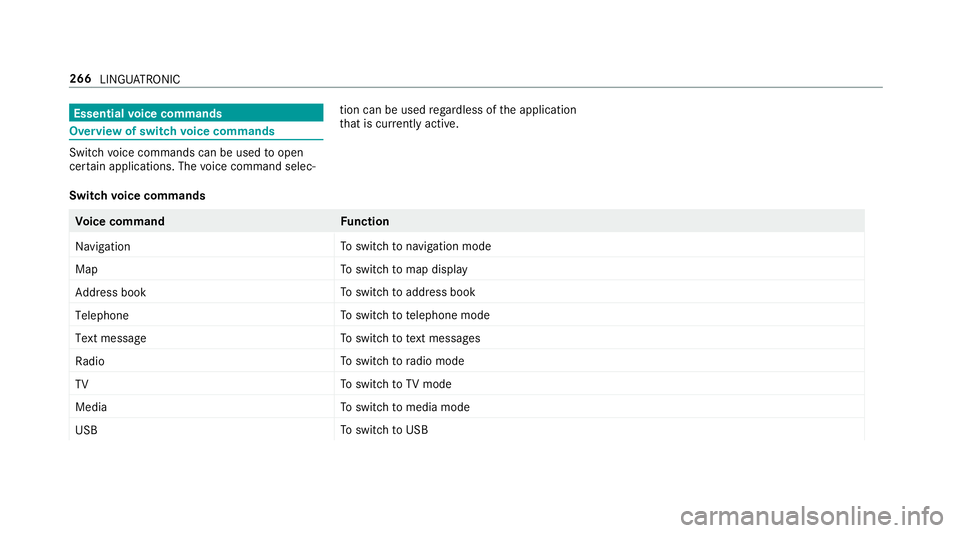
voice commands Overview of switch
voice commands Swit
chvoice commands can be used toopen
cer tain applications. The voice command selec‐ tion can be used
rega rdless of the application
th at is cur rently acti ve.
Switch voice commands Vo
ice command Function
Navigation To
switch tonavigation mode
Map To
switch tomap display
Address book To
switch toaddress book
Telephone To
switch totelephone mode
Text message To
switch totext messa ges
Radio To
switch toradio mode
TV To
switch toTV mode
Media To
switch tomedia mode
USB To
switch toUSB 266
LINGU ATRO NIC
Page 273 of 589
Vo
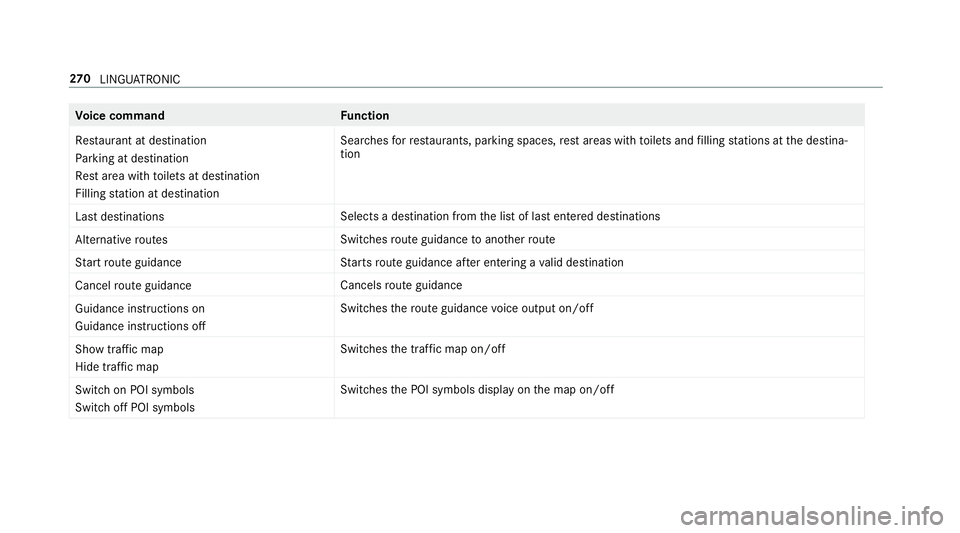
ice command Function
Restaurant at destination
Parking at destination
Rest area with toilets at destination
Filling station at destination Sear
ches forre staurants, parking spaces, rest areas with toilets and filling stations at the destina‐
tion
Last destinations Selects a destination from
the list of last entered destinations
Alternative routes Switches
route guidance toano ther route
Start route guidance St
arts route guidance af ter entering a valid destination
Cancel route guidance Cancels
route guidance
Guidance instructions on
Guidance instructions off Swit
ches thero ute guidance voice output on/off
Show traffic map
Hide traffic map Swit
ches the tra ffic map on/off
Switch on POI symbols
Switch off POI symbols Swit
ches the POI symbols display on the map on/off 270
LINGU ATRO NIC