light MERCEDES-BENZ C-CLASS CABRIOLET 2018 Owners Manual
[x] Cancel search | Manufacturer: MERCEDES-BENZ, Model Year: 2018, Model line: C-CLASS CABRIOLET, Model: MERCEDES-BENZ C-CLASS CABRIOLET 2018Pages: 589, PDF Size: 10.55 MB
Page 5 of 589
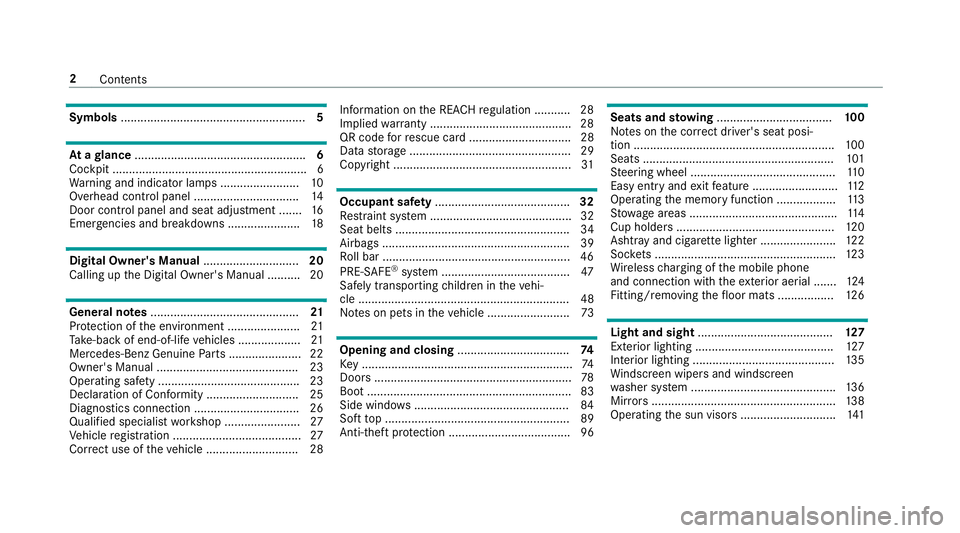
Symbols
........................................................ 5At
agl ance .................................................... 6
Cockpit ........................................................... 6
Wa rning and indicator lamps ........................ 10
Overhead contro l panel ................................ 14
Door control panel and seat adjustment ....... 16
Emergencies and breakdowns ...................... 18Digital Owner's Manual
.............................20
Calling up the Digital Owner's Manual ..........20 Genera
l notes............................................. 21
Pr otection of the environment ......................21
Ta ke -ba ckof end-of-life vehicles ...................21
Mercedes-Benz Genuine Parts ......................22
Owner's Manual ...........................................23
Operating saf ety .......................................... .23
Declaration of Conformity ............................ 25
Diagno stics connection ................................ 26
Qualified specialist workshop ....................... 27
Ve hicle registration ....................................... 27
Cor rect use of theve hicle ............................28 Information on
the REA CHregulation ........... 28
Implied warranty .......................................... .28
QR code forre scue card ...............................28
Data storage .................................................29
Copyright ...................................................... 31 Occupant saf
ety......................................... 32
Re stra int sy stem ...........................................32
Seat belts ..................................................... 34
Airbags ......................................................... 39
Ro ll bar ........................................................ .46
PRE-SAFE ®
sy stem ....................................... 47
Safely transporting children in theve hi‐
cle ................................................................48
No tes on pets in theve hicle .........................73 Opening and closing
.................................. 74
Ke y ................................................................ 74
Doo rs............................................................ 78
Boot .............................................................. 83
Side windo ws............................................... 84
Soft top ........................................................ 89
Anti- theft pr otection .....................................96 Seats and
stowing ................................... 100
No tes on the cor rect driver's seat posi‐
tion ............................................................. 100
Seats .......................................................... 101
St eering wheel ............................................ 11 0
Easy entry and exitfeature .......................... 11 2
Operating the memory function .................. 11 3
St ow age areas ............................................ .114
Cup holders ................................................ 12 0
Ashtr ayand cigar ette lighter ...................... .122
Soc kets ....................................................... 12 3
Wi reless charging of the mobile phone
and connection with theex terior aerial .......1 24
Fitting/removing thefloor mats ................. 12 6 Light and sight
......................................... 127
Exterior lighting .......................................... 127
Interior lighting ........................................... 13 5
Wi ndsc reen wipers and windscreen
wa sher sy stem ............................................ 13 6
Mir rors ........................................................ 13 8
Operating the sun visors ............................. 1412
Contents
Page 6 of 589
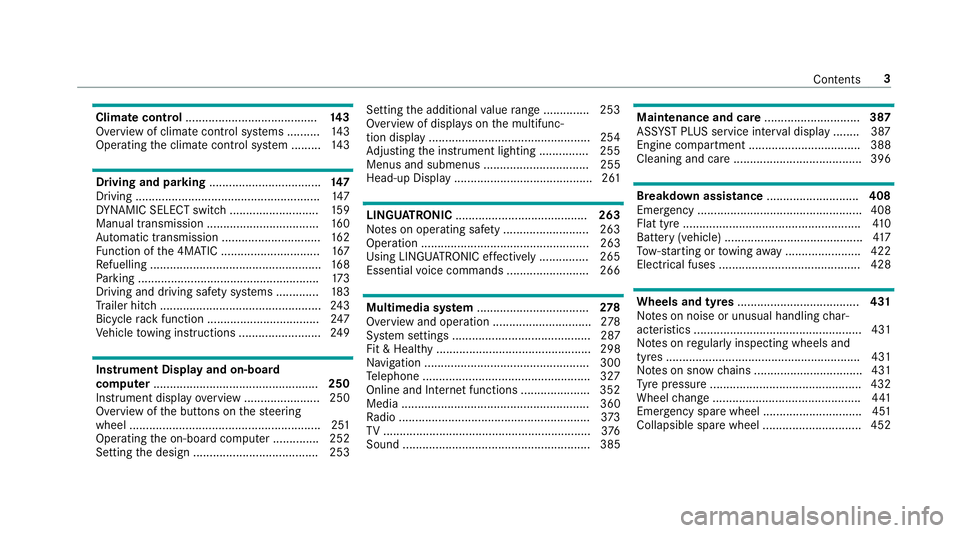
Climate control
........................................ 14 3
Overview of climate contro l systems ..........1 43
Operating the climate control sy stem ......... 14 3 Driving and pa
rking .................................. 147
Driving ........................................................ 147
DY NA MIC SELECT switch ........................... 15 9
Manual transmission ..................................1 60
Au tomatic transmission .............................. 16 2
Fu nction of the 4MATIC .............................. 167
Re fuelling .................................................... 16 8
Pa rking ...................................................... .173
Driving and driving sa fety sy stems .............1 83
Tr ailer hit ch................................................. 24 3
Bicycle rack function .................................. 247
Ve hicle towing instructions ........................ .249 Instrument Display and on-board
comp uter.................................................. 250
Instrument display overview ...................... .250
Overview of the buttons on thesteering
wheel ..........................................................2 51
Operating the on-board computer .............. 252
Setting the design ...................................... 253 Setting
the additional value range .............. 253
Overview of displ ays on the multifunc‐
tion display .................................................2 54
Ad justing the instrument lighting ............... 255
Menus and submenus ................................ 255
Head-up Display .......................................... 261 LINGU
ATRO NIC ........................................ 263
No tes on operating saf ety .......................... 263
Ope ration ................................................... 263
Using LINGU ATRO NIC ef fectively ............... 265
Essential voice commands ........................ .266 Multimedia sy
stem .................................. 278
Overview and operation .............................. 278
Sy stem settings .......................................... 287
Fit & Healt hy............................................... 298
Na vigation .................................................. 300
Te lephone .................................................. .327
Online and Internet functions ..................... 352
Media ......................................................... 360
Ra dio .......................................................... 373
TV ............................................................... 376
Sound ......................................................... 385 Main
tenance and care ............................. 387
ASS YST PLUS service inter val display ........ 387
Engine compartment .................................. 388
Cleaning and care ...................................... .396 Breakdown assi
stance ............................ 408
Emergency ................................................. .408
Flat tyre ...................................................... 41 0
Battery (vehicle) .......................................... 417
To w- starting or towing away ....................... 422
Electrical fuses ........................................... 428 Wheels and tyres
..................................... 431
No tes on noise or unusual handling char‐
acteristics .................................................. .431
No tes on regular lyinspecting wheels and
tyres .......................................................... .431
No tes on snow chains ................................ .431
Ty re pressure .............................................. 432
Wheel change ............................................ .441
Emergency spare wheel .............................. 451
Collapsible spare wheel .............................. 452 Contents
3
Page 10 of 589
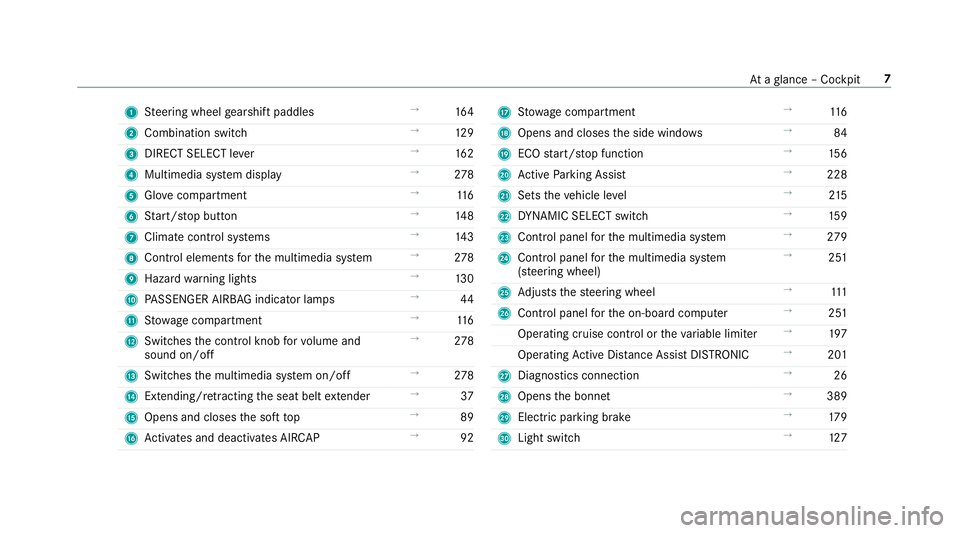
1
Steering wheel gearshift paddles →
16 4
2 Combination swit ch →
12 9
3 DIRECT SELECT le ver →
16 2
4 Multimedia sy stem display →
278
5 Glovecompa rtment →
11 6
6 Start/ stop button →
14 8
7 Climate cont rol sy stems →
14 3
8 Control elements forth e multimedia sy stem →
278
9 Haza rdwa rning lights →
13 0
A PASSENGER AIRB AGindicator lamps →
44
B Stow age compartment →
11 6
C Switches the control knob forvo lume and
sound on/off →
278
D Switches the multimedia sy stem on/off →
278
E Extending/r etra cting the seat belt extender →
37
F Opens and closes the soft top →
89
G Activates and deacti vates AIR CAP →
92 H
Stow age compartment →
11 6
I Opens and closes the side windo ws →
84
J ECO start/ stop function →
15 6
K Active Parking Assist →
228
L Sets theve hicle le vel →
215
M DYNA MIC SELECT switch →
15 9
N Control panel forth e multimedia sy stem →
279
O Control panel forth e multimedia sy stem
(s te ering wheel) →
251
P Adjusts thesteering wheel →
111
Q Control panel forth e on-board computer →
251
Operating cruise control or theva riable limiter →
197
Operating Active Dis tance Assi stDISTRONIC →
201
R Diagno stics connection →
26
S Opens the bonn et →
389
T Electric parking brake →
17 9
U Light switch →
127 At
aglance – Cockpit 7
Page 14 of 589
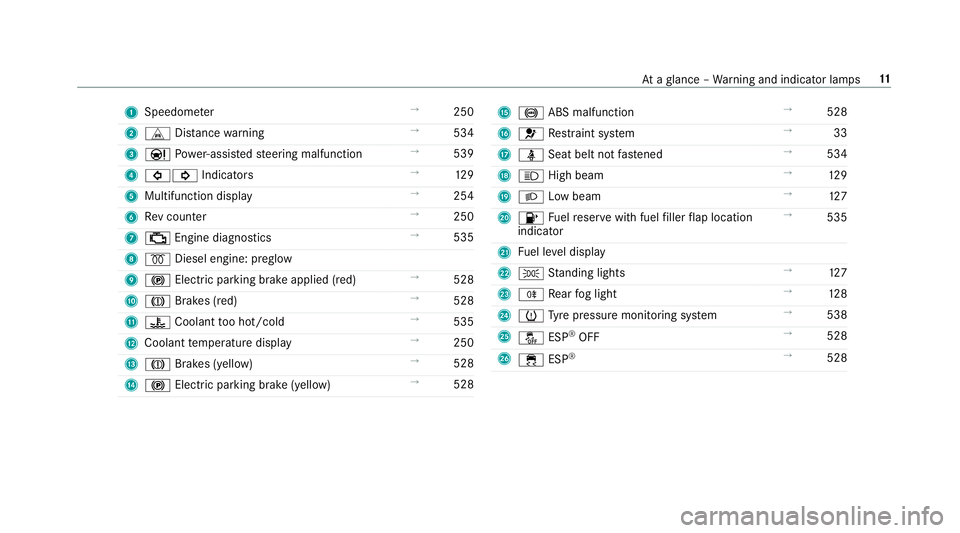
1
Speedom eter →
250
2 L Distance warning →
534
3 00CC Powe r-assis tedsteering malfunction →
539
4 003E003D Indicators →
12 9
5 Multifunction display →
254
6 Rev counter →
250
7 00B9 Engine diagnostics →
535
8 0028 Diesel engine: preglow
9 0024 Electric parking brake applied (red) →
528
A 004D Brakes (red) →
528
B 00AC Coolant too hot/cold →
535
C Coolant temp erature display →
250
D 004D Brakes (yellow) →
528
E 0024 Electric pa rking brake (yellow) →
528 F
0025 ABS malfunction →
528
G 0075 Restra int sy stem →
33
H 00E9 Seat belt not fastened →
534
I 0057 High beam →
12 9
J 0058 Low beam →
127
K 00B6 Fuelreser vewith fuel filler flap location
indicator →
535
L Fuel le vel display
M 0060 Standing lights →
127
N 005E Rear fog light →
12 8
O 0077 Tyre pressure monitoring sy stem →
538
P 00BB ESP®
OFF →
528
Q 00E5 ESP®
→
528 At
aglance – Warning and indicator lamps 11
Page 16 of 589
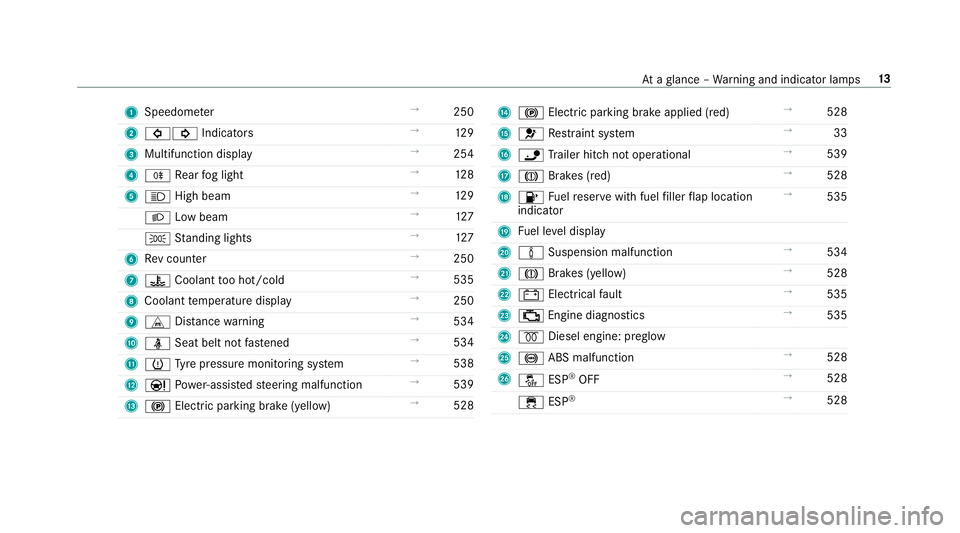
1
Speedom eter →
250
2 003E003D Indicators →
12 9
3 Multifunction display →
254
4 005E Rear fog light →
12 8
5 0057 High beam →
12 9
0058 Low beam →
127
0060 Standing lights →
127
6 Rev counter →
250
7 00AC Coolant too hot/cold →
535
8 Coolant temp erature display →
250
9 L Distance warning →
534
A 00E9 Seat belt not fastened →
534
B 0077 Tyre pressure monitoring sy stem →
538
C 00CC Powe r-assis tedsteering malfunction →
539
D 0024 Electric pa rking brake (yellow) →
528 E
0024 Electric parking brake applied (red) →
528
F 0075 Restra int sy stem →
33
G 00CA Trailer hit chnot operational →
539
H 004D Brakes (red) →
528
I 00B6 Fuelreser vewith fuel filler flap location
indicator →
535
J Fuel le vel display
K 00CC Suspension malfunction →
534
L 004D Brakes (yellow) →
528
M 003D Electrical fault →
535
N 00B9 Engine diagnostics →
535
O 0028 Diesel engine: preglow
P 0025 ABS malfunction →
528
Q 00BB ESP®
OFF →
528
00E5 ESP®
→
528 At
aglance – Warning and indicator lamps 13
Page 18 of 589
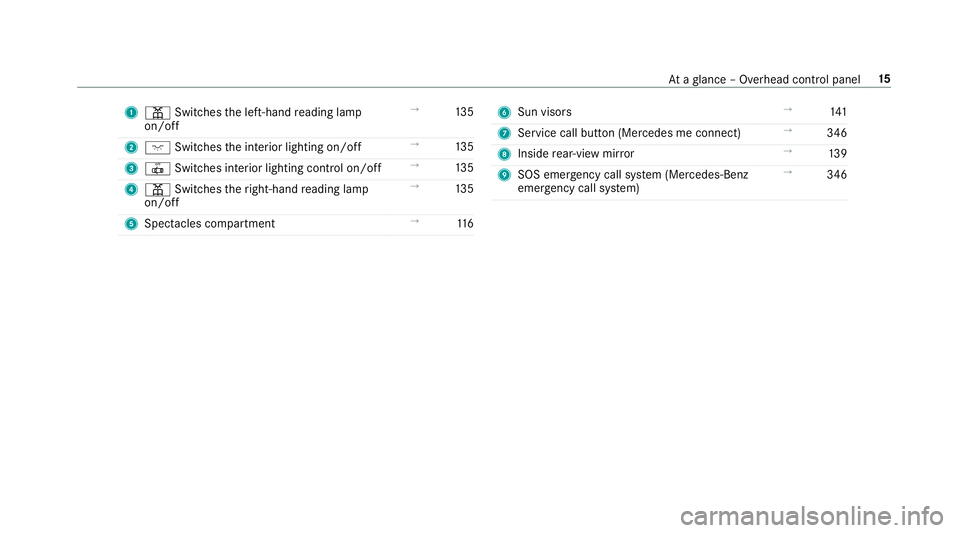
1
003D Switches the left-hand reading lamp
on/off →
13 5
2 004A Switches the interior lighting on/off →
13 5
3 0033 Switches interior lighting control on/off →
13 5
4 003D Switches theright-hand reading lamp
on/off →
13 5
5 Spectacles compa rtment →
11 6 6
Sun visors →
141
7 Service call button (Me rcedes me connect) →
346
8 Inside rear-view mir ror →
13 9
9 SOS emergency call sy stem (Mercedes-Benz
emer gency call sy stem) →
346 At
aglance – Overhead control panel 15
Page 22 of 589
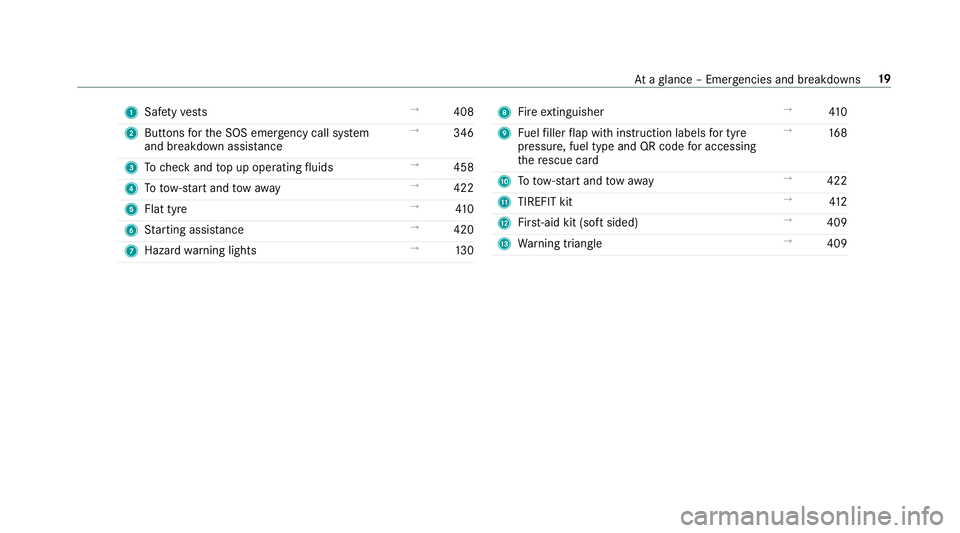
1
Safetyve sts →
408
2 Buttons forth e SOS emer gency call sy stem
and breakdown assis tance →
346
3 Tocheck and top up operating fluids →
458
4 Totow- start and tow aw ay →
422
5 Flat tyre →
41 0
6 Starting assis tance →
420
7 Haza rdwa rning lights →
13 0 8
Fire extinguisher →
41 0
9 Fuelfiller flap with instruction labels for tyre
pressu re, fuel type and QR code for accessing
th ere scue card →
16 8
A Totow- start and tow aw ay →
422
B TIREFIT kit →
412
C First-aid kit (so ftsided) →
409
D Warning triangle →
409 At
aglance – Emer gencies and breakdowns 19
Page 23 of 589
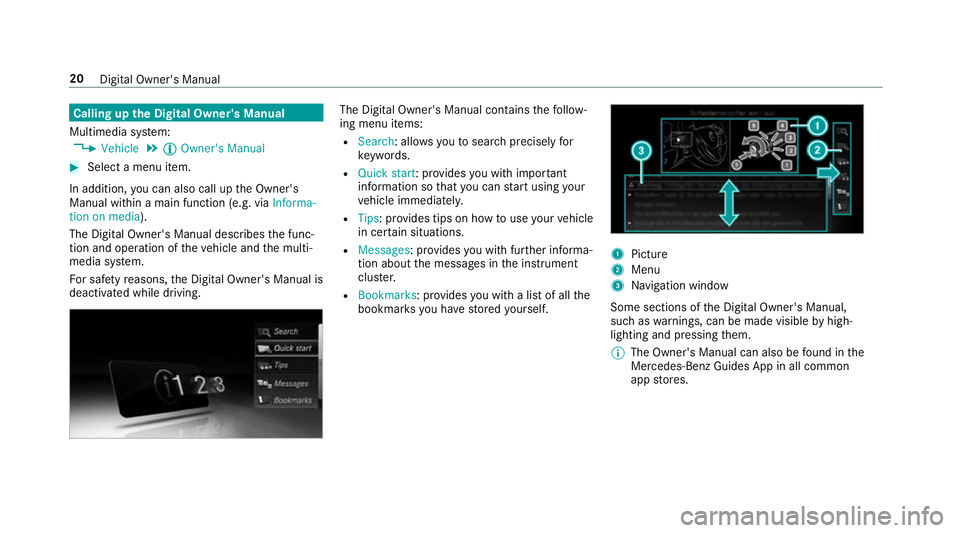
Calling up
the Digital Owner's Manual
Multimedia sy stem:
0018 Vehicle 0019
Õ Owner's Manual 0007
Select a menu item.
In addition, you can also call up the Owner's
Manual within a main function (e.g. via Informa-
tion on media).
The Digital Owner's Manual describes the func‐
tion and operation of theve hicle and the multi‐
media sy stem.
Fo r saf etyre asons, the Digital Owner's Manual is
deactivated while driving. The Digital Owner's Manual conta
insthefo llow‐
ing menu items:
R Search: allo wsyouto sear chprecisely for
ke ywords.
R Quick start: pr ovides you with important
information so that you can start using your
ve hicle immediately.
R Tips: pr ovides tips on how touse your vehicle
in cer tain situations.
R Messages : provides you with fur ther informa‐
tion about the messages in the instrument
clus ter.
R Bookmarks : provides you with a list of all the
bookmar ksyou ha vestored yourself. 1
Picture
2 Menu
3 Navigation window
Some sections of the Digital Owner's Manual,
such as warnings, can be made visible byhigh‐
lighting and pressing them.
0009 The Owner's Manual can also be found in the
Mercedes-Benz Guides App in all common
app stores. 20
Digital Owner's Manual
Page 32 of 589
of an accident,
rescue services can use the QR
code toquickly find the appropriate rescue card
fo ryo ur vehicle. The cur rent rescue card con‐
ta ins the most impor tant information about your
ve hicle in a compact form , e.g. thero uting of the
electric lines.
Fu rther information can be obtained at http://
www.mercedes-benz.de/qr-code. Data
storage Electronic control units
Elect
ronic control units are fitted in your vehicle.
Some of these are necessary forth e safe opera‐
tion of your vehicle, while some assist you when
driving (driver assis tance sy stems). In addition,
yo ur vehicle pr ovides com fort and enter tainment
functions, which are also made possible byelec‐
tronic control units.
Elect ronic control units contain da tamemories
which can temp orarily or permanently store
te ch nical information about theve hicle's operat‐
ing state, component loads, main tenance
re qu irements and tech nical events or faults. In
general, this information documents thest ate
of a component part, a module, a sy stem or the
sur roundings such as:
R operating status of sy stem components (e.g.
fi ll le vels, battery status, tyre pressure)
R status messages concerning theve hicle or
its individual components (e.g. number of
wheel revo lutions/speed, longitudinal accel‐
eration, lateral acceleration, display of fas‐
te ned seat belts)
R malfunctions or faults in impor tant sy stem
components (e.g. lights, brakes)
R information on events leading tovehicle
damage
R system reactions in special driving situations
(e.g. airbag deployment, inter vention of sta‐
bility control sy stems)
R ambient conditions (e.g. temp erature, rain
sensor)
In addition toprov iding the actual control unit
function, this data assists the manufacturer in
de tecting and rectifying faults and optimising
ve hicle functions. The majority of this data is te
mp orary and is only processed in theve hicle
itself. Only a small portion of the data is stored
in theeve nt or fault memor y.
When your vehicle is serviced, tech nical da ta
from theve hicle can be read out byservice net‐
wo rkemplo yees (e.g. workshops, manufactur‐
ers) or third parties (e.g. breakdown services).
Services include repair services, maintenance
processes, warranty claims and quality assur‐
ance measures, forex ample. The read out is per‐
fo rm ed via the legally prescribed port forthe
diagnostics connection in theve hicle. The
re spective service network locations or third
parties collect, process and use the data. They
document tech nical statuses of theve hicle,
assist in finding faults and impr oving quality and
are transmitted tothe manufacturer, if neces‐
sar y.Fu rthermore, the manufacturer is subject
to product liability. Forth is, the manufacturer
requ irestech nical da tafrom vehicles.
Fa ult memories in theve hicle can be reset by a
service outlet as part of repair or maintenance
wo rk. Gene
ral no tes 29
Page 33 of 589

Depending on
the selected equipment, you can
import data into theve hicle's comfort and info‐
ta inment functions yourself.
This includes, forex ample:
R multimedia data such as music, films or pho‐
to sfo r playback in an integrated multimedia
sy stem
R address book data for use in connection with
an integrated hands-free sy stem or an inte‐
grated navigation sy stem
R entered navigation destinations
R data about the use of Internet services
This data can be sa ved locally in theve hicle or it
is located on a device which you ha veconnected
to theve hicle (e.g. smartphone, USB flash drive
or MP3 pla yer). If this data is stored in theve hi‐
cle, you can dele teit at any time. This data is
sent tothird parties only at your requ est, partic‐
ular lywhen you use online services in accord‐
ance with the settings that you ha veselected.
Yo u can store or change con venience settings/
individualisations in theve hicle at any time. Depending on
the equipment, this includes, for
ex ample:
R settings forth e seat and steering wheel posi‐
tions
R suspension and climate control settings
R customisations such as interior lighting
If yo ur vehicle is accordingly equipped, you can
connect your smartphone or ano ther mobile end
device totheve hicle. You can cont rolth is by
means of the control elements integrated in the
ve hicle. Images and audio from the smartphone
can be output via the multimedia sy stem. Cer‐
ta in information is simultaneously transfer redto
yo ur smartphone.
Depending on the type of integration, this can
include:
R general vehicle data
R position data
This allo wsyouto use selected apps on your
smartphone, such as navigation or music play‐
bac k.There is no fur ther interaction between the
smartphone and theve hicle; in particular, vehi‐
cle data is not directly accessible. Which type of fur
ther data processing occurs is de term ined by
th e pr ovider of the specific app used. Which set‐
tings you can make, if an y,depends on the spe‐
cific app and the operating sy stem of your
smartphone. Online services
Wire
less network connection
If yo ur vehicle has a wireless network connec‐
tion, it enables data tobe exc hanged between
yo ur vehicle and additional sy stems. The wire‐
less network connection is enabled via theve hi‐
cle's transmission and reception unit or via con‐
nected mobile end devices (e.g. sma rtphones).
Online functions can be used via the wireless
network connection. This includes online serv‐
ices and applications/apps pr ovided bythe man‐
ufacturer or other pr oviders.
Manu factu rer's se rvices
Re garding online services of the manufacturer,
th e individual functions are described bythe
manufacturer in a suita ble place (e.g. Owner's
Manual, website of the manufacturer) along with
th ere leva nt da taprotection information. Per‐ 30
General no tes